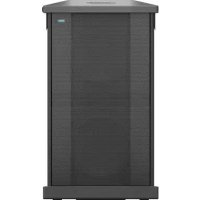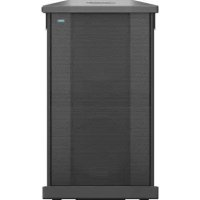
Sub2 - Subwoofer BOSE - Free user manual and instructions
Find the device manual for free Sub2 BOSE in PDF.



| Product type | Powered subwoofer |
| Brand | Bose |
| Model | Sub2 |
| Dimensions (H × W × D) | 69,0 × 30,5 × 55,0 cm |
| Net weight | 23,4 kg |
| Input power | 100-240 V AC, 4 A, 50/60 Hz |
| Inrush current | 15,2 A at 120 V; 28,6 A at 230 V |
| Standby power consumption | ≤ 0,5 W |
| Auto power off | After 4 hours of inactivity (can be disabled) |
| Line inputs | 2 analog inputs (XLR and 1/4" TRS/TS jack) |
| Line outputs | 2 XLR outputs (wideband or high-pass) |
| SubMatch connection | Input and output/return to connect up to 2 subwoofers |
| Phase/Pattern | Polarity switch and cardioid mode (two subwoofers) |
| Line input EQ | LPF or optimized L1 Pro |
| Line output EQ | FULL or HPF (with special S1 Pro EQ) |
| Level adjustment | Potentiometer with Signal/Clip indicator |
| Orientation | Vertical or horizontal (self-locking feet) |
| M20 threaded insert | For mast up to 1,3 m with speaker ≤ 7,1 kg |
| Maintenance | Soft dry cloth; vacuum cleaner for the grille |
| Cleaning | Do not use solvents, alcohol, or abrasive products |
| Safety | Do not expose to water, do not modify the power supply cover |
| Warranty | Limited warranty (details at global.bose.com/warranty) |
| Included accessories | Rolling case, adjustable mast, SubMatch cable |
Frequently Asked Questions - Sub2 BOSE
User questions about Sub2 BOSE
0 question about this device. Answer the ones you know or ask your own.
Ask a new question about this device
Download the instructions for your Subwoofer in PDF format for free! Find your manual Sub2 - BOSE and take your electronic device back in hand. On this page are published all the documents necessary for the use of your device. Sub2 by BOSE.
USER MANUAL Sub2 BOSE
natural_image
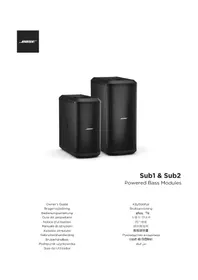
Two black BOSE audio/video speakers displayed side by side, no visible text or symbols on the devices themselves.Sub1 & Sub2
Powered Bass Modules
Owner's Guide
Brugervejledning
Bedienungsanleitung
Please read and keep all safety and use instructions.
Important Safety Instructions

Bose Corporation hereby declares that this product is in compliance with the essential requirements and other relevant provisions of Directive 2014/53/EU and all other applicable EU directive requirements. The complete declaration of conformity can be found at: www.Bose.com/compliance.
- Read these instructions.
- Keep these instructions.
- Heed all warnings.
- Follow all instructions.
- Do not use this apparatus near water.
-
Clean only with a dry cloth.
-
Do not block any ventilation openings. Install in accordance with the manufacturer's instructions.
-
Do not install near any heat sources such as radiators, heat registers, stoves, or other apparatus (including amplifiers) that produce heat.
-
Do not defeat the safety purpose of the polarized or grounding-type plug. A polarized plug has two blades with one wider than the other. A grounding type plug has two blades and a third grounding prong. The wide blade or the third prong are provided for your safety. If the provided plug does not fit into your outlet, consult an electrician for replacement of the obsolete outlet.
-
Protect the power cord from being walked on or pinched, particularly at plugs, convenience receptacles, and the point where it exits from the apparatus.
-
Only use attachments/accessories specified by the manufacturer.
-
Use of car with the cart, stand, tripod, bracket, or table specified by the manufacturer or sold with the apparatus. When a cart is used, use caution when moving the cart/apparatus combination to avoid injury from tip-over.
-
Unplug this apparatus during lightning storms or when unused for long periods of time.
-
Refer all servicing to qualified personnel. Servicing is required when the apparatus has been damaged in any way such as power-supply cord or plug is damaged, liquid has been spilled or objects have fallen into the apparatus, the apparatus has been exposed to rain or moisture, does not operate normally, or has been dropped.
WARNINGS/CAUTIONS

This symbol on the product means there is uninsulated, dangerous voltage within the product enclosure that may present a risk of electrical shock.

This symbol on the product means there are important operating and maintenance instructions in this guide.

Contains small parts which may be a choking hazard. Not suitable for children under age 3.

This product contains magnetic material. Consult your physician on whether this might affect your implantable medical device.

Use at altitude less than 2000 meters only.

This symbol on the product means there is a tip-over hazard when using a pole mount.

Do not alter, modify, or remove the sliding cover over the power input of the Sub1/Sub2. There is uninsulated, dangerous voltage within the product enclosure that may present a risk of electrical shock.
- The pole-mount M20 threaded insert on the Sub1 and Sub2 is designed to support a pole of up to 1.3 meters (51 inches) with a Bose S1 Pro mounted on the pole. Do not use the Sub1 or Sub2 with a pole exceeding 1.3 meters (51 inches) in height or a loudspeaker weight that exceeds 7.1 kilograms (15.7 pounds). Using a pole/loudspeaker combination that exceeds either of these limits or creates an unstable mounting scenario may lead to a hazardous condition that could result in injury.
- Do NOT make unauthorized alterations to this product.
- Do NOT use in vehicles or boats.
- Do NOT place the product in a confined space such as in a wall cavity or in an enclosed cabinet while in use.
- Keep the product away from fire and heat sources. Do NOT place naked flame sources,
such as lighted candles, on or near the product.
• To reduce the risk of fire or electrical shock, do NOT expose the product to rain, liquids, or moisture.
- Do NOT expose this product to dripping or splashing and do not place objects filled with liquids, such as vases, on or near the product.
- Do NOT use a power inverter with this product.
- Provide an earth connection or ensure the socket outlet incorporates a protective earthing connection before connecting the plug to the mains socket outlet.
- Where the mains plug or an appliance coupler is used as the disconnect device, the disconnect device shall remain readily operable.
Regulatory Information
The product, in accordance with the Ecodesign Requirements for Energy Related Products Directive 2009/125/EC, is in compliance with the following norm(s) or document(s): Regulation (EC) No. 1275/2008, as amended by Regulation (EU) No. 801/2013.
| Required Power State Information | Power Modes | |
| Standby | Networked Standby | |
| Power consumption in specified power mode, at 230V/50Hz input | ≤ 0.5 W N/A* | |
| Time after which equipment is automatically switched into mode | 4 hours N/A* | |
| Power consumption in networked standby if all wired network ports are connected and all wireless network ports are activated, at 230V/50Hz input | N/A* | |
| Network port deactivation/activation procedures. Deactivating all networks will enable standby mode. | *Product does not utilize a networked standby mode for a Bluetooth* connection and does not have the ability to be configured to a network via Wi-Fi* or Ethernet | |
Sub1 Sub2
| Dimensions (H × W × D) | 53.0 × 25.0 × 53.0 cm(20.9 × 9.8 × 20.9 in) | 69.0 × 30.5 × 55.0 cm(27.2 ×12.0 × 21.7 in) |
| Net Weight | 16.1 kg(35.5 lb) | 23.4 kg(51.7 lb) |
| Input Rating 100–240 VAC, 3 A, 50/60 Hz | 100–240 VAC, 4 A, 50/60 Hz | |
| Initial turn on inrush current | 14.9 A at 120 V; 29.3 A at 230 V | 15.2 A at 120 V; 28.6 A at 230 V |
| Inrush current after AC mains interruption of 5 s | 5.8 A at 120 V; 32.0 A at 230 V | 2.6 A at 120 V; 6.1 A at 230 V |
Shielded cables are required to maintain regulatory compliance.
The product label is located on the bottom of the product.
Model: 431389G1 / 431389G2. The CMIIT ID is located on the bottom of the product.
CAN ICES-3 (B)/NMB-3(B)
Information About Products That Generate Electrical Noise (FCC Compliance Notice for US) NOTE: This equipment has been tested and found to comply with the limits for a Class B digital device, pursuant to Part 15 of the FCC Rules. These limits are designed to provide reasonable protection against harmful interference in a residential installation. This equipment generates, uses, and can radiate radio frequency energy and, if not installed and used in accordance with the instructions, may cause harmful interference to radio communications. However, there is no guarantee that interference will not occur in a particular installation. If this equipment does cause harmful interference to radio or television reception, which can be determined by turning the equipment off and on, the user is encouraged to try to correct the interference by one or more of the following measures:
• Reorient or relocate the receiving antenna.
- Increase the separation between the equipment and receiver.
- Connect the equipment into an outlet on a circuit different from that to which the receiver is connected.
- Consult the dealer or an experienced radio/TV technician for help.
Changes or modifications not expressly approved by Bose Corporation could void the user's authority to operate this equipment.
This device complies with part 15 of the FCC Rules and with ISED Canada's license-exempt RSS standard(s). Operation is subject to the following two conditions: (1) This device may not cause harmful interference, and (2) this device must accept any interference received, including interference that may cause undesired operation.
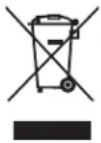
This symbol means the product must not be discarded as household waste, and should be delivered to an appropriate collection facility for recycling. Proper disposal and recycling helps protect natural resources, human health, and the environment. For more information on disposal and recycling of this product, contact your local municipality, disposal service, or the shop where you bought this product.
China Restriction of Hazardous Substances Table
| Names and Contents of Toxic or Hazardous Substances or Elements | ||||||
| Toxic or Hazardous Substances and Elements | ||||||
| Part Name | Lead (Pb) | Mercury (Hg) | Cadmium (Cd) | Hexavalent (CR(VI)) | Polybrominated Blphenyl (PBB) | Polybrominated diphenylether (PBDE) |
| PCBs X O O | O O O | |||||
| Metal Parts | X O O O | O O | ||||
| Plastic Parts | O O | O O O O | ||||
| Speakers X | O O O O | O | ||||
| Cables X O | O O O O | |||||
| This table is prepared in accordance with the provisions of SJ/T 11364.O: Indicates that this toxic or hazardous substance contained in all of the homogeneous materials for this part is below the limit requirement of GB/T 26572. |  | |||||
| X: Indicates that this toxic or hazardous substance contained in at least one of the homogeneous materials used for this part is above the limit requirement of GB/T 26572. | ||||||
Taiwan Restriction of Hazardous Substances Table
| Equipment name: Sub1/Sub2 Type designation: 431389G1 / 431389G2 | ||||||
| Restricted substances and its chemical symbols | ||||||
| Unit | Lead (Pb) | Mercury (Hg) | Cadmium (Cd) | Hexavalent chromium (Cr+6) | Polybrominated biphenyls (PBB) | Polybrominated diphenylethers (PBDE) |
| PCBs | - | ○ | ○ | ○ | ○ | ○ |
| Metal Parts | - | ○ | ○ | ○ | ○ | ○ |
| Plastic Parts | ○ | ○ | ○ | ○ | ○ | ○ |
| Speakers | - | ○ | ○ | ○ | ○ | ○ |
| Cables | - | ○ | ○ | ○ | ○ | ○ |
| Note 1: “○” indicates that the percentage content of the restricted substance does not exceed the percentage of reference value of presence. Note 2: The “-” indicates that the restricted substance corresponds to the exemption. | ||||||

Date of Manufacture: The eighth digit in the serial number indicates the year of manufacture; "0" is 2010 or 2020.
China Importer: Bose Electronics (Shanghai) Company Limited, Part C, Plant 9, No. 353 North Riying Road, China (Shanghai) Pilot Free Trade Zone
EU Importer: Bose Products B.V., Gorslaan 60, 1441 RG Purmerend, The Netherlands
Mexico Importer: Bose de México, S. de R.L. de C.V., Paseo de las Palmas 405-204, Lomas de Chapultepec, 11000 México, D.F. For service or importer information, call +5255 (5202) 3545
Taiwan Importer: Bose Taiwan Branch, 9F-A1, No. 10, Section 3, Minsheng East Road, Taipei City 104, Taiwan. Phone Number: +886-2-2514 7676
Bose Corporation Headquarters: 1-877-230-5639
Wi-Fi is a registered trademark of Wi-Fi Alliance®
Bose, L1, and SubMatch are trademarks of Bose Corporation.
All other trademarks are the property of their respective owners.
The Bose Privacy Policy is available on the Bose website.
©2020 Bose Corporation. No part of this work may be reproduced, modified, distributed or otherwise used without prior written permission.
Please complete and retain for your records.
The serial and model numbers are located on the product label on the bottom of the product.
Serial number: ____ Model number: ____
Warranty Information
This product is covered by a limited warranty.
For warranty details, visit global.bose.com/warranty.
Overview 5
Package Contents 5
Optional Accessories 5
Setup 6
Connections and Controls 6
Connecting Power....7
Connecting Directly to a Power Outlet....7
Connecting to an L1 Pro32 with a SubMatch Cable....8
AutoOff/Low-power Standby 8
Inputs and Outputs....9
Line Input 9
Line Output 9
Settings....9
Phase/Pattern....9
Level 10
Line Input EQ....10
Line Output EQ....10
Sub1/Sub2 Orientation....10
Using the Pole-mount Insert with an S1 Pro 11
Care & Maintenance 12
Cleaning Your Sub....12
Troubleshooting....12
Overview
Package Contents
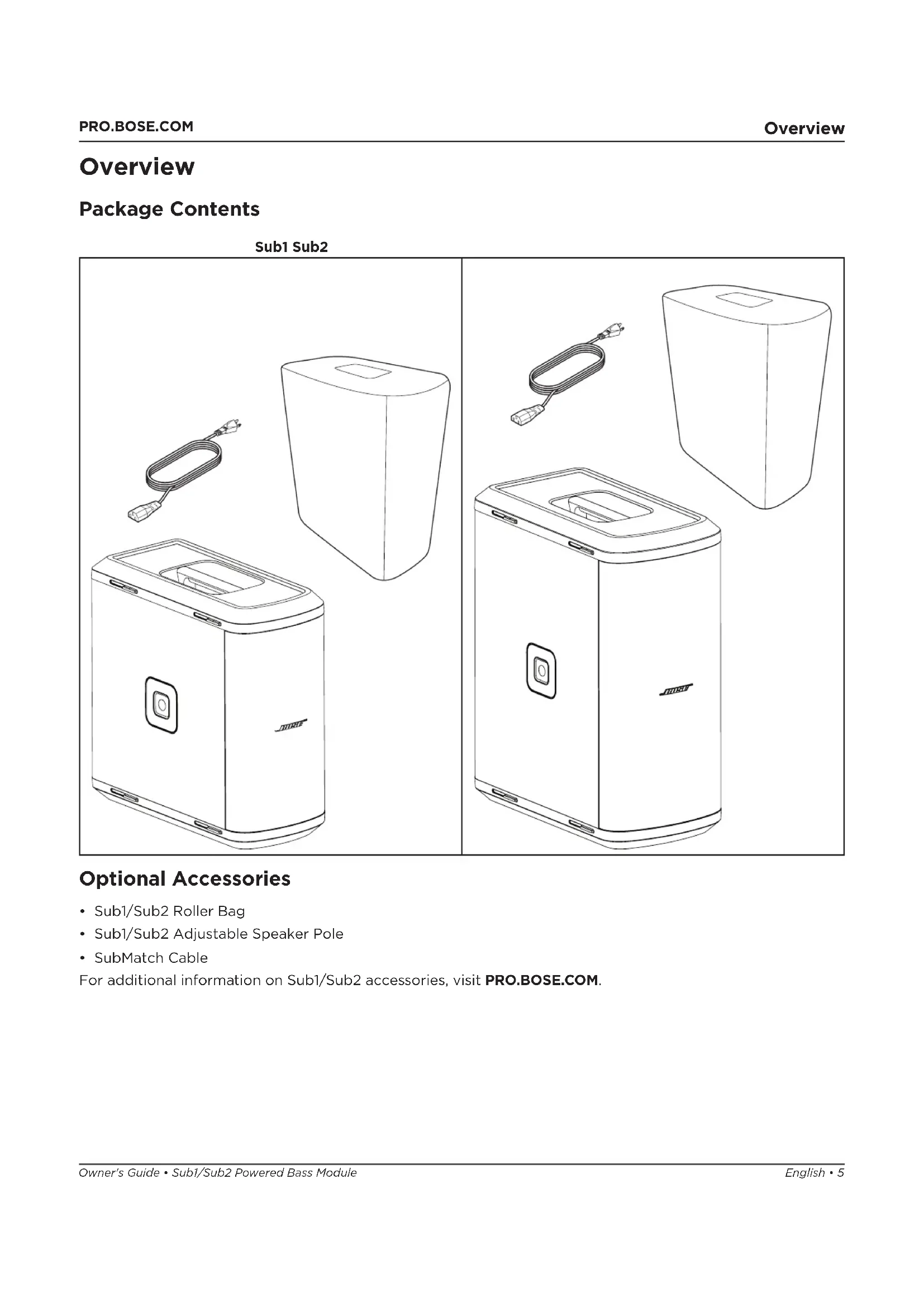
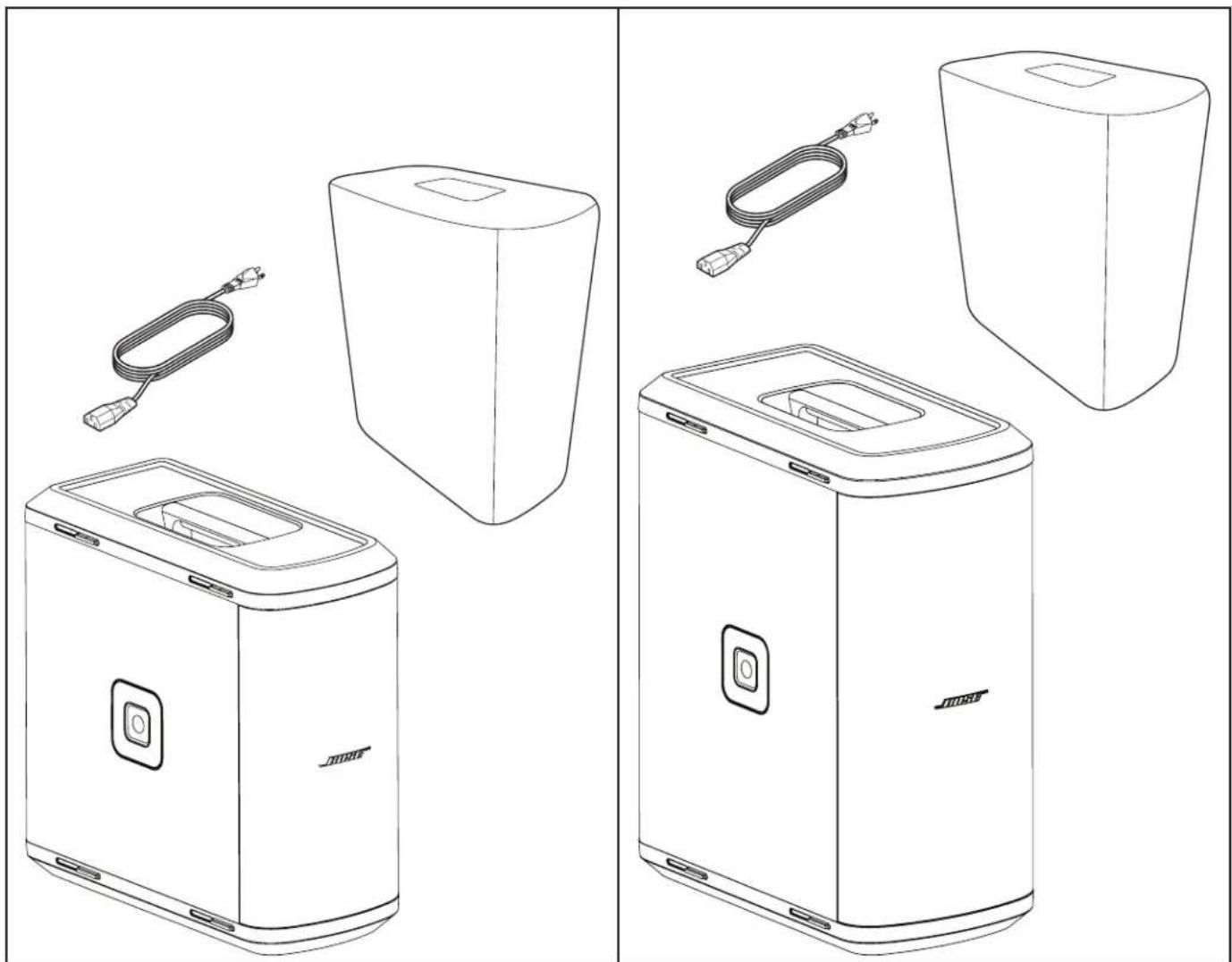
Sub1 Sub2
natural_image
Line drawings of various electronic devices including a speaker and charging unit, with no visible text or symbols.Optional Accessories
- Sub1/Sub2 Roller Bag
- Sub1/Sub2 Adjustable Speaker Pole
- SubMatch Cable
For additional information on Sub1/Sub2 accessories, visit PRO.BOSE.COM.
Setup
Connections and Controls
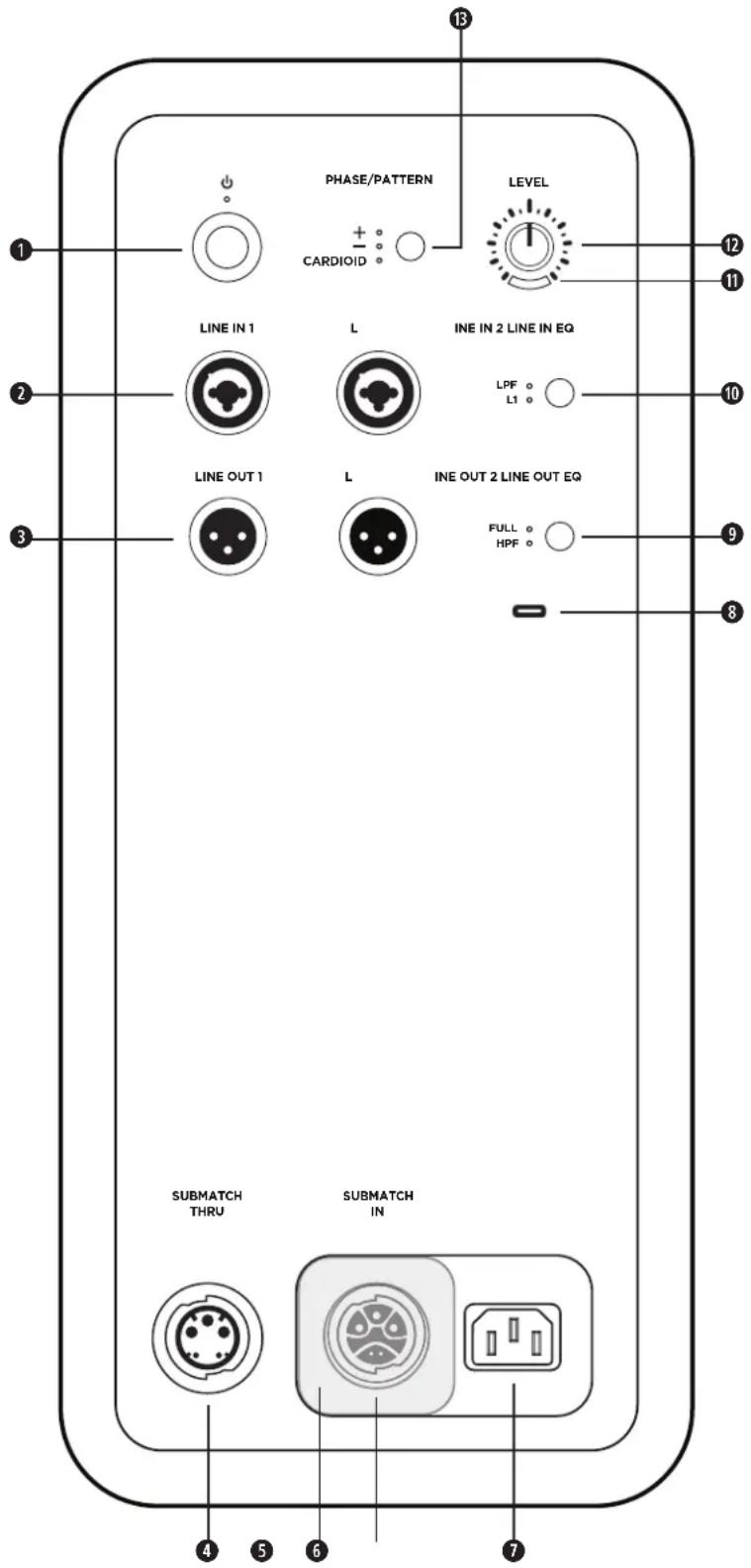
① Standby Button: Press the button to power on the Sub. The LED will illuminate white while the Sub is on.
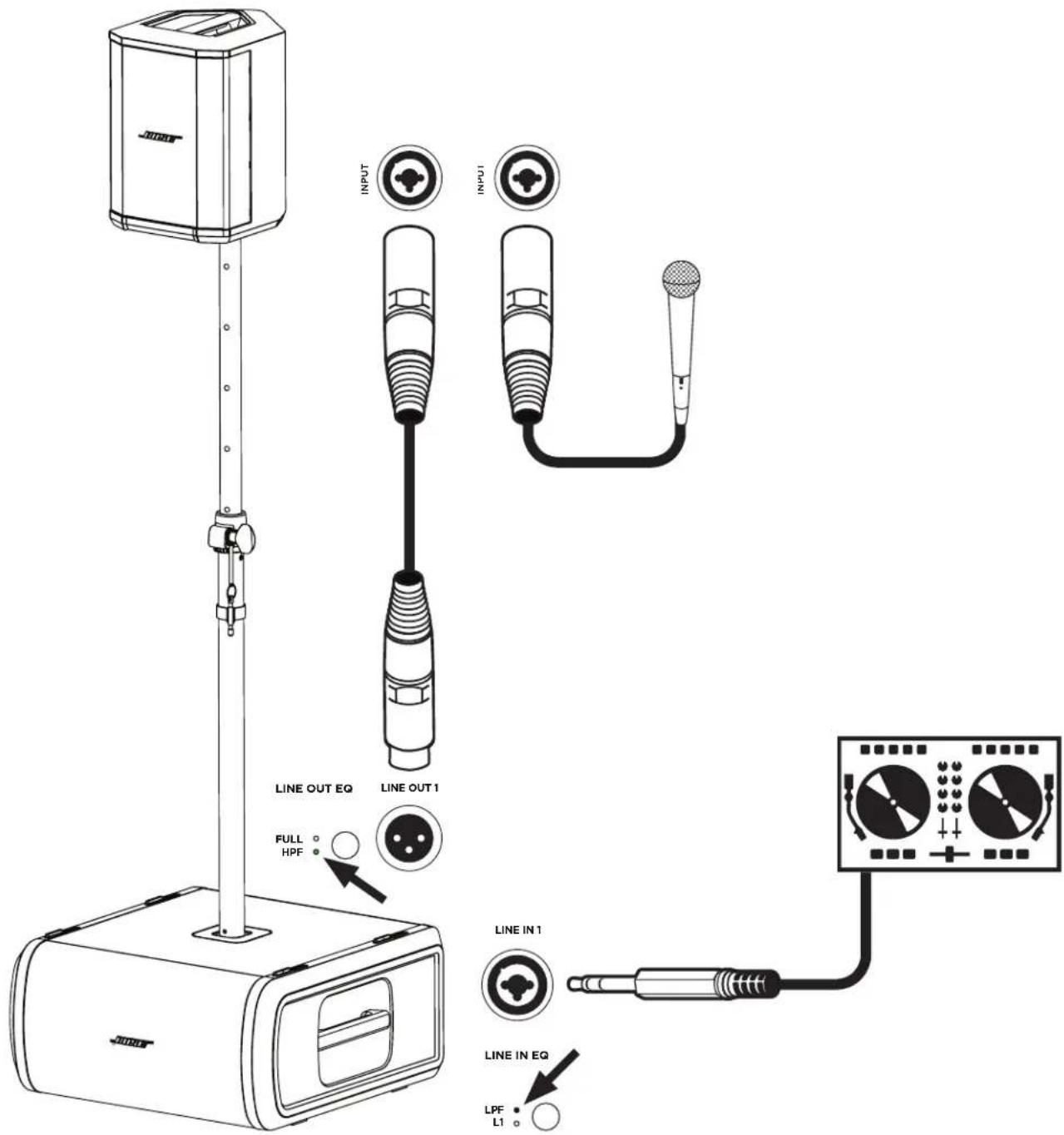
② Line Inputs: Analog input for connecting an L1 Pro or other line-level audio source. Compatible with XLR, TRS balanced, and TS unbalanced cables.
③ Line Outputs: Use an XLR cable to connect the line-level output to a loudspeaker.
4 SubMatch Thruput: Connect an additional Sub bass module with a SubMatch cable. Up to two Sub1 or Sub2 powered bass modules can be powered by a single L1 Pro32 via SubMatch connection.
⑤ Power Input Cover: Prevents simultaneous use of the SubMatch Input and Power Input. Slide the cover to reveal the power input that is needed for setup.
⑥ SubMatch Input: Connect the Sub to an L1 Pro32 with a SubMatch cable.
⑦ Power Input: IEC power cord connection.
8 USB Port: USB-C connector for Bose service use and firmware updates.
Note: This port is not compatible with Thunderbolt 3 cables.
⑨ Line Output EQ: Select between FULL bandwidth or a multi-purpose HPF when using Line Outputs. Press the button to switch EQ settings. The corresponding LED will illuminate white while selected.
10 Line Input EQ: Select between an optimized EQ for an L1 Pro or a multi-purpose LPF when using Line Inputs. Press the button to switch EQ settings. The corresponding LED will illuminate white while selected.
⑪ Signal/Clip Indicator: The LED will illuminate green when a signal is present and will illuminate red when the signal is clipping or the Sub is entering limiting. Reduce the level or signal volume to prevent signal clipping or limiting.
12 Level Control: Adjust the level of audio output. The Level Control does not affect the Line Outputs. The 12 o'clock position is recommended when in use with an L1 Pro32.
B Phase/Pattern Button: Adjust the polarity of the Sub. Press the button to switch polarity. The corresponding LED will illuminate white while selected. Also allows access to Cardioid mode when using two identical Sub modules.
Connecting Power
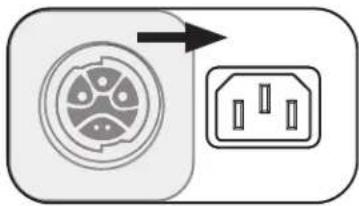
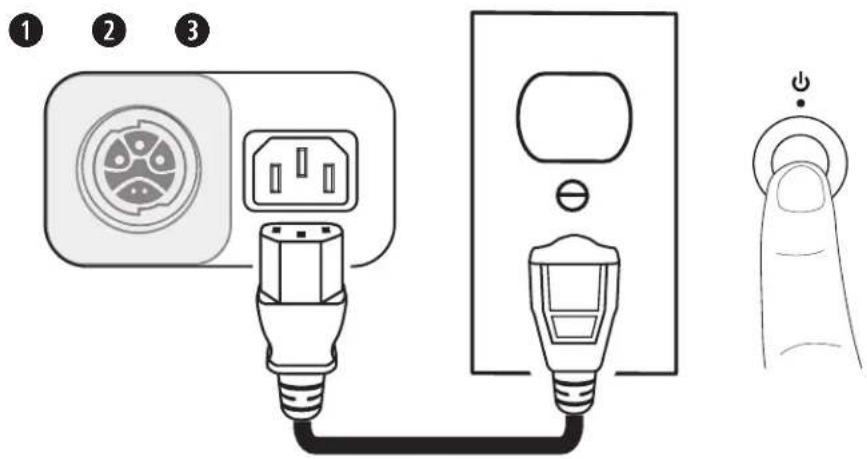
There are two ways to connect a Sub to power: connecting to a power outlet or connecting to an L1 Pro32 with a SubMatch cable. The Power Input Cover prevents simultaneous connection of both power inputs. Only one of the two power connections should be used at a time.
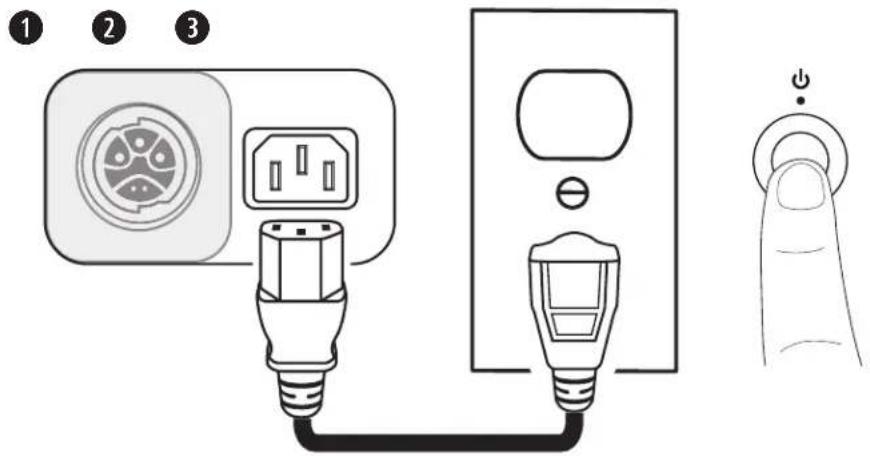
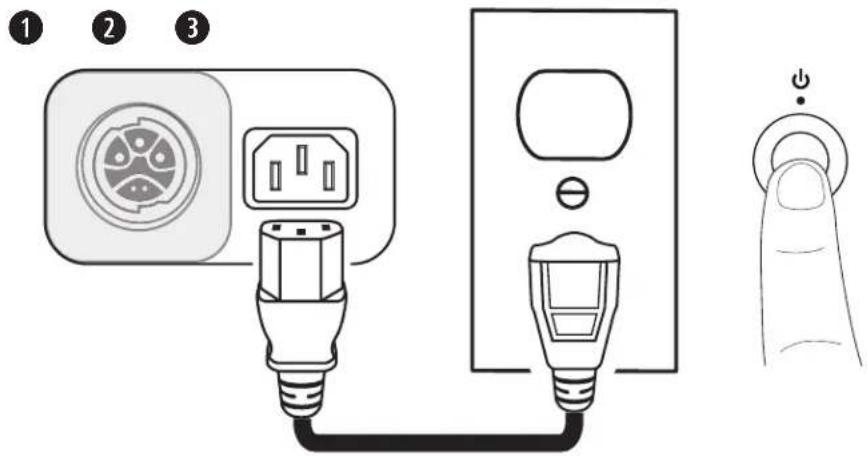
If connecting directly to a power outlet, slide the Power Input Cover to the left, concealing the SubMatch Input. If connecting to an L1 Pro32 with a SubMatch cable, slide the Power Input Cover to the right, concealing the Power Input.

WARNING: Do not alter, modify, or remove the sliding cover over the power input of the Sub1/Sub2. There is uninsulated, dangerous voltage within the product enclosure that may present a risk of electrical shock.
natural_image
Diagram showing a circular component with internal circuit-like structure and an electrical socket with three slots, no text or symbols present.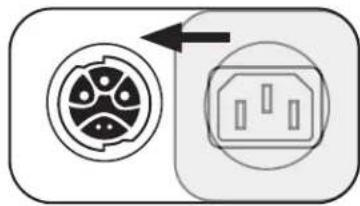
natural_image
Diagram showing a circular connector with internal components and an electrical outlet, no text or symbols present.Connecting Directly to a Power Outlet
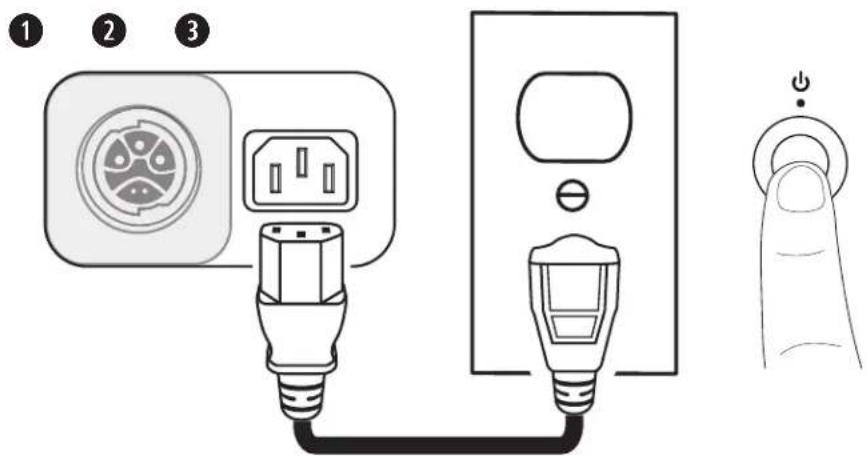
- Plug the power cord into the Power Input.
- Plug the other end of the power cord into a live electrical outlet.
Note: Do not power on the Sub until after you've connected your sources. - Press the Standby Button. The LED will illuminate white while the Sub is on.
Connecting to an L1 Pro32 with a SubMatch Cable
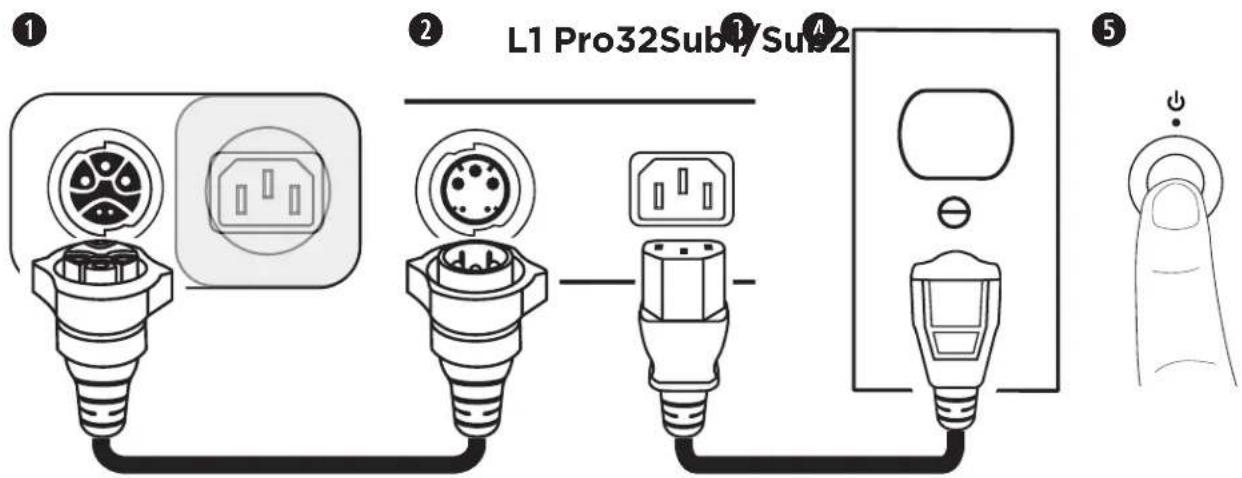
- Plug the SubMatch cable into the SubMatch Input on a Sub1/Sub2.
- Plug the other end of the SubMatch cable into the SubMatch Output of the L1 Pro32.
- Plug the power cord into the Power Input on the L1 Pro32.
- Plug the other end of the power cord into a live electrical outlet.
Note: Do not power on the L1 Pro or the Sub until after you've connected your sources. See the L1 Pro32 owner's guide at PRO.BOSE.COM for more information about connecting sources to an L1 Pro32.
- Press the Standby Button on the L1 Pro32 then press the Standby Button on the Sub. The LEDs will illuminate white while the L1 Pro and Sub are on.
Note: Press and hold the Standby Button for 10 seconds to reset the Sub to factory settings.
When using two Subs via SubMatch cable connection, first turn on the Sub connected directly to the L1 Pro32, then turn on the second Sub.
AutoOff/Low-power Standby
After four hours of no use, the Sub will enter AutoOff/Low-power Standby mode to save power. To wake the Sub from AutoOff/Low-power Standby mode, press the Standby Button.
Note: Disable AutoOff/Low-power Standby mode by pressing and holding the Phase/Pattern Button and Line Output EQ button simultaneously for 10 seconds. Enable AutoOff/Low-power Standby mode by repeating this step. Disabling AutoOff/Low-power Standby mode will result in higher energy usage when the Sub is not in use.
Inputs and Outputs
Line Input
Analog input for connecting an L1 Pro or other line-level audio source. Compatible with XLR, TRS balanced, and TS unbalanced cables. Use Line Input 1 (Left) and Line Input 2 (Right) together for stereo applications.
Line Output
Use an XLR cable to connect the line-level output to a loudspeaker. Use Line Output 1 (Left) and Line Output 2 (Right) together for stereo applications.
Settings
Phase/Pattern
Adjust the polarity of the Sub. Press the button to switch between positive polarity (+) and inverted polarity (-). The corresponding LED will illuminate white while selected. Choose the polarity that sounds best for your application.
Cardioid Mode
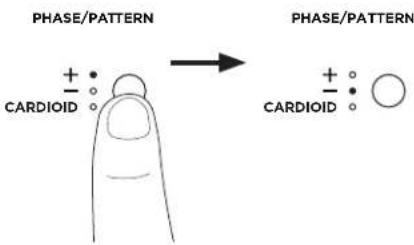
Cardioid mode is for use with a stack of two identical Sub modules, which allows for most of the sound energy to be focused in front of the Sub stack
while reducing the sound energy that is generated behind the Sub stack. Press and hold the button for four seconds to select CARDIOID. The LED will illuminate white while selected. Press and hold again to switch back to +. Cardioid mode should only be used in a stacked configuration of two identical Sub modules, with the top Sub facing the coverage area and the bottom Sub facing the non-coverage area. Set the Phase/Pattern of the top Sub to + and the Phase/Pattern of the bottom Sub to CARDIOID. When adjusting the level of the stacked subs in Cardioid mode, be sure that the Level Control is set to the same position on both Subs. See the below diagrams for Sub stack orientation and coverage patterns.
| Cardioid Stack Configuration | Coverage Patterns (Top View) | |
| Cardioid Mode Off Cardioid Mode On | ||
Level
Adjust the level of audio output from the Sub. Begin with the Level Control set to a low setting and increase the level until the Signal/Clip Indicator illuminates green. The Level Control does not affect the Line Outputs. The 12 o'clock position is recommended when in use with an L1 Pro32. If using two Subs with a single L1 Pro, it is recommended that the Level Control is set to the same position on both Subs.
Line Input EQ
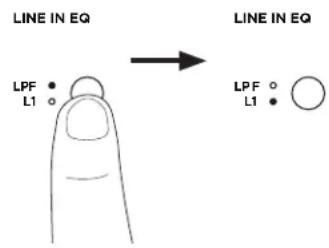
Change the EQ of both Line Inputs by pressing the Line Input EQ button until the corresponding LED for your desired EQ illuminates white. Use L1 to apply an input EQ optimized for L1 Pro products; use LPF to apply a low-pass filter to the inputs. When a Sub is connected to an L1 Pro32 with a SubMatch cable, the Line Input EQ will be fixed to L1.
Line Output EQ
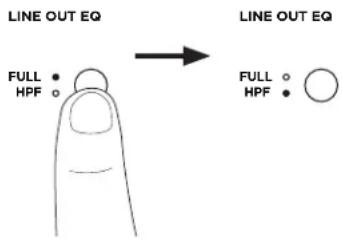
Change the EQ of both Line Outputs by pressing the Line Output EQ button until the corresponding LED for your desired EQ illuminates white. Use FULL for full frequency or HPF to apply a high-pass filter to the outputs.
Note: If using the Sub with an S1 Pro, press and hold the Line Output EQ button for four seconds to enable an EQ specifically optimized for use with an S1 Pro. The HPF LED will illuminate green. To deactivate the S1 Pro EQ, press and hold for four seconds.
Sub1/Sub2 Orientation

WARNING: Do not place the equipment in an unstable location. The equipment could become unstable leading to a hazardous condition, which could result in injury.
CAUTION: Do not stack more than two Subs together. Only stack two Subs of the same model.
For horizontal configurations, adjust the logo by rotating it.
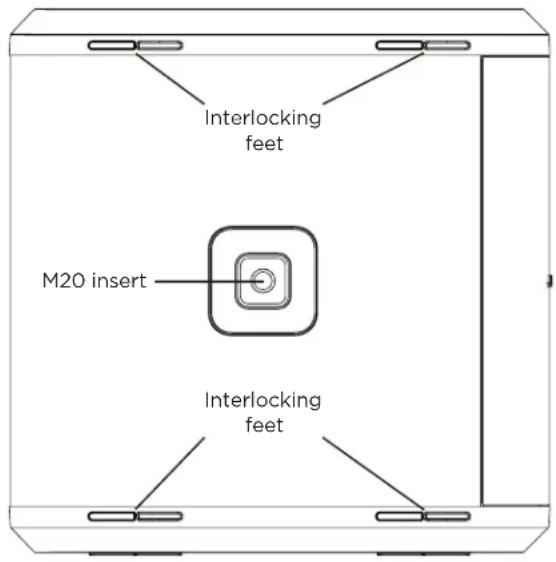
For stacked configurations, the Sub includes four interlocking feet that will attach to another Sub of the same model. When stacking Subs horizontally, always make sure the feet lock together before connecting power and sources.
Using the Pole-mount Insert with an S1 Pro

WARNING: The pole-mount M20 threaded insert on the Sub1 and Sub2 is designed to support a pole of up to 1.3 meters (51 inches) with a Bose S1 Pro mounted on the pole. Do not use the Sub1 or Sub2 with a pole exceeding 1.3 meters (51 inches) in height or a loudspeaker weight that exceeds 7.1 kilograms (15.7 pounds). Using a pole/loudspeaker combination that exceeds either of these limits or creates an unstable mounting scenario may lead to a hazardous condition that could result in injury.
The Sub1/Sub2 includes a pole-mount M20 threaded insert. The insert is compatible with the Bose Sub1/Sub2 Adjustable Speaker Pole accessory, designed for use with the Bose S1 Pro system (for more information, see the Adjustable Speaker Pole owner's guide at PRO.BOSE.COM).
Care & Maintenance
Cleaning Your Sub
Clean the product enclosure using only a soft, dry cloth. If necessary, carefully vacuum the grille of the Sub.

CAUTION: Do not use any solvents, chemicals, or cleaning solutions containing alcohol, ammonia, or abrasives.
CAUTION: Do not use any sprays near the product or allow liquids to spill into any openings.
Troubleshooting
| Problem What to do | |
| No power | Make sure you have power at the AC outlet. Try operating a lamp or other equipment from the same AC outlet or test the outlet using an AC outlet tester.If powered from an L1 Pro32 with a SubMatch cable, ensure the L1 Pro32 is turned on, and not in AutoOff/Low-power Standby mode. |
| No sound• Make sure your sub is turned on.Make sure your source is plugged into the Line Input.Make sure the volume is turned up on your source.Make sure the Level Control is turned up on the Sub.Make sure the Sub isn't in AutoOff/Low-power Standby mode. | |
| Standby LED is flashing red (thermal fault) | Turn off the Sub and wait 30 minutes before turning it back on.Move the Sub to a cooler location.Move the Sub to a location that has more ventilation. |
| Standby LED is solid red (system fault) | Contact Bose customer service. Visit worldwide.Bose.com/contact. |
| With nothing plugged into the Sub, a light hum or buzz is heard | Using an AC outlet tester, test the AC outlet the Sub is plugged into for reversed or open (hot, neutral, and/or ground) contacts.If using an extension cord, plug the Sub directly into the outlet. |
| Audio source sounds distorted | Turn down volume on the source.Turn down Level Control.Try a different source. |
| Excessive hum when daisy-chaining multiple units | Ensure the level on the daisy-chained unit(s) is not set too high. |
Importer I Kina: Bose Electronics (Shanghai) Company Limited, Part C, Plant 9, No. 353 North Riying Road, Kina (Shanghai) Pilot Free Trade Zone
Importør i EU: Bose Products B.V., Gorslaan 60, 1441 RG Purmerend, Holland
Importar i Mexico: Bose de México, S. de R.L. de C.V., Paseo de las Palmas 405-204, Lomas de Chapultepec, 11000 México, D.F. Ring til +5255 (5202) 3545 for oplysninger om service eller importør
Importer i Taiwan: Bose Taiwan Branch, 9F-A1, No.10, Section 3, Minsheng East Road, Taipei City 104, Taiwan. Telefonnummer: +886-2-2514 7676
Bose Corporations hovedkvarter: 1-877-230-5639
Line Output EQ....10
Sub1/Sub2-retning 10
natural_image
Line drawings of various electronic devices including a speaker and charging unit, with no visible text or symbols.Valgfrit tilbehør
natural_image
Diagram showing a circular component with internal segments and an electrical outlet with three slots, connected by an arrow (no text or symbols)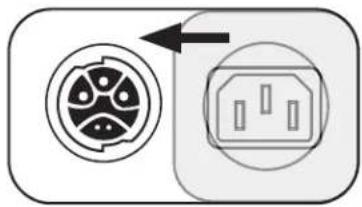
natural_image
Diagram showing two electrical connector symbols: a circular socket with internal circuit and an octagonal socket with internal components, connected by an arrow (no text or labels)Line Output EQ
Sub1/Sub2-retning

Importeur In China: Bose Electronics (Shanghai) Company Limited, Part C, Plant 9, No. 353 North Riying Road, China (Shanghai) Pilot Free Trade Zone
Europese importeur: Bose Products B.V., Gorslaan 60, 1441 RG Purmerend, Nederland
Line Output EQ....10
natural_image
Line drawings of various electronic devices including a speaker and charging unit, with no visible text or symbols.Optionele accessoires
- Sub1/Sub2 Roller Bag
- Sub1/Sub2 Adjustable Speaker Pole
- SubMatch-kabel
natural_image
Diagram showing a circular component with internal circuit-like patterns and an electrical socket with three slots, connected by an arrow (no text or symbols)
natural_image
Diagram showing a circular connector with internal components and an electrical outlet, no text or symbols present.Line Output EQ
Importador para China: Bose Electronics (Shanghai) Company Limited, Part C, Plant 9, No. 353 North Riying Road, China (Shanghai) Pilot Free Trade Zone
Importador de la UE: Bose Products B.V., Gorslaan 60, 1441 RG Purmerend, Países Bajos
natural_image
Line drawings of various electronic devices including a speaker and charging unit, with no visible text or symbols.natural_image
Diagram showing a circular component with internal components and an electrical outlet, no text or symbols present.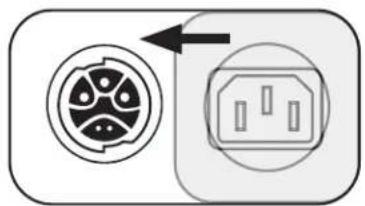
natural_image
Diagram showing two electrical connector components: a circular socket with internal circuit and an open socket with internal contacts (no text or symbols)natural_image
Line drawings of various electronic devices including a power heater, charging case, and battery pack (no text or symbols)Accessoires disponibles en option
natural_image
Diagram showing a circular component with internal circuit-like structure and an electrical socket (no text or symbols)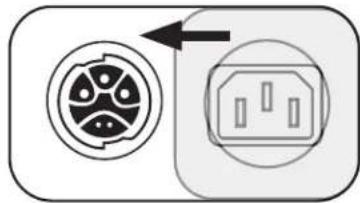
natural_image
Diagram showing a circular connector with internal components and an electrical outlet, no text or symbols present.Importatore per la Cina: Bose Electronics (Shanghai) Company Limited, Part C, Plant 9, No.353 North Riying Road, China (Shanghai) Pilot Free Trade Zone
Importatore per l'UE: Bose Products B.V., Gorslaan 60, 1441 RG Purmerend, Paesi Bassi
natural_image
Line drawings of various electronic devices including a speaker and charging unit, with no visible text or symbols.Accessori opzionali
natural_image
Diagram showing a circular component with internal circuit-like structure and an electrical socket (no text or symbols)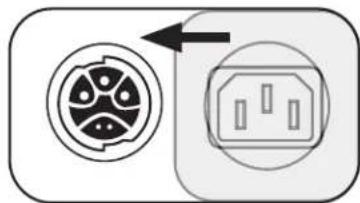
natural_image
Diagram showing a circular connector with internal components and an electrical outlet, no text or symbols present.Line Out EQ
Manutenzione
Pulizia del sub
natural_image
Line drawings of various electronic devices including a power heater, charging case, and two connected devices (no text or symbols present)natural_image
Diagram showing a circular component with internal circuit-like structure and an electrical outlet symbol (no text or labels)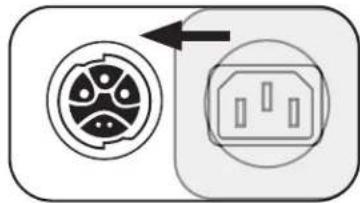
natural_image
Diagram showing a circular connector with internal components and an electrical outlet, no text or symbols present.Importeur In China: Bose Electronics (Shanghai) Company Limited, Part C, Plant 9, No. 353 North Riying Road, China (Shanghai) Pilot Free Trade Zone
Europese importeur: Bose Products B.V., Gorslaan 60, 1441 RG Purmerend, Nederland
Line Output EQ....10
natural_image
Line drawings of various electronic devices including a speaker and charging unit, with no visible text or symbols.Optionele accessoires
- Sub1/Sub2 Roller Bag
- Sub1/Sub2 Adjustable Speaker Pole
- SubMatch-kabel
natural_image
Diagram showing a circular component with internal circuit-like patterns and an electrical outlet symbol (no text or labels)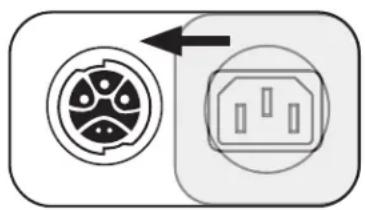
natural_image
Diagram showing a circular connector with internal components and an electrical outlet, no text or symbols present.Line Output EQ
Importor for Kina: Bose Electronics (Shanghai) Company Limited, Part C, Plant 9, No. 353 North Riying Road, Kina (Shanghai) Pilot Free Trade Zone
Importør i EU: Bose Products B.V., Gorslaan 60, 1441 RG Purmerend, Nederland
Importar i Mexico: Bose de México, S. de R.L. de C.V., Paseo de las Palmas 405-204, Lomas de Chapultepec, 11000 México, D.F. For service- eller importorinformasjon kan du ringe +5255 (5202) 3545
Importor for Taiwan: Bose Taiwan Branch, 9F-A1, No. 10, Section 3, Minsheng East Road, Taipei City 104, Taiwan. Telefonnummer: +886-2-2514 7676
Hovedkontoret til Bose Corporation: 1-877-230-5639
Sub1/Sub2 retning....9
natural_image
Line drawings of various electronic devices including a speaker and charging unit, with no visible text or symbols.Valgfritt tilbehør
natural_image
Diagram showing a circular component with internal slots and an electrical outlet with three slots, no text or symbols present.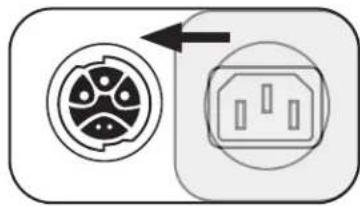
natural_image
Diagram showing two electrical connector symbols: a circular component with internal circuit patterns and an open socket with three pins (no text or labels)- Koble strømledningen til strøminngangen.
- Koble den andre enden av strømledningen til en stikkontakt.
Merk: Ikke slå av Sub-en før du har koblet til kildene dine. - Trykk på Standby-knappen. LED-lampen lyser hvitt mens Sub-en er på.
Linjeutgang EQ
Sub1/Sub2 retning

Vedlikehold
Rengjøre Sub-en
Importer — Chiny: Bose Electronics (Shanghai) Company Limited, Part C, Plant 9, No. 353 North Riying Road, China (Shanghai) Pilot Free Trade Zone
Importer — UE: Bose Products B.V., Gorslaan 60, 1441 RG Purmerend, Holandia
natural_image
Line drawings of various electronic devices including a speaker and connected cables (no text or symbols)natural_image
Diagram showing a circular component with internal slots and an electrical outlet with three slots, connected by an arrow (no text or symbols)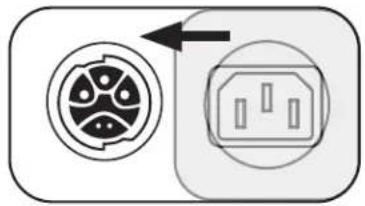
natural_image
Diagram showing two electrical connector symbols: a circular socket with internal components and an open socket with internal slots, connected by an arrow (no text or labels)Konserwacja
Importador da China: Bose Electronics (Shanghai) Company Limited, Part C, Plant 9, No. 353 North Riying Road, China (Shanghai) Pilot Free Trade Zone
Importador da UE: Bose Products B.V., Gorslaan 60, 1441 RG Purmerend, Países Baixos
natural_image
Line drawings of various electronic devices including a speaker and charging unit, with no visible text or symbols.natural_image
Diagram showing a circular component with internal circuit-like structure and an electrical socket (no text or symbols)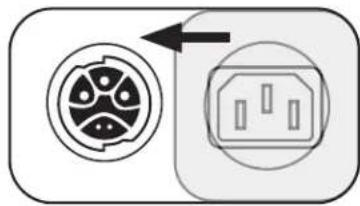
natural_image
Diagram showing two electrical connector components: a circular socket and an open socket, with no text or symbols present.Saída de linha EQ
Maahantuoja Kiinassa: Bose Electronics (Shanghai) Company Limited, Part C, Plant 9, No. 353 North Riying Road, China (Shanghai) Pilot Free Trade Zone
EU-maahantuoja: Bose Products B.V., Gorslaan 60, 1441 RG Purmerend, The Netherlands
Meksikon maahantuoja: Bose de México, S. de R.L. de C.V., Paseo de las Palmas 405-204, Lomas de Chapultepec, 11000 México, D.F. Huollo-tai maahantuojatietoja voi kysyä puhelinnumerosta +5255 (5202) 3545.
Maahantuoja Taiwanissa: Bose Taiwan Branch, 9F-A1, No. 10, Section 3, Minsheng East Road, Taipei City 104, Taiwan. Puhelinnumero: +886-2-2514 7676
natural_image
Line drawings of various electronic devices including a speaker and charging unit, with no visible text or symbols.Lisävarusteet
Huelto ja ylläpito
Importör I Kina: Bose Electronics (Shanghai) Company Limited, Part C, Plant 9, No. 353 North Riying Road, China (Shanghai) Pilot Free Trade Zone
EU-importör: Bose Products B.V., Gorslaan 60, 1441 RG Purmerend, The Netherlands
Importör I Mexiko: Bose de México, S. de R.L. de C.V. Paseo de las Palmas 405-204, Lomas de Chapultepec, 11000 México, D.F. Ring +5255 (5202) 3545 för service- eller importörinformation.
Importör I Taiwan: Bose Taiwan Branch, 9F-A1, No. 10, Section 3, Minsheng East Road, Taipei City 104, Taiwan. Telefonnummer: +886-2-2514 7676
natural_image
Line drawings of various electronic devices including a speaker and charging unit, with no visible text or symbols.Separata tillbehör
- Sub1/Sub2-rullväska
- Justerbart Sub1/Sub2-högtalarstativ
- SubMatch-kabel
natural_image
Diagram showing a circular component with internal components and an electrical outlet, connected by an arrow (no text or symbols)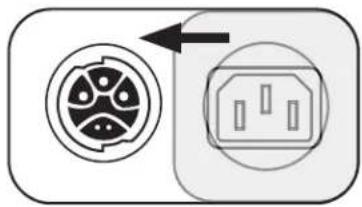
natural_image
Diagram showing two electrical connector symbols: a circular socket with internal circuit and an octagonal socket with internal components, both without any text or labels.EQ för linjeutgång
Sub1/Sub2-orientering

natural_image
Line drawings of various electronic devices including a speaker and charging unit, with no visible text or symbols.natural_image
Diagram showing a circular component with internal slots and an electrical outlet with three slots, connected by an arrow (no text or symbols)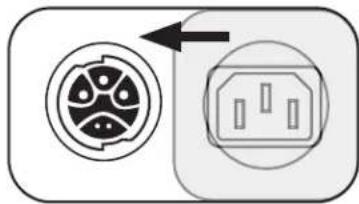
natural_image
Diagram showing a circular connector with internal components and an electrical outlet, connected by an arrow (no text or symbols)สัญญาณ对外开放 Line EQ
การดูแลรักษา
중국 수입업체: Bose Electronics (Shanghai) Company Limited, Part C, Plant 9, No. 353 North Riying Road, China (Shanghai) Pilot Free Trade Zone
EU 수입업체: Bose Products B.V., Gorslaan 60, 1441 RG Purmerend, The Netherlands
대만 수입업체: Bose Taiwan Branch, 9F-A1, No. 10, Section 3, Minsheng East Road, Taipei City 104, Taiwan. 전화 번호: +886-2-2514 7676
Bose Corporation 본사: 1-877-230-5639
natural_image
Line drawings of various electronic devices including a speaker and charging unit, with no visible text or symbols.옵션 액세서리
- Sub1/Sub2 롤러 가방
- Sub1/Sub2 Adjustable Speaker Pole
- SubMatch 케이블
전원 콘센트에 직접 연결

라인 출력 EQ
관리 및 유지 보수
Sub 청소
natural_image
Line drawings of various electronic devices including a speaker and charging unit, with no visible text or symbols.可选配件
- Sub1/Sub2 拖轮箱
- Sub1/Sub2 可调节扬声器杆
- SubMatch 线缆
直接连接至电源插座
线路输出均衡器
维护与保养
清洁低音箱
natural_image
Line drawings of various electronic devices including a speaker and charging unit, with no visible text or symbols.選配配件
flowchart
graph TD
    A["Plug Icon"] --> B["Switch Icon"]
    style A fill:#f9f,stroke:#333
    style B fill:#ccf,stroke:#333
直接連線至電源插座
線性輸出 EQ
Sub1/Sub2 方向

維護與保養
清潔 Sub
CE Bose Corporation hereby declares that this product is in compliance with the essential requirements and other relevant provisions of Directive 2014/53/EU and all other applicable EU directive requirements. The complete declaration of conformity can be found at: www.Bose.com/compliance.
The product, in accordance with the Ecodesign Requirements for Energy Related Products Directive 2009/125/EC, is in compliance with the following norm(s) or document(s): Regulation (EC) No. 1275/2008, as amended by Regulation (EU) No. 801/2013.
| Required Power State Information | Power Modes | |
| Standby | Networked Standby | |
| Power consumption in specified power mode, at 230V/50Hz input | ≤ 0.5 W N/A* | |
| Time after which equipment is automatically switched into mode | 4 hours N/A* | |
| Power consumption in networked standby if all wired network ports are connected and all wireless network ports are activated, at 230V/50Hz input | N/A* | |
| Network port deactivation/activation procedures. Deactivating all networks will enable standby mode. | *Product does not utilize a networked standby mode for a Bluetooth* connection and does not have the ability to be configured to a network via Wi-Fi* or Ethernet | |
Sub1 Sub2
| Dimensions (H × W × D) | 53.0 × 25.0 × 53.0 cm(20.9 × 9.8 × 20.9 in) | 69.0 × 30.5 × 55.0 cm(27.2 ×12.0 × 21.7 in) |
| Net Weight | 16.1 kg(35.5 lb) | 23.4 kg(51.7 lb) |
| Input Rating | 100–240 VAC, 3 A, 50/60 Hz | 100–240 VAC, 4 A, 50/60 Hz |
| Initial turn on Inrush current | 14.9 A at 120 V; 29.3 A at 230 V | 15.2 A at 120 V; 28.6 A at 230 V |
| Inrush current after AC mains interruption of 5 s | 5.8 A at 120 V; 32.0 A at 230 V | 2.6 A at 120 V; 6.1 A at 230 V |
Shielded cables are required to maintain regulatory compliance.
The product label is located on the bottom of the product.
Model: 431389G1 / 431389G2. The CMIIT ID is located on the bottom of the product.
CAN ICES-3 (B)/NMB-3(B)
Information About Products That Generate Electrical Noise (FCC Compliance Notice for US) NOTE: This equipment has been tested and found to comply with the limits for a Class B digital device, pursuant to Part 15 of the FCC Rules. These limits are designed to provide reasonable protection against harmful interference in a residential installation. This equipment generates, uses, and can radiate radio frequency energy and, if not installed and used in accordance with the instructions, may cause harmful interference to radio communications. However, there is no guarantee that interference will not occur in a particular installation. If this equipment does cause harmful interference to radio or television reception, which can be determined by turning the equipment off and on, the user is encouraged to try to correct the interference by one or more of the following measures:
- Reorient or relocate the receiving antenna.
- Increase the separation between the equipment and receiver.
- Connect the equipment into an outlet on a circuit different from that to which the receiver is connected.
- Consult the dealer or an experienced radio/TV technician for help.
Changes or modifications not expressly approved by Bose Corporation could void the user's authority to operate this equipment.
This device complies with part 15 of the FCC Rules and with ISED Canada's license-exempt RSS standard(s). Operation is subject to the following two conditions: (1) This device may not cause harmful interference, and (2) this device must accept any interference received, including interference that may cause undesired operation.
This symbol means the product must not be discarded as household waste, and should be delivered to an appropriate collection facility for recycling. Proper disposal and recycling helps protect natural resources, human health, and the environment. For more information on disposal and recycling of this product, contact your local municipality, disposal service, or the shop where you bought this product.
中国で制限されている有害/危険物質一覧
中国における輸入元: Bose Electronics (Shanghai) Company Limited, Part C, Plant 9, No. 353 North Riying Road, China (Shanghai) Pilot Free Trade Zone
EUにおける輸入元: Bose Products B.V., Gorslaan 60, 1441 RG Purmerend, The Netherlands
メキシコにおける輸入元: Bose de México, S. de R.L. de C.V., Paseo de las Palmas 405-204, Lomas de Chapultepec, 11000 México, D.F. For service or importer information, call +5255 (5202) 3545
台湾における輸入元: Bose Taiwan Branch, 9F-A1, No. 10, Section 3, Minsheng East Road, Taipei City 104, Taiwan. Phone Number: +886-2-2514 7676
Bose Corporation Headquarters: 1-877-230-5639
natural_image
Line drawings of various electronic devices including a speaker and charging unit, with no visible text or symbols.オプションのアクセサリー
- Sub1/Sub2 Roller Bag
- Sub1/Sub2 Adjustable Speaker Pole
- SubMatch Cable
電源コンセントへの直接接続
ライン出力EQ
お手入れについて
ベースモジュールの清掃
natural_image
Line drawings of various electronic devices including a speaker and two connected devices with cables (no text or symbols)natural_image
Diagram showing a circular component with internal circuit-like patterns and an electrical socket with three slots, connected by an arrow (no text or symbols)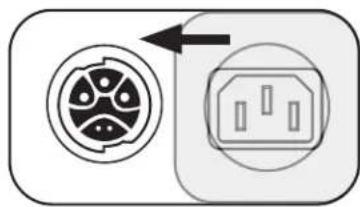
natural_image
Diagram showing a circular connector with internal components and an electrical outlet, no text or symbols present.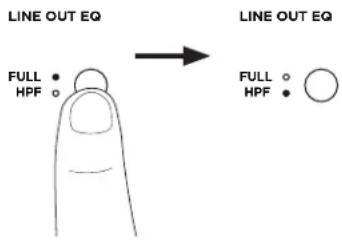
Уход и обслуживание
Очистка модуля Sub
natural_image
Line drawings of various electronic devices including a speaker and charging unit, with no visible text or symbols.वैकल्पिक उपसाधन
natural_image
Diagram showing a circular component with internal circuit-like structure and an electrical socket with three slots, no text or symbols present.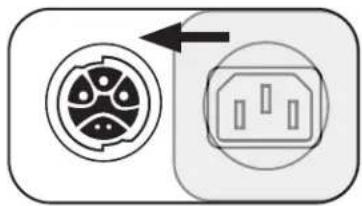
natural_image
Diagram showing a circular connector with internal components and an electrical outlet, no text or symbols present.लाइन आउटपुट EQ
Sub1/Sub2 ओरिएंटेशन

देखभाल और रख-रखाव
Plant 9, No. 353 North Riying Road, China (Shanghai) Pilot Free Trade
Zone
Purmerend, The Netherlands
+886-2-2514 7676 :East Road, Taipei City 104, Taiwan
1-877-230 -5639 : Bose المقر ramisi لشركة
natural_image
Line drawings of four different electronic devices with attached cables, shown from front and side views (no text or symbols)الملحقات الاختيارية
-Sub2/Si
-Sub2/St
-SubMat
natural_image
Diagram showing a circular component with internal components and an electrical outlet, connected by an arrow (no text or symbols)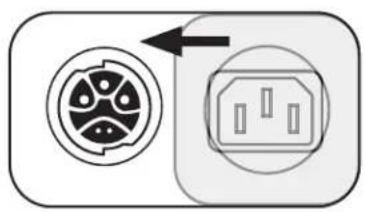
natural_image
Diagram showing two electrical socket symbols with an arrow pointing to one (no text or labels)natural_image
Simple line drawing of a finger pressing a button with an 'OK' button above (no text or symbols on the finger itself)موازن مخرج الخط