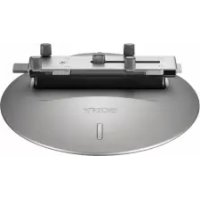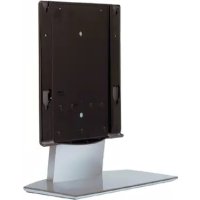
SUP42T1 - Other camera accessories SONY - Free user manual and instructions
Find the device manual for free SUP42T1 SONY in PDF.



User questions about SUP42T1 SONY
0 question about this device. Answer the ones you know or ask your own.
Ask a new question about this device
Download the instructions for your Other camera accessories in PDF format for free! Find your manual SUP42T1 - SONY and take your electronic device back in hand. On this page are published all the documents necessary for the use of your device. SUP42T1 by SONY.
USER MANUAL SUP42T1 SONY
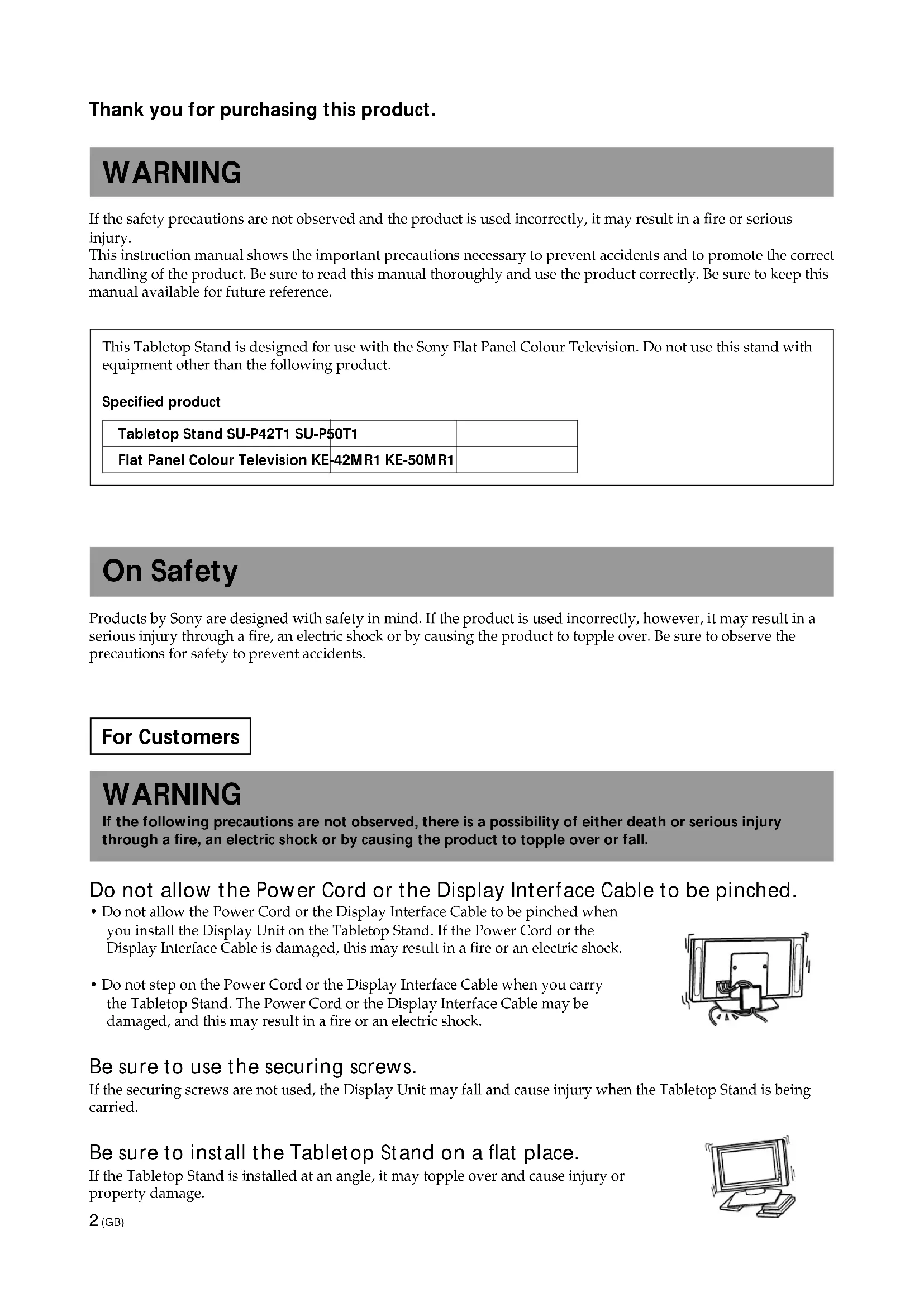
Thank you for purchasing this product.
WARNING
If the safety precautions are not observed and the product is used incorrectly, it may result in a fire or serious injury.
This instruction manual shows the important precautions necessary to prevent accidents and to promote the correct handling of the product. Be sure to read this manual thoroughly and use the product correctly. Be sure to keep this manual available for future reference.
This Tabletop Stand is designed for use with the Sony Flat Panel Colour Television. Do not use this stand with equipment other than the following product.
Specified product
| Tabletop Stand SU-P42T1 SU-P50T1 | |
| Flat Panel Colour Television KE-42MR1 KE-50MR1 |
On Safety
Products by Sony are designed with safety in mind. If the product is used incorrectly, however, it may result in a serious injury through a fire, an electric shock or by causing the product to topple over. Be sure to observe the precautions for safety to prevent accidents.
For Customers
WARNING
If the following precautions are not observed, there is a possibility of either death or serious injury through a fire, an electric shock or by causing the product to topple over or fall.
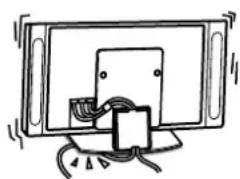
Do not allow the Power Cord or the Display Interface Cable to be pinched.
- Do not allow the Power Cord or the Display Interface Cable to be pinched when you install the Display Unit on the Tabletop Stand. If the Power Cord or the Display Interface Cable is damaged, this may result in a fire or an electric shock.
- Do not step on the Power Cord or the Display Interface Cable when you carry the Tabletop Stand. The Power Cord or the Display Interface Cable may be damaged, and this may result in a fire or an electric shock.
Be sure to use the securing screws.
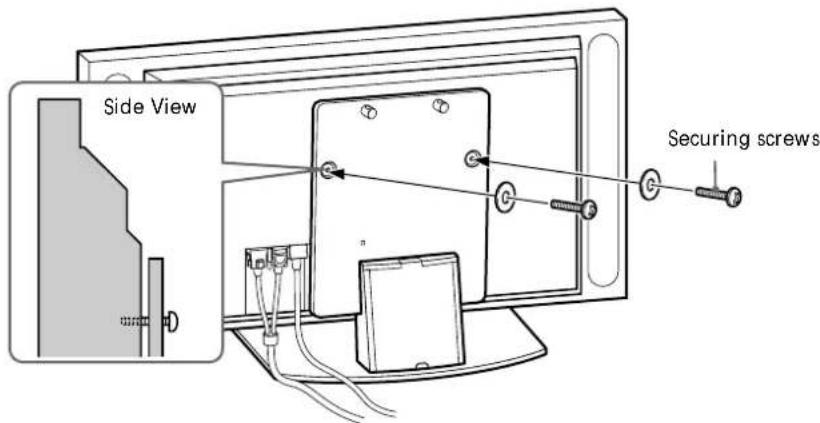
If the securing screws are not used, the Display Unit may fall and cause injury when the Tabletop Stand is being carried.
Be sure to install the Tabletop Stand on a flat place.
If the Tabletop Stand is installed at an angle, it may topple over and cause injury or property damage.
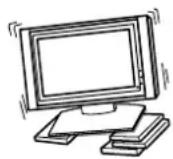
Be sure to install the Tabletop Stand on a stable surface.
If you install the Tabletop Stand on an unstable surface, it may lose its balance and topple over or fall off. This may cause injury or property damage.
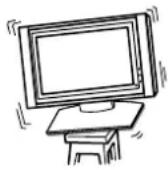
Be sure to take measures to prevent the stand from toppling over.
If you fail to do so, the Tabletop Stand may topple over during an earthquake and cause injury or property damage. Draw a wire or the like through the holes of the Security Attachments located on the upper part of the Main Bracket and fix the other ends of the wires to the wall to anchor the Tabletop Stand and prevent it from toppling over.
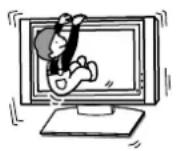
Do not lean on or hang from the Tabletop Stand.
The Tabletop Stand may topple over and cause injury.
Do not block the ventilating holes on the Display Unit.
If you block the ventilating holes on the Display Unit by covering the top of the Tabletop Stand with a cloth or the like, the Display Unit may become overheated and this may cause a fire.
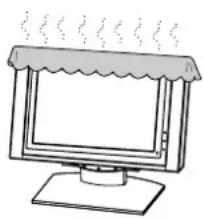
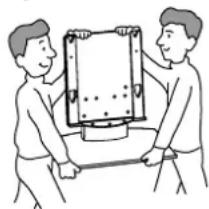
Be sure to carry the stand in the manner shown in this manual.
If the Tabletop Stand is carried incorrectly, it may topple over and cause injury.
Do not stumble over the Power Cord or the Display Interface Cable.
If you stumble over the Power Cord or the Display Interface Cable, the Tabletop Stand may topple over and cause injury.
Do not carry the Tabletop Stand with Display Unit installed on it.
Be sure to remove the Display Unit before attempting to carry the Tabletop Stand. If you fail to do so, the Display Unit may fall and cause bodily injury.
CAUTION
If the following precautions are not observed, there is a possibility that the user will suffer injury or that property damage will occur.
Do not install equipment other than the specified product.
This Tabletop Stand is designed for use with the specified product. If you install equipment other than the specified product, it may fall and cause injury or property damage.
Precautions
To keep the stand clean, occasionally wipe the stand with a dry soft cloth. Stubborn stains may be removed with a cloth slightly dampened with watered-down dishwashing detergent. Then wipe the area with a dry soft cloth. Do not use any type of chemicals, such as thinner or benzene, as they may damage the finish of the stand.
Assemble the Tabletop Stand
For Sony Dealers
To Sony Dealers
The following instructions are for Sony Dealers only. Be sure to read safety precautions described above and pay adequate attention to safety during the installation, maintenance and checking of this product.
Be sure that two or more persons do the installation work.
Be sure that two or more persons do the installation work when installing the Display Unit on the Tabletop Stand. If one person does the installation work alone, this may result in an accident or an injury.
Be sure to assemble the Tabletop Stand securely following the instructions in this manual.
If any of the screws are loose or fall out, the Tabletop Stand may lean and topple over, or the Display Unit may fall. This may cause injury or property damage.
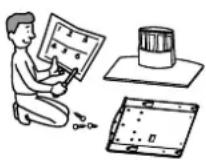
Be sure to install the Display Unit securely, following the proper procedure. Be sure to tighten the screws firmly.
If the Display Unit is not installed securely, it may fall and cause injury.
Be careful not to hurt your hands or fingers when assembling the Tabletop Stand.
Be careful not to hurt your hands or fingers when assembling the Tabletop Stand or when installing the Display Unit.
Precautions on the installation
- Be sure to spread packing materials or the like over the floor beforehand when assembling the Tabletop Stand.
-
Install the stand on a solid and flat floor. Do not allow the stand to be installed at an angle or leaning in one direction. To avoid this, observe the following precautions.
-
If you install the stand on a soft surface such as a mat or a carpet, lay a board on the designated location beforehand.
- Do not install the stand in a place subject to direct sunlight or near a heater.
- Do not install the stand in a hot or humid place, or outdoors.
Step 1: Check the parts
For Sony Dealers
- Prepare a Phillips screwdriver beforehand.
Exercise extreme care to avoid injury when installing the Main Bracket.
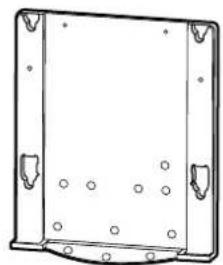
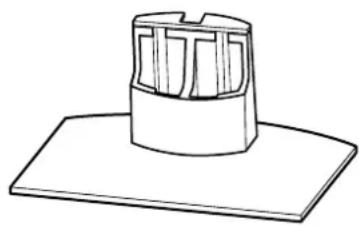
Main Bracket (1 piece) Stand (1 piece)
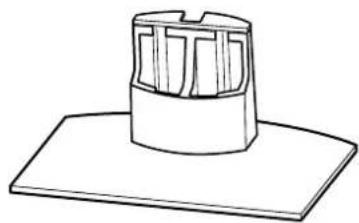
| Name Quantity | |
| Securing screw 2 | |
| Countersink screw 10 | |
| Cable clampper 1 |
Step 2: Install the Main Bracket
For Sony Dealers
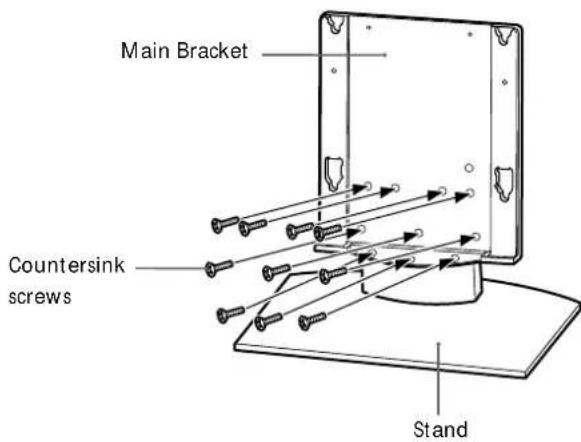
1 Align the Main Bracket over the screw holes on the stand. Then fasten the Main Bracket to the stand using 10 countersink screws.
Be sure that two or more persons hold the parts during this procedure. Tighten the 10 countersink screws once again after screwing them temporarily.
Caution
- Be sure to hold the stand firmly and keep it stable.
- When you use an electric driver to tighten screws tightening torque must be approx. 2.45N· m . Do not use impact drivers.
If you use impact drivers or electric drivers with the tightening torque other than 2.45N· m you will overtighten the screws. This may destroy parts or screws, cause the Main Bracket to drop off from the stand, leading to any injury.
WARNING
Be sure to complete the installation before connecting the Power Cord to the wall outlet. If you allow the Power Cord to be pinched under or between pieces of equipment, this may result in a short circuit or an electric shock. If you stumble over the Power Cord or the Display Interface Cable, the stand may topple over, and this may result in injury.
1
Install the Display Unit on the Tabletop Stand.
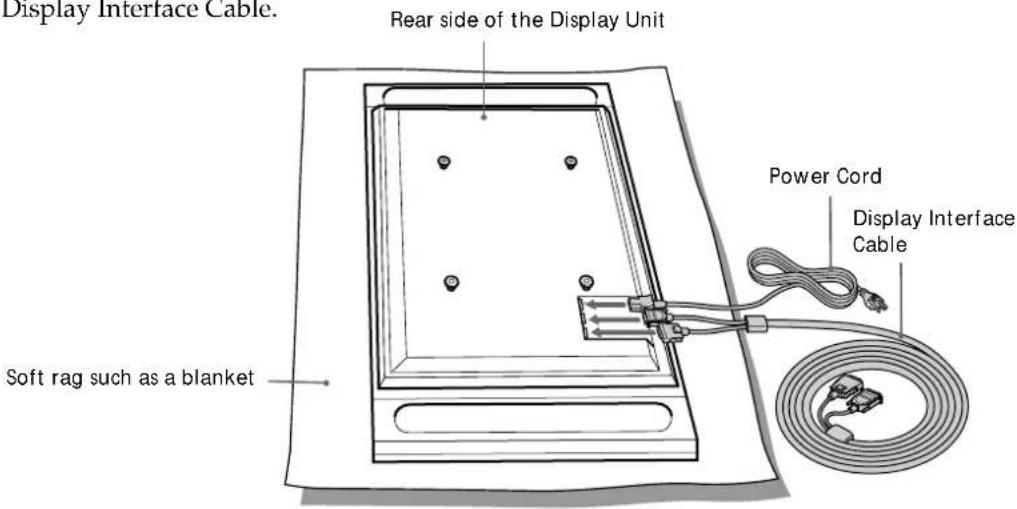
Connect the Power Cord and the Display Interface cable to the Display Unit.
Tip
See the instruction manual of the Sony Flat Panel Colour Television (KE-42MR1/KE-50MR1) for more details on connecting the Power Cord and the Display Interface Cable.
1
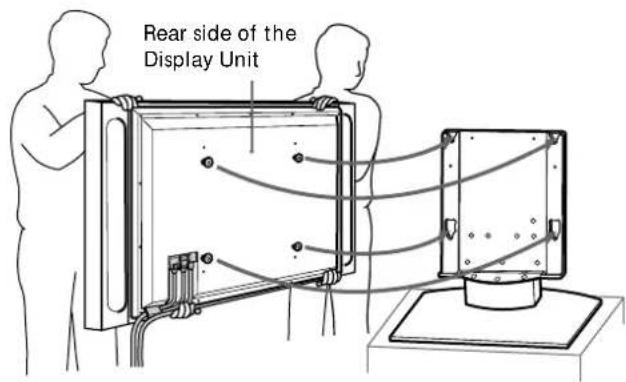
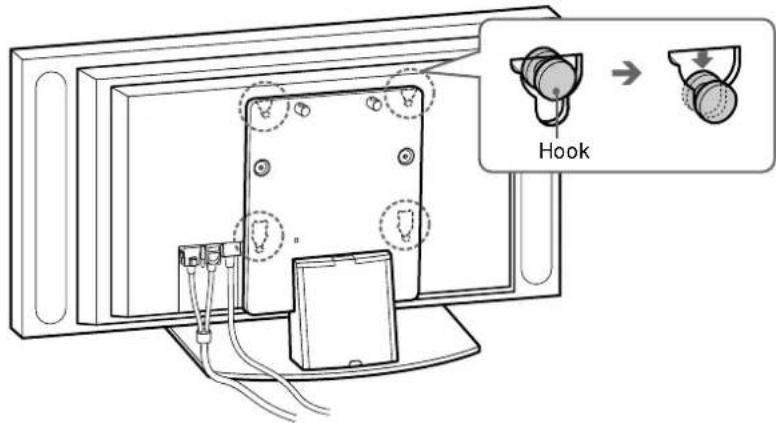
2 Be sure that two or more persons hold the right and left edges of the top and the under sides of the Display Unit while fitting the hooks on the rear of the Display Unit into the holes on the fixtures of the stand. Then confirm that the hooks on the rear of the Display Unit are completely inserted into the four holes of the fixtures.
Note
Do not stumble over the Power Cord or the Display Interface Cable.
2
Slide the Display Unit straight downward until it snaps on.
Notes
- Slide the Display Unit completely down to the bottom. Confirm that the Display Unit is installed on the stand horizontally.
- Be sure to keep the Tabletop Stand stable while installing the Display Unit.
3
2
Attach the Display Unit to the stand with the two securing screws.
3
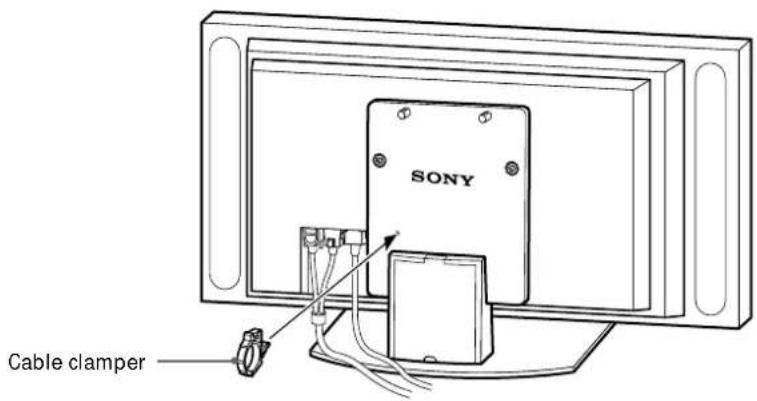
Route the Power Cord and the Display Interface Cable through the stand.
Attach the cable clampers to the Main Bracket.
0
2 Draw the Power Cord and the Display Interface Cable through the cable clampers and fix them.
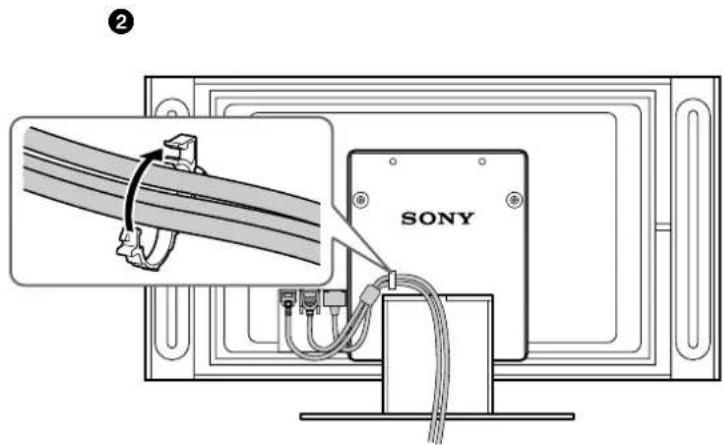
Remove the Cable Cover from the stand and route the Power Cord and the Display Interface Cable inside the stand.
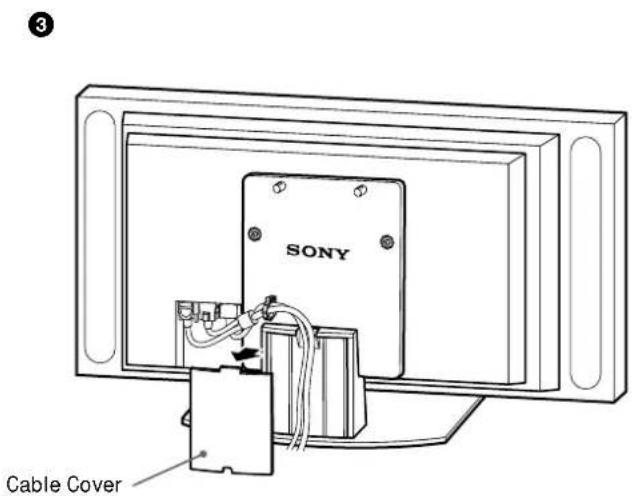
4 Reattach the Cable Cover to the stand.

4
4
Take measures to prevent the stand from toppling over.
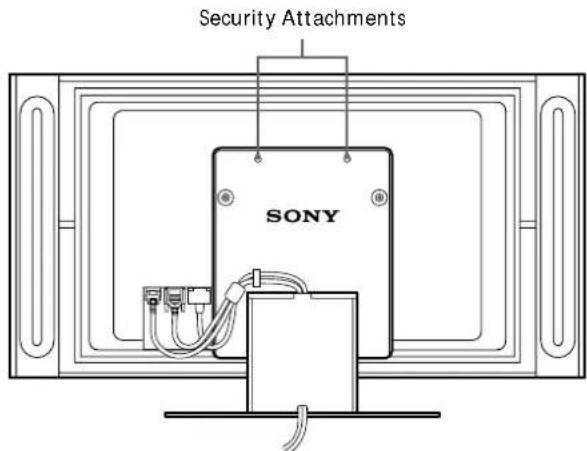
Draw a wire or the like through the holes of the security attachments located on the upper part of the Main Bracket and fix the other ends of the wires to the wall to anchor the Tabletop Stand and prevent it from toppling over.
WARNING
Be sure to take measures to prevent the stand from toppling over. If you fail to do so, the Tabletop Stand may topple over during an earthquake and cause injury or property damage. Draw a wire or the like through the holes of the security attachments located on the upper part of the Main Bracket and fix the other ends of the wires to the wall to anchor the Tabletop Stand and prevent it from toppling over.
Specifications

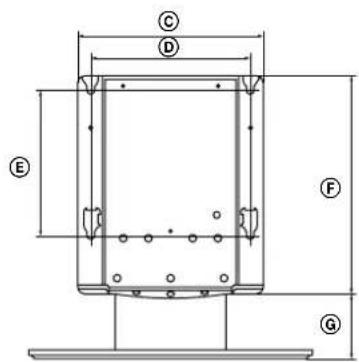
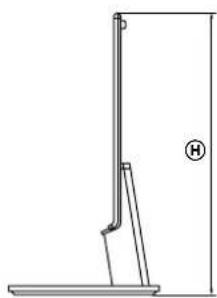
| SU-P42T1 SU-P50T1 | |||
| Unit: (mm) A 500 600 | |||
| B 295 321 | |||
| C 392 | |||
| D 340 | |||
| E 310 | |||
| F 461 | |||
| G 141 | |||
| H 602 | |||
| Weight: (kg) | 16.0 19.0 | ||
Design and specifications are subject to change without notice.
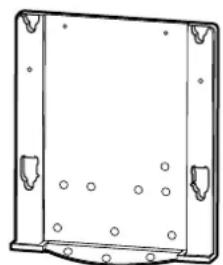
Console principale (1 piece) Support (1 piece)
Ppoulaεic katv tooθεtnon
Kata n ouvaoguooyon ts EuaqaneBaons,baaowte otpiouyovw esente aawet a vixa ouxeviaos n ageueqoh avtiveeva oto dae do.
Too0eite Tn bao n oe otege xu eintede 8daqos. Mny too0eite Tn bao vto yovia n e xion qoc tn ma a nevga.Fua va atopuyyete xutetoto,tnonote tacokovce povlaegic.
-Ev qoxetua va tootheetae tn bao n avo oe aalaxn eupaveia ownc oe xai n oxtote nootato 0to ouyexquveo quieio ma oviida n laxa.
-MnVtoo0eTeiTe nβaon oEoenTouvaTnBλeTeI O nlovovtαOeAolqepq.
-Mvtootheite tnbaon oe Ceota n yqa meqn, n oe eewotquovs xogouv.
Sorg for, at mindst to personer holder delene imens.
Stram de 10 forsakenkningssskruer endnu engang, after du har skruet dem alle i.
Forsigtig!
Printed on 100% recycled paper using VOC (Volatile Organic Compound)-free vegetable oil based ink.