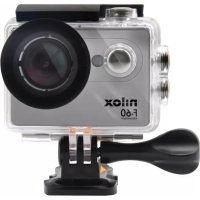
USER MANUAL NXACBIKECAM NILOX
Carefully read the safety notes and consult the online user manual before using the product. Keep this information for future reference and include it when passing the product to third parties. Use the product and its accessories solely for the intended use, adhering to the specified electrical ratings and in enclosed and protected environments to avoid serious risks. Keep the product away from heat sources, direct sunlight, moisture, and liquids. The device should not be used by children or by those who are unable to understand the risks. Do not leave the product charging for too long or connected to the power supply when not in use or if you suspect malfunctions. Avoid impacts, drops, crushes, or rough handling that could cause dangerous situations. Never attempt to disassemble or repair the product in case of defects. If liquid leaks from the product, avoid contact with skin or eyes; in such cases, immediately wash the affected area with water and consult a doctor. Keep the box and especially the bags away from children to prevent the risk of suffocation or accidental ingestion. Avoid using the device near medical devices, such as pacemakers. For any doubts regarding the operation, safety, or connection of the product, contact Esprinet customer service. Do not use the device during activities that require high concentration to avoid distractions and accidents. The product requires little maintenance and can be cleaned only with a soft, clean cloth, without the use of aggressive cleaners or chemicals. This product is not a toy. Keep the device and its accessories out of the reach of children and pets. Do not use the device in hospitals, on airplanes, and in environments with electronic instruments that may be affected by radio frequencies. Unless expressly stated on the technical data sheet, the product is not suitable for immersion in water or other liquids; do not touch the product or its accessories with wet or damp hands or other body parts. Before each use, it is advisable to fully charge the product. Do not expose the product directly to high temperatures exceeding 40^ C. Esprinet
S.p.A. will not be liable for any injuries or damages caused to persons or property resulting from improper use of the product.
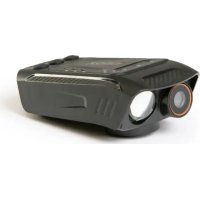
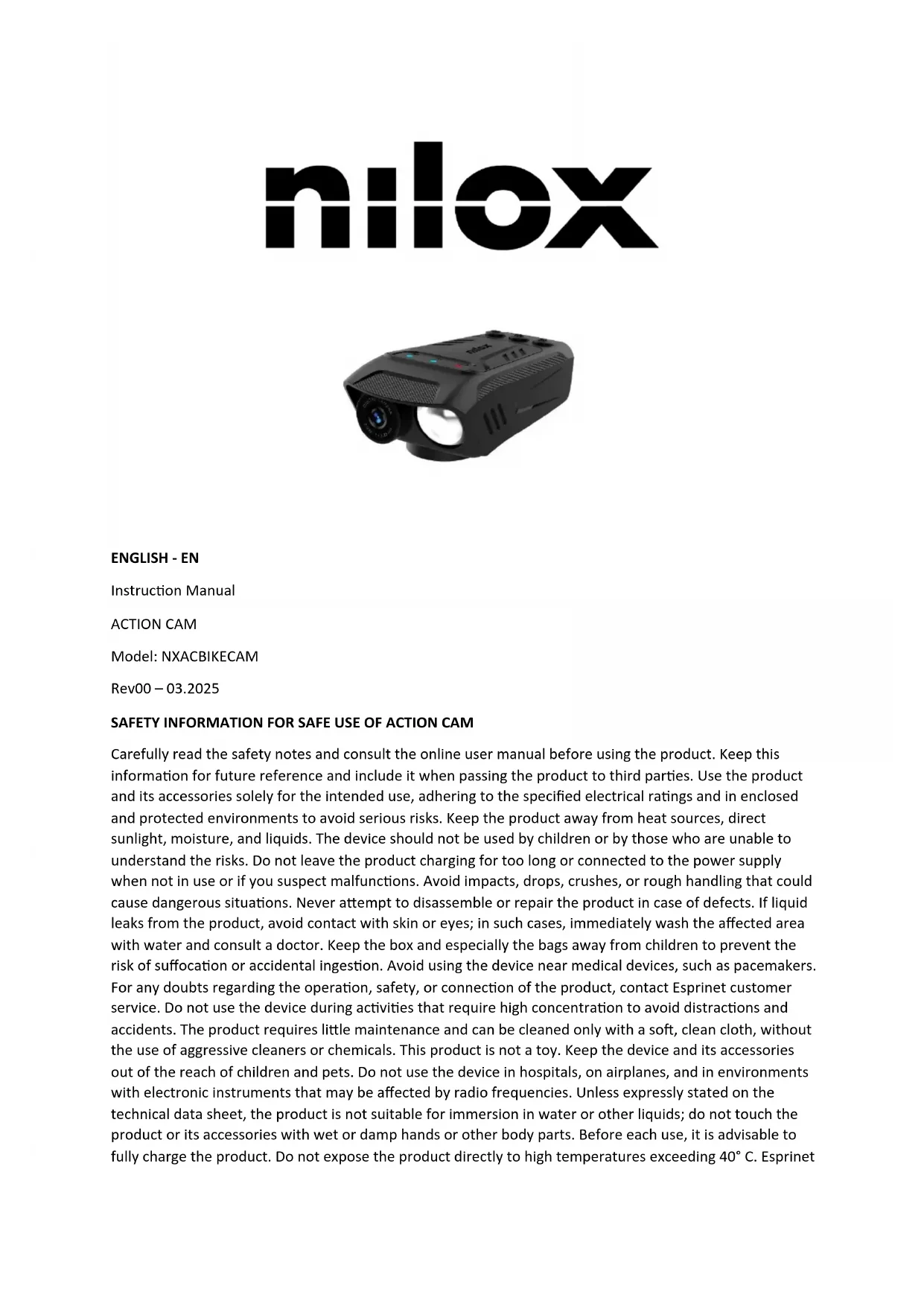
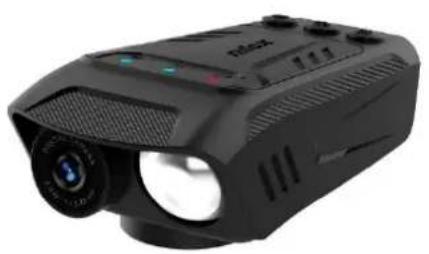
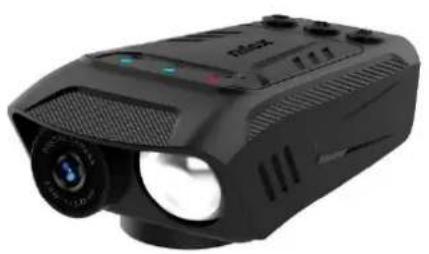
PRODUCT
REMOTE CONTROL

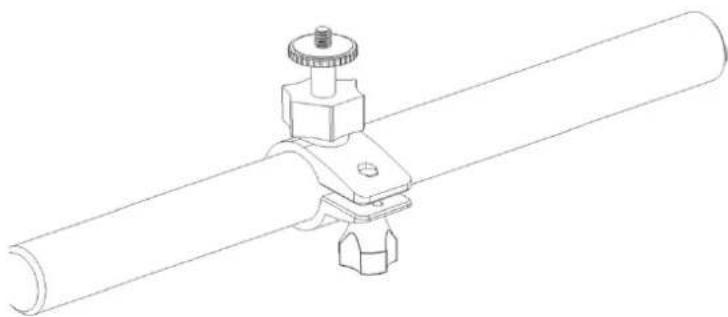
HOW TO INSTALL
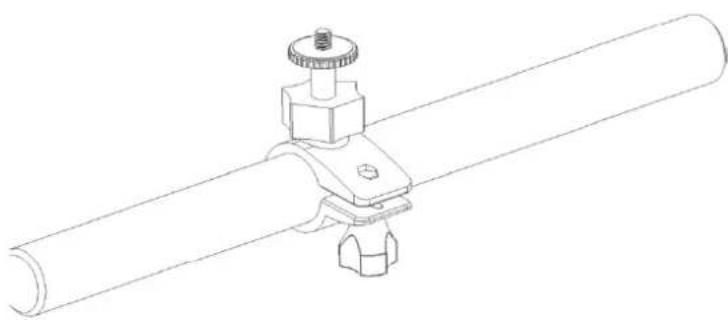
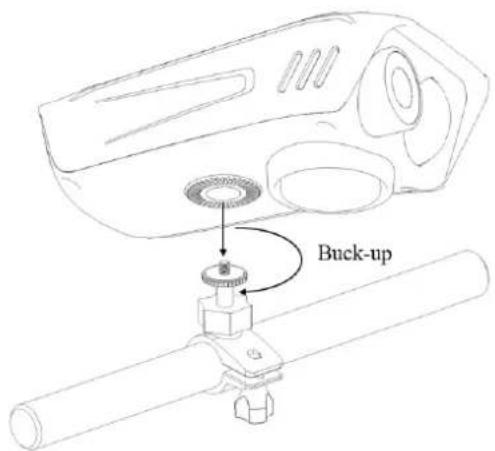
Install the base on the handlebar as shown in the photo.
Insert the cam into the slot and secure the product.
INSTALLATION OF THE REMOTE CONTROL
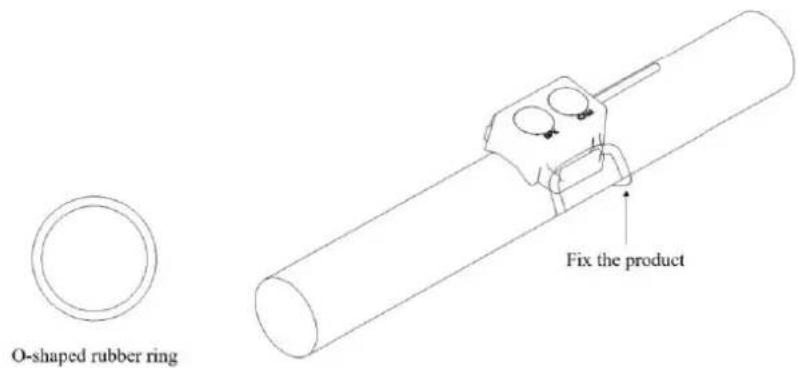
After selecting the appropriate position, secure the remote control to the handlebar with a rubber ring and connect the device.
INSTRUCTIONS
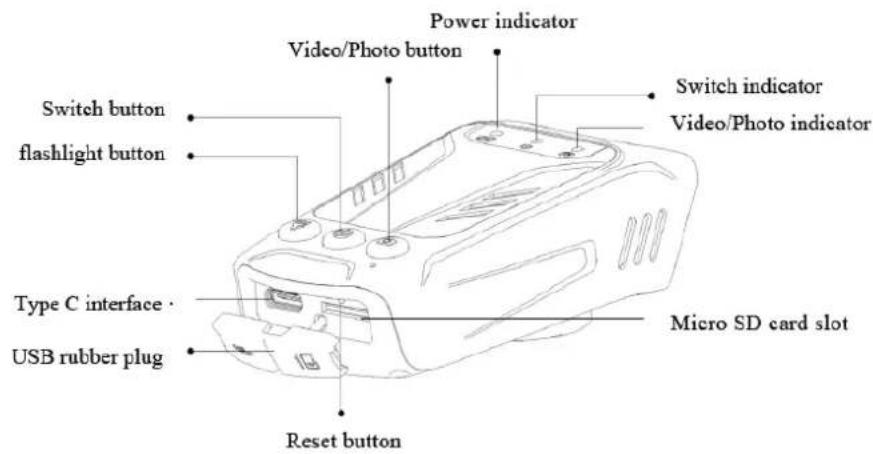
MICRO SD: After turning on, if the Micro SD card is not inserted in the device, or the Micro SD card is faulty, or the storage space of the Micro SD card is full, the switch indicator and the video/photo light will flash simultaneously. Note: It is recommended to choose a high-speed Micro SD card to save high-quality video files. To make it compatible with the device, format it on the computer before use.
TURN OFF/ON: Press the switch button for about 3 seconds to turn the camera on/off; the switch indicator will be on/off.
A. After turning on the camera, briefly press the Video/Photo button to start the photo function, and the Video/Photo indicator will flash twice.
B. After turning on the camera, press and hold the Video/Photo button for 2 seconds to start the video function, and the Video/Photo indicator will be on. If you need to stop recording, press and hold the Video/Photo button for 2 seconds to stop the recording function, and the indicator will turn off.
STORAGE AND PLAYBACK: After the camera is connected to the computer with a Type C cable, the product automatically enters USB disk mode, and files can be copied and played on the computer side.
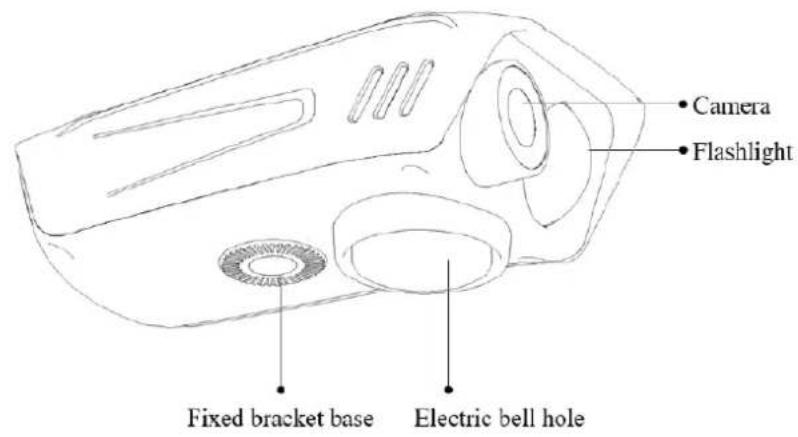
FLASHLIGHT FUNCTION: Briefly press the flashlight button to start the flashlight function. The flashlight has four modes: Highlight, Bright, SOS flashing, and off. Briefly press the flashlight button to change modes.
BICYCLE HORN FUNCTION: Briefly press the electric horn button, it will sound once, and pressing the electric horn will sound continuously for a long time. Press for 8 seconds to change the sound types; a total of 5 sounds are available for switching.
BATTERY CHARGING: It can be charged by connecting the power adapter, and it can also be charged while off. The power indicator flashes during charging, and the power indicator is always on when the camera is fully charged. When the battery is below 20% , the power indicator flashes while using the camera. It can record video while charging.

This mark on the product or its packaging means that the product, at the end of its life, including the non-removable battery, must be separated from other types of waste for responsible recycling. The safe use of this product is guaranteed by adhering to the online instruction manual; keep it and use it carefully throughout the product's life. The lithium-ion/ li ion/polymer battery inside the product is integrated and non-replaceable. Do not attempt to remove it as it may pose risks of overheating, fire, and injury. The battery should only be removed by qualified technicians who can do so safely and recycle it in accordance with the law. Users should return the non-working product free of charge to local separate collection centers or to the retailer, on a one-to-one basis or free of charge if the product size exceeds 25~cm . Proper waste disposal allows for recycling of the product, treating it with disposal methods compatible with the environment to prevent possible harm to the environment or human health and promote the reuse and/or recycling of the product materials. Unauthorized disposal of electronic products, cells, and batteries by household users is subject to penalties under current legislation.
TECHNICAL SPECIFICATIONS:
Video Resolution: 1920 × 1080 30fps
- Lighting Brightness: Maximum 1000lm
- Lighting distance: 20m
- Lighting mode: Highlight, Bright, SOS flashing
Electric horn volume: 100dB
Memory card type: Micro SD card, maximum 32GB
- Battery capacity: Built-in 2500mAh
Duration of use: Lighting 4 H, video recording 10H
- Charging time: 3 H
- Interface type: Type C
Product size: 105 × 54 × 37 ~mm
Product weight: 120g
- INPUT: DC 5V/1A
- Battery Type: Li-Polymer 3.7V 2500mAh
Frequency: 2,402-2,480 GHz
CONVENTIONAL WARRANTY
1. SCOPE OF APPLICATION
1.1. Esprinet S.p.A., with registered office in Vimercate (MB), Via Energy Park, 20, - hereinafter referred to as ("Esprinet") offers this conventional warranty for Celly branded products in favor of both the end-consumer customer ("End-consumer customer") and the end-professional customer ("End-professional customer") under the terms and conditions set forth herein (the "Conventional Warranty"). The Conventional Warranty applies to:
i. new goods branded Celly (the "Products");
ii. Products that incorporate or are interconnected with digital content or a digital service in such a way that the lack of such digital content or digital service would prevent the proper functioning of the Products ("Products with Digital Elements").
1.2. This Conventional Warranty exclusively includes intact Products, in their original configuration, including any accessory equipment.
2. CONSUMER RIGHTS
2.1. This Conventional Warranty does not affect the rights of the consumer provided for by the national legislative provisions implementing Directive (EU) 2019/771 and subsequent amendments regarding consumer goods warranties ("Legal Warranty").
2.2. The Conventional Warranty does not replace, limit, or prejudice the Legal Warranty nor exclude it but adds to it. The end-consumer customer may therefore always assert the rights under the Legal Warranty against the seller, under the conditions and terms provided by the aforementioned legislation.
3. SUBJECT OF THE WARRANTY
3.1 Based on this Conventional Warranty, Esprinet undertakes, at its discretion, (i) to replace or repair the Products or components that are found to be defective due to original manufacturing defects arising from the materials used or workmanship with identical Products or components or, (ii) where this is not possible, to replace with a product or parts of a product or components of equal functionality and economic value.
4. EXCLUSIONS FROM THE WARRANTY
4.1 This Conventional Warranty does not apply in the event of breakages, malfunctions, or defects caused by:
i) installation errors caused by negligence, imprudence, inexperience, or carelessness;
ii) failure to comply with or incorrect adherence to the instructions and warnings contained in the manuals or any additional instruction sheets;
iii) failure to maintain the Products according to the methods indicated by Esprinet;
iv) improper storage of the Product;
v) tampering, modifications, interventions, or maintenance performed by the end customer or carried out by the end customer by third parties, and in any case not performed by persons authorized by Esprinet;
vi) improper use not in accordance with the normal use or intended purpose of the Product;
vii) aggravation of the damage caused by further use by the end customer once a possible malfunction or defect has already occurred;
viii) any external factor both in the installation and use phase of the Product not attributable to or otherwise attributable to Esprinet;
ix) if the model, serial number, or label on the Product has been deliberately counterfeited or removed;
x) failure to install the provided update.
4.2. This Conventional Warranty does not include obvious defects immediately recognizable upon delivery of the Product, nor defects or malfunctions caused by deterioration due to normal wear and tear.
4.3. This Conventional Warranty is excluded if breakages, malfunctions, defects, or flaws are caused by products, parts, or components manufactured by third parties other than Esprit to which the Product is connected or with which it is otherwise used.
5. USE OF THE WARRANTY
5.1. The Conventional Warranty is activated immediately upon purchase of the relevant Product. The end customer can take advantage of this Conventional Warranty by directly contacting Esprit at the email address garanzia@espritet.com or warranty@espritet.com. The Conventional Warranty can also be managed through an Authorized Espritet Center.
5.2. To benefit from this Conventional Warranty, the end customer must possess the receipt and/or invoice for the purchase of the Product and/or the delivery document ("DDT"). Esprit reserves the right to refuse to provide this Conventional Warranty if the end customer does not provide at least one of these documents.
6. DURATION
6.1. The duration of this Conventional Warranty is equal to that of the Legal Warranty (the "Warranty Period"). It follows that the end-professional customer is also offered a conventional warranty of duration equal to that legally provided for consumers, namely two years.
6.2. The Warranty Period begins to run from the date of purchase of the Product, therefore, from the date indicated on the receipt and/or invoice and/or delivery document (DDT).
6.3. In the event of repair or replacement, the original Warranty Period continues to run, which should therefore not be understood as renewed or extended.
6.4. The action aimed at asserting defects is prescribed, in any case, within a period of twenty-six months (Warranty Period + two months) from the purchase of the Product.
7. TERRITORIAL SCOPE
7.1. This warranty is effective only for warranty services to be rendered in Italian, Spanish, and Portuguese territory and only concerns products marketed under the Celly brand.
8. APPLICABLE LAW AND COMPETENT COURT
8.1. These General Warranty Conditions are governed by Italian law. For any dispute that may arise from the interpretation or application of these conditions, the Court of Milan shall have exclusive jurisdiction.
8.2. The application of any more favorable and mandatory provisions provided by the law of the country in which they have their habitual residence is reserved for end-consumer customers, particularly regarding applicable law, warranty duration, and competent court.
This product complies with Directive 2011/65/EU-2015/863/EU (RoHS). The product has the CE marking and is therefore compliant with the safety standards established by the European Union.
Nilox® is a trademark owned by Esprinet S.p.A. All trademarks are registered trademarks of their respective owners. Esprinet S.p.A., via Energy Park 20, 20871 Vimercate (MB) - Italy. Made in China.
www.nilox.com
for info and contacts: contact@esprinet.com
nlox
ITALIANO-IT
Video Resolution: 1920 x 1080 30fps
- Lighting Brightness: Maximum 1000lm
- Lighting distance: 20m
- Lighting mode: Hightlight, Bright, SOS flashing
Electric horn volume: 100dB
Memory card type: Micro SD card, maximum 32GB
- Battery capacity: Built-in 2500mAh
Duration of use: Lighting 4 H, video recording 10H
- Charging time: 3 H
- Interface type: Type C
Product size: 105 × 54 × 37 ~mm
Product weight: 120g
- INPUT: DC 5V/1A
- Battery Type: Li-Polymer 3.7V 2500mAh
Frequency: 2,402-2,480 GHz
1. CHAMP D'APPLICATION
GWARANCJA KONWENCJONALNA
1. ZAKRES ZASTOSOWANIA
8. PRAWO WŁASCIWE I SAD WŁASCIWY
7. TEPITOPNJAJHA OBJACT
7.1. Oba rapaunja baxn cmo 3a ycnyre y rapaunjno koje ce npykaju ha terupotnju nTaunje, IpaHne i Noptyranije n odnocn ce cmo na npou3boe kojn ce npoajy noD 6peHdom Celly.
8. ПИМЕньиBO ПAPBO И KOMNETEHTHn CUD
8.1. OBNOnIuYcNoBn rapaHunje peRylnscAnu cy nTaJInuJahckm npabOM. 3a cBe cnopoBe KoJn Mory NaCTaTn I3 TymaueHa nn npimHe nCTnx, NCKbYuNBo he 6ntn HaadnexKaH Tp6yHaN y MnlaHy.
8.2. OcTaBbCa He Ha Cha3n npimHeHa odpe6n Koje cy eBeHTyalHo NOBoHnJe n 6abe3ne 3a KpaJIbe KynIe-NotpoWae npedBnHe 3aKoHOM 3emJbe y Kojo Imajy CBOje yobuajeho npebBaHnTe, Noc6Ho y Be3n Ca npimHeBnBm npabOM, TpajaHem rapaHnje n HndJeXHM cYdOm.

Obaj npo3bod je y ckaady ca DnpekTbom 2011/65/Ey-2015/863/EY (RoHS). PpO3BOD mMa CE o3NaKy n cTora je y ckaady ca cTaHdapDima 6e36eDnocTn yTbpjehmO od cTpaHe EbpontcKe yHnje.
Nilox® je 6peHd y BlaChnIstBy Esprinet S.p.A. CBr 6peHdoBc cy perncTroBaHm MapKn BlaChnka. Esprinet S.p.A., via Energy Park 20, 20871 Vimercate (MB) - ItaJIna. Ipon3BeDeHO y KInn.
www.nilox.com
3a INΦopMaζηje ΜΚΟΤαΚΤε: contact@esprinet.com
nlox
SVENSKA - SE
Bruksanvisning
ACTION CAM
Model: NXACBIKECAM
Rev00-03.2025
INSTALAREA REMOTE CONTROL-ULUI
CONVENTIONELE GARANTIE
1. TOEPASSINGSOMVANG
TEXHNUECKHEXAPAKTEPNCTNKN:
- Pa3peuHne BnIeO: 1920 x 1080 30fps
Rpkoctb ocBeueHn: MakcImym 1000lm
-ДальнocьOCbeшен20M
- Pekim oceheHn: IocBcTeKa, Apkn, SOS mHaOnn
-「POMKocTb 3JIeKtpnueckoro cnHaJa:100dB
Tn KapTbI namrtn: KapTa Micro SD, maksymm 32GB
- Emkoctb 6atapen: BcTpoehnna 2500mAh
Bpempa6o7bI:OcBeueHne4u,Bndeo3anncb10u
BpeMa3apAdkn:34
TnHHTepfeca:Type C
Pa3Mep npoDyKta: 105x54x37mm
Bec npoDyKta: 120g
- BXOД: DC 5V/1A
Tun 6atapen: Li-Polymer 3.7V 2500mAh
- Yactota: 2,402-2,480 GHz
TAPAHTIA
1.OBJACTbIPIUMEHEHNA
1.1.3CnPNHET S.p.A., cOpnduueckm aDpecom B Bumepkate (MB), Via Energy Park, 20, - danee, ("Esprinet") npednaer daHHy o rapaHTIO I na pOdyKTOB no MapKo Celly kak dny KoheHoro notpe6nteia ("KoneHyb nOtp6nteIb") TAK n dny KoHeHyro npofoecnoHaIa ("KoneHyb npofoecnoHaI") Ha ycNoBnx, n3NoXeHHbIX 3decb (daane "Fapantra"). Fapantra npimehareTcK: i.HOBbIM TOBapam noMapKO Celly (daane "PpOdyKtbl");
ii. PpOdyKTam, KOTOpbIe BkJIIOUaIOT nII IN CB83aHbIC ZnΦpOBbIM KOHTeHOM nII ZnΦpOBbIM CepBcOM TaKIM O6pa3OM, YTO OTCyTCTBne TAKORO ZnΦpOBoro KOHTeHtA nII CEPBcA npenrTCTBOBaI0 6bl BbINOJIHeHIO fYHKcN, pncuixn PpOdyKTam ("PpOdyKTbIC ZnΦpOBbIM 3IemeHTAm").
1.2.Данная Гаразия BKLOHuaet NCKLIOHTeNbHO ueIbe IpoDyKtB B INx nepBOHaaybHoi KOHfrypaun, BKLOUOaJIO6bIe DOONHHTeNbHbIe npHaadJeXHOCTn.
2. INPABA NOTPEBNTEN
2.1.Данная Гаразия He 3aTparnBaet npaba notpe6nteIa, npedycmOTpeHHbIe HaunohJIbHbIM 3aKoHoJaTeIbCTBOM,peaH3yUOuM DnpeKTbY (EC) 2019/771 nocJeDuOuNe I3MeHeHn B O6laCTN rapaHTn Ha ToBapbl Notpe6IeHn ("3aKoHHa rapaHTn").
2.2. rapaHTnHa He 3aMeHReT, He orpaHnUHbAe T Hne NCKJIouaET 3aKoHHyO rapaHTnO, a DOnOpHraeT ee. KoHeuHbI noTpBe6ntelB Bcerda MoKeT BocNoIb3ObaTbcr npaBaMn, PpeDyCMOTpeHHbIM 3aKoHHo rapaHTneB, B OTHoSeHm nPoDaBua, Ha ycNoBnx I B cPOKn, PpeDyCMOTpeHHbIe yKa3aHHbIM 3aKOHOdaTeNbCTBOM.
3. INPEДMET IAPAHTNI
3.1 Ha ocnoBaHn daHHoI Iapantu, Esprinet o6a3yeTc, no CBOeMy yCMOTpeHNO, (i) 3aMeHHTb nI IN OTpeMOHTnpOBaTb PpOyKtBI nn KOMNoHEtBI, KOtopbI Oka3aJIncb DeΦeKTHbIMN N3-3a nepBoHaayabHbIX DeΦeKTOB PPOIN3BOIDCTBEHHORO Ppocecca, Bbl3BaHHbIX NCIOJb3YeEMbIMN MaTePnaIamn nn pa6oey cHIO, Hn IJeHTNUHbIE PpOyKTBI nn KOMNoHEtBI, II (ii) ecnn 3TO HeB03MOxHO, 3aMeHHTb Ha npOyKT nn Yactn PpOyKTA nn KOMNoHEtBI aHaIOrNuHoi ΦyHKUHOHaJIbHOCTN IN 3KOHOMUueCKO ueHHOCIn.
4.CIyUAn NCKJIIOUeHENI IAPAHTN
4.1 DaaHnag TapaHTnA He npImeHaeTc B cIyuae IOnOMok, HncnpaBHOCTe NII NIObIX DeΦeKTOB, Bbl3BaHHbIX:
i) OUN6KaMn yCTaHOBKn, Bbl3BaHHbIMN He6peXHOCTbIO, HEOCTOPOXHOCTbIO, HeyMeHNEM nn XanaTHOCTbIO;
ii) Heco6IIOeHnem nn HnnpaBnBbIM co6IIOeHnem nHcTpkyuN n npdeynpeKdEHH, CoepkauxCBykoBOcTBax nn Ha IIO6bIX DoONHHTeNbHbIX NCTax nHcTpkyuN;
iii) Heco6bIeHnem nn HnpaBnBbIM 06cnyxnbHnem PpOyKTOB B COOTBeTCTBn C yKa3aHnAeMn Esprinet;
iv) HenpaBnBnM xpaHeHneMpOdykTa;
v) BMeWateJIbCTBOM, n3MeHeHnA Mn, pa6OtAmn nn O6cnyKuBaHnEeM, BblONHeHHbIMn KoHeuHbIMnOTpe6NteIem nn BblONHeHHbIMn KOHeUHbIMn OTpe6NteIem TpeTbIMn IuIaMn, n B IIObOM clyuae He BblONHeHHbIMn yNoJHomOueHHbIMn Esprinet IuIaMn;
vi) HnpaBnBbIM n HeCOOTBeTCTByUoI m HopMaIbHOMy IcNoIb3OBAHIO nn Ha3HaueHIO PpOdykTa;
vii) ycyry6enneHem uycep6a, Bb3BaHHoro daIbHeuHm IcNoIb3ObaHnEM KoHeuHbIM nOtpe6nteMe Iocne TOrO, kak yke npo8BnCBA0MoxHbI c6oI nn DeΦeK;
viii) IIO6bIM BHeuHnM fakTopoM KaK Ha 3Taane yCTaHOBKn, TaK Ha 3Taane nCNoIb3OBAHnA IpoDyKTa, He OTHOCaUMc Hn He NpIeXkaUm OTHeceHnO K Esprinet;
ix) ecn moelb, cepHbH HOpE npnn 3TKeTka Ha PpOyKTe 6bln HAmepenH NoDdelaHbI nn CTepTb;
x) HecBoeBpeMeHHo yCTaHOBko o6HOBneHn, npeOCTaBHeHHoro.
4.2.ДаHHЯ ГаHTЯ He BKNIOuae RAHbIe HeDOCTaTKN, KOToPbIE MOxHO cpa3y pacNo3HaTb npn DoCTaBKe IpoDyKTA, a TaKKe DeΦeKtbl Nn HEnCnpaBHOCTN, Bbl3BaHHbIe N3HOCOM B pe3yNbTaTe HopMaJIbHOrO nCNOlb3OBaHnI.
4.3.Данная Гаразия NCKILOUaETcR, ecnnoNOMK, HeNCpabHocTn, HeoCTaTKn nIeΦeKTbI Bbl3BaHbI npOyKTamN, qactm nn KOMNoHEHTamN, pOn3BeDeHHbIM TpeTbIMn IuCaMn, OTnUHbIM ot Esprinet, k KOtOpBIM PpOdyKT noDKJIoueH nn C KOtOpbIM OH nCNOJb3yeTcR.
5.ИСПОЛьЗОВАНЕТAPАHTИN
5.1. rapaHTnA aKTHBnpyeTcH MeMeIeHHO C MOneHTa NOKyIKN COOTBeTCTByUcero IpoDyKTa. KoHeuHbI nOtpe6nteJIb MoXeT BocNoJIb3OBaTbcra DaHHo rapaHTnei, CBzABWncb HaprMyo C Esprinet no aDpccy 3NeKtpOHHO nOuTy garanzia@esprinet.com nn warranty@esprinet.com. rapaHTnTaKKe MoXeT 6bITb OOpMlHa uepe3 ABTopn3OBaHHbI LcHTp Esprinet.
5.2.Дя toro yto6bI BOCNoB3OBAtbcSdAHHoI TapaHTnei, KOHeuHbI NOTpe6nteJI DoJxEHN MeTb Yek n/nnn cuet-ФakTyPHa NOKyNkY IpoDyKTA u/nnn TpaHcNopTHbI DOKyMeHT ("DDT"). Esprinet ocTabnre 3a co6oI npabO OTka3aTb B IpeDoCTaBNeHnn DaHHoI TapaHTn, ecn KoHeuHbI NOTpe6nteJI He IpeDoCTaBNT XOTa 6bl OOnH n3 3Tnx DOKyMeHTOB.
6. CPOK DENCTBNA
6.1. Cpok DeiCTBn DaHHoI rapaHTn paBeH cpoK deiCTBn 3aOKHOI rapaHTn (daJe "Cpok rapaHTn"). 3To O3Haayet, YTo KoHeuHOMy npOeCCNOHaNy TaKKe npEIOCTabIaETcRApaHTn, Cpok DeiCTBn KOtOpO paBeH 3aOKHOHOMy cpoK, npEduCMOTpeHOMy dny notpe6ntene, To eCTb Dba roDa.
6.2. Cpok rapaHTnHaunHaeTcC daTbI NOKyKn PpoDyKta, To ecTb C daTbI, yka3aHHo Ha ueKe n/nn CuTe-phiKType n/nn TpaHCnOpTHom DokymeHte (DDT).
6.3. B clyuae peMOHa Tn nn 3aMeHbI opnHnHaBn CpoK rapaHTn npoOJkaeT deNCTBOBaTb, n OH He DOnJIkeH CHTaTBcA PpOJIeHHbIM nn O6HOJIeHHbIM.
6.4. Действа, Наразвениhoe на зашипу OT Deф ekтов, Истекат, В Любом Случae, В Ттуни Кдадцати лесди месяец (С рoked rapанту + два месяца) с морента покунки Пождукта.
7. TEPPITOPNAJIbHbI OXBAT
7.1.Данная rapaHTnЯ DeiCtByET TOnbKO ДЯ rapaHTnHbIX yCnyr,пpeOCTaBnaeMbIX Ha TeppuTOpNn
ItaNn,Испaнn И Португалуи n Kacaetc TOnbKO npOdykTOB, npOdaBaembIX noD MapKoI Celly.
8. INPIMEHIMOE 3AKOHODATEIbCTBO I KOMPTEHTHBI CyD
8.1. Hactoune O6uue ycnoBra rapaHTnpeynpuyOTc nTaJIbHckm npabOM. IJRAIIO6bIX cnpOB, BO3NkaOuix n3 ToIKOBaHHn nn npimHeHHn HactoUx ycNoB, KOMTeHTbIM 6ydet NCKluHTeBHO MuaHckn cyd.
8.2. OctablaTcB CnIe npImeHHeK KOHeuHbIM NOTpe6nteMa 6Olee 6IaIopnTbIX n O6a3aTeNbHbIX PNOJKeHn, PpeDyCMOTpeHHbIX 3aKOHOdaTeJIbCTBOM CTpaHbI, B KOTOpO OH N IMeOT NOCToAHHOe MeCTO XHTeJIbCTBa, B YAcTHOCTN B OTHOWeHn PpIMeHUMOrO 3aKOHOdaTeJIbCTBa, CpOKa rapaHTn IN KOMIeTeHTHOrO cyda.
C
3TOT npOdyKT COOTBeCTByET DnpeKtnBe 2011/65/EC-2015/863/EC (RoHS). PpOdyKT nMeet MapKnpoBky CE n, CJIeIOBaTeIbHo, COOTBeCTByET CTaHdApTAM 6e3ONaChOcTn, yCTaHOBJIeHHbIM EBpOneckm CoO3OM.
Nilox® Альперся TOBAPьIM 3нakOM, РпнадлесацIM Esprinet S.p.A. BCE TOBAPьIE 3нakИЯВЛЯOTСАразERCSTрпорованьIMTOBAPьIMN 3нakамM COOTBeTcTBYЮцINxBlaДельцEB. Esprinet S.p.A., via Energy Park 20, 20871 Vimercate (MB) - Итalia. Сделно В Китae.
www.nilox.com
ДяинфорmaцииΚΟΝΤΑΚΤΟВ:contact@esprinet.com
nlox
EESTI-EE
Kasutusjuhend
ACTION CAM
Mudel: NXACBIKECAM
Rev00-03.2025
OHUTUSINFO ACTION CAMI TURVALISEKS KASUTAMISEKS
3. GARANTIJAS OBJECTS
3.1 Saskaña ar so Konvenciónalo garantiju Esprinet apnemas péc saviem ieskatiem (i) nomainit vai labot produktus vai componentus, kas ir bojati rǎzosanas procesa sākotnéjo defektu del, kas radušies izmantoto materialu vai darba del, ar identiskiem produktiem vai componentiem, vai (ii) ja tas nav iespějams, nomainit ar produktu vai produkta daß m vai componentiem ar lidzigu funcionalitàti un ekonomisko vertibu.
4. GARANTIJAS IZSLEGSANAS GADIJUMI
HOGYAN KELL TELEPITENI