USER MANUAL Outdoor Camera CW300 Xiaomi
xiaomi Outdoor Camera CW300 User Manual • 03
C-2
D-1
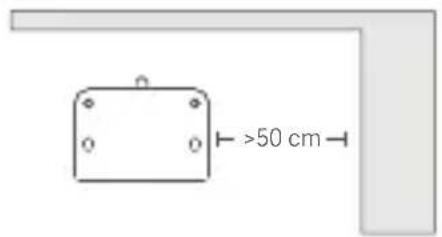
D-2
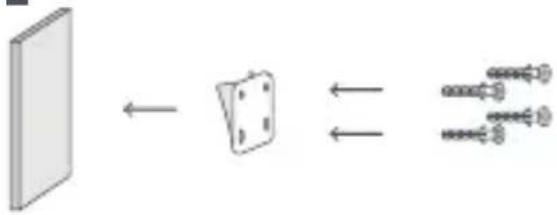
D-3
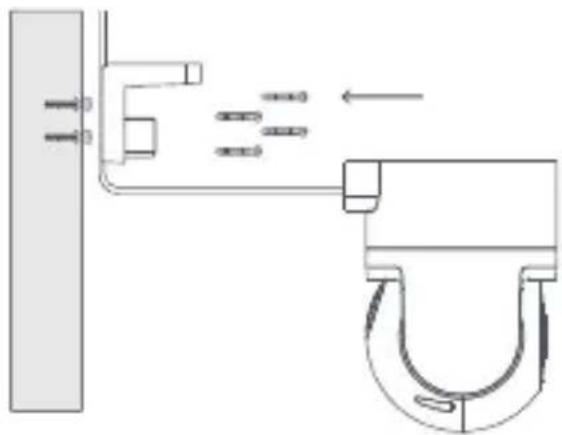
D-4
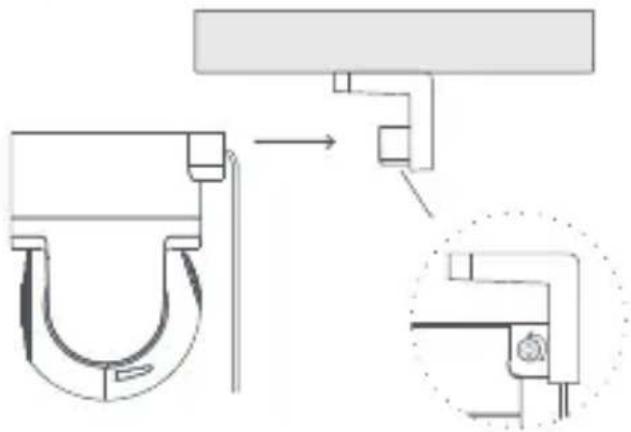
D-5
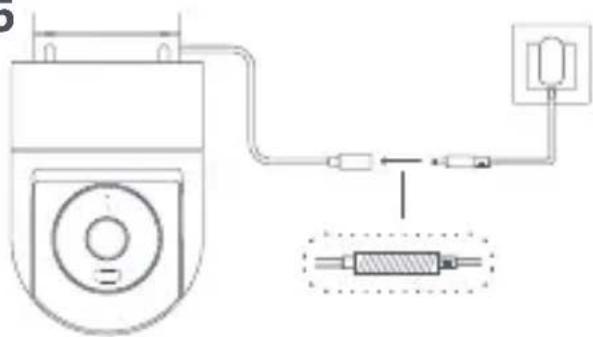
E-1
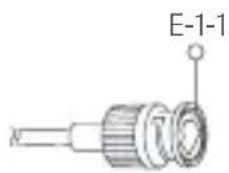
E-3

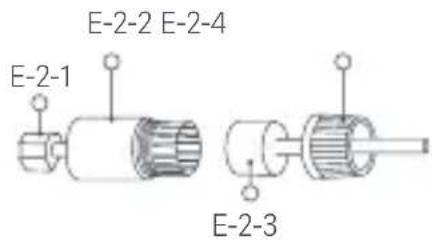
E-2
Read this manual carefully before use, and retain it for future reference. Precautions
- The operating temperature range for this camera is -30°C to 60°C . Do not use this camera in environments with temperatures above or below the specified operating range.
- This camera is a precision electronic product that has an IP66 dust-tight and water-resistant rating. To ensure normal use, do not use the camera in extremely humid environments or locations that may cause water ingress.
- The power adapter that comes along with this product is not waterproof and is only for indoor use. Do not use the power adapter in extremely humid environments or locations that may cause water ingress. The operating temperature range for the power adapter is -30°C to 45°C . Do not use the camera in environments with temperatures above or below the specified range.
- To improve the camera's performance, do not place it where its lens faces or is next to a reflective surface, such as glass windows or white walls, as this will cause the image to appear overly bright in areas close to the camera and darker in areas further away, or cause the camera to produce white images.
- When using Wi-Fi, make sure the camera is installed in an area with a strong Wi-Fi signal. Do not install the camera near microwave ovens and other objects or places that may affect its Wi-Fi signal.
- When enabling or disabling the night vision of the camera, the infrared cut-off filter will be switched and a slight clicking sound will be made, which is normal.
- If the power cable gets damaged, please contact the after-sales service team for replacement.
- The product's nameplate information is on the bottom of the product.
Product Overview
Package Contents (Fig. A)
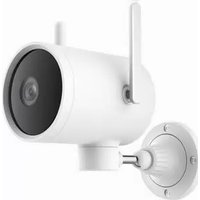
- Xiaomi Outdoor Camera CW300
- Wall Mount
- Mounting Template Sticker
- Power Adapter
- Waterproof Network Port Accessories
- Waterproof Tape
- Mounting Screws
- User Manual
- Warranty Notice
Camera (Fig. B)
- Power Port
- Network Cable Port
- Indicator
- Microphone
- Lens
- Spotlight
- Waterproof Cover
- Reset Button
- MicroSD Card Slot
10. Attention Sticker
Notes: Illustrations of product, accessories, and user interface in the user manual are for reference purposes only. Actual product and functions may vary due to product enhancements. The model, parameters and safety information of the camera are shown in the user manual and at the bottom of the camera.
How to Use
Installing a microSD card
Make sure the camera is unplugged. Remove the waterproof cover from over the microSD card slot and insert a microSD card with its contact side facing up. (Fig. C-1)
CAUTION: Unplug the camera when inserting or removing the microSD card. Please use a microSD card from a qualified brand (the camera supports a microSD card with a maximum capacity of 256 GB and the FAT32 format only, and a microSD card with a capacity of 64 GB and above may need to be formatted to the FAT32 format before use via Settings > Manage storage on the camera's plug-in page in the Xiaomi Home app). It is recommended that the microSD card has a read/write speed of no less than U1/Class 10.
Note: After inserting or removing the microSD card, make sure to reinstall the waterproof cover over the card slot to prevent water from entering the camera and affecting normal use.
Turning on
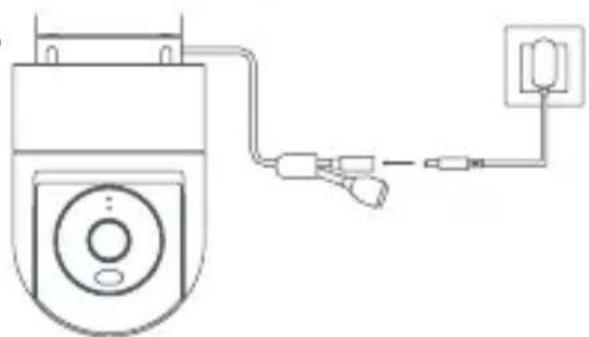
Plug the power adapter cable into the power port on the camera, and the camera will automatically turn on. (Fig. C-2)
When the indicator keeps in orange and a voice notification is heard, the camera is successfully turned on.
Note: Please make sure to use the original power adapter cable provided to charge the camera to avoid the camera not working properly. When the camera is turned on, do not turn the lens of the camera nor force it to rotate. If the positioning of the lens is inaccurate, please calibrate it in the Xiaomi Home app.
Indicator Status
Orange: Awaiting connection/Reset successfully
Blinking orange: Connecting to a network...
Blinking blue: Connecting to a server/OTA update in progress...
Blue: Connected successfully/Working normally
Connecting with the Xiaomi Home App
This product works with the Xiaomi Home app. Use the Xiaomi Home app to control your device, and to interact with other smart home devices.

Scan the QR code to download and install the app. You will be directed to the connection setup page if the app is installed already. Or search for "Xiaomi Home" in the app store to download and install it. Open the Xiaomi Home app, tap "+" on the upper right, and then follow the instructions to add your device.
Notes: The version of the app might have been updated, please follow the instructions based on the current app version. When connecting, make sure the network connection is stable, the camera is turned on, and the indicator remains orange. Once connected, the indicator will change to blue.
Reset
Press and hold the reset button for about 7 seconds if changing the network or the Xiaomi account connected to the camera. A voice notification will be heard once the reset is completed.
Note: Resetting the camera will not delete any data on the microSD card.
Installation
-
Stick the mounting template sticker in the correct position on the wall, making sure the right side of the sticker is over 50 cm from the corner of the wall. Drill holes in the wall that align with the holes on the sticker, with a diameter of about 6 mm and a depth of about 35 mm. (Fig. D-1)
-
Insert the plastic wall plugs into the drilled holes. (Fig. D-2)
-
Wall-mounted installation: Attach the wall mount to the wall by inserting the screws into the holes and screwing them into the wall plugs. If the power cable is being installed upward, it should pass through the groove in the wall mount first before the wall mount is screwed onto the wall. (Fig. D-3)
-
Ceiling installation: Turn the base of the camera upward, line it up with the clip on the mounting bracket, and tighten the screw on the right side. (Fig. D-4)
-
Once the camera is secured in place, wrap the waterproof tape around the power port to avoid water ingress. (Fig. D-5)
CAUTIONS:
- The wall must be able to support at least three times the total weight of the camera.
- To prevent possible injury, the camera must be securely fixed to the wall according to the installation instructions.
- Do not install near a heat source, such as an outdoor air conditioning unit, range hood outlet, or gas water heater outlet.
Installing the waterproof network port accessories
E-1-1. Sealing Ring
E-2-2. Waterproof Sleeve
E-2-4. Waterproof Rear Cover
E-2-1. Network Cable
E-2-3. Stopper
The waterproof network port accessories include: sealing ring, waterproof sleeve, stopper, and waterproof rear cover. Once installed, the network port's waterproof performance will be improved. Place the sealing ring on the camera's network port (Fig. E-1). Thread the waterproof rear cover, stopper, and waterproof sleeve over the network cable in order (Fig. E-2), then plug the network cable into the port. Screw together the waterproof sleeve and sealing ring, then screw together the waterproof rear cover and waterproof sleeve (Fig. E-3).
When network cable is not used, please still install the waterproof network port accessories. Please use a shielded network cable.
Specifications
Name: Xiaomi Outdoor Camera CW300
Model: MBC21
Item Dimensions: 168 × 100 × 123 mm
Video Codec: H.265
Night Vision Light: 850 nm infrared light × 2, white light × 2
Rated Input: 12V---1A
Wireless Connectivity: Wi-Fi IEEE 802.11 b/g/n 2.4 GHz
Net Weight: 487 g
Wi-Fi Operation Frequency: 2412–2472 MHz
Resolution: 2560 × 1440
Wi-Fi Maximum Output Power: <20 dBm
Storage: MicroSD card (8 GB–256 GB supported)/Cloud storage
Operating Temperature: -30°C to 60°C
External AC Adapter Specifications
Manufacturer: Shenzhen AMC Technology Co., Ltd.
Model Identifier: AD-0121200100EU-6
Input Voltage: 100–240 VAC, 50/60 Hz, 0.5 A
Output Voltage: 12.0 V = 1.0 A 12.0 W
Average Active Efficiency: ≥82.96%
Efficiency at Low Load (10%): ≥73.26%
No-load Power Consumption: ≤0.10 W

All products bearing this symbol are waste electrical and electronic equipment (WEEE as in directive 2012/19/EU) which should not be mixed with unsorted household waste. Instead, you should protect human health and the environment by handing over your waste equipment to a designated collection point for the recycling of waste electrical and electronic equipment, appointed by the government or local authorities. Correct disposal and recycling will help prevent potential negative consequences to the environment and human health. Please contact the installer or local authorities for more information about the location as well as terms and conditions of such collection points.

Hereby, Shanghai Moshon Technology Co., Ltd. declares that the radio equipment type Xiaomi Outdoor Camera CW300 (product name) MBC21 (model) is in compliance with Directive 2014/53/EU. The full text of the EU declaration of
conformity is available at the following internet address: http://www.mi.com/global/service/support/declaration.html
For detailed e-manual, please go to www.mi.com/global/support/user-guide
Under normal use of condition, this equipment should be kept a separation distance of at least 20 cm between the antenna and the body of the user.

CAUTION: Possibly hazardous optical radiation emitted from this product.
Do not stare at operating lamp. May be harmful to the eyes.

Note: The power adapter is not waterproof and is only for indoor use. Do not use it in extremely humid environments or locations that may cause water ingress.
Manufactured for: Xiaomi Communications Co., Ltd.
Manufactured by: Shanghai Moshon Technology Co., Ltd.
(a Mi Ecosystem company)
Address: No. 668 Shenzhuan Road, Songjiang Hi-Tech Park, Caohejing
Development Zone, Shanghai, China
For further information, please go to www.mi.com
Manufacturer or his authorized representative:
Name: Xiaomi Technology Netherlands B.V
Address: Prinses Beatrixlaan 582, 2595BM, The Hague, The Netherlands
Country: Netherlands
User Manual Version: V1.0
Complies with
IMDA Standards
DB106135
10F1A6C2
Entrada nominal: 12 V --- 1 A
Peso neto: 487 g
Resolución: 2560 × 1440
http://www.mi.com/global/service/support/declaration.html
Para un manual electrónico detallado, vaya a www.mi.com/global/support/user-guide
Caohejing Development Zone, Shanghai, China
10F1A6C2
Entrada nominal: 12 V --- 1 A
Peso neto: 487 g
Resolución: 2560 × 1440
http://www.mi.com/global/service/support/declaration.html
Caohejing Development Zone, Shanghai, China
10F1A6C2
Nom: Xiaomi Outdoor Camera CW300
Adresse: No. 668 Shenzhuan Road, Songjiang Hi-Tech Park,
Caohejing Development Zone, Shanghai, China
10F1A6C2
Nome: Xiaomi Outdoor Camera CW300
Modello: MBC21
Tensione di uscita: 12,0 V = 1,0 A 12,0 W
Indirizzo: No. 668 Shenzhuan Road, Songjiang Hi-Tech Park,
Caohejing Development Zone, Shanghai, China
10F1A6C2
Adresse: No. 668 Shenzhuan Road, Songjiang Hi-Tech Park,
Caohejing Development Zone, Shanghai, China
10F1A6C2
Alamat: No. 668 Shenzhuan Road, Songjiang Hi-Tech Park,
Caohejing Development Zone, Shanghai, China
10F1A6C2
Mã model: AD-0121200100EU-6
Điện áp đầu ra: 12,0 V --- 1,0 A 12,0 W
Đja chì: No. 668 Shenzhuan Road, Songjiang Hi-Tech Park,
Caohejing Development Zone, Shanghai, China
10F1A6C2
Nominal Giriş: 12 V --- 1 A
Çıkış Voltajı: 12,0 V = 1,0 A 12,0 W
Adres: No. 668 Shenzhuan Road, Songjiang Hi-Tech Park,
Caohejing Development Zone, Shanghai, China
10F1A6C2
Entrada nominal: 12 V --- 1 A
Peso líquido: 487 g
Tensão de saída: 12,0 V --- 1,0 A 12,0 W
Endereço: No. 668 Shenzhuan Road, Songjiang Hi-Tech Park,
Caohejing Development Zone, Shanghai, China
10F1A6C2
Tensão de saída: 12,0 V --- 1,0 A 12,0 W
Morada: No. 668 Shenzhuan Road, Songjiang Hi-Tech Park,
Caohejing Development Zone, Shanghai, China
10F1A6C2
Adres: No. 668 Shenzhuan Road, Songjiang Hi-Tech Park,
Caohejing Development Zone, Shanghai, China
10F1A6C2
Adres: No. 668 Shenzhuan Road, Songjiang Hi-Tech Park,
Caohejing Development Zone, Shanghai, China
10F1A6C2
.Glaf mqaoom loaey. E-2-2
سدادة. E-2-3
10F1A6C2
10F1A6C2
Caohejing Development Zone, Shanghai, China
10F1A6C2
Call Center 1200 (Insws)
Caohejing Development Zone, Shanghai, China
10F1A6C2
Catatan: Versi aplikasi mungkin telah dikemas kini, sila ikut arahan berdasarkan versi aplikasi semasa. Ketika menyambung, pastikan sambungan rangkaian stabil, kamera dihidupkan dan penunjuk kekal oren. Sebaik sahaja disambungkan, penunjuk akan bertukar kepada biru.
Tetap semula
Storan: Kad microSD (8 GB–256 GB disokong)/Storan awan
Pengecam Model: AD-0121200100EU-6
Voltan Input: 100–240 VAC, 50/60 Hz, 0.5 A
Voltan Output: 12.0 V = 1.0 A 12.0 W
Alamat: No. 668 Shenzhuan Road, Songjiang Hi-Tech Park,
Caohejing Development Zone, Shanghai, China
10F1A6C2
Caohejing Development Zone, Shanghai, China
10F1A6C2
Development Zone, Shanghai, China
10F1A6C2
http://www.mi.com/global/service/support/declaration.html
Adresa: No. 668 Shenzhuan Road, Songjiang Hi-Tech Park, Caohejing
Development Zone, Shanghai, China
Xiaomi Technology Netherlands B.V.
Prinses Beatrixlaan 582, 2595BM, The Hague, The Netherlands
contact@support.mi.com
UK REP.
Xiaomi Technology UK Limited
Davidson House, Forbury Square, Reading, Berkshire RG1 3EU
contact@support.mi.com