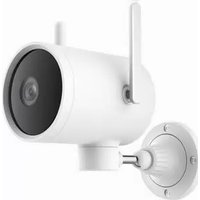
BW300 - Surveillance Camera Xiaomi - Free user manual and instructions
Find the device manual for free BW300 Xiaomi in PDF.


Pick your language and provide your email: we'll send you a specifically translated version.
| Product type | Surveillance camera |
| Brand | Xiaomi |
| Model | BW300 |
| Dimensions (L×W×H) | Approximately 70 × 70 × 120 mm |
| Weight | Approximately 200 g |
| Power supply | Power adapter 5V/1A (USB) |
| Video resolution | 1080p Full HD |
| Viewing angle | 130° |
| Night vision | Yes, up to 10 m |
| Motion detection | Yes, with alerts |
| Two-way audio | Yes, built-in microphone and speaker |
| Storage | microSD card up to 128 GB |
| Connectivity | Wi-Fi 802.11 b/g/n 2.4 GHz |
| Compatibility | Mi Home app (iOS/Android) |
| Installation | Indoor, on stand or flat surface |
| Operating temperature | -10°C to 50°C |
| Maintenance and cleaning | Clean with a soft, dry cloth |
| Safety | Do not expose to water or excessive humidity |
| Spare parts and repairability | Contact Xiaomi after-sales service |
| General information | 2-year warranty, domestic use |
Frequently Asked Questions - BW300 Xiaomi
How to install the Xiaomi BW300 camera?
Download the Mi Home app, create an account, add the device, and follow the on-screen instructions. Connect the camera to a power outlet and make sure Wi-Fi is enabled.
Is the BW300 camera compatible with Alexa or Google Home?
Yes, it is compatible with Amazon Alexa and Google Assistant via the Mi Home app.
What is the recording resolution of the BW300?
The camera records in 1080p Full HD with clear image quality, even at night.
Can I use a microSD card with the BW300?
Yes, you can insert a microSD card up to 128 GB for local recording.
How to activate motion detection?
In the Mi Home app, go to camera settings, enable motion detection, and set detection zones. You will receive alerts on your phone.
What to do if the camera does not connect to Wi-Fi?
Check that Wi-Fi is on 2.4 GHz, the password is correct, and the camera is close to the router. Reset the camera by holding the reset button for 5 seconds.
Is night vision in color?
No, night vision is in black and white with infrared LEDs. The range is about 10 meters.
How to reset the BW300 camera?
Use a paperclip to press the reset button on the back of the camera for about 5 seconds until you hear a beep. The camera will restart.
Can I view the camera remotely?
Yes, via the Mi Home app, you can view the live feed from anywhere with an internet connection.
How to clean the camera?
Use a soft, dry cloth to wipe the lens and housing. Avoid chemicals and do not immerse the camera in water.
User questions about BW300 Xiaomi
0 question about this device. Answer the ones you know or ask your own.
Ask a new question about this device
No questions yet. Be the first to ask one.
Download the instructions for your Surveillance Camera in PDF format for free! Find your manual BW300 - Xiaomi and take your electronic device back in hand. On this page are published all the documents necessary for the use of your device. BW300 by Xiaomi.
USER MANUAL BW300 Xiaomi


Manual assistant
Powered by Anthropic
Waiting for your message
Product information
Brand : Xiaomi
Model : BW300
Category : Surveillance Camera