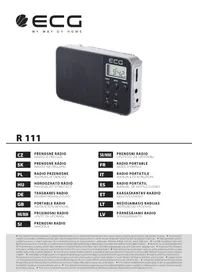
R 111 - Radio ECG - Free user manual and instructions
Find the device manual for free R 111 ECG in PDF.



| Product type | Clock radio with FM/AM tuner |
| Brand | ECG |
| Model | R 111 |
| Power supply | 2 AA 1.5V batteries or 3V 500mA AC adapter (not included) |
| Frequency ranges | FM 87.5–108 MHz, AM 522–1620 kHz |
| Antennas | FM: telescopic; AM: internal directional ferrite |
| Station memory | 40 presets (20 FM + 20 AM) |
| Display | LCD screen with clock (12/24h) |
| Search | Manual, automatic, and auto-scan with memory (SCAN) |
| Alarm function | By radio or buzzer, with snooze (10 min) and 1-hour duration |
| Sleep function | Sleep timer from 10 to 90 minutes |
| Connectors | 3.5mm headphone jack, DC IN jack |
| Volume control | Rotary knob |
| Maintenance | Clean with a soft dry cloth; avoid moisture and abrasive products |
| Safety | Double insulation (Class II), keep away from water, do not open |
| Included accessories | User manual |
Frequently Asked Questions - R 111 ECG
User questions about R 111 ECG
0 question about this device. Answer the ones you know or ask your own.
Ask a new question about this device
Download the instructions for your Radio in PDF format for free! Find your manual R 111 - ECG and take your electronic device back in hand. On this page are published all the documents necessary for the use of your device. R 111 by ECG.
USER MANUAL R 111 ECG
R 111
CZ
PŘENOSNÉ RÁDIO NÁVOD K OBSLUZE
SK
PRENOSNÉ RÁDIO NÁVOD NA OBSLUHU
PL
RADIO PRZENOŚNE INSTRUKCJA OBSŁUGI
HU
HORDOZHATÓ RÁDIÓ HASZNÁLATI ÚTMUTATÓ
DE
- Telescopic antenna
- LED display
- MEMO button
- BAND/ALARM button
- POWER button
- TUNE+ button
- TUNE-button
- M-button
- M+ button
- Battery compartment
- Volume control
- Headphones jack
- DC power connector (3V)
HR/BIH
- Teleskopska antena
- LCD zaslon
- Tipka MEMO
- Tipka BAND/ALARM
- Tipka POWER
- Tipka TUNE+
- Tipka TUNE-
- Tipka M-
- Tipka M+
- Pretinac za baterije
- Gumb za regulaciju glasnoće
- Utičnica za slušalice
- DC konektor napajanja (3V)
SI
- Teleskopska antena
- LED zaslon
- Tipka MEMO
- Tipka BAND/ALARM
- Tipka POWER
- Tipka TUNE+
-
Tipka TUNE-
-
Tipka M-
- Tipka M+
- Prostor za baterijo
- Upravljalnik glasnosti
- Vtičnica za priključitev slušalk
- Konektor napetosti DC (3 V)
SR/MNE
- Teleskopska antena
- LCD ekran
- Taster MEMO
- Taster BAND/ALARM
- Taster POWER
- Taster TUNE+
- Taster TUNE-
- Taster M-
- Tipka M+
- Odeljak za baterije
- Dugme za regulaciju jačine zvuka
- Utičnica za slušalice
- DC konektor za napajanje (3 V)
FR
The lightning symbol warns the user about dangerous voltage inside the device box, which could cause injury by shock upon coming into contact with the internal elements of the device.
CAUTION
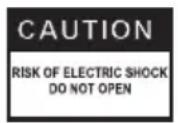
To reduce the risk of fire or electric shock, do not remove the cover of the device. Have a qualified service technician perform repairs on the device.

WARNING
The exclamation mark alerts the user to important operational instructions in the manual.

WARNING
The device, including accessories. should not be exposed to dripping or splashing water and objects, containing liquids should not be placed on it, e.g. vases. You will reduce the risk of electric shock or damage to the device.
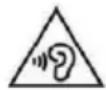
To prevent possible hearing damage, avoid prolonged listening at high volume.

Appliance Protection Class II with double insulation. This device may not be grounded.

Read carefully and keep for future use!
- Before plugging the device in and starting using it, please read this manual thoroughly and follow the provided instructions. Keep this manual for future reference.
- Follow all warnings on the product and in the documentation supplied with the appliance.
- Unplug the device before cleaning. Do not use liquid cleaners or spray cleaners for cleaning. Use wet cloth for cleaning.
- Use only accessories recommended by the manufacturer. Otherwise there is a risk of injury or damage to the device.
- Do not use the device near water and in wet locations such as near a pool, bathtub, kitchen sink, in a damp cellar, laundry room and so on. The device must not be exposed to dripping or splashing water, do not place containers filled with liquids on the device.
- Place the device on a horizontal, flat and firm surface with good ventilation. Do not cover the air vents. Doing so may damage the device by overheating. Do not place the device in a confined space with poor ventilation, for example, in glass cabinets or on tight shelves.
- The appliance should be powered only from a power sources indicated on the product label. If you are unsure of your power network parameters, consult your vendor or your electricity provider. In case of power supply from batteries, follow the instructions in the manual.
- The power cord should be led so as to avoid stepping on the cord or its excessive straining or pinching. Pay special attention to places where then cord exits from the appliance and close to the plug. If the device is not used for long periods, unplug the power cord. Unplug the power supply also during a thunderstorm to prevent damage by lightning.
- The electrical outlet has to be constantly accessible.
- Protect the device against infiltration of liquids or foreign objects and do not insert any object into the ventilation openings, with potentially hazardous contact with voltage inside the device.
- Do not open the device box. There are no elements inside that can be configured by the user. Have a qualified service technician perform repairs on the device.
- Do not expose batteries to excessive temperatures, e.g. direct sunlight, fire etc.
- Replace batteries only with batteries of the same type and with correct polarity. Otherwise there is a risk the system may explode.
- Do not expose the device to heat sources such as radiators, heating or other heat-producing appliances such as amplifiers.
- Changes or modifications not expressly approved by the responsible authority can lead to loss of authorization to use the device.
- Excessive sound pressure from earphones can cause hearing damage.
OPERATION
Turning the device on
- Set the device on a flat, stable surface, with controls easily accessible.
- Ensure adequate ventilation of the device.
Power (batteries):
- Open the cover of the battery compartment and insert two 2 (AA) batteries 1,5 V. Observe correct polarity of the batteries marked in the battery compartment.
- Close the cover of the battery compartment.
- If the device is not used for long periods, remove the batteries to prevent battery leakage.
- Battery life: If the sound from the radio is weak or distorted, or when it is difficult to read display of the device, replace the batteries with new ones.

CAUTION
- Do not expose batteries to excessive heat, such as in direct sunlight, near a fire, etc. There is danger of explosion.
- Do not combine together different types of batteries or new and old batteries.
- Do not throw batteries into normal household waste. Take the batteries to a designated collection place.
AC power supply
The device is equipped with a DC IN jack for connecting DC 3V supply 500 mA.
Plug the AC adapter (not supplied) into the wall outlet and the DC connector into the jack on the unit. Positive terminal of the adapter must be connected to the centre pin of the power socket. Unsuitable adapter (with negative voltage on the center contact of the DC connector) can cause damage to the device!
Headphones jack
Use headphones with s 3,5 mm connector. Connect the headphones connector to the headphones jack. When you connect headphones, the speaker of the device automatically shuts off.
Listening to the radio
- Switch the radio on by pressing the button POWER (5). The LCD display shows frequency.
- Press BAND/ALARM (4) to select the required bandwidth (FM/AM).
- Manually, automatically or using the memory function of MEMO tune to the desired station. The LCD display shows the frequency of the received station. See the section "Tuning".
- Adjust the antenna setting, see section "Antennae."
- Volume control (11) set to desired level.
- Press again POWER to switch off the radio, the display shows current time.
Note: The device remembers the radio station (AM or FM) tuned at the moment when the radio is turned off. When you turn the device on this station will be tuned.
Antennae
FM:
Extend the telescopic antenna and adjust its orientation so as to achieve the best station reception.
AM:
Sensitive rod ferrite antenna inside the device provides optimal reception of broadcasts on medium wave (MW). Rod antenna is directional, turning the radio can get a better reception of the tuned station.
Tuning
Turn on the radio and select the desired bandwidth. You can tune in the station using one of three methods: Manual tuning, Automatic tuning and Memory presets.
Channel Scan
When you press the button TUNE+ (6) or TUNE- (7) in the FM bandwidth the tuned frequency moves by 0,1 MHz. Repeat pressing the buttons (6) and (7) to tune in the required station.
In the AM bandwidth one tuning step is 9 kHz.
Auto-tune
Press and hold (2 seconds) TUNE+ (6) or TUNE- (7) and then release it. The automatic tuning function starts search for the nearest station with sufficiently strong signal. Repeat procedure until you find the required station.
Memory presets
You can store in the memory of the device up to 40 presets, 20 for each bandwidth, see section "Station preset". When you save the stations in memory you can just press buttons M+ (9) or M- (8) and the device tunes station on the next or previous memory position. The number of the selected preset appears in the left upper corner. Three seconds after the station is tuned in, the memory position indicator disappears.
Station preset
Manual storing of the presets
- Select the bandwidth and tune the required station.
- Press and hold for two seconds the button MEMO (3), the number of the memory position in the upper left corner starts flashing.
- Press M+ (9) or M- (8) to select the required memory position (0, 1, 2..., 19).
- Press briefly MEMO (3), the tuned station will be saved under the required preset number. If you do not press the button MEMO and will not perform any other action the number of the memory position will flash for three seconds and then the tuned station will be saved under that preset number in memory.
- By repeating this procedure you can save up to 20 favourite stations in the given bandwidth.
Automatic search with storing in memory
The radio can automatically search for all the stations in a given bandwidth range and store the first found 20 stations in memory. Proceed as follows.
- Select the bandwidth.
- Press MEMO (3) for more than 5 seconds. The indicator SCAN starts flashing on the LCD display and the radio starts searching the bandwidth from the lowest frequency to higher frequencies.
- First 20 radio stations will be stored in memory. If in a given bandwidth is found fewer than 20 stations, the remaining free memory positions are available for storing any stations with manual preset storage.
Device clock
Clock setting
- Press POWER (5) and turn off the device so that clock appears on the LCD.
- Before setting time make sure that the alarm clock function is not active (the alarm icon does not appear in the upper right corner of the display). If the alarm clock is active, turn off the alarm icon by pressing the button BAND/ALARM (4).
- Press and hold for 2 seconds the button MEMO (3), the indicator 12/24 HR on the LCD starts flashing. Use TUNE+ (6) or TUNE- (7) to select between 12 or 24 hour time formats. Press again MEMO.
-
The hour on the display starts flashing. Use TUNE+ (6) or TUNE- (7) to set the hour and press again the button MEMO.
-
The minutes start flashing on the display. Use TUNE+ (6) or TUNE- (7) to set the minutes and confirm by pressing the button MEMO.
- The clock is set and shows the correct time.
Setting alarm
- The alarm time can be set only when the device is switched off when the display shows the clock. The alarm clock indicator has to appear in the upper right corner of the display. If the alarm indicator does not appear, press the button BAND/ALARM (4). You will turn on this way the alarm mode indicated by an icon in the upper right corner.
- Press the button MEMO, the hour starts flashing. Use TUNE+ (6) or TUNE- (7) to set the hour and confirm by pressing the button MEMO.
- The minutes start flashing on the display. Use TUNE+ (6) or TUNE- (7) to set the minutes and confirm by pressing the button MEMO.
- The icon "rAd" (radio alarm) or "buZ" (buzzer alarm) appears. Use TUNE+ (6) or TUNE- (7) to choose between those two wake-up modes and again confirm by pressing the button MEMO.
- When the set time is reached, depending on the selected mode it starts automatically the radio or the buzzer.
- You can deactivate the alarm function before the set time is reached by pressing the button BAND/ALARM, the alarm clock icon disappears from the display.
- After setting the alarm you can either turn off the radio or turn it on and listen to the radio. Turning on the radio does not affect the alarm clock setting.
Radio alarm
- When you select the radio alarm and the set time is reached the radio automatically turns on.
Note: When the radio is on before the alarm time, the radio alarm automatically switches at the set time to buzzer alarm.
- The radio will play for 1 hour, then the it turns off automatically.
- You can turn off the radio any time by pressing the button POWER (5).
- If you do not deactivate the alarm by pressing BAND/ALARM, it will be activated the next day in the same time.
Buzzer alarm
- When you select the buzzer alarm and the set time is reached the buzzer is automatically activated.
Note: If the radio is on before the set time is reached the buzzer turns on automatically at the set time. - The buzzer will be active for 1 hour, then it turns off automatically.
- You can turn off the buzzer any time by pressing the button POWER (5).
- If you do not deactivate the alarm by pressing BAND/ALARM, it will be activated the next day in the same time.
Snooze function
- If you want to delay the alarm press at the alarm time the button BAND/ALARM (4). The alarm stops for 10 minutes and then starts again. The alarm icon in the display will flash during the snooze time.
- If you want to turn off the alarm entirely, press the button POWER (5). The alarm clock will be active the next day at the set time.
Sleep with music
The radio can be set so that after a set time (10–90 minutes) shuts down automatically.
- You can activate this function when the device is off. Press and hold the button POWER (5), the display shows the indicator "SLEEP" and "90", which means that the time until shut off is set to 90 minutes.
- You will shorten the interval to shut off each time you press the button POWER by 10 minutes. When you set the desired interval, the radio is turned on and after this time will automatically shut down.
- You can stop the countdown any time and turn off the device by pressing the button POWER (5).
MAINTENANCE AND CLEANING OF THE DEVICE
- Clean the surface of the device with soft, dry cloth. Prevent moisture penetrating the device.
- Do not use cleaning agents containing alcohol, ammonia or abrasive ingredients.
- Any stains may be cleaned with slightly damp cloth. Dry thoroughly after cleaning.
TECHNICAL DATA
Model R 111
Power Batteries: 2 × 1.5V (type AA, not included)
External power DC 3 V / 500 mA
Frequencies range FM 87.5–108 MHz
AM 522–1620 kHz
USE AND DISPOSAL OF WASTE
Wrapping paper and corrugated paperboard – deliver to scrapyard. Packing foil, PE bags, plastic elements – throw into plastic recycling containers.
DISPOSAL OF PRODUCTS AT THE END OF LIFETIME
Disposal of electric and electronic equipment (valid in EU member countries and other European countries with an implemented recycling system)
The represented symbol on the product or package means the product shall not be treated as domestic waste. Hand over the product to the specified location for recycling electric and electronic equipment. Prevent negative impacts on human health and the environment by properly recycling your product.
Recycling contributes to preserving natural resources. For more information on the recycling of this product, refer to your local authority, domestic waste processing organization or store, where you purchased the product.
This product complies with EU directive requirements on electromagnetic compatibility and electrical safety.
The instruction manual is available at website www.ecg-electro.eu. Changes in text and technical parameters reserved.
SIGURNOSNA UPOZORENJA

Oznaka visokog napona upozorenje je korisnicima da unutar uređaja postoje dijelovi pod visokim naponom koji mogu dotaknuti stijenku kućišta s unutrašnje strane i dovesti do električnog udara.
CAUTION
RISK OF ELECTRIC SHOCK DO NOT OPEN
UPOZORENJE
Alimentation Piles : 2× 1,5 V (type AA, non fournies)
Alimentation externe DC 3 V / 500 mA
PEČAT I POTPIS PRODAVATELJA
K+B Progres
PROIZVAJALEC ali DAJALEC GARANCIJE:
K+B Progres, a.s.; MBS: 61860123
250 69 Klíčany, Czech Rep. e-post: ECG@kbexpert.cz
LT
K+B Progres, a.s.
U Expertu 91 tel.: +420 272 122 111
250 69 Klíčany, Czech Rep. el. paštas: ECG@kbexpert.cz
LV
K+B Progres, a.s.
U Expertu 91 tel.: +420 272 122 111
250 69 Klíčany, Czech Rep. e-pasts: ECG@kbexpert.cz

- R 111
- HR/BIH
- SI
- SR/MNE
- FR
- CAUTION
- WARNING
- Read carefully and keep for future use!
- OPERATION
- Turning the device on
- Power (batteries):
- AC power supply
- Headphones jack
- Listening to the radio
- Antennae
- FM:
- AM:
- Tuning
- Channel Scan
- Auto-tune
- Memory presets
- Station preset
- Manual storing of the presets
- Automatic search with storing in memory
- Device clock
- Clock setting
- Setting alarm
- Radio alarm
- Buzzer alarm
- Snooze function
- Sleep with music
- MAINTENANCE AND CLEANING OF THE DEVICE
- TECHNICAL DATA
- USE AND DISPOSAL OF WASTE
- DISPOSAL OF PRODUCTS AT THE END OF LIFETIME
- SIGURNOSNA UPOZORENJA
- UPOZORENJE
- PEČAT I POTPIS PRODAVATELJA
- K+B Progres
- LT
- LV
Brand : ECG
Model : R 111
Category : Radio