
TDA70EYGB - Iron BOSCH - Free user manual and instructions
Find the device manual for free TDA70EYGB BOSCH in PDF.
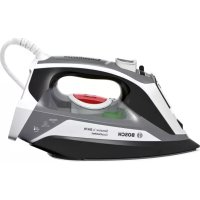


| Brand | Bosch |
| Model | TDA70EYGB |
| Product type | Steam iron |
| Power supply | 220-240 V, 50-60 Hz (estimated) |
| Power | Approximately 2400 W (estimated) |
| Water tank capacity | Approximately 300 ml (estimated) |
| Weight | Approximately 1.5 kg (estimated) |
| Dimensions (L x W x H) | Approximately 30 x 15 x 20 cm (estimated) |
| Main functions | i-Temp, SensorSecure, steam shot, spray, vertical ironing, self-clean, anti-calc, Calc'nClean function |
| Steam setting | Steam regulator (max, medium, off) |
| Soleplate | Smooth soleplate (material not specified) |
| Automatic shut-off | SensorSecure: heating stops when handle is released |
| Recommended water type | Tap water, can be mixed with distilled water (1:1 or 1:2 if water is very hard) |
| Maintenance and cleaning | Clean soleplate with damp cloth; descale with Calc'nClean function; use of descaling liquid recommended every 3 months |
| Safety | Hot surface (caution), do not leave unattended, do not direct steam at people or animals, unplug before filling or cleaning |
| Available accessories | Descaling liquid (TDZ1101), StoreProtect for hot storage (TDZ1750) |
| Use | Household only, max altitude 2000 m |
| Compliance | WEEE Directive 2012/19/EU |
Frequently Asked Questions - TDA70EYGB BOSCH
User questions about TDA70EYGB BOSCH
0 question about this device. Answer the ones you know or ask your own.
Ask a new question about this device
Download the instructions for your Iron in PDF format for free! Find your manual TDA70EYGB - BOSCH and take your electronic device back in hand. On this page are published all the documents necessary for the use of your device. TDA70EYGB by BOSCH.
USER MANUAL TDA70EYGB BOSCH
Register your new Bosch now: www.bosch-home.com/welcome

Sensixx'x DA70 EasyComfort

BOSCH
uk Operating Instructions
ru Operating Instructions
ro Operating Instructions
ar
kz Operating Instructions
| Index | |
| DEUTSCH6 | |
| ENGLISH14 | |
| FRANÇAISE22 | |
| ITALIANO30 | |
| NEDERLANDS38 | |
| DANSK46 | |
| NORSK54 | |
| SVENSKA62 | |
| SUOMI70 | |
| ESPÁÑOL78 | |
| PORTUGUES36 | |
| ΕΥΑΗNIKA | 94 |
| TÜRKçe | 102 |
| POLSKI | 110 |
| MAGYAR118 | |
| ΥΚΑΙΝΥΚΑ | 126 |
| ΡΥСΚΙΝ | 134 |
| ROMÁN | 142 |
| العربية | 157 |
| ΚΑ3AK 158 |
| KA3AK | SUOMI | SVENSKA | NORSK | DANSK | NEDERLANDS | ITALIANO | FRANÇAISE | ENGLISH | DEUTSCH |
| y##y | ROMAN | PYCCKME | YKPAHcBka | MAGYAR | POLSKI | TÜRKQE | EVAHNIKA | PORTUGUES | ESPANOL |
Thank you for buying the "Sensixx'x DA70 EasyComfort" steam iron from Bosch.
Carefully read through the operating instructions for the appliance and safeguard them for future reference.
You can download this manual from the local home pages of Bosch.
General safety instructions
The iron must not be left unattended while it is connected to the supply mains. - Remove the plug from the socket before filling the appliance with water or before pouring out the remaining water after use. The appliance must be used and placed on a stable surface. - When placed on its stand, make sure that the surface on which the stand is placed is stable. The iron should not be used if it has been dropped, if there are visible signs of damage or if it is leaking water. It must be checked by an authorized Technical Service Centre before it can be used again. With the aim of avoiding dangerous situations, any work or repair that the appliance may need, e.g. replacing a faulty mains cable, must only be carried out by qualified personnel from an Authorised Technical Service Centre. This appliance can be used by children aged from 8 years and above and persons with reduced physical, sensory or mental capabilities or lack of experience and knowledge if they have been given supervision or instruction concerning use of the appliance in a safe way and understand the hazards involved. Children shall not play with the appliance. Cleaning and user maintenance shall not be made by children without supervision.
- Keep the iron and its cord out of reach of children less than 8 years of age when it is energized or cooling down.
This appliance is designed only for household use up to 2000m above sea level.

CAUTION. Hot surface.
Surface is liable to get hot during use.
Important notices
- This appliance has been designed exclusively for domestic use and must not be used for industrial purposes.
- This appliance must be used only for the purposes for which it was designed, i.e. as an iron. Any other use will be considered improper and consequently dangerous. The manufacturer will not be held responsible for any damage arising from misuse or improper use.
- This appliance reaches high temperatures and produces steam during use, this could cause scalds or burns in case of improper use.
- Do not touch the soleplate! Hold the iron by its handle.
- Do not leave the supply cord hanging over the table or ironing board, to prevent the appliance from falling.
- Do not iron clothing while it is being worn!
- Never spray or aim the steam at persons or animals!
- Do not allow the power cable to come into contact with sharp edges or with the soleplate when it is hot.
- Never rest the iron in a horizontal position when the soleplate is hot. Rest it on its heel.
- Do not touch the appliance with wet hands when in operation.
- This appliance is to be connected and used in accordance with the information stated on its characteristics plate.
- This appliance must be connected to an earthed socket. If it is absolutely necessary
to use an extension cable, make sure that it is suitable for 16A and has a socket with an earth connection.
- In special environmental conditions slight instability may occur.
- The appliance must never be placed directly under the tap to fill the water tank.
- Unplug the appliance from the mains supply after each use, or if a fault is suspected.
- The electrical plug must not be removed from the socket by pulling the cable.
- Never immerse the iron in water or any other fluid.
- Do not leave the appliance exposed to weather conditions (rain, sun, frost, etc.).
Advice on disposal
Our goods come in optimised packaging. This basically consists in using noncontaminating materials which should be handed over to the local waste disposal service as secondary raw materials. Your local town council can give you information about how to dispose of obsolete appliances.
This appliance is labelled in accordance with European Directive 2012/19/EU concerning used electrical and electronic appliances (waste electrical and electronic
equipment - WEEE).
The guideline determines the framework for the return and recycling of used appliances as applicable throughout the EU.
Open the leaflet sides
Description
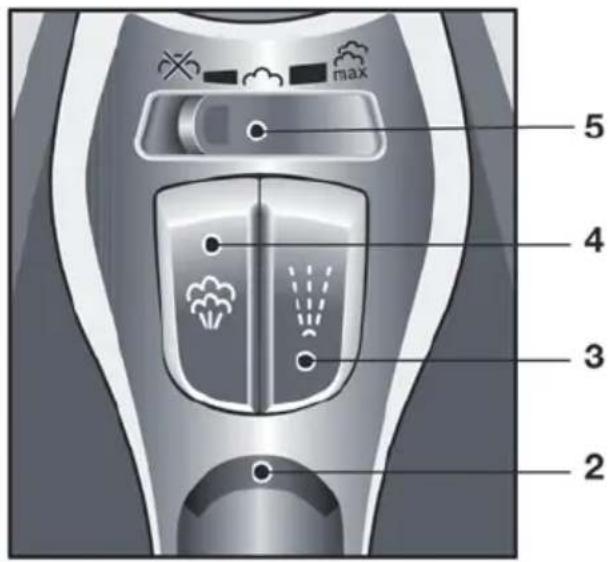
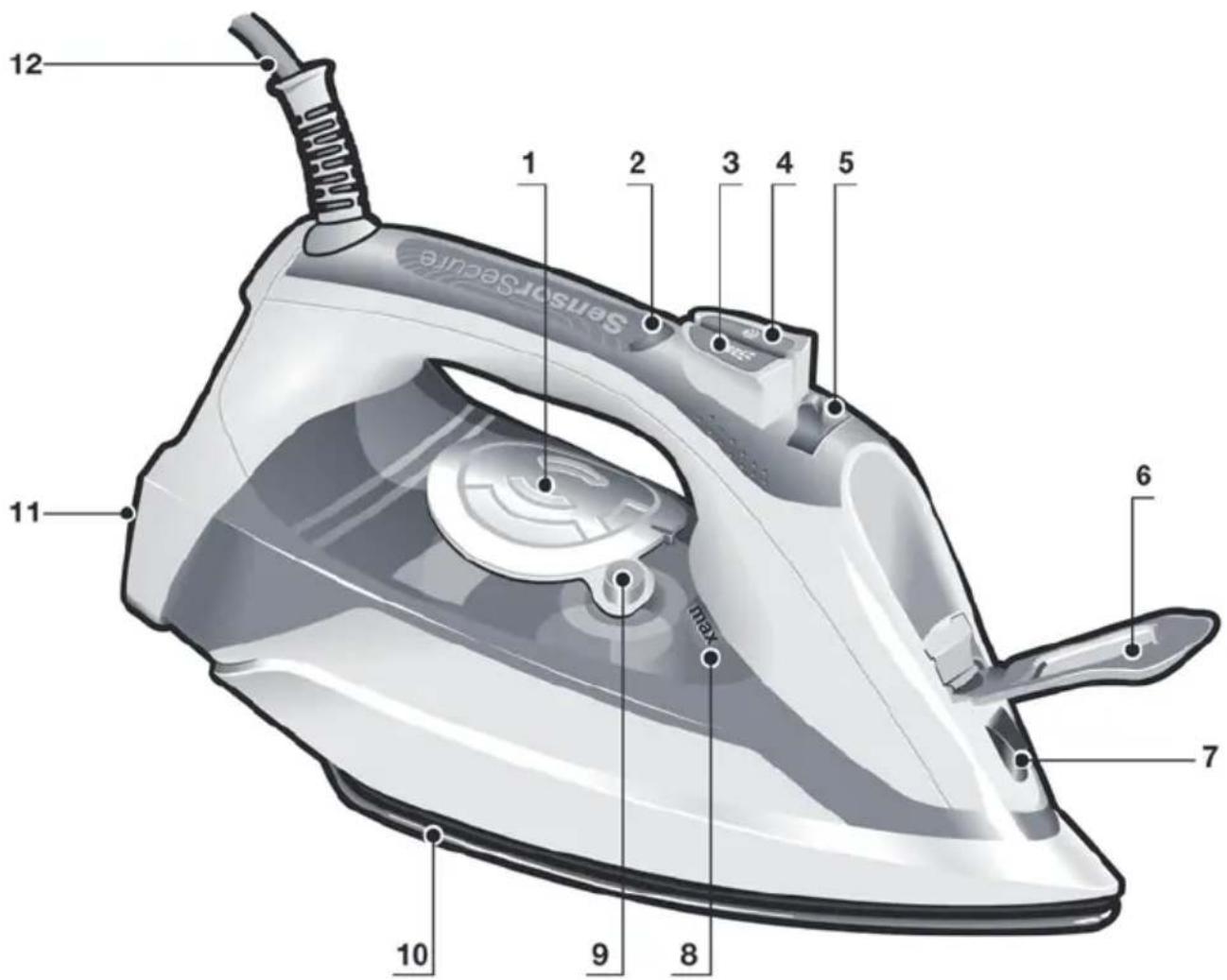
- "TempOK" indicator lamps
- "SensorSecure" indicator lamp
- Spray button
- Shot of steam button
- Steam regulator
- Water inlet lid
- Spray nozzle
- Level mark for maximum filling
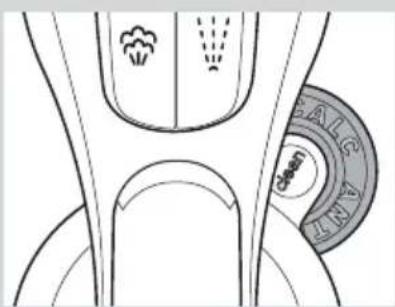
- "clean" button
- Soleplate
- Heel
- Power cable
Using your appliance
1. Filling the water tank
This appliance has been designed to use normal tap water.
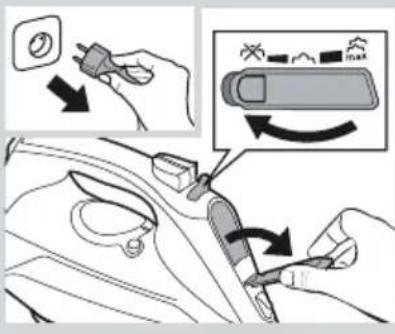
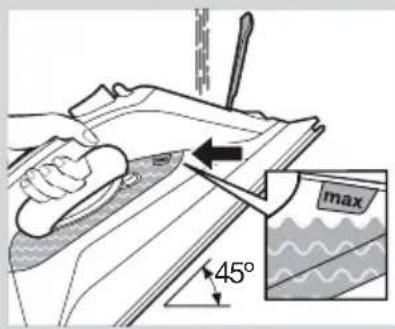
Important: Do not use additives! The addition of other liquids, such as perfume, vinegar, starch, condensation water from tumble dryers or from air conditioning systems or chemicals will damage the appliance. Any damage caused by the use of the aforementioned products will make the guarantee void!
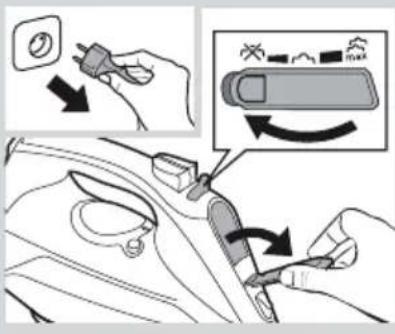
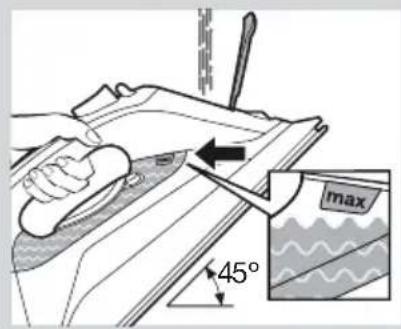
1 Unplug the iron from the mains. 2 Set the steam regulator (5) to the position 3 Open the water inlet lid (6). 4 Fill the water tank. Never fill beyond the level mark for maximum filling (8)! 5 Close the water inlet lid.
Tip: To prolong the optimum steam function, you may mix tap water with distilled water 1:1. If the tap water in your district is very hard, mix tap water with distilled water 1:2.
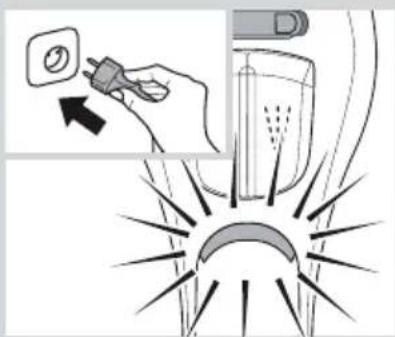
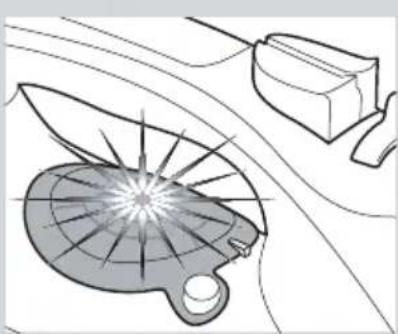

2. Heating
Remove any labels or protective covering from the soleplate (10).
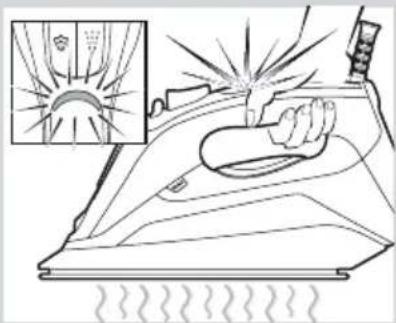
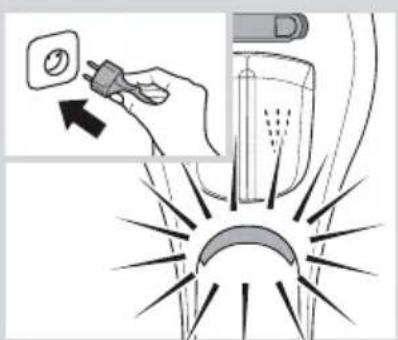
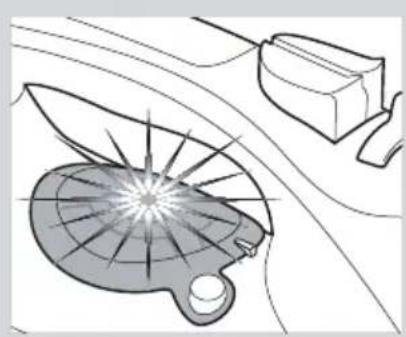
1 Plug in the iron. 2 "SensorSecure" function will be activated and the indicator lamp (2) will flash. 3 The "TempOK" indicator lamp (1) will flash, indicating that the iron is heating up. When the iron is ready to use, the indicator lamp will remain lit continuously.
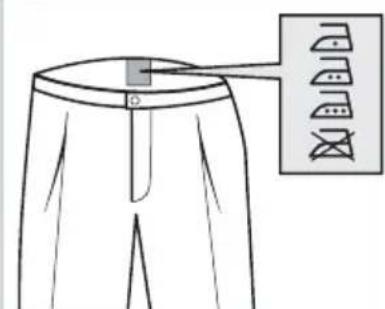
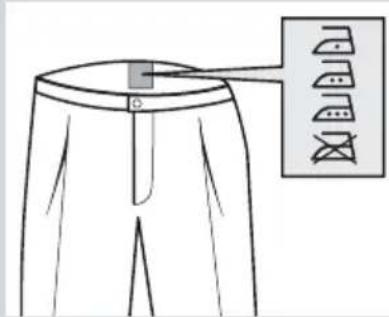
This technology sets an appropriate temperature, which is suitable for all fabrics that can be ironed (symbols
The "i-Temp" technology does not apply to fabrics that cannot be ironed (symbol).
Please check the garment care label for details or try ironing on a part of the fabric not visible normally.

3. "SensorSecure" function
After the initial heating, "SensorSecure" function switches off the iron when it is left unattended, thus increasing security and saving energy.
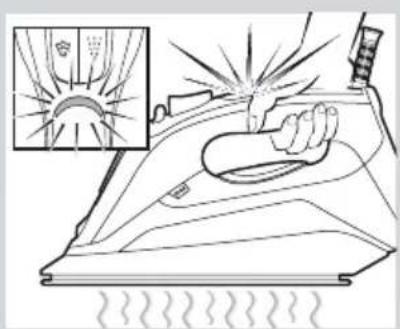
1 While the handle is gripped, the iron heats up. The "SensorSecure" indicator lamp (2) will remain lit continuously. 2 When the handle is released, the "SensorSecure" function is activated. The "SensorSecure" indicator lamp (2) will flash.

4. Steam settings
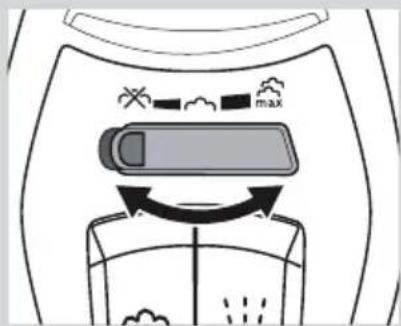
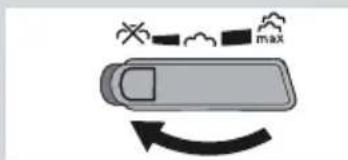
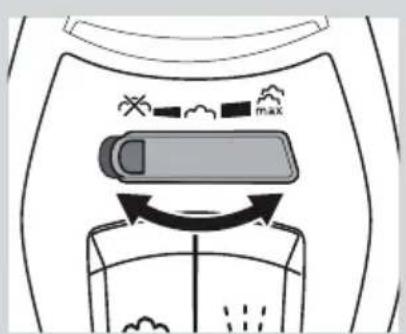
The steam regulator (5) is used to adjust the amount of steam produced when ironing.
| Steam setting Steam regulator | |
| High steam flow | max |
| Medium steam flow | |
| Dry ironing | |
Tip: Try to iron the fabrics while they are still damp after washing. Steam will be generated from the fabrics rather than the iron.

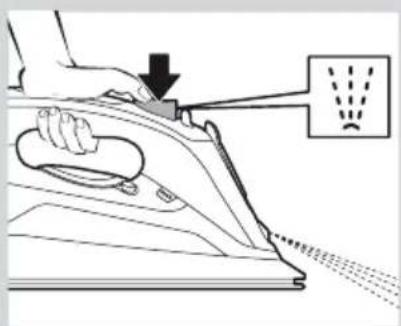
5. Shot of steam function
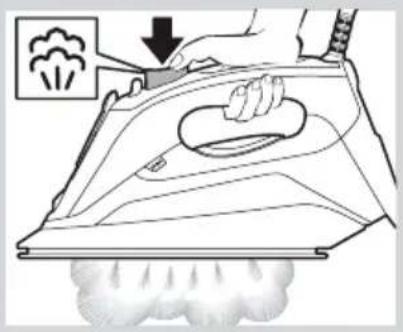
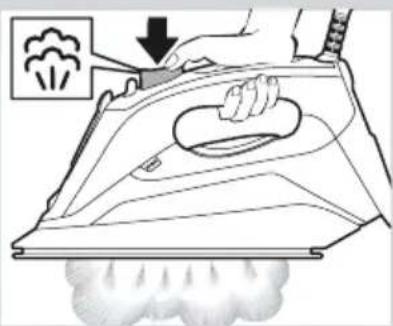
Shot of steam can be used to remove stubborn wrinkles or to press in a sharp crease or pleat.
1 Press the shot of steam button (4) repeatedly with intervals of at least 5 seconds.

6. Vertical steam
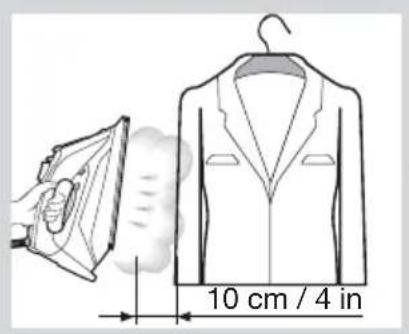
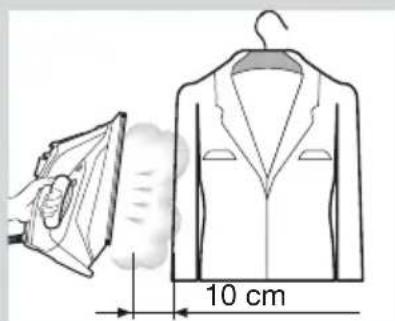
Vertical steam can be used to remove creases from hanging clothes, curtains etc.
1 Hang article of clothing on a clothes hanger. 2 Operate the iron in a vertical position at a distance of 10 cm / 4 in, and press the shot of steam button (4) repeatedly with pauses of at least 5 seconds.
Important: If the "SensorSecure" indicator lamp (2) flashes while ironing in a vertical position, it means that the handle is not properly gripped and the iron will cool down.
7. Spray
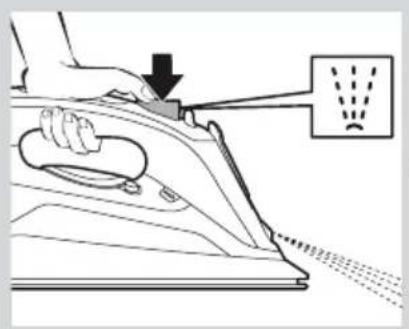
Spray can be used to remove stubborn wrinkles.
1 When ironing, press the spray button (3) and water will spray out of the spray nozzle (7) onto the garment.
Tip: Do not use the spray function with silk.
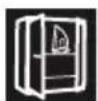
8. After ironing
1 Unplug the iron from the mains socket. 2 Empty the water tank.
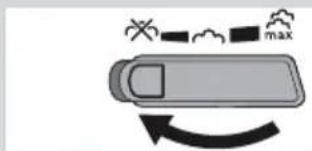
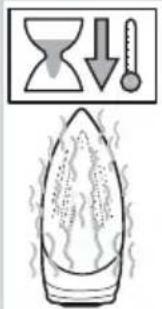
3 Switch the steam regulator (5) from to and back again several times (self-cleaning). Set the steam regulator to the position 4 Set the iron aside in a vertical position on its heel (11) to cool down. 5 Coil the power cable (12) loosely around the heel of the iron. Store the iron in an upright position.
Tip: For immediate storage of the iron, you may use the "StoreProtect" accessory (see "Accessories" section).


Cleaning & Maintenance

Attention! Risk of burns!
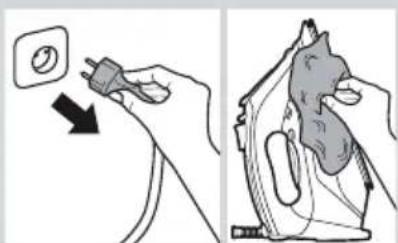
Always unplug the appliance from the mains supply before carrying out any cleaning or maintenance operation on it.
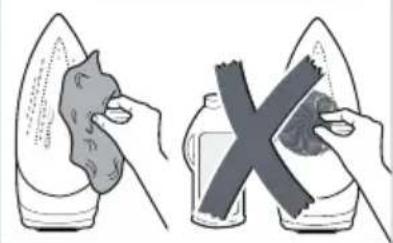
If the iron is only slightly soiled, pull out the plug and allow the soleplate (10) to cool down. Wipe the housing and the soleplate with a damp cotton cloth only. 2 To keep the soleplate smooth, you should avoid hard contact with metal objects. Never use a scouring pad or chemicals to clean the soleplate.

Descaling systems
A "self-clean"
Each time you use the steam regulator (5), the "self-clean" system cleans the mechanism of scale deposits.
B "anti-calc"
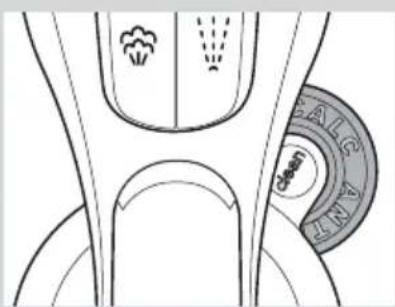
The "anti-calc" cartridge has been designed to reduce the build-up of scale produced during steam ironing.
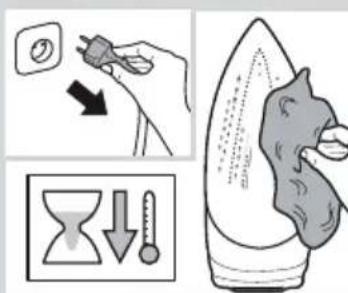
C "Calc'nClean" function
The "Calc'nClean" function helps to remove scale particles out of the steam chamber.
If the water in your area is very hard, you may use this function approximately every two weeks.
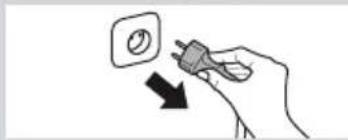
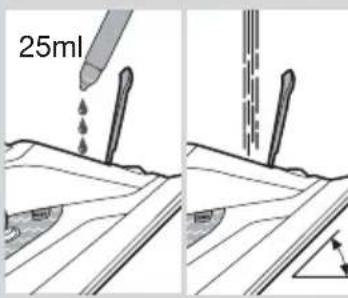
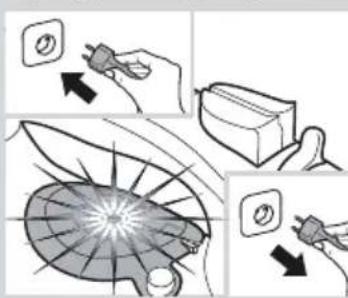
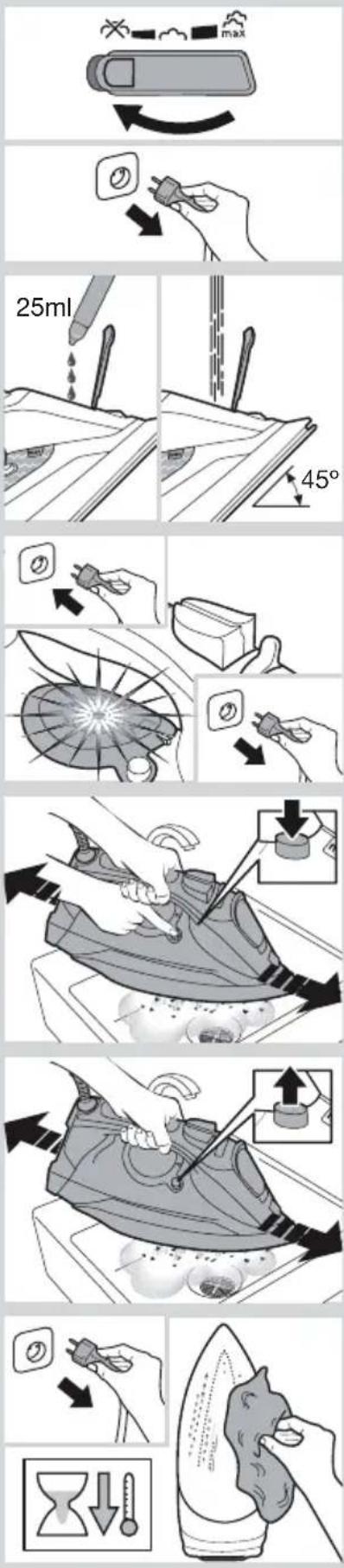
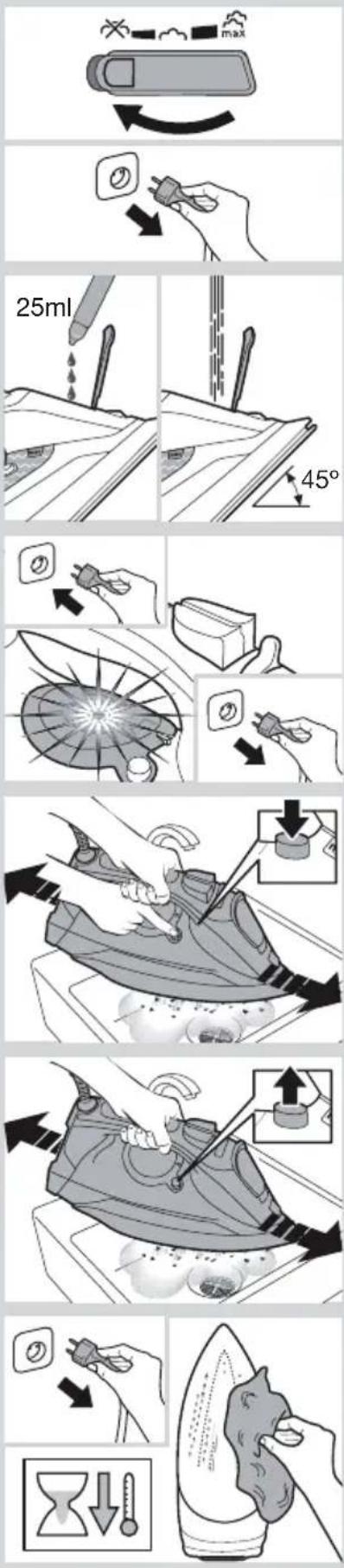
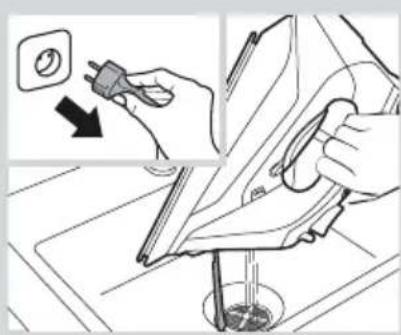
1 Set the steam regulator (5) to the position Unplug the iron from the mains socket.
Tip: For deep descending, it is recommended to use the descending liquid (see "Accessories" section). This procedure should be carried out every 3 months.
Pour a measure (25 ml) of the descaling fluid into the water tank.
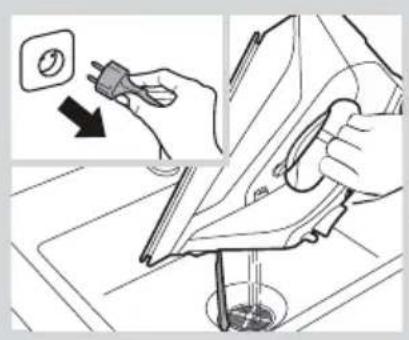
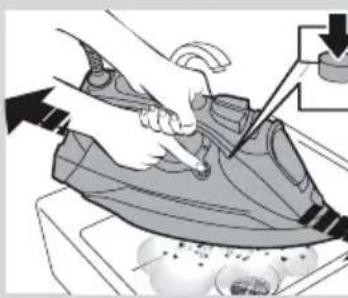
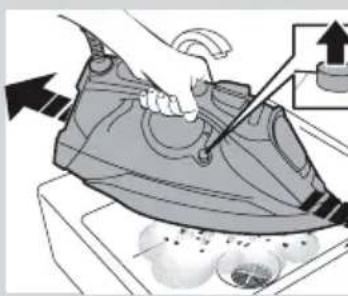
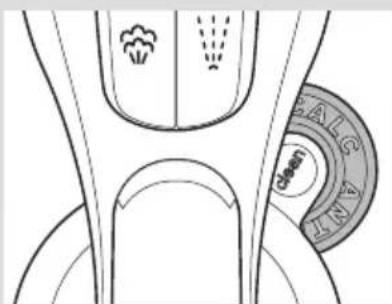
2 Fill the water tank up to the level mark for maximum filling. 3 Plug in the iron. 4 When the lamp "TempOK" (1) remains lit continuously, unplug the iron (very important!). 5 Hold the iron over a sink. 6 Press the "clean" button (9) and shake the iron back and forth keeping it in a horizontal position until approximately one third of the water capacity of the tank is evaporated. Boiling water and steam will come out, carrying scale or deposits that might be there. 7 Release the "clean" button, and gently shake the iron for some seconds. 8 Repeat steps 6 and 7. 9 Check carefully that the water tank is empty (very important!). 10 Plug the iron in and heat it up again until the remaining water has evaporated. 11 Unplug the iron and let the soleplate cool down. Wipe the soleplate with a damp cotton cloth only.
Accessories
The accessories may be purchased from the customer service or specialist shops.
| Descaling liquid "$storeProtect" | |
| For deep descaling of the steam iron. Contents: 4 bottles x 25 ml. | Enables an immediate and safe storage of the iron, even with a hot soleplate. |
| Name of the accessory: TDZ1101 Name | of the accessory: TDZ1750 |
| Accessory code: 00311715 Accessory code: 00575960 | |

Trouble shooting
| Problem Probable cause Solution | ||
| The iron does not heat up. | The "SensorSecure" function has been activated. The iron is set to stand-by. | Grip the handle of the iron to re-start it. |
| Water drips out of the soleplate when using the "shot of steam" function. | You have pressed the shot of steam button (4) repeatedly without waiting for 5 seconds between each press. | Wait 5 seconds between each press of the shot of steam button. |
| Steam does not come out. | Steam regulator (5) is set to position. | Set the steam regulator to a higher position. |
| Excessive dripping or steaming. | No proper closing of "clean" button (9). | Point the iron away from the ironing area. Actuate a few times the "clean" button. |
| Smoke comes out when connecting the iron for the first time. | This may be caused by the lubrication of some of the internal parts. | This is normal and will stop after a few minutes. |
| Deposits come out through the holes in the soleplate (10). | Traces of lime scale are coming out of the steam chamber. | Carry out a cleaning cycle (see "Calc'nClean function" section). |
If none of the above solves the problem, get in touch with an Authorised Technical Service.
A "self-clean" (zelfreiniging)
B "anti-calc" (ontkalking)
A self-clean, selvensing
Properties via a coupon
Appliances and devices are not disposed of with household waste. The correct disposal of the product at the end of its useful life is required to be handed over to the local collection point for recycling. For more information, contact your local authority or the store where you purchased the product.

This appliance bears the symbol of the European Directive 2012/19/EU regarding the use of electrical and electronic equipment (waste electrical and electronic equipment
WEEE)
The Directive applies throughout the EU and sets the framework for the return and recycling of used equipment.
Description
Recommended 3-in-1
The product is marked in accordance with the European Directive 2012/19/EC regarding electrical and electronic equipment, and you must dispose of it separately from household waste. You can obtain information about the correct disposal of old electrical appliances from your local waste disposal service.
Marked in accordance with the European Directive 2012/19/EC regarding electrical and electronic equipment, and you must dispose of it separately from household waste. You can obtain information about the correct disposal of old electrical appliances from your local waste disposal service.
Electrical and electronic equipment - WEEE).
This Directive sets the norms for the return and recycling of used electrical and electronic equipment throughout the EU.
Expand the components
Description of the device
- Temperature indicators
- Indicator «SensorSecure»
- Power button
- Steam burst button
- Regulator
- Steam selection lever
- Spray nozzle
- Maximum water level mark
- «Clean» button
10. Soleplate 11. Heel 12. Cord
Using the appliance
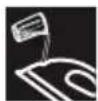
1. To get steam bursts, press the steam burst button (4) with intervals of no less than 5 seconds.

1. Place the item to be ironed on the ironing board. 2. Hold the iron vertically at a distance of 10 cm from the item, press the steam burst button (4) with intervals of no less than 5 seconds.
Important: When using the iron in a vertical position, the «SensorSecure» indicator (2) may light up, which means that you are holding the iron in an incorrect way; in this case, the iron will lose temperature. Hold the iron in the correct way so that the indicator lights up with a steady light.

A «self-clean»
Each time you use the steam regulator (5), the self-cleaning system will rinse the mechanism against scale.
B «anti-calc»
The «anti-calc» cartridge is designed to replace the scale during ironing.
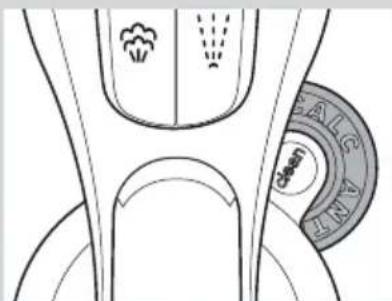
C Function «Calc'nClean»
Troubleshooting
- Do not touch the soleplate of the iron! Hold the iron by the handle. Make sure the power cord does not hang over the edge of the ironing board to prevent possible falls of the appliance.
- Do not iron clothes that are still on a person!
- Never spray water or direct steam at people or animals!
Do not allow the power cord to come into contact with sharp objects or with the hot soleplate of the iron. - Never place the iron horizontally. The iron should be placed vertically, on its heel. Do not touch the operating appliance with wet hands. - Before plugging the appliance into the mains, make sure that the voltage in the mains corresponds to the value indicated on the rating plate with the technical characteristics of the appliance.
This appliance must be connected to an earthed socket. If using an extension cord, make sure it is equipped with an earthed plug. - Under certain environmental conditions, minor interruptions in the operation of this appliance are possible. - The appliance should never be placed under a water tap to fill it with water. - If you suspect a malfunction, immediately disconnect the appliance from the mains. Also always disconnect it from the mains after each use. The plug of the appliance should not be pulled out of the socket by the power cord. Do not immerse the iron in water or any other liquid. Do not leave the appliance exposed to weather conditions (rain, sunlight, frost, etc.).
Waste disposal
The packaging of our products is carefully designed. It mainly consists of materials that can be recycled, which can be taken to your local waste collection service. Information on how to dispose of the used electrical appliance can be obtained from your local authorities.
Scale removal systems
A "self-clean"
Each time you use the steam regulator (5), the "self-clean" system automatically cleans the appliance from limescale deposits.
B "anti-calc"
The "anti-calc" cartridge is designed to reduce limescale formation when ironing with steam.
C The "Calc'nClean" function
The "Calc'nClean" function helps remove scale particles from the steam chamber.
If the water in your region is very hard, you can use this function approximately once every two weeks, without waiting.
1 Set the steam regulator (5) to the off position and unplug the iron from the electrical outlet.

Tip: For effective scale removal, it is recommended to use a descaling liquid (additional information is provided in the "Accessories" section). This procedure must be performed every 3 months. Pour two cups of water containing the contents of one bottle of descaling liquid (25 ml) into the water tank. 2 Fill the tank with water up to the maximum level mark. 3 Plug the iron into the electrical outlet. 4 When the "TempOK" indicator light (1) lights up with a steady light, unplug the iron from the electrical outlet (this is very important!). 5 Hold the iron over a sink. 6 Press the "clean" button (9) and, while holding it, shake the iron, moving it horizontally back and forth, until about a third of the water in the tank has evaporated. Boiling water and steam will come out of the soleplate, removing any scale and deposits. 7 Release the "clean" button and gently shake the iron for a few seconds. 8 Repeat the actions described in steps 6 and 7. 9 Make sure the water tank is empty (very important!). 10 Plug the iron into the electrical outlet and heat it again until the remaining water has completely evaporated. 11 Unplug the iron from the electrical outlet and let the soleplate cool down. Wipe the soleplate with a damp cloth (do not use other materials).
Accessories
Additional accessories can be purchased at a service center or in specialized stores.
5


.6

Sll (2) "SensorSecure" 100000000000000000000000000000000000000000000000000000
7.

.
(3)(7)

y
8

.1

i-Temp" 1j j
"SensorSecure"
"SensorSecure" 150 w y jy 150 150 150 150 150 150 150 150 150

"SensorSecure" (2) "SensorSecure"
Jg.4

(5)j
ailll aaiall lglal 1gaaaiy
∴ a i = 1/2( a i - 1)
aol gll lgl jua aill
EU/2012/19
∴ S ΔOBC = S ΔCOD + S ΔBOC - S ΔBOC
.(WEEE)
eJusy plll jbl 1
Jgaa gLa Jyjdi ole! g aaiuall jzj
1
aale 1
1 1 1
By pressing the "self-clean" button, the iron's self-cleaning mechanism is activated.
B "anti-calc"
The "anti-calc" cartridge reduces the build-up of limescale during ironing.
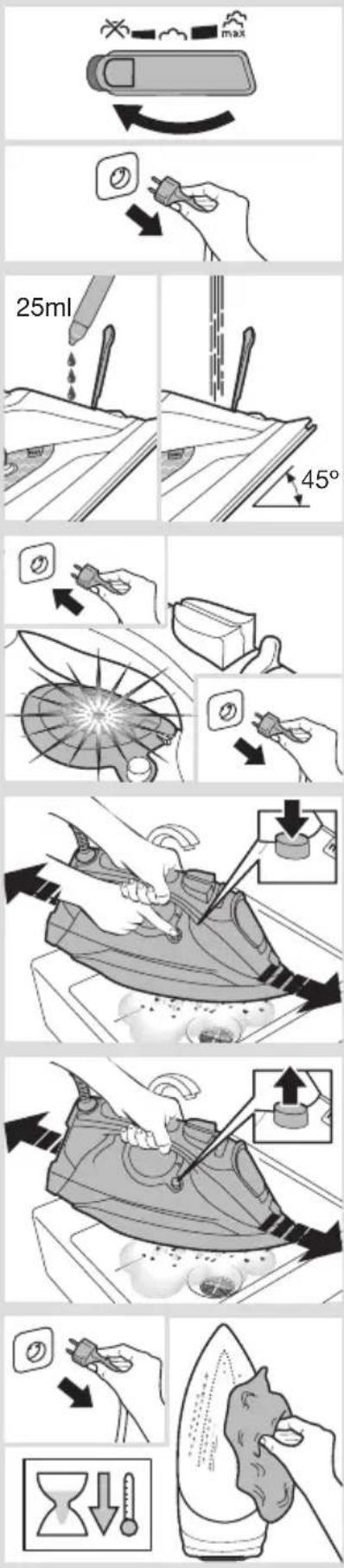
C "Calc'nClean" function
The "Calc'nClean" function helps remove limescale particles from the steam chamber. If the water in your iron needs to be replaced, this function can be used once every two weeks. 1 Press the iron's power button. Unplug the iron from the socket. For a thorough cleaning, use the cleaning solution recommended for irons (see "Descaling" section). Repeat this procedure every 2 months. Pour the cleaning solution (25ml) into the water tank. 2 Fill the water tank up to the maximum level mark. 3 Plug the iron into the socket. 4 While the "TempOK" (1) indicator light is on, unplug the iron (important!). 5 Place the iron on a stable surface. 6 Press the "clean" button (9) and hold it until the water in the tank is completely drained, then release. The limescale deposits will be flushed out with the water. 7 Release the "clean" button and after a few seconds, press it again. 8 Repeat steps 6 and 7. 9 Check that the water tank is empty (important!). 10 Reconnect the iron and rinse it with the remaining water. 11 Unplug the iron and empty the water tank. Wipe the soleplate only with a damp cloth.
Descaling
Descaling cartridges can be purchased from service centers or authorized dealers.
| Касты Тазалay Сунытыfы | StoreProtect |
| Буны утikten Касты Терен Тазалayfa арhalган. Кураздостары: 4 бөтөнг eх 25 мл | Tinti tabaны bICTbIK күдө boлган кеши дe утikт dipeу көнө kayinci3 сakтayfa MUMkɪndɪk берedi. |
| Косыша Кураздын aтayы: TDZ1101 КсьIMша Кураздын aтayы: TDZ1750 | |
| Косыша Кураздын ковы: 00311715 КсьIMша Кураздын ковы: 00575960 | |

| Mосeл eМумкiн ce6e6i | шeшim | |
| Yтik кызбайды. "SensorSecure" Функця белсенидіп. Yтik КУТу рекимие opнатылган. | Yтikті кайта кosity сюн онын ТуTKасынан устаны.3. | |
| "shot of steam" Функциясын пайдалиган кеadingу су tabаннан aгады. | СiЗ Шерту apалыfcында 5 секунд КУТпecтен, by сокьсынын ТУМecin (4) бipнese мэртубылб. | Бу сokьсынын ТУМecin ор басу apалыfcында 5 секунд КУТиig. |
| Бушikпай жатыр. | Бу ретTERiш (5) KUйие opнатылган. | Бу ретTERiшжогарырak КУИRE opнатылg.3. |
| Сydын ладпөн тьс Көн оглын hemece буга aiналуы. | "clean" ТУМechi (9) дурьс жабылмäды. | Yтikті утікту ai'maftынан щлшak Коьыны.3. "clean" TУМechi бipнese petбасыл.3. |
| Алгаш рет косkan Кеadingу утікten Tутін шылды. | Бул кeьбip iшki бөлшектeredi. maйлayынан boлуы Мумкiн. | Бул калыntы ожafдай кэн бipнese миHTТан кeIN ТOKтaiл.3. |
| Сydын түнбалары Утіктін таşанындагы (10) tecikтep apкылы шылды. | Каçън iздeti 6у камерасы apкылышыfcын катур. | Тазалay ai'HalmbiH opbɪнданыз ("Calc'nClean Функциясы" Бәліmін караныз). |
If the solutions provided above do not help, contact a qualified technical service center.


- GENERAL SAFETY INSTRUCTIONS
- CAUTION. HOT SURFACE
- IMPORTANT NOTICES
- ADVICE ON DISPOSAL
- DESCRIPTION
- USING YOUR APPLIANCE
- FILLING THE WATER TANK
- HEATING
- SENSORSECURE" FUNCTION
- STEAM SETTINGS
- SHOT OF STEAM FUNCTION
- VERTICAL STEAM
- SPRAY
- AFTER IRONING
- CLEANING & MAINTENANCE
- ATTENTION! RISK OF BURNS
- DESCALING SYSTEMS
- A "SELF-CLEAN
- B "ANTI-CALC
- C "CALC'NCLEAN" FUNCTION
- ACCESSORIES
- TROUBLE SHOOTING
- A "SELF-CLEAN" (ZELFREINIGING)
- B "ANTI-CALC" (ONTKALKING)
- A SELF-CLEAN, SELVENSING
- PROPERTIES VIA A COUPON
- RECOMMENDED 3-IN
- DESCRIPTION OF THE DEVICE
- USING THE APPLIANCE
- A «SELF-CLEAN
- B «ANTI-CALC
- C FUNCTION «CALC'NCLEAN
- TROUBLESHOOTING
- WASTE DISPOSAL
- SCALE REMOVAL SYSTEMS
- C THE "CALC'NCLEAN" FUNCTION
- SENSORSECURE
- JG
- AALE
- DESCALING
Brand : BOSCH
Model : TDA70EYGB
Category : Iron