EasyManual
Bravia KD43XF8796 - TV SONY - Free user manual and instructions
Find the device manual for free Bravia KD43XF8796 SONY in PDF.


User questions about Bravia KD43XF8796 SONY
0 question about this device. Answer the ones you know or ask your own.
Ask a new question about this device
Download the instructions for your TV in PDF format for free! Find your manual Bravia KD43XF8796 - SONY and take your electronic device back in hand. On this page are published all the documents necessary for the use of your device. Bravia KD43XF8796 by SONY.
USER MANUAL Bravia KD43XF8796 SONY
Parts and Controls 9
Controls and Indicators 9
Using Remote Control 10
Remote Control Parts Description. 10
Connection Diagram 12
Installing the TV to the Wall 14
Using the optional Wall-Mount Bracket . . . 14
KD-85/75XF85xx only. 15
Troubleshooting. 18
Troubles and Solutions. 18
Specifications 19
Internet Connection and Data Privacy
This product connects to the internet during initial setup as soon as a network is connected in order to confirm internet connection, and later to configure the Home screen. Your IP address is used in these and all other internet connections. If you do not want your IP address be used at all, do not set-up the wireless internet function and do not connect an internet cable. Please refer to the privacy information presented in the set-up screens for further details of internet connections.
Introduction
Thank you for choosing this Sony product.
Before operating the TV, please read this manual thoroughly and retain it for future reference.
Note
Before operating the TV, please read the "Safety Information" (page 3).
- Images and illustrations used in the Setup Guide and this manual are for reference only and may differ from the actual product.
- The "xx" that appears in the model name corresponds to a numeric digit, related to design, colour or TV system.
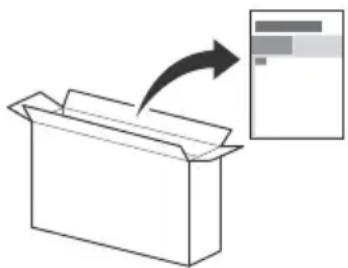
Attaching the Table-Top Stand to the TV
Refer to the Setup Guide on top of the cushion.
Help
Find more troubleshooting and other useful information directly from your TV. Press HELP on the remote control to display a list of topics, or to search by keyword.
Help Guide (Manual)
For more detailed information, select [Help Guide] from the Help menu on your TV. You can also check the Help Guide from your PC or smartphone (information provided on the back cover).
Location of the identification label
Labels for the TV Model No., Production Date (year/month) and Power Supply rating are located on the rear of the TV or package.
For models with supplied mains adaptor:
Labels for the mains adaptor Model No. and Serial No. are located on the bottom of the mains adaptor.
WARNING
TO PREVENT THE
SPREAD OF FIRE, KEEP
CANDLES OR OTHER OPEN FLAMES AWAY FROM THIS PRODUCT AT ALL TIMES.

NOTICE FOR CUSTOMERS IN THE UNITED KINGDOM
A moulded plug complying with BS1363 is fitted to this equipment for your safety and convenience.
Should the fuse in the plug supplied need to be replaced with the same rating of fuse approved by ASTA or BSI to BS 1362 (i.e., marked with or) must be used.
If the plug supplied with this equipment has a detachable fuse cover, be sure to attach the fuse cover after you change the fuse. Never use the plug without the fuse cover. If you should lose the fuse cover, please contact your nearest Sony service station.
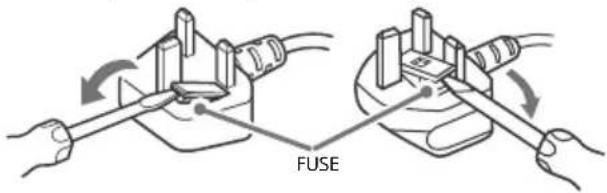
How to replace the fuse
Open the fuse compartment with a blade screwdriver, and replace the fuse.
Please refer to the illustration that actually equipped with the product.
IMPORTANT NOTICE
This product has been manufactured by or on behalf of Sony Visual Products Inc.
EU Importer: Sony Europe Limited.
Inquiries to the EU Importer or related to product compliance in Europe should be sent to the manufacturer's authorized representative, Sony Belgium, bijkantoor van Sony Europe Limited, Da Vincilaan 7-D1, 1935 Zaventem, Belgium.
Notice for Radio Equipment

Hereby, Sony Visual Products Inc. declares that the radio equipment types KD-85XF8596, KD-75XF8596,
KD-65XF8796, KD-65XF8599, KD-65XF8596, KD-65XF8588, KD-65XF8577, KD-65XF8505, KD-55XF8796, KD-55XF8599, KD-55XF8596, KD-55XF8588, KD-55XF8577, KD-55XF8505, KD-49XF8796, KD-49XF8599, KD-49XF8596, KD-49XF8588, KD-49XF8577, KD-49XF8505, KD-43XF8796, KD-43XF8599, KD-43XF8596, KD-43XF8588, KD-43XF8577, KD-43XF8505 are in compliance with Directive 2014/53/EU. The full text of the EU declaration of conformity is available at the following internet address: http://www.compliance.sony.de/
This radio equipment can be operated in the EU without infringing applicable requirements on the use of radio spectrum. Notice for customers: the following information is only applicable to equipment sold in countries applying EU directives.
TV wireless system may be operated in following countries: AT, BE, HR, CY, CZ, DK, EE, FI, FR, DE, EL, HU, IE, IT, LV, LT, LU, MT, NL, PL, PT, SK, SI, ES, SE, UK, IS, LI, NO, CH, BG, RO, TR, AL, BA, MK, MD, RS, ME, Kosovo
This equipment can be operated in other non-European countries.
Safety Information
WARNING
Caution
Risk of explosion if the battery is replaced by an incorrect type. Batteries must not be exposed to excessive heat such as sunshine, fire or the like or extremely low air pressure that can result in an explosion or leakage of flammable liquid or gas.
Stability Hazard
The television set may fall, causing serious personal injury or death. Never place a television set in an unstable location. A television set may fall, causing serious personal injury or death. Many injuries, particularly to children, can be avoided by taking simple precautions such as:
- Using cabinets or stands recommended by the manufacturer of the television set.
- Only using furniture that can safely support the television set.
- Ensuring the television set is not overhanging the edge of the supporting furniture.
- Not placing the television set on tall furniture (for example, cupboards or bookcases) without anchoring both the furniture and the television set to a suitable support.
- Not placing the television set on cloth or other materials that may be located between the television set and supporting furniture.
- Educating children about the dangers of climbing on furniture to reach the television set or its controls. If your existing television set is being retained and relocated, the same considerations as above should be applied.
Installation/Set-up
Install and use the TV set in accordance with the instructions below in order to avoid any risk of fire, electric shock or damage and/or injuries.
Apparatus connected to the protective earthing of the building installation through the mains connection or through other apparatus with a connection to protective earthing - and to a television distribution system using coaxial cable, may in some circumstances create a fire hazard. Connection to a television distribution system therefore has to be provided through a device providing electrical isolation below a certain frequency range (galvanic isolator, see EN 60728-11).
Installation
- The TV set should be installed near an easily accessible mains socket.
- Place the TV on a stable, level surface to prevent it from falling over and causing personal injury or property damage.
Install the TV where it cannot be pulled, pushed, or knocked over. - Install the TV so that the TV's Table-Top Stand does not protrude out from the TV stand (not supplied). If the Table-Top Stand protrudes out from the TV stand, it may cause TV set to topple over, fall down, and cause personal injury or damage to the TV.
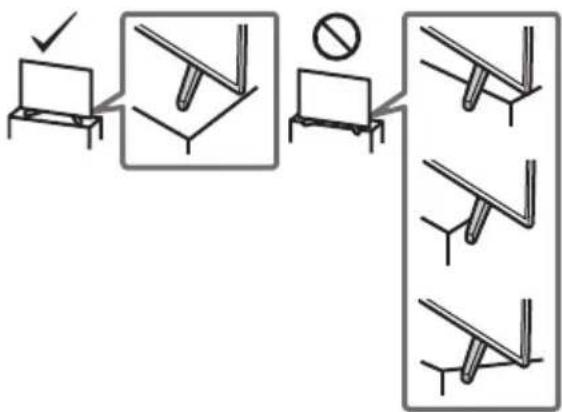
-
Only qualified service personnel should carry out wall-mount installations.
-
For safety reasons, it is strongly recommended that you use Sony accessories, including:
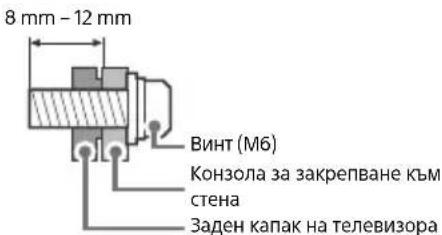
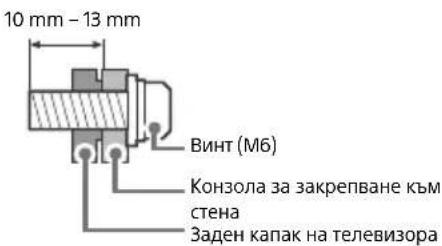
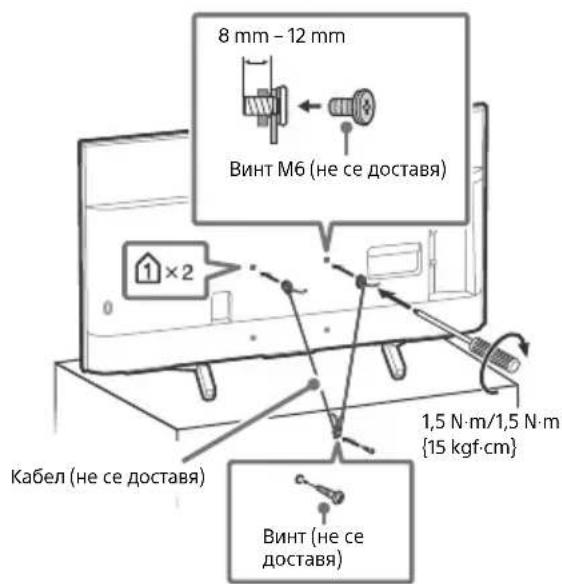
Wall-Mount Bracket SU-WL450 (Except KD-85/75XF85xx) - Be sure to use the screws supplied with the Wall-Mount Bracket when attaching the Wall-Mount Bracket to the TV set. The supplied screws are designed as indicated by illustration when measured from the attaching surface of the Wall-Mount Bracket. The diameter and length of the screws differ depending on the Wall-Mount Bracket model. Use of screws other than those supplied may result in internal damage to the TV set or cause it to fall, etc.
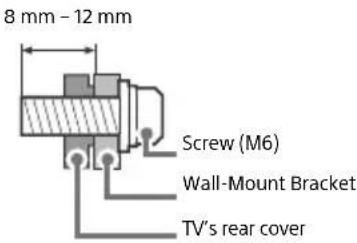
KD-85/49/43XF85xx, KD-49/43XF87xx
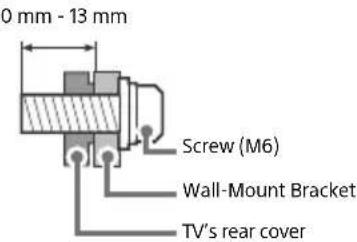
KD-75/65/55XF85xx, KD-65/55XF87xx
Transporting
- Before transporting the TV set, disconnect all cables.
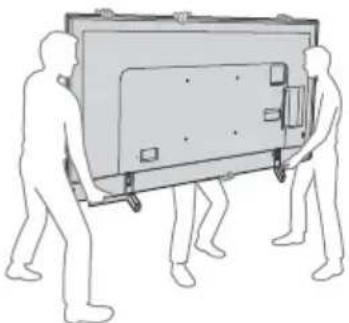
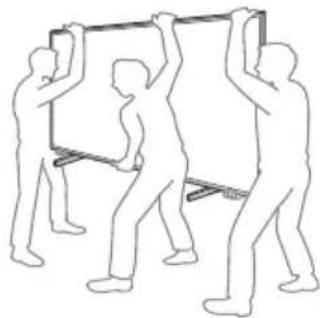
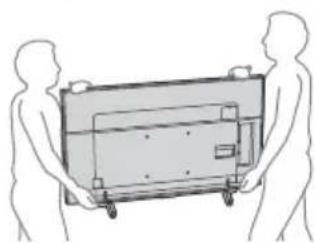
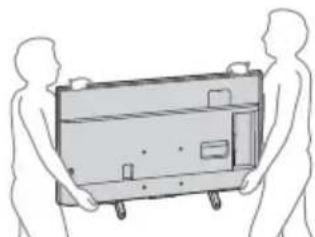
- Two or more people (three or more people for KD-85XF85xx) are needed to transport a large TV set.
- When transporting the TV set by hand, hold it as shown below. Do not put stress on the LCD panel and the frame around the screen.
- When lifting or moving the TV set, hold it firmly from the bottom.
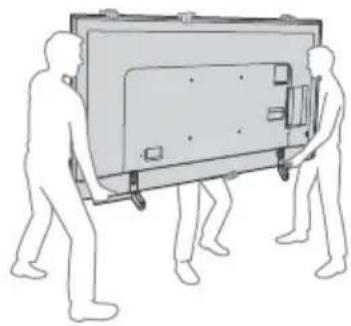
KD-85XF85xx
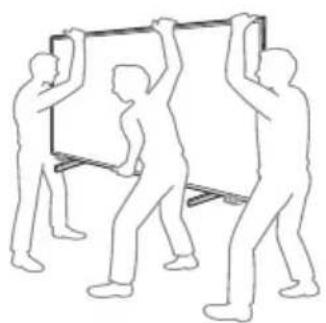
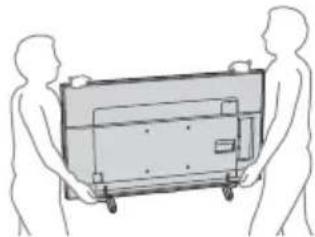
KD-75/65/55XF85xx, KD-65/55XF87xx
KD-49/43XF87xx, KD-49/43XF85xx
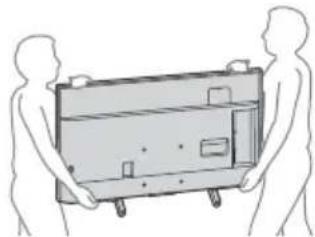
- When transporting the TV set, do not subject it to jolts or excessive vibration.
- When transporting the TV set for repairs or when moving, pack it using the original carton and packing material.
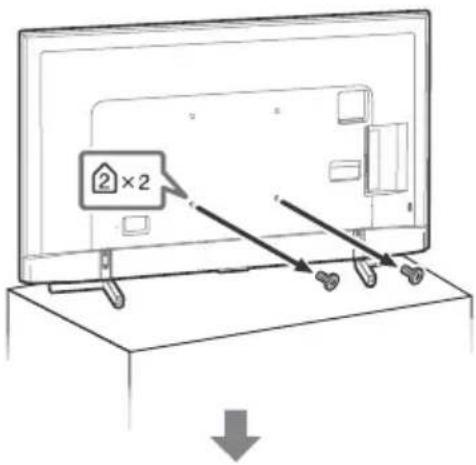
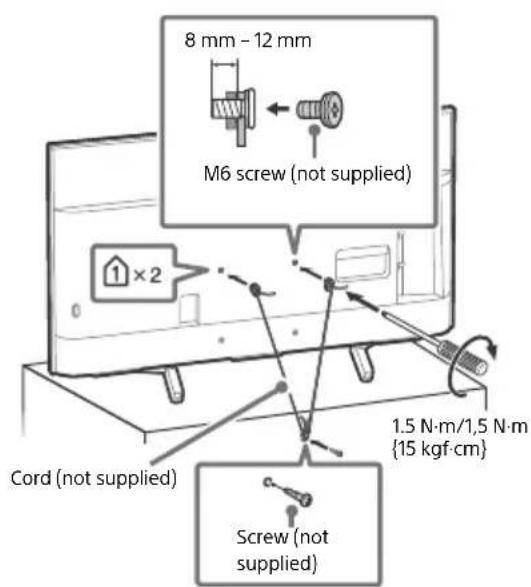
Topple prevention
KD-85XF85xx
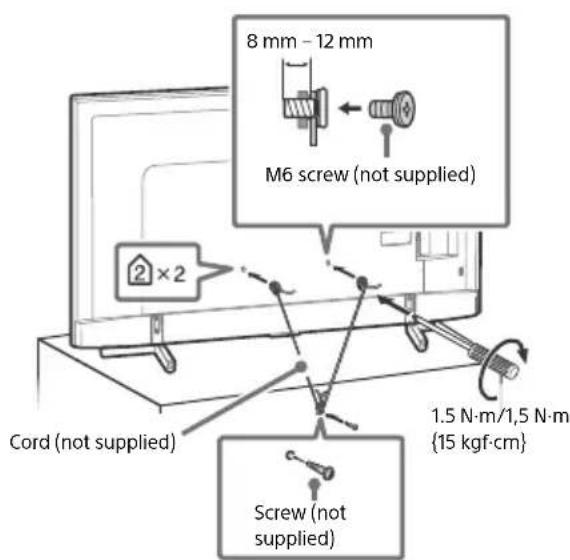
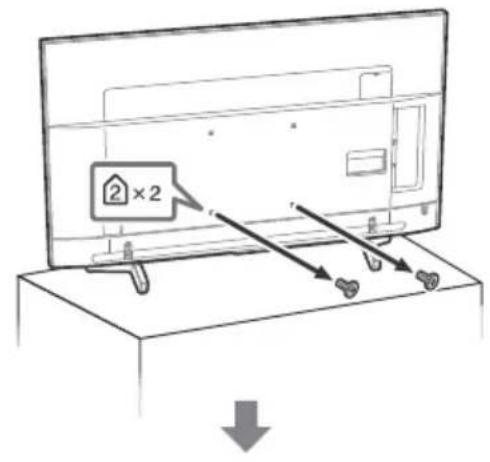
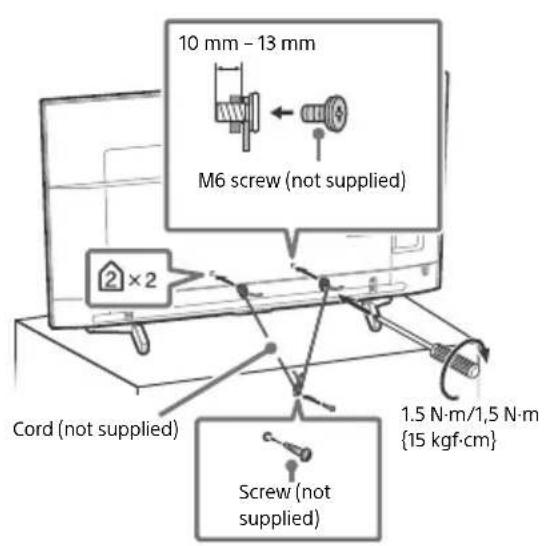
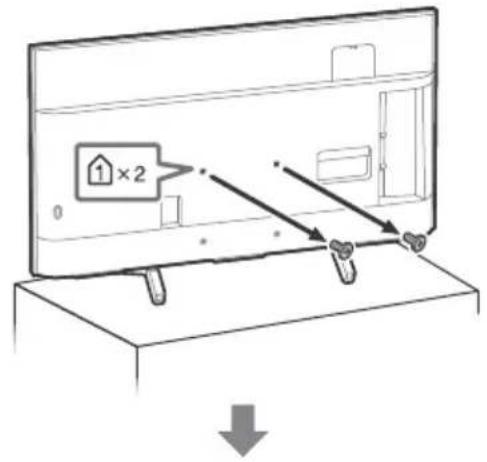
Ventilation
- Never cover the ventilation holes or insert anything in the cabinet.
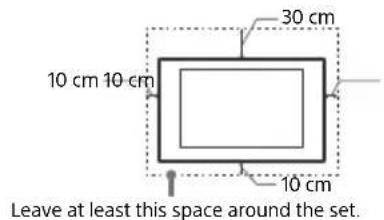
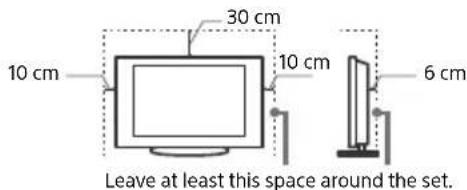
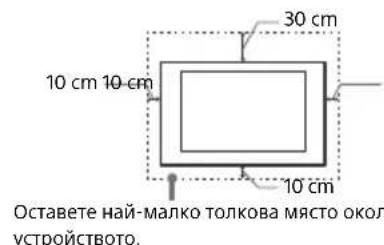
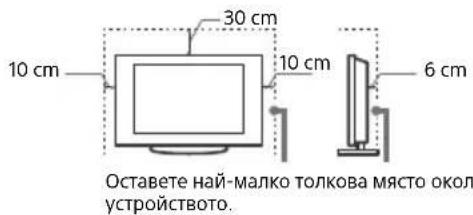
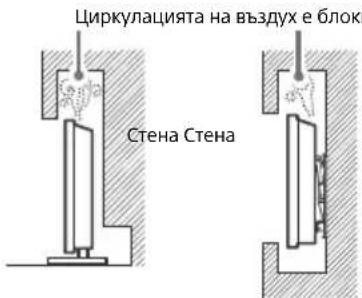
- Leave space around the TV set as shown below.
- It is strongly recommended that you use a Sony Wall-Mount Bracket in order to provide adequate air circulation.
Installed on the wall
Installed with stand
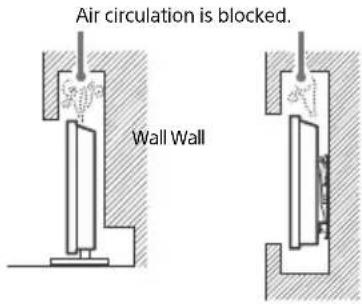
To ensure proper ventilation and prevent the collection of dirt or dust:
- Do not lay the TV set flat, install upside down, backwards, or sideways.
- Do not place the TV set on a shelf, rug, bed or in a closet.
- Do not cover the TV set with a cloth, such as curtains, or items such as newspapers, etc.
- Do not install the TV set as shown below.
Mains lead
Handle the mains lead and socket as follows in order to avoid any risk of fire, electric shock or damage and/or injuries:
- Use only mains leads supplied by Sony, not other suppliers.
- Insert the plug fully into the mains socket.
- Operate the TV set on a 220 V - 240 V AC supply only.
- When wiring cables, be sure to unplug the mains lead for your safety and take care not to catch your feet on the cables.
- Disconnect the mains lead from the mains socket before working on or moving the TV set.
- Keep the mains lead away from heat sources.
- Unplug the mains plug and clean it regularly. If the plug is covered with dust and it picks up moisture, its insulation may deteriorate, which could result in a fire.
Note
- Do not use the supplied mains lead on any other equipment.
- Do not pinch, bend, or twist the mains lead excessively. The core conductors may be exposed or broken.
- Do not modify the mains lead.
- Do not put anything heavy on the mains lead.
- Do not pull on the mains lead itself when disconnecting the mains lead.
- Do not connect too many appliances to the same mains socket.
- Do not use a poor fitting mains socket.
NOTE ON MAINS ADAPTOR (models with supplied mains adaptor only)
Warning
To reduce the risk of fire or electric shock, do not expose this apparatus to rain or moisture.
To prevent fire or shock hazard, do not place objects filled with liquids, such as vases, on the apparatus. Do not install this equipment in a confined space, such as a bookshelf or similar unit.
- Please ensure that the mains socket is installed near the equipment and shall be easily accessible.
- Be sure to use the supplied mains adaptor and mains lead.
- Do not use any other mains adaptor. It may cause a
malfunction - Connect the mains adaptor to an easily accessible mains socket.
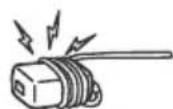
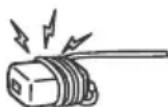
- Do not coil the mains lead around the mains adaptor. The core wire may be cut and/or it may cause a malfunction of the media receiver.
- Do not touch the mains adaptor with wet hands.
If you notice an abnormality in the mains adaptor, disconnect it from the mains socket immediately. - The set is not disconnected from the mains source as long as it is connected to the mains socket, even if the set itself has been turned off.
- As the mains adaptor will become warm when it is used for a long time, you may feel hot when touching it by hand.
Prohibited Usage
Do not install/use the TV set in locations, environments or situations such as those listed below, or the TV set may malfunction and cause a fire, electric shock, damage and/or injuries.
Locations:
- Outdoors (in direct sunlight), at the seashore, on a ship or other vessel, inside a vehicle, in medical institutions, unstable locations, near water, rain, moisture or smoke.
Environments:
- Places that are hot, humid, or excessively dusty; where insects may enter; where it might be exposed to mechanical vibration, near flammable objects (candles, etc.). The TV set shall not be exposed to dripping or splashing and no objects filled with liquids, such as vases, shall be placed on the TV.
Situations:
- Use when your hands are wet, with the cabinet removed, or with attachments not recommended by the manufacturer. Disconnect the TV set from mains socket and aerial during lightning storms.
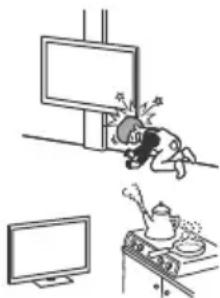
- Install the TV so that it sticks out into an open space. Injury or damage from a person or object bumping into the TV may result.
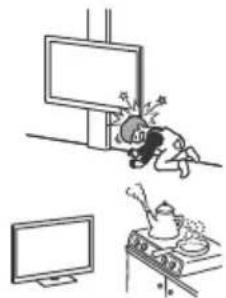
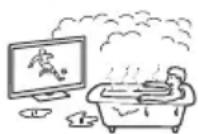
- Place the TV in a humid or dusty space, or in a room with oily smoke or steam (near cooking tables or humidifiers). Fire, electric shock, or warping may result.
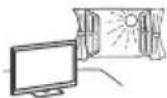
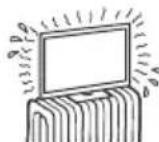
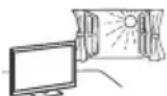
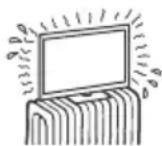
Install the TV in places subject to extreme temperature such as in direct sunlight, near a radiator or a heating vent. The TV may overheat in such condition which can cause deformation of the enclosure and/or TV malfunction.
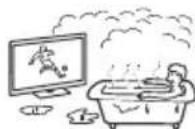
If the TV is placed in the changing room of a public bath or hot spring, the TV may be damaged by airborne sulfur, etc.
- For best picture quality, do not expose the screen to direct illumination or sunlight.
- Avoid moving the TV from a cold area to a warm area. Sudden room temperature changes may cause moisture condensation. This may cause the TV to show poor picture and/or poor colour. Should this occur, allow moisture to evaporate completely before powering the TV on.
Broken pieces:
- Do not throw anything at the TV set. The screen glass may break by the impact and cause serious injury.
- If the surface of the TV set cracks, do not touch it until you have unplugged the mains lead. Otherwise this may cause an electric shock.
When not in use
- If you will not be using the TV set for several days, the TV set should be disconnected from the mains for environmental and safety reasons.
- As the TV set is not disconnected from the mains when the TV set is just turned off, pull the plug from the mains socket to disconnect the TV set completely.
- Some TV sets may have features that require the TV set to be left in standby to work correctly.
For children
- Do not allow children to climb on the TV set.
- Keep small accessories out of the reach of children, so that they are not mistakenly swallowed.
If the following problems occur...
Turn off the TV set and unplug the mains lead immediately if any of the following problems occur.
Ask your dealer or Sony service centre to have it checked by qualified service personnel.
When:
- Mains lead is damaged.
- Poor fitting of mains socket.
- TV set is damaged by being dropped, hit or having something thrown at it.
- Any liquid or solid object falls through openings in the cabinet.
About LCD TV Temperature
When the LCD TV is used for an extended period, the panel surrounds become warm. You may feel hot when touching there by the hand.
Precautions
Viewing the TV
View the TV in moderate light, as viewing the TV in poor light or during long period of time, strains your eyes.
- When using headphones, adjust the volume so as to avoid excessive levels, as hearing damage may result.
LCD Screen
- Although the LCD screen is made with high-precision technology and 99.99% or more of the pixels are effective, black dots may appear or bright points of light (red, blue, or green) may appear constantly on the LCD screen. This is a structural property of the LCD screen and is not a malfunction.
- Do not push or scratch the front filter, or place objects on top of this TV set. The image may be uneven or the LCD screen may be damaged.
- If this TV set is used in a cold place, a smear may occur in the picture or the picture may become dark. This does not indicate a failure. These phenomena disappear as the temperature rises.
- Ghosting may occur when still pictures are displayed continuously. It may disappear after a few moments.
- The screen and cabinet get warm when this TV set is in use. This is not a malfunction.
- The LCD screen contains a small amount of liquid crystal. Follow your local ordinances and regulations for disposal.
Handling and cleaning the screen surface/ cabinet of the TV set
Be sure to unplug the mains lead connected to the TV set from mains socket before cleaning.
To avoid material degradation or screen coating degradation, observe the following precautions.
- To remove dust from the screen surface/cabinet, wipe gently with a soft cloth. If dust is persistent, wipe with a soft cloth slightly moistened with a diluted mild detergent solution.
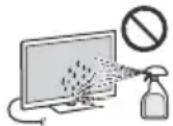
- Never spray water or detergent directly on the TV set. It may drip to the bottom of the screen or exterior parts and enter the TV set, and may cause damage to the TV set.
- Never use any type of abrasive pad, alkaline/acid cleaner, scouring powder, or volatile solvent, such as alcohol, benzene, thinner or insecticide. Using such materials or maintaining prolonged contact with rubber or vinyl materials may result in damage to the screen surface and cabinet material.
- Do not touch the TV if your hand is covered in any chemical substance such as hand cream or sunblock.
Periodic vacuuming of the ventilation openings is recommended to ensure proper ventilation. - When adjusting the angle of the TV set, move it slowly so as to prevent the TV set from moving or slipping off from its table stand.
Optional Equipment
- Keep optional components or any equipment emitting electromagnetic radiation away from the TV set. Otherwise picture distortion and/or noisy sound may occur.
- This equipment has been tested and found to comply with the limits set out in the EMC Directive using a connection signal cable shorter than 3 meters.
- This equipment has been tested and found to comply with the limits set out in the EMC Directive using a RF cable shorter than 30 meters for terrestrial/satellite/CATV terminal.
Recommendation of F type plug
Projection of the inner wire from the connection part must be less than 1.5mm
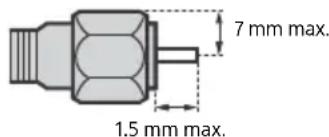
(Reference drawing of the F type plug)
Wireless Function of the unit
- Do not operate this unit near medical equipment (pacemaker, etc.), as this may result in the malfunction of the medical equipment.
- Although this unit transmits/receives scrambled signals, be careful of unauthorised interception. We cannot be responsible for any trouble as a result.
- This equipment should be installed and operated keeping a separation distance of 20cm or more between the antenna of this device and a person's body.
Caution about handling the remote control
- Observe the correct polarity when inserting batteries.
- Do not use different types of batteries together or mix old and new batteries.
- Dispose of batteries in an environmentally friendly way. Certain regions may regulate the disposal of batteries. Please consult your local authority.
- Handle the remote control with care. Do not drop or step on it, or spill liquid of any kind onto it.
- Do not place the remote control in a location near a heat source, a place subject to direct sunlight, or a damp room.
Disposal of the TV set
m = 311 ;
Disposal of old electrical & electronic equipment (applicable in the European Union and other countries with separate collection systems)
This symbol on the product or on its packaging indicates that this product shall not be treated as household waste. Instead it shall be handed over to the appropriate collection point for the recycling of electrical and electronic equipment.
By ensuring that this product is disposed of correctly, you will help to prevent potential negative consequences for the environment and human health, which could be caused by inappropriate waste handling of this product. The recycling of materials will help to conserve natural resources. For more detailed information about recycling of this product, please contact your local Civic Office, your household waste disposal service or the shop where you purchased the product.

Disposal of waste batteries (applicable in the European Union and other countries with separate collection systems)
This symbol on the battery or on the packaging indicates that the battery provided with this product shall not be treated as household waste.
On certain batteries this symbol might be used in combination with a chemical symbol. The chemical symbol for lead (Pb) is added if the battery contains more than 0.004% lead. By ensuring that these batteries are disposed of correctly, you will help to prevent potentially negative consequences for the environment and human health which could be caused by inappropriate waste handling of the battery. The recycling of the materials will help to conserve natural resources. In case of products that for safety, performance or data integrity reasons require a permanent connection with an incorporated battery, this battery should be replaced by qualified service staff only. To ensure that the battery will be treated properly, hand over the product at end-of-life to the appropriate collection point for the recycling of electrical and electronic equipment. For all other batteries, please view the section on how to remove the battery from the product safely. Hand the battery over to the appropriate collection point for the recycling of waste batteries. For more detailed information about recycling of this battery, please contact your local Civic Office, your household waste disposal service or the shop where you purchased the product or battery.
Parts and Controls
Controls and Indicators
KD-85/75/65/55XF85xx, KD-65/55XF87xx
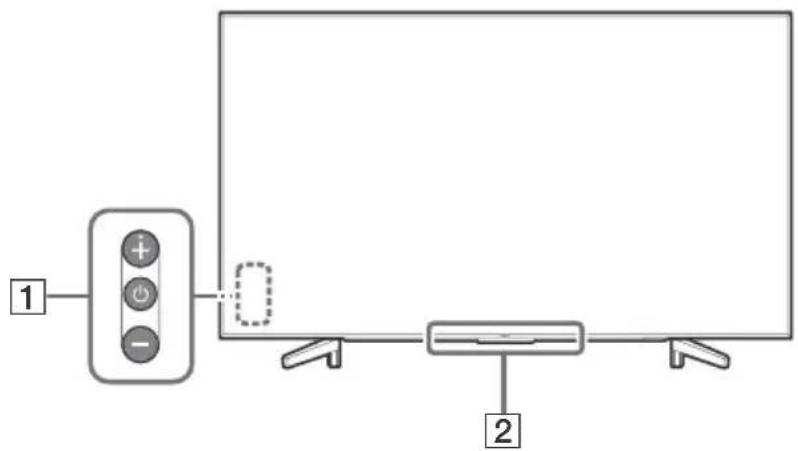
KD-49/43XF87xx, KD-49/43XF85xx
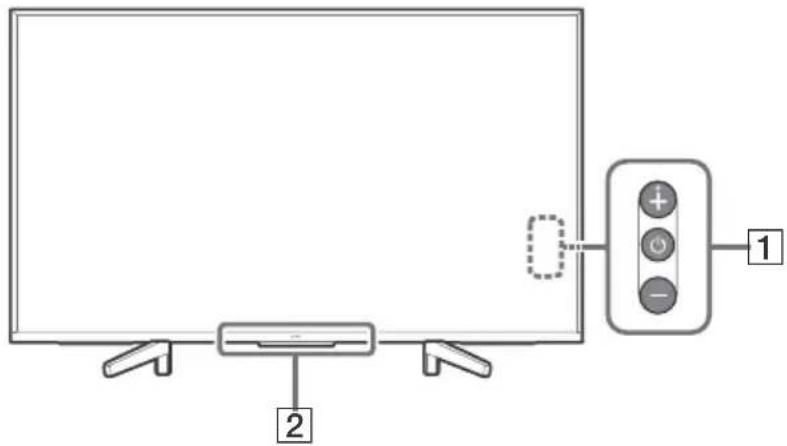
1 (Power) /+/-
When the TV is off,
Press to power on.
When the TV is on,
Press and hold to power off.
Press repeatedly to change the function, then press + or - button to:
- Adjust the volume.
- Select the channel.
- Select the input source of TV.
Remote Control sensor*/Light sensor*/Illumination LED
The illumination LED lights up or blinks according to the status of the TV.
For more information, refer to the Help Guide.
- Do not place anything near the sensor.
Using Remote Control
Remote Control Parts Description
The remote control shape, location, availability and function of remote control buttons may vary depending on your region/country/TV model.
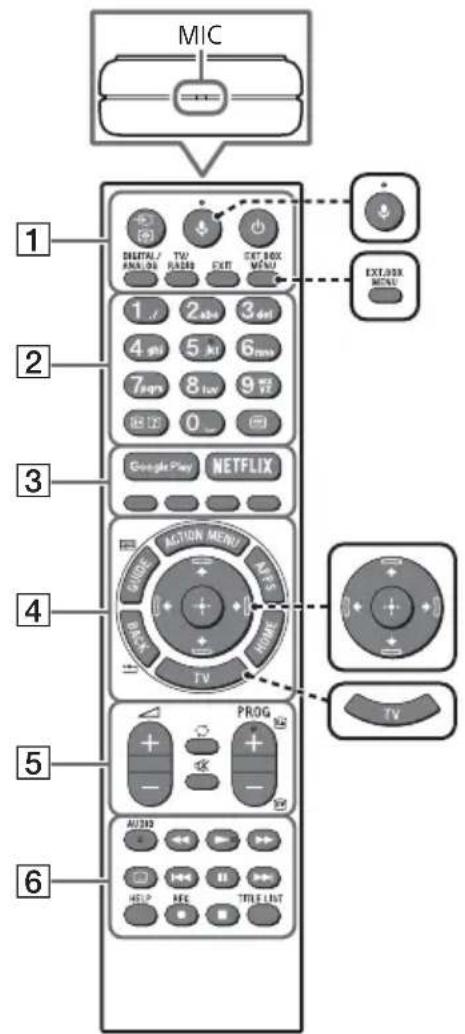

(Microphone)
Use Voice Search. (e.g., Search various content by voice.)

EXT.BOX MENU
Display the connected External Box (cable/satellite box) menu.
- For models with supplied IR Blaster, connect and set up the IR Blaster (page 13).
- The External Box menu may be displayed for some HDMI CEC compatible devices when the IR Blaster is not supplied/connected.
艹/艹/艝/艸/艱 (Navigation D-Pad)
On screen menu navigation and selection.
TV
Switch to a TV channel or input and display the TV Menu Bar.
1 (Input select/Text hold)
In TV mode: Display and select the input source.
In Text mode: Hold the current page.
(TV standby)
Turn on or turn off the TV (standby mode).
DIGITAL/ANALOG
Switch between digital and analogue mode.
TV/RADIO
Switch between TV or RADIO broadcasts.
EXIT
Return to the previous screen or exit from the menu. When an Interactive Application service is available, press to exit from the service.
Number buttons

( Info / Text re v
Display information.
(Text)
Display text information.
3 Google Play
Access the "Google Play" online service.
NETFLIX (Only on limited region/ country/TV model)
Access the "NETFLIX" online service.
Colour buttons
Execute corresponding function at that time.
4 ACTION MENU
Display a list of contextual functions.
GUIDE/国
Display the digital programme guide.
APPS
Access various services and applications.
BACK/
Return to the previous screen.
HOME
Display the TV Home Menu.
5 +/-(Volume)
Adjust the volume.
(Jump)
Jump back and forth between two channels or inputs. The TV alternates between the current channel or input and the last channel or input that was selected.
(Muting)
Mute the sound. Press again to restore the sound.
PROG+/-/E/A/E
In TV mode: Select the channel.
In Text mode: Select the next (3) or previous (5) page.
6 AUDIO
Change the language for the programme currently being viewed.
<>/>>/1<>/
Operate media contents on the TV and connected BRAVIA Sync-compatible device.
(Subtitle setting)
Turn subtitles on or off (when the feature is available).
HELP
Display the Help menu. Help Guide can be accessed from here.
REC
Record the current programme with the USB HDD recording function.
TITLE LIST
Display the Title list.
Connection Diagram
For more information on connections, refer to the Help Guide by pressing HELP on the remote control.

CAM (Conditional Access Module)
- Provides access to pay TV services. For details, refer to the instruction manual supplied with your CAM.
- Do not insert the smart card directly into the TV CAM slot. It must be fitted into the Conditional Access Module provided by your authorised dealer.
- CAM is not supported in some countries/ areas. Check with your authorised dealer.
- A CAM message may appear when you switch to a digital programme after using the Internet video.
2 USB1/2,USB3(HDDREC)* 3
- Connecting a large USB device may interfere with other connected devices beside it.
- When connecting a large USB device, connect to the USB 1 port.
- Connect a USB HDD device to the USB 3 port (blue).
3 AUDIO OUT
Supports 3-pole stereo mini jack only.
- To listen to the TV's sound through the connected equipment, press HOME. Select [Settings] [Sound] [Headphone/Audio out] and then select the desired item.
HDMI IN 1/2/3/4
- HDMI interface can transfer the digital video and audio on a single cable.
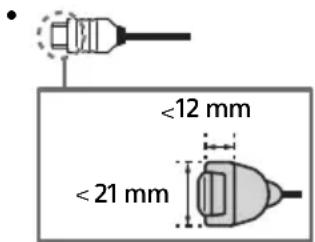
HDMI IN 3 ARC (Audio Return Channel)
Connect your audio system to the HDMI IN 3 to route TV audio to your audio system. An audio system that supports HDMI ARC can send video to the TV, and receive audio from the TV via the same HDMI cable. If your audio system does not support HDMI ARC, an additional connection with DIGITAL AUDIO OUT (OPTICAL) is necessary.
5 IR BLASTER3
- Use your Sony remote control to control your External Box (cable/satellite box). Connect the IR Blaster Cable*3 to the IR Blaster port on your TV. Place one or both of the other two ends as shown below.
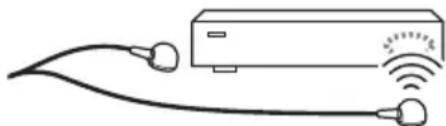
- To perform IR Blaster setup, press HOME and select [Settings] [External inputs] [IR Blaster setup].
RF input),Satellite input)
- Connections for terrestrial/cable and satellite. Connection steps: SUB. MAIN Antenna
- For SUB. jack, connect only when you are using twin tuner mode except for Single Cable Distribution EN50494.
1 When connecting mono equipment, connect to the L (MONO) audio jack (socket).
2 For an external device which has only SCART AV OUT, use a SCART-RCA adaptor and Analogue Extension Cable.
*3 Only on limited region/country/TV model.
Installing the TV to the Wall
Using the optional Wall-Mount Bracket
This TV's instruction manual only provides the steps to prepare the TV for Wall-Mount installation before it is installed on the wall.
To Customers:
For product protection and safety reasons, Sony strongly recommends that installation of your TV be performed by Sony dealers or licensed contractors. Do not attempt to install it yourself.
To Sony Dealers and Contractors:
Provide full attention to safety during the installation, periodic maintenance and examination of this product.
Sufficient expertise is required for installing this product, especially to determine the strength of the wall for withstanding the TV's weight. Be sure to entrust the attachment of this product to the wall to Sony dealers or licensed contractors and pay adequate attention to safety during the installation. Sony is not liable for any damage or injury caused by mishandling or improper installation.
Use the Wall-Mount Bracket SU-WL450 (not supplied) (Except KD-85/75XF85xx) to install the TV to the wall.
When installing the Wall-Mount Bracket, also refer to the Operating Instructions and Installation Guide supplied with the Wall-Mount Bracket.
Note
- Be sure to store the removed screws in a safe place, keeping them away from children.
- Place the TV with its screen facing down on a level and stable surface covered with a thick and soft cloth when removing the Table-Top Stand from the TV to prevent damaging the surface of the LCD display. (KD-49/43XF87xx, KD-49/43XF85xx only)

For instructions on Wall-Mount Bracket installation, see the Installation Information (Wall-Mount Bracket) on the product page for your TV model. www.sony.eu/support/
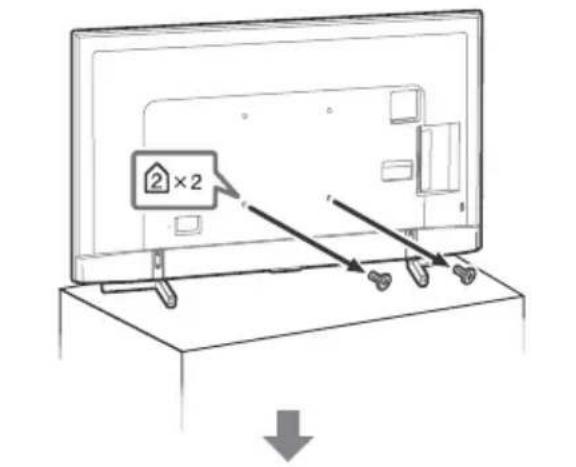
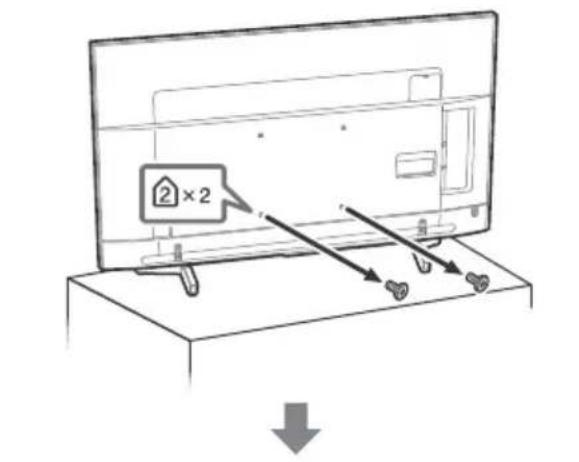
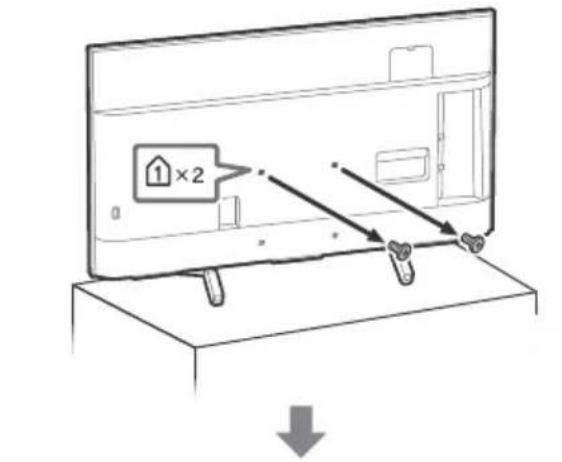
Remove the screws from the rear of the TV.
KD-65/55XF87xx, KD-65/55XF85xx KD-49/43XF87xx, KD-49/43XF85xx
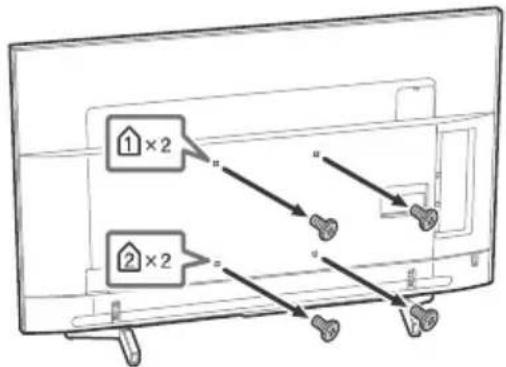
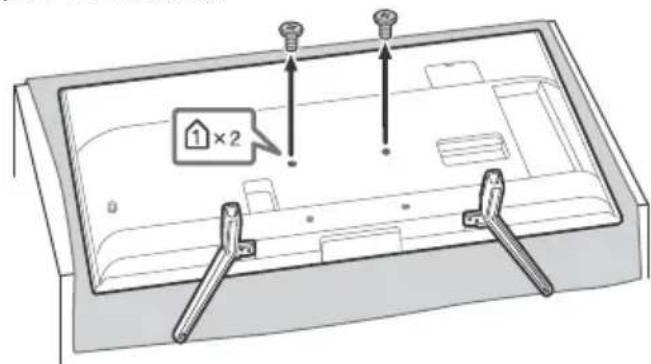
To detach the Table-Top Stand from the TV (KD-49/43XF87xx, KD-49/43XF85xx only)
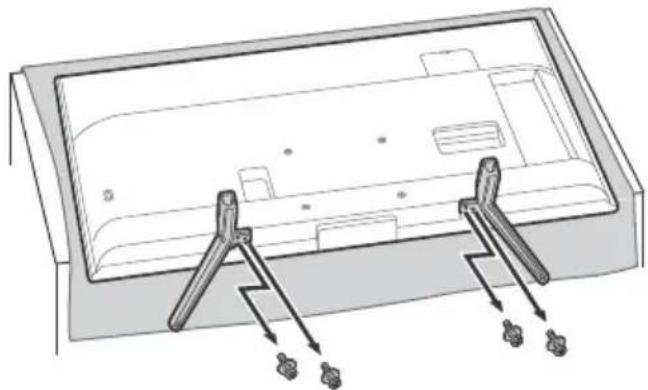
GB
KD-85/75XF85xx only
Your TV can be mounted on a wall using a Wall-Mount Bracket (not supplied) out of the box as packaged.
Prepare the TV for the Wall-Mount Bracket before making cable connections.
For product protection and safety reasons, Sony strongly recommends that installation of your TV on the wall be performed by qualified professionals. Do not attempt to install it yourself.
- Follow the instruction guide provided with the Wall-Mount Bracket for your model. Sufficient expertise is required in installing this TV, especially to determine the strength of the wall for withstanding the TV's weight.
- Be sure to store the unused screws and Table-Top Stand in a safe place until you are ready to attach the Table-Top Stand. Keep the screws away from small children.
1 Remove the screws from the rear of the TV. KD-85XF85xx KD-75XF85xx
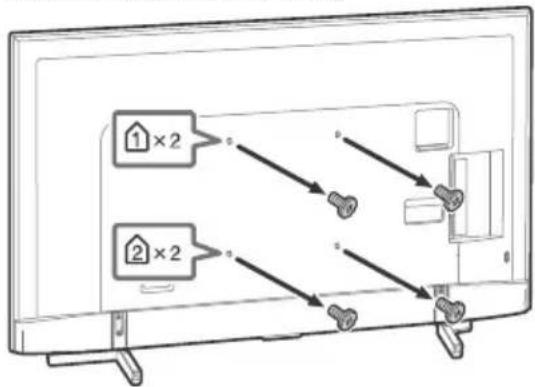
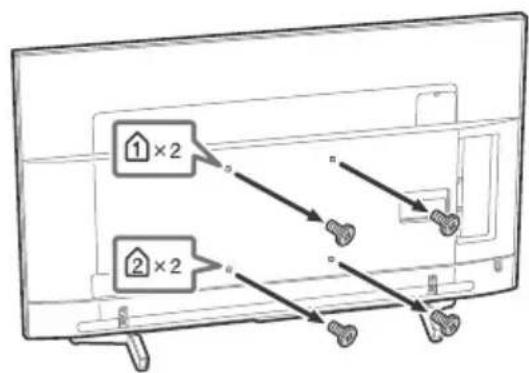
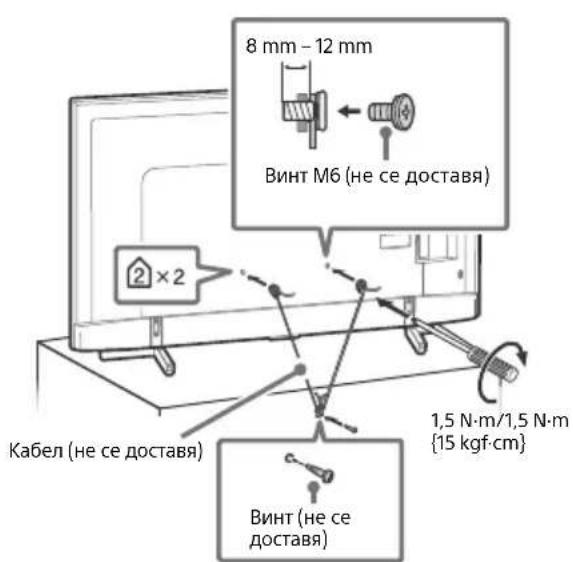
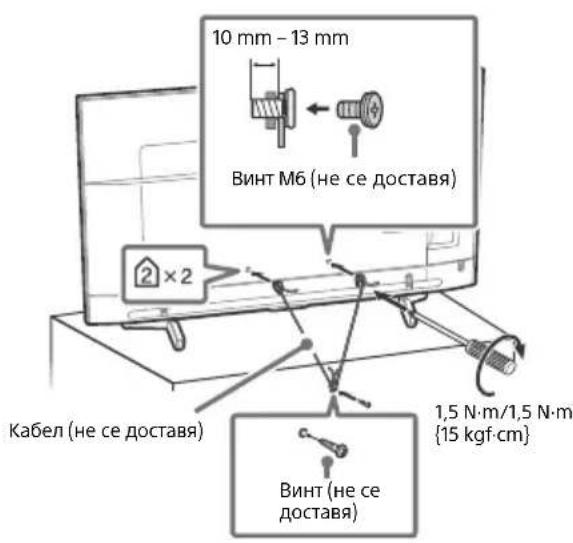
2 Attach the Wall-Mount Bracket (not supplied) using the screws (not supplied).
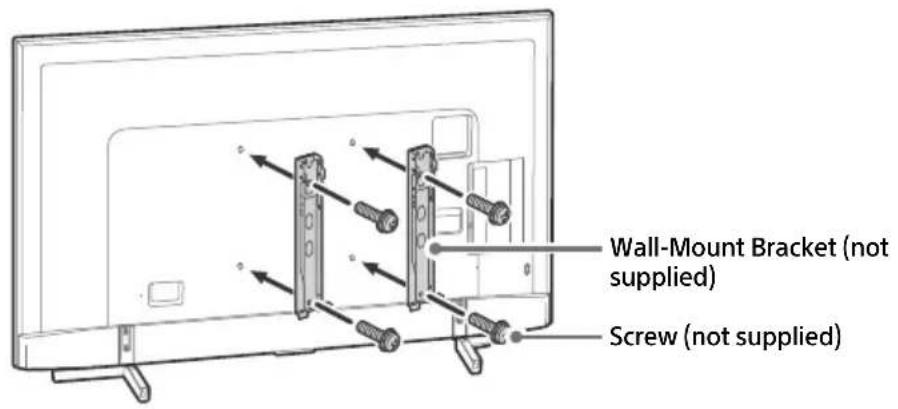
KD-85XF85xx
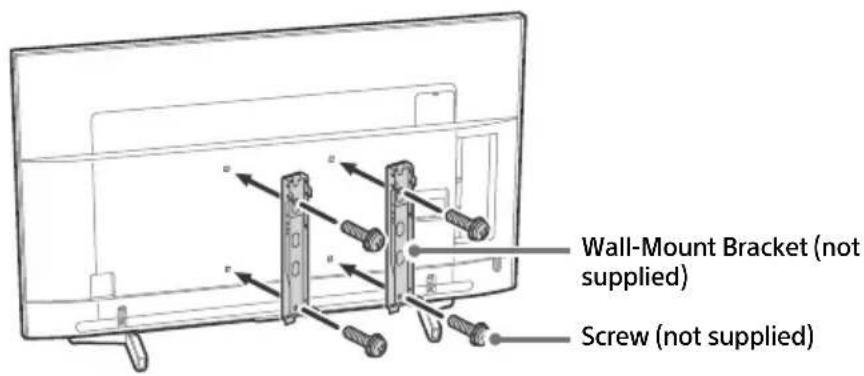
KD-75XF85xx
Note
- If using an electric screwdriver, set the torque at approximately 1.5N· m {15 kgf·cm}.
3 Detach the Table-Top Stand from the TV.
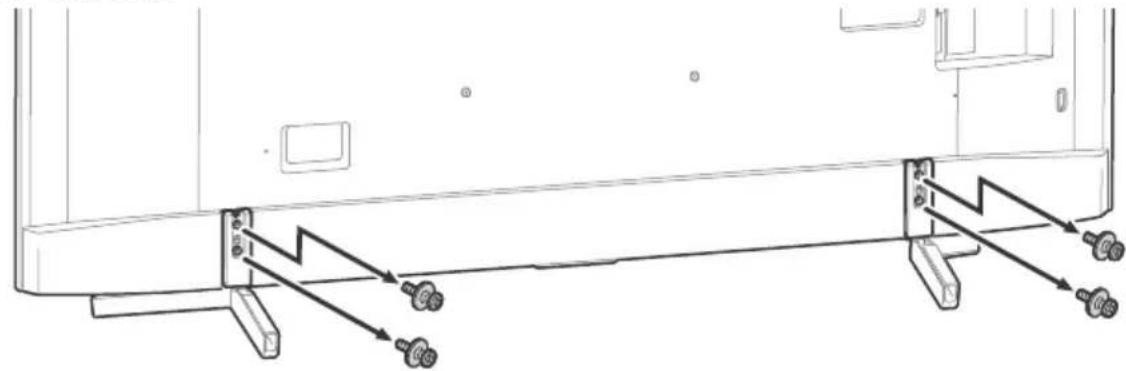
KD-85XF85xx
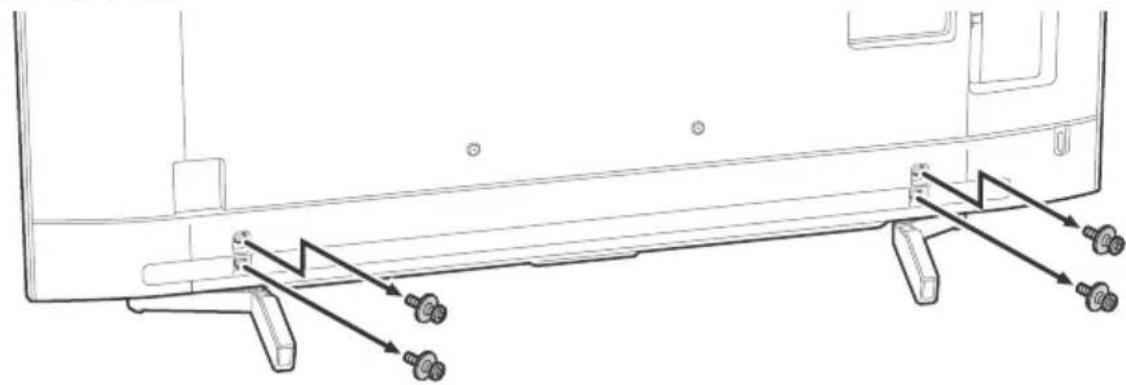
KD-75XF85xx
Troubleshooting
General troubleshooting for issues like: black screen, no sound, frozen picture, TV does not respond, or network is lost, do the following steps.
1 Restart your TV by pressing the power button on the remote control until a message appears. The TV will restart. If the TV does not recover, try unplugging the TV from the mains lead for two minutes and then plug it in again.
2 Refer to the Help menu by pressing HELP on the remote control.
3 Connect your TV to the Internet and perform a software update.
4 Visit Sony support website (information provided on the back cover).
When [A new TV system software update is available...] message is displayed.
Sony strongly recommends you to update the TV software by selecting [Update Now]. These software updates improve your TV performance or add new features.
The following screen with [Updating...] will appear and the illumination LED flashes white while software is updating.
![SONY Bravia KD43XF8796 - When [A new TV system software update is available...] message is displayed. - 1](/content/2026/03/465161/images/faef3430b80996d9756ca64f35d1ccf507476d554c62907baaabb8c7968cae32.jpg)
Do not unplug the mains lead during the software update. If you do, the software update may not finish completely, and it may cause a software malfunction. Software updates can take up to 15 minutes.
When you plug in the TV, the TV may not be able to turn on for a while even if you press the power button on the remote control or the TV.
It takes time to initialize the system. Wait for about one minute, then operate it again.
Troubles and Solutions
When the illumination LED is flashing in red.
- Count how many times it flashes (interval time is three seconds). Reboot the TV by disconnecting the mains lead for two minutes, then turn on the TV. If the problem persists, disconnect the mains lead, and contact your dealer or Sony service centre with the number of times the illumination LED flashes.
Terrestrial/cable service cannot be received.
- Check the antenna (aerial)/cable connection and booster settings.
- Select terrestrial/cable service by pressing DIGITAL/ANALOG on the remote control. If the broadcasting service is not displayed, press TV and then press DIGITAL/ANALOG.
- Terrestrial signal might be suppressed if there is a strong signal supplied nearby. Set [LNA (CH---)] to [Off] in digital tuning settings.
After moving to a new house or trying to receive new services, attempt a service search by selecting [Digital Tuning].
Satellite service cannot be received.
- Check the satellite cable connection.
- When [No signal. LNB overload detected...] message is displayed, unplug the mains lead. Then, ensure the satellite cable is not damaged and the satellite signal line is not short-circuited in the satellite connector.
The remote control does not function.
- Replace the batteries.
The EXT.BOX MENU button on the remote control does not work.
- Connect and set up the IR Blaster (models with supplied IR Blaster only) (page 13).
- Connect HDMI CEC compatible device (except models with supplied IR Blaster) and change to that input.
The parental lock for broadcast password has been forgotten.
- Enter 9999 for the PIN code and select [Change PIN Code].
The TV surrounds become warm.
- When the TV is used for an extended period, the TV surrounds become warm. You may feel hot when touching there by the hand.
Specifications
System
Panel system
LCD (Liquid Crystal Display) Panel, LED Backlight
TV system
Depending on your country/area selection/TV model
Analogue: B/G, D/K, I
Digital: DVB-T/DVB-C
DVB-T2*
Satellite*: DVB-S/DVB-S2
Colour system
PAL/SECAM/NTSC3.58 (Video only)/NTSC4.43
(Video only)
Channel coverage
Depending on your country/area selection/TV model
Analogue: UHF/VHF/Cable
Digital: UHF/VHF/Cable
Satellite*: IF Frequency 950-2,150 MHz
Sound output
10W+10W
Wireless technology
Protocol IEEE802.11ac/a/b/g/n
(IEEE802.11ac may not be available depending on countries/regions.)
Bluetooth Version 4.1
Frequency band(s)
| Wireless LAN (IEEE802.11ac/a/b/g/n) | |
| Frequency range Output Power | |
| 2400-2483.5 MHz < 20.0 dBm | |
| 5150-5250 MHz < 23.0 dBm | |
| 5250-5350 MHz < 20.0 dBm | |
| 5470-5725 MHz < 20.0 dBm | |
| 5725-5850 MHz < 13.9 dBm |
| Bluetooth | |
| Frequency range Output Power | |
| 2400-2483.5 MHz < 10.0 dBm |
RMF-TX311E/TX310E/TX221ES
| Bluetooth | |
| Frequency range Output Power | |
| 2400-2483.5 MHz < 10.0 dBm |
Software version
TV: PKG_. EUA
Press HELP on the remote control to know the software version.
Remote control: Press HOME, then select [Settings] [Voice Remote Control] [Software version].
Any updates of software/firmware for this equipment/accessories/components will never affect its conformity to Directive 2014/53/EU in future.
- Not all the TV sets have DVB-T2 or DVB-S/S2 technology or satellite antenna terminal.
Input/Output jacks
Antenna (aerial)/cable
75 ohm external terminal for VHF/UHF
Satellite antenna
Female F Type Connector, 75 ohm.
DiSEqC 1.0, LNB 13 V/18 V & 22 kHz tone, Single Cable Distribution EN50494.


YP_BPR (Component Video): 1080p (50, 60 Hz), 1080i (50, 60 Hz), 720p (50, 60 Hz), 576p, 576i, 480p, 480i
Audio input (phono jacks)
AVIN
Video input (common phono pin with Y input)
HDMI IN 1/2/3/4 (support 4K resolution, HDCP 2.2-compatible)
Video:
4096 × 2160p (50, 60 Hz)12, 4096 × 2160p
(24Hz)^*1 3840× 2160p (50, 60 Hz)*2, 3840 ×
2160p (24, 25, 30 Hz), 1080p (30, 50, 60 Hz),
1080/24p, 1080i (50, 60 Hz), 720p (30, 50,
60 Hz), 720/24p, 576p, 576i, 480p, 480i, PC Formats*3
*1 When 4096 × 2160p is input and [Wide mode] is set to [Normal], the resolution is displayed as 3840 × 2160p . To display 4096 × 2160p , set [Wide mode] setting to [Full 1] or [Full 2].
*2 HDMI IN 2/3 only. To support 18 Gbps, set [HDMI signal format] to [Enhanced format].
*3 Refer to the Help Guide for details.
Audio:
5.1 channel linear PCM: 32/44.1/48/88.2/96/
176.4/192 kHz 16/20/24 bits, Dolby Digital,
Dolby Digital Plus and DTS
ARC (Audio Return Channel) (HDMI IN 3 only)
(Two channel linear PCM: 48 kHz 16 bits, Dolby
Digital, Dolby Digital Plus, DTS)
DIGITAL AUDIO OUT (OPTICAL)
Digital optical jack (Two channel linear PCM:
48 kHz 16 bits, Dolby Digital, DTS)
Headphone, Audio output, Subwoofer
1,2-3(HDBREC)*
1
USB device port. (USB HDD device for REC feature)
USB port 1 and 2 support High Speed USB (USB 2.0)
USB port 3 supports Super Speed USB (USB 3.1)
Gen 1)
CAM (Conditional Access Module) slot
品
_AN
10BASE-T/100BASE-TX connector (Depending on the operating environment of the network, connection speed may differ. 10BASE-T/
100BASE-TX communication rate and communication quality are not guaranteed for this TV.)
DC IN 19.5 V (models with supplied mains adaptor only)
Mains adaptor input
IR BLASTER*1
IR Blaster Cable input (mini jack)
Others
Optional accessories
Wall-Mount Bracket: SU-WL450
(Except KD-85/75XF85xx)
Operating temperature
0^ - 40^
Operating humidity
10% - 80% RH (non-condensing)
Power, Product Fiche and others
Power requirements
except models with supplied mains adaptor
220V-240VAC,50Hz
models with supplied mains adaptor only
19.5 V DC with mains adaptor
Rating: Input 220 V - 240 V AC, 50 Hz
Energy Efficiency Class
KD-85XF85xx: A
KD-75XF85xx: A+
KD-65XF87xx / KD-65XF85xx: A+
KD-55XF87xx / KD-55XF85xx: A
KD-49XF87xx / KD-49XF85xx: A
KD-43XF87xx / KD-43XF85xx: B
Screen size (measured diagonally) (Approx.)
KD-85XF85xx: 214.8 cm / 85 inches
KD-75XF85xx: 189.3 cm / 75 inches
KD-65XF87xx / KD-65XF85xx: 163.9 cm /
65 inches
KD-55XF87xx / KD-55XF85xx: 138.8 cm / 55 inches
KD-49XF87xx / KD-49XF85xx: 123.2 cm /
49 inches
KD-43XF87xx / KD-43XF85xx: 108.0 cm /
43 inches
Power consumption
In [Standard] mode
KD-85XF85xx:233W
KD-75XF85xx: 149 W
KD-65XF87xx / KD-65XF85xx: 120 W
KD-55XF87xx / KD-55XF85xx: 103 W
KD-49XF87xx / KD-49XF85xx: 88 W
KD-43XF87xx / KD-43XF85xx: 76 W
In [Vivid] mode
KD-85XF8596:400W
KD-75XF8596:272W
KD-65XF8796:218W
KD-65XF8599:218W
KD-65XF8596:218W
KD-65XF8588:218W
KD-65XF8577:218W
KD-65XF8505:218W
KD-55XF8796:192W
KD-55XF8599:192W
KD-55XF8596:192W
KD-55XF8588:192W
KD-55XF8577:192W
KD-55XF8505: 192 W
KD-49XF8796:160W
KD-49XF8599:160W
KD-49XF8596:160W
KD-49XF8588:160W
KD-49XF8577:160W
KD-49XF8505:160W
KD-43XF8796:143W
KD-43XF8599:143W
KD-43XF8596:143W
KD-43XF8588:143W
KD-43XF8577:143W
KD-43XF8505:143W
Average annual energy consumption ^2
KD-85XF85xx:323 kWh
KD-75XF85xx: 207 kWh
KD-65XF87xx / KD-65XF85xx: 166 kWh
KD-55XF87xx / KD-55XF85xx: 143 kWh
KD-49XF87xx / KD-49XF85xx: 122 kWh
KD-43XF87xx / KD-43XF85xx: 105 kWh
Standby power consumption*3*4
0.50 W (25 W in software/EPG update mode)
Display resolution
3,840 dots (horizontal) × 2,160 lines (vertical)
Output Rating
USB 1/2
5V=500mA MAX
USB3
5V=900mA MAX
Dimensions (Approx.) (w× h× d)
with Table-Top Stand
KD-85XF85xx: 191.1 × 117.6 × 42.9 cm
KD-75XF85xx: 167.3 × 103.1 × 37.1 ~cm
KD-65XF87xx / KD-65XF85xx: 145.0 × 90.0 ×
31.5 cm
KD-55XF87xx / KD-55XF85xx: 123.1 × 77.6 × 31.5 cm
KD-49XF87xx / KD-49XF85xx: 109.8 × 70.3 ×
27.9 cm
KD-43XF87xx / KD-43XF85xx: 96.5 × 62.8 ×
27.9 cm
without Table-Top Stand
KD-85XF85xx: 191.1 × 109.8 × 7.3 cm
KD-75XF85xx: 167.3 × 96.3 × 5.4 cm
KD-65XF87xx / KD-65XF85xx: 145.0 × 83.6 ×
5.2 cm
KD-55XF87xx / KD-55XF85xx: 123.1 × 71.3 × 5.2 cm
KD-49XF87xx / KD-49XF85xx: 109.8 × 64.4 ×
5.8 cm
KD-43XF87xx / KD-43XF85xx: 96.5 × 56.9 × 5.8 cm
Mass (Approx.)
with Table-Top Stand
KD-85XF85xx: 46.2 kg
KD-75XF85xx: 40.1kg
KD-65XF87xx / KD-65XF85xx: 26.5 kg
KD-55XF87xx / KD-55XF85xx: 20 kg
KD-49XF87xx / KD-49XF85xx: 13.7 kg
KD-43XF87xx / KD-43XF85xx: 11.3 kg
without Table-Top Stand
KD-85XF85xx: 44.1 kg
KD-75XF85xx: 38.9 kg
KD-65XF87xx / KD-65XF85xx: 25.6 kg
KD-55XF87xx / KD-55XF85xx: 19.1 kg
KD-49XF87xx / KD-49XF85xx: 13.2 kg
KD-43XF87xx / KD-43XF85xx: 10.8 kg
1 Only on limited region/country/TV model.
2 Energy consumption per year, based on the power consumption of the television operating 4 hours per day for 365 days. The actual energy consumption will depend on how the television is used.
3 Specified standby power is reached after the TV finishes necessary internal processes.
4 Standby power consumption will increase when your TV is connected to the network.
Note
- Do not remove the dummy card or cover from TV CAM (Conditional Access Module) slot other than to insert a smart card fitted in CAM.
- Optional accessories availability depends on countries/region/TV model/stock.
- Design and specifications are subject to change without notice.
Notes on Digital TV function
- Digital TV (DVB terrestrial, satellite and cable), interactive services and network functions may not be available in all countries or areas. Some functions might not be enabled or might not operate correctly with some providers and network environments. Some TV service providers may charge a fee for their services.
- This TV supports digital broadcasting using MPEG-2, H.264/MPEG-4 AVC and H.265/HEVC CODECs, but compatibility with all operator/service signals, which may change over time, cannot be guaranteed.
Trademark information
- The terms HDMI and HDMI High-Definition Multimedia Interface, and the HDMI Logo are trademarks or registered trademarks of HDMI Licensing Administrator, Inc. in the United States and other countries.
Manufactured under license from Dolby Laboratories. Dolby, Dolby Audio, and the double-D symbol are trademarks of Dolby Laboratories. - "BRAVIA", Bane BRAVIA Sync are trademarks or registered marks of Sony Corporation.
- Gracenote, the Gracenote logo and logotype, "Powered by Gracenote" logo are either registered trademarks or trademarks of Gracenote, Inc. in the United States and/or other countries.
- Vewd® Core. Copyright 1995-2017 Vewd Software AS. All rights reserved.
- Google, Android TV, Google Play, Chromecast built-in, YouTube and other related marks and logos are trademarks of Google LLC.
- Wi-Fi®, Wi-Fi Alliance®, Wi-Fi Direct® and Miracast® are registered trademarks of Wi-Fi Alliance.
- Wi-Fi Protected Setup™ is a trademark of Wi-Fi Alliance.
-
The Wi-Fi CERTIFIED™ Logo is a certification mark of Wi-Fi Alliance.
-
For DTS patents, see http:// patents.dts.com. Manufactured under license from DTS, Inc. DTS, the Symbol, & DTS and the Symbol together are registered trademarks, and DTS Digital Surround is a trademark of DTS, Inc. © DTS, Inc. All Rights Reserved.
- The Bluetooth® word mark and logos are registered trademarks owned by the Bluetooth SIG, Inc. and any use of such marks by Sony Corporation is under license. Other trademarks and trade names are those of their respective owners.
- Netflix is a registered trademark of Netflix, Inc.
- DiSEqCTM is a trademark of EUTELSAT. This TV supports DiSEqC 1.0. This TV is not intended for controlling motorized antennas.
- TUXERA is a registered trademark of Tuxera Inc. in the US and other countries.
- USB-IF SuperSpeed USB Trident logo is a registered trademark of USB Implementers Forum, Inc.
- All other trademarks are the property of their respective owners.
Table des matieres
AVIS IMPORTANT. 3
Analogue: B/G, D/K, I
Analogue: UHF/VHF/Cable
ARC (Audio Return Channel) (HDMI IN 3 uniquely)
DIGITAL AUDIO OUT (OPTICAL)
10% - 80% HR (sans condensation)
KD-55XF8599, KD-55XF8596, KD-55XF8588, KD-55XF8577
KD-55XE8505 KD-49XE8796 KD-49XE8599 KD-49XE8596
KD-49XF8588, KD-49XF8577, KD-49XF8505, KD-43XF8796.
KD-43XF8599, KD-43XF8596, KD-43XF8588, KD-43XF8577.
AT, BE, HR, CY, CZ, DK, EE, FI, FR, DE, EL, HU, IE, IT, LV, LT, LU, MT, NL, PL, PT, SK, SI, ES, SE, UK, IS, LI, NO, CH, BG, RO, TR, AL, BA, MK, MD, RS, ME, Kosovo
DIGITAL AUDIO OUT (OPTICAL)
Toma digital optica (PCM lineal de dos canales: 48 kHz 16 bits, Dolby Digital, DTS)
AUDIO OUT 念 / 念 (minitoma estereo)
Auricular, Salida de audio, Altavoz de graves
1,2-3(HBDREC)*
Puerto para dispositivo USB (dispositivo HDD)
10% - 80% RH (sin condensation)
AT, BE, HR, CY, CZ, DK, EE, FI, FR, DE, EL, HU, IE, IT, LV, LT, LU, MT, NL, PL, PT, SK, SI, ES, SE, UK, IS, LI, NO, CH, BG, RO, TR, AL, BA, MK, MD, RS, ME, Kosovo
2160p (24, 25, 30 Hz), 1080p (30, 50, 60 Hz),
1080/24p, 1080i (50, 60 Hz), 720p (30, 50,
60 Hz), 720/24p, 576p, 576i, 480p, 480i,
Pc-formaten
(Tweekanaals lineaire PCM: 48 kHz 16 bits, Dolby
Digital, Dolby Digital Plus, DTS)
Satellite*: IF Freqenz 950-2.150 MHz
Tonausgänge
10W+10W
Wireless-Technologie
Protokoll IEEE802.11ac/a/b/g/n
2160p (24, 25, 30 Hz), 1080p (30, 50, 60 Hz),
1080/24p, 1080i (50, 60 Hz), 720p (30, 50,
60 Hz), 720/24p, 576p, 576i, 480p, 480i,
Computerformate*
DIGITAL AUDIO OUT (OPTICAL)
High-Speed-USB (USB 2.0)
AT, BE, HR, CY, CZ, DK, EE, FI, FR, DE, EL, HU, IE, IT, LV, LT, LU, MT, NL, PL, PT, SK, SI, ES, UK, IS, LI, NO, CH, BG, RO, TR, AL, BA, MK, MD, RS, ME, Kosovo
Estequipment podeserutilidnootrospaisesnaneuropeus.
Instalar o television na parede
Utilizar o Suporte de parede optional
2160p (24, 25, 30 Hz), 1080p (30, 50, 60 Hz),
1080/24p, 1080i (50, 60 Hz), 720p (30, 50
60 Hz), 720/24p, 576p, 576i, 480p, 480i,
Formatos PC*3
DIGITAL AUDIO OUT (OPTICAL)
Tomada digital otica (PCM linear deinous canais:
48 kHz 16 bits, Dolby Digital, DTS)
AUDIO OUT (Mini-tomada estereo)
Auscultador, saía de audio, subwoofer
-
- 3 (HDBREC)*
AT, BE, HR, CY, CZ, DK, EE, FI, FR, DE, EL, HU, IE, IT, LV, LT, LU, MT, NL, PL, PT, SK, SI, ES, SE, UK, IS, LI, NO, CH, BG, RO, TR, AL, BA, MK, MD, RS, ME, Kosovo
Pannello LCD (cristalli liquidi), Retroillumination a LED
Sistema TV
DIGITAL AUDIO OUT (OPTICAL)
EU-importor: Sony Europe Limited.
Fragor till EU-importoren aller fragor som rörprodukternas overensstammelse i Europa skall sändas till tillverkarens auktoriserade representant, Sony Belgium, bijkantoor van Sony Europe Limited, Da Vincilaan 7-D1, 1935 Zaventem, Belgien.
Meddelande for radioutrustning

Härmed fösakrar Sony Visual Products Inc.
attenna typ av radioustrusting KD-85XF8596, KD-75XF8596, KD-65XF8796, KD-65XF8599, KD-65XF8596, KD-65XF8588, KD-65XF8577, KD-65XF8505, KD-55XF8796, KD-55XF8599, KD-55XF8596, KD-55XF8588, KD-55XF8577, KD-55XF8505, KD-49XF8796, KD-49XF8599, KD-49XF8596, KD-49XF8588, KD-49XF8577, KD-49XF8505, KD-43XF8796, KD-43XF8599, KD-43XF8596, KD-43XF8588, KD-43XF8577, KD-43XF8505
överensstämmer med direktiv 2014/53/EU. Den fullständiga
texten till EU-fösakran om overensstammelse finns på foljande
webbadress: http://www.compliance.sony.de/
Se Hjalpguiden for mer information.
- Placera ingenting nara sensorn.
Anvanda fjarrkontrollen
2160p (24, 25, 30 Hz), 1080p (30, 50, 60 Hz),
1080/24p, 1080i (50, 60 Hz), 720p (30, 50,
60 Hz), 720/24p, 576p, 576i, 480p, 480i,
PC-format*3
DIGITAL AUDIO OUT (OPTICAL)
EU Importor: Sony Europe Limited.
KD-55XF8588, KD-55XF8577, KD-55XF8505, KD-49XF8796
KD-49XF8599, KD-49XF8596, KD-49XF8588, KD-49XF8577
KD-49XF8505, KD-43XF8796, KD-43XF8599, KD-43XF8596
KD-43XF8588, KD-43XF8577, KD-43XF8505 er i overensstemmelse
med direktiv 2014/53/EU. EU-overensstemmelseserklaeringens
fulde tekst kan.findespafalgende internetadresse:
http://www.compliance.sony.de/
AT, BE, HR, CY, CZ, DK, EE, FI, FR, DE, EL, HU, IE, IT, LV, LT, LU, MT, NL, PL, PT, SK, SI, ES, UK, IS, LI, NO, CH, BG, RO, TR, AL, BA, MK, MD, RS, ME, Kosovo
Installation/Opsæting
/ / / (Navigering D-Pad)
Skaermmenunavigering og valg.
TV
2160p (24, 25, 30 Hz), 1080p (30, 50, 60 Hz),
1080/24p, 1080i (50, 60 Hz), 720p (30, 50,
60 Hz), 720/24p, 576p, 576i, 480p, 480i,
Pc-formater*3
*1 Nár 4096 × 2160p er input og
(to-kanals lineaer PCM: 48 kHz 16 bit, Dolby
Digital, Dolby Digital Plus, DTS)
DIGITAL AUDIO OUT (OPTICAL)
Digitalt optisk stik (to-kanals lineaer PCM: 48 kHz
16 bit, Dolby Digital, DTS)
AUDIO OUT (Stereo-minijack)
Hovedtelefon, lydudgang, subwoofer
1,2-3(HDDREC)*
USB-port. (SSHB HDD-ened for REC-funktion)
USB-port 1 og 2 understotter High Speed USB (USB 2.0)
USB-port 3 understotter Super Speed USB (USB 3.1 Gen 1)

CAM (Conditional Access Module)-holder
LAN
10BASE-T/100BASE-TX-stik
2160p (24, 25, 30 Hz), 1080p (30, 50, 60 Hz),
1080/24p, 1080i (50, 60 Hz), 720p (30, 50
60 Hz), 720/24p, 576p, 576i, 480p, 480i,
PC-muodot*3
DIGITAL AUDIO OUT (OPTICAL)
EU-importor: Sony Europe Limited.
Spørsmål til EU-importøren eller spørsmål vedrørende produits overensbestemmelse i Europa skal sendes til produsentens autoriserte representant, Sony Belgium, bijkantoor van Sony Europe Limited, Da Vincilaan 7-D1, 1935 Zaventem, Belgia.
Merknad for radioutstyr
Herved erkrlaerer Sony Visual Products Inc. at radioustyrstypene KD-85XF8596, KD-75XF8596, KD-65XF8796,

KD-65XF8599, KD-65XF8596, KD-65XF8588, KD-65XF8577, KD-65XF8505, KD-55XF8796, KD-55XF8599, KD-55XF8596, KD-55XF8588, KD-55XF8577, KD-55XF8505, KD-49XF8796, KD-49XF8599, KD-49XF8596, KD-49XF8588, KD-49XF8577, KD-49XF8505, KD-43XF8796, KD-43XF8599, KD-43XF8596, KD-43XF8588, KD-43XF8577, KD-43XF8505 er i samsvar me direktiv 2014/53/EU. EU-erklaering fulltekst finner du pa Inte under: http://www.compliance.sony.de/
Vis TV-ens home-meny.
5 +/-(Volum)
Juster volumet.
(Hopp)
(Teksting-innstilling)
Slár teksting på eller av (nár davon funksjonden er tilgengelig).
HELP
Vis Hjelp-menyen. Hjelpeveiledning kan nas herfra.
REC
Lydinngang (phonoplugger)

VIN
2160p (24, 25, 30 Hz), 1080p (30, 50, 60 Hz),
1080/24p, 1080i (50, 60 Hz), 720p (30, 50
60 Hz), 720/24p, 576p, 576i, 480p, 480i,
PC-formater
(tokenals lineaer PCM: 48 kHz 16 biter, Dolby
Digital, Dolby Digital Plus, DTS)

DIGITAL AUDIO OUT (OPTICAL)
Digital optisk kontakt (tokenans lineær PCM:
48 kHz 16 biter, Dolby Digital, DTS)
AUDIO OUT (minijack, stereo)
Hodetelefon, lydutgang, subwoofer
1,23(HDDREC)*
The Heights, Brooklands
Weybridge, Surrey, KT 13 0XW
United Kingdom.
Importer w UE: Sony Europe Limited.
KD-55XF8599, KD-55XF8596, KD-55XF8588, KD-55XF8577
KD-55XF8505, KD-49XF8796, KD-49XF8599, KD-49XF8596
KD-49XF8588, KD-49XF8577, KD-49XF8505, KD-43XF8796
KD-43XF8599, KD-43XF8596, KD-43XF8588, KD-43XF8577
AT, BE, HR, CY, CZ, DK, EE, FI, FR, DE, EL, HU, IE, IT, LV, LT, LU, MT, NL, PL, PT, SK, SI, ES, SE, UK, IS, LI, NO, CH, BG, RO, TR, AL, BA, MK, MD, RS, ME, Kosovo
2160p (24, 25, 30 Hz), 1080p (30, 50, 60 Hz),
1080/24p, 1080i (50, 60 Hz), 720p (30, 50,
60 Hz), 720/24p, 576p, 576i, 480p, 480i, formaty
komputerowe*3
DIGITAL AUDIO OUT (OPTICAL)
AT, BE, HR, CY, CZ, DK, EE, FI, FR, DE, EL, HU, IE, IT, LV, LT, LU, MT, NL, PL, PT, SK, SI, ES, SE, UK, IS, LI, NO, CH, BG, RO, TR, AL, BA, MK, MD, RS, ME, Kosovo
Toto vybaveni muze byt pouzito vostatnich neevropskych zemich.
2160p (24, 25, 30 Hz), 1080p (30, 50, 60 Hz),
1080/24p, 1080i (50, 60 Hz), 720p (30, 50,
60 Hz), 720/24p, 576p, 576i, 480p, 480i, PC formaty
DIGITAL AUDIO OUT (OPTICAL)
DC IN 19.5 V (pouze modely s dodanym
napajecim adapérem)
Vstup pro napajeci adaptor
IR BLASTER*1
Vstup pro kabel IR Blaster (mini konektor)
Ostatni
2160p (24, 25, 30 Hz), 1080p (30, 50, 60 Hz),
1080/24p, 1080i (50, 60 Hz), 720p (30, 50,
60 Hz), 720/24p, 576p, 576i, 480p, 480i, Formáty PC*3
DIGITAL AUDIO OUT (OPTICAL)
DC IN 19.5 V (iba modely s dodávanym
EU importor: Sony Europe Limited.
AT, BE, HR, CY, CZ, DK, EE, FI, FR, DE, EL, HU, IE, IT, LV, LT, LU, MT, NL, PL, PT, SK, SI, ES, SE, UK, IS, LI, NO, CH, BG, RO, TR, AL, BA, MK, MD, RS, ME, Kosovo
2160p (24, 25, 30 Hz), 1080p (30, 50, 60 Hz),
1080/24p, 1080i (50, 60 Hz), 720p (30, 50,
60 Hz), 720/24p, 576p, 576i, 480p, 480i, PC formatumok*3
DIGITAL AUDIO OUT (OPTICAL)
Importer UE: Sony Europe Limited.
Intrebari catre importatorul UE sau referitoare la conformitatea produsului in Europa se trimit catre representantul autorizat al producatorului, Sony Belgium, bijkantoor van Sony Europe Limited, Da Vincilaan 7-D1, 1935 Zaventem, Belgia.
Observatie cu privire la echipamentul radio

Prin prezenta, Sony Visual Products Inc.
declarà cà tipurile de echipament radio KD-85XF8596,
KD-75XF8596, KD-65XF8796, KD-65XF8599, KD-65XF8596,
KD-65XF8588, KD-65XF8577, KD-65XF8505, KD-55XF8796,
KD-55XF8599, KD-55XF8596, KD-55XF8588, KD-55XF8577,
KD-55XF8505, KD-49XF8796, KD-49XF8599, KD-49XF8596,
KD-49XF8588, KD-49XF8577, KD-49XF8505, KD-43XF8796,
KD-43XF8599, KD-43XF8596, KD-43XF8588, KD-43XF8577,
KD-43XF8505 sunt in conformitate cu Directiva 2014/53/UE. Textul integral al declaratiei UE de conformitate este disponibil la urmātoarea adresā internet: http://www.compliance.sony.de/
Analogic: B/G, D/K, I
Digital: DVB-T/DVB-C
DVB-T2*
Satelit*: DVB-S/DVB-S2
Sistemculoare
PAL/SECAM/NTSC3.58 (Numai video)/NTSC4.43 (Numai video)
Acoperire canale
Analogic: UHF/VHF/Cablu
Digital: UHF/VHF/Cablu
Satelit*: Frecventa IF 950 - 2.150 MHz
lesire audio
10W+10W
Tecnologie wireless
Protocol IEEE802.11ac/a/b/g/n
(Este posibil ca, in functie de tari/regiuni, protocolul IEEE802.11ac sa nu fie disponibil.)
2160p (24, 25, 30 Hz), 1080p (30, 50, 60 Hz), 1080/24p, 1080i (50, 60 Hz), 720p (30, 50,
60 Hz), 720/24p, 576p, 576i, 480p, 480i, Formate PC*3
DIGITAL AUDIO OUT (OPTICAL)
Mufa optica digitala (PCM liniar pe doua canale: 48 kHz 16 biti, Dolby Digital, DTS)
AUDIO OUT / (mini mufä stereo)
Castei, ieire audio, subwoofer
1,2-3(HBDREC)* 1
Port disposizitiv USB. (Disposi- positive HDD
N3NoJ3BaHe Ha NICTaHcNOHHO
ynpaBneHne 10
ДиctaHIOHNO ynpaBHeHne onncAHne Ha Yactnte. 10
DnarpamaHa Cbbp3BaHe 12
MOHTaX Ha TeIeBn3opa Ha cTeHa .14
To3n npOdyKT e npOn3BeDen OT nJIn OT nMeTo Ha Sony Visual Products Inc.
Bbocnten BC: Sony Europe Limited.
3aNTBaHnIO BHOCTeIaN 3aNTBaHnCBp3aHcBc CbOTBECTBnTo HA npOyKTNe CBfNaCHO 3aKOHOaTeIcTBOTO Ha EBPOneCKnC bHO, CNEBa Da ce OTnpABT KbM yNBLOHOMoUeHn IpeDCTabuTeHa npOn3BOuTeIa Sony Belgium, bijkantoor van Sony Europe Limited, Da Vincilaan 7-D1, 1935 Zaventem, BeHn.
3a6eIeKka 3a paIIO o6OpyDbaHe

C hactoTo Sony Visual Products Inc.
deknapura,ue TINOBete padnoobopydhae
KD-85XF8596,KD-75XF8596,KD-65XF8796,KD-65XF8599,
KD-65XF8596,KD-65XF8588,KD-65XF8577,KD-65XF8505,
KD-55XF8796,KD-55XF8599,KD-55XF8596,KD-55XF8588,
KD-55XF8577,KD-55XF8505,KD-49XF8796,KD-49XF8599,
KD-49XF8596,KD-49XF8588,KD-49XF8577,KD-49XF8505,
KD-43XF8796,KD-43XF8599,KD-43XF8596,KD-43XF8588,
KD-43XF8577,KD-43XF8505 cboTBeTCTBaT Ha NipeKTbA
2014/53/EC.LIIOCTHNIATKCTHa EC deKnapauTAta 3a
cboTBeTCTBnE MoKe Da ce HAmepu Ha CneDNHn INTePHT aDpec:
http://www.compliance.sony.de/
ToBa paIIO o6OpUyBaHe MoKe Ja ce I3non3Ba B EC, 6e3 Ja ce HApUyBaT IIpNILOXKUMITE N3NCKBaHnO THOCHO I3NON3BaHeTo Ha paIIOueCToTHnI CnEkTbp.
3a6eBnKKa 3a NoTpeBnTeHn: CNeDHaTa NnHΦOpMaunCe OTHacr cAmo 3a o6pUdBaHe, npOdaBaHO BCTpaHn, KbETo Ce npNlarat DnepkTNBe Ha EC.
Be3KuHaTa TeleBn3NoHHa CnCTema MoKe Da ce N3NoJ3Ba B CNeHNTe DbpxkAbN:
AT, BE, HR, CY, CZ, DK, EE, FI, FR, DE, EL, HU, IE, IT, LV, LT, LU, MT, NL, PL, PT, SK, SI, ES, SE, UK, IS, LI, NO, CH, BG, RO, TR, AL, BA, MK, MD, RS, ME, Kocobo
ToBaOBOpyDbaHe MoKe Da Ce N3NoJ3Ba B Dpyr HeeBpOeNCKn CTpaHn.
HΦopMaζηa 3a 6e3oNaCHOCT
PPEyPEXKDEHNE
BhimaHne
Onacnoct ot ekcnlo3n, ako 6aTeepnTa 6bJe noDMeHea c HennpaBnEn Tn6bATEpN.
BaTePnIte He Tp8Ba Da ce n3NaRaT Ha npeKaeneHa TOnnHa HAnpMep CbHcEba CBETnHa,Orb Hnn NIOo6Hn Nn Ha
n3KnOuHTeNo HnCKo aTMocCepHo HnAraHe, KoTo MoKe, DOBeDe Do EKcNtO3n UIn N3TuHaHe Ha 3aNaJIMa TeHOC Ta3.
OnachOCT, Cbbp3aHa Cbc Cta6HIOHOCTTa
TeLeBn3OpT MoKe Da NaIHe N Da npuHnH cepNo3Ho
HapaHraBaHe UIN CMBpt.
Hikora He CnaIaTe TeLeBn3Op Ha HeCTabUNn NOBbpxHOCTN.
TeLeBn3OpT MoKe Da NaIHe N Da npuHnH cepNo3HO
HapaHraBaHe UIN CMBpt. MHoro HapaHraBaHN, OcObeHO npi
Deca, Morat Da ce n36eHaT, KaTo Ce B3eMaT IpocTN IpepNa3HN
MEPK KATO:
-Изпаллбане Haшkaфови стойи,пpenopьани OT npoun3BODNTeЯHa TeleEBn3opa.
-ИЗнорзвахамаHaMe6eJи,КоNTOMorat6e3OanchoДa n3dbpxaT TeXeCTTaHaTeIeBn3opa.
Ja Ce BHMABA TeJEBN3OpbT Da He N3JIN3a N3BbH Pb6a Ha Me6eJInte,Ha KONTO e NOCTaBEH.
TeIeBn3OpbT Da He Ce NocTaB Bbpxy BucOKn Me6en (HanpIMep WkaPObe Hnn 6n6nOteKn), 6e3 TeJIeBn3OpbT n cBoTBHeTa M6eN da 6bDaT PHKcuaH N KbM NOxOJa onopa.
Ja He Ce NoCTaB TeNeBn3Opa BbPxy NlaT Nnn DpyrMaTepeNAn, KOTo MOrA Ta Ce HaMnpaMeKdy TeNeBn3Opa Me6EJIte.Ha KOnTO e NoCTaBEH.
Ja ce 68aHHT Ha decaTa onaChOCTnTe OT KaTepeHe NO Me6bEnIte,3a Da ce DoCTnHE TeLeBn3OpbT UIN HerOBInTe opraHHa 3y npAbeHne.
Ako npu CmHa Ha JxuJnUeTo 3ana3nte HactoUzma Cn TeJeBnOp, CneBa Da B3MeTe NpeDbNc BcUnTe CbOpaXeHnA, KaTKe RopEnJNoXeHNTe.
HCTaJaua/HacrpoKa
HCTaInpaTe N3NoI3BaIte TeneBn3Opa B CbOTBeTCTBne C HNCTpyKUInTE, ONICAH NO-DOJy, 3a Da N36BerHete PnCK OT NoXapK, TOKOB YdAp NIN NOBpeJa N/NN HapaNBAHna. YpeD, CBbp3An KBM 3aUnTHOTO 3aEMBAHe Ha CrpAdHaT HNCTaIauNJa Ype3 Bp3Ka C MpeXKOBJTO eNEKPTo3AxApaHBAHe NIN Ype3 DpyFO YcTPOINCTBO C Bp3Ka KBM 3aUnTHOTO 3aEMBAHe, IN KbM TeLEBn3IOHHa pa3npeJEnTIHe CNCTMe, IN3NO3BaJa KOAKCuAneH Ka6e, MoKe npN onpeJEnH o6tOReTCTBa da Cb3dJe OAnCHOT OT NoXap. 3aTOBa Cbbp3BaHETo KbM TeLEBn3IOHHa pa3npeJEnTIHe CNCTMe Tpr6Ba Da ce OCbUeCTBn Ype3 YcTPOINCTBO, npeOCTABnIO eNEKTPnuecka IOnaunnoIod onpeJEnH neCToTeH dnaNa3OH (ranBaHnueH n3OlaTop, Bx. EN 60728-11).
HCTaIau
TeBn3OpbT Tp6Ba Da 6bIe HcTaInpaH 6n3o Do necho DOCTbneH KOHT.
IocTabeTe TeLEBnOpa Ha CTa6INHApaBH NaOBbpxHOCT,3a Da 136berHe TaHHeTo My,KoEt MoKeJa pUHH HapAHBaHE Ha YOBeK NII NOBpEDA HA IMUYECTBO.
- MoHTnpaIte TeIeBn3Opa Ha MЯcTo, KbIeTo He MoXe Da 6bJe dpbHAT, 6yTHaT uIN ppeo6bpHaT.
- NocTabete TeneBn3opa TaKa, Ye CToKkata 3a Maca Ha TB da He e CtbpyoT MaCata, Ha KOrTo e NoCTabeH TeNeBn3OpbT (He ce Doctab). Ako CToKkata 3a Maca e n3daheHa HABbH cnpMa Macata, Ha KOrTo e NoCTabeH TeneBn3Opa, TOBa MoKe da DOBeDe IO pNeoobpbUaHe nn NaJaHe Ha TeneBn3Opa I da DOBeDe DO HapaHApBaHe Ha YOBek nn NobpeDa Ha TeneBn3Opa.

- MoHTaXbT Ha YcTpOJCTBOTO KbM CTeHaTa TpR6Ba Da Ce N3BbPm CaMo OT KBaIIMnUmpaH NepcoHAn.
- 3a no-roJlMa 6e3oNaChOCT Bn npenOpbBAmE da n3non3BaTe opnnHAnHHeAkecoapn Ha Sony, BKNoHTeHIO: -Koh3Ja 3aKepeBaHe KbM CTeHa SU-WL450 (6e3 KD-85/75XF85xx)
Ha BcKa ZaHa N3NoJ3BaIte BnHToBeTe npNIOXeHN KbM KOH3ONaTa 3a 3aKpeNBAHe KbM CTeHa, KOrATo 3aKaUaTe KOH3ONaTa 3a 3aKpeNBAHe KbM CTeHa KbM TeJeBn3opa. IpnIOxKeHIne BnHToBe ca IpoeKtnpaHn KaKTo e NOKa3Ho Ha NIOCTpaunra, N3MepBaHeTo e HApPaBeHo CNpMa O 3aKa4BaUaTa TOnbIpxHOCT Ha KoH3ONaTa 3a 3aKpeNBAHe KbM CTeHa.
IaMaTeBpT NbJXHnHa Ta HbNTOBeCe pa3NuaBabT B 3aBcUMoCT OT MoJeNa Ha KOH3OJaTa 3aZakpenBaHe KbM CTEHa.
I3N03BaHTo Ha BnHTObe, pa3NnUHN OT Te3N B KOMnJIeKTa Ha KOH3OJATA, MOKe Da IOBeE Do BbTpeuH N NOBpeH NaTeNeBn3Opa nn Da cTaHe npuHa 3a naJaHTo My n T.H.
KD-85/49/43XF85xx, KD-49/43XF87xx
KD-75/65/55XF85xx, KD-65/55XF87xx
PpeHacHe
- Ppei Da MeCTIe TeJIeBUN3Opa, IN3KJIIOUeTe BCNUKn Ka6eNt O T Hero.
-ПпенаснETOHaTOLЯМTeLEBUN3OpN3NCKBaДВaMaИл nobeueуdyu(TPIMAnNoBoeuDyu3aKD-85XF85xx)
Korato MeCTte TeteBn3opa Ha pue, npbXTe ro, KaKTo e noka3aHO no-dony. He hatncKaIe LCD naHena npamkata OKONO ekpaHa.
Korato NOBnIgate Nm MeCTuTe TeneBu3Opa,To DpXkTe 3dpaboOTdoJy.
KD-85XF85xx
KD-75/65/55XF85xx, KD-65/55XF87xx
KD-49/43XF87xx, KD-49/43XF85xx
- Pn npheacare He n3naarTe TeJeBn3opa Ha CbTpceHn nnnpekane Hn6paun.
Korato npehacrte TeneBn3opa npu peMOHT nnn npn cMaHa Ha KnuIeTo, naKeTnpaTe ro, KaTo n3No3BaTe opnHaHata onakOBka mATEpnaJn 3a naKeTnpaHe.
PpeoTbpaTaBaHe Ha napaHe
KD-85XF85xx
KD-75/65/55XF85xx, KD-65/55XF87xx
BeHTnlaucna
HnKora He NOKpNBaIe BeHTNlaUHOHHte OTBOpn HBe BkapBaIte npEIMTe B KOpnyca.
Octabete CBO6OAno MRCTO OKOIO TeNEBUN3opa KaKTo e NOKa3aHO NO- DONY.
-ПpenopbHTeHHe e n3nON3BATE opunHaHnHata KoH3OJa 3a3akpenBaHe KbM cTeHa Ha Sony, 3a da ocNpyPnte DocTaTbUHa UPKyIaIHa Hb3dYxa.
HCTaJaunHa CTeHa
HCTaInpaHe c nOmoUta Ha noctabKa
3a da noctnHete npabuHa BeHTuaCnna 3a da npedOTbpaNTe CbupaHeTo Ha npax Nm MPcOTnA;
He cnaarTe TeneBn3op aIerHaI, He ro MoHTnpaIte 06bphat C rOpHnKpa HADOly, HaONAKN NIN CTpaHNo.
He cnaarTe TeIeBn3opa Bbpxy pafoBe,KnIM,nerNo nIN B DpeuHnk.
He nokpmbaTe TeneBn3opa c napeta nata, kato nepdeta nnC npdmTu, kato BcTHnU n dp.
He nHCTaHaPaTe TeJeBn3Opa, KaKTo e noka3aHo No-DoNy.
3axpaHbau Ka6eI
3a Da npedotbpaTne pnc OT noxap, TOKOB ynap, NOBpea N/nnn HapaHraBe, pa6oTeTe cbc 3axpaHaun Ka6eN KaKTo CNEBa:
- I3noI3BaIte cmo opuHnHaJeH 3axpaHbau Ka6eH Ha Sony. He H3noI3BaIte DpyrN MapKn.
BkapaTe 电eCena NbTHO IN DOKpaB KOTaKTA.
BKNIOUOBaIe TELeBUN3Opa CaMO KbM PIpOMEHINBOTOKOB 3axpaHbAHe oT 220V-240V.
Korato npokapbate Ka6e, 3a Ba7a 6e0nacHcT ce yBepete, ye Ce Tn3KnUoyni 3axpaHbaunr Ka6e; BHNMaBaIte da He ce CnBHeTe B Ka6eNITE.
-ИЗкlioуete 3axpaHbaunяKa6eIOT mpekataOT 220 V,пдамecTne uINuN3BbPwBaTe onepaunu HAD TebeBnOpa. - Na3eTe 3axpaHbAunKa6eJ DaJeU OT N3ToHnU Ha ToNInHa.
I3KIOUeTe 3axpaHbuaNra KaBEn Iro NoocCTBaHTe peDobHO. Ako 3axpaHbuaNraT KaBEn e 3aMbpcen INn npaaHe N NO Hero ce o6pa3yaBbNAr, nOlaunrTa My MoKe Da ce Hapywn ToBa MoKe Da noDeE do noXap.
3a6eJekka
He n3non3BaTe npnnoKeHn 3axpaHbau Ka6e n c npyro 06opydBahe.
He dyuHte, He orBaTne H He ycKBaIe npeKoMEpHO 3axpaHbuaa KabeJ. BbTeuHnTe npOboHNmu MoRat da ce ORoNt nn PpeKbChat.
He npenpaBnTe 3axpaHbuaaKa6eJ.
He noctabraIte TeKk npedMeTn Bbpyx 3aXpaHbuaNka6eJ.
He IbpnaTe camra 3axpaHbaU, Ka6eI, KOraTo ro n3KIOuBaTeOT KOHTaTA.
He Cbbp3BaIe TBbpDe MHOrO yCTpoiCTBa KbM eINH IN CbIu KOHTAKT.
He n3noI3BaIte KOHTaKT, KoITo He 3axBaIa cTa6nJIHo 5encena.
BENEKKA OTHOCHO 3AXPAHBAUNAANTOP (cAmo moJeN cDocTaBeH 3axpaHbaa aantop)
PpeDynpexKdEHe
3a da HamaIte ONaCHOCTTA OT NOXap UIN eNEKtpueeKn ydap, He n3naIte anapaTa Ha IbXk UNBn Bnra.
3a Da npedotbpaTnTe NpapnnToKOB yApd,He NoCTabraIte npedMeTn, pblHn C BoDa, HapnpimEe BaN, Bbpyx anapaTa. He MOHTnapeTbe TOBA o6OpyBaHBe B 3aTbOpeNo pOcTpaHCTBO,
Hanpimep 6n6noTeKa nn noo6Ha Me6eJ.
MOny, yBepTe ce, ye eNeKtpnuecknT KOHTaKT e MOHTnpAH 6nn3o do o6OpDbaHeto n eJecho DoCTbneH.
- YBepTe Ce, Ye IN3NOJ3BaTe DoCTaBeHInTe 3axpaHBAa aJaantOp n Ka6en.
He n3no3BaIte HnKaKbB Dpyr 3axpaHbAa aanTOp.ToBa MoKe Da npuHHn Hn3npaBHOCT.
Cbpxte3axpaHbaunnaaanTopKbMJeCHOdoCTbneH eEeKtpueckn KOHTaT.
He HabnBaIte 3axpaHbAunna KaBEn Okono 3axpaHbAunna aadTOp. BtpeuHnT npoBOdNHK MoKe Na pRekbcne HToBa da npuHNH HeM3npaBHOCT Ha npNEMHnKa.
He doKocBaIte 3axpaHbauIraaantOp c BnaXn pBue.
Ako3a6eJKeNTeU3MeHEnHbB3axpaHbAunApaTOp, n3KIOUcTe RoOT eEKeTpueckn KOHTAKr He3a6abHO.
TeNeBIM3OpbT He eN3KJIOUeH OT 3aXpaHBAHeTo, DOKaTO e Cbbp3aH KbM eJEKTPuueCKn KONTaKT, OOpA aKO camnT TeNeBI3Op e N3KJIOUeH.
-Понже зхраньшпгтадаNTOPce 3aTOnNЯ,akOce n3nON3Ba npOdbJIxKITeJIHO,MожЕДаNoUyBCTBaTe TOnJIINHa,KorATo rdoKoCHte Cpbka.
3a6paheHa ynoTppe6a
He nHCTaIpaIte/N3NoJI3BaIte TeneBn3Opa Ha CneIeHNTe MeCtAnu B cHTaUInTe, OONcAHNo-noJy. B npOTuBEH cnuyaIe TeneBn3OpT MoKeJa Ce NoBpeDn Da pNpUHH NOKap, TOKOB yUpd, Ueta N/nn HapaHbAbe.
MectohaxoJdeHne:
Ha oTkpuTo (npraKa CbHYeBa CBeTlnHa), Ha MOpcknB 6pR, KaKoA6 Nm Dpyr PnaBAteJeH CbI, BbB BbTpEwHocCTHa npEBo3HO CpeDCTBO, BMeuNHCKn 3aBeDeHn, Ha HeCtAbHnNoBbpxHcO7N, 6bn30 Do BOda, n3NOXeH Ha DbXd, Bnara nnnywek.
OkoJHa cpea:
- MecTa, KonTo ca ropeu, BnaxHn WnnpkeaHNo npaun; TaM, KbTeTo MoKe Da Bnra3aT HaceKoMn; KbTeTo MoKe Da 6bJe n3Noxeh Ha MexaHnHn Bn6paun, B 6bn3ocT Do 3anaJIMn npEdMeTH (CBeuN np..) TeLeBn3OpBT Tp6Ba Da 6bJe npednaeH ot NOnBaHe c TeUHcTn; He NoctabRyTe B 6bn3ocT Do yCTpoiCTBOTo npEdMeTn, PbInn C TeUHcTn, KaTO HanPnPmep Ba3H.
Cnryaunn:
He n3no3BaHte, aKO cTe C MOKpn pBuze, KORATo KaNAkBT Ha yCTPOJcTBOTO eCBaEN HIN C akCEcoApN, KOtO He ca npenOpbauHn OTpONBDOHTeJI. No Bpeme Ha rPbMOTeBnuHn 6ypr N3KIOUChBaTte TJeEBN3Opa OKTaTKaN CbIoo n3BaXkaTe aHTEHnRAKaBn
He MoHTnpaIte TeLEBn3Opa Taka, Ye da CTbpH. MoKe Da Bb3HnKHe HapaHraBaHe NnN NOBpeDa OT C6NbCbk Ha YOBek NnN PpeMet B TeLEBn3Opa.
He nocTabraIte TeneBn3opa Ha BnaJXHO IINI npaUHO MRCTo, INN B CTa C Ma3eH DMM NINI npapa (6bn3o Do KxHEcKn IIOTOBe INN OBnaxKnTeIn).Moke Da Bb3HnKHe NOkAp, eNeKtpueckn Ydap INN DeΦopMaun.
He nocTabraTe TelenBn3opa Ha MeCTa, H3IOXeHN Ha BnCOKn Temnepatypn, Hnapmep DnpekTHa CbHueBa CBeTnHa, 6N3o Do paiaTop uIN OToNTIeNHO TaNo. B TakBa YcNoBna TelenBn3OpBT MOKe Da npperpee, KoETO da npuHHIn DeΦopMaunr Ha Kopnyca H/IN NOBpeDa Ha TeJeBn3opa.
AkoTeIeBn3OpbT6bIeNoCTaBeH B cb6IekanHa 06IecTBHeBaHa IIN MInHepaJIHa 6aHa,TeIeBn3OpbT MoKe Da ce NOBpeNOT CpaTa BBB3DyXa N Dp.
3a Han-do6po KaueCTBO Ha KapTInHata, He N3laIaTe ekpaHa Na HUpeKTHO OCBETBaHE NiN CNbHuEe CBETINHa.
- I368RaBte NpeMeCTBaHeTo Ha TeNeBn3Opa O t cydeHo Ha TOnIO MAnTO. BHe3aHnHne npOMEHN B TemNepaTpyata Ha CTaTa MoTa Da nPunHrKoHcH3 Ha Bnara. Toba MoKe da e npuHnHa 3a Noka3BaHe Ha loWa KaPTNa H/nnn Looun CBTeBo. B TaKb Cnyauh u3aKaAte BnaraTda ce n3napn HanbNo, PneDn Da BKNouHtE TeNEB3Opa.
Cyuene napyea:
He XbprnTe Hmio KbmteneBnOpa.CtkbIto Ha eKpHaMOKe Da ce Cuyu N da ekcnlonpa npu ydapa n da npuHnCepno3Hn HapaHraBaHna.
AkoNobpXHOCTTHaDnCnJeCE nponyka,He DOKOCBAITE, KOaTo HE n3KIOHNeTe 3axpaHbauNkAbEJ.BnpOTuBcHcNyau ToBaMOKe Da pPunHnTOKOByapd.
Korato He n3no3BaTe yCTpoNCTBOTo
- Iopadn npuHnH, CbBp3aHn C 6e30NaChocTt Na OKoHaTa cpeDa, BN npenopb4BaMe Da n3KnIOyBaTe TeeneB3Opa OT mPexKaTa, KOraTo He NnAHHaPe Ta rO n3NoJ3BaTe HkOJIko DnH.
TeIeBn3OpbT He e N3KIOUoye OT MpeKaTa, KOraTo e N3KIOUoye OT KOnyTe. 3a Da N3KIOUyTE HaNbJHNo YcTpOInCTBOTo, N3KIOUye Ta Ka6ena Ha 3axpaHbaHeTo OT eNekTpueckaTa MPeka.
HЯко TeJIeBn3Op npITexKaBAtФYHKUIM, KOnTO n3NCKBaT yCTpoIcTBOTO da 6bJe ocTaBeHO B pEXKIM FOToBHOCT.
OTHOCHOeuaTa
- He no3B0JaBaiTe Ha da Ce KaayBbPxy TeNeBu3Opa.
- Na3eTe MaKNTe akcecoapn daJeu OT deua, 3a Da He bdaT NOrbHaTHo TReX NO HEBHMaHHe.
Ako Bb3HnKHaT CneJHnte npo6IeMn...
He3a6abHn N3KIOUeTe TeneBn30pa nN3BaJeTe 3axpaHbAunna Ka6en B cnyaay, Ye B3HNKHe HAKON O T CneDHnTe npOBeMn. KOHCytnpaIte Ce C bAunn DOCTaBvNK INn CepBn3eH CEHTbp Ha Sony dAn e HANOIXTEnHO TeneBn3OpBT Da 6bJde npOBepeOn OT KBAHnHmpanh cepBn3.
Korato:
- 3axpaHbauT Ka6eI e noBpeH.
- THe3DToHa KOHTaKaTHe 3aXBaUcaCTa6nHNO Uencena.
TeBn3OpbTe NOBpeDeH, NoHeXe e N3nyChaT, YdapeHnn Heo e Xbplno Ho Hero.
TeuH NITBbPn PpeMeTn Ca nonaHaN B OTBOpnte Ha Kopnyca.
OTHOCHO TEMNEPATypata Ha LCD TeJeBn3opa
Korato LCD TeIeBn3OpbT ce n3NoI3Ba npOdbJnxTeHNO BpeMe, pAMkATo OKoJIo naHena ce 3aTOnJI. MoKe da ycetnte TOnJIHa, ako JdoKoCHete. MoKe da ycetnte TOnJIHa, KORATO JdoKoCHete CpKa.
Ppepa3HmepKn
TneJaHe Ha TeNeBn3n
- IJedaIte TeneBn3N B CpeDHO OCBeteHc CTa, TbKATO IeNaHeTO Ha TeNeBn3N B Cna6o OCBeteHc CTa HATOBapBa DOJIbIHNHTEJHO OUYTE B.
Korato n3non3BaTe CnyuAnKn, HAcTpoTe CnIaTa Ha 3ByKa TaKa, Ye Da PpeDoTbPaTNe YBpeKdHa He Cnyxa.
LCD ekpaH
BbnpeknueLCDekpaHbTe n3paboTeH NO BucOko-npeuHa texHOIOrna N NOBEeOT 99,99% OT NIKcENIte My ca eFeKTHBN, BByxU LCD ekpaha Moxe TpaHNo Da ce NoaBt eepHN iIN CBETIN TOCKN (cepBeHH, CINH iIN 3eJeHH).Toba e ctpyKtypha Oco6eHOCT Ha LCD ekpaha Hne npedctabraBa Heu3npaBOCT.
HeHaNTCKaIteHneIpaKaNTe npEHNHnФINTbpN He NoCTaBraIte npEIMTu Bbpxu yCtpoiCtBOTo.N3o6paXeHnTo MOKe Da e HepaBHomepHo nIn LCD ekpaHbT MoKe Da ce NobpeDn.
Ako n3NoI3BaTe yCtpoHCTBoTo Ha cTyeHo MrcTo, KapTuHaTa MoKeJaCe 3AmBfln Nm Da CTAHe No- TbMHa. ToBa He e Hen3PpABHOct. To3n FeHOMeH N3Ye3Ba, KOrATo TemNepaTypaTa ce NobuN.
KoraTo Ha ekpaHa npOdbJnxTeHNO BpeMe ca noka3aHHeNoDBNXn N3o6paKeHn, Bb3MOxHO e Da ce NOBRTocTaBvHN oba3n. Te MoRa Da N3ue3HaT CneH HKOJIkoceKyHm.
EkpaHbT N KopnycBt Ce 3aToNJIr, KOrato N3non3BaTe yCTpoiCTBOTo. TOBa He e HEn3npaBHocT.
LCDekpaHbTcBdbpkaMaMKoKONUYeCTBO TeuHN KpncTann. CneBaIte MeCTHNTe npaBnna 3aKOHn 3a N3XBbpPnHe Ha noOobHn OTnabu.
IopdpbKKa nNouHcTbaHe Ha nobbpxHocTTa Ha ekpaHa/Kopnyca Ha TeleBn3opa
YBepeTe ce, ye cTe N3KJIIOUHIN CbBp3aHn KBM TeJIeBn3opa 3axpaHbau Ka6en, npEi Da 3anoOHHe nouCTBaHe.
3a da npdeoTbpaTne NOBpeHa Na NOKpTNMeTo Ha ekpaHa, cnEBAaTe NHCTpyKUnnte, n36poEHn No-DOy.
3a da npemaxhe Te npaxo OT nobpbxhoctTa Ha ekpaHa/Kopnyca, NOUcTBaIe C MeKo cyxo napye NnA. AKO NOJenHnAHT npax He MOKe Da Ce NoOCTN, NOUcTBaIe EkePbA C MeKo napye PnA, JNeKo HABNaXHeHO CbC cnaB NOUcTBaU pa3TBoP.
Hnkora He npbckaIte Boda nn pa3Tbop dIpeKTHO Bbpxy TeneBn3opa. No ekpana Hn BbHnHTe qactN, MOKe da Ce o6pa3yBat KaKN, KOITo Da nOTEkAT, da HabJe3HaBdoHaTa qact Ha TeneBn3opa N da rno nobpejrt.
- He n3no13BaIte rpanabn napye Ta nlat, noHCTBaAs npenapatn Ha aKanHa/KncEInnHa OCHOBa, noHCTBaAs npaxoBe nn pa3TbOpu, Kato HAnpImep aIKoxO, 6eH3o, pa3peNtEn nn HcKeTnUd. N3non3BaHeTo Ha taKINBA BeueCTBa Nnn PNOBbNkTeHNHT KOHTAKT C rYMa Nn BnHnMoXe Da NobpeDn NOBbPxHOCTTa Ha ekpaHa Nn NOBbPxHOCTTa HA KopnyCa Ha yCTpoiCTBOTO.
He nnaTe TeIeBn3opa, aKo pbKaTa Bn e noKpnta C XmNHyHO BeueCTBO KaTo KpeM 3a pbue NnCbHcE3aunTeH KpeM.
-Ппенорьва ce nepиоюнчно поочтБаHe C npaxocMykaЧа Ha OTBOPHTe 3a пpoBeTpЯBaHe C ueI ocNrypЯBaHe Ha npaBnHa BeHTINaця.
KoraTo peryIuipaTe bIbNa Ha TeIeBn3Opa, MeCteTe 6abHO yCToPcIbTOBO, 3a Da npEOTbPaTIne N3mctBaHe Ha TeIeBm3Opa NNn NaJaDe OT Macata NNn CTOkNtA.
- He noctabraye Hnio B 6n30ct do ceh3opa.
BG
HabirataBekpaHHOTMeHIO n360p.
TV
PpeBKnIOUbaHe Ha TeJeBn3NOHe KaHaJI NIN BXoI IN Oka3BaHe Ha JeHTaTc MeHIO To Ha TeJeBu3Opa.
1 (H36op Ha BXoJ/3aIbpxKaHe Ha TeKCT)
B TB peKIM: Noka3Ba n 36upa BXoHnna H3TOUHNK.
BpeKIM TekCT: 3aIpbka TekyuataCTpaHnca.
( TB roTOBHOCT)
BkIOUcbu nnI u3KIOUba TeNEBu3Opa (peXIM FOToBHOCT).
DIGITAL/ANALOG
IpeBkIIOyBa MeKdy uNΦpOB n aHaNoROB peKIM.
TV/RADIO
IpeBkIIOUBaMeKdyTVnIN RADIOpnpdaBaHna.
EXIT
Bbpbua kBM npednweh ekpaH nn n3Jn3a ot MeHIO.To Korato pa60Tu HHTepaKTNBHO npInloXeHHe,HaTNCHeTe,3a Da n3Je3eTe OT ycnyrata.
2 ByToHn c uΦpN
+/(HΦo/NoKa3BaHeHaTeKCT)
Poka3Ba HΦopMaζη.
TeKCT
Ioka3Ba TeKCTOBA INHΦOpMaζη.
3 Google Play
IpeckaayHa3aJnHnHaPeJMeKdyDba KaHaJa nnBxOJa.TeJeBn3OpbT CmEny TeKyuJna KaHaJ nnBxOdCnocJIeHNn N36paH KaHaJ nn BxOJ.
(3arnywaBaHe)
N3KJIIOUyBa 3Byka. HaTnCHeTe OTHOBO, 3a Na Bb3CTaHOBnTe 3Byka.
PROG+/-/E/A/E
B TB peXm: IV36Op Ha KaHaJ.
He ce npnemaeponpHa/ka6enHa ycnyra.
-Пювере ВьбзкаТа c eфирнaita aHTeHa/ Ka6ela n HactpoynKeT ha aHTeHHnyaCUNBaTeJ.
-Изберете eфирна/кабелна услуга чрз
НатиckaHe Ha DIGITAL/ANALOG Ha
Дистанционноупавлени. Ако услугота за
разионпедаове He ce пoka3Ba, Натис悔Te TV И
След TOВa HATис悔Te DIGITAL/ANALOG.
Ha3eMHnT CnHnMOKe Da 6bJe NOTnCHaT, aKo NMa CnJIeH CnHn, KOJTO Ce n3JIbYBa B 6JIu3OCT. HAcTpOte [LNA (KaHn---)] Ha [N3Kn.] B UΦpOBnTe HAcTpOkn.
Cnei npemeCTBaHe B HOBA Kbua nIe KOraTo TbpCnTe HOBu ycLyr, ONNTaIe TbpcHe Ha ycLyra KaTO n36epete [UΦpOBU NaCTPOJKN].
He ce npneMaT caTeJIuTHn ycnyr.
-Поберете сателпота кабелна Врьзka.
Korato ce noBc bO6eHne [Hma cHaI. OTuTeHo e npetobapBaHe Ha LNB...], n3BaTe 3axpaHbAaJnKa6eI. CLeTToBa ce yBepTe, ye caTeNtTHrT Ka6eJI He e NOBpeDeH, a JInHraTa Ha caTeNtTHra CnHaJI He e DaJa Ha KbCO B CaTeNtTHra KOHEKTOp.
(IEEE802.11ac MoKe Da He e HaJIuHOB
HaTnuchTe HOME, cIeI KOeTo n36epeTe
[Hactpoyn] [TnacobO DnctaHNoHNOynpabHe] [CoΦTyepHa Bepcna]:.
HnTo eHa aKtyaIIm3aIaI Ha coOfTyep/ΦbPmYeep 3a TOBa O6OpUdBaHe/IpnuHaIJIeXHoCTN/KOMNoHEHTN HMa Da 3aceRHe CbOTBETCTBNeTOn m C DnpeKtNbA 2014/53/EC B 6bJeue.
- He BCNUKNI TeJIeBUN3OpN NMAT DVB-T2 NIN DVB-S/S2 TexHOJIOgN INI KOHeKTop 3a CaTeJNTHa aHTeHa.
BxOДHo/нЗхОДнИЖаКOBe
AHTeHa/Ka6eJ
75 OMa BbHWeH TePmHaI 3a VHF/UHF
CateJIHTHa aHTeHa
KoHeKTOp TnF,KeHcKn,75 OMa.
DiSEqC 1.0, LNB 13 V/18 V & 22 kHz TOH
Paznpedelahe no 1 ka6eN EN50494.

COMPONENT IN
YPBPR(KomnoentHO BnJeO):1080p(50,60Hz), 1080i (50,60 Hz),720p (50,60 Hz),576p,576i, 480p,480i
Ayno BxoD (foHO kakobe)

AVIN
BnIeO BxoJ (o6u,foHO nIH c Y BxoJa)
HDMI IN 1/2/3/4 (noДиьрka 4К peЗолюпя, Cьвмecтим c HDCP 2.2)
Bndeo:
4096× 2160p (50, 60 Hz)*1*2, 4096× 2160p (24Hz)^*1 , 3840 × 2160p (50, 60 Hz)*2, 3840 × 2160p (24, 25, 30 Hz), 1080p (30, 50, 60 Hz), 1080/24p, 1080i (50, 60 Hz), 720p (30, 50, 60 Hz), 720/24p, 576p, 576i, 480p, 480i, PC opmatn*3
^*1 Korato ce nodaBa 4096 × 2160p n [UnpokoekepaHeH pexm] e HactpoeH Ha [HopmaEn], pe3oJIoUcIra Ta ce noka3Ba KaTo 3840× 2160p . 3a noka3BaHe Ha 4096 × 2160p cNoKeTe HactpoiKaTa [UnpokoekepaHeH pexm]Ha[IIbJeH1]nIn[IIbJeH2].
2 Camo HDMI IN 2/3. 3a noДьрхане Ha 18 Gbps HabТpoIte [Формат Ha HDMI сигнана.] Ha [Poboljsani format].
3 3a NOBue He HOpMaun BuxTe NOMOHTOPbKOBODCTBO.
Aydno:
5,1 kaHaleh JInHeeH PCM: 32/44,1/48/88,2/96/ 176,4/192 kHz 16/20/24 6nta,Dolby Digital, Dolby Digital Plus n DTS
ARC (Audio Return Channel) (camo HDMI IN 3)
(Дыкаленлпснрс:48kHz166nta,Dolby Digital,Dolby Digital Plus, DTS)
DIGITAL AUDIO OUT (OPTICAL)
LHPOB ONTueH JAK (DBykaHaJIeH JInHeeH PCM: 48 kHz 16 6nta, Dolby Digital, DTS)
AUDIO OUT 念 / 念 (CTepeo MmHn JkaK)
CnyuapanK, Aynno n3xOa, Cb6yep
1,2-3(HBREC)* 1
Iop3aUSBycTpoiCTBO.(S8SB HDD yctpoiCTBO 3a YHKUNRA REC)
USB nopT 1 n 2 noДьржat High Speed USB (USB 2.0)
USB nopT 3 noДьрka Super Speed USB (USB 3.1 Gen 1)

CAM (moyn 3a ycIOBEN IOCTbN) rHe3do
品 LAN
10BASE-T/100BASE-TX KOHeKTop (B 3aBnCmOcT OT yCIOBnTa Ha pa6oTa Ha MPeKaTa, CKOpocTTa Ha npEhOC Ha daHHnte MOKe Da ce pa3JIuYBa.
10BASE-T/100BASE-TX 3a To3n TeJeBn3Op He rapaHTnpa ckopoCT n KaueCTBO Ha KOMyHnKaunraTa.)
DC IN 19.5 V (cMo MoJeN c dOCTaBeH 3axpaHbAu aanTOp)
BxOД зхранвац做一个TOp
IR BLASTER*1
BxoJ3a IR Blaster ka6eJ (mHn JkaK)
Dpyn
DonblHnTeJIHn aKcecoapN
Koh3oJa 3a 3aKpenBaHe KbM cTeHa: SU-WL450
(Be3 KD-85/75XF85xx)
Pa60Tha TempepaTypa
0^ - 40^
Pa60Tha BnaXHOCT
OTHOCHTeHaBnaXHoCT 10% -80%(6e3
O6pa3yBaHe Ha KOHdeH3)
3axpaHbaHe,ΦnshHa npOdyKta n dpytn
N3nCKBaHna 3a 3axpaHbAHeTo
OCBENMOeJ,KoTO CeIOCTaBc3axpaHbU aIANTOP
220V-240VAC,50Hz
cAmO MoIeN C DoCTaBEn 3axpaHbAaJdaANTOp
19,5VDCcb3axpaHbAaapanTop
HomHaJIHO BxOJHO HApEKeHne: BxoJHO
Etoaywyeac otyn Eupwn : Sony Europe Limited.
Epwntoeic npoc tov eoaywya n oxetik a ne tvn
oumuopfwoan tou pioiovtoc wc npoc tn vuo0eia tnc
Eupwnaiokc Evwoon c 0 npenei va aneeuovovta oTov
Eouaioootnevo knpoosno, Sony Belgium, bijkantoor van
Sony Europe Limited, Da Vincilaan 7-D1, 1935 Zaventem,
Bélyio.
Ieote npataetaeva to yia anevpyoioiOn.
Piote eanaveiannmueva To yia va aaaaetetn aeitoupyia kai, eeneita piote tokoupi+ n-yia vakavete ta Enc:
DIGITAL AUDIO OUT (OPTICAL)
AB ithalatcis: Sony Europe Limited.
Dijital: UHF/VHF/Kablolu
Uydu*: IF Frekansi 950-2.150 MHz
Se ciksi
10W+10W
DIGITAL AUDIO OUT (OPTICAL)
Dijital optik jak (iki kanal dogrusal PCM: 48 kHz, 16 bit, Dolby Digital, DTS)
AUDIO OUT (Stereo Mini Jak)
http://rd1.sony.net/help/tv/faep1/h_aep/
Help Guide/Guide d'aide/Guía de ayuda/Helpgids/Hilfe/Guía de ajuda/Guida/Hjälpguide/Hjælpevejledning/Käyttoopas/Hjelpeveiledning/
For useful information about Sony products