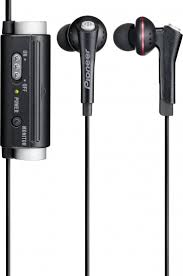
SE-NC31C NOISE CANCELLING - Headphones PIONEER - Free user manual and instructions
Find the device manual for free SE-NC31C NOISE CANCELLING PIONEER in PDF.



| Product type | Active noise-cancelling headphones |
| Brand | Pioneer |
| Model | SE-NC31C NOISE CANCELLING |
| Transducer type | Dynamic, closed |
| Speaker diameter | 14.2 mm |
| Impedance | 34.5 Ω (ON) / 18.5 Ω (OFF) |
| Output sound level | 103 dB (ON) / 105 dB (OFF) |
| Frequency response | 5 Hz to 16,000 Hz |
| Maximum input power | 10 mW |
| Noise suppression | Up to 90% of ambient noise (20 dB at 300 Hz) |
| Power supply | 1 AAA battery (manganese or alkaline) |
| Battery life | Approx. 120 h (alkaline) / 60 h (manganese) |
| Weight (without battery) | Approx. 28 g |
| Included accessories | Earphones, airplane adapter, AAA battery (manganese), S/L eartips, carrying case, instruction manual |
| Main functions | Active noise cancellation, ambient sound listening (control button), use without noise reduction |
| Care and cleaning | Clean the plug with a soft cloth; avoid shocks; do not expose to water |
| Safety | Do not use if allergic; do not expose to flame; follow recycling instructions |
| Operating temperature | +5 °C to +35 °C, humidity < 85% |
Frequently Asked Questions - SE-NC31C NOISE CANCELLING PIONEER
User questions about SE-NC31C NOISE CANCELLING PIONEER
0 question about this device. Answer the ones you know or ask your own.
Ask a new question about this device
Download the instructions for your Headphones in PDF format for free! Find your manual SE-NC31C NOISE CANCELLING - PIONEER and take your electronic device back in hand. On this page are published all the documents necessary for the use of your device. SE-NC31C NOISE CANCELLING by PIONEER.
USER MANUAL SE-NC31C NOISE CANCELLING PIONEER
Noise-canceling earphones
Ecouteurs antibruit
Operating Instructions
Mode d'emploi
Bedienungsanleitung
Information for users on collection and disposal of old equipment and used batteries
(Symbol for equipment)

(Symbol examples for batteries)


Pb
These symbols on the products, packaging, and/or accompanying documents mean that used electrical and electronic products and batteries should not be mixed with general household waste.
For proper treatment, recovery and recycling of old products and used batteries, please take them to applicable collection points in accordance with your national legislation.
By disposing of these products and batteries correctly, you will help to save valuable resources and prevent any potential negative effects on human health and the environment which could otherwise arise from inappropriate waste handling.
For more information about collection and recycling of old products and batteries, please contact your local municipality, your waste disposal service or the point of sale where you purchased the items.
These symbols are only valid in the European Union.
For countries outside the European Union:
If you wish to discard these items, please contact your local authorities or dealer and ask for the correct method of disposal.
K058a_A1_En
Information to User
Alterations or modifications carried out without appropriate authorization may invalidate the user's right to operate the equipment.
D8-10-2_A1_En
WARNING
This equipment is not waterproof. To prevent a fire or shock hazard, do not place any container filled with liquid near this equipment (such as a vase or flower pot) or expose it to dripping, splashing, rain or moisture.
D3-4-2-1-3_A1_En
Operating Environment
Operating environment temperature and humidity: +5^ to +35^ (+41^ to +95^) ; less than 85% RH (cooling vents not blocked)
Do not install this unit in a poorly ventilated area, or in locations exposed to high humidity or direct sunlight (or strong artificial light)
D3-4-2-1-7c*A1_En
WARNING
To prevent a fire hazard, do not place any naked flame sources (such as a lighted candle) on the equipment.
D3-4-2-1-7a A1 En
When disposing of used batteries, please comply with governmental regulations or environmental public institution's rules that apply in your country/area.
D3-4-2-3-1_B1_En
WARNING
Do not use or store batteries in direct sunlight or other excessively hot place, such as inside a car or near a heater. This can cause batteries to leak, overheat, explode or catch fire. It can also reduce the life or performance of batteries.
D3-4-2-3-3_A1_En
This product is for general household purposes. Any failure due to use for other than household purposes (such as long-term use for business purposes in a restaurant or use in a car or ship) and which requires repair will be charged for even during the warranty period.
K041_A1_En
Thank you for buying this Pioneer product. Please read through these operating instructions so you will know how to operate your model properly. After you have finished reading the instructions, put them away in a safe place for future reference.
Main Features
Suppresses up to 90% of ambient noise, great listening even in noisy locations.
- Based on proprietary measurement methods.
- Not all surrounding sounds are eliminated.
Press monitor button to hear surrounding sounds.
Energy-saving design allows up to 120 hours of continuous listening enjoyment.
- When using Alkaline battery.
Features large-diameter 14.2mm drive unit for high-quality sound.
Noise-canceling function can be switched off when not needed, allowing use as ordinary earphones.
Includes in-flight adapter (dual plug) for use on airplanes.
Set Contents
Confirm the presence of all parts and components before use.
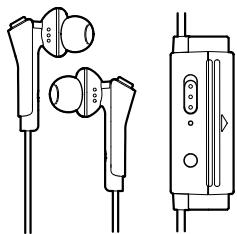
- Earphones
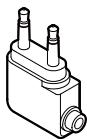
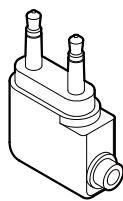
- In flight plug adapter
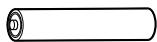
- AAA manganese battery (1) (for confirming operation)

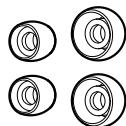
- Earphone tips, 2 each, S, L (silicon rubber)
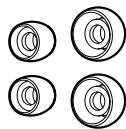
M size tips are factory installed on the earphones.
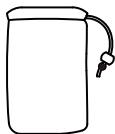
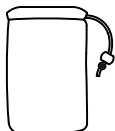
- Storage pouch
- Operating instructions (this document)
Names and Functions of Parts
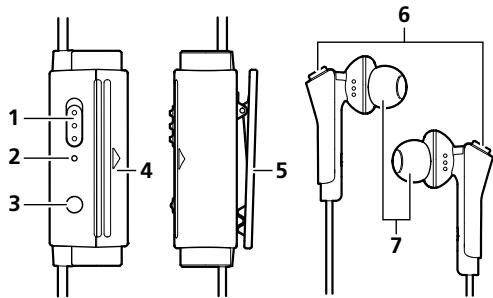
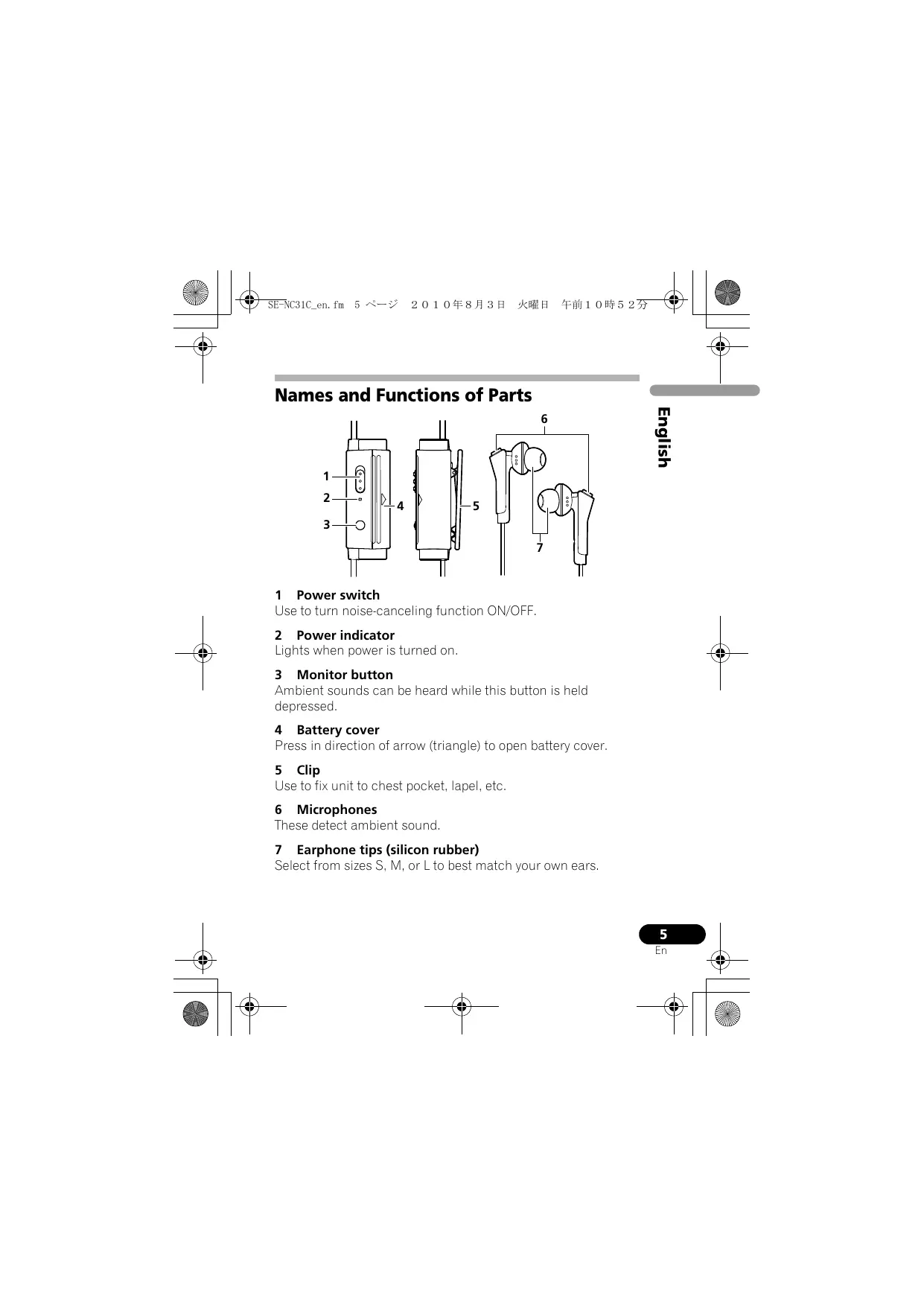
1 Power switch
Use to turn noise-canceling function ON/OFF.
2 Power indicator
Lights when power is turned on.
3 Monitor button
Ambient sounds can be heard while this button is held depressed.
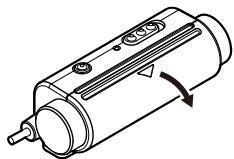
4 Battery cover
Press in direction of arrow (triangle) to open battery cover.
5 Clip
Use to fix unit to chest pocket, lapel, etc.
6 Microphones
These detect ambient sound.
7 Earphone tips (silicon rubber)
Select from sizes S, M, or L to best match your own ears.
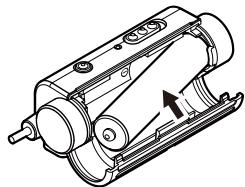
Inserting Battery
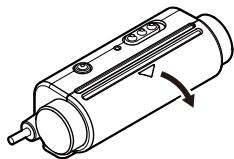
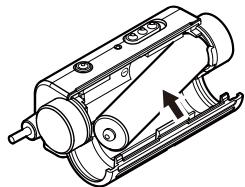
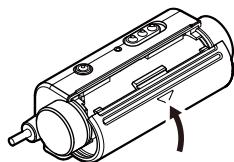
1 Press in direction of arrow to open battery cover.
2 Insert battery, taking care to align its and polarities correctly.
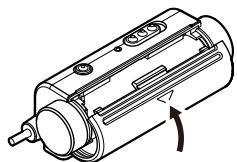
3 Press in direction of arrow to close battery cover.
When to replace battery
When battery becomes expended, the power indicator will become darker, and sound will appear distorted, with greater than normal amounts of noise. Always replace a new battery. Nominal battery life is as follows when noise-canceling function is used continuously:
AAA Alkaline battery: About 120 hours
AAA Manganese battery: About 60 hours
(Battery life may vary depending on surrounding temperatures and other conditions of use.)
Using the Earphone
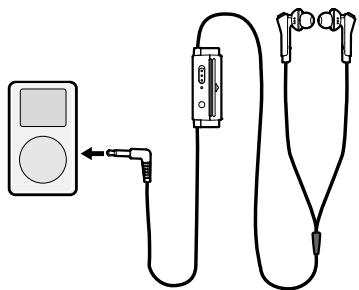
1 Connection to AV devices
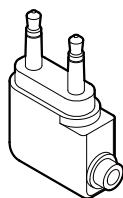
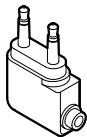
In flight plug adapter
When connecting the earphones to an airline onboard audio system, use the supplied plug adapter.
2 Using the earphones
Confirm the left/right orientation of the earphones by looking at the "L" and "R" symbols or the earphone color, and place the earphones in your ears. Select the provided earphone tip that best fits your ear size.
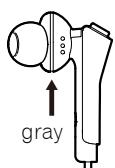
L:left
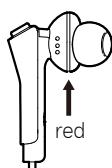
R: right
3 Playing music
1. When power is ON
When the power switch is set to ON, the power indicator lights green, and the noise-canceling function operates, allowing you to listen to music without excessively raising the volume, thus eliminating the need to raise sound volume excessively, and reducing disturbance to nearby people.
2. When power is OFF
When the power switch is set to OFF, the noise-canceling function stops, and the unit can be used as ordinary earphones.
3. When the monitor button is pressed
While the monitor button is held depressed, playback sound is muted and the noise-canceling function is temporarily stopped, thus allowing you to hear ambient sounds without removing the earphones.
- This function is enabled only when the power switch is set to ON.
4 Following Use
When not using the earphones, set the power switch to OFF.
5 Precautions
- When disconnecting the cord, grasp the plug and do not pull the cord.
- The furnished in flight plug adapter may not be compatible with the jacks on all airplanes.
-
Do not use with airline onboard sound systems under the following conditions:
-
Whenever the cabin crew announces that electronic devices are prohibited.
-
When the use of privately owned earphones is prohibited inside the plane.
-
The noise-canceller function is designed to reduce noise primarily in the low-frequency range, and is not effective at reducing high-frequency noise.
- If the earphone tips do not correctly match the size and contours of your ears, excessive sound may escape, or you may sense insufficient bass sound, and the effect of the noise-canceling function may be reduced. Always select and use the earphone tips that best match the size of your ears.
- If the earphones' microphone is covered with your hand or other object, feedback may be caused, resulting in a "howling" sound. In this case, remove your hand or other obstruction from the microphone.
Troubleshooting
If you suspect a malfunction, perform the following checks, since a simple operating error may be the cause of the problem. The problem may also be caused by factors other than the earphones themselves, so be sure to check the sound components with which the earphones are used.
Perform the following checks, and if the problem persists, consult your dealer or nearest Pioneer service station.
| Problem | Remedy |
| No sound. | ·Check connection between earphones and AV device. ·Confirm that power is turned on to the AV component. ·Adjust the output sound volume on the AV component. ·Replace the earphone battery. |
| Sound is distorted. | ·Lower the sound volume on the connected AV component. ·Replace the earphone battery. |
| Power won't turn on. | ·Replace the earphone battery. ·Check that battery is installed correctly (are ⊕ and ⊙ polarities correct?). |
| Feedback sound (howling). | ·If you are covering the microphone part of the microphone with your hand, remove your hand. |
| Noise canceller produces no effect. | ·Set the power switch to position ON (power indicator lights green). |
About use of earphones
- Do not subject earphones to dropping, striking, or other severe impacts, since damage may result.
- To ensure high quality sound reproduction, keep the plug clean by wiping occasionally with a soft clean cloth.
- In the event of a malfunction, or if a foreign object becomes lodged in the earphones, turn off the power and consult your dealer or Pioneer service station.
- During use of the earphones, if you sense an allergic reaction (rash, etc.), stop using the earphones immediately.
- This product has been designed to reduce noise and enhance your listening experience. It has not been designed for pilot use or for inflight communications as designated by the FAA (Federal Aviation Administration). Do not use this product for purposes other than those for which it was designed.
Specifications
Type Closed dynamic
Driver unit diameter . 14.2 mm
Maximum input. 10 mW/32 Ω
Impedance. 34.5 (ON), 18.5 (OFF)
Output sound level 103 dB (ON), 105 dB (OFF)
Frequency response. 5 Hz to 16 000 Hz
Noise suppression 20 dB (at 300Hz
Power. AAA battery x 1
Weight . about 28 g
(not including battery)
Accessories
In flight plug adapter 1
AAA manganese battery (for confirming operation) 1
Earphone tips S, L (silicon rubber) 2 each
- M size tips are factory installed on the earphones.
Storage pouch. 1
Operating Instructions 1

Note
- The appearance and specifications of this product are subject to change without notice.
Published by Pioneer Corporation.
Copyright © 2010 Pioneer Corporation.
All rights reserved.
Publication de Pioneer Corporation.
© 2010 Pioneer Corporation.
Copyright © 2010 Pioneer Corporation.
Copyright © 2010 Pioneer Corporation.
Copyright © 2010 Pioneer Corporation.
(borracha silicone) 2 de cada
"Copyright" © 2010 Pioneer Corporation.
Brusreducing. 20 dB (vid 300 Hz)
Copyright © 2010 Pioneer Corporation.
Kopiering forbjuden
Evnpwopwn Tov xonotov oxetika me t oulaoyn kai tooppn taalov sokeuw kai xonipoiinouevow mtapaiy
o i a ouokuee

( -ta a ) via atapicε


Pb
Ta mOjula oAvo tO aPoiovta, stn yMeKoiaia toc KAI/STa Epyapaa nov ta
sovobouv uOdoekVbovov oTt aeiTeiatao 1 oaiqawioicov ToNkEeKpivok NkEeKtpovikov
pOoiovToK TAO IVaIaTApovAo nOa ToNlaOIAu OIKAA oOAPUipMia.
IaTnOeotrAnoppyun,AnokouohkavAvaKoKaLoanZaiAoW npOivToV Kau
JNpOzoioumEvovuataPawvAnEvoBvOteiStarKtALnnAOniaOnuaOnyNic,OnpoovMa
EevukicAsvOyoBeiaC.
MeTnOoTtAnOoPnIooVToKuMauTApov,BoJHtate TnyEoKoovJIOIoTuW e npov Katoic nKtNpOaJyEvbOeouav apvntikov ooiOnciv Oo npoeKtuAvoTnKtNpOaTouY,ya NtUavPovynVyeiaKa topeBdAoV.
Tia panaosotepa nlaopopoei agtikae m tynoukoy kau auvokkaom paluov npovotov ka matarapu, oikovotne me ts tonkac apzv, tvn umpeia anoppyns ouokcvov ts npovjoc snc to noqioo paoonto npovotov.
Auta ta oubetaiaoxouov mvo yia ts xwpe ts Eupmaikns Evwns.
Tia xwpes EKtos ts Eupwnaikns Evwons:
Eav enthoyeire va atopnpivere aote tig ookene, cankovnvohtpe ie tic tonikc apzic n to onieio ayopac tou npovtos kui evnepootee otzukia me tvv osrnt jedoo anoppipns tocug.
K058a_A1_EI
ПОНДОПОIHESH
Autoc o eToTiaOcEevivaIabiApoxc. Tva v atopotepetov KivuVIOuPakayicA nAekTporTIAJc, mnuTotOBeTeite OTOIDNTOTRE OeUoC yEaTO pKovTae autov to EToTiaOio (Otuc EVA poCnEv aDooExo IauoIoUw) nnu To EKETeTe Oe STaJIO, KATpeyj, BpOxN uypaoria.
D3-4-2-1-3_A_Gr
AeIoupyiko Tepiαλλov
Oeopkaia kai vyaia leiatoyuovn oepiipaloovtos; Ato5+6oC+85+341Fto+95+5),Iyatope aio 85%RH (Gpaoic npaeidoiu todoepoeip aoia) Mny ckytaotarate auiv nuymoa de aou mukoo aepieocyeh07en, h oe tonoeeoiouk eoktntvtae ou neynla yypaaia h eaoo naakoo foc (htayupo teytonoq foioituo). Dd-2-1-7A-C
ПОНДОПОИЗH
Fia va atotpeetye Tov Kivuvo tpukayic, mnu ToTbeTeite OtoiaDtoniye TuVn Tiyny oLoVac (mOw eavauveoKei) pArvTw oToEgToAIO.
D3-4-2-1-7a_A_Gr
Kata nTv atropiunTuv xonoiotoinevuov
mTatapiuv, papaakaioumuopwheite me touc
kUpepivtikouc kavoviaouc n Touc kavoces Tou
nBouoioe Tepalauovikoyou apayoviaou1
tOxuovou atnvXupa/teipov1qac. D3-4-2-1-Gr
D3-4-2-3-1_Gr
Auro to piov eviva yia yevuk oikauk chiyon.
Onoaiodnve aeverpakka loya oyigns toy ia ekotowc
awoc kctoc akoi oikaukoc (0eoc n jaukopopredceom
choyi yia eayepaartkooc loyos on vva estetarotip no
choyi ne aokvtinno t no anuataei ekeknei
th xpeowbi akojn ka tata tvd diaqkna ts yeynuoeos
orey. K041_Gr
Euayapiotoue yia tvnyapotaov npovtoc npoiovoc Pioneer. Ipaakaleioe oonos diaaose tic npooboec odnyie iitovpyiac oote va ywopicietne ooc va xepiosteite katalna to mvtelo ca. Apoov teaiowete tnv avaywoon tow odnyiw, tonotheeiote tsc oe aogaaespeo cya eavaovtkn napanpni.
Kúpia XapaktnpiTiká
KataoTeAauov EwC kai TO 90% TOU oOpuou TEPiIaAovToC, apiotn akpoan anokua kai OE oOpuBwEicx wopouc.
Baoioueva0KatoxupouevεμθodovuεTpno
- ev t a 1 _1 0 i _1 c .
Pntote To koupti akpoadns yia va akouoette touc nxouc Tou Tepiabllovtoc.
O oxediouo eoiokovouon evpyeiaε tiptpeT expi KAI 120 wepc ouveouc aTolauoTuKnC akpOaONs.
M TeynpnoaKauKns aataipia.
IepiaaBavei movadaa trouou eyaansc diaetpou 014,2 xI. yia npwnnns TioiTnTac.
Bosma npoosapuoyea yua πtnon
Mnatapia AAA (1) ( 5tovpyias
- IIpooataeotkaakovotikov,2 _ia kaotemueytoS,L (Kaouoouk npuitiou)
Ta npoostatevtka 0 M evai tonoetnueva sta akovotika ano kataokevc.
- Θύλακας αποθήκενσός
O8nyiEcsxphonCtioapov Eyypafo)
1 Diakottns Tpofooosia
Xpnouoioe to yia va evpyoounoet/aevpyoounoet nV etoupyia noise-cancelling.
2 Evdiŋ tropooboiac
Avaet otav n tpoofoosia aoivc.
3 Koupiαρoαης
Otro to koumu iivat patnevo, npopeite va akoovotouc novtovepiaalovto.
4 Káluμμa μπatapiaç
Ieotpocntv katoobvOntovbeoV (tpiywo) yva avoiEeTo KaVmua TcM pataipia.
5
Xpnooioane to yia va ouvayete tn v oukeun otny toeenn tns o a c, 0to neto, k.
6 Mikofoova
AvxvEvov tv xovt vepaalovtoc.
7 Ipooataeutiká akouotikov (kaoutouk Tupitiou)
3 Avanapaywyn mouoikns
Telif Hakkı © 2010 Pioneer Corporation.
Pluggadapter for bruk pa fly
Opphavrsrett © 2010 Pioneer Corporation.
Alle rettigheter reservert.
Informace pro uzivatele pro sbēr a nakládāni se starymi pristroji a použitymi bateriemi
(Symbol pro) pristroje

(Pfiklady symbolu) na bateriich


Pb
Tyto symbola na pfiistroji, baleni, a/nebo na pfiiozenych dokumentech znamenaj, Ze pouzite elektricke a elektronicke vyrobyk a baterie by nemeli bytvmichany mezbi bezny odpad domacnsto.
Prafdnuklividka, obnoovani' a recylokani odadpu starych vrobu'a pouzitych bateri, prosim pouzijte oznacenych nadvob s voulasu d plastmi smitni zakony.
Copyright © 2010 Pioneer Corporation.
Kiadja a Pioneer Corporation.
Copyright © 2010 Pioneer Corporation.
Minden jog fenntartva.
Informaté pre spottingebitešov o skladovani a narabani staryymi alebo nefunkčnymi elektronickymi zariaideniama a použitými batériami.
He IcnoIyIe He xHpaIIte BatapeKn Ha
PpAMo COnJIeHOM CBety INb I DpyTHx JAKHX
MeCTax (HaHPmepE, B cAnOte ABOtOMbIaN INH
PdAmC cO6OrpeBaTeTEM). 3To MOKTe npBvBeT N
YteKe HJXKOctN 63 Batapeek, nepeByeB, BApbyB
Inn 603rpanIO. Kpme TOrO, cpoLcnkxbIy IN
EMKOTb Batapeek MOyEBuINbTcB.
D3-4-2-3-3_A1_Ru
JaHnOHe H3eHEnpePnD3aHcHEnOJIN HcN0b3oBAnHH B O6hIcxOx3RtCTBeHNbI xceI, C BnuCyae B03NkHOBENHIO6HnCnPABHOCT, CBAHONiC HcN0lb3oBAnHM E BpyTHX,HexEJIoxOx3RtCTBeHNbIX ceJIHX (TAKHX, Ka JInTeBHOe HcN0lb3oBAnHH B KOMMERKHECNIX cEePOTAH NIN B ATOBMOnIE, INN HA KOpAe)ITpeBQyEPEMOHTA, TAKOI pEMOHOT OCyeCTBnRETC 3a NNATy,DANBE TcEHEne rapaHTNHOFO cPOKA.
K041_A1_Ru
-ПО co6CBeHHbIM MeTOДAM H3MepeHHI KOMIIaHHI.
- OtcekaIOTcH He BCE BHeIIHHe 3ByKN.
YTO6bI yCJIbIaTb BHeUHHe 3ByKN, HaxMnTe KhONKy OTCJEXKBAHNA BHeUHNX 3ByKOB.
3Hepros6eperaioa KaHcTpyKzna oOecneuBaetdo 120
yacOB HnpepbIBHOrO IpocnyuBHaNMy3bIKN.
- IIpn HcIOJIb3OBAHHIeIoUHOI 6aTaapeKn.
IcnoJIb3ObaHne DnHaMnuecknx ROnOBok 6oJbUoro DnaMeTp a 014,2 MM oBeCneuNbaeT BbICOKoe KaueCTBO 3ByaHn.
- YexoJI IJIa XpaHeHHI IN IpeHocKn
3 KhoNka OTCJeXnBaHnBHeuHnx 3ByKOB
BHeIIHHne 3ByKN cJIbIIHHbI, IIOKa 3Ta KHOIIka yIepKINBaETcB HAnKaTOM IIOJIOKeHHN.
4 KpbiIka 6aTaapeHoro OTecka
HaKMMte B HnPaBJIeHH, yKa3aHHom cTpeJIkoN (TpeYToJIbHNKOM), YTO6bI OTKpBTb KpbIIky 6aTaapeHOrO OTeka.
5 Klnnca
HcnoJIb3yIte IJIa IIpHKpeIIeHnI H3JeJIInK K rpydHomy KapMaHy, IaIkaHny H T. I.
6 Mnkpoonbl
PpHHMaKOT BHeIIHHe 3ByKN.
7 BknaIbIuH HayuHnKOB (CNJIHKoHOBbI KAYuK)
Bb6epHe H3 pa3mepOB S, M HJIH L Te BkJIaIbIHH, KOtOpbIe JyUHIIe BCErIOIIXOJIT opMe BaIIHx yIIeI.
UcTaHOBka 6aTapeiKN
1 HaKmTe B HnpaBJeHnn, yKa3aHHOM CTpeIkoJ, YTO6bI OTKpbITb KpbIshky 6atapeHoro OTCEka.
2 BcTaBbTe 6aTapeiKy B npaBnIbHOJ OpiEHTaUIN, CO6JIIOJa IOnIpaHocTb U
3 HaKmTe B HAnpaBJeHnn, yKa3aHHOM CTpeIkoJ, YTO6bl 3aKpbITb KpbIshky 6aTapeHoro OTceka.
Korda 3aMeHb 6aTapeKy
KorJa 6aTaapeKa pa3pIHTcH, HINKATOp IITaHHcT aHeT TeMHee, a 3Byk 6yIET HCKaKaTbc, COIIPOBQdAraCb 6OJIbIHNM, cEm O6bIHyO, KOJIInueCTBOM HcKaKeHN.ДЯ 3aMeHb BCEJda HcIOJIb3yIte HOByO 6aTaapeKy. HomHaJIbHi croK cJyK6b6aTaapeKn IIpr HcIOJIb3OBaHH ΦyHKiH NIOaJIbJeHHI yMa 6yIe T CJIeIyIOHM:
IIeJIOuHa8 6aTaapeiKa TnIa AAA: oKOJIo 120 yacOB
Mapranueba6atapeiKa TnAAA:okoJIO 60 cacOB
(Cpok cnjxkb6aatapeiKN MOKeT OTJHuaTbC8 B3aBNCMocTH OT OKpykaioiTeMIIpeaTypbI H npyIHX ycIOBn 9KcIIyataaHH.)
- YCTaHOBHTe BbIKJIOuateJIb IITaHHN B IIIOJIOKeHHe ON (BKJI) (INHdNKaTOp IITaHHN 3aIOPHTc4 3JIeHbIM IBeTOM).
3aMeuHHe O nOJIb3OBaHH N HayUHNKaMn
He poHnTe HayIHHKN, He IIOBepraIte Hx yIapam N IpyrHM cnJIbHbIM BO3JeCTBnM, B IPOTHBHOM CJIyae BO3MOJHO IOBpeKJeHne HayIIHNKOB.
C 1eJIbI0 o6ecIeueHnB bICOKO RaueCTBa 3ByaHnIepKHTe IITeIcIb YnCTbIM, IepHOuueCKN IpOTnpaer eO MRKO uHCToI TKaHbIO.
BcIyae HeNCIIpaBHOCTH HJIecJIIN B HauIIHHKN IIIOJaI IOCTOPOHHI IIpeIMET, BbIKJIIOHTe IITaHHe N o6paTHTecb 3a KOHCyJIbTaIChE K IIPOdaBHy HJIIN B cepBnCHbI IeHTp KOMIIaHHN Pioneer.
- EcINI BO BVPemRAHNCIOJIb3OBaHHA HayIIHHKOB y Bac BO3HNKHeT aJIIEpRNUeCKa peAKIIHRA (cblb H T.Д.), HEmeJLIeHHO IIpeKpaHTHe NCIOJIb3OBaHHe HayIIHHKOB.
Данhoeи3dJIHe cIeHuaJIbHO pa3pa6OtaHo cIeJIbU yMeHbIIeHHN IIIyMOB H yJUyIIIeHHN 3ByuHaHH. OHO He IIpeHa3NaYeHo IJIa HcIOJIb3OBaHHN IIJIOTaMH HJIN DJIa 6oTobOH CBa3H, KaK yKa3aHO FAA (ΦeJIepaJIbHbIM YIpaJIbHeHem rpaKaJDAHcKoABHaUNCIIIA). He IIpJIb3yIteCb IaHHbIM H3dJIeHHM B CEJIAX, OTJINuHOUIXcra OT TEX, IJIa KOTOpbIX OHO IIpeHa3NaYeHo.
TexHnueckne xapaKTepeNCTnKN
THII. 3aKpbTbI dHHaMHK
ДиhamETДИнHamHueckoI rOIOBKn 014,2 MM
MaKc. MoIIOHOCTb 10 MBT/32Ω
HmpeIaHc 34,5Ω(ON),18,5Ω(OFF)
YpOBeHb BbIXoIHOrO 3ByKOBOrO cHHaJa 103 nB (ON), 105 nB (OFF)
Yactotnha xapaKtepehctnka. OTo 5Tdo 16000 T
Плдамльени IIIyMOB. 20 Ib (Ha 300 II)
UexoJI IJIa XpaHeHHn H IpeHocKn 1
Hnctpykunno n0 KcnIyataunn 1

PpimmeaHne
BHeIIHHN BnI N TeXHHueckNe xapaKTepeHCTKN H3JeJIHa MOryT H3MeHЯTbC8 6e3 IpeIbapHTeJIbHoro yBeIOMJIeHHN.
Издано Pioneer Corporation.
Pioneer Corporation, 2010.
Bce npaba 3aunneHbI.
Copyright © 2010 Pioneer Corporation.
Published by Pioneer Corporation.
Copyright © 2010 Pioneer Corporation.
All rights reserved.
Publication de Pioneer Corporation.
© 2010 Pioneer Corporation.
HmnpTep: OOO "IIOHEP PUC"
125040, Pocca, r. MockBa, yI. PpaBbl, d.26 TeI.: +7(495) 956-89-01
PIONEER ELECTRONICS (USA) INC.
P.O. BOX 1540, Long Beach, California 90801-1540, U.S.A. / Etats-Unis. TEL: (800) 421-1404
PIONEER ELECTRONICS OF CANADA, INC.
300 Allstate Parkway, Markham, Ontario L3R 0P2, Canada TEL: 1-877-283-5901, 905-479-4411
PIONEER EUROPE NV
Haven 1087, Keetberglaan 1, B-9120 Melsele, Belgium / Belgique TEL: 03/570.05.11
PIONEER ELECTRONICS ASIACENTRE PTE. LTD.
253 Alexandra Road, #04-01, Singapore / Singapour 159936 TEL: 65-6472-7555
PIONEER ELECTRONICS AUSTRALIA PTY. LTD.
5 Arco Lane, Heatherton, Victoria, 3202, Australia/Australia, TEL: (03) 9586-6300
PIONEER ELECTRONICS DE MEXICO S.A. DE C.V.
Blvd. Manuel Avila Camacho 138 10 piso Col.Lomas de Chapultecpec, Mexico / Mexique, D.F. 11000 TEL: 55-9178-4270 K002_B3_RU

- Information for users on collection and disposal of old equipment and used batteries
- Information to User
- WARNING
- Operating Environment
- Main Features
- Set Contents
- Names and Functions of Parts
- Power switch
- Power indicator
- Monitor button
- Battery cover
- Clip
- Microphones
- Earphone tips (silicon rubber)
- Inserting Battery
- When to replace battery
- Using the Earphone
- Connection to AV devices
- Using the earphones
- Playing music
- When power is ON
- When power is OFF
- When the monitor button is pressed
- Following Use
- Precautions
- Troubleshooting
- About use of earphones
- Specifications
- Accessories
- Note
- Evnpwopwn Tov xonotov oxetika me t oulaoyn kai tooppn taalov sokeuw kai xonipoiinouevow mtapaiy
- Tia xwpes EKtos ts Eupwnaikns Evwons:
- ПОНДОПОIHESH
- AeIoupyiko Tepiαλλov
- ПОНДОПОИЗH
- Kúpia XapaktnpiTiká
- Diakottns Tpofooosia
- Evdiŋ tropooboiac
- Koupiαρoαης
- Káluμμa μπatapiaç
- Mikofoova
- Ipooataeutiká akouotikov (kaoutouk Tupitiou)
- Avanapaywyn mouoikns
- Informace pro uzivatele pro sbēr a nakládāni se starymi pristroji a použitymi bateriemi
- Informaté pre spottingebitešov o skladovani a narabani staryymi alebo nefunkčnymi elektronickymi zariaideniama a použitými batériami.
- KhoNka OTCJeXnBaHnBHeuHnx 3ByKOB
- KpbiIka 6aTaapeHoro OTecka
- Klnnca
- Mnkpoonbl
- BknaIbIuH HayuHnKOB (CNJIHKoHOBbI KAYuK)
- UcTaHOBka 6aTapeiKN
- Korda 3aMeHb 6aTapeKy
- 3aMeuHHe O nOJIb3OBaHH N HayUHNKaMn
- TexHnueckne xapaKTepeNCTnKN
- PpimmeaHne
- HmnpTep: OOO "IIOHEP PUC"
- PIONEER ELECTRONICS (USA) INC.
- PIONEER ELECTRONICS OF CANADA, INC.
- PIONEER EUROPE NV
- PIONEER ELECTRONICS ASIACENTRE PTE. LTD.
- PIONEER ELECTRONICS AUSTRALIA PTY. LTD.
- PIONEER ELECTRONICS DE MEXICO S.A. DE C.V.
Brand : PIONEER
Model : SE-NC31C NOISE CANCELLING
Category : Headphones