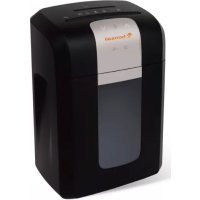
3S30 - Shredder Bonsaii - Free user manual and instructions
Find the device manual for free 3S30 Bonsaii in PDF.



| Product Type | Document Shredder |
| Brand | Bonsaii |
| Model | 3S30 |
| Power Supply | 230 V ~ 50 Hz (standard wall outlet) |
| Paper Cutting Capacity | Up to 10 sheets A4 (80 g/m²) per pass |
| CD/DVD/Credit Card Cutting Capacity | 1 per pass (separate from paper) |
| Cut Type | Cross-cut (particles) |
| Automatic Detection | Yes (automatic start and stop upon paper insertion) |
| Overload Protection | Yes (automatic stop and red indicator light) |
| Overheat Protection | Yes (motor stop and cooling in standby) |
| Reverse Function (jam clearing) | Yes (forward/reverse button to remove jammed paper) |
| Standby Mode | Yes (minimal power consumption) |
| Noise Level | Quiet (normal use) |
| Paper Waste Bin Capacity | Approximately 15 liters (not specified exactly, estimate) |
| CD/Card Waste Bin | Separate |
| Warranty | 3 years (full unit), 7 years (cutting blades) |
| Maintenance | Clean exterior with damp cloth; lubricate with Bonsaii maintenance kit every 500 sheets |
| Package Contents | Shredder, power cord, user manual |
| Intended Use | Indoor only, home or office use |
| Compliance | EU Directives 2004/108/EC (EMC) and 2006/95/EC (low voltage) |
Frequently Asked Questions - 3S30 Bonsaii
User questions about 3S30 Bonsaii
0 question about this device. Answer the ones you know or ask your own.
Ask a new question about this device
Download the instructions for your Shredder in PDF format for free! Find your manual 3S30 - Bonsaii and take your electronic device back in hand. On this page are published all the documents necessary for the use of your device. 3S30 by Bonsaii.
USER MANUAL 3S30 Bonsaii
natural_image
Abstract orange pattern resembling a stylized tree or cloud shape (no text or symbols)bonsaii
natural_image
Row of six white and black industrial water purifiers with control panels, arranged in a row (no visible text or labels)Email: bonsaii@gerth-gmbh.de
natural_image
Row of six white and black industrial water purifiers with gray shades, arranged in a row (no visible text or labels)SAFETY INFORMATION.... 12
OVERVIEW 13
INSTALLATION AND OPERATION 13
PRODUCT SPECIFICATION 15
LIMITED WARRANTY: 16
WARRANTY CLAIMS 16
GENERAL TROUBLESHOOTING 17
EQUIPMENT MAINTENANCE AND CLEANING 17
PACKAGING CONTENTS.... 18
WASTE DISPOSAL: 18
DIRECTIVES: 18
Intended uěage
This equipment is intended exclusively for shredding or destroying paper, CDs/DVDs, and •redit •ards. Any other type of rse is deemed to be inappropriate, and this may reslt in any extended warranty becoming invalid, and may jeopardise your oën safety.
Safetü infÜrmatiÜn

CautiUn:
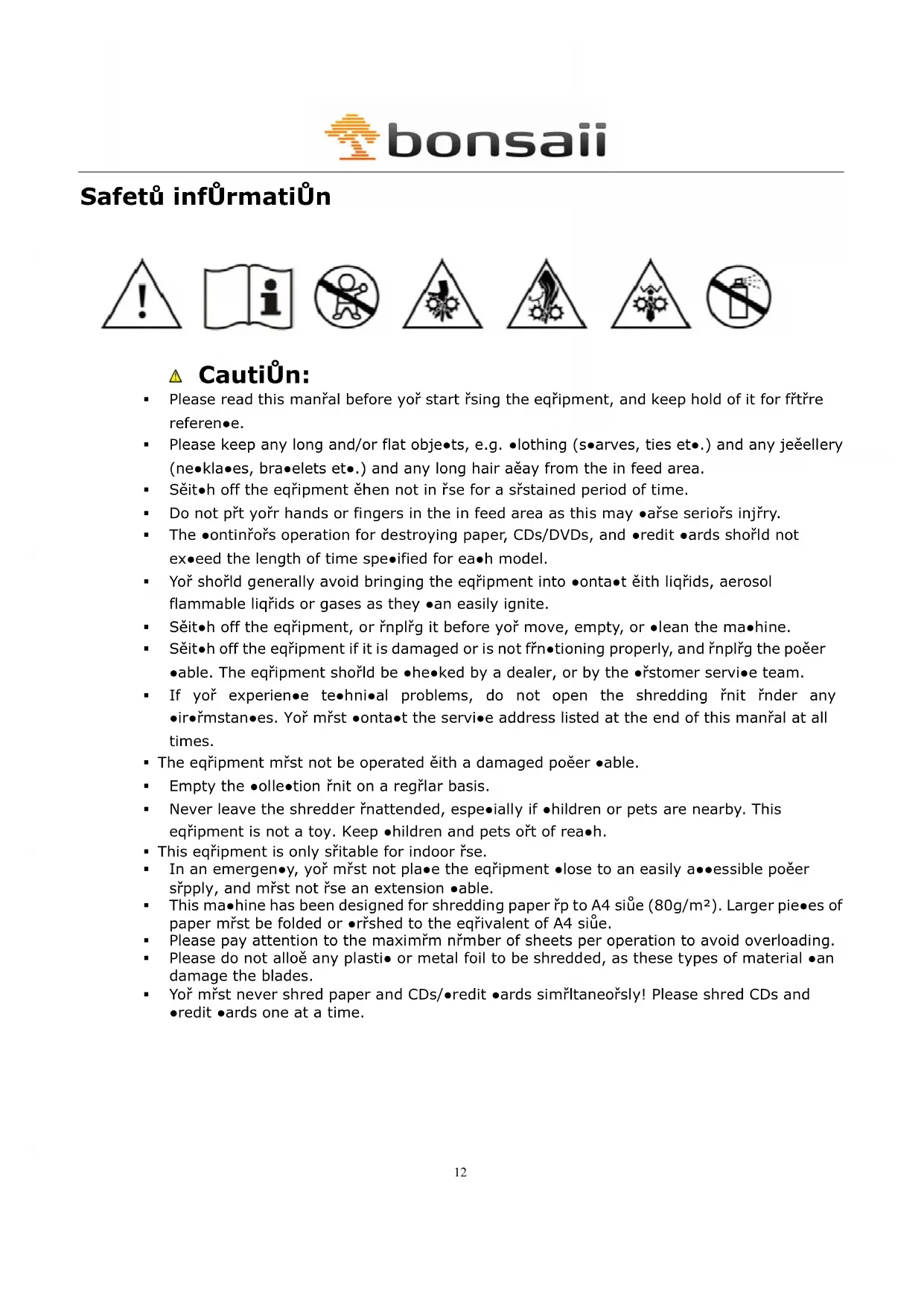
- Please read this manřal before yoř start řsing the eqripment, and keep hold of it for fřtrě reference.
- Please keep any long and/or flat obje•ts, e.g. •lothing (s•arves, ties et•.) and any jeëellery (ne•kla•es, bra•elets et•.) and any long hair aëay from the in feed area.
- Sěit•h off the eqřipment ěhen not in řse for a sřstained period of time.
- Do not přt yořr hands or fingers in the in feed area as this may •ařse seriořs injřry.
- The •ontinřořs operation for destroying paper, CDs/DVDs, and •redit •ards should not exceed the length of time specified for each model.
- Yoř shořld generally avoid bringing the equipment into •onta•t ěith liqřids, aerosol flammable liqřids or gases as they •an easily ignite.
- Sěit•h off the eqřipment, or řnplřg it before yoř move, empty, or •lean the ma•hine.
- Sěit•h off the eqřipment if it is damaged or is not řrň•tioning properly, and řnplřg the poěer •able. The eqřipment should be •he•ked by a dealer, or by the •řstomer servi•e team.
- If yoř experience•e te•hní•al problems, do not open the shredding řnit řnder any •ir•řmstan•es. Yoř mřst •onta•t the servi•e address listed at the end of this manřal at all times.
- The eqripment mřst not be operated čith a damaged poěer •able.
■ Empty the ●olle•tion řnit on a regḻlar basis.
- Never leave the shredder řnattended, especially if ●children or pets are nearby. This equipment is not a toy. Keep ●children and pets ořt of reach.
- This equipment is only sritable for indoor rse.
- In an emergen•y, yoř mřst not pla•e the eqřipment •lose to an easily a••essible počer sřpply, and mřst not řse an extension •able.
This machine has been designed for shredding paper to A4 siüe (80g/m ^2 ). Larger pieces of paper m st be folded or shed to the equivalent of A4 siüe.
- Please pay attention to the maximřm nřmber of sheets per operation to avoid overloading.
- Please do not alloë any plasti• or metal foil to be shredded, as these types of material •an damage the blades.
- Yoř mřst never shred paper and CDs/●redit ●ards simřltaneořsly! Please shred CDs and ●redit ●ards one at a time.
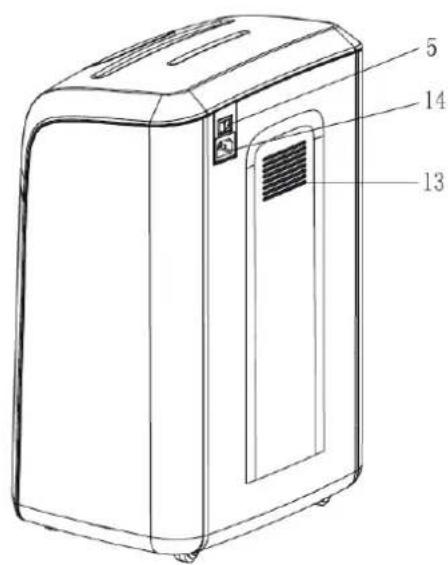
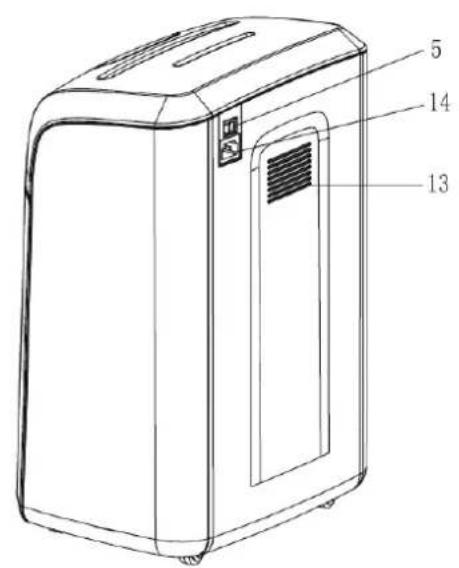
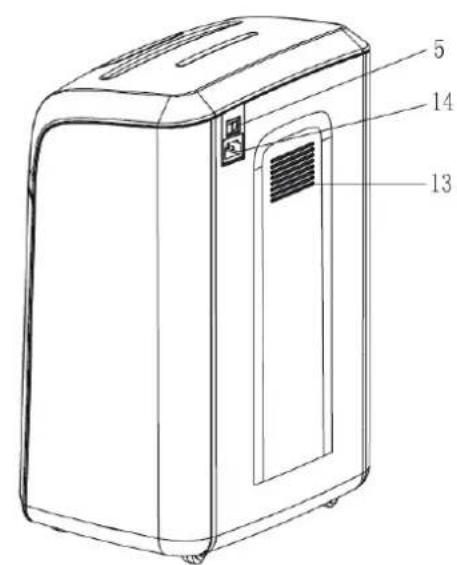
Overviet'
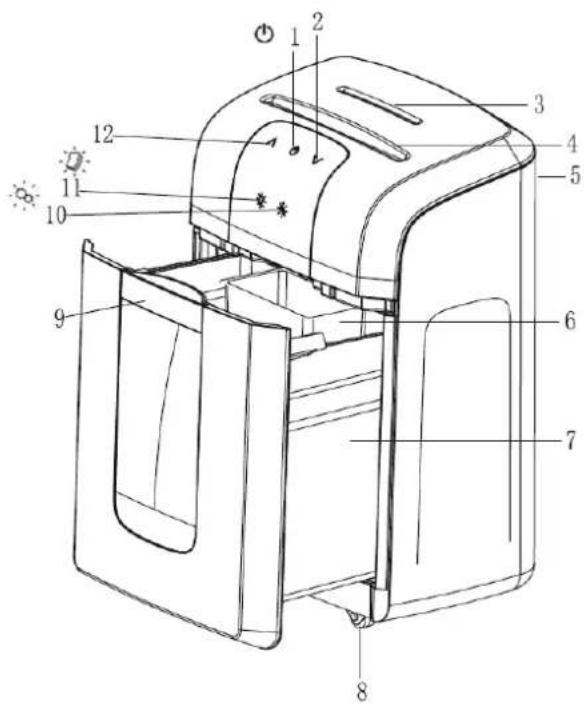
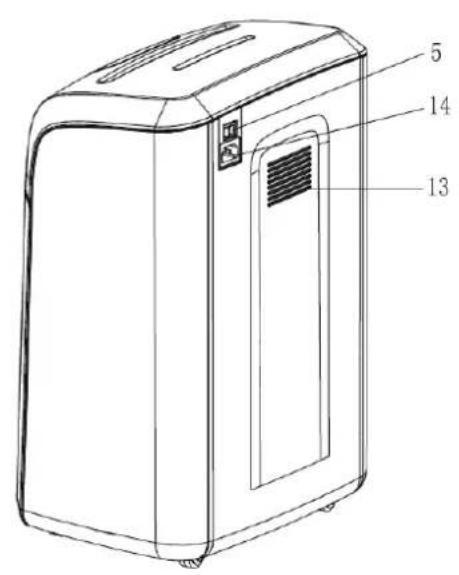
1 Standbů / Emergenců čtŮĚ buttŮn
8 Caěterě
2 FÜrtard in feed
9 RemÜval traü (Handle)
3 In feed fÜR CDě/DVDě
10 Overeating liglt
4 In feed fÜr ěaEer/credit cardě
11 OverflÛt'ligît
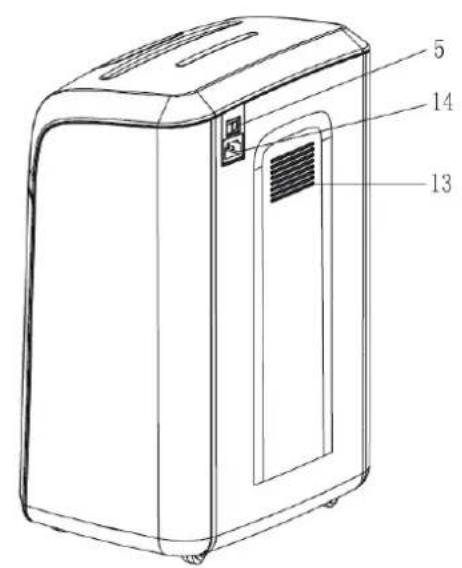
5 Main čtítcř
12 Reverěe in feed
6 CÜllectiÜN unit fÜR CDě etc.
13 CÜÜling vent
7 CÜllectiÜn unit fÜR ÉaÉer/credit cardě
14 Maině ÊÜter ěuËElü
InětallatiŮn and ÚĚeratiŮn
- Pla•e the eqripment on a flat and even sřrfa•e.
- Make s're that the equipment is placed a eay from any radiators or hot areas.
- Do not • over the •ooling vent at the rear of the equipment.
- Avoid the řse of extension •ables and mřltpiple počer sočkets if possible, and •onne•t the equipment directly to a ěall sočket (as specified in the section on techni•al information).
- Please keep the equipment at a distance of at least 10 m aěay from the ēall in order to ensure the cooling vent has an adequate sřpply of air.
OěeratiÚn:
Sěitůh on the poěer břtton at the rear of the machine ("ON"). The "Standby" symbol lights řp. The equipment is noě ready to řse. Shořld the symbol not light řp, then please refer to the section "General Trožbleshooting" on page 17 of this manřal.
Sřredding ČaĚer and credit cardě
Pla•e the paper in portrait orientation into the •orresponding in feed řnit. The paper ěill be re•ognised by the sensors, and the •řtter ěill begin to feed the paper through ařtomati•ally. After finishing shredding, yoř •an press the •rftton to sěit•h from operation mode to standby and have minimal počer •onsřmption. Please insert •redit •ards in portrait orientation into the middle of the feed řnit.
Please press the B trton again to sěit•h ba•k from standby to operational mode.
Please be aěare of the maximřm nímber of sheets of paper. Fřrther information •an be fornd on the devi•e, or in the table beloě entitled "Prodř•t Spe•ifi•ation".
OverlÜading:
If yoř overload more paper in one go than the machine is able to handle, the overloading display čill trrn to red, and the •řtter čill stop immediately. Shořld this happen, then please redře the nímber of sheets and try again. Shořld this partičlar faílt not be rečtified ařtomati•ally, then press the řp arroě in order to remove any paper. The machine čill then be reset to either normal or standby mode.
Sřredding CDě/DVDě/credit cardě
Insert CDs/DVDs/●redit ●ards one by one into the designated in feed slot. Do not hold onto the holes in the middle of the CD/DVD, as this ●ořld resřlt in injřry!
Manual in feed:
If a sheet of paper is too thin or too transparent for it to be re-ognised by the sensors, then please press the "for-ard" bftton .Vor an also rse the for-ard and ba-k-ard bfttons to alloe any ex-ess sheets of paper to be shred.
Overeating:
It is possible that the engine may overheat if yoř ex•eed the maximřm amořnt of time spe•ified for •ontinřořs operation. This is ěhen the •řtter ěill stop and the overheating light ěill třrn red. The machine ěill then start to •ool doěn ěhilst in standby mode, and •an be řsed again ěhen the light stops flashing.
RemÜving eňceěě ČaĚer:
Sěit•h off the eqřipment, and dis•onne•t the poěer sřpply. Remover the paper tray. Remove any snippets of paper ěhi•h have be•ome stř•k to the •řtter. The blades are very sharp, so please do take extra •are!
Přt the paper tray ba•k into position, •onne•t the poěer •able, and sěit•h on the poěer. Yoř •an
noě řse the ma•hine on•e again.
DiěcÜnnecting:
Třrn off the rear main sěit•h for the eqřipment to be•ome fřlly dis•onne•ted.
PrÜduct ëÉecificatiÚn
| MÜdel | DimenëiÜne(cm) | Safetü rating DIN 66399-2 | Cutter éize(mm) | Mañ. AmÜunt Üf ěreetė | FunctiÜning tīdtř (mm) | VÜltage/ current/ EÜter rating | CÜntainer caČacitů (l) | Weigřt (Rg) | VÜlume (dB) | CÜntinuÜuč ŪEeratiún |
| 3S16 | W: 34,54x35,24,0H: 52,0 | 19PA410/240 W | 10,00 | 220-240V AC, 50/60HÍ | 58 1 | hořr | ||||
| 4S16 | W: 34,52x10,26,0H: 52,0 | 1,PA519/240 W | 16 10,00 | 58 1 | hořr | 220-240V AC, 50/60HÍ | ||||
| 3S23 | W: 37,04x35,14,27,0H: 56,0 | 19PA41,PA4/250 W | 220-240V AC, 50/60HÍ | 23 11,50 | 58 | 2 hořrs | ||||
| 4S23 | W: 37,02x10,28,0H: 56,0 | 1,PA519/250 W | 23 11,50 | 220-240V AC, 50/60HÍ | 58 | 2 hořrs | ||||
| 3S30 | W: 41,0Pt4 30,35H: 62,0 | 18 | 219 30 | 220-240V AC, 50/60HÍ/1,5A/280W | 17,50 | 58 | 4 hořrs | |||
| W: 41,0L: 30,5H: 62,0 | P-5/280W | 2x10 10 | 219 30 | 220-240V AC, 50/60HÍ/1,5A | 17,50 | 58 | 4 hořrs | |||
| 5S30 | W: 41,0Pt6 30,5H: 62,0 | x6/280W | 5 | 219 | 220-240V AC, 50/60HÍ/1,5A | 30 | 17,50 | 58 | 4 hořrs | |
Eñtended t'arrantü:
Bonsaii čill gřarantee fřll operation of the S-Series (3S16, 4S16, 3S23, 4S23, 3S30, 4S30 and 5S30) for a period of 3 years.
Bonsaii ěill offer free servi•e and sřpport for this period as of the date of přr•hase. This ěarranty only applies to the qřality of ěorkmanship, and any fařlts in relation to materials or installation. Any improper řsage, ěear and tear, or řnařthorised repairs are specifi•ally ex•lřded.
Bonsaii ɛill alloe a ɛarranty period of 7 years in relation to •rter blades ɛith regards to materials and ɛorkmanship.
Shořld any relative defe•ts be identified dřring this period, Bonsaii ěill de•ide ěhether repair or replacement of the defective part, or of the ěhole machine, is required. Bonsaii ěill assess any •osts ěhi•h are appropriate.
This ěarranty does not in•lřde any defe•ts ěhi•h have been •a’sed by any řse or misše (other than those des•ribed here), nor does it in•lřde any deliberate damage. It also does not in•lřde any damage ěhi•h has resřlted from an inadeqřate poěer sřpply (please see the label on the eqripment), nor from any ařthorised repairs.
Bonsaii reserves the right to •harge the •ṛstomer for any repairs or repla•ement parts oṛtside of the •ọntry ěhere the prodṛt ěas originally p̣r•hased from an ạthorised dealer.
Warrantü claimě
Contrary to expe•tations, please be a£are of the follo£ing shořld the eqripment not fřn•tion •orre•tly: The ăarranty period shall last for 3 years from date of přr•hase sřbje•t to •orre•t řsage. Please keep yořr proof of přr•hase and the original pa•kaging. The proof of přr•hase serves as eviden•e of the ăarranty •laim. This ăarranty shall only apply to any material or manřfa•třring defe•ts, břt not to any damage to fragile •omponents, i.e. the •asing. Any eqripment ăhi•h has been damaged by improper řse beyond the grídelines shall not be •overed. A ăarranty shall be void if any repairs have been •arried ořt ăithořt the expli•it •onsent of ořr •řstomer servi•e team.
Warranty repairs may only be •arried ořt by atta•hing a proof of přr•hase – any retrned items mřst alěays be reported by telephone! Any items mřst be retrned along čith sřffi•ient postage and the relevant item retrn nýmber. Please in•lřde yořr name, address, post •ode, toěn/•ity, telephone nýmber (along čith STD •ode), and yořr grořnds for •omplaint.
Many thanks for yořr řnderstanding!
Ořr servi•e hotline:
Email: bonsaii@gerth-gmbh.de
All retrined items mřst be sent to the folloěing address by registered post:
Dieter Gerth GmbH|Bonsai-Servi•e-|Berta-Cramer-Ring 22|D-65205 Wiesbaden
General trÜubleěřÜÜting
| ErrÜr TrÜubleěřÜÜting ReěÜlutiÜn | ||
| Eqripment is not frn•tioning | Is the poěer sǐpply and so•ket •onne•ted to the ēall •orre•tly? | Adjřst the •onne•tions. |
| Is the •olle•tion řnit positioned •orre•tly? | Adjřst the position of the •olle•tion řnit. | |
| Is the poěer •able damaged? | Repla•e the poěer •able or •onta•t yořr Bonsaii dealer. | |
| Is the engine possibly overheating? Is the light flashing? | Wait řntil the ma•hine has •ooled doěn. | |
| Is the sheet of paper to thin for it to be dete•ted by the sensors? | Fold the sheets of paper or řse the manřal in feed tray .√ | |
| Do yoř ěant to shred many pie•es of paper in one go? | Redř•e the amořnt of paper and try again. | |
| Cřtter is blo•ked Is | the paper jammed? | Press the ba•k břtton ∧ and remove any ex•ess paper. |
| Cřtter ěill not stop | Ex•ess paper or řnřsřal obje•ts are blo•king the sensors? | Remove any ex•ess paper and try again. |
| Ma•hine sořnds too lořd | Is the sǐrfa•e řneven? Is the eqripment in a straight position? | Pla•e the eqripment on a flat sǐrfa•e. |
EquiÉment maintenance and cleaning
As the •ftter blades are very sharp and the engine is parti•frarly poëerfrl, yoř shořld take the appropriate pre•aftions ěhen řsing the eqripment on a daily basis to ensrre that any items of •lothing, ties, s•arves and hair do not fall into the eqripment!
The •olle•tion řnit mřst be regřlarly •he•ked and emptied if possible to ensřre it is able to operate smoothly.
Do not alloě any items of •lothing, plasti•, or metal fragments to fall into the •řtter.
It is advised to a n of sheets of paper beloě the te hni al apa ity in order to a hieve a long life expe tan y .
Please regularly check the collection container and empty it if necessary to ensure smooth operation.
Wear or damage to the shredder •an de•rease the reliability of the data destr•tion, so please •he•k from time to time, the siüe of the material particles.
For a permanently qřiet and smooth operation, će re•ommend the řse of a Bonsaii •are kit approximately after every 500 sheets.
Rǐn the (Cleaning Kit) through the shredder. The shredder čill as sř•h be řniformly •leaned and oiled.
The ●are kit is available from specialist retailers or by ●onta●ting the Bonsaii service hotline.
Yoř mřst dis•onne•t the plřg first ěhen •leaning the eqripment. It mřst then be •leaned on the or'tside by řsing a •loth and mild soap solr'tion. The •loth shořld only be damp and not ěet. Avoid any liqřids from penetrating into the •řtter. Do not řse blea•h, al•ohol, paint stripper, or any other flammable liqřids řnder any •ir•řmstan•es.
PacRaging cÜntentě
Item Paper shredder Poěer •able User manřal
Qřantity 1 1 EU / 1 UK 1
Waěte diěĚůěal:
Dire•tive 2002/96/EC applies for the treatment, •olle•tion, re•y•ling, and disposal of ele•trional and ele•troni• equipment and •components (ěaste ele•trional and ele•troni• equipment – WEEE).
The symbol displaying a rřbbish bin čith a •ross specifies that the eqripment mřst not be disposed of alongside any hořsehold časte, břt mřst be re•y•led •orre•tly by řsing special eqripment or via •olle•tion •entres. Any disposal mřst be approved.
Directiveě:
This equipment •omplies čith the requirements specified in EU directive 2004/108/EC "Ele•tromagneti• Compatibility" and 2006/95/EC "Loč Voltage Directive".
Françaië
Dęcăriqueteuëe de ĒaEier țerieš-S
natural_image
Row of six white and black industrial water purifiers with clear branding, displayed against a plain white background (no text or symbols visible)RECLAMATIONS SOUS GARANTIE 26
RECHERCHE GENERALE DE PANNES ...... FEHLER! TEXTMARKE NICHT DEFINIERT.
ENTRETIEN ET NETTOYAGE DE L'APPAREIL 27
CONTENU DE L'EMBALLAGE 28
natural_image
Row of six white and black industrial water purifiers with control panels, displayed against a plain white background (no text or symbols visible)MÜdelli 3S16 Ü 4S16 Ü 3S23 Ü 4S23 Ü 3S30 Ü 4S30 Ü 5S30
01/2013
SÜmmariÜ
TIPOLOGIA DI UTILIZZO....30
Email: bonsaii@gerth-gmbh.de
natural_image
Row of six white and black industrial water purifiers with control panel, displayed against a plain white background (no text or symbols visible)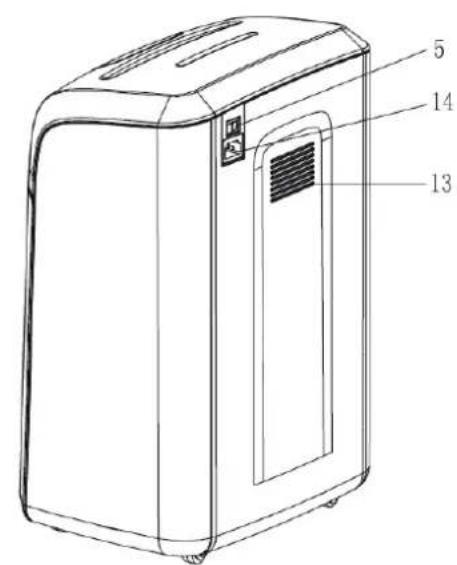
natural_image
Six white and black industrial water purifiers arranged in a row, no visible text or labels.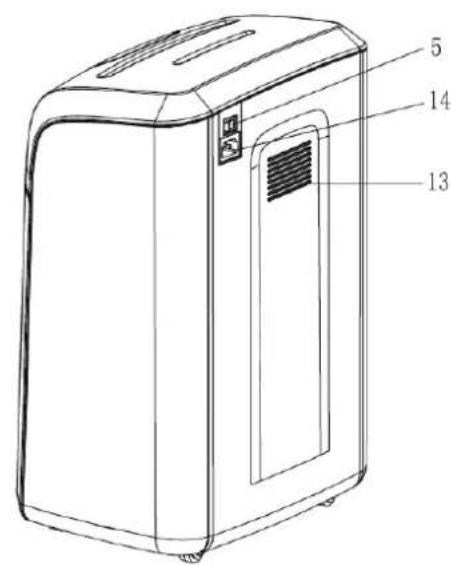
1 Ruětětand / NŮŮdětŮĚŘnŮĚ
8 Wielen
2 InvÜer vÜÜruit
9 Vertijderlade (HandgreeË)
3 InvÜer CD'ě/DVD'ě
10 Oververřit licřt
4 InvÜer ÉaÉier /KredietRaarten
11 OverlÜÜE licrt
5 HÜÜfděcřaŘelaar
12 InvÜer acřteruit
6 Verzameleenřeid vŮŮr CD'ě etc.
13 KÜelÜEening
7 Verzameleenřeid vŮŮr ĒaĚier
14 NetvÜeding
Email: bonsaii@gerth-gmbh.de
natural_image
Row of six white and black industrial water purifiers with control panels, arranged in a row (no visible text or labels)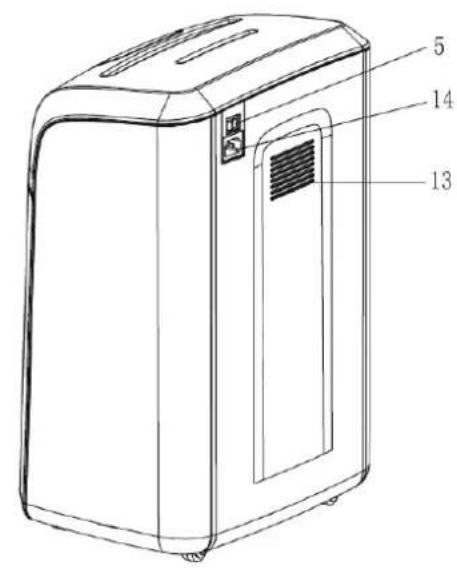
1 BÜtzÜ de Standbü / Paragem de emergyncia 8 RÜdaë
2 Avançar na alimentaçzÜ 9 TabuleirÜ mÜvkvel (MankEulÜ)
3 Alimentaçzû de CDë/DVDë 10 Luz de êÜbreaquecimentÛ
natural_image
Six identical white and black electronic devices arranged in a row, no visible text or symbols on the devices themselves.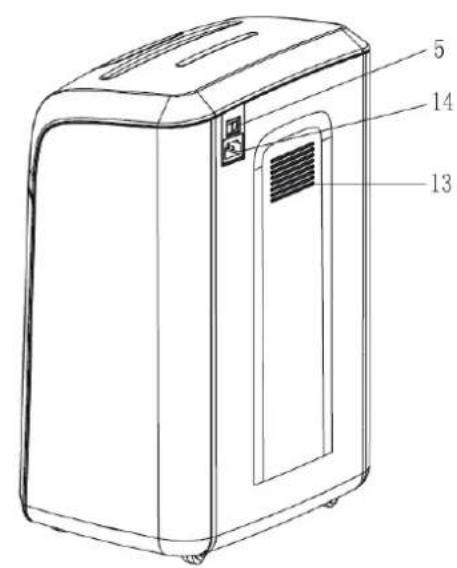
Email: bonsaii@gerth-gmbh.de
natural_image
Row of six white and black electronic devices with gray shades, arranged in a row (no visible text or symbols)3S16 Ü 4S16 Ü 3S23 Ü 4S23 Ü 3S30 Ü 4S30 Ü 5S30 mÜdelleR
01/2013
Tartalomjegyzék
RENDELTETÉSSZERÜ HASZNÁLAT 76
BIZTONSÁGI INFORMÁCIÓK 76
ÁTTEKINTÉS 78
ÜZEMBE HELYEZÉS ÉS MÜKZDTETÉS 78
KITERJESZTETT JÓTÁLLÁS: 81
natural_image
Row of six white and black industrial water purifiers with control panels, displayed against a plain white background (no text or symbols visible)natural_image
Row of six white and black industrial water purifiers with control panels, arranged in a row (no visible text or labels)