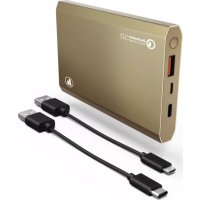
PA12 - Power bank HAMA - Free user manual and instructions
Find the device manual for free PA12 HAMA in PDF.


| Product type | Portable battery / External power supply |
| Brand | Hama |
| Model | PA12 |
| Battery capacity | 12000 mAh / 44.3 Wh (Li-Po 3.8 V) |
| Minimum capacity | 11670 mAh |
| Micro USB input | 5 V / 2 A |
| USB Type-C input | 5 V / 3 A |
| USB Type-C output | 5 V / 3 A |
| USB output (Quick Charge 3.0) | 5 V / 3 A, 9 V / 4.8 A, 12 V / 4.3 A |
| Max total output current | 3 A |
| Battery type | Lithium-Polymer (Li-Po) integrated, non-removable |
| Capacity display | 4 LEDs (25% each) |
| Main functions | Charging mobile devices, Quick Charge 3.0, auto shut-off |
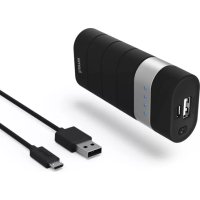
| Package content | Power bank, micro USB cable, USB Type-C cable, instruction manual |
| Care and cleaning | Clean with a slightly damp, lint-free cloth, without harsh detergents |
| Safety | Do not open, do not expose to moisture or overheating, follow charging instructions |
| Spare parts / Repairability | Integrated battery not replaceable, contact Hama customer service for repairs |
| General information | Domestic non-commercial use, mandatory recycling according to WEEE and battery directives |
Frequently Asked Questions - PA12 HAMA
User questions about PA12 HAMA
0 question about this device. Answer the ones you know or ask your own.
Ask a new question about this device
Download the instructions for your Power bank in PDF format for free! Find your manual PA12 - HAMA and take your electronic device back in hand. On this page are published all the documents necessary for the use of your device. PA12 by HAMA.
USER MANUAL PA12 HAMA
Operating Instructions
Bedienungsanleitung
Mode d'emploi
Controls and Displays
- On/Off button
- USB port (Quick Charge 3.0)
- Micro U SB port
- USB Type-C port
- LED capacity indicator
- Micro U SB cable
- USB Type-C cable
Thank you for choosing a Hama product.
Take your time and read the following instructions and information completely. Please keep these instructions in a safe place for future reference. If you sell the device, please pass these operating instructions on to the new owner.
1. Explanation of Warning Symbols and Notes

Warning
This symbol is used to indicate safety instructions or to draw your attention to specific hazards and risks.

Note
This symbol is used to indicate additional information or important notes.
2. Package Contents
- Power Pack 12000 mAh
- Micro-USB charging cable
U SB Type-C charging cable - T hese operating instructions
3. Safety Notes
- T he product is intended for private, non-commercial use only.
- Protect the product from dirt, moisture and overheating, and only use it in a dry environment.
- K eep this product, as all electrical products, out of the reach of children!
- D o n ot drop the product and do not expose it to any major shocks.
- Do not operate the product outside the power limits given in the specifications.
- Do not open the device or continue to operate it if it becomes damaged.
- D ispose of packaging material immediately according to locally applicable regulations.
- Since the battery is integrated and cannot be removed, you will need to dispose of the product as a w hole. Do this in compliance with the legal requirements.
- Do not modify the product in any way. Doing so voids the warranty.
To find out whether your terminal device supports Quick Charge, please refer to the product information or operating instructions of the device manufacturer or the information available on the Internet.
4. Operation
4.1 Charging the Power Pack
- B egin charging the power pack by connecting the included Micro-USB charging cable to the power pack's Micro-USB input (IN 5V/2.4A) or the included USB Type-C charging cable to the USB Type-C socket (IN 5V/3A) and to a suitable USB charger. Please refer to the operating instructions for the USB charger used.
C hargingsbegins and ends automatically. - Charge the Power Pack fully before using it for the first time.

Note -Capacity
- T he capacity is always shown when the Power Pack is charging.
Each status LED corresponds to 25% of the capacity. When an LED is permanently illuminated, this indicates that this capacity level has already been reached. The Power Pack is charged t at least 75% if three LEDs are iIlluminated, and the fourth is flashing. - I fall four status LEDs light up, the full capacity is available.
- Press the button of the Power Pack to switch it on and to check its current capacity.
- To switch the Power Pack off, press and hold the button until the status LEDs go out.

Warning - Battery
- O nly use suitable charging devices or USB connections for charging.
- As a rule, do not charge devices or USB connections that are defective and do not try to repair them yourself.
- Do not overcharge the product or allow the battery to completely discharge.
- A void storing, charging or using batteries in extreme temperatures.
- When stored over a long period of time, batteries should be charged regularly (at least every three months).
4.2 Charging terminal devices
- Connect the included Micro-USB or USB Type-C charging cable to the power pack's USB or USB (QC3.0) connection (see 8. Technical Data) and to the Micro-USB or USB Type-C connection on your terminal device (mobile phone, smartphone, etc.)
- T he included charging/connection cables may not be suitable for the USB connection on your terminal device. In this case, use the USB cable that was included with your terminal device.
- Charging begins automatically. The status LEDs show the remaining capacity when the Power Pack is charging.
- T he current battery status of your terminal device will appear on this device.
- Press the button on the power pack and hold it for approximately 3 seconds to stop charging and to switch the power pack off. The status LEDs should switch off.
- The Power Pack will automatically switch off if it is not connected to a terminal device.
Warning - Connecting terminal devices
- Before connecting a terminal device, check whether the power output of the charger can supply sufficient power for the device.
- Ensure that the total power consumption of the connected terminal device does not exceed the limit value (see point 8 T technical Data).
- P lease refer to the instructions in the operating manual of your terminal device.
- It is essential that you observe these specifications and the safety instructions regarding the power supply of your devices.
- The power pack must not be charged and discharged at the same time!
Note - O optimised charging
- O optimised charging means that the Power Pack recognises the connected terminal device and supplies it with the optimal current to minimise charging time.
Warning
- N ever connect the charging cable of the Power Pack to both the input and the output of Power Pack at the same time. This could damage the battery.
- Do not connect any terminal devices while the Power Pack is charging. This could damage the Power Pack and the connected device.
5. Care and Maintenance
Only clean this product with a slightly damp, lint-free cloth and do not use aggressive cleaning agents.
6. Warranty Disclaimer
Hama GmbH & Co KG assumes no liability and provides no warranty for damage resulting from improper installation/mounting, improper use of the product or from failure to observe the operating instructions and/or safety notes.
7. Service and Support
Please contact Hama Product Consulting if you have any questions about this product.
Hotline: +49 9091 502-115 (German/English)
Further support information can be found here:
www.hama.com
8. Technical Data
| Micro-USB input 5V 2A | -- |
| USB Type-C input 5V | ---3A |
| USB Type-C output 5V | ---3A |
| USB output (QC 3.0) | 5V----3A/ 9V----4.8A/ 12 V----1.3A |
| Output total 3A(max.) | |
| Battery type 3.8 V/Li-Po | |
| Min. capacity 11670mAh /44.3Wh | |
| Typ. capacity | 12000mAh |
9. Recycling Information
Note on environmental protection:
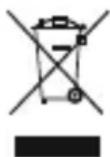
After the implementation of the European Directive 2012/19/EU and 2006/66/EU in the national legal system, the following applies: Electric and electronic devices as well as batteries must not be disposed of with household waste. Consumers are obliged by law to return electrical and electronic devices as well as batteries at the end of their service to the public collecting points set up for this purpose or point of sale. Details to this
defined by the national law of the respective country. This symbol on the product, the instruction manual or the package indicates that a product is subject to these regulations. By recycling, reusing the materials or other forms of utilising old devices/Batteries, you are making an important contribution to protecting our environment.
Remarque - 0 optimised charging
Nota - Q u a l c o nQnck ChargeTM 3.0
4.1 3apdka akKymyIaTOPHO6Joka nHTaHnA
- YTO6bI 3apAaNTb aKKymyTOpHbI 6JOK NITAHnI, CoeINHte eRO C COOTBeTCTByIOUm 3apAHyBIM yCTPOINCTBOM C NOMOuBIO npNlaeMbIX Ka6enei Micro-USB (pa3bEM IN 5V/2,4A) nIN USB-Type-C (pa3bEM IN 5V/3A). Co6nOdaIte INHcTpKuIIO no EKnPlyatauIN 3apAInHO yCTPOINCTBa USB.
- PpOeCC 3apAaKn IPOiCXoI NT aBtOMaTnueckn.
- Pered nauanom 3KcIpyataun aKKyMylrTophBn 6LOK nITaHnreO6xOIMo OINH pa3 3apraNTb noJIHOCTbIO.

PpimeyaHne -Emkoctb
- Bo Bpem 3apn Tekya aMKoCTb OTo6paKaTcHnepepbIBHO.
- KaЖдаг Лamna Инданаци COOTBeTCTByeT 25% emKocn. HenpepbIbHNo roряшаг Лamna noka3bIbAeT,чTo MaKc. emKoct bdoctuHyta.EcIn TprлamnbI ropT,a YetBepTaMraeT, 3HaHT akkymyIaTOpHbI 6JOK 3apJxeh MmHm. Ha 75%.
- EcIn 6aTape 3apXeHa nOINocThIO, rOpT BCE 4 CBeToDnOHDhe NaMnbl.
- Yto6bI BKJIIOUHTb 6JLOK IITaHnI IN IPOBepNTb eRO TeKyUHO EMKoCTb, HAXMITE KONKy Ha naHeJI.
- Yto6bI BbIKJIOUHTb AKKyMylTOpHbI 6LOK, HaxMtI ydepXnBaIte KhoNky Ha BepxHei naHeJI, Noka JAMNb IHNdkaCmN He norgchyT.

BHHMaHne-AKKymyTOp
-Приименят bToIbKO COOTBETCTByIOUиne 3apЯньile yctpoiCTBa.
3anpeaetcnaKcnnyatnpoBaTb npemOHtnpoBaTb HncnpaBhble yctponCTBa.
- He noDBepratb akymyIaTOpbI rIy6oko pa3pIKe npe3apIKe.
-BepebOT BbICOKNX TemnepaTpy npxpaHeHH,3apJe n 3KcNnyatauH.
- Ppi dIInTeBHom XpaHEnn 3apJxAtb He pexe OndHO pa3a B Tprn Mecaua.
4.2 3apAka OKoHeuHbIX yCTPOIcTB
- Поdkлочпа Зарднь кабели зкomonлжета К разьему USB nii USB (QC3.0) akkyмлгого 6лoka (сm. п. 8 «Тхнческne xapakтepnstknu»).Дрюй koheц кабеля подклочпe К мнpopаЗьему USB nii K разьему USB Type-C заржaelo устpoиctba (MOБильhamу Teleфону, смартфону и.T.д.).
3apnHb/coeHNHTbHb USB-ka6JIb n3 KOMJIeKTA aKKyMJIaTOpHOro 6Joka MoKeT He npOHTK OKOHeHOMY yCTpoiCTBy. B 3tOM cIyae BOCNOJIb3yIteCb USB-ka6eJeM yCTpoiCTBa. - Ipocecc 3aRpy3kn NaHneTcraBtOMaTueckn. Bo BpeM 3apAdkn TeKyuzae emKoctb OTo6paKaetcCBETOIOIDhbIMn JAmnAmn INDnKaun.
XoJ3apJdkn cMOTpnte HaДИСПЛee OKOHeuHOrO yCTpoiCtBa. - YTo6bI OTKJIOnHTb npOceC3aprAkn I BbIKJIOuHTb 6nOK nITaHna, HaxMnte u ydepXnBaIte KHOkny Ha 6nOke nITaHna B TeYeHne npImepHo 3 c. JAmNbl INDnKaUIN DOnJXhbl NOracHytB.
- EcIn 3apjxaemoe yctpoiCTBO He noDkIIOyeHO, aKKymyIaTOpHbI 6JOK aBtOMaTnueckn BblKlIOuayaeTc.

PpeynpexKeHne! PoiKloueHne oKOHehblx yctpoiCTB
- Pered nodknouehem 3apjxaemoro yctpoiCTBa y6eintecb, YTO erO xapaKtepncTNK COOTBETCTBYOT aKKyMylrTOPHomy 6lOKy nHTAHnI.
He npebbuaTe o6uHn noTppe6JMaEBmI TK nOdkNHOeHHbIX yCTpoiCTB (CM. n. 8 «TexHueckne xapaKtepncTkn»). - Co6JIIOJaIe INHCTpyKUIN NO KcNJIyatauIN yCTPOINCTB.
Co6JIOdaIte npabnla texHNIK 6e3oNaChocTn no nHTaHNO yCTPOINCTB. - AkkymyIaTOpHbI 6nok nITaHnIa3aIpeuaeTcOdHOBpeMeHNO 3apJxTaB pa3pJxTaB.

PpimueaHne. ONTIMaJIbHaJ 3apJaKa
- Pexim ONTImaJIbHOJ 3apIckn o6ecneuBaet ONo3HaBaHne yCTpoiCTBa, BblOp TOKa ONTImaJIbHOJ BeInuHbI N o6ecneueHne MInHMaJIbHOrO BpeMeHn 3apIckn.

PpeDynpEeHne
3anpeuaetc coeHHaTB ka6eIbM BxOJ N BbIXoAkkymyIaTOPHO 6IOka. 3TO MOXET CtaTb npuHnOB bixOda aKKymyIaTOPa n3 cTpor.
He npoknouaTe oKoHeuHbIe yCTpoNCTBa BO BpeM 3apAkn AKKyMylTOpHOrO 6Joka NITAHIN. B npotNBHom clyae 3TO MOKeT PnIBecTN K BbIXOdy n3 CTPOr 6Joka NITAHIN N OKOHeuHORO yCTpoNCTBa.
5. Yxod nTexHnueckoe 06cIyXnBaHne
YnCTky n3dJIy npOn3BODnTb ToJbKO 6e3BOPCOB cnErKa BnaXHO nCanfoKo. 3aIpeuaetc npImHeTb arpeccNBhIe YnCTaUne CpeDCTBa.
6. OTKa3 OT rapaHTnHbIX 06a3aTeNbCTB
Kompanha Hama GmbH & Co KG He heceT OTBeTCTBHeHOctb 3a yUep6, Bo3NKuN BcIeIcTBne HnnpabunbHOro MoNTaJa, NOKLIOueHn I NCNOJIb3OBaHn I3JeJn He No Ha3HaueHIO, a TaKKe BCNEcTBn Heco6JIIOdeHn IHCTpyKuN IO KCNyatauN IN TexHKn 6e3OnacHOctn.
7. OToIen Texo6cnyxuBaHnA
IIO BONPocam pemOnTa nn 3aMeHbI HeNCpPaBbIX n3denn o6paauTecb K npOdaBu y nn B cepBucHy cnyk6y komnAHn Hama.
FopuaJINHNAOTDeaTexO6CnyKuBaHnA:
+49 9091 502-115 (HemeKn, aHrnnckn)
Ponpo6Hee CMOTpnte 3decb: w www.hama.com
8. TexHnueckne xapaKTepeNCTIKN
| Вхов Micro-USB 5V 2A | — |
| Вхов USB Type-C 5V | — 3A |
| Выхов USB Type-C 5V | — 3A |
| Выхов USB (QC 3.0) | 5V — 3A/ 9V — 1,8A/ 12V — 3A |
| Obsolete Bxoid 3A (max.) | |
| Тир батарей | 3.8V/Li-Po |
| Minimum EMKOSTb | 11670 mAч/44,3Вt.ч |
| Тир. EMKOSTb | 12000mAч |
Wskazowski - Q u a l c o nQnick ChargeTM 3.0
Vystraha - a kumulator
All listed brands are trademarks of the corresponding companies. Errors and omissions excepted, and subject to technical changes. Our general terms of delivery and payment are applied.
- Controls and Displays
- Explanation of Warning Symbols and Notes
- Warning
- Note
- Package Contents
- Safety Notes
- Operation
- Charging the Power Pack
- Note -Capacity
- Warning - Battery
- Charging terminal devices
- Warning - Connecting terminal devices
- Note - O optimised charging
- Care and Maintenance
- Warranty Disclaimer
- Service and Support
- Technical Data
- Recycling Information
- Note on environmental protection:
- Remarque - 0 optimised charging
- Nota - Q u a l c o nQnck ChargeTM 3.0
- 3apdka akKymyIaTOPHO6Joka nHTaHnA
- PpimeyaHne -Emkoctb
- BHHMaHne-AKKymyTOp
- 3apAka OKoHeuHbIX yCTPOIcTB
- PpeynpexKeHne! PoiKloueHne oKOHehblx yctpoiCTB
- PpimueaHne. ONTIMaJIbHaJ 3apJaKa
- PpeDynpEeHne
- Yxod nTexHnueckoe 06cIyXnBaHne
- OTKa3 OT rapaHTnHbIX 06a3aTeNbCTB
- OToIen Texo6cnyxuBaHnA
- TexHnueckne xapaKTepeNCTIKN
- Wskazowski - Q u a l c o nQnick ChargeTM 3.0
- Vystraha - a kumulator
Brand : HAMA
Model : PA12
Category : Power bank