
ESLF71 - Razor PANASONIC - Free user manual and instructions
Find the device manual for free ESLF71 PANASONIC in PDF.
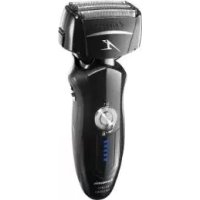


| Product type | Rechargeable dry/wet electric shaver |
| Brand | Panasonic |
| Model | ESLF71 (ES-LF71) |
| Dimensions (L x H x D) | 6.3 cm x 15.7 cm x 5.3 cm |
| Weight | 185 g |
| Power supply | AC mains adapter (ref. RE7-59), automatic voltage |
| Battery | Rechargeable lithium-ion, charging time approx. 1 hour |
| Runtime | Approximately 14 shaves of 3 minutes (full charge) |
| Use | Dry or wet (with shaving gel, in the shower or bath) |
| Waterproof rating | Shaver: IPX5 and IPX7; adapter: IPX4; self-cleaning charger: not waterproof |
| Main features | Pivoting shave (Soft/Lock selector), pop-up trimmer, sonic vibration cleaning mode |
| Cleaning | Self-cleaning charger (cleaning, drying, charging) or manually with soapy water |
| Lubrication | Recommended with included oil (ref. WES003) |
| Replacement parts | Outer foil (WES9027 or WES9167), inner blades (WES9068), detergent cartridge (WES035) |
| Safety | Lock ring, automatic stop in case of malfunction, do not use if foil is damaged |
| Operating temperature | 5 °C to 35 °C |
| Intended use | Household use only |
Frequently Asked Questions - ESLF71 PANASONIC
User questions about ESLF71 PANASONIC
0 question about this device. Answer the ones you know or ask your own.
Ask a new question about this device
Download the instructions for your Razor in PDF format for free! Find your manual ESLF71 - PANASONIC and take your electronic device back in hand. On this page are published all the documents necessary for the use of your device. ESLF71 by PANASONIC.
USER MANUAL ESLF71 PANASONIC
Operating Instructions
(Household) Rechargeable Shaver
Model No. ES-LF71
English 2 Dansk 68 Cesky 134
Before operating this unit, please read these instructions completely and save them for future use.
Thank you for choosing a Panasonic shaver ES-LF71. With our WET/DRY technology, you can enjoy using your Panasonic shaver dry or in the shower or bath for gentle and easy shaving. Please read all instructions before use.
Important
This shaver has a built-in rechargeable battery. Do not throw into fire, apply heat, or charge, use, or leave in a high temperature environment.
Before use
This WET/DRY shaver can be used for wet shaving using shaving lather or for dry shaving. You can use this watertight shaver in the shower and clean with water. The following symbol means suitable for use in a bath or shower.

Treat yourself to wet lather shaves for at least three weeks and notice the difference. Your Panasonic WET/DRY shaver requires a little time to get used to because your skin and beard need about a month to adjust to any new shaving method. This shaver body has a waterproof performance that is compliant to the "IPX5" and "IPX7", and the adaptor has a waterproof performance that is compliant to the "IPX4". The self-cleaning recharger is not waterproof.
Using the shaver
Caution
The outer foil is very thin and can be damaged if not used correctly. Check that the foil is not damaged before using the shaver. Do not use the shaver if the foil is damaged as you will cut your skin.
2
- Terminate the usage when there is an abnormality or failure.
- Do not share your shaver with your family or other people. Doing so may result in infection or inflammation.
- This appliance is not intended for use by persons (including children) with reduced physical, sensory or mental capabilities, or lack of experience and knowledge, unless they have been given supervision or instruction concerning use of the appliance by a person responsible for their safety. Children should be supervised to ensure that they do not play with the appliance.
- Persons using an implanted medical electronic device, such as a pacemaker, should not allow this unit to touch the skin where the medical electronic device is implanted because this may cause a malfunction.
Charging the shaver
- Never use the AC adaptor in the bathroom or shower room.
- Do not use any power cord or AC adaptor other than the AC adaptor (RE7-59).
- Plug in the AC adaptor into a household outlet where there is no moisture and handle it with dry hands.
- Hold the AC adaptor when disconnecting it from the household outlet. If you tug on the power cord, you may damage it. The supply cord cannot be replaced. If the cord is damaged, the AC adaptor should be scrapped.
Cleaning the shaver
Warning
Disconnect the power cord from the shaver before cleaning it in water to prevent electric shock.
- Keep both the inner blades inserted. If only one of the inner blades is inserted, the shaver may be damaged.
- If you clean the shaver with water, do not use salt water or hot water. Do not soak the shaver in water for a long period of time.
- Clean the housing only with a soft cloth slightly dampened with tap water or soapy tap water. Do not use thinner, benzine, alcohol or other chemicals.
Storing the shaver
- Store the shaver in a place with low humidity after use.
- Do not store the shaver where it will be exposed to direct sunlight or other heat sources.
- Disconnect the power cord when storing the shaver.
- Do not bend the power cord or wrap it around the shaver.
- Keep the oil away from children.
Self-cleaning recharger
- Do not clean the AC adaptor or the self-cleaning recharger in water as it will damage them or cause an electric shock.
- Do not remove the shaver from the self-cleaning recharger while using a course that includes the "Dry" function. A heater is used so the area around the blades becomes extremely hot and you may burn yourself.
- Place the self-cleaning recharger on a level and stable surface. Otherwise the cleaning liquid may spill and discolor leather products or other surfaces. Wipe up spills immediately.
- The self-cleaning recharger cleans the inner blades and the system outer foil. Brush or wash with water to remove beard trimmings in other areas.
- Use the self-cleaning recharger in humidity less than 95%.
- Depending on the environment, the shaver may not dry even if you select a course that includes the "Dry" function. In this case, wipe off any drops of water with a dry cloth.
Parts identification
4s116u3 A C D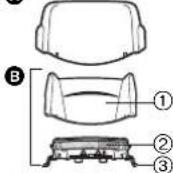
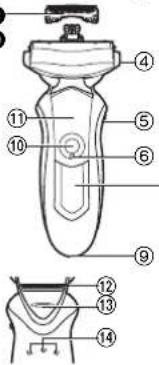
E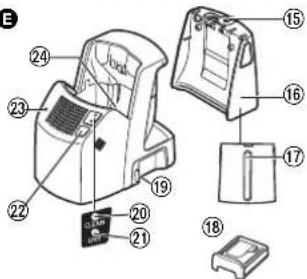
F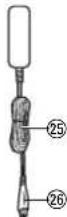
G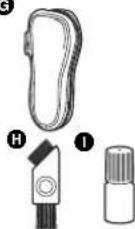
A Protective cap
Outer foil section
① Foil frame (2) System outer foil ③ System outer foil release buttons
C Inner blades
• Main body
(4) Foil frame release buttons (5) Pivot action selector
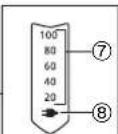
⑥ Lock ring ⑦ Battery capacity lamp ⑧ Charge status lamp (⑤ Appliance socket 10 Power switch [0/1] Finger rest (12) Trimmer 3 Trimmer handle 14 Main body rear terminal

Self-cleaning recharger
Water tank cap Water tank Water maximum line Detergent cartridge Socket 20 CLEAN lamp ② DRY lamp 2 SELECT button
STATUS lamp
24 Cleaning tray
AC adaptor (RE7-59) ⑤ Power cord ⑥ Appliance plug
Travel case Cleaning brush Oil
Using the lock ring
Use the lock ring to lock or unlock the power switch.
Rotate the lock ring until it clicks.

Rotate the lock ring to "O" to unlock the power switch:
For when shaving, washing the shaver, lubricating the shaver.

Rotate the lock ring to "f" to lock the power
switch:
For when carrying the shaver.
Charge
Charging using the self-cleaning recharger
Thoroughly wipe off any drops of water on or around the self-cleaning recharger so that it is dry before charging the shaver.
Insert the appliance plug into the self-cleaning recharger. 2 Remove the protective cap and then attach the shaver. 3 Plug in the AC adaptor into a household outlet.
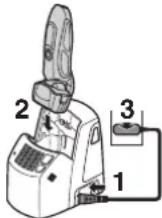
- The "Charge" course starts when attaching the shaver.
- Turn the shaver off before attaching.
- Check that the outer foil is not deformed or damaged when you are attaching the shaver.
- Wipe off any water droplets on the main body rear terminal.
- You can charge even with the STATUS lamp of the self-cleaning recharger blinking.
- Charging is completed after approx. 1 hour.
You can keep the shaver attached to the self-cleaning recharger, or connected to the AC adaptor, when not using it to maintain full battery capacity. You cannot overcharge the shaver.
Charging without the self-cleaning recharger
You can also charge without the self-cleaning recharger.

1 Insert the appliance plug into the shaver. 2 Plug in the AC adaptor into a household outlet.
You cannot operate the shaver while charging.
Reading lamps when charging
While charging After ch
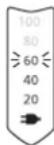
ring is completed
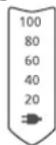

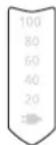
All the lamps will light up and then turn off after 5 seconds.
The charge status lamp glows.
The number of the battery capacity lamp will increase as charging progresses.
- After charging is completed, turning the power switch ON with the shaver plugged in will cause all the lamps to light up and then turn off after 5 seconds. This shows that the shaver is fully charged.
- Recommended ambient temperature for charging is 5 - 35°C. The battery may not charge properly or at all under extreme low or high temperatures.
The charge status lamp (3) will blink when there is a problem with charging.
- When charging the shaver for the first time or when it has not been in use for more than 6 months, the charge status lamp may not glow. It will eventually glow if kept connected.

Shave
Using the shaver
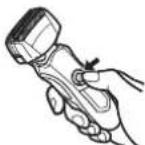
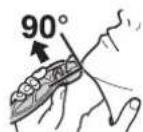
1 Rotate the lock ring to unlock the power switch and press the power switch.
2 Hold the shaver as illustrated above and shave.
- We recommend using the shaver in an ambient temperature range of 5 - 35°C. If used outside this range, the appliance may stop operating.
Start out shaving by applying gentle pressure to your face. Stretch your skin with your free hand and move the shaver back and forth in the direction of your beard. You may gently increase the amount of pressure as your skin becomes accustomed to this shaver. Applying excessive pressure does not provide a closer shave.
Caution
If you press the power switch for more than 2 seconds, the sonic vibration cleaning mode is activated. You cannot shave in this mode. - Do not place your fingers on the power switch while using the shaver. This may cause the shaver to turn off or enter the sonic vibration cleaning mode. Place your fingers on the finger rest while using the shaver.
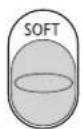
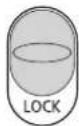
Pivot action selector
Use to select "SOFT" (soft) or "LOCK" (lock). You can change the pivot action whether the shaver is turned on or off.
Using the trimmer
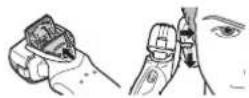
Slide the trimmer handle up. Place at a right angle to your skin and move downwards to trim your sideburns.
Reading lamps when using
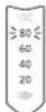
- Approximate amount of battery charge is displayed as 20 - 100.
- It will turn off approximately 5 seconds after operating the switch.
While using
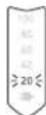
"20" blinks when operating the shaver.
- You can shave 2 to 3 times after "20" appears. (This will differ depending on usage.)
- A full charge will supply enough power for approx. 14 shaves of 3 minutes each. (This will differ depending on usage.)
Clean
Cleaning using the self-cleaning recharger
Preparing the self-cleaning recharger
Remove the shaver and the appliance plug from the self-cleaning recharger.
1. Remove the water tank and then open the water tank cap.
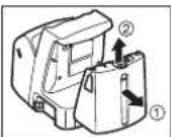
2. Wash away the old cleaning liquid and then rinse the water tank.
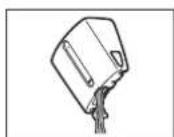
Pour tap water into the water tank.
- Do not let the water rise above the maximum water line. This may cause the cleaning liquid to spill.
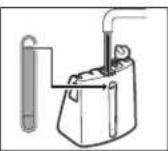
4. Securely close the water tank cap and then attach the tank.
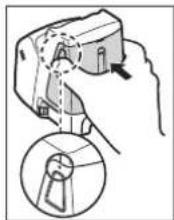

5. Peel off the 2 seals from the new detergent cartridge.
- Hold the detergent cartridge horizontally. (The detergent may spill if the detergent cartridge is tilted too much.)
Precautions for the detergent cartridge - Keep out of reach of children. - Only use to clean the blades of electric shavers. - Carry out emergency measures if the cleaning agent enters mouth or eyes, and consult a doctor.
6. Attach the detergent cartridge.
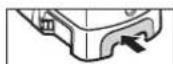
- Replace the detergent cartridge when the status lamp is illuminated.
- The expiration date of the cleaning liquid is 6 months after it is opened. If you do not use the cleaning liquid for more than 6 months, throw away the detergent cartridge and the cleaning liquid.
- Only use self-cleaning recharger detergent for Panasonic shavers. Always change the detergent cartridge and the cleaning liquid in the water tank at the same time. Adding water, or changing just the detergent cartridge or the water, will result in deteriorated cleaning functions.
- If you operate the self-cleaning recharger, the concentrated detergent in the detergent cartridge dilutes and the water inside the tank will become a cleaning liquid.

Cleaning the shaver
Use the self-cleaning recharger in temperatures between 15°C and 35°C.
1. Insert the appliance plug into the self-cleaning recharger.
2. Remove the protective cap and then attach the shaver.
Plug in the AC adaptor into a household outlet.
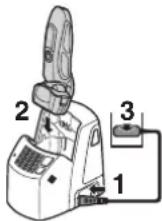
- Remove any soap or water on the shaver if it has been washed with hand soap or any other detergent.
- Turn the shaver off before attaching.
- Check that the outer foil is not deformed or damaged when you are attaching the shaver.
- Wipe off any water droplets on the main body rear terminal.
4. Press the SELECT button to select the course.
- The "Charge" course starts when attaching the shaver. Each time you press the SELECT button, the course changes from "Clean/Dry/Charge" to "Dry/Charge" to "Charge". The courses start approximately 6 seconds after they are selected.
- The course will be aborted if the power is cut off. In this case, perform the course again from the beginning.
- Do not detach the detergent cartridge or the water tank as the cleaning liquid may spill causing a malfunction.
| Course Time required (guide) | ||
| Charge 0 to 60 min | ||
| Clean/Dry | Dry 80 min (170 min*) | Charge 0 to 60 min |
| Clean DRY | ||
| Clean/Dry/Charge | It is not possible to change the course after the "Clean/Dry/Charge" course has started. | |
| Dry/Charge | Dry 180 min | Charge 0 to 60 min |
| Clean DRY | ||
| Clean/Dry/Charge | It is possible to change to the "Clean/Dry/Charge" course even after the "Dry/Charge" course has started. | |
- When the ambient temperature of the self-cleaning recharger is low (approx. 15°C or lower), the time it takes to dry the shaver increases.
- The Clean or Dry function may stop under extreme low temperatures (approx. 0°C or lower). In such a case, the CLEAN and DRY lamps will blink when the "Clean/Dry/Charge" course is selected, or the DRY lamp will blink when the "Dry/Charge" course is selected.
Follow the steps outlined below if the status lamp blinks or glows.
Blinks / Glows
Correctly set the detergent cartridge and then restart a course.
If the status lamp goes out
Continue a course.
Remove the shaver from the self-cleaning recharger and then check that the [CLEAN] lamp has gone out. (Be careful as the blade may be hot or wet.) Check that the water tank is correctly attached, the water tank cap is securely closed, and the self-cleaning recharger is placed horizontally.
When an abnormality has been corrected
Remove the AC adaptor from a household outlet.
When no abnormality was found
It is time to replace the detergent cartridge and cleaning liquid inside the water tank. Wash away the old cleaning liquid, rinse the water tank, and then refill it with water. Replace the old detergent cartridge and then restart the course.
When the status lamp goes out
Continue a course. Contact an
When the status lamp glows again
authorized service center.
Cleaning the shaver without the self-cleaning recharger
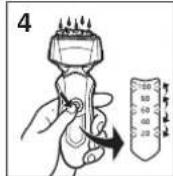
- Disconnect the power cord from the shaver.
- Apply some hand soap and some water to the outer foil.
- Rotate the lock ring to unlock the power switch.
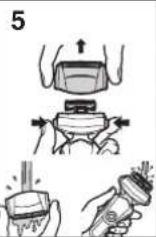
- Press the power switch for more than 2 seconds to activate the sonic vibration cleaning mode. The battery capacity lamps blink in order. After about 20 seconds, it will be automatically turned off, or you can turn it off by pressing the power switch.
- Remove the outer foil section and press the power switch for more than 2 seconds to activate the sonic vibration cleaning mode and clean it with running water.
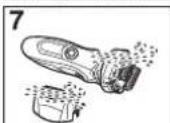
- Wipe off any drops of water with a dry cloth.
- Dry the outer foil section and the shaver completely.
- Attach the outer foil section to the shaver.
- Lubricate the shaver.
Drying the shaver with the self-cleaning recharger
- Attach the outer foil section to the shaver.
- Dry the shaver with self-cleaning recharger using "Dry/ Charge" course.
- Lubricate the shaver.
Lubrication
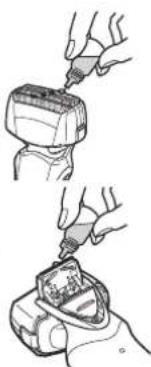
To maintain shaving comfort for a long time, it is recommended that the oil provided with the shaver is used.
- Switch off the shaver.
- Apply one drop of oil to each of the outer foils.
- Raise the trimmer and apply a drop of oil.
- Switch the shaver on, and run it for approximately five seconds.
- Switch off the shaver, and wipe off any excess oil from the outer foils with a soft cloth. It is not necessary to oil the blades after cleaning the shaver with the self-cleaning recharger. (Lubricant is included in the cleaning detergent.)
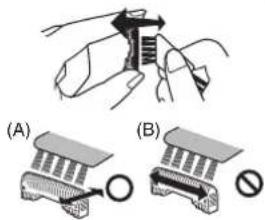
Cleaning with the brush
Clean the inner blades using the short brush by moving it in direction (A).
Clean the system outer foil, the shaver body and the trimmer using the long brush.
- Do not move the short brush in direction (B) as it will damage the inner blades and affect their sharpness.
- Do not use the short brush to clean the outer foils.
Replacing the system outer foil and the inner blades
system outer foil once every year
inner blades once every two years
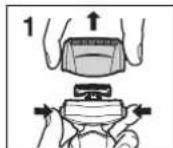
Replacing the system outer foil
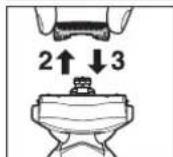
- Press the foil frame release buttons and lift the outer foil section upwards.
- Press the system outer foil release buttons and pull down the system outer foil.
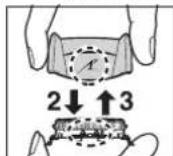
- Align the foil frame mark ( ) and the system outer foil mark ( ) and securely attach together. The system outer foil cannot be reversely attached. Always insert the system outer foil to the foil frame when attaching to the shaver.
- After turning the foil frame mark ( ) to the front, securely attach the outer foil section to the shaver until it clicks.
Replacing the inner blades
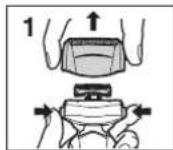
- Press the foil frame release buttons and lift the outer foil section upwards.
- Remove the inner blades one at a time. Do not touch the edges (metal parts) of the inner blades to prevent injury to your hand.
- Insert the inner blades one at a time until they click.

Replacement parts
Replacement parts are available at your dealer or Service Center.
| Replacement parts for ES-LF71 | System outer foil and inner blades | WES9027 |
| System outer foil WES9167 | ||
| Inner blades WES9068 | ||
| Oil WES003 | ||
| Detergent cartridge WES035 | ||
Cleaning the self-cleaning recharger
Beard trimmings may become attached to the cleaning tray of the self-cleaning recharger. Follow the steps below to remove them. We recommend doing this each time you change the detergent cartridge.
- Be sure to remove the water tank and the appliance plug from the self-cleaning recharger. Be careful not to spill the cleaning liquid.
- Gently wipe off any beard trimmings attached to the inside of the cleaning tray with a cloth or tissue paper dampened with water.
Clean the corners and uneven parts of the cleaning tray with a cotton swab dampened with water.
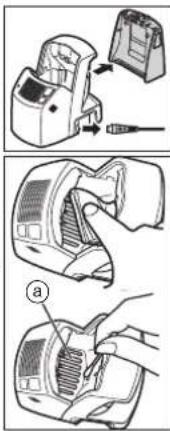
Do not pull hard on the rubber blade protector (a) at the bottom of the cleaning tray. The rubber may come off if you pull hard on it. It is only necessary to pull it up slightly.
Warning
Do not wash or apply water to the AC adaptor or self-cleaning recharger. Failure to observe this may cause electric shock or result in short circuits.
When the water does not drain from the cleaning tray
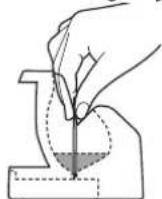
Beard trimmings may clog the drain at the bottom of the cleaning tray. In this case, you cannot clean or dry the shaver.
Push the beard trimmings down through the drain with a toothpick etc.
Removing the built-in rechargeable battery
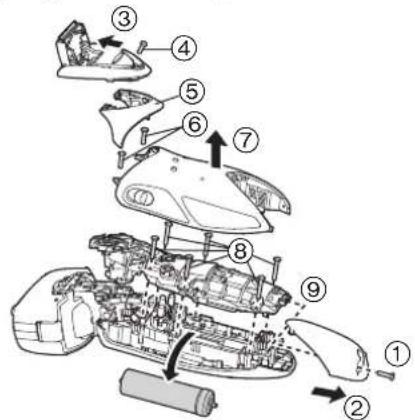
Remove the built-in rechargeable battery before disposing of the shaver. Please make sure that the battery is disposed of at an officially designated location if there is one. Do not dismantle or replace the battery so that you can use the shaver again. This could cause fire or an electric shock.
Please contact an authorised service center. - Disconnect the power cord from the shaver when removing the battery.
- Perform steps ① to ⑨ and lift the battery, and then remove it.
For environmental protection and recycling of materials This shaver contains a Lithium-ion battery.
Please make sure that the battery is disposed of at an officially assigned location, if there is one in your country.
Specifications
| Power source | See the name plate on the AC adaptor. (Automatic voltage conversion) |
| Motor voltage | 3.6 V--- |
| Charging time Approx. 1 hour | |
| Airborne Acoustical Noise | In shaving mode: 66 (dB (A) re 1 pW) In trimmer mode: 65 (dB (A) re 1 pW) |
This product is intended for household use only.
Information for Users on Collection and Disposal of Old Equipment and used Batteries
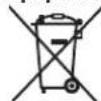
These symbols on the products, packaging, and/or accompanying documents mean that used electrical and electronic products and batteries should not be mixed with general household waste.
For proper treatment, recovery and recycling of old products and used batteries, please take them to applicable collection points, in accordance with your national legislation and the Directives 2002/96/EC and 2006/66/EC.
By disposing of these products and batteries correctly, you will help to save valuable resources and prevent
any potential negative effects on human health and the environment which could otherwise arise from inappropriate waste handling. For more information about collection and recycling of old products and batteries, please contact your local municipality, your waste disposal service or the point of sale where you purchased the items. Penalties may be applicable for incorrect disposal of this waste, in accordance with national legislation.
For business users in the European Union
If you wish to discard electrical and electronic equipment, please contact your dealer or supplier for further information.
[Information on Disposal in other Countries outside the European Union]
These symbols are only valid in the European Union. If you wish to discard these items, please contact your local authorities or dealer and ask for the correct method of disposal.
![PANASONIC ESLF71 - [Information on Disposal in other Countries outside the European Union] - 1](/content/2026/03/454959/images/994b280c4c1fef542e2a5123d72217b173c4b2e94160fd9b6952e7dd45a964a0.jpg)
![PANASONIC ESLF71 - [Information on Disposal in other Countries outside the European Union] - 2](/content/2026/03/454959/images/d59da20108a6232874081bcf78b6548245b6e04c3d409a7acb01830aca6e432a.jpg)
![PANASONIC ESLF71 - [Information on Disposal in other Countries outside the European Union] - 3](/content/2026/03/454959/images/ec5844ad164fdf93bda6d07e0a2e2c6321d14f0db87d1c5d009ec3d1c6c210f0.jpg)
![PANASONIC ESLF71 - [Information on Disposal in other Countries outside the European Union] - 4](/content/2026/03/454959/images/c66b27033b43d2787acb2486e3f0d59a2d6a9a749cff284c301faab2a799b107.jpg)


- IMPORTANT
- BEFORE USE
- USING THE SHAVER
- CAUTION
- CHARGING THE SHAVER
- CLEANING THE SHAVER
- WARNING
- DISCONNECT THE POWER CORD FROM THE SHAVER BEFORE CLEANING IT IN WATER TO PREVENT ELECTRIC SHOCK
- STORING THE SHAVER
- SELF-CLEANING RECHARGER
- PARTS IDENTIFICATION
- A PROTECTIVE CAP
- CHARGE
- CHARGING USING THE SELF-CLEANING RECHARGER
- CHARGING WITHOUT THE SELF-CLEANING RECHARGER
- READING LAMPS WHEN CHARGING
- SHAVE
- PIVOT ACTION SELECTOR
- USING THE TRIMMER
- READING LAMPS WHEN USING
- WHILE USING
- CLEAN
- CLEANING USING THE SELF-CLEANING RECHARGER
- PREPARING THE SELF-CLEANING RECHARGER
- PEEL OFF THE 2 SEALS FROM THE NEW DETERGENT CARTRIDGE
- ATTACH THE DETERGENT CARTRIDGE
- PRESS THE SELECT BUTTON TO SELECT THE COURSE
- FOLLOW THE STEPS OUTLINED BELOW IF THE STATUS LAMP BLINKS OR GLOWS
- BLINKS / GLOWS
- IF THE STATUS LAMP GOES OUT
- WHEN AN ABNORMALITY HAS BEEN CORRECTED
- WHEN NO ABNORMALITY WAS FOUND
- WHEN THE STATUS LAMP GOES OUT
- WHEN THE STATUS LAMP GLOWS AGAIN
- CLEANING THE SHAVER WITHOUT THE SELF-CLEANING RECHARGER
- DRYING THE SHAVER WITH THE SELF-CLEANING RECHARGER
- LUBRICATION
- CLEANING WITH THE BRUSH
- REPLACING THE SYSTEM OUTER FOIL AND THE INNER BLADES
- REPLACING THE SYSTEM OUTER FOIL
- REPLACING THE INNER BLADES
- REPLACEMENT PARTS
- CLEANING THE SELF-CLEANING RECHARGER
- WHEN THE WATER DOES NOT DRAIN FROM THE CLEANING TRAY
- REMOVING THE BUILT-IN RECHARGEABLE BATTERY
- INFORMATION FOR USERS ON COLLECTION AND DISPOSAL OF OLD EQUIPMENT AND USED BATTERIES
- FOR BUSINESS USERS IN THE EUROPEAN UNION
- [INFORMATION ON DISPOSAL IN OTHER COUNTRIES OUTSIDE THE EUROPEAN UNION]
Brand : PANASONIC
Model : ESLF71
Category : Razor