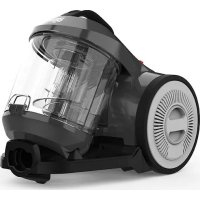
Ultima Power DD27204 - Vacuum Cleaner DIRT DEVIL - Free user manual and instructions
Find the device manual for free Ultima Power DD27204 DIRT DEVIL in PDF.



| Product type | Bagless canister vacuum cleaner |
| Brand | Dirt Devil |
| Model | Ultima Power DD2720 (DD27204) |
| Supply voltage | 220–240 V ~, 50/60 Hz |
| Rated power | 800 W |
| Dust bin capacity | 2.2 L |
| Weight | 4.3 kg |
| Power cord length | 5.0 m |
| Automatic cord rewind | Yes |
| Telescopic tube | Yes, adjustable |
| Included accessories | Furniture brush, crevice tool, switchable brush, telescopic tube, suction hose |
| Optional accessories | Parquet brush, mini turbo brush |
| Compatible floor types | Hard floors, carpets, rugs |
| Suction power adjustment | 3 positions (min, central, max) |
| Filters | Motor protection filter + air outlet filter |
| Filter cleaning | Washable with water, drying 24 h minimum |
| Switchable brush | Bristles for hard floors and carpets |
| Parking function | Yes, notch for vertical storage |
| Safety | Unplug before maintenance; do not vacuum liquids, ashes or hot objects |
| Warranty | Legal warranty in accordance with Directive 2011/83/EU |
| After-sales service | Contact Dirt-Devil or a specialized store |
Frequently Asked Questions - Ultima Power DD27204 DIRT DEVIL
User questions about Ultima Power DD27204 DIRT DEVIL
0 question about this device. Answer the ones you know or ask your own.
Ask a new question about this device
Download the instructions for your Vacuum Cleaner in PDF format for free! Find your manual Ultima Power DD27204 - DIRT DEVIL and take your electronic device back in hand. On this page are published all the documents necessary for the use of your device. Ultima Power DD27204 by DIRT DEVIL.
USER MANUAL Ultima Power DD27204 DIRT DEVIL
natural_image
Technical line drawing of a vacuum cleaner internal structure (no text or symbols)EN Instruction Manual | Cylinder vacuum cleaner | 13
natural_image
Illustration of a folded document with arrows indicating left and right pages (no text or symbols)International Service
DE
Royal Appliance International GmbH
Abt. Kundenservice
Jagenbergstraße 19
41468 Neuss
DEUTSCHLAND

de@dirtdevil-service.eu
www.dirtdevil.de

0049 (0) 180 - 501 50 50*

0049 (0) 2131 - 60906095
AT

at@dirtdevil-service.eu
0043 - 720 -88 49 54**
CH

ch@dirtdevil-service.eu
0041 - 31 -52 80 557**
BE

be@dirtdevil-service.eu
0032 - 2 -80 85 065**
LU

lu@dirtdevil-service.eu
00352 - 2 -08 80 506**
FR

fr@dirtdevil-service.eu
0033 - 9 - 75 18 30 17**
ES

es@dirtdevil-service.eu
0034-91-1982787**
IT

it@dirtdevil-service.eu
0039 - 06 - 94 80 16 18**
PT

pt@dirtdevil-service.eu
00351 - 21 - 11 41 327**
NL

nl@dirtdevil-service.eu
0031 - 20 - 80 85 408**
PL

pl@dirtdevil-service.eu
0048 - 22 - 39 70 223**
CZ

cz@dirtdevil-service.eu
00420 - 2 - 46 01 95 41**
HU

hu@dirtdevil-service.eu
0036 - 1 - 84 80 686**
TR

tr@dirtdevil-service.eu
0090 - 85 03 90 1980**
FI

fi@dirtdevil-service.eu
00358 - 9 - 42 45 04 12**
SE

se@dirtdevil-service.eu
0046 - 84 46 82 150**
DK

dk@dirtdevil-service.eu
0045 - 78 - 77 44 95**
SK

sk@dirtdevil-service.eu
0042 - 12 32 78 45 49**
NO

no@dirtdevil-service.eu
0047 - 21 99 94 89**
GR

gr@dirtdevil-service.eu
0030-2-11 19 81 203**
RO

ro@dirtdevil-service.eu
0040 - 31 63 03 651**
BG

bg@dirtdevil-service.eu
00359 - 2 - 49 25 116**
HR

hr@dirtdevil-service.eu
00385 - 1 - 6666 441**
LT

li@dirtdevil-service.eu
00370 - 52 14 17 98**
LV

lv@dirtdevil-service.eu
00371 - 66 09 04 70**
EE

ee@dirtdevil-service.eu
00372 - 88 01 167**
SI

si@dirtdevil-service.eu
00386 - 18 88 80 74**
DE
** Charges for calls from abroad depend on the current charges imposed by the respective foreign telephone company and the respective rates.
AT, CH
natural_image
Diagram of a vacuum cleaner with a downward arrow indicating motion (no text or symbols)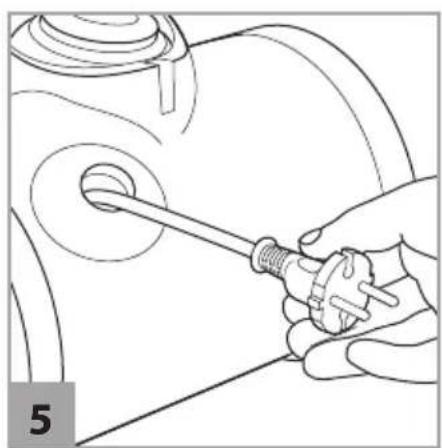
natural_image
Line drawing of a hand holding a screwdriver inside a mechanical component (no text or symbols)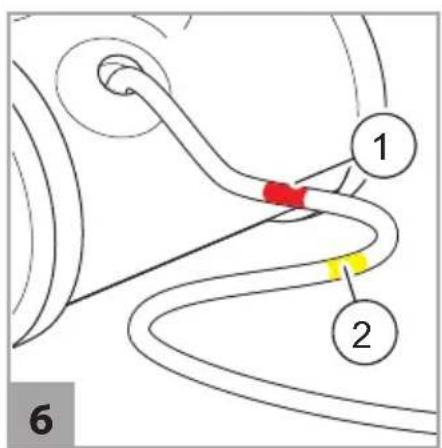

natural_image
Diagram showing two cleaning steps of a mop, with arrows indicating movement direction (no text or symbols)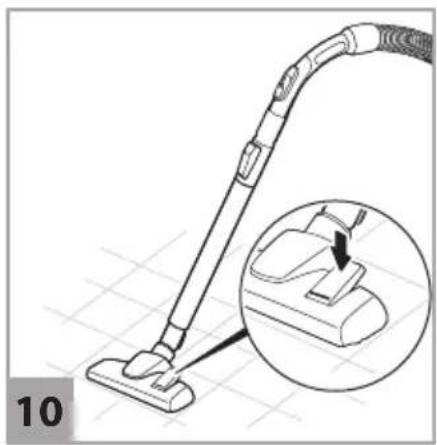
natural_image
Line drawing of a vacuum cleaner with an inset close-up showing the component (no text or symbols)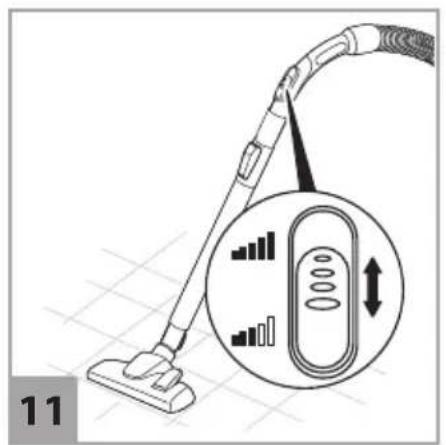
natural_image
Technical line drawing of a mechanical component with a black arrow indicating a step or insertion (no text or symbols present)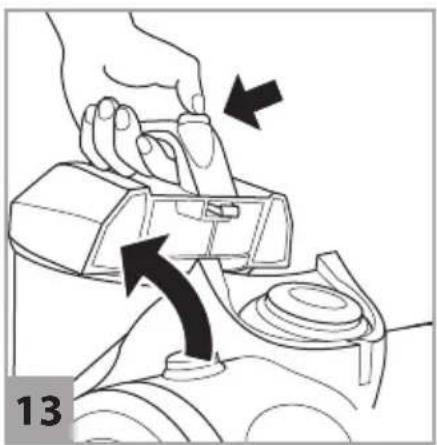
natural_image
Illustration of a hand using a device to lift a component, with arrows indicating motion direction (no text or symbols)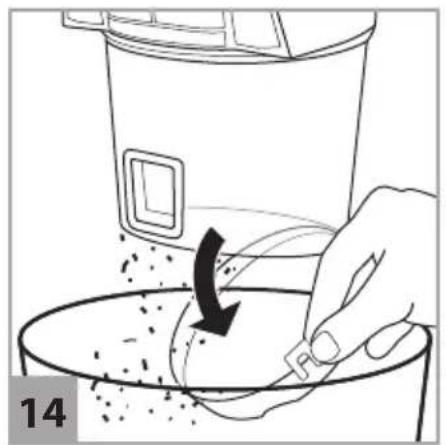
natural_image
Illustration of a hand pouring granular material into a bowl with a black arrow indicating rotation (no text or symbols)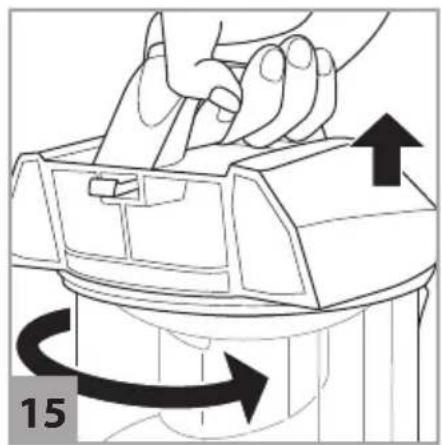
natural_image
Illustration of hands using a tool to adjust or move a mechanical component, with arrows indicating motion direction (no text or symbols)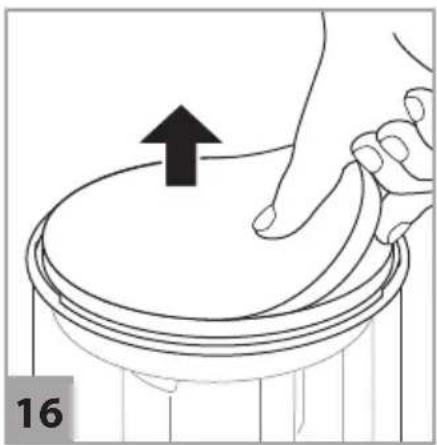
natural_image
Illustration of a hand pressing down on a circular object with an upward arrow, no text or symbols present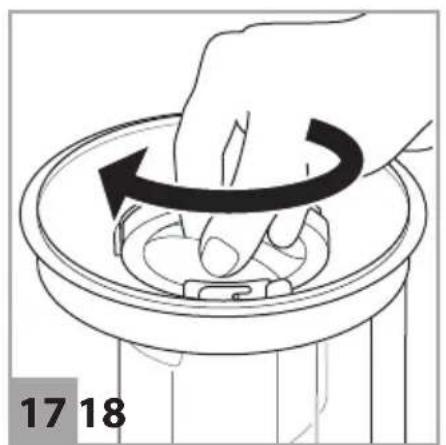
natural_image
Hand placing a circular object into a trash bin with a black arrow indicating rotation (no text or symbols)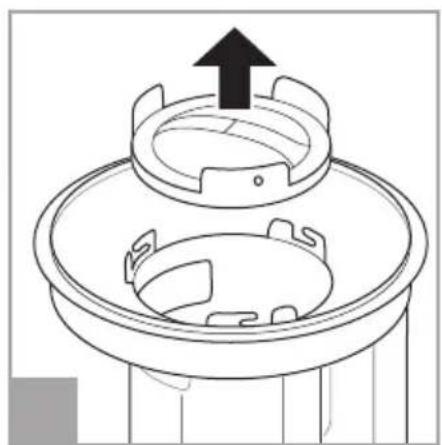
natural_image
Technical line drawing of a mechanical component with an upward arrow indicating motion (no text or symbols)
natural_image
Cross-sectional diagram of a piston-cylinder assembly with directional arrows and red dotted lines indicating movement (no text or labels)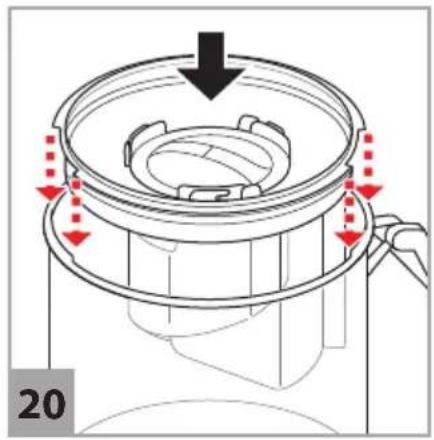
natural_image
Technical diagram of a mechanical component with red arrows indicating motion or assembly (no text or symbols)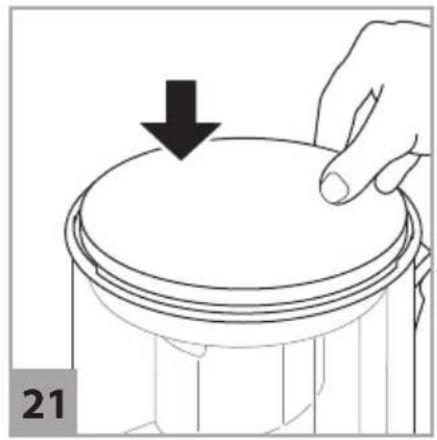
natural_image
Illustration of a hand pressing down on a cylindrical object with a downward arrow, labeled '21' (no text or symbols on the object itself)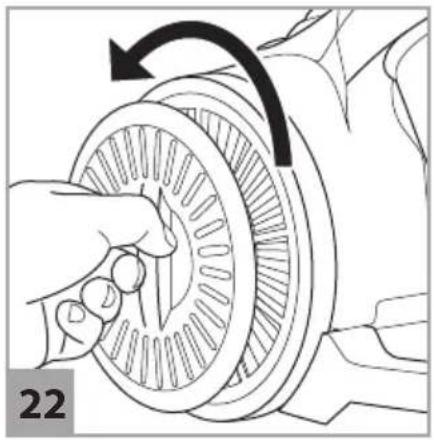
natural_image
Illustration of a hand turning a circular mechanical component with an arrow indicating rotational motion (no text or symbols)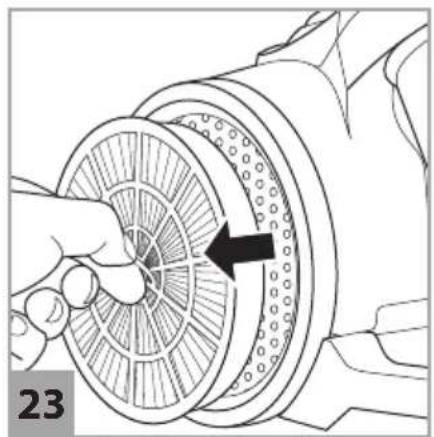
natural_image
Diagram of a hand holding a circular mechanical component with a black arrow indicating rotation (no text or symbols present)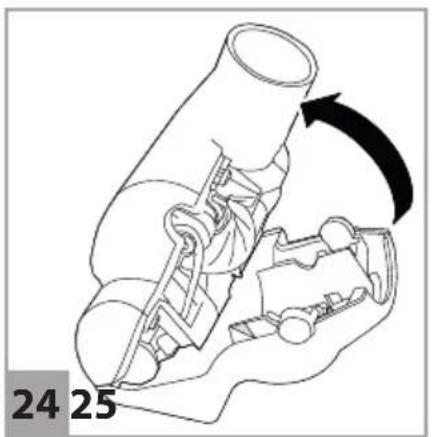
natural_image
Diagram of internal components with arrows indicating flow or movement, no visible text or symbols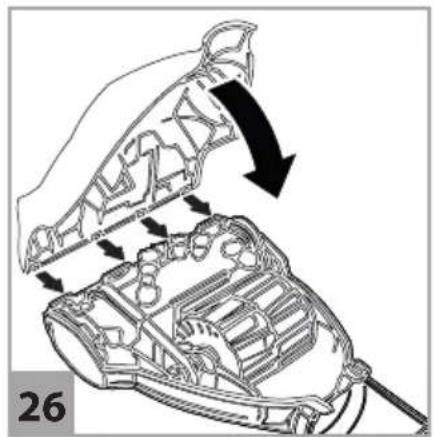
natural_image
Technical diagram of a car body with internal components and directional arrows indicating movement (no text or symbols)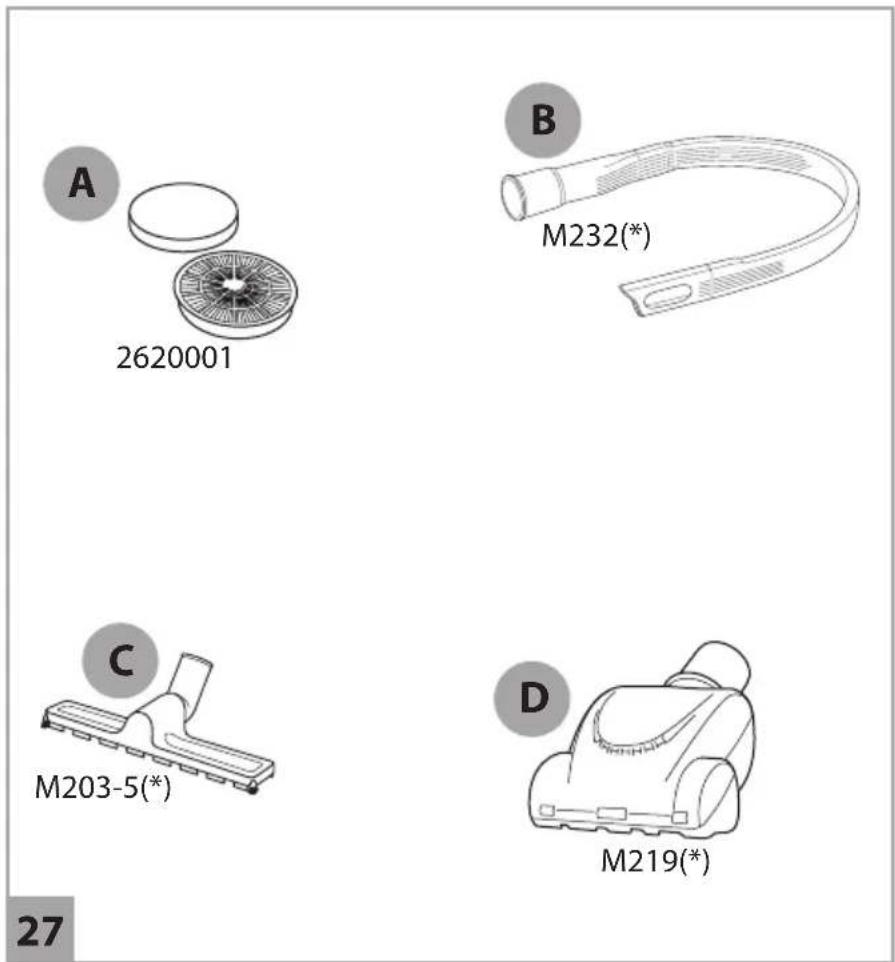
Vielen Dank!
We are pleased that you decided to purchase a Dirt Devil product. We hope you enjoy using your appliance and we would like to thank you for your purchase.
You will find further information on your product in this operating manual and at our website www.dirtdevil.de. To contact our service team, refer to the contact details on page 2.
Technical data
| Type of appliance Bagless cylinder vacuum cleaner | |
| Model Ultima Power, DD2720 | |
| Voltage 220–240 V ~, 50/60 Hz | |
| Power 800 W | |
| Dust bin 2.2 l | |
| Weight 4.3 kg | |
| Connection cord length approx. 5.0 m | |
Environmental protection and disposal
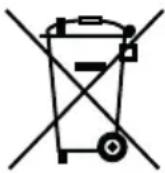
Do not dispose of the appliance with the domestic waste. Your local administration will provide you with information on proper disposal.

Warranty
If you have purchased the appliance as a consumer within the European Union, the respective national legislation implemented as per EU Directive 2011/83/EU applies as the minimum warranty standard. In non-EU countries the minimum warranty requirements in the respective country apply. This does not apply to batteries or rechargeable batteries which have become faulty or have a reduced service life as a result of normal wear or improper handling.
SAFETY INSTRUCTIONS
About the operating manual
Read this operating manual completely before using the appliance. Keep this operating manual for reference. If you pass the appliance on to third parties, it must be accompanied with this operating manual. Failure to adhere to this operating manual can lead to serious injuries or damage to the appliance. We assume no liability for damage caused as a result of failure to adhere to this operating manual.
Important information not included in this chapter is indicated as follows:

WARNING!
Warns of health hazards and identifies possible risks of injury.

CAUTION!
Indicates possible dangers to the appliance or other objects.
NOTE
Highlights tips and information.
You can also download this operating manual at any time from out website:
www.dirtdevil.de
Concerning certain groups of persons
These appliances can be used by children of 8 years and persons with impaired physical, sensory or mental abilities, or insufficient experience or knowledge, providing they are supervised or have been instructed in the proper use of the appliance and understand the risks involved.
■ Children must not perform cleaning or user maintenance tasks without supervision. Children must not play with the appliance.
- Packing material ad small parts must not be used as toys. There is risk of asphyxiation.
Children under the age of 8 years old should be kept away from the appliance and the connection cord whilst the appliance is switched on, plugged in at the socket or cooling down.
Information on the power supply
The appliance is operated with electrical current. Thus there is always risk of electrical shock.
You must therefore observe the following:
- Never immerse the appliance in water or other liquids.
If you want to pull the connection cord out of the socket, always pull directly on the plug. Never pull on the connection cord.
■ Ensure that the connection cord is not bent, pinched, rolled over and that it does not come into contact with heat sources.
■ Always check the connection cord for possible damage before using the appliance. Do not use a connection cord with a damaged cord or plug.
Before cleaning or performing maintenance on the appliance, ensure that the appliance is switched off and that the connection cord is not connected.
Information on the rotating brush roller (optional)
The brush roller in turbo nozzles rotates at hight speed. This poses various hazards to people, animals and objects:
If the appliance is faulty
If the appliance or the connection cord are damaged, they will need to be replaced by the manufacturer, the manufacturer's customer service department or a similarly qualified person in order to prevent hazards.
- Hand over a faulty appliance to an authorised dealer or send it to the Dirt Devil customer service department for repairs, >“International Service” on page 2.
■ Never use a faulty appliance or a faulty connection cord.
Information on proper use
■ Never vacuum clean people, animals or plants. Keep parts of the body and items of clothing away from the moving parts and openings on the appliance when it is in operation. They may otherwise be drawn in and may cause injuries.
This appliance is intended for domestic use only. It is not suitable for industrial or commercial use. Only use the appliance for cleaning lightly soiled, dry hard floors, carpets or upholstered furniture. Any other use is considered improper use and is prohibited.
Before you detach or attach, open or an the turbo nozzle, switch off the appliance.
The following in particular is prohibited:
- Do not run over cords, cables etc. as there is a risk of them becoming tangled in the brush roller and may become damaged.
- Keep the rotating brush roller away from all delicate surfaces. This may otherwise cause damage. Comply with the care and cleaning instructions provided by the manufacturer.
Also keep the rotating brush roller away from curtains, long tassels and the like. The objects may otherwise become drawn in and damaged.
Vacuuming:
- People, animals, plants or items of clothing on the body
→ High risk of injury! - Hot ash, burning cigarettes, matches and highly flammable substances
→ Risk of fire!
— Water and other liquids
→ Risk of short circuit! - Toner (for laser printers, copying machines, etc.)
→ Risk of fire and explosion!
Use
– in the vicinity of explosive or highly flammable substances
→ Risk of fire and explosion!
- outdoors
→ Risk of damage due to rain and dirt!
- of non-original accessories
→ Impairment of appliance safety!
- Carrying out repairs yourself
→ Risk of injury and loss of entitlement to free replacement!
Concerning disposal
After its service life, dispose of the appliance in an environmentally friendly manner, as described, >“Environmental protection and disposal” on page 13.
Preparatory work
Getting to know the appliance
Fig. 1: ① dust bin cover; ② dust bin; ③ suction hose connection; ④ dust bin release; ⑤ ON/OFF button; ⑥ parking bracket; ⑦ connection cord; ⑧ exhaust filter cover; ⑨ cord rewind button; ⑩ dust bin handle; ⑪ bypass vent; ⑫ handle; ⑬ suction hose; ⑭ suction hose connection; ⑮ accessory bracket; ⑯ furniture brush; ⑰ crevice nozzle; ⑱ switchable floor nozzle; ⑲ telescopic tube release catch; ⑳ telescopic tube
Accessories (optional):
Ⓐ parquet brush; Ⓑ mini turbo nozzle
Unpacking and assembling
① Check that the unpackaged contents are complete. If you notice any transport damage or if anything is missing, contact your dealer immediately. ② Connect suction hose and appliance (Fig. 2).
③ Connect the suction hose with the telescopic tube and adjust the length of the telescopic tube (Fig. 3).
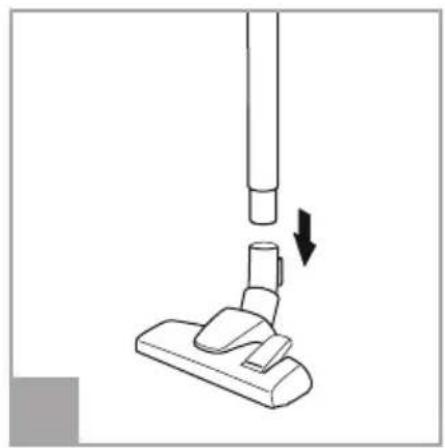
④ Connect telescopic tube and switchable floor nozzle (Fig. 4).
⑤ Ensure that the bypass vent (Fig. 1/11) is completely closed.
Using the accessories

CAUTION!
For hard floors, only use the switchable floor nozzle with the brush (Fig.10) extended, as the hard floor may otherwise become damaged.

CAUTION!
If using the turbo nozzle, make sure that the surface can withstand the rotating brush without becoming damaged.
NOTE:
You can also use the suction nozzles without the telescopic tube as necessary. To do so, connect the required accessories directly to the handle (Fig. 9).
① Connect the required accessory to the handle or the telescopic tube (Fig. 9). Make sure that the accessory is securely connected. → The appliance can be connected.
Connecting the appliance

CAUTION!
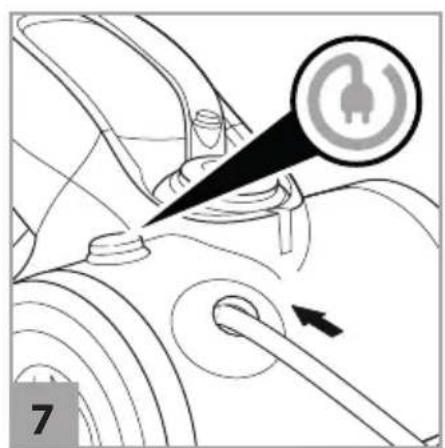
If the red marking is visible (Fig. 6/1), retract the connection cord by pressing the cord rewind button to pull in the cord up to the yellow mark (Fig. 6/2) (Fig. 7). Otherwise, the connection cord might be damaged.
① Pull the cable out of the appliance (Fig. 5). ② Insert the plug into a mains socket.
Vacuum cleaning
Flexible vacuum-cleaning
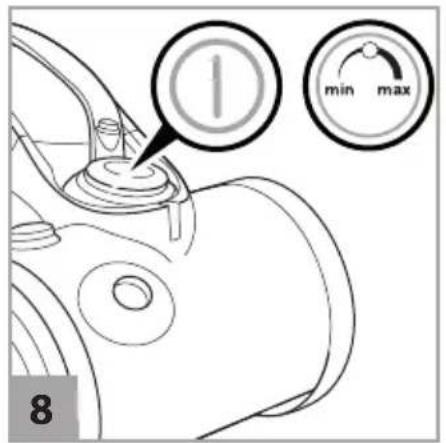
① Connect the required accessories >"Using the accessories" on page 17. ② Connect the appliance >"Connecting the appliance" on page 17. ③ To switch on the appliance, press the ON/OFF button (Fig. 8). → The appliance starts vacuuming. ④ When working with the appliance, pull it after you like a sleigh. ⑤ To switch off the appliance, press the ON/OFF button again (Fig. 8). → The appliance switches off.
Regulating the suction power
With the suction power controller (Fig. 8) you can adjust the suction power to the surface to be cleaned:
- min. position: for curtains, drapes and the like
- middle position: for hard floors without joints and crevices
- max. position: for carpets and hard floors with joints and crevices
Storing the appliance
NOTE:
If necessary, use the accessories mount (Fig. 1/15) to attach 2 accessories.
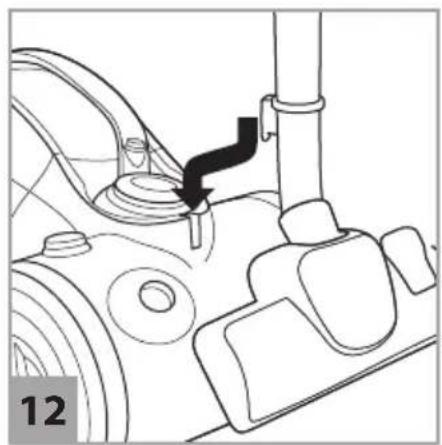
① Switch off the appliance and pull the plug from the socket. ② Push the cord rewind button until the cord has been fully rewound (Fig. 7). ③ Hang the telescopic floor nozzle or parquet nozzle (connected to the telescopic tube or handle) in the parking bracket (Fig. 12).
Maintaining the appliance
Emptying the dust bin
① Switch off the appliance and pull the plug from the socket. ② Press the dust bin release catch and remove the dust bin from its console in the appliance (Fig.13). ③ Place dust bin closely above a waste bin and release the dust bin (Fig.14). ④ Dispose of the contents of the dust bin in a waste bin. Gently tap out the dust bin to remove any soiling. ⑤ Close the emptied dust bin. ⑥ Re-insert the dust bin into its console in the appliance so that you feel it click into place.
Cleaning the separator and filter
NOTE:
The appliance, the separator and the pre-motor filter should be cleaned regularly in order to maintain the suction power.
① Remove the dust bin from the appliance, >"Emptying the dust bin" on page 18.② Unscrew the dust bin cover in the anti-clockwise direction and lift it off (Fig. 15). ③ Remove the pre-motor filter (Fig. 16).
4 Release the separator cover by turning it in the clockwise direction (Fig. 17). 5 Remove the cover from the separator (Fig. 18). 6 Remove the separator and dispose of the content in a waste bin (Fig. 19).
⑦ Rinse the pre-motor filter and the separator out thoroughly under running water. ⑧ Leave the cleaned parts to dry completely for at least 24 h.
⑨ Insert the separator cover into the separator. ⑩ Secure the separator cover by turning it in the anti-clockwise direction (Fig. 17). ⑪ Insert the separator, together with the separator cover, into the dust bin (Fig. 20). ⑫ Place the pre-motor filter on the dust bin (Fig. 21). ⑬ Screw the dust bin cover onto the dust bin by turning it in the clockwise direction.
14 Re-insert the dust bin into its console on the appliance body. You must be able to feel the dust bin click into place.
Cleaning the exhaust filter

CAUTION!
The fine fins on the exhaust filter are sensitive. Never clean the fins with water and only ever use soft brushes for cleaning.
NOTE:
Replace any damaged, discoloured or deformed exhaust filters with new ones.
① Screw the exhaust filter cover in the anti-clockwise direction and remove it from its console on the appliance body (Fig. 22). ② Remove the exhaust filter (Fig. 23). ③ Carefully tap out the exhaust filter.
4 Carefully clean the exhaust filter with a soft brush.
5 Re-insert the exhaust filter into its console on the appliance. 6 Refit the exhaust filter cover. 7 Secure the exhaust filter cover by turning it in the clockwise direction.
Cleaning the mini turbo nozzle
1 Disconnect the mini turbo nozzle from the suction hose or the telescopic tube. 2 Unfasten the two screws on the bottom of the mini turbo nozzle.
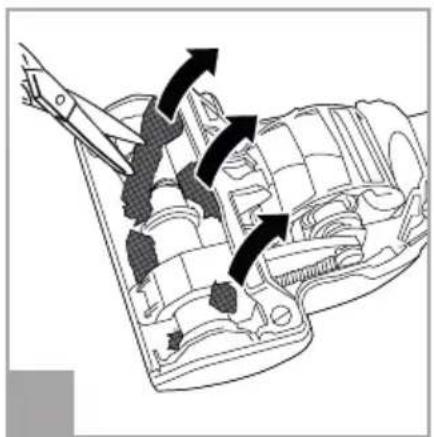
③ Carefully open up the appliance top of the mini turbo nozzle (Fig. 24). ④ Thoroughly clean the brush by hand. In case of stubborn soiling, carefully use tweezers or scissors (Fig. 25). ⑤ Place the appliance top on the 4 tabs on the appliance bottom and then carefully close the appliance top (Fig. 26). ⑥ Refit the two screws on the bottom of the mini turbo nozzle and tighten them.
Accessories
- Filter set (1 pre-motor filter, 1 exhaust filter) – 2620001 (Fig. 27/A)
- 1 Long flexible crevice nozzle – M232 (Fig.27/B) (*)
- 1 Mini turbo nozzle "Fellino" – M219 (Fig.27/C) (*)
- 1 Parquet brush – M203-5 (Fig.27 /D) (*)
(*) optional
Troubleshooting
Before you contact our customer service department or send the appliance to the Dirt Devil customer service department, you will find a lot of additional information in the service area of our website which will help you solve problems.
Switch off the appliance before you start trouble-shooting. Never use a faulty appliance.
Merci beaucoup !
*Indicative annual energy consumption (kWh per year), based on 50 cleaning processes. The actual annual energy consumption depends on how the appliance is used. The data is based on the Delegated Regulation (EU) No. 665/2013 of the commission of 3rd May 2013 which supplements Directive 2010/30/EU. All the methods which are not described in more detail in these instructions have been implemented based on DIN EN 60312-1:2014. Date: March 2018
Information on the energy label
- International Service
- DE
- AT
- CH
- BE
- LU
- FR
- ES
- IT
- PT
- NL
- PL
- CZ
- HU
- TR
- FI
- SE
- DK
- SK
- NO
- GR
- RO
- BG
- HR
- LT
- LV
- EE
- SI
- AT, CH
- Vielen Dank!
- Environmental protection and disposal
- Warranty
- SAFETY INSTRUCTIONS
- About the operating manual
- WARNING!
- CAUTION!
- NOTE
- Concerning certain groups of persons
- Information on the power supply
- Information on the rotating brush roller (optional)
- If the appliance is faulty
- Information on proper use
- The following in particular is prohibited:
- Concerning disposal
- Preparatory work
- Getting to know the appliance
- Accessories (optional):
- Unpacking and assembling
- Using the accessories
- NOTE:
- Connecting the appliance
- Vacuum cleaning
- Flexible vacuum-cleaning
- Regulating the suction power
- Storing the appliance
- Maintaining the appliance
- Emptying the dust bin
- Cleaning the separator and filter
- Cleaning the exhaust filter
- Cleaning the mini turbo nozzle
- Accessories
- Troubleshooting
- Merci beaucoup !
- Information on the energy label
Brand : DIRT DEVIL
Model : Ultima Power DD27204
Category : Vacuum Cleaner