
EY7411 - Drill PANASONIC - Free user manual and instructions
Find the device manual for free EY7411 PANASONIC in PDF.

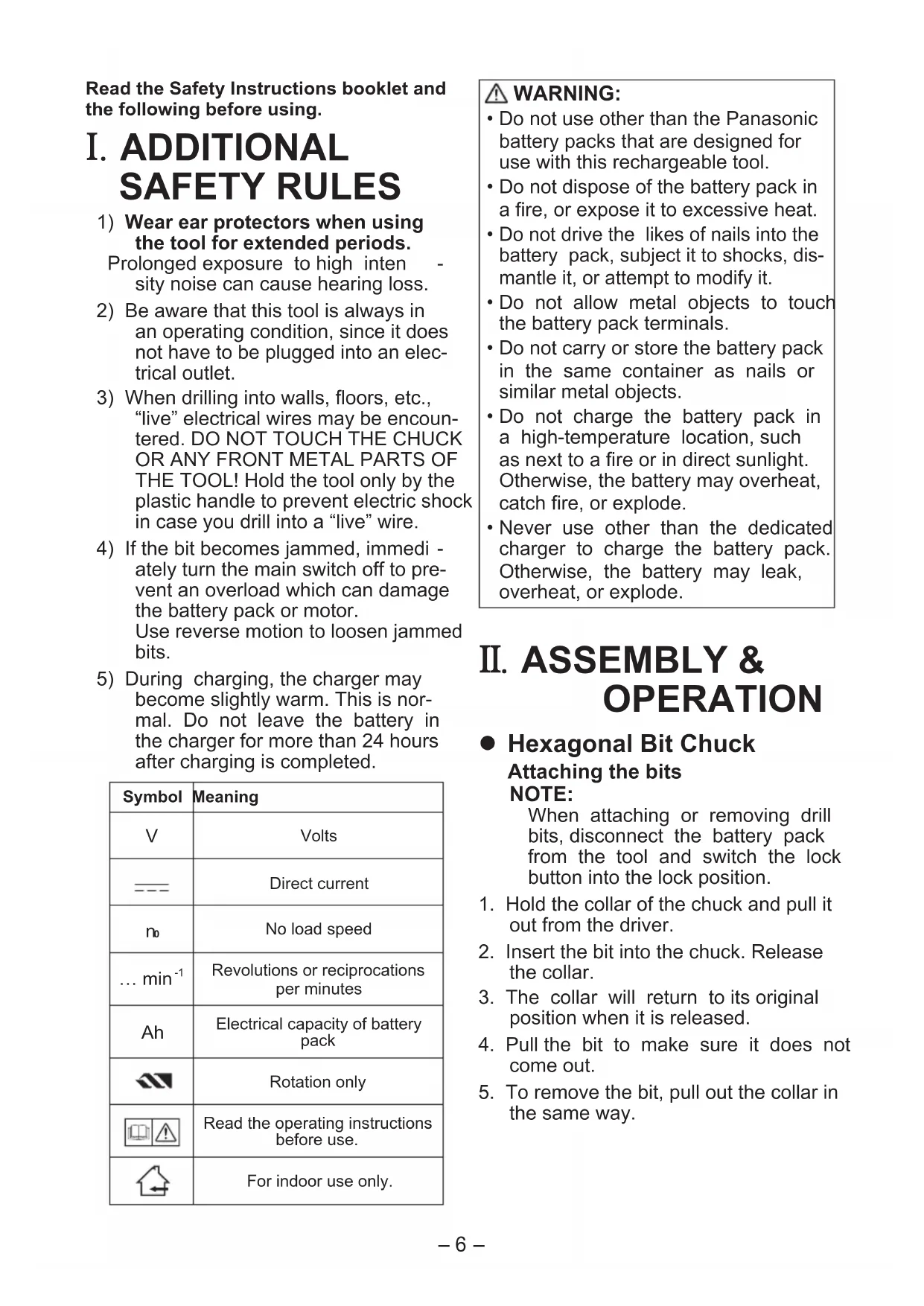


| Brand | Panasonic |
| Model | EY7411 |
| Product type | Cordless drill/driver |
| Nominal voltage | 3.6 V DC |
| Battery | Li-ion 3.6 V, 1.5 Ah (EY9L10) |
| Charger | EY0L10, 30 min for full charge |
| No-load speed (low) | 200 min⁻¹ |
| No-load speed (high) | 600 min⁻¹ |
| Max torque (low) | 4.4 N·m |
| Max torque (high) | 1.5 N·m |
| Max clutch torque | 3.0 N·m |
| Drilling capacity (metal) | Ø 5 mm (thickness 1.6 mm) |
| Screwing capacity (wood screws) | Ø 3.8 × 38 mm |
| Screwing capacity (machine screws) | M2.5 to M5 |
| Total length | 283 mm |
| Weight (with battery) | 0.5 kg |
| Number of clutch settings | 21 |
| LED light | Yes, with 5 min timer |
| Screw counter | Yes, UP/DOWN modes, up to 99 |
| Anti-double tightening function | Yes, adjustable timer 0.1 to 30 s |
| Bit lock | Yes, up to 14.7 N·m |
| Maintenance | Dry cloth, no water or solvent |
| Safety | Battery protection, automatic stop, safety glasses recommended |
Frequently Asked Questions - EY7411 PANASONIC
User questions about EY7411 PANASONIC
0 question about this device. Answer the ones you know or ask your own.
Ask a new question about this device
Download the instructions for your Drill in PDF format for free! Find your manual EY7411 - PANASONIC and take your electronic device back in hand. On this page are published all the documents necessary for the use of your device. EY7411 by PANASONIC.
USER MANUAL EY7411 PANASONIC
Cordless Drill & Driver
Cordless Drill & Driver
Cordless Drill & Driver
Cordless Drill & Driver
Model No: EY7411
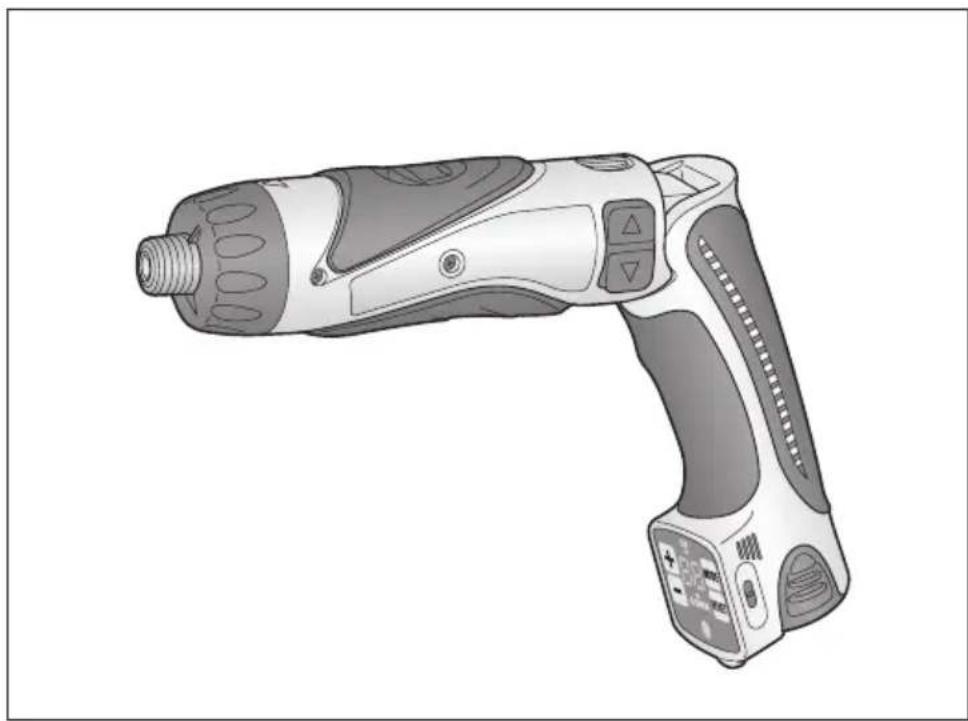
Before operating this unit, please read these instructions completely and save this manual for future use.
Read the Safety Instructions booklet and the following before using.
I. ADDITIONAL SAFETY RULES
1) Wear ear protectors when using the tool for extended periods.
Prolonged exposure to high intensity noise can cause hearing loss.
2) Be aware that this tool is always in an operating condition, since it does not have to be plugged into an electrical outlet. 3) When drilling into walls, floors, etc., "live" electrical wires may be encountered. DO NOT TOUCH THE CHUCK OR ANY FRONT METAL PARTS OF THE TOOL! Hold the tool only by the plastic handle to prevent electric shock in case you drill into a "live" wire. 4) If the bit becomes jammed, immediately turn the main switch off to prevent an overload which can damage the battery pack or motor. Use reverse motion to loosen jammed bits. 5) During charging, the charger may become slightly warm. This is normal. Do not leave the battery in the charger for more than 24 hours after charging is completed.
| Symbol | Meaning |
| V | Volts |
| --- | Direct current |
| no | No load speed |
| ... min-1 | Revolutions or reciprocations per minutes |
| Ah | Electrical capacity of battery pack |
| Rotation only | |
| Read the operating instructions before use. | |
| For indoor use only. |
WARNING:
- Do not use other than the Panasonic battery packs that are designed for use with this rechargeable tool.
- Do not dispose of the battery pack in a fire, or expose it to excessive heat.
- Do not drive the likes of nails into the battery pack, subject it to shocks, dismantle it, or attempt to modify it.
- Do not allow metal objects to touch the battery pack terminals.
- Do not carry or store the battery pack in the same container as nails or similar metal objects.
- Do not charge the battery pack in a high-temperature location, such as next to a fire or in direct sunlight. Otherwise, the battery may overheat, catch fire, or explode.
- Never use other than the dedicated charger to charge the battery pack. Otherwise, the battery may leak, overheat, or explode.
II. ASSEMBLY & OPERATION
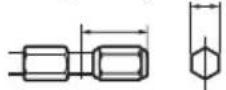
- Hexagonal Bit Chuck
Attaching the bits
NOTE:
When attaching or removing drill bits, disconnect the battery pack from the tool and switch the lock button into the lock position.
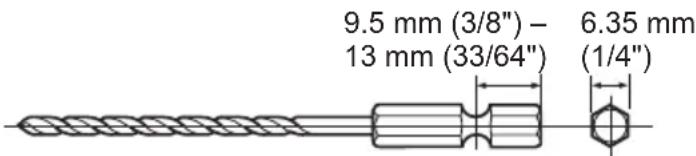
- Hold the collar of the chuck and pull it out from the driver.
- Insert the bit into the chuck. Release the collar.
- The collar will return to its original position when it is released.
- Pull the bit to make sure it does not come out.
- To remove the bit, pull out the collar in the same way.
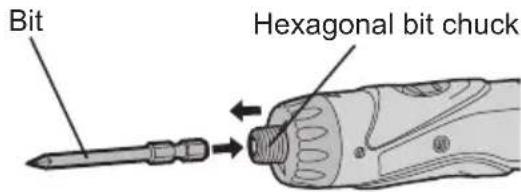
9.5 mm (3/8") - 13 mm (33/64") 6.35 mm (1/4")
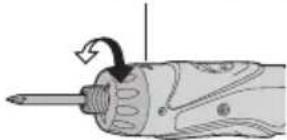
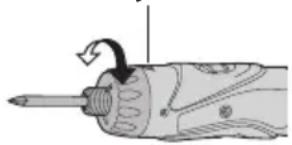
- Clutch Handle (Clutch Torque Setting)
Adjust the torque to one of the 21 possible settings to suit the job. There is an interval of about 0.13 N·m (1.3 kgf·cm or 1.1 in-lbs) between steps.
CAUTION:
Test the setting before actual operation.
Set the scale at this mark.
Reference for Adjusting Torque
| Setting | Torque Use | |
| 1 | Approx: 0.29 N·m(3.0 kgf-cm or 2.6 in-lbs) | For driving screws |
| 5 | Approx: 0.82 N·m(8.4 kgf-cm or 7.3 in-lbs) | |
| 9 | Approx: 1.35 N·m(13.8 kgf-cm or 12.0 in-lbs) | |
| 13 | Approx: 1.88 N·m(19.2 kgf-cm or 16.6 in-lbs) | |
| 17 | Approx: 2.41 N·m(24.6 kgf-cm or 21.3 in-lbs) | |
| 21 | Approx: 2.94 N·m(30.0 kgf-cm or 26.0 in-lbs) | |
| Approx: 4.4 N·m(45.0 kgf-cm or 39.0 in-lbs$crews and drilling | For power-ful driving |
- When using at high speeds, set the clutch at 10 or below. (Operation stops at the maximum torque of 1.5 N·m (15 kgf·cm) when the scale is higher.)
- The auto shut-off function may become inoperable at high clutch settings when battery power drops. Recharge the battery in that case.
NOTE:
The chart is only a reference. The torque settings may differ by materials, types of screws, etc. Please test it at your own conditions before use.
Control Panel
Manufacturer settings upon shipment
- Count system: Count down system
- Count setting value: 99
- Buzzer sound pitch: b1 (Low sound)
- Double tightening counting prevention count time: 0 (OFF) Hold switch: Released
Please set the settings according to conditions of use.
Screw count function
- Counts the number of auto stops. (Counts the number of screws driven) The count method can be selected from "UP" or "DOWN".
- When the set number of screws to be driven is reached, a buzzer sounds and the count value is reset. The buzzer sound can be selected from 3 types of sound.
- Double tightening counting prevention function
Work (double tightening and screw driving confirmation, etc.) that began within the set time is not counted after the driven screws are counted.
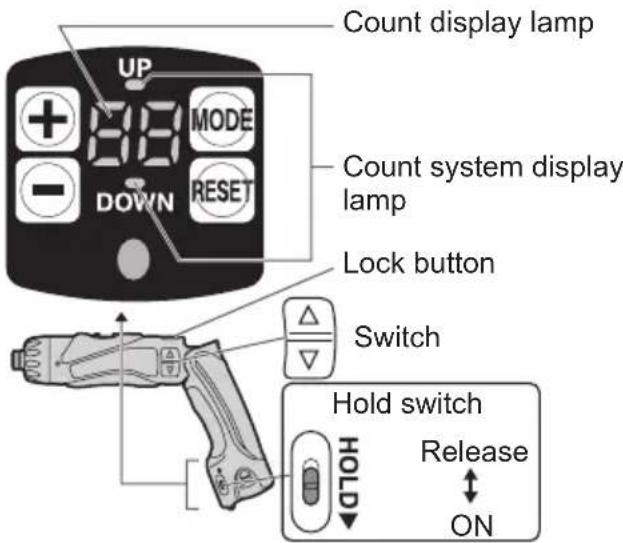
Starting the control panel
- Release the hold switch.
- To illuminate the control panel
① Release the lock button
② Press Control panel is lit.)
- The count display lamp and "UP" or "DOWN" are illuminated.
Setting the count functions (Screw count setting/Count system setting)
- Press while the control panel is illuminated.
Each time is pressed, the screw count setting and count system setting switch and flash.
- Screw count setting → Count display lamp flashes.
- Count system setting → "UP" or "DOWN" flashes.
- Screw count setting
Set the number of screws with ^+ or
The range can be set within 0 - 99. - 0 is not counted.
Count system setting
Press MODE. "UP" or "DOWN" will begin to flash. Next select "UP") or ("DOWN").
- Press and hold the (or) buttons while setting the torque to vary the value continuously. < Count System "UP" >
- Displays the count for the number of screws driven.
0→1→2...Set number
The settings are activated by pushing
- When the set number of screws is reached, the buzzer sounds and the count value resets to zero. < Count System "DOWN" >
- Displays the count for the remaining number of screws to be driven. (Set number)
- When the set number of screws to be driven is reached, the buzzer
sounds and the count value resets to original set number.
- The settings are activated by pushing the up/down buttons.
The previous setting will be cleared.
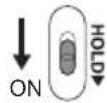
- To prevent changes in the set values due to operational errors.
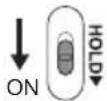
- Turn the HOLD switch to ON.
Convenient function settings (buzzer sound setting/double tightening counting prevention time setting)
- Press for 2 or more seconds while the control panel is illuminated.
- Count display lamp "F1" is illuminated.
Each time it is pressed, the buzzer sound setting and the double tightening counting prevention time setting can be switched.
- "Buzzer sound setting" → "F1" is illuminated.
- "Double tightening counting prevention time setting" → "F2" is illuminated.
- Buzzer sound setting
The buzzer sound can be selected with when "F1" is illuminated.
| Operation | Display | Sound Frequency |
| + | b3 | High pitched sound (Approx. 4 kHz) |
| b2 | Medium pitched sound (Approx. 3 kHz) | |
| b1 | Low pitched sound (Approx. 2 kHz) | |
| b0 | No sound (OFF) |
- If reset is pressed, the buzzer sound saved from the previous setting is displayed.
Double tightening counting prevention time setting
Press MODE to illuminate "F2" and select the time with + -
| Operation | Display | No. of seconds | Following the screw count, screw driving within the set number of seconds is not counted. |
| 30 3 | seconds | ||
| : | : | ||
| 1 0.1 | second | ||
| 0 OFF | |||
- If n is pressed, the time setting saved from the previous setting is displayed.
- The settings are activated by pressing Δ/
- To prevent changes in the set values due to operational errors.
- Turn the HOLD switch to ON.
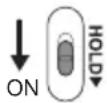
To change the screw count while in use
- Release the hold switch.
- Adjust the count value with + -
- The displayed number of screws to be driven can be changed within the range of the screw count values.
- To prevent changes in the set values due to operational errors.
- Turn the HOLD switch to ON.
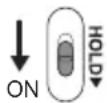
While setting, if no operations conducted for 60 or more seconds and when the battery is removed
Operation for the set value becomes invalid.
Please reset the operational values.
- When batteries are changed while in use
- When batteries are changed, the count value is saved. Therefore, the drill can be used continuously.
- Battery Low Warning Lamp
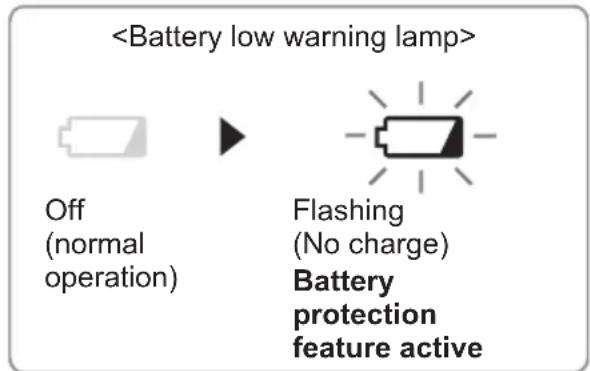
Excessive (complete) discharging of Li-ion batteries shortens their service life dramatically. The driver includes a battery protection feature designed to prevent excessive discharging of the battery pack.
- The battery protection feature activates immediately before the battery loses its charge, causing the battery low warning lamp to flash.
- If you notice the battery low, wait for the lamp flashing, charge the battery pack immediately.
- Clutch Lock Cover
The clutch lock cover allows you to lock the clutch at the selected setting.
Attaching the cover
- Select the appropriate clutch setting for the application.
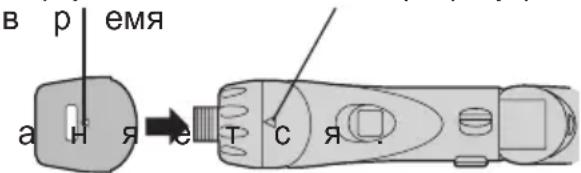
- Attach the clutch lock cover.
- Align the triangle mark on the cover with the graduation selection mark on the drill and attach.
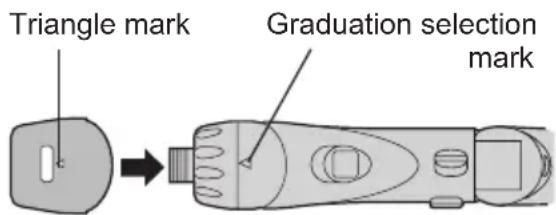
Removing the cover
- Grip the clutch lock cover with your fingers on the triangle mark and the bottom of the cover, then push in and twist to remove.
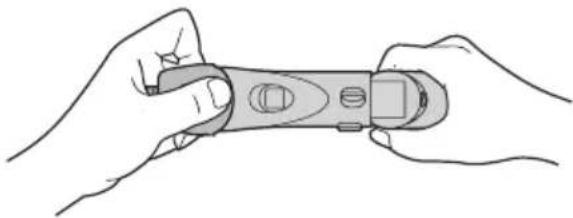
- It will be difficult to remove the clutch lock cover from the drill if you push on the side of the cover while pulling it off.
Using the LED Light
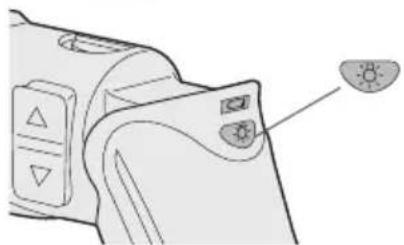
Before the use of LED light, always pull the power switch once.
Press the LED light on button.
The light illuminates with very low current, and it does not adversely affect the performance of the tool during use or its battery capacity.
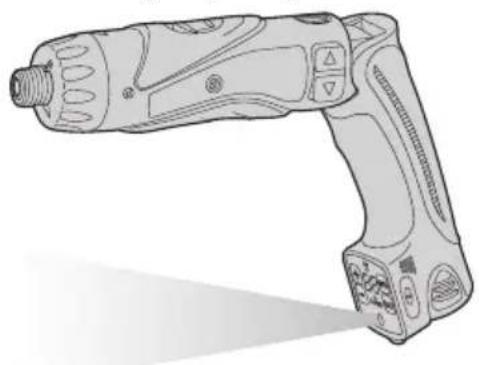
CAUTION:
- The built-in LED light is designed to illuminate the small work area temporarily.
- Do not use it as a substitute for a regular flashlight, since it does not have enough brightness.
- LED light turns off when the tool has not been used for 5 minutes.
Caution: DO NOT STARE INTO BEAM.
Use of controls or adjustments or performance of procedures other than those specified herein may result in hazardous radiation exposure.
- Bit-locking Function
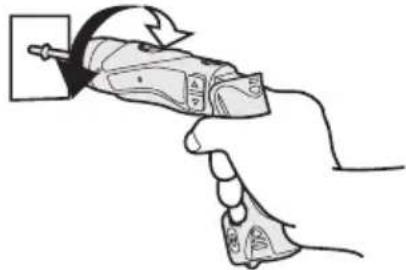
With the switch at off and the bit locked in place, the tool can be used as a manual screwdriver - up to 14.7 N·m (150 kgf·cm, 130 in-lbs).
There will be a little play in the driving shaft, but this is not a malfunction.
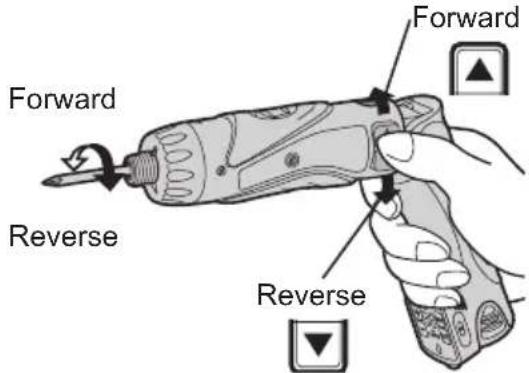
- Main Switch (ON/OFF)
Push the upper half of the switch for forward rotation, or the lower half for reverse rotation.
- Speed Selector Switch
To suit the application of this tool, two different rotational speeds are available. Depending upon use, either the high or low speed should be selected.
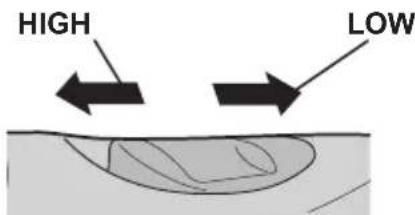
| Speed selection Torque | |
| LOW 200 min | -1 (rpm) High |
| HIGH 600 min | -1 (rpm) Low |
CAUTION:
- Check speed selector switch before use.
- Do not operate the speed selector
switch while the main switch is on (switch is in the ON position).
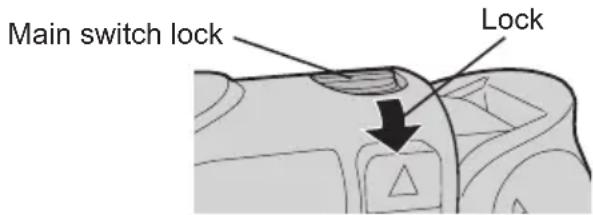
- Main Switch Lock
After use, set the main switch lock at the lock position to prevent accidental operation.
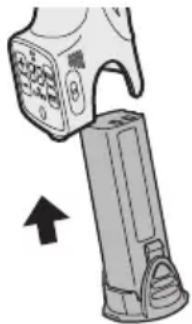
- Battery Pack (EY9L10)
- Remove the battery pack away from the tool.
- Charge the battery pack using the battery charger.
- After charging has been completed, remove the battery pack from the charger and connect it to the tool.
Disconnect the charger from the power source when not in use.
NOTE:
Use under extremely hot or cold conditions will reduce operating capacity per charge.
[Battery Pack]
For Appropriate Use of Battery pack
Li-ion Battery pack (EY9L10)
- For optimum battery life, store the Li-ion battery pack following use without charging it.
- The ambient temperature range is between 0°C (32°F) and 40°C (104°F). If the battery pack is used when the battery temperature is below 0°C
(32°F) the tool may fail to function properly.
- When battery pack is not in use, keep it away from other metal objects like: paper clips, coins, keys, nails, screws, or other small metal objects that can make a connection from one terminal to another. Shorting the battery terminals together may cause sparks, burns or a fire.
- When operating the battery pack, make sure the work place is well ventilated.
Battery Pack Life
The rechargeable batteries have a limited life. If the operation time becomes extremely short after recharging, replace the battery pack with a new one.
Battery Recycling
ATTENTION:
For environmental protection and recycling of materials, be sure that it is disposed of at an officially assigned location, if there is one in your country.
[Battery Charger]
Charging
Common Cautions for the Li-ion/Ni-Cd Battery Pack
NOTE:
- When a cold battery (of about 0°C or less) is to be charged in a warm room, leave the battery in the room for at least one hour and charge it when it has warmed up to room temperature. (Failing to do so may result in less than a full charge.) Cool down the charger when charging more than two battery packs consecutively.
- Do not insert your fingers into contact hole, when holding charger or any other occasions.
CAUTION:
To prevent the risk of fire or damage to the battery charger.
- Do not use power source from an engine generator.
- Do not cover vent holes on the charger and the battery pack.
- Unplug the charger when not in use.
Li-ion Battery Pack
NOTE:
Your battery pack is not fully charged at the time of purchase. Be sure to charge the battery before use.
Battery charger (EY0L10)
- Plug the charger into the AC outlet.
NOTE:
Sparks may be produced when the plug is inserted into the AC power supply, but this is not a problem in terms of safety.
- Slide the battery dock cover back to allow insertion of the Li-ion battery pack.
- Verify that the cover is locked, purely in place.
- Insert the battery pack firmly into the charger.
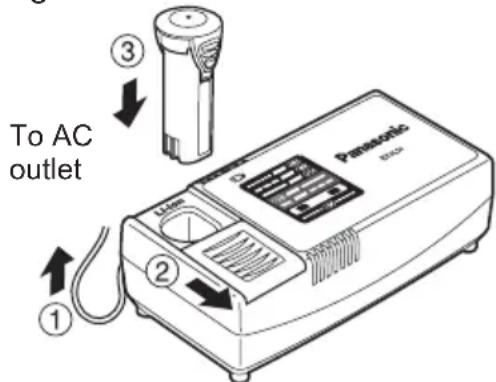
- During charging, the charging lamp will be lit.
When charging is completed, an internal electronic switch will automatically be triggered to prevent overcharging.
- Charging will not start if the battery pack is warm (for example, immediately after heavy-duty operation).
The orange standby lamp will be flashing until the battery cools down. Charging will then begin automatically.
- The charge lamp (green) will flash slowly once the battery is approximately 80% charged.
- When charging is completed, the charging lamp will start flashing quickly in green color.
- If the temperature of the battery pack is 0°C or less, charging takes longer to fully charge the battery pack than the standard charging time. Even when the battery is fully charged, it will have approximately 50% of the power of a fully charged battery at normal operating temperature.
- If the power lamp does not light immediately after the charger is plugged in, or if after the standard charging time the charging lamp does not flash quickly in green, consult an authorized dealer.
- If a fully charged battery pack is inserted into the charger again, the charging lamp lights up. After several minutes, the charging lamp may flash quickly to indicate the charging is completed.
Ni-Cd Battery Pack
NOTE:
When you charge the battery pack for the first time, or after prolonged storage, charge it for about 24 hours to bring the battery up to full capacity.
Battery charger (EY0L10)
- Plug the charger into the AC outlet.
NOTE:
Sparks may be produced when the plug is inserted into the AC power supply, but this is not a problem in terms of safety.
- Slide the battery dock cover back to allow insertion of the Ni-Cd battery pack.
- Verify that the cover is locked securely in place.
- Insert the battery pack firmly into the charger.
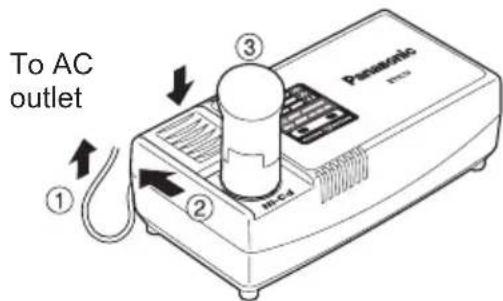
- During charging, the charging lamp will be lit.
When charging is completed, an internal electronic switch will automatically be triggered to prevent overcharging.
- Charging will not start if the battery pack is warm (for example, immediately after heavy-duty operation).
The orange standby lamp will be flashing until the battery cools down. Charging will then begin automatically.
- When charging is completed, the charging lamp will start flashing quickly in green color.
- If the power lamp does not light immediately after the charger is plugged in, or if after the standard charging time the charging lamp does not flash quickly in green, consult an authorized dealer.
- If a fully charged battery pack is inserted into the charger again, the charging lamp lights up. After several minutes, the charging lamp may flash quickly to indicate the charging is completed.
LAMP INDICATIONS

Green Lit
Charger is plugged into the AC outlet. Ready to charge.

Green Flashing Quickly
Charging is completed. (Full charge.)

Green Flashing
Battery is approximately 80% charged. (Usable charge. Li-ion only)

Green Lit
Now charging.

Orange Lit
Battery pack is cool.
The battery pack is being charged slowly to reduce the load on the battery. (Li-ion only)

Orange Flashing
Battery pack is warm. Charging will begin when temperature of battery pack drops.

Charging Status Lamp
Left: green Right: orange will be displayed.

Both Orange and Green Flashing Quickly
Charging is not possible. Clogged with dust or malfunction of the battery pack.
If the temperature of the battery pack is -10°C or less, the charging status lamp (orange) will also start flashing.
Charging will begin when the temperature of the battery pack goes up (Li-ion only)
Information for Users on Collection and Disposal of Old Equipment and used Batteries
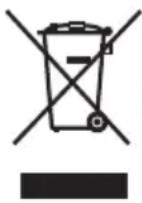
These symbols on the products, packaging, and/or accompanying documents mean that used electrical and electronic products and batteries should not be mixed with general household waste.
For proper treatment, recovery and recycling of old products and used batteries, please take them to applicable collection points, in accordance with your national legislation and the Directives 2002/96/EC and 2006/66/EC.
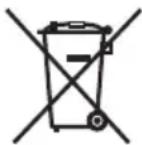
By disposing of these products and batteries correctly, you will help to save valuable resources and prevent any potential negative effects on human health and the environment which could otherwise arise from inappropriate waste handling.
For more information about collection and recycling of old products and batteries, please contact your local municipality, your waste disposal service or the point of sale where you purchased the items.
Penalties may be applicable for incorrect disposal of this waste, in accordance with national legislation.
For business users in the European Union
If you wish to discard electrical and electronic equipment, please contact your dealer or supplier for further information.
[Information on Disposal in other Countries outside the European Union]
These symbols are only valid in the European Union. If you wish to discard these items, please contact your local authorities or dealer and ask for the correct method of disposal.
Note for the battery symbol (bottom two symbol examples):
This symbol might be used in combination with a chemical symbol. In this case it complies with the requirement set by the Directive for the chemical involved.
III. MAINTENANCE
Use only a dry, soft cloth for wiping the unit. Do not use a damp cloth, thinner, benzine, or other volatile solvents for cleaning.
IV. ACCESSORIES
CAUTION:
To prevent the risk of injury, only use accessory or attachment for its stated purpose.
If you need any assistance for more details regarding these accessories, ask your local service center.
- EY9X007E
Clutch lock cover
Use only bits suitable for size of drill's chuck.
V. SPECIFICATIONS
MAIN UNIT
| Model EY7411 | |||
| Capacity | Screw driving | Machine screw M2.5 - M5 | |
| Wood screw ø 3.8 × 38 mm (5/32 " × 1-29/64") | |||
| Drilling For metal | tal ø 5 mm (13/64) | ") spc t = 1.6 mm | |
| Motor 3.6 V DC | |||
| No load speed | LOW: 200 min-1 (rpm) | ||
| HIGH: 600 min-1 (rpm) | |||
| Maximum torque | LOW: 4.4 N·m (45 kgf-cm, 39 in-lbs) HIGH: 1.5 N·m (15 kgf-cm, 13 in-lbs) | ||
| Maximum clutch torque 3.0 N·m | (30 kgf-cm, 26 in-lbs) | ||
| Overall length 283 mm (11-5/32) | ") | ||
| Weight (with battery pack) 0.5 kg (1.1 lbs) | |||
BATTERY PACK
| Model EY9L10 | |
| Storage battery Li-ion Battery | |
| Battery voltage | 3.6 V DC (3.6 V × 1 cell) |
| Capacity | 1.5 Ah |
BATTERY CHARGER
| Model EY0L10 | |||
| Weight | 0.6 kg (1.3 lbs) | ||
| Electrical rating | See the rating plate on the bottom of the charger. | ||
| Charging time | 2.4 V | 3.6 V | |
| 1.2 Ah | EY9021 | EY9025 | |
| Full: 15 min. | Full: 15 min. | ||
| 1.5 Ah | EY9L10 | ||
| Usable: 15 min. | |||
| Full: 30 min. | |||
NOTE:
- For applicable battery packs to this charger, see the label on the charger or the latest general catalog.
The instruction label on the battery packs also shows the applicable charger.
ONLY FOR U.K.
VI. ELECTRICAL PLUG INFORMATION
FOR YOUR SAFETY PLEASE READ THE FOLLOWING TEXT CAREFULLY
This appliance is supplied with a moulded three pin mains plug for your safety and convenience.
A 5 amp fuse is fitted in this plug.
Should the fuse need to be replaced please ensure that the replacement fuse has a rating of 5 amp and that it is approved by ASTA or BSI to BS1362.
Check for the ASTA mark or the BSI mark on the body of the fuse.
If the plug contains a removable fuse cover you must ensure that it is refitted when the fuse is replaced.
If you lose the fuse cover the plug must not be used until a replacement cover is obtained.
A replacement fuse cover can be purchased from your local Panasonic Dealer.
IF THE FITTED MOULDED PLUG IS UNSUITABLE FOR THE SOCKET OUTLET IN YOUR HOME THEN THE FUSE SHOULD BE REMOVED AND THE PLUG CUT OFF AND DISPOSED OF SAFELY. THERE IS A DANGER OF SEVERE ELECTRICAL SHOCK IF THE CUT OFF PLUG IS INSERTED INTO ANY 13 AMP SOCKET.
If a new plug is to be fitted please observe the wiring code as shown below.
If in any doubt please consult a qualified electrician.
IMPORTANT:
The wires in this mains lead are coloured in accordance with the following code:
Blue: Neutral
Brown: Live
As the colours of the wire in the mains lead of this appliance may not correspond with the coloured markings identifying the terminals in your plug, proceed as follows. The wire which is coloured BLUE must be connected to the terminal in the plug which is marked with the letter N or coloured BLACK.
The wire which is coloured BROWN must be connected to the terminal in the plug which is marked with the letter L or coloured RED.
Under no circumstances should either of these wires be connected to the earth terminal of the three pin plug, marked with the letter E or the Earth Symbol.
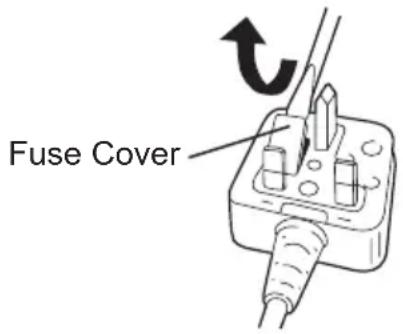
How to replace the fuse: Open the fuse compartment with a screwdriver and replace the fuse and fuse cover if it is removable.
This apparatus was produced to BS800.
Pacco battery Li-ion
NOTE:
| Bediening | Display T | bonfrequentie |
| +↑ | b3 | Hoge toon(ong. 4 kHz) |
| b2 | Middentoon(ong. 3 kHz) | |
| b1 | Lage toon(ong. 2 kHz) | |
| b0 | Geen toon (UIT) |
- Main switch (ON/OFF)
Clutch adjustment (setting the tightening torque of the clutch)
Set the required tightening torque to one of the possible values. Between them there is an interval of approximately 0.13 N·m (1.3 kgf-cm).
ATTENTION:
Check the installation before starting this work.
Set the scale near this mark.
Recommendations for adjusting the tightening torque
| Знachievements | Крочи моремт | Искобъовиме |
| 1 | Проблиз.: 0,29 H·M(3,0 кгс-cм) | ДляЗавинувaningшушив |
| 5 | Проблиз.: 0,82 H·M(8,4 кгс-cм) | |
| 9 | Проблиз.: 1,35 H·M(13,8 кгс-cm) | |
| 13 | Проблиз.: 1,88 H·M(19,2 кгс-cm) | |
| 17 | Проблиз.: 2,41 H·M(24,6 кгс-cm) | |
| 21 | Проблиз.: 2,94 H·M(30,0 кгс-cm) | |
| Проблиз.: 4,4 Hm(45,0 кгс-cm) | Для сильноюзавин Bavaningшушиви Сберлесия |
- When using at high speeds, set the tightening torque value of the clutch to position 10 or higher. (Operation stops at maximum tightening torque of 1.5 N·m (15 kgf·cm) if a higher value is set.) - The automatic shut-off function may become unsafe when using high tightening torque values of the clutch if the battery charge is low. In such a case, charge the battery.
NOTE:
This table is only a recommendation. The tightening torque setting value may vary depending on materials, types of screws, etc. Please check it under your own conditions before use.
The indicator display will blink alternately with "UP" and "DOWN".
On the display line (screw count setting / system count setting), the number is displayed.
x1. Press the MODE button to switch the operation mode while the control panel is lit.
Each time you press the button, the screw count setting and system count setting are displayed alternately.
Screw count setting: The indicator for screw count lights up. System count setting: The "UP" or "DOWN" indicators blink.
a Set the number of screws using the + or - buttons.
- The range can be set from 0 to 99. - Not counted.
System count setting
Press the MODE button. The "UP" or "DOWN" indicators will blink. Then select the counting direction using the + ("UP") or - ("DOWN") buttons.
Press and hold the button ( ) when setting the torque for permanent change of the value < "UP" counting system> - displays the count of tightened screws. (0→1→2...set quantity)
The setting is activated by pressing the button.
- When the set number of screws is reached, an audible signal is activated and the counted value is reset to < "DOWN" counting system>.
- Displays the count of remaining screws that need to be tightened. (Set quantity... 2→1→0)
- When the set number of screws that need to be tightened is reached, an audible signal is activated and the counted value is reset to the initially set quantity.
- The setting is activated by pressing the button.
- The previous setting will be deleted.
4. To prevent changes to the set values due to operating errors.
- Set the blocking switch to the ON position.
Setting common functions (setting of audible signal / setting of time for preventing counting on double tightening)
- Press and hold the button for 2 or more seconds while the control lamp is lit.
- The countdown indicator "F1" lights up.
Each time the MODE button is pressed, the sound signal setting and the countdown time setting can be activated alternately.
- "Sound signal setting → indicator "F1" lights up." "Countdown time setting → indicator "F2" lights up."
- Sound signal setting
The sound signal can be selected using + or -, when the indicator "F1" is displayed.
Coupling lock cover
The coupling lock cover allows you to lock the selected setting.
Attaching the cover
- Select the coupling setting according to the application.
- Attach the coupling lock cover.
Align the triangular mark on the cover with the graduation selection mark and attach.
Triangular mark, graduation selection mark
- Press the triangular mark △ on the coupling lock cover and on the lower part of the cover, then pull and turn to remove it.
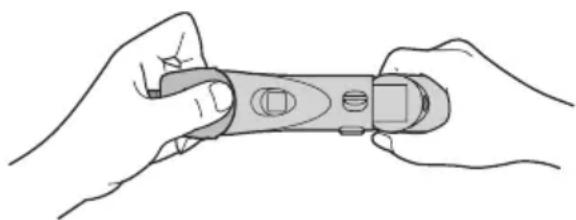
- It will be easier to remove the coupling lock cover if you press one side of the cover while removing it.
- Flashlight function
Always press the switch before using the flashlight.
Press the button to turn on the flashlight.
The flashlight operates at a very low current and does not have a harmful effect on the tool's performance during operation or on its battery capacity.
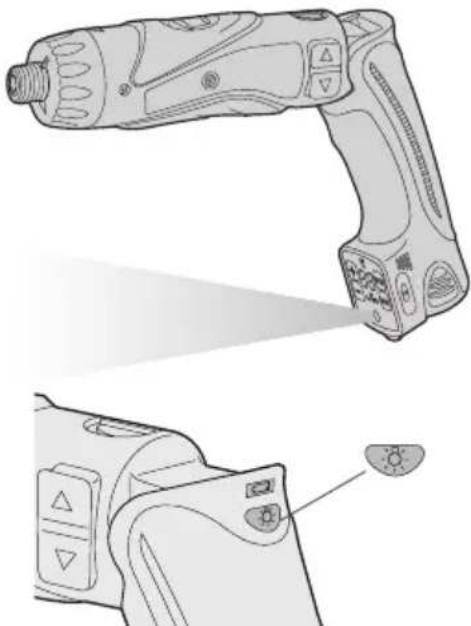
CAUTION:
The built-in flashlight is intended for temporary illumination of a small work area. Do not use it as a replacement for a constant light source, as it does not have sufficient brightness. If the tool is not used for 5 minutes, the flashlight will turn off.
CAUTION: Do not look into the beam.
Using the controls or adjusting the tool in a manner other than specified in this instruction may result in exposure to hazardous radiation.
- Chuck lock function
With the switch off and the chuck locked,
the tool can be used as a manual screwdriver up to 14.7 N·m (150 kgf·cm). There will be a slight play in the chuck, which is not a malfunction.
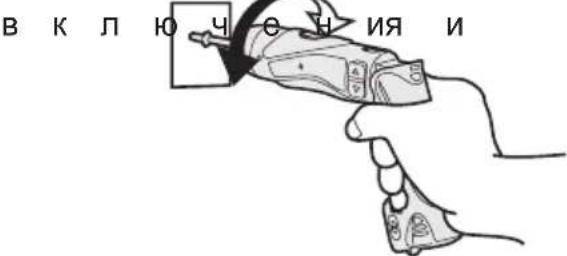
- If the battery pack is not in use, store it away from metallic objects such as paper clips, coins, nails, screws, or other small metal objects that could cause a short circuit between terminals.
Charging battery packs together can cause sparks, fire, or electric shock.
Before using the battery pack, make sure the work area is well ventilated.
Battery pack service life
Battery packs have a limited service life. If the operating time after charging becomes excessively short, replace the battery pack with a new one.
Battery disposal WARNING
To protect the environment and properly dispose of materials, make sure the battery is disposed of at an officially designated location, if such locations exist in your country.
[Charging device]
Charging
Additional safety precautions for the lithium-ion/nickel-cadmium battery pack NOTE
When charging a cold battery pack (with a temperature below 0°C (32°F)) in a cold place, leave the battery pack in that place and wait for more than one hour until the battery warms up to the ambient temperature. Otherwise, the battery pack may not charge fully. - Cool the charging device when charging more than two battery packs in succession. Do not insert your fingers into the contact holes while holding the charging device, or in other cases.
WARNING:
To prevent the risk of fire or damage to the charging device.
Do not use a generator as a power source. Do not block the ventilation openings on the charging device and battery pack. - Unplug the charging device from the wall outlet if it is not in use.
Lithium-ion battery pack
NOTE:
The battery pack is not fully charged at the time of purchase. Do not forget to charge it before first use.
Charging device (optional)
- Plug the charging device into a wall outlet of alternating current.
NOTE:
Connecting the wall plug to an AC power source may cause sparks, but this does not pose a safety problem.
2. Slide the cover of the battery compartment back to insert the lithium battery pack.
- Make sure the cover is securely fastened in place.
- Firmly insert the battery pack into the charging device.
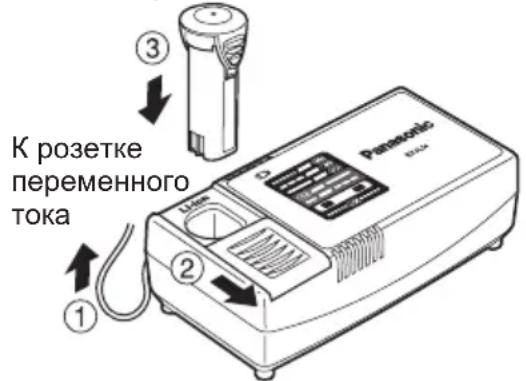
4. During charging, the charging lamp will light up.
After charging is complete, an internal electronic switch automatically activates to prevent overcharging.
Charging the battery pack while it is hot (for example, immediately after operation under heavy load).
The orange lamp of the charging mode will blink until the battery cools down.
Then charging will start automatically.
- The charging lamp (green) will blink slowly while the battery is charging to approximately 80%.
- After charging is complete, the charging lamp will blink rapidly with a green light.
- If the temperature of the battery pack is 0°C or lower, charging the battery pack will take longer than the usual charging time.
Prolonged exposure to high-intensity noise may cause hearing loss.
2) Remember that this tool is always in working condition because it does not need to be plugged into an electrical outlet.
3) When drilling or fastening screws into walls, floors, or other places, the tool may come into contact with wires that are under voltage. Also, be careful of any other hidden metal parts of the tool! If you are fastening screws or driving nails into a wire that is under voltage, to avoid electric shock, hold the tool only by the plastic handle.
4) If the accessory is jammed, turn off the tool immediately to avoid kickback, which could damage the battery pack or motor. If the accessory is stuck, use reverse rotation.
5) During charging, the charger may become slightly warm. This is normal. Do not leave the battery connected to the charger for more than 24 hours after charging is complete.
6) The service life (durability) of the tool is set by the manufacturer to be approximately 7 years from the date of manufacture, provided that the tool is used
in strict accordance with the operating instructions and technical standards applicable to this product.
The service life of battery packs is: 500 charge cycles (for nickel-cadmium battery pack only), 1200 charge cycles (for nickel-metal hydride battery pack only) from the date of manufacture under the same conditions.
Panasonic Electric Works Co., Osaka, Japan
Do not expose the battery block to fire or high temperatures. Do not insert the battery block into such devices as drills, do not drop it, do not disassemble it, and do not attempt to modify it. Do not allow metal objects to touch the battery block terminals. Do not carry or store batteries together with metal objects such as necklaces, hairpins, or other metal items.
Do not charge the battery block in places with high temperature, for example, near fire or in direct sunlight. The battery may overheat, ignite, or explode. Never use any charger other than the one specifically designed for your device. The battery may leak, overheat, or explode.
II. ASSEMBLY AND OPERATION
Torque adjustment (setting the torque of the clutch)
Set the required torque for operation to one of the 21 values. There is an interval between them of approximately 0.13 N·m (1.3 kgf·cm).
CAUTION:
Before starting work, check the setting.
Set the switch under the cap.
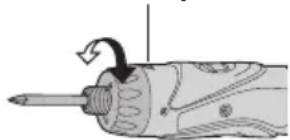
Recommended torque adjustment
Factory setting upon delivery
- Counting system: reverse counting. Set counting value: 99. Sound signal tone height: b1 (low tone)
- Time for full tightening, not counted in the number of strokes: 0 (OFF). Disable blocking: switch off the lamp, set settings according to operating conditions.
- "Sound signal setting" → indicator "F1" lights up. "Setting the time for full tightening, not counted" → indicator "F2" lights up.
2. Sound signal setting
The sound signal can be selected using the + and - buttons. The "F1" indicator lights up.
Depending on the time of day of the last shutdown, it is not taken into account
Press the F2 indicator button and select the time with the buttons
3. The settings are set by pressing the buttons
4. To save the changed values in connection with the work.
Set the switch for blocking the field in the ON position.
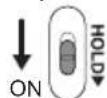
Changing the counter of turns during operation
- Turn off the blocking.
2. Adjust the counter values with the buttons
The displayed number of turns that are subject to tightening can be changed within the limits of the counter values of the turns.
3. To save the changes of the set values in connection with the work.
Set the switch for blocking the field in the ON position.
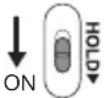
■Settings, if no actions are performed for 60 seconds or more, and when the battery is
- The operation of the set value becomes unclear. Was there a reset of the operation values.
■When replacing the battery
- When replacing the battery, the passed value is saved. Therefore, the device can be used continuously.
- The low battery charge indicator lamp is on.

The battery is discharged (the device is turned off).

The battery protection function is activated (the battery is not being charged).
Overdischarge (full) of lithium-ion batteries sharply reduces their service life. The device is equipped with a battery protection function designed to prevent overdischarge of the battery block.
- The battery protection function is activated automatically before the battery is fully discharged, which triggers the low battery charge indicator lamp.
- If the indicator lamp is on, charge the battery block immediately.
Battery compartment cover
The battery compartment cover allows you to lock the battery in the selected position.
Cover adjustment
- Select the appropriate battery settings depending on the application.
Using the light guide attachment
Read the safety instructions carefully before using the light guide attachment.
Press the button to turn on the light guide attachment.
The attachment heats up when used with a low air flow, which does not negatively affect
the productivity of the instrument during operation or the battery capacity.
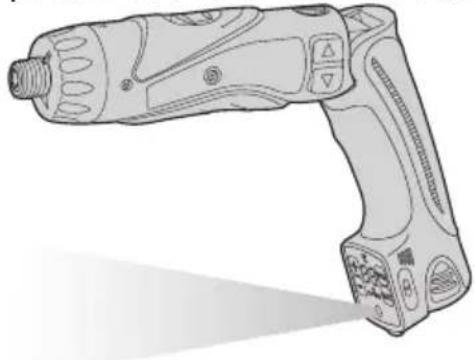
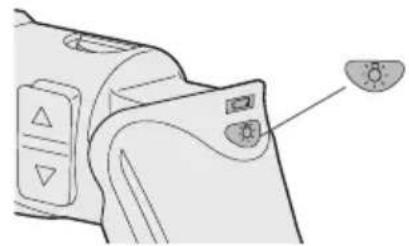
WARNING:
The lighting device is intended for illuminating small areas. Do not use it as a replacement for a stationary flashlight, as it does not have sufficient brightness. If the tool is not used for 5 minutes, the lighting device will turn off.
[Charging indicator] Charging
General safety precautions for the lithium-ion/nickel-cadmium battery pack
NOTE:
- When charging a cold battery pack (with a temperature below 0°C (32°F)), place the battery pack in a warm place and wait for about one hour until the battery pack reaches the temperature of the surrounding environment. Otherwise, the battery pack may not charge fully. - Cool down the charging device after consecutive charges of more than two battery packs. Do not insert your fingers into the contact openings while holding
the charging device, and in other cases.
WARNING:
Lithium-ion battery pack NOTE:
Your battery pack is not fully charged at the time of purchase. Do not forget to charge it before use.
Charging device (EY0L10)
- Plug the charging device into the AC outlet.
NOTE:
Connecting the plug to the AC outlet may cause sparks, but this does not create a safety problem.
- Remove the battery cover to insert the lithium-ion battery pack.
- The battery pack is fully charged and fixed in place.
- Insert the battery pack into the charger.
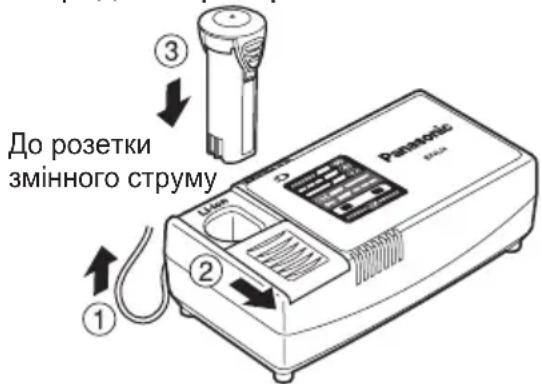
4. During charging, the charging indicator will light up.
After charging is complete, the internal electronics automatically
switch off, preventing overcharging.
Charging will not start if the battery pack is too hot (for example, immediately after heavy use). The orange indicator will blink until the battery cools down. Then charging will start automatically.
5. The charging indicator (green) will blink slowly until the battery is charged to approximately 80%. 6. After charging is complete, the charging indicator will blink rapidly with a green light. 7. If the temperature of the battery pack is 0°C or less, full charging will take longer than usual. Even after a full charge, the battery will have only about 50% of its capacity compared to a battery fully charged at normal operating temperature. 8. If the indicator does not light up immediately after plugging in the charger, or if after the standard charging time the indicator does not blink rapidly, contact an authorized service center. 9. If a fully charged battery pack is inserted again into the charger, the charging indicator will light up. After a few minutes, the charging indicator may start blinking rapidly, indicating that charging is complete.
Nickel-metal hydride battery pack
NOTE
On the first charge of the battery pack, or after prolonged storage, or if the battery has been used for more than 24 hours, it is necessary to charge the battery to full capacity.
Charger (EY0L10)
- Plug the charger into a household AC outlet.
NOTE:
When connecting the plug to the power source, sparks may occur, but this does not pose a safety problem.
- Open the battery cover to insert the nickel-metal hydride battery pack.
- The cover is fixed in place.
- Firmly insert the battery block into the charging device.
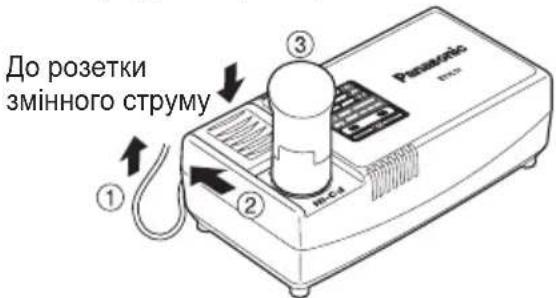
4. During charging, the charging indicator will light up.
After charging is complete, the internal electronic switch automatically turns off, preventing overcharging.
Charging will not start if the battery block is too hot (for example, immediately after heavy use).
The orange standby indicator will blink until the battery cools down. Then charging will start automatically.
5. After charging is complete, the charging indicator will blink green. 6. If the charging indicator does not light up immediately after plugging in the charger, or if the indicator does not go out after the standard charging time, contact an authorized service center. 7. If a fully charged battery block is inserted into the charger again, the charging indicator will light up. After a few minutes, the charging indicator may start blinking, indicating that charging is complete.
LED INDICATORS
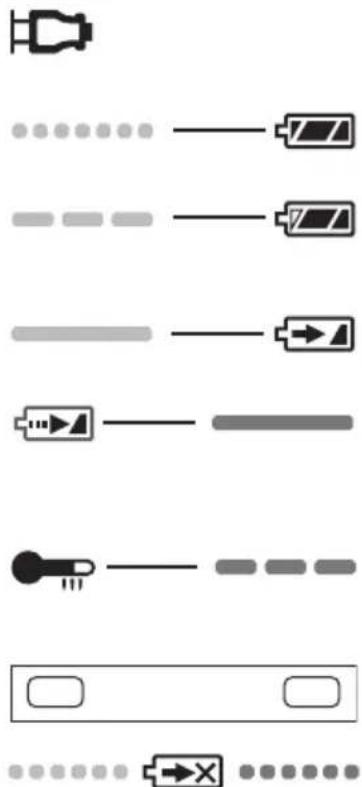
Green light blinking: the charger is connected to the wall outlet and AC power. Ready to charge.
Green light steady: charging is complete. (New battery)
Green light blinking: battery is charged to about 80%. (Fast charge mode. Continue charging)
Green light blinking: charging in progress.
The battery block will light up with an orange light. The battery block must be charged sufficiently to avoid overloading the battery. (See the battery block section)
The orange light on the battery block will flash. Charging will begin when the battery block temperature rises.
The charging status lamp: green - right, orange - left, will light up.
If the orange and green lights flash alternately, charging is not possible. The battery block is worn out or defective.
If the battery block temperature is -10°C or lower, the charging lamp (orange) will also flash. Charging will begin when the battery block temperature rises. (See the battery block section)
Information about disposal in countries that are not members of the European Union
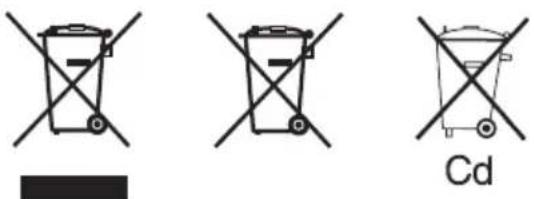
This symbol is only valid in the territory of the European Union.
V. TECHNICAL SPECIFICATIONS
MAIN UNIT
| Модень | EY7411 | ||
| ЕмнICTь | Загвинчыдан шурупib | ГВИNT ДЛЯ КРINЛECHУ | M2,5 - M5 |
| Шуруп ДЛЯ DEPEBA | Ø 3,8 × 38 MM (5/32" × 1-29/64") | ||
| СBERДПИНТЯ | ДЛЯ MEТАЛY | Ø 5 MM (13/64") spc t = 1,6 MM | |
| Мотор 3,6 | В постійHorо CTPyMuY | ||
| Швдікість бeз habаHTажЕння | HN3bКИ: 200 xB-1 (o6/xB) | ||
| ВИСОКИ: 600 xB-1 (o6/xB) | |||
| Мakсимальни кртулbingий МOMeHT | HN3bKИ: 4,4 H-M (45 Krc-cM, 39 ДюМ-ФуHT) ВИСОКИ: 1,5 H-M (15 Krc-cM, 13 ДюМ-ФуHT) | ||
| Мakсимальни кртулbingий МOMeHT MyΦТи | 3,0 H-M (30 Krc-cM, 26 ДюМ-ФуHT) | ||
| Загалha довхина | 283 MM (11-5/32') | ||
| Bara (3батарейнам блokом0,5 | Кт (1,1 ФуHTa) | ||
BATTERY BLOCK
EY971074112 H2009 Printed in Japan


- ADDITIONAL SAFETY RULES
- WARNING
- ASSEMBLY & OPERATION
- HEXAGONAL BIT CHUCK
- ATTACHING THE BITS
- CLUTCH HANDLE (CLUTCH TORQUE SETTING)
- CAUTION
- NOTE
- CONTROL PANEL
- SCREW COUNT FUNCTION
- STARTING THE CONTROL PANEL
- SETTING THE COUNT FUNCTIONS (SCREW COUNT SETTING/COUNT SYSTEM SETTING)
- CONVENIENT FUNCTION SETTINGS (BUZZER SOUND SETTING/DOUBLE TIGHTENING COUNTING PREVENTION TIME SETTING)
- TO CHANGE THE SCREW COUNT WHILE IN USE
- BATTERY LOW WARNING LAMP
- CLUTCH LOCK COVER
- ATTACHING THE COVER
- REMOVING THE COVER
- USING THE LED LIGHT
- CAUTION: DO NOT STARE INTO BEAM
- BIT-LOCKING FUNCTION
- MAIN SWITCH (ON/OFF)
- SPEED SELECTOR SWITCH
- MAIN SWITCH LOCK
- BATTERY PACK (EY9L10)
- [BATTERY PACK]
- FOR APPROPRIATE USE OF BATTERY PACK
- LI-ION BATTERY PACK (EY9L10)
- BATTERY PACK LIFE
- BATTERY RECYCLING
- ATTENTION
- [BATTERY CHARGER]
- CHARGING
- COMMON CAUTIONS FOR THE LI-ION/NI-CD BATTERY PACK
- LI-ION BATTERY PACK
- BATTERY CHARGER (EY0L10)
- NI-CD BATTERY PACK
- LAMP INDICATIONS
- INFORMATION FOR USERS ON COLLECTION AND DISPOSAL OF OLD EQUIPMENT AND USED BATTERIES
- FOR BUSINESS USERS IN THE EUROPEAN UNION
- [INFORMATION ON DISPOSAL IN OTHER COUNTRIES OUTSIDE THE EUROPEAN UNION]
- NOTE FOR THE BATTERY SYMBOL (BOTTOM TWO SYMBOL EXAMPLES)
- MAINTENANCE
- ACCESSORIES
- SPECIFICATIONS
- MAIN UNIT
- BATTERY PACK
- BATTERY CHARGER
- ONLY FOR U.K
- ELECTRICAL PLUG INFORMATION
- FOR YOUR SAFETY PLEASE READ THE FOLLOWING TEXT CAREFULLY
- IMPORTANT
- PACCO BATTERY LI-ION
- CLUTCH ADJUSTMENT (SETTING THE TIGHTENING TORQUE OF THE CLUTCH)
- RECOMMENDATIONS FOR ADJUSTING THE TIGHTENING TORQUE
- ON THE DISPLAY LINE (SCREW COUNT SETTING / SYSTEM COUNT SETTING), THE NUMBER IS DISPLAYED
- SETTING COMMON FUNCTIONS (SETTING OF AUDIBLE SIGNAL / SETTING OF TIME FOR PREVENTING COUNTING ON DOUBLE TIGHTENING)
- COUPLING LOCK COVER
- FLASHLIGHT FUNCTION
- CAUTION: DO NOT LOOK INTO THE BEAM
- CHUCK LOCK FUNCTION
- BATTERY PACK SERVICE LIFE
- BATTERY DISPOSAL WARNING
- [CHARGING DEVICE]
- ADDITIONAL SAFETY PRECAUTIONS FOR THE LITHIUM-ION/NICKEL-CADMIUM BATTERY PACK NOTE
- LITHIUM-ION BATTERY PACK
- CHARGING DEVICE (OPTIONAL)
- ASSEMBLY AND OPERATION
- TORQUE ADJUSTMENT (SETTING THE TORQUE OF THE CLUTCH)
- SOUND SIGNAL SETTING
- CHANGING THE COUNTER OF TURNS DURING OPERATION
- THE LOW BATTERY CHARGE INDICATOR LAMP IS ON
- BATTERY COMPARTMENT COVER
- COVER ADJUSTMENT
- USING THE LIGHT GUIDE ATTACHMENT
- [CHARGING INDICATOR] CHARGING
- GENERAL SAFETY PRECAUTIONS FOR THE LITHIUM-ION/NICKEL-CADMIUM BATTERY PACK
- LITHIUM-ION BATTERY PACK NOTE
- CHARGING DEVICE (EY0L10)
- NICKEL-METAL HYDRIDE BATTERY PACK
- CHARGER (EY0L10)
- LED INDICATORS
- INFORMATION ABOUT DISPOSAL IN COUNTRIES THAT ARE NOT MEMBERS OF THE EUROPEAN UNION
- TECHNICAL SPECIFICATIONS
- BATTERY BLOCK
Brand : PANASONIC
Model : EY7411
Category : Drill