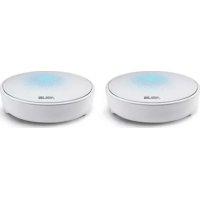
Lyra MAPAC2200 - Wireless Router ASUS - Free user manual and instructions
Find the device manual for free Lyra MAPAC2200 ASUS in PDF.



| Product type | Wireless router |
| Brand | ASUS |
| Model | Lyra MAPAC2200 |
| Dimensions (approx.) | 120 x 120 x 40 mm |
| Weight (approx.) | 200 g |
| Power supply | AC adapter (built-in) |
| Frequency bands | 2.4 GHz and 5 GHz |
| Wi-Fi standards | 802.11a/b/g/n/ac |
| Maximum speed | AC2200 (up to 2200 Mbps) |
| Configuration | Via ASUS Lyra app or web interface |
| Bluetooth | BLE 4.0+ for simplified setup |
| Pairing button | Yes, to add additional nodes |
| LED indicators | Light blue (everything is fine), red (node connection lost), yellow (internet connection lost), solid white (ready for setup) |
| Care and cleaning | Clean with a dry cloth; do not use liquid products |
| Operating temperature | 0 °C to 40 °C |
| Minimum distance for RF exposure | 20 cm (CE/ISED compliance) |
| Max transmitted power (2.4 GHz) | 19.98 dBm |
| Max transmitted power (5 GHz) | 22.99 dBm (5180-5320 MHz), 29.98 dBm (5500-5700 MHz) |
| Certifications | CE, ISED, CAN ICES-3(B)/NMB-3(B) |
| Package contents | Lyra Trio device, AC adapter, network cable, quick start guide |
Frequently Asked Questions - Lyra MAPAC2200 ASUS
User questions about Lyra MAPAC2200 ASUS
0 question about this device. Answer the ones you know or ask your own.
Ask a new question about this device
Download the instructions for your Wireless Router in PDF format for free! Find your manual Lyra MAPAC2200 - ASUS and take your electronic device back in hand. On this page are published all the documents necessary for the use of your device. Lyra MAPAC2200 by ASUS.
USER MANUAL Lyra MAPAC2200 ASUS
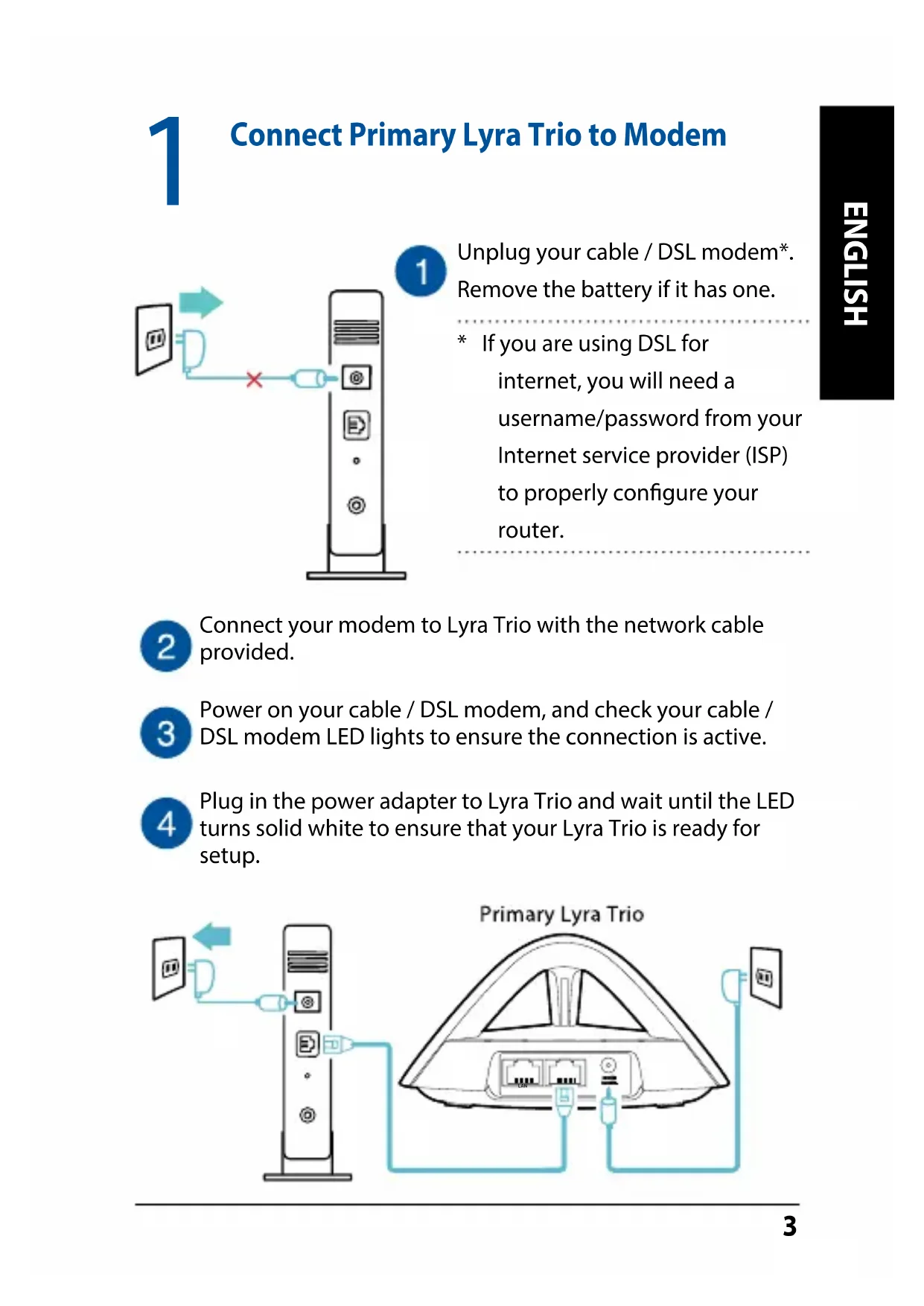
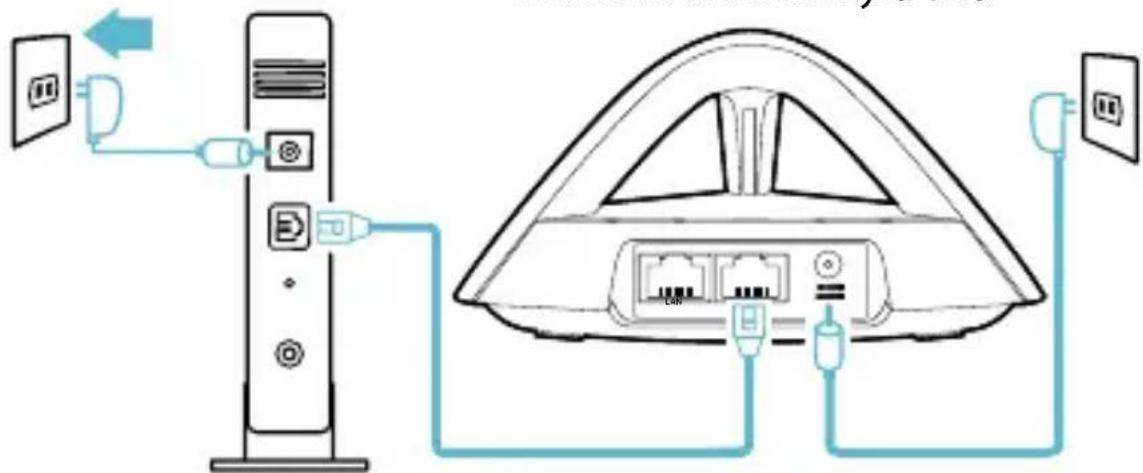
1 Connect Primary Lyra Trio to Modem
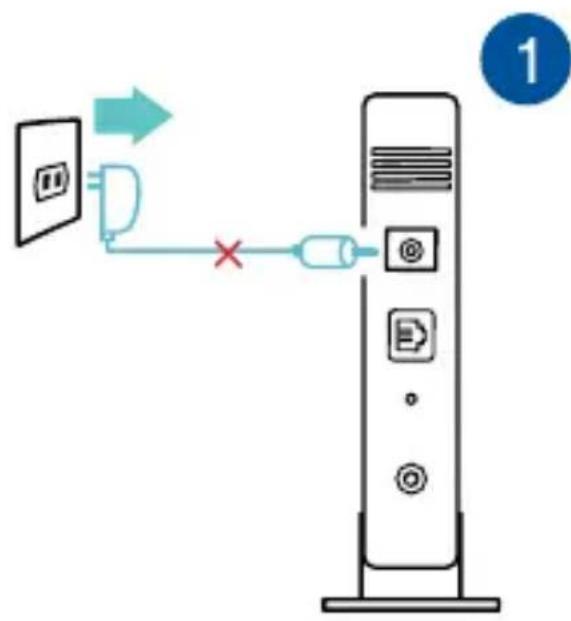
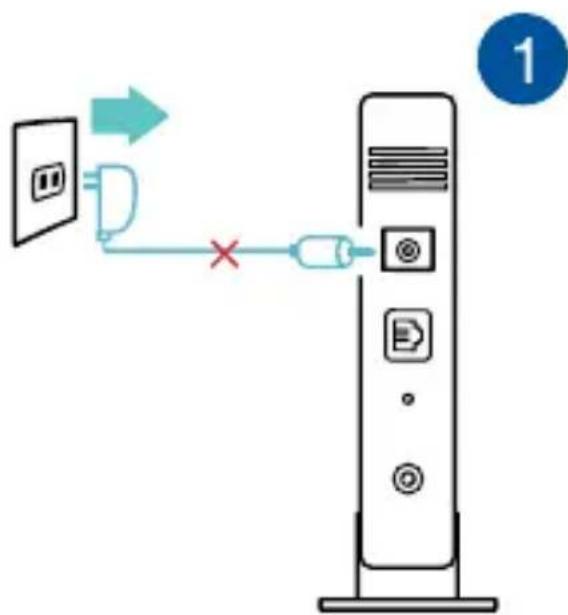
Unplug your cable / DSL modem*. Remove the battery if it has one.
- If you are using DSL for internet, you will need a username/password from your Internet service provider (ISP) to properly configure your router.
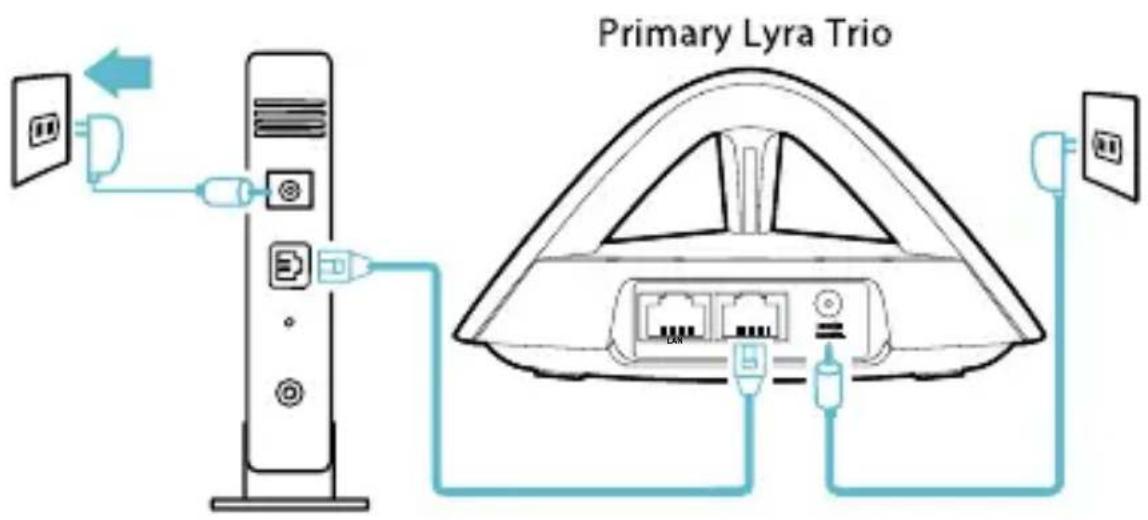
Connect your modem to Lyra Trio with the network cable provided.
3 Power on your cable / DSL modem, and check your cable / DSL modem LED lights to ensure the connection is active.
Plug in the power adapter to Lyra Trio and wait until the LED turns solid white to ensure that your Lyra Trio is ready for setup.

2
Setup your Lyra Trio WiFi system
METHOD 1 Through the App
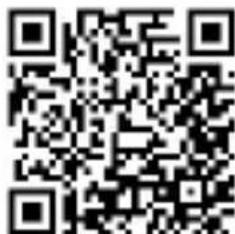
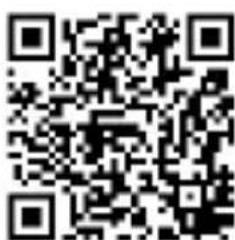
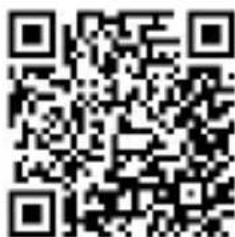
Download the free ASUS Lyra app.
2
Launch the ASUS Lyra app on your mobile device, and follow the instructions in just a few moments.
- Make sure your device supports BLE, Bluetooth 4.0 or above.

METHOD 2 Through the Web GUI
1
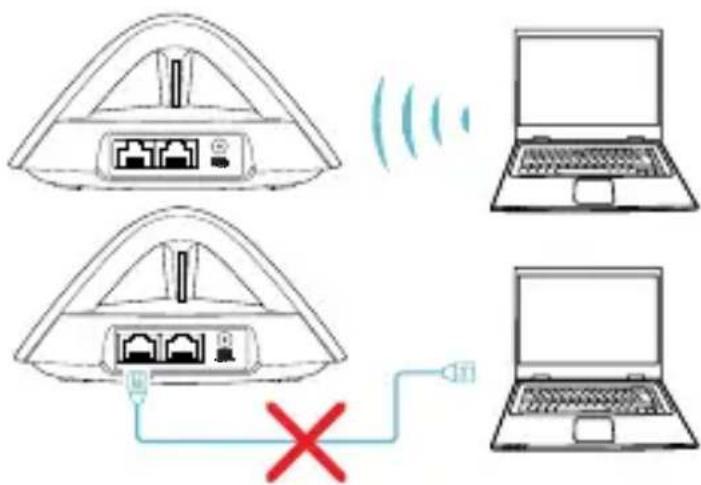
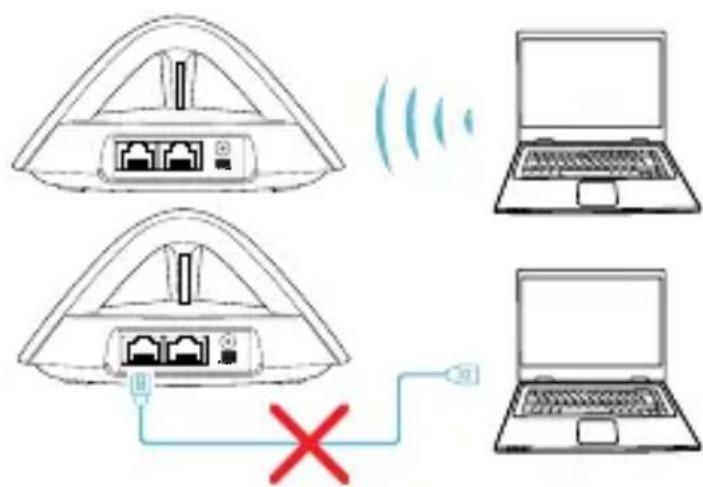
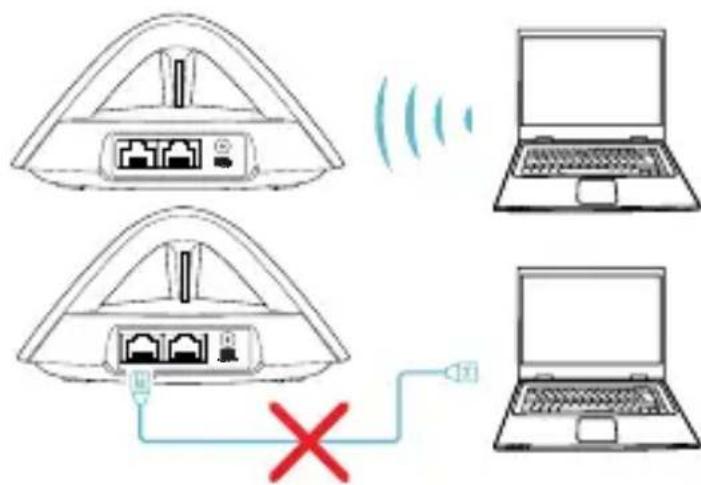
Connect PC/NB to your Lyra Trio via WiFi "ASUS_XX_AMAPS". Open a web browser. You will be redirected to the ASUS Setup Wizard. If not, navigate to http://router.asus.com.
Primary Lyra Trio
3
Adding other Lyra Trio to current network
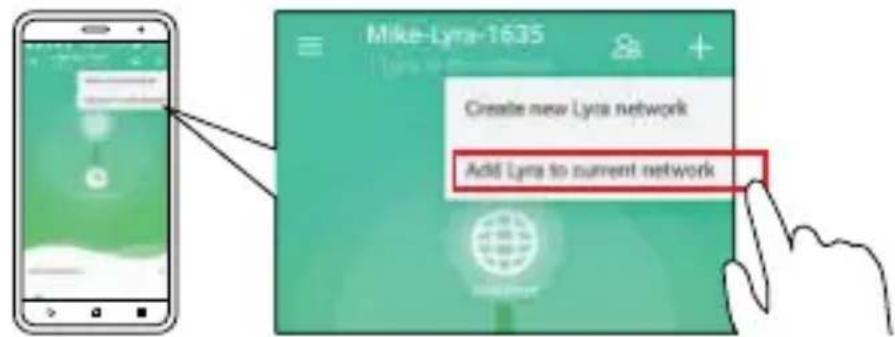
METHOD 1 Through the App
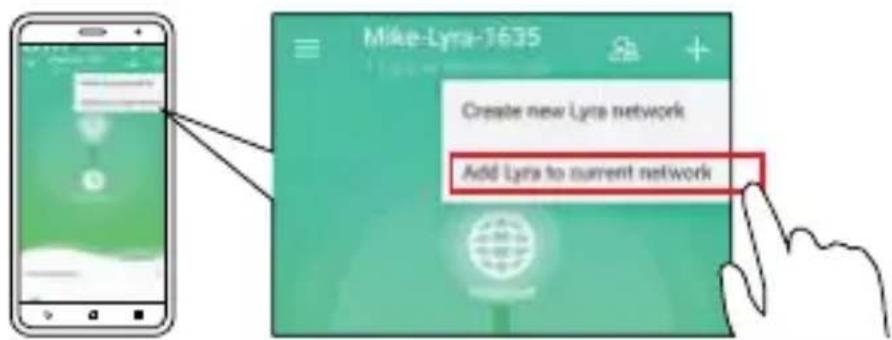
Launch Lyra app and click the "+" icon on the upper right corner, then choose Add Lyra to current network and follow the instructions to complete.
METHOD 2 Through the Pair Button
Press the Pair button on the Primary Lyra Trio until the LED starts to blink blue light.
Press the Pair button on the second Lyra Trio until the LED starts to blink blue, then turns solid light cyan, indicating the pairing process is completed.
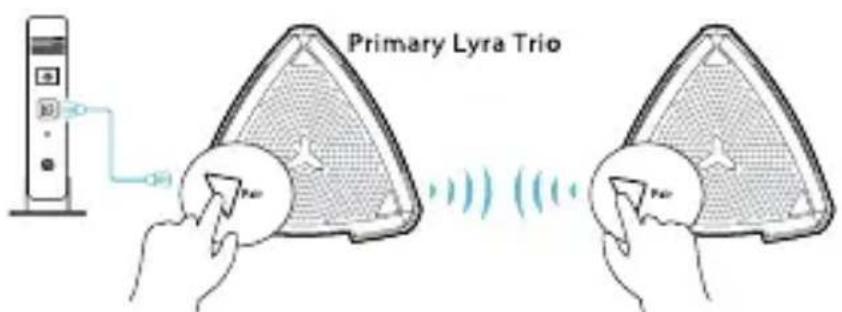
- Pairing feature only works with the Primary Lyra Trio device connecting to modem.
- While setting up through Web GUI, ensure that you pair other Lyra Trio hub(s) with the Primary Lyra Trio using the Pair button.
Colors of Lyra Trio




Light Cyan
Everything is good!
Red
Lost connection to the primary Lyra Trio. Move it closer.
Yellow
Lost connection to the Internet. Please check the cable connected with your modem.
Solid White
Lyra Trio is ready for setup. It will start blinking when setting up with the app.
Safety Notices
- Use this product in environments with ambient temperatures between 0^ C ( 32^ F ) and 40^ C ( 104^ F ).
- Refer to the rating label on the bottom of your product and ensure your power adapter complies with this rating.
- DO NOT place on uneven or unstable work surfaces. Seek servicing if the casing has been damaged.
- DO NOT place or drop objects on top and do not shove any foreign objects into the product.
- DO NOT expose to or use near liquids, rain, or moisture. DO NOT use the modem during electrical storms.
- DO NOT cover the vents on the product to prevent the system from getting overheated.
- DO NOT use damaged power cords, accessories, or other peripherals.
- If the Adapter is broken, do not try to fix it by yourself. Contact a qualified service technician or your retailer.
- To prevent electrical shock hazard, disconnect the power cable from the electrical outlet before relocating the system.
1
Cbbp3BaHe Ha ochOBHa cnCTema Lyra Trio KbM MoDem
1
Изключete сбогакбeн / DSL moDEM*.Отстаребateрята,aco Има тakaba.
* Ako n3noJ3BaTe DSL 3a INTepHeT, Tp6Ba Da Imate NOTpe6nteNcKO nme/ napola ot Baunn INTepHET IOCTaBvNK (ISP) 3a npabuHNO KOHfIgypipaHe Ha pyTepa.
2
Cbpxte Baunm Moem KbM Lyra Trio kaTO n3noJ3BaTe npedocTabeHn MpeKOB ka6en.
3
Cbpxte Baunna Kaeneh/DSL moen npoBepTe LED nHnKaTopne My, 3a da cTe cnrgn, ye Bpb3kata e aKtNBHa.
4
BkIoueTe 3axpaHbAunia aadantep KbM Lyra Trio n 3uakaIte LED uHdkaTopnTe da 3anOuHaT da cBeTAT 6aNo HepeKbChato, 3a da cTe cnrypHn, ye Baata cncTeMa Lyra Trio e roTOBa 3a hAcToPka.
OCHOBHa cnCTema Lyra Trio
2
Инстампаны Ваша тсstema Lyra Trio WiFi
METOД 1Чрз пиложене
1 N3terlnte 6e3nlaTHoTo npuIooKeHne ASUS Lyra.
2 yCTPOIcTBO IN CJIeBaITe INHCTpyKcUNTe, KOeTO HMa da OTHEMe MHOrO BpeMe.
C

Available on the App Store
METOД2 Ппeз ye6 GUI
1
Available on the App Store
Available on the App Store

Available on the App Store
2 METODAS Naudojantis internetiniu GUI
1
Prijunkite kompiuterj / nešiojamaji kompiuterj prie savo „Lyra Trio" jrenginio per „Wi-Fi" "ASUS XX AMAPS". Paleiskite interneto naršykle. Būsite nukreipti j sąrankos vedlj „ASUS Setup Wizard". Jeigu ne, naudokite http://router.asus.com.
Pagrindinis, Lyra Trio" jrenginys
3
Available on the App Store
2. METODE Timekja GUI izmantošana
1
Savienojiet datoru/piezimjdatoru ar icerici Lyra Trio, izmantojot WiFi "ASUS XX AMAPS". Atveriet timekla pārlūku. Tiek atverts ASUS iestatīsanas vednis. Ja tas neatveras, navigējiet uz http://router.asus.com.
Primārā icerice Lyra Trio

3
Citas Lyra Trio icerces pievienošana esosajam tiklam
Available on the App Store
METOД2 Yepe3 Be6-нтepфс
1 XX_AMAPS".ОТкpoиTe 6pay3ep.Бы 6удeTe перehanpaBileHbIMacTepe NaCTpoiKn.Ecni HeT,пepeДITEHa http://router.asus.com.
Primary Lyra Trio

3
- IapekoHaTeCra, 1o npictri i nipTrpmye BLE, Bluetooth 4.0 a6o Bnue.

CnOCi5 2 Yepe3 rpaΦiUHm Be6-iHTepΦeɪc
1
Пидключын ПК/ноутбук до Lyra Trio чераз WiFi "ASUS_XX_AMAPS". BiДкрип Te Be6-6payзер. Bac 6удe перанравен do nporpamn-nomiЧиka habaштувань ASUS.Якso hi, to nepeйдITdo http://router.asus.com
PepBHHn npncptpi Lyra Trio
3
Як дожати=inиnpст pi Lyra Trio do notochoi mepexi
CPIOCB1 Yepe3 nporpaMy
1
3anycitb nporpamy Lyra i klauniht b niktorpamy "+" y npabomy Bepxhbomy KyTKy, Bn6epiTb Add Lyra to current network (odamu Lyra do nomouhoi mepeksi) i BnKoHyTe ihctpykui dIra 3aBepweHna.
Federal Communications Commission Statement
This device complies with Part 15 of the FCC Rules. Operation is subject to the following two conditions:
- This device may not cause harmful interference.
- This device must accept any interference received, including interference that may cause undesired operation.
This equipment has been tested and found to comply with the limits for a class B dig ital device, pursuant to part 15 of the FCC Rules. These limits are designed to provide reasonable protection against harmful interference in a residential installation. This equipment generates, uses and can radiate radio frequency energy and, if not installed and used in accordance with the instructions, may cause harmful interference to radio communications. However, there is no guarantee that interference will not occur in a particular installation. If this equipment does cause harmful interference to radio or television reception, which can be determined by turning the equipment off and on, the user is encouraged to try to correct the interference by one or more of the following measures:
- Reorient or relocate the receiving antenna.
- Increase the separation between the equipment and receiver.
- Connect the equipment into an outlet on a circuit different from that to which the receiver is connected.
- Consult the dealer or an experienced radio/TV technician for help.
WARNING!
Any changes or modifications not expressly approved by the party responsible for compliance could void the user's authority to operate the equipment.
Prohibition of Co-location
This device and its antenna(s) must not be co-located or operating in conjunction with any other antenna or transmitter.
This equipment must be installed and operated in accordance with provided instructions and the antenna(s) used for this transmitter must be installed to provide a separation distance of at least 20 cm from all persons and must not be co-located or operating in conjunction with any other antenna or transmitter.
IMPORTANT NOTE:
Radiation Exposure Statement: This equipment complies with FCC radiation exposure limits set forth for an uncontrolled environment. End users must follow the specific operating instructions for satisfying RF exposure compliance. To maintain compliance with FCC exposure compliance requirement, please follow operation instruction as documented in this manual.
This device within the 5.15 5.25GHz is restricted to indoor operations to reduce any potential for harmful interference to co-channel MSS operations.
Compliance Statement of Innovation, Science and Economic Development Canada (ISED)
This device complies with Innovation, Science and Economic Development Canada licence exempt RSS standard(s). Operation is subject to the following two conditions: (1) this device may not cause interference, and (2) this device must accept any interference, including interference that may cause undesired operation of the device.
Operation in the band 5150-5250 MHz is only for indoor use to reduce the potential for harmful interference to co-channel mobile satellite systems.
CANICES-3(B)/NMB-3(B)
Radio Frequency (RF) Exposure Information
The radiated output power of the ASUS Wireless Device is below the Industry Canada (IC) radio frequency exposure limits. The ASUS Wireless Device should be used in such a manner such that the potential for human contact during normal operation is minimized.
This equipment should be installed and operated with a minimum distance of 21 cm between the radiator and any part of your body.
This device has been certified for use in Canada. Status of the listing in the Industry Canada's REL (Radio Equipment List) can be found at the following web address: http://www.ic.gc.ca/app/sitt/reltel/srcch/nwRdSrcch.do?lang=eng
Additional Canadian information on RF exposure also can be found at the following web: http://www.ic.gc.ca/eic/site/smt-gst.nsf/eng/ sf08792.html
RF Exposure information
This device meets the EU requirements (2014/53/EU) on the limitation of exposure of the general public to electromagnetic fields by way of health protection.
REACH
Complying with the REACH (Registration, Evaluation, Authorisation, and Restriction of Chemicals) regulatory framework, we published the chemical substances in our products at ASUS REACH website at http://csr.asus.com/english/reach.aspx
NOTES:
- Use only the adapter that came with your package. Using other adapters may damage the device.
- Specifications:
| DC Power adapter DC Output: +12V with max 1.5A current | ||
| Operating Temperature 0~40 °C Storage 0~70 | °C | |
| Operating Humidity 50~90% Storage 20~90% | ||
Canada, Industry Canada (IC) Notices
This Class B digital apparatus complies with Canadian ICES-003 and RSS-247.
Operation is subject to the following two conditions: (1) this device may not cause interference, and (2) this device must accept any interference, including interference that may cause undesired operation of the device.
The radiated output power of the ASUS Wireless Device is below the Industry Canada (IC) radio frequency exposure limits. The ASUS Wireless Device should be used in such a manner such that the potential for human contact during normal operation is minimized.
This device has been evaluated for and shown compliant with the IC Specific Absorption Rate ("SAR") limits when installed in specific host products operated in portable exposure conditions.
ASUS Contact information
ASUSTeK COMPUTER INC. (Asia Pacific)
Address 15 Li-Te Road, Peitou, Taipei, Taiwan 11259
Online support support.asus.com
ASUS COMPUTER INTERNATIONAL (America)
Address 800 Corporate Way, Fremont, CA 94539, USA
Telephone +15107393777
Fax +15106084555
Website usa.asus.com
Online support support.asus.com
ASUS COMPUTER GmbH (Germany and Austria)
Address Harkort Str. 21-23, D-40880 Ratingen, Germany
Support Fax +49-2102-959931
Website asus.com/de
Online contact eu-rma.asus.com/sales
Technical Support
Telephone (Component) +49-2102-5789555
Telephone Germany
(System/Notebook/Eee/LCD) +49-2102-5789557
Telephone Austria
(System/Notebook/Eee/LCD) +43-820-240513
Support Fax +49-2102-959911
Online support support.asus.com
| Manufacturer: ASUSTeK Computer Inc. | ||
| Tel: +886-2-2894-3447 | ||
| Address: 4F, No. 150, LI-TE RD., PEITOU, TAIPEI 112, TAIWAN | ||
| Authorised representative in Europe: | ASUS Computer GmbH | |
| Address: HARKORT STR. 21-23, 40880 RATINGEN, GERMANY | ||
Networks Global Hotline Information
| Region Country Hotline Number Service Hours | |
| Europe | Cyprus 800-92491 09:00-13:00; 14:00-18:00 Mon-Fri |
| France 0033-170949400 09:00-18:00 Mon-Fri | |
| Germany 0049-1805010920 0049-1805010923 component support) 09:00-18:00 Mon-Fri | |
| Greece 00800-44142044 0049-2102959911 (Fax) 10:00-17:00 Mon-Fri | |
| Hungary 0036-15054561 09:00-17:30 Mon-Fri | |
| Italy 199-400089 09:00-13:00; 14:00-18:00 Mon-Fri | |
| Greece 00800-44142044 09:00-13:00; 14:00-18:00 Mon-Fri | |
| Austria 0043-820240513 09:00-18:00 Mon-Fri | |
| Netherlands/ Luxembourg 0031-591570290 09:00-17:00 Mon-Fri | |
| Belgium 0032-78150231 09:00-17:00 Mon-Fri | |
| Norway 0047-2316-2682 09:00-18:00 Mon-Fri | |
| Sweden 0046-858769407 09:00-18:00 Mon-Fri | |
| Finland 00358-969379690 10:00-19:00 Mon-Fri | |
| Denmark 0045-38322943 09:00-18:00 Mon-Fri | |
| Poland 0048-225718040 08:30-17:30 Mon-Fri | |
| Spain 0034-902889688 09:00-18:00 Mon-Fri | |
| Portugal 00351-707500310 09:00-18:00 Mon-Fri | |
| Slovak Republic 00421-232162621 08:00-17:00 Mon-Fri | |
| Czech Republic 00420-596766888 08:00-17:00 Mon-Fri | |
| Switzerland-German 0041-848111010 09:00-18:00 Mon-Fri | |
| Switzerland-French 0041-848111014 09:00-18:00 Mon-Fri | |
| Switzerland-Italian 0041-848111012 09:00-18:00 Mon-Fri | |
| United Kingdom 0044-1442265548 09:00-17:00 Mon-Fri | |
| Ireland 0035-31890719918 09:00-17:00 Mon-Fri | |
| Russia and CIS 008-800-100-ASUS 09:00-18:00 Mon-Fri | |
| Ukraine 0038-0445457727 09:00-18:00 Mon-Fri | |
Networks Global Hotline Information
| Region Country Hotline Numbers Service Hours | ||
| Asia-Pacific | Australia 1300-278788 09:00-18:00 Mon-Fri | |
| New Zealand 0800-278788 09:00-18:00 Mon-Fri | ||
| Japan 0800-1232787 | 09:00-18:00 Mon-Fri | |
| 09:00-17:00 Sat-Sun | ||
| 0081-570783886 | 09:00-18:00 Mon-Fri | |
| ( Non-Toll Free ) | 09:00-17:00 Sat-Sun | |
| Korea 0082-215666868 09:30-17:00 Mon-Fri | ||
| Thailand 0066-24011717 09:00-18:00 Mon-Fri | ||
| 1800-8525201 | ||
| Singapore 0065-64157917 11:00-19:00 Mon-Fri | ||
| 0065-67203835 11:00-19:00 Mon-Fri | ||
| ( Repair Status Only ) 11:00-13:00 Sat | ||
| Malaysia 1300-88-3495 9:00-18:00 Mon-Fri | ||
| Philippine 1800-18550163 09:00-18:00 Mon-Fri | ||
| India | 09:00-18:00 Mon-Sat | |
| India(WL/NW) | 1800-2090365 | |
| Indonesia | 0062-2129495000 09:30-17:00 Mon-Fri | |
| 500128 (Local Only) 9:30 – 12:00 Sat | ||
| Vietnam | 1900-555581 | |
| Hong Kong | 00852-35824770 10:00-19:00 Mon-Sat | |
| Americas | USA | 8:30-12:00 EST Mon-Fri |
| Canada | 9:00-18:00 EST Sat-Sun | |
| Mexico | 001-8008367847 | |
| Mon-Fri | ||
Networks Global Hotline Information
| Middle East + Africa | Egypt | 800-2787349 | 09:00-18:00 Sun-Thu |
| Saudi Arabia | 800-1212787 | 09:00-18:00 Sat-Wed | |
| UAE | 00971-42958941 | 09:00-18:00 Sun-Thu | |
| Turkey | 0090-2165243000 | 09:00-18:00 Mon-Fri | |
| South Africa | 0861-278772 | 08:00-17:00 Mon-Fri | |
| Israel | *6557/00972-39142800 | 08:00-17:00 Sun-Thu | |
| *9770/00972-35598555 | 08:30-17:30 Sun-Thu | ||
| Balkan Countries | Romania | 0040-213301786 | 09:00-18:30 Mon-Fri |
| Bosnia Herzegovina | 00387-33773163 | 09:00-17:00 Mon-Fri | |
| Bulgaria | 00359-70014411 | 09:30-18:30 Mon-Fri | |
| 00359-29889170 | 09:30-18:00 Mon-Fri | ||
| Croatia 00385-16401111 | 09:00-17:00 Mon-Fri | ||
| Montenegro | 00382-20608251 | 09:00-17:00 Mon-Fri | |
| Serbia | 00381-112070677 | 09:00-17:00 Mon-Fri | |
| Slovenia 00368-59045400 | 08:00-16:00 Mon-Fri | ||
| 00368-59045401 | |||
| Baltic Countries | Estonia 00372-6671796 | 09:00-18:00 Mon-Fri | |
| Latvia 00371-67408838 | 09:00-18:00 Mon-Fri | ||
| Lithuania-Kaunas | 00370-37329000 | 09:00-18:00 Mon-Fri | |
| Lithuania-Vilnius | 00370-522101160 | 09:00-18:00 Mon-Fri | |
NOTES:
For more information, visit the ASUS support site at: https://www.asus.com/support
UK support email: network_support@asus.com
CE statement
Simplified EU Declaration of Conformity
ASUSTek Computer Inc. hereby declares that this device is in compliance with the essential requirements and other relevant provisions of Directive 2014/53/EU. Full text of EU declaration of conformity is available at https://www.asus.com/support/
Declaration of Conformity for Ecodesign directive 2009/125/EC
Testing for eco-design requirements according to (EC) No 1275/2008 and (EU) No 801/2013 has been conducted. When the device is in Networked Standby Mode, its I/O and network interface are in sleep mode and may not work properly. To wake up the device, press the Wi-Fi on/off, LED on/off, reset, or WPS button.
This equipment complies with EU radiation exposure limits set forth for an uncontrolled environment. This equipment should be installed and operated with minimum distance 20 cm between the radiator & your body.
All operational modes:
2.4GHz: 802.11b, 802.11g, 802.11n (HT20), 802.11n (HT40),
5GHz: 802.11a, 802.11n (HT20), 802.11n (HT40), 802.11ac (VHT20), 802.11ac (VHT40), 802.11ac (VHT80)
The frequency, mode and the maximum transmitted power in EU are listed below:
2412-2472MHz: 19.98dBm; 5180-5240MHz: 22.76 dBm
5260-5320MHz: 22.99dBm; 5500-5700MHz: 29.98dBm
2402-2480MHz (BR/EDR): 5.82 dBm; 2402-2480MHz (LE): 5.59 dBm

AT BE BG CZ DK EE FR
DEIS IIEITELESCY
LV LI LT LU HU
NO PL PT RO SI SK TR
FI SE CH UK HR
MTNL
French
The frequency, mode and the maximum transmitted power in EU are listed below:
2412-2472MHz: 19.98dBm
5180-5240MHz: 22.76 dBm
5260-5320MHz: 22.99dBm
5500-5700MHz: 29.98dBm
2402-2480MHz (BR/EDR): 5.82 dBm
2402-2480MHz (LE): 5.59 dBm
- Connect Primary Lyra Trio to Modem
- 2
- Setup your Lyra Trio WiFi system
- METHOD 1 Through the App
- METHOD 2 Through the Web GUI
- 3
- Adding other Lyra Trio to current network
- METHOD 2 Through the Pair Button
- Colors of Lyra Trio
- Light Cyan
- Red
- Yellow
- Solid White
- Safety Notices
- 1
- Cbbp3BaHe Ha ochOBHa cnCTema Lyra Trio KbM MoDem
- 4
- Инстампаны Ваша тсstema Lyra Trio WiFi
- METOД 1Чрз пиложене
- METOД2 Ппeз ye6 GUI
- METODAS Naudojantis internetiniu GUI
- METODE Timekja GUI izmantošana
- Citas Lyra Trio icerces pievienošana esosajam tiklam
- METOД2 Yepe3 Be6-нтepфс
- CnOCi5 2 Yepe3 rpaΦiUHm Be6-iHTepΦeɪc
- Як дожати=inиnpст pi Lyra Trio do notochoi mepexi
- CPIOCB1 Yepe3 nporpaMy
- Federal Communications Commission Statement
- WARNING!
- Prohibition of Co-location
- IMPORTANT NOTE:
- Compliance Statement of Innovation, Science and Economic Development Canada (ISED)
- Radio Frequency (RF) Exposure Information
- RF Exposure information
- REACH
- NOTES:
- Canada, Industry Canada (IC) Notices
- ASUS Contact information
- ASUSTeK COMPUTER INC. (Asia Pacific)
- ASUS COMPUTER INTERNATIONAL (America)
- ASUS COMPUTER GmbH (Germany and Austria)
- Technical Support
- Networks Global Hotline Information
- CE statement
- Simplified EU Declaration of Conformity
- Declaration of Conformity for Ecodesign directive 2009/125/EC
- French
Brand : ASUS
Model : Lyra MAPAC2200
Category : Wireless Router