OLED KD55AG9 - TV SONY - Free user manual and instructions
Find the device manual for free OLED KD55AG9 SONY in PDF.


User questions about OLED KD55AG9 SONY
0 question about this device. Answer the ones you know or ask your own.
Ask a new question about this device
Download the instructions for your TV in PDF format for free! Find your manual OLED KD55AG9 - SONY and take your electronic device back in hand. On this page are published all the documents necessary for the use of your device. OLED KD55AG9 by SONY.
USER MANUAL OLED KD55AG9 SONY
To attach the Table-Top Stand, refer to the Setup Guide.
Table of Contents
IMPORTANT NOTICE 2
Safety Information 3
Protecting the TV Screen (OLED TV) .4
Parts and Controls. 5
Controls and Indicators 5
Using Remote Control 6
Remote Control Parts Description. 6
Connection Diagram 8
Installing the TV to the Wall 11
Using the optional Wall-Mount Bracket (SU-WL850 or SU-WL450) 11
Troubleshooting. 13
Troubles and Solutions. 13
Specifications 14
Internet Connection and Data Privacy
This product connects to the internet during initial setup as soon as a network is connected in order to confirm internet connection, and later to configure the Home screen. Your IP address is used in these and all other internet connections. If you do not want your IP address be used at all, do not set-up the wireless internet function and do not connect an internet cable. Please refer to the privacy information presented in the set-up screens for further details of internet connections.
Introduction
Thank you for choosing this Sony product.
Before operating the TV, please read this manual thoroughly and retain it for future reference.
Note
Before operating the TV, please read the "Safety Information" (page 3).
- Read the supplied Safety Information for additional safety information.
- Images and illustrations used in the Setup Guide and this manual are for reference only and may differ from the actual product.
Help
Find more troubleshooting and other useful information directly from your TV. Press HELP on the remote control to display a list of topics, or to search by keyword.
Help Guide (Manual)
For more detailed information, select [Help Guide] from the Help menu on your TV. You can also check the Help Guide from your PC or smartphone (information provided on the back cover of this manual).
Location of the identification label
Labels for the TV Model No., Production Date (year/month) and Power Supply rating are located on the rear of the TV or package. They can be found by removing the stand cover CD1
IMPORTANT NOTICE
Notice for Radio Equipment
Hereby, Sony Visual Products Inc. declares that the radio equipment types
KD-77AG9, KD-65AG9, KD-55AG9 are in compliance with Directive 2014/53/EU. The full text of the EU declaration of conformity is available at the following internet address:
http://www.compliance.sony.de/
Notice for customers: the following information is only applicable to equipment sold in countries applying EU directives.
For this radio equipment, the following restrictions on putting into service or of requirements for authorization of use apply in AT, BE, HR, CY, CZ, DK, EE, FI, FR, DE, EL, HU, IE, IT, LV, LT, LU, MT, NL, PL, PT, SK, SI, ES, SE, UK, IS, LI, NO, CH, BG, RO, TR, AL, BA, MK MD, RS, ME, Kosovo :
5150 - 5350 MHz band is restricted to indoor operations only.
Safety Information
Installation/Set-up
Install and use the TV set in accordance with the instructions below in order to avoid any risk of fire, electric shock or damage and/or injuries.
Installation
- The TV set should be installed near an easily accessible mains socket.
- Place the TV set on a stable, level surface to prevent it from falling over and causing personal injury or property damage.
Install the TV where it cannot be pulled, pushed, or knocked over. - Install the TV so that the TV's Table-Top Stand does not protrude out from the TV stand (not supplied). If the TV's Table-Top Stand protrudes out from the TV stand, it may cause TV set to topple over, fall down, and cause personal injury or damage to the TV.
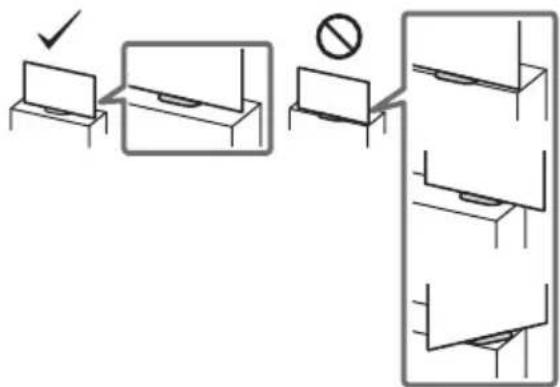
- For safety reasons, be sure to attach the centre covers to the rear of the TV when TV in Table-Top condition.
- Only qualified service personnel should carry out wall-mount installations.
-
For safety reasons, it is strongly recommended that you use Sony accessories, including:
-
Wall-Mount Bracket SU-WL850
-
Wall-Mount Bracket SU-WL450
-
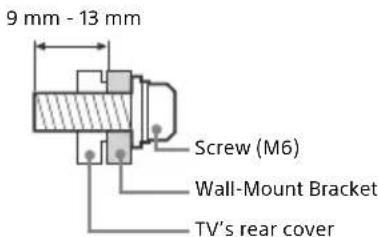
Be sure to use the screws supplied with the Wall-Mount Bracket when attaching the Wall-Mount Bracket to the TV set. The supplied screws are designed as indicated by illustration when measured from the attaching surface of the Wall-Mount Bracket. The diameter and length of the screws differ depending on the Wall-Mount Bracket model. Use of screws other than those supplied may result in internal damage to the TV set or cause it to fall, etc.
Transporting
- Before transporting the TV set, disconnect all cables.
- Two or three people are needed to transport a large TV set.
- When transporting the TV set by hand, hold it as shown below. Do not put stress on the panel and the frame around the screen.
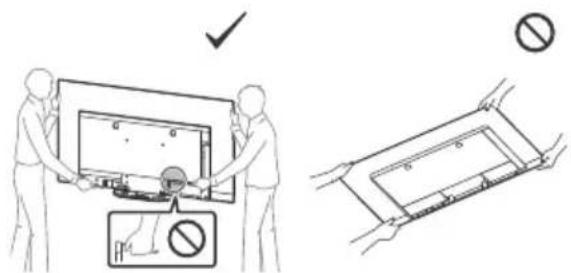
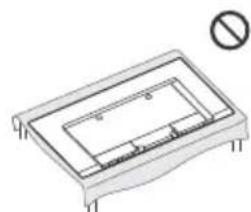
- When handling or mounting the TV set, do not lay down the TV.
- When transporting the TV set, do not subject it to jolts or excessive vibration.
- When transporting the TV set for repairs or when moving, pack it using the original carton and packing material.
Topple prevention
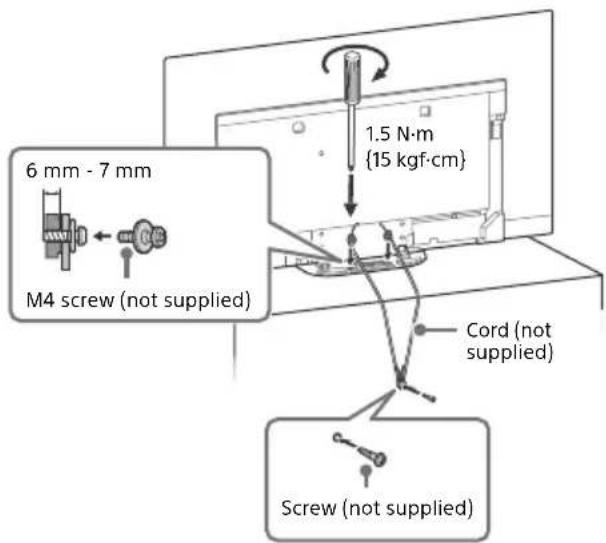
Ventilation
- Never cover the ventilation holes or insert anything into the cabinet.
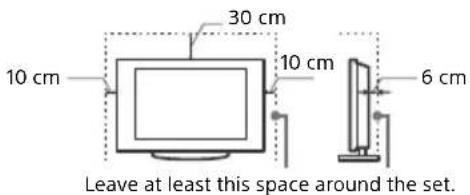
- Leave space around the TV set as shown below.
- It is strongly recommended that you use a Sony Wall-Mount Bracket in order to provide adequate air circulation.
Installed on the wall
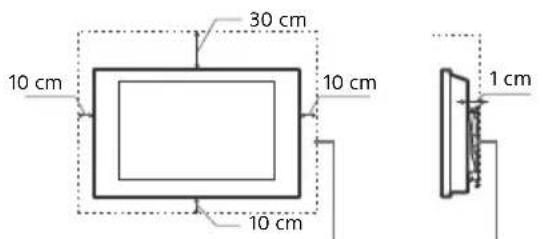
Leave at least this much space around the set.
Installed with stand
To ensure proper ventilation and prevent the collection of dirt or dust:
- Do not lay the TV set flat, install upside down, backwards, or sideways.
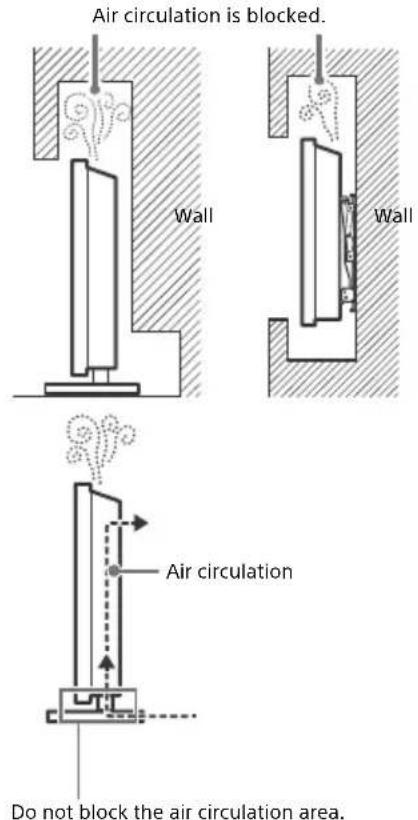
not place the TV set on a shelf, rug, bed or in a closet. - Do not cover the TV set with a cloth, such as curtains, or items such as newspapers, etc.
- Do not install the TV set as shown below.
Protecting the TV Screen (OLED TV)
Precautions to Protect the Screen from Damage
Image retention
OLED TV's are susceptible to image retention (burn-in) due to the characteristics of the materials used. Image retention may occur if images are displayed in the same location on the screen repeatedly or over extended periods of time. This is not a malfunction of the TV. Avoid displaying images that may cause image retention.
The following are examples of images that may cause image retention:
Content with black bars either on the top and bottom and/or the left and right sides of the screen. (for example, Letterboxed, 4:3 screen, Standard definition)
- Static images such as photos.
- Video games that might have static content in some part of the screen.
- On-screen menus, programme guides, channel logos etc.
Static content from applications.
- On-screen tickers, such as those used for news and headlines.
To reduce the risk of image retention:
- Sony recommends that you turn off the TV normally by pressing the power button on the remote control or the TV.
- Fill the screen by changing [Wide mode] to eliminate the black bars. Select [Wide mode] other than [Normal].
- Turn off the OSD (On Screen Display) by pressing the button, and turn off the menus from connected equipment. For details, refer to the instruction manuals for the connected equipment.
- Avoid displaying static images with bright colours (including white), clocks or logos on any portion of the screen.
- Set the picture settings based on the ambient conditions. The Standard Picture is recommended for home use and when viewing content that often displays the station logos, etc.
The TV has following features to help reduce/prevent image retention.
Panel refresh
Panel refresh will automatically run to adjust the uniformity of the TV screen after it has been in use for long periods of time. Panel refresh can also be performed manually and should only be used if image retention is very noticeable or you see the following message: [Panel refresh did not finish...]
Caution:
- The Panel refresh function may affect the panel. As a reference, perform the Panel refresh only once a year, do not perform it more than once a year as it may affect the usable life of the panel.
- Panel refresh takes about one hour to complete.
- A white line may be displayed on the screen during the Panel refresh, this is not a malfunction of the TV.
- Panel refresh will only work when the room temperature is between 10^ and 40^ .
Pixel shift
Automatically moves the image on the screen to prevent image retention.
Other feature
The screen brightness is automatically reduced when displaying still images, clocks, bright colours or logos etc.
Parts and Controls
Controls and Indicators
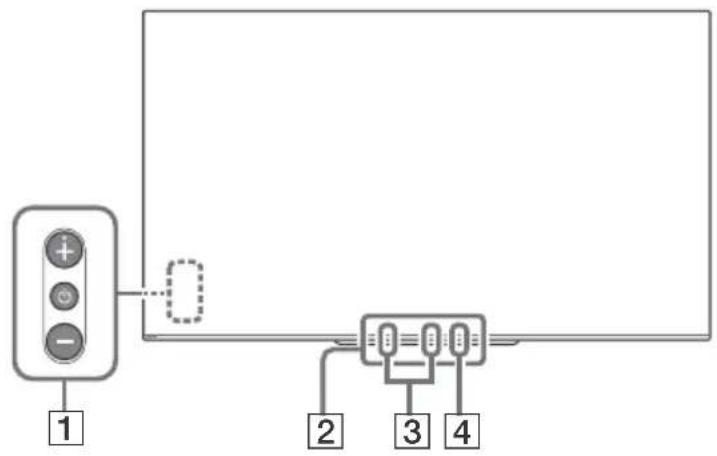
GB
1 (Power) / + / -
When the TV is off,
Press to power on.
When the TV is on,
Press and hold to power off.
Press repeatedly to change the function, then press + or - button to:
- Adjust the volume.
- Select the channel.
- Select the input source of TV.
Remote Control sensor*/ Light sensor*/Illumination LED
The illumination LED lights up or blinks according to the status of the TV. For more information, refer to the Help Guide.
3 Built-in MIC²-³
Use the hands-free built-in microphone for voice search. To enable the built-in MIC, follow the on-screen instructions when you press the button.
4 Built-in MIC LED
The built-in MIC LED lights up in amber when the built-in MIC is enabled. The built-in MIC LED can be disabled.*3
1 Do not place anything near the sensor.
2 The voice search requires an Internet connection. The voice search with the built-in MIC is available only on limited region/country/language. Standby power consumption will increase because the built-in MIC is always listening when the voice search with the built-in MIC is enabled.
*3 For more information, see the Online Help Guide (page 2).
Using Remote Control
Remote Control Parts Description
The remote control shape, location, availability and function of remote control buttons may vary depending on your region/country/TV model.
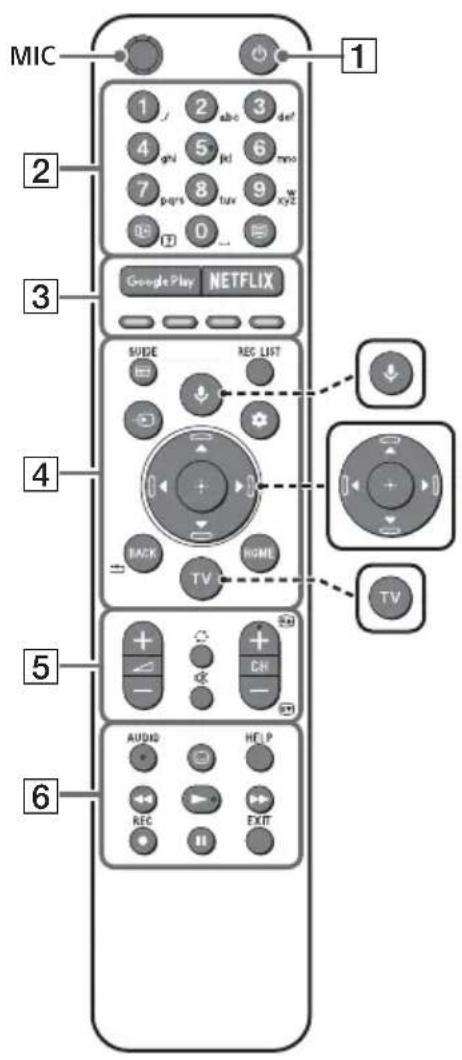
(Microphone) Use voice search. (e.g., Search various content by voice.)
/ / / / (Navigation D-Pad) On screen menu navigation and selection.
TV Switch to a TV channel or input and display the TV menu.
- The voice search requires an Internet connection.
1 (TV standby)
Turn on or turn off the TV (standby mode).
Number buttons
+/2(Info/Textre
Display information.
三 (Text)
Display text information.
3 Google Play
Access the "Google Play" online service.
NETFLIX (Only on limited region/ country/TV model)
Access the "NETFLIX" online service.
Colour buttons
Execute corresponding function at that time.
4GUIDE
Display the digital programme guide, or EPG of cable/satellite box after setting [Cable/ Satellite box setup] (Set top box control compatible models only).
REC LIST
Display the Rec list of USB HDD, or DVR after setting [Cable/Satellite box setup].
Input select)
Display and select the input source, etc.
Quick settings)
Display Quick Settings.
BACK/
Return to the previous screen.
HOME
Display the TV Home Menu.
5 +/-(Volume)
Adjust the volume.
Jump)
Jump back and forth between two channels or inputs. The TV alternates between the current channel or input and the last channel or input that was selected.
(Mute)
Mute the sound. Press again to restore the sound.
Hint
The accessibility shortcut service can be turned on or off by pressing and holding.
CH+/-/E/
In TV mode: Select the channel.
In Text mode: Select the next (E) or previous (E) page.
6 AUDIO
Select the sound of multilingual source or dual sound for the programme currently being viewed (depend on programme source).
(Subtitle setting)
Turn subtitles on or off (when the feature is available).
HELP
Display the Help menu. Help Guide can be accessed from here.
<>/>>/11
Operate media contents on the TV and connected BRAVIA Sync-compatible device.
REC
Record the currently viewed programme on the USB HDD, or DVR after setting [Cable/ Satellite box setup] (only on limited region/ country/TV model).
EXIT
Return to the previous screen or exit from the menu. When an Interactive Application service is available, press to exit from the service.
Note
- For more information about [Cable/Satellite box setup], refer to the Help Guide.
Connection Diagram
For more information on connections, refer to the Help Guide by pressing HELP on the remote control.
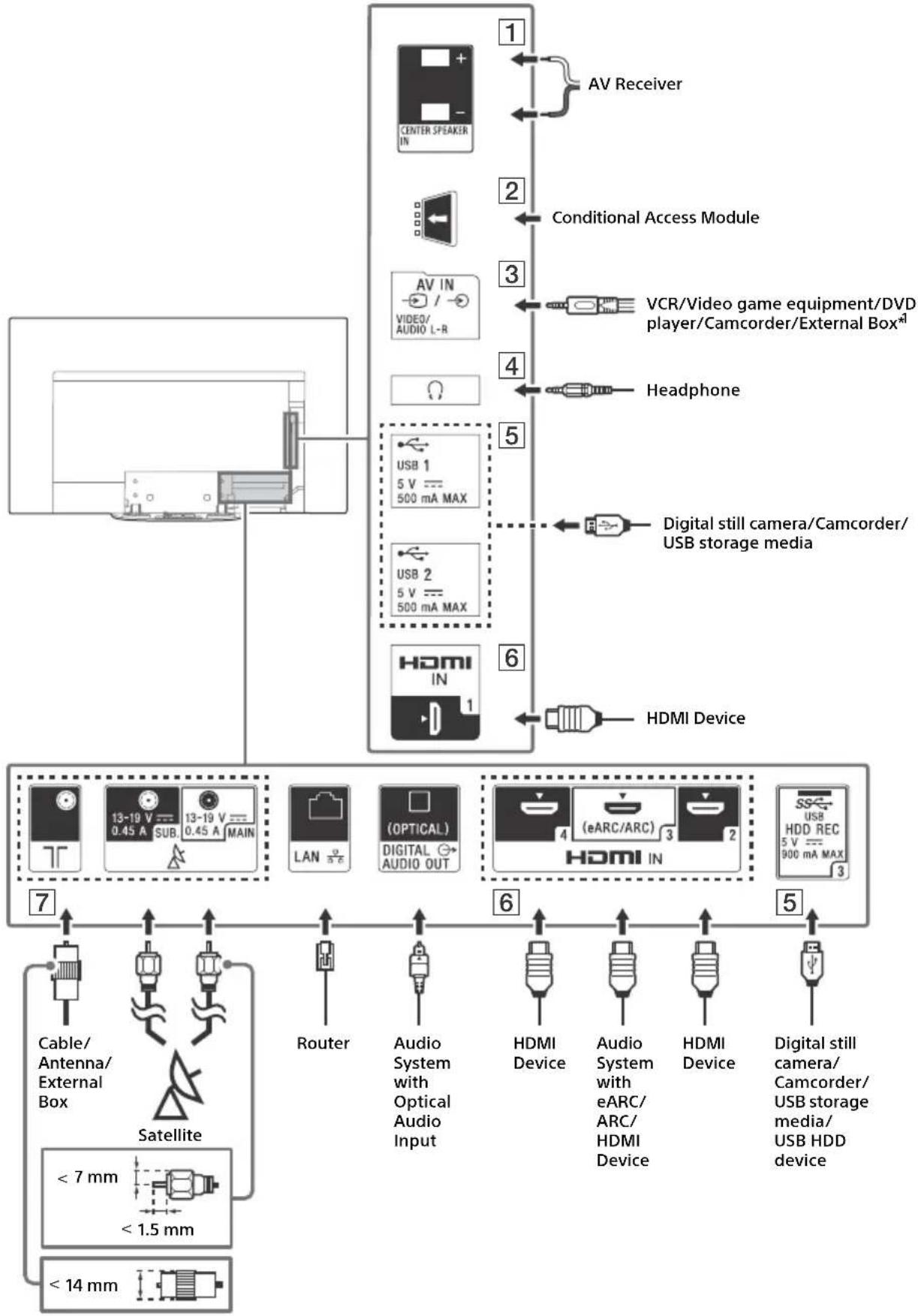
1 CENTER SPEAKER IN
- To use your TV speakers as the centre speaker, connect the output of your AV receiver to the CENTER SPEAKER IN on your TV.
- Before connecting cables, disconnect the mains lead of both TV and AV receiver.
- Make sure the [Speakers] is set to [Audio system].
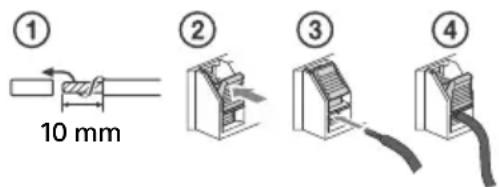
To prevent hiss when not connecting the CENTER SPEAKER IN to an AV receiver, disable [TV centre speaker mode]. For details, refer to the Help Guide.
2 CAM (Conditional Access Module)
- Provides access to pay details, refer to the instruction manual supplied with your CAM.
- Do not insert the smart card directly into the TV CAM slot. It must be fitted into the Conditional Access Module provided by your authorised dealer.
- CAM is not supported in some countries/ areas. Check with your authorised dealer.
- A CAM message may appear when you switch to a digital programme after using the Internet video.
3 / AVIN
- For a composite connection, use an Analogue Extension Cable (not supplied).
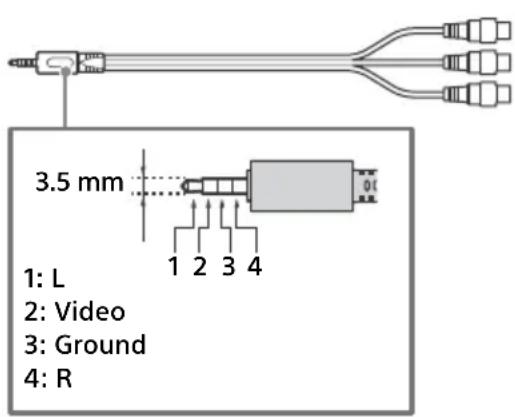
4 (Headphone)
Supports 3-pole stereo mini jack only.
- You cannot output sound from both the headphone and the TV speakers at the same time.
5 USB1/2,USBHDDREC\*
2
- Connecting a large USB device may interfere with other connected devices beside it.
- When connecting a large USB device, connect to the USB 1 port.
- Connect a USB HDD device to the USB 3 port (blue).
HDMI IN 1/2/3/4
- HDMI interface can transfer the digital video and audio on a single cable.
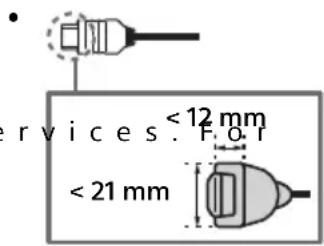
- To enjoy high quality 4K 50p/60p contents, connect a Premium High Speed HDMI cable and set the [HDMI signal format] to [Enhanced format]. Do this setting individually for each connected HDMI IN terminal. For details of supported formats, refer to the "Specifications" in this manual (page 14-16).
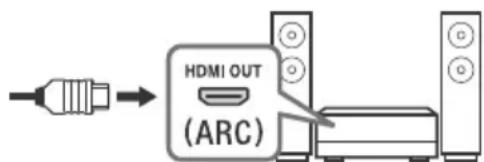
- HD MI IN 3 eARC/ARC (Enhanced Audio Return Channel/Audio Return Channel) Connect your audio system to the HDMI IN 3 to route TV audio to your audio system. An audio system that supports HDMI eARC/ARC can send video to the TV, and receive audio from the TV via the same HDMI cable. If your audio system does not support HDMI eARC/ARC, an additional connection with DIGITAL AUDIO OUT (OPTICAL) is necessary.
- Use the HDMI cable with Ethernet to connect audio system with eARC.
7 (RF input), (Satellite input)
- Connections for terrestrial/cable and satellite. Connection steps: SUB. MAIN Antenna
- For SUB. jack, connect only when you are using twin tuner mode except for Single Cable Distribution EN50494.
1 For an external device which has only SCART AV OUT, use a SCART-RCA adaptor and Analogue Extension Cable.
2 Only on limited region/country/TV model.
Note
- You cannot attach the side cover to the cables are connected to side terminal.
- Be sure to store the side cover in a safe place for future use.
Installing the TV to the Wall
Using the optional Wall-Mount Bracket (SU-WL850 or SU-WL450)
To Customers:
For product protection and safety reasons, Sony strongly recommends that installation of your TV be performed by Sony dealers or licensed contractors. Do not attempt to install it yourself.
To Sony Dealers and Contractors:
Provide full attention to safety during the installation, periodic maintenance and examination of this product.
Wall-Mount Bracket Installation Information
This TV's instruction manual only provides the steps to prepare the TV for Wall-Mount installation before it is installed on the wall.
For instructions on Wall-Mount Bracket installation, see the Installation Information (Wall-Mount
Bracket) on the product page for your TV model.
www.sony.eu/support/
Preparing for Wall-Mount Installation
Use the Wall-Mount Bracket SU-WL850 (not supplied) or SU-WL450 (not supplied) to install the TV to the wall.
Make sure to attach the Table-Top Stand before installing the TV to the wall by referring to the Setup Guide.
- Prepare the TV for the Wall-Mount Bracket before making cable connections.
- Follow the instruction guide provided with the Wall-Mount Bracket for your model. Sufficient expertise is required in installing this TV, especially to determine the strength of the wall for withstanding the TV's weight.
- Be sure to entrust the attachment of this product to the wall to Sony dealers or licensed contractors and pay adequate attention to safety during the installation. Sony is not liable for any damage or injury caused by mishandling or improper installation.
- The screws for Wall-Mount Bracket are not supplied.
- Be sure to store the unused screws and Table-Top Stand in a safe place until you are ready to attach the Table-Top Stand. Keep the screws away from small children.
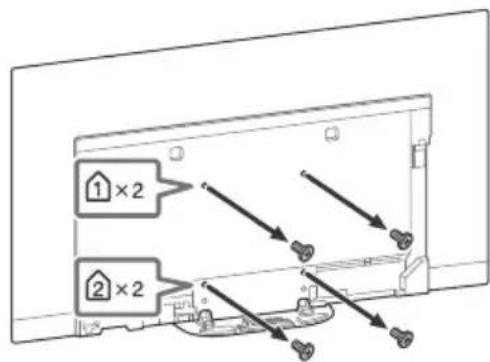
1 Remove the stand cover and terminal covers.
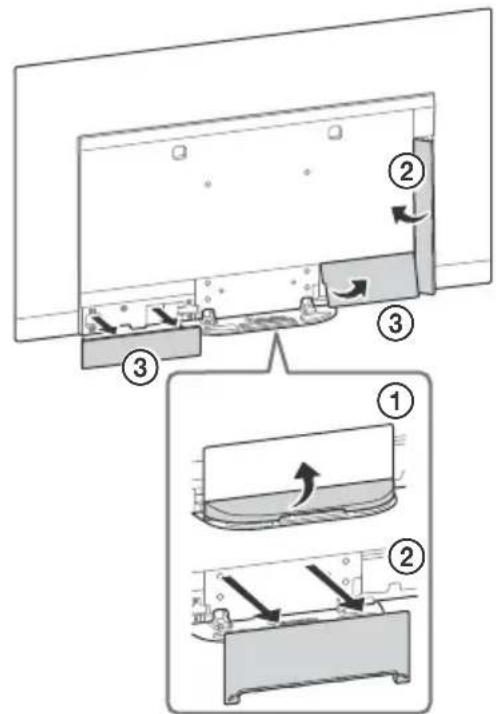
2 Remove the screws from the rear of the TV.
Troubleshooting
General troubleshooting for issues like: black screen, no sound, frozen picture, TV does not respond, or network is lost, do the following steps.
1 Restart your TV by pressing the power button on the remote control until a message appears. The TV will restart. If the TV does not recover, try unplugging the mains lead. Then press the power button on the TV and wait for two minutes, and plug in the mains lead.
2 Refer to the Help menu by pressing HELP on the remote control.
3 Connect your TV to the Internet and perform a software update. Sony recommends you to keep your TV software updated. Software updates provide new features and performance improvements.
4 Visit Sony support website (information provided on the front cover of this manual).
When you plug in the TV, the TV may not be able to turn on for a while even if you press the power button on the remote control or the TV.
It takes time to initialize the system. Wait for about one minute, then operate it again.
Troubles and Solutions
When the illumination LED is flashing in red.
- Count how many times it flashes (interval time is three seconds).
Reboot the TV by disconnecting the mains lead until the illumination LED stopped flashing in red, then turn on the TV.
If the problem persists, disconnect the mains lead, and contact your dealer or Sony service centre with the number of times the illumination LED flashes.
Terrestrial/cable service cannot be received.
- Check the antenna (aerial)/cable connection and booster settings.
- Select terrestrial/cable service by pressing TV on the remote control, and then select [Digital] if the broadcasting service is not displayed.
- Terrestrial signal might be suppressed if there is a strong signal supplied nearby. Set [LNA (CH---)] to [Off] in digital tuning settings.
- After moving to a new house or trying to receive new services, attempt a service search by selecting [Digital tuning].
Satellite service cannot be received.
- Check the satellite cable connection.
- When [No signal. LNB overload detected...] message is displayed, unplug the mains lead. Then, ensure the satellite cable is not damaged and the satellite signal line is not short-circuited in the satellite connector.
The remote control does not function.
- Replace the batteries.
The parental lock for broadcast password has been forgotten.
- Enter 9999 for the PIN code and select [Change PIN code].
The TV surrounds become warm.
- When the TV is used for an extended period, the TV surrounds become warm. You may feel hot when touching there by the hand.
The screen becomes darker while watching TV.
- If the whole image or part of the image remains still, the screen brightness will be gradually reduced to prevent image retention. This is not a malfunction of the TV.
You are concerned about image retention.
If the same image is displayed repeatedly or for long periods of time, image retention may occur. To reduce image retention, we recommend that you turn off the TV normally by pressing the power button on the remote control or the TV.
Note
- Perform Panel refresh manually only when image retention is particularly noticeable. As a reference, perform it only once a year. Avoid performing it more than once a year because it may affect the usable life of the panel.
- Images that include clocks, logos and bright colours (including white) easily cause image retention. Avoid displaying these types of images for long periods of time, otherwise image retention may occur.
A white line appears on the screen.
- Panel refresh automatically runs after the TV has been used for long periods of time to reduce image retention. Panel refresh starts after the TV is turned off and takes about one hour to complete. A white line may be displayed on the screen during the Panel refresh. This is not a malfunction of the TV.
The message [Panel refresh did not finish...] is displayed.
Panel refresh automatically runs after the TV has been used for long periods of time to reduce image retention. If the TV is turned on, the mains lead is unplugged, or the room temperature falls outside of the range between 10^ and 40^ during the Panel refresh, the process will not be completed and this message will appear.
- If Panel refresh started automatically, it will restart when you turn off the TV with the remote control.
If Panel refresh initiated manually, you must select it again.
Specifications
System
Panel system
OLED (Organic Light Emitting Diode) Panel
TV system
Depending on your country/area selection/TV model
Analogue: B/G, D/K, I
Digital: DVB-T/DVB-C
DVB-T2*1
Satellite*1: DVB-S/DVB-S2
Colour system
PAL/SECAM/NTSC3.58 (Video only)/NTSC4.43
(Video only)
Channel coverage
Depending on your country/area selection/TV model
Analogue: UHF/VHF/Cable
Digital: UHF/VHF/Cable
Satellite*1:IF Frequency 950-2,150 MHz
Sound output
20 W + 20 W + 10 W + 10 W
Wireless technology
Protocol IEEE802.11ac/a/b/g/n
(IEEE802.11ac may not be available depending on countries/regions.)
Bluetooth Version 4.2
Frequency band(s)
| Wireless LAN (IEEE802.11ac/a/b/g/n) | |
| Frequency range Out | put Power |
| 2400 - 2483.5 MHz < 2 | 0.0 dBm |
| 5150 - 5250 MHz < 23 | 0 dBm |
| 5250 - 5350 MHz < 20 | 0 dBm |
| 5470 - 5725 MHz < 20 | 0 dBm |
| 5725 - 5850 MHz < 13 | 9 dBm |
| Bluetooth | |
| Frequency range Out | put Power |
| 2400 - 2483.5 MHz < 10.0 dBm | |
RMF-TX600E
| Bluetooth | |
| Frequency range Output Power | |
| 2400 - 2483.5 MHz < 10.0 dBm |
Software version
This radio equipment is intended to be used with the approved version(s) of software that are indicated in the EU Declaration of Conformity. Press HELP on the remote control to know the software version.
Remote control: Select [Remote control] [Software version] from [Settings]. For more information, refer to the Help Guide.
The software loaded on this radio equipment is verified to comply with the essential requirements of the Directive 2014/53/EU.
Input/Output jacks
Antenna (aerial)/cable
75 ohm external terminal for VHF/UHF
Satellite antenna*
Female F Type Connector, 75 ohm.
DiSEqC 1.0, LNB 13 V/18 V & 22 kHz tone, Single
Cable Distribution EN50494.
AVIN
Video/Audio input (mini jack)
HDMI IN 1/2/3/4 (support 4K resolution, HDCP
2.3-compatible)
Video:
4096× 2160p (50, 60 Hz)*2*3, 4096× 2160p
(24Hz)^*2 3840× 2160p (50, 60 Hz)*3
3840 × 2160p (24, 25, 30Hz ), 1080p (30, 50,
60, 100, 120 Hz), 1080/24p, 1080i (50, 60 Hz),
720p (30, 50, 60 Hz), 720/24p, 576p, 480p,
PC Formats*4
Audio:
In eARC (Enhanced Audio Return Channel) mode*5
Refer to the Help Guide for details.
Except eARC mode
5.1 channel linear PCM: 32/44.1/48/88.2/96/
176.4/192 kHz 16/20/24 bits, Dolby Digital,
Dolby Digital Plus, DTS
eARC/ARC (Enhanced Audio Return Channel/
Audio Return Channel) (HDMI IN 3 only)
In eARC mode*5
Refer to the Help Guide for details.
In ARC mode
Two channel linear PCM: 48 kHz 16 bits, Dolby
Digital, Dolby Digital Plus, DTS
DIGITAL AUDIO OUT (OPTICAL)
Digital optical jack (Two channel linear PCM:
48 kHz 16 bits, Dolby Digital, DTS)
(Stereo mini jack)
Headphone
1,2-3(HOBREC)*
6
USB device port (SSUSB HDD device for REC feature)
USB port 1 and 2 support High Speed USB
(USB 2.0)
USB port 3 supports Super Speed USB (USB 3.1)
Gen 1)

CAM (Conditional Access Module) slot
LAN
10BASE-T/100BASE-TX connector (Depending on the operating environment of the network, connection speed may differ. The communication rate and quality are not guaranteed.)
CENTER SPEAKER IN
Centre speaker input terminal
Others
Optional accessories
Wall-Mount Bracket: SU-WL850
Wall-Mount Bracket: SU-WL450
Operating temperature
0^ - 40^
Operating humidity
10% - 80% RH (non-condensing)
Power, Product Fiche and others
Power requirements
220V-240VAC,50Hz
Energy Efficiency Class
KD-77AG9: A
KD-65AG9: B
KD-55AG9: B
Screen size (measured diagonally) (Approx.)
KD-77AG9: 194.7 cm / 77 inches
KD-65AG9: 163.9 cm / 65 inches
KD-55AG9: 138.8 cm / 55 inches
Power consumption
In [Standard] mode
KD-77AG9:211W
KD-65AG9:169W
KD-55AG9:132W
In [Vivid] mode
KD-77AG9:674W
KD-65AG9:490W
KD-55AG9:394W
Annual energy consumption
KD-77AG9: 293 kWh per year
KD-65AG9: 234 kWh per year
KD-55AG9: 183 kWh per year
Standby power consumption*8.9
KD-77AG9:0.50 W (29 W in software/EPG update mode)
KD-65AG9:0.50 W (27 W in software/EPG update mode)
KD-55AG9:0.50 W (27 W in software/EPG update mode)
Display resolution
3,840 dots (horizontal) × 2,160 lines (vertical)
Output Rating
USB 1/2 5V57 500mA MAX
USB 3 5V77 900mA MAX
Dimensions (Approx.) (w× h× d)
with Table-Top Stand
KD-77AG9: 172.1 × 100.1 × 30.2 cm
KD-65AG9: 144.7 × 83.8 × 25.5 cm
KD-55AG9: 122.6 × 71.4 × 25.5 cm
without Table-Top Stand KD-77AG9: 172.1× 99.6× 4.9cm KD-65AG9: 144.7× 83.4× 4.0cm KD-55AG9: 122.6× 71.0× 4.0cm
Mass (Approx.)
with Table-Top Stand
KD-77AG9: 39.7 kg
KD-65AG9: 24.8 kg
KD-55AG9: 22.3 kg
without Table-Top Stand
KD-77AG9: 35.3 kg
KD-65AG9: 21.2 kg
KD-55AG9: 18.7 kg
1 Not all the TV sets have DVB-T2 or DVB-S/S2 technology or satellite antenna terminal.
2 When 4096 × 2160p is input and [Wide mode] is set to [Normal], the resolution is displayed as 3840 × 2160p . To display 4096 × 2160p , set [Wide mode] setting to [Full 1] or [Full 2].
3 To support 18 Gbps, set [HDMI signal format] to [Enhanced format].
4 Refer to the Help Guide for details.
5 eARC mode is active when [eARC mode] is set to [Auto], [Speakers] is set to [Audio system] and eARC compatible audio system is connected.
6 Only on limited region/country/TV model.
7 Energy consumption in kWh per year, based on the power consumption of the television operating 4 hours per day for 365 days. The actual energy consumption will depend on how the television is used.
8 Specified standby power is reached after the TV finishes necessary internal processes.
*9 Standby power consumption will increase when your TV is connected to the network.
Note
- Do not remove the dummy card or cover (availability depends on TV model) from TV CAM (Conditional Access Module) slot other than to insert a smart card fitted in CAM.
- Optional accessories availability depends on countries/region/TV model/stock.
- Design and specifications are subject to change without notice.
Notes on Digital TV function
- Digital TV (DVB terrestrial, satellite and cable), interactive services and network functions may not be available in all countries or areas. Some functions might not be enabled or might not operate correctly with some providers and network environments. Some TV service providers may charge a fee for their services.
- This TV supports digital broadcasting using MPEG-2, H.264/MPEG-4 AVC and H.265/HEVC CODECs, but compatibility with all operator/service signals, which may change over time, cannot be guaranteed.
Trademark Information
- The terms HDMI and HDMI High-Definition Multimedia Interface, and the HDMI Logo are trademarks or registered trademarks of HDMI Licensing Administrator, Inc. in the United States and other countries.
- Dolby, Dolby Vision, Dolby Audio, and the double-D symbol are trademarks of Dolby Laboratories. Manufactured under license from Dolby Laboratories. Confidential unpublished works. Copyright ©1992-2015 Dolby Laboratories. All rights reserved.
- "B R A V BRAVA and BRAVIA Sync are trademarks or registered marks of Sony Corporation.
- Gracenote, the Gracenote logo and logotype, "Powered by Gracenote" logo are either registered trademarks or trademarks of Gracenote, Inc. in the United States and/or other countries.
- Vewd® Core. Copyright 1995-2019 Vewd Software AS. All rights reserved.
- Google, Google Play, Chromecast, YouTube, Android TV and other related marks and logos are trademarks of Google LLC.
-
Wi-Fi®, Wi-Fi Alliance® and Wi-Fi Direct® are registered trademarks of Wi-Fi Alliance.
-
The Wi-Fi CERTIFIED™ Logo is a certification mark of Wi-Fi Alliance.
- For DTS patents, see http:// patents.dts.com. Manufactured under license from DTS, Inc. DTS, the Symbol, & DTS and the Symbol together are registered trademarks, and DTS Digital Surround is a trademark of DTS, Inc. © DTS, Inc. All Rights Reserved.
- The Bluetooth® word mark and logos are registered trademarks owned by the Bluetooth SIG, Inc. and any use of such marks by Sony Corporation is under license. Other trademarks and trade names are those of their respective owners.
- Netflix is a registered trademark of Netflix, Inc.
- DiSEqCTM is a trademark of EUTELSAT. This TV supports DiSEqC 1.0. This TV is not intended for controlling motorized antennas.
- TUXERA is a registered trademark of Tuxera Inc. in the US and other countries.
- USB-IF SuperSpeed USB Trident logo is a registered trademark of USB Implementers Forum, Inc.
- All other trademarks are the property of their respective owners.
7 (Entree RF), (Entree satellite)
Analogue: B/G, D/K, I
eARC/ARC (Enhanced Audio Return Channel/
Audio Return Channel) (HDMI IN 3 uniquement)
En mode eARC*5
DIGITAL AUDIO OUT (OPTICAL)
10% - 80% HR (sans condensation)
KD-55AG9:138,8cm/55pouces
KD-55AG9:122,6×71,4×25,5cm
Sansupportde table
KD-77AG9:172,1×99,6×4,9 cm
KD-65AG9:144,7×83,4×4,0 cm
KD-55AG9:122,6×71,0×4,0cm
Poids (approx.)
HDM I IN 3 eARC/ARC (Enhanced Audio Return Channel/Audio Return Channel)
System panelu Panel OLED (Organic Light Emitting Diode)
W trybie eARC (Enhanced Audio Return
Channel)*5
eARC/ARC (Enhanced Audio Return Channel/
Audio Return Channel) (tylko model HDMI IN 3)
W trybie eARC*5
DIGITAL AUDIO OUT (OPTICAL)
Port USB 3 obstugue standard Super Speed USB (USB 3.1 Gen 1)

KD-77AG9:194,7cm/77 cali
KD-65AG9:163,9 cm / 65 cali
KD-55AG9:138,8cm/55cali
Pobórmocy
W trybie [Standardowy]
KD-77AG9:211W
KD-65AG9:169W
KD-55AG9:132W
Wtrybie[Zywy]
KD-77AG9:674W
KD-65AG9:490W
KD-55AG9:394W
Panel OLED (Organic Light Emitting Diode)
V rezime eARC (Enhanced Audio Return
Channel)*5
Podrobnosti najdete v Priručke.
Okrem režimu eARC
5,1 lineárny kanál PCM: 32/44,1/48/88,2/96/
176,4/192 kHz 16/20/24 bitov, Dolby Digital, Dolby Digital Plus, DTS
eARC/ARC (Enhanced Audio Return Channel/
Audio Return Channel) (Len model HDMI IN 3)
V rezime eARC
Podrobnosti najdete v Priruce.
V rezime ARC
Dvojkanálovy lineárny PCM: 48 kHz 16 bitov,
Dolby Digital, Dolby Digital Plus, DTS
DIGITAL AUDIO OUT (OPTICAL)
eARC (Enhanced Audio Return Channel)
üzemmodban*5
eARC/ARC (Enhanced Audio Return Channel/
Audio Return Channel) (Csak a HDMI IN 3
esétén)
eARC üzemmodban*5
Részletes leirast a Sugou'tmutatoban talal.
"Elenk" uzemmodban
Analogic: B/G, D/K, I
Digital: DVB-T/DVB-C
DVB-T2*
Satelit*1: DVB-S/DVB-S2
Sistemculoare
PAL/SECAM/NTSC3.58 (Numai video)/NTSC4.43
(Numai video)
Acoperire canale
Analogic: UHF/VHF/Cablu
Digital: UHF/VHF/Cablu
Satelit*: Frecventa IF 950 - 2.150 MHz
lesire audio
20W+20W+10W+10W
Technologie wireless
Protocol IEEE802.11ac/a/b/g/n
(Este posibil ca, in functie de tari/regiuni,
protocoll IEEE802.11ac sa nu fié disponible.)
In modul eARC (Enhanced Audio Return
Channel)*5
Pentru detali, consultati ghidul de asistenta.
eARC/ARC (Enhanced Audio Return Channel/
Audio Return Channel) (Numai HDMI IN 3)
In modul eARC*5
Pentru detali, consultati ghidul de asistenta.
In modul ARC
DIGITAL AUDIO OUT (OPTICAL)
Mufa optica digitala (PCM liniar pe doua canale:
48 kHz 16 biti, Dolby Digital, DTS)
(mini mufä stereo)
Castei
1,2-3 (HOBREC)*
6
KD-55AG9: 0,50 W (27 W in modul software/actualizare program)
Rezolute ecran
3.840 puncte (horizontal) × 2.160 linii (vertical)
I3MeCTBaHeHaNikKeJIn
A B T O M A T N U H O N P I P E M E C T B A N 3 0 b p a k e H E N E T O H a E K P a H A, 3 a D n p e d o T B P a T N 3 a d b p k a H e H a K a p t N H A T A.
Dpyra yHKzna
JaKoCTHa EkapHa aBOMaTmHNo HamaJIbBa, KORATo Ce noka3BaHT HeNOBnBXKn NIO6paKeHn, YacOBnCn, Jpkn CBeTeObe nn Em6bIeMn T.H.
BkIIOUyBa IINN IN3KIIIOUyBa TeJIeBuN3Opa (peXIM FOToBHOCT).
2 ByToHn C uΦpN
H/HΦO/ΠKa3BaHe Ha TEKCT)
Poka3Ba HΦopMaζη.
TeKCT
Ioka3Ba TeKCTOBA HΦOpMaζη.
3 Google Play
Korato CBeToDnOdbT MnaB YepeBHeNo.
- Ipe6poTe KOJko nbTu Mira (uHTepBaJIbT OTo BpeMe e Tpu ceKynHn).
PecTapTnpaIte TeJeBn3Opa, KaTo n3KJIouHtTe 3axpaHBaUuKa6eI DOKaTO CBeToIONoBt CnPpe Da npemrBa B UepBeHo, CNeI KOeTO rBKNIOUcTe OTHOB0.
Ako npo6JIembT npOdbJxu, n3KJIIOUcTe 3axpaHbAsnKa6eI n Ce CbbpKeTe C Baun IocTaBnK NnCepBn3eH cHTbp Ha Sony KaTO nOCOHTe KOJIKO NtMn Mfra CBETOINOda.
He ce npneMa eΦnupHa/ka6eJHa ycnyra.
- PpOBepeTe BpB3KaTa c (eΦnHata) aHTeHa/ Ka6eNa n HAcTpOuKnte Ha aHTeHHn yCUNBaTeJ.
- Ako n3JIbUbaHaTa ycLyra He ce noka3Ba, n36epete eOpHa/ka6eHa ycLyra Upe3 HATnCKaHe Ha 6yToHa TV Ha INCTaHcIOHHTO ynpabVeHne, CneI KoETo n36epete [UnΦpOBA TB].
Ha3eMHnIaT CnHaN MoKe Da 6bJe NOTuCHaT, aKo IMa CnJIeN CnHaN, KOJTO Ce n3JIbUBA B 6JIu3OcT. HAcTpOuTe [LNA (KaHaN---)] Ha [U3Kn.] B UΦpOBuTe HAcTpOuKn.
CneI npemecTBaHe B HOBA Kbua Nn KOraTo TbpCnTe HOBu YcLyr, ONNTaTte TbpcHe Ha ycLyra KaTO n36epete [UΦpOBU NaCTpoiKn].
He ce npneemat catelntn ycnyrn.
- PpOBepeTe caTeJIuTHaTa Ka6eJIHa Bpb3ka.
Korato ce noBn cbo6eHne [Hma cnHaJ. OTuTeHo e npTeOBapBaHe ha LNB...], n3BaJeTe 3axpaHbAaun Ka6eI.CneTToBa ce yBepTe, ye CaTeJIuTHNRT Ka6eJI He e NOBpeJeH, a JInHraTa Ha caTeJIuTHNcRHaJ He e daJaHa KbCO B CaTeJIuTHN KoHEKTOp.
ДиctaHcnoHHTo ynpabJeHne He pa6oTn.
- CmeHeTe 6aTepeHnTe.
3a6paBHe napOla 3a poNDteNcKO 3aKlIOuBaHe Ha N3JIbYBaHe.
- BbBeTe 9999 3a ПИн Кола и n3берete [СmaHa Na ПИн Кола].
PamkaTHa TeIeBn3opa Ce 3aToonna.
Korato TeJIeBn3OpbT ce n3noI3Ba npOdbJIxNtEnHO BpeMe, pAMKaTa My Ce 3aToPnJ. MoKe da ycETNe ToPnInHa, KOrato JdoKOChTe Cpka.
EkpaHbT NOTbMnBa, DOKaTO rIeJaTe TeJeBu3n.
- AkoцялOTOиЗOBpaЖeHne ИлчAcT O He ro octaHe HnOДВnxHo,ЯрКоCTTa Ha ekpaHa NOCTepeHNo Ie HamaJe,3aДа ce npedOTbpaTn 3aIbpxaHe Ha KapTuHa.Toba He e HEN3npaBHOcT Ha TeJIeBu3Opa.
PnntecHbBA Bn 3aBpKaHTo Ha KapTuHaTa.
Ako eHNO n CbIoo I3O6paXeHne ce NOKa3Ba MHOrOkpArHO nn 3a Dbln nepNoDN OT BpeMe, MOKe Da CE NOBvN 3aDbPkaHe Ha KapTnHaTa. 3a Da HAmalnte 3aDbPkaHeTo Ha KapTnHaTa, BN PpeOpbYBaMe Da N3KlIOUbaTe TeLeBu3Opa Upe3 KOnYeTo 3a N3KlIOUBaHe OT DInCTaHcIOHHOTo ynpabVeHne.
3a6eJekka
- OБноваяи Te nahela pbuHo cmo kOrato 3aIbpxKaHTo Ha KapTuHaTa e Oco6eHo BnDHo. KaTo npEpa3Ha MApka obHOBaYTe nAHeLa cmo BeHbX roDUnHo. He obHOBaYTe naHeJa NOBce To BeHbX roDUnHo, TbK aTO TOBa MoKe da HaMaJI XJBOT Ha nAHeJa.
- 1306paXeHnTa, KOnTO BkLIOuBaT YacOBHnU, em6lemn IApkn CBeToBE (BkIouHTenHO 6raLo), neCHO npeDN3BnKBAr 3aDbpXaHe Ha KapTuHaTa. H36yRbAte NOKa3BaHeTo Ha TaKbB TnN 1306paXeHn 3a Dblr NepnoDn OT BpeMe, B npOTuBeH CnyaM MoKe Da ce NoRB 3aDbpXaHe Ha KapTuHaTa.
Ha ekpana ce noBbBa 6yIeHTa.
Ha ekpaHa ce noBBA 6JaIeHTa. O6HOBraBaHeTo Ha naHeLa ce BkIoUba aBTOMaTnUHO CJIeK KaTO TeJeBn3OpbTe 6uJn 3IOJ3BaH npOdbJXnTEJHo, 3a Da CE HamaJN 3aDbPkaHeTo Ha KapTHa. O6HOBraBaHeTo Ha naHeLa 3aNoyBa CJIeD KaTO TeJeBn3OpbTe n3KIOUcEH n OTHeMa OKoLo eDIn Yac. Po Bpeme Ha o6HOBraBaHeTo Ha naHeLa MoKe Da CE noBn 6JaIeHTa Ha ekpaHa. Toba He e Hen3npabHOCT Ha TeJeBn3Opa.
Ioka3Ba ce cbo6ueHHeTo [O6HOBraHeto Ha naHeJa He e 3aBpseHo...].
O6HOBaHaTo Ha nHaJa Ce BkIIOUBa
aBtOMaTnUHO CJIeI KaTO TeJeBn3OpbTe 6uJ
n3IOJ3BaH IPOJbJXHTeJIHO, 3a Da Ce HamaJi
3aJbPkaHaTo Ha KapTHaTa. Ako IO BpeMe Ha
o6HOBaHaTo Ha nHaJea TLeEbn3OpbTe
BKnIOueH, 3axpaHbAunr KaBeI e N3BaJeH nJN
TeMnepaTpya BA CTaYr e N3BbH dnaNa3OHa OT
10 ^ C Do 40 ^ C , npouecbT hMa da 6bJe
3aBbPseH nIe Ce nOABn TOBa cbo6uJeHne.
- Ako obHOBaHaTe Ho nHaHeJa e 3aNoUHaNo aBTOMaTnUHo, Ue Ce pectapTpnpa, KOrato N3KJIouHtTe TeJeBn3Opa C DnCTaHcNHOHTo ynpabLeHne.
- Ako 60OB8BaHeTo Ha NaHeIe e 3aJaTeHO pBuHO, Tp6Ba Da rO n36peTe OTHOBO.
CneuФикauи
Cnctema
CnCTemaHa nahanela
PanaHEn 3a OLED (opraHnueh cBeToDnOД)
TeJIeBn3IOHHa cIcTeMa
B 3aBnCmOcT OT BaUaTa nbpXkaBa/u36Op Ha 30Ha/MoJeH a TeIeBn3opa
AhaIoroba: B/G, D/K, I
LunΦροBa:DVB-T/DVB-C DVB-T2*1
CateJInTha*1: DVB-S/DVB-S2
LBeTOba CnCTema
PAL/SECAM/NTSC3.58 (camo bnupeo)/NTSC4.43 (camo bnupeo)
IokpnTne Ha kaHaJInte
B 3aBnCmOcT OT BaUaTa IbPkaBa/u36Op Ha 3oHa/MoDJI HA TeJeBn3opa
Analoroba: UHF/VHF/ka6eJ
UHVF/ka6eJ
CateJIurTHa*1:IFyecToTa950-2150MHz
3ByKOB n3XoJ
20W+20W+10W+10W
БezичнТхнлоги
IEEE802.11ac/a/b/g/n npoToKoJ
(IEEE802.11ac MoKe Ia He e HauHOB
3a BVCIMOCT OT CtpaHaTa/perNoHa.)
Bluetooth Bercn4.2
YeCTOTHa(u)JeHTa(u)
| Бezжун LAN (IEEE802.11ac/a/b/g/n) |
| Чебтейн无缝ват История мошноct |
| 2400 - 2483,5 MHz < 20,0 dBm |
| 5150 - 5250 MHz < 23,0 dBm |
| 5250 - 5350 MHz < 20,0 dBm |
| 5470 - 5725 MHz < 20,0 dBm |
| 5725 - 5850 MHz < 13,9 dBm |
| Bluetooth | |
| Чебтейн обхвац范围内 | Для за мошноct |
| 2 400 - 2 483,5 MHz < 10,0 dBm | |
RMF-TX600E
| Bluetooth | |
| Чебтейн обхвац范围内 | Для за мошноct |
| 2 400 - 2 483,5 MHz < | 10,0 dBm |
BG
CoΦTyepHa Bεpcn
ToBa paIIO o6OpUdBaHe e npEHa3NaYeHO 3a yNoTpe6a c OoObeHnTe Bercn Ha coOfTyepa, KOnTO ca NocOeHN B DeKnapaunra 3a cbOTBeTCTBnE Ha EC.
HaTnchete HELP HaДиCTaHcNHOHOTO ynpabIeHne,3a Da BUnTe BepCnraTa Ha coΦTyepa.
ДиСТаHцИоНHoупразБеHne:
I36epeTe [ДиCTaHcNoHNO ynpaBJIeHne] [CoΦTyepHa Bepc:]OT [HAcTpoiKn].3a nobYe HhΦopMaunBnKTe B NOMOuHOTOpbKOBOdCTBO. CoΦTyepbT, 3apeHn Ha TOBa paNIO o6OpyDbaHe,e yOcTOBepen KaTo CbOTBeTCTBaU Ha CbUeCTBeHnTe n3uCKBaHnHa NIpEKTnBa 2014/53/EC.
BxoHNO/IN3XoDHNJkaKOBe
AHTeHeH/ka6eI
75 OMa BbHsEh TepMnHaJI 3a VHF/UHF
CateJInTHa aHTeHa
KoHEKTOp TnF,KeHcKn,75 Oma.
DiSEqC 1.0, LNB 13 V/18 V & 22 kHz TOH
Pa3npedeJHne no 1 ka6eN EN50494.
/ AVIN
eARC/ARC (Enhanced Audio Return Channel/
Audio Return Channel) (camo HDMI IN 3)
B pexum eARC*5
3a noBee uHOpMaunBnKTe nOMoHOTO
PbKOBOJCTBO.
BpekmARC
KD-77AG9:194,7cm/77mHua
KD-65AG9:163,9 cm / 65 inHua
KD-55AG9:138,8 cm/55 mHua
KohcymaunHa eHepnra
B [CtaHapTeH] peXIM
KD-77AG9:211W
KD-65AG9:169W
KD-55AG9:132W
B [Rpbk] peKmM
KD-77AG9:674W
KD-65AG9:490W
KD-55AG9:394W
TOnuHnKa KOHCmaunHa eHeprna*
KD-77AG9:293 kWh roDnsho
KD-65AG9:234 kWh roDnHNo
KD-55AG9:183 kWh rodiuho
KohcymaunHa eHepnBpeknm
ΓΟΤΟΒΗΟCT89
KD-77AG9:0,50W(29WВржимHa
aktyaun3aun Ha cofoep/EPG)
KD-65AG9:0,50W(27 WВржим Ha
aktyaun3aun Ha cofoep/EPG)
KD-55AG9:0,50W(27WВржимHa
aktyaun3aun Ha cofoep/EPG)
Pe3oIouznaHa dncnpea
3840ToUKn(noxopn3oHTaJa) × 2 160peJa(noBepTnKaJa)
U3XoHN HOMHaJIHn DaHHN
USB 1/2
5V7500mA(MaKc.)
USB3
5V7900mA(MaKc.)
T6apntn (npn6n.) (w x B x d)
C NOCTaBka 3a Maca
KD-77AG9: 172,1× 100,1× 30,2 cm
KD-65AG9: 144,7× 83,8× 25,5cm
KD-55AG9: 122,6× 71,4× 25,5cm
6e3 NOCTaKa 3a Maca
KD-77AG9: 172,1× 99,6× 4,9cm
KD-65AG9: 144,7× 83,4× 4,0cm
KD-55AG9: 122,6× 71,0× 4,0cm
Tero (npn6n.)
C NOCTaBKa 3a Maca
KD-77AG9:39,7kg
KD-65AG9:24,8kg
KD-55AG9:22,3 kg
6e3 nocTaBka 3a Maca
KD-77AG9:35,3 kg
KD-65AG9: 21,2 kg
KD-55AG9: 18,7 kg
1 He BCNUKn TeNeBn3Opn UMaT DVB-T2 uNn DVB-S/S2 TexHOJOrn uNn KOHeKTOp 3a caTeJIuTHa aHTeHa.
^2 KoraTo ce noJaBa 4096 × 216Op n [UnpokoeKpaH e NaCTpoeHa [HopMaJIeH],pe3OJIuONrTa ce Noka3Ba KaTo 3840× 2160p .3a Noka3BaHe Ha 4096× 2160p cnOKeTe HAcTpoiKaTa [UnpokoeKpaH e peKm] Ha [PbJIeH 1] nn [PbJIeH 2].
3 3a noДьрхаHe Ha 18 Gbps NaCTpoIe [ФормТ ha HDMI cnHana.] Ha [ПоДобpeн ФормТ].
4 3a noBuee nHΦopMaζην BuxTe ΠOMOιHOTOpbKOBODCTBO.
5 Pexim eARC e aKtUbeH, KOraTo [Pexim eARC] e 3aJaIeH Ha [ABTomat.], [TobOpntel] e 3aJaIeHO Ha [Aydno cnCTema] n e Cbbp3aHa ayDnO cnCTema, cBMeCTMa c pexim eARC.
^6 Camo 3a onpejeelen npereohn/ctpaHn/MoeJN TeJeBu3Opn.
*7 FOnuHaTa KOHcymaun Ha eHeprna B kWh e 6a3npaHa Ha KOHcymaunra Ha TeJeBu3Op, KOnTo pa60Tu 4 Yaca Ha DeH, 365 dHn. DeiCTBUNeHata KOHcymaun Ha eHeprna 3aBnCn OT TOBa KaK Ce N3NoJ3Ba TeJeBu3Opa
*8 Yka3aHaTa KOHCyMaunHa eHepnB PexIM TOTOBHOCT Ce DoCTnRa CLeI KaTO TeJeBu3OpbT PnKJIouH Heo6xoDmUTe BbTpewHn Ppoecn.
*9 KoHcyMaζηra Na eHeprɪŋ B pɛɡm rʊTobhOCT ξe ce yBæŋuŋ, Kɔrato BaʌŋrT TeJIeBn3Op e Cbþɜn KbM Mpeɡka.
3a6eJexKa
- He n3BaXdAaTe nCeBdo-KapTaTa nn Kanaka (HaInuHocCTTa NM 3aBucn OT MoJeNa Ha TeLeBn3Opa) OT TV CAM cNoTa (MoUyna 3a ycNoBeH DoCTbN),OCBeH 3a Da NoCTaBnTe CMapr KapTa B CAM.
HaIyuHTo Ha OIuHOHaHn AkceCoapn 3aBncn OT DbpxKaBaTa/perNoHa/Moega Ha TeJeBu3opa n HauHocTt.
-ДиЗанБТИСпeциФиКaциNTe NOДnexKatHa ПомЯнБ6e3 ПpeDyUpEжДeнe.
3a6eJekka 3a cHpObaTa yHKnna Ha TeLeBn3opa
- LcHpOBA TeJIeBn3nA (DVB Ha3eMHO, caTeJIHTHO n Ka6eJIHO), INHTepaKTNBn YcIyrN mpeXOBn fYHKUIM MoKe Da He Ca DOCTbHN BvB BCNUK n CtpaHn IJn paNoH. HAcON fYHKUIM MoKe Da He ca AKTUBnPaHn NIm MoKe Da He pa6OTAT npabUNHO C HAcON DoCTaBuNcN mpeXOBn cpeiN. HAcON DoCTaBuNcN Ha TeJIeBn3IOHn YcIyrN MoKe Da NaHCJIaBaT TaKca 3a YcIyrInTe CN.
To3n TeJebu3Op noDbpxa uΦpOBO npedabaHe, n3noI3BaIkn MPEG-2, H.264 / MPEG-4AVC nH.265/HEVC KoJeu, Ho He MoKe Da 6bIe rapaHTnpaHa CbBMeCTIMOCCTTa C BCNUCK CNrHaJIi Ha ONepaTopu/YcLnyr, KOINTo MoKe Da ce IpnomEHr T CeUeHne Ha BpeMeTO.
HΦopMaζηa TbProBcKm MapKn
- TepMNHTe HDMI n INTeppeic 3a Mylntmeia C BncoKa pa3deJIteHa cnoc6hOCT HDMI (HDMI - High-Definition Multimedia Interface), KaKTo u Ioroto HDMI ca 3ana3eHn Mapkn Ha HDMI Licensing Administrator, Inc. B CbeDInHeHNTe 7atn n npyrn dbpXabN.
Dolby, Dolby Vision, Dolby Audio, n cIMBOJbT IBOHNo "D" ca TbpROBcN mApKn Ha Dolby Laboratories. PpOu3BeJeHo No IuueH3 Ha Dolby Laboratories. KOnΦnIeHuaJIHn HEny6JIkyBaHn TpyDoBe. ABTopcko npabo © 1992-2015 Dolby Laboratories. BcUckn npaba 3ana3eHN.
"BRAVBAIVIA n BRAVIA Sync ca TbproBCKn MapKn IJn pernctpupaHn MapKn Ha Sony Corporation. - Gracenote, Логото и логоти NBт Gracenote, К akто и логото "Powered by Gracenote" ca PerinctpupaHи ТьрвсКи МарКи Илп ТьрвсКи МарКи Нa Gracenote, Inc.В CAU, n/нлл Дуги Дьржави.
- Vewd® Core. Copyright 1995-2019 Vewd Software AS. All rights reserved.
Google, Google Play, Chromecast, YouTube, Android TV and YouTube Cbvp3aHn MapKu JIora ca 3ana3eHn MapKn Ha Google LLC. - Wi-Fi, Wi-Fi Alliance and Wi-Fi Direct and PerinctpnpaHn TbproBcN MapKn Ha Wi-Fi Alliance.
- Jloroto Wi-Fi CERTIFIED™ e ceptnФикuaционен 3нak Ha Wi-Fi Alliance.
- 3a DTS nateHTn, BuxTe http:// patents.dts.com. Ipon3BeJeHo no JnueH3 Ha DTS, Inc. DTS, cIMBOJbT, & DTS n cIMBOJbT 3aeJHo ca perncTpnpaHn TbproBcKn MapKn, a DTS Digital Surround e TbproBcKa MapKa Ha DTS, Inc. © DTS, Inc. Bcnukn npaba 3ana3eHn.
3HaKbT Bluetooth®и Фирмени Te 3Haци ca pernctpupaHn TbpROBcKn Mapkn co6CTBeHocT Ha Bluetooth SIG, Inc. n n3noJ3BaHeTo Ha Te3N 3Haци ot Sony Corporation e no JnueH3. Дугн TbpROBckn Mapkn I TbpROBcKn ImeHa ca npntExaHne Ha cBOTBeTHIne IM CO6CTBeHUn. -
Netflix e perinctpupaHa TbproBcka MapKa Ha Netflix, Inc.
-
DiSEqCTM e TbproBcKa Mapka Ha EUTELSAT. To3n TeIeBn3Op noIbpxKa DiSEqC 1.0. To3n TeIeBn3Op He e npedHa3NaueH 3a ynpabJIeHne Ha aHTeHn C MOTop.
TUXERA e pernctpupaHa TbproBcKa Mapka Ha Tuxera Inc. B CAU n npu rn cTpaHn. - Iloroto USB-IF SuperSpeed USB Trident epernctpupaHa Tbprobcka Mapka Ha USB Implementers Forum, Inc. SS
- BCNUKn DpyrN TbproBCKn MapKn ca npntExKaHHe Ha CbOTBeTHHTe NM CO6CTBeHnU.
Tia npoopioe oxetikα
ue tn ouvdoon tnc Baonc
enitpaoeiaac
tonoetnoc, avatpeEte
otov O8nyo
ykaataoanc.
περιεχόμενα
HMMANTIKH HMEI H 2
Pnpoopoe c oxetikα μe tnv αoαλεια 3
NpooTaa ta nC oOvnc TnC tnAeopaonc (TnAeopaon OLED). 4
Eeapntnuaata kai xelipotnpia. 6
Xeipiotnpia kai evdeixic 6
Xpnon Tou TnExeipiotnpiou. 7
PiEe npaepaeva to yia anEvpyooin.
PiEe EAnveIaNmuEv a To yia va Tn aeitoupyia kai, eTeita PiEeTo Koupi+ n- yia va KaVete Ta E\xnc:
eARC/ARC (Enhanced Audio Return Channel/
Audio Return Channel) (Móvo yα to μovτέλo HDMI IN 3)
DIGITAL AUDIO OUT (OPTICAL)
Sony Visual Products Inc., KD-77AG9,
KD-65AG9, KD-55AG9 radyo ekipmani
Dijital: UHF/VHF/Kablolu
Uydu*: IF Frekansi 950-2.150 MHz
Ses qikisi
20W+20W+10W+10W
eARC/ARC (Enhanced Audio Return Channel/
Audio Return Channel) (sadece HDMI IN 3) eARC modunda*5
Ayrintilar icin Yardim Kilavuzuna bakin.
ARC modunda
iki kanal dogrusal PCM: 48 kHz 16 bit, Dolby
Digital, Dolby Digital Plus, DTS
DIGITAL AUDIO OUT (OPTICAL)
Dijital optik jak (iki kanal dogrusal PCM: 48 kHz
16 bit, Dolby Digital, DTS)