EasyManual
CZCENSC1 - Air-conditioner PANASONIC - Free user manual and instructions
Find the device manual for free CZCENSC1 PANASONIC in PDF.


User questions about CZCENSC1 PANASONIC
0 question about this device. Answer the ones you know or ask your own.
Ask a new question about this device
Download the instructions for your Air-conditioner in PDF format for free! Find your manual CZCENSC1 - PANASONIC and take your electronic device back in hand. On this page are published all the documents necessary for the use of your device. CZCENSC1 by PANASONIC.
USER MANUAL CZCENSC1 PANASONIC
Installation Instructions Separately Attached.
Thank you for purchasing the Panasonic ECONAVI sensor.
- Read the Operating Instructions carefully for safe use. This manual describes the ECONAVI sensor. Read this manual as well as operating instructions supplied with indoor units and outdoor units.
- Be sure to read the "Safety Precautions" (P.4 - 5) before using.
- Keep this manual with operating instructions supplied with indoor units and outdoor units in a safe place.
- Be sure to keep this manual in a place easily accessible by users. In the case of user change, be sure to give this manual to a new user.
ENGLISH
3~14
Before operating the unit, read these operating instructions thoroughly and keep them for future reference.
FRANÇAIS 15~27
Safety Precautions 4
Precautions for Use 6
Overview of the ECONAVI function 7
Parts Name. 9
Guideline for detection area 10
On/off setting Procedure of ECONAVI function 11
Troubleshooting 13
Specifications 14
NOTICE
The English text is the original instruction. Other languages are translation of the original instructions.
Disposal of Old Equipment
Only for European Union and countries with recycling systems

This symbol on the products, packaging, and/or accompanying documents means that used electrical and electronic products must not be mixed with general household waste.
For proper treatment, recovery and recycling of old products, please take them to applicable collection points in accordance with your national legislation.
By disposing of them correctly, you will help to save valuable resources and prevent any potential negative effects on human health and the environment. For more information about collection and recycling, please contact your local municipality.
Penalties may be applicable for incorrect disposal of this waste, in accordance with national legislation.
Safety Precautions

WARNING
This symbol refers to a hazard or unsafe practice which can result in severe personal injury or death.

CAUTION
This symbol refers to a hazard or unsafe practice which can result in personal injury or product or property damage.

Matters to be observed Prohibited matters


WARNING

Do not use this appliance in a potentially explosive atmosphere.

In case of malfunction of this appliance, do not repair by yourself. Contact the sales or service dealer for repair.

In case of emergency, remove the power plug from the socket or switch off the circuit breaker or the means by which the system is isolated from the mains power.


CAUTION

This appliance is not intended for use by persons (including children) with reduced physical, sensory or mental capabilities, or lack of experience and knowledge, unless they have been given supervision or instruction concerning use of the appliance by a person responsible for their safety. Children should be supervised to ensure that they do not play with the appliance.
This appliance can be used by children aged from 8 years and above and persons with reduced physical, sensory or mental capabilities or lack of experience and knowledge if they have been given supervision or instruction concerning use of the appliance in a safe way and understand the hazards involved. Children shall not play with the appliance. Cleaning and user maintenance shall not be made by children without supervision.

- Do not operate with wet hands.
- Do not wash with water.
Safety Precautions
Note:
- This device complies with Part 15 of the FCC Rules. Operation is subject to the following two conditions: (1) this device may not cause harmful interference, and (2) this device must accept any interference received, including interference that may cause undesired operation.
- This equipment has been tested and found to comply with the limits for a class B digital device, pursuant to Part 15 of the FCC Rules. These limits are designed to provide reasonable protection against harmful interference in a residential installation. This equipment generates, uses and can radiate radio frequency energy and, if not installed and used in accordance with the instructions, may cause harmful interference to radio communications. However, there is no guarantee that interference will not occur in a particular installation. If this equipment does cause harmful interference to radio or television reception, which can be determined by turning the equipment off and on, the user is encouraged to try to correct the interference by one or more of the following measures:
- Reorient or relocate the receiving antenna. Increase the separation between the equipment and receiver.
- Connect the equipment into an outlet on a circuit different from that to which the receiver is connected.
- Consult the dealer or an experienced radio/technician for help.
- FCC Caution: To assure continued compliance, follow the attached installation instructions. Any changes or modifications not expressly approved by the party responsible for compliance could void the user's authority to operate this equipment.
Precautions for Use
- Do not use in the following places:
- Where humidity/oil/vibration is excessive, the unit will be exposed to direct sunlight or near a heat source, or condensation is likely to occur.
(Otherwise, failure may be caused.)
- Where excessive noise is present.
(Otherwise, malfunction may be caused.)
ECONAVI sensor is for indoor use only.
- Do not damage or scratch the surface of the sensor section. (Otherwise the sensor may become unable to detect properly.)
- Do not apply pressure to the sensor section.
(The sensor section may get damaged.) - Do not clean with benzine, paint thinner, or chemically treated wipes.
(Discoloration or deformation may occur.)
- If the sensor section is dirty, gently wipe it with a dry cloth.
- If the sensor is very dirty, soak a cloth in water-diluted neutral detergent, wring it thoroughly, and use it to wipe the sensor clean. After that, gently wipe it with a dry cloth.
Overview of the ECONAVI function
The ECONAVI sensor detects human activity and conserves energy based on the activity level.
| High activity | •Cooling:Target temperature is the same as the set temperature. •Heating:Target temperature is 1 °C lower than the set temperature. |
| Low activity | •Cooling:Target temperature is 1 °C higher than the set temperature. •Heating:Target temperature is the same as the set temperature. |
| No one in the room | No one in the room for 20 minutes •Cooling:Target temperature is 2 °C higher than the set temperature. •Heating:Target temperature is 2 °C lower than the set temperature. |
| * When the sensor detects movements in the room which have been empty, it will resume operation to match with the activity level. | No one in the room for 3 hours •Cooling:Cooling will stop and the unit will be in fan only mode. •Heating:Heating will stop and the unit will be in fan only mode. |
WARNING
- Do not use the ECONAVI function in areas only with infants, babies, or people with disabilities. In situations with limited or no human movement, the sensor may consider there to be no human activity and turn off the unit.
EN
Notes
- Even when target temperature is changed through the ECONAVI function, the set temperature shown in the remote controller does not change.
- Even when Cooling/Heating is changed to Fan through the ECONAVI function, the operation mode shown in the remote controller will still be Cooling/Heating.
- It is possible to change the time needed to start changing operation mode (standard setting : 3 hours) after the room has been empty. If you need to do so, please contact the dealer.
- It is possible to choose from the following options for the operation to be performed after a lapse of 3 hours since the room has been empty.
- Operates in the Fan mode only.
- Stops and resumes operations after human movements are detected.
- Stops and will not resume operations even after human movements are detected.
- Continues to operate in the current mode.
If you need to do so, please contact the dealer.
- Please use the indoor unit and remote controller designed for the ECONAVI function. Using a remote controller for the ECONAVI function allows the user to turn the ECONAVI function ON/OFF.
Parts Name
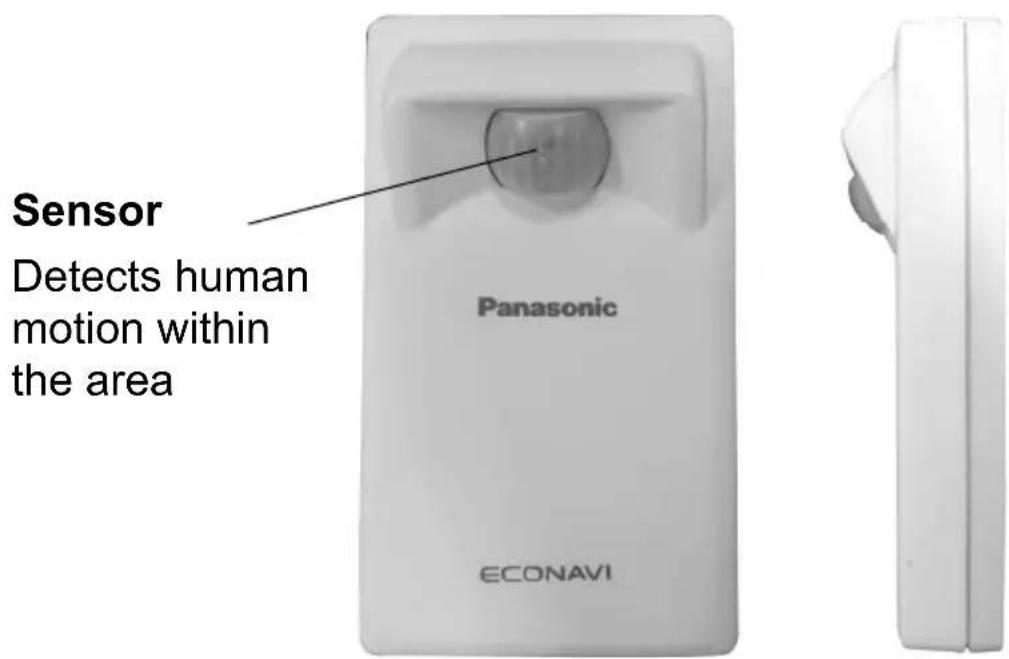
Notes
- The sensor designed to detect heat transfer detects not only human bodies but also moving objects that generates heat. (For example, moving animals, an infrared heater's oscillating operation, etc.)
- The sensor may not be able to detect people who move slightly.
- People who have a small exposed-area of the skin may cause a decrease in the sensitivity of the sensor.
- If the ambient temperature exceeds 30^ , the sensor may not be able to detect people.
- When more than one indoor unit are operating in large room/area, the effect of energy saving may be affected by room conditions.
- If the sensor section is damaged or covered by oil, dust or soot, etc., it may not be able to detect people.
Guideline for detection area
The sensor is unable to detect the presence of humans within about 1m from the wall.
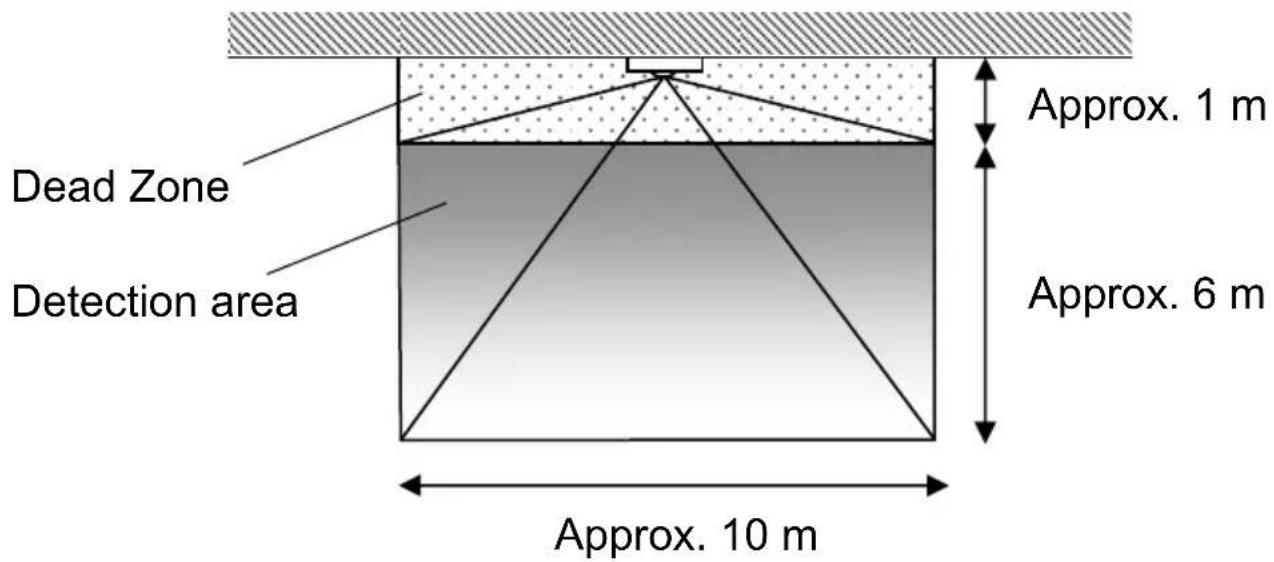
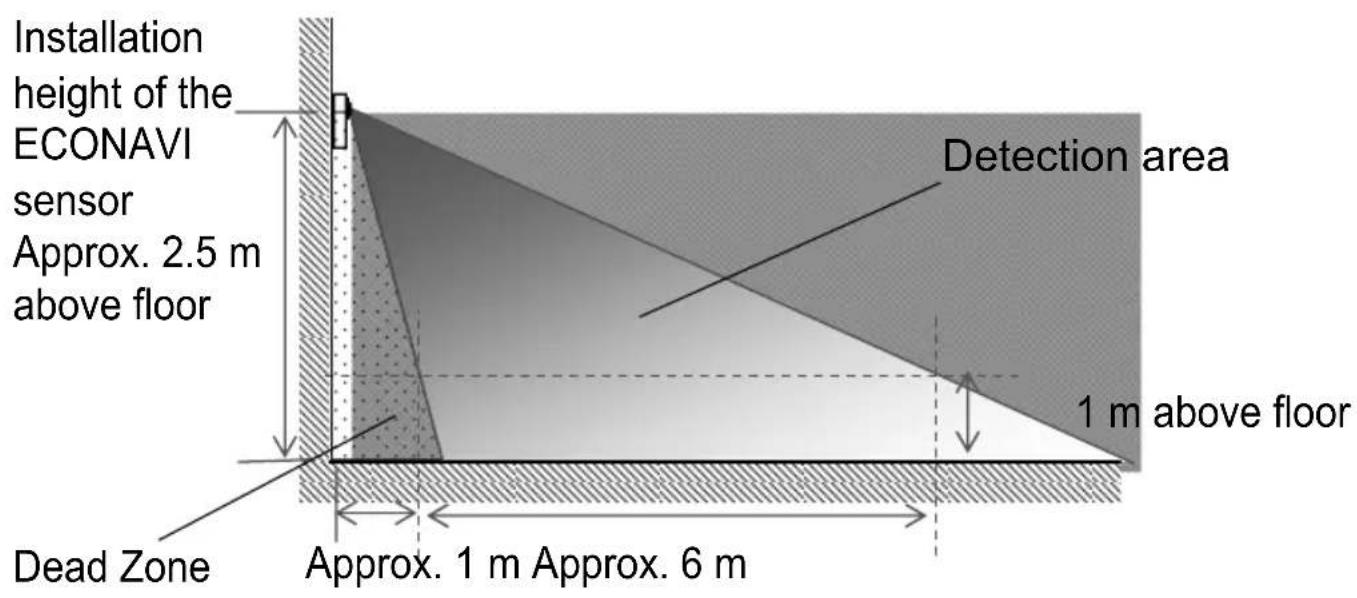
Notes
- The further away people are from the sensor, the higher the magnitude of movement is required for the detection of people.
- The sensor is unable to detect human motion in the dead zone.
On/off setting Procedure of ECONAVI function
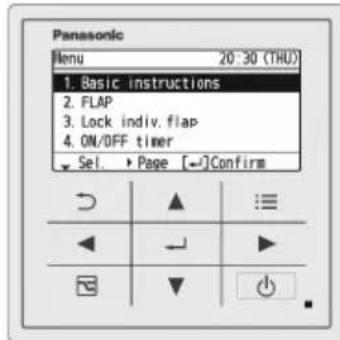
Using the High-spec Wired Remote Controller, you can switch the ECONAVI function ON/OFF.
Notes
-
If you are using a remote controller other than High-spec Wired Remote Controller, refer to the appropriate Operating Instructions for instructions. If the Operating Instructions does not contain instructions for operating the ECONAVI function, your remote controller may not support ECONAVI.
-
Display the [Menu] screen.

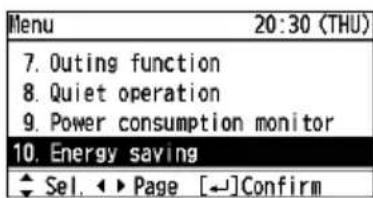
- Select [10. Energy saving].

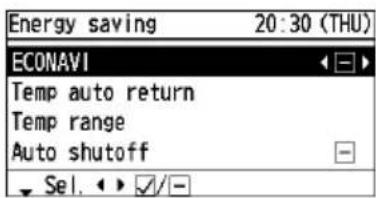
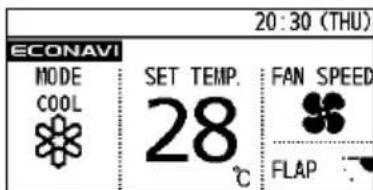
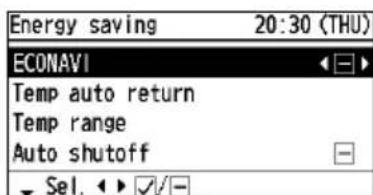
- Select [ECONAVI].

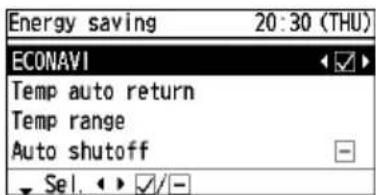
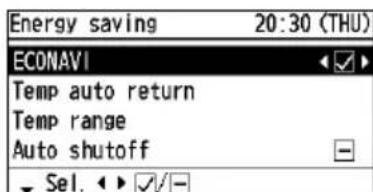
- Switch ECONAVI to ON or OFF.

- Finish the setup.

(Press 2 times to finish.)
EN
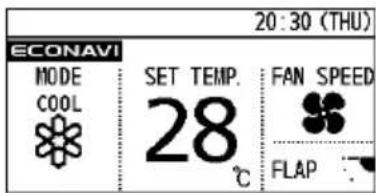
*When ECONAVI is enabled ECONAVIear.
When the indoor unit is stopped
ECONAVI will disappear.
WARNING
- Please do not turn the ECONAVI function ON in areas only with infants, babies, or people with disabilities. In situations with limited or no human motion, the sensor may consider there to be no human activity and turn off the unit.
Notes
-
Turn the ECONAVI function OFF if:
-
You want to maintain the room temperature at a set temperature.
-
You want to keep air conditioner running while nobody is in a room.
-
The sensor fails.
-
Only infants, babies, or people only with disabilities are in the room.
Troubleshooting
| Problem Cause | Solution | |
| Sensor is unable to detect human movements. | There are objects in front of the sensor. | Move the objects to an area which will not impede the sensor detection. |
| There is too small a difference between the room temperature and the body temperature. | Cool down the room temperature. | |
| The sensor is unable to detect activity within 1 m from the wall. | ||
| There is not enough exposed skin for the sensor to detect human activity. | ||
| The sensor is dirty. | Gently wipe the sensor clean with a dry cloth. | |
| The remote controller screen displays a flashing ECONAVI. | Faulty sensor or incorrect installation. | Turn OFF the ECONAVI function with the remote controller and contact the retailer or point of purchase with the Model No. and problem. |
| The remote controller screen does not display the ECONAVI. | The indoor unit has stopped. | Turn on the indoor unit. |
| The ECONAVI function is set to OFF. | Turn the ECONAVI function ON with the remote controller. | |
| The remote controller may not support the ECONAVI function. | If its Operating Instructions does not contain instructions on how to set up the ECONAVI function, the remote controller does not support it. Please contact the dealer. | |
| The indoor unit may not support the ECONAVI function. | If you turn the ECONAVI function ON with the remote control but there is no change, the indoor unit does not support the ECONAVI function. Please contact the dealer. |
Specifications
| Model No. CZ-CENSC1 | |
| Dimensions (H) 120 mm × (W) 70 mm × (D) 32 mm | |
| Weight 75 | g |
| Temperature/Humidity range | 0 °C to 40 °C/20% to 80% (No condensation) * Indoor use only. |
| Power source DC16 V (Supplied from indoor unit) | |
| Connections 1 sensor per indoor group | |
Table des matieres
IpaBnBhIe DeIcTBnHepaBnBhIe


ПРЕДУПЕЖДЕНЕ

He nCNoIb3yIte daHbI npI6Op B nOteHcnaJIbHO B3PbIBOONaCHO cpeJe.

B cnyuae HeNCnpaBnOCTn np6opa, He nbItaTeCb OTpeMOHTnpoBaTb erO camocToTeJbHo.ДЯ peMOHTa IIN yTNII3aUIn np6opa obpaaATecb K dIJIepy no PPOdaXam IN B cepBnC-zeHtp.

B cIyuae BO3HnKHOBeHna ABapnHOn CNTyaUuN, BbIKIIOUHTe BNJKY NITaHn I3 PO3eTKN, BbIKIIOUHTe aBTOMaTNUeCKn BbIKIIOUaTeJIb IJIb BOCNoJIb3yIteCB yCTpOJCTBOM, OTCoeDnHraIOUIm CNCTeMy OT CETn 3JIeKTPoCHa6JKeHnA.


ПРЕДОCTEPEЖЕНЕ

3TOT np60p He npedHa3Hauen dIy nCnoJb3OBAHn IIOdbMn (BkJIouyaeJeTei) C OrpaHnueHHbIMN 4n3nuecknMn, CeHCOPHbIMN nIIN yMCTBeHHbIMN CNOc6HOCTaMn IIO6o HeIOCTaTOUHbIM ONbITOM N 3HaHnAIMN, 3a NCKJIIOUeHNEm CnyuAEB, KOrda OHn HaxODaTcN IOd npncmOTpom JInca, OTBeTCTBEHHORo 3a INx 6e3ONaCHOCtB, INN NOlyuINn OT HeRo yKa3aHnN PO NCNoJb3OBaHnIO np6opA. DeTN DOJXHbI HaxOHTbcra IOd npncmOTpom, YTO6bI He DOynCTNTb INx INrP C np6Opom.

He kacaitecbpnp6opamokpbimnykamn. He moTe BDOI.
RU
Mepbl ppeoctopoXHOCTn prn nCNoJb3OBaHnn
He nCnoB3yIe B cJeDyIOx MecTaX:
- Где влajхноctb/codepkaHne macna/Bn6paunЯВЯETcaype3MepHBIM,гдообopydOBaHne 6ydeT noDbepraTbcBBO3dIeCTBnIO npAmbIX COJHeuHbIX JyuEi, B6JIINN NCTOUYKOBTePNa IInr GdE BepoTHO obpa3OBaHne KOHNcata.(B npOTNBHom clyuae, moXeT npOn30uTn c6oJ.)
- Ie npncyTCTByeT ype3MepHbI shym. (B npOTNBHom cIyae, 3TO MOKeT npNBecTN K HeNCnPaBHOCTN.)
- Датчник ECONAVI позднадуен目前国内 Исторistically TOЛько в РOMEШени.
He noBpeJdaIte n He cIapanaTe NOBepXHOCTb CeKcHn DaTcNka. (B npOTnBHom clyuae, daTcNK MOKeT OKa3aTBcR He B COCTOHN npaBnJIbHo ONpeJeTb.)
He hadabnBaTe Ha ceKuIO daTUnKa. (Moxet 6bITb IOBpeJdeHa ceKun DaTUnKa.)
He nCnoJb3yIte dIy quCTkn 6eH3nH, pactBOpntJIb dIy KpaCKn IIN XIMnueckn o6pa6oTaHHbIe caIΦeTKN. (3TO MOxET npNBecT N K oBeCsBeuBaHnO IIN DeΦopMnpOBaHnO.)
- Ecni ceKzna daTUnka 3aIpaTHo npOTpnte ee cyXoTkAhbIO.
- Ecni DaTnK CInbHo 3aIrp3HeH, CMOUHTe TkaHb B BoHOM pactBOpe HeITpaJIbHOrO MOIOSeRo CpeIcTBa, TuaTeIbHO OToXmTe I npOTpNTe DaTnK DouNCTa. Pocne 3TOrO aKKypaTHo npOTpNTe CeKzIIO DaTnKa CyXoJ TkaHbI.
O63op Функции ECONAVI
ДатунК ECONAVI обаружиBaet человеческуоakTNBHOCTьИ эКOHOMТэHerpгиВЗвсIMOCtNOTypOBHЯakTNBHOCTN.
Kayinci3dk shapapapbl

ECKEPTY
Булбелгкалыхаразкага hemece enimre ce6en 6oJatbH kayinti hemece katepni KOndaHbIC kaJNbI eckepTei.

CAKTAHdbIPY
Булбели KaTTbIжарakatka Hemece KypaIbIH Hemece DvHne-MyNikTIn 6vNiHyiHe ce6en 6oNaTbIH KayinTi Hemece KaTepni KOnDaHbIC KaJIbI eCkepteI.

OpHdanybl Tnicti epeketTep Tbibim caibirran epeketTep

ECKEPTY

- [ECONAVI] TaHdaHbI3.

- ECONAVI Функцясьин KOCY Hemece - ΘШIPY Киіпe OрнаТынБi3.

- Ophatydbia aKaTahbI3.

(AaKtay ywiH 2 pet 6acbIhbl3.)
* ECONAVI yHkCnYcbl Kocblfah Ke3de
EeNaeOJaDbI.
Iwki 6JOK TOKtaTbIFaH Ke3ne
ECONAVI KepiH6eN KeTeDi.
ECKEPTY
ECONAVI yHKnCnBIn KaHa TyFaH HepcteJep, banaJap XHe KaBineTepi WeKTeJreH aamdap 6ap aMakTapda KOCnAHbl3. WeKTeJreH HeMece aam KIMbIbI JOK 6oNfA HkaFda, KaDafa aam apeKeTi JOK eKeHH aHbIKtan, KypblfBHLb EwipeDi.
EckepTneIep
ECONAVIФункцясьIH ΘшIPIH3,erep: -6oJImeHIn TempepatypacbIH opHaTbINfAH Tempepatypada caKtafbHbI3 KeInce.
-
6eImeJe eKIM 6oImaHaH Ke3De aya KOHdNcNoHepiH icTeT TypFaHbIH KaIacAHy3. -KaIaF aICTeMei KaIdbI.
-
БалмendeTekжанТуганНэрстелер,балалap hemecekabineTrepiшктелrenадamdap 6ap.
AkaayIbIKTapdbI XOIO
| Акayльб Собп | Шебимi | |
| Када浪费адам КIMылдарын аныктай алмайды. | Када浪费адам алдынгы Жа浪费а шakандай шakандай шakандай шakандай шakандай шakандай шakандай шakандай шakандай шakандай шakандай шakандай шakандай шakандай шakандай шakандай шakандай шakiman шakiman шakiman шakiman шakiman шakiman шakiman шakiman шakiman шakiman шakiman шakiman шakiman шakiman шakiman шakiman шakiman шakiman шakiman шakiman шakiman шakiman шakiman шakiman шakiman шakman шakiman шakiman шakiman шakiman шakiman шakiman шakiman шakiman шakiman шakiman шakiman шakiman шakiman шakiman шakiman шakiman шakiman шakiman шakiman шakiman шakiman шakiman шakiman шakiman шakinan шakiman шakiman шakiman шakiman шakiman шakiman шakiman шakiman шakiman шakiman шakiman шakiman шakiman шakiman шakiman шakiman шakiman шakiman шakiman шakiman шakiman шakiman шakiman шakiman шakuman шakiman шakiman шakiman шakiman шakiman шakiman шakiman шakiman шakiman шakiman шakiman шakiman шakiman шakiman шakiman шakiman шakiman шakiman шakiman шakiman шakiman шakiman шakiman шakiman шak Rim шakiman шakiman шakiman шakiman шakiman шakiman шakiman шakiman шakiman шakiman шakiman шakiman шakiman шakiman шakiman шakiman шakiman шakiman шakiman шakiman шakiman шakiman шakiman шakiman шakrim шakiman шakiman шakiman шakiman шakiman шakiman шakiman шakiman шakiman шakiman шakiman шakiman шakiman шakiman шakiman шakiman шakiman шakiman шakiman шakiman шakiman шakiman шakiman шakiman шakimas шakiman шakiman шakiman шakiman шakiman шakiman шakiman шakiman шakiman шakiman шakiman шakiman шakiman шakiman шakiman шakiman шakiman шakiman шakiman шakiman шakiman шakiman шakiman шakiman шakim шakiman шakiman шakiman шakiman шakiman шakiman шakiman шakiman шakiman шakiman шakiman шakiman шakiman шakiman шakiman шakiman шakiman шakiman шakiman шakiman шakiman шakiman шakiman шakiman шakIM шakiman шakiman шakiman шakiman шakiman шakiman шakiman шakiman шakiman шakiman шakiman шakiman шakiman шakiman шakiman шakiman шakiman шakiman шakiman шakiman шakiman шakiman шakiman шakiman шakimar шakiman шakiman шakiman шakiman шakiman шakiman шakiman шakiman шakiman шakiman шakiman шakiman шakiman шakiman шakiman шakiman шakiman шakiman шakiman шakiman шakiman шakiman шakiman шakiman шak Marian шakiman шakiman шakiman шakiman шakiman шakiman шakiman шakiman шakiman шakiman шakiman шakiman шakiman шakiman шakiman шakiman шakiman шakiman шakiman шakiman шakiman шakiman шakiman шakiman шakian шakiman шakiman шakiman шakiman шakiman шakiman шakiman шakiman шakiman шakiman шakiman шakiman шakiman шakiman шakiman шakiman шakiman шakiman шakiman шakiman шakiman шakiman шakiman шakiman шakadan шakiman шakiman шakiman шakiman шakiman шakiman шakiman шakiman шakiman шakiman шakiman шakiman шakiman шakiman шakiman шakiman шakiman шakiman шakiman шakiman шakiman шakiman шakiman шakiman шakwan шakiman шakiman шakiman шakiman шakiman шakiman шakiman шakiman шakiman шakiman шakiman шakiman шakiman шakiman шakiman шakiman шakiman шakiman шakiman шakiman шakiman шakiman шakiman шakiman шakilan шakiman шakiman шakiman шakiman шakiman шakiman шakiman шakiman шakiman шakiman шakiman шakiman шakiman шakiman шakiman шakiman шakiman шakiman шakiman шakiman шakiman шakiman шakiman шakiman шakalan шakiman шakiman шakiman шakiman шakiman шakiman шakiman шakiman шakiman шakiman шakiman шakiman шakiman шakiman шakiman шakiman шakiman шakiman шakiman шakiman шakiman шakiman шakiman шakiman шak alan шakiman шakiman шakiman шakiman шakiman шakiman шakiman шakiman шakiman шakiman шakiman шakiman шakiman шakiman шakiman шakiman шakiman шakiman шakiman шakiman шakiman шakiman шakiman шakiman шak<|im_start|> | |
| Акayльк Соб ecbi | Шебимi | |
| Кашиктын баскару пьытінін экранында ECONAVI Керсetedілмейді. | Iшki 6лok ТOKтулді. | Iшki 6лokтулді косьініз. |
| ECONAVI Функциясы ӨшIPУ куіие орнатулган. | ECONAVI Функциясын Кашиктын баскару пьытіmen КСынБ3. | |
| Кашиктын баскару пьыті ECONAVI Функциясын Колдамayы МуMKін. | Еrep онын, Пайдалиу жениgeri нүскayларында ECONAVI Функциясын орнау туранынүскayлар бOLмаса, Кашиктын баскару пьыті оны Колдамayы. Дilepre хабарласьнБ3. | |
| Iшki 6лok ECONAVI Функциясын Колдамayы МуMKін. | Еrep ECONAVI Функциясын Кашиктын баскару пьытіmen КОCCAHы3, біра шkaндані озrewic Боммац, onda{iшki 6лok ECONAVI Функциясын Колдамayы. Дilepre хабарласьнБ3. | |
TexHnKaJIbIK cnPaTTaMaJaIapbl
Information on hazardous constituents as specified in sub-rule1 of rule16 in electrical and electronic equipment.
Declaration of Conformity with the requirements of the E-Waste (Management) Amendment Rules, 2023 with the sub-rule1 of rule16 limits with respect to Lead, Mercury, Cadmium, Hexavalent chromium, Polybrominated biphenyls, Polybrominated diphenyl ethers.
The content of hazardous substance with the exemption of the applications listed in SCHEDULE II of the E-Waste (Management) Amendment Rules, 2023 :
- Lead (Pb) – not over 0.1% by weight;
- Cadmium (Cd) – not over 0.01% by weight;
- Mercury (Hg) not over 0.1% by weight;
- Hexavalent chromium (Cr^6+) not over 0.1% by weight;
- Polybrominated biphenyls (PBBs) – not over 0.1% by weight;
- Polybrominated diphenyl ethers (PBDEs) – not over 0.1% by weight.
For the purpose of recycling to facilitate effective utilization of resources, please return this product to a nearby authorized collection center, registered dismantler of recycler, or Panasonic service center when disposing of this product.
Customer care number ( Toll free ) : 1800 103 1333 ,1800 108 1333
Please see the Panasonic website for further information on collection centers, etc. or call the customer care toll-free number https://www.panasonic.com/in/corporate/e-waste-management.html
| Do's & Don'ts | ||
| S.No. | Do's Don'ts | |
| 1. | All electrical and electronic products are required to be handed over only to the Authorized recycler. | The product should not be opened by the user himself / herself, but only by authorized service personnel. |
| 2. | The product should be handed over only to authorized recycler for disposal. | The product is not meant for re-sale to any unauthorized agencies / scrap dealers / kabariwalas. |
| 3. | Keep the product in an isolated area, after it becomes non-functional / unrepairable so as to prevent its accidental breakage. | The product is not meant for mixing into household waste stream. |
| 4. | Refer to Operating Instructions for handling of end of life products. | Do not keep any replaced spare part(s) from the product in an exposed area. |
| 5. | Always dispose of products that have reached end of life at Panasonic Life Solutions India Authorized Service Centre. | Do not donate old electronic items to anybody. Do not dispose of your product in garbage bins along with municipal waste that ultimately reaches landfill. |
| 6. | Wherever possible or as instructed, separate the packaging material according to responsible waste disposal options and sorting for recycling. | Do not give e-waste to informal and unorganized sectors like Local Scrap Dealers / Rag Pickers. |
HΦopmaunnaInnoJb3OBaTeJIeB PΦ
<Ппсдунрждени>
CneyuTe HnKepeBHeHbIM npabuIam,ecnN nHOe He yKa3aHO BdpyrNX DOKyMeHTax.
1.YcTaHaBnBaIte np6Op Ha TBepoN pIOCKoN NOBepxHocTN,3a NCKIOUeHNEM OTCOeHNHEMbIX ININ HeCbEMbIX YAcTeI.
2. XpaHnTB BCyXOM, 3akpbYOM NOMEUeHNN.
3.BoBpeMa TpaHcnpTupOBKn He 6pocatb,He NoDBepraTb H3nHne Bn6paunn nn ydaPam O npyRn ne ppeMeTbI.
4. YTNIN3NPOBaT B COOTBETCTBn C HauHOHaJIbHbIM N/IN MecTHbIM 3aKOHODaTeJIbCTBOM.
Ppabnna n ycnoBna pean3aunn He yctaHOBJIeHb I3ROTOBNTeJeM N DOJXHb COOTBeTCTBOBaTb HaIOHOJIbHOMy IIN MecTHOMY 3aKHOJaTeNbCTBy CTpaHb peaJIn3aunn TObapa.
Bnpo6JeHo:
PnHaCoHnK KopnpaHn
1006,Oa3aKaIOMa,KaIOMa-wn,
Ocaka,571-8501JnoHn
UmnpTe
OOO"PanaHcOnHK Pyc",115162,r.MoKcba,yn.7a6oNoBka,d.31r
3TaxnomeeHne aHTpecoJIb 1 3TaKa/10
Ihopmaia InKopncTybaHb YkpaHa
YnoBHOBaXeHnIpeDCTABHNK:
TOB“NAHACOHIKYKPAIHAJIITD
Byn.BacinbkiBcKa,30,M.KniB 03022,YkpaHa

«Information for users in the Republic of Kazakhstan» in Kazakh language
< Eckepty>
Erepackka kondaMa Kxkattapda KepeTINmereH KaFma,TeMeHderi WapTTapdbOpbHdaHb3.
- Teric, 6epik 6eTke opHaJaCTbIpbHbI3, TEK aIbHaTbIH 6JIWeKTepe Hemece Ko3FaJMaIbTHbIH 6JIWeKTepeH 6aCaKa.
- Ka6bIK KHeK Kpyfak Kepde caTay KepeK.
- Tacimlanaydykynatycbi3,acaBn6paunrcbi3xHe 6acka 3aTapFa corycbi3 xacay KepeK.
- KaDere kapaTydbI yNTTbIK KHe JKeprinikTI 3aHapFa caikec Xacay KepeK.
Caty wapTTapbEHNipyWimeH opHaTbIMarAH XHe MemNeKeTTIH TayapDbI naJaAHydbH yTTbIK Hemece JepriikTi 3aHapbHa caB6onybl KepeK.
eHndipyuwi
PanhaoHnK Kopnp3uH
1006,Oa3a Kaoma,Kaoma-wn,
Ocaka,571-8501Xanohn
IMNOpTep
KUc《nHaHcOHPKyc》
Pecen, 115162, Møckey, ŠaβoNobka κ-ci, 31Γ yι, kaβaT/δεηme
aHTpeoB1 Ka6aT/10
Ka3akctah Pecny6nKacbI TeppntOpncbHdaftbEHM canacb6oBbHsa Hapa3blbIKTapdb Ka6bldaTbH yekinetti MybIM:
NahacOHnK MapKeTnHr TMd AK ekindi, Ka3akTaH, 050010, AImaTb K., DoctbKa daHfbnbl 192, 3-ki Ka6at
Panasonic aknapaT optalbIfb:
+7 (727) 330-88-07 -Алматы К. Мен Кьрfb3ctaHHaн KOHbpay wany yuIN.
8-300-0-809-809 - Kaazakctah ayMaftbHaJa XepriNkTI yIbI baiNaHbIC neH KanaIbIK onePaTOpnapBHaH TerIH KoHbIpay Wany.
HOpmaunIy nonb3oBateeIn B Pecny6nke Ka3axctan
OprHn3aun, yonHMOeHHa Ha npHnTne npTeH3n no KaueCTbpy npOdykUnn Ha TeppuTOpn Pecny6nKuKaaxCTan:
PpeCTaBtEnbCTBO AO "PaHacoHnK MapKeTnHr CHF Ka3axctan, 050010 r. AnMaTbI, PpocneKT DocTBk 192, 3- n 3aX.
HnphopmaioHHbI ueHtp Panasonic:
+7 (727) 330-88-07 -ДязBOHкOB n3 r. Аматы И Кргнстana.
8-800-0-809-809-6ecnnnathbI 3BOHOK c roPOdcknx MObuNbHbIX TeIEcFOHOB MeCThbx COToOBbIX onepaTopoB B npedeNaX Ka3axCTaHa.
Contact in the UK
Panasonic UK, a branch of Panasonic
Marketing Europe GmbH, Maxis 2,
Western Road, Bracknell, Berkshire, RG12 1RT
Panasonic Corporation
http://www.panasonic.com
Authorized representative in EU
Panasonic Testing Centre
Panasonic Marketing Europe GmbH
Winsbergring 15, 22525 Hamburg, Germany