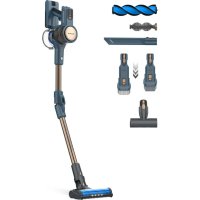
Homeland Digital Animal Flex - Broom TAURUS - Free user manual and instructions
Find the device manual for free Homeland Digital Animal Flex TAURUS in PDF.



| Product type | Cordless stick vacuum cleaner |
| Brand | Taurus |
| Model | Homeland Digital Animal Flex |
| Power source | Rechargeable lithium-ion battery |
| Battery reference | S780 (INR18650-25PG) |
| Charging time | 4 to 5 hours (first charge 6 hours) |
| Estimated runtime | Approximately 30 to 45 minutes |
| Dust container capacity | Approximately 0.5 L |
| Filters | HEPA filter, stainless steel filter, removable filter |
| Power levels | 3 speeds: Eco (blue), Low (green), Maximum (red) |
| Display | LED screen with battery level and blockage indicator |
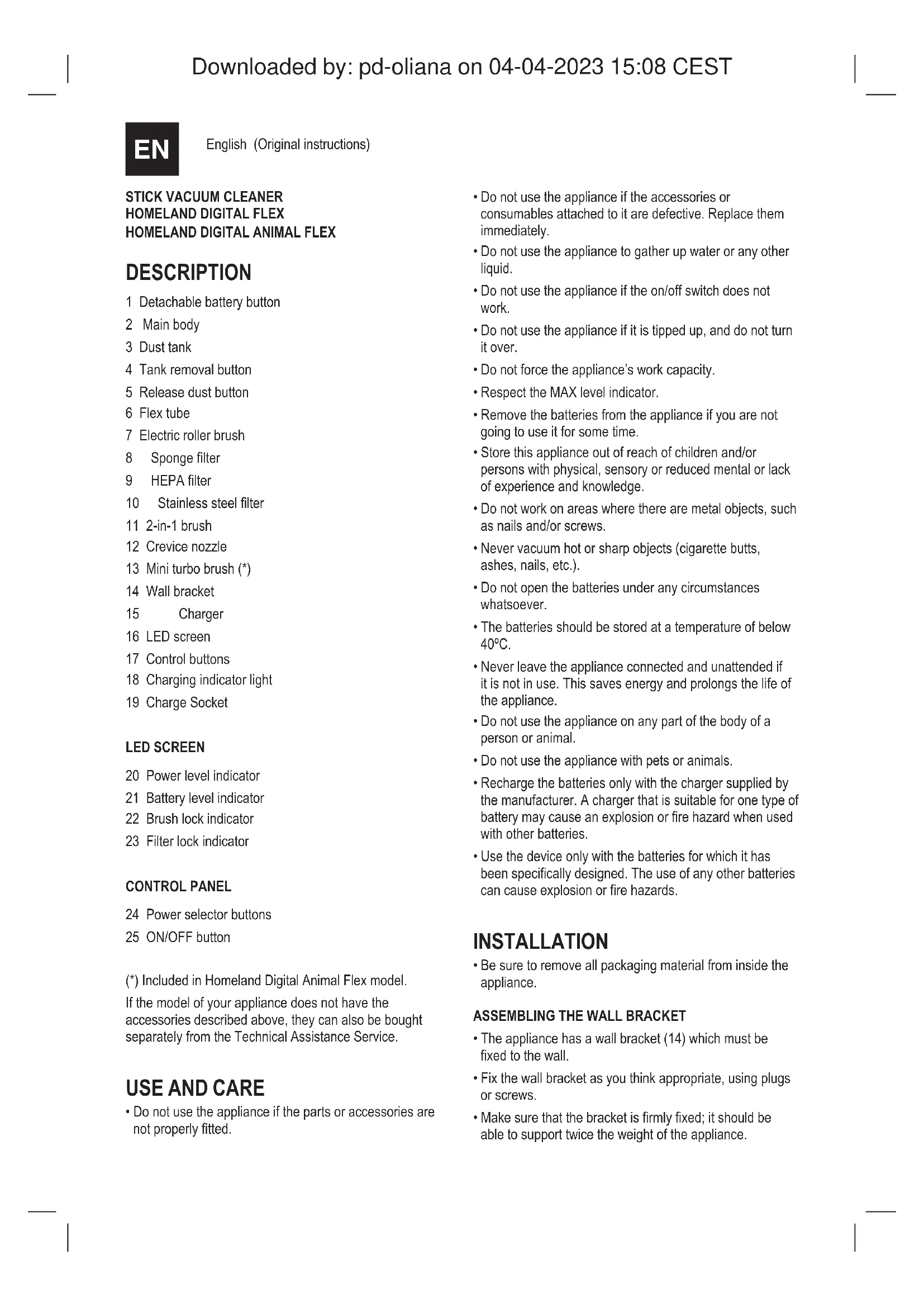
| Included accessories | 2-in-1 brush, crevice nozzle, mini turbo brush, wall mount, flexible hose |
| Anti-clogging function | Anti-clogging system with warning light |
| Folding | Foldable for easy storage, integrated parking |
| Approximate net weight | 2.5 kg |
| Approximate dimensions | 110 x 25 x 20 cm |
| Maintenance | Emptying the container, cleaning filters and rotating brush |
| Safety | Do not use on animals, avoid water, keep away from children |
| Spare parts | Battery, filters, brush (available from technical service) |
Frequently Asked Questions - Homeland Digital Animal Flex TAURUS
User questions about Homeland Digital Animal Flex TAURUS
0 question about this device. Answer the ones you know or ask your own.
Ask a new question about this device
Download the instructions for your Broom in PDF format for free! Find your manual Homeland Digital Animal Flex - TAURUS and take your electronic device back in hand. On this page are published all the documents necessary for the use of your device. Homeland Digital Animal Flex by TAURUS.
USER MANUAL Homeland Digital Animal Flex TAURUS
HOMELAND DIGITAL FLEX HOMELAND DIGITAL ANIMAL FLEX
EN. Instructions for use
FR. Mode d'emploi
HOMELAND DIGITAL FLEX
HOMELAND DIGITAL ANIMAL FLEX
DESCRIPCION
English (Original instructions)
STICK VACUUM CLEANER
HOMELAND DIGITAL FLEX
HOMELAND DIGITAL ANIMAL FLEX
DESCRIPTION
1 Detachable battery button
2 Main body
3 Dust tank
4 Tank removal button
5 Release dust button
6 Flex tube
7 Electric roller brush
8 Sponge filter
9 HEPA filter
10 Stainless steel filter
11 2-in-1 brush
12 Crevice nozzle
13 Mini turbo brush (^*)
14 Wall bracket
15 Charger
16 LED screen
17 Control buttons
18 Charging indicator light
19 Charge Socket
LED SCREEN
20 Power level indicator
21 Battery level indicator
22 Brush lock indicator
23 Filter lock indicator
CONTROL PANEL
24 Power selector buttons
25 ON/OFF button
(*) Included in Homeland Digital Animal Flex model.
If the model of your appliance does not have the accessories described above, they can also be bought separately from the Technical Assistance Service.
USE AND CARE
-
Do not use the appliance if the parts or accessories are not properly fitted.
-
Do not use the appliance if the accessories or consumables attached to it are defective. Replace them immediately.
- Do not use the appliance to gather up water or any other liquid.
- Do not use the appliance if the on/off switch does not work.
- Do not use the appliance if it is tipped up, and do not turn it over.
- Do not force the appliance's work capacity.
- Respect the MAX level indicator.
- Remove the batteries from the appliance if you are not going to use it for some time.
- Store this appliance out of reach of children and/or persons with physical, sensory or reduced mental or lack of experience and knowledge.
- Do not work on areas where there are metal objects, such as nails and/or screws.
- Never vacuum hot or sharp objects (cigarette butts, ashes, nails, etc.).
- Do not open the batteries under any circumstances whatsoever.
- The batteries should be stored at a temperature of below 40^ .
- Never leave the appliance connected and unattended if it is not in use. This saves energy and prolongs the life of the appliance.
- Do not use the appliance on any part of the body of a person or animal.
- Do not use the appliance with pets or animals.
- Recharge the batteries only with the charger supplied by the manufacturer. A charger that is suitable for one type of battery may cause an explosion or fire hazard when used with other batteries.
- Use the device only with the batteries for which it has been specifically designed. The use of any other batteries can cause explosion or fire hazards.
INSTALLATION
- Be sure to remove all packaging material from inside the appliance.
ASSEMBLING THE WALL BRACKET
- The appliance has a wall bracket (14) which must be fixed to the wall.
Fix the wall bracket as you think appropriate, using plugs or screws. -
Make sure that the bracket is firmly fixed; it should be able to support twice the weight of the appliance.
-
Fit the appliance into the wall bracket.
CHARGING THE BATTERY
- Caution: A new battery is not fully charged and must therefore be charged before the appliance is used for the first time.
- Charge the battery at an atmospheric temperature of between 4 and 40^ .
- Approximately 4 to 5 hours are needed for a complete charge of the battery. Never attempt to over-charge the battery (although it is recommended that the first charge of the battery be of 6 hours in duration).
- You can charge the battery completely assembled or disassembled from the main body.
- The pilot light (18) will flash to indicate that the charger is charging the battery. Once it is in full charge, the pilot light will stay on.
- If the battery is assembled into the main body, the display panel will show the battery level indicator (21).
- At the end of the time period specified above, remove the battery from the charger.
- When the battery is charged, disconnect the charger from the mains supply.
- Note: Do not use the appliance while it is connected to the charger.
INSTRUCTIONS FOR USE
BEFORE USE
- Please read the "Safety advice and warnings" booklet carefully before first use.
- Make sure that product's packaging has been removed.
- Before using this product for the first time, it is important to make a full charge of batteries.
- Prepare the appliance according to the function you wish to use.
USE
- Turn the appliance on by using the on/off button.
- Select the desired speed with the power selector buttons (24).

Eco level will show this symbol in blue Low level will show this symbol in green Max level will show this symbol in red
This stick vacuum cleaner has an anti-block system.
When this light is on (fl ash 6 seconds), it means that the brush is blocked with hair or something, and the brush roller needs to be cleaned.
U
When this light is on (fl ash 6 seconds), it means the machine is completely blocked, and the air inlet needs to be unblocked, or the HEPA fi liter needs to be cleaned.
FITTING AN ACCESSORY TO THE HAND VACUUM
- The hand vacuum is designed in such a way that it allows the following accessories to be fitted: (use the combination that best meets your requirements). (Fig. 1).
- 2-in-1 brush: Equipped with a brush at the end, which brushes the surface as it is used.
- Crevice nozzle: Specially designed for getting into cracks and diffi cult corners.
- Mini turbo brush (included in Homeland Digital Animal Flex model): Specially designed to remove areas with pet hair or hard fabrics. (Sofa, mattress, etc.).
- You can insert the accessories into the tube.
- Flex tube: press the button to bend the fl exible tube and access hard-to-reach areas. (Fig. 2).
ONCE YOU HAVE FINISHED USING THE APPLIANCE
- Turn the appliance off using the on/off button.
- Remove the battery from the appliance if you do not intend to use the appliance for an extended period.
Clean the appliance.
FOLDING POSITION
- This appliance can be folded totally for easy storage. (Fig. 7).
PARKING POSITION
- This appliance has its own parking position for comfortable and straightforward storage.
CLEANING
- Disconnect the battery charger from the mains and allow it to cool before undertaking any cleaning task.
- Clean the equipment with a damp cloth with a few drops of washing-up liquid and then dry it.
- Do not use solvents or products with an acid or base pH, such as bleach, or abrasive products, for cleaning the appliance.
- Never submerge the appliance in water or any other liquid or place it under running water.
- Empty the dust box when it is full (observation facilitated by transparent windows) or when vacuuming power is notably reduced.
- Open the lid of the dust box by pressing the release dust button to open the lower tank cover (5) and empty the contents into the appropriate waste disposal receptacle. (Fig. 3).
- Check the condition of the dust box filter and clean it if necessary.
CHANGING THE FILTERS
- Dust tank HEPA filter (high-efficiency air filter that efficiently retains spores, ash, sawdust, pollen, etc.), it is advisable to change it a least once a year or after every 50 hours of use or if its potency diminishes remarkably.
TO REMOVE THE FILTERS
- Remove the dust tank by pressing the tank removal button (4) and turning it clockwise, as indicated by the arrow and the padlocks. (Fig. 4).
- Extract the cyclone by turning clockwise. The filter is inside the cyclone, and to remove the filter from its anchor, turn it clockwise, as indicated by the arrow and the padlocks. (Fig. 5).
- To reassemble the filter, proceed with the above instructions, in reverse order.
CLEANING THE ROTARY BRUSH
-
To remove the brush:
-
At the bottom of the shoe, you have to move the tab towards the open padlock and unhook the side piece that fixes the brush and releases it. (Fig. 6).
- Remove the brush and clean.
To reassemble the rotary brush, follow the above instructions but in reverse.
To remove the mini turbo brush (included in the Homeland Digital Animal Flex model):
- Unlock the brush by turning the side lever anticlockwise and pulling it out.
-
Remove hair, dust, etc., that may have been caught.
-
To reassemble the mini brush, follow the above instructions but in reverse.
SUPPLIES
-
Supplies can be acquired from distributors and authorised establishments (such as filters, etc.) for your appliance model.
-
Always use original supplies designed specifically for your appliance model.
- The type reference of the battery pack for this appliance is S7C for model HVCA72590B (Homeland Digital Flex) and S780(INR18650-25PG) for model HVCA72591B (Homeland Digital Animal Flex).
HOW TO REPLACE THE BATTERIES
- CAUTION: The appliance must be disconnected from the mains when inserting/removing the removable batteries.
- CAUTION: Use only the type of battery with the specific reference for your hoover model.
- Using a different battery may cause an explosion or fire hazard.
- Remove the battery by pressing the removable battery button (1).
- Insert the new battery respecting the polarity, and slide it in until you hear a click.
TO REMOVE THE BATTERIES, ONCE THE LIFE OF THE APPLIANCE
- Remove the battery by pressing the detachable batteries button (1).
- Then, dispose of it into special containers. Do not disassemble or dispose of in fire.
FR
HOMELAND DIGITAL FLEX
HOMELAND DIGITAL ANIMAL FLEX
DESCRIPTION
HOMELAND DIGITAL FLEX
HOMELAND DIGITAL TIER FLEX
BESCHREIBUNG
HOMELAND DIGITAL FLEX
HOMELAND DIGITAL ANIMAL FLEX
BESCHRIJVING
HOMELAND DIGITAL FLEX
HOMELAND DIGITAL ANIMAL FLEX
DESCRIBE
PENTRU A ELIMINA FILTRELE
HOMELAND DIGITAL FLEX
HOMELAND DIGITAL ANIMAL FLEX
OPIS
6bIrapck (PpeBOH ha n3BbpueHHeHTe HnCtpyKun)
CTNK IPAXOCMYKAUKA
HOMELAND DIGITAL FLEX
HOMELAND DIGITAL ANIMAL FLEX
ONUCAHNE
1 POnDbNKeH 6yToH 3a 6aTepeRnTa
2 OCHOBHO TAYNO
3 Peepboap 3a npax
4 ByToH 3a npemaxBaHe Ha pe3epBoapa
5 ByToH 3a ocB60xDaBaHe Ha npaxa
6 _BKBaBa Tpb6a
7 EneKtpuecka poJkoBa yeTka
8 ΦπTbpcr6a
9 HEPA qnTbp
10 ΦntbpOT HepbKaema CTOMaHa
11 YeTka2B1
12 HaukpaHnK 3a ueHaTHnH
13 MmHn Typ6o YeTka (^*)
14 CTeHHa cko6a
15 3apnHO yctpoCTBO
16 LED ekpaH
17 ByToHn 3a ynpabVeHne
18 CBeTINHeH INnDnKaTop 3a 3apeXdaHe
19 He3do 3a 3apekdahe
LED EKPAH
20 INHdkaTOp 3a HNBO Ha MoUHOCT
21 HndkaTop 3a HnBO Ha 6aTepuIra
22 HdkaTOp 3a 3aknOyBaHe Ha YeTkata
23 INHdkaTOp 3a 3akIOUbaHe HaΦnITbpa
KOHTPOJIENIIAHEN
24 BytoHn 3a n36op Ha moUHOCT
25 ByToH BKJI / N3KJI
(*) Bкнючень модана Homeland Digital Animal Flex. Ako moJeJIbT ha BaUma ypei He pa3noIara c ropeonicaHnTe akcecoapn, Te MOraT da 6bDat 3akyNeHn n OTdeJIHO ot CepBn3a 3a texHnuecka nOmoU.
N3PON3BAHE IN TPNXN
He n3no3BaIte ypeIa, ako cactnte nn akcecoapnte He ca MOHTnpaHn npaBnIHO.
He n3no3BaIte ypeDa, aKo akcecoapTe nIN KOHCymaTnBITE, CbP3AHn C Hero, Ca depekTHn. 3ameHete nHe3a6abHO.
- He n3noi3Baai Te ypea, 3a da c6bupate Boda nn npyra TeuHocT.
He n3noJI3BaIte ypeJa, aKo npBkNIOVBaTeJrT 3a BKNIouBaHe/N3KlOuBaHe He pa60n.
He n3no3BaIte ypeia, aKe e HAKIOHn He ro o6pb- uaiTe.
- He hacnlaBaIte pa6oTocno6bHocTtHa ypea.
CnzaBaiTe HndikaTopa 3a HnBO MAX.
- ɪЗbaɪdete òatepɪnɪte OT ypeə, ako ḤЯma ᵠa roɪ nɪʒoɪn3-BaTeɪn3BecTHO Bpeme.
CbXpaHraBaIteTo3nYpeN3BbHObceraHaDeucaN/INn IInCa CΦn3HueCKn,CEH3OpHN NIn YmCTBeHN YBPexKaHn ININJINCAHaONITN3HAHnI.
- He pa6oTeTe Ha MeCTa, KbJeTo NmMa MetaJIHn IpeJMeTn, KaTO IIPOHO H/INN BHTOBe.
- Hikora He noicBaIte c npaxocmykaKa ropeu nn nOctpn npedmetn (pacobe ot uRapn, neen, npoHn n dp.).
- He OTBaPnIe 6aTePnIte np HnKaKbN o6cToTaeJICTBa.
- BaTePnIte TpI6Ba Da ce cIbXpaHЯBAt npi TempePaTpa noI 40^
- Hinkora He octabryte ypeDa BkIIOueH 6e3 Ha3Op, aKo He ce n3No3Ba. Taka ce neCTn eHeprn I ce ydIJIkaBA JINBObT ha ypeDa.
- He n3no3BaIte ypeDa Bbpxy KoITo n da e YacT OT TIAIO-TO Ha YoBeK nn XnBOTHO.
He n3no3BaIte ypea c domaunn IIO6mucu nn KINBOTHN.
- ReazapekdaIte 6aTePnITe cmo cbc 3apAnHOTo yctpoNCTBO, IpeOCTabeHO OT npOn3BOJNTeN. 3apAnHOyCTPOICTBO, KOETe e NOxOJaIO 3a eINH TIn 6aTePNMOKe Da npuHn EKcnNo3n INn ONaCHOCT OT NoXap, KOrato Ce n3non3Ba C dpYn 6aTePN.
- Ⅲπολ3baIte yctpoiCTBTO cAmO c 6aTePnITe, 3a KOnTo e cneuaHNO npedHa3NaHeHO. Ⅲπoλ3BaHTo Ha dpyu 6aTePnMOke Da npuHn EKcPiNo3n IIN OnaCHOCT OT noXap.
HCTAJIALIaIaIaIaIaIaIaIaIaIaIaIaIaIaIaIaIaIaIaIaIaIaIaIaIaIaIaIaIaIaIaIaIaIaIaIaIaIaIaIaIaIaIaIaIaIaIaIaIaIaIaa
- YBepeTeCe, Ye CTEOTCTpaHnIu CEIIaONaKOBbueH MaTePnaI ON BbTpEuHOCTTa Ha ypeHa.
CTJIO6BAHE HA CTEHHATA CKO6A
- YpeBt NMa CTeHnA Cko6a (14), KoTo Tp86Ba Da ce 3akpeni KbM CteHata.
3akpenete cTeHHata KOH3OJa no Ba7a npeeHka c NOMOHTa Ha IIO6eIN INN BnHTObE.
- YBepete ce, ye cKo6aTa e 3IpaBo FOKcnpaHa; Tp8Ba Da MoKe Da N3DbpxN DBA NbTN TerlNoTo Ha ypeDa.
-ПoctabeteуpeDAKOH3OJaTa3aCTeHa.
3APEKDAHE HABATEPURA
BHHMaHHe: Hobata 6atePnHa He e HanbHno 3apeHeHa n CneIOBaTeHNO Tp6Ba Da ce 3apei npEi ypeBt da Ce n3NON3Ba 3a PbpN pT.
3apekdaTe 6atepnaTn pnaatmocepha TEmnpaTypa Mejdy 4 n 40^
3a IIHOTo 3apeKdahe Ha 6atepnaTa ca Heo6xOdmm npn6nnnteHNO 4 do 5 yaca. Hnkora He ce onnTbaIte da npe3apeDITE 6atepnaTa (BbnpkeN Ye ce npenopbYBa TbbpOTO 3apeKdahe Ha 6atepnaTa da npodbnk6 yaca)
- Moxete da 3apekdaTe 6aTepeTnHaHbIHO crIIO6eHa nn pa3rno6eHa OT OCHOBHOTo TnO.
KoHTpOJIHATA NaMnUka (18) 3e Mira, 3a da nokaxe, ye 3aprIHO yCTPOIcTBO 3apeXda 6aTepeNra. CJeI KaTo e HAnbIHO 3apeHe, NInOTHaT aNaMnUka 3e ocTaHe BKIOUheHa.
Ako 6aTepeyra e MOHTnpaHa B OCHOBHOTo TAno, NaHeJIbT Ha DcPnEe Iue NOKaXe INDnKaTopa 3a HnBO Ha 6aTepeyra (21).
B KpaHa nocouehnnaNo-rope nepnoD ot BpeMe n3BaTe 6aTePnTa O3apAnHOTo yCTpoNCTBO.
Korato 6aTePnTa e 3apeHa, n3KJIuOeTe 3apJHOTO yCTpoIcTBO OT eNEkTpUHeckata MPeka.
3a6eJekKa:He n3non3BaIte ypea,doKaTo e Cbbp3An KbM 3apAHOTO yCTpoICTBO.
HCTPYKUN 3A YNOTPEBA
IPEENYIOTP6A
- MoJn, npOyTeTe BHNMaTeIHo 6poUpyaTa "CbBETn npEynPpeKdEHHa 3a 6e3oNaChocT" npEyn PbPbaTa yNoTpe6a.
- YBepete ce, ye onaKobkata Ha npOdykTa e npemaxHaT.
-Ппдддддддддддддддддддддддддддддддддддддддддддддддддддддддддддддддддддддддддддддддддддддддддддддддддддд徳нггггггггггg - PioIroTBete ypeDa cnopei fyuHKuYra, KOaTo NcKaTe da n3PON3BaTe.
N3I0JI3BAIITE
BkIIOUeTe ypeDa C NOMOuTa Ha 6yToHa 3a BkIIOUBaHe/ n3KJIIOUBaHe.
- Ⅰ36epete xenahata ckopocT c 6ytoHnTE 3a n36op Ha mouhoCT (24).
Eko HNBOTo Ⅲe NOKaKe TO3N CnMBoB CnHbO HnCKo HNBO Ⅲe NOKaKe TO3N CnMBoB 3eNeHo MaKcMaJIHOTo HNBO Ⅲe NOKaKe TO3N CnMBoB V cepBeHO
Ta3n npaxoxcmykaquKa nMa aHTn6JIOknpaua cncTeMa.
Korato Ta3n lamnnuKa CBETN (Mnra 6 cekyHn), TOBa O3HaayBa, Ye YETkata e 6nOKupHa C KOCMI Nn Heo Noo6Ho n PoJkata Ha YETkata Tp8Ba Da ce NoCHTn.
Korato Ta3n lammyka CBETN (Mira 6 cekyHn), TOBA O3NaHaBa, Ye MaunHata e HanbIHO 6IOkpana n BxOdbT 3a Bb3dyx Tp8Ba Da 6bDe OT6IO-KupaH nn HEPA qntbpbT Tp8Ba da 6bDe IOuHCTeH.
IOCTABRHE HA AKCECOAP KbM PbHATA IIPAXOCMYKAUKA
PbuynRT BaKyM e npoeKtnpaH no TaKbHaunH,Ye No3BOJRA MoTHnpaHeTo Ha CneHnTe akcecoapn: (N3No13BaIte KOM6nHaunrTa, KOaTO Hau-dOpe OTROBApra Ha BaUnTE N3NCBAHnR). (ФИr.1).
- YeTka 2 B 1 Cha6dH c YeTka B Kpa, KOrTo YeTka NOBbpxHOCTTA, DOKATO CE N3NON3BA.
- HakpaHnK 3a cenHaTnH: CneuaJHo npoeKTnpaHa 3a BnI3aHe BnyKaHTnH N TpydH bI.
MHN Typ6o YeTka (BKNIOeHa B MoedeJa Homeland Digital Animal Flex): CneuAnHO npoeKtpaH 3a O-CTpaHraBe Ha 30Hc KOCMN OT DOMaUHN IIObIMCuN NIN TBbpDn TBKaHN. (DUBaH, MaTpak N dp.).
- Moxte da noctabite akcecoapnte B Tpb6ata.
- TbBkaba Tpb6a: HATNCHEte 6yToHa, 3a da ORbHete TbBkabata Tpb6a n Da nonyuHte DocTbn Do TpyHODocTbHN MeCTa. (ФИг.2).
CNEI KATO IPIKNIQUHTE C N3NOJ3BAHETO HA YPEDA
-ИЗКПЮЧЕуpeда,кATOиЗПОЛЗВаTe6уTOHa3aВКПЮЧBAHe/ИЗКПЮЧВаHe.
- ɪn3baɪdete 6aTepeɪraTət ypeə, ako He Bb3HaMepeɪBaTe DaɪnⅢnoɪ3BaTe ypeə 3a npoɪbʌŋkɪTeŋeH nepɪoɪd OT Bpeme.
-Поочисте урета.
cIbBAEMAIO3NUIA
To3n ypeM MoKe Da ce CbHe HAnbJHo 3a NeCHO cbXpaHHeHe. (Φnr.7).
ПОЗИЦИ 3А ПAPКИPAH
To3n ypei nI Ma co6cTBHeHa nO3nui 3a npKnpaHe 3a ydo6Ho N IecHO cbXpaHHe.
ПОЧТBAHE
- 3KIOHOTe 3APJHOTo yCTPOINCTBO OT eJEKTPNueckata Mpeka nTO OCTaBeTe Da ce OXnAn, npEi Da 3aONHeTe KAKBOTO nDa e NOuNCTBaHe.
-Почисте obopydBaHeto C bnaKHa KbPna C hЯколКаKKM MNEU npenapaT nCne TOBA ro NODcywete.
He n3no13BaIte pa3TBOpntn nn npOyKtn c KncenHHo nn OCHOBn pH, kaTo 6eJnHa, nn a6pa3NBn npOyKtn, 3a noHCTbaHe Ha ypeJa. - Hikora He notanrYepeDa BbB BODa nnDpyra TeuHocT He ro NoCTabYte NOd TeuaBa BOda.
N3PPA3BAHE HA KYTNYA 3A NIPAX
- Ⅲnpa3Hete KyTnTa 3a npax, korato e nblHa (Ha6JIIOdeHneTo ce yIeChra BA OT npO3paHn npO3OpCu) nnKorato MOUHocTTa Ha npaxOCMyKauchata e 3HaHTeJHo HamaJeHa.
- OTBopete Kanaka Ha KyTnaTa 3a npax, KaTo HATnCHete 6yToHa 3a OCBo6oxDaBaHe Ha npaxa, 3a Da OTBopnte DonHnA Kanak Ha pe3epBoapa (5) n 3npa3He TcBbPkaHneTO B NODXoJaIuN CbD 3a IN3XBbPJIaHE Ha OTNaDbU. (ФИR.3).
- PpOBepTe CbCToHMeTo Ha qnITbpa Ha KyTnra 3a npax Iro NoHcTete, aKo e Heo6xOdmo.
CMRAHA HA ΦNITTPNE
HEPA qnIbtp 3a pe3epBoap 3a npax (BnCokoepeKTHBEN B3dywen qnIbtp, KOITo eFeKTNBHO 3aIbpxka cnpn, nenei, IbPBEHN CTbproTNH, ZBeTeH npaueu T.H.), npenopbYHTeNHO e da rO CMeHrTe NOHe BeDhJx RoDmHo uIN CNeI BCEKN 50 yaca ynotpe6a uIN aKO eFeKTNB-HOCTTa My HamaJe 3HaHTeNHO.
POUNHA DIGITAL ANIMAL FLEX
ONUCAHNE
1 CbemHnKa 6aTapeu
2 OchOBHoi Koprnyc
3 nblne6bopnHK
4 KhoNka ChrTna 6aka
5 OTnyCTNTe KHOJky nbjin
6 In6kaTpy6ka
7 3neKtpnueckarpoNkoBaa
8 Iy6aTbI qnIbTp
9 HEPA-Финьтр
10 Φильтnpи3нржкавеюшс стann
11 KNTb 2-B-1
12 电eBaaHacdaKa
13 MnHn-Typ6oouetKa (^*)
14 HacTeHHbIKKpOHHTeH
15 3apAHOe yCTpoIcTBO
16 CBETOINIOHyBn 3KpaH
17 KhoNk ynpaBneHn
18 INHdkatop 3apdKn
19 3apdHoe rHe3do
CBETOINOHbI3KPAH
20 HdkkaTOp ypOBHMoUHocTH
21 HndkaTOp ypoBn 3apda 6aTapei
22 HdkaTOp 6JIOKnpOBKn 1eTOK
23 HdkaTOp 6IOKnpOBKnΦnIbTpA
IAHENb ynpABJIeHnIa
24 KhoNKn BbI6opa MoUHOCHTN
25 KhoNka BKN/BbIKN
(*) Bкючeo H moeь Homeland Digital Animal Flex.
Ecni moeJIb BaIeRo npI6opa He Imeet OncaHbIX
BblIe npINHaJNeXHocTei, INx TaKke MOxHO npInOpeCTn
OTdIbHO B CnyKbe TexHNueCKoI NOIdepKKn.
NcIIOJIb3OBAHHe I yXoI
He nCnoB3yIe npB6p,ecnIeTaNnn npHaJNeXHOCHT He ycTaHOBneHbI DoJXHbIM 6pa3OM.
He nCnoB3yIte np6Op,ecn npnaeraembie K Hemy npHaJnxHcOHTN pACxoDhbIe Maepnabl HeNCpabHbI. HeMeJNeHHo 3aMeHInTe nx.
- He nCnoJIb3yIte npI6Op IaIc6Opa BOIbI INn IIO6oBdpyroJ KNDKoCTN.
- He nCnoB3yIte np6bOp, ecn nepeKIOuateIb BkIOUeHHe/BbIKIOUeHHe pa6oTaet.
He nCnoB3yIe npI6Op,ecn OH onpOKnHyT,He nepebopaHbaiTe erO.
- He φορεύργινητe paδοτος ΣΟβόθους έπρισαρα.
CneiTe 3a INHnKaTopoMaKcImaIbHorO ypoBna.
- BbHbTe 6aTaepeKn n3 npu6opa,ecnBbHe co6npaeteCb NM NOnb3OBaTbCk KaKoe-To BpeM.
XpaHnTe 3TOT npN6Op B HeNoctynHom IJnIeTei N/ nIN JInC OrpaHnueHHbIMn Φn3nueckmN, ceHCOPHBIMn INy MCTBeHHbIMn CnOCo5HoCTaMn INn C HeNoctaKom ONbTaN 3HaHn.
He pa6oTaTe Ha yuactkax C MeTaIInIYeCKIMn npedMeTAM, TaKIMN KAK IBO3DN N/INJ WypynbI.
HnKorda He nbineocobTe ropaue nIO ocTpbie npedMebl (okypkn,nenen,HOTNI T.D.).
- Hn npi KaKnx 6ObToaTeNbCTbX He BCKpbBaIte 6aTapeN.
- BaTapeu cneyuET xpaHnTB npu Tempepatye Hnke 40^
Hikorda He octabnIte np60npKIOeHHbIM n 6e3 npcMToPa, ecn OH He nCNoJb3yETc. 3TO 3KOHOmt 3HeprnIO npoDneBaet cPCK cyk6bl np60pa.
- He nCnoB3yIe npi6op Ha kaKoJ-ni6o qacTn TeNa YeNoBeKa nJIn XINBOTHO.
-He nCIOJIb3yIte npIbOp cDOMaUHIMM JXIBOTHBIM.
- Pe3apKaIte aKkMyJITOpbI TOJIbKO C NOMOuH2 3apJHOYcTPOINCTBa, NOCTABNREMORO npOn3BOJNTeJIeM. 3apJdHoe yCtPOINCTBO, NOXoJruee IJn OJHO TnIa aKKMyJITOPOB, MOKeT pInBecTn K B3pbIBy INIIN BO3rOpAHIO pRn NCNoJIb3OBAHmC DpyTMM aKKMyJITopAMN.
- UcnoIb3yIte yCTpoIcTBO TOnbKO c6aTapeMNI,ДЯ KOTopbIX OHO 6bIIO CNEuaNbHO pa3pa6OtaHO.ИсоIb3OBAHHe IIObIX dpyrnx 6aTapei MoKet npNBecTN K B3pBBy uIN BO3ropaHIO.
YCTAHOBKA
- 063aTeJbHo ydAnIte BeCb yNaKOBOHbIM MaTePnA1n3HyTp npi6opa.
CBOPKA HACTEHHOrO KPOHJTEHHA
-ПибборИМeET HAcTeHHbI KpoHHTeHn (14),KOTOpbI Heo6xOdmo3aKpeNtBHaCTHe.
3akpenTe HacteHHbI KPOHHTeH TAK, KaK Bbl CHTaTe HyKhbIM, INcNoJIb3yra IIO6eIN NII Wypynbl.
- Y6eIntecb, yTO KPOHHTeH HAdExKHO 3aKpePnneH; OHdoJIKeH BbIePKNBaTb BdBoE 6oJIbWnBec np6opa.
- YctahOBInTe npin6op B nacteHHb KPOHHTeH.
3APRDAKKYMNYTOPA
- Octopokhocb: HOBa 6atape 3apjkeHa He
NonHocbIO, NoTomy ee Heo5xoIMO 3apJNTb nepei
nepBbIM nCOnb30BaHHe m np6opa.
3apjkaTe akkymyIaTOp npu TempePaType OkpykaOuSei cpebl ot 4do 40^
Длгплновзардкakkymyлтopa trpe6yetcnpn6nnteNbHOOTdo5ycob.HNKordaHe nbTaIteCb nepe3apdntb 6atapeo (xotrayekOMeHnyetc,уTo6bl npBba zapdka 6atapennpoDOnkana6 yacob).
BbMOKeTe 3apRkaTb akkyMnyTOp B NOHocTbIO CO6paHHOM INI pa3o6paHHOM BnDE OT OCHOBHORO KOpNyCa.
KoHTpoJIbHaJaAMNoUka(18)6yDetMURAtB,POKa3bIbAa, YTO 3aprAnHoe yCTpoJcTBO 3apraKaet AKKymnIaTOp.Kak TOnbKO OH 6yDet NOJIHOCTbIO 3apxKe, KOHTpoJIbHaJaAMNoUka OCTaHETCBAKIIuOeHHoH. - Ecnn 6batape BCTaBHeHa B OCHOBH OKpIyc, Ha nanei dncnner oTo6pa3ntcra HndkaTOp ypoBna 3apra da 6batape (21).
-ПОИСТЕЧЕНУКAZAHHOrOВБИЕпERNoDAВРЕМENI3BNeKITE AkkMyJITOP 3APaHnOHOyCTPOnCTBa.
Korda aKKyMylrTop 3apxKeH,OTKIIHOHTe 3apdHoe yCTpoIcTB0 OT cETN.
-ПиMuEaHHe He nCnoJIb3yIte npI6Op, KOrJa OH NOKIIoueH K 3apAДHOMy yCTpoIcTBy.
HCTPYKUNIPOINPMHEHIO
IPEPENCIOB3OBAHNEM
- IpeqI nepBbIM nCNoIb3OBAHnem BHNMaTeJIbHO npouHTaIe 6yKnET "CobEtI n ppeDynpeXdEHHo no TexHnke 6e3OnaNchOCTn".
- Y6eintecb, yTO ynaKOBKa npOyKaTa ydaNeHa.
- Ipeed nepBbIM NcNoJIb3OBAHnEM 3TOro npOyKTA BaXHOIIOHOCTbIO 3apAaKKMyJrTOplbI.
- PnIOIROTOBbTe npIN6Op B COOTBeTCTBm C cyHKuNei, KOTOpYIO Bbl XOTnTE nCNOJb3OBaTb.
NCIOJIb3OBATb
BkJIIOHHTe pnp6Op C NOMOu bIO KHOPIK IN BkJIIOUcEHn/ BbIKIIOUcEHn.
BbI6epnteKeJenaemyCkOpocTbCnMOuH KHOIOK Bbl6opaMoUHOCTHN (24).

3ko ypoBeHb NOKaKET 3TOT CnMBON CnHM UBeTOM Hn3Kn ypoBeHb 6yDet OTO6paKaTb 3TOT CnMBON 3eJIeHbIM UBeTOM.
MaKcMmAbHbI yPOBeH bOKaXeT 3TOT CmBOJ KpaCHbIM 3TOT pyHoi nbIeOC nMeET aHTn6IOKNpOBOUHyo CnCTEmy.
Korda 3TOT INHnKaTop ropnt (Mnraet 6 cekyH), 3TO O3NaHaet, YTO UeTKa 3aBnKOpBaHa BOJocAMN HIN YEM-TO eEne, N UeToHbI BANK Heo6xOdmo OChCTNb.

Korda 3OT INHnkaTop ropnt (Mnraet6cekyH), 3TO O3HaayeT, YTO MaunHa NOJHOCTbIO 3a6nOKnpoBaHa, IN Heo6xOdmo pa36nOKnpoBaT bnyckhoe OTBepCTne dna Bo3dyxa nIN OHCTNTb
ФильтРHEPA.
YCTAHOBKA AKCECCYAPA HA PYHON IIJECOC
PyHNOIbJIeOCCKOHCTpyINPOBaH TaKIM o6pa3OM,TO Ha HrO MoXHO yCTaHaBnBaTb CNeDyUOuNE aKCECCyApbl: (NcNoJb3yIte KOM6nHaUNIO,KOTOPa HAUYuM 06pa3OM COOTBeTCTByET BaUM Tpe6oBaHnM). (Pnc.1).
KNTb 2-B-1 Ochaen TooukOHa KOHc, KOTopar HCTNT NOBepxHOCTb NO Mepe NcNoJIb3OBaHHa.
- ΚeIeBaH hacaIka: CneuIaIbHo pa3pa6oTaHa I nI npOHKnHOBeHnB U eJIIN u TpydHDoOCTyHbIe yIbI.
MHH-Typ6oetka(B KOMnIeKTe C MoJeBHO Homeland Digital Animal Flex): CneuaJIbHo pa3pa60taH dIy ydaIeHry UaCTKOB C wepcTbIO DOMaUHIX XKIBOTbIX INI TBePbIX TkaHei. (INBaH, Matpaun T.d.).
BbMOKeTe BCTaNTb akceccyapbl Tpy6ky.
Γn6ka Tpy6ka: HaxMMTE KONky, YTO6bI cORHyTb n6KyHO Tpy6ky INoJyUHTb DOCTyn K TpyHDOCTynhBIM MecTaM. (Pnc. 2).
TOOKOHUAHINNCIOJIb3OBAHNIPNBEOPA
- BbIKJIOUHTe npH6Op c nOMOuB KHOKN BkIIOueHnA/ BbIKNIOUeHnA.
ИЗВЕКЛТЕ АKKУМЛТОТ ИЗ пИБОпа, ecINи Bbl He co6ираTeecb ИСПОЛьЗOBaTb пИБОрВ TeЧЕнeДПИТЕЛБHORO ВРЕмEH.
OuHCTnTe npH6Op.
CKIADHOE NIOJOXEHNE
3TOT npB6op MOKHO NOJHOCbIO CNOXHTb Dnry yO6CTBa xpaHeHn. (Pnc. 7).
NAPKOBOUYOEIIOJOXEHNE
-3TOT npin6op nmeet co6ctbeHHoe napkoBOHoe noJIOXeHne dny ydo6Horo n IpocToR xaHHeHn.
YBOPKA
- OTKHOnHTe 3apRdHoe yCTpOInCTBO OT cTe n daTne emy OCTbITb, npExJe Yem pNcTpyNaTb K OChTKe.
- PpOtpnTe o6OpUdoBaHne BnaXHoT TpAknKoC doaBHeHem HeckOJIbKnx KaIeNb MoIOUeRo CpeDCTBa, a 3aTeM BbCyUHTe.
He nnoj3yTe nIy uCTkn np6opa pactbopnten nn cpeCTBa C KNCIOThbIM Nn IeNoCHbIM pH, TaKne KaOtBeNBaTeB, INN abpa3NBhle cpeCTBa.
Hikorda He norpykaite np6op B Body nIIO6yo DpyIyO KndKoCTb Hne IomeaaiTe erO IO npOTOHyIO BODy.
OuNCTKA IIbIIECBOPHNKA
- Onopoxhnyte nbIe6bOpHk, KOrda OH noJIOH (Ha6JIIOHeHne 6OJIeYaETcR npO3paHbIMN OKHAMn) IINKorDa MOUHOCTb nbIIEcoCA 3aMeTHO CHIXKaETC.
- OtkpoIte KpbIbKy nbIeNec6OpHnKa, HauKaB Ha KNHOnKy ФИКСАТОпа nbIeNec6OpHnKa, YTOБы OTKpbITb HINKHIOU КрblKy pe3epByapa (5) И BBICbIaTb COdEpXmOe B COOTBeTCTByIOUyEO EMKOCTb ДЯ YTNIN3aUNI ON TXODOB. (Pnc. 3).
- PpOBeBpTe COCTOHnne FmNbTpA PbIeSc6OpHnka n npN Heo6xoDMOCtN OOnCTNe erO.
3AMEHAФиltPOB
ΦnIbTp nblnc6opHnka HEPA (BbICOKo3cpeKTNBbI bO3dyuHbI φnIbTp, KOtOpbI 3cpeKTNBHO 3aDepKuBaet cnpbl, 30ny, ONNKN, PbIbUy I. D.), peKomeHdyETcMeHrTb He pexe OJHOro pa3a B rOd nIu Ype3 Kaqdbie 50 yacOB nCOnlb3ObaHnry nIu ecnn erO 3cpeKTNBHOCTb 3aMeTHO CHNKaeTcR.
YDAJIHEHMEΦNJIbTPOB
- CHIMITE nblnc60pHnK, HAKAB KHONKY CHTINpe3epByapa (4) n noBepHyB ee no Yacobon CTpeJIke, KAKyka3aHO CTpeJIKOI N 3AMKOM. (Pnc.4).
-ИЗВЕКЛТЕ ΚИΚΙΝΟ, NOВЕРΗΥΒ εἰΟ NO YACOBΟ CTPEΝΕ. ΦιΝΙΤΡ HAXODΙΝΤΑ BΗΥΤΡΙ ΚΙΚΙΝΟHA, έντοῦς Χητή ΦιΝΙΤΡ C εἰΟ ἀκΟρΑ, NOВΕPΗΝΙΤΕ εἰΟ NO YACOBΟ CTPEΝΙΚE,ΚΑΚ γΚΑ3aHΟ CTPEΝΙΚΟ Ι ΑΜΚΑΜΝ.(Pιс.5). - YTO6bI CO6paTb FmJIbTp, CNEyIe PnpBeEHHbIM BblJe HNCTpyKcIaM B o6paTHOM nopAKe.
OuHCTKA BPAUIOUIEICYETKIN
- UTo6bI CHaTb 5eTky:
B HnKHe yactn ObyBn Bbl DOnkHbI nepeMeCTNTb 3bIcOK B CTOpOHy OTkpblTOrO 3aMka N OTcENITb 60KOByo YacTb, KOtopa qHKcnpyET uETky n OCBO6OxJaet ee. (Pnc.6).
- CHIMNTEIeTKy INoHnCTnTe.
- 4T06bI c6paTaBpaaOuOyIOc 5eTKy, CneNyTe npNBBeDEHHbIM BblIe INHCTpyKUIM, HO B o6paTHOM nopAKe.
- YTO6bI CHaTb MmH-Typ6oUeTKy (BXOaNT B KOMnJIeK T MoEiH Homeland Digital Animal Flex):
Pa36JIOKpyIteIeTky,IOBepHyB 60KOBoB pIyIaI npOTNB YacBOB CTpeKN N BbITauINB ee.
- YdaIInTe BOIOcbl, NbIb NT.Д., KOTOpbIE MOJIIN 6blTb 3axBaueHbl.
-TO6bIc6paTbMHNH-5eTKy,CJIeNyItePnBBeHeHHbIM BblIe HNCTpyKUJNM,HO B O6paTHOM NOPaIKe.
PINHADNEJEXHOCTN
PacxOdbIe MaTePnAbI MoXHO npNo6peCTN y dCTpnbIOTopOB IN B ABTOPi3OBaHbIX yUpeXDeHNAX (HaNPIMep, pInbTpbl N.Д.)ДЯ BaSeM MoDJI np60pa.
Bcerda nCnoJb3yIte opnHnJIbHbIe paCXoHbIe MaTePnAbl, pa3pa6OtaHbIe cneuAnbHO dJa BaJe MoDen np6opa.
CcbIka Ha Tn 6aTapeHoro 6Joka dIra 3TO rnp6opa - S7C dIra moIeHN HVCA72590B (Homeland Digital Flex) n S780(INR18650-25PG) dIra moIeHN HVCA72591B (Homeland Digital Animal Flex).
KAK 3AMEHHTb BATAPEIKN
- OCTOPOXHOCTb: Pn6bp DoJIxhen 6bITb OTKJIOUeHOT cETn npu ycTaHOBKe/IN3BNeueHnn CbeMHbIX 6atapei.
OCTOPOXHOCTb: NcnoIb3yIe ToIbKO TOT TIN 6baTapeN, KOTOpB yKa3AH B CpeuaJIbHOM CnpaBOHnke dIra BaWei MoDEJN PbIneCoca.
-Испонтьзовские дугов батарень может пиевск виздун пожар.
-ИЗВЛЕКИТе 6aTapeк,нжав Ha KhoПу cБeMHоI 6aTapeN (1).
BCTaBbTe HOBy 6BaTapeKy, co6JIIOJaI NOJIpaHocTb, n3aDbNbTe ee do ueJyka.
YTO6bI YDAJIHTb BATAPEN, KAK TOJbKO CPOK CJYX6bI IPNBOPA
-ИЗВЕКЛТЕ AkKуМЛЯТОР,нжав КНонку CBemHbIX akKуМЛЯТОРВ(1).
3aTeM yTnIn3npyIe erO B cneuaNbHbe KOHeHepbI He pa3bpaIte H He bIbpaCbIbAte B OROhB.
DA
HOMELAND DIGITAL FLEX
HOMELAND DIGITAL ANIMAL FLEX
BESKRIVELSE
1 Aftagelig batteriknap
2 Hovedlegeme
3 Stovtank
4 Knap til fjernelse af tank
5 Slip stovknappen
6 Flex rør
7 Elektrisk rullebørste
8 Svampe filter
9 HEPA filter
10 Rustfrit stal filter
11 2-i-1 børste
12 Spaltemundstykke
13 Mini turbo børste (*)
14 Vaegbeslag
15 Oplader
16 LED skaerm
17 Kontrolkninger
18 Opladningsindikatorlys
19 Opladningsstik
LED SKAERM
20 Effektniveauindikator
21 Batteriniveauindikator
22 Børståsindikator
23 Filterasindikator
KONTROLPANEL
24 StrømveiIgerknapper
25 ON/OFF knap
MONTERING AF TILBEHOR TIL HANDSTVSUGEREN
NAR DU ER FAERDIG MED AT BRUGE APPARATET
HOMELAND DIGITAL FLEX
HOMELAND DIGITAL ANIMAL FLEX
BESKRIVELSE
1 Avtakbar batteriknapp
2 Hoveddelen
3 Stovtank
4 Knapp for fjerning av tank
5 Slipp stovknappen
6 Flex tube
7 Elektrisk rullebørste
8 Svampfilter
9 HEPA filter
10 Filter i rustfritt stal
11 2-i-1 børste
12 Spaltmunnstykke
13 Mini turbo børste (*)
14 Veggfeste
15 Lader
16 LED-skjerm
17 Kontrollnapper
18 Ladeindikatorlampe
19 Ladekontakt
LED-SKJERM
MONTERING AV TILBEHOR TIL HANDSTVSGEREN
HOMELAND DIGITAL FLEX
HOMELAND DIGITAL ANIMAL FLEX
BESKRIVNING
1 Lõstbar batteriknapp
2 Huvuddel
3 Dammtank
4 Tankborttagningsknapp
5 Slapp dammkappen
6 Flexor
7 Elektrisk rullborste
8 Svampfilter
9 HEPA-filter
10 Rostfritt filter
11 2-i-1 borste
12 Spaltmunstycke
13 Mini turbo borste (^*)
14 vaggfaste
15 Laddare
16 LED-skarm
17 Kontrollknappar
18 Laddningsindikatorlampa
19 Laddningsuttag
LED-SKÄRM
20 Effektiväindikator
21 Batteriniväindikator
22 Indikator for borstlas
23 Filterasindikator
KONTROLLPANEL
24 Strömväljarknappar
25 ON/OFF-knapp
(*) Ingár i Homeland Digital Animal Flex-modellen.
NAR DU AR KLAR MED APPARATEN
HOMELAND DIGITAL FLEX
HOMELAND DIGITAL ANIMAL FLEX
KUVAUS
POLYSÄLION TYHJENNYS
12 + 7 = 19
#
-
-
.
·S7C
(HVCA72590B (Homeland Digital Flex
HVCA72591B nVy (S780(INR18650-25PG-
.((Homeland Digital Animal Flex
mipn nn nnn
non/non nybwnnynpnn npn
nnon nnnn nbn bn
mnnnnn nn nnnn nn nnnn nn nnnn nn nnnn
nwnxnnn nn nnnn nn nnnn
nabwn nbion nbn by nnb by nbion nx non
.(1)
- pnnn nwnpyn by
.ynyynnynnn
wnnnn nnnn nn nnnn nnnn
mnnn nmb by mnb by abn non
(1) mon
x p 1 x .0mm o0m n 1 x 1n
DQ = 2GD = 210
wnnnn nn nnnn by nnnn
.2nx).nynnnpwnnnns
nnnnn nnnn
N 10000000
nwn nn nnnn nn nn nn nn nn nn
.7yannn nynxwynn nx
-
2x yxyyynn n
-
wanwn nn nnnn nn nn nn nn nn nn nn nn nn nn nn nn nn nn nn nn nn nn nn nn nn nn nn nn nn nn nn nn nn nn nn nn nn nn nn nn nn nn nn nn nn nn nn nn nn nn nn nn nn nn nn nn nn nn nn nn nn nn nn nn nn nn nn nn nn nn nn nn nn nn nn nn nn nn nn nn nn nn nn nn nn nn nn nn nn nn
.wwnnnnpnwn
.
.
.(7)bnpnbsb npnt
.
nann
.
w
"
.1
.
-yyy
nibbn bn
.
7
n npnn n nn nn nn nn nn n nn
nnae 1
wnnn npn, pmpw onnn n, npnpn x n,
n nn nnnn nn nnnn nn nnnn
omnnnnn
pann nbp np
bnn bn bn nx np non
pnnn nn nnnnnnn

·n
n nn nnnnnnnnnnnnnnnnnnnnnnnnnnnnnnnnnnnnnnnnnnnnnnnnnnnnnnnnnnnnnnnnnnnnnnnnnnnnnnnnnnnnnnnnnnnnnnnnnnnnnnnnnnnnnnnnnnn
- by nnb -by pann noep bo noon nx nna
.
(5)nnnnn nn nnnn nn nnnn
(3) nbiwn pbiob konn bn niin nn
.
wnnn
nna nhy hynn HEPAA npnpan
nnn n, (npax, npia, npx, npby mny
OKXVWY50nNnNnNnNn
.
y
bnnnn nnn by nmb by pann nn non
.0ynn ynn by nnyn nnnn (4)
.4
Kxnnn nn nnnnnnnnnnnnnnnnnnnnn
nix nix 1n nnnn nn nnnn nnn
.5nx).ywnmynnnnynny,ynwn
, mnnn nnwn, nnnn nn nnnn
.757770
nN n, (nW 6 anan) npnn nn
n nn n np 1, nnnn nn nnnn
.
nNn,(nuw6an)npni nwn
noon no n no 1n no n no
HEPA-nponnnpjyn

·Pnwnwuxnx
wnnnn nnwn)
.(1).(m)
NNNnNn npa nwnnn 1-2 nwnn
.
nnnyy by nnnn nn nnnn (Animal Flex
.(1n,).
nynnnnnnnnnnnnnnnnn
(nnn np)
HE
.
HOMELAND DIGITAL FLEX HOMELAND DIGITAL ANIMAL FLEX
.1x n nn nn nn nn nn nn nn nn nn nn nn nn nn nn nn nn nn nn nn nn nn nn nn nn nn nn nn nn nn nn nn nn nn nn nn nn nn nn nn nn nn nn nn nn nn nn nn nn nn nn nn nn nn nn nn nn nn nn nn nn nn nn nn nn nn nn nn nn nn nn nn nn nn nn nn nn nn nn nn nn nn nn nn nn nn nn nn nn nn nn nn nn nn nn nn nn nn nn nn nn
. MAX- nnnn nn
1
- 1000000000000000000000000000000000000000000000000000
.77
mnnn 4
yivx/1 yvnynnn nynn . 0nnn nn nnnn,nnn nn nnnn /nno n no n no n no n no n no n
pann nn nnn 5
,x,)0n 1x0n 0x0n 0x
6
mynn nnn 7
8
1nNn nn nnnn nn nnnn nn nnnnn nn nnnnn nn nn nn nn nn nn nn nn nn nn nn nn nn nn nn nn nn nn nn nn nn nn nn nn nn nn nn nn nn nn nn nn nn nn nn nn nn nn nn nn nn nn nn nn nn nn nn nn nn nn nn nn nn nn nn nn nn nn nn nn nn nn nn nn nn nn nn nn nn nn nn nn nn nn nn nn nn nn nn nn nn nn nn nn nn nn nn nn nn nn nn nn nn nn nn
HEPA 9
y
10
y by powwn by pn nbnn nx wwnn .
nx npnnn nnbny nbbn by nn npnnn yon .
nnn nbbn by wnwn
1-2 11
.
12
(^*) 13
nann 14
15
70n 16
n 17
nynnn 18
yyp 19
记
.
yynnnn
(6JAL)1aJg 1aJg aJg aJg aJg aJg
laabigolal
sally s01 085 085 085 085 085 085 085
: (Animal Flex
aegal aagaaagaae gaae
S OBC = S COD + S_ BOC
ablaa 10 a 100g 1000
sally 0gol ogsololalolololololololololololololol
pjl
jxlal (j) oaiab1 caiwblg jybjb jco lcltla 1 Jgall
djlglj,lal (du)
jIjI jJIbJbIa aannabla aolal llojklabl 1
.
HVCA72590B jIJI S7C gJgJgJgJgJgJgJgJgJgJgJg
jglul
山山
.7Jss)jssal algale jgsllis
UJUJUJUggo
jglg jyjll 4 aolll lgl jg jgld li jn
jS780 (INR18650-25PGg (Homeland Digital Flex
.(HVCA72591B (Homeland Digital Animal Flex
yjbnllnnnnaa
yjlll j / jdo 10000000000000000000000000000000000000000000
A. a B. b C. d D. e
yololl hoover jjbl sall gge jllg jbs pui:
yogw g jolalg yjlln yj
.(1) alljyaiaiaiayaijaijy jgaoiaaiaiaiaiaijgs
aai gao yol ayg aalal ygo ayall jll
jol joo ooiog oo iJbIy
(1)Laal alal lal bll jde bala aalbll allj
.
jul 3 qiu jiu 5u 5sui y. aolc cug 3 liq uai
.
.
aagagaialljdsyglgjgljlljao jla
在 Rt ABD 中:
Lgaoa Jusoll Jilu no Cjbs gao allua jiaab jzbl
y
jglal jaiil abaiSll gaii slgo
y
jallg
Jj 1 a3,16 ju wuy) Uua u gLoaue yalglgauo eJy
.1gdo JSAaSdJdlo Jdaic g (dsla) dsgl
(aLoljllolololljoo)

AR
MAXsunblg0
Lae 20 aJy JzUSo
gai jao gaoaa w ci 15jia jia jia jia jia jia jia jia jia jia jia jia jia jia jia jia jia jia jia jia jia jia jia jia jia jia jia jia jia jia jia jia jia jia jia jia jia jia jia jia jia jia jia jia jia jia jia jia jia jia jia
Jusj Jusj Jusj wJogos
aaley yolw y / g Uabil jgluie jn jgall n
J 1 J 1 J 1 J 1 J 1 J 1 J 1 J 1 J 1 J 1 J 1
aill aolal do 15
0j1 jgbl Jglbl Jglbl Jglbl Jglbl 5 4 2y
j0j000000000000000000000000000000000000000000
()
JyjLJI Jnss jolal j 18) gllj glabj
-
-
-
-
-
-
-
-
-
-
-
-
-
-
-
-
-
-
-
-
-
-
-
- 1.
-
-
-
-
-
-
-
-
-
-
-
-
-
-
-
-
-
-
-
-
-
-
a aalaoj jaae, glll 1
.(21)
JALL JQyJIbIg,0sIg 0ssOg 0j0a0j0a0j
Joluluyloogiljgallpoooyiabgolo
yjyjy jyj yj yj yj yj yj yj yj yj
.
JzWJ
- HOMELAND DIGITAL FLEX HOMELAND DIGITAL ANIMAL FLEX
- HOMELAND DIGITAL FLEX
- HOMELAND DIGITAL ANIMAL FLEX
- DESCRIPCION
- STICK VACUUM CLEANER
- DESCRIPTION
- LED SCREEN
- CONTROL PANEL
- USE AND CARE
- INSTALLATION
- ASSEMBLING THE WALL BRACKET
- CHARGING THE BATTERY
- INSTRUCTIONS FOR USE
- BEFORE USE
- USE
- FITTING AN ACCESSORY TO THE HAND VACUUM
- ONCE YOU HAVE FINISHED USING THE APPLIANCE
- FOLDING POSITION
- PARKING POSITION
- CLEANING
- CHANGING THE FILTERS
- TO REMOVE THE FILTERS
- CLEANING THE ROTARY BRUSH
- SUPPLIES
- HOW TO REPLACE THE BATTERIES
- TO REMOVE THE BATTERIES, ONCE THE LIFE OF THE APPLIANCE
- FR
- HOMELAND DIGITAL TIER FLEX
- BESCHREIBUNG
- BESCHRIJVING
- DESCRIBE
- PENTRU A ELIMINA FILTRELE
- OPIS
- ONUCAHNE
- LED EKPAH
- KOHTPOJIENIIAHEN
- N3PON3BAHE IN TPNXN
- HCTAJIALIaIaIaIaIaIaIaIaIaIaIaIaIaIaIaIaIaIaIaIaIaIaIaIaIaIaIaIaIaIaIaIaIaIaIaIaIaIaIaIaIaIaIaIaIaIaIaIaIaIaIaa
- CTJIO6BAHE HA CTEHHATA CKO6A
- 3APEKDAHE HABATEPURA
- HCTPYKUN 3A YNOTPEBA
- IPEENYIOTP6A
- N3I0JI3BAIITE
- IOCTABRHE HA AKCECOAP KbM PbHATA IIPAXOCMYKAUKA
- CNEI KATO IPIKNIQUHTE C N3NOJ3BAHETO HA YPEDA
- cIbBAEMAIO3NUIA
- ПОЗИЦИ 3А ПAPКИPAH
- ПОЧТBAHE
- N3PPA3BAHE HA KYTNYA 3A NIPAX
- CMRAHA HA ΦNITTPNE
- POUNHA DIGITAL ANIMAL FLEX
- CBETOINOHbI3KPAH
- IAHENb ynpABJIeHnIa
- NcIIOJIb3OBAHHe I yXoI
- YCTAHOBKA
- CBOPKA HACTEHHOrO KPOHJTEHHA
- 3APRDAKKYMNYTOPA
- HCTPYKUNIPOINPMHEHIO
- IPEPENCIOB3OBAHNEM
- NCIOJIb3OBATb
- YCTAHOBKA AKCECCYAPA HA PYHON IIJECOC
- TOOKOHUAHINNCIOJIb3OBAHNIPNBEOPA
- CKIADHOE NIOJOXEHNE
- NAPKOBOUYOEIIOJOXEHNE
- YBOPKA
- OuNCTKA IIbIIECBOPHNKA
- 3AMEHAФиltPOB
- YDAJIHEHMEΦNJIbTPOB
- OuHCTKA BPAUIOUIEICYETKIN
- PINHADNEJEXHOCTN
- KAK 3AMEHHTb BATAPEIKN
- YTO6bI YDAJIHTb BATAPEN, KAK TOJbKO CPOK CJYX6bI IPNBOPA
- DA
- BESKRIVELSE
- LED SKAERM
- KONTROLPANEL
- MONTERING AF TILBEHOR TIL HANDSTVSUGEREN
- NAR DU ER FAERDIG MED AT BRUGE APPARATET
- LED-SKJERM
- MONTERING AV TILBEHOR TIL HANDSTVSGEREN
- BESKRIVNING
- LED-SKÄRM
- KONTROLLPANEL
- NAR DU AR KLAR MED APPARATEN
- KUVAUS
- POLYSÄLION TYHJENNYS
- #
- mipn nn nnn
- .(1)
- wnnnn nnnn nn nnnn nnnn
- w
- 7
- HE
- 记
Brand : TAURUS
Model : Homeland Digital Animal Flex
Category : Broom