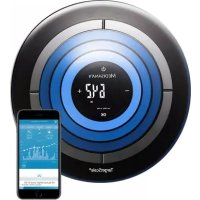
TargetScale 3 - Scale MEDISANA - Free user manual and instructions
Find the device manual for free TargetScale 3 MEDISANA in PDF.



| Product Type | Body analysis impedance scale |
| Brand | Medisana |
| Model | TargetScale 3 |
| Dimensions (L x W x H) | Approx. 360 mm x 360 mm x 47 mm |
| Net weight | Approx. 2.2 kg |
| Power supply | 4 AA batteries (1.5 V each) |
| Measurement range | Up to 180 kg / 396 lb / 28 st |
| Division (precision) | 100 g / 0.2 lb / 1/4 st |
| User memory | 8 users + guest mode (P0), up to 30 slots |
| Analysis functions | Weight, BMI, body fat, muscle, water, bone mass, calorie requirement, target weight difference |
| Target weight display | Illuminated rings indicating deviation (inner, middle, outer) |
| Connectivity | Bluetooth 4.0/Bluetooth Smart for VitaDock+ app (iOS/Android) |
| Step-on function | Yes, automatic weighing when stepping on barefoot |
| Auto-off | Approx. 5 seconds after use |
| Weight units | kg, lb, st:lb |
| Safety | Not suitable for pregnant women, pacemaker wearers, or implants. Indoor use only. |
| Care and cleaning | Wipe with a damp cloth, no harsh chemicals. Protect from moisture and heat. |
| Protection rating | Not specified – avoid any contact with water |
| Repairability | Do not open; repairs by authorized service center only |
| Warranty | 3 years from date of purchase upon presentation of receipt |
| Item number / EAN | 40413 / 4015588 40413 9 |
Frequently Asked Questions - TargetScale 3 MEDISANA
User questions about TargetScale 3 MEDISANA
0 question about this device. Answer the ones you know or ask your own.
Ask a new question about this device
Download the instructions for your Scale in PDF format for free! Find your manual TargetScale 3 - MEDISANA and take your electronic device back in hand. On this page are published all the documents necessary for the use of your device. TargetScale 3 by MEDISANA.
USER MANUAL TargetScale 3 MEDISANA
Read the instruction manual carefully before using this device, especially the safety instructions, and keep the instruction manual for future use. Should you give this device to another person, it is vital that you also pass on these instructions for use.
- This device should only be used in private households.
- This device should only be used by people who weigh less than 180kg .
- This device should not be used during pregnancy.
- Due to the electrical current which flows through the body, this device should not be used for body fat analysis in children for safety reasons. However children may be weighed without any concerns.
- The device many not be used by anyone fitted with a heart pacemaker, or any other medical implant. The indication of body fat may be inaccurate in the event of diabetes or other medical / physical conditions. The same applies to highly trained sportsmen.
- The device should not be used if it is not functioning perfectly, if it has fallen into or under water, or it has been damaged.

Risk of slipping and falling!
Never step onto the scales with wet feet. Never step onto the scales while wearing socks or similar. Never place the scales on an uneven surface. While weighing, never stand on the edge of the scales. Always stand still in the middle of the scales, so that each foot touches 2 electrodes, (the left foot on the two on the left, and the right foot on the two on the right).

Dangerous for children!
Batteries can prove fatal if swallowed. Therefore please keep batteries and the device itself out of the reach of children. If a battery is swallowed, please consult a doctor immediately. Keep children away from packaging material. This can constitute a choking hazard, for example.

Hazards associated with batteries!
Batteries must not be deformed, taken apart, thrown into a fire or short circuited. If a battery has leaked, avoid contact with the battery fluid. Rinse any affected areas with water and consult a doctor immediately.
When replacing the batteries, observe the correct polarity (+/-) .
Only use the same or equivalent type of battery (4x AA, 1.5 V).
Protect the batteries from excessive heat. Remove the batteries from the device when they have expired or you are no longer using The device. This helps avoid damage which may arise from a leak.

Risk of material damage!
Protect the device from moisture. Keep the scales away from water.
The surface of the scales is slippery when wet or damp. Keep the surface dry.
Do not keep the scales in a hot surroundings and protect from strong sunlight.
Protect the scales from any impact or shaking.
Do not make any changes to the scales and do not open them up.
Any repairs should only be carried out by a specialist workshop or in a service centre.
Floors may be coated with a variety of paints or artificial materials and are treated with a wide variety of care products. Some of these materials contain elements which attack and soften the device's feet. Therefore, place a non-slip, non-yielding base under it. When cleaning, do not use any strong chemicals, or aggressive or foaming cleaning materials.
We hereby declare that body analysis scale, model Target Scale 3, art. 40413 complies with the fundamental requirements of the European Directive 2014/53/EC. You can request the complete EC Conformity Declaration from Medisana AG, Jagenbergstrasse 19, 41468 Neuss, Germany, or you can also download it from the Medisana homepage (www.medisana.com).
For further information und country-specific service addresses visit www.medisana.com
A) Weighing with "step-on"-function
Before you can use the scale, pull the insulating strip out of the battery compartment on the underside of the scale.
Make sure the scales are on a firm, level surface. If you only want to weigh yourself but have moved the scales just before, you must first initialise the scales.
To do this, press your foot on the middle of the surface of the scales. "0.0 kg" appears in the display.
When the scales switch off, they are ready for the "step-on" function.
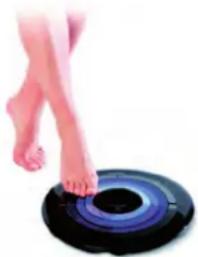
Simply stand on the scales barefoot (without socks or similar).
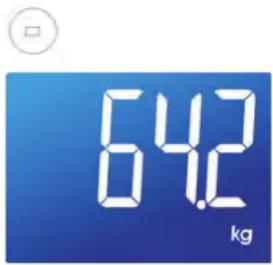
2 Your weight is shown.
B) Setting the personal data in the scales / Weighing with body analysis
The scales can store the data (gender, athlete mode, height, age) for 8 people with up to 30 memory locations each. The values preset in the scales are: Male, 165 cm, 30 years old, kg.
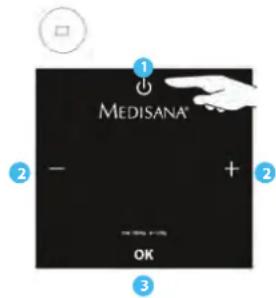
Press the ON/OFF sensor button shortly.
2 Select desired memory location with buttons "+" and "-"
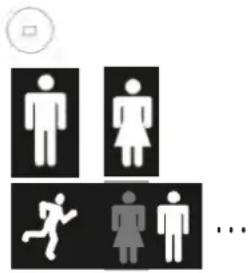
Now the symbols for gender/ athletic condition are flashing. Select with "+" or "-" and confirm with "OK".
Memory location "P0" is used for "guest mode". No data will be saved when using "P0".
Press "OK" to confirm your selection.
If you have already saved your personal data before, steps 3, 4 and 5 do not apply. After selecting a memory location the stored data is shown one after another. Proceed with step 6.
Enter your height, age and your target weight. Change numbers by pressing "+" and "-" Confirm every step with "OK".
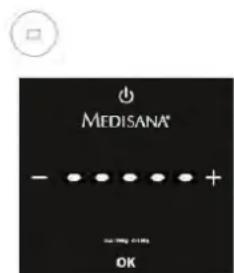
Displays shows "---" and then "0.0 kg".
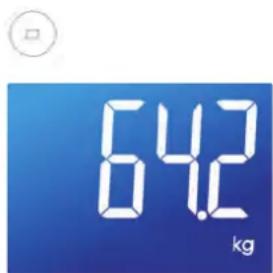
Stand on the scales barefoot (without socks or similar).
2 Your weight is shown.
Then body analysis is conducted. After a few seconds the display shows the following measurements:
Actual weight
- Difference between actual weight and target weight (see Target weight function)
- BMI
KCAL (caloric needs)
Proportion body fat
Proportion muscle mass
Proportion body water
Bone mass
Change the unit of weight
You may have your weight displayed in kilograms (kg), pounds (lb) or stones (st). Turn on the scales. When the display shows "0.0", select the unit (KG / LB / ST:LB) by pressing "+" or "-".
Automatic user recognition
Automatic user recognition based on last measurement:
Stand on the scales barefoot. Your user data (memory location) is selected automatically.
- If your user data is not selected correctly, select the number (P1 to P8) by pressing "+" or "-" and confirm with "OK".
Target weight function
Three shining rings indicate how close you are to your target weight:
If difference between actual weight and target weight is + / - 0 to 1.5kg inner ring is shining.
Within + / - 1.5 to 3kg the middle ring is shining.
Above 3kg difference the outer ring is shining.
C) VitaDock+ App*
Weighing yourself and transferring data via Bluetooth to the VitaDock+ app
Make the personal settings on the scales as described in B). To transfer the data, the scales and the smartphone must be connected via Bluetooth® 4.0 or Bluetooth Smart®. To do this, install the latest version of the VitaDock+ app.
- Free download of the VitaDock+ app* in the app store or Google Play store.
*System requirements:
iOS: iPhone 4S and later, iPad 3 and later. Android: Version 4.3 (Jelly Bean) Bluetooth® 4.0 technology.
- Activate Bluetooth® on your iOS or Android appliance.
- Start the app. Ensure that there is a stable connection to the internet (3G or WLAN). Register now with your VitaDock online account. If you don't have your own account yet, you can register free now at VitaDock Online.
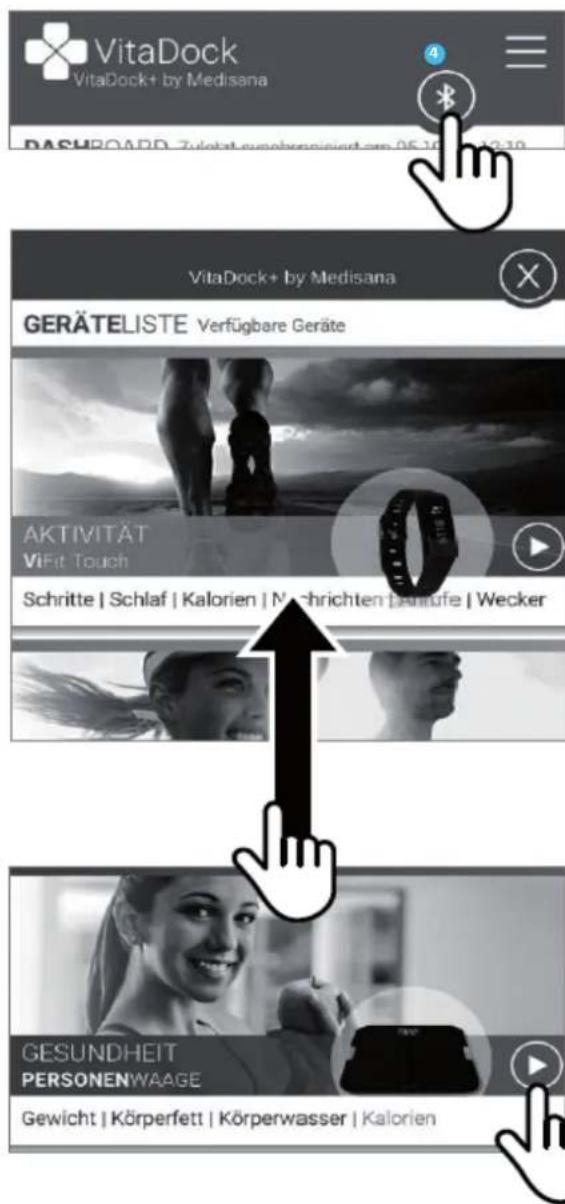
- Touch the Bluetooth symbol to open the list of devices.
- Scroll down the device list until you see the TargetScale 3.
- Touch the arrow beside the scales to start the setup process.
- Follow the setup process within the app.
NOTE:
If you use the scales in guest mode "PO", no data is saved. The weight data cannot be transferred by Bluetooth in this mode. In the course of continuous product optimisation, we reserve the right to regularly update the VitaDock+ app. Therefore, we recommend that you periodically perform an update. The included images serve only as a reference.
Technical specifications
| Name and model MEDISANA TargetScale | 3 |
| Voltage supply 6 V=, 4 x 1.5 V batteries (type AA) | |
| Memory for 8 persons + guest mode (P 0) | |
| Measuring range up to 180 kg, 396 lb or 28 st | |
| Graduation 100 g, 0.2 lb or 1/4 st | |
| Autom. switch-off after approx. 5 seconds | |
| Abmessungen (L/W/H) approx. 360 mm | 360 mm x 47 mm |
| Weight | approx. 2.2 kg |
| Item No. / EAN No. | 40413 / 4015588 40413 9 |


Troubleshooting
O - LD = The scale is overloaded; LO = The battery is low and must be replaced.
ERR/ERR2 = Body analysis could not be completed.
"----" = get off the scales first and wait until the device has turned off. Restart a measurement afterwards.
"□□□□" = bodyfat analysis in progress. Do not get off the scales during this measurement process! The measurement is finished, when the display shows the correct weight.
If your personal scales do not function to your satisfaction, check the following before contacting a service centre:
- Check whether the batteries have been inserted correctly.
- Check whether the correct unit of weight has been selected.
- Check whether the scales are freestanding on a solid and even surface. They must not be touching a wall or any other object.
- Weigh yourself again.
Insert/replace batteries
Replace the battery if the battery change symbol "LO" appears in the display or if nothing appears in the display after you have stepped on the device. Insert the four 1.5 V batteries (type AA) into the device. To do this, open the battery compartment beneath the device and insert the batteries.
Make sure the polarity is correct.
Disposal
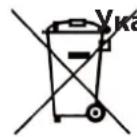
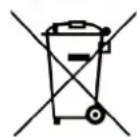
This product must not be disposed of together with domestic waste. All users are obliged to in all electrical or electronic devices, regardless of whether or not they contain toxic substances, at a municipal or commercial collection point so that they can be disposed of in an environmentally acceptable manner. Please remove the batteries before disposing of the device/unit. Do not dispose of old batteries with your household waste,
but at a battery collection station at a recycling site or in a shop.
Warranty and repair terms
Please contact your dealer or the service centre in case of a claim under the warranty. If you have to return the unit, please enclose a copy of your receipt and state what the defect is.
The following warranty terms apply:
- The warranty period for MEDISANA products is three years from date of purchase. In case of a warranty claim, the date of purchase has to be proven by means of the sales receipt or invoice.
- Defects in material or workmanship will be corrected free of charge within the warranty period.
- Repairs under warranty do not extend the warranty period either for the unit or for the replacement parts.
- The following is excluded under the warranty:
a. All damage which has arisen due to improper treatment, e.g. nonobservance of the user instructions.
b. All damage which is due to repairs or tampering by the customer or unauthorised third parties.
c. Damage which has arisen during transport from the manufacturer to the consumer or during transport to the service centre.
d. Accessories which are subject to normal wear and tear (batteries etc.).
- Liability for direct or indirect consequential losses caused by the unit are excluded even if the damage to the unit is accepted as a warranty claim.

MEDISANA AG
Colocar/trocar as pilhas
BaTapeMOryT CTAb ONaChbIMn DnA JxN3Hn PnPnpOrIaTbIBaHnn. PoTOMy XpaHIne 6bTapeu N np6Op B HeNoCTynHom DnA DeTeN MeCte. Pn PpOrIaTbIBaHnn 6aTaapeiKn HemeDneHNO 6bPaTHeCb K BpaUy. He DaBaIte DeTAM INrPaTbcra YnaKOBOUHbIM MaTePnaJiom. CyueCTByet ONaCHOCTb CMePTn OT yDuMb.

Onachoctb m3-3a 6atapeek!
БатAPEйк 3апeшаетс дформировыт, pa36ираь,брcaьВ OROH Ил 3ambikatb нakopotк.Еси 6атAPEйka «NoteКлa»,ИЗбeraиTe KOHTaTc CэлькТРОЛТOM, HaxODЯшIMC Вутуг Hee.При Heo6xOДIMOCtI npOMоTe BODоучaCTOK TeJa, Куд ПОпал JэлькТРОЛТ, И Немделнообразпесь K Врач.При установке 6атAPEй сеДNTe 3a пapвиьног ПОлярhoeТь (+/-).ИспOBьУte TolьКо 6атAPEйиnpabuNbHOrO Tuna (4x AA,1,5B). ОберайтбатAPEйк OTЧpe3МерHorO harpeBa.Бынтse 6атAPEйк, ecn Onn pa3рженьИ. Еси Bы He 6удete ИспOB3OBaTB рибopВ TeueHne ДпITьHOrO ВрemeH.ЗTo nOMoxet Жаьп NOВржdeHи, KOTOpьIE MOrY TB O3HnKHyTb Prn BBiteKaHIn 3JIeKTPOLNTa.

OnachocTb MaTePnaJIbHoro yUepe6a!
ObeperaTe np6op ot Bnarn. DepeKnte BeCbI NOaJIbwe OT BObI. Pnp CbIpOCTn IN BnaJxHocTn NOBepXHOCTb BEcOB cTaHOBITcR cKoJIb3KOJ. CLeINTe, YTO6bl NOBepXHOCTb 6bla cyXoH. He XpaHInTe BeCbI B JapKoI cpeI e ObeperaiTe OT nonaHaHINr prrMbIX COJIHeYbIX LyueH. He DOnyckaIte UApOB I COTpCeHmB BecOB. He BHOcTIe KaKnx-Im60 n3MeHEnB V BeCbI N He BCKpbIBaIte ux. PemOHInpyuTE BeCbI TOLko B CneUaIIIN3NPOBaHHbIX MaCTepCKNX I ABTOPIN3OBAHbIX cepBnCHbIX OprAHn3aunix. PONbl MOry 6byTB NOKpbITb pa3NIuHbIMN KpackamN NN CNHTeTNUeCKMIM MaTePuaIaMn, I yXoD 3a HMM MoKET OCUJeeCTBIArBCa C NOMOUIpo PA3HOo6pa3HBIX cpeIDTB dIy yXoJa. HeKOTOpBie I3 3TNX BeJeCTB CoepKaT KOMNOHEtbl, KOToPbIE MOrTy pa3BeJaTb I pa3MaIgTuMbHoxKKn Prn6opa. IOnTOMy NODKnaDbIBAitPe NOD HIX HECKOJIb3AlyIO HnepOdaBnBaEMyo nOdoKkKy. He nCNoJIb3yIe dIy OuncTKn EdKne XUMNKaTbI, arpeccNBbIe I nn zapapaIoUne YnCTraUne cpeCTBa.
HaCToIIMMbI NOITBepKdaem,HTO HanoIbHbIe BeCbI MEDISANA Target Scale 3,apt.N40413 OTBeuaOT OCHOBHbIM Tpe6oBaHnIM, I3IOxHeHHbIM B DnpeKTmbe 2014/53/EC. POnHoe EC-3aABJIeHne O COBTcTBn TOBapa Bbl MoXeTe 3aTpe6oBaTb no aDpecy Medisana AG,Jagenbergstrasse 19,41468 Neuss, TepMaHnI nn 3arpy3ntb Ha caIte Medisana (www.medisana.com).ДЯ nOlyeHnI DonOIHNTEJbHOHnΦopMaunu anapecob cepBnchbIX ueHtpOB BaWei cTpaHne npoiUITE no CcbJIkam, yKa3aHHbIM HnKe:wwW medisana.com.
O-LD = BecbI neperpyxHe; LO = BaTapei pa3pJxHe, Heo6xoJIMO npOn3BecTn 3aMeHy.
ERR/ERR2 = He ydaIocb onpeJeIITb pe3yIbTaTb INaIHOCTIKN OpraHn3Ma.
"----" = chauana OTKIOUHTe Becbl, 3aTeM NOOJNTe, Noka yCTPOICTBO OTKIOUHTc. Iocne 3Toro nepe3arpy3nte npocecc n3MepeHnra. "□□□□" = aHaJIIN3 yPOBnRA Jnpa B TeNe 3anyuJeH. He OTKIOUaIte BeCbl B npocece npoBeHnra 3Toro n3MepeHnra! N3MepeHnne 3aBepSeHo, KOrda Na dIncnnee oTo6paxaETc TaOnh b Bec. Ecn Baun nepcoHaJIbHbIe BeCbl fYHKUHOpyOT HeHaJIeXaUM o6pa3OM, nepeD o6paSeHnEM B cepBnCHbI ueTp peKOMeHdyeM caMOCTOReTbHO npOBepITb CneDuOuee:
- PpOBepbTe npaBnIbHOCTb yCTaHOBKn 6aTapei.
- Поберп Te npabиьнocь Bbl6opa eHnUcbl n3MepeHn.
- Y6eIITecb, yTO BeCbl yCTaHOBneHb Ha npOHy n POBHO NOBepxHOCTn. BeCbl He DoJIHKbl yNIPAbCA B CTeHy IIN IpOHy npeDMeTbl.
-Измерътсвоь Всп NOВTOPHO.
YctaHOBka/3aMeHa 6aTapei
3aMeHnte 6aTapeu, ecn dncnne He 3aRopaetc nHa Hn Ha hem OTo6paXaeTc CmBON 3aMeHbI 3JeMeHTOB nHTAHNLO.B KaueCTBe 3JeMeHToB nHTAHNIG cNoJb3yOTc 6aTapeu 1,5 B (tIn AA). BCTaBBte 6aTapeu B OTceK, paCnoJoxHeHHn Ha HnXHe CTOPOHe BEcoB. PpU yCTaHOBe CO6JIOaJIte NOnApHocTB 6aTapeu.

a3aHne no yTmnn3aun
3anpeaetc yTuInn3npoBaT daHbI np6Op BmecTe c 6bITOBbIM NTxOdaMn. KaKdbI nOTpe6HTeB 063aH cdaBaT Bce 3neKTpueckne I 3neKTPOHHbI np6Opbl He3aBNCUMO OT TOr,coepkataOn OHn BpeHbI BeueCTBa,BTOPOdCKne pnpemHbI nyHKtBuINI npedPnTn TropBn, yTo6bl o6ecneuTb INx 3KOLOrHuHyU yTuInn3aun. BbHbTe 6aTaapeKn nepeD yTuInn3aunE np6Opa. YTuInn3aun 6aTapen:
He BbIbpaBaiTe NcNoJIb3OBAHHbIe 6aTapeH n aKKyMylrTOpbI B 6bITOBoMycOp, INx MoKHO Bbl6paBbTaTolbKOBMecTe CO CneuAlbHbIM MyCOPOMnIN CdaBaTb BCneuJIn3NpOBaHHbIE MeCTa IIN c6opa B TOPROBbIX TOUkax.
YcnoBra rapaHTn npemOnTa
HaTcOaHbMblNoTBeKdAem,HTo HAnOpNbHbIe BeCbI MEDISANA Target Scale 3,apT.N40413 OTBeuaOT OCHOBHbIM Tpe6ObaHnAM, n3JIOXeHHbIM B DnapeKTInBe 2014/53/EC.
Bb mokeTe 3aTpe6oBaT bONHyIO deKnapauio o COOTBeTcTBn no aDpecy Medisana AG, Jagenbergstraße 19, 41468 Neuss, Deutschland (FepmaHna) nIIN 3aRpy3ntb Ha caIte Medisana.
YcnoBna rapaHTn n peMOHTa rapaHTnHbI cpoK Ha n3deJnA MEDISANA coCTabJIeT Tpi roJa. B rapaHTnHOM Clyuae DaTa NOKyKNIOITBepXdaETCAccOBbIM YekOM IIN CyeTOM.
