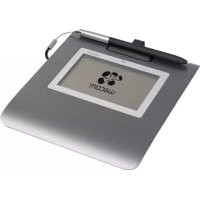
USER MANUAL Signature Set STU430 WACOM
The following item provides help and support information for the product.
Help and support information Description
| Quick Start Guide (This guide) | Provides a general overview of the STU-430 and STU-530. It includes information about connecting and using the product. Also, it contains precautions, product specifications, and other important information. Read this information carefully before use. |
Supplied accessories

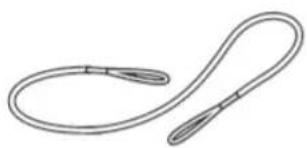
Pen tether
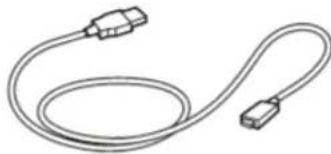
USB cable (3 m)
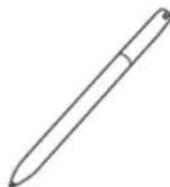
Pen
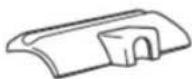
Pen holder
Quick start guide
Getting to know the product
- Front housing
- Signing area
- LED
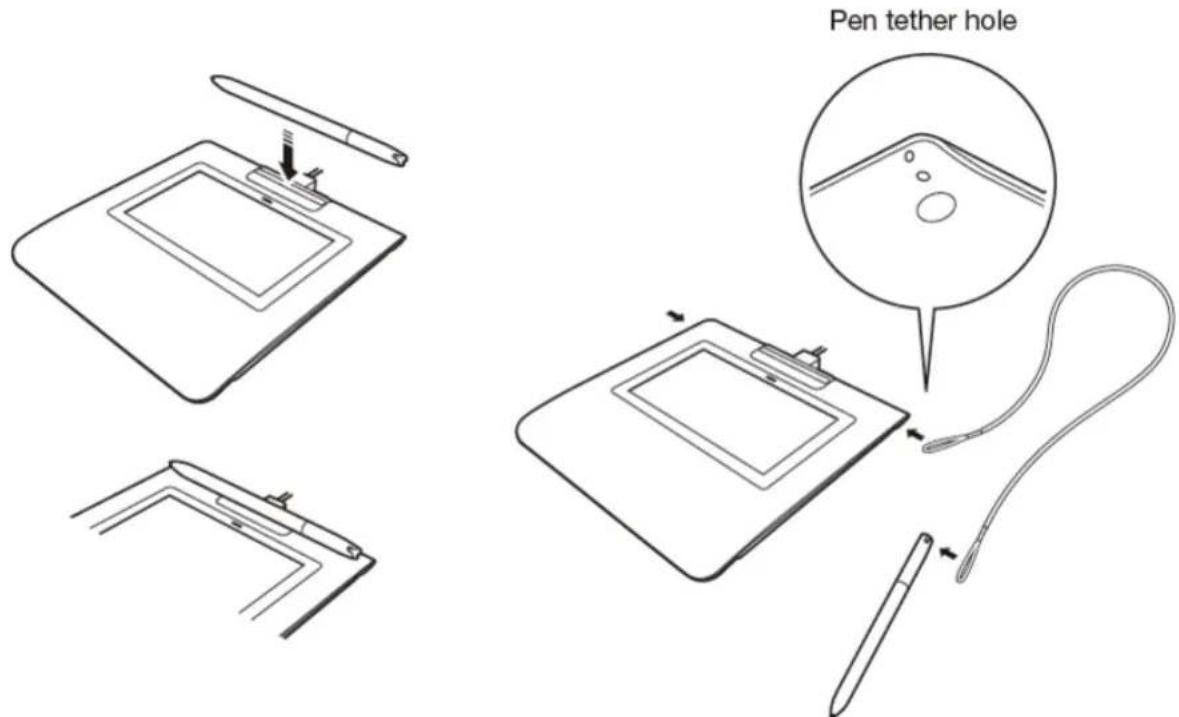
- Pen holder
- Security lock slot
- Back housing
- Feet
- Pen tether hole
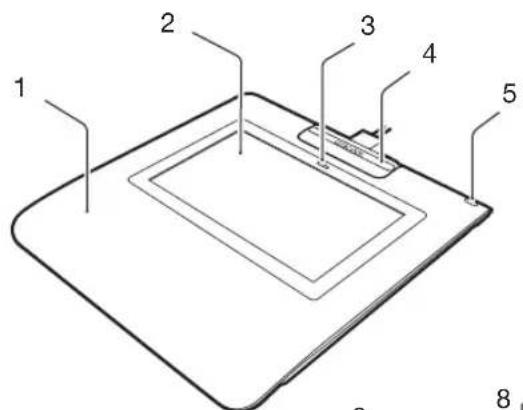
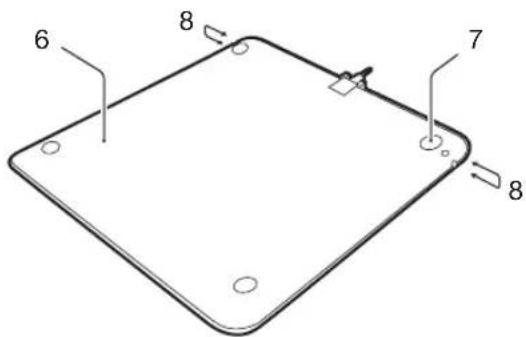
Connecting the product to your computer
EN
- Turn off your computer.
- Insert the mini-USB plug into the USB connector located at the rear edge of the signature pad. Once the USB plug is properly inserted, attach the pen holder to the signature pad by first inserting it into the notches, then moving into the direction of the device until it clicks into place. The pen holder will lock the USB cable in place and prevent it from being accidentally detached.
- Plug the USB connector into a free USB port on your computer to use the signature pad.
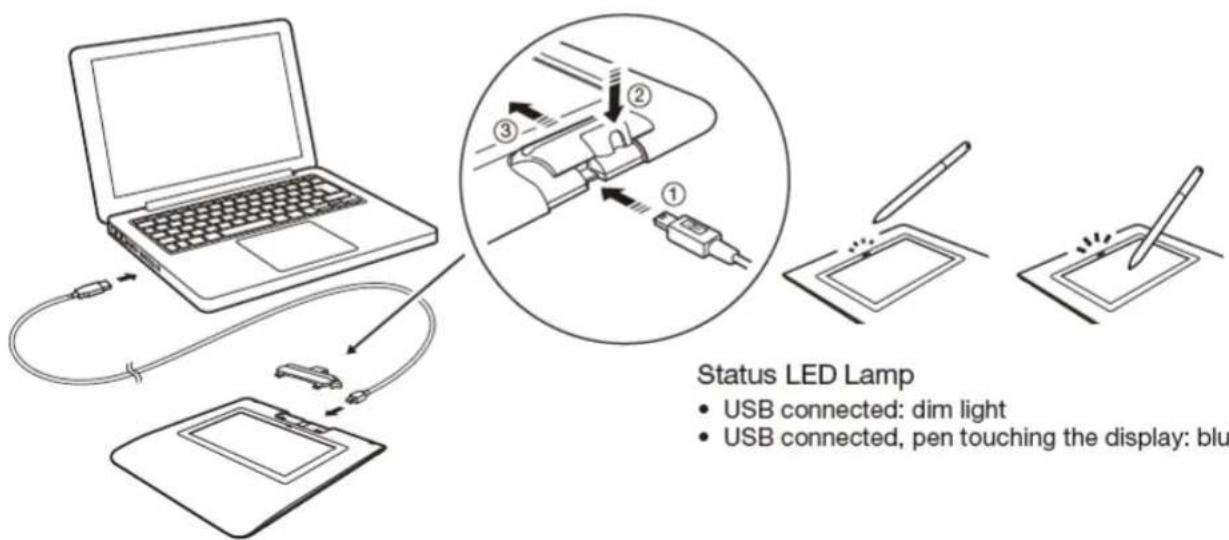
Status LED Lamp
- USB connected: dim light
- USB connected, pen touching the display: blue light

Pen holder and pen tether
Registering the product
EN
For USA, Canada, Central and South America
Go to www.wacom.com/support/product-registration
For Europe
Go to www.wacom.eu/register
For Asia Pacific
Visit https://register.wacom.asia/ and select your region. Then choose the registration option.
Support options
For USA, Canada, Central and South America
For the latest information and driver updates visit www.wacom.com, check the User's Manual, or contact Customer Care at www.wacom.com/support
For Europe
Check the Troubleshooting section in the User's Manual, or visit our web site at www.wacom.eu
Technical Support is available Monday - Friday 9:00 to 18:00 (Central European Time).
Please refer to www.wacom.eu/contact for the Technical Support contact details for your country.
For Asia Pacific
Visit our web site at http://www.wacom asia/customer-care
Precautions
Be sure to follow all instructions, cautions, and warnings found within this guide. Failure to do so could cause the loss of data or damage to your computer. Failure to do so could also void your warranty, in which case Wacom shall have no responsibility to repair or replace the product.
Warning
Do not use the product in a facility control system that requires extremely high reliability; it may cause other electronic devices to malfunction, or other devices may cause the product to malfunction. Where use is prohibited, power off the product to prevent the possibility of it causing other electronic devices to malfunction. Wacom does not accept any liability for direct or consequential damages.
High Voltage. Do not open or disassemble the product. There is a risk of electrical shock when the casing is open. This will also void your warranty and Wacom shall have no responsibility to repair or replace the product.
If the LCD screen has been damaged, DO NOT touch any liquid that may be leaking from it; this liquid is an irritant. In case of contact with skin, eyes, or mouth, rinse immediately with running water for at least 15 minutes or more. If contact is made with the eyes or mouth, also consult a physician.
Prevent children from swallowing the pen tip. The pen tip may accidentally be pulled out if children are biting on them.
Caution
Do not use or store the product where:
- Temperature changes are severe or exceed specific cations (e.g., outdoors or inside a vehicle).
- The product and pen are exposed to direct sunlight or heat from an appliance, or are exposed to water or any other kind of liquid.
Do not use the product in a dusty environment; this may damage the unit.
Do not disassemble the pen. This may cause the device to malfunction. In this case, Wacom shall have no responsibility to repair or replace the product.
Do not scratch the display screen. Avoid placing sharp objects on the display screen surface.
Avoid intensive shock or vibration to the product or the pen. Hitting or dropping the product may damage the display screen or other components.
Do not put heavy articles on the product or push against it with a strong force; This may damage the display screen.
Do not place heavy articles on the product cabling, repeatedly bend the cables sharply, or apply heavy stress to the cable connectors; this may damage the unit or cabling.
If the pen tip becomes sharp or angular, it may damage the coating on the display screen. Please replace the pen tip if necessary.
Do not expose the product to high voltage electrostatic discharges or to a buildup of an electrostatic charge on the LCD screen. This may result in a temporary blotching of the LCD monitor. If blotching occurs, leave the product's display on and the blotching should disappear within a few hours.
Note on using this product
Replacing the pen tip
For replacement of the pen tips please contact your Wacom Signature Solution Partner.
Note on use
When LCD panel is operated continuously for long period, a trace of electric charge remains near the electrode inside the LCD, and residual or "ghost" image of the previous image may be observed (Image persistence).
To avoid image persistence, Wacom recommends the use of a moving screen saver when the screen is turned on but idle.
Caring for your LCD signature pad
Keep the pen and LCD screen surface clean. Dust and dirt particles can stick to the pen and cause wear to the display screen surface. Regular cleaning will help prolong the life of your LCD screen surface and pen. Keep the tablet and pen in a clean, dry place and avoid extremes in temperature. Room temperature is best. The product and pen are not made to come apart. Taking apart the product will void your warranty.
Cleaning
To clean the product casing or the pen, use a soft, damp cloth; you can also dampen the cloth using a very mild soap diluted with water. Do not use paint thinner, benzine, alcohol, or other solvents to clean the unit casing or pen.
To clean the display screen, use an anti-static cloth or a slightly damp cloth. When cleaning, apply only a light amount of pressure to the display screen and do not make the surface wet. Do not use detergent to clean the display screen; this may damage the coating on the screen. Please note that damage of this kind is not covered by the manufacturer's warranty.
Product specifications
STU-430
General Specifications
Model/Brand STU-430
Dimensions (W × D × H) 161.43 × 174.37 × 10.85 mm
Weight Main Body: 0.279 kg approximately
Operating temperature & humidity
5 to 40 degrees C, humidity: 30% to 80% RH (non-condensing)
Storage temperature & humidity
-20 to 60 degree C, humidity: 30% to 90%
RH (non-condensing)
Power consumption 1.0 W maximum
Display
Display panel FSTN Positive Reflective
Screen size 4.5 inch (95.985 x 59.985 mm)
Number of pixels 320 x 200
Pixel pitch 0.30 (H) x 0.30 (V) mm
LCD quality Each LCD panel is produced under very
stringent quality standards, Production techniques cannot guarantee an absolutely perfect display. Wacom does not allow any pixel to be always white or always black. A small number of pixels are allowed to show a wrong color for some parts of the color spectrum. This does not mean the display is defective.
Pen tablet
Reading technology Electro-magnetic resonance technology
Active area 95.985 x 59.985 mm
Resolution 2540 lpi or 0.01 mm/pt
Accuracy ± 0.5 mm (center), the edge area 1 (20 mm
wide from edge of display area) to be
± 2.0 mm , the edge area 2 (3 mm wide from
edge of dsplay area) to be ± 4.0mm
Reading height 5 mm or more (center)
Maximum report rate 200 points/sec
Pressure levels 1024 levels
Communication interface USB
Others
Security slot 1
STU-530
General Specifications
Model/Brand STU-530
Dimensions (W x D x H) 161.43 x 174.37 x 10.85 mm
Weight Main Body: 0.289 kg approximately
Operating temperature & humidity
5 to 40 degrees C, humidity: 30% to 80% RH
(non-condensing)
Storage temperature & humidity
-20 to 60 degree C, humidity: 30% to 90%
RH (non-condensing)
Interface cables
Power consumption 2.5 W maximum
Display
Display panel Amorphous-TFT-LCD
Screen size 5.0 inch (108.0 x 64.8 mm)
Number of pixels 800 x 480, WVGA
Pixel pitch 0.135 (H) x 0.135 (V) mm
LCD quality Each LCD panel is produced under very
stringent quality standards. Production
techniques cannot guarantee an absolutely
perfect IFI display. Wacom does not allow
any pixel to be always white or always black .A small number of pixels can be used to show
A small number of pixels are allowed to show currency color for some parts of the color.
a wrong color for some parts of the colorprocess. This does not mean the display is
spectrum. This does not mean the display is defective.
Pen tablet
Reading technology Electro-magnetic resonance technology
Active area 108.0 x 64.8 mm
Resolution 2540 lpi or 0.01 mm/pt
Accuracy ± 0.5 mm (center), the edge area 1 (20 mm
wide from edge of display area) to be
± 2.0 mm , the edge area 2 (3 mm wide from
edge of dsplay area) to be ± 4.0 mm
Reading height 5 mm or more (center)
Maximum report rate 200 points/sec
Pressure levels 1024 levels
Communication interface USB
Others
Security slot 1
Pen UP-610-89A-1
Physical size (LD) 140.5*9.0mm 5.53 0.35 in
Weight 7 g (0.25 oz), approximately
Pen tip travel 0.2 mm (0.04 in) approximately
Warranties
Limited warranty
(U.S.A. and Canada)
Wacom warrants the product, to the original consumer purchaser, except for the Software and consumable items such as the battery, pen cartridges, tablet surface sheet and nibs, to be free from defects in materials and workmanship under normal use and service for a period of three (3) years, from the date of original retail purchase, as evidenced by a copy of the receipt and registration with Wacom within 30 days of purchase.
The Software is licensed "as is." Wacom makes no warranty with respect to its quality or performance. Wacom cannot guarantee you uninterrupted service or the correction of any errors.
Upon discovery of a defect in the product, except in the Software, within the Warranty Period, you should contact Wacom Technical Support via telephone, email, or fax to obtain an RMA (Return Merchandise Authorization) number and instructions for shipping the product to a service location designated by Wacom. You should send the product, shipping charges prepaid, to the designated service location, accompanied by the return authorization number, your name, address and telephone number, proof of purchase date, and a description of the defect. Wacom will pay for return shipping by United Parcel Service or by an equivalent service as chosen by Wacom.
Wacom's sole obligation and entire liability under this warranty shall be, at Wacom's option, either the repair or replacement of the defective product or parts thereof of which Wacom is notified during the Warranty Period; provided, however, that you are responsible for (i) the cost of transportation of the product to the designated service location and (ii) any loss or damage to the product resulting from such transportation.
Wacom shall have no responsibility to repair or replace the product if the failure of the product has resulted from accident, abuse, misuse, negligence, or unauthorized modification or repair, or if it has been handled or stored other than in accordance with Wacom's storage instructions.
Any descriptions, drawings, specifications, samples, models, bulletins, or similar material, used in connection with the sale of the product, shall not be construed as an express warranty that the product will conform or comply with your requirements.
EXCEPT FOR THE LIMITED WARRANTY DESCRIBED ABOVE, THERE ARE NO OTHER WARRANTYES MADE BY WACOM ON THIS PRODUCT. NO ORAL OR WRITTEN INFORMATION OR ADVICE GIVEN BY WACOM, ITS DEALERS, DISTRIBUTORS, AGENTS, OR EMPLOYEES SHALL CREATE A WARRANTY
OR IN ANY WAY INCREASE THE SCOPE OF THIS WARRANTY, AND YOU MAY NOT RELY ON ANY SUCH INFORMATION OR ADVICE.
THIS WARRANTY GIVES YOU SPECIFIC LEGAL RIGHTS, AND YOU MAY ALSO HAVE OTHER RIGHTS WHICH VARY FROM STATE TO STATE.
WACOM LIMITS THE DURATION OF ANY LEGALLY IMPLIED WARRANTYING INCLUDING IMPLIED WARRANTYES OF MERCHANTABILITY OR FITNESS FOR A PARTICULAR PURPOSE, TO THE DURATION OF WACOM'S EXPRESS WARRANTY. SOME STATES DO NOT ALLOW LIMITATIONS ON HOW LONG AN IMPLIED WARRANTY LASTS, SO THE ABOVE LIMITATION MAY NOT APPLY TO YOU.
NEITHER WACOM NOR ANYONE ELSE WHO HAS BEEN INVOLVED IN THE CREATION, PRODUCTION, OR DELIVERY OF THIS PRODUCT SHALL BE LIABLE FOR ANY DIRECT, CONSEQUENTIAL, OR INCIDENTAL DAMAGES (INCLUDING DAMAGES FOR LOSS OF BUSINESS PROFITS, BUSINESS INTERRUPTION, LOSS OF BUSINESS INFORMATION AND THE LIKE) ASING OUT OF THE USE OF OR INABILITY TO USE SUCH PRODUCT, EVEN IF WACOM HAS BEEN ADVISED OF THE POSSIBILITY OF SUCH DAMAGES. SOME STATES DO NOT ALLOW THE EXCLUSION OR LIMITATION OF INCIDENTAL OR CONSEQUENTIAL DAMAGES, SO THE ABOVE LIMITATION OR EXCLUSION MAY NOT APPLY TO YOU.
In the event that any of the above limitations are held unenforceable, Wacom's liability for any damages to you or any party shall not exceed the purchase price you paid, regardless of the form of any claim.
This Limited Warranty is governed by the laws of the United States of America and the state of Washington.
This Limited Warranty is valid for and only applies to products purchased and used inside the United States (and its territories or possessions) or Canada.
Warranty service
To obtain Warranty service within the U.S. or Canada contact:
Wacom Customer Care Center
Phone: 1.360.896.9833
Email Inquiry form: http://www.wacom.com/productsupport/email.cfm
Should you have any questions about this Agreement, or if you desire to contact Wacom for any reason, please contact in writing:
Wacom Technology Corporation
1455 NW Irving Street Suite 800 Portland OR 97209
U.S.A.
Limited warranty
(Central America, South America and The Caribbean)
Wacom warrants the product, to the original consumer purchaser, except for the Software and consumable items such as the battery, pen cartridges, tablet surface sheet and nibs, to be free from defects in materials and workmanship under normal use and service for a period of three (3) years, from the date of original retail purchase, as evidenced by a copy of the receipt and registration with Wacom within 30 days of purchase.
The Software is licensed "as is." Wacom makes no warranty with respect to its quality or performance. Wacom cannot guarantee you uninterrupted service or the correction of anyerrors.
Upon discovery of a defect in the product, except in the Software, within the Warranty Period, you should contact Wacom Technical Support via telephone, email, or fax to obtain an RMA (Return Merchandise Authorization) number and instructions for shipping the product to a service location designated by Wacom. You should send the product, shipping charges prepaid, to the designated service location, accompanied by the return authorization number, your name, address and telephone number, proof of purchase date, and a description of the defect. Wacom will pay for return shipping by United Parcel Service or by an equivalent service as chosen by Wacom.
Wacom's sole obligation and entire liability under this warranty shall be, at Wacom's option, either the repair or replacement of the defective product or parts thereof of which Wacom is notified during the Warranty Period; provided, however, that you are responsible for (i) the cost of transportation of the product to the designated service location and (ii) any loss or damage to the product resulting from such transportation.
Wacom shall have no responsibility to repair or replace the product if the failure of the product has resulted from accident, abuse, misuse, negligence, or unauthorized modification or repair, or if it has been handled or stored other than in accordance with Wacom's storage instructions.
Any descriptions, drawings, specifications, samples, models, bulletins, or similar material, used in connection with the sale of the product, shall not be construed as an express warranty that the product will conform or comply with your requirements.
EXCEPT FOR THE LIMITED WARRANTY DESCRIBED ABOVE, THERE ARE NO OTHER WARRANTYES MADE BY WACOM ON THIS PRODUCT. NO ORAL OR WRITTEN INFORMATION OR ADVICE GIVEN BY WACOM, ITS DEALERS, DISTRIBUTORS, AGENTS, OR EMPLOYEES SHALL CREATE A WARRANTY OR IN ANY WAY INCREASE THE SCOPE OF THIS WARRANTY, AND YOU
MAY NOT RELY ON ANY SUCH INFORMATION OR ADVICE.
THIS WARRANTY GIVES YOU SPECIFIC LEGAL RIGHTS, AND YOU MAY ALSO HAVE OTHER RIGHTS WHICH VARY FROM COUNTRY TO COUNTRY. WACOM LIMITS THE DURATION OF ANY LEGALLY IMPLIED WARRANTYINGS INCLUDING IMPLIED WARRANTYES OF MERCHANTABILITY OR FITNESS FOR A PARTICULAR PURPOSE, TO THE DURATION OF WACOM'S EXPRESS WARRANTY. SOME COUNTRIES DO NOT ALLOW LIMITATIONS ON HOW LONG AN IMPLIED WARRANTY LASTS, SO THE ABOVE LIMITATION MAY NOT APPLY TO YOU.
NEITHER WACOM NOR ANYONE ELSE WHO HAS BEEN INVOLVED IN THE CREATION, PRODUCTION, OR DELIVERY OF THIS PRODUCT SHALL BE LIABLE FOR ANY DIRECT, CONSEQUENTIAL, OR INCIDENTAL DAMAGES (INCLUDING DAMAGES FOR LOSS OF BUSINESS PROFITS, BUSINESS INTERruption, LOSS OF BUSINESS INFORMATION AND THE LIKE) ASING OUT OF THE USE OF OR INABILITY TO USE SUCH PRODUCT, EVEN IF WACOM HAS BEEN ADVISED OF THE POSSIBILITY OF SUCH DAMAGES. SOME COUNTRIES DO NOT ALLOW THE EXCLUSION OR LIMITATION OF INCIDENTAL OR CONSEQUENTIAL DAMAGES, SO THE ABOVE LIMITATION OR EXCLUSION MAY NOT APPLY TO YOU.
In the event that any of the above limitations are held unenforceable, Wacom's liability for any damages to you or any party shall not exceed the purchase price you paid, regardless of the form of any claim.
This Limited Warranty is governed by the laws of the United States of America and the state of Washington.
This Limited Warranty is valid for and only applies to products purchased and used inside Central America, South America or the Caribbean.
Warranty service
To obtain Warranty service within Central America, South America or the Caribbean contact your local dealer or distributor.
Wacom Customer Care Center
Spanish: http://www.wacom.com/sp/productsupport/email.cfm
Portuguese: http://www.wacom.com/pr/productsupport/email.cfm
Should you have any questions about this Agreement, or if you desire to contact Wacom for any reason, please contact in writing:
Wacom Technology Corporation
1455 NW Irving Street Suite 800
Portland OR 97209
U.S.A.
Limited warranty
(Europe, Africa and Middle East)
WACOM warrants to you, as the initial purchaser, (hereinafter referred to as "you" or "the customer") that the product hardware will remain free from defects in materials and workmanship under normal use and service for a warranty period of THREE (3) YEARS,
commencing from the purchase date and provided that the product was unused at the time of purchase. Defects in wear parts (e.g. pen nibs, tablet surfaces and batteries) resulting from normal wear and tear are exempt from the warranty. Furthermore, WACOM warrants that the data carriers delivered with the product are free from defects in materials and workmanship under normal use for a period of SIX (6) MONTHS from the date of purchase.
If during the applicable warranty period the product, excluding any software, is discovered to be defective, it should be returned immediately to the place of purchase in its original packaging together with your name, address, and telephone number, a description of the problem, and a copy of the original receipt. The customer shall be liable for any possible damage or loss of the product during transit to the place of purchase for this purpose.
WACOM's sole obligation and entire liability under this warranty shall be, at WACOM's option, either the repair or the replacement of the product or parts thereof that prove defective and that were returned within the applicable warranty period.
WACOM does not warrant to repair or replace the product if: (a) the damage to the product results from accident, misuse, improper use, negligence or unauthorised alteration or repair; (b) the product was not handled or stored according to the instructions provided by WACOM; (c) the damage resulted from normal wear and tear of product parts; or d) the serial number affixed by WACOM has been removed or rendered unintelligible.
Any descriptions, drawings, specifications, samples, models, notifications or similar material provided in connection with the purchase of the product cannot be taken as an explicit guarantee that the product corresponds to or fulfils your requirements.
The warranty guaranteed by law remains unaffected. You can claim defects of the product in accordance with the relevant legal provisions.
WACOM shall only be liable for itself and its vicarious agents if a material contractual obligation has been culpably breached in a manner jeopardising the purpose of the contract or the damage is due to intentional acts or omissions or gross negligence. A material contractual obligation is an obligation which is essential to the proper performance of the contract on which the other party will typically rely. In case that the culpable infringement of such a material
contractual obligation is not due to intention or gross negligence, the liability of a party shall be limited to such damages being typical for the contract and which were reasonably foreseeable at the time of the closure of the contract. Where these Terms and Conditions preclude or limit liability, this also applies to the personal liability of the executive officers of the party concerned, its employees, agents and subcontractors. The provisions of the product liability law (Produktafungsgesetz) remain unaffected.
If, when a claim made under this warranty is checked, it emerges that it is outside the permitted time period or is not covered by the warranty or that the product is not defective, the customer will reimburse WACOM for associated costs.
This limited warranty shall apply if the registered office of the vendor is situated in the EU or Iceland, Norway, Jersey, Switzerland, Russia, the Ukraine, Croatia, Serbia, Tunisia, Turkey, Syria, Lebanon, Jordan, Israel, Egypt, the United Arab Emirates, Iran or South Africa. This warranty is subject to German law. However, the applicability of the United Nations Convention on Contracts for the International Sale of Goods is explicitly excluded. The city of Düsseldorf, Germany, is the sole place of jurisdiction for all claims arising from this contractual relationship and all disputes between the parties resulting from the formation, handling or termination of the contractual relationship, provided that the customer is a trader, a legal entity or fund under public law. The jurisdiction agreement shall also apply for customers who do not have a general place of jurisdiction in Germany. The jurisdiction agreement shall not apply if, due to legal provisions, a different sole place of jurisdiction must be established for the case.
Furthermore, WACOM is authorised to file a lawsuit against the headquarters of the customer.
Should one of the provisions of this limited warranty be or become void, the validity of the other provisions shall not be affected, in full or in part. Should a provision be invalid, the legally permissible regulation most closely resembling the invalid regulation shall apply in its place. If you have any questions about this agreement, or would like to contact WACOM for another reason, please write to us at this address:
Wacom Europe GmbH
Völklinger Straße 1
40219 Dusseldorf
Germany
Limited warranty (Asia Pacific region)
Wacom Co., Ltd. warrants the product, to the original consumer purchaser, to be free from defects in materials and workmanship under normal use and service for a period of one (1) year, from the date of original retail purchase, as evidenced by a copy of the receipt (proof of purchase).
The Software is licensed "as is." Wacom makes no warranty with respect to its quality or performance or others. Wacom cannot guarantee you uninterrupted service or the correction of any errors. Wacom also makes no warranty for consumable items such as battery, pen cartridges, tablet surface sheet and nibs.
Upon discovery of a defect in the product, except in the Software, within the Warranty Period, the warranty holder must contact the original place of purchase to obtain instructions for returning the product for repair or replacement. Wacom and its partners are not obligated to reimburse unauthorized prepaid shipment.
The warranty holder is under no obligation to pay for shipment charges between the original place of purchase and the place of repair or replacement.
Wacom's sole obligation and entire liability under this warranty shall be, at Wacom's option, either the repair or replacement of the defective product or parts thereof of which Wacom is notified during the Warranty Period.
Wacom shall have no responsibility to repair or replace the product if the failure of the product has resulted from force majeure including but not limited to fire, natural disasters, accident, and act of god; intentional or accidental abuse, misuse, negligence, unauthorized modification or repair, usage of this product in a fashion other than as explained in the users guide, or if the product has been handled or stored other than in accordance with Wacom's storage instructions.
Any descriptions, drawings, specifications, samples, models, bulletins, or similar material, used in connection with the sale of the product, shall not be construed as an express warranty that the product will conform or comply with your requirements.
EXCEPT FOR THE LIMITED WARRANTY DESCRIBED ABOVE, THERE ARE NO OTHER WARRANTYES MADE BY WACOM ON THIS PRODUCT. NO ORAL OR WRITTEN INFORMATION OR ADVICE GIVEN BY WACOM, ITS DEALERS, DISTRIBUTORS, AGENTS, OR EMPLOYEES SHALL CREATE A WARRANTY OR IN ANY WAY INCREASE THE SCOPE OF THIS WARRANTY, AND YOU MAY NOT RELY ON ANY SUCH INFORMATION OR ADVICE. THIS WARRANTY GIVES YOU SPECIFIC LEGAL RIGHTS, AND YOU MAY ALSO HAVE OTHER RIGHTS WHICH VARY FROM COUNTRY TO COUNTRY.
WACOM LIMITS THE DURATION OF ANY LEGALLY IMPLIED WARRANTYES INCLUDING IMPLIED WARRANTYES OF MERCHANTABILITY OR FITNESS FOR A PARTICULAR PURPOSE, TO THE DURATION OF WACOM'S EXPRESS WARRANTY.
SOME COUNTRIES DO NOT ALLOW LIMITATIONS ON HOW LONG AN IMPLIED WARRANTY LASTS, SO THE ABOVE LIMITATION MAY NOT APPLY TO YOU.
NEITHER WACOM NOR ANYONE ELSE WHO HAS BEEN INVOLVED IN THE CREATION, PRODUCTION, OR DELIVERY OF THIS PRODUCT SHALL BE LIABLE FOR ANY DIRECT, CONSEQUENTIAL, OR INCIDENTAL DAMAGES (INCLUDING DAMAGES FOR LOSS OF BUSINESS PROFITS, BUSINESS INTERruption, LOSS OF BUSINESS INFORMATION AND THE LIKE) ASING OUT OF THE USE OF OR INABILITY TO USE SUCH PRODUCT, EVEN IF WACOM HAS BEEN ADVISED OF THE POSSIBILITY OF SUCH DAMAGES. SOME COUNTRIES DO NOT ALLOW THE EXCLUSION OR LIMITATION OF INCIDENTAL OR CONSEQUENTIAL DAMAGES, SO THE ABOVE LIMITATION OR EXCLUSION MAY NOT APPLY TO YOU.
In the event that any of the above limitations are held unenforceable, Wacom's liability for any damages to you or any party shall not exceed the purchase price you paid, regardless of the form of any claim.
This Limited Warranty is valid for and only applies to products purchased and used inside the countries and territories of Asia Pacific excluding Japan, the People's Republic of China, Hong Kong, and countries in the Middle East.
This Limited Warranty is a statement of the current warranty policy of the Asia Pacific Division of Wacom Co., Ltd. and takes precedent over all other warranty statements contained in packaging, brochures, manuals, etc.
This Limited Warranty is governed by the laws of Japan and is subject to change without prior notice.
Australian Consumer law Our goods come with guarantees that cannot be excluded under the Australian Consumer Law. You are entitled to a replacement or refund for a major failure and for compensation for any other reasonably foreseeable loss or damage. You are also entitled to have the goods repaired or replaced if the goods fail to be of acceptable quality and the failure does not amount to a major failure. Our hardware products come with a one (1) year warranty given by Wacom Co., Ltd. with a subsidiary located at Wacom Australia Pty. Ltd. Ground floor, Building 1,3 Richardson Place, North Ryde, NSW, 2113 Australia. If your products do not provide the general features and functions described in the User Documentation in the one (1) year period after delivery to you please contact Wacom Australia Pty. Ltd. at +61-29422-6700 with details of your product, serial number, and proof of purchase. You may be required to return the hardware product to the address we provide to you
at the time, in which case such return will be at your own cost. The benefits under this warranty are in addition to other rights and remedies that you may have at law.
Warranty Service / Wacom Technical Support in Asia Pacific (except Japan, the People's Republic of China, Hong Kong, and countries in the Middle East) Detailed Asia Pacific Limited Warranty policy and product registration may be found online at http://www.wacom.asia/customer-care
To obtain technical support or Warranty service within Southeast and South Asia, Oceania and Taiwan, please contact the Wacom Customer Support Service. Phone numbers can be found here:
http://wacom-wapcc.com/inquiry/create
Should you have any questions about this Agreement, or if you desire to contact Wacom for any reason, please contact from the site below
http://wacom-wapcc.com/inquiry/create
EU ROHS
Wacom products comply with the European Union RoHS Directive 2002/95/ EC (RoHS Directive).

Reuse, recycling, and recovery. You are urged to recycle this product when replacing it with a newer product or when it has outlived its useful life by bringing it to an appropriate collection point for recyclable materials in your community or region.
By doing this, you can help improve the environment of your community as well as minimize the potential negative effects created should any hazardous substance that may possibly be present within waste material reach the environment during the disposal process.
Within the European Union, users are required not to dispose of Waste Electrical and Electronic Equipment (WEEE) as unsorted municipal waste, according to the Directive 2002/96/EC of the European Parliament and of the Council of 27 January 2003, or the corresponding local laws of the Member States. Products for which this is applicable will be marked with the WEEE symbol shown at the beginning of this note unless this is not feasible because of the size or the function of the product. Wacom products are subject to the Directive 2002/96/EC and therefore you should always collect them separately and bring them to the appropriate collection point in your community or region.
HG-LAMP(S) INSIDE THIS PRODUCT CONTAIN MERCURY AND MUST BE RECYCLED OR DISPOSED OF ACCORDING TO LOCAL, STATE OR FEDERAL LAWS.
The STU-430 and STU-530 pen display has a backlight which contains mercury (HG). Be sure to dispose of it properly, and to manage any disposal of this unit in accordance with your local ordinances and laws.
UNITED STATES E-WASTE PROGRAM
Wacom Technology, as a manufacturer of electronic monitors, is subject to and fully compliant with eWaste legislation in various states. For more information on the collection sites and statewide eWaste recycling programs in the United States, please visit: http://www.wacom.com/eWaste or call 1-800-922-6613
REGULATORY STATEMENT
FCC NOTICE
This device complies with Part 15 of the FCC Rules. Operation is subject to the following two conditions: (1) this device may not cause harmful interference, and (2) this device must accept any interference received, including interference that may cause undesired operation.
This equipment has been tested and found to comply with the limits for a Class B digital device, pursuant to Part 15 of FCC Rules. These limits are designed to provide reasonable protection against harmful interference in a residential installation.
This equipment generates, uses and can radiate radio frequency energy and, if not installed and used in accordance with the instructions, may cause harmful interference to radio communications. However, there is no guarantee that interference will not occur in a particular installation.
You can determine whether the equipment is causing interference by disconnecting it from your computer. If the interference stops, it was probably caused by the equipment.
If the equipment does cause interference to radio or television reception, you may be able to correct the interference by using one or more of the following measures:
-
Rotate the television or radio antenna until the interference stops.
-
Move the equipment farther away from the television or radio.
-
Plug the equipment and computer into an outlet that is on a different circuit from the television or radio.
If necessary, consult your Wacom dealer or an experienced radio/television technician for help.
Changes or modifications to this product not authorized by Wacom could void the FCC
Certification and negate your authority to operate the product.
INDUSTRY CANADA (CANADA ONLY)
Industry Canada, Class B
"This Class (B) digital apparatus complies with Canadian ICES-003"
CE DECLARATION
The Wacom product(s), (STU-430 and STU-530) conform(s) to the following directive(s):
EMC Directive 2004/108/EC
The European harmonized norms and tests used to evaluate the product(s) for this declaration are referable on the Wacom website (http://www.wacom.eu/certificates).
Based on the results of those tests, Wacom indicates this conformity by the CE-sign on the above mentioned product(s).
The product(s) must be installed and operated always in accordance with the instructions given in this document.
Any changes or modifications to this product that were not specifically authorized by Wacom will invalidate this declaration.
EN
Wacom Technology Corporation
1455 NW Irving Street Suite 800
Portland OR 97209
USA.
Spanish: http://www.wacom.com/sp/productsupport/email.cfm
Wacom Technology Corporation
1455 NW Irving Street Suite 800
Portland OR 97209 USA
Wacom Customer Care Center
Telefoon:1,360,896.9833
Vragenformulier (e-mail): http://www.wacom.com/productsupport/email.cfm
Wacom Technology Corporation
1455 NW Irving Street Suite 800
Portland OR 97209
V.S.
Wacom Customer Care Center
Spaans: http://www.wacom.com/sp/productsupport/email.cfm
Portugees: http://www.wacom.com/pr/productsupport/email.cfm
Wacom Technology Corporation
1455 NW Irving Street Suite 800
Portland OR 97209
V.S.
Centre de support client Wacom
Telephone: +1.360.896.9833
Wacom Technology Corporation
1455 NW Irving Street Suite 800
Portland OR 97209
U.S.A.
Garantie limitee
Centre de support client Wacom
Espagnol: http://www.wacom.com/sp/productsupport/email.cfm
Portugais:http://www.wacom.com/pr/productsupport/email.cfm
Wacom Technology Corporation
1455 NW Irving Street Suite 800
Portland OR 97209
U.S.A.
Industry Canada, Class B
« This Class (B) digital apparatus complies with Canadian ICES-003 »
DECLARATION CE
La directive CEM 2004/108/EC
Consumo energetico 1,0 W massimo
Display
Pannello del display FSTN Positive Reflective
Dimensioni schermo 4,5 pollici
Dimensioni schermo 5,0 pollicl (108,0 x 64,8 mm)
Wacom Customer Care Center
Tel.: 1.360.896.9833
Modulo informazioni via e-mail: http://www.wacom.com/productsupport/email.cfm
Wacom Technology Corporation
1455 NW Irving Street Suite 800
Portland OR 97209 U.S.A.
Wacom Customer Care Center
Spagnolo: http://www.wacom.com/sp/productsupport/email.cfm
Portoghese: http://www.wacom.com/pr/productsupport/email.cfm
Wacom Technology Corporation
1455 NW Irving Street Suite 800
Portland OR 97209
U.S.A.
Garanzia limitata
(Europa, Africa e Medio Oriente)
Vaya a www.wacom.com/support/product-registration
Para Europa
Vaya a www.wacom.eu/register
Consumo de energia 1,0 W maximo
Pantalla
Panel de pantalla FSTN Positive Reflective
http://www.wacom.com/productsupport/email.cfm
Wacom Technology Corporation
1455 NW Irving Street Suite 800
Portland OR 97209
EE.UU.
Garantía limitada
Espanol: http://www.wacom.com/sp/productsupport/email.cfm
Portugues: http://www.wacom.com/pr/productsupport/email.cfm
Wacom Technology Corporation
1455 NW Irving Street Suite 800
Portland OR 97209
EE.UU.
Tela do monitor FSTN Positive Reflective
Tela do monitor Amorphous-TFT-LCD
Formulário de consulta por email: http://www.wacom.com/productsupport/email.cfm
Wacom Technology Corporation
1455 NW Irving Street Suite 800
Portland OR 97209
U.S.A.
Garantia limitada
(America Central, America do Sul e Caribe)
Espanhol: http://www.wacom.com/sp/productsupport/email.cfm
Portugues: http://www.wacom.com/pr/productsupport/email.cfm
Wacom Technology Corporation
1455 NW Irving Street Suite 800
Portland OR 97209
U.S.A.
Garantia limitada (Europa, Afrika e Oriente Medio)
Wacom Technology Corporation
1455 NW Irving Street Suite 800 Portland OR 97209
U.S.A.
Portugalski: http://www.wacom.com/pr/productsupport/email.cfm
Wacom Technology Corporation
1455 NW Irving Street Suite 800
Portland OR 97209
U.S.A.
ROHS W UE
MepbI npeOToPOxHocTn
HactoTBoTeNbIePbOKeMDoYOTc COBIOJIoTH, Bce IHCHTpyKIMn MepbI pNeOCTOPOXHOCTN, npBDEHeHHb HAcTOrAerXpKyoBOCTBe. BpNTOBHm CNoyae 3To MOKeT NPBECTN K notepe daHbIX hnn NopBExDMeHNO KOMbIbTeOp. HecobIOJeHne daHbIXh NcHTpyKIMn MeppI pOCTOPOXHOCTN MOpET NPBECTN AKnHyyPOBaAHNO RapaHTMN, B cNoyae Yero KOMBAHNA Wacom He Hecet OTBcTBeHOOCTNa 3e PMOHT NnAMeHYd3EINDA.
PpeDynpexKdHne
He IcnoIb3yueYCTPOTHAO B0nIMN CHTEM YpNAIBENH NOBbETAMNCHTEMMAM, npEIOIaONAOMMBAICKOYTOHOTCbFyHKUONHOBPAINMOHBNOOOPBOAHN. TIANHWEJ MOKET NOcNYKHTb pnnHHNOCB bPaoTe DpyTRO 3NEKTPOHNO OYCTPOBCTBA. INI TAKME yCPTPOBCTBA MGY MTBNTBC pnnHHNOCB oBaPoTe pNDQBA. ECLN IcnoIb3oAHBE YcPTPOBCTBA DAHOHO TUNA ZAPeUEHO, OTKNIOHTe EEO B36EXAHHE B03MOXbHIX cboEB paBoTe DpyrTO 3NEKTPOHNO O6OpDyOBAHN, Bb3aBAHNbPa5OToIyCtPOBCTBA. KomHaH Wacom He Hecet OBeTCTBENHOCTMa 3paPmOn INI KOCBENHb UyepeB C cnVyae HecobNODeEHDAHNOYCOHO
Bbckoe HnpanjekHe. He OtkpibaTe n he pa3bnpaTe ycTpoHCTBO. OTkpbTbI KOpnyc yctpoTHCTBA MOKet npHBecTN K npokzehmIO 3eKtPnueckm TOKOM. 3To TAKKe npMBeET K anHynpoBaHIO rapaHTM, B cnYae Yero Wacom Ho Hecet OTBcETBEHHOCTMa pomOHN mAMeHY I3dEINNA.
HE PIPKACAITECb K nobpeXeHdHOMy XK-dmncnEIO, a taKxe XKnDkoCTN, noHBWbueChra H er oI BOBpHXoTc. 3Ta JxKdoCTb ABLHETc paaDpaKaooM BueTeCTOBm. Ppi nOJaAHm ee HA KOKy, B Ia3aA HIN B POT, HEMeDiHBO PPOMoe XI PPOTOHBO DOD He MEHee 15 MHNyt. Ppi nOJaAHm XKnDkoCTb I BIIaA HIN pot TAKKe 6paHTeCTb K BPay.
He onyckate npnlaTbHnna HAKOHEYNHa nepa deTbMn. HAKOHEYNK nepa MOKET bIbnact kNHTCpymETEA, cncI p6ebHKONBnTAETcRcEO bblHyb.
BHHMaHne
He nnonb3yIe Hn XpaHnTe daHHb npOyKT
B NOMEeHHX Cpe3KMMI NepeNaAMM TemNepaTyp IIN TMNEpapTyPOINPEBbIaOHJey ypcOBHe, YkA3AHbH B TeXHlHeCKHX XapaKTepnCTmKax (HaPIMeR, HauYIuce IIN B TpaHCnOPTe);
Ha pRMO M cIHOHOM CSeTE, PdOcM c OTONHTbHbIMn PpHOpAMn, BOIOI INM dpyrIMN XKUOKCTAM.
HeIcIbIyIeYCTPOXTBbIbIbIXIOMeEHNIX.TAKK3TOMOKETPINBECTN K ETOnpoBeKENIO.
He pa36ipaiyte npoe. 3TO MOET pIeBCTN K c06o Kaobtby UcypO8Ba. B 3TOM CNYae KOJHMAW Wacom He OET COTEBTBEHCOHTA 2a POMOH INN 3AMENHY IADMN.
He 3kpan dncnner. He knaDte ocTpeI npedMeTb Ha 3kpan dncnner.
He noDBeprarte yctpOHTBc Iyo nepo cIbnHbM ydapan Imy BbPam. Be p3yIbTaTe naedhyn iY npda, kxpah DNnne IINN pyDyTRE KOMIOHEHTb MORYT NOBpeITbCbr.
He KnaIaHte NaYbCTOyTRO TIXeJIbpeIgMeTbI Hne DaBITE Ha Hero C CNOH.3TO MOKET pIbnBeTHa NOBPeKdENoIO 3KpaH aDMnCn.
He KnaIaTe TnKEnbIe IpeMBeTb Ha KaBEnIy cYToPoiCTBa, He cNbaIe IX CnblbO B OJHO MecTe HcckoJIko Pa3, Ho HKaHMaTe cNtikOM KaHbIO Ha KaBEnIbIe pa3bEmlb, Ta KAc 3TO MokET npIbECTN Ko NOBpExdHIO YcToPoiCTBa NIN KaBEnIe.
EJNJ HAKOHEVHK nepa 3a0cTIPNCRn INH 3HOCINCR, OH MOKET NOBEPDNTb CNEIIMAHIOHEOKPbITy EKHPA DcINPNJ. Prrn EHO6xODMnCTZAMEHETHE HAKOHEVHK nepa.
He npnckae TneonHORO paoepraDyctpOCTBA HAKONNEHNAeKNTPOCTAHNCCKORA aapada HA KK-dncnnee. 3To moKet nPiBcTeN KNOBAnHEM Ha hem nTAE. B Cnyae noanBnHnA nTaeH octabTe DmCNNe JKNIOHENHM Ha NEcOKbIKo YacO8, NoocYe OHm DOxNkHb MCNo3HTy.
PnmeaHnIO nCNOJIb3OBAHnIO daHHoro yCTpOInCTBa 3ameHa HakoHeuHka nepa
TIO BPOPcAM 3aMeHb HAOHEuHHKOB Nepa o6paTHTeB K BAWeM Cy npTHepy-NocTaUky PnpOyKnw Wacom Signature.
PpmeuHnno nCNoJIb3ObaHnIO
B cnyae HnpepbHbON pa60Tb KK-nahenn B Teehne DnntelHo rno npdo pdo m C nektoPDom Bythnp KHKnnnoa octoTa CnEe NktpocatNaHcKo 3apda, TTO MOKOT npBeCTn KcoxpaHHeNo HA kpahe npdeuzyero No6paxenB B nide octatoHoro nn "fantomHoro" no6paxenHRA (phi
TIO6bl npeoTbpaTnB noBnHHe NOCTaOHTHO N3O6paXeHN, Wacom peKoMeHnyET
NcIObIcOBAT bHMnIPoBaHHyO 3acTBky, ECIN KpAH BKNJIOH, HO HAXOJNTCB COCTORHM
63e3dCTBN.
Yxo3a KK-DnCnIeem nlaHWeTa dna 3neKtpoHHbIX noDnncen
Copekhte nepo nOBepxHOCTb KK-3kpaH bHCTOTE. Ibln hACTnIb rpn3m MoryT npctabatb Knpy H BblBbIbNt3cNOBepxHOCTn NpebeBO rOcnIen. PernypHnn OCHKTa NOMOXET pNDiHTB cPCK 3KcNpyATAun NOBEPXHOCTN NpebeBO rOcnIENr H npea HNTAHNETN EPOB CXYOM HCTCM MeCTe H NoDBePRAte IN 803DeEITBIO 4pe3MbpHbTe TMepaTy. ONPiMaHbON RANBTAeON KomHATNA TEmPePATyA. YOpontBo n nepe HpeDaHaahaeHy dpr a3ap6OpKn. 5aop6OpKa yctPoTHBa aannynpyet rapaHTMo.
OuicTka
IIN OHCTKN KOPNya CytpoHCTBa NIN NEPA IINONb3yIe MNRkyo BnAaKHyO TkaHb. Ee MOJHO TAKXE YBLAXNHITB INI NOMOUI CNAOORo MBInbHO-BODHOpACTBopa.He pImMeHNTE IIN OHCTKN KOPNya DmNIIEN NIN NEPA pa3bAHTeB IIIN KPACK, Be3HH, cIMPT IN Dpyrne PAcTBOPHTeN.
IaOncKkXkXkpaHbNcNpO3yBteAHTNCATWnckcyIOHN CnEeKbNaXkHyIO TKAHb.BoepMa OcHcTKKn kKaHApHe MoCHyEero NOBepXHOCTb H e DaJIbte Ha Hero cN3MNIHM yCINHEMe. He NcPb3yBteMoOJUme CpeCTBa DnA OcHcTKKnPAHa, TAK KAC 30 MOKET pnpBeCTn K erO npBekDeHHo. ObpATEbNbHMAnHe, 10r rapAHTHe H paCnpoCtPaHrTeHc HA TaKHe npBekDeHHin.
XapakTePncTnK yCTponCTBa
STU-430
ObuneTexnueckne xapaKTepeNCTUNK
Mopnb/Mapka STU-430
Pa3Mepbl (xBxΓ) 161,43 x 174,37 x 10,85 MM
Bec OchoBHOKopnyc:0,279 Kr,pnp6nntenbHo
TemnepaTypa 3KcnnyatauM NOTHCNTeBHa BnaxHoctb
5-40°C, 30-80% (6e3 KOHDECaM)
TemnepaTpaN OTHOCNTenbHaB BnaXHOCTb XpaHEH
0°C, 30-90% (6e3 KOHdEHCaUN)
Ka6eHnHTeppeIca USB TnA ha USB mini-B
3heprnoonTppe6neHHe 1,0Bt(MaKc.)
Ducinien
PAnelb Dnncnnr FSTN Positive Reflective
Pa3Mep 3KpaHa 4,5
KoJnueCTBO Toeyek 320x200
Pazmep nKcena 0,30 (no ropn3oHTan) x 0,30 (no BepTkAn) MM
KauecTBo KK-naHenei KaKdAa KK-naHeb npOn3BeHeHa B COOTBeTCTBm
CO TPOFIMMACTAHJAPTAMKAUCTBA.TexHOLOITPMNIOBDOCTBAHEMOYraptaHTPcBaTB.IIeAaHbHOKAKCTBOFTDmCNn. KomnHaWacom HeOyCKaETMNNiHNIOCTBOHcHPbXIIINBekIXNIKKCENOB.DONYCKaBTCA.TTOHeBONbOeO KOMNCTBCNkCEIOB NOKa3bBAeTHeBepbIcBETBEHKOTOpBcACTHXZEBTOBOCHKTPA.TTOHe3HAHT,TODMCNN HCMcnpaBae
Praaphueckn nlaHwet
TexHONORnCHTbIBAHn TexHONORn3JekTpoMaHrTHOro pe3ohHa
Pa6o4a 0bnaCTb 95,985 x 59,985 MM
Pa3peHHe 2540 nnHn Ha Ioum nnn 0,01 MMToueK
IorpeuHoctb ±0,5 MM (ueHTp), Kpaeban obnactb1 (20 MM mnpnHO
OTpapHnB3KpaHHoOBnactN) np6nn3ntelbHO
±2,0 MM, Kpaeban o6nactb 2 (3 MM uHINHOIOT
PpHnUbIekpaHHoNoblaactu) npn6m3nteNbHO ±4,0 MM
BbICOTa CHITbIBAHNA 5 MM N 6Oone (ueHTp)
MaKcImaJIbHaN CKOpOCTb OTCNeXnBaHn
200 tokeK/c
Uncno ypOBHei HaxnMa
1024
INTepeoeicCBa3N
USB
Другoe
PnIa nKpennneHnKa6eB6eONachOCTn
1
STU-530
O6uIeTexHnueckne xapaKTepeNCTIKN
MoeBb/Mapka STU-530
Pa3Mepb (x B x F) 161,43 x 174,37 x 10,85 MM
Bec OchoBHOK Kopnyc: 0,289 kr, npmbnntenbho
TemnepaTpyaKcnnyatauM NOTHCNTeBHaB BnaXHOCTb
5-40°C, 30-80% (6e3 KOHdeHcaUN)
TemnepaTpaN OTHOCHTbHAR BnaxHOCTb XpaHeHH
-20-60°C,30-90% (6e3 KOHdeHcaM)
KaBenn HHTeppeca USB TnA Ha USB mini-B
3heprnontpe6neHnE 2,5BT (MaKc.)
Ducnnei
PAnenb dncnner Amorphous-TFT-LCD
Pa3Mep 3KpaHa 5,0" (108,0 x 64,8 MM)
KONMIECTBO TOeK 800x480,WVGA
Pa3Mep nKcena 0,135 (no ropuHOTaHx 0,135 (no BepTmKann) MM
KaeeTBo KK-naHene Kaaan KK-naHb npOn3BeDeHa B COOTBeCTBn
CO TPOTNMM CTAHADTAMN KAECTB8, TEXHOLOIM INPON3BDCTBA HE MOYRTAPHTNOPOBATB, HDAIINHOO KAECTBO TFT-DINNEKOMNAHRA WACOM HE DONYCKAET NANHNI NOHCTBO NEHPBx IEN6BIX NIKCNECO. DONYCAEYT, 70 He N6OBHX OMOHNCTAO NINKCENIO KOKaBbAeT HepehBn IIEET B HEKOTOpBX YACTRX LEBTOBO CNEKTPA. 3TO HE 3HAHT, 7TO DNNNNEHNCNPAEB
TpaepnuecknnnnaHneT
TexHONORMCHITbBAHH
TexHONORI 3NeKTPomarHHTHO pe3OHHaCa
Pa60a8 o6nactb 108,0x64,8 MM
Pa3peueHHe 2540 HnHn Ha dHm nHn 0,01 MMToeK
Iorpeuhoctb ± 0,5 MM (ueHTp), Kpaebar o6naTb1 (20 MM wnpHoi
OTpapanu3KpaHnOoblaactn) np6bnnteBHO
±2.0MM, Kpaeban obnactb 2 (3 MM wnpnHOIOT
rpaHnHbEkpapHHoOBnactn) npN6n3nTeBHO ± 4,0 MM
BbICOTa CHTbIBAHN 5 MM 60nee (ueHtp)
MaKcMaIbHaC KOpocTb OTCJExKnBaHn
200 Touek/c
Yncno ypOBHeH haxnMa 1024
HHTepcneCBA3n USB
Другoe
Tnna kpenneHnKa6eNb63onachOCTn
1
Nepo UP-610-89A-1
Ra6apHTbIe pa3Mepbl (dlnHa x dnaMeTp)
140,59,0MM(5,530,35")
Bec 7r np6n3ntenbHo
XoHaKoHcHnKa nepa 0,2 MM, pnp6m3ntbHo
TapaHTIN
OrpaHnueHHraIpaHTnA (CUSA n KaHada)
KOMHAna WAcO rapaHTyET NepbMOY nOTpe6IeTIO HACToTeIPO npdykTA (rapaHTN He paacnpoctpanetcHa Iporpammmoe oecneChenHe m pacxOnbIe MaTePnAJI, TaNke KaK 6BaTaPe, KApTpJXn nepa, NpEHKa H naOBepXHOCTn pAnlEeTa HAKOHEHKnKe npea), 40 npy cynobnn pnaBnHkcknyatauH nOcbNyXbaHnH pnoDyKT He bEyder OcbHpyKaBt KaKix-NiNo DEpKToM aMePmIoN BnKaCTBaN3TOrOJIeHN B TeHNeH T(3) net Co DnH NepBo NOKyIKn B pO3HnHO TOpBOB cEtH, KOtpan NoTbpExPaETKdETC KONMe KKBtAHnO bOnIahte n PrrnctpaHne ppojkyta B kOMHAn WAcO bTeHMe 30 dne co DnH pnoOpetEHN.
Pprrpammmoe oecneuehme nmeHnpyeTc ha ycnoBnx "kak ctb". Wacom He bepet Ha ce6 kKaKx-ImoRapaTHmHbO xOBaTeNcE7B O tHOuEHMH KaueeCTBa N3KcnnyatauONHO 3000000000000000000000000000000000000000000000000000000000000000
EcmB TceHHe TaepHHIOHOpeBa BbO6hApKHTePeKtI npOyKaT (KpOMe
nporpaMMHOro o6cBeHMeHH), Bbl OJxNkHb OpeATbTHB CByXyTeHXnecKO nOdoepKK
WacomNo TneOpEOhy, NsckPtoHNo NoHTm PAcKy, YToBb NpOyHb Hoom RMA
(Pa3peuHMe HA Bo3bpat ToBap) INHCTpyKmNo noocTabKe HdEeN BnyHKT TexMHcckoro
ocByNJkBAHn, Yka3AHbIKOMTANHbWacom. Bam Heo6xoDMNO OTPiABNT h3dme (C
onlato paccObo No nepeBlcke) By yka3aHbN tyHKT EcxHECKo 06cFyKmBAHn, yka3ab
HomeP aapeuHHeHa BO3bpat ToBap, BauM fAmIMINO MmA, apnc In HomeP TepeOna H
npnoXOB DoKymENT, NoTBeRxpAioouM daty npno6peTHeN pOpykTA nOniNCaHme DeEeKTA.
WacomOnnatn ObaTHpye NoeKkyN h3eN NOTOBc cny6bO United Parcel Service m
noBo8 apryo AnanomrOc hcy6bO Ha cmOTpeHwacom.
NCKIKHINTENTHEO H ODH3HAHTOEOB 6B3ATENCTBO WACOM B COOTETCTBN C HACTONIeI RAPANTHN BYET ZAKHOATbCn, No BbOpby WACOM, NIO B OBECENEHNPEMOHTA, NIOB BZAMME DEEKEKTHORIO NEDNIW IIN ETO NEMTIOB, O YCM KOMIIAHN WACOM BYET YBEOMNHeBA TceHMe RAPANTHHORO NEPOMDa, PnYcNOBm, YTO Bu (i) BcpeTa H cebpaOnDu No TpAHCNPOTPbOKe PnpDyKa T B ONpEDAeHNNyNHYKTexNHueCKORO oCNykBaHn (ii) HeceTe OTBeCTBeHHoctb 3a IIOBo yUepb mN NOpeKdHn PnpDyKa, NaHecEHHe b pesyBtate TaKoi TpAHCNPOTpBKn.
Wacom He Hecet OTBCTBHOHCTNa pEMOHNT Nm 3AmeHy M3NENH, cCN 3aBnHbHHb DeKeKT RBNcP e3yblTaTOM npOCHUeCTBn, HApyOBHn HOpM 3KcnNyTAuHM, HoNADeXaJrO pCmNtO3BOAHn Hm HeCAHKnHCPoBraHNO MoDkNkauMn nPMeHTa npOdykTA, nNn cCN o6pBaHHeN uXPaHEHn pOyDKTA OcyueCTBnIOc C hecObnDEHmN nHctpyKu Wacom B oTHOWeHN xpaHHeN o6pOyDaHN.
IbObe OINCAHn, PnCHyKn, XapaKTePnCTNkn, NPMmepbl, MoDJIe, 60JInTeHn Hn Hn aHNOHHe MaTeHnbl, MCNoB3oBaHBe B CBAaC n CpOJaKe H3dJIHn, He MOrT 6b1b NcTOKOBaHb KAK BbpaKeHe rapaHTn TOR, YTO IN3dJIe 6yDet yIOBNeTBoPrtb Hn COOTBeTcBOBaTb Tpe6oBaHnnoNp3oB4aTe.
KPOME O5B3ATEJBCTB, ONCAHbIbX BBIUE, WACOM HE BEPET HA CEBKAKHXJLIO INbIX TAPAHNTMHbIX OBRATEJIbCTB B OTHOHEN HAIHOHO TIPQIDYKTAAKAKAR JNBO YCTHA INI INI INCBMeHHAH INHOPMAUIN IIN PEKOMEHADLIYIN PDEOCTABJEHHAR KOMIAHNEI WACOM, EE INIEPAPM, IMCTPBbIOTOPAMN, AHEHTAMM NIM PA6OTIHKKAM EN CO3AET TAPAHNTMHbIE HIKOKUMOBPAS30EH PACUIMPRET KOHTEKCT HACTORIUXI XAPAHNTMHbIX OBR3AEJIbCTB, B CBR3C C YEM Bbl HE MOXETE CCBJATBC HA INIOOBHYIO INHOPMAUIN IIN PEKOMEHADLIYIN
DAHARAPAHITNIPDEOCTABRETEMBOOCBIEIOPINUHECKNEIPIBAI;PNI 3TOM OHA MOKETIOPA3UMEBATBINRA BAC PRAIDPYTNIPAB,KOTOPbIEMOY T bItb INDIBIVANbHMINJ KAXDOIITATA.
WACOM OPGAHINBAET PNOJIOKINIELBOHOCB TIIIObIX 3AKOHODATEJIbHO OBVCIOJEHHbIX TAPAHNTINHbIX O6R3ATEJIbCT BKGIOHAO JPOPA3YMEBAEMIE TAPAHNTINIPIWQIOHNCTI INIPOJAOXIKINIIINI CNOPTOB3OABAHINB OTPEDEJIENHbIX LCEJAX, NEPHODOM DEICTBIA DOROBOPHOI TAPAHNTIN WACOM 3AKOHODATEJIbCTBO HEKOTOPbIX IITATOB 3ANPEUAEOT OPAHIYE HIE CPOKA DECTBIV NOIPA3YMEBAHIX TAPAHNTINHbIX O6R3ATEJIbCT BNO3TOMY YKA3AHHOE BbIUE YCOJBE MOKET HE IMETb INI BAC Cnbl.
HIN KOMTANAH WACOM, HN INHbI E NILU, PIPINIMABUNE YACTVE B CO3DAHIN, IPOIN3BODCTBE INIIOCTABKE DAHHTO IPODYKTA, HE HECYT OTBTETCEBHNOCTB 3A JIOBOI PIPMOM, KOCBEBHNI INIIN CUYAHNBY UUEPS (BKJIOHAY UUEP6, 3AKJIOHOAUINCR B NOTEPPE KOMMEPECKOKN PINEPBILIN, NEPEPBIBAX B KOMMEPECKOKN PON13B0DCTBE, NTOTEPE KOMMEPECKOHN HNFOPMAUIN T. D.), KOTOPB MOKET 5bITC BCR3AHC UICNOJ3OBAHHEMN INIHN HECTOCOHSOCTBO IO NTOJB3OBAHNAI DAHONO POJDVKTA, DAXE ECINI KOMTANAH WACOM 5bII A PNEDBAPINTJEHO IN3BEUHAE BO E POBPHTOCHTN HAIECEHN IPODG6HOTO UUYEPA. 3AKOHODATEBCTBO HEKOTOPBXI UTATOB 3ANPEJIAE TOKA3 INI INGPAHHEHIVE OTBTETCEBHNOCTN 3A CNYAHHBINV KOCBEBHHY UUYPE, PNO3TOMY VKA3AHHOE BBIIE YCOBME MOKET HE IMETB DnR BAC CNbl.
Bcnyae Bo3HKnHOeHNnOBCToTBeCTB,piN KOtOpbX IIO6bIy K3a3AHbIe BbIe OraHAnHeHnE He bYdUT MNEb 3aKHOHnCnbl,OTBEcTBHeOCTb Wacom 3A IO60 yUep6, HaneChEBn BAM NmNIO60 CTOpOHe, He yDed pNeBuaHbAT cyMMy, ynnpAehHHy npn pno6peTeHNn IN3dJIIN, H3aBcIMMO To XapakTePa rpTeH3Mn.
HactoJIaOr OAnrHuEHnHaR aapTnHpeyIpyETc 3aKHOaTeIbCTBOM CoeJINHeHbIX 7uToAro AMepiKa uItata BaunHrTO.
Hactoiliar OprpAHHHHAR papaHTNIMeEOTnI pINPMEHMA ToJIbKO K3dEJIAMR, PP606TeHHMH B CoOeHHHHBIXUTATAx (IXT PeTTOPHTNIRN BnAaDHAEHN) IJIH KaHaDE.
TapaHTnHoe 6cbnyKbAHne
Tc6bO cOyueCTBtI rapaHTmHoe o6CnyKbaHHe u3dEINB CUSA mnn KaHaJe, 6paTnTeCb B: LcHtp no. depkKnIneHToB Wacom
Tenepon:1-360-896-9833
Φopma sanpoca no 3eKtpnoHHo noHTe: http://www.wacom.com/productsupport/email.cfm
PnB03HNIHOEHNBOIPOOCB C B3N C daHHbM CornaeHHeMe Hnn pN Heo5XDDMOCTn CB3aTbC n KOMIaHMeW Wacom no JIO6Omy NOBOy, npocbaOpaaTbcNmcbMeHNO aAepc?
Wacom Technology Corporation
1455 NW Irving Street Suite 800 Portland OR 97209
U.S.A. (CUJA)
OrpaHueHHa rapaHTnA (cTpaHbI LcHTpAlbHoM AmePKu, IOxHoN AmepKu n Kapnbckoro baccenHa)
KOMAHA Wacom rapAHNPYET NEPBOYMOTP6EHTENH HACTOERPOJNDyTA (RAPAHNIE He paccnOCTpAHRETC HA POrpammmoe OBEcEHNEI m PacxOnDHe MaTePNbI, TaKe K aBatapek, KAPrpnDxNk nepa, NpEnKHa NoOBeXHOCTn IANHweta n HAKOHEnHHNKnepa), 0TPO npCYNBnnpAIBNHO 3KNCPNYATAuINm OBcNXYBaHNn POJdYT Ke 6DyET ObhApYknBaT bKaHXNnIO DEeFToMg TApMAHNO INH KAcTeBAI HrTOBHeNn B TeCHNe DByE (2) Co DnA NEpBnOKyHM B pO3NHNO TROPBOB cETH, KOtpor NaDTBepKDaTcR KOIme KBtAHUNo 6 onnPaTE u pReNTpAUCHE POpDKyTA B KOMAHAWacom B TeEHMe 30 DeH co dHa pnoB6TeHNI.
PporpamHoe 66ecneHHe NnueHnpyeTcHa YcnoBax "KaK ecTb." Wacom He bepeH ta C65a KaKnx-Ni6o rapaHTnHbX o83aTeNtCTBa O tHOuEHEH MaCteCTBa NkCNyATAUHOH OH aFekTeMHBOCTI PO. Komnaiwacom He moKet rapaHTnpoBaTb HnpepbIBHO paOboT b nnHcnpabLeHHa KAKx-Ni6o Oui6ok.
EcINB TceHMeI PapaHTNIHOro nepHOBA Bb Ob6hApXHTe DepeKtBu npOyKaTc (KpOme npOrpaMMHOro 0beceHnEHHB, Bbl DOnkHb BoaPbHTB C CnykBy TeXHECKO nOpeKnn WacOM no TetePOHY, 3NeKToPHOH NOrte INn PaCKy, TcObI NOnyHTB oHmepRA (PaTepeHHHnBa HO3BPAT TOBAPs) HNCTpyKuIN No DOCTABKe INeBnBnBnYHKT TeXHECKO OBcNyKBHAnH, Yka3AHBH KOMnAHNEW WAcOM. Bam Heo6DIOIMO OtnpAIBNT I3dJIe (C ONNATO PAcoXIOB NO IpeCeBnJIke) B yka3AHnBI NYHKT TeXHHeCKO bOcLNYKBHAnH, Yka3AB HOpE pArzPeUHNHa BO3BPAT TOBA, BauIN qAmHIINu INM, aAdEC IN HOpE TetePOHa INpOIOXnB DOKyMEHT, NOIeTeRkDAIOUIN DaTy pNO6pTeHENPPOyDKTA uONCAHNEDeFeKTA. WAcOM onnATHT ObpATHyIO nepeCbNKu INNoTOBOI cNy6Boi United Parcel Service INn NIO6B AnAoNRnHO ChyKBo HA ycMTorne WAcOM.
NCKIOHTBHOe N ODH3HauHOe o6BaTeIbCTBO WACOM B CooTBeTCTBNC HAcTOUeI RAPAHTMByEETzAKOTHbOe, NO BHiOpby WACOM, nIbO BceCNEOHNPEMOHTA, NIOB B 3AMoHEDePekTHOrO h3ENNOI INR OER MEOHOTOB, OcYM KOMnAHNAw TACOM BYETyEOOMNHO B TECHEHNE RAPaHTHnHOrO nepMOda, PnIP yCNOBIM, YTO BbI (i) 6pePeHa c6bA paoDnIO No TPAHCNOPTPOKBE PNOyDKTA B ONpDEeHNHbYNHKTexHHcEKOBO BCNYXBAHNI I (II) Hecete OTCBETBHeHOCTBa IIOHOB yuebpMnnoBpeKdHIN PNOyDKTA HANECHEHNBie B pe3yJIbTate TAKOI TPHCNOPTPOBKB.
Wacom He Hecet OTBcTcBHeHcOCTNa peMOT nIu 3aMeHy N3dEInna, eCNI 3aBnEHHHy deeKET ABNCa PeByTAOM PPOCNueCTBnA, HApNUEHNO HcKPNyTaUIN, HemaNDNeJxQoICNpONbAHNO INIEHCANKUNHOHPOBAHNO MOIDFkauNKIN INPEMOPT

npodykta, nnc enbn opaenehe n npaehene npdyka ccyuectanrnooc hneobnoidem Hnchtpykwn Wacom B OTHOENHN xpaehenn onbopydabnH.
JIObIe OINCAHNI, PNCYHKN, XAPAKTEPHCTNK, NPMMEpbI, MOeJIEN, 60JIJIeTeHN IIN AHANORHbIe MATEPcHbIa, INCNJb3oBaHHbIe B CBAIc C npOdAXeN3dENH, HE MOrT bIbT hCtONKOBHbIa KAK BApXeHE RapAHTI NTO, YTO IN3dJIe N6yET yD0BnTeBOPATb IIN COOTBeTcBOBaT, Tpe6oBaHmN ONl3bOBeTAE.
KPOME OEB3ATEBCTB, ONICAHBbIX BbIUE, WACOM HE BEPET HA CEBKAKHXIIO NIVbIX TAPAHTMIIbX OEB3ATECBB BTHOUHEHIM DAHHTO IPOJYKTAKAKARIMBOYCTHBINNIMIEBHMAHIAHINPHOPMAUCINN INPEKOMEHDAJIINPDEIOCTABIEHHAR KOMTAHAHNEW WACOM, EE INIEPAPMAM, IMCTPBbHOTOPAMN,AEHTHAMNNIPASOTTHKAMM ENCOADTAPAHNTMbHE INIKOKUMOBPSA3OMEHACUIMPRET KOHTEKCT HACTORIUXTAPAHNTMbIX OB3ATEBCTB, BCBR3C CEMBbl HE MOXETE CCbIATBCRA HIOOOBHyIO INHOPMALIO INIMPEKOMEHDAJIIN
DAHARJAPAHNTIPEIOCTABJREBAMOCOBJIEIOPIINHECKNEIPRAPA;PNI 3OTMOHAOMKETIOIPAYMAEBTBJNBAECPRDPTNYXNPABKOTOPBJE MOTYT BbITPA3JIHATbCRBPA3HBIXCTPAHAX.
WACOM OPGHINBAET PNOJIOKINBHOCT BIKObIX 3AKOHODATEJBHO
OBYCBOIEHbIX TAPAHNTINHBX OB3ATEJIbCTB, BKIOHAOPA3YMEBAEMJE
TAPAHNTINPOJNOHOTN DINOJAOXINI INI INCPOJN5OBAHN B
ONPDEJIENHHbIX LCEJAX, NEPHODOM DEIECTBIAI DOROBOPHOJ TAPAHNTIN WACOM
3AKOHODATEJIbCTBO HEKOTOPbIX CTPAH 3ANPEUAEOT PAOHIMHEVIE CPOKA
NECTBIVI NOIPAD3YINHBX ABATAHNTINb6R3ATEJIbCTB, NO3TOMY
YKA3AHHOE BVIIIE YCIOBME MOKET HE IMETb DIAI BAC CNIbl.
HKOMPAHNA WACOM, HNHNBIE JILLA, PPNHIMABUIME YACTVE B
CO3DAHIN, PON3BOCTBE NIN OCTABKE DAHHO TPODYKA, HE HECYT
OTBTCTBEHHOCHT 3A JIOBOI PNPMOI, KOCBEBHNI IINI CJUYAHNI YUEPB
(BKJLOOAY UUEPE, 3AKJNOUAOIMCR B NOTEPE KOMMEPCECKO PIMBBJIN,
NEPEPBJXAB KOMMEPCECKO PON3BOCTBE, NTOTEPE KOMMEPCECKO
INHOPMALNI I. T.). KOTOPBI MOKET bIIT CBRAH C INCIOJI3BOAHHE
NJINHECTOCOHSOCTbKO INTOJB3OBAHIA DAHATOPOJDKTA, DAXE ECJIN
KOMPAHNA WACOM BJIJA INPEDBAPINTBHO IN3BELEHA O BEPOATHOCTNI
HAHECEHN PINO60EHU YUPEBA. 3AKOHODATENBCTBO HEOKOTPBIX CTPAH
3ANPEJAEOTKA3 INN OPRAHNEHEOE OTBTCTBEHHOCTH 3A CNYAHBIINN
KOCBENHHY UYPEB, IIO3TOMY YKA3AHHO BIIUE YCIOBIE MOKET HE IMETb
DIN BAC CNBL.
Bcnyae B03HKnHOHeNOBCTB, npn KOTOpbXIO6bIyKazAHHbE Bblie orpaHHeH He 6yDyT NMeTbA KOHOHN CnH, OTBeTcTBHOHcTb Wacom 3a IO6o yUep6, HaeOCHBH Bam nHIO6b CTOpOHe, He 6yDeT pNoBtWbCyt MyM, ynnAeHHyO npn PnpO6pTeHnEINH, HsEBACNNOp O XapakTepe npTeEHN.
HbTaOaIgOrAnHcHnHgAraHHTBpeYHpYETc3KkoHOaTeBtBOM CoeHInHeHX 7uTAtoAmePkiuNtataBauHHToT.
HacToIaAor OrpaHnueHNHaR rapAHTHra NMeeT cNHy I npImeHnMa ToIbko K H3dEJIIMR, pnpOpeTeHHbM B CTpAHX LHeTpAIBho AMepKn, IOXHO AmepKn IN KapIO6cKO 6aaccHe.
TapaANTnHoe o6cnyxNBaHne
3a HkOOPMaMnE O a paRanTHMOHOBcNbBnBnBnBnBnBnBnBnBnBnBnBnBnBnBnBnBnBnBnBnBnBnBnBnBnBnBnBnBnBnBnBnBnBnBnBnBnBnBnBnBnBnBnBnBnBnBnBnBnBnB
LcHtp noDpeKKn KneHToB Wacom
Ha ncaHcKOM 3bIke: http://www.wacom.com/sp/productsupport/email.cfm
Ha nopTyraNbckOM 3bIke: http://www.wacom.com/pr/productsupport/email.cfm
PnB03HKNHOBNPocOB BCBHc daHHbM CnAaHHeHMe HIN PnHEo6XdMOnCTN CB3aTbc c KOMPAHMeWacom no JIObOmy NOBOy, npocBa opaatbaCRmcbMeHHo no aepcy:
Wacom Technology Corporation
1455 NW Irving Street Suite 800
Portland OR 97209
U.S.A. (CUSA)
OrpaHnueHHra rapaHTna
(EBpona, Adppnka n BmKnn BoCTOK)
KOMNHA WACOM rapaHTpyeT BAM, KAK nepBOHauJIbHOmy NOKyTAteIO (B daJIbHeIeMEMMHyombl «BbI» mN «KmEHT) 4TO pRn YcNOBIM npABINbHOI ekCnYATAUIM I6cbNyKBaHnOBOgDAny cYpOCTBa He 6ydet bdepeKtAm MATEPANOB INPON3DBTaB TceHMe TPEXJLETHEO (3) cpoKa,
HauHHa co dHa npno6peTHeH, npn ycNoBn, YTO Ha MoMeH npno6peTeHn npOdyKT He IcNOb3oBAnC. DepeKtI hNsAHaBaeMIX TaeeH (hAmHmep, HAKoHeHInkOB nepa, noeApXHOCTn nAnaHeta n BapaeB n BpESyTabe t cecteBHnOHO hNcOHa o He NDLeKAT DeIcTHIO rapaHTm. Boone toro, WACOM rapaHTpyET, YTO HOcHToH daHNbIX, NoctBaTnMaBHe Bmecte C npOqYkToM, He 6bHApKyBaOT depeKtOB mATEPmABoN K aKeCTBa N3rOBoBHeH pRn HopMaJIbHOM IcNoB3oBAHn B ToeHeH lECTN (6) MECRILEB CO dHa npno6peTHeH.
Pn 66hApKHeHn DepeKtA B nepHOd DeiC7Bn rapaHTnn npOdyKT - 3a NcKIOUeHMeM pIoTOI - cIeDyET HeaMeIINTeBHO BepHYb NO MeCTy NOKYNB a OHNHbON yIAYAKoE H n IITOM PNeIOCTABT B CEBWb O CBOEM H IMN, AIEC8 N HOMEPe TJIeFOHa. ONICAHNEpO6NMeBn KOnIKIO OPOHNA HEKA. IOTPe6HtENb Hecet OTBETCTBEHOCTb 3a IIO60 Bo3MOxHbYupeB INI YTEPO npOdyKT BO BPEMa NEpeDAHnpOdyKT B MecTo NKOpYN C tOINbIO.
NCKHHTbHOJ 683AAHHOCTHIO HNOHOIOTBECTBENHOCTBOWACOM NO yCNOBAM Hactoae npaHTIN BnRETCn, NO bIoBPO KOMNAHN WACOM, pemOH nnnn aMeHa OPobyOBAHN INI Iero CACTe, KOtOpBe OKA3AJIbC bDePcKTHbIMN 6bJIIN BO3BaPeHb B THeNEH NcTeCTByUQeTO rapaTNIHOrO cPoKa.
KOMNAHNA WACMO HE RAPAHNTYET PEOHTN IIN 3AMEHY NPODKT B CNEpOuXHNI CNYAAY: (a) npOyDK TbI bnoPepKHe BCNECTBHE HecCACTHO RcUYA, HApUeHNHA YCNOBIK KCNPLYATAUM, HeONyCTHMORIO NCNONL3OBAMH, HECOTOPKOHCTNI INH HecANKMOHAPoBAHn NOIbTI KIMENHNI INMPOHTA; (b) pR NKcNlpyTAUNI INXPAHENI PNOyDKT BbI HApUeHNbIpeKoMeHDAuMNOMAHWACMO; (b) NOBpEJdEHNF
6blnbl3b3aHbI ecteBHeHHbIM npOeECOM mHOcA KMOHOHTOB npOdykTA; HIN (r)
hakneka c cepHHbHm Oom, pNkpenenHn B kOMnAHWACOM, 6bla ydaenaHa NcdoepKaHanaep3oOpHBiBc CbeDeHN.
IIObIe OINCAHNI, PNCYHKN, XAPAKTePHCTKN, INPIMEPbI, MDoJIEN, YBEOOMJIENH NII ANAHOHNUHMe MaTePbIa, PpeOCTABeNHHe Ipi NOKyKe I3dEINH, He MOrYT 6bITb KTOKOBaHbIK KAKraTApHTNR TOQ, TcU I3dJIeNIE bEyET yDObJIeTBOPRbI NII COOTBCTBOBaT BaaWM Tpe6oAHnIR.
IapahTn, ppeOCTaJIbEMAR 3aOKoHOM, OCTaTeC8 63 MeI3NHeB, BbMOKeTe 6bKANOBATb DEpKToI pPOyKTa H aOCHOHAMON COOTBeTc7BIOUxIH 3aOKOHbX NOnOKeHH.
WACOM HcetOTBETCTBEHHOCTb TOLko 3a CBOJ DeCTBnHa 3a DeCTBnCBOHX yunHMOOHHEHb NpOCTABTcHb CByyae cNt MATPnAHLHO6B3ATeNTbCTNO KOHTPAKBY BINOHOHOHApUHHeo CNOcoOB, KOTOpB NODBERP PNCY CEJI DaHONOR KOHTPAkTA, INI ECIN ybyIOk 6bl HAHeCN B pESyIbTate DECTBn HA MeKdyHApOHO
ApeHn IynuHHeNbNIn YpE3BHyHnHEpBEXHOCTN. MatPepnAHLHO6O3AHTeNBCTBO NO KOHTPAKTY ABnTcC O63AteNTCBTOH, HEOTBMENbIM DnHADHexaueo HcNfONHEHn KOHTPAkTA, Ha KOTOpoe (HCNOnHeHHe) CTAHdAPTHO NnonAeTCA BTOpar CTOPHO. B cYyae
BHOHOHOHApUHHeo MATPnAHLHO6O3AteNTcBO NO KOHTPAK TY B pESyIbTate
PnDnHApEmEHhIX DeCTBn IM No pNvHInyeP3EBMHyHnEO HePExHOCTN CTOPHO HcET OTBTCTBEHHOCTb TOLko 3a Uyep6, KOTOpB NpNHETC TINNVHMBI NOKHTPAkTA INEL Bbl PA3yMHON CTENHNI PPNDINMM HA Momet 3AKIOHOHN KOHTPAkTA. EcnB KAKOH To bOACTn DAHHBe IPiabVII NCKIOHAt ON pANHAIKAOT OTBTCTBEHHOCTb TO DAHNHO
ycNoBHn TAKKE6 Byd CPANBDINO B Cnyyae NmHO HOETCTBOHHOCTDN JONXHOCTHBIL NzAAHHTpeCOBAHHO CTOPHO, EE pAOHTNKOB, PpDCTABTEnN i CykOHPTARHTOB.
IonoXHenr zakoHA o OTBTCTBEHHOCTN 3a npodykuim (Produkthaftungsgesetz) OCTaICrCE 63 uMeHNHEH.
ECNn pnpOBpeke ICKA, noDAHORBO GCOOTBCTTBm C DAHNbHMrnapAHNTNHMMI
OBsRAaTeJIbCTBAMM,OBhApXyIMBaTcR,TOH OHAXOJITCA 3npeBDnAMM PAaepIEUHEHO
nePnoDA BpEmEHm HnE NOkpbBaTECnDAHbIMrnapAHNTBHMMiOBa3aTeNCTBAMM
pnpOyKT He cOpEPKHT DeqEKToT, T oNOkynATeB IOo3MeCTN WACOM CB3AHbEs C 3TNM
NCKOM paACKDbI.
Hactoian OrpAHnEHnARIpaHAnI INPmMeHETC,ecn 3AepHcTIPPOBAAHHbOpHC NOCTaWnka HaxoHNTC B cTpaHx EC nIN B VcnaHnn, HopBerH, JXepCh, IWeBaUapHH, PocCN, YKpAanH, XopBAtm, CepSIn, THyncE, TpyuN, CypHn, IbHaBe, NOpDAnH, IVaPAnee, ErHntte, OA3, IpAne Hn IOAP. DAnHARpaTHANIO pNOHNHTCZAKHOADATEbCTy FepMaHH. Ondako npmehmocb KOhBeHHm OH O DOBOpApMz MekdyHpOHOH KYNPPNDaOaHOBpHe RbHM ObpOMNckNoeAeT. FOpO KpeFbJb, FepMaHH, RbHReTc EIDHCTBHeHHO 3OH0IOpNCiKnIM JnDpoAaBHCEX KCOB, BOHKeHauQHX HA OCHOB DaHHbX KOHTPAkTHbIX OTHoHEH, NpApeWHeHH BCex CnpOB MeKdy CTOPoAHM, BOHKeHauQHX HA OCHOB CoOaDHn, OdTeBTHn IMpKpaLHeHH DeOCTBn DAHHbX OCHPATKbIX OTHoHEH, NpYcOBoH, YTO NOKyNaTeB PpeCTaANET CO60 TOpROBa, 3aKOHHy oprAhnAIO hN fhoD, NDqNHIOuONMCADeCTBn N6bHnHO rnpaa. CorTaueHMe O kIpNCuKmN OTHOCNIT TaKKe K KInHeHAM, Yb OHCCOB HOpNCuKmN HAOHTCBA ZPeNeBAMr FepMaHH. CorTaueHHe O kIpNCuKmN UtpaNBaET CNY, ECNI B COOTBcT BnC mPabOBMM HOpMaMM IIN KOHKpeTHOrO CnyTae Tpe6yETcYctAHOBtB dpyroE dEmHO MeTO IpNCuNKmN
Kpome TOrO, KOMaHnA WACOM aPabe Naatb cyne6hoe pa36bpatenbcto npToHg roJHOHO OrOpNc KInHeNA.
B Cnuyae,ecnO nO nONooHn HACTOHNE OPOAHueHHoRAPHTNHY TYPaHBaET CNyI 3TO He OTPaKaTeT hA DeNCTBNTELHOCTDpyrN NOONeHHNO NNNOTbMn HAcTHNo.
B Cnuyae HeDeiCTBNTELHOCTKAKOFO-NIO NOONeHHG,BMEcTO Hero DOnKHJb6blTb npimMeHeHn HAmboee NmK3Ke No cMbCny IOPdMneckn npabOMOchYe pnpdrncnA.
Pi np03nnKHObeHH Bonpoc No noobyo daHoro COnaeeHHnPi np HeoEbxDMOCt BcaatBaC wACOM No dpyrO NOOBdy, PnWHTte HAM no ADCye?
Wacom Europe GmbH
Völklinger Straße 1
40219 Dusseldorf Germany (Gentmaa)
OrpaHueHHa rapaHTnA (A3naTcko-TnxOoKeaHcKn peHOn)
KOMAHINWacom Wc. Ltd. rapaHHTyET npaOMY nTpe6bTeNHO hactoero pOdykTA. Yo PRN cYNBNO INpAINBNO 3KcNlYATAUIN IN oCNbYKBAHINPODyKT HE yIeTb OHaPkyMbaT B KaIKNnlo deKeTOK MATEPMANIO NNI KauCTBa HrTOBENH B THeHne ODHoro (1) roda co nHAp neBPO NOKNYB PBOHNNOTROPOB CETN, KOPTAR NOdTBePXDAAETC KONMe KBTHAMnO db ONnato (DOKAaATeNTbCTO NOKNYN).
IporpamHMOe o6ecneHHe NnueH3npyTeTc H aYcNOBax "Kak cts." Wacom He 6epet Ha c6eKanX-1n6o rapaHTnHbX 063nateJBCTB B OTHouHEMH KauCtBA, 3KcNlYatauONHOH 3fpeKTNBHOCTN nDpyTN XAPAKTEPCHNTIO. KOMaHNa Wacom He MOKeT rapaHTIpOBOATb HnpepeBHyOH paoBJI hIN NCnPAJIeHNA KAKIX-Ni6o OIOHKo. KOMnHa Nwacom He B03nAraET HA c68a rapaHTnHbE 068aTeNcTBa B OTHouHEMH PAcXOJbHX MaTePnaIbAO TAKnx, KaK bTaapeR, KapTpIaNx nepa, PnEHN Ha NOBepXHOCTN pAnHSeTa I NaKOHeNHIK.
EcnB TueHHe rapaHTnHO rnpoHa bbl oObApyXte DeKTe bPODyKa (KpOme nporpaAMHHOrO obeceHneBb, bdoJNBo bOpatInbcr HcnopeCtBeHNBO mara3Hn, rIe NIOpeBETAOc yCTPbO, bnIOJIyHHe INHctpyKmO pNOpeYdpe erO 3aEMHei nn pEmOnHa. KomAHA Wac mo napThpe He ob3yOTc B0Maoultb paXoDb, npotpaehHe naHecankuONHOpaBHIO ONnAT paXoDb nopeCbJKe.
Bce, KTO IMeTe npBaO HA rapaHTHnHOE 6bcnyXbAHme, Bnpabe He onnauMbTa pacxoIb no nepecbIke MeJy HneOpcTeBHeHbIM MeCTOM pImo6pTeHnY uCTpoiCTBa M MeCTOM er0 3aMeHb IIN PemOHTa.
NCKHIOHTBHO 0NDHO3AHHO 063aTebCTBO KOMNAHIM Wacom B COOTBEcTBm C hAOHTOEOI RAPAHNTB 8DyET 3AKIOHATOB, NO BbOBy Wacom, nIOo B o6eCNeHIM POMHTA, NIOo B ZAMHe DEpEKTHOR yCPOTCTBA IINr EONEMTOB, O cEM KOMNAHIM Wacom B dyET YBcDMNEHa B TceHep RApaHTNHoro cspoka.
KOMAHNA Wacom He Hcet 0BETCTBEHNOCT3a pEMOH TIN 3AmeHY cYPTOBCTA, ECN3AARBBNEH DEEKT RANCA P63YNATOM OBCSTENTBCTHE NHEPOLOIMM Cnbl, BKIOUyAR, HO HE ORPAAHNBARC BOKAPOM, CTXWHNbIMI B6eCTBMRIM, HECVACTBbIM CNYaEM INI DECTBUNH ENPEOLOIMM Cnbl; HAMEPBENbIM I NCIyAHIb IM HEDAIEKAAMIM NCNBO3BQAHEM,XANAHTOCBTO, HECAKUNHOHPoABHMO MDMFKDAKIAUM INI pEMOHOTM,

HONOL3OBAHHE mnpdykTA B cienHX, HnepeyCMOTpehBHX HAcTOnuMH pykoBOCTBOM
HnIb3cBATEN, HNx Xe cnc obpaaHe N xpaHeH npoDky OCAteBnIOCb C
HecOboHnDEHmHnCtpyKwM Wacom B oTHoWHeHH xpaHeHH oOpbyOaHH.
IIObIe OINCAHNI, PNCYNK, XAPAKTEPHNKN, PNIMEPBI, MOIDJI, BIONETHI INI AHANORHHME MATEPAHNI, ICNOLB3OABHHNE B CBNC n CpOdAXEN N3DENH, HE MOrT 6bTb NcTOKOBAHKAI KAK BIPAXEHNE RAPAHNTN TORO, YTO N3DEHNE 6yDet yD0ABNETOPATb INI COOTBCTBOAHTPte6oAHNNNHNON3B0BATER.
KPOME O5R3ATEJBCTB, ONCAHbIX BblIE, WACOM HE BEPET HA CEBKAKHXJINBO HINbIX TAPAHITMHbIX O5R3ATEJIbCTB O BTHOHENH DAHIO IPOJYDKTA. KAKAR JI5O YCTHAR INI NVCHEHAR IHNOPMALIHIN KEPOMEHADLIHA, IPEIOCTABIEHHAR KOMTANHEM WACOM, EE INIEPAAMN, INCTPMBbIKOTOPAMN, AREHTAMN INI PA6OTHIKAMN HE CO3AE7E TAPAHNTMHBE H INHKOIMOB43OM HE PACUIPPRET KOHTEKCT HAOPIHIX TAPAHITMHbIX OB3ATEJIbCTB, BCBRI C CEM Bbl E MOXETE CCblATbCR HA IIOIOBHyIO INHOPMALIOIN PEKOMEHADLIHA, DAAHAR TAPAHNTPBNEPOCTABJRETBAMOC6BLEI KOPINDHECKME PIPABA; INI 3TOM OHMAOKET NOIPA3yMEBATdIIBAC PNDPYNX PABK, GOTOBJE MOVT BblbPa3JIHATCbB Pa3BHCTB CTPAHAX.
WACOM OPAHMHBAET PNOJDNKITEbHOCTb JIObI X 3AKOHODATEJIbHO
OBOYCIOBIEHHbIX TAPAHNTINHbIX OB3ATEBICTB, BKIOHAH IOIPA3YMEBAEMBE
TAPAHNTIMPINOHOCTN DIAPOJAXNI IINI DRCIOJI B0AHOBNOTPEDEHEHbIX LEJRAX, INPOHOOM DEICTBRII IOOBOPHOI TAPAHNTIW WACOM.
3AKOHODATEBCTBO HEKOTOpBX CTPAH 3ANPEUAAET OPAHMHEHVE CPOKA
JEIECTBNI IOJDA3YMEBAEMBX TAPAHNTINHbIX OB3RATBICTB, NO3OTOMY
YUKA3AHHOE BIIUE YCIOBIE MOKET HE IMETb DRII BAC CNLI.
HKOMPAHNA WACOM, HNHNBIE JILLA, PPNHIMABUIME YACTVE B
CO3DAHIN, PON3BOCTBE NIMOTACBAGEAHHOPOJYKTA, HE HECYT
OTBTCTBEHHOCHTB 3A JIOBOI PNPMOI, KOCBEBHNI JNJCUYAHNI YUEPB
(BBKJLOUAYUUEP, 3AKJNOUAOIMCR B IOTEPE KOMMEPCECKO PIMBBJIN,
NEPEPBJXAB KOMMEPCECKO PON3BOCTBE, IOTEPEKOMMEPCECKO
NHFOOPMAUIN T.I.D.), KOTOPBI MOKET bIITCBRAH C INCIOLBJ3OBAHHEM
NJINHECTOCOHSOCTBO INCIOJB3OBAHINA DAHHOTOPOJDKTA, DAXE ECJIN
KOMPAHNA WACOM BJIJA IPREDAPBITBHO IN3BELEHA O BEPOATHOCTNI
HAHECEHN PND06HOBUY UYEPAE. 3AKOHODATEBCTBO HEOKOTPBxCTPAH
3ANPEJAEOTKA3IINI OPRAHNEHEV OTBTCTBEHHOCTHA 3CAJYAHBIINN
KOCBEHHBI YUPEB, IIO3TOMY YKA3AHHOBEU YE CIOBNE MOKET HE IMETB
DIN BAC CNBLB.
Bcnyae Bo3HKnHOHeHnOBCTbTB, pN KOTOpbXIOOble yka3aHHHe BbIe ORpaHHeHnE He dyUT mTeT bAOKHOHcNtU, OBTcTcBHeHOCTb Wacom 3a IOoB yuep6, HaeCehnB Bam nnIOoB CTPOHe, He dyEt npeBuaTb Cmmy, aanAAeHNyO npn OkynKe I3dNN, H3aBACIMNO OT xapakTepe pntEH3NI.
HactoIaIIaOrpAHyENHnArapTNIIMeET CINN yPIMMeHIMMa TOnbKO K yCTPOIcTBAM, npMO6peTHeHbM Ha TepprToOpim AImatcko-TuxooKeahCkO rpeHNoA, 3a KcKIOuHEHM eRHOHN, KHTaekoc HApOJHO PeCyb6nIKn, TohOKHra t cTpaB BnXKHeBOcTOkOA.
Hactoian orapnHennra paretn nnnrtnpnapbim akTOM Tekyuee npaHTNI.
NoancaHHnmpdctabntenlIMAnAtncK-TxHXOKeAHCKO OToDenk KomnHm Wacom Co..
Ltd. n 06naaet npnpitETm B oTHoWENpyuNX paretn hbx 6bn3atEnbCTy, yka3AHbIX
haynakOBk, b6pOliopax, pykoBOcTBxN T. D.
DannHra paretnepyepetcaaKHOaTeBCTbOM HnoHN u noNEXKUT 3MeHeHIO 6e3 npedBaHTeBHorO yBeOMHeHrA.
3aKoO O a3aHTte npaa NotpeBentene B AcbTpann Hauu ToabpI NoctyNAtC rapAHTRMM, KOTOpbIE HeBO3MOXIOH NCKIOHTb HA cHOBAHIN 3a30Ha nPaeNoTne pABeNoTpeBtene B AByCTpannn. Bb IMeTe npBa HOA Hn BO3MOeHN UyoE6Ba C bnyAe CpeEHsO HmncPABHOCTH, a TAOKE H KOIMHOCAHIO B PA3YMOH PTeAHN HPOBdUMM yUye6B IN NOBEXHEIN. Bb IMeTe npBa H pAOHT TOBAPB IO IN XxAMHy npyCNOHM, YTO KAeCTBO TOABOP ABnRETC HONPMENMbM, AOBPEDHeH NO BcDOITc K cpeB3HO HmncPABHOCTH. Ha Haue OOBpOBDANHE PAcnpOCTPAHETCN RAPAHNTN CPOkOM OHIN (1) oI, npEOCTABINHE M KOMNAHEn Wacom Co., Ltd. , DCephee OToDeNE HcopoTOK paonlaranaetco no apdyce: Wacom Australia Pty. Ltd. Ground floor, Building 1,3 Richardson Place, North Ryde, NSW, 2113 Australia (ABCTPANIA) EOnn YcptOCTBA StcyrToR (1) nocne npIObPeTHeH He dEmOHCTPpIOT OCHOBHb xepaKTePcHtIKu HpyHKIM, ONICAHBE B daHNNy PkyBOOCTBe, OpatATTEb B KOMNAHIO Wacom Australia Pty. Ltd. Tno Tepohoy +61-29422-6700 n peoDCtBaTB neopOObhne cpeDEHn OB cyptOCTBe, erO cepiHOM Homepe H KBTAnTHue OOnlate, noTBePexDaouen Pokynky. Bam Moket NoanDoBtbc BepHTb annapathoe OOBpOBDANBE no kya3AHOM Hmae APeqy. B TAKOM CUYAE npecSINKA OCyTcBnTReTc 3a BAu ChT. PpEMyUoCTBA, NoNYaOMMe B COOTBcTBM C hactoIeeparahTme, ABnIOCToDONIOHEm K DpyRM CpoDCTBaM zauHTb BAuNX parn, KOTOpBH Bm oKeTe 6bnadatb B cnny 3aKaOHa.
RapaHTHHNOb6cNyBnAHBe/ncyXbaTexHueckoNoepdknnKOMnAHmWacom B AAtaATcKO-THXOoeAehKCM perHOHe (3a IckNOeUeHmIOHNHO, KITAIKO HApodHOI PecnybIKn, TOnkOHrHa nCTPAH BInKHeRo BoCToka) NpOboHyo IHOpmauio 06 OrapanHEHNORAPaTHM for AAMATcKO-THXOeAehKcOgero pEmHOa I or pErTcPauzim npOkyKaT a MOKHO nOlytB, HInTePHeOP no apcye: http://www.wacom.asia/client-care
IINN NOYENH NEXHNECKO NOEPDEXKNN IINRAPAHTMHNO OBOCNYKBAHN BIOROBCTOHHO INOHOAHN OKEAHN TANBaHe,OBpATIEcB CnSybNoDPeKKN KNIEMTOB WACOM.HomePA TEJIPOHOB MOKHO HAI HABE-CaHTe
http://wacom-wapcc.com/inquiry/create
PnB03NHHOBEHNNBONPOC8CB3HcDAHbHMCorNAUHEHEMMNPNHe6xODMOCNTBCA3bTcKOMPAHMeWacomnoJIO6OmyNOBOy,OTnpBaTe 3anpoc,3anolHMBAnkety HABe6-caTe
http://wacom-wapcc.com/inquiry/create
CBEENIAOBYTNIN3AUINIPEPABOTKE
RoHS EC
PpOdyKbI KOMNaHm Wacom COOTBcTCTByET Tpe6oBaHNM DnpekTHBbE BAponeckoro Co03a 2002/95/EC "OrpaHnHeHne Ha nCnObl3oBaHne onpeDeneHHbIX OnaChbIX BeueCTB 3nEeKTPnNECKOM 3nEeKTPOHOM 6OpDyOBaHH" (DnpeKTHBa RoHS).
TPE6OBAHINK YTNJIN3ALINBCTPAHAXEC (IMPEKTINBA EC O5 OTXODAX 3JEKTPUHECKOTO IN 3JEKTPOHHOOOBOPYDOBAHIN)

IOBTOPHOE HcNOb3OBaHHe, nepepa6Oka H BOcCTaHOBNeHMe. BbI 063aHbI c4tB 3TO h3dEne Ha nepepa6Oky npH 3aMeHe ero Ha HOBOE HnN NOcNE HCteEHnC pOka Eero CnyXbI B COOTBeTcByuOHn PNYKTH c6Opa MaTeHnOanB, NpDnEkauxn nepepa6OKe, B BaAeN CTpaH e nn nPemOnE.
3TO MOKET NOMOHy ynyuHHTb COCTORHHe OKpykaHoue CpeDy TaM, De BBy JIKBEte, a TaCKe CBeCTN K MHNHMMy NOTEHNAHbHOE OTPnateHbHOB BO3dEChTBHe, ECIN ONaCHbE BeueCTBa, KOtOpbE MOrY BxOJITb B COCTAB YTHN3HpyEmbIX MATEpHAnOB, NOaIyT B OKpykAQUyIO CpeDy B npoUeCE C yTHN3auH H3denH.
Ha TeppHTOpHn Ebponeckoro Co03a nonb3oBaTeRn 3anpeeaTcR Ba6paBbTa 3neKTOPHNOe H 3neKTPnueCKoe O6pOBoAHne (WEEE) BMECTc C 6b1TOBbIMN OTXoAMn B COOTBeTCTBm C dIpEKNBO8 2002/96/ EC Ebponeckoro NapnameHn TO CoebA To 27 ABapr 2003 c. n B COOTBeTCTBn M MeCtThbM 3aKOHOaTeNbCTBOM rOydpactB-uneHOB EC N3dJIIN, K TOKOpBn PnPMHeHM DAnHHb 3aOKH, NOMEaOTCR 3hAKOM WEEE, PNPIBEHbM IN peep TEKTOM DaHHOR pPiMeaHn, KPOme TEx CnyaEB, KOTDa THe BOE03MOKHO H3-3a Pa3MePob Nm pa6OtB H3dJIIN.
Ha3dennn KOMnann Wacom pacnpoctpaaretc deHCTBne DInpeKTHbbl 2002/96/EC, no30my TaKeHe noDnEkaaue yTINN3aun H3deNnH HeO6xmo 0TDeIbHO CO6HpA t b CdaBaTb B COOTBeTCTByIOUe IyHKtB o6Op a B CTpaHE nnn perHOe.
ENJIAPALUNO COOTBETCTBNI
3AABJIIEHNE O COOTBETCTBUN CE
IpoDyKmKOMnAHm Wacom, (Intuos CTL-480, CTH-480 n CTH-680) COOTBETCTByET CNEyoueH(M) DnpeKTBe(a):
EMC Directive 2004/108/EC
EBPONIECKHERAPMOHINHHPOBAHBHe HOPMbI INNCbTAHHNHCNOb3OBAHHBe npm OueHK npoDyKta(O) DnA daHdOH KeNaapauu,doCTynHb HA Be6-CaTe Wacom (http://www.wacom.eu/certificates).
HaOCHOBAHmpe3yIbTaTOB3TNXNCbITAHmWacom yka3bIBaET COOTBeTCTBHe HOPMAM,pa3MeaJIa COOTBeTCTByUOHyoMapKHPoBky (CE) Ha BBUeYNOMRHYOMnpDyKTe(ax).
IpoDyKT(b)doJKeH yctaHaBnBaTcR n 3KcnnyaTHPOBaTcR NCKNIOHTeBHO B COOTBCTBM C HNTDPYKUHMN, CODEpKaUHMHC R daHOM DoKymHe T c BaXHO INHOpMaHMe O npOyKeT (daHHbI DOKYMHT)pyKOBOCTBe noJIb3OBaTeN.
IIO6bIe H3MeHHeHH MOnDnHkaaHdAHHORO yCTPOBCTBa, He pa3peHHeHbIe cneuaJIbHO KOMNaHMe Wacom, IINJAKOT DAHHYIO DEKnapauo CInbl.
IIAHUETbI DnA 3NEKTPOHHOI UΦPOBOI NOINICN
Part STU-430,STU-530
H3rotobntel:PhiMa-WacomCompanyLimited,RnoHn2-510-1 Toyonodal,Kazo-shl,Saltama,349-1148Japan
CTpana-npon3Bodntenb:KtTai
PpOdaBaei AO「TpaDnueckHe nnaHuetbI」,PocCnI,111250,r.MoKcbA, np-3aBoDA Cepn H Monot, d.6.Kopn.1.CepBnchoE rapAHTmHoe o6cnykBAHne B Pocsn: +7(495) 651-62-96
Adeca ABTOPHONBAHNbIX cepBNCbIX ueHTPOB Wacom yka3aHbHa caTe http://wacom.ru/support/warranty-and-service.html
TapaTn3roda

製品に開す的重要なお知らせ
4.5 95.985 x 59.985 mm
0.30(半圆)×0.30(半圆)mm
LCD是年露的
生成,
告中
在高增高增高增高增高增高增高增高增高增高增高增高增高增高增高增高增高增高增高增高增高增高增高增高增高增高增高增高增高增高增高增高增高增高增高增高增高增高增高增高增高增高增高增高增高增高增高增高增高增高增高
他用歌时音。
主的
I
合
则T
启机台
IehebukouloIhdeBabnIyIuBcHnUaBckInNtuaBckInNt
人用中,人用正的况信通以大他成
Wacom Korea Customer Support
国内對家中子國的名,本社社日
© 2017 Wacom Co., Ltd. All rights reserved. Wacom and the logo are trademarks and/or registered trademarks of Wacom Co., Ltd. All other company or product names are trademarks and/or registered trademarks of the respective company.
Printed in China UM-0558(F)