2.5 Memory Safe - Hard Drive INTENSO - Free user manual and instructions
Find the device manual for free 2.5 Memory Safe INTENSO in PDF.



| Product Type | 2.5-inch external hard drive |
| Brand | Intenso |
| Model | 2.5 Memory Safe |
| Interface | USB 3.0 (backward compatible with USB 2.0) |
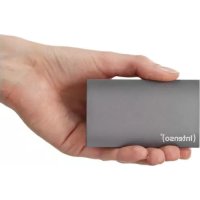
| Dimensions (L x W x H) | 130 × 77.5 × 15.5 mm |
| Maximum transfer speed | 5 Gbit/s (USB 3.0) |
| Operating temperature | 5°C to 35°C |
| Compatible operating systems | Windows XP / Vista / 7 / 8 / 8.1 / 10, Mac OS 10.x |
| Hardware encryption | Yes, XTS-AES-256-bit |
| Password entry | Built-in numeric keypad (4 to 12 digits) |
| LED indicators | Blue (ready/access), Red (locked), Green (unlocked) |
| Self-destruct function | Yes, after 100 consecutive incorrect entries |
| Power supply | Via USB bus |
| Included accessories | USB 3.0 cable, user manual |
| Maintenance and cleaning | Clean the casing with a soft, dry cloth |
| Security | AES-256-bit encryption, keylogger protection |
| Warranty | Legal warranty (see terms) |
Frequently Asked Questions - 2.5 Memory Safe INTENSO
User questions about 2.5 Memory Safe INTENSO
0 question about this device. Answer the ones you know or ask your own.
Ask a new question about this device
Download the instructions for your Hard Drive in PDF format for free! Find your manual 2.5 Memory Safe - INTENSO and take your electronic device back in hand. On this page are published all the documents necessary for the use of your device. 2.5 Memory Safe by INTENSO.
USER MANUAL 2.5 Memory Safe INTENSO
External USB 3.0 Festplatte 2,5^* (6,35cm)
Abmessungen: 15,5 × 77,5 × 130 ~mm
Transferrate max. 5 GBit /sek (USB 3.0)
Kapazität: 1MB = 1,000,000 bytes / 1GB = 1,000,000,000 bytes
Anwendungshinweise

Service Center (thre RMA-Mr.)
Service Hotline: +49 (0) 900 - 150 40 30
Operating Instructions
2,5" MEMORYSAFE
Scope of Delivery
- Intenso High-Speed USB 3.0 hard drive (downwardly compatible)
USB 3.0 cable - Operating instructions
Technical Data
External USB 3.0 hard disk 2,5" (6,35cm)
Dimensions: 15,5 × 77,5 × 130 mm
Maximal transfer 5 GBit/sec (USB 3.0)
Capacity: 1MB = 1,000,000 bytes / 1GB = 1,000,000,000 bytes
Instructions for use

Operational between:
5^ C and 35^ C
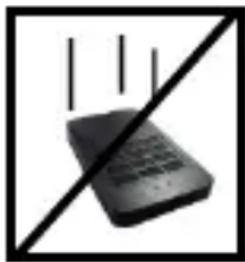
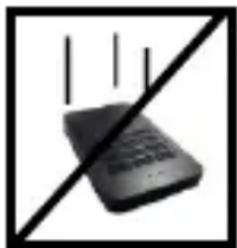
Crush, fall
Protect the device in every operation condition from crush and fall. Do not move the device during operation.

Electrostatic discharge:
It is an electrostatic discharge sensitive device. Protect the device from every kind of electrostatic discharge.

Disposal of WEEE (Waste Electrical and Electronic Equipment)
Devices marked with the WEEE logo are subject to the European Community Directive 2012/19/EC.
Waste Electrical and Electronic Equipment must be separated from household rubbish and disposed at sites that collect WEEE.
By orderly disposing WEEE you will avoid damage caused to the environment.
Installation Instructions
System Requirements:
This hard drive is compatible with the operating systems MS Windows XP / Vista / Windows 7 / 8 / 8.1 / 10 and Mac OS 10.x.
Please note:
For the USB 3.0 operation an USB 3.0 interface card is needed. The hard disk is downwardly compatible with the previous USB standards.
Your PC's hardware configuration as well as the operating system employed can influence the compatibility of the hard drive.
Power supply under USB 2.0: If your USB 3.0 hard disc is not recognized on your PC with a USB 2.0 connection, this could probably be caused by the power supply. In this case, please connect an USB hub with an external power supply.
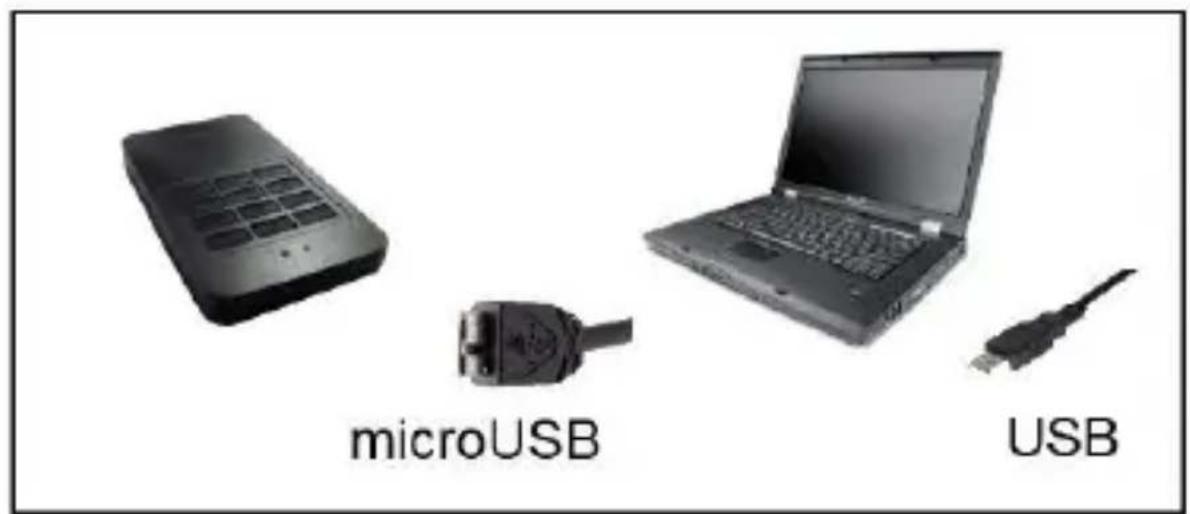
Hard Drive Connection:
To connect an external hard drive to your computer, please use the USB cable provided. Connect the USB 3.0 plug with the Intenso hard drive and the plug of the USB cable ending with your computer.
The computer automatically detects the "New Device" and installs the driver. Please wait until driver installation is completed. Your computer now shows an additional drive named "Intenso".
As soon as the hard drive is connected to your computer, the LED flashes. The LED flashes, when writing or reading procedure is carried out.
Trademark: Windows XP / Vista / Windows 7 / 8 / 8.1 / 10 are registered trademarks of the Microsoft Corporation. Macintosh and MAC are registered trademarks of Apple Computer. All trademarks and names of third parties are property of the respective user.
Use of Intenso AES Encryption Hard Disk:
| 1 | 2 | 3 |
| 4 | 5 | 6 |
| 7 | 8 | 9 |
| * | 0 | # |
Keys 0-9: Number keys to enter a password (minimum 4 and maximum 12 numbers to be used as password)
Key*: Star key
Key #: Hash key
For the functions of star and hash keys, please refer to the following points of these operating instructions.
LED indicator:
Blue LED: When remaining illuminates it indicated that the hard disk is ready for operation. The blue LED flashes when accessing the hard disk (read / write operations). When entering the password, each keystroke is visualised by interruption of the blue LED lighting.
Red LED: Indicates that the hard disk is locked and that you must enter the password to access the hard disk.
Green LED: Indicates that the hard disk drive is unlocked and that you can access any data stored.
1. Use:
Intenso Encryption hard disk drive is already formatted as a factory default and provided with a password so that you can use the hard disk immediately.
In order to access the hard disk, you must first enter the default password and confirm with the hash key. After successful entry, the green LED lights up and you can now find the Intenso drive in file manager.
Note: The default password is: 1234. Please change the password before you store your personal data on the hard disk!
2. General commands
For normal use, you only need the number (0-9) keys and the hash (#) key.
To unlock the hard disk, enter your password using the number keys and press the (#) key to confirm.
Keep the hash (#) button pressed for 3 seconds to lock again the unlocked hard disk. Please note that locking is only possible, if no read / write operations are currently taking place.
3. Changing the password:
Prerequisite: The hard disk must be locked; the LED must therefore light up red.
a) Press the hash (#) and star (*) key simultaneously for 3 seconds, until the LED starts flashing red.
b) Now type your old password and press the hash (#) key. If you have entered your password correctly, the LED will start flashing green (slow flashing). If you have entered your password incorrectly, the LED will flash red. In this case, return to step a).
c) Now enter your new password and confirm your entry by pressing the hash (#) key.
d) The green LED flashes rapidly now. Please confirm your new password by entering it again and confirm your entry by pressing the hash (#) key.
e) If the confirmation of the new password is successful, the green LED lights up for 3 seconds. Then the red LED lights up again and the hard disk is locked. If you enter the new password incorrectly when confirming, the hard disk will be locked and the red or green status LED will no longer be illuminated. Disconnect and reconnect the hard disk again and enter your old password in order to regain access.
4. Correction of password entry
To reset the password entry during the current entry, please press the star (*) key. To confirm the correction, the green LED will light up briefly for three times.
5. Multiple incorrect entries of the password
If the password is entered incorrectly 3 times, the hard disk will be locked. The red status LED will no longer be illuminated. In this case, the hard disk must be re-connected to the computer. If the password is inserted wrongly 100 sequent times, for safety reasons all data saved on the hard disk will be automatically definitively deleted.
6. Password reset
Warning: Through this process, all data stored on the hard disk will be permanently erased!
To reset the password, you must press the star (*) key and digit 1 simultaneously for the time required (about 3 seconds) until the green and red LEDs start flashing in sequence. The system will now be reinitialised and all stored data will be deleted. When initialisation is completed, the LED will turn red.
In this state, the hard disk must be re-initialised in the "Disk Management" of your operating system and formatted. For this purpose, the hard disk must first be unlocked using the default password (1234). Please refer to the valid instructions of the operating system you use for information on how to proceed.
7. Security features
- 4-digit to 12-digit personal PIN
- XTS-AES-256-bit secure encoding
- No special software or driver needed
- 100% hardware encoding
- Protection software from password theft (Trojan, key logger, etc.) by direct keyboard input of the PIN into the hard disk
Real-time encoding of the whole hard disk (no speed reduction) - Independent from operating system
- Self-destruction mode (if password is inserted incorrectly for 100 times subsequently, all data will be automatically and definitively deleted)
Limited guarantee conditions
The guarantee only covers the use of this Intenso product. The guarantee does not cover normal wear resulting from faulty, improper use, negligence, accidents, incompatibility or poor functionality of certain computer hardware or computer software.
Claim under guarantee does not exist in the case of noncompliance with the Intenso user manual as well as in case of improper assembly, use or defects of other devices.
Claim under guarantee does not exist in the case that the device is exposed to shock, electrostatic discharge, heat or humidity beyond the product specifications.
Intenso is not liable for data loss or any other occurring indirect damages or secondary damages, for the violation of the guarantee conditions or any other damages, no matter what the reason is.
Important information:
Please note that any claim under guarantee expires, if the capacity label (= guarantee sealing) on the rear side is damaged and if the housing of the hard disk is opened.
This product is not intended for commercial use, for medical or special applications, where a failure of the product can cause injuries, fatalities or substantial property damage.
(Intenso) WARRANTY CONDITIONS
Dear Intenso customer,

Thank you for opting for a high-quality Intenso product. All Intenso products are subject to constant quality inspections and the legal warranty period applies, of course, from the date of purchase. Please be sure therefore to save the sales receipt as proof of purchase.
Warranty conditions
The warranty only covers material and production defects. Intenso GmbH is not liable for the loss of data in units sent to us. The free of charge warranty service covers the repair or replacement of defective parts. Please understand that we cannot render any warranty services, e.g. in case of:
Misuse or improper handling, installation or use
- Damages, scratches or wear
- Modifications, manipulation or repairs by third parties
Damages through force majeure or transport
Your Intenso GmbH
CLAIM PROCEDURE
In case of a claim, please proceed as follows:
- Only returns accompanied with all accessories and sales receipt are accepted.
- In addition, a RMA number is absolutely required for return shipments. You can request this RMA number via e-mail or through the service hotline.
- Please package the product including all accessories and the sales receipt safe for transport. Please stamp the package.
- Please affix the RMA number clearly visible on the outside of the package.
Please send to the following service address:
INTENSO GMBH
Service Center (your RMA-No.)
(0.39 €/min from the landline in Germany
Usual costs apply.)
Email support@intenso.de
Internet www.intenso.de
Istruzioni d'uso
2,5" MEMORYSAFE
Volume di segna
Capacité: 1MB = 1,000,000 bytes / 1GB = 1,000,000,000 bytes
Service Center (Votre reference RMA)
Service Hotline: +49 (0) 900-150 40 30
Capacidade: 1MB = 1,000,000 bytes / 1GB = 1,000,000,000 bytes
Indicações de uso:

Operacional entre:
5^ - 35^

Colisões, quidas
Service Center (Seu N° ADM)
Email support@intensode
Internet www.intenso.de
Instrukcja obstugi
2,5" MEMORYSAFE
USB 3.0 BheuHn JckTkn DnCK 2,5" (6,35cm)
Pa3mepbl: 15,5 x 77,5 x 130 MM
Ckopoctb nepepaHmakc.5Γbnt/c (USB 3.0)
EMKOCb:1MB=1000006aaiTOB/1GB=100000006aaiTOB
Yka3aHnI NOJIb3OBaTeJIa

Pa6o7a TeMnepaTypa Mexy:
5^ - 35^
yap, naeHne
3aunuainepnupbopBJIIObOMpa6ooyemcoCTOHNOT ynapa npanen. He nepeDbrarTe np60pB pa6ooyem COCTOHN.

3neKtpocTaTnueckn pa3pnd
CoeHHeHne XeCTKOrO DnCKa:

UTo6bI npncOeHNHTb BHeuHn JecTKn DnCK K BaWeMy KOMNbTepy, nCNoJIb3yIte, noXaJyIcTa, doCTaBnEHHbI Ka6eJIb USB. CoeINHtE USB 3.0 uTeKkep c Intenso JecTKm DnCKOM I USB uTeKkep c BaWM KOMNbIOTePOM.
KoMnIbTepeacno3Haet,HOBoe annapatHoe oBeCneueHne" n HcTalIpuyET dpaBep aBTOMaTHueckn. IdoXdnte, noka 3aBepuNTcra
HCTaJIpyIgIpaIbepa.HaPa6oyem MeTe"BpacnojXeHn TeIepb IMeETcEe OINH DnCKOBOD C 06O3HaueHneM ,Intenso".
Kak Tobilbo BHeHn JecTKn DnCK CoeHNHeC KOMnbIOTepom HauHnaet Mngatb CBToDnO. CBeToDnOd MngaET, KOrda NDeT npocecc 3aNNcN nIN YTeHnJ.
Toprobámpka: Windows XP / Vista / Windows 7 / 8 / 8.1 / 10 yBnIOTc
3apernctpnpOBaHHbIMN TopROBbIMN MapkAMN KopnpauCm Microsoft. Macintosh n MAC - 3TO 3apernctpnpOBaHHbIE TopROBbIe MapkI Apple Computer. BCE mapkn n Ha3BaHnI TpeTbeI CTOpOHbI YBnIOTcR CO6CTBeHHOCtBu COOTBETCTByUoIero NOlb3OBaTeJIa.
IcnoJIb3OBAHnE JecTkoro Dncka Intenso c AES-koInpoBaHnem:
| 1 | 2 | 3 |
| 4 | 5 | 6 |
| 7 | 8 | 9 |
| * | 0 | # |
KnaBn0-9:KnabuC uipamn Ira BbOda npoJ (Ira BbOda npoJIyOTcMHNmym 4 n MaKcmym 12 cnp)
KnaBnua*: KnaBnua co 3Bε3doukoI
Klambu#a#: KlaBua cpeWetko
OncanHe yHKn KnaBnCn CO 3B3doKo n KnaBnCpeWetKo npBOHTCB CNeDyUxN PyHKtAX DaHHoro pyKOBoCTBa.
CBeToIIOHbIe HdNkAToPbI:
CnHn CBeToDnOd: HenpepbIBHOe rOpEHne CBeToDnOda CNrHaJIIN3npyET O TOM, YTO JcEckn DnCK rOtOB K paBote. EcN CBeToDnOd Mmraet, 3TO O3NaHaaeT, YTO B DaHHbIM MOMENT JcEckn DnCK nCNoIb3yETc (Ppocecc 3aIncn / cHTbIBaHn). PpN BBOde npoJRAkXdoe Haxatne Ha KnaBnUy COnpoBoXdAeTcR IppepbIBaHnEM rOpEHn CnHero CBeToDnOda.
KpacbI CBeToaNoD: CnHaJIIN3npyeT O TOM, YTO JcCTKn DnCK 3a6JokIpOBaH;ДЯ ПОЛуЧЕня DoCTyPa K JcctKOMy DnCKy Heo6XoDmO BBecTn napOlB.
3eIeHbI CBetoNOd: CnHaJIIN3NpyET O TOM, YTO JcCTKm DnCK pa36JIOKIpOBaH n IMeEtCra DoCTyN K COxpaHeHHbIM DaHHbIM.
1.Испобьвангe:
KecTKn DnCK Intenso c KoInpOBaHHeM Ha MOMeHT NOCTaBKn CcOpMaTIpOBaH n Cha6xHen napoJeM, TaKIM o6pa3OM, BbI MoXeTe HeMeJdJIeHNO npICTuNTb K eRo IcNoJIb3OBAHnIO.
Дя поуеня дocура кжсткому диckу сачалa TpebyetcBBeCTn napOBJIeHHbI N3ROTOBNTeJem, И NOДТВЕРДNTb erO, HabaHа kIaNbUshy cpeшETko. Посл ВBOda napОЯ 3aropaETcR 3elHbI CBToDIOd,ИВСПИСКе ФайноВОго MeHeДжЕра NOYBLЯETcRДИСКOBOD Intenso.
Yka3aHne: NapoIb, yCTaHOBJIeHHbI N3rOToBHTeJIeM: 1234.
IopkaJyucTa, n3MeHnTe npoJIpei coXpaHeHEm Ha JecTKOM DnCKe nepcoHaJIbHbIX daHHbIX!
2.Obuine komaHdbI
Дя pa6otbI B CTaHdapTHOM peXmme Bam nOTpe6yIOrTcra TOnbKO KnaBnC uΦpamn (0-9) n KnaBnA c peWetKo# (#).