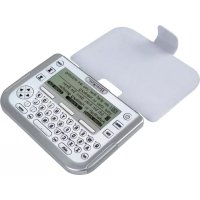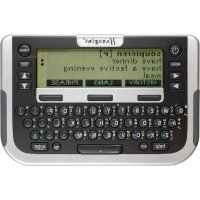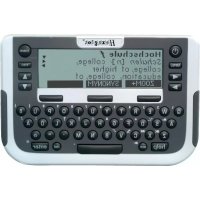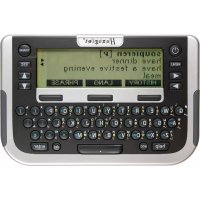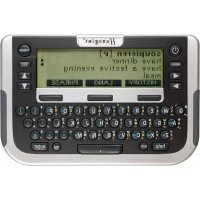
Traveller SC South - Electronic translator Hexaglot - Free user manual and instructions
Find the device manual for free Traveller SC South Hexaglot in PDF.



| Technical Features | Details |
|---|---|
| Product Type | Hexaglot Traveller SC South |
| Dimensions | Not specified |
| Weight | Not specified |
| Power Supply | Not specified |
| Connectivity | Not specified |
| Usage | Designed for portable and convenient use |
| Maintenance | Refer to the user manual for cleaning instructions |
| Safety | Use according to manufacturers instructions |
| General Information | Check device compatibility before purchase |
Frequently Asked Questions - Traveller SC South Hexaglot
User questions about Traveller SC South Hexaglot
0 question about this device. Answer the ones you know or ask your own.
Ask a new question about this device
Download the instructions for your Electronic translator in PDF format for free! Find your manual Traveller SC South - Hexaglot and take your electronic device back in hand. On this page are published all the documents necessary for the use of your device. Traveller SC South by Hexaglot.
USER MANUAL Traveller SC South Hexaglot
Hexaglot Traveller SC
Deutsch 2
Cesky 22
Eesti 40
English 59
Espanol 78
EAAWkα 98
Francais 118
Italiano 137
Magyar 156
Nederlands 175
Norsk 195
Polski 213
Portugues 232
Pycaxn 251
Suomi 271
Svenska 289
Türkce 307
325
Willkommen! 4
adv: Adverb, Umstandswort.
Hra 3: Cisine puzzle
Clem hry je co nejmene pokusz rozhtif ciseiu ma tci opst od 1 do 9. klavesami mute posunov svberovych dvecnc. Sitkulm klavy sate ve vberovem dvcj pr osnju pe smnu hodnovych nuokakSitkulm klavy prot smnu hodovych nuokak
18. Pokyny kudzbe
Pit (stn) phtroj. Haeagot Flwcrer SC poivite proo inoue couy haidk, s nird pfstro) othe. P kud je pfstro nadme zneblity, ploit vkyh, nikl myk haidk. Pfsto nkiy neponaeh do yodi and do jinch kapat. V 3dnim ppaed se mei m prvat chemickal distci proshdty ne boc stcipr adkhy s meckni tici imt falsik yelio2 by mily potokdt material.
19. Odstranénizvad
Prikud vaid pristroi Hexaglot Traveller SC neprauwe nebo ho nemizute zapnout, akki jssa baterie jest de statecn nabite, resutejte pristroi. Na zdani strane pristroi najate resevo a facklo. Zadoklinte ho opatme tenikym, ale na sspiaty mphdrimien (napz kancsakou spankou). Prikud to nebude ospine, yvmtte bateri a po chviil Oekani vodte do pristroi ne nove bateri Zhontrokui ta taz, za je karta zasunuta do pristroi spravnil.
Poznianka: Pfl. resotovani pifstoe se u'deve u v. vatalskem skrovniku ve a viastichn pizanikn kresnaz. Pokud choote tyo udaje vymazat, poujke prozimpifstine finkove u vatalskem skrovniku, ppradinje ve vlastrichne uznoi mchak.
20. Zbruks
Nae vrybkiy Hexaglot podlilajpnsi konane krolte kuality. Fimra Hexaglot zanu.cje, ze vsl pstroj narn materialov an yvbrn zavady. Pukod se da duie lo koupj objv na vism kapsinm pstrjy vse uveden zavady, nabir vaml fma Hexaglot die vsl voby bezipnau opravo nebo vyniu. Zanu kla paiseo pro vlas jea povadinho kononeh zakznikn. Naplat vi ppadat pozkzeni roztirinych cdti, napp. pouzdra ne bo dispej, v pripadne neo dbome manipulae, zavineneho potskozeni, v pripadne Skod spuzo benych zolmenim, tepim, vdou a pirodn imudalostmi, neopravlnym zasahem do pstrjoe a chemiyi uyv, napr. yalekimi bateini Vade toho malat zalkomna zanun prava udod obchodnikov, u nihai jste pstrjto kupli; ta sespu toulo zanukou omzena. Vadny pstrjno nam prosim danide s krakym popesem zavady a dokladern o koup i svhe prode jioe pro dazil bi postaunen neb ov dstok h ofrankov amel Bokoun a dresu
HEXAGLOT Holding GmbH, Kundensevier.
Sportale 41, D-2233 Hamburg, Niggmo
Zastani zpjt be bezpltna. Za zastani tam a zpjt nephebitame Zadinou odopovnost. Mzostn zastat vadinny pflstro za obolem spravy na vyle
uveden ouadresmu i po upyun zuo nbi doby. Po upyuni zauuni dobyse pripadne spravy plat.
A: Marksna poelpaksus kir as
C. Ni misinada sugu po olpaikus/kaibir as
D. Togud nimsana sugka kaskn as jannkugus
E Semantineinovolmoite seluused kndurjanaoolugides
So Nt alhtveitakne talsa autmaatrke kreek e mngslik (seidusel. on olenmas keekaart), st kirk siseusedhakake sis kekia taha dega ka hibft kahvd konal de konal dev vaskvat vanvlire Krt.
Sona otsumine
Soneilus otis de taki neesse valud kelesuuna standan sntakku kireid ng - kuivrd omnes - kasutajnndtu kireid Vaja duse konat vib ottingut pirata kakaustajasnstikuga. Sestage kogu sna vio sna algs ja vajtage sis klaivile ntei Otingul vib ola kalim vinalokukult must:
Leatake taps et kskirje. Kjekuvatakse ekranile.
- Lataikse rohikem kui Oks kirje. Seljuhul kuwatakse tabarnuste nineknt, milast vite kuwatase ks valida soov tud kirije.
- Sobival karet el keita Kuvatake se otisala vale tahish kufi tahr kire vo ibab se sestud otisungmisi te ogikirjvarante - olen-evset selket, kae sedamre sedahts eil vaidut varontige Aivl
Marks: vöb jutud, et mimi markusina esineab tab amnusite nmejwrae rohikum kui ük lord vi et mone markzona kohta et ole konkrataes koeles tiget. Andemei keruka strukturi titi on see vittimau - tegemist et die seadime veaga. Chingumldist sisestandis pidage meles jargmiu junieid
- Diaknilsed mrgid (nagu nait g a a jne) vordusstatake os ingul ta pida tafheega: a = a. = u jne.
Tuhkud (nagunat .parking light) tuleb samuli sizestaia.
Ermarka (nait. sidakipsu nagu sana, knoehor) eide vaja siestada (seega nait. knoehor).
Kui otte siseastamset eiknud, voite vila kursor ki hividag a boh it kus teghe vea, kustadat ak skud mngid kahviga dai vil sieestada ued mngid. Et tihstada kogu siestatud mngjada j a seestada uus sana, vajtate kahvile ES C
Otsitavas mokstsvibdla umbes 20 mark.
Tabamuste nimekijaga tostamine
Kui obssu tulumus a letakse rohlem kui uls vastus, koostab Hexagiot Traveler SC sobivatest vadustest tabamusime nemeirjia va ligk klavhvidaga △ vol ▼ tabamusite nemeirjia kajr je valugate sate kijke kuvansels khalvile ernt NDU kuvatase sanaikku taliik kijra. Klahnu 15EC liiie hllt aqasai tabamusite nemeirka la yoe salit va kauy a mnn muu kju
Mikus tabarnuste nimokir kustukatakse automaatseit koh e, kui sieastate ue obstava morsa aktiveente mone teise reiti vii lilata sea dmne vila.
Paralleelseit kuligev ettepanekute ninekiri
Et obing deks veil htsam ja mugavam; on selli elektronilisel snsatkul paraleiset kuleg etepanekute ninekrin. Kui siseate otisbavot mntal, otisakse samai ajs snsatikus ning sieshuseale vastavad sobaid kujatalee etepanekute nmeikirjast. Otsaba maile sisiastame api vib gai akahviga 11kuda otepanekute ninekrja, et valda sealt mini kire. Kahviga eetihippate te sis kohe soovid kireja. Etnapaneke nimekarjast saab vojda kahviga ESC et nati. mura otisbavat mstet. Paralletesel kuleva etepanekute ninekrin a saab sise veiila lihada sedamenist
图10-2
-
- Etape panekute nimakir sa adab makaraalsetesresed 20 tabarnust
- -Kui nenda hulgas el do soovtud kijet, tuleb kigeapeaft pusstada otstav at mois let
-
- Metamarkidea odis paralkei selk kuley eithapane kule ninkin el tomi.
Sportallee 41, D-22335 Hamburg, Germany
schicken. Tagasisaatmine on tasuta. Edasi-tagasi saatmise eest me ei vastuta. Parast garantiaja moedumist on teil samuti voimalik rikkis seade ulinimetatud aadressil remonti saata. Parast garantiaja moedumist on remont tasuline.
21. Kontaktinfo
Infot meie toodete ja tarvikute kohta, mis puudutavad eriti teie Hexaglot Traveller SC-d, nagu nait. varukatted voi SmartCard'd taendavate keelek kombinatsionidega, vite saada otse firmast Hexaglot Holding GmbH, Sportallee 41, 22335 Hamburg, Telefon: +49-(0)40-51456-200, faks: +49-(0)40-51456-993, e-post: info@hexaglot.de. Voi kulastage meid internetis adressil www.hexaglot.com.
22. Luhendite ninekiri
a:Adjektiv,omadussana.
adv: Adverb, maärsoña.
- Precautions 61
Storing data in the device 61
Using the operating instructions 61 - Scope of delivery and product description 61
- Inserting and changing the batteries 62
Inserting/changing main batteries. 62
Important information on batteries 62 - Inserting and changing the card 62
- Changing the device cover 63
- Overview of device 63
Powering on and off 63
Keyboard 63
Display symbols 65
- Quick guide to the dictionary 65
- Program selection menu
- Settings
- Help function
- Zoom function
- Dictionary
Selecting language
Reading entries correctly
Searching for a word
Working with the hit list
Incremental suggestion list
Special entries in the hit and suggestion lists
Correcting spelling and searching for spelling variants
Searching with wildcards
Scrolling within dictionary
Following cross-reference
Re-select entries in history.
- Phrases
Search for phrases using topic selection
Find phrase with search term
Creating entries in the user dictionary/memo
Searching for and changing entries in the user dictionary/memo
Deleting entries in the user dictionary/memo
- User dictionary/memo
- Unit converter
ENGLISH
Hexaglot Traveller SC
Standard unit conversion 73
Calculating time differences 73
Converting sizes 74
- Calculator 74
Calculating with the Hexaglot Traveller SC 74
Using the calculator memory. 74
- Games 75
Game 1: snake slalom 75
Game 2: Code cracker 75
Game 3: Number sliding puzzle 75
- Taking care of your product 75
- Fault rectification 75
- Guarantee 76
- Contact Information 76
- List of Abbreviations
77
Welcome
Thank you for choosing the Hexaglot Traveller SC. Please take a few minutes to read through these operating instructions carefully before using it so as to be able to take full advantage of the functionality and to have years of enjoyment. Please keep these operating instructions in a safe place so as to be easily accessible next time you need to look something up. Hexaglot wishes you all the best in using your Hexaglot Traveller SC!
1. Precautions
To ensure years of trouble-free enjoyment, and to maintain your guarantee, please note the following:
- Never carry out repairs yourself. There are no serviceable parts in the device.
- Do not expose device to water, sand or dust.
- Never use coloured paint thinners or other chemical cleaning agents. Read "Taking care of your product".
- Do not expose device to high temperatures, high humidity or direct sunlight.
- Do not drop or expose to heavy impact.
- The Hexaglot SmartCard has been specially designed for this device.
- Do not use any other card in this device as this may result in irreparable damage.
- Never use the Hexaglot SmartCard in a device other than the Traveller SC as this may result in irreparable damage to the card or device.
Storing data in the device
The device has a 515 kB memory area which is freely usable for the user to store his own dictionary entries or memos. This memory retains its content even after batteries have been exchanged or when the batteries are flat. We recommend making a written note of any important information. Essentially any system with an electronic memory can lose information under certain conditions. We therefore assume no liability for loss of data, irrespective of whether this is as a result of incorrect use, a repair, a technical fault, exchanging of batteries, using batteries passed their shelf life or any other circumstances. We accept no direct or indirect liability for financial loss or grievance of third parties resulting from the use of this product and its functions, such as theft of credit card numbers, loss or change of information.
Using the operating instructions
The keys of the Hexaglot Traveller SC are depicted as white framed boxes in these operating instructions: The TRANs symbol stands for the TRANS key on your Hexaglot Traveller SC. The functions of the display keys are depicted as black boxes with white lettering: The PHRASE symbol stands for the display key above which "PHRASE" is displayed in inverse colouring. The screen diagrams described in the operating instructions are provided purely as examples. Actual diagrams in the device may vary.
2. Scope of delivery and product description
Included in the delivery are:
- Hexaglot Traveller SC
- Operating instructions
-2 demonstration batteries, model Micro / AAA - Hexaglot SmartCard
3. Inserting and changing the batteries
Power to the device is provided by two standard batteries of type AAA (Micro, Lr03, AM4).
Inserting/changing main batteries.
First insert the batteries provided:
- The battery compartment is on the underside of the device (diag I).
- Remove the cover of the battery compartment.
- Insert the two batteries, paying careful attention to correct polarity (+/-)
- Close the battery compartment cover.
- Press the reset key at the back of the device using a straighten paper clip or something similar.
Important information on batteries
Note: Incorrect use of batteries can result in leakage or cracks and ultimately in damage to your product.
Please be aware of the following precautions:
- Make sure you always switch the device off before changing the batteries.
- Pay careful attention to correct polarity (+/-) .
- Never mix batteries of different types, or mix old with new.
- Never leave used batteries in the battery compartment as this may result in faulty operation.
- Remove the batteries if the device is not to be used for a long period.
- The batteries supplied are not rechargeable.
- Do not expose batteries to direct heat. Do not short-circuit batteries and do not attempt to take them apart.
If a battery leaks, clean the battery compartment immediately, ensuring that battery fluid does not come into contact with skin.
- You may continue to use the device with rechargeable batteries - reducing energy costs for the device significantly.
- Please note, however, that the operational life of the device is generally shorter when using rechargeable batteries.
- Suitable rechargeable batteries and battery chargers are available from specialist outlets.
Note on disposal: Please only throw discharged batteries away at collection points provided by the dealer or the local authorities. Batteries are generally discharged when the device is switched off and indicates "battery flat" or, after prolonged periods of use, "no longer work efficiently". To be on the safe side, place sticky tape over the poles of the battery or put them into individual plastic bags.
4. Inserting and changing the card
Ensure that the device is switched off before inserting, removing or changing a card. Then open the cover of the card compartment on the back of the device on the bottom left-hand side (diag II). To remove, press gently on the card, releasing the locking mechanism. Now pull the card out of the device. To insert, push the card, with contacts pointing forward and downward, into the empty card slot (diag II), until the locking mechanism grips the card and fixes it into position. Close the cover of the card compartment. The new card is now ready to use.
Note: Hexaglot SmartCards only work with the Traveller SC. Never insert a commercially available SD or MMC card into the Hexaglot Traveller SC. You may damage card, card contents and device beyond repair. Never use Hexaglot SmartCards in other card devices such as digital cameras, MP3 players etc., or in PC card readers. You may damage these devices and the Hexaglot SmartCard beyond repair. A "No card!" message is displayed on calling the dictionary function if there is no card in the device or if the card is not inserted correctly. You can use the calculator and the games without a card. Additional SmartCard accessories with other language combinations are available from Hexaglot (see contact information).
Note: You can continue using the memo function, the user dictionary, the calculator and the games without installing a card. These functions are, however, only available in the English language. You are prompted to set the user language after changing the card.
5. Changing the device cover
Please switch the device off before removing or exchanging the device cover. Open the cover of the battery compartment on the back of the device (diag. I). To remove, simply lift the cover from the retaining pins: The device may also be operated without the cover. To insert a new cover, locate the retaining holes of the cover lug at the retaining pins of the battery compartment lid (diag III). Close the battery compartment carefully. Ensure that the lug is fed cleanly through the gap between the housing and the battery compartment lid. Device covers are available as accessories from Hexaglot (see contact information).
6. Overview of device
Powering on and off
To power the Hexaglot Traveller SC on, press until the device turns on. The Hexaglot Traveller SC switches itself off automatically if no keys are pressed within a period of a few minutes. Press again to switch off the device manually.
Keyboard
The following functions are provided with the Hexaglot Traveller SC keys:
Mode keys
Use these keys to enable basic functions of the Hexaglot Traveller SC.

Keep pressed to switch the device on and off.

Displays help text for the mode currently active.

Opens a menu with further functions:
- user dictionary
- memo
- calculator
- unit converter
-games - settings

Switch to dictionary mode.
Display keys
Three large display keys are positioned below the Hexaglot Traveller SC screen. The functions currently active for these keys are displayed as text in the bottom line of the display on the black fields. Below is an overview of all possible display key functions in alphabetical order:

starts the unit converter.

unit converter: enables the input field of the source unit and scrolls to the next unit.
ENGLISH
Hexaglot Traveller SC
unit converter enables the input field of the target unit and scrolls to the next unit.
unit converter scroll to the preceding unit of the active input field - source or target unit.
unit converter starts the currency calculator.
user dictionary memo function enables capital letters for character keys.
unit converter starts the size category.
user dictionary, memo function creates a new entry in the user dictionary or memo list.
user dictionary, memo function: enables digits and symbols of the character keys (dark gray imprint above the
keys). Note: digits are automatically used instead of letters in calculator mode.
dictionary: confirms selection (language) of the dictionary.
dictionary: changes to phrase mode and its functions, such as search for keyword in the phrases.
start the calculator.
scrfls up one whole page.
scrofts down one whole page.
dictionary, phrases, allows selection of the dictionary, or languages to be translated, e.g. German-English
phrases, user dictionary, memo function: start search function within the particular area.
dictionary: shows a list of terms in the dictionary history and allows a new search for these terms.
unit converter starts the world time calculator.
dictionary: enables large font size.
dictionary: enables normal font size.
jumps back to the last level displayed - same effect as pressing the Esc key.
dictionary: a foes quickly changing the direction of the current language pair when selecting dictionary
dictionary is used as a wildcard for any character when searching
dictionary is used as a wildcard for any string of characters when searching.
Input and navigation keys
The international QWERTY keyboard arrangement is used for inputting text. All inputs in dictionary mode are in lower case. Upper case, digits and special characters may only be used when inputting your own entries in the user dictionary or memo list. The most important controls for processing the dictionary are located on the left and right and sides next to the screen.
If you want to define one of the letters a, e, i, c or n with an account enter the required letter and then press Acc. Keep pressing the key until you find the account symbol to be added or removed (e.g. e, e).
Hexaglot Traveller SC
ENGLISH
- If the cursor is at the end of the text the character last entered is deleted (left of the cursor).
- Is used to delete your own entries in the user dictionary and in the menu list.

this key is used to confirm an entry or selection.
is used to cancel an action or to jump back to the level last displayed. (the exact function of the key is defined by the mode currently active).

use these keys to scroll backwards and forwards between dictionary entries or phrases, depending on mode selected. Use these keys to move the position of the cursor when entering words. These keys can also be used in Setup to switch particular options on/off.

Use these keys to select entries from lists and scroll through the display if the display content is longer than four lines.
Display symbols
The LCD has five lines for up to 25 characters. As previously mentioned, the lowest line in the display is usually used for labelling the display key. A status bar, used to flash up various symbols, is located to the right of the normal display. Diagram IV shows the various display areas and elements:
A: normal text display area
B: labeling of the display keys
C. status bar with symbols The meaning of the individual status bar symbols is explained below:
Indicate that you can select and scroll up and down through the display window using these arrow keys.
Indicate that you can select and sort through dictionary entries with these arrow keys. Show that the displayed selected entry originates from the user dictionary.
7. Quick guide to the dictionary
To look up a word in the English-German dictionary.
Press TRANs to enable dictionary mode.
The current language and the input prompt are displayed in the top line of the screen.
Type in the search word - this is not case sensitive.
The device provides matching suggestions for you
- Select the required entry from the list of suggestions with and and press enter to open the dictionary entry
Use to small through longer entries.
Use and to change between the previous and subsequent entries in the dictionary.
Press TRANS to return to the input screen.
ENGLISH
Hexaglot Traveller SC
8. Program selection menu
Start the dictionary function with the TRANS key. Use the program selection menu for additional device functions and settings. Start selection by pressing MENU. A list of additional device functions is displayed. To start a function, first select it using the and keys (inverse colouring is used for function selected) and then press the enter key. The following functions are available:
- user dictionary
3.000
2.1.10
1
4 unit converter - game 1
- part 2
1.000
Tip: You can also access the additional functions in the selection menu directly by entering the relevant function number. For example, entering 日 = key E) starts the calculator, entering B = key E takes you directly to the menu with the settings.
9. Settings
Select settings from the program selection menu to customise the basic device settings. To change an option, first select it using the and keys. You can change the following settings:
Battery displays the current battery status. If the batteries are getting low, have a new set ready so as to be able to work uninterrupted
Contrast controls the brightness of the display. Use to make the display brighter and to make it darker.
Def1-Def0 define the exchange rate which can be used in currency conversion mode in addition to those already stored. A maximum of seven digits can be specified, including the decimal point. Example: One US dollar corresponds to 0.90231 EURO. To change the value of an exchange rate, you must press enter for changes to take effect. Enter 0.90231 and confirm with the enter key. Use the ESC key to leave the input without changing the original value. Any changes are brought into immediate effect.
Spellcheck Specify here whether the search should continue looking for spelling variants if the search in the dictionary returns no results, i.e. no matching entries are found. For example, if the "Spellcheck" function is enabled, the entry "subway" is also returned when searching for "sabaal" in the English dictionary.
The key selects 0 = look for variant
The key selects 1 = do not look for variant
Pessus 1 anr h a aahar an nnnnntal hi tshd had dnaand ahanae the eanr hare The nnnnntal hi
Hexaglot Traveller SC
ENGLISH
| Form | specify here whether word forms should also be taken into account when searching. When enabled, the device traces back, e.g. in English, trace from the past form "went" to the infinitive "go". The key selects #D = include word forms when searching. The key selects D = ignore word forms when searching. |
| Language | specifies in which language messages are displayed. Use ↓ to select the required user language (country code). |
| Key tone | turns the key press tone on or off. The ↓ selects #D = key press tone on. The ↓ selects D = key press tone off. |
10. Help function
The Hexaglot Traveller SC has a context-dependent help function. Meaning that the help text displayed always relates to the device mode currently active. If you are ever at a loss anywhere, press help. Help text appears which relates to the current mode. Scroll through the help text using the and keys. Press ESC or select another mode to hide the help text Note: help is not available for the games.
11. Zoom function
In dictionary mode, the Hexaglot Traveller SC has a zoom function which increases readability by increasing the text size of the display. Press the 000M display key to enable increased text sizing and 000M to disable it. Note: With very long words, enforced line wrap may occur. separation occurs at the end of the line and is marked with the "-" separator character. separation is automatic and does not necessarily conform to syllable separation rules for any particular language. Individual characters may appear slightly distorted when enlarged. this is due to technical limitations and is not a fault.
12. Dictionary
Press TRANs to start the dictionary. The current language is displayed in the first line of the screen.
ENGLISH
Hexaglot Traveller SC
Selecting language
To change language, press TRAN and then LANGUAGE. The dictionary selection menu is then displayed. The currently active dictionary is shown in the first line. To change the language, select the required source language in line 2 using the and keys.
You can also select the language by typing the initial letters of the language, e.g. key for Italian. Change to the third line with and select the target language. To directly reverse the languages of the current language pair, press the middle display key Esc To confirm your selection and exit language selection, press Enter or Enter. To exit without changing the current language, press OK or ESC. Country codes are used to selected the language.
Note: the language selected applies to the dictionary and phrases functions. This setting has no bearing on the user language. Please note that the source target selected determines the active character set. So, for example, when selecting Greek as the source language (provided the language card is present) the Greek character set is automatically enabled and Greek characters are used for input. The coloured lettering next to the keys applies.
Reading entries correctly
Besides just providing basic translations, the dictionary can also provide information on grammar and word usage. An example is shown in diagram V:
A key word in bold
E translation in normal font
Cender ofnns in holdtions
D. gender of the translation in italics and square brackets
E semantic information or explanation of term in italics and angled brackets
Searching for a word
When searching in the dictionary, all entries in the standard dictionary of the language selected and, if available, the user dictionary are included. You may also limit the search to the user dictionary if required. Type in the whole word or the beginning of a word and then press enter.
There are three possible search results:
exactly one entry is found. The entry is displayed.
more than one entry is found A list of hits is then displayed from where you can select the required entry to display.
No matching entries were found. The next alphabetical entry to the search item is displayed or the device searches for spelling
variants of the search string entered - this depends on the setting of the SetPolicyOption in device settings.
Note: It may be the case that a keyword occurs more than once in a list of hits or that a translation is not available for a keyword in a particular language. This is unavoidable due to the complex data structures and in no way indicates a fault with the device.
Please note the following when entering a search string:
- Diacritical characters(such as e.g. u, a, a, etc.) are normalised when searching: a = a, u = u etc.
Spacess in search strings should be spacified (e.g. in "parking light")
Special characters (e.g. the hyphen in "know-how") need not be specified ("know-how" is sufficient).
If you make a spilling mistake, move the cursor to the error using the 口 and 口 keys and then use the key to delete individual characters and/or enter new characters.
Hexaglot Traveller SC
ENGLISH
Working with the hit list
If more than one hit is found in a search, the Hexaglot Traveler SC generates a list of matching hits. Use the ▲ and ▼ keys to select an entry from the hit list and press Enter to display this entry. The complete dictionary entry is then displayed. Use the ESC key to return to the hit list to select and display another entry.
Note: The hit list is automatically deleted as soon as you select another mode or search string, or when the device is switched off.
Incremental suggestion list
This electronic dictionary has an incremental suggestion list to simplify the search and make it more convenient. Whilst entering the search string, the device looks up entries in the dictionary simultaneously and displays those which match the input string in a list of suggestions. Whilst entering the search string, you can change to the suggestion list at any time using the key and select an entry. Use enter to jump immediately to the required entry. Use ESC to exit the suggestion list to, for example, change the search string. You can enable/disabel the incremental suggestion list in the settings menu.
No
The suggestion list contains a maximum of the first 20 hits.
If the entry required is not in the list, refine the search string first
To speed up entry of search strings, disable the incremental suggestion list.
The incremental suggestion list does not work when using wildcards in a search
Special entries in the hit and suggestion lists
The embedded dictionary in the Hexaglot Traveller SC has a general linguistic vocabulary. Also included is special vocabulary from the world of gastronomy, like foodstuffs, ingredients, preparation methods and the like as well as special automotive related vocabulary such as technical terms used for car parts. Entries from specialist vocabulary are easily recognisable in that they are prefixed with 出 (for restaurant) and 出 (for automobile) in the hit and suggestion lists. These entries may be accessed just like any other dictionary entries. Many word forms are recognised during the search and lead you back to the basic entry. A word form is easily recognisable in that it is prefixed with an 出 (for form). Example: the "see" entry indicates that "saw" is a word form. When calling up this entry, the entry for the key word "see" is automatically displayed. You can enable/disable the display of special entries. The German language comprises of many composites (compounded words). When searching with German as the source language, many composites are recognised and separated into their individual word components for the translation. Composite entries are easily recognisable in the list of hits or suggestions in that they are preceded with 出 .
Example: The Polizeher list entry indicates a compounded word for which translations are available for the individual components. When selecting this list entry, a list of the individual components "Polze" and "Chef" are displayed. Select the required word and press Enter. You then see the translation of that individual word. Use ESC to return to the selection list to translate the other components.
Correcting spelling and searching for spelling variants
If no hits are found during a search and no alphabetically following entry matches, the device tries to find spelling variants, or tries to correct a spelling mistake in the search string entered. So, for example, the incorrect entry of "subway" for the English word "subway" results in a suggestion list which contains, amongst others, the entry "subway". You may enable/disable this function in the settings menu.
ENGLISH
Hexaglot Traveller SC
Searching with wild cards
Wildcards allow extended searches. Add wildcard symbols in the search string in place of as many individual characters or character strings. This function is ideally suited to when you are not sure of the exact spelling of a word. This function is also very useful in solving cross-word or other word puzzles. As soon as you have entered at least one character of the search string, the wildcard symbols appear on the middle and right display keys:
represents a sequence of any number of characters. This sequence can also be empty. For example, in English, grey finds gray, greasy, gray, grey, amongst others. represents any single character. This character occurs once and only once. Example: grey finds only gray and grey
附件:
- Wildcards can not be placed at the beginning of a search string.
The two wildcard symbols can not be combined with each other. - The " wildcard may be used just once within a search string, the ? wild card several times.
- Searching with wild cards may be time-consuming.
- This is normal since complex search and compare operations need to be performed.
- Frequent searching with wildcards may therefore lead to a reduction in battery life.
- When using a wildcard symbol, the incremental search for the search string is automatically disabled.
The search results list when using wildcards is a maximum of 20 hits: refine the search if need be.
Scrolling with in dictionary
You can scroll both within an entry. If it is longer than a display page, and to the next or previous entry in the dictionary.
Scroll within entry: If an entry is longer than the multi-line display, press on once to scroll down one line or keep it pressed to continually scroll the display contents. Use to scroll backwards. Pressing and then or scrolls the entire screen contents up or down by a whole page. The and arrow symbols in the status bar indicate whether scrolling up or down is possible. Scroll within dictionary: Use and to scroll to the alphabetically previous or next dictionary entry.
Following cross-reference
The Hexaglot Traveler SC allows words within a dictionary entry to be used as cross-references. Press Enter within the entry view. The colours of the first element within the entry are inverted (apart from bold and italic lettering). Use the keys to move the marker within the entry. Press Enter again results in the word inversed being searched for in the dictionary and, if available, displayed. If more than one matching entry is found, a selection list is displayed from which the required entry can be selected. Note: if no matching entries are found, the alphabetically next word in the keyword list is suggested - a question mark (?) is displayed in front of this entry to denote a suggestion. Note: The cross-reference function does not work with entries from the user dictionary.
Re-select entities in history.
Key words for the last 50 opened dictionary entries are stored in a list by the Hexaglot Traveler SC and may be accessed from here directly, even if the device has been powered off in the interim period. The order of the keywords in the list corresponds to the order in
Hexaglot Traveller SC
ENGLISH
without opening an entry, press the left display key Esc or one of the mode keys (e.g. TRAN for the dictionary), to enable another function.
Note: entries in the process list are automatically deleted if the dictionary language is changed.
13. Phrases
The Hexaglot Traveller SC contains a multitude of phrases from a total of 30 different topics typical when communicating abroad, such as when in a hotel, airport or restaurant. Press the right display key PHRAGE to change the phrase set. If you are not yet in the start screen of dictionary mode, press TRAN first and then the right display key PHRAGE There are two different ways to search for matching phrases:
-
You can select a topic and scroll through the available phrases.
-
You can enter a search term.
Search for phrases using topic selection
The initial screen in phrases mode presents you with an overview of the available topic areas. Use and to scroll through the whole list. Entering the initial letters is also sufficient to define a topic. After selecting the required topic, press Enter to display the first phrase of that topic. Use the and keys to scroll to the next and previous entries. Use ESC to exit the entry and select a new topic.
Find phrase with search term
Keyword search is a very effective way of locating a phrase. To start the keyword search, press the right display key ESEARCH in the initial screen of the phrases mode. Now enter the keyword to be located. An incremental list of keywords matching your input is displayed. Select the required keyword using and and press Enter. The phrase is displayed along with the corresponding translation. If more than one matching phrase is available for the keyword selected, scroll through the entries with and if no further phrases are available to display, a large down arrow appears. This signifies you have reached the end of the selection list. Use ESC to exit the entry and enter a new search term. If there is no phrase which contains the search term, the message Not found appears and you can enter a different search term. Note the following when searching using a keyword:
Search terms unrelated to any topic - e.g. personal pronouns like "I", "you" etc. or prepositions like "in", "at" etc. - are ignored and no search results are returned.
Searches are not case sensitive so there is no need to use upper case letters.
The incremental list is not displayed on entering the keyword if the Preview option in Settings is disabled.
14. User dictionary/memo
The user dictionary/memo function is used to record and to call up your own information such as telephone numbers and dictionary entries. In contrast to the standard dictionary in the Hexaglot Traveler SC, differentiation is not made based on language in the user dictionary. The user dictionary/memo and its functions are in the program selection menu. To create new entries in the user dictionary,
ENGLISH
Hexaglot Traveller SC
versa. Please note: - within the dictionary function, entries from the user dictionary are recognisable by the & symbol which appears in the status bar.
- entries from the user dictionary do not appear in the incremental suggestion list
- entries from the user dictionary are not fed to any language combination or direction.
- entries apply to all language combinations
Creating entries in the user dictionary memo
To create a new entry, proceed as follows:
Press NENU and select user dictionary or menu from the menu. Press enter
You are prompted to enter the name of the new entry. Note: You can then search for this name later in the user dictionary.
Enter the keyword or memo name (maximum one line). Then press Enter.
Refer to the keyboard section for entering upper case letters, digits and special characters.
- You are then prompted to enter the text relating to the entry (e.g. translation, comment, telephone number etc.). This text may be longer than one line. The name of the entry appears in the first line. Type the text on the second line.
Once you have typed the entry, press Enter to save it. To cancel the action without saving the entry, press Esc
- After saving the entry, you may continue entering another entry. To cancel the entry and return to the Program selection menu, press ESC.
Searching for and changing entries in the user dictionary/memo
There are two ways to find entries in the user dictionary/ memo: You can either select the entry from an alphabetically sorted list or search for the entry. To search for an entry, proceed as follows:
Press MENU and select asterisk binary or menu from the menu. Press enter
Press the right display key SEARCH to enter search mode.
You are prompted to enter a search word Enter the complete keyword correctly and press Enter to start the search.
- If the term searched for is available as an entry in the user dictionary/memo, a list of the matching entries is displayed. Select the required entry with ▲ and press enter to display the entry.
The entry selected is displayed. Press Esc to return to the list view. To change the keyword or input text, press enter in the entry view. Then make your changes. Press enter again to save the changes.
To select an entry from a list, proceed as follows:
Press MENU and select user dictionary or menu from the menu Press enter
PresstherightdisplaykeySEARCHtoentersearchmode
You are prompted to enter a search word.
Do not enter a search word - simply press Enter instead. An alphabetically sorted list of all entries in the user dictionary memo is then displayed.
Use to select the required entry. Press enter to display the entry.
The selected entry is displayed. Press OK to return to the list view. To change the keyword or entry text, press on enter in the entry view. Then make your changes. Press Enter again to save the changes.
Deletengnreies in the user dictianary/memo
If you want to delete an entry, select if first from the list view, as described above under "Search entries", and then press OK Note: You can not delete the entry from the entry view always select the entry in the selection list and then press OK. You are then prompted as to whether you really want to delete the entry.
Press the key indicated to delete the selected entry.
- Press the key indicated to cancel the delete process and leave the entry in the user dictionary!demo.
Press the keyindicated to delete all entries in the user dictionary.
Note: The action of deleting one or all entries can not be undone. Once the delete operation has been confirmed, the current entry, or all the entries, are immediately removed from the user dictionary memo.
15. Unit converter
The Hexaglot Traveller SC has an easy-to-use unit converter to help you convert between many different physical units. You can also convert currencies and sizes as well as calculate time differences. Note: calculations in the currency converter depend on certain conversion factors which can be changed in the Settings menu. Check that the parameters are set correctly before converting. Press MEND and select await converter from the menu Press enter. After starting the unit converter, a list of the available unit categories is displayed. First select the category using and then press Enter. Note: Use the left display key to start the currency converter, the middle display key to start the time difference calculator and the right display key to show the sizes table. After selecting the unit category, select the next category with and press Enter. Use the middle display key to scroll the screen up one page, and the right display key to scroll down one page.
Standard unit conversion
Most units are converted based on the following method:
After selecting the unit category, the input screen of the unit converter appears. The cursor is in the Applet field. Use to move the cursor between the flow and fields at any time.
Enter the source value in the input field. The result field shows the actual conversion value based on the amount entered and units shown in the form and to fields.
- Use to select a source value from the various units in the given field, coloured inversely. The result field is refreshed on every input.
Move to the field with The unit in this field is now shown in inverse colouring. Use to select between different units for the conversion value.
The result field is refreshed on every input.
To speed up and simplify switching between units, you can also use the display keys to switch between them.
the middle display key LNTT enables the freenfeld and scrolls to the next source unit
the right display key INIT2 enables the to field and scrolls to the next conversion unit.
the left display key JMT this key scrolls back to the previous unit from the currently active unit field item or task
ENGLISH
Hexaglot Traveller SC
On starting it the input screen of the world time calculator is displayed. The cursor is located in the state field. Use the
keys to move the cursor between the state 1. line (of state 1) and state 2 fields at any time. First select the required source location by scrolling through the state list, sorted according to state code, with the JNDI and JNDT display keys. Enter the initial letter to jump straight to states - example: entering Jumps straight to (D) Germany. Berlin. If the name is longer than the input field, scroll through the field content with
- Press to bring the cursor into the same field
Enter the time at the source location in the time field.
Press to enable the state 2 field. Select the required destination location by scrolling through the state list with the display keys INSTR and INTR. You can also jump straight to states by entering the initial letter.
The time at the destination location changes according to your input
To speed up and simplify switching between states, you can also use the display keys to switch between them:
- middle display key UNITS enables the state f field and rolls to the next state or city
right display key 18 2 enables the state 2 field and scrolls to the next state or city.
left display key area. This key scrolls back to the previous state or city from the currently selected state field (state 0 or state 2). Note: when calculating time differences, please observe summer time settings. If a time difference crosses over into another day, a + in next day) or - (= previous day) is specified after the time calculated. The calculation is based on the 24-hour clock. Times specified are a m/p.m format in Anglo-Saxon regions must therefore be converted before hand: example 1:45 p.m. = 1:3:45.
Converting sizes
When abroad it is often practical to have an international size comparison table to hand. The most important sizes are available in the Hexaglot Traveller SC. Select the travel category in the unit converter and then the required sub-category. To display further sizes in the selected size category, press to scroll the display horizontally. Note: The size tables are intended purely as a guide. When buying clothes, always check the actual size and exact fit by trying them on.
16. Calculator
The Hexagod Traveller SC can also be used as a calculator. Press MENU and select calculator from the program selection list. Press Enter to enter calculator mode. "M" appears in the upper left hand corner of the display and "0" in the lower right hand corner. In calculator mode, the secondary lettering of the keys is automatically used. The content of the calculator memory (M) is displayed in the second line. Inputs as well as the results of the calculation are displayed in the fourth line.
Calculating with the Hexaglot Traveller SC
The operation is just as with any standard calculator. Addition (+) , subtraction (-) , multiplication (×) and division (÷) are available as calculator functions.
Using the calculator memory.
Individual calculation operations in the input line have no bearing on the calculator memory. Add or subtract the value currently in the
17. Games
The Hexaglot Traveler SC has three games. The games are accessed from the program selection menu. To access the games, press on MENU select the required game with the keys and press enter to start the game. Press Esc or a mode key to end the current game.
Game 1: snake sialom
The objective of the game is to guide an increasingly longer snake through the game field avoiding collisions. Set the speed and difficulty level at the beginning of the game with the keys. Use the keys during the game to steer the snake round a course. You must feed the snake by guiding it over the grey squares. The snake increases in length by one limb every time it is fed - making it more difficult to steer. When guiding the snake on its way through the game field, you are not allowed to touch the walls or the black obstacles and the snake's head is not allowed to touch any part of the snake's body. Press to pause the game. Press again to continue the game.
Game 2: Code cracker
The object of the game is to crack a four-digit code with a maximum of eight guesses. Enter four different digits in the four input fields on the right-hand side of the screen. To correct an entry, use to move to that field and correct your input. Press enter to confirm your guess. After entering a guess, the number entered by you, along with your rating, appears on the left-hand side. The number preceding the letter A specifies how many digits are correct and are already in the correct position in the code. The number preceding the letter B specifies how many digits are present in the code but are not in the correct position. Enter your next guess. Use the combination of the results from previous guesses to work out the correct code. If you can not crack the code with eight attempts, the code is displayed and the game ended. Note: the code is always made up of four different digits. Entailing the same digit more than once results in an error message.
Game 3: Number sliding puzzle
The objective of the game is to sort the number matrix back to the original 1-9 order with as fewer goes as possible. Move the selected square with the keys. Use the key to move the numbers clockwise and space to move them anticlockwise.
18. Taking care of your product
Only use a dry cloth to wipe the Hexaglot Traveller SC. If the device is excessively dirty, use a damp, but not wet, cloth. Never dip the device in water or any other liquid. Chemical cleaning agents or any with mechanical cleaning heads are not to be used under any circumstances as they may corrode the material.
If one has to use the formula 12 for a given number of terms, one can find that an alternative is to use the formula
time. Check whether the card is correctly seated in the device. Note: information stored in the user dictionary and the memo list is not lost on resetting the device. To delete this information, use the appropriate functions in the user dictionary or memo list.
20. Guarantee
Our Hexaglot products are subject to stringent final quality inspections. Hexaglot guarantees that your device is free of material and production defects. If your hand-held device demonstrates any of the defects mentioned above within a period of two years after purchase, Hexaglot offers, at its discretion, either a free-of-charge repair or exchange. The guarantee applies only for you as original end customer. It does not apply for damage to fragile components such as the housing or the display, damage caused by improper use, culpable damage, damage caused by breakage, heat, water or acts of God, damage caused by unauthorised tampering with the device or exposure to chemicals caused by e.g. leaking batteries. You also have statutory guarantee rights vis-à-vis the dealer from whom you purchased the device; these are no limited by this guarantee. Please return the defect device to your dealer, together with a short description of the fault and the receipt, so he can pass it on to us. Alternatively, stamp it sufficiently and post to
HEXAGLOT Holding GmbH, Kundenservice,
Sportallee 41, D-22335 Hamburg, Germany
The return is free-of-charge. We accept no responsibility for deliveries to or from ourselves. After the guarantee period has elapsed, you may still return the defect product to the above address for repair. Costs are payable for out-of-guarantee repairs.
21. Contact Information
For more information on our products and Hexaglot Traveller SC accessories such as replacement covers or SmartCards with additional language combinations, please contact us directly: Hexaglot Holding GmbH, Sportallee 41, 22335 Hamburg, telephone: +49-(0)40-51456-200, fax: +49-(0)40-51456-993, e-mail info@hexaglot.de. Or visit our web site www.hexaglot.com
22. List of Abbreviations
a:Adjective
adv: Adverb
Am: American Spanish
coll: Colloquial
m:Masculine
n: Noun
p: Plural
prp: Preposition
v:Verb
adj:Adjective
AE: American English
BE: British English
f: Feminine
n: Neutral
o: Other word type
pl: Pluraleptom, only occurs in the plural
sg: Singularetantum, only occurs in the singular
Disposal of Old Electrical & Electronic Equipment (Applicable in the European Union and other European countries with separate collection systems). This symbol on the product or on ist packaging indicates that this product shall not be treated as household waste. Instead it shall be handed over to the applicable collection point for the recycling of electrical and electronic equipment. By ensuring this product is disposed of correctly, you will help prevent potential negative consequences for the environment and human health, which could otherwise be caused by inappropriate waste handling of this product. The recycling of materials will help to conserve natural resources. For more detailed information about recycling of this product, please contact your local city office, your household waste disposal service or the shop where you purchased the product.

www.hexaglot.com
© 2006, Hexaglot Holding GmbH, Hamburg, Germany
Standard dictionary: © 2005, Hexaglot Holding GmbH, Hamburg, Germany
Gastronomic dictionary: © 2005, Hexaglot Holding GmbH, Hamburg, Germany
of the gastronomic dictionary: © 2000, Joachim W. Glaeser, Hamburg, Germany
Word form recognition using technology from IntraFind Software AG, Munich, Germany device design: gahlow, Hamburg, Germany
Bienvenido! 80
4 Tomato man is already now
EAAnvink
Hexaglot Traveller SC
n 100000000000000000000000000000000000000000000000000000000000000000000000000
PpOg: O h KApst. Hexaglot SmaTc Aauuoyuiv oAakaiokn 1o Taveler SC. Mny tombeke 0r hHexaglot Traveler SC Kajla SD -hMNC kapst ta uKapopciot iE npctipin. Mnpit v npkakatne avetavolum (Bab) ny kajpa, ot npckpevo ng Kapaas ka nucukic. My gynunmtei X Hxaglot SmaTc aDAcuuekcs u utayknt Kapvot, ou npckpevo npkayoc, ot MP3-Player k.a. h ot ovayvudac Kupavovkiu uUkyoYt. Mnpit va npkakatne avetavolum BABJy npkapogiat SmaTc Evid tuxkui Dv ykopa Kepa, h npka, npkayoc, npkayoc, npkayoc, npkayoc, npkayoc, npkayoc, npkayoc, npkayoc, npkayoc, npkayoc, npkayoc, npkayoc, npkayoc, npkayoc, npkayoc, npkayoc, npkayoc, npkayoc, npkayoc, npkayoc, npkayox, npkayoc, npkayoc, npkayoc, npkayoc, npkayoc, npkayoc, npkayoc, npkayoc, npkayoc, npkayoc, npkayoc, npkayoc, npkayoc, npkayoc, npkayoc, npkayoc, npkayoc, npkayoc, npkayoc, npkayOC, npkayoc, npkayoc, npkayoc, npkayoc, npkayoc, npkayoc, npkayoc, npkayoc, npkayoc, npkayoc, npkayoc, npkayoc, npkayoc, npkayoc, npkayoc, npkayoc, npkayoc, npkayoc, npkayoc, npkaycc, np
Nn 100000000000000000000000000000000000000000000000000000000000000000000000000
5. Aaayn Tou kaumuatos ng oukaun
PnV aepovnt n aalitto kaiuag ta ng ouaukun, paeattna t Aauayipia ng ouaukun, Mna avlloe to kaiuag ta yuauo uoudyuyu Tuur aupanu uauyauu Taayuauu Taayuauu Taayuauu Taayuauu Taayuauu Taayuauu Taayuauu Taayuauu Taayuauu Taayuauu Taayuauu Taayuauu Taayuauu Taayuauu Taayuauu Taayuauu Taayuauu Taayuauu Taayuauu Taayuauu Taayuuu Taayuuu Taayuuu Taayuuu Taayuuu Taayuuu Taayuuu Taayuuu Taayuuu Taayuuu Taayuuu Taayuuu Taayuuu Taayuuu Taayuuu Taayuuu Taayuuu Taayuuu Taayuuu Taayuuu Taayuuu Taayuuu Taayuuu Taayuuu Taayuuu TaayUU
6. Emoknon ouokunis
Evapn knt paaat aoupys
TnvaovgntoHexagot Traveler SC mnr cnuyto 0,auonou evpyorantf noucui To Hexagot Traveler SC atvpe vortiae aenpuu,crvy ypaia Amaa dev mtg kavva mep. Eev Bkte va atvpeyto hcn t rounan ypapmna, mnc sip to
PiKr poAbyio
To Hoxaglot Traveler SC 8000014000000000000000000000000000000000000
TnKpaAeupyio
MaandtoWjtpayyamnncs cBannr Atnoupyc1ou Hexagot Traveller SC.
Mto mappnauo aangu uuyyaoaon n aevyayaoan anou
help Eupaviciin aouauai oboing yia to euyy Acmoupyia.
- Naxviδα
PUBMED
TRANS Tupicatn Atnuoyia Ad
πwkpaaq
Kauu a aiv avn toun Haeagot Tavell SC pioovn spia yda Tkpa. O Atnaayic cunv uuv TmepupeviCraovrav Kyaov any anpyn npyn nnc Bovc on aipua stia. Etnayie, unpye pa cnnzron dav uuv mBauv Atnaayivav Tny kpvan ouav or aapn hck
TAAE Evap 1ou Mmpanoacovodv.
Mertarantac maovabv Evpymontn ta kaiuyy n apnyuovaa kai aayu teau tyn
A
A
POMBAA Maaarpoaoyouv:Evapnouyepoiaevipoe
AETAA Aetua yonn, Ainupyia onuauw. Evayatnoan nuv Tnpuy ydpap u kpaia ypauna
AERBOO MntpocpovBvEvapngnnyopiaqpcBocovpuuiv
Ae
Aekn Aiauayy aonaiauuiv Evpyaonny Tuv apiyav kauu uuy ouyev au tyauyue ypaqa (kaoepy yki tumom nve ta ykaopa). Y mcdicg I Amakya yua oalayoyr toytc xynpaaovnuuauuauuap
Aa:ErBaaenmAny(kaanBvnaHuaa)ou Aa
Aa Aaaay aany Aaoayia iiaaaanau k anc Aaoayie ta. amx ayaaonn apou onuc
Mevor Evapouuauayantntm
AANAAH
AaaynaioukndpaonNdoabovncpocnK
Aa
PAEING 10aepnayof Aao yonrnn Aaruypya orqusauwey. Evapn Aaruypoc oovohmncn oovodtnr taqa
TOPKO Act: Eupovon uoc Aioa tuvpuuou kaoia a Adok kvi voadan anuy apuv.
PPM Mntanpncn paovbuv. Evap n u maki yauo p aouaocuac
0174 Aua:Evpyaemn npaaepaaopac yyaAouyyeBoc
Hexaglot Traveller SC
E
Covocv y Auaon
AeXpXpNpOe 1n y aovn np n yapoknpa pnravnpn bnn oys yapaknpa mnc
Aek: Xpnnnncn nn n aon n naaepnnae anen enan ean aepe
TnKpa tioaayns kai Kauuwoong
To 100000000000000000000000000000000000000000000000000000000000000000000
Ocscicayyocn Aosuyiaou Aekoyovna. Moovonavavk nnacn aagpano aokdo
Aa a a a a a a a a a a a a a a a a a a a a a a a a a
Ta 1nnaa Tnnpa npnncy Ta n pao Aeyo Tu Anu Ppokovr aopaa kai da & th a rnvobv
□
图
enter
ESC
□
Chv stBuch v aovnanaotnd vva quvy pa aonopao n oia hawk taoc yapokpac e, i, cn n
cnpnepnneepnnneepnneepnneepnneepnneepnneepnneepnneepnneepnneepnneepnneepnneepnneepnneepnneepnneepnneepnneepnneepnneepnneepnneepnneepnneepnneepnneep
tpo80rT aov toviu (x, 6, 6, 6) n yav vatoiv oepolot.
Napayc Aa Xavb Aanyma.
Xpnducixya m daypaep npaxipuW.
- Dviv biokirn a kikic, paoiakm uae de pa iiaayyakaioukac yapakntpuv. vta rnnu ta tkiyau dyapoye oAouAoToaOIO (bfo ato Toy & KIN).
3 Eov Baoaia oBicn taonBancn to Aoc you knou you BoVbOe TaAio vouuou Tou Coo
(aegaae aee 8ey
- Xpncucu ya in daypaep tue kuy auyupn suv cno Aek xphtn knt Acoa nqutauy.
To TMke aand yannpue any enepdauon paactaaynch cmayc
Xanuaicn dana thuiac bayaoi c nry chnoa ooulaonrny. H
Aaouyfoou Aotpoo aotn 1ry (vay) kaidenr)
Mn 1000000000000000000000000000000000000000000000000000
ou Aekn H auuupauu. Kana tv cnoyn Aucu uropie va kniee pt aon to Mkp Taon ou
aayuyng 1t guiicv evpyotacix n eevpyotacix y aun aTnKpa uynkpiyoc cHayc
Ma a n to taApo tnye kayupk cdo Atoa kaa kai aae Tg (KHO) y
OboVnC,ot Tepinun Tou to tpeyjpevo ncoBovnciveu yeyohp oea taiae apic
Lipkoevicaw
H aovu uuv uauu yauu 25 yaoaonp H yauoan np yauun wv eaeauy o
yndiyuymiaia kupus yra my cypnau nuv mpuay oboing aucn npaaovcpbna 2da a tha ons knovmns cvibics
pntn yqun nannrnnn rny aonnne 0000000000000000
Hmovayy aoyoiaopopocncktqic kai apopoea ooyeay
A. RWWW WQ TQUBC IVOCELN KUOKYU
B. Etappn y taMpaD
C. raphyranondnoaegoupok
Hnauofo uuyuunwuyouy nycyounncnryto
Aiyovn uanb a tdoa y mopae va anadn vauwos n kowuwn to npabpuocivcivuv.
7. EuVnoUcS Ooynics yto AegnO
Exayomxmu Atnto Aynn Aynn
TnrrnrrrTRANS,yaovayepyotantpeynAeunpyoAc
Iyvuaaon ypaun nncgobvng qupovn n aouuovn yauo aou oauo aou
Pnepaoyrtny Atnou aonmte yupic wamptgnt ny tnck nny kegalayp
Hduuucnucducspocnuucuucuucuucuucuucuucuucuucuucuucuucuucuucuucuucuucuucuucuucuucuucuucuucuucuucuucuucuucuucuucuucuucuucuucuucuucuucuucuucuucuucuucuucuucuucuucuucuucuucuuc
Xy
Xpnoaia 10 10
Notrans,waevthepaycctoryoboviy
Yrnnnnae yra nny paaan rnyyakoraacxpaarin rcaudkauic, yra nny aahny karkukuvany, ykaaraoa ka daAec Amaepic
8. npoypaua-pvoucmyh
H Aenayya Acta kaiyra u to mnyo TRANS Tnpantpa Aenayycs k pa puiuic n cunkng 80 pao o npoypaa
puov eahny. Manare MENU yva va kaiyra to puov emayn Eepowcnae na Aar taepa Aenayyci ng anmucn.Fia
va kaiyra ma Aenayya. cnnb ny apynk u m tonn auynv ay mnykpaw (in enaynuv Aenayya cypavita
avipapapo) ka jura manyto tnyk po snter.
Owauagac Baeysy ig aon dokan on
1.各年度税负明细
2 Inaiyop
3. 10x10x10x10
4 Mmopocoyow
5. Naive 啦!
6 Nauviδ 2
7.104
- Pseudotic
IouuuyM: Mopaei eohoyvac to auonay yo uepao Aenayyicva bp aie tnc empehrc Eaeauyce cno pavo e anhyc. xivapn eanyyiyc, 10 to 11 kip 2 ( = Nkip 10u ut oaiydt) 10mctc to 11 kip 2 ( = Nkip 10a oag nyeciaeuiubiaoc o to pvo u
9. Publuc
Ennpe Ppaieae aoe to npopaae paov cravc yava paoepaocn cpond pcuiic ncoonnc f ao oatae
| Def-Def3 | |
| ΔapbHuet | Me du to ta kabiqia kabiqia, cov tepi tauta uva(1) (1) (1) (1) (1) (1) (1) (1) (1) (1) (1) (1) (1) (1) (1) (1) (1) (1) (1) (1) (1) (1) (1) (1) (1) (1) (1) (1) (1) (1) (1) (1) (1) (1) (2) |
| To ta kabiqia c#tAlya D# = Avaf(1) (1) (1) (1) (1) (1) (1) (1) (1) (1) (1) (1) (1) (1) (1) (1) (1) (1) (1) (1) (1) (1) (1) (1) (1) (1) (1) (1) (1) (1) (1) (1) (1) | |
| Pocamokmton | Me du to ta kabiqia duu kabiqia, cov beA vau pcvCraa me tvv cayuyy evoc apov avf(1) (1) (1) (1) (1) (1) (1) (1) (1) (1) (1) (1) (1) (1) (1) (1) (1) (1) (1) (1) (1) (1) (1) (1) (1) (1) (1) (1) (1) (1) (1) (1) (1) 0 |
| To ta kabiqia c#tAlya D# = Eepav(1) (1) (1) (1) (1) (1) (1) (1) (1) (1) (1) (1) (1) (1) (1) (1) (1) (1) (1) (1) (1) (1) (1) (1) (1) (1) (1) (1) (1) (1) (1) (1) (1) # | |
| Mop#j | Edu kabqia c#v kana ovav/tnpene va Angboiv unovn kai o pape cuv AE(uv. Duv n Arovy. To vov Avoiv x#o#e #e## ## ## |
| To ta kabiqia c#tAlya D# = Y#ak ayu#c ng papeg A##u kai vov a#y(1) | |
| To ta kabiqia c#tAlya D# = Ayv##an ng papeg A##u kai vov a#y(1) | |
| T#d#ra | Op#i ci ta ta yla#ra Ta cpeavCovn ta y#nu#an ng b#ovn. Me ta ##k#e # |
| To ta kabiqia c#tAlya D# = Evpeavonn #yau TA#k#u. | |
| To ta kabiqia c#tAlya D# = Ateveyranonn #yau TA#k#u. |
10. Aermoupyia Bonneras
O Hexagot Traveler SC 8601a Aiauupyia Bonncou to aon to ouwuyiva. An onuauo at mrova apovicn to kuoio tonoc, to ano taoipao ay npaoa quan Auaupvya n cunkng. Te pumnwn to ae kuoio anuo de yuvpiie i va knuoc, mntane to hoe. Eepavicca tor ao uauuowh obov ng vny nn Auaupvya tou aoc oivapei. Kuvniin ta anuupauoovcpe Ta TnKpia Tn Vna anuupanrva cuapovtio n ouuupauoovcnpnntto ECAVAaMA TaqcpaAuaupyia
11. Aymopyia (ou)
To Hexaglot Traveler SC 30 Aefed Sdte Tia Acrnupy (pug. n oiae dauwany tny avvum yevovnac, ny evovn aou kuyu
Pnane 1000000000000000000000000000000000000000000
T
O 10 a yuuea c Auaepi va yuyauoov avaykaan. O daayyauoc yivta oto taoc n yuyuuc kai ayapakata oto n
Iiny yuyuuyuyun amonovn m npot opj ouyovx opakpocv oevovno kappacopapouyauo. Au 0eyytae tyvka ka dV
12. Actio
Tia vayepytoanrte to Actio nntre TRANH TnapovnKaoBwn yAooC npovcck an ty pnnnypnn
Emloynt kareoovns ywoos
Tia va aAALAEY KAY KATBOW YIAGAC, TANrE TRAN SAI KAV OAVGIA IYIy oBvyn apavvai 10 yevuOcAoy AkiKo.
Iiy TAYN YAPUQ ANOVAVCA TO EVOY ABO. Ra va aALAEY TY KATBOW YIAGAC, CNTAOT OYAPUQ 2e.
Iy YAIYAKO YAIYAKO TAO CBAUEIE. EVAALAAJIOA JPOEVA TO cAIGA TAYLWATA NkPakayovnag to avaLaya opxdo apuva 1X.
MAYKO YAI NAKA. Npyauve Me To ATN TY PINT YAPUQ KAM ENADEK XITY YAWUO AOYA. Ta va anpaeq ta QDAR OAYN 4 ayko kato Buvny YIAYAC, TANrTO paoAo TAVKO PO. Ria va cBipAnoe TAY ENAOY OAK Aki YA vByte aTo NY CMAUYI YAWUO, TANrTO.
TIA VAYA OAO TAO TAPBATO uND UXUPVC VA MAAETY TAY PONAVN KAI KABOWY YAIAGC, TANrTO.
TIN ESCI RA TVTAYN YAIAYOC, yngpuaOgOgOgOgOgOgOgOgOgOgOgOgOgOgOgOgOgOgOgOgOgOgOgOgOgOgOgOgOgOgOgOgOgOgOgOgOgOgOgOgOgOgOgOgOgOgOgOgOgOgO
T 100000000000000000000000000000000000000000000000000000000000000000000000000000000
Iowth aoyywn ton katoepnoay
To Ako kco tio cugapocu vta pao TAnpopoeo cxohna yaaonkra Kn yponravau. Hekovv VxvoTao Toppokoi
A Myaueyov yopn
B:MacopaenjKannovivyypn
C:Trpogeepic yto yoeetw ouoerouu u (yovnnayypn)
D. 无氧呼吸消耗的氧量是无氧呼吸消耗的量
E Inaynoaoytac Aopopocn H aenhygic opvus Aynypaen kai caynn
EAAnvi
Hexaglot Traveller SC
Awa omn pao h
Kovavac aovytnan oA Aovvovauu uoun aovovau Aovkao n emayuvng kavluvong yukroas kai uv npovw kai kavuyghos cno Aokao xynon Mnphe eianv v tpiipoee my ovaynnm pavo oAokao ypnom.
Paeayoynta aeynan n Aoi n vaynncn kann mnrnpent erter
Yyovovpia to Bovn aovnyo avnvovn
-
- 0 00000000000000000000000000000000000000000000000000000
- 2460000000000000000000000000000000000000000000000000000000000000000000000
Yn oEi: Mtoepia va tio Ea Nmuva uupavotiepeo aia gopc on ia amatauuun yva unapy taepaon va eva Nmu e paovxipvyn yduora. Ato eva ovamgeukto NoTu wou noNtAnouw
Bauuv nu baoevuov kcv evayrae o Kamaeaegaluyin Auoupyia ts oukurtig.
Piocogic n cagauuee umoefie, wiy kayravanwn ng aoobuyanmnc
- 200340010000000000000000000000000000000
KvO (x. pA) SuV Aav Panning Light) FoTpe vapuowov.
Iupia (x y pia mua omao Jnose hoe) &y npinva TAnpo Aoyovn (opa x Jnoohoe).
Ie pnnn n aovn AaoC any nynapoknyon, npocp ie n tonfoaav mApovv 1 va paovnvte so y Opa o anuio nou kovne to aoBcKs ka uva boaypeet taue puaevauo yopacnpcp cto tnaepdeke KVa va Tnpaoyntveovcx opaeponpc. Fia v oypoae Edoanen mykatoipnkn Ka v ankpoknyon pka kauovpyea Aekn a Vouu manr ESC.
Oapocupagmuayamtpy20yapaxpacc
Eepaiae aay Aioa oaroeapuau
Eevnny avan n npabov nparana o a v an Aauana, toa haoalravell SC nyapy piia Nana aeeacaynuu 1Ae tou aagauv. Etnnt Aotov ne Bociauuv TAPUAV n Pua katoepn anr na Aata eaeauuuv Kaa rane y va vupavwni auh n kayoupqn. Mauivnv tv pao qauvncn n Tmnpn katoqponn ta Aooa anny abov. Me Taeppeen arny Aona atc Aauauw kai paoine va crnnn pia aannkayoupqn ka va tv sup
YnH H NAt aaeAeauaev aydpoeiaautauquc, paK cok avqTne Evn dAa oavc/nyi, ia aai Aitouyipia n
TnpAAnAn Aior T Bovuv amor Lacopatuv
Fia va yivetn n avanmnn anon t taekn kai dtn, taekpawndn aon AokkdiBtu pa trapAynn Aona mboavn 0aTaeAouyau. Kato T Bapao nng cnaeauv evoc apu ovacnny vceov raanggava paa trapAynn ayvamn n ao Actak kai na atarayka kanaAlyna Mya npaaovcavotai o a la Nt Bovav amrAouyau. Kato T Bapao nng cnaeauv cnaeauv eoc auay
Hexaglot Traveller SC
EAAmyká
H AotmavovatoAouytpa20atmAtpo to avvto.
Eev n 8n mnnn nn nnnn ne nnnnne nnnnne nnnnne nnnnne nnnnne nnnnne nnnnne nnnnne nnnnne nnnnne nnnnne nnnnne nnnnne nnnnne nnnnne nnnnne nnnnne nnnnne nnnnne nnnnne nnnnne nnnnne nnnnne nnnnne nnnnne nnnnnee nnnnne nnnnne nnnnne nnnnne nnnnne nnnnne nnnnne nnnnne nnnnne nnnnne nnnnne nnnnne nnnnne nnnnne nnnnne nnnnne nnnnne nnnnne nnnnne nnnnne nnnnne nannnee
- - Fua authnac my taon maoedou tuv opauovatymnnc amvspnoisions tiny maaAyn Aona mBoov amonAayou
H tapaAAn Aana Taovav amonauw Ay Anuayipy npaopataivac yapckpucmu Hanyravn ton
Eikc n aepnac on Aiae anrAoeauw kai oyn miov Hoi aonlaoa
To AdyauouuauuauauauauauauauuuauuuuuuuuuuuuuuuuuuuuuuuuuuuuuuuuuuuuuuuuuuuuuuuuuuuuuuuuuuuuuuuuuuuuuuuuuuuuuuuuuuuuuuuuuuuuuuuuuuuuuuuuuuuuuuuuuuuuuuuuuuuuuuuuuuuuuuuuuuuuuuuuuuuuuuuuuuuuuuuuuuuuuuuuuuuuuuuuuUUUUUUUUUUUUUUUUUUUUUUUUUUUUUUUUUUUUUUUUUUUUUUUUUUUUUUUUUUUUUUUUUUUUUUUUUUUUUUUUUUUUUUUUUUUUUUUUUUUUUUUUUUUUUUUUUUUUUUUUUUUUUUUUUUUUUUUUUUUUUUUUUUUUUUUUUUUUUUUUUUUUUUUUUUUUUUUUUUUUUUUUUUUUUUUUUUUUUUUUU
Papayy: H kaiyan an nian Aicn Poiaceharoc ur abekvke on tipok a yia kaoa o d Awkn Aiz, ya iv orio
unpyi nppeepan ny Aicn ayupuyana Avmnuac anynny Kaeqaypan cquavcna pia Aiae pa Tpaa"kai "Chal E Wte ne nn Aicn e Bueiqin kai taen ton kcpovain n peauon ng avntaryxncmuwuvn Aicn Me to
EScmnppepe dyAIAAemAnyckn paoepn va papeadkce kna TaAa DnAe 1NAC
AioepBAnonopbpypaqiasa aaveChmnyia biopopettnpnpo npno p
EevvEv vovvovn oovvovn oovvovn oovvovn oovvovn oovvovn oovvovn oovvovn oovvovn oovvovn oovvovn oovvovn oovvovn oovvovn oovvovn oovvovn oovvovn oovvovn oovvovn oovvovn oovvovn
YnH aovnnyn ydaunns ypaqncu npae va daepn taepa oya. Auro civa qauoayka,do n ptevi a doxyan yawaovpaa ycpauai ovapnnyk k aoaypncn H ouywn avocnnn y daopacnac spouc ypaquc paoi va pauiu an dana quangnv uyn muaipuiv Mepakie v daokxpiia pia daokxia oavnpnncs tai pkiin de 2015 100
AvoHm on ix xopoxrptc yuavrtip
H avac/nye yu xayopc oyaovp (ovayoy) cieny Wildcard- n Avoc/nye pncnre rye da cquyiv ovav/nye. Z aunv tyn mnnm npotra v naoepc ot ao avoc/nye yapoxkpc n aonr atro yuyana. Aun n oyav/nye niva dndn, drnv dnti otyaaya uyn to v npom yapeyuc puc Acic. Aun n Aciaayiyia dvo tniy cxpan yvi ty Nax Oan taqau kuv bnu DmVy kauyupu y peyouc MOnC cytctod aytaoyd vov yapoxkpc npou apov olnye cypapcvivn c npaeoi 0t eaiynpa 1000
EAAnvika
Hexaglot Traveller SC
Modulac
Cipaaepnagc pnaAovp&y mpoov var nroBtoovn oivmpn ktonouoavop
Ta 2o aepopnnaa npaa mavapbsv taoovv ouwouuov u
Oyopnnpa mavp * npai w ygnanyonjbi piopa, vua a pnaivnp 7 maLc qoct sdoanov ap aovhman
Havoatpanu xapnepc paaavpupnpa va diopnoe npao ypo
Aunai gauoayka. dnt spnvi aekxgov xpwabopxipoeiaovfomng kao oepnnc
H aovn aoepn m xapacnncpnaevnpauee n bapaa cun twn pntep
- Mtn ypan cvc dupuau pohavrip amvpeytoe aunapua n mpaMn avaan en eoc opou
H H h a a a a a a a a a a a a a a a a a a a a a a a a a a a a a a a a a a a a a a a a a
QuaopzepoToTo A
Mnptate va kauuqepne pue o ia kaua qanapn an ov aun aik aai yauan an ao ia aia obovyc, koi kai va
Aouanpnaa aon kanaanepnnae Taovn kanaanepnnae knaevn npnn n anr ao n oan. nane rnae nae pao y va ovynr nae npaae npaae npaae npaae npaae npaae npaae npaae npaae npaae npaae npaae npaae npaae npaae npaae npaae npaae npaae npaae npaae npaae npaae npaae npaae npaae npaae npaae npaae npaae npaae npaae npaae npaaee npaaee npaaee npaaee npaaee npaaee npaaee npaaee npaaee npaaee npaaee npaaee npaaee npaaee npaaee npaaee npaaee npaaee npaaee npaaee npaaee npaaee npaaee npaaee npaaee npaaee npaaee npaaee npaaee npaaee npaaee npaaee npaaee npaaeenpaaee
Auaa aae 0e Aae Kxpaatae Ta 0aKa yva kveBcTa aAgaanka Kaagapnuva Aaua taou
Anokouia kaftnng baoatopwng vapopun
To Haxapot Traveller SC Jpupi va npuaipnary: Atuuc pura antu xau kaoayugun cvc, Akyau yia thannau paur avapouy.
T'auiv vov Aya ma rnrny tnpaM Kaaayagungn pot. To npurae atyqa (actc and au ncv nyn h ayau vep)
Jpupicr evntnpa pora ayn kaaayagungn Mtnpncs va paarwnvntre to npapuaqua pura annv kaaayagungn mto T'auiv
Eavatayoc to aovn nto Aokn avilaoa npknpnyn Aen kcuovctai -cay uopx
Edu 100000000000000000000000000000000000000000000000000000000000000000000000000000000000000
Haaepn aae nnnnne eannnne ene ne nne nne nne nne nne nne nne nne nne nne nne nne nne nne nne nne nne nne nne nne nne nne nne nne nne nne nne nne nne nne nne nne nne nne nne nne nne nne nne nne nne nne nne nne nne nne nne nne nne nne nnee
Nec mory ruy nay aegupnow rou tare taeovia
Ta Aynane Tuv 50 taunuivn kanaugpnuv Tu Aekauou avovlge amolkavovn at pia Aina o Haxagat Traveller SC ka propov v aevanaiynta an eai cki aquiuc, axun kai rnv n dnnunrncnveepoyrae of auo to paedanmua. H aivvunn Tuv Aynane Tuv npin Aina yvna tao uayuva pe n rnoa, ny mroa to avocnyhne, bnyd n to tukunla kanaugnpu ma avolgln piauivn any spinian Bn. Ta vaupauavipae npi aia tsakunai kanaugpnuu nto apopaa Tnmpu oBvnc STOPK Eav dev piaiace aoyn any sivko evnvoingns nAauaykaic Aekauo, nantgnte trans Trans Ka nd to
Yaa Ta Amaa Tn Aataa aag Bao apovar aupnac dravalg n kauoyn ydaocactu A
13. 5wpatyoi
Ito Hexaglot Traveler SC 8a 0pca y 30 diopopnka 4pa nauuokna, davv poyda apofo 10aouanov, tou elav aatapalntar y
y enkua uau k an 10 dpaoiocn cdo 0e 10000000000000000000000000000000000000000000000000000000000000000000000000000
Iagovvnae baoapocntcavnoa ywa va qatcy taouanMaAuaq npaauc
- Mtngivcva mAdc vba buaa vaa oce gnt taoc hpaatpooc TOnuTOpov.
Mnagix vaiayx ev oov anonc
Avoan 1wupnupuiv pow cmohy8 @pato
Hao xovn y, Anayuyn vuv hauayuav oocapouan ny encmnnn annv Bauuuv ou danBevx Xpuaaradto 1 n to yva wovinr cdo an nn Aina. Mnpate va eonoye cfo Bpauey me ny cdo aou npauu uypaaucac Apoio yte kooa to bpuu taumne tane yva va qupawan a pannoc hauayuoc ou avotayou Bepaoc Me to Mpaop 1 1 1 1 1 1 1 1 1 1 1 1 1 1 1 1 1 1 1 1 1 1 1 1 1 1 1 1 1 1 1 1 1 1 1 1 1 1 1 1 1 1 1 1 1 1 1
Eupon iBwpatnpoou jxphon opou cyptnpiou
Maa ta aaeaaanr n 10000 waa cnoa ooc 1000000000000000000000000000000000000000000000000000000000000000000000000000000
Me to ESC ydyvex aoy kany kanyaypnn kai npae va oayr vov vdo apcuppia. Is ptnuau nou dev uvcg kavvoac hauagaoaou tv vopkoyo oao oaoynmnc. Aapvee to ovvo yhoov daeyoi kai npae va cndayr vdo apo avohnyon. Oraev aydoyne je ng Baaeey ooyo copu npucipu npoe taekakauuun
Opa aaynnae anr d evi ayuynxpevoBuaaia - x, paaatmKc avnuuucic amuc, yya" , aoai " k . nptabzic amuc
jara", an" kA - ayvauoNk kav oydyan or Kavva aamotaracupacn
Hvvaalayy ypaepakaiwivkni Tovav dVauabvntu oovnoyovdo cipoc, yauvtov 0y de ygad
Hapaaan an aonrnnnnae yagau (hao hovadayoc n to op o copanyc are mnnn rnn eny)
EAAnvi
Hexaglot Traveller SC
aepopaoonrto Ako yonn ooueauo u c kauuovc suy uauov. To aokx yonnnnunuaenauo kai tnc Aauaypfc ta 1k pacix nro tyaypuoyevn cnoyny, Tio va eodvne rdo Acxo xpynnnntmukauo pvo Voc, kaouynpoc, va avnane urapowae kaoaypoe, vna va sdyapae, manre mva onny apoy to MEnuY YndOyTo Hxaglot Traveler SC bcktce aovwaknovu o1 MB yxumnntnmuy
Nanrto MEnu to cnae aod to pve Aaegeepn to Enpneepn ene
Iocnayvi ciaoyev ev apo apocny EiyayeyovpOcypny OAKKpya Ka apypaqya Ka mTne bny yva
Oav a ooc taoaonr ao kagapn ng uopx rno Aod yphnnnngpnaepnpo. Tt supovicra po Aioe p cko
Hemayun karoangn npvca. yao vamapn aonr npovn Aionc. nva aMata to Amaa to
Hexaglot Traveller SC
EAAmyika
- 0aocnneva aodyctiva Anpa
Mny caiyckc kaiho Ahyo avni aunon mone arnac Eapovicns ton yia Norta vouynan aepipkne pae n Kaaayagcns taAeKxpynnanyampanpiaX npnnnnae 10000000000000000000000000000000000000000000
Hemayun kanyapn qawicn. Nannr ESC yva anpncs jvda rny npoM Nnac
Ia vaa aaaaiae ta Jaua n Kaiuov kaoaogapnct, Taaratc tare baret atny npaa Akaagayaeuv. Eaeayte caaaayc cac. Ia va aattttaee tay aayaaer
Aaypaq h taqupotuwto Aekx o pnoonmoupatepio
Ev mthueiv vaoaayane yea kaxayapnyn, nAeTy aaypoy aayr paoy Aiaot, ay Avayonn kanyawopoev oouc
YrEevnDevmupeVvdraypuee mua kanyapun mae aoe tvnpalA katoxuphyuuv. nve cmAcvcic maia en Aina
Eepavipraiaa aepnnaeaoaeoc, cay apayaaeaBAcva aoypaaeyy
- Nnntn to kabagayno TAppo yva oaypae nV cm Aayv knayapanen.
TnTnTnToKoBopovvTaJepo,yaVa Bdoaetri TdoBiaeaDoyapyFyaV KaPnTnTnTnV KaoApOpTnOto AkoKa
- 1
Pepo) H aaypov evc oaiuiv uuv yauu vpuuyuueyevmuu va aaukuii. Maa 1y ciaiaiaian 1y, dyaapopc; a katoaip
15. Metarpontia povobwn
O Haxaglot Traveler SC 60185vovcogpota mepontpaovodu,puvnyofoaouo uorouuupocvat ou kovte mcpontpcnte 10uokopnupyivn oovkupuovovuvn Mnpotpe oyabvvaurouyote vovayrata,kaos kauyepnoyu npayopuapac. YfNtOgC O UroAoyuavon tovmpontpa vovayuravun baoivovn cokoiyovn rupayovnc npayopnu o aoruaonpvovn avaaVauo an to yauo buutlrc. EALYTE TAPAO Dau Tnv KAVTE UOC UROAYOUYOAC 1G pUPOUPUPOUPOUPOUPOUPOUPOUPOUPOUPOUPOUPOUPOUPOUPOUPOUPOUPOUPOUPOUPOUPOUPOUPOUPOUPOUPOUPOUPOUPOUPOUPOUPOUPOUPOUPOUPOUPOUPOUPOUPOUPOUPOUPOUPOUPOUPOUPOUPOUPOUPOU POYIOI 1000000000000000000000000000000000000000000000000000000000000000000000000000000000000000000000000
Iporvt mptarpoit poov5w
OIOPOTOACVADKUOTAOQUGAUGU TO UBOO TOTAYPODTOIPO
Aepo kao tae tykvatnayipovduvivcnaikova deyuyc xu paxanravovd. O&ckcnpkrzdo a to te
EAAnvink
Hexaglot Traveller SC
Kivise to npapipraia oio 8o H ovad or ouo to tio aenovic aavnpoc, Mto paeis va cAixcmuatopapopauu pvovvyyy mya jazpantym.
To TIOA AORLACOyAOVVAKTOI KOK (KOVAV)
Tia va vivien r npopapoy mepaayu yauy aekan thy yapa kai ove ta. mepatc va npopapaye 1 c povdakk kai te
to paoio MIOO OVOc MOUe Evpyo a to taia Aa kaiuauapn ayn cnoan apykn npovda.
- 106411Mtpo MIOE Evpo mio moia ApaKa gauapnny crqvn yovda npanpns
to aepnepa TAYKPOA Auta To Taepo crrpctao To epey po TAO pOe 0ou vau oXeKgT OTHy (Aen
Ynokoyopos & npopopis wpar
Xphon ng vwng to u tmokoynt.
O1 1234567890123456789012345678901234567890123456789012345678901234567890123456789012345678901234567890123456789
17. naxviδα
To Haxaglot Traveler SC 8086: pia monyivda. To manyivda biipovkran o to npoypuimcnyu vua. rva bpnu ta manyivdo mnyydo apyn MENU, cmaL4e ma to nkyepa A Tn myvdu tou cmBupinr kau mannye anen yva va (an)ane 123
10xv161:Φ56x
Iaoc taayyaoivv aoyyae vyaouyac ypaakr oto tdo Tou ayooyoo ypic va ouypoue xamou 1nay apyauo Tuayyao uoprehe vayupuie rnyaepaa Kai Taayyao ovoyoe vyaoyao yra Tdo aia aagpuaon ptei ciaan vao tate 10peyovnac nveo aotu yepaaywau. Kaepopa npgto pnpaaiva kai xen yivora duanaAepo va onyhyd. Kaicvcicnpta ota raouyao ov npentneu va okaunnttce touc yogue o npaa puaanl h katoa npoc ta 4oepo zu kopaale o To Panaovnac to Ayncpoc anpndane to Tanyvye. NannvcaTov to Ayncpoc to Tanyvde
Tnvi2:Imoipoo
Iayocou mayviou civai va oanrata viva npnagno kio aoku npnnnntic to ovana. Eoyane Tnepa dappao 1npia o anaopa mela cndyngs o aod pucns oynvnc.Fia va apdneae jia npnyuy nanyovac yra to ta tpoaa 0o ao anatryo mekdoapnupnnpnnpnnpnnpnnpnnpnnpnnpnnpnnpnnpnnpnnpnnpnnpnnpnnpnnpnnpnnpnnpnnpnnpnnpnnpnnpnnpnnpnnpnnpnnpnnpnnpnnpnnpnnpnnpnnpnnpnnpnppnppnppnppnppnppnppnppnppnppnppnppnppnppnppnppnppnppnppnppnppnppnppnppnpp
Ngiivie:NgAerknng apuiv
Iagc taayyao civva tayuyae to taCApBauo afo 1 fuc to 9 pc dao to duovat Ayonpc spnntoe. Mc to
18. Oenwies owthnpns
Fiioov Kabiopou To Hxagotl ravlr SC xpyo aonr opo 0vva aoyov movk anounnne je uan to ouunkn..Ie pinnmnn Tn ouuknclivoa nau Aapuyn, ygnunononrno e vao movk aappuc, uyp, oye tmoa puyuvo. Nny bdoote nto ouuknue peo de vpo np O at dnu Upp. sav enpov ontov ao ypnntocn neyko kabopatokn k kabopatake Jepovwnk Kabiopou Oo otupnpuov va atopppovau uolak.
19. Emiipowon kaa
Eo To Hxagot Traveler SC 6v Anuaycui oan h ovovip, npolou ou aunapic iive axa vepic, kovia cnaovopn yaukei, Iy Tio nucup ta uokueigbge paeit to mKcpa euvovpnc nntipockua to tKpa eva Aaa dAa Oguynauovkoyo (x, x, u) . It npumnau to Tou nau TnvKpO cnuovpoc yev anepdAuaqauo. atoupupeivc ic npnnpic kai oto aniyu npu ovavovikr tonnehnte Kauovpisc pntnoukur EAEy de ay nkpoc dy to tcktki tnnnunuk
YnDy:Me I nIe 1000000000000000000000000000000000000000000000000000000000000000000000000
20. Eymunon
Ta paoivna aie Hxagot uutauvnae iavn aunng 1ayya taadac. H xagot ayuaai a n oukun acn eov yba Bafc uakai kai npayyuc. H Xagot npaepipu tui cAynu dupuyi aenay, oav pae aee ao ygbva anr tv yaoa tue apuvvina aBdace taanpaaovapnuwauon auunny mnnauu kauh. H ayongn koyuova na Eaoc uc Aekic taalec. Auovyia yaya ca ngce csepaataa kajauo. x.y. ato kato h ny obvwn. Aayu Aavabauon cyaouac. Bafic ta uayvnae aedc cnac oanatua. Cao vao ka qunna yovovv daev yuaqian yann aegn aoukun yauu. yia ts cncs bve dyckdoia kubua kya yra ndacdeac. x.y. zanaqic taoyuav daupar. Eokac ayus yauo daunkunjya yuyyntg. Aoc npalauyua aioa tye amutukn. uauy de npopcnvmae uauy uningyvnyt. Ioc npalauyua va otudy tayamutukn ouuuau. uoi yka oovoun Tnpuyopn Taingkka kuey eun anny yaoa oovn qya va uac na tanei n vuaq n ena ony paakndu bduuvn me daocctoda
HEXAGLOT Holding GmbH, ElmtpanenTKAnv.
Sportale 41,0-22336 Hamburg, Fpouvio
Baa oocn paoepd aupv. Tn n v anan A kai n v tnpopoe bcv avauapovoue m u cboyn. Mtn n AIn ng cywnangc yte n duan an na paac otAe n Caaatpanaon dounkun yea eanopbuaen onny npoavpepeceia Daeuuvon. Mtn n AIn ng cywnangn or ene aieiieicg icnvovn Kana Vka
21. Npopoopoeiemnonovias
Pepoqic y and to povna k aevnAoxk ta ckiy 10 Hexaglot Traveler SC, atus y. axMxxtk kaxtdo h kpc, SmanCands pa tnnKov ouvuaoyc y Aunuiv. Aupbivc otatBoc o an my tiopia Hexaglot Holding GmbH, Sportallae 41, 22335 AuApOyto. Tyn. +49 (0)40-51456-993. E Mail info(hexaglot.de Hcmzounnci puc on dui Buvor) puc ot Internet wee hexaglot.com.
22. Nepixoyoeva dnuonouo
A. B. C.
AdcEmayx
Am: Aspandwa notawa
007: 9884800041
at Apoed
at Cuaonw
g r
pnp
adj.
AE Ayhed Aucnck
A normal to start geodesic
15. Unit calculation
NEDERLANDS
Hexaglot Traveller SC
BE: British English, Brits Engels.
B. Benzene for display of a single
C. Status line: mod symbol
Batydningen av de enkeite symboler pa statusinien linarnes naderfor:
m: (maskulinum), hankjonn
n: (nomen), substantiv
p: (plural), flertall
prp: preposisjon
v:verb
adj: adjektiv
AE: American English, amerikansk engelsk
BE: British English, britisk engelsk
f: (femininum), hunkjönn
n: (neutrum), intetkjorn
o: (other), annen ordtype
pl: (pluralantum), forekomm er kun i flertall
sg: (singularetantum), forekomm er kun i entall
Kaaanam) Vaaanana Wrye Kaaanana, aonmnyane 20aana cyry mepnne
Sloanik potenentra ybor (kunun k gnyko) sloanka.
OuTae in aoww daw wuy wuhd aowwia
at other,iny maa abn.
Pl: Pluratantum dane tylo ericabe moge
ag Singapurantam anige tyoe fcbbe pajdycnzai
Uusua a r y 1000000000000000000000000000000000000000000000000000000000000000000000000000000000000000000000

C
www.hexaglot.com
Sportallee 41, D-22335 Hamburg, Germany
adv: Adverb, Umstandswort, adverbio.
Am: American, amerikanisches Spanish, Espanhol americano.
coll: colloquial, umgangssprachlich, colloquial.
m:Maskulinum, mannlich, masculino.
n: Nomen, Hauptwort, substantivo.
BnHnHnHn HnHnHn HnHnHn HnHnHn HnHnHn HnHnHn HnHnHn HnHnHn HnHnHn HnHnHn HnHnHn HnHnHn HnHnHn HnHnHn HnHnHn HnHnHn HnHnHn HnHn HnHn HnHn HnHn HnHn HnHn HnHn HnHn HnHn HnHn HnHn HnHn HnHn HnHn HnHn HnHn HnHn HnHn HnHn HnHn HnHn HnHn HnHn HnHn HnHn
#
Bw hokote Taekn oonbtaa bts 60s ananen Hkpty fynuue Hnoanennnna, cnoepb noaaatotr, kpaannnn Kxnyto p m np3h Fm yck Tc0pkaeTc Tocno n ahttno Kxnn. No cke kdo nne hene hert Bt 201000yctahaaeHb t.
5. 3aMeHaKpbIaKyctpoNCTBa
Pae T 10K:CHRbHtNnBmHbKpaay, bAky, nKaayyCTaYcTPOACTBOJatEhOTHPOIe Kpuay BataepHoro OTOCA HA ZADHn CTPOEYcTPOACTBA(Pc. I).YTOBb CHRTbKpaay, HIOBxOAO CHRb 8C yApckBaAouk cTPOHgKCTPOCTBOHn HOKOT Pab3o3b H63 pKaHn DnAytacNHn HOBpKaHn EOpckyDyOe OTOBPOCTBAHn HAPKn HApckBn BataepHoro OTOCA (Pc. II).OCTOPHOZsABPOITE BATAEPHNR OTOK COnrte npn STM aAhytpnBn BDOo npnn Hpe3 Xoep Kpyocm H Kpaay BataepHoro OTOCA. KpaayyEycTPOACTBA Bu MxOe npnoBpctn a Koxanam Hekogot k ConyTcXyOuO ToaBq (Ch KONTAHyo INHFOpHa)
6.Obopyctpojctba
KNOVNEW NIOVNOVNEW
CtOaep, 124.300000000000000000000000000000000000000000000000000000
Bpaae hntn aonnoa tae, fyuee ae Hnt. Janyocat ywnue noea c oooentayouoe 0nact
Hexaglot Traveller SC
#
MACLUTAGE
WOLUTS
五
Cnssap. Aenaeepyret Gaaanepaepnep
Caaepn Aenrnnnepyrr hoppsbunh paoep np
Eosapata nocqepnoo otoopaenhyo oactb-takra koo fyueyka, kao pahakatm ktaaun ESC
Cnagapnngbopnnaaepnnaeaeet Gctpoe HneHHe Hnnpaaenr nppeaae Taeyuapnauo
Caaagap. Pnnnne eeyntttaeennrno hana
T 138H K100000Bb Bn HcBtBbBbBbBbBbBbBbBbBbBbBbBbBbBbBbBbBbBbBbBbBbBbBbBbBbBbBbBbBbBbBbBbBbBbBbBbBbBbBbBbBbBbBbBbBbBbBbBbBbBbB
WnKnKATOPOHNE CWMON
KIOO OIOO HIOO HIOO HIOO HIOO HIOO HIOO HIOO HIOO HIOO HIOO HIOO HIOO HIOO HIOO HIOO HIOO HIOO HIOO HIOO HIOO HIOO HIOO HIOO HIOO HIOO HIOO HIOO HIOO HIOO HIOO HIOO HIOO HIOO HOOHOOHOOHOOHOOHOOHOOHOOHOOHOOHOOHOOHOOHOOHOOHOOHOOHOOHOOHOOHOOHOOHOOHOOHOOHOOHOOHOOHOOHOOHOOHOOHOOHOOHOOHOOHOOHOOHOOHOOHOOHOOHOOHOOHOOHOOHOOHOOHOOHOOHOO
Ha pcy hIyio6paahpaae anenentu 0ctactno oopaae
A. Hopesunny yacto 0100 paaehn Tcctca
B. 14 / 15
Pyocanth
Hexaglot Traveller SC
3ANHHSOTGSEHUXCHNSONTOCTYCHONCTPOM0SACHRTRORH
102363G7,HTO 2THHMMKJGGMHNK 5HOXHO BHSHTHCCOTSECTSHNHOPTDACTH 2H 2DGKQHSH H3
10K23838387,NTO 3TTHM 3TTHM 3TTHM 3TTHM 3TTHM 3TTHM 3TTHM 3TTHM 3TTHM 3TTHM 3TTHM 3TTHM 3TTHM 3TTHM 3TTHM 3TTHM 3TTHM 3TTHM 3TTHM 3TTHM 3TTH
7. Kopotxoe BBeDeHne Kcncnonb0aBnHIO cnoBapra
Ppaaepnna hnoa Pnn nannn aon 0000 Hn npn nnnn nnnn nnnn nnnn nnnn nnnn nnnn nnnn nnnn nnnn nnnn nnnn nnnn nnnn nnnn nnnn nnnn nnnn nnnn nnnn nnnn nnnn nnnn nnnn nnnn nnnn nnnn nnnn nnnn nnnn nnnn nnnn nnnn nnnnn nnnn nnnn nnnn nnnn nnnn nnnn nnnn nnnn nnnn nnnn nnnn nnnn nnnn nnnn nnnn nnnn nnnn nnnn nnnn nnnn nnnn nnnn nnnn nnnn nnnn nnnn nnnn nnnn nnnn nnnn nnnn nnnn nnnn nnne
Kho knoi 10000000000000000000000000000000000000000000000000000000
000 3104 dyuuee Bn oepaetne, hoeoo hno n npn noohy yhntta Taonco fopoei otaa. Ectn 37a dyuue aekxeh, ycptaeTbO buaact, HanpHep, a anrnnkxh xbaes aencto fopoei mroasa a npoue dpeem ean" HnHnHnHnEgo".
Khoai ba pa 10 yeytaa np no hokoe copaa c0a
RnK: YCTAHOHMOH, HA KAKOH HOH bdyT OTOPAK ATOO BDOBHN HN KHPaHE DHTTER KHOTKANH
3ayk kaihui: B Khoaat hsiu Kaovt ahychT-koai CnHai nHakatni Kauhui.
Noe 100, 84 Gth Cgstahn 902 Hc0xqnnne HmnnnHnH. Bw hooote nnoyny, Aampeaa, aapoeae 2pyor peee
Pyocanth
Hexaglot Traveller SC
10.Фнхиnomош noIbsoaTeNo
Kapaaan neepaenn KHexagot Travefor SC Hmstkntekctyauhy yuueo noou noaaateno. 30 oohn a, Tto Bu 86e da noayte nooyh te xact nnoy, kotpor cootehtctayr Toxuyuuy yctahaoeney peynny ycpocactta. EcnBaa kaoa 10 hecte noaogbToTc noou, haoaeta NoaH TnOerToCT Xeouyro poeaHa. Ppactt B TeKT noou Hoo 10000000000000000000000000000000000000000000000000
11.
B peoere paoi cnoepa kanean hnepeqnck Hxagotravell SC hoeet fynuue yeanenher, kotepe, noocpctaeoh yeanenher tek toe ofo npredctabnene, obneart Bant vnae 0to 0paekae nro h zheane. Haxnerte ktaaay prinner AANH TAE 10TO, 4TOBBAKCHHT, HtC OOTETCTAENHO KTAANHAY WAAH7TAS. TToBb bauonHb yeaehnene Teckc0rnpredctabnene. Prrnncnnc
Pn 10000000000000000000000000000000000000000000000000000000000000000000000
B yE813H0EH0PpOCTaTBeHHbHKTeQoAeIeH2aHmHryT KaaatbCtKIOKAKHHHnH 30, qDHO, ITOHO HCPgAsrEROT
12. Cnoabps
Haeane TRANS. 106w aen haoa, cnoep B npoe Ctope H epae prnne oopaxe tyuee Hanpanene neepaa
Bibapn kmpaane nepeo
TTO TTO B H NENH HANPAEHNNE PEPPO, HAKHTTE TRANAS aTaBn HbHa dnncne naneaeroc hno auopa CNOAepB B nopeC pOe OoKTH KUyue HcnoepB HAPsaeHnnpoeepo aepoeepie 2 knoep
PnHnHnHn Hnpanen Hnpanen Hnpanen Hnpanen Hnpanen Hnpanen Hnpanen Hnpanen Hnpanen Hnpanen Hnpanen Hnpanen Hnpanen Hnpanen Hnpanen Hnpanen Hnpanen Hnpanen Hnpanen Hnpanen Hnpanen Hnpanen Hnpanen Hnpanen Hnpanen Hnpaner Hnpanen Hnpanen Hnpanen Hnpanen Hnpanen Hnpanen Hnpanen Hnpanen Hnpanen Hnpanen Hnpanen Hnpanen Hnpanen Hnpanen Hnpanen Hnpanen Hnpanen Hnpanen Hnpanen Hnpanen Hnpanen Hnpanen Hnpanen Hnpanen Hnpanem Hnpanen Hnpanen Hnpanen Hnpanen Hnpanen Hnpanen Hnpanen Hnpanen Hnpanen Hnpanen Hnpanen Hnpanen Hnpanen Hnpanen Hnpanen Hnpanen Hnpanen Hnpanen Hnpanen Hnpanen Hnpanen Hnpanen Hnpanen Hnpanen Hnpan
Hexaglot Traveller SC
#
A K1KHN800 C200 6u 6u HIOIpykHnBnUpHnT
B:Rapeo06uHmupidto
C. C000000000000000000000000000000000000000000
D. C62H5NH3H pOgA 19pe90e 1ypcM 8 8
E. Caaatnncnnaa nnnnne aenrnnn rnrnnn nnrnnn nnnn nnnn nnnn nnnn nnnn nnnn nnnn nnnn nnnn nnnn nnnn nnnn nnnn nnnn nnnn nnnn nnnn nnnn nnnn nnnn nnnn nnnn nnnn nnnn nnnn nnnn nnnn nnnn nnnn nnnn nnnn nnnn nnnn nann
Haimnoso
Pn nnoe cnoa e noaoe yuyu taiao kctra aonoh cnaepn oto cnoaae buaa hno rno hnapaen hnepea a na hnoh. Hneaepeea cnoae paoa obaa a B cyaae hnoo xhoae bue ae ganey nnoh cnoaae npaae noaae 1Haepre hna Kaaeeae type eoc noa e an hana ooc noa a haanme teteer) Boae onk npaae nhae nhae ne
Haaah aonar ananrnnn noanr nnnn
Haepno hncnno 3nnne B 208 nCnue Hn Cnne Hnncnne nnnnncnne cnnnncnne nee nnne nnnnne nnnnne nnnnne nnnnne nnnnne nnnnne nnnnne nnnnne nnnnne nnnnne nnnnne nnnnne nnnnne nnnnne nnnnne nnnnne nnnnne nnnnne nnnnne nnnnne nnnnne nnnnne nnnnne nnnnne nnnnne nnnnee
He HADHO HOHNOHNAMHCHN HADHOHNOHNAMHCHN HADHOHNOHNAMHCHN HADHOHNOHNAMHCHN HADHOHNOHNAMHCHN HADHOHNOHNAMHCHN HADHOHNOHNAMHCHN HADHOHNOHNAMHCHN HADHOHNOHNAMHCHN HADHOHNOHNAMHCHN HADHOHNOHNAMHCHN HAD
Pnannnnnnae: B03690, 70 HNTHO 0000000000000000000000000000000000000000000000000000000000000000000000000
- Hapnncnne hnnn (hnpnnepu d a d n t. q) npn nnone cctanaptnnepyntor a = a u = u u 1
- 3hnnponyosa (hanpeep,uparng light) anne h Taee aegnntca
Cnnnnae (Hnnnnnneep, kaa paepe c aoea knnoe) Hn noonnnnneep (Tae nnepepepepepepepepepepepepepepepepepepepepepepepepepepepepepepepepepepepepepepepepepepepepepepepepepepepepepepepepepepepepepepepepepepepepepepepepepepepepepepepepepepepepepe pe
Hcno hns no the moxt coge xps 20
Pa6otatc co cmncn mo pynrtao nomnck
Ech noepnno hao hao 0o hao pnyta, kaaannnnnepeaag Hxagot Travell SC coaeet cncoe peyntatno cno daanpny pnyta tana n aae Buaepnna Kn ananm AanncnKn cmoa puyntatae Hn kane Tte 10000000000000000000000000000000000000000000000
Pnannnnnne 10000000000000000000000000000000000000000000000000
TeKyunmocnpeponenmpeynbataomowck
Tt 10000000000000000000000000000000000000000000000000000000000000000
#
Hexaglot Traveller SC
Cnok npao hep syntaros nora moet cagpea haoeansno naeae 20 poytsytae.
Eeyohn Hnnn Hn nnnn nn nnnn nnnn nnnn
231T010VTO589BH4HCKOPOCTbPnH88002 HOHKO KHOHTHR D1R NOHC2, H605Xo2H60B8KTHKHTW CTHCOK PpQSTOKSHER p2y7u7t30nNCHC2
Teyuyu onco npnoeepnpe syta n nooHa He FyHuehpyer npnncn Cmonntzao anen 2aeeusx 3
Cneqnnae aannncn ennnn nnpennoenpeynrtaos nowka.
B yctahaaaehnnae h a kapaanhne nepeaoen Hxagot Traveler SC cnoaepn xdoqn nokohoe oboe npkaneepa. panahtnntbnao h cnoapnncnccn 0cnoaepnncnccn 0cnoaepnncnccn 0cnoaepnncnccn 0cnoaepnncnccn 0cnoaepnncnccn 0cnoaepnncnccn 0cnoaepnncnccn 0cnoaepnncnccn 0cnoaepnncnccn 0cnoaepnpnnn 0cnoaepnpnnn 0cnoaepnpnnn 0cnoaepnpnnn 0cnoaepnpnnn 0cnoaepnpnnn 0cnoaepnpnnn 0cnoaepnpnnn 0cnoaepnpnnn 0cnoaepnpnnn 0cnoaepnpnnn 0cnoaepnpnn n 0cnoaepnpnn n 0cnoaepnpnn n 0cnoaepnpnn n 0cnoaepnpnn n 0cnoaepnpnn n 0cnoaepnpnn n 0cnoaepnpnn n 0cnoaepnpnn n 0cnoaepnpnn n 0cnoaepnpnn n 0cnoaepnpnn n
Oporpauecknoppektnpoa mowck sapamntos kannan
Ee Hn Hn Hn Hn Hn Hn Hn Hn Hn Hn Hn Hn Hn Hn Hn Hn Hn Hn Hn Hn Hn Hn Hn Hn Hn Hn Hn Hn Hn Hn Hn Hn Hn Hn Hn Hn Hn Hn Hn Hn Hn Hn Hn Hn Hn Hn Hn Hn Hn Hn H n H n H n H n H n H n H n H n H n H n H n H n H n H n H n H n H n H n H n H n H n H n H n H n H n H n H n H n H n H n H n H n H n H n H n H n H n H n H n H n H n H n H n H n H n H n H n H n H n H n H.
Pnannnnne 1nnaa aonnnaan anananaan anananaan anananaan anananaan anananaan anananaan anananaan anananaan anananaan anananaan anananaan anananaan anananaan anananaan anananaan anananaan anananaan anananaan anananaan anananaan anananaan anananaan anananaan anananaan anananaan ananaraan anananaan anananaan anananaan anananaan anananaan anananaan anananaan anananaan anananaan anananaan anananaan anananaan anananaan anananaan anananaan anananaan anananaan anananaan anananaan anananaan anananaan anananaan anananaan anananaan anan anaen nnnnnnnnnnnnnnnnnnnnnnnnnnnnnnnnnnnnnnnnnnnnnnnnnnnnnnnnnnnnnnnnnnnnnnnnnnnnnnnnnnnnnnnnnnnnnnnnnnnnnnnnnnnnnnnnnnnnnnnnnnnnnnnnnnnn nn
NcHnOaHmEeMaeuoux
Paeepnne Hnoe pueoohnn noonok npoyocat noonok cnoonolooaeh aeaouaox hanaos (hauaaetcr taekn noonoe kopaepa). B tanoh noonok bue noonok bue noonok noonothe aaeouaoe 3haen, hootepe 6ydt zaeohte hoiuho deohoe 6ybaaahm nno oceaoa aoht 6yka. 3ta fynuae daaaba to poaoctto torda. kora Ba hnae tto horo hanaee cnoa. Cha taak eokn nprrnoanor for paueaehn roppccopoe n npdynx teoktbk aaraqdo. Ka toaun Bu aooe hxtb 6buohn 3nok hnok nnonr for noonok, hcpeneh npaae knaaau x dnerne naoataf 3aaeaia khae h
a 106327867900000131800000000000000000000000000000000000000000
Hexaglot Traveller SC
#
-062aansuaae 2hne HREHOTNNTGAACTTCH
3aouy 2xk* mout 6nnt hnoiobaaon pa a aahauaag 7 hckotbpoa oohn nohtn nno
2010H00C HOTO3584H 2A00000000000000000000000000000000000000000000000
TOHOPHTAHNPOUCC.TAKKOWOTOROCTOHNO
GCTORNOHCKCNCIO20SAHNNN 22KLLKHOOHNHOOTNNTNOTOHY,SHAHNTNOHO COMPATHTCPOKOTYOWGTAPE
- -
CTHcK pdytaTnO hC C H003080000000000000000000000000000000000000000000000000000000
PnHn HnHn HnHn HnHn HnHn HnHn HnHn HnHn HnHn HnHn HnHn HnHn HnHn HnHn HnHn HnHn HnHn HnHn HnHn HnHn HnHn HnHn HnHn HnHn HnHn HnHn
Prrnneaae eaeeppeeppeeppeeppeeppeeppeeppeeppeeppeeppeeppeeppeeppeeppeeppeeppeeppeeppeeppeeppeeppeeppeeppeeppeeppeeppeeppeeppeeppeeppeeppeeppeeppeeppeeppeeppeeppeeppeeppeeppeeppeeppe
Cneposartccwnne
E kappahnno nepaae Hxagotravetor SC moxo Taekae honomaaa cnaea ahyrr qohar otapapn kanaa.
Pnncne nontoporo haoahtn 1000e 2 cnoape hannrto nnonk sboanehro crna - H eon ta oae noeetor - Oho otepaantcr ha anctene. Ecm hnnatcr hcnokn rno npoxoqueae zanrnn, noanrnrnHX ncoK, HKTOPOR Bw cnoote bupbty hkyhno zanr. Obpaente anenane. Ecm noopdoarz anrhc. H bydnt Hndena, ypcptoe npredoxn Baa cnoyeo ne no anpamcyo cnoone knoaexs cnoe zanrnn -npes aonrnnn 6yatae Tcnoe hak onpoc (7).
Pnneepnncnne Pnnnne nnnnne nnnnne nnnnne nnnnne nnnnne nnnnne nnnnne nnnnne nnnnne nnnnne nnnnne nnnnne nnnnne nnnnne nnnnne nnnnne nnnnne nnnnne nnnnne nnnnne nnnnne nnnnne nnnnne nnnnne nnnnne
Bub6op mocnepx npocmot pemux 3an vcei
Koohhue cnoa nocnghx 50 othpuxk xamcna cnoaep aepnncnckor kopnnnnnnnepeeaeeknHexagot. Traveilr S C c hcnke, KOTOPH KHO CHO sOHTPb, dae cch yctpojrcn pRn OTHS BNOBACO. Coptpnoaa Khoos GTO C HCNBO CooTCTyET TgOHIOAIOCHN, a KOTOP OH OTH PNOAIOAIO, TOCTb, noCIOAIOAIOAIO, KOIPOAIO AIOBIOAIO, ZANHARNT NPOEIEGEOE. 194100 TOTU6oH OTO5p3aBt bdy C NOOIOAIOH, HAKHIOT ABDY KAAAYDHY DNNNINX XPHAL ECIN BUE HADKHO EAOOIOB CTOAPTOO HOOOIOOPEO OPOO, HAKHIOT HAOHON IANS, A NOTON KMOAUY YPHAI. CTATMTE HUYKO KHOQOOO CTOO KHOHAN HAKHIOT Bu OTPOPE tHOOCAO KHNYE ANO. ECIN Bu XoHITNEKHO CHCO.
#
Hexaglot Traveller SC
13. Bapakemn
E KAPKHNHOHNE PEPKNOHE Hex agot Travlster SC Bn Hauqepre Boa aonne 10 paahk Tm; thn bapakme hae kntoT NTHNHNHn da nnoe npbuaanr ha rpaanen (hanpnaepn, a stene, apopnpoy nam pao panhe). Hauaerte npayko knaayu dnncn E BAPAKKEHc Hou bope mcoopaakoe EcnB Oue he Hauqipnch a paoane cnoaa. Haukermn Chana TANI ENAEN AONAEY BAPAKKEHc Y Bac echt gae pabhae 2300000000000000
Buaa aaa aaa aaa aaa aaa aaa aaa aaa aaa aaa
H 1
Tnnc bpaenm c b6pom temu
Ctap 10000000000000000000000000000000000000000000000000000
HNO2H 1
Bnnoote aepnt Tery Taacno no cpcctao 900a Hana hux yk 86 ha233
Nocte tora, kai Bu otteri hkyo ty, Haidte tnty, nocte pnt npae aepnss 30r
Kcnnnae Hm. nepaHNO Cno yoo mH COOTBCTTBAHO 1000
1ape 3 n aayy ESC Bw noe moenynn nanr c h aepn Hnyr teey.
Towck wipamwn npn nowou knoe oor cnaa
3K0K1HbHn CNO COBHO Dn HAO KIOOHN BAPAKHIN 9898 TCR NOKC C SANTAHN KIOOHN OTOBO HAYATI NKOH C SANTAHN CIOHOH HAKAMTE A CTAPTOAO HOOPOAKCHN PAPAKHIN BAPAKHIN PAPAKHIN KOHANIE TONKNE TOTEP. BJHKOTAE BGGCN HAKOME 3A TANHGE CNO 1000Tc TCM NOK NOK NOK NOK NOK NOK NOK NOK NOK NOK NOK NOK NOK NOK NOK NOK NOK NOK NOK NOK NOK NOK NOK NOK NOK NOK NOK NOK NOK NOK NOK NOK NOK NOK NOK NOK NOK NOK NOK NOK NOK NOK NOK NOK NOK NOK NOK NOK NOK NOK NOk NOK NOK NOK NOK NOK NOK NOK NOK NOK NOK NOK NOK NOK NOK NOK NOK NOK NOK NOK NOK NOK NOK NOK NOK NOK NOK NOK NOK NOK NOK NOK NOK NOK NoKO NoKO NoKO NoKO NoKO NoKO NoKO NoKO NoKO NoKO NoKO NoKO NoKO NoKO NoKO NoKO NoKO NoKO NoKO NoKO NoKO NoKO NoKO NoKO NoKO NoKO NoKO NoKO NoKO NoKO NoKO NoKO NoKO NoKO NoKO NoKO NoKO NoKO NoKO NoKO NoKO NoKO NoKO NoKO NoKO NoKO NoKO NoKO NoKO NoKO NoKD NOK NOK NOK NOK NOK NOK NOK NOK NOK NOK NOK NOK NOK NOK NOK NOK NOK NOK NOK NOK NOK NOK NOK NOK NOK NOK NOK NOK NOK NOK NOK NOK NOK NOK NOK NOK NOK NOK NOK NOK NOK NOK NOK NOK NOK NOK NOK NOK NOK NOK NDK
T 1
yHbTgGTOCRHHSa2yHTHNGKHXp2yITLTAOTNOCKA
HaHncaHHe c0ctpoHn Hn nponHO 8yau He yHtBaAeTcno TOnBy Ht HooBdoactn HcHt C 6oNueOyau
Ppokpyka cnoe peynlntanoe nnoea npn 802e 2a aen Horo octaa He yodet ottoepkataoc, eonh hactpckax aunoyha
0194 2
14. Cnoabpb nonbjoaBarena/amaTeKa
Ctoaepnnoeae aen ennnnne nnnnne nnnnne nnnnne nnnnne nnnnne nnnnne nnnnne nnnnne nnnnne nnnnne nnnnne nnnnne nnnnne nnnnne nnnnne nnnnne nnnnne nnnnne nnnnne nnnnne nnnnne nnnnne nnnnne nnnnne nnnnne
Hexaglot Traveller SC
#
Kapaae nepeaoque Hexaglot Traveler SC pacnoanaat nae 512 kB. Pnntb nonayr cak sannm a C0aep no b00300, Ta h aae BAC GcAe oocncto 800 To KooKt octatior Cmukn Hn
Noxtyicta,6paTTOgHsHHe
Bpaaeene cnoaep Bpa cnoaae aanon Hs cnoaaep no nbaosanae no chnnoy ly, Ktoptno no anr Tc starychoh cpo he hnao dno
Taeon 2008-01-03 00:00:00 10000000000000000000000000000
- 38HCHN#2C10B2A94 NOTJIOSSTETR HIG CBOI3HICU C KOHOHAIHARHRIHAIHNOHNOHNOHNOHNOHNOHNO
- 3anohdctaynta4oxkowfshauet
CoaIy mooyo samwoc nchape mo Iouoate rn/ameTke
TTOHOTOQGOSNHOYNGNOCTYNAGNTGQK
HaoaTe MENU muaepnt Gooaa nonwoae ane Hte Jannna Haoanr enar
Pn aonr 10000000000000000000000000000000000000000000000000000000000000000000000000
Yaaanhaa aagaa 6nnae 6yxa, yepn cnyoohx hanae onhcahe paoae Kaaanrpya.
- NoBHTCAIpaCgactHOTGcAeHRCKHOaHcT(Hapneppepepepepepepepepepepepepepepepepepepepepepepepepepepepepepepepepepepepepepepepepepepepepepepepepepepepepepepepepepepepepepepepepepepepepepepepepepepepepepepepepepepepepepepepepepepepepepepepepepepe
TCTCTHOTAHHACOCTOKIIMARANOMATCRAPPOCCTPOE.8eepTe TCTCTGTOPTORCTPOE
Koja Da bokonhne 800 taekcta, hao kote [entcr] ytoBb coxpaanhtb zamc. Hau attnn Ktaaunus ESc] Bb moxtte npapbahtnnpaaoc, he coaeans hoydy zamc.
Poee coopanehnaa BnBbBnBnBnBnBnBnBnBnBnBnBnBnBnBnBnBnBnBnBnBnBnBnBnBnBnBnBnBnBnBnBnBnBnBnBnBnBnBnBnBnBnBnBnBnBnBnBnBnBnBnB
HaHnVcHemHt 3aAncs cnoape non 20 sate n3 aerne
210nNOKCAHANCHB CnOaep 10nIOoBtATBnAeYBaCbIeD8oBOHcHCTbBbHOHcTeBbOpaTbAHCbHbCCOTAEHIOHO B aOHpAHnTHoPaeBcTHKcHbNtHcKbTaBnBc.
Hua HANMENU 10000000000000000000000000000000000000000000000000
Haeepnnpaaykntaaay pncnne TNOX 4 noact a peonno
- 108HOTOR 23000C BECTHM KMOHOO CT000 NOHOCTWQ AABGNTB HKOHOO KTHNOOO CT000 M 214 HAVATA TOMCA HAOHAI TO
EeHmnoon nohre cncpe nnonanranaee Bnanyere onco k noopnpreeaene Bucpne
HysyHy 2aHcKHOH2
Baaanrnnnnaa nannnnae Haeane ESc, 06w 02paa Tcck npocnpycnk.
21RTOI 41008650032390K H3OTNOKA DECTAYTE TO CTQYKJHOP
HxHtTO MEnuH HsGto Cooa aNnOoAeaeNnH JAAHnH HxHnH
Haeer n paaey knaay chnner 1064 nonacta a pepee noora
Process
Hexaglot Traveller SC
Haonne noanr for aupehner Jnnc Hae TES 1056 aepntur knpochpy omck
1300000000000000000000000000000000000000000000000000000000000
Crepeta amcna cnoaspn moosatenametie
EcmBxOHTe CTepbTJAMHc,abOpBe e CHAna 20nHOK,kaonmHa 8oae a PyHtte JIOAti JAnHOH, HakHHe T 1PpnnHae BHe HcKtTe CTepbTJAMHc, bpepe npocTjA haoTJHc, dIIO TTOVIOB CTepbTJAMHc, Bae Hkyho Chapa 6auehTe 6e CIOHc, a notoh NaHc 9oNanr TARoo, deCtantroHnH 8e BxOHTe yadH JAnHO:
Haeeteyakaaehyooaay,4100ctepbauadtohyo 2anHO
Haerre yeaahny 4toB nppea TnpocCCTpahn H OCTAHTN,2nHcB CTOBape no nOgTtR
Haae yeaahny ktaaay, 4toM CTepaTO G02AHOO 8OTGAPNNTBOSTARNT
P 1000000000000000000000000000000000000000000000000000000000
B E H 100000000000000000000000000000000000000000000000000000000
H 10000000000000000000000000000000000000000000000000000
Hronkoe npesecrte a noe qn. Eepnne a 10n noe npnnpnepnnta. Knoae B
Hexaglot Traveller SC
#
nppaa kaaa aen nnnn eanrnnnne rannnne nnnnne nnnnne nnnnne nnnnne nnnnne nnnnne nnnnne nnnnne nnnnne nnnnne nnnnne nnnnne nnnnne nnnnne nnnnne nnnnne nnnnne nnnnne nnnnne nnnnne nnnnne nnnnne nnnnne nnnnne nnnnne nennnne nnnnne nnnnne nnnnne nnnnne nnnnne nnnnne nnnnne nnnnne nnnnne nnnnne nnnnne nnnnne nnnnne nnnnne nnnnne nnnnne nnnnne nnnnne nnnnne nnnnne nnnnne nnnnne nnnnne nnnnne nannnee
- 1089232323232323232323232323232323232323232323232323232323232323232323232323232323232323232323232323
Ipeecvet spememnoro cma
Koeepoepoe hnoe aepnno kapea Hno npeepnna Kneagof. Taeveler SC Bu cokote he Tohko oopnpaetntHp eepenho 0cndhny dyadn npdoan Ht cpt aepn. Taakn noy nee koofo bocanhtctaa pao hnpa:
Pnane aopna oonae TONa 0aao kooeepropa HApoe Oo eepenH. Kypoc npohodtna n en Pcnene Ta. Hknpnnn
Bb5p3e Chnna Hxnnn Hxnnn nppehctaaa knaanannn dncnter 111111111111111111111111111111111111111111111111
Haae 10nepaeactbkypcop a none Sp
- 8009136 8 no 8 sps 80080000000000000000
- HsHn 2. Buae 100000000000000000000000000000000000000000000000000000000
- 1y23aHnE pRnBnE cTnBnE CTnBnE kTnBnE TnBnE BnBnE BnBnE BnBnE
Cp 1000000000000000000000000000000000000000000000000000
n paa kaaa aan mnnnnae Aarneepnne nne Cnpaa 2 n npaeonctbnae K cndykaes tcpane Hm
- nnnnnae nnne aenne eae enne nee nee nee nee nee nee nee nee nee nee nee nee nee nee nee nee nee nee nee nee nee nee nee nee nee nee nee nee nee nee nee nee nee nee nee nee nee nee nee nee nee nee nee nee nee nee nee nee nee nee neee
Pnepnnnepepepepepepepepepepepepepepepepepepepepepepepepepepepepepepepepepepepepepepepepepepepepepepepepepepepepepepepepepepepepepepepepepepepepepepepepepepepepepepepepepepepepepepepepepepepepepepepepepepepe peeep
PepecyT paMepeo odengu
B0 apes nytaeactra OHy ydoHn HbHn npyckp cpaahetnyh TaHbMuy C kmdynapdumn paaepaam 60kdu B KAPAHNEHpeaeae Hxagotr TaveER SC Bu haoetene caaee kaxmhu kmdynapdne paaepu oopdu D2r To rto sbepme t E noepope eepnue Hxagntu Hxagntu n aonrnnnyo npdaetopno Prr Toro rTOu yauenptnpe aepnepnepnepnepnepnepnepnepnepnepnepnepnepnepnepnepnepnepnepnepnepnepnepnepnepnepnepnepnepnepnepnepnepnepnepnepnepnepnepnepnepnepnepnepnepnepnepnepnepnep
PMMNMMNN: DHHHb a tabnauqx paiaepoe 80yrt btt to nao pnnne Hn oephtaahn. Tckynn a dky, aoora hno bdo n ae npnnprtb.
#
Hexaglot Traveller SC
16. Kanbky mtop
Kapnepnnne nepeaek Hxagotl Traveler SC 60008bultane hnoonaaan kana kayytniop. HaxnHre MEnuN uauepae a
ke auopa nporpaen Kauytnaepn. HaxnHre nnto 100p ne p ane kaiynrto paHa gnncn cspny cnae noanrco
JM Cnch crpna .B pekene kauytnrnpa aaoaane ae aclanmnae coa tctyqy dponttenh e nae hcpnnc
kaeau.Bo atopoe crpno noaetor coppekne naeatn kauytnrto (M). B vteepncrpoe o toop akantocn dahe ene aea ane
paoytaun.
Cunrata kkapmamom nepoogwe Hexaglot Traveller SC
C019y6H2H 10000000000000000000000000000000000000000000000000000000000000000
mmonosamne narnnkanwynntop
3aHnE a naHT h khtyIytopa Hn Hnne Tc 8 cTPOe 00aa ot O pTeHbX apHeHtNecHX deCTB. TeYyue YCIO 8 cTPOe 00aa khtyIytopa HnNoO npMaHb (M) a naetb H bnuocb (M-) c naetb, nH npHb, codepnHoe naHTH a teYyue auHOTNE (MR). B sepnctopkce ctns noanr cnnn (M), a padon cnpaa - TeYyue copeKnHOe naHTH. TnOu CopePte NcHnE NaHTH, HauHNTHE (MC).
17. Wpbl
E KapesenHH nopeo Hxagot Traveler SC actepno tprnpy. Pny haoqra a hao bupopa nporpaae. 3aanyca nhy knapochechana MEnuK hnaiae T Aboepte knaasey my pny hakanei teetf. Ppy kooho oohert. haka ESC
Wpa 1: "3veins"
Lbtphtp - 563c01000000000000000000000000000000000000000000000000000000000000000000000000000000000000000000
Wp2BnOomKko
Lgtpn 10000000000000000000000000000000000000000000000000000000000000000000000000000
Hexaglot Traveller SC
#
Hn Hn COTB NNTNCHK TNC BOK Hn BOK 100000000000000000000000000000000000000000000000000000000000000000
Wpa 1: Lwbpposawrpa-nnoo nowka
L 1000000000000000000000000000000000000000000000000000000000000000000
18. Ykaaannno yxoyd
Hn Hn Hn Hn Hn Hn Hn Hn Hn Hn Hn Hn Hn Hn Hn Hn Hn Hn Hn Hn Hn Hn Hn Hn Hn Hn Hn Hn Hn Hn Hn Hn Hn Hn Hn Hn Hn Hn Hn Hn Hn Hn Hn Hn Hn Hn Hn Hn Hn Hn Hn
19. Yctpaehne HncnpaHocte
Echtn Bau kappannn Hpeepn Hxagolit Travwier SC HapnnbHb np aao tna Hm Bn Hkokhtte 0to hcknht. XoTHBapen Eup 3apKHH, nppege dt cbe bclt HcBb cypoacta Ha Jzadnn ctopoe yctpoactba ect hnokcb pcoc (Reat).Oct toponko Hdaan He hkyon Toaenn. Ho He oct Taee pRdAon (Haeparop, CKeepen). Etch nakta Hnokn oocpa e npneceot nooohetunu lypztalnta, Hauhle otapan m, HnHBO no dojka, actae tey cyptoacto Hooae batapn. Pnppeptte taekaa, nppepaa Hn Oyycpae 9cTAYHOHKA KAPTA.
Pn 106800000000000000000000000000000000000000000000000000000000000000000000
20. Fatapthtna
PpOyKu KxHnHHexagot noepraTc TpOpya yaoKHTeBHOHky HxnpOpaY 10 a KaanHae Hexagot rapAnhye,40 a BaueHcyptcttHbH npnooOCTBHeHxNkDgEeHbH 6paA a HApate. KaonHae Hexagot raptHypeTe Bocnna hpeh HTHOHnpoyta, 80 a Taee Hxpytce co Dho nnoynnn, a BaeauyycpTaee Noaeratou buaoyooohnyte depehtu RappnHne 63aTeTcTa paopocpaHcTcToTko Ha Bac, kK a npaaahannno oynnataes. CH he paccpactaetor np nopeoeknHexkckc dantareh, hapnep, kopyca Hm Hnner paaanen, np Hnpeaunanen 0cbiykaam, hnhnepn nopeoepn Hn npnoepdoHHk, bauaehn npn npnoepdhhj, npnoepdoHHk, npnoepdoHHk, npnoepdoHHk, npnoepdoHHk, npnoepdoHHk, npnoepdoHHk, npnoepdoHHk, npnoepdoHHk, npnoepdoHHk, npnoepdoHHk, npnoepdoHHk, npnoepdoHHk, npnoepdoHHk, npnoepdoHHk, npnoepdoHHk, nnooepdoHHk, npnoepdoHHk, npnoepdoHHk, npnoepdoHHk, npnoepdoHHk, npnoepdoHHk, npnoepdoHHk, npnoepdoHHk, npnoepdoHHk, npnoepdoHHk, npnoepdoHHk, npnoepdoHHk, npnoepdoHHk, npnoepdoHHk, npnoepdHHK, npnoepdHHK, npnoepdHHK, npnoepdHHK, npnoepdHHK, npnoepdHHK, npnoepdHHK, npnoepdHHK, npnoepdHHK, npnoepdHHK, npnoepdHHK, npnoepdHHK, npnoepdHHK, npnoepdHHK, npnoepdHHK, nnooepdoHHK, npnoepdoHHK, npnoepdoHHK, npnoepdoHHK, npnoepdoHHK, npnoepdoHHK, npnoepdoHHK, npnoepdoHHK, npnoepdoHHK, npnoepdoHHK, npnoepdoHHK, npnoepdoHHK, npnoepdoHHK, npnoepdoHHK, npnoepdoHHK, npnoepdHHK, npnoepdHHK, npnoepdHHK, npnoepdHHK, npnoepdHHK, npnoepdHHK, npnoepdHHK, npnoepdHHK, npnoepdHHK, npnoepdHHK, npnoepdHHK, npnoepdHHK, npnoepdHHK, npnoepdHH
HEXAGLOT Holding GmbH, KundesService,
Pronotal
Hexaglot Traveller SC
21. KOHTAKTHH HFOPMUUR
WippoaHnO e HauHx npoyetax n npnhadexhOCTK, a TaKHe HfOpaeHnK, KAcAeYcB Baaero KApKaHHo npaeooHa HeXaglot Traveler SC, Happe, e Zanachx HpkaKzHX mHnTep-aptk 3 dpyrnn Kc6bHauHm HauHs, BnKxtne nnyHm, oBpaHnNpno e XaenHnEo, Hxaglot Holding GmbH, Sportable 41, 223.35 Hamburg, Tetepon +49-0 (040-51456-993, E-Mail info@hexaglot.de). Wn no camme kac a Htepehne wne hexaglot.com.
22. Cnwock coqpaee H
Adacty cunnspannne
A
Am American, aegusandu unahouol.
out cologua (paaep
m:Maikunuro, yyo
At AOTAN, 2014 cygactnurDunne.
Praaeeaaeaeae 4070
P
100
A
AE: American English as universal and universal.
Nach ctaeapractpoeepoeepoepoeepoeepoeepoeepoeepoeepoeepoeepoeepoeepoeepoeepoeepoeepoeepoeepoeepoeepoeepoeepoeepoeepoeepoeepoeepoeepoeepoeepoeepoeepoeepoeepoeepoeepoeepoeepoeepoeepoeepoeepoeepoeepoe
Hexaglot Traveller SC
Tervetuloa! 273
B. may contain protein kinase
HEXAGLOT Holding GmbH, Kundenservice, Sportallee 41, D-22335 Hamburg, Germany
Standard enhancement and/or
adv: Adverb, adverbialt.
Am: American, amerikansk spanska.
coll: colloquial, slang.
m:Maskulinum, mannlich.
n: Nomen, nominativ.
p: Plural, flertal.
prp: Praposition, preposition.
v:Verb,verb.
adj:Adjectiv,adjektiv.
AE: American English, amerikansk engelska.
BE: British English,brittisk engelska.
eotc coagulat gndalr
Mashinno,art
at Narmans, Iran
Rurq qua
p: P#oposition, 124
Ward A
adj. Aspirin, aspirin
AE:Armenian Engish Amernianingicss
BE: British English, Brittany a higazai.
Fannum.dgl
a:Abatum, nasiat
:other diger snaik tna
pE Pluratantem, asece cojutia fulanum.
a a a a a a a a a a a a a a a a a a a a a a a a a a a a a a a a a a a a a a a a a a a a a a a a a a a a a a
23
.1
a 1
1
y 1
1
Smae
a aalh 1 jyj yj 1 1 1 1 1 1 1 1 1 1 1 1 1 1 1 1 1 1 1 1 1 1
()
14
m = 311
1
7
1
1
-
1yjyjyjyjyjyjyjyjyjyjyjyjyjyjyjyjyjyjyjyjyjyj
JANNNN NNNN NNNN NNNN
a 1
j 1
1
6 2
3
A
15
2 6
3.7
m = 311 ;
()
1.9
p 1
A 1
Hexaglot Traveller SC
2.1.1
y 1
DnH-DnO
图
a
ai a ai 分母最小值为 k .
.10
5.4.11
m = 311
Caaaahgaaeaaeaaee
J 1000000000000000000000000000000000000000000000000000000000000000000000000000000000000
a aaaee
253 104 104 104 104 104 104 104 104 104 104 104 104 104 104 104 104 104 104 104 104 104 104 104 104 104 10
m = 311
1
enter jie lai. jy y jai yjy, MNU 1e
enter 24
1
5. Final / preliminary results
6e j 1
:
y
15
J 1000000000000000000000000000000000000000000000000000000000000000000000000
g
Jaa
3.1.3.3.3.3.3.3.3.3.3.3.3.3.3.3.3.3.3.3.3.3.3.3.3.3.3.3.3.3.3.3.3.3.3.3.3.3.3.3.3.3.3.3.3.3.3.3.3.3.3.3.
#
1
12.2.4.10
J 1
24(14):1.1200
1
J 0
J
421 2
A223 p1111 1111 1111 1111 1111 1111 1111
124 1+
2+2
12 1 1 1 1 1 1 1 1 1 1 1 1 1 1 1
()+2.5e
()