EasyManual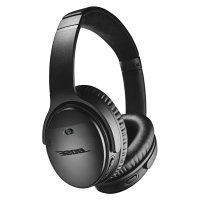
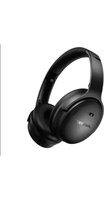
QuietComfort 35 II - Wireless Earbuds BOSE - Free user manual and instructions
Find the device manual for free QuietComfort 35 II BOSE in PDF.



Frequently Asked Questions - QuietComfort 35 II BOSE
User questions about QuietComfort 35 II BOSE
0 question about this device. Answer the ones you know or ask your own.
Ask a new question about this device
Download the instructions for your Wireless Earbuds in PDF format for free! Find your manual QuietComfort 35 II - BOSE and take your electronic device back in hand. On this page are published all the documents necessary for the use of your device. QuietComfort 35 II by BOSE.
USER MANUAL QuietComfort 35 II BOSE
Please read and keep all safety and use instructions.
WARNING/CAUTIONS
- Do NOT use the headphones at a high volume for any extended period.
- To avoid hearing damage, use your headphones at a comfortable, moderate volume level.
- Turn the volume down on your device before placing the headphones in/on your ears, then turn the volume up gradually until you reach a comfortable listening level.
- Do NOT use your headphones while driving for phone calls or any other purpose.
-
Do NOT use the headphones with noise cancelling on at any time the inability to hear surrounding sounds may present a danger to yourself or others, e.g., while riding a bicycle or walking in or near traffic, a construction site or railroad, etc.
-
Remove the headphones, or use the headphones with noise cancelling off and adjust your volume, to ensure you can hear surrounding sounds, including alarms and warning signals.
-
Be aware of how sounds that you rely on as reminders or warnings may vary in character when using the headphones.
-
Do NOT use the headphones if they emit any loud unusual noise. If this happens, turn the headphones off and contact Bose customer service.
- Remove headphones immediately if you experience a warming sensation or loss of audio.
- Do NOT use mobile phone adapters to connect headphones to airplane seat jacks, as this could result in injury or property damage due to overheating.
-
Do NOT use the headphones as aviation communication headsets except in case of emergency.
-
No incoming audio will be heard with a discharged or improperly installed battery. This could result in the potential of missed communications while piloting an aircraft.
- Extremely loud ambient noise levels common to many propeller-driven aircraft may impair your ability to receive incoming audio communications, particularly during takeoff and climb out.
- The headphones are not engineered for noise conditions, altitude, temperature or other environmental conditions common in non-commercial aircraft, resulting in possible interference to critical communications.

Contains small parts which may be a choking hazard. Not suitable for children under age 3.

This product contains magnetic material. Consult your physician on whether this might affect your implantable medical device.
- To reduce the risk of fire or electrical shock, do NOT expose this product to rain, liquids or moisture.
- Do NOT make unauthorized alterations to this product.
- Use this product only with an agency approved power supply which meets local regulatory requirements (e.g., UL, CSA, VDE, CCC).
- Do NOT expose products containing batteries to excessive heat (e.g. from storage in direct sunlight, fire or the like).
NOTE: This equipment has been tested and found to comply with the limits for a Class B digital device, pursuant to Part 15 of the FCC Rules. These limits are designed to provide reasonable protection against harmful interference in a residential installation. This equipment generates, uses, and can radiate radio frequency energy and, if not installed and used in accordance with the instructions, may cause harmful interference to radio communications. However, there is no guarantee that interference will not occur in a particular installation. If this equipment does cause harmful interference to radio or television reception, which can be determined by turning the equipment off and on, the user is encouraged to try to correct the interference by one or more of the following measures:
- Reorient or relocate the receiving antenna.
- Increase the separation between the equipment and receiver.
- Connect the equipment into an outlet on a circuit different from that to which the receiver is connected.
- Consult the dealer or an experienced radio/TV technician for help.
Changes or modifications not expressly approved by Bose Corporation could void the user's authority to operate this equipment.
This device complies with part 15 of the FCC Rules and with Industry Canada license-exempt RSS standard(s). Operation is subject to the following two conditions: (1) This device may not cause harmful interference, and (2) this device must accept any interference received, including interference that may cause undesired operation
This device complies with FCC and Industry Canada radiation exposure limits set forth for general population. It must not be co-located or operating in conjunction with any other antenna or transmitter.
Meets IMDA Requirements.
CANICES-3 (B)/NMB-3(B)
Management Regulation for Low-power Radio-frequency Devices
Article XII
According to "Management Regulation for Low-power Radio-frequency Devices" without permission granted by the NCC, any company, enterprise, or user is not allowed to change frequency, enhance transmitting power or alter original characteristic as well as performance to an approved low power radio-frequency devices.
Article XIV
The low power radio-frequency devices shall not influence aircraft security and interfere legal communications; If found, the user shall cease operating immediately until no interference is achieved. The said legal communications means radio communications operated in compliance with the Telecommunications Act.
The low power radio-frequency devices must be susceptible with the interference from legal communications or ISM radio wave radiated devices.
DON'T attempt to remove the rechargeable lithium-ion battery from this product. Contact your local Bose retailer or other qualified professional for removal.

Bose Corporation hereby declares that this product is in compliance with the essential requirements and other relevant provisions of Directive 2014/53/EU and all other applicable EU directive requirements. The complete declaration of conformity can be found at: www.Bose.com/compliance
For Europe:
Frequency band of operation 2400 to 2483.5 MHz
Bluetooth: Maximum transmit power less than 20 dBm EIRP.
Bluetooth Low Energy: Maximum power spectral density less than 10 dBm/MHz EIRP.

Please dispose of used batteries properly, following local regulations. Do NOT incinerate.
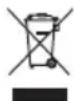
This symbol means the product must not be discarded as household waste, and should be delivered to an appropriate collection facility for recycling. Proper disposal and recycling helps protect natural resources, human health and the environment. For more information on disposal and recycling of this product, contact your local municipality, disposal service, or the shop where you bought this product.

Removal of the rechargeable lithium ion battery in this product should be conducted only by a qualified professional. Please contact your local Bose retailer or see https://www.bose.com/compliance for further information.


| Names and Contents of Toxic or Hazardous Substances or Elements | ||||||
| Toxic or Hazardous Substances and Elements | ||||||
| Part Name | Lead(Pb) | Mercury(Hg) | Cadmium(Cd) | Hexavalent(CR(VI)) | PolybrominatedBiphenyl(PBB) | Polybrominated diphenylether(PBDE) |
| PCBs X 0 0 0 0 0 | ||||||
| Metal Parts X 0 0 0 0 0 | ||||||
| Plastic Parts O 0 0 0 0 0 | O | |||||
| Speaker X 0 0 0 0 0 | ||||||
| Cables X 0 0 0 0 0 | ||||||
| This table is prepared in accordance with the provisions of SJ/T 11364.O: Indicates that this toxic or hazardous substance contained in all of the homogeneous materials for this part is below the limit requirement of GB/T 26572. | 5 | |||||
| X: Indicates that this toxic or hazardous substance contained in at least one of the homogeneous materials used for this part is above the limit requirement of GB/T 26572. | ||||||
Date of Manufacture: The eighth digit in the serial number indicates the year of manufacture; "8" is 2008 or 2018.
China Importer: Bose Electronics (Shanghai) Company Limited, Part C, Plan 9, No. 353 North Riying Road, China (Shanghai) Pilot Free Trade Zone
EU Importer: Bose Products B.V., Gorslaan 60, 1441 RG Purmerend, The Netherlands
Taiwan Importer: Bose Taiwan Branch, 9F-A1, No.10, Section 3, Minsheng East Road, Taipei City 104, Taiwan Phone Number: +886-2-2514 7676
Mexico Importer: Bose de Mexico, S. de R.L. de C.V., Paseo de las Palmas 405-204, Lomas de Chapultepec, 11000 Mexico, D.F. Phone Number: +5255 (5202) 3545
Charging temperature range: 32^ - 113^ (0^ - 45^)
Discharging temperature range: -4^ - 140^ (-20^ - 60^)
Use of the Made for Apple badge means that an accessory has been designed to connect specifically to the Apple product(s) identified in the badge, and has been certified by the developer to meet Apple performance standards. Apple is not responsible for the operation of this device or its compliance with safety and regulatory standards. Please note that the use of this accessory with an Apple product may affect wireless performance.
Apple, the Apple logo, iPad, iPhone, and iPod are trademarks of Apple Inc., registered in the U.S. and other countries. App Store is a service mark of Apple Inc. The trademark "iPhone" is used in Japan with a license from Aiphone K.K.
Amazon, Alexa and all related logos are trademarks of Amazon.com, Inc. or its affiliates.
Android, Google Assistant, Google Play and the Google Play logo are trademarks of Google LLC.
The Bluetooth® word mark and logos are registered trademarks owned by Bluetooth SIG, Inc. and any use of such marks by Bose Corporation is under license.
The N-Mark is a trademark or registered trademark of NFC Forum, Inc. in the United States and in other countries.
iHeartRadio is a registered trademark of iHeartMedia, Inc.
Wi-Fi is a registered trademark of Wi-Fi Alliance.
Bose Corporation Headquarters: 1-877-230-5639
©2018 Bose Corporation. No part of this work may be reproduced, modified, distributed or otherwise used without prior written permission.
Bose Connect App
What can I do with the Bose Connect app? 9
What's in the Carton
Contents 10
Headphone Controls
Power on 12
Standby timer 12
Power off 13
Headphone functions 14
Media playback and volume functions 14
Call functions. 15
Action button functions 16
Amazon Alexa
Set the Action button to Alexa. 17
Access Alexa 18
Things to try 18
The Google Assistant
Set the Action button to your Google Assistant 20
Use your Google Assistant 20
Noise Cancellation
Noise cancelling modes 21
Set the Action button to noise cancellation 21
Change the noise cancelling mode 21
Alternative Voice Control
Access alternative voice control 22
Access your Google Assistant using the Multi-function button 22
Battery Charging
Charge the headphones 23
Charging time 23
Hear the battery level 23
Status Indicators
Bluetooth indicator 24
Battery indicator 24
Voice Prompts
Pre-installed languages 25
Change the language 25
Disable voice prompts 25
Bluetooth Connections
Connect your mobile device using the Bose Connect app (recommended) 26
Choose an alternative connection method 27
Connect using the Bluetooth menu on your mobile device 27
Connect using NFC on your mobile device. 29
Disconnect a mobile device 30
Reconnect a mobile device 30
Multiple Bluetooth Connections
Connect another mobile device 31
Identify connected mobile devices 31
Switch between two connected mobile devices 31
Reconnect a previously connected device 32
Clear the headache pairing list. 32
Wired Connections
Connect the audio cable. 33
Care and Maintenance
Store your headphones 34
Clean the headphones 35
Replacement parts and accessories. 35
Limited warranty. 35
Serial number location 36
Troubleshooting
Common solutions 37
Download the Bose Connect app to keep your software up to date, personalize your headphone settings, easily manage Bluetooth connections and access new features.
What can I do with the Bose Connect app?
- Easily connect to and switch between multiple mobile devices with a single swipe.
- Set up the Action button.
-
Customize your headphone experience:
-
Name your headphones.
- Select a voice prompt language or disable voice prompts.
- Change the noise cancelling mode.
-
Adjust the standby timer.
-
Access the product tour and help.
- Keep headphones up to date with the latest software.

Contents
Confirm that the following parts are included:
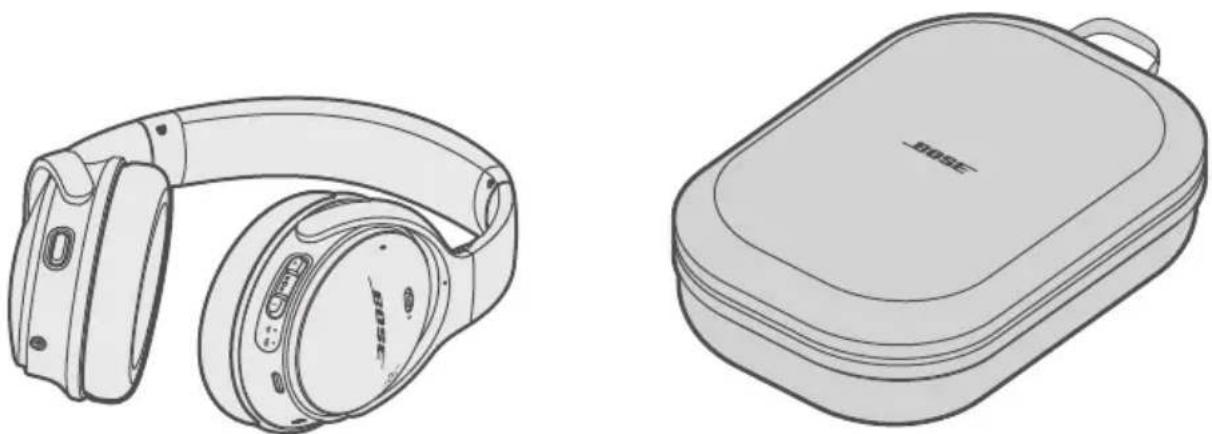
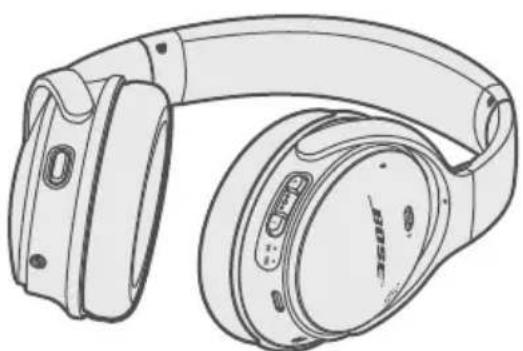
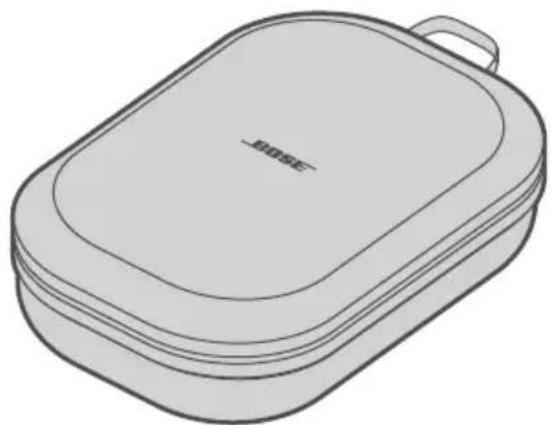
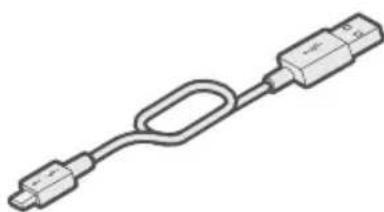
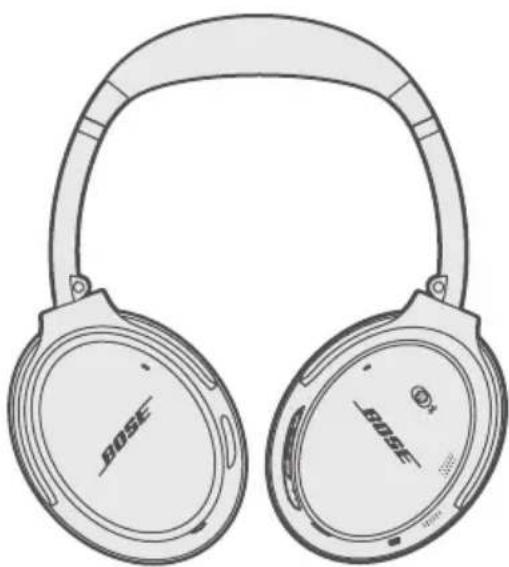
Bose® QuietComfort® 35 wireless headphones II Carry case

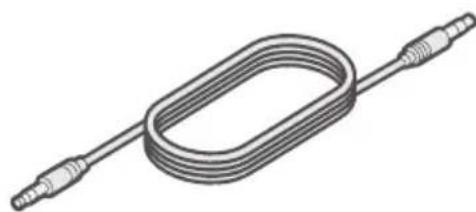
USB cable 3.5 mm audio cable
Note: If any part of your product is damaged, do not use it. Contact your authorized Bose® dealer or Bose customer service. Visit: global.Bose.com/Support/QC35ii
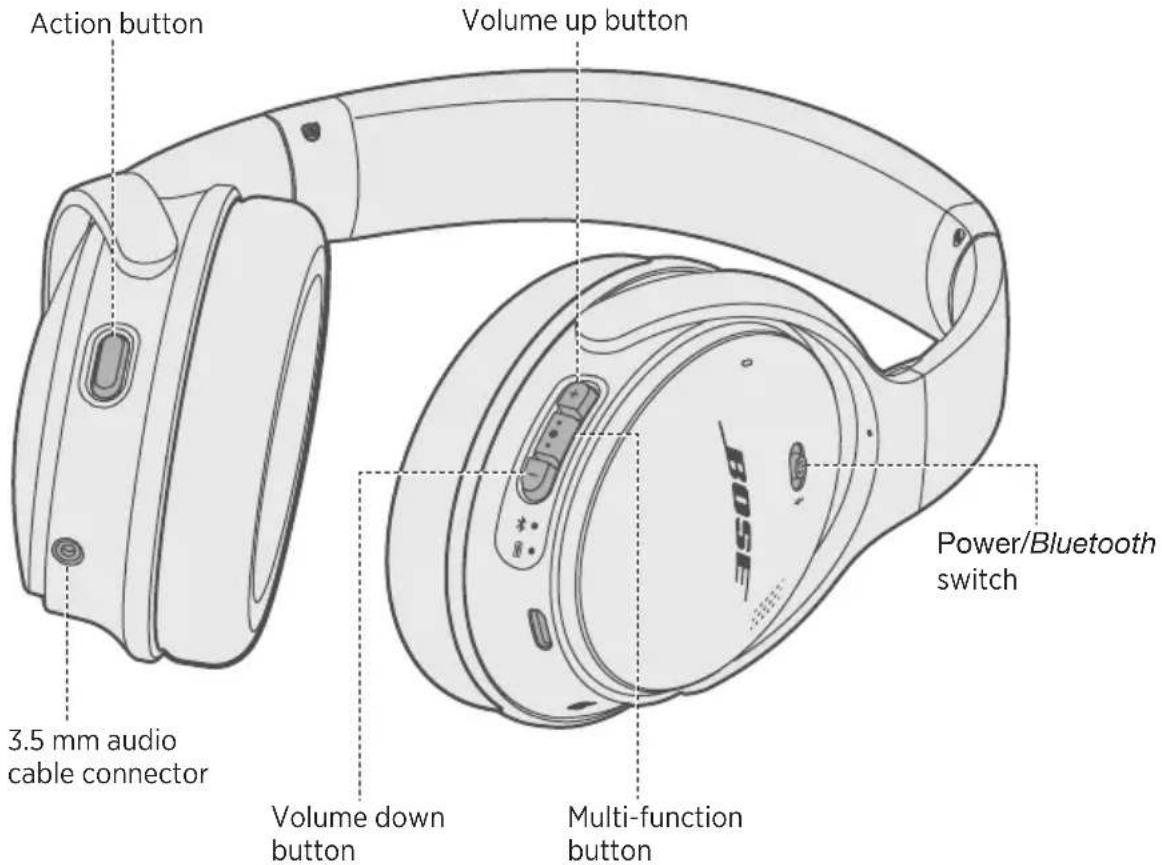
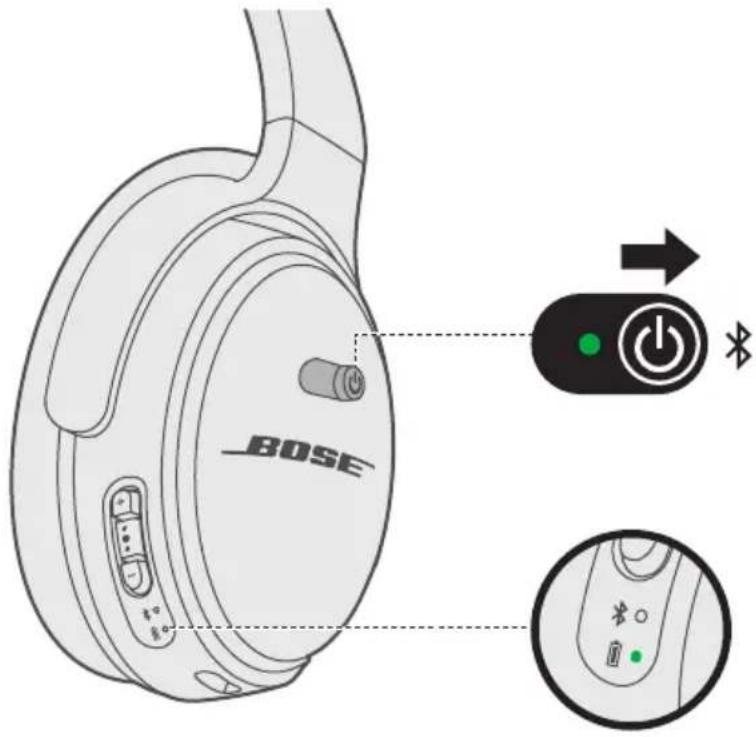
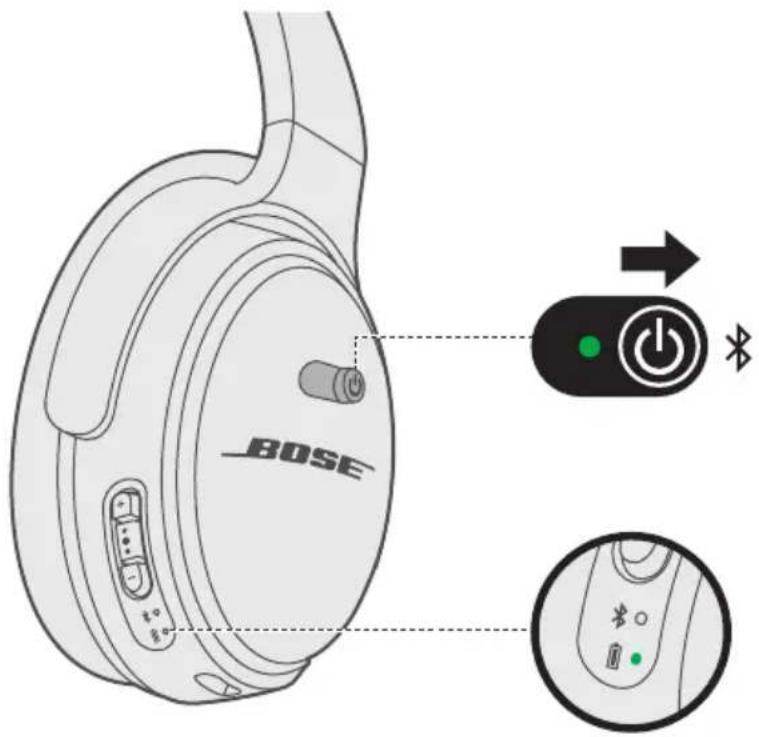
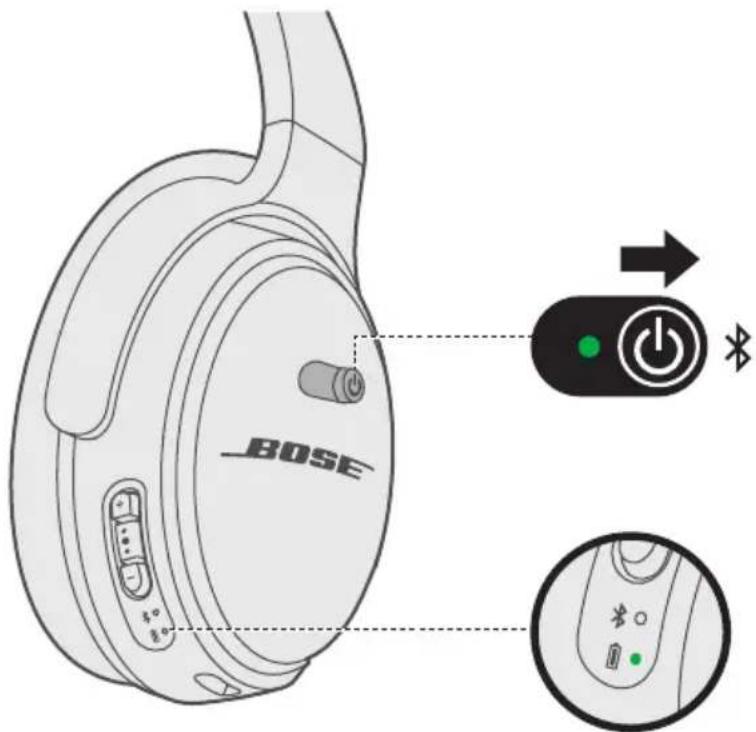
Power on
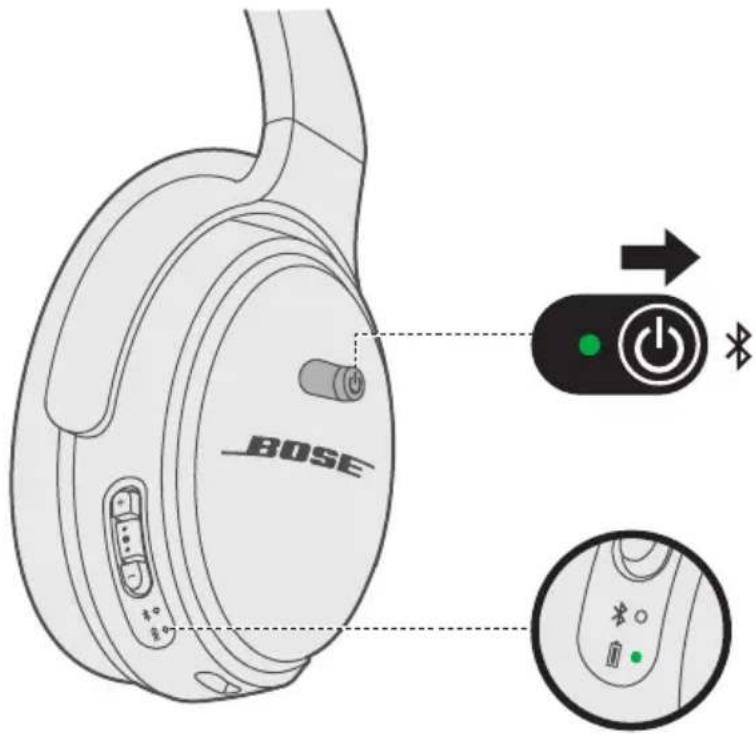
Slide the Power/Bluetooth switch to the right
A voice prompt announces the battery level and the battery indicator glows according to the current charge level.
Standby timer
The standby timer conserves the battery when the headphones are not being used. To set up and customize the standby timer, use the Bose Connect app.
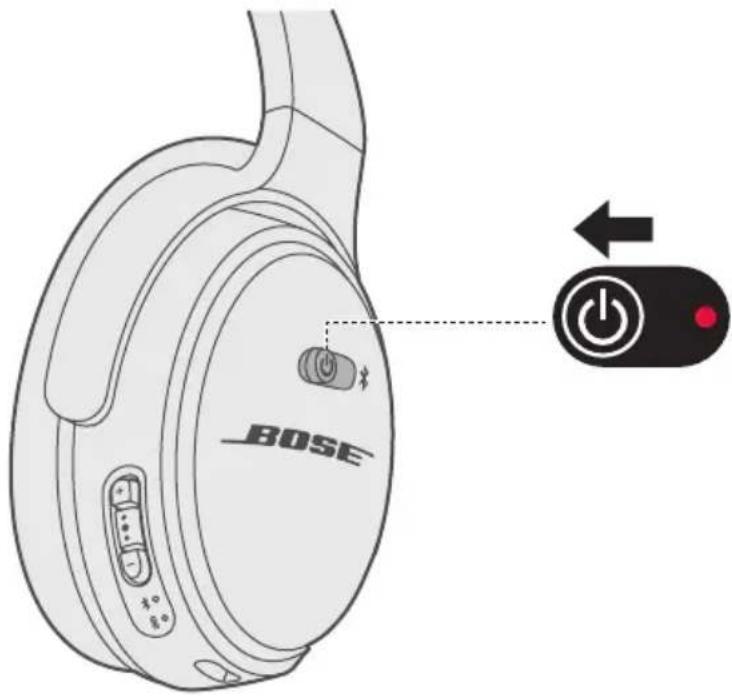
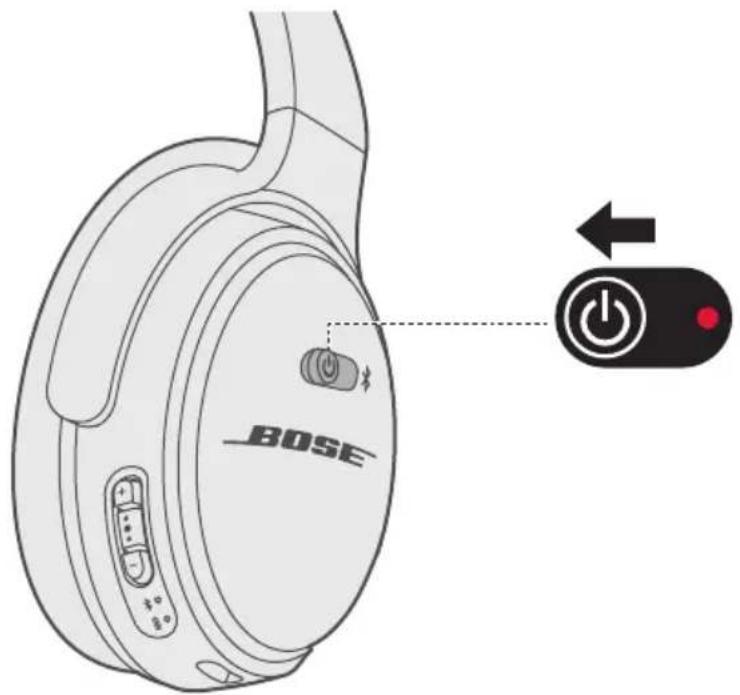
Power off
Slide the Power/Bluetooth switch to the left.
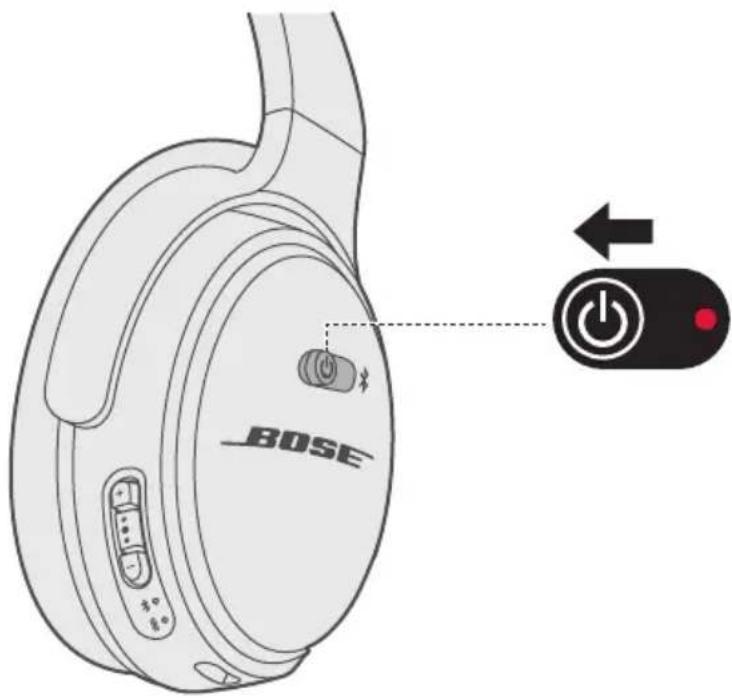
Note: When the headphones are powered off, noise cancellation is disabled.
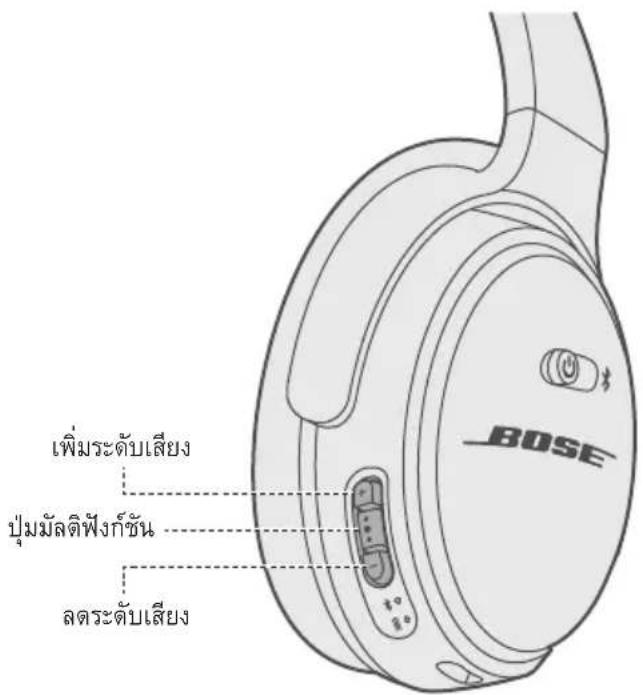
Headphone functions
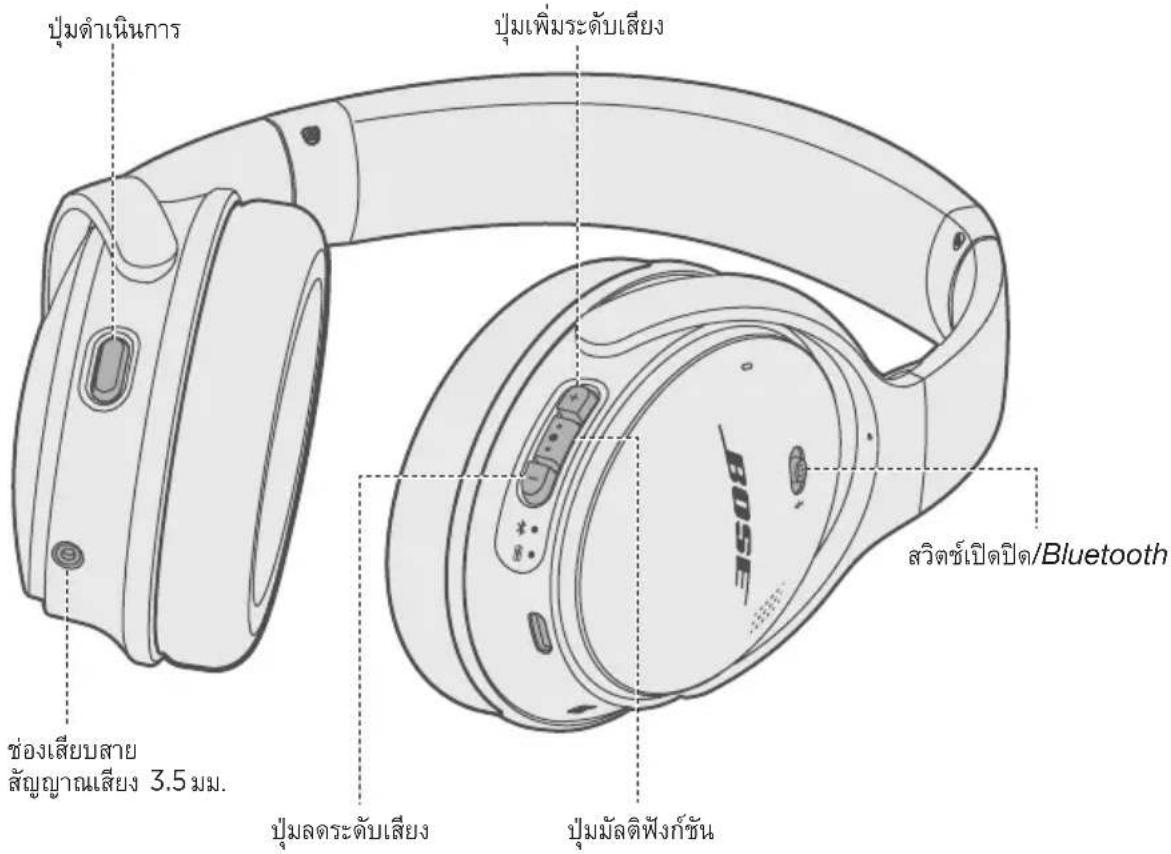
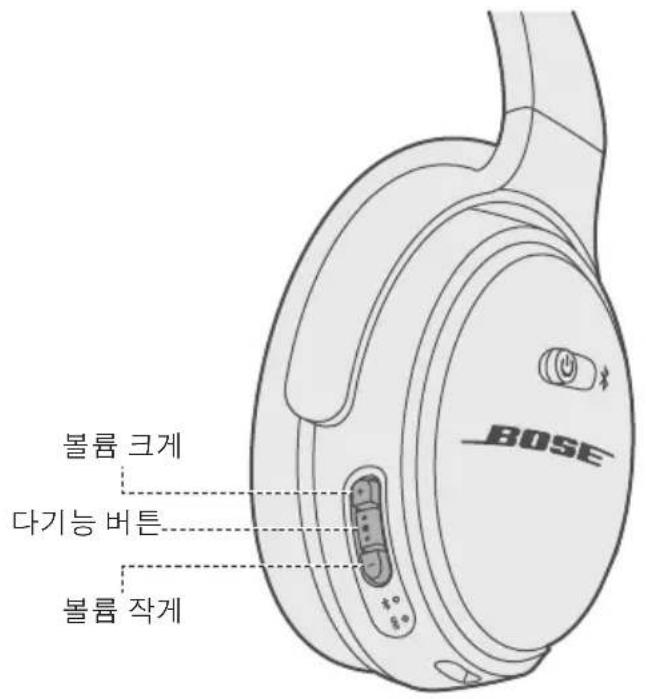
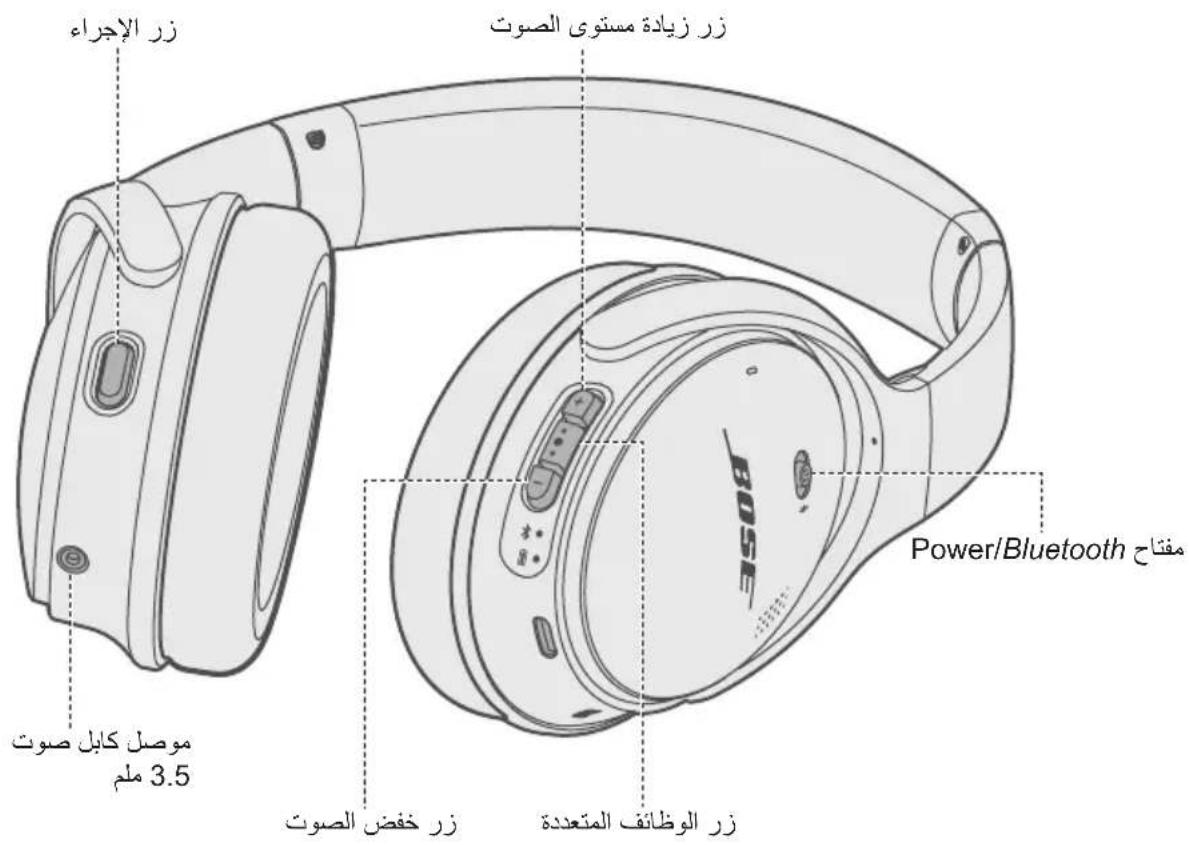
The headphone controls are located on the back of the right earcup.
Media playback and volume functions
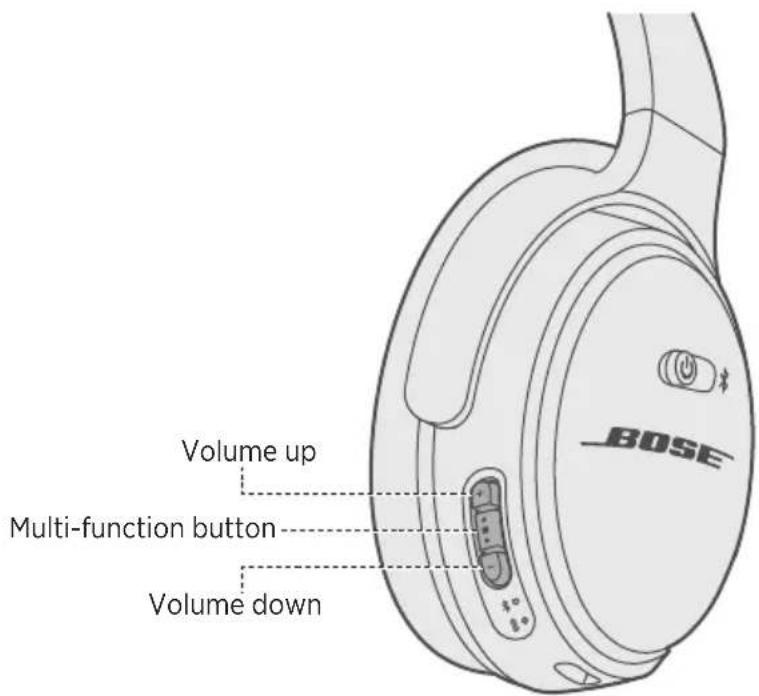
| Function What to do | |
| Play/Pause | Press the Multi-function button • ●●. |
| Skip forward | Double-press • ●●. |
| Skip backward | Triple-press • ●●. |
| Fast forward | Double-press • ●● and hold the second press. |
| Rewind | Triple-press • ●● and hold the third press. |
| Volume up | Press+. |
| Volume down | Press-. |
Call functions
The Multi-function button and microphone are located on the back of the right earcup.
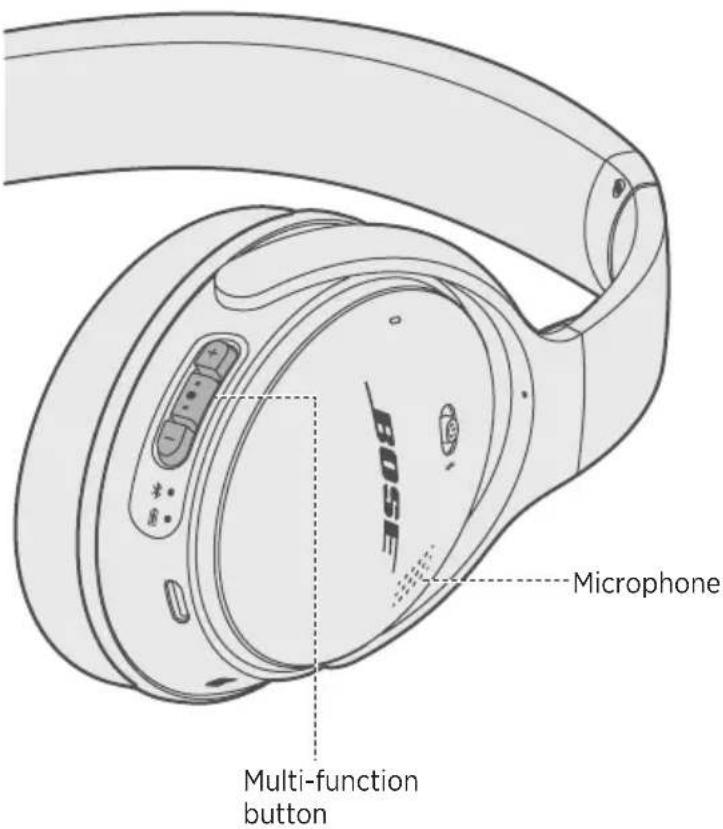
| Function What to do | |
| Answer a call | Press●●. |
| End a call | Press●●. |
| Decline an incoming call | Press and hold●●for one second. |
| Answer a second incoming call and put the current call on hold | While on a call, press●once. |
| Decline a second incoming call and stay on current call | While on a call, press and hold●●for one second. |
| Switch between two calls | With two active calls, double-press●●. |
| Create a conference call | With two active calls, press and hold●●for one second. |
| Mute/Unmute a call | While on a call, press+and-=simultaneously. |
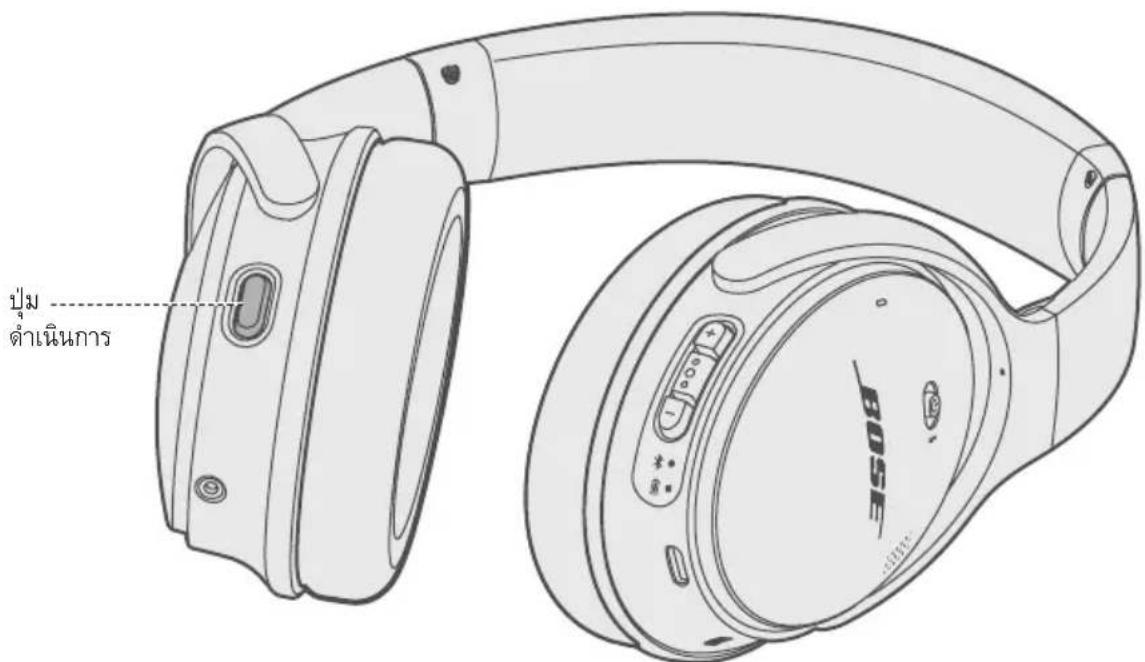
Action button functions
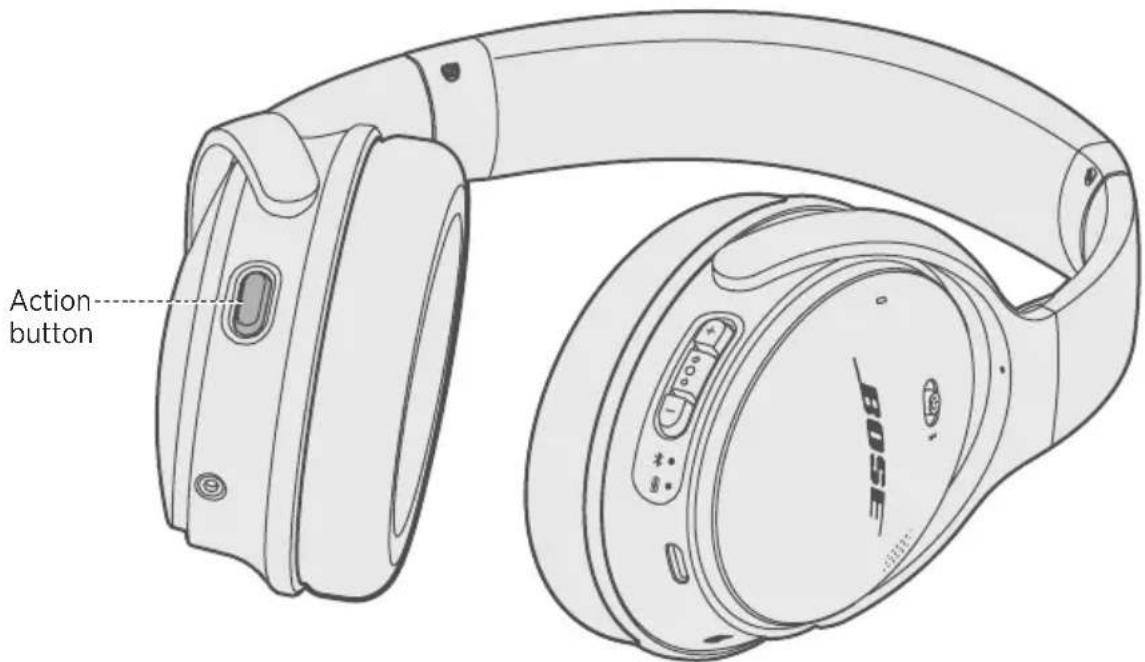
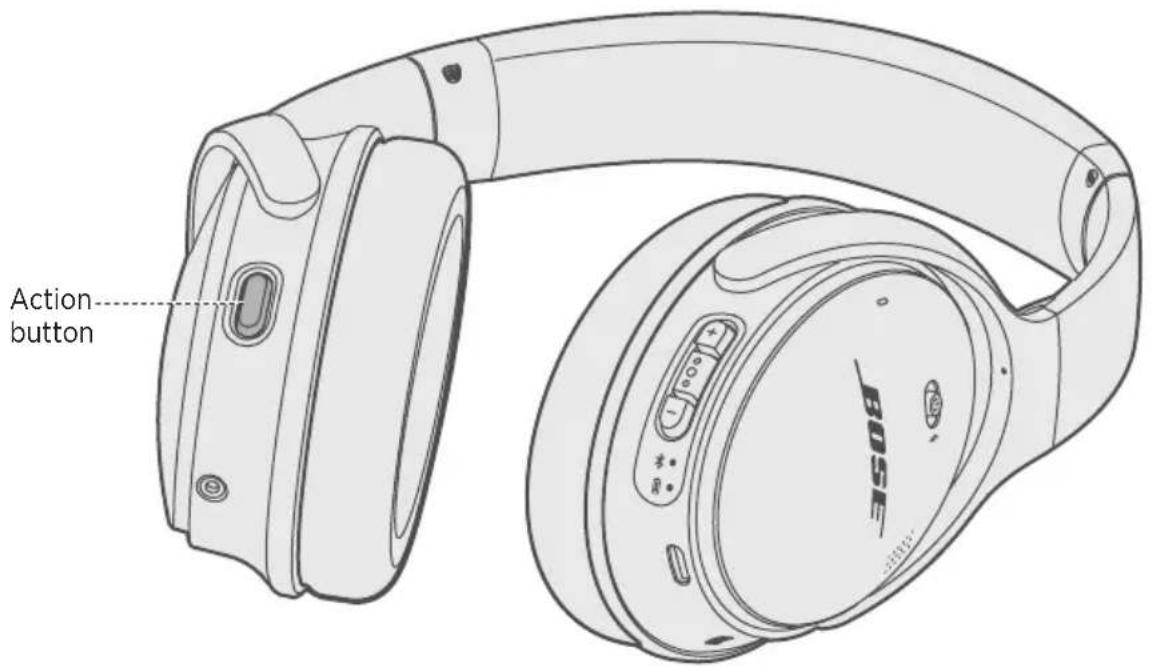
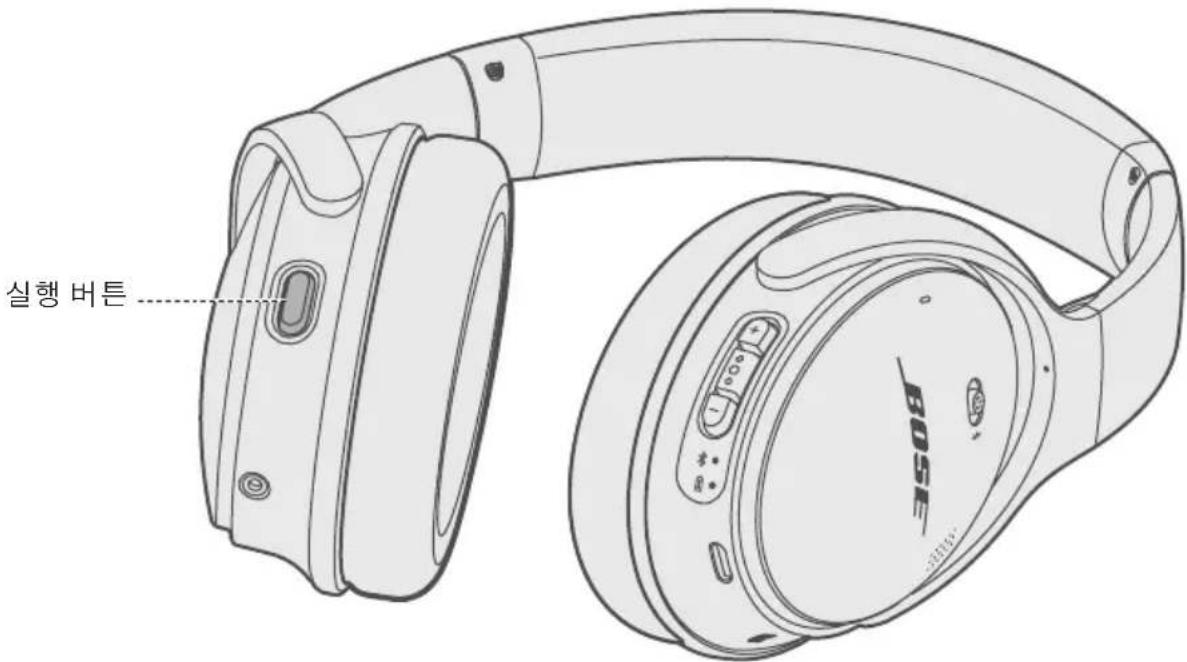
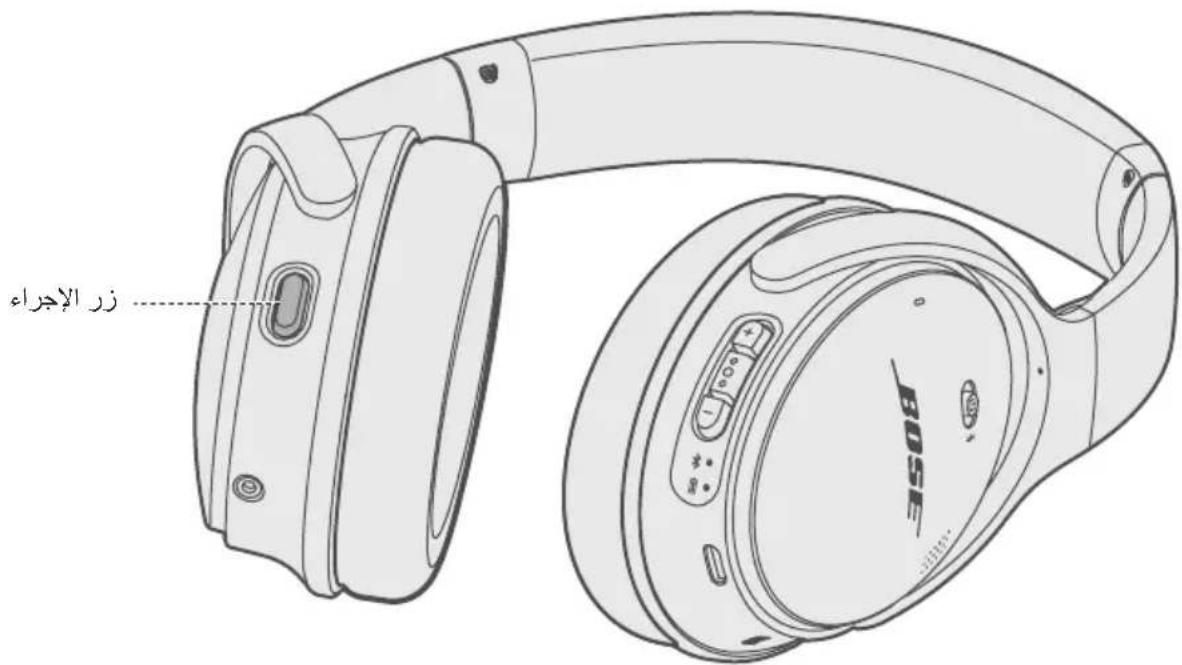
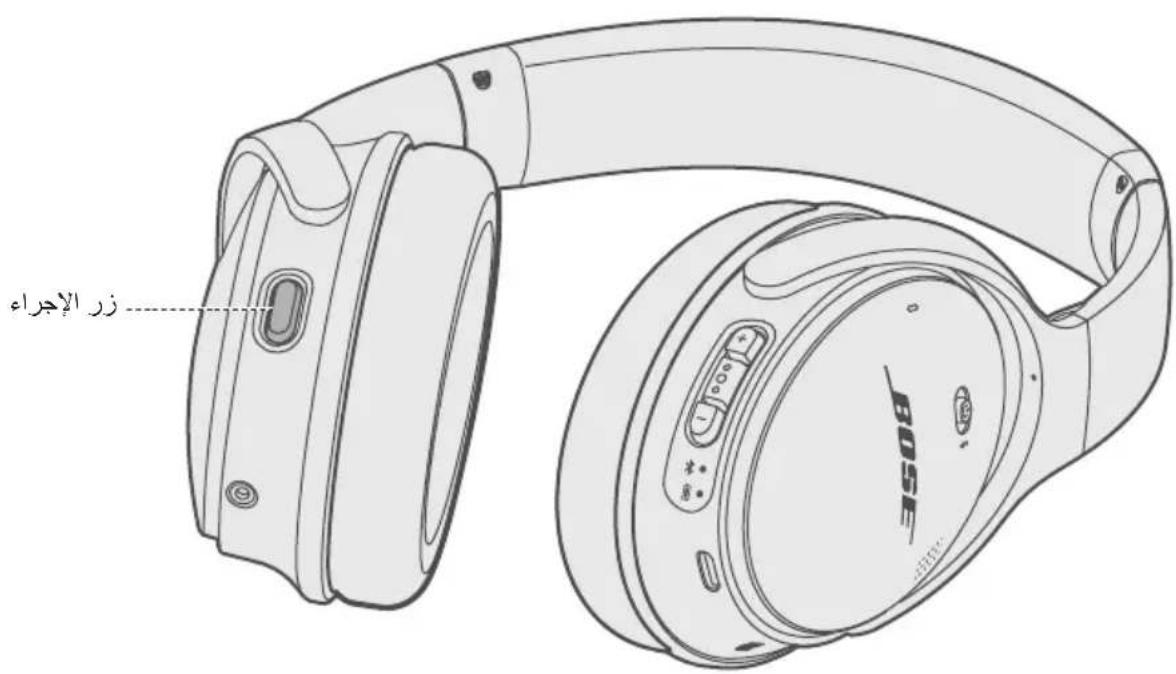
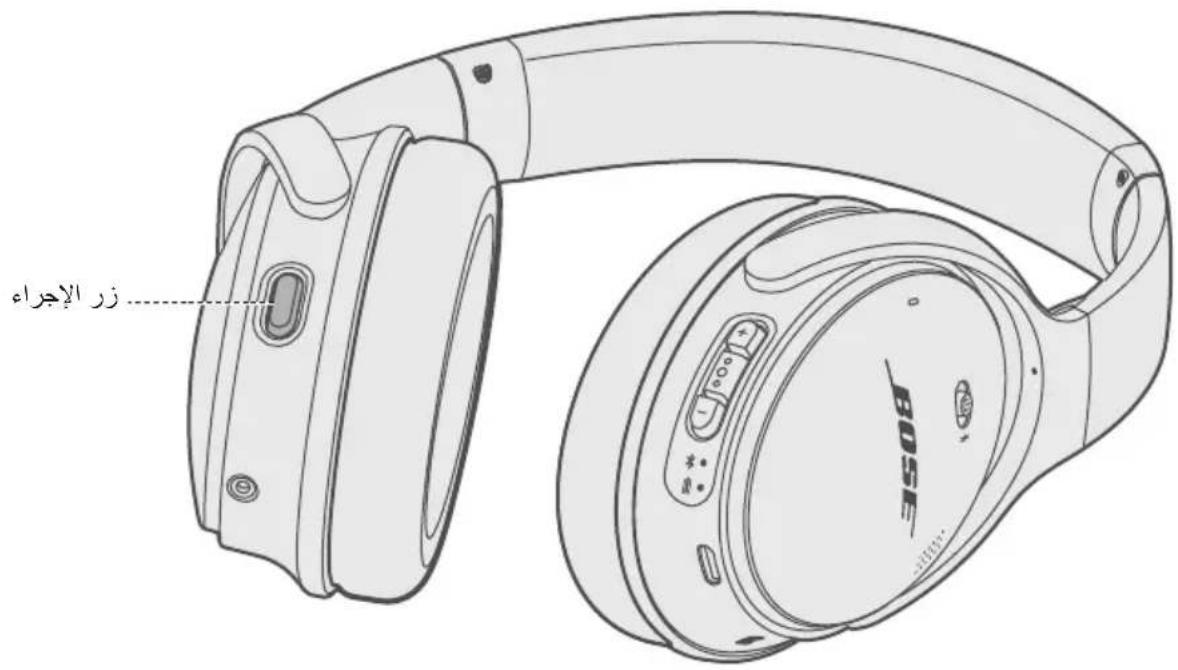
The Action button is a programmable button that allows you to quickly and easily access Amazon Alexa, your Google Assistant or noise cancellation. The Action button is located on the back of the left earcup.
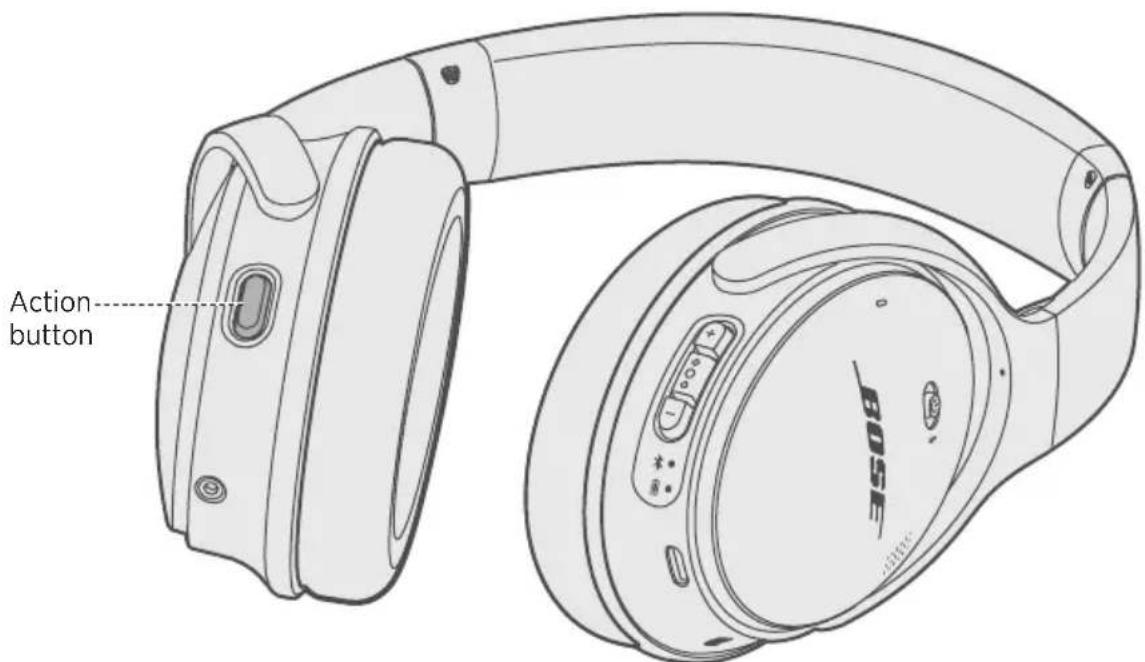
| Action button setting What to do | |
| Amazon Alexa To set the Action button to Amazon Alexa, see page 17. | |
| Your Google Assistant To set the Action button to your Google Assistant, see page 20. | |
| Noise Cancellation To set the Action button to noise cancellation, see page 21. |
Note: The Action button can only be programmed for one function at a time.
You can talk to Amazon Alexa on your headphones. With Alexa, you can ask to play music, hear the news, check weather, control smart home devices and more. Alexa lives in the cloud and is always getting smarter, adding new capabilities that are delivered to your device automatically. Using Alexa on your headphones is simple — just press-and-ask, and Alexa will respond instantly.
Note: Alexa isn't available in all languages and countries.
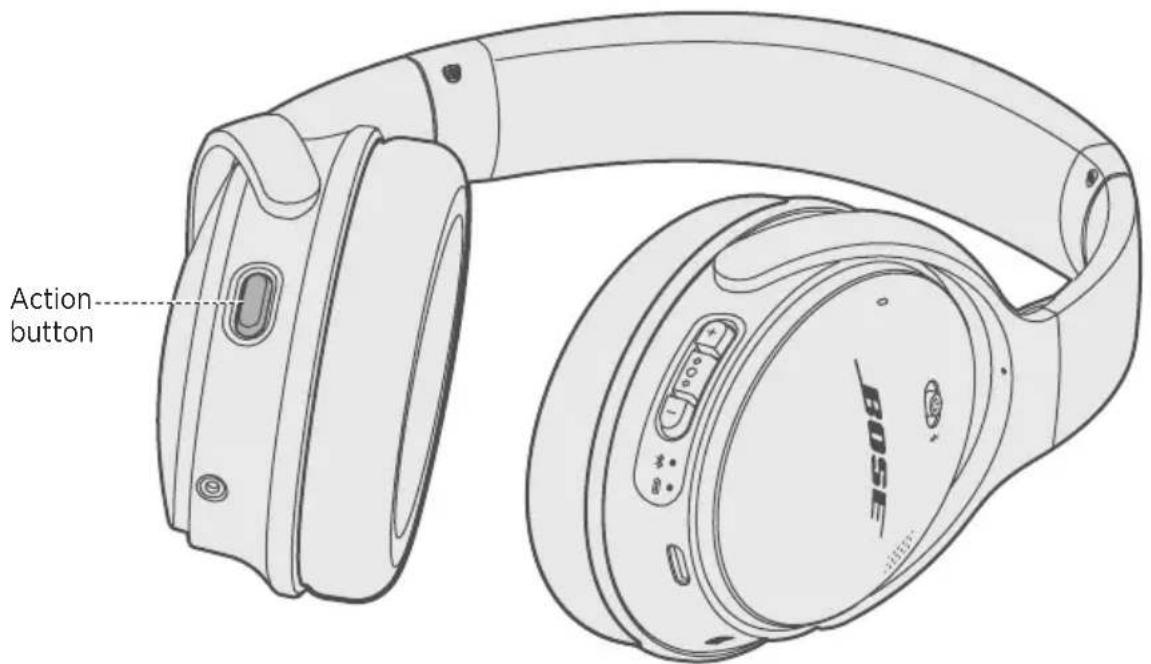
Set the Action button to Alexa
- Connect your headphones to your mobile device.
- On your mobile device, open or download the Amazon Alexa app and follow the app instructions.

Access Alexa
To access Alexa, press and release the Action button.
Things to try
| Things to try Example of | what to say |
| Talk to Alexa "What's the weather?" | |
| Play audio "Play Niall Horan." | Note: Amazon Music is set as the default music service. To change the default music service, use the Alexa app. |
| Play audio from a specific music service | "Play NPR on iHeartRadio." |
| Set a timer "Set a timer for 5 minutes." | |
| Discover more skills "What new skills do you have?" | |
| Stop Alexa While Alexa is talking | press and release the Action button then say "Stop." |
Note: For more information about what Alexa can do, visit:
global.Bose.com/Support/QC35ii
Your headphones are optimized for the Google Assistant. You can quickly enjoy entertainment, stay connected, get information, and manage your day — all without glancing at your phone.
For more information on what your Google Assistant can do, visit: https://assistant.google.com/platforms/headphones
Note: The Google Assistant isn't available in all languages and countries.
Set the Action button to your Google Assistant
- Connect your headphones to your mobile device.
-
Set up your Google Assistant using your mobile device:
-
On your Android device, press and hold the home button to open the Google Assistant and follow the on-screen instructions.
- On your Apple device, open or download the Google Assistant app and follow the app instructions.

Google Assistant
Note: The Google Assistant is available on eligible Android devices. To check if your Android device is compatible with the Google Assistant, visit: support.google.com/assistant
Use your Google Assistant
| Function What to do | |
| Talk to your Google Assistant Press | Press and hold the Action button to begin. For examples of questions and things you can do, visit: https://assistant.google.com/platforms/headphones |
| Get your notifications Press the Action button. | |
| Stop your Google Assistant Double-press the Action button. | |
| Reply to a message (where available) | After receiving a message notification, press and hold the Action button to respond. When you're done, release the button. |
Noise cancellation reduces unwanted noise providing a clearer, more lifelike audio performance. You can choose the noise cancelling mode based on your listening preferences and environment.
Note: To change the noise cancelling mode, use the Bose Connect app or set the Action button to noise cancellation.
Noise cancelling modes
| Noise cancelling mode Description | |
| High World-class noise cancellation with Bose optimized audio. | |
| Low Noise cancellation fine-tuned for audio listening in quieter or windy environments. | |
| Off Noise cancellation disabled. | |
Note: Each time you power on the headphones, your noise cancelling mode defaults to High.
Set the Action button to noise cancellation
- In the Bose Connect app, tap the gear icon to access Action button settings.
- Select noise cancellation.
Change the noise cancelling mode
Press and release the Action button.
A voice prompt announces the noise cancelling mode. Continue to press and release the Action button until you reach your preferred mode.
You can use the Multi-function button on your headphones to access the Google Assistant or the native voice control on your mobile device.
Note: You can't access voice control while on a call.
Access alternative voice control
If the Action button is set to Amazon Alexa or your Google Assistant, you can access the native voice control on your mobile device using on the headphones.
| Type of mobile device What to do | |
| Apple (Siri) | Press and hold•●●for one second. You hear a tone that indicates voice control is active. |
| Android | Press and hold•●●for one second. You hear a tone that indicates voice control is active. Note: If the Action button is set to your Google Assistant, see “The Google Assistant” on page 19. |
Access your Google Assistant using the Multi-function button
If the Action button is set to Noise Cancellation, you can access your Google Assistant on your Android mobile device using the on your headphones.
Press and hold one second.
You hear a tone that indicates voice control is active.
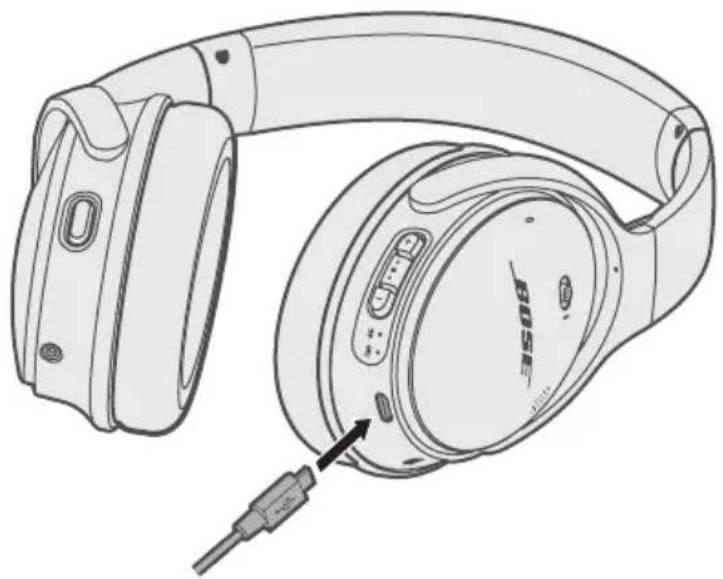
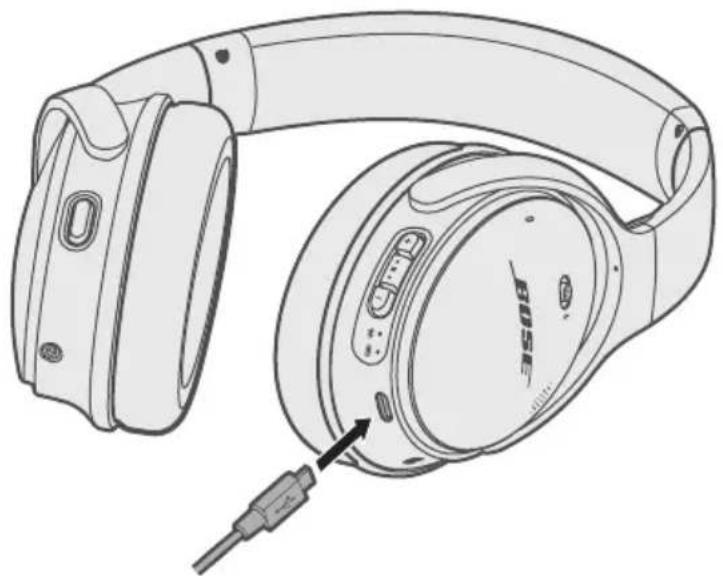
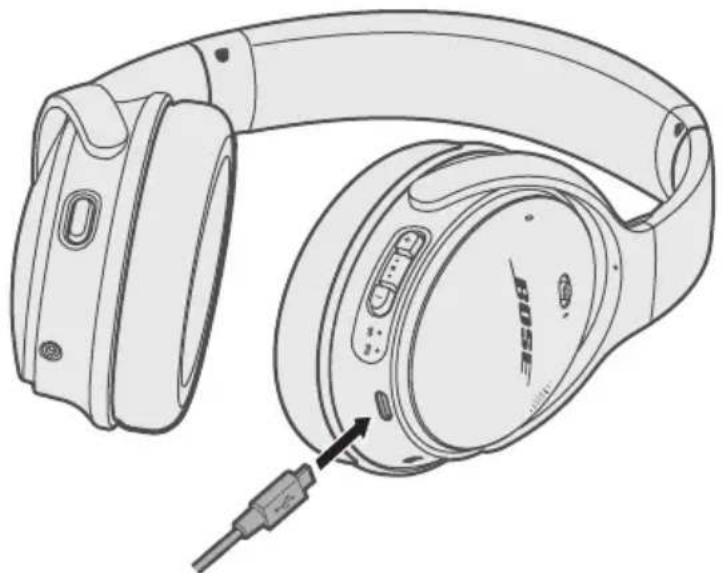
Charge the headphones
- Plug the small end of the USB cable into the micro-USB connector on the right earcup.
- Plug the other end into a USB wall charger or computer that is powered on.
Notes:
While charging, the battery indicator blinks amber. When the battery is fully charged, the battery indicator glows green.
- The headphones do not play while charging.
Charging time
Allow up to two hours to fully charge the headphones.
Notes:
- When connected wirelessly, a full charge powers the headphones for up to 20 hours.
- When connected using the audio cable, a full charge powers the headphones for up to 40 hours.
Hear the battery level
Each time you power on the headphones, a voice prompt announces the battery level. When the headphones are in use, you hear "Battery low, please charge now."
Note: To visually check the battery, see the indicator I located on the right earcup. For more information, see "Battery indicator" on page 24.
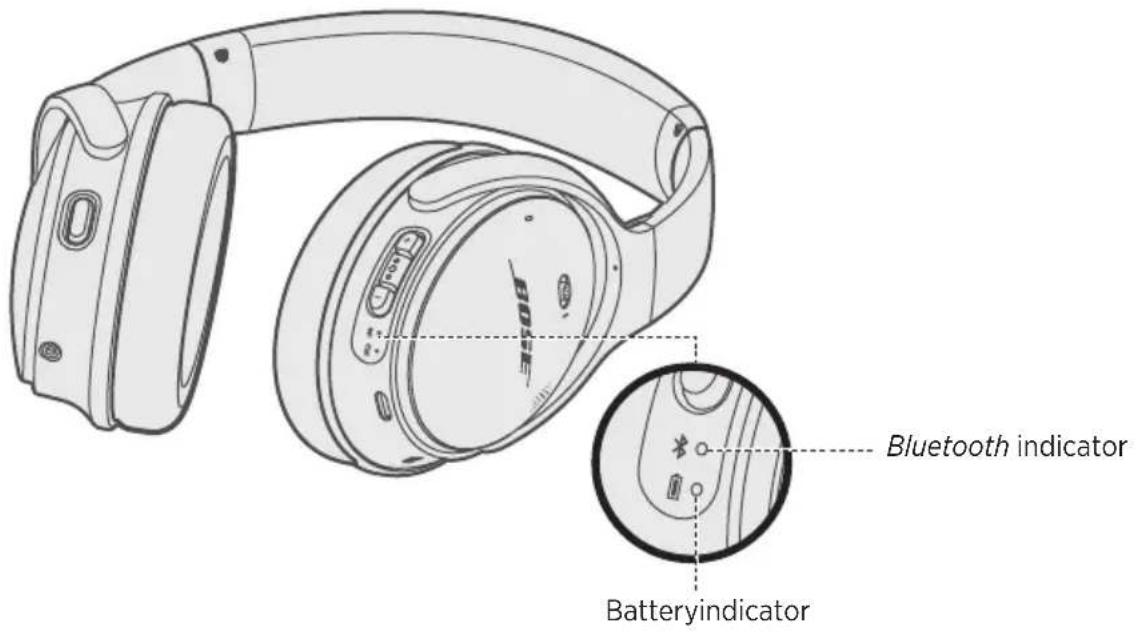
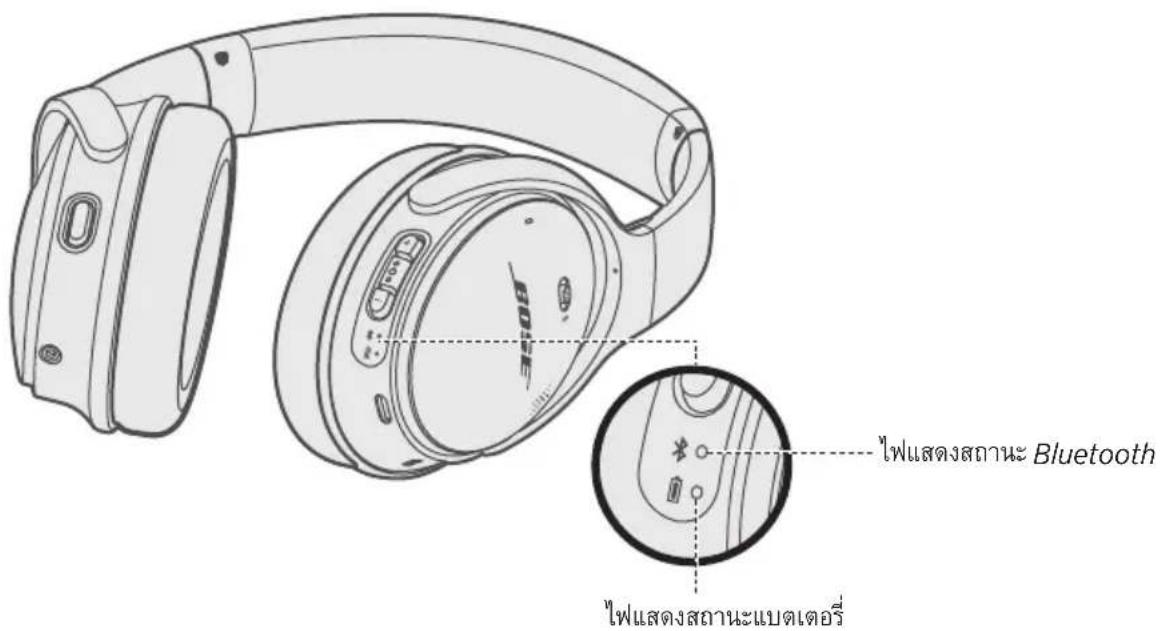
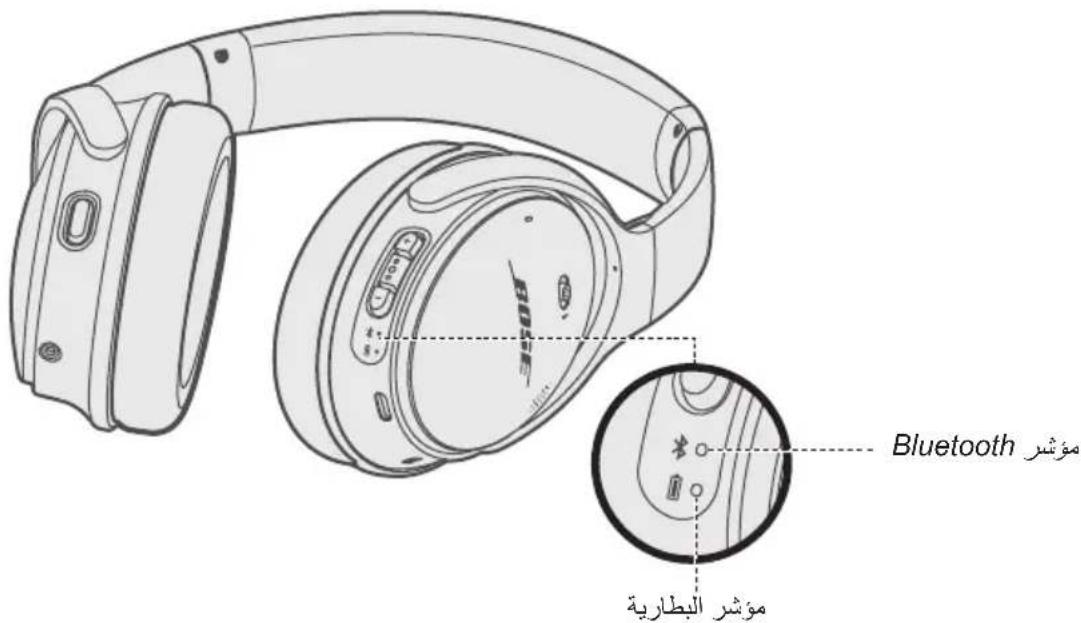
The Bluetooth and battery indicators are located on the right earcup.
Bluetooth indicator
| Indicator activity System | state |
| Blinking blue Ready to connect | |
| Blinking white Connecting | |
| Solid white (10 seconds) then powers off | Connected |
Battery indicator
| Indicator activity System | state |
| Solid green Medium to full charge | |
| Blinking amber Charging | |
| Solid amber Low charge | |
| Blinking red Need to charge | |
| Solid red Charging error - contact | Bose customer service |
Note: If connected to an Apple device, the device displays the headphone battery level near the upper right corner of the screen and in the notification center.
Voice prompts guide you through the Bluetooth connection process, announce the battery level and identify connected devices. You can customize voice prompts using the buttons on your headphones.
Tip: You can also easily manage voice prompt settings using the Bose Connect app.
Pre-installed languages
The following languages are pre-installed on your headphones:
- English - German - Korean - Swedish
- Spanish • Mandarin • Italian • Dutch
- French - Japanese - Portuguese
To check for additional languages
Additional languages may be available. To check for language updates, download the Bose Updater.
Visit: btu.Bose.com
Change the language
When you power on the headphones for the first time, the voice prompts are in English. To select a different language:
- Press and hold + and - simultaneously until you hear the voice prompt for the first language option.
- Press + or - to move through the list of languages.
- When you hear your language, press and hold the Multi-function button to select.
Disable voice prompts
To disable and re-enable voice prompts, use the Bose Connect app.
Note: Disabling voice prompts does not disable Amazon Alexa or your Google Assistant.
Bluetooth wireless technology lets you stream music from mobile devices such as smartphones, tablets and laptop computers. Before you can stream music from a device, you must connect the device with your headphones.
Connect your mobile device using the Bose® Connect app (recommended)
- Power on the headphones (see page 12).
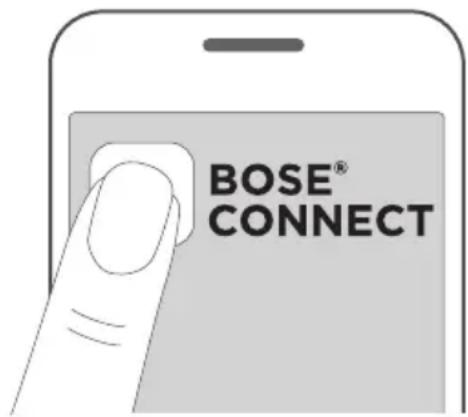
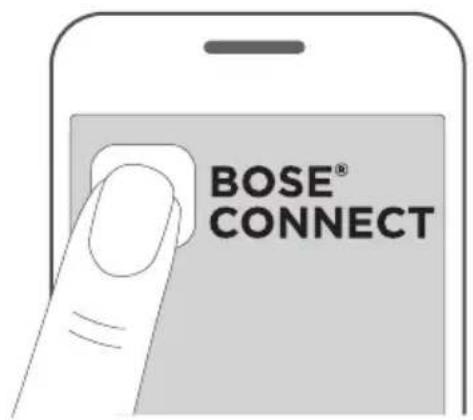
- Download the Bose Connect app and follow the on-screen connection instructions.
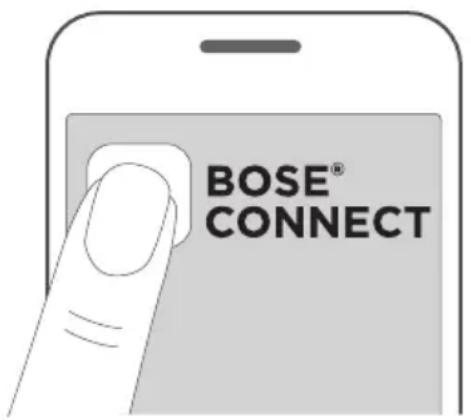
Once connected, you hear "Connected to
Choose an alternative connection method
You can connect your mobile device with your headphones using Bluetooth wireless technology or Near Field Communication (NFC).
Connect using the Bluetooth menu on your mobile device
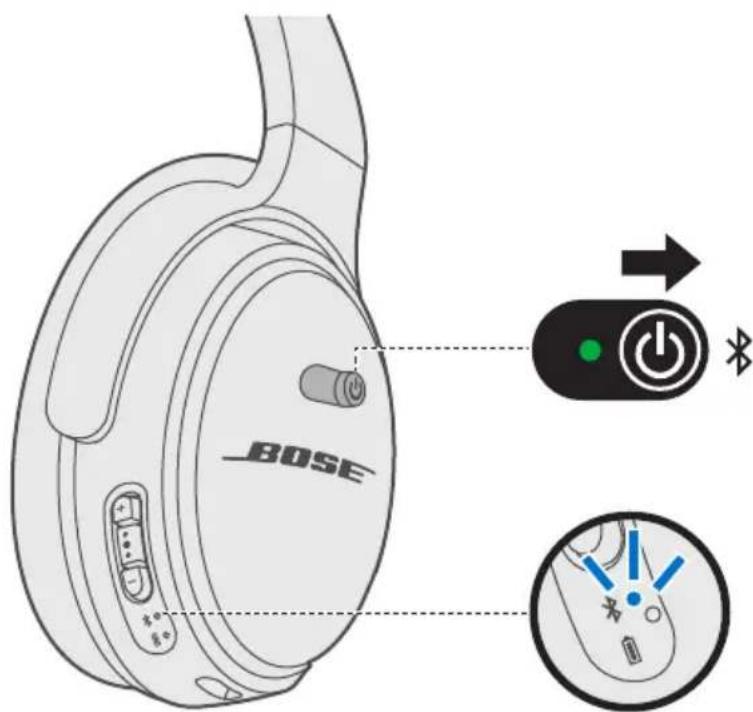
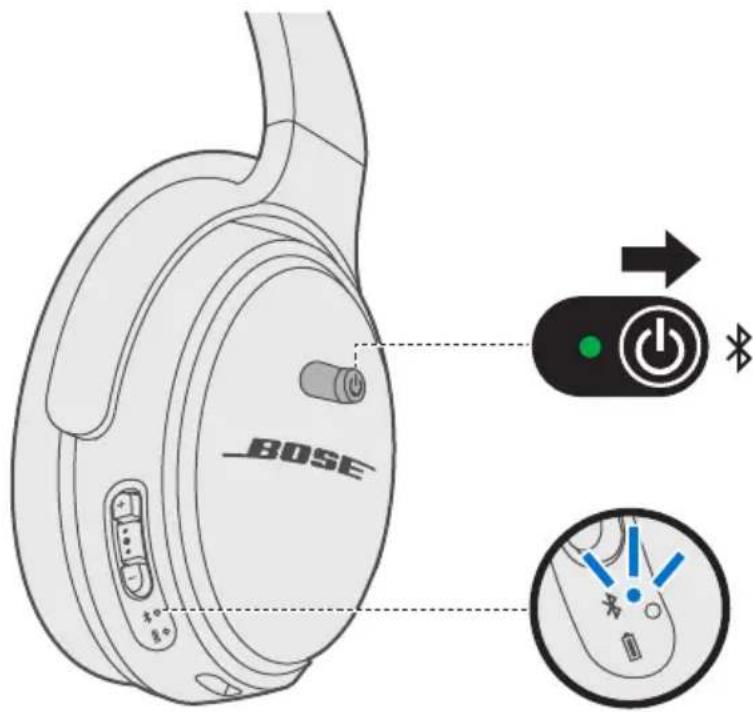
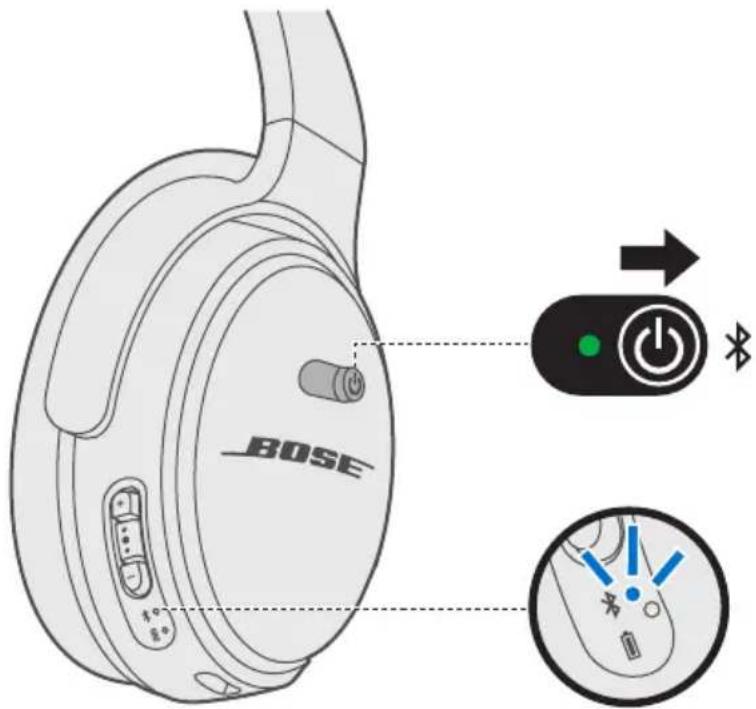
- Slide the Power/Bluetooth button to the right and hold for two seconds.
You hear "Ready to connect another device," and the Bluetooth indicator blinks blue.
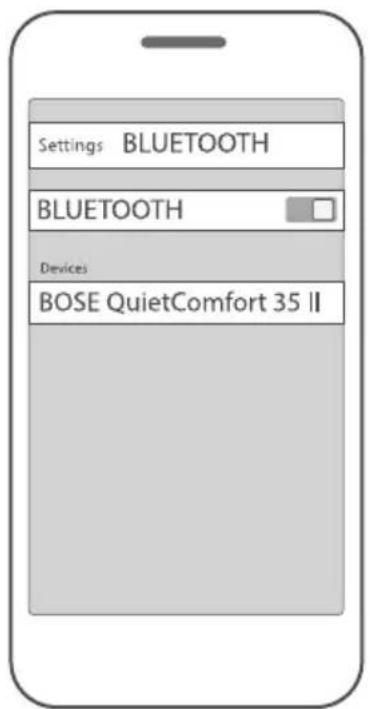
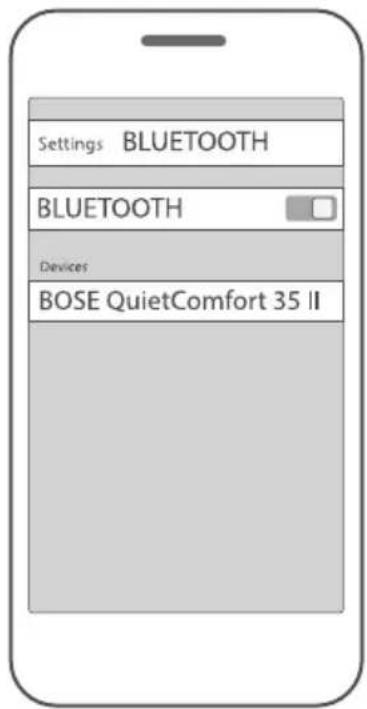
- On your device, enable the Bluetooth feature.
Tip: The Bluetooth feature is usually found in the Settings menu.
- Select your headphones from the device list.
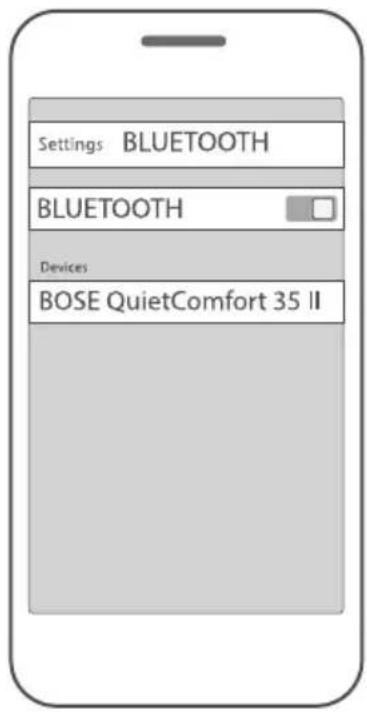
Once connected, you hear "Connected to
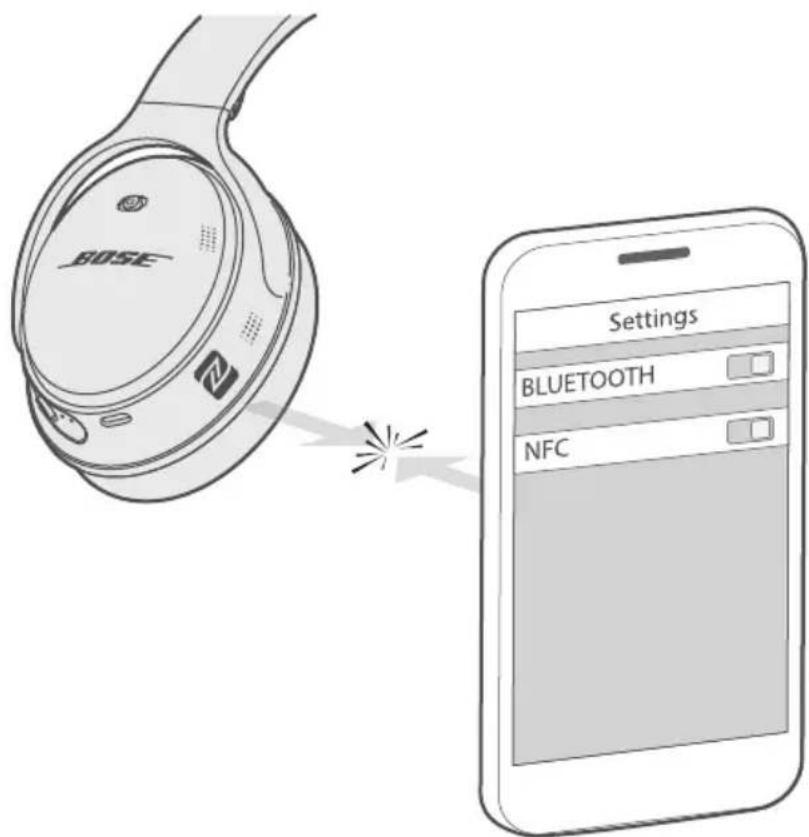
Connect using NFC on your mobile device
What is NFC?
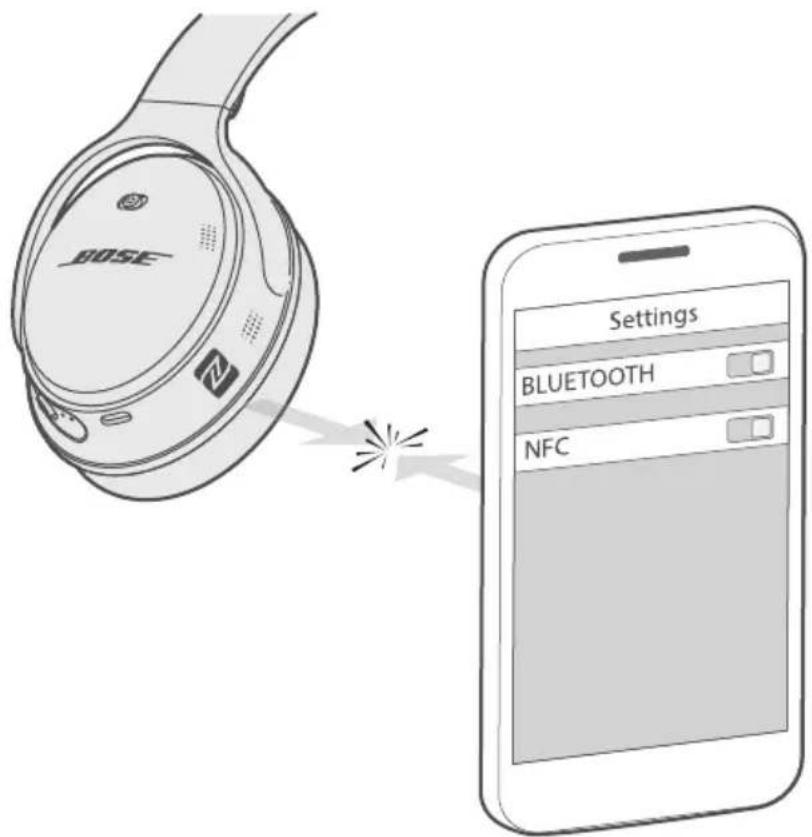
NFC enables a Bluetooth connection by simply tapping two devices together. Refer to your device owner's guide to see if your model supports NFC.
Note: If your device supports a Bluetooth connection via NFC, you can use either connection method.
- With your headphones powered on, unlock your device and enable the Bluetooth and NFC features. Refer to your device owner's guide to learn more about these features.
- Tap the NFC touchpoint on your device to the left underside of the headphones. Your device may prompt you to accept the Bluetooth connection.
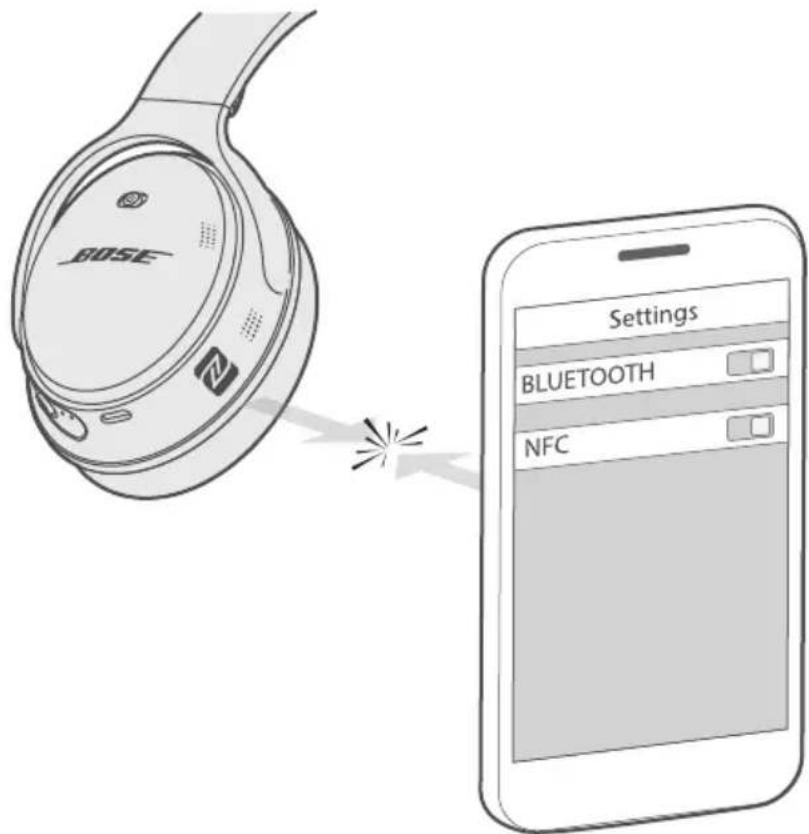
Once connected, you hear "Connected to
Disconnect a mobile device
Use the Bose Connect app to disconnect your mobile device.
Tip: You can also disconnect using the Bluetooth menu on your mobile device.
Reconnect a mobile device
When powered on, the headphones try to reconnect with the two most recently-connecteddevices.
Note: The devices must be within range (30 ft. or 9 m) and powered on.
You can connect additional devices to your headphones. These Bluetooth connections are controlled with the Power/Bluetooth switch. Voice prompts guide you through controlling multiple connections. Before connecting an additional mobile device, make sure this feature is enabled.
Tip: You can also easily manage multiple connected devices using the Bose Connect app.
Connect another mobile device
You can store up to eight connected devices in the headphone pairing list, and your headphones can be actively connected to two devices at a time.
To connect another device, download the Bose Connect app (see page 26) or use the Bluetooth menu on your mobile device (see page 27).
Note: You can only play audio from one device at a time.
Identify connected mobile devices
Slide to the right and release to hear which device is currently connected.
Switch between two connected mobiledevices
- Pause audio on your first mobile device.
- Play audio on your second mobile device.
Note: Your headphones receive phone calls from both devices, despite which device is playing audio.
Reconnect a previously connected device
- Slide the Power/Bluetooth switch to the right and release to hear which device is connected.
- Within two seconds, slide to the right and release again to connect to the next device in the headphone pairing list. Repeat until you hear the correct device name.
- Play audio on the connected mobile device.
Clear the headphone pairing list
- Slide to and hold for 10 seconds, until you hear "Bluetooth device list cleared. Ready to connect."
- Delete your headphones from the Bluetooth list on your mobile device. All devices are cleared and the headphones are ready to connect.
Connect the audio cable
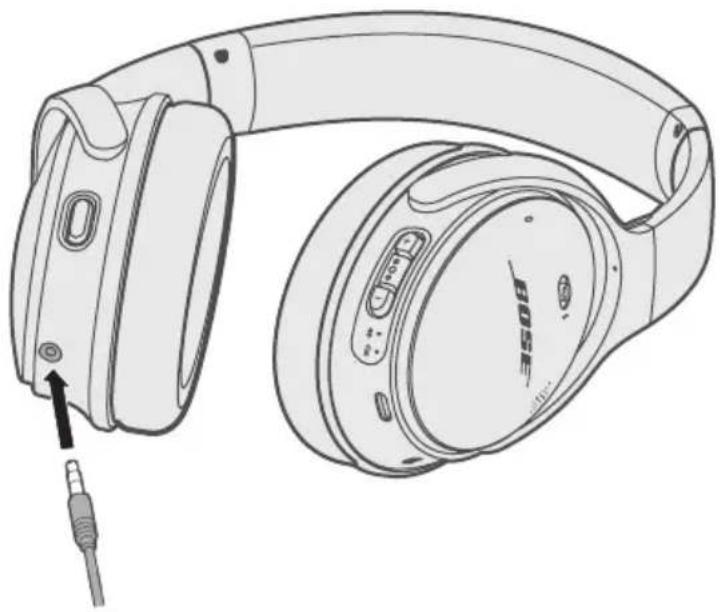
Use the 3.5mm cable (provided) to connect a non-wireless device or to continue using the headphones if the battery charge is depleted.
- Insert the cable into the connector on the right earcup.
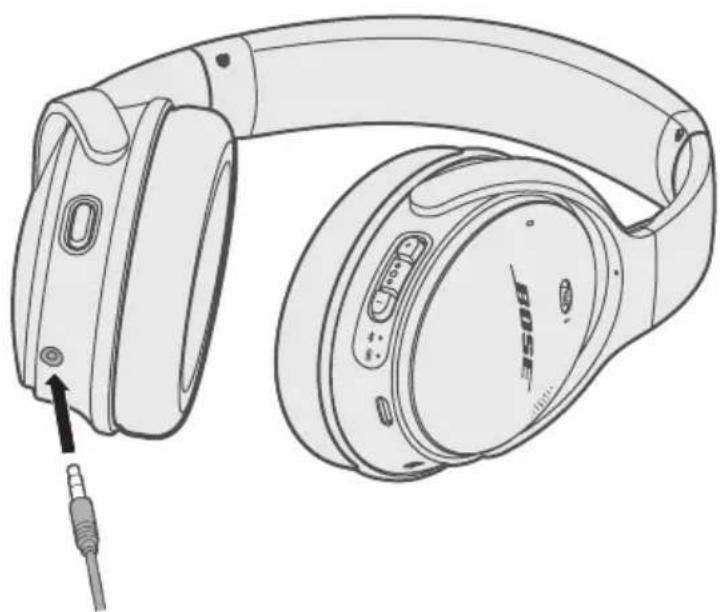
- Insert the other end of the cable into the connector on your device.
Store your headphones
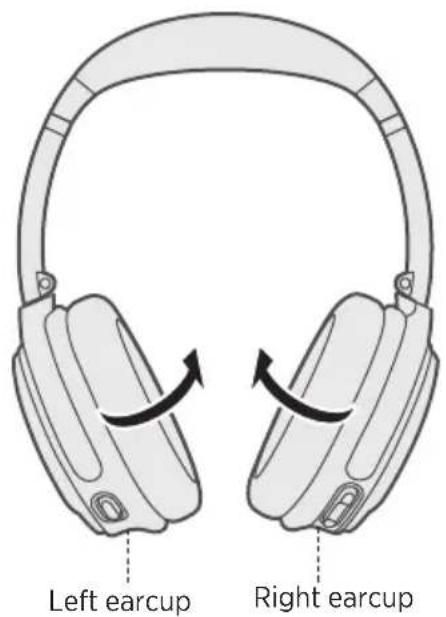
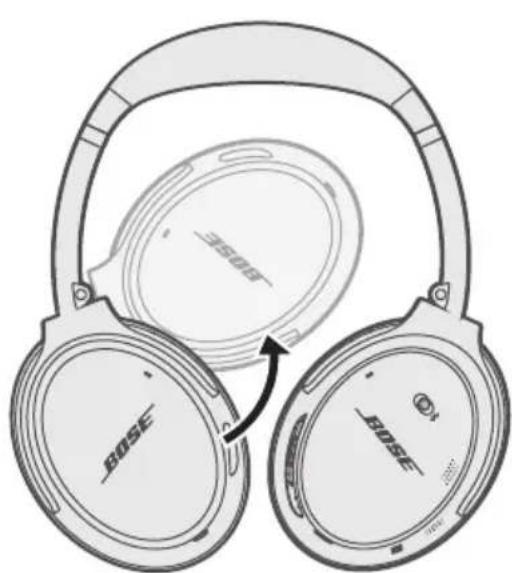
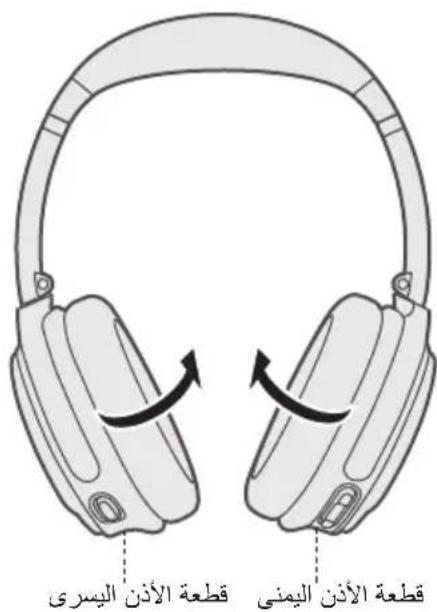
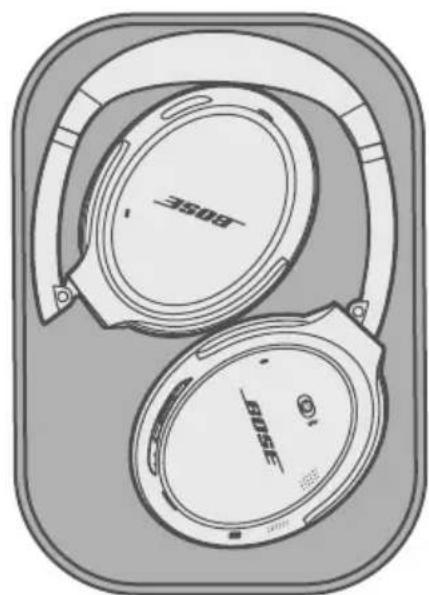
The earcups rotate for easy, convenient storage. Place the headphones flat into the case.
- Rotate both earcups inward so they lay flat.
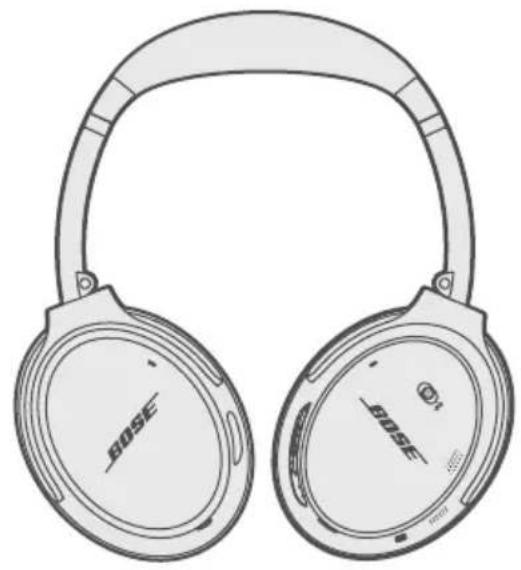
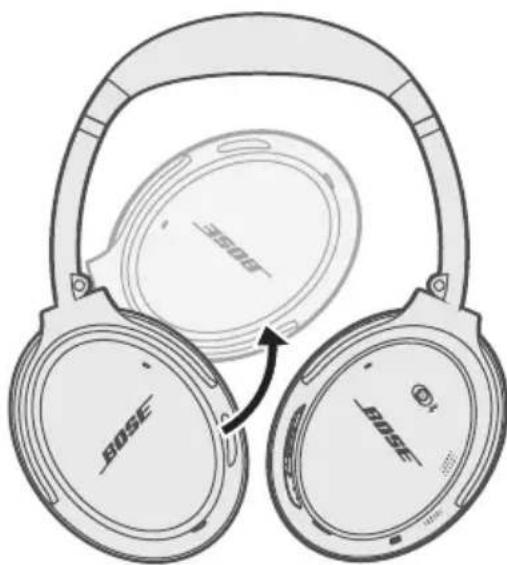
- Fold the left earcup up toward the headband.
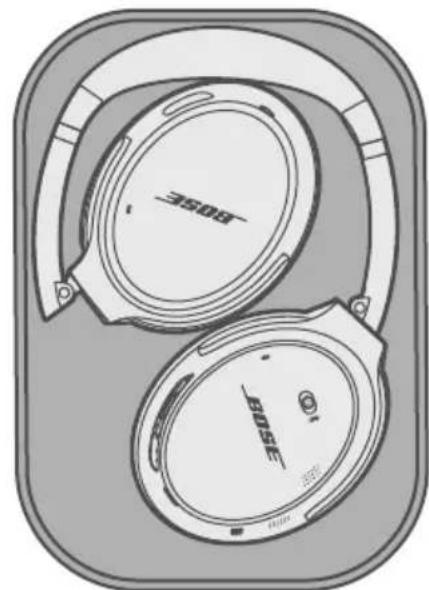
Notes:
Make sure to power off the headphones when not in use.
- Before storing the headphones for more than a few months, make sure the battery is fully charged.
Clean the headphones
Your headphones may require periodic cleaning.
- Wipe the outside surfaces with a soft, dry cloth.
- Don't allow moisture to get inside the earcups or the audio input connector.
Replacement parts and accessories
Replacement parts and accessories can be ordered through Bose customer service. Visit: global.Bose.com/QC35ii
Limited warranty
Your headphones are covered by a limited warranty. Visit our website at global.Bose.com/warranty for details of the limited warranty.
To register your product, visit global.Bose.com/register for instructions. Failure to register will not affect your limited warranty rights.
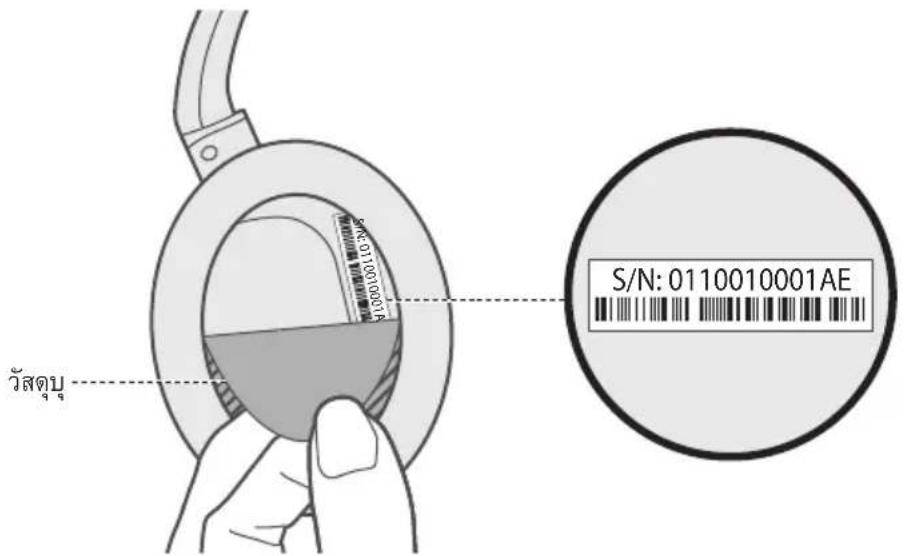
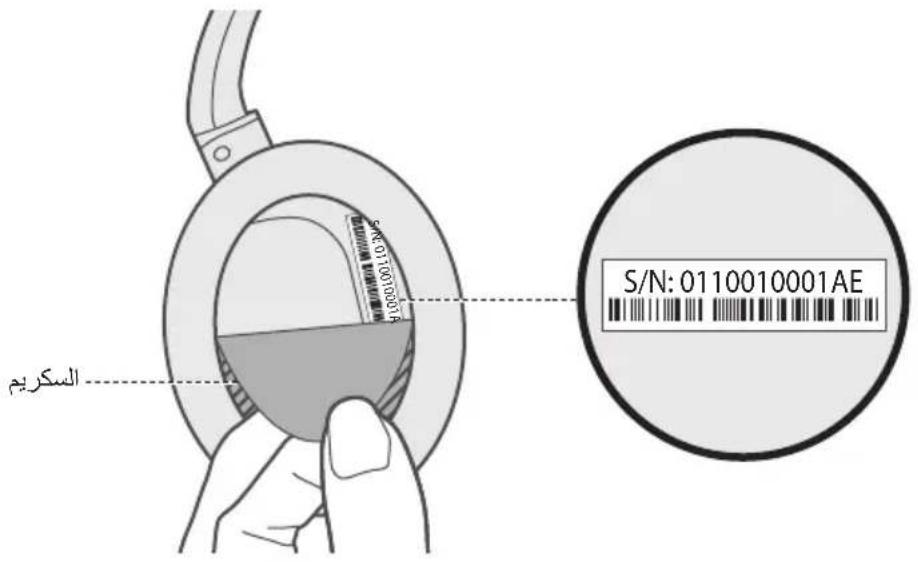
Serial number location
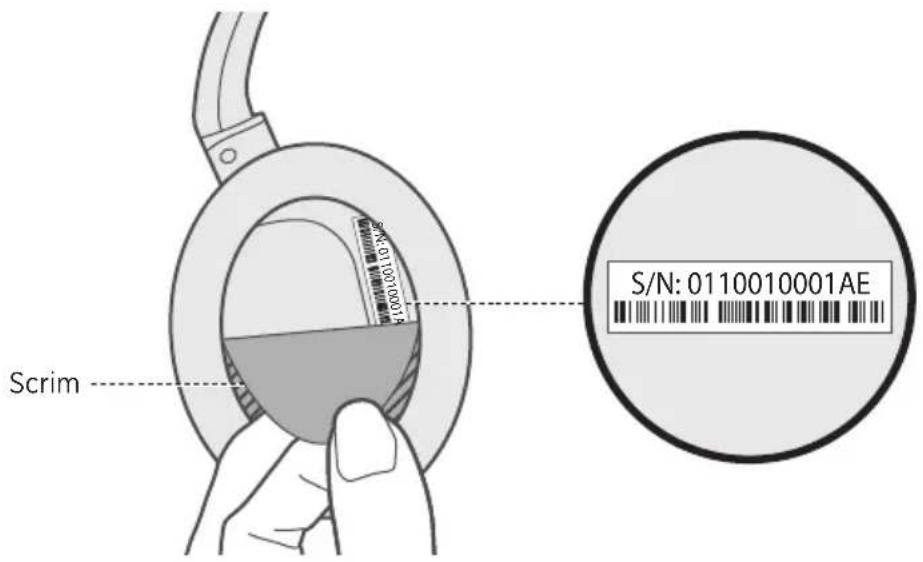
The serial number is located beneath the right scrim in the back of the earcup. The scrim is the inner screen which covers and protects the components inside the earcup.
To view the serial number, grab the scrim at the top edge and gently peel it away. Be careful not to press down on or remove any other components inside the earcup as this could damage the headphones.
Common solutions
If you experience problems with your headphones:
- Check the state of the status indicators (see page 24).
- Charge the battery (see page 23).
- Increase the volume on your headphones, mobile device and music app.
- Try connecting another mobile device (see page 31).
If you could not resolve your issue, see the table below to identify symptoms and solutions to common problems. If you are unable to resolve your issue, contact Bose customer service.
| Symptom Solution | |
| Headphones don't power on | Charge the battery. |
| Headphones don't connect with your mobile device | ·Check the state of the status indicators (see page 24). ·Disconnect the back-up audio cable. ·Disconnect the USB charging cable. ·On your mobile device: -Disable the Bluetooth feature and then re-enable. -Delete your Bose® QuietComfort® wireless headphones II from the Bluetooth list on your device. Connect again. ·Move your mobile device closer to the headphones and away from any interference or obstructions. ·Connect another mobile device (see page 31). ·Visit global.Bose.com/Support/QC35ii to see how-to videos. ·Clear the headphone pairing list (see page 32) and connect again. |
| Headphones don't connect using NFC | ·Check the state of the status indicators (see page 24). ·Make sure your device supports Bluetooth connecting via NFC. ·Unlock your device and enable the Bluetooth and NFC features. ·Tap the NFC touchpoint on the back of your mobile device to the NFC touchpoint on the headphones. |
| No sound | • Power on the headphones and charge the battery. • Check the state of the status indicators (see page 24). • Increase the volume on your headphones, your mobile device and music source. • Slide the Power/Bluetooth switch to the right and release to hear the connected device. Make sure you are using the correct device. • Move your mobile device closer to the headphones and away from any interference or obstructions. • Use a different music source. • Connect another mobile device (see page 31). • If two mobile devices are connected, pause your other device first. • If two mobile devices are connected, move the devices within range of the headphones (30 ft. or 9 m). |
| Poor sound quality | • Use a different music source. • Connect another mobile device (see page 31). • Disconnect the second device. • Move your mobile device closer to the headphones and away from any interference or obstructions. |
| No sound from a device connected by the back-up audio cable | • Secure the ends of the back-up audio cable. • Increase the volume on your headphones, your mobile device and music source. • Connect another device (see page 31). |
| Poor sound quality from a device connected by audio cable | • Secure the ends of the back-up audio cable. • Connect another device (see page 31). |
| Battery won't charge | • Secure the ends of the USB charging cable. • Try another charging source. • If your headphones have been exposed to high or low temperatures, let the headphones return to room temperature and try charging again. |
| Amazon Alexa is not responding | • If you haven't already, set the Action button to Amazon Alexa (see page 17). • Connect your mobile device to Wi-Fi®. • Make sure you are in a country where Amazon Alexa is available. • Make sure you are using the most up-to-date version of the Amazon Alexa app. • For additional support, visit: global.Bose.com/Support/QC35ii |
| Your Google Assistant not responding | ·If you haven’t already, set the Action button to your Google Assistant (see page 20). ·Connect your mobile device to Wi-Fi. ·Make sure you are in a country where the Google Assistant is available. ·For additional support, visit: support.google.com/assistant |
| Action button does not change the noise cancellingmode | ·Make sure your headphones are powered on. ·Make sure the Action button is set to noise cancellation. ·Use the Bose® Connect app to change the noise cancelling mode. |
Management Regulation for Low-power Radio-frequency Devices
ArticleXII
I henhold til "Management Regulation for Low-power Radio-frequency Devices" ma ingen virksomhed, organisation erer bruger uten tilladelse fra NCC aendre frekvensen, oge transmissonseffekten ellere prindelige egenskaber ell er ydeevnen for godkendte laveffektradiofrevvenenheder.
ArticleXIV
Importer i Kina: Bose Electronics (Shanghai) Company Limited, Part C, Plan 9, No. 353 North Riying Road, Kina (Shanghai) Pilot Free Trade Zone
Importor i EU: Bose Products B.V., Gorslaan 60, 1441 RG Purmerend, Holland
Importor i Taiwan: Bose Taiwan Branch, 9F-A1, No.10, Section 3, Minsheng East Road, Taipei City 104, Taiwan
Telefonnummer: +886-2-2514 7676
Importar Mexico: Bose de Mexico, S. de R.L. de C.V., Paseo de las Palmas 405-204, Lomas de Chapultepec, 11000 Mexico, D.F. Telefonummer: +5255 (5202) 3545
Temperaturomrade for opladning: 0^ - 45^
Temperaturomrade for afladning: 20^ - 60^
China-Import: Bose Electronics (Shanghai) Company Limited, Part C, Plan 9, No. 353 North Riying Road, China (Shanghai) Pilot Free Trade Zone
EU-Import: Bose Products B.V., Gorslaan 60, 1441 RG Purmerend, Niederlande
Taiwan-Import: Bose Taiwan Branch, 9F-A1, No.10, Section 3, Minsheng East Road, Taipei City 104, Taiwan
Telefonnummer: +886-2-2514 7676
Mexiko-Import: Bose de Mexico, S. de R.L. de C.V., Paseo de las Palmas 405-204, Lomas de Chapultepec, 11000 Mexico, D.F. Telefonummer: +5255 (5202) 3545
Importeur in China: Bose Electronics (Shanghai) Company Limited, Part C, Plan 9, No. 353 North Riying Road, China (Shanghai) Pilot Free Trade Zone
Importeur in de EU: Bose Products B.V., Gorslaan 60, 1441 RG Purmerend, Nederland
Importeur in Taiwan: Bose Taiwan Branch, 9F-A1, No.10, Section 3, Minsheng East Road, Taipei City 104, Taiwan Telefooonnummer: +886-2-2514 7676
Importeur in Mexico: Bose de Mexico, S. de R.L. de C.V., Paseo de las Palmas 405-204, Lomas de Chapultepec, 11000 Mexico, D.F. Telefoonnummer: +5255 (5202) 3545
Oplaadtemperatuur: 0^ - 45^
Gaaar: global.Bose.com/QC35ii
Beperkte garantie
Importador en China: Bose Electronics (Shanghai) Company Limited, Part C, Plan 9, No. 353 North Riying Road, China (Shanghai) Pilot Free Trade Zone
Importador en UE: Bose Products B.V., Gorslaan 60, 1441 RG Purmerend, Paises Bajos
Importador en Taiwán: Sucursal de Bose en Taiwán, 9F-A1, No.10, Section 3, Minsheng East Road, Taipei City 104, Taiwan
Número de téléphone: +886-2-25147676
Importador en Mexico: Bose de Mexico, S. de R.L. de C.V., Paseo de las Palmas 405-204, Lomas de Chapultepec, 11000 Mexico, D.F.Numero de téléphone: +5255 (5202) 3545
Rango de temperatura de energia: 32^ - 113^ ( 0^ - 45^ )
Rango de temperatura de descarga: -4^ - 140^(-20^ - 60^)
Usar Google Assistant
Application Bose Connect
Importatore per la Cina: Bose Electronics (Shanghai) Company Limited, Part C, Plan 9, No. 353 North Riying Road, China (Shanghai) Pilot Free Trade Zone
Concessioni Bluetooth
Kinai importor: Bose Electronics (Shanghai) Company Limited, Part C, Plan 9, No. 353 North Riying Road, Kina (Shanghai) Pilot Free Trade Zone
EU-importor: Bose Products B.V., Gorslaan 60, 1441 RG Purmerend, The Netherlands
Tajvani importor: Bose Taiwan Branch, 9F-A1, No.10, Section 3, Minsheng East Road, Taipei City 104, Tajvan. Telefonszam: +886-2-2514 7676
Mexikói importo: Bose de México, S. de R.L. de C.V., Paseo de las Palmas 405-204, Lomas de Chapultepec, 11000 Mexico, D.F. Telefonszám: +5255 (5202) 3545
Toltesi homérisklet-tartomány: 0^ - 45^
Toltesleadasi homerseklet-tartomany: -20^ - 60^
Management Regulation for Low-power Radio-frequency Devices
Artikkel XII
Importor for Kina: Bose Electronics (Shanghai) Company Limited, Part C, Plan 9, No. 353 North Riying Road, Kina (Shanghai) Pilot Free Trade Zone
Importor for EU: Bose Products B.V., Gorslaan 60, 1441 RG Purmerend, Nederland
Importor for Taiwan: Bose Taiwan Branch, 9F-A1, No.10, Section 3, Minsheng East Road, Taipei City 104, Taiwan
Telefonnummer: +886-2-25147676
Importor for Mexico: Bose de Mexico, S. de R.L. de C.V., Paseo de las Palmas 405-204, Lomas de Chapultepec, 11000 Mexico, D.F. Telefonummer: +5255 (5202) 3545
Ladetemperatur: 0^ til 45^ (32°F til 113°F)
Utladingtemperatur: -20°C til 60°C (-4°F til 140°F)
Importer — Chiny: Bose Electronics (Shanghai) Company Limited, Part C, Plan 9, No. 353 North Riying Road, China (Shanghai) Pilot Free Trade Zone
Importer - UE: Bose Products B.V., Gorslaan 60, 1441 RG Purmerend, Holandia
Importer — Tajwan: Bose Taiwan Branch, 9F-A1, No.10, Section 3, Minsheng East Road, Taipei City 104, Tajwan. Numer telefonu: +886-2-2514 7676
Importer - Meksyk: Bose de Mexico, S. de R.L. de C.V., Paseo de las Palmas 405-204, Lomas de Chapultepec, 11000 Mexico, D.F. Numer Telefonu: +5255 (5202) 3545
Zakres temperatur otoczenia (ladowanie): od 0^ do 45^
Kinainportor: Bose Electronics (Shanghai) Company Limited, Part C, Plan 9, No. 353 North Riying Road, Kina (Shanghai) Pilot Free Trade Zone
EU-importor: Bose Products B.V., Gorslaan 60, 1441 RG Purmerend, Nederländerna
Taiwanimportor: Bose Taiwan Branch, 9F-A1, No.10, Section 3, Minsheng East Road, Taipei City 104, telfonummer Taiwan: +886-2-2514 7676
Mexikoimportor: Bose de Mexico, S. de R.L. de C.V., Paseo de las Palmas 405-204, Lomas de Chapultepec, 11000 Mexico, D.F. Telefonummer: +5255 (5202) 3545
Temperaturinterval for uppladdning: 0^ - 45^
Temperaturinterval for urladdning: -20^ - 60^
Stalla in atgardsknappen for brusreducing 21
Aandra laget for brusreducing 21
Alternative rostkontroll
Komma at alternative rostkontroll 22
Aktivera Google Assistant med flerfunktionsknappen 22
Ladda batteriet
Laddaupp hollurarna 23
Laddningstid 23
Hora laddningsnivan 23
Statusindikatorer
Bluetooth-indicator 24
Batteriindikator 24
Röstmeddelanden
Anvanda Google Assistant
Ändra laget for brusreducing
Bluetooth Low Energy: 10 dBm/MHz EIRP

藏毒电池回收
Tn
y

Bose http://www.bose.com/compliance/


| (Pb) | (Sun (Hg) | (Chen) | (Luc) | (Luc) | (Luc) | |
| PCB X 00000 | ||||||
| X 00 | 000 | |||||
| 000 | 000 | |||||
| X 00 | 000 | |||||
| X 00 | 000 | |||||
wnnnaa 8 nnnnnae aeeaaen ennnnneanennn neannnne anennnne
Bose Electronics (Shanghai) Company Limited, Part C, Plan 9, No. 353 North Riying Road, China (Shanghai) Pilot Free Trade Zone
WuNTUe EU: Bose Products B.V., Gorslaan 60, 1441 RG Purmerend, The Netherlands
Bose Taiwan Branch, 9F-A1, No.10, Section 3, Minsheng East Road, Taipei City 104,
Bose de Mexico, S. de R.L. de C.V., Paseo de las Palmas 405-204, Lomas de Chapultepec, 11000 Mexico, D.F. www.lntnwnw: +5255 (5202) 3545
:0°C-45°C
20C-60°
Made for Apple wnuwunwnuwrnnnwnrwwn nnwnnwnnwnnwnnwnnwnnwnnwnnwnnwnnwnnwnnwnnwnnwnnwnnwnnwnnwnnwnnwnnwnnwnnwnnwnnwnnwnnwnnwnnwnnwnnwnnwnnwnnn
Apple, IaN Apple, iPad, iPhone uas iPod uuauuunuunuunu Apple Inc. uuuuuuuuuuuuuuu uuuuuuuuuu App Store uuuuunuunuunuunu un Apple Inc. uuuuuuuuuuuuuu "iPhone" uuuuuuuuuuuuuuuu Aiphone K.K
Amazon, Alexa uai iinniuyuoyuayyuyuayyuyuayyuyuayyuyuayyuyuayyuyuay. Amazon, Inc.
Android, Google Assistant, Google Play 山 Google Play 山 Google Play 山 Google Play 山 Google Play 山 Google Play 山 Google Play 山 Google Play 山 Google Play 山 Google Play 山 Google Play 山 Google Play 山
Bose Corporation
Bose Corporation: 1-877-230-5639
© 2018 Bose Corporation wwnnnnun nn nnnnnnne nnnnnnnnnnnnnnnnnnnnnnnnnnnnnnnnnnnnnnnnnnnnnnnnnnnnnnnnnnnnnnnnnnnnnnnnnnnnnnnnnnnnnnnnnnnnnnnnnnnnnnnnnnnnnnnnnnnnnnnnnnnnnnnnn
Bose Connect
Bose Connect 9
a
auiuunai 10
H
12
12
13
WJ 14
17.26.47.56 14
Wan
Wnnaaaynnnns 16
Amazon Alexa
Alexa 17
Alexa 18
18
Google Assistant
Google Assistant 20
Google Assistant 20
mraanrnnnnaa
21
21
山
nannnnnnnnnnnnnnnnnnnnnnnnnnnnnnnnnnnnnnnnnnnnnnnnnnnnnnnnnnnnnnnnnnnnnnnnnnnnnnnnnnnnnnnnnnnnnnnnnnnnnnnnnnnnnnnnnnnnnn
22
Google Assistant 22
n
23
23
23
Wuaanannn
Wuweiweiwei Bluetooth 24
WuJueJueHuaHuaJiaJia 24
1
mananen anen enanen 25
25
25
Bluetooth
Bose Connect (unu) 26
27
Daaiaaiaaiaaiaaiaaiaaaiaaaiaaaaaiaaaaaaaaaaaaaaaaaaaaaaaaaaaaaaaaaaaaaaaaaaaaaaaaaaaaaaaaaaaaaaaaaaaaaaaaaaaaaaaaaaaaaaaaaaaaaaaaaaaaaaaaaaaaaaaaaaaaaaaaaaaaaaaaaaaaaaaaaaaaaaaaaaaaaaaaaaaaa aa aaaa aaaa aaaa aaaa aaaa aaaa aaaa aaaa aaaa aaaa aaaa aaaa aaaa aaaa aaaa aaaa aaaa aaaa aaaa aaaa aaaa aaaa aaaa aaaa aaaa aaaa aaaa aaaa aaaa aaaa aaaa aaaa aaaa aaaa aaaa aaaa aaaa aaaa aaaa aaaa aaaa aaaa aaaa aaaa aaaa aaaa aaaa aaaa aaaa aaaa aaaaaa
NFC 29
30
30
Bluetooth
31
31
31
32
32
N
33
muaa
34
35
35
m 35
36
nunnn
37
Bose Connect nwnwannnnaaennnnnnae nnne ne nnnnne nnnnne nnnnne nnnnne nnnnne nnnnne nnnnne nnnnne nnnnne nnnnne nnnnne nnnnne nnnnne nnnnne nnnnne nnnnne nnnnne nnnnne nnnnne nnnnne nnnnne nnnnne nnnnne nnnnne nnnnne nnnnnee
Bose Connect
·
·
J 1
一的
-1
·177777777777777777
WwWwWwWwWwWwWwWwWw

Download on the App Store

GET IT ON Google Play
a
y
Bose® QuietComfort® 35 wireless headphones II
nnaaannnn
USB
muaa aynuun 3.5 uu.
Bose: global.Bose.com/Support/QC35ii
山
B
山
2
m 2
Bose Connect
C
Wn
2
nssaaa aae Wnnns
- 1nnnnaaannnnaaennnnaananaananaananaananaananaananaananaananaananaananaananaananaananaananaananaananaananaananaananaananaananaananaananaananaananaananaananaananaananaananaananaananaananaananaananaananaananaananaananaananaananaananaananaananaananaananaananaananaananaananaanaraannnna
amazon alexa
Alexa
wnnnae nnae Alexa nonnnnnnnae
vnaanana
| Alexa | Alexa |
| Alexa " | Alexa" |
| Alexa "Alexa" | Alexa"Alexa" |
| Alexa "Alexa" | Alexa"Alexa" |
| Alexa "Alexa" | Alexa"Alexa" |
| Alexa "Alexa" | Alexa"Alexa" |
| Alexa "Alexa" | Alexa"Alexa" |
| Alexa "Alexa" | Alexa"Alexa" |
Wnwn: nwnwauwauwAlexa ananannnnae nnennn global.Bose.com/ Support/QC35ii
WwWvWuWuWuWuWuWuWuWuWuWuWuWuWuWuWuWuWuWuWuWuWuWuWuWuWuWuWuWuWuWuWuWuWuWuWuWuWuWuWuWuWuWuWuWuWuWuWuWuWuWuWw
Google Assistant: https://assistant.google.com/platforms/headphones
| Google Assistant | |
| Google Assistant Google Assistant | |
| Google Assistant | |
| Google Assistant | |
| Google Assistant | |
| Google Assistant |
nnnnnnnnnnnnnnnnnnnnnnnnnnnnnnnnnnnnnnnnnnnnnnnnnnnnnnnnnnnnnnnnnnnnnnnnnnnnnnnnnnnnnnnnnnnnnnnnnnnnnnnnnnnnnnnnnnnnnnnnnnnnnnnnnnnnn
Nnnae: nnne nnnnne nee nee nee nee nee nee nee nee nee nee nee nee nee nee nee nee nee nee nee nee nee nee nee nee nee nee nee nee nee nee nee nee nee nee nee nee nee nee nee nee nee nee nee nee nee nee nee nee nee nee neee
nunnnnnnnnnnnnnnn
| บhumanninthasartharshvattan | บhumatharshvattan |
| 成语 enghuahua huan huan huan huan huan huan huan huan huan huan huan huan huan huan huan huan huan huan huan huan huan huan huan huan huan huan huan huan huan huan huan huan huan huan huan huan huan huan huan huan huan huan huan huan huan huan huan huan huan huan huo | 成语 enghuahua huan huan huan huan huan huan huan huan huan huan huan huan huan huan huan huan huan huan huan huan huan huan huan huan huan huan huan huan huan huan huan huan huan huan huan huan huan huan huan huan huan huan huan huan huan huanhuan huan huan huan huan huan huan huan huan huan huan huan huan huan huan huan huan huan huan huan huan huan huan huan huan huan huan huan huan huan huan huan huan huan huan huan huan huan huan huan huan huan huan huan huan huan huan huan huan huanhuan huan huan huo |
| 成语 enghuahua huan huan huan huan huan huan huan huan huan huan huan huan huan huan huan huan huan huan huan huan huan huan huan huan huan huan huan huan huan huan huan huan huan huan huan huan huan huan huan huan huan huan huan huan huan | 成语 enghuahua huan huan huan huan huan huan huan huan huan huan huan huan huan huan huan huan huan huan huan huan huan huan huan huan huan huan huan huan huan huan huan huan huan huan huan huan huan huan huan huan huan huan huan huan huan huan |
nnae:
2
- uwwwBose Connect wonauuWuaWaaWaaWaaWaaWaaWaa
2.
山
nnaa
a
Google Assistant
HJ11:
2
wnnnnne nnnnnn nn nnnnnaa Amazon Alexa gn Google Assistant nnnnnnnn nn nnnnnaa
| Apple(Siri) | não • ●●●●●●●●●●●●●●●●●●●●●●●●●●●●●●●●●●●●●●●●●●●●●●●●●●●●●●●●●●●●●●●●●●●●●●●●●●●●●●●●●●●●●●●●●●●●●●●●●●●●● |
| Android | não • ●●●●●●●●●●●●●●●●●●●●●●●●●●●●●●●●●●●●●●●●●●●●●●●●●●●●●●●●●●●●●●●●●●●●●●●●●●●●●●●●●●●●●●●●●●●●●●● |
Google Assistant
wnnnnnaaannnnnnnnnnnnnnnnnnnnnnnnnnnnnnnnnnnnnnnnnnnnnnnnnnnnnnnnnnnnnnnnnnnnnnnnnnnnnnnnnnnnnnnnnnnnnnnnnnnnnnnnnnnnnnnnnnnnnnnnnnnnnnnnnnnnnnnnnnnnnnnnnnnn
n
1
W
- USB 2. USB micro-USB
- 1
WJTEILW:
- WwWnJHn7uWn7uWn7uWn7uWn7uWn7uWn7uWn7uWn7uWn7uWn7uWn7uWn7uWn7uWn7uWn7uWn7uWn7uWn7uWn7uWn7uWn7uWn7uWn7uWn7uWn7u
·
1
1
WJTEILH:
20
40
W
nno nnnn noon noon noon noon noon noon noon noon noon noon noon noon noon noon noon noon noon noon noon noon noon noon noon noon noon noon noon noon noon noon noon noon noon noon noon noon noon noon noon noon noon noon noon noon noon noon noon noon noon noon noom
24
WwannnnnnaaennnnnneaaeBluetooth
Bluetooth
| 成语 | 说明 |
Wuaananaaunnae
| 成语 | |
| - ridgefruit juice, orange juice, and rosemary juice |
H
Bleoth 1
Bose Connect
n
777777777777777777777777777777777777
- English
German
Korean
Swedish
- Spanish
Mandarin
Italian
Dutch
- French - Japanese - Portuguese
N
Bose Updater: btu.Bose.com
山
1
- n+682-775wJyNnHbNzNnBnBnBnBnBnBnBnBnBnBnBn
- n+na=6wbaaennnnn
3.
#
Bose Connect
Nan: mJnJnJnJnJnJnJnJnJnJnJnJnJnJnJnJnJnJnJnJnJnJnJnJnJnJnJnJnJnJnJnJnJnJnJnJnJnJnJnJnJnJnJnJnJnJnJnJnJnJnJ
nnuuauu uuuuauu uuuuauu uuuuuuuuuuuuuuuuuuuuuuuuuuuuuuuuuuuuuuuuuuuuuuuuuuuuuuuuuuuuuuuuuuuuuuuuuuuuuuuuuuuuuuuuuuuuuuuuuuuuuuuuuuuuuuuuuuuuuuuuuuuuuuuuuuuuuuuuuuuuuuuuuuuuuuuuuuuuuuuuuuuuuuuuuuuuuuuuuuuuuUU
Bose Connect (
- 12
- 0nnaaawBose Connect nnnnnnnnnnnnnnnnnnnnnnnnnnnnnnnnnnnnnnnnnnnnnnnnnnnnnnnnnnnnnnnnnnnnnnnnnnnnnnnnnnn
1000000000000000000000000000000000000000000000000
Nannnnnnaaannnnnnaanennnnn nn nnnnnnnnnnnnnn Nnnee Bnntothnne Near Field Communication (NFC)
Dnnaaiaeaaeae aee
- 1
- 互联网+Bluetooth Bluetooth
nannnnn: nnnnnnluetho wu
3.
"
NFC
NFC
NFC 75000000000000000000000000000000000000000000000000000000000000000000000000
nnaaannnnnne aennnnnne nnnnne bnuoth NFC nnnnnnnae
- NFC 1000000000000000000000000000000000000000000000000000000000000000000000000000
"
nnaaannnnnnaanennnnae
LauwwaunuBose Connect wannnwnnnnnaaunnnnnaa
u: u
a
nwnnnnnnnnnnnnnnnnnnnnnnnnnnnnnnnnnnnnnnnnnnnnnnnnnnnnnnnnnnnnnnnnnnnnnnnnnnnnnnnnnnnnnnnnnnnnn
HJNTI: 0JNnOIOOIOOIOOIOOIOOIOOIOOIOOIOOIOOIOOIOOIOOIOOIOOIOOIOOIOOIOOIOOIOOIOOIOOIOOIOOIOOIOOIOOIOOIOOIOOIOOIOOIOOIOOIOOIOOIOOIOOIOOIOOIOOIOOIOOIOOIOOIOOIOOIOOIOO
Bnwnnnnnaaannnnnneennnnnnnnnnnnnnnnnnnnnnnnnnnnnnnnnnnnnnnnnnnnnnnnnnnnnnnnnnnnnnnnnnnnnnnnnnnnnnnnnnnnnnnnnnnnnnnnnnnnnnnnnnnnnnnnnnnnnnnnnnnnnnnnnnnnnnnnnnnnnnnn
Bose Connect
1
Nannnnaananaananaananaananaananaananaananaananaananaananaananaananaananaananaananaananaananaananaananaananaananaananaananaananaananaananaananaananaananaananaananaananaananaananaananaananaananaananaananaananaananaananaananaananaananaananaananaananaananaananaanara anaaa aee
y
y
Hnnnnaaannnnaaennnnnnaanennnnnnnnnnnnnnnnnnnnnnnnnnnnnnnnnnnnnnnnnnnnnnnnnnnnnnnnnnnnnnnnnnnnnnnnnnnnnnnnnnnnnnnnnnnnnnnnnnnnnnnnnnnnnnnnnnnn
n
- 2.
HJW: WJWJWJWJWJWJWJWJWJWJWJWJWJWJWJWJWJWJWJWJWJWJWJWJW
a
nnaananaananaananaananaananaananaananaananaananaananaananaananaananaananaananaananaananaananaananaananaananaananaananaananaananaananaananaananaananaananaananaananaananaananaananaananaananaananaananaananaananaananaananaananaananaananaananaananaananaananaan ana
n
nnaanannnnnnaaennnnnnaaaanennnnnnaan nnaan nn anan anan anan anan anan anan anan anan anan
#
yannnnsuynnynnnnywnny
24
(20 23
- WJzgUuljUuWgUunssbBnueh UaabWwBwBwBwJyJp
·n31)
nannnnnnnnnnnnnnnnnnnnnnnnnnnnnnnnnnnnnnnnnnnnnnnnnnnnnnnnnnnnnnnnnnnnnnnnnnnnnnnnnnnnnnnnnnnnnnnnnnnnnnnnnnnnnnnnnnnnnnnnnnnnnnnnnnnn
| Google Assistant Google Assistant Google Assistant Google Assistant Google Assistant Google Assistant Google Assistant Google Assistant Google Assistant Google Assistant Google Assistant Google Assistant Google Assistant Google Assistant Google Assistant Google Assistant Google Assistant Google Assistant Google Assistant Google Assistant Google Assistant Google Assistant Google Assistant Google Assistant Google Assistant Google Assistant Google Assistant Google Assistant Google Assistant Google Assistant Google Assistant Google Assistant Google Assistant Google Assistant Gmail.com support.google.comassistant support.google.comassistant support.google.comassistant support.google.comassistant support.google.comassistant support.google.comassistant support.google.comassistant support.google.comassistant support.google.comassistant support.google.comassistant support.google.comassistant support.google.comassistant support.google.comassistant support.google.comassistant support.google.comassistant support.google.comassistant support.google.comassistant support.google.comassistant support.google.comassistant support.google.comassistant support.google.com assistant support.google.comassistant support.google.comassistant support.google.comassistant support.google.comassistant support.google.comassistant support.google.comassistant support.google.comassistant support.google.comassistant support.google.comassistant support.google.comassistant support.google.comassistant support.google.comassistant support.google.comassistant support.google.comassistant support.google.comassistant support.google.comassistant support.google.comassistant support.google.comassistant support.google.comassistant support.google.com |
毎日
长和/
中國國數:Bose Electronics (Shanghai) Company Limited, Part C, Plan 9, No. 353 North Riying Road, China (Shanghai) Pilot Free Trade Zone
EU Suillertel: Bose Products B.V., Gorslaan 60, 1441 RG Purmerend, The Netherlands
Jn/BluetoothsWHTILOOIO
音成安内加贝托尼登到日,贝托尼贝托尼贝托尼贝托尼贝托尼贝托尼贝托尼贝托尼贝托尼贝托尼贝托尼贝托尼贝托尼贝托尼贝托尼贝托尼贝托尼贝托尼贝托尼贝托尼贝托尼贝托尼贝托尼贝托尼贝托尼贝托尼贝托尼贝托尼贝托尼贝托尼贝托尼贝托尼贝托尼贝托尼
大
大如TaiI用的他德元将安用知时在时,
大记TaiIeHt
初元卫
SeT/BluetoothSwoiCJ 员真秋口或口
楚:海三元用卫明N01sKnCnLgIiSAUHJ
海德森
連三元元是八元元的灵用,
IMDIOIJ
Google Assistant https://assistant.google.com/platforms/headphones
Google Assistant
Google Assistant®
That's the best way to get your baby to sleep.
https://assistant.google.com/platforms/headphones
https://assistant.google.com/platforms/headphones
This is a good way to improve your English skills. 10.
中国におけの輸入元:Bose Electronics (Shanghai) Company Limited, Part C, Plan 9, No. 353 North Riying Road, China (Shanghai) Pilot Free Trade Zone
EUにお願いいたします输入元:Bose Products B.V., Gorslaan 60, 1441 RG Purmerend, The Netherlands
台湾におけの輸入元:Bose Taiwan Branch, 9F-A1, No.10, Section 3, Minsheng East Road, Taipei City 104, Taiwan Phone Number: +886-2-2514 7676
Mekshon 11000 Mexico, D.F. Phone Number: +5255 (5202) 3545
Bose Corporation Headquarters: 1-877-230-5639
support.google.com/assistant
Googleアシスロー使用する
Hoppd hns hpon is 10n
global.Bose.com/QC35ii
保证
Jie jia juii ci 11jil jll caleao y - jaiy .Bose as Jie dae
j.
y
( x,y) = ab,52ab
a 1
e 1
aalal aal alal aal alal alal alal alal alal alal alal alal alal alal alal alal alal alal alal alal alal alal alal alal alal alal alal alal alal alal alal
3J 1

y

a 1
CSA UL jia) aaiy aaii i yjly aaiy aaiy aaiy aaiy aaiy aaiy aaiy aaiy aaiy
.(CCC·VDE
(4)la j lill lea jai g o jolll aal aai i jia jia jia jia jia jia jia jia jia jia jia jia
B Aill no g jg jg jg jg jg jg jg jg jg jg jg jg jg jg jg jg jg jg jg jg jg jg jg jg jg jg jg jg jg jg jg jg jg jg jg jg jg jg jg jg jg jg jg jg jg jg jg jg jg jg j
A1 = 2,B1 = 3
.
j 1 j 1 j 1 j 1 j 1 j 1 j 1 j 1 j 1 j 1 j 1 j 1 j 1 j 1 j 1 j 1 j 1 j 1 j 1 j 1 j 1 j 1 j
scllal lll jilill g jolll o jy jolll g j no jnll 1d j aieall e jgall
Bose Corporation 5
()JLcLaFgAaHf(FCC)yAaYyAaYyAaYyAaYyAaYyAaYyAaYyAaYyAaYyAaYyAaYyAaYyAaYyAaYyAaYyAaYyAaYyAaYyAaYyAaYyAaYyAaYyAaYyAaYyAaYyAa
(FFCC) 11111111111111111111111111111
y
CANICES-3(B)/NMB-3(B)
aaiiaiaiaiaiaiaiaiaiaiaiaiaiaiaiaiaiaiaiaiaiaiaiaiaiaiaiaiaiaiaiaiaiaiaiaiaiaiaiaiaiaiaiaiaiaiaiaiaiaiaiaiaiaiaiaiaiaiaiaiaiaiaiaiaiaiaia
ojuie aaii oaiii
yipn 100000000000000000000000000000000000000000000000000000
ojuie aaijll ooi
piaaill 1e y, 1y, 1y, 1y, 1y, 1y, 1y, 1y, 1y, 1y, 1y, 1y, 1y, 1y, 1y, 1y, 1y, 1y, 1y, 1y, 1y, 1y, 1y, 1y, 1y, 1y, 1
aalalal aalalal aalalal 10 10
y

静電池開收
.0000000000000000000000000000000000000000000000000000000000000000000000000000
Li-ion


Bose Electronics (Shanghai) Company Limited, Part C, Plan 9,
No. 353 North Riying Road, China (Shanghai) Pilot Free Trade Zone
Bose Products B.V., Gorslaan 60, 1441 RG Purmerend, The Netherlands
Bose Taiwan Branch, 9F-A1, No.10, Section 3, Minsheng East Road,
Taipei City 104, Taiwan
+886-2-25147676:
"Made for Apple" "Apple" "Apple" "Apple" "Apple" "Apple" "Apple" "Apple" "Apple" "Apple" "Apple" "Apple" "Apple" "Apple" "Apple" "Apple" "Apple" "Apple" "Apple" "Apple" "Apple" "Apple" "Apple" "Apple" "Apple" "Apple" "Apple" "Apple" "Apple" "Apple" "Apple" "Apple" "Apple" "Apple" "Apple
20 ....Google Assistant
20 Google Assistant
21
21
21
a
22
22 2
a
23
23
23
a
24 Bluetooth
24 2
aaiiaai
25
25
25 1
Bluetooth
26 (J) Bose Connect 1
27 1
27 1
29 (NFC)
30 1
30 1
Bluetooth
31
31 3
31 2
32
32
A
33 1
aillg lll
34 1
35
35
35 2
36
LgXlaI g IbsI cIis
37 1
global.Bose.com/Support/QC35ii
Power/Bluetooth
yj jn 111111111111111111111111
Jaaaagao
aiai iil lclaw n jy laie yjllg 1daiy
.Bose Connect
Power/Bluetooth
:
abc = 1.
Alexa Jia, Alexa Jia, Alexa Jia, Alexa Jia, Alexa Jia, Alexa Jia, Alexa Jia, Alexa Jia, Alexa Jia, Alexa Jia, Alexa Jia, Alexa Jia, Alexa Jia, Alexa Jia, Alexa Jia, Alexa Jia, Alexa Jia, Alexa Jia, Alexa Jia, Alexa Jia, Alexa Jia, Alexa Jia, Alexa Jia, Alexa Jia, Alexa Jia, Alexa Jia,
:la.111,
Alexa
1.
- 2 l_1 = 8 25 = 4 25 = 4 25 = 2

amazon alexa
Alexa
AeJzjIyJzJzJzAlexa J
y
global.Bose.com/Support/QC35ii
G 1
Google Assistant https://assistant.google.com/platforms/headphones
:
Google Assistant
- J is a
Giaa aall 1024 Android Jaiy jay jay jay jay jay jay jay jay jay jay jay jay jay jay jay jay jay jay jay jay jay jay jay jay jay jay jay jay jay jay jay jay jay jay jay jay jay jay jay jay jay jay jay jay jay jay jay jay jay jay jjay

Google Assistant
:abdoLao gocill
Google Assistant Android support.google.com/assistant
Google Assistant
Google Assistant Jgsslll lalil 100000000000000000000000000000000000000000000000000000
Ai = Aj
J 1
Jg Jg Jg Jg Jg Jg Jg Jg Jg Jg Jg Jg Jg Jg Jg Jg Jg Jg Jg Jg Jg Jg Jg Jg Jg Jg Jg Jg Jg Jg Jg Jg Jg Jg Jg Jg Jg Jg Jg Jg Jg Jg Jg Jg Jg Jg Jg Jg Jg Jg Jg
| الله��الله��الله��الله��الله��الله��الله��الله��الله��الله��الله��الله��الله��الله��الله��الله��الله��الله��الله��الله��الله��الله��الله��الله��الله��الله��الله��الله��الله��الله��الله��الله��الله��الله��� .19 مصحيى Google Assistant بعبيع الحرفicit الله��الله��الله��الله��الله��الله��الله��الله��الله��الله��الله��الله��الله��الله��الله��الله��الله��الله��الله��الله��الله��الله��الله��الله��الله��الله��الله��الله��الله��الله��الله��الله��الله�� .19 مصحيى Google Assistant بعبيع الحرفicit الله��الله��الله��الله��الله�� .19 مصحيى Google Assistant بعبيع الحرفicit | |
| Apple (Siri) | Android |
| Google Assistant | Google Assistant |
Google Assistant
Google Assistant
.
a
J
m micro-USB USB 1
2.
= 1
J 1
.
JalSlygicuclu Jauo 1dol wJl cIeLau
= 1
20 1
J 40
a
Clelaw jgsl oie gus n jx y aas aalba .
"..j1 j 1111 1111 1111 1111
y 24
B
Bluetooth
Bn 10000000000000000000000000000000000000000000000000
Connect 1
Laaa aaiiaai
:
S OBC = S COD + S_ BOC
ai a ai
S OBC = S AOB + S_ BOC
Bii#
A
A
中
a
Google Assistant Amazon Alexa
a 111 111 111 111 111 111 111 111 111 111 111 111 111 111 111 111 111 111 111 1
Bose® (Jusss) Connect
(12a)
Connect 2.
.
Jluayy jai sLwblnBleuthog 1gol gki pdiwi yjll calea y jalall Jgall
.(NFC)
y j 1
.1
2.
30 ÷ x =
Bluht 1
(NFC)
(NFC)
Jn Jn nnnn nn nnnn nn nnnnnnnnnnnnnnnnnnnnnnnnnnnnnnnnnnnnnnnnnnnnnnnnnnnnnnnnnnnnnnnnnnnnnnnnnnnnnnnnnnnnnnnnnnnnnnnnnnnnnnnnnnnnnnn
NFC 1
NFC 8e Bluetooth 10
Jg j 1. NFC, E
.2
Bluetooth
Bluetho 1
Joooo Joooo Bose Connect
Jy Jy
Jg jgs
Laaa Jaga jgs Juaa 1c!
Jiaolll jiejnlw 45 jil, *n jnlll aep Power/Bluetooth U
- 1
C. all jiè 21. cl 12. all 已 经
3.3
a
.1
JUULU JALI
- J asa-all
Jgill jal Jll clclaw gjz
#
aai 3.5 1
1.
2.
sbi aalill lllle
a
- c = 0 或 c = 1
2.
= 1
.
S木弟 = S1 + S2 + S3
i
i j 1
.
.
aalalglj
:J. Bose . global.Bose.com/QC35ii
#
global.Bose.com/warranty 1e 1000000000000000000000000000000000000000000000000000000000000000
global.Bose.com/register jyj yj j j j j j j j j j j j j j j j j j j j j j j j j j j j j j j j j j j j j j j
Jusuaa
aai 1
a 1 a 1 1 1 1 1 1 1 1 1 1 1 1 1 1 1 1 1 1 1 1
aui jgl
| QuietComfort® GSM GSM GSM GSM GSM GSM GSM GSM GSM GSM GSM GSM GSM GSM GSM GSM GSM GSM GSM GSM GSM GSM GSM GSM GSM GSM GSM GSM GSM GSM GSM GSM GSM GSM GSM GSM GSM GSM GSM GSM GSM GSM GSM GSM GSM GSM GSM GSM GSM GSM GSM GSM GSM GSM GSM GSM GSM GSM GSM GSM GSM GSM GSM GSM GSM GSM GSM GSM GSM GSM GSM GSM GSM GSM GSM GSM GSM GSM GSM GSM GSM GSM GSM GSM GSM GSM GSM GSM GSM GSM GSM GSM GSM GSM GSM GSM GSM GSM GSM GSM FM GSM FM GSM FM GSM FM GSM FM GSM FM GSM FM GSM FM GSM FM GSM FM GSM FM GSM FM GSM FM GSM FM GSM FM GSM FM GSM FM GSM FM GSM FM GSM FM GSM FM GSM FM GSM FM GSM FM GSM FM GSM FM GSM FM GSM FM GSM FM GSM FM GSM FM GSM FM GSM FM GSM FM GSM FM GSM FM GSM FM GSM FM GSM FM GSM FM GSM FM GSM FM GSM FM GSM FM GSM FM GSM FM GSM FM GSM FM GSM FM GSM FM GSMFM GSM FM GSM FM GSM FM GSM FM GSM FM GSM FM GSM FM GSM FM GSM FM GSM FM GSM FM GSM FM GSM FM GSM FM GSM FM GSM FM GSM FM GSM FM GSM FM GSM FM GSM FM GSM FM GSM FM GSM FM GSM FM GSM FM GSM FM GSM FM GSM FM GSM FM GSM FM GSM FM GSM FM GSM FM GSM FM GSM FM GSM FM GSM FM GSM FM GSM FM GSM FM GSM FM GSM FM GSM FM GSM FM GSM FM GSM FM GSM FM GSM FM GSM FB GSM FB GSM FB GSM FB GSM FB GSM FB GSM FB GSM FB GSM FB GSM FB GSM FB GSM FB GSM FB GSM FB GSM FB GSM FB GSM FB GSM FB GSM FB GSM FB GSM FB GSM FB GSM FB GSM FB GSM FB GSM FB GSM FB GSM FB GSM FB GSM FB GSM FB GSM FB GSM FB GSM FB GSM FB GSM FB GSM FB GSM FB GSM FB GSM FB GSM FB GSM FB GSM FB GSM FB GSM FB GSM FB GSM FB GSM FB GSM FB GSM FB GSM FM GSM FM GSM FM GSM FM GSM FM GSM FM GSM FM GSM FM GSM FM GSM FM GSM FM GSM FM GSM FM GSM FM GSM FM GSM FM GSM FM GSM FM GSM FM GSM FM GSM FM GSM FM GSM FM GSM FM GSM FM GSM FM GSM FM GSM FM GSM FM GSM FM GSM FM GSM FM GSM FM GSM FM GSM FM GSM FM GSM FM GSM FM GSM FM GSM FM GSM FM GSM FM GSM FM GSM FM GSM FM GSM FM GSM FM GSM FM GSM FM GSM FD GSM FD GSM FD GSM FD GSM FD GSM FD GSM FD GSM FD GSM FD GSM FD GSM FD GSM FD GSM FD GSM FD GSM FD GSM FD GSM FD GSM FD GSM FD GSM FD GSM FD GSM FD GSM FD GSM FD GSM FD GSM FD GSM FD GSM FD GSM FD GSM FD GSM FD GSM FD GSM FD GSM FD GSM FD GSM FD GSM FD GSM FD GSM FD GSM FD GSM FD GSM FD GSM FD GSM FD GSM FD GSM FD GSM FD GSM FD GSM FD GSM FD GSM FB GSM FB GSM FB GSM FB GSM FB GSM FB GSM FB GSM FB GSM FB GSM FB GSM FB GSM FB GSM FB GSM FB GSM FB GSM FB GSM FB GSM FB GSM FB GSM FB GSM FB GSM FB GSM FB GSM FB GSM FB GSM FB GSM FB GSM FB GSM FB GSM FB GSM FB GSM FB GSM FB GSM FB GSM FB GSM FB GSM FB GSM FB GSM FB GSM FB GSM FB GSM FB GSM FB GSM FB GSM FB GSM FB GSM FB GSM FB GSM FB GSM FD GSM FD GSM FD GSM FD GSM FD GSM FD GSM FD GSM FD GSM FD GSM FD GSM FD GSM FD GSM FD GSM FD GSM FD GSM FD GSM FD GSM FD GSM FD GSM FD GSM FD GSM FD GSM FD GSM FD GSM FD GSM FD GSM FD GSM FD GSM FD GSM FD GSM FD GSM FD GSM FD GSM FD GSM FD GSM FD GSM FD GSM FD GSM FD GSM FD GSM FD GSM FD GSM FD GSM FD GSM FD GSM FD GSM FD GSM FD GSM FD GSMFD GSM FD GSM FD GSM FD GSM FD GSM FD GSM FD GSM FD GSM FD GSM FD GSM FD GSM FD GSM FD GSM FD GSM FD GSM FD GSM FD GSM FD GSM FD GSM FD GSM FD GSM FD GSM FD GSM FD GSM FD GSM FD GSM FD GSM FD GSM FD GSM FD GSM FD GSM FD GSM FD GSM FD GSM FD GSM FD GSM FD GSM FD GSM FD GSM FD GSM FD GSM FD GSM FD GSM FD GSM FD GSM FD GSM FD GSM FD GSM FD GSM FD GSM FG FM FM FM FM FM FM FM FM FM FM FM FM FM FM FM FM FM FM FM FM FM FM FM FM FM FM FM FM FM FM FM FM FM FM FM FM FM FM FM FM FM FM FM FM FM FM FM FM FM FM FM FM FM FM FM FM FM FM FM FM FM FM FM FM FM FM FM FM FM FM FM FM FM FM FM FM FM FM FM FM FM FM FM FM FM FM FM FM FM FM FM FM FM FM FM FM FM FM FM FM FD FM FM FD FM FD FM FD FM FD FM FD FM FD FM FD FM FD FM FD FM FD FM FD FM FD FM FD FM FD FM FD FM FD FM FD FM FD FM FD FM FD FM FD FM FD FM FD FM FD FM FD FM FD FM FD FM FD FM FD FM FD FM FD FM FD FM FD FM FD FM FD FM FD FM FD FM FD FM FD FM FD FM FD FM FD FM FD FM FD FM FD FM FD FM FD FM FD FM FD FM FD FM PD FD FM FD FM FD FM FD FM FD FM FD FM FD FM FD FM FD FM FD FM FD FM FD FM FD FM FD FM FD FM FD FM FD FM FD FM FD FM FD FM FD FM FD FM FD FM FD FM FD FM FD FM FD FM FD FM FD FM FD FM FD FM FD FM FD FM FD FM FD FM FD FM FD FM FD FM FD FM FD FM FD FM FD FM FD FM FD FM FD FM FD FM FD FM FD FM FD FM FD FN F F F F F F F F F F F F F F F F F F F F F F F F F F F F F F F F F F F F F F F F F F F F F F F F F F F F F F F F F F F F F F F F F F F F F F F F F F F F F F F F F F F F F F F F F F F F F F F F F F F F E F F F F F F F F F F F F F F F F F F F F F F F F F F F F F F F F F F F F F F F F F F F F F F F F F F F F F F F F F F F F F F F F F F F F F F F F F F F F F F F F F F F F F F F F F F F F F F F F F F F G F F F F F F F F F F F F F F F F F F F F F F F F F F F F F F F F F F F F F F F F F F F F F F F F F F F F F F F F F F F F F F F F F F F F F F F F F F F F F F F F F F F F F F F F F F F F F F F F F F F I F F F F F F F F F F F F F F F F F F F F F F F F F F F F F F F F F F F F F F F F F F F F F F F F F F F F F F F F F F F F F F F F F F F F F F F F F F F F F F F F F F F F F F F F F F F F F F F F F F F f F F F F F F F F F F F F F F F F F F F F F F F F F F F F F F F F F F F F F F F F F F F F F F F F F F F F F F F F F F F F F F F F F F F F F F F F F F F F F F F F F F F F F F F F F F F F F F F F F F F T E D E A D E A D E A D E A D E A D E A D E A D E A D E A D E A D E A D E A D E A D E A D E A D E A D E A D E A D E A D E A D E A D E A D E A D E A D E A D E A D E A D E A D E A D E A D E A D E A D E A D E A A D E A D E A D E A D E A D E A D E A D E A D E A D E A D E A D E A D E A D E A D E A D E A D E A D E A D E A D E A D E A D E A D E A D E A D E A D E A D E A D E A D E A D E A D E A D E A D E A D E E A D E A D E A D E A D E A D E A D E A D E A D E A D E A D E A D E A D E A D E A D E A D E A D E A D E A D E A D E A D E A D E A D E A D E A D E A D E A D E A D E A D E A D E A D E A D E A D E A D D E A D E A D E A D E A D E A D E A D E A D E A D E A D E A D E A D E A D E A D E A D E A D E A D E A D E A D E A D E A D E A D E A D E A D E A D E A D E A D E A D E A D E A D E A D E A D E A D E A O D E A D E A D E A D E A D E A D E A D E A D E A D E A D E A D E A D E A D E A D E A D E A D E A D E A D E A D E A D E A D E A D E A D E A D E A D E A D E A D E A D E A D E A D E A D E A D E A D E A C D E A D E A D E A D E A D E A D E A D E A D E A D E A D E A D E A D E A D E A D E A D E A D E A D E A D E A D E A D E A D E A D E A D E A D E A D E A D E A D E A D E A D E A D E A D E A D E A D E A F O S H F O S H F O S H F O S H F O S H F O S H F O S H F O S H F O S H F O S H F O S H F O S H F O S H F O S H F O S H F O S H F O S H F O S H F O S H F O S H F O S F O S F O S F O S F O S F O S F O S F O S F O S F O S F O S F O S F O S F O S F O S F O S F O S F O S F O S F O S F O S F O S F O S F O S F O S F O F O F O F O F O F O F O F O F O F O F O F O F O F O F O F O F O F O F O F O F O F O F O F O F O F O F O F O F O F O F O F O F O F O |
| (24 a.m. ) (23 a.m.) (21 a.m.) (19 a.m.) (18 a.m.) (17 a.m.) (16 a.m.) (15 a.m.) (14 a.m.) (13 a.m.) (12 a.m.) (11 a.m.) (10 a.m.) (9 a.m.) (8 a.m.) (7 a.m.) (6 a.m.) (5 a.m.) (4 a.m.) (3 a.m.) (2 a.m.) (1 a.m.) (1 a.m.) (1 a.m.) (1 a.m.) (1 a.m.) (1 a.m.) (1 a.m.) (1 a.m.) (1 a.m.) (1 a.m.) (1 a.m.) (1 a.m.) (1 a.m.) (1 a.m.) (1 a.m.) (1 a.m.) (1 a.m.) (1 a.m.) (1 a.m.) (1 a.m.) (2 a.m.) (2 a.m.) (2 a.m.) (2 a.m.) (2 a.m.) (2 a.m.) (2 a.m.) (2 a.m.) (2 a.m.) (2 a.m.) (2 a.m.) (2 a.m.) (2 a.m.) (2 a.m.) (2 a.m.) (2 a.m.) (2 a.m.) (2 a.m.) (2 a.m.) (2 a.m.) (17 a.m. ) | (24 a.m. ) (23 a.m.) (21 a.m.) (20 a.m.) (19 a.m.) (18 a.m.) (17 a.m.) (16 a.m.) (15 a.m.) (14 a.m.) (13 a.m.) (12 a.m.) (11 a.m.) (10 a.m.) (9 a.m.) (8 a.m.) (7 a.m.) (6 a.m.) (5 a.m.) (4 a.m.) (3 a.m.) (3 a.m.) (3 a.m.) (3 a.m.) (3 a.m.) (3 a.m.) (3 a.m.) (3 a.m.) (3 a.m.) (3 a.m.) (3 a.m.) (3 a.m.) (3 a.m.) (3 a.m.) (3 a.m.) (3 a.m.) (3 a.m.) (3 a.m.) (3 a.m.) (3 a.m.) (2 a.m.) (2 a.m.) (2 a.m.) (2 a.m.) (2 a.m.) (2 a.m.) (2 a.m.) (2 a.m.) (2 a.m.) (2 a.m.) (2 a.m.) (2 a.m.) (2 a.m.) (2 a.m.) (2 a.m.) (2 a.m.) (2 a.m.) (2 a.m.) (2 a.m.) (3 a.m.) (3 a.m.) (3 a.m.) (3 a.m.) (3 a.m.) (3 a.m.) (3 a.m.) (3 a.m.) (3 a.m.) (3 a.m.) (3 a.m.) (3 a.m.) (3 a.m.) (3 a.m.) (3 a.m.) (3 a.m.) (3 a.m.) (3 a.m.) (3 a.m.) (17 a.m. ) | |
| (31 a.m. ) (31 a.m. ) (31 a.m. ) (31 a.m. ) (31 a.m. ) (31 a.m. ) (31 a.m. ) (31 a.m. ) (31 a.m. ) (31 a.m. ) (31 a.m. ) (31 a.m. ) (31 a.m. ) (31 a.m. ) (31 a.m. ) (3) | ||
| (31 a.m. ) (31 a.m. ) (31 a.m. ) (31 a.m. ) (31 a.m. ) (31 a.m. ) (31 a.m. ) (31 a.m. ) (31 a.m. ) (31 a.m. ) (31 a.m. ) (31 a.m. ) (31 a.m. ) (31 a.M. ) (31 a.m. ) (31 a.m. ) (31 a.m. ) (31 a.m. ) (31 a.m. ) (31 a.m. ) (31 a.m. ) (31 a.m. ) (31 a.m. ) (31 a.m. ) (31 a.m. ) (31 a.m. ) (31 a.m. ) (31 a.m. ) (2 a.m. ) (2 a.m. ) (2 a.m. ) (2 a.m. ) (2 a.m. ) (2 a.m. ) (2 a.m. ) (2 a.m. ) (2 a.m. ) (2 a.m. ) (2 a.m. ) (2 a.m. ) (2 a.m. ) (2 a.m. ) (2 a.m. ) (2 a.m. ) (2 a.m. ) (2 a.m. (2 a.m. ) (2 a.m. ) (2 a.m. ) (2 a.m. ) (2 a.m. ) (2 a.m. ) (2 a.m. ) (2 a.m. ) (2 a.m. ) (2 a.m. ) (2 a.m. ) (2 a.m. ) (2 a.m. ) (2 a.m. ) (2 a.m. ) (2 a.m. ) (2 a.M. ) (2 a.m. ) (2 a.m. ) (2 a.m. ) (2 a.m. ) (2 a.m. ) (2 a.m. ) (2 a.m. ) (2 a.m. ) (2 a.m. ) (2 a.m. ) (2 a.m. ) (2 a.m. ) (2 a.m. ) (2 a.m. ) (2 a.m. ) (2 a.m. ) ( 2 a.m. ) (2 a.m. ) (2 a.m. ) (2 a.m. ) (2 a.m. ) (2 a.m. ) (2 a.m. ) (2 a.m. ) (2 a.m. ) (2 a.m. ) (2 a.m. ) (2 a.m. ) (2 a.m. ) (2 a.m. ) (2 a.m. ) (2 a.m. ) (2 a.m.) (2 a.m. ) (2 a.m. ) (2 a.m. ) (2 a.m. ) (2 a.m. ) (2 a.m. ) (2 a.m. ) (2 a.m. ) (2 a.m. ) (2 a.m. ) (2 a.m. ) (2 a.m. ) (2 a.m. ) (2 a.m. ) (2 a.m. ) (2 a.m. ) (2 a. m. ) (2 a.m. ) (2 a.m. ) (2 a.m. ) (2 a.m. ) (2 a.m. ) (2 a.m. ) (2 a.m. ) (2 a.m. ) (2 a.m. ) (2 a.m. ) (2 a.m. ) (2 a.m. ) (2 a.m. ) (2 a.m. ) (2 a.m. ) (2 a.m. ) (3a.m. ) (3a.m. ) (3a.m. ) (3a.m. ) (3a.m. ) (3a.m. ) (3a.m. ) (3a.m. ) (3a.m. ) (3a.m. ) (3a.m. ) (3a.m. ) (3a.m. ) (3a.m. ) (3a.m. ) (3a.m. ) (3a.m. ) | ||
| Amazon Alexa ge . | (17 a.m. ) (17 a.m. ) (17 a.m. ) (17 a.m. ) (17 a.m. ) (17 a.m. ) (17 a.m. ) (17 a.m. ) (17 a.m. ) (17 a.m. ) (17 a.m. ) (17 a.m. ) (17 a.m. ) (17 a.m. ) (17 a.m. ) (18 a.m. ) | |
| .Wi-Fi® | (20 a.m. ) (20 a.m. ) (20 a.m. ) (20 a.m. ) (20 a.m. ) (20 a.m. ) (20 a.m. ) (20 a.m. ) (20 a.m. ) (20 a.m. ) (20 a.m. ) (20 a.m. ) (20 a.m. ) (20 a.m. ) (20 a.m. ) (21 a.m. ) | |
| .Amazon Alexa | (21 a.m. ) (21 a.m. ) (21 a.m. ) (21 a.m. ) (21 a.m. ) (21 a.m. ) (21 a.m. ) (21 a.m. ) (21 a.m. ) (21 a.m. ) (21 a.m. ) (21 a.m. ) (21 a.m. ) (21 a.m. ) (21 a.m. ) (22 a.m. ) | |
| .amazon Alexa | (22 a.m. ) (22 a.m. ) (22 a.m. ) (22 a.m. ) (22 a.m. ) (22 a.m. ) (22 a.m. ) (22 a.m. ) (22 a.m. ) (22 a.m. ) (22 a.m. ) (22 a.m. ) (22 a.m. ) (22 a.m. ) (22 a.m. ) (23 a.m. ) | |
| global.Bose.com/Support/QC35ii : | (23 a.m. ) (23 a.m. ) (23 a.m. ) (23 a.m. ) (23 a.m. ) (23 a.m. ) (23 a.m. ) (23 a.m. ) (23 a.m. ) (23 a.m. ) (23 a.m. ) (23 a.m. ) (23 a.m. ) (23 a.m. ) (23 a.m. ) (24 a.m. ) |