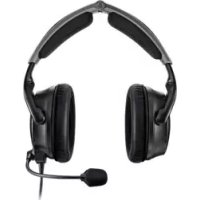
USER MANUAL A30 Aviation Headset BOSE
Please read and keep all safety and use instructions.
For more information about your A30 Aviation Headset, visit: support.Bose.com/A30

Bose Corporation hereby declares that this product is in compliance with the essential requirements and other relevant provisions of Directive 2014/53/EU and all other applicable EU directive requirements. The complete declaration of conformity can be found at: www.Bose.com/compliance
This product conforms to all applicable EU directive requirements. The complete declaration of conformity can be found at: www.Bose.com/compliance

This product conforms to all applicable Electromagnetic Compatibility Regulations 2016 and all other applicable UK regulations. The complete declaration of conformity can be found at: ____ ____ ____ www.Bose.com/compliance
Bose Corporation hereby declares that this product is in compliance with the essential requirements per Radio Equipment Regulations 2017 and all other applicable UK regulations. The complete declaration of conformity can be found at: www.Bose.com/compliance
WARNINGS/CAUTIONS
- To reduce the risk of fire or electrical shock, do NOT expose this product to rain, dripping, splashing, or moisture and do not place liquid filled objects such as vases, on or near the product.
- Do NOT make unauthorized alterations to this product.
- The battery provided with this product may present a risk of fire, explosion or chemical burn if mishandled, incorrectly replaced or replaced with an incorrect type.
- If the battery leaks, do NOT allow the liquid to come in contact with the skin or eyes. If contact is made, seek medical advice.
- Do not expose products containing batteries to excessive heat (e.g. from storage in direct sunlight, fire or the like).
- Keep batteries out of reach of children.
- Please dispose of used batteries properly, following any local regulations.
- Batteries may cause a fire or chemical burn if mishandled. Do not recharge, disassemble, heat, or incinerate.

Contains small parts which may be a choking hazard. Not suitable for children under age 3.

This product contains magnetic material. Consult your physician on whether this might affect your implantable medical device.
NOTE: Damage could occur to avionics equipment by the use of these headsets if equipment was manufactured for use with 600 Ω headsets only. If in doubt, consult the avionics equipment manufacturer.
Please read and save this guide
Please read this guide carefully. Save this guide for future reference and make it easily accessible for passengers and third parties who use this headset.
- Switch to an alternate communications method in the event of a headset issue.
In the unlikely event of any headset issue or failure in the passive noise reducing mode, switch to an alternate communications method and use standard cockpit resource management skills to minimize distractions.
- Use the headset at a moderate volume level.
To avoid hearing damage, use the headset at a comfortable, moderate volume level. Limit the headset volume to safe levels that do not interfere with your ability to hear informational sounds and warning alarms, such as stall warnings or gear up, while piloting.
- Turn the headset off if it emits any loud noise.
As with any complex electronic device, it is possible for this headset to fail during operation. Symptoms of failure, which may include loud tones, distortion, feedback squeals and loss of communications signal in the headset, can occur in either the Acoustic Noise Cancelling mode (turned on) or in the passive mode (turned off). If the headset emits any loud noise and the related loss of communications in the Acoustic Noise Cancelling mode, turn off the power switch. The headset will continue to provide communications in the passive noise-reducing mode. If the problem persists, see “Troubleshooting” on page 54.
- Be aware of sound differences while wearing the headset.
With the headset's active and passive noise reduction, typical aircraft sounds (such as engines, propellers, warning alarms, and other sound sources) may not sound familiar. Make sure you can hear and recognize these sounds when using the headset while operating any aircraft.
- Do NOT make phone calls while piloting.
Do not use the headset for telephone calls during flight operations.
- Make sure your aircraft communications system volume control is easily accessible.
This control affects the strength of the communications signal coming into the headset. Make sure you can understand critical communications even with Acoustic Noise Cancelling mode turned off. In this case, you may need to turn up the aircraft communications system volume. In passive mode, the volume controls on the control module will automatically be set to maximum volume. For additional volume control, use the intercom or radio volume control. If your headset is aircraft powered, connect the headset to the aircraft power sources only as described in “Aircraft Connectors” on page 34.
- Make sure portable devices do not interfere with the aircraft's navigation and communication systems. Reference FAA AC 91.21-1D, or later revision, for installation approval.
It is the pilot's responsibility to ensure that portable devices do not interfere with the aircraft's navigation and communication systems, as well as to determine if the portable device is suitable for use with the headset.
- Use AA (LR06) batteries, alkaline preferred.
Alkaline batteries are recommended for best results. Other battery chemistries may yield different results. Battery life may differ and battery life indication may not be accurate. Properly dispose of used batteries.
- Do NOT repair the headset yourself.
Contact the Bose organization in your country/region for specific care, return and shipping instructions. Visit: ____global.Bose.com
- Do not use the headset with a helmet or as part of a crash protection system.
The headset is not intended for such use, and has not been certified for crash protection. Dismantling, reassembly or modification of the headset, or any part, for use in a helmet or other crash protection system could result in severe bodily injury and such unauthorized use will void the limited product warranty.
- Do NOT immerse the headset or any parts in water or any other liquid.
See "Clean the headset" on page 48 for cleaning instructions.
- Keep the earcup free of debris.
Proper headset operation requires that the headset acoustic and microphone openings located on the outside of each earcup are kept free of debris to ensure clear communications. See “Clean the headset” on page 48 for cleaning instructions.
NOTE: This equipment has been tested and found to comply with the limits for a Class B digital device, pursuant to Part 15 of the FCC Rules. These limits are designed to provide reasonable protection against harmful interference in a residential installation. This equipment generates, uses, and can radiate radio frequency energy and, if not installed and used in accordance with the instructions, may cause harmful interference to radio communications. However, there is no guarantee that interference will not occur in a particular installation. If this equipment does cause harmful interference to radio or television reception, which can be determined by turning the equipment off and on, the user is encouraged to try to correct the interference by one or more of the following measures:
- Reorient or relocate the receiving product or antenna.
- Increase the separation between the equipment and receiver.
- Connect the equipment into an outlet on a circuit different from that to which the receiver is connected.
- Consult the dealer or an experienced radio/TV technician for help.
Changes or modifications not expressly approved by Bose Corporation could void the user's authority to operate this equipment.
This device complies with part 15 of the FCC Rules and with ISED Canada license-exempt RSS standard(s). Operation is subject to the following two conditions: (1) This device may not cause harmful interference, and (2) this device must accept any interference received, including interference that may cause undesired operation.
This device complies with FCC and ISED Canada radiation exposure limits set forth for general population. This transmitter must not be co-located or operating in conjunction with any other antenna or transmitter.
FCC ID: A94429358
CAN ICES-3(B)/NMB-3(B)
For Europe:
Frequency band of operation 2400 to 2483.5 MHz.
Maximum transmit power less than 20 dBm EIRP.
Maximum transmit power is below regulatory limits such that SAR testing is not necessary and exempt per applicable regulations.
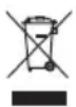
This symbol means the product must not be discarded as household waste, and should be delivered to an appropriate collection facility for recycling. Proper disposal and recycling helps protect natural resources, human health and the environment. For more information on disposal and recycling of this product, contact your local municipality, disposal service, or the shop where you bought this product.

Please dispose of used batteries properly, following local regulations. Do not incinerate.


Low-power Radio-frequency Devices Technical Regulations
Without permission granted by the NCC, any company, enterprise, or user is not allowed to change frequency, enhance transmitting power or alter original characteristic as well as performance to a approved low power radio-frequency devices. The low power radio-frequency devices shall not influence aircraft security and interfere legal communications; If found, the user shall cease operating immediately until no interference is achieved. The said legal communications means radio communications is operated in compliance with the Telecommunications Management Act. The low power radio-frequency devices must be susceptible with the interference from legal communications or ISM radio wave radiated devices.
低功率射頻器材技術規範
China Restriction of Hazardous Substances Table
| Names and Contents of Toxic or Hazardous Substances or Elements |
| Toxic or Hazardous Substances and Elements |
| Part Name | Lead (Pb) | Mercury (Hg) | Cadmium (Cd) | Hexavalent (CR(VI)) | Polybrominated Biphenyl (PBB) | Polybrominated diphenylether (PBDE) |
| PCBs X 0 0 0 0 0 | | | | | | |
| Metal Parts X 0 0 0 0 0 | | | | | | |
| Plastic Parts 0 0 0 0 0 0 | 0 | | | | | |
| Speakers X 0 0 0 0 0 | | | | | | |
| Cables X 0 0 0 0 0 | | | | | | |
| This table is prepared in accordance with the provisions of SJ/T 11364.O: Indicates that this toxic or hazardous substance contained in all of the homogeneous materials for this part is below the limit requirement of GB/T 26572. |  |
| X: Indicates that this toxic or hazardous substance contained in at least one of the homogeneous materials used for this part is above the limit requirement of GB/T 26572. |
Date of Manufacture: The eighth digit in the serial number indicates the year of manufacture; “3” is 2013 or 2023.
China Importer: Bose Electronics (Shanghai) Company Limited, Level 6, Tower D, No. 2337 Gudai Rd. Minhang District, Shanghai 201100
EU Importer: Bose Products B.V., Gorslaan 60, 1441 RG Purmerend, The Netherlands
Taiwan Importer: Bose Limited Taiwan Branch (H.K.), 9F., No.10, Sec. 3, Minsheng E. Road, Zhongshan Dist. Taipei City 10480, Taiwan Phone Number: +886-2-2514 7676
UK Importer: Bose Limited, Bose House, Quayside Chatham Maritime, Chatham, Kent, ME4 4QZ, United Kingdom Model: 429358. The CMIIT ID is located on the inside of the battery cover.
Please complete and retain for your records
The serial and model numbers are located under the headband cushion.
Serial number:
Model number:
Please keep your receipt with your owner's guide. Now is a good time to register your Bose product.
You can easily do this by going to worldwide.Bose.com/ProductRegistration
The Bose Privacy Policy is available at worldwide.Bose.com/privacypolicy
The Bose Terms of Use are available at worldwide.Bose.com/termsofuse
Apple and the Apple logo are trademarks of Apple Inc. registered in the U.S. and other countries. App Store is a service mark of Apple Inc.
Android, Google Play, and the Google Play logo are trademarks of Google LLC.
The Bluetooth ^® word mark and logos are registered trademarks owned by Bluetooth SIG, Inc. and any use of such marks by Bose Corporation is under license.
Bose Corporation Headquarters: 1-877-230-5639
A20, Acoustic Noise Cancelling, Bose, and Bose A30 Aviation Headset are trademarks of Bose Corporation.
©2023 Bose Corporation. No part of this work may be reproduced, modified, distributed, or otherwise used without prior written permission.
The following license disclosures apply to certain third-party software packages used as components in the product.
Package: LittlevGL Version 7.10.1
Copyright © 2020 LVGL LLC
Package: pycrc
Copyright © 2006-2015, Thomas Pircher tehpeh-web@tty1.net
The above is/are subject to the license terms reprinted below:
MIT License
Permission is hereby granted, free of charge, to any person obtaining a copy of this software and associated documentation files (the "Software"), to deal in the Software without restriction, including without limitation the rights to use, copy, modify, merge, publish, distribute, sublicense, and/or sell copies of the Software, and to permit persons to whom the Software is furnished to do so, subject to the following conditions:
The above copyright notice and this permission notice shall be included in all copies or substantial portions of the Software.
THE SOFTWARE IS PROVIDED "AS IS", WITHOUT WARRANTY OF ANY KIND, EXPRESS OR IMPLIED, INCLUDING BUT NOT LIMITED TO THE WARRANTIES OF MERCHANTABILITY, FITNESS FOR A PARTICULAR PURPOSE AND NONINFRINGEMENT. IN NO EVENT SHALL THE AUTHORS OR COPYRIGHT HOLDERS BE LIABLE FOR ANY CLAIM, DAMAGES OR OTHER LIABILITY, WHETHER IN AN ACTION OF CONTRACT, TORT OR OTHERWISE, ARISING FROM, OUT OF OR IN CONNECTION WITH THE SOFTWARE OR THE USE OR OTHER DEALINGS IN THE SOFTWARE.
Package: MCUXpresso Software Development Kit (SDK)
©2006-2021 NXP Semiconductors. All rights reserved.
The above is/are subject to the license terms reprinted below:
3-Clause BSD License
(Also called "BSD License 2.0" or "Modified BSD License")
Redistribution and use in source and binary forms, with or without modification, are permitted provided that the following conditions are met:
- Redistributions of source code must retain the above copyright notice, this list of conditions and the following disclaimer.
- Redistributions in binary form must reproduce the above copyright notice, this list of conditions and the following disclaimer in the documentation and/or other materials provided with the distribution.
- Neither the name of the nor the names of its contributors may be used to endorse or promote products derived from this software without specific prior written permission.
THIS SOFTWARE IS PROVIDED BY THE COPYRIGHT HOLDERS AND CONTRIBUTORS "AS IS" AND ANY EXPRESS OR IMPLIED WARRANTIES, INCLUDING, BUT NOT LIMITED TO, THE IMPLIED WARRANTIES OF MERCHANTABILITY AND FITNESS FOR A PARTICULAR PURPOSE ARE DISCLAIMED. IN NO EVENT SHALL BE LIABLE FOR ANY DIRECT, INDIRECT, INCIDENTAL, SPECIAL, EXEMPLARY, OR CONSEQUENTIAL DAMAGES (INCLUDING, BUT NOT LIMITED TO, PROCUREMENT OF SUBSTITUTE GOODS OR SERVICES; LOSS OF USE, DATA, OR PROFITS; OR BUSINESS INTERRUPTION) HOWEVER CAUSED AND ON ANY THEORY OF LIABILITY, WHETHER IN CONTRACT, STRICT LIABILITY, OR TORT (INCLUDING NEGLIGENCE OR OTHERWISE) ARISING IN ANY WAY OUT OF THE USE OF THIS SOFTWARE, EVEN IF ADVISED OF THE POSSIBILITY OF SUCH DAMAGE.
Packages: CMSIS Version 5.6.0 & SDK CMSIS Peripheral Drivers 2.x.x
Copyright © 2010-2017 ARM Limited or its affiliates. All rights reserved.
Package: Mbed TLS Version 2.26.0
Copyright © 2021 Arm Limited (or its affiliates).
The above is/are subject to the license terms reprinted below:
Apache License
Version 2.0, January 2004
http://www.apache.org/licenses/
TERMS AND CONDITIONS FOR USE, REPRODUCTION, AND DISTRIBUTION
1. Definitions.
“License” shall mean the terms and conditions for use, reproduction, and distribution as defined by Sections 1 through 9 of this document.
“Licensor” shall mean the copyright owner or entity authorized by the copyright owner that is granting the License.
“Legal Entity” shall mean the union of the acting entity and all other entities that control, are controlled by, or are under common control with that entity. For the purposes of this definition, “control” means (i) the power, direct or indirect, to cause the direction or management of such entity, whether by contract or otherwise, or (ii) ownership of fifty percent (50%) or more of the outstanding shares, or (iii) beneficial ownership of such entity.
"You" (or "Your") shall mean an individual or Legal Entity exercising permissions granted by this License.
“Source” form shall mean the preferred form for making modifications, including but not limited to software source code, documentation source, and configuration files.
"Object" form shall mean any form resulting from mechanical transformation or translation of a Source form, including but not limited to compiled object code, generated documentation, and conversions to other media types.
“Work” shall mean the work of authorship, whether in Source or Object form, made available under the License, as indicated by a copyright notice that is included in or attached to the work (an example is provided in the Appendix below).
“Derivative Works” shall mean any work, whether in Source or Object form, that is based on (or derived from) the Work and for which the editorial revisions, annotations, elaborations, or other modifications represent, as a whole, an original work of authorship. For the purposes of this License, Derivative Works shall not include works that remain separable from, or merely link (or bind by name) to the interfaces of, the Work and Derivative Works thereof.
“Contribution” shall mean any work of authorship, including the original version of the Work and any modifications or additions to that Work or Derivative Works thereof, that is intentionally submitted to Licensor for inclusion in the Work by the copyright owner or by an individual or Legal Entity authorized to submit on behalf of the copyright owner. For the purposes of this definition, “submitted” means any form of electronic, verbal, or written communication sent to the Licensor or its representatives, including but not limited to communication on electronic mailing lists, source code control systems, and issue tracking systems that are managed by, or on behalf of, the Licensor for the purpose of discussing and improving the Work, but excluding communication that is conspicuously marked or otherwise designated in writing by the copyright owner as “Not a Contribution.”
“Contributor” shall mean Licensor and any individual or Legal Entity on behalf of whom a Contribution has been received by Licensor and subsequently incorporated within the Work.
- Grant of Copyright License. Subject to the terms and conditions of this License, each Contributor hereby grants to You a perpetual, worldwide, non-exclusive, no-charge, royalty-free, irrevocable copyright license to reproduce, prepare Derivative Works of, publicly display, publicly perform, sublicense, and distribute the Work and such Derivative Works in Source or Object form.
- Grant of Patent License. Subject to the terms and conditions of this License, each Contributor hereby grants to You a perpetual, worldwide, non-exclusive, no-charge, royalty-free, irrevocable (except as stated in this section) patent license to make, have made, use, offer to sell, sell, import, and otherwise transfer the Work, where such license applies only to those patent claims licensable by such Contributor that are necessarily infringed by their Contribution(s) alone or by combination of their Contribution(s) with the Work to which such Contribution(s) was submitted. If You institute patent litigation against any entity (including a cross-claim or counterclaim in a lawsuit) alleging that the Work or a Contribution incorporated within the Work constitutes direct or contributory patent infringement, then any patent licenses granted to You under this License for that Work shall terminate as of the date such litigation is filed.
- Redistribution. You may reproduce and distribute copies of the Work or Derivative Works thereof in any medium, with or without modifications, and in Source or Object form, provided that You meet the following conditions:
a. You must give any other recipients of the Work or Derivative Works a copy of this License; and
b. You must cause any modified files to carry prominent notices stating that You changed the files; and
c. You must retain, in the Source form of any Derivative Works that You distribute, all copyright, patent, trademark, and attribution notices from the Source form of the Work, excluding those notices that do not pertain to any part of the Derivative Works; and
d. If the Work includes a "NOTICE" text file as part of its distribution, then any Derivative Works that You distribute must include a readable copy of the attribution notices contained within such NOTICE file, excluding those notices that do not pertain to any part of the Derivative Works, in at least one of the following places: within a NOTICE text file distributed as part of the Derivative Works; within the Source form or documentation, if provided along with the Derivative Works; or, within a display generated by the Derivative Works, if and wherever such third-party notices normally appear. The contents of the NOTICE file are for informational purposes only and do not modify the License. You may add Your own attribution notices within Derivative Works that You distribute, alongside or as an addendum to the NOTICE text from the Work, provided that such additional attribution notices cannot be construed as modifying the License.
You may add Your own copyright statement to Your modifications and may provide additional or different license terms and conditions for use, reproduction, or distribution of Your modifications, or for any such Derivative Works as a whole, provided Your use, reproduction, and distribution of the Work otherwise complies with the conditions stated in this License.
- Submission of Contributions. Unless You explicitly state otherwise, any Contribution intentionally submitted for inclusion in the Work by You to the Licensor shall be under the terms and conditions of this License, without any additional terms or conditions. Notwithstanding the above, nothing herein shall supersede or modify the terms of any separate license agreement you may have executed with Licensor regarding such Contributions.
- Trademarks. This License does not grant permission to use the trade names, trademarks, service marks, or product names of the Licensor, except as required for reasonable and customary use in describing the origin of the Work and reproducing the content of the NOTICE file.
- Disclaimer of Warranty. Unless required by applicable law or agreed to in writing, Licensor provides the Work (and each Contributor provides its Contributions) on an “AS IS” BASIS, WITHOUT WARRANTIES OR CONDITIONS OF ANY KIND, either express or implied, including, without limitation, any warranties or conditions of TITLE, NON-INFRINGEMENT, MERCHANTABILITY, or FITNESS FOR A PARTICULAR PURPOSE. You are solely responsible for determining the appropriateness of using or redistributing the Work and assume any risks associated with Your exercise of permissions under this License.
-
Limitation of Liability. In no event and under no legal theory, whether in tort (including negligence), contract, or otherwise, unless required by applicable law (such as deliberate and grossly negligent acts) or agreed to in writing, shall any Contributor be liable to You for damages, including any direct, indirect, special, incidental, or consequential damages of any character arising as a result of this License or out of the use or inability to use the Work (including but not limited to damages for loss of goodwill, work stoppage, computer failure or malfunction, or any and all other commercial damages or losses), even if such Contributor has been advised of the possibility of such damages.
-
Accepting Warranty or Additional Liability. While redistributing the Work or Derivative Works thereof, You may choose to offer, and charge a fee for, acceptance of support, warranty, indemnity, or other liability obligations and/or rights consistent with this License. However, in accepting such obligations, You may act only on Your own behalf and on Your sole responsibility, not on behalf of any other Contributor, and only if You agree to indemnify, defend, and hold each Contributor harmless for any liability incurred by, or claims asserted against, such Contributor by reason of your accepting any such warranty or additional liability.
END OF TERMS AND CONDITIONS
©2023 Bose Corporation
Licensed under the Apache License, Version 2.0 (the "License"); you may not use this file except in compliance with the License.
You may obtain a copy of the License at: http://www.apache.org/licenses/LICENSE-2.0
Unless required by applicable law or agreed to in writing, software distributed under the License is distributed on an "AS IS" BASIS, WITHOUT WARRANTIES OR CONDITIONS OF ANY KIND, either express or implied.
See the License for the specific language governing permissions and limitations under the License.
WHAT'S IN THE BOX
Contents 15
Headset components.... 16
Control module options 17
IMPORTANCE OF PROPER FIT
Fit the headband.... 18
Adjust the microphone.... 19
Conditions related to fit 21
Secure the cable and control module.... 21
Cable clips 21
Control module holder 21
HEADSET CONTROLS
Power on 22
Power off 22
ACOUSTIC NOISE CANCELLING
Acoustic Noise Cancelling (ANC) switch 23
Tap Control for talk-through communication.... 24
Switch earcups 25
Reset Tap Control 25
OPERATION SWITCHES
Operation switch functions.... 26
Change the operation switches.... 28
MICROPHONE PLACEMENT
Move the microphone 30
BATTERIES
Replace the batteries 32
AIRCRAFT CONNECTORS
Dual plug (general aviation) 34
Connect to the aircraft 34
Disconnect from the aircraft 34
U174, 5-pin XLR, and 6-pin Lemo 35
Connect to the aircraft 35
Disconnect from the aircraft (U174 and 5-pin XLR).... 35
Disconnect from the aircraft (6-pin Lemo) 35
STATUS LIGHTS
Power light 36
Bluetooth ^® light 37
Dim the status lights.... 37
Turn off the status lights.... 37
SECONDARY AUDIO SOURCES
AUX connections 38
Bluetooth connections.... 39
Connect using the Bluetooth menu on your mobile device 39
Disconnect a mobile device 40
Reconnect a mobile device 40
Recover a lost connection.... 40
Connect an additional mobile device.... 40
Switch between connected devices.... 41
Clear the headset pairing list 41
Bluetooth functions.... 42
Bluetooth volume functions 42
Call functions.... 43
SECONDARY AUDIO PRIORITY
Secondary Audio Mode switch.... 45
PRIORITY operation switch 46
Secondary audio priority chart 46
CARE AND MAINTENANCE
Store the headset 47
Clean the headset.... 48
Limited warranty 49
Serial number location.... 49
Replacement parts and accessories.... 50
Ear cushions.... 50
Headband cushions 52
Microphone windscreen.... 53
Batteries 53
Microphone or terminator cover.... 53
TROUBLESHOOTING
Try these solutions first 54
Other solutions 54
Acoustic Noise Cancelling.... 54
Intercom communications.... 55
Audio 56
Microphone 57
Bluetooth audio source 58
Auto on/off.... 59
Reversionary mode 59
INSTALLATION
Mount the aircraft panel connector.... 60
Mono connection diagram.... 61
Stereo connection diagram 62
Details on making the connections.... 63
Headset specifications.... 64
FAA Technical Standard Order.... 66
CONTENTS
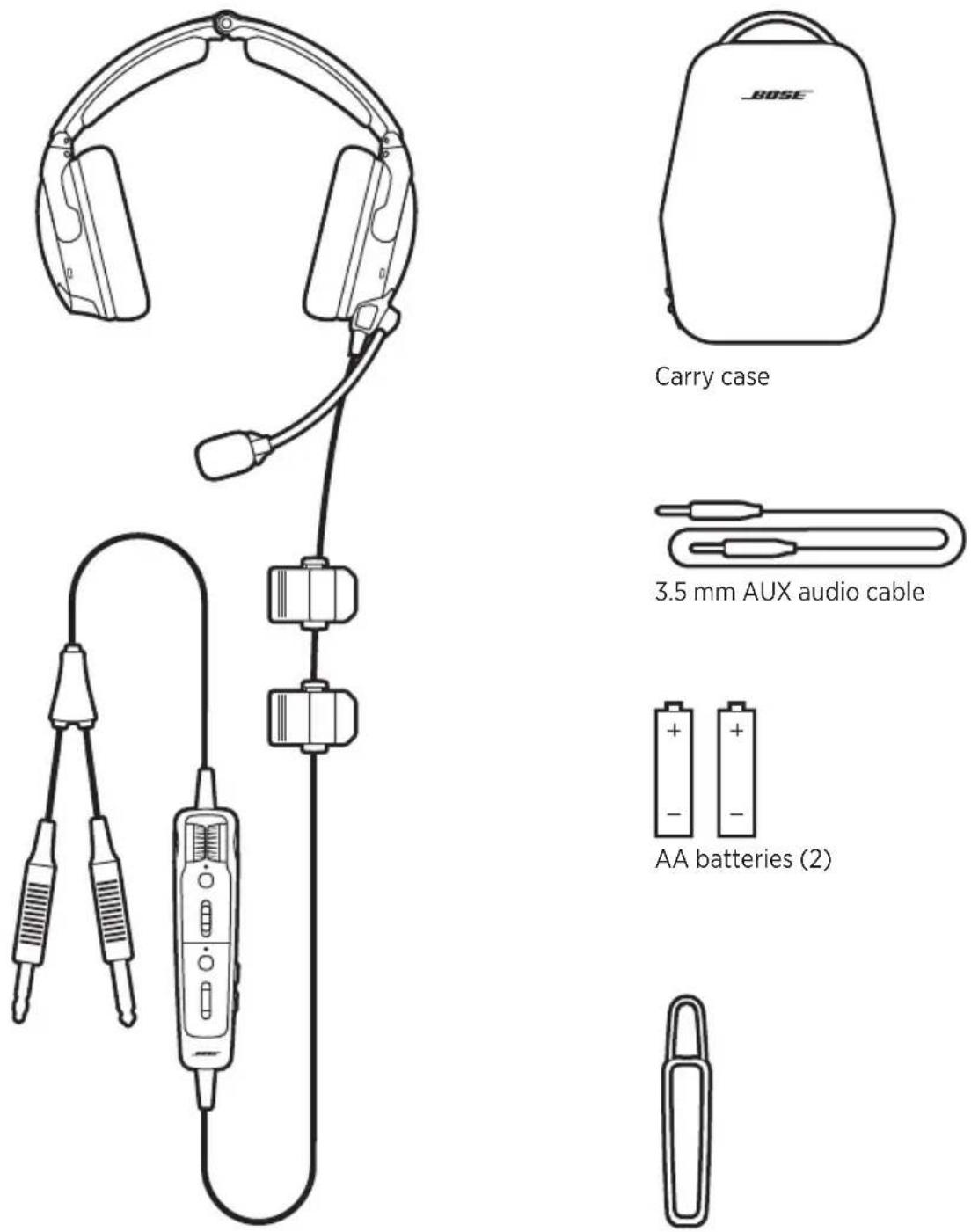
Bose A30 Aviation Headset Control module holder
NOTES:
- For control module options, see page 17.
- For aircraft connector types, see page 34.
- If any part of the product is damaged, don't use it. Contact your authorized Bose dealer or Bose customer service.
Visit: ____ ____ support.Bose.com/A30
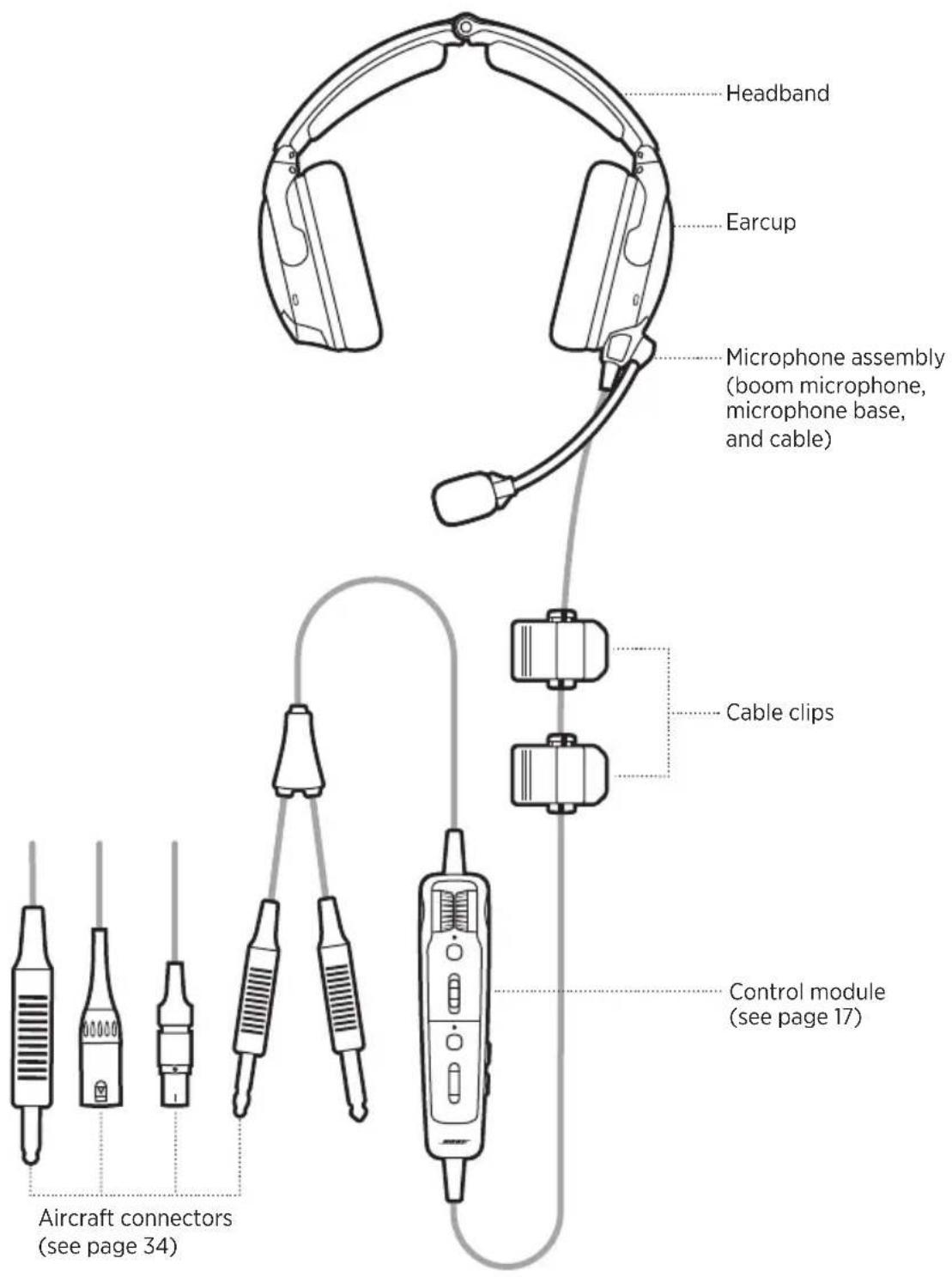
HEADSET COMPONENTS
text_image
Headband
Earcup
Microphone assembly
(boom microphone,
microphone base,
and cable)
Cable clips
Control module
(see page 17)
Aircraft connectors
(see page 34)
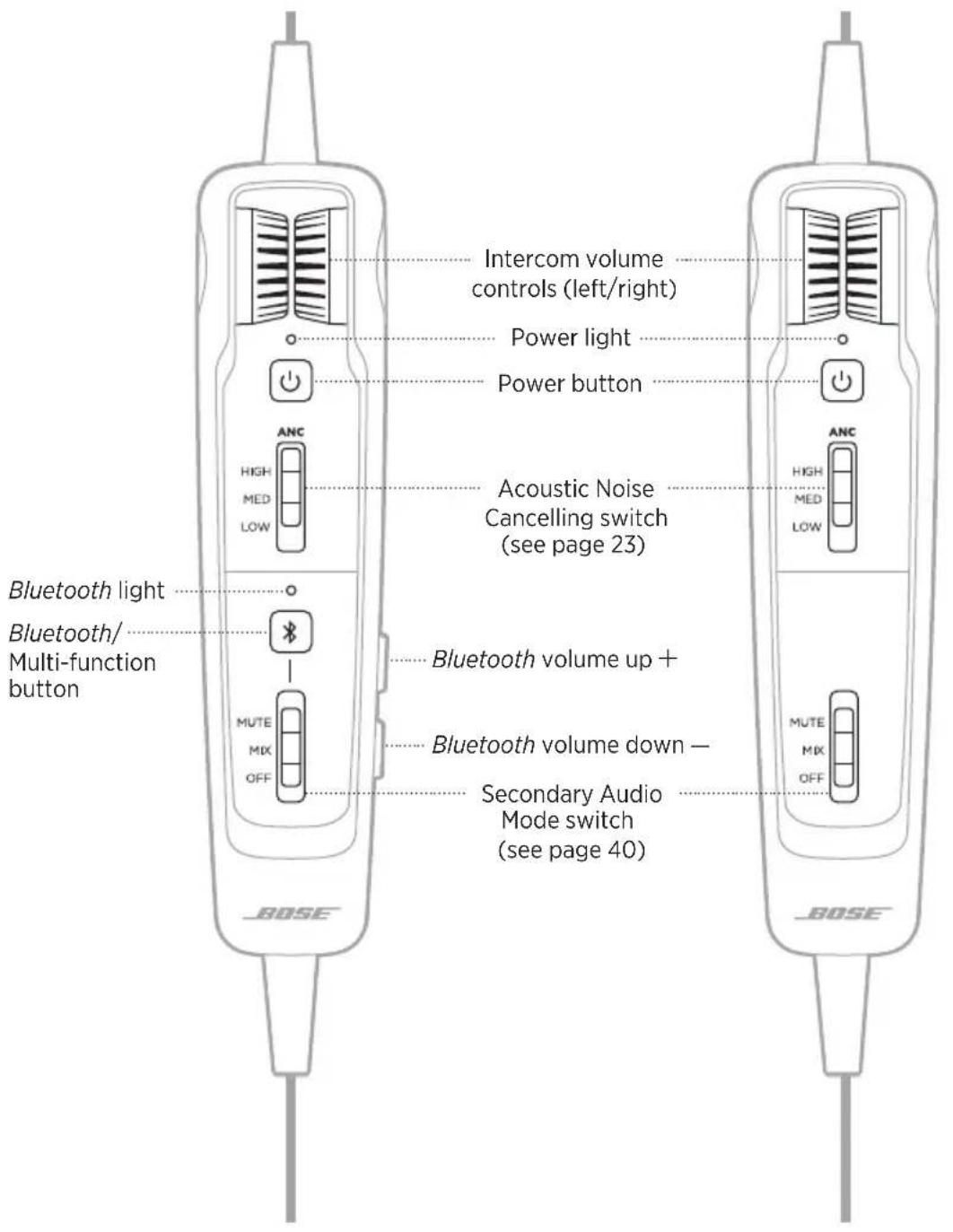
CONTROL MODULE OPTIONS
Conventional control moduleControl mc
text_image
Intercom volume
controls (left/right)
Power light
Power button
Acoustic Noise
Cancelling switch
(see page 23)
Bluetooth light
Bluetooth/
Multi-function
button
Bluetooth volume up +
Bluetooth volume down -
Secondary Audio
Mode switch
(see page 40)
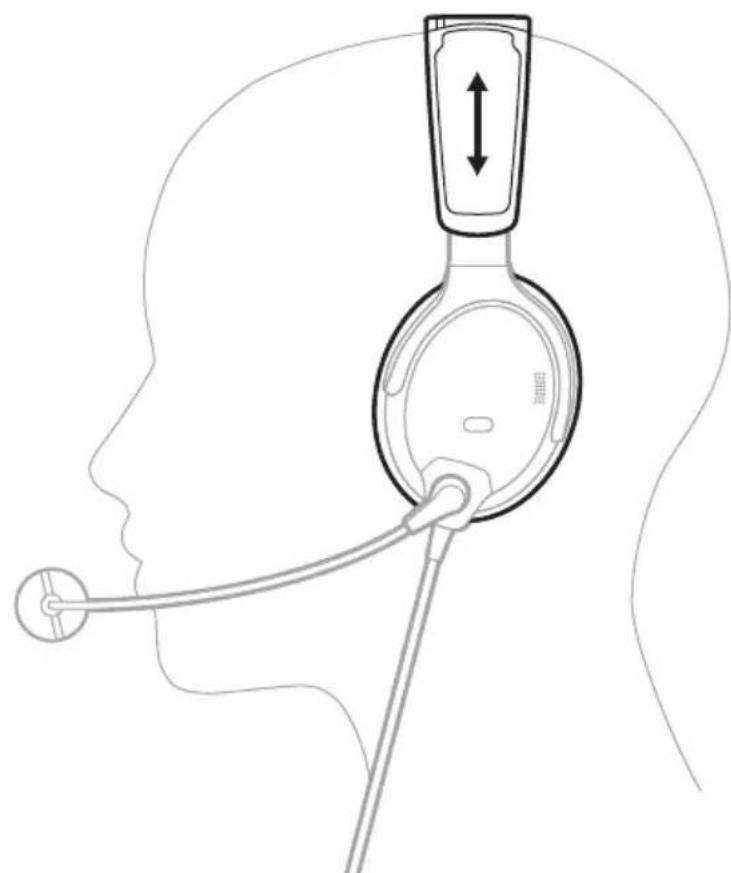
FIT THE HEADBAND
Proper fit is important both for comfort and optimal noise cancellation performance.
-
Locate the left Ⓛ and right ® icons inside the earcups to orient the headset properly.
-
Place the headset on your head.
-
Adjust the headband so the ear cushions completely cover your ears.
NOTE: For best performance, make sure the ear cushions fit securely around your ears so they create a seal.
natural_image
Diagram of a human head with a medical device connected to the ear, showing anatomical positioning (no text or labels)
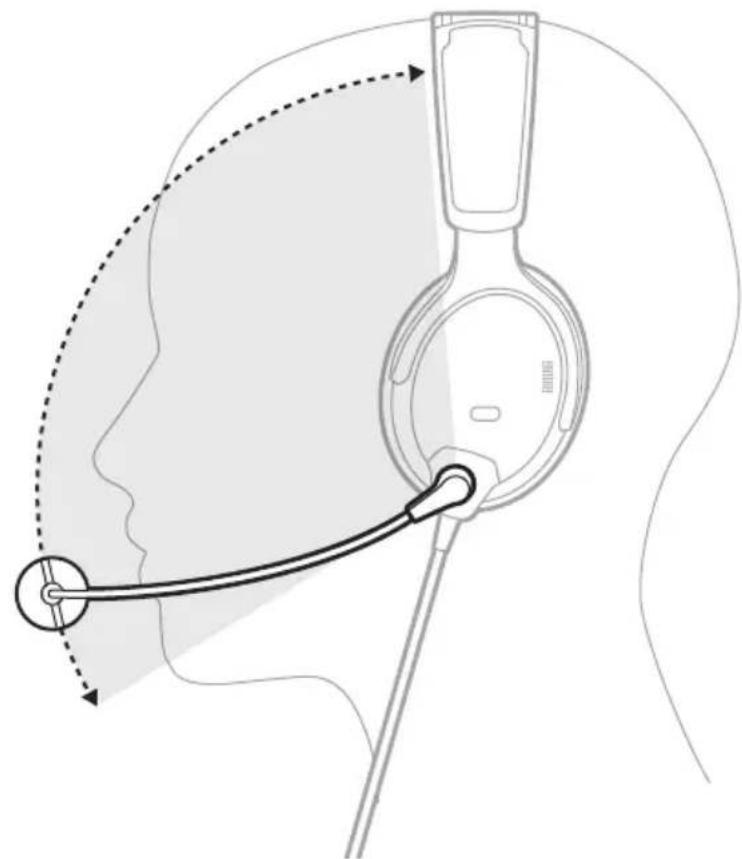
- Grasp the microphone base and adjust the boom so the microphone is level with your mouth.
CAUTION: Microphone placement is important for clear communication. The microphone boom can rotate 160°. Do NOT force it beyond the intended rotation or damage could occur.
natural_image
Diagram of a human head with earphones and a medical device, showing anatomical positioning (no text or labels)
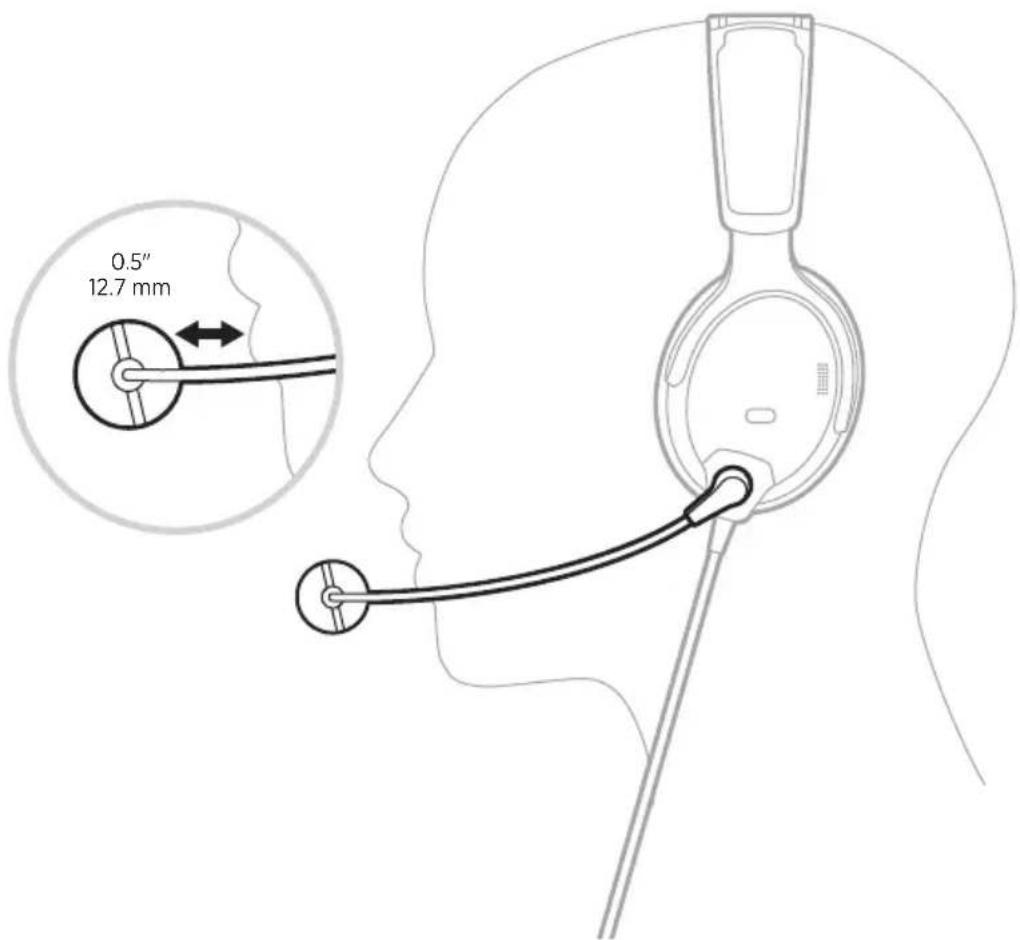
- Make sure the microphone is 0.5" (12.7 mm) from your lips.
NOTE: The microphone should not be touching your lips.
text_image
0.5"
12.7 mm
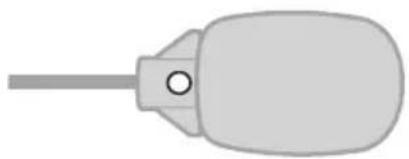
- Make sure the white dot on the microphone base faces your mouth.
NOTE: If needed, twist the microphone base.
natural_image
Simple line drawing of a bulb-like object with a central pin (no text or symbols)
- Test the headset before flight.
In very loud conditions, such as during takeoff, you may experience a brief reduction in noise cancellation as the headset compensates for a momentary pressure change. If this continues when the sound level returns to normal, see “Acoustic Noise Cancelling” on page 23. If it persists, see “Troubleshooting” on page 54.
A low rumbling sound or frequent, brief losses of noise cancellation may indicate an improper fit or blocked earcup openings. See “Clean the headset” on page 48 for instructions on removing blockages.
During a long flight, you may feel a slight pressure point, which can be relieved by adjusting the headband position.
SECURE THE CABLE AND CONTROL MODULE
The cable clips and control module holder secure the cable and control module to your clothing, a safety harness, sun visor rail, or aircraft headset hook for quick and easy access.
Cable clips
Squeeze the narrow end of the clip to open. Press the side button to release and reposition the clip along the cable.

text_image
Side button
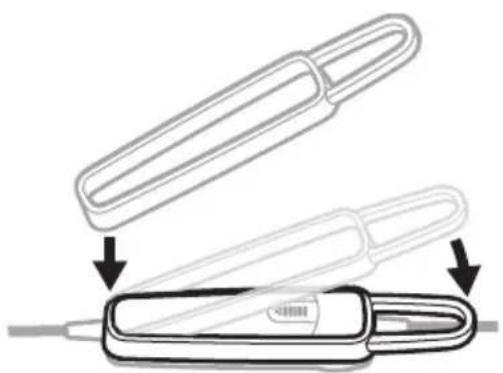
Control module holder
Stretch the holder over the back of the control module to secure it in place.
natural_image
Diagram showing two mechanical components with arrows indicating assembly or disassembly (no text or symbols present)
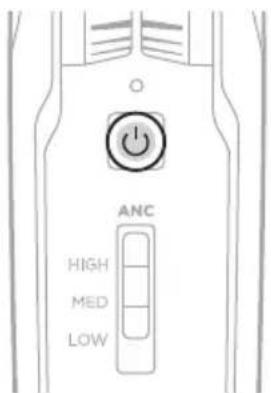
POWER ON
Press the Power button ⏻.
text_image
ANC
HIGH
MED
LOW
The Power light glows amber then blinks according to the battery level.
See "Power light" on page 36.
NOTE: The first time you power on your headset, noise cancellation is fully enabled.
See "Acoustic Noise Cancelling" on page 23.
POWER OFF
Press and hold ⏻ until the Power light glows amber, then release.
NOTE: When powered off, the headset provides passive audio communications.
Acoustic Noise Cancelling reduces unwanted noise, providing a clearer, more lifelike audio performance. You can choose your noise cancellation level based on your listening preferences and environment.
NOTE: When you receive a call, the headset remains at the current noise cancellation level.
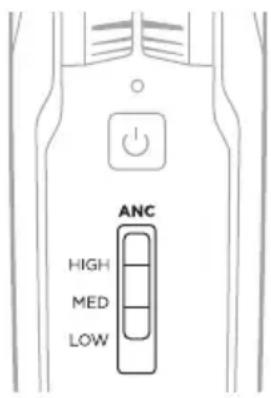
ACOUSTIC NOISE CANCELLING (ANC) SWITCH
Sets the noise cancellation level.
text_image
ANC
HIGH
MED
LOW
FUNCTION POSITION DESCRIPTION
| HIGH | 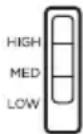 | Maximum quiet and noise cancellation across the entire spectrum. Best signal-to-noise ratio for radio and intercom communications in loud aircraft. |
| MED | 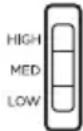 | Consistent noise reduction across a wide range of frequencies. Best for clear and comfortable noise cancellation in typical jet aircraft. |
| LOW | 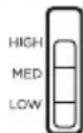 | Best for improved interpersonal communication outside of the intercom in quieter environments. |
TAP CONTROL FOR TALK-THROUGH COMMUNICATION
When you need to focus on interpersonal communication coming from a specific direction, you can automatically set noise cancellation to LOW in one earcup.
NOTES:
- By default, the TAP CONTROL operation switch is set to OFF.
- Tap Control is available only when the Acoustic Noise Cancelling (ANC) switch is in the HIGH or MED position.
-
Tap Control is disabled during extreme levels of ambient noise to ensure proper noise reduction performance and intercom communication quality. However, you can still set the noise cancellation level to LOW in both earcups using the Acoustic Noise Cancelling (ANC) switch (see page 23).
-
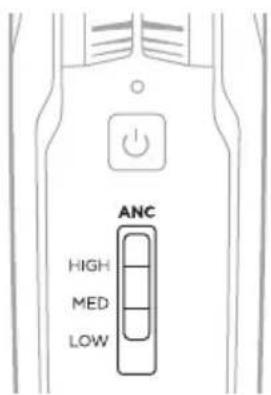
Make sure the Acoustic Noise Cancelling (ANC) switch is in the HIGH or MED position.
text_image
ANC
HIGH
MED
LOW
- Inside the control module battery compartment, set the TAP CONTROL switch to ON. See "Change the operation switches" on page 28.

ON - OFF
TAP CONTROL
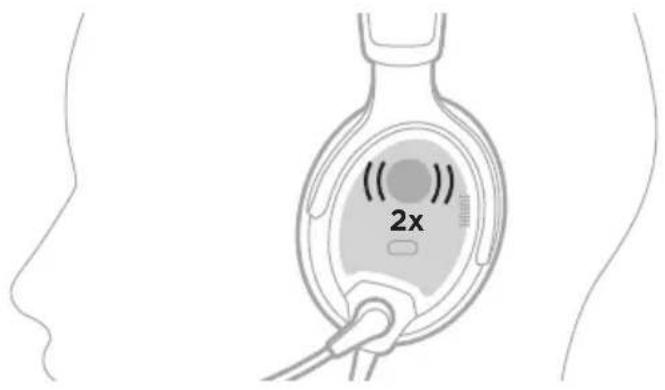
- Firmly double-tap the outside of the earcup.
text_image
2x
Switch earcups
To switch Tap Control to the other earcup, firmly double tap the other earcup.
Reset Tap Control
To resume noise cancellation in both earcups, double-tap the earcup where Tap Control is currently active, or move the Acoustic Noise Cancelling (ANC) switch to another position.
OPERATION SWITCH FUNCTIONS
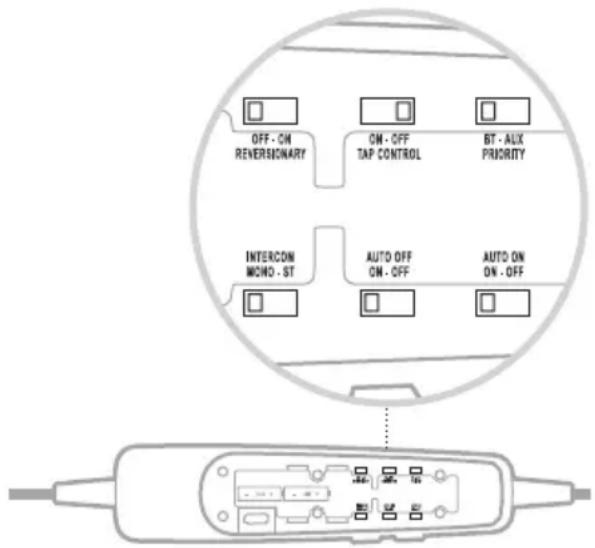
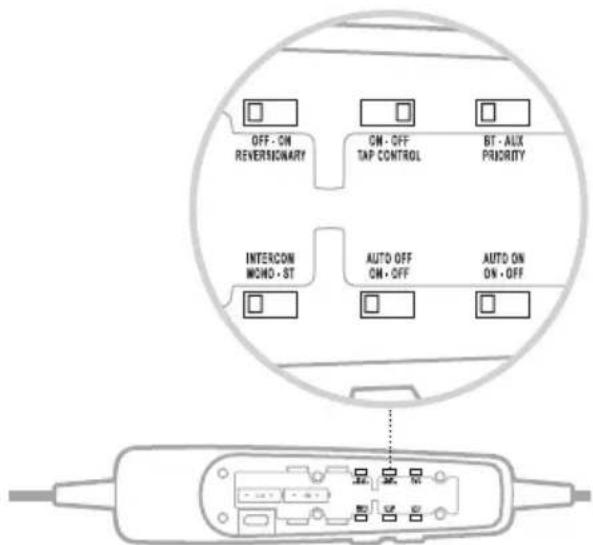
The operation switches are located in the control module battery compartment.
NOTE: Some operation switches are not available on all models.
text_image
OFF - ON
REVERSIONARY
ON - OFF
TAP CONTROL
BT - AUX
PRIORITY
INTERCON
MOND - ST
AUTO OFF
ON - OFF
AUTO ON
ON - OFF
FUNCTION POSITION DEFAULT DESCRIPTION
| REVERSIONARY | 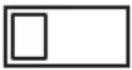 OFF - ON REVERSIONARY OFF - ON REVERSIONARY | OFF | Disables all non-critical functions, including Bluetooth audio, AUX audio, and Tap Control. Only intercom communications and Acoustic Noise Cancelling are enabled.In case of emergency hardware or software failure, set the switch to ON.For more information, see page 59. |
| TAP CONTROL |  ON - OFF TAP CONTROL ON - OFF TAP CONTROL | OFF | Enables/Disables Tap Control feature (see page 24). |
| PRIORITY | 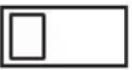 BT - AUX PRIORITY BT - AUX PRIORITY | BT | Establishes priority between two secondary audio sources connected at the same time.Select BT to give the Bluetooth (wireless) connection higher priority.Select AUX to give the wired connection higher priority.For more information, see page 46. |
FUNCTION POSITION DEFAULT DESCRIPTION
| INTERCOM | INTERCOMMONO - ST | MONO | Processes intercom audio as mono or stereo.Available for configurations that support two-channel or stereo intercom systems only.NOTE: 5-pin XLR and U174 models are mono-only configurations. |
| AUTO OFF | AUTO OFFON - OFF | ON | Power off automatically after 3 to 45 minutes of inactivity.NOTES:When running on battery power and unplugged from the intercom, the headset powers off unless there is audio from an active mobile device present.If you are on a call and unplugged from the intercom, the headset powers off approximately 3 minutes after the call is ended. |
| AUTO ON | AUTO ONON - OFF | ON | Power on automatically when connected to aircraft power.NOTES:Available in Flex Power models only (see page 34).Bluetooth models return to the previous Bluetooth state when powered on. |
CHANGE THE OPERATION SWITCHES
-
Power off the headset (see page 22).
-
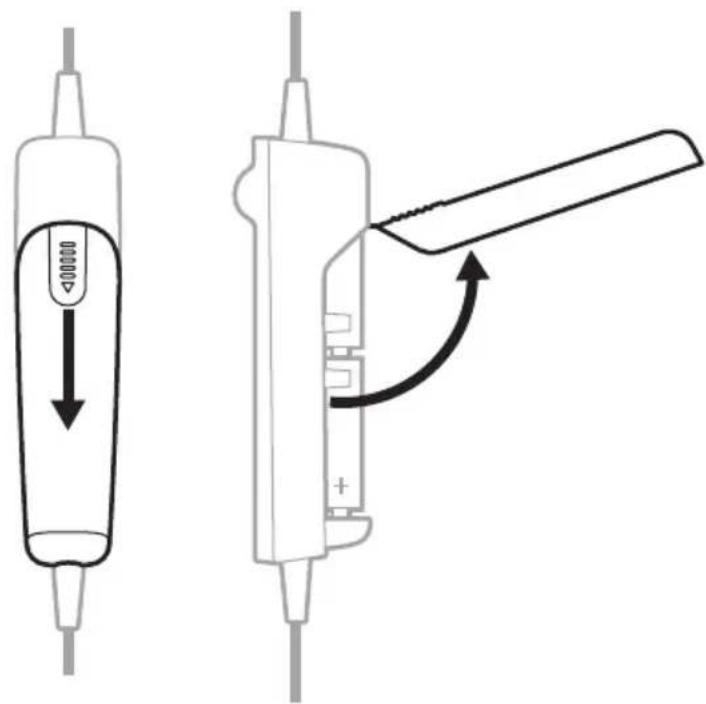
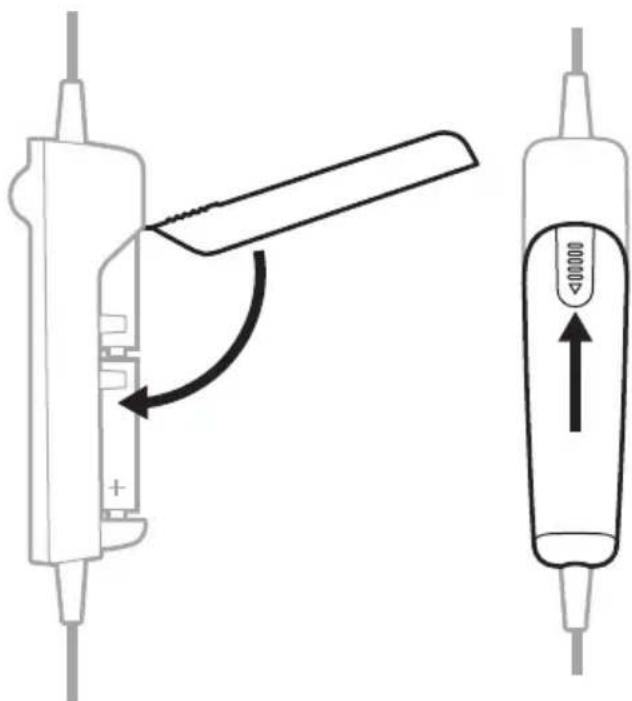
On the back of the control module, press down firmly on the finger indent and slide the cover down.
CAUTION: The battery cover is tethered to the control module. Do NOT attempt to detach it.
text_image
Diagram showing two types of electronic devices with labeled parts and directional arrows indicating movement or change.
-
Remove the batteries.
-
Using a pen or a small, flat-tipped screwdriver, gently move the switch(es).
text_image
OFF - ON
REVERSIONARY
ON - OFF
TAP CONTROL
BT - AUX
PRIORITY
INTERCON
WORD - ST
AUTO OFF
ON - OFF
AUTO ON
ON - OFF
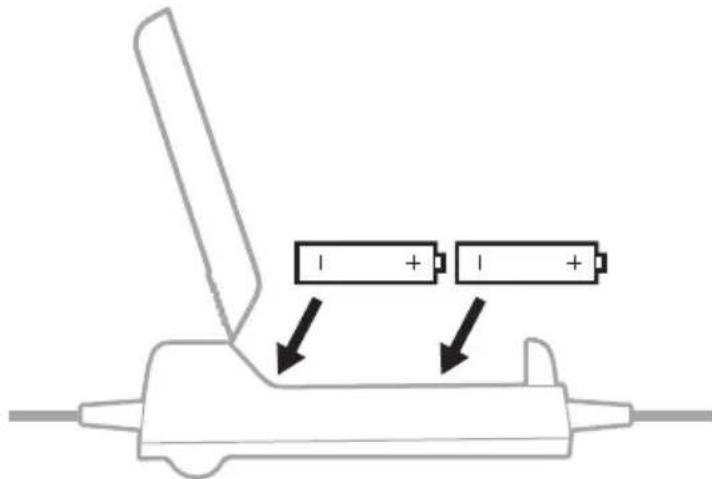
- Insert two AA batteries (alkaline preferred), observing proper polarity.
text_image
Diagram showing battery charging mechanism with two batteries and directional arrows indicating charging direction
CAUTION: If the batteries don't fit correctly, do NOT force them in. Forcing an improper connection will cause permanent damage to the controlmodule.
- Close the battery cover, press firmly down on the finger indent, and slide the cover into place.
text_image
Diagram showing a device being adjusted to a battery, with an arrow indicating the process and a control panel labeled '10000' with an upward arrow.
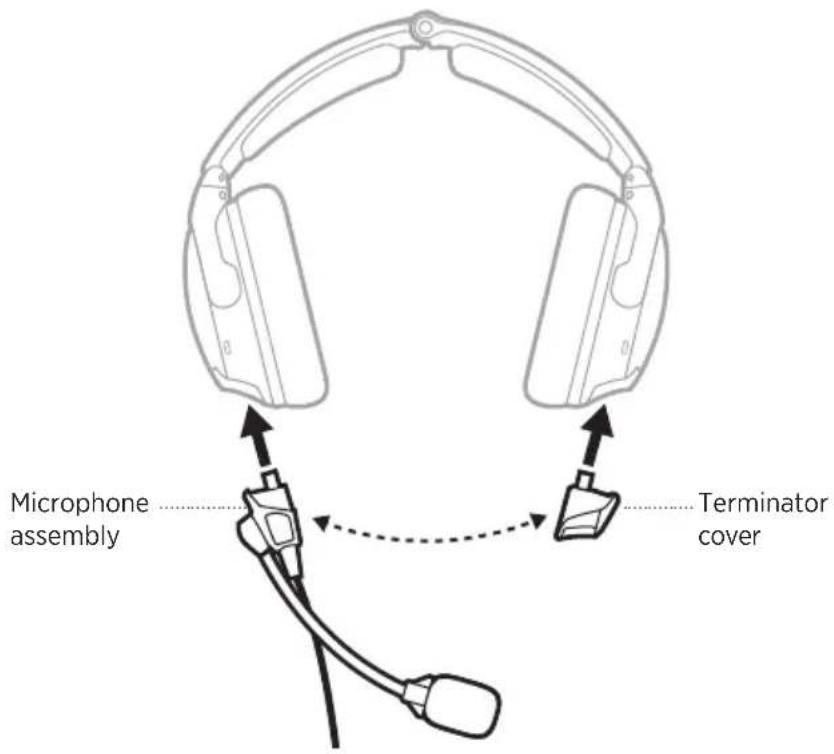
By default, the microphone assembly ships from the factory attached to the left earcup (although in some configurations it may ship unattached). It can be easily moved from one earcup to the other.
text_image
Microphone assembly
Terminator cover
MOVE THE MICROPHONE
Remove the microphone assembly and terminator cover
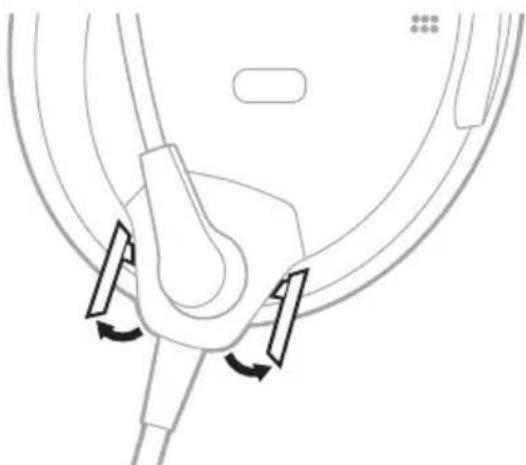
- At the base of the microphone assembly, open the two latches.
natural_image
Pure mechanical diagram showing a lever mechanism with no text or symbols
-
Gently pull the microphone assembly from the socket.
-
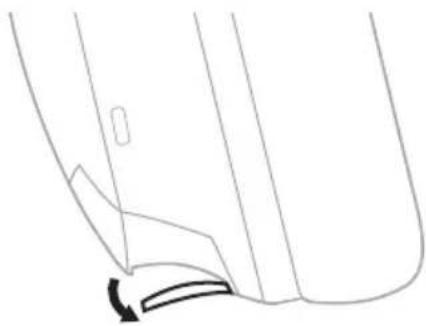
On the terminator cover, open the latch.
natural_image
Pure technical line drawing of a mechanical component with no text or symbols
- Gently pull the terminator cover from the socket.
Replace the microphone assembly and terminator cover
-
Align the base of the microphone assembly with the socket on the earcup and slide in until secure.
-
At the base of the microphone assembly, close the two latches.
-
Align the terminator cover with the socket on the other earcup and slide in until secure.
CAUTION: Do NOT force the terminator cover into the socket.
NOTE: If the terminator cover is not securely installed, there will be no audio in the earcup.
-
On the terminator cover, close the latch.
-
Test the headset before flight.
REPLACE THE BATTERIES
When the battery light blinks red, the batteries must be replaced.
NOTE: For aircraft-powered headsets, batteries are not required for operation if aircraft power is available. However, you can still install batteries when connected to aircraft power as a backup in case of power interruptions or disconnections. See “Aircraft Connectors” on page 34.
- Power off the headset (see page 22).
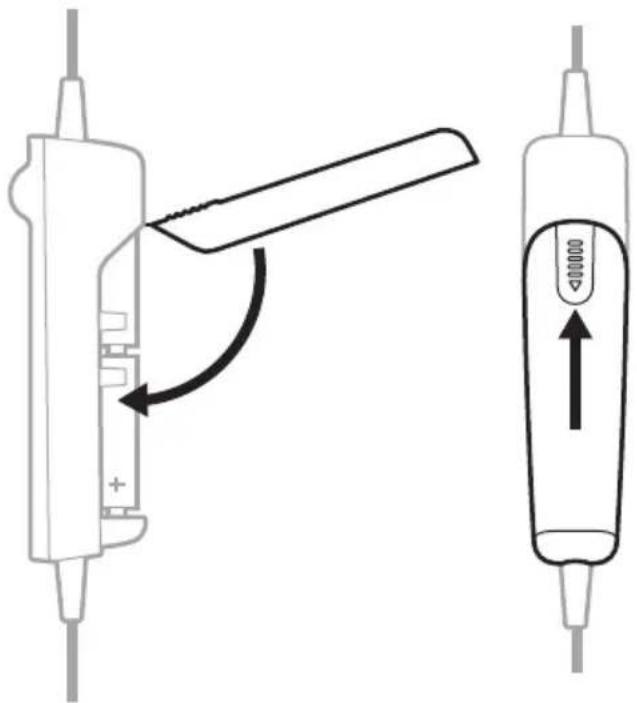
- On the back of the control module, press down firmly on the finger indent and slide the cover down.
CAUTION: The battery cover is tethered to the control module. Do NOT attempt to detach it.

text_image
Diagram showing two types of medical or laboratory devices with directional arrows indicating movement or change, including a labeled component '00000' and a plus symbol.
-
Remove the batteries.
-
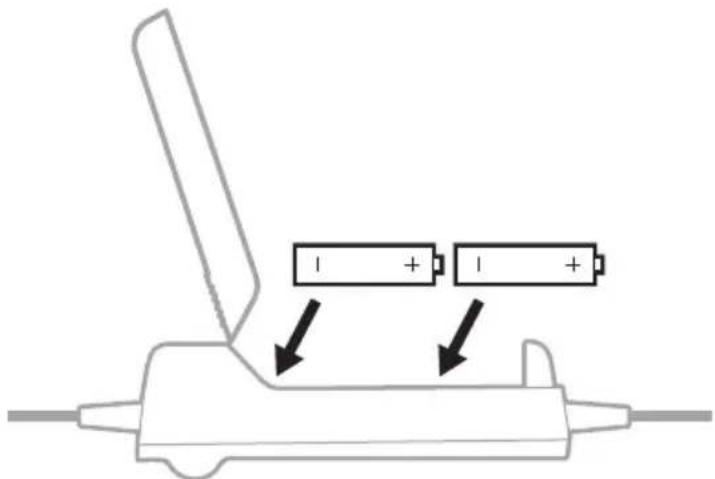
Insert two AA batteries (alkaline preferred), observing proper polarity.
text_image
Diagram showing battery charging mechanism with two 1+ batteries and directional arrows indicating charging direction
CAUTION: If the batteries don't fit correctly, do NOT force them in. Forcing an improper connection will cause permanent damage to the controlmodule.
- Close the battery cover, press firmly down on the finger indent, and slide the cover into place.
text_image
Diagram showing a device with a lever mechanism and its internal component, labeled with directional arrows and a valve symbol.
NOTES:
- New AA alkaline batteries supply up to 45 hours of power for the headset. Battery life varies with the ambient noise level of the aircraft, temperature, ear cushion condition, Bluetooth feature use, and age of the batteries.
- Other battery chemistries may yield different results. Battery life may differ and battery life indication may not be accurate.
Your headset comes with one of several standard aircraft connector options.
POWER TYPE CONNECTOR OPTIONS
| Battery power only | Dual plug (general aviation)U174 |
| Flex Power:Aircraft power or battery powerNOTES:• Batteries aren’t needed when connected to aircraft power.• This model comes with an Auto On function (see page 27). | 5-pin XLR6-pin LemoNOTES:• Adapters are available to convert a 6-pin Lemo connector to a Dual plug or U174 connector for additional connection flexibility.• Not all aircraft provide power to multi-pin connectors. Check the power status to confirm power is supplied to the headset (see page 37). |
NOTE: Contact Bose customer service for more information about these connectors.
DUAL PLUG (GENERAL AVIATION)
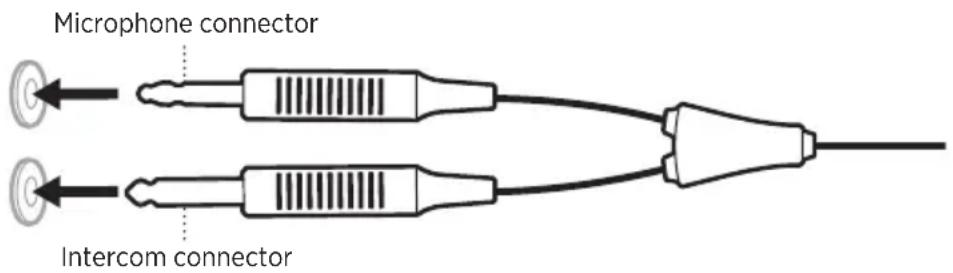
Dual plug models have two general aviation aircraft connectors that insert into specific jacks on the aircraft control panel.
NOTE: The microphone connector is shorter, thinner, and has a slightly different shape than the intercom connector.
Connect to the aircraft
- Insert the intercom connector into the intercom jack on the aircraft control panel.
- Insert the microphone connector into the microphone jack on the aircraft control panel.
text_image
Microphone connector
Intercom connector
Disconnect from the aircraft
Gently pull back on each connector to remove the connector from the aircraft control panel.
U174, 5-PIN XLR, AND 6-PIN LEMO
5-pin XLR and 6-pin Lemo aircraft connectors provide the headset with both aircraft power and intercom audio. U174 connectors provide the headset with only intercom audio.
Connect to the aircraft
-
Align the connector with the socket on the aircraft control panel, matching the narrow bar on the connector with the slot in the socket.
-
Firmly insert the connector into the aircraft control panel.

text_image
U174
6-pin Lemo5-pin XLR
Disconnect from the aircraft (U174 and 5-pin XLR)
-
Press the button/latch on the aircraft control panel to release the connector, if necessary.
-
Gently pull back to remove the connector from the aircraft control panel.

text_image
U174
5-pin XLR
Disconnect from the aircraft (6-pin Lemo)
- Pull back on the sleeve near the end of the connector.
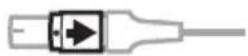
CAUTION: You must pull back on the sleeve before you pull out the connector. Forcing the connector out will damage the cable and/or the aircraft control panel.
- Continue gently pulling back to remove the connector from the aircraft control panel.

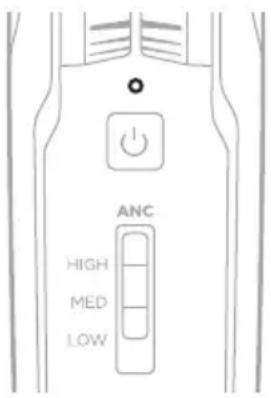
The Power and Bluetooth lights are located on the front of the control module.
POWER LIGHT
Shows the power source and level.
text_image
ANC
HIGH
MED
LOW
POWER SOURCE LIGHT ACTIVITY SYSTEM STATE
| Aircraft Slow blinking green Power On |
| Battery Blinking green | Power On—batteries high (about 8 hours or more remaining) |
| Battery Blinking amber | Power On—batteries low (about 2 to 8 hours remaining) |
| Battery Blinking red | Power On—batteries low (about 2 hours or less remaining)NOTE: In Bluetooth models, when the batteries reach this level, the Bluetooth feature is disabled to conserve remaining power. You hear a tone, indicating that your Bluetooth device is disconnecting and the Bluetooth feature is turning off. |
| Aircraft or battery None Power Off or batteries depleted |
NOTES:
- New AA alkaline batteries supply up to 45 hours of power for the headset. Battery life varies with the ambient noise level of the aircraft, temperature, ear cushion condition, Bluetooth feature use, and age of the batteries.
- Other battery chemistries may yield different results. Battery life may differ and battery life indication may not be accurate.
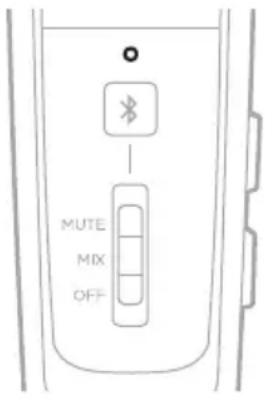
BLUETOOTH LIGHT
NOTE: This section applies to Bluetooth models only.
Shows the connection status of a mobile device.
text_image
MUTE
MIX
OFF
LIGHT ACTIVITY SYSTEM STATE
Blinking purple (in sync with Power light) Ready to connect
Blinking blue (in sync with Power light) Connecting/Connected
DIM THE STATUS LIGHTS
To dim the Bluetooth and Power lights, double-press the Power button ⏻.
To restore brightness, press ⏻ again, or turn the headset off and then on.
TURN OFF THE STATUS LIGHTS
To turn off the Bluetooth and Power lights, triple-press ⏻.
To turn the lights back on, press ⏻ again, or turn the headset off and then on.
NOTE: The status lights will return to default brightness each time the headset is powered on.
You can connect your headset to a secondary audio source in two ways:
- AUX (wired) connection
- Bluetooth (wireless) connection (applies to Bluetooth models only)
AUX CONNECTIONS
Use the 3.5 mm AUX audio cable to connect a non-wireless device.
- Make sure the Secondary Audio Mode switch is in the MUTE or MIX position (see page 45) and the REVERSIONARY operation switch is set to OFF (see page 28).
NOTE: If the Secondary Audio Mode switch is set to OFF or the REVERSIONARY operation switch is set to ON, AUX audio functionality is disabled.
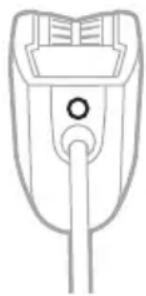
- Connect the cable to the 3.5 mm AUX port on the back of the control module.
natural_image
Line drawing of a medical device with a central shaft and connector (no text or symbols)
- Connect the other end of the cable to the 3.5 mm port on your audio source.
NOTE: The functions of a connected AUX audio source are not controlled by the control module.
BLUETOOTH CONNECTIONS
NOTE: This section applies to Bluetooth models only.
- Make sure the Secondary Audio Mode switch is in the MUTE or MIX position (see page 45) and the REVERSIONARY operation switch is set to OFF (see page 28).
NOTE: If the Secondary Audio Mode switch is set to OFF or the REVERSIONARY operation switch is set to ON, Bluetooth functionality is disabled.
- Press and hold the Bluetooth/Multi-function button ✝ for 1 second.
The Bluetooth light blinks purple.
- On your mobile device, enable the Bluetooth feature.
NOTE: The Bluetooth feature is usually found in the Settings menu.
- Select the headset from the device list.
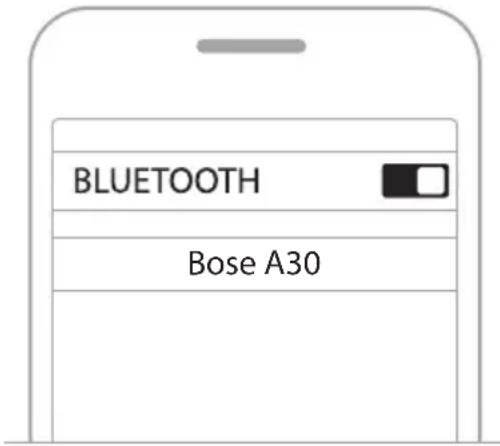
text_image
BLUETOOTH
Bose A30
Once connected, you hear a tone, and the Bluetooth light blinks blue.
NOTES:
- After 5 minutes of inactivity, the headset automatically exits pairing mode, and the Bluetooth light turns off. To turn the Bluetooth feature back on, press ✝.
- Each time you turn on the Bluetooth feature, the headset attempts to reconnect with the two most recently connected Bluetooth devices. If the device(s) are turned off or out of range, the headset attempts to reconnect to any other devices in the pairing list, then returns to pairing mode. See “Reconnect a mobile device” on page 40.
Disconnect a mobile device
- Press and hold the Bluetooth/Multi-function button ✗ for 5 seconds to turn the Bluetooth feature off.
- Move the Secondary Audio Mode switch to the OFF position (see page 45).
NOTE: You can also use Bluetooth settings to disconnect your device. Disabling the Bluetooth feature disconnects all other devices.
Reconnect a mobile device
When powered on, the headset tries to reconnect with the two most recently-connected devices.
NOTE: The devices must be within range (30 ft or 9 m) and powered on.
Recover a lost connection
When your connected mobile device moves out of range, the connection is lost. The headset automatically attempts to reconnect for 5 minutes. If the headset is unable to reconnect, it returns to pairing mode. After 5 minutes of inactivity, the Bluetooth feature turns off.
- Move the device back into range.
- Press ✝ to reconnect.
Connect an additional mobile device
You can store up to eight paired devices in the headset pairing list, and your headset can be actively connected to two devices at a time.
To connect an additional device, use the Bluetooth menu on your device (see page 39).
NOTES:
- Only one secondary audio source can be heard at a time.
• Secondary audio will never override the intercom.
Switch between connected devices
- Pause audio on your first device.
- Play audio on your second device.
Clear the headset pairing list
- Press and hold the Bluetooth/Multi-function button ✝ and — (the Bluetooth volume down button, located on the side of the control module) simultaneously for 7 seconds, or until the Bluetooth light blinks purple in sync with the Power light.
- Delete the headset from the Bluetooth list on your device.
All devices are cleared, and the headset is ready to connect.
See "Bluetooth connections" on page 39.
BLUETOOTH FUNCTIONS
NOTE: This section applies to Bluetooth models only.
Bluetooth volume functions
The Bluetooth volume controls are located on the side of the control module.
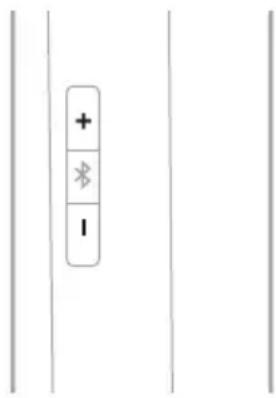
text_image
+
*
-
FUNCTION WHAT TO DO
| Bluetooth volume up | Press +. |
| Bluetooth volume down | Press —. |
Call functions
The Bluetooth/Multi-function button ✝ is located on the front of the control module.
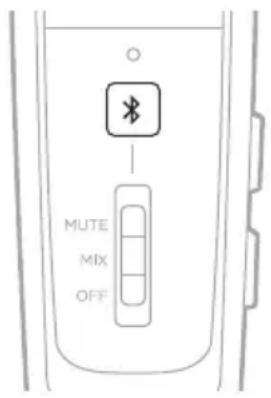
text_image
MUTE
MIX
OFF
FUNCTION WHAT TO DO
| Make a call | Dial from your connected phone.The call automatically transfers to the headset. |
| Answer a call | Press *.You hear a short beep before you hear the incoming call. |
| End a call | Press *.You hear two short beeps indicating the call has ended. |
| Decline an incoming call | Press and hold * for 1 second.You hear two short beeps indicating the call has been declined. |
| Answer a second incoming call and put the current call on hold | While on a call, press *.You hear a short beep before you hear the second call. |
| Decline a second incoming call and stay on current call | While on a call, press and hold * for 1 second.You hear two short beeps indicating the call has been declined. |
| Switch between two calls | With two active calls, double-press *.You hear a short beep before you hear the incoming call. |
| Redial the last number | When there are no active or incoming calls, double-press *. |
FUNCTION WHAT TO DO
| Transfer audio to the mobile device | While on a call, press and hold the Bluetooth/Multi-function button § for 3 to 4 seconds.The audio is transferred to the mobile phone while the Bluetooth connection remains active. |
| Activate voice control | When there are no active or incoming calls, press §. |
| Mute/unmute a call | While on a call, press + and — simultaneously.You hear two short beeps indicating the call has been muted/unmuted. |
NOTES:
- If you are on a call and unplugged from the intercom, the headset powers off approximately 3 minutes after the call is ended.
- To use the headset when unplugged from the intercom (to listen to audio or to make or receive calls), Bose recommends to disable the Auto off feature for uninterrupted functionality. See “Operation Switches” on page 26.
- Some functions may not be available for some mobile devices. Refer to your device owner's guide for more information.
SECONDARY AUDIO MODE SWITCH
Controls how secondary audio sources are heard in relation to the intercom.
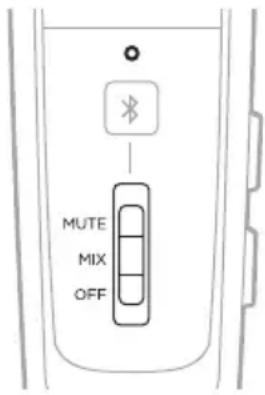
text_image
MUTE
MIX
OFF
FUNCTION POSITION DESCRIPTION
| MUTE | 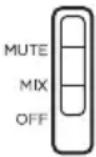 | When an intercom signal is detected, secondary audio is temporarily muted until intercom audio ceases. |
| MIX | 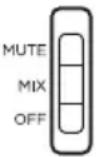 | When an intercom signal is detected, secondary audio is mixed with intercom audio.You hear a maximum of two audio sources: the intercom plus one secondary device. |
| OFF |  | Only intercom audio is active. All secondary audio sources, (AUX and Bluetooth) are muted.NOTES:All Bluetooth connections are disabled and antennae power is removed.If you switch to OFF while connected to a Bluetooth device, you may need to re-establish your Bluetooth connection the next time you turn on the headset or the next time you move the switch from the OFF position. |
NOTES:
- Only one secondary audio source can be heard at a time.
- Audio from a secondary source will never override intercom communications.
- When MUTE or MIX are selected, incoming and outgoing phone calls automatically mute all other secondary audio sources.
- During a phone call, intercom and phone call audio are mixed.
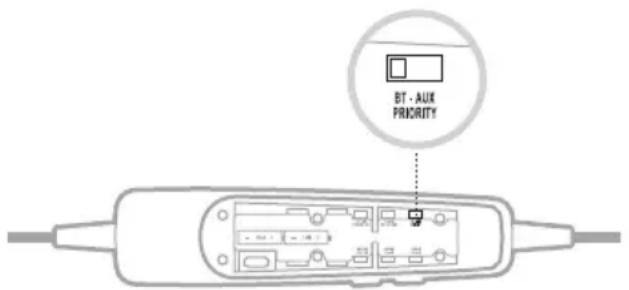
Establishes priority between two secondary audio sources connected at the same time.
text_image
BT - AUX
PRIORITY
- Locate the PRIORITY operation switch inside the battery compartment.
-
Set the switch to the correct source (BT or AUX). See “Change the operation switches” on page 28.
-
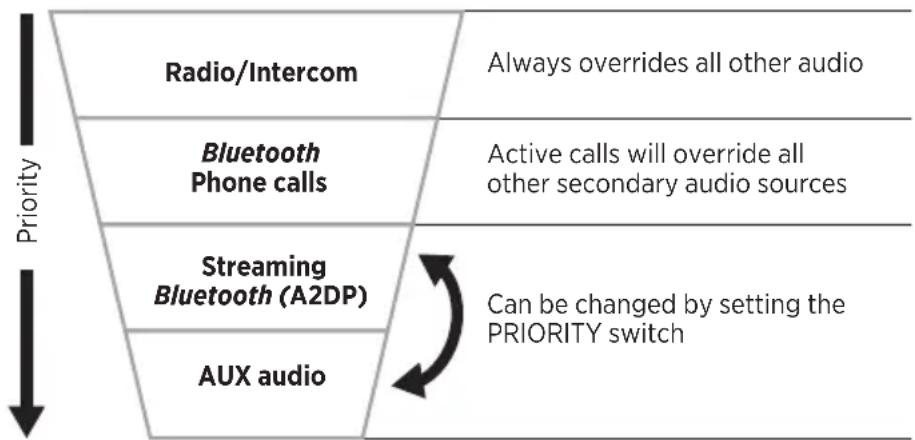
When the switch is in the BT position, the Bluetooth source will override the AUX source if a signal is detected.
- When the switch is in the AUX position, the AUX source will override the Bluetooth source if a signal is detected.
NOTE: Incoming and outgoing phone calls will always override any other secondary source.
SECONDARY AUDIO PRIORITY CHART
Audio sources are heard according to priority:
flowchart
graph TD
    A["Radio/Intercom"] --> B["Bluetooth Phone calls"]
    B --> C["Streaming Bluetooth (A2DP)"]
    C --> D["AUX audio"]
    E["Always overrides all other audio"] --> F["Active calls will override all other secondary audio sources"]
    G["Can be changed by setting the PRIORITY switch"] --> H
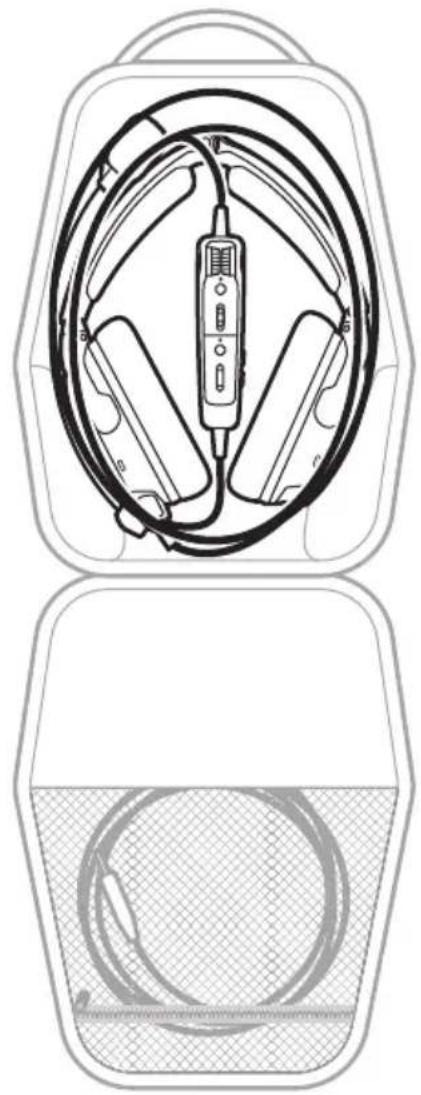
STORE THE HEADSET
- Place the headset in the carry case for easy, convenient storage.
- Store the headset in a ventilated area away from direct sunlight.
- Remove the batteries before storing the headset for extended periods.
natural_image
Technical line drawing of a medical device with internal components and a meshed base (no text or symbols)
CLEAN THE HEADSET
Your headset may require periodic cleaning.
COMPONENT CLEANING PROCEDURE
| Headset | Wipe the outside surfaces of the headband, headband cushion, earcup cushions, connectors, and plastic parts using a soft, damp cloth (water only) and mild soap.CAUTION: Do NOT immerse the headset in water or any liquid. |
| Earcup openings | Check to make sure that the openings on the outside of each earcup are clean and free of debris before each flight.When wiping down the earcups, be sure not to force any dirt or debris into the openings.Carefully use tweezers, if necessary,toremoveforeign matter that may be lodged in theopenings.CAUTION: Do NOT blow air into or vacuum the openings, as this may damage the headset. |
| Earcup inner screen | Do not attempt to remove, replace, repair, or clean the inner screen inside the earcup. If the screen appears to be damaged or worn out, contact Bose customer service.If the inner screen becomes damp from environmental moisture such as light rain, dew, perspiration, or condensation, allow it to air dry only.CAUTION: Do NOT use electric heaters, blowers, or hair dryers to dry the inner screen. |
| Microphone windscreen | Gently slide or roll the windscreen off the microphone.Rinse and dry the windscreen.Once the windscreen is completely dry, slide the windscreen back on the microphone. Make sure it fits completely over the microphone. |
LIMITED WARRANTY
The headset is covered by a limited warranty. Details of the limited warranty are provided on the product registration card that is in the carton. Please refer to the card for instructions on how to register. Failure to do so will not affect your limited warranties.
- Contact the Bose organization in your country/region (visit wordwide.Bose.com for Bose contact information in your country/region) for specific return and shipping instructions.
- Label and ship the product, freight prepaid, to the address provided by the Bose organization in your country.
- Place any necessary return authorization number prominently on the outside of the carton. Cartons not bearing a return authorization number, where required, will be refused.
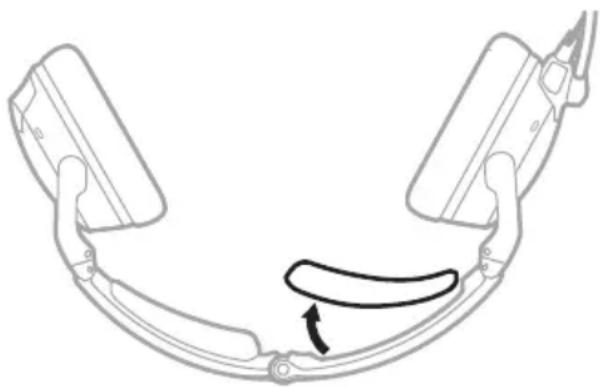
SERIAL NUMBER LOCATION
The serial number is located under the headband cushion. To view the serial number, gently grab and peel the cushion from away from the headband.
natural_image
Diagram of a curved mechanical component with a curved arrow indicating motion or force (no text or symbols)
Refer to this serial number when you register your product or contact Bose for technicalsupport.
REPLACEMENT PARTS AND ACCESSORIES
Through normal use, parts like windscreens and ear cushions may require periodic replacement. Replacement parts and accessories can be ordered through Bose customer service.
Visit: ____ support.Bose.com/A30
Available accessories
- Ear cushions (pair)
• Headband cushions (pair)
• Electret microphone windscreen
• Dynamic microphone windscreen
• Service kit (ear cushions, electret microphone windscreen, headband cushions)
- Carry case
- Terminator cover
- Control module with cable and microphone assembly
- 6-pin to Dual plug cable adapter
- 6-pin to U174 cable adapter
• 3.5 mm AUX audio cable
- Installation kit
- Cable clip
Ear cushions
Ear cushions should be replaced every six months or every 350 hours of use.
You may need to replace them more often if you:
- Have a full beard or heavy whiskers.
- Subject the headset to severe temperature extremes such as parking your airplane outside in severe cold or heat.
- Put excess strain on the cushions because of improper storage.
Indications that the ear cushions need replacing include:
- Flaking of the outer covering
- Cuts or tears
- Flattening of the cushion, reducing the effectiveness of the seal
NOTE: To extend the life of the ear cushions, perform regular cleaning (see page 48).
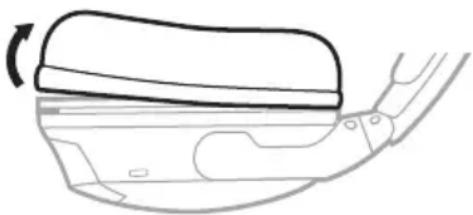
Remove the old ear cushion
- Grasp the ear cushion skirt where it folds into the slot on the earcup.
- Gently pull the ear cushion skirt up and away from the earcup.
natural_image
Diagram of a car interior showing a curved handle and seat, with an arrow indicating rotation (no text or symbols)
Install the new ear cushion
- Properly align the new ear cushion with the earcup.
- Tuck an edge of the ear cushion skirt into the slot behind the ear cushion flange. Be careful not to fold the skirt over.
- Gently stretch the cushion around the earcup, working the skirt into the slot as you go.
- Grasp the ear cushion and adjust its position to remove any folds in the skirt and wrinkles in the cushion.
Headband cushions
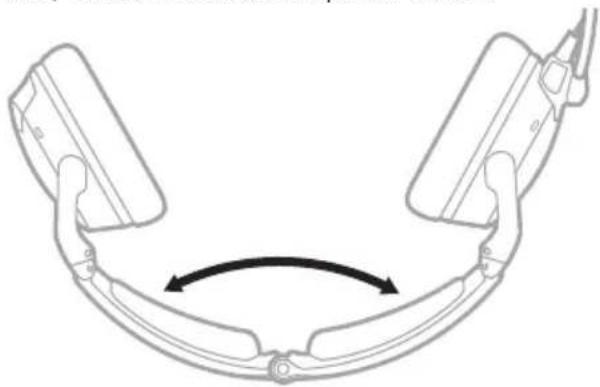
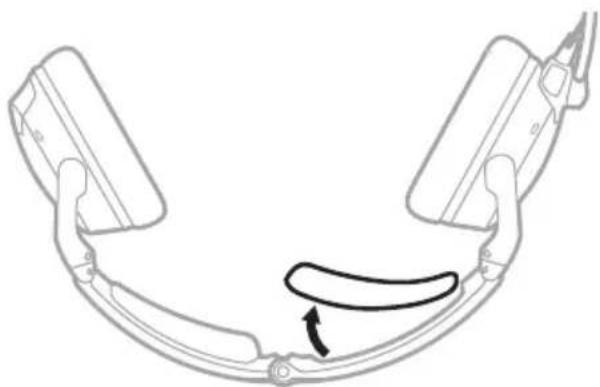
Replace the cushion once regular care and maintenance fails to restore the cushion to its original size and shape.
- On a protected surface, turn the headset upside down.
natural_image
Diagram of a curved mechanical component with bidirectional arrow indicating rotation (no text or symbols)
- Remove the old cushion from the headband.
natural_image
Diagram of a curved mechanical component with a curved arrow indicating motion or force (no text or symbols)
- While still holding the headband open, align the center of the new cushion with the center of the headband and press firmly from the center toward the outside.
Microphone windscreen
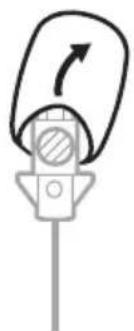
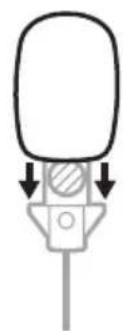
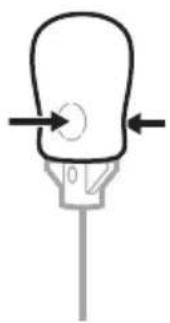
You can remove the windscreen to wash it or to replace it as needed.
- Gently grasp the microphone base and peel the windscreen away from the microphone.
natural_image
Simple line drawing of a mechanical device with an arrow indicating rotational motion (no text or symbols)
-
Slide the windscreen off the microphone.
-
Slide the new windscreen on the microphone. Make sure it fits completely over the microphone.
natural_image
Simple line drawing of a mechanical component with arrows indicating direction (no text or symbols)
- Press the sides of the windscreen to secure into place.
natural_image
Simple line drawing of a light bulb with arrows indicating direction (no text or symbols)
Batteries
See "Batteries" on page 32.
Microphone or terminator cover
See "Microphone Placement" on page 30.
TRY THESE SOLUTIONS FIRST
If you experience problems with your headset, try these solutions first:
• Power on the headset (see page 22).
- Check the state of the status lights (see page 36).
- Make sure the REVERSIONARY operation switch is set to OFF (see “Change the operation switches” on page 28).
- For Bluetooth models:
- Make sure your mobile device supports Bluetooth 4.2 and greater.
- Increase the volume on your Bluetooth device or music app.
– Try connecting another Bluetooth device (see page 40).
OTHER SOLUTIONS
If you could not resolve your issue, see the table below to identify symptoms and solutions to common problems. If you are unable to resolve your issue, contact Bose customer service.
Visit: ____ worldwide.Bose.com/Contact
Acoustic Noise Cancelling
PROBLEM WHAT TO DO
| Communication, but no noise cancellation in either ear | If using battery power, make sure the batteries are fresh and correctly installed (see page 32).If using aircraft power, check the aircraft fuse or circuit breaker.If using aircraft power, make sure the connector is firmly seated in the control panel and the control panel has power (see page 34).Power off, then power on the headset (see page 22).NOTE: Don’t press the Power button ○ repeatedly. |
| No active noise cancellation and no communication | If using battery power, make sure the batteries are fresh and correctly installed (see page 32).If using aircraft power, make sure the connector is firmly seated in the control panel and the control panel has power (see page 34).Power off, then power on the headset (see page 22).NOTE: Don’t press the Power button ○ repeatedly.Use the headset in a different seat location.Remove microphone assembly from the headset, and check for damage to the connector or pins (see page 30). |
PROBLEM WHAT TO DO
| Tap Control doesn’t function during extreme ambient noise conditions | Tap Control is disabled during extreme levels of ambient noise to ensure proper noise reduction performance and intercom communication quality. However, you can still set the noise cancellation level to LOW in both earcups using the Acoustic Noise Cancelling (ANC) switch (see page 23). |
PROBLEM WHAT TO DO
| Noise cancellation active, but no incoming audio | Make sure the volume controls are not set too low on the control module or the intercom.Make sure the aircraft connectors are securely inserted into the aircraft control panel (see page 34).Use a different seat location in the aircraft. |
| Low volume of incoming communications | Make sure the volume controls are not set too low on the control module or the intercom.Make sure the INTERCOM operation switch is correctly set for your intercom system (see page 26).Make sure all headsets sharing the intercom have the INTERCOM operation switch in the correct position (see page 26).Unplug all other headsets and see if the volume can be adjusted to an acceptable level. |
| Intermittent communication | Make sure the aircraft connectors are securely inserted into the aircraft control panel (see page 34).Use a different seat location in the aircraft. |
| Reduced volume in one ear only | Make sure the volume controls are not set too low on the control module or the intercom.Make sure the INTERCOM operation switch is correctly set for your intercom system (see page 26). |
| No stereo separation or communications in one ear only | Make sure the INTERCOM operation switch is correctly set for your intercom system (see page 26).Make sure the terminator cover is securely installed (see page 30).Depending on how your audio jacks are wired, there may be only one channel of audio supplied to the headphone jack. If the INTERCOM operation switch is set to ST and you only hear communications on one side, set the operation switch to MON to play audio on both sides. 5-pin XLR models are mono audio only. |
Audio
PROBLEM WHAT TO DO
| Reduced noise cancellation, intermittent clickingsounds, orcommunication distortion in a loud environment | Make sure the earcups are clean and free of debris (see page 48).Remove the microphone, then attach again (see page 30).If the headset emits any loud noise and related loss of communications while in Acoustic Noise Cancelling mode, turn the power off. The headset will continue to provide communications in the passive noise reducing mode. |
| Squealing or whistling sound when the headset powers on | Make sure the headset orientation is correct. Use the Left Ⓗ and Right ® markings on the headset to orient the headset correctly.Make sure the ear cushions fully cover your ears (see page 18).Make sure the earcups are clean and free of debris (see page 48). |
| Crackling sound audible with headset turned on in a loud environment, or noise cancelling is intermittent | Make sure the headset orientation is correct. Use the Left Ⓗ and Right ® markings on the earcups to orient the headset correctly.Make sure the earcups are clean and free of debris (see page 48).Remove the microphone, then attach again (see page 30).If using battery power, check if the battery is low (see page 36).If using aircraft power, make sure the voltage powering the headset is no less than 10 VDC. |
WARNING: If the headset emits any loud noise and related loss of communications while in Acoustic Noise Cancelling mode, turn the power off. The headset will continue to provide communications in the passive noise reducing mode.
Microphone
PROBLEM WHAT TO DO
| Microphone doesn’t pick up sound | Make sure the white dot on the microphone is facing your mouth (see page 19).Make sure the microphone is fully connected to the headband (see page 30).Check the Squelch level on the intercom and adjust if needed.Try another intercom position in the aircraft.ForBluetoothphone calls, make sure the batteries are fresh and correctly installed (see page 32).NOTE:ForBluetoothmodels only. |
Bluetooth audio source
NOTE: This section applies to Bluetooth models only.
PROBLEM WHAT TO DO
| No audio from theBluetooth source to the headset while on a call | Make sure the Secondary Audio Mode switch is in theMUTEor MIX position(seepage 45).Turn on and offBluetoothon the mobile device.Make sure theBluetoothfeature is on, and theBluetoothlight is flashing (see page 37).Make sure the headset and device are in range (30 ft or 9 m).Make sure the mobile device is connected properly and the headset is ready to pair (see page 39).Make sure theBluetoothvolume is not set too low on the control module (see page 42). |
| Headset does not pair with a device | Turn on and offBluetoothon the mobile device.Make sure theBluetoothfeature is on, and theBluetoothlight is flashing (see page 37).If operating on battery power, check the Power light (see page 36). If it's flashing red, theBluetoothfeature is disabled to conserve power. Replace the batteries.Make sure the Secondary Audio Mode switch is in theMUTEor MIXposition(seepage 45).Clear the headset pairing list (see page 41) and connect again.Delete the headset from your device'sBluetoothdevice list and pair again. |
| Cannot answer/end a call | Make sure your mobile device is connected to the headset.Turn your device off and on. Connect again. |
| Headset does not reconnectto apreviously connecteddevice | Make sure the headset and device are in range (30 ft or 9 m).Make sure the Secondary Audio Mode switch is in theMUTEor MIXposition(seepage 45).Make sure theBluetoothfeature is on, and theBluetoothlight is flashing (see page 37).If operating on battery power, check the Power light (see page 36). If it's flashing red, theBluetoothfeature is disabled to conserve power. Replace the batteries.On your mobile device, make sure theBluetoothfeature is on.Delete the headset from your device'sBluetoothdevice list and pair again. |
Auto on/off
NOTE: This function is not available for Dual plug and U174 models.
PROBLEM WHAT TO DO
| Headset does not poweronautomatically | Make sure the AUTO ON operation switch is set to ON(see page 26).Check the aircraft specifications to see if the jack is getting at least 10V of DC power from the aircraft's electrical system. |
| Headset does not poweroffautomatically | Make sure the AUTO OFF operation switch is set to ON(see page 26).Disconnect the headset from the aircraft. Then power on the headset and wait 15 minutes.It may take up to 9 minutes for the headset to power off when not in use immediately after initial power up. If the headset has not powered off after 15 minutes, contact Bose customer service. |
Reversionary mode
PROBLEM WHAT TO DO
| Headset is in an unresponsiveor unusablestate | Set the REVERSIONARY operation switch to ON (see page 28). This disables all non-critical functions, including Bluetooth audio, AUX audio, and Tap Control. Only intercom communications and Acoustic Noise Cancelling are enabled. |
MOUNT THE AIRCRAFT PANEL CONNECTOR
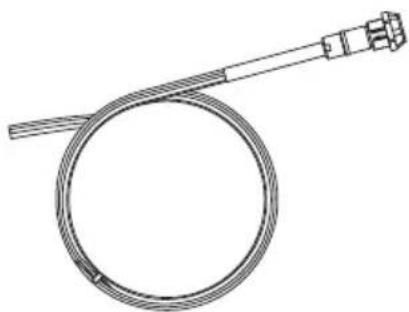
The aircraft panel connector is part of the optional 6-pin wiring harness assembly.
natural_image
Line drawing of a coiled cable with a connector, no text or symbols present
Visit www.Bose.com or global.Bose.com for information or to purchase.
WARNING: The aircraft panel connector must be mounted by a technician who is qualified to perform this type of avionics installation for the aircraft you are using.
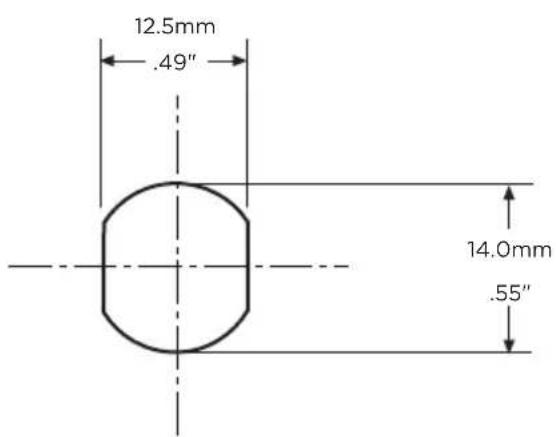
Mount the connector into a cutout, using the diagrams below as a guide.
text_image
12.5mm
.49"
14.0mm
.55"
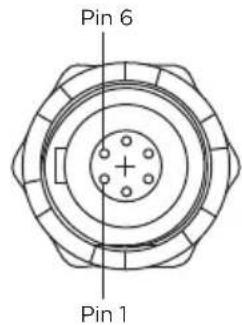
Receptacle - Pinout (front view)
text_image
Pin 6
Pin 1
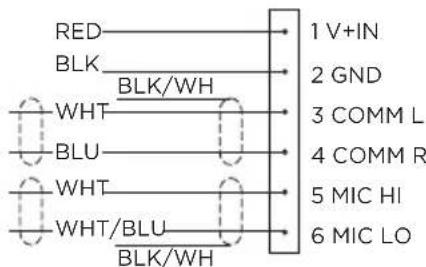
Aircraft Interface Schematic
text_image
RED
BLK
WHT
BLU
WHT
WHT/BLU
BLK/WH
1 V+IN
2 GND
3 COMM L
4 COMM R
5 MIC HI
6 MIC LO
Connect the eight wires as follows:
- Two for the microphone
- Two for audio
- One for power
- One for ground
- Two for audio shields
Audio and microphone wires should be connected to the back of the existing microphone and headphone jacks, leaving existing jacks intact for use with conventional headsets. This is usually the fastest installation method.
CAUTION: Do NOT use excessive force or bend the installed connector. This may damage or break internal solder joints.
NOTE: The aircraft panel connector cannot be installed in an audio system using transformer-coupled audio outputs. Contact Bose customer service.
Mono connection diagram
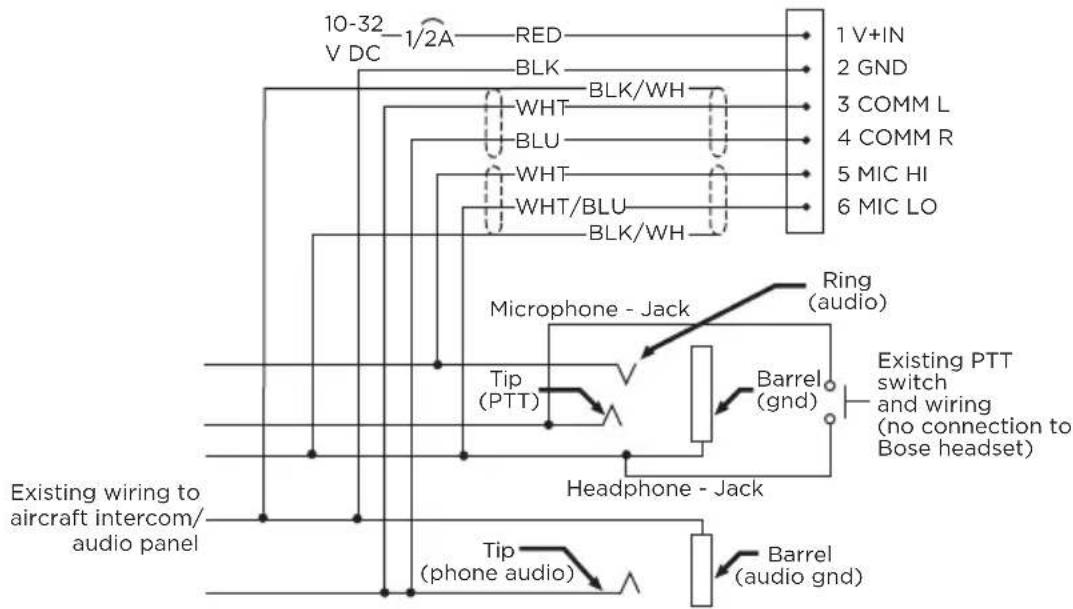
text_image
10-32 V DC
1/2A RED
BLK
WHT BLK/WH
BLU
WHT
WHT/BLU
BLK/WH
1 V+IN
2 GND
3 COMM L
4 COMM R
5 MIC HI
6 MIC LO
Microphone - Jack
Ring (audio)
Tip (PTT)
Barrel (gnd)
Existing PTT switch and wiring (no connection to Bose headset)
Headphone - Jack
Existing wiring to aircraft intercom/ audio panel
Tip (phone audio)
Barrel (audio gnd)
Stereo connection diagram
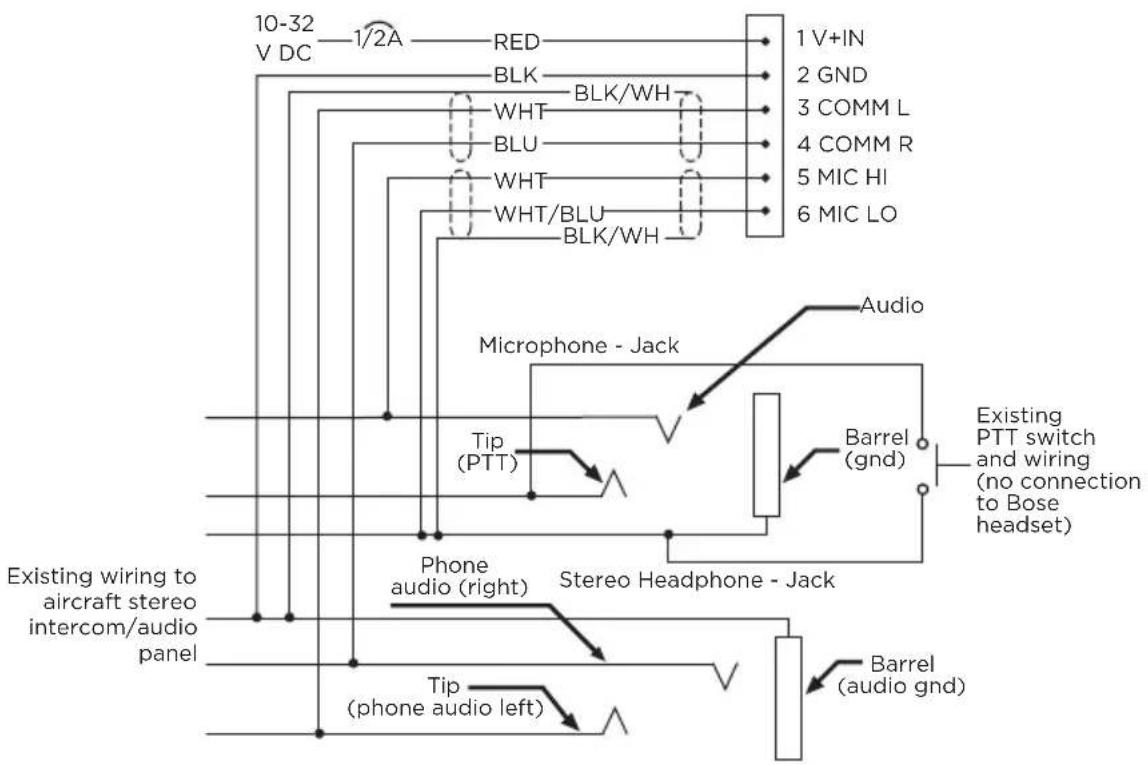
text_image
10-32
V DC — 1/2A — RED — 1 V+IN
BLK — BLK/WH — 2 GND
WHT — WHT — 3 COMM L
BLU — BLU — 4 COMM R
WHT — WHT — 5 MIC HI
WHT/BLU — BLK/WH — 6 MIC LO
Microphone - Jack
Audio
Tip (PTT) —
Existing PTT switch and wiring (no connection to Bose headset)
Phone audio (right) — Stereo Headphone - Jack
Existing wiring to aircraft stereo intercom/audio panel
Tip (phone audio left) — Barrel (audio gnd)
Details on making the connections
The pinouts for the optional installed connector are detailed in the table below.
PIN NUMBER COLOR PURPOSE
| 1 Red | V+IN: Headset power (10-32 VDC). Use a 1/4 amp fuse or a 1/2 amp circuit breaker. |
| 2 Black | GND: System ground. Connect to the existing audio ground. |
| 3 White COMM L: Phone communication, Left. |
| 4 Blue COMM R: Phone communication, Right. |
| NOTE: For stereo operation, connect the left and right channels to their respective positions. For monaural operation, connect pins 3 and 4 together, and to the tip of the existing phone jack. |
| 5 White | MIC HI: Microphone/Hi-audio. Connect to the portion of the existing microphone jack that corresponds to the ring position of a headset microphone plug. Don't connect to the tip (PTT) segment. |
| 6 White/Blue | MIC LO: Microphone/Lo-ground. Connect to the portion of the microphone jack that corresponds to the barrel position of a headset microphone plug. |
| NOTE: If the microphone works on radio transmit but not through the intercom, check pin 6. It may be incorrectly wired to the PTT segment of the microphone jack. |
| Comm Shield Black Shield from Comm L and Comm R wire pair. |
| Mic Shield Black Shield from Mic Hi and Mic Lo wire pair. |
| NOTE: The wires connecting pins 3 and 4 and pins 5 and 6 are shielded, twisted pairs with a black wire shield termination exiting each pair. If the existing wiring is not shielded, connect the shields to the existing audio wiring shields, or connect the shield from Comm L and Comm R wire pair to audio ground. |
HEADSET SPECIFICATIONS
SPECIFICATION DESCRIPTION
| Headphone sensitivity | 96.5 +/- 3.5 dBA SPL* *Measured per RTCA DO-214A Subparagraph 2.7.2.1(a) |
| Headphone impedance | Mono mode: 150 Ohm* Stereo mode: 300 Ohm* *Measured per RTCA DO-214A Subparagraph 2.3.4.1 |
| Headphone frequency response | Total span (max - min) +/- 7.5 dB* *Measured per RTCA DO-214A Subparagraph 2.7.2.1(b) |
| Boom microphone sensitivity | 400 mV RMS +/- 3 dB for 114 dB SPL at 1000 Hz* *Measured per RTCA DO-214A Subparagraphs 2.2.3.1 and 2.6.2.1 |
| Boom microphone bias | Operating range: 8.0 - 16 VDC* *Measured per RTCA DO-214A Subparagraph 2.6.2.1 |
| Maximum ambient noise level | Full active noise reduction operating range: 115 dB SPL Reduced active noise reduction operating range: 134 dB SPL |
| Battery power source Two (2) AA alkaline batteries |
| Battery life | Up to 45 hours. Duration varies with battery quality, ambient noise levels, and use of the Bluetooth feature. |
| Aircraft power source Aircraft power voltage range: 10 to 32 VDC |
| Average power consumption 300 mW |
| Fuse/breaker | 1/4 amp, fast-blow fuse (AGC 1/4 amp fuse) or 1/2 amp circuit breaker |
| Headset weight 12 ounces (headset only) |
SPECIFICATION DESCRIPTION
| Headset size range | Slider not extended:8.425" (214 mm) H x 6.34" (161 mm) W x 3.15" (80 mm) DSlider extended:10.2" (259 mm) H x 6.6" (168 mm) W x 3.15" (80 mm) D |
| Control module dimensions | 1.5" (38.1 mm) H x 1.5" (38.1 mm) W x 4.92" (125 mm) D |
| Temperature and Altitude (Category A2) | Operating: 5°F - 158°F (-15°C - 70°C)Storage: -67°F - 158°F (-55°C - 70°C)Altitude: 15,000 feet maximum pressure altitude for full cancellation |
| Bluetooth wireless technology | 4.2 |
| Headset cable length 6.56 ft or 2 m |
NOTE: Damage could occur to avionics equipment by the use of these headsets if equipment was manufactured for use with 600 Ω headsets only. If in doubt, consult the avionics equipment manufacturer.
FAA TECHNICAL STANDARD ORDER
The Bose A30 Aviation Headsets that are approved to TSO and ETSO C139a are appropriately marked. The product interface, cables, and microphones have been designed to function in or withstand exposure to the environmental conditions below.
This article meets the minimum performance and quality control standards required by a technical standard order (TSO). Installation of this article requires separate approval.
CONDITION CATEGORY
| Altitude and temperature A2 | |
| Salt fog S | |
| AF conducted susceptibility B | |
| Humidity B | |
| Magnetic effect A | |
| Power input B | |
| RF Susceptibility TR | |
| Vibration S, R and U | |
| Voltage spike A | |
| Shock drop 12 times, 1 m onto concrete (per DO-214a) | |
| Explosive atmosphere | Passed |
Environmental categories cited refer to RTCA DO-160G and RTCA DO-214a (December 18, 2013).
The conditions and tests required for TSO approval of this article are minimum performance standards. Those installing this article either on or within a specific type or class of aircraft must determine that the aircraft installation conditions are within the TSO standards which include any accepted integrated non-TSO functions. TSO articles and any accepted integrated non-TSO function(s) must have separate approval for installation in an aircraft. The article may be installed only according to 14 CFR part 43 or the applicable airworthiness requirements.
This device complies with FCC and ISED Canada RF radiation exposure limits for general population. It must not be collocated or operating in conjunction with any other antenna or transmitter.
China-Import: Bose Electronics (Shanghai) Company Limited, Level 6, Tower D, No. 2337 Gudai Rd. Minhang District, Shanghai 201100
EU-Import: Bose Products B.V., Gorslaan 60, 1441 RG Purmerend, Niederlande
Taiwan-Import: Bose Limited Taiwan Branch (H.K.), 9F., No. 10, Sec. 3, Minsheng E. Road, Zhongshan Dist.
Taipei City 10480, Taiwan Telefonnummer: +886-2-2514 7676
The following license disclosures apply to certain third-party software packages used as components in the product.
Package: LittlevGL Version 7.10.1
Copyright © 2020 LVGL LLC
Package: pycrc
Copyright © 2006-2015, Thomas Pircher tehpeh-web@tty1.net
The above is/are subject to the license terms reprinted below:
MIT License
Permission is hereby granted, free of charge, to any person obtaining a copy of this software and associated documentation files (the "Software"), to deal in the Software without restriction, including without limitation the rights to use, copy, modify, merge, publish, distribute, sublicense, and/or sell copies of the Software, and to permit persons to whom the Software is furnished to do so, subject to the following conditions:
The above copyright notice and this permission notice shall be included in all copies or substantial portions of the Software.
THE SOFTWARE IS PROVIDED "AS IS", WITHOUT WARRANTY OF ANY KIND, EXPRESS OR IMPLIED, INCLUDING BUT NOT LIMITED TO THE WARRANTIES OF MERCHANTABILITY, FITNESS FOR A PARTICULAR PURPOSE AND NONINFRINGEMENT. IN NO EVENT SHALL THE AUTHORS OR COPYRIGHT HOLDERS BE LIABLE FOR ANY CLAIM, DAMAGES OR OTHER LIABILITY, WHETHER IN AN ACTION OF CONTRACT, TORT OR OTHERWISE, ARISING FROM, OUT OF OR IN CONNECTION WITH THE SOFTWARE OR THE USE OR OTHER DEALINGS IN THE SOFTWARE.
Package: MCUXpresso Software Development Kit (SDK)
©2006-2021 NXP Semiconductors. All rights reserved.
The above is/are subject to the license terms reprinted below:
3-Clause BSD License
(Also called "BSD License 2.0" or "Modified BSD License")
Redistribution and use in source and binary forms, with or without modification, are permitted provided that the following conditions are met:
- Redistributions of source code must retain the above copyright notice, this list of conditions and the following disclaimer.
- Redistributions in binary form must reproduce the above copyright notice, this list of conditions and the following disclaimer in the documentation and/or other materials provided with the distribution.
- Neither the name of the nor the names of its contributors may be used to endorse or promote products derived from this software without specific prior written permission.
THIS SOFTWARE IS PROVIDED BY THE COPYRIGHT HOLDERS AND CONTRIBUTORS "AS IS" AND ANY EXPRESS OR IMPLIED WARRANTIES, INCLUDING, BUT NOT LIMITED TO, THE IMPLIED WARRANTIES OF MERCHANTABILITY AND FITNESS FOR A PARTICULAR PURPOSE ARE DISCLAIMED. IN NO EVENT SHALL BE LIABLE FOR ANY DIRECT, INDIRECT, INCIDENTAL, SPECIAL, EXEMPLARY, OR CONSEQUENTIAL DAMAGES (INCLUDING, BUT NOT LIMITED TO, PROCUREMENT OF SUBSTITUTE GOODS OR SERVICES; LOSS OF USE, DATA, OR PROFITS; OR BUSINESS INTERRUPTION) HOWEVER CAUSED AND ON ANY THEORY OF LIABILITY, WHETHER IN CONTRACT, STRICT LIABILITY, OR TORT (INCLUDING NEGLIGENCE OR OTHERWISE) ARISING IN ANY WAY OUT OF THE USE OF THIS SOFTWARE, EVEN IF ADVISED OF THE POSSIBILITY OF SUCH DAMAGE.
Packages: CMSIS Version 5.6.0 & SDK CMSIS Peripheral Drivers 2.x.x
Copyright © 2010-2017 ARM Limited or its affiliates. All rights reserved.
Package: Mbed TLS Version 2.26.0
Copyright © 2021 Arm Limited (or its affiliates).
The above is/are subject to the license terms reprinted below:
Apache License
Version 2.0, January 2004
http://www.apache.org/licenses/
TERMS AND CONDITIONS FOR USE, REPRODUCTION, AND DISTRIBUTION
1. Definitions.
“License” shall mean the terms and conditions for use, reproduction, and distribution as defined by Sections 1 through 9 of this document.
“Licensor” shall mean the copyright owner or entity authorized by the copyright owner that is granting the License.
“Legal Entity” shall mean the union of the acting entity and all other entities that control, are controlled by, or are under common control with that entity. For the purposes of this definition, “control” means (i) the power, direct or indirect, to cause the direction or management of such entity, whether by contract or otherwise, or (ii) ownership of fifty percent (50%) or more of the outstanding shares, or (iii) beneficial ownership of such entity.
"You" (or "Your") shall mean an individual or Legal Entity exercising permissions granted by this License.
“Source” form shall mean the preferred form for making modifications, including but not limited to software source code, documentation source, and configuration files.
"Object" form shall mean any form resulting from mechanical transformation or translation of a Source form, including but not limited to compiled object code, generated documentation, and conversions to other media types.
“Work” shall mean the work of authorship, whether in Source or Object form, made available under the License, as indicated by a copyright notice that is included in or attached to the work (an example is provided in the Appendix below).
"Derivative Works" shall mean any work, whether in Source or Object form, that is based on (or derived from) the Work and for which the editorial revisions, annotations, elaborations, or other modifications represent, as a whole, an original work of authorship. For the purposes of this License, Derivative Works shall not include works that remain separable from, or merely link (or bind by name) to the interfaces of, the Work and Derivative Works thereof.
“Contribution” shall mean any work of authorship, including the original version of the Work and any modifications or additions to that Work or Derivative Works thereof, that is intentionally submitted to Licensor for inclusion in the Work by the copyright owner or by an individual or Legal Entity authorized to submit on behalf of the copyright owner. For the purposes of this definition, “submitted” means any form of electronic, verbal, or written communication sent to the Licensor or its representatives, including but not limited to communication on electronic mailing lists, source code control systems, and issue tracking systems that are managed by, or on behalf of, the Licensor for the purpose of discussing and improving the Work, but excluding communication that is conspicuously marked or otherwise designated in writing by the copyright owner as “Not a Contribution.”
“Contributor” shall mean Licensor and any individual or Legal Entity on behalf of whom a Contribution has been received by Licensor and subsequently incorporated within the Work.
- Grant of Copyright License. Subject to the terms and conditions of this License, each Contributor hereby grants to You a perpetual, worldwide, non-exclusive, no-charge, royalty-free, irrevocable copyright license to reproduce, prepare Derivative Works of, publicly display, publicly perform, sublicense, and distribute the Work and such Derivative Works in Source or Object form.
- Grant of Patent License. Subject to the terms and conditions of this License, each Contributor hereby grants to You a perpetual, worldwide, non-exclusive, no-charge, royalty-free, irrevocable (except as stated in this section) patent license to make, have made, use, offer to sell, sell, import, and otherwise transfer the Work, where such license applies only to those patent claims licensable by such Contributor that are necessarily infringed by their Contribution(s) alone or by combination of their Contribution(s) with the Work to which such Contribution(s) was submitted. If You institute patent litigation against any entity (including a cross-claim or counterclaim in a lawsuit) alleging that the Work or a Contribution incorporated within the Work constitutes direct or contributory patent infringement, then any patent licenses granted to You under this License for that Work shall terminate as of the date such litigation is filed.
- Redistribution. You may reproduce and distribute copies of the Work or Derivative Works thereof in any medium, with or without modifications, and in Source or Object form, provided that You meet the following conditions:
a. You must give any other recipients of the Work or Derivative Works a copy of this License; and
b. You must cause any modified files to carry prominent notices stating that You changed the files; and
c. You must retain, in the Source form of any Derivative Works that You distribute, all copyright, patent, trademark, and attribution notices from the Source form of the Work, excluding those notices that do not pertain to any part of the Derivative Works; and
d. If the Work includes a "NOTICE" text file as part of its distribution, then any Derivative Works that You distribute must include a readable copy of the attribution notices contained within such NOTICE file, excluding those notices that do not pertain to any part of the Derivative Works, in at least one of the following places: within a NOTICE text file distributed as part of the Derivative Works; within the Source form or documentation, if provided along with the Derivative Works; or, within a display generated by the Derivative Works, if and wherever such third-party notices normally appear. The contents of the NOTICE file are for informational purposes only and do not modify the License. You may add Your own attribution notices within Derivative Works that You distribute, alongside or as an addendum to the NOTICE text from the Work, provided that such additional attribution notices cannot be construed as modifying the License.
You may add Your own copyright statement to Your modifications and may provide additional or different license terms and conditions for use, reproduction, or distribution of Your modifications, or for any such Derivative Works as a whole, provided Your use, reproduction, and distribution of the Work otherwise complies with the conditions stated in this License.
- Submission of Contributions. Unless You explicitly state otherwise, any Contribution intentionally submitted for inclusion in the Work by You to the Licensor shall be under the terms and conditions of this License, without any additional terms or conditions. Notwithstanding the above, nothing herein shall supersede or modify the terms of any separate license agreement you may have executed with Licensor regarding such Contributions.
- Trademarks. This License does not grant permission to use the trade names, trademarks, service marks, or product names of the Licensor, except as required for reasonable and customary use in describing the origin of the Work and reproducing the content of the NOTICE file.
- Disclaimer of Warranty. Unless required by applicable law or agreed to in writing, Licensor provides the Work (and each Contributor provides its Contributions) on an “AS IS” BASIS, WITHOUT WARRANTIES OR CONDITIONS OF ANY KIND, either express or implied, including, without limitation, any warranties or conditions of TITLE, NON-INFRINGEMENT, MERCHANTABILITY, or FITNESS FOR A PARTICULAR PURPOSE. You are solely responsible for determining the appropriateness of using or redistributing the Work and assume any risks associated with Your exercise of permissions under this License.
-
Limitation of Liability. In no event and under no legal theory, whether in tort (including negligence), contract, or otherwise, unless required by applicable law (such as deliberate and grossly negligent acts) or agreed to in writing, shall any Contributor be liable to You for damages, including any direct, indirect, special, incidental, or consequential damages of any character arising as a result of this License or out of the use or inability to use the Work (including but not limited to damages for loss of goodwill, work stoppage, computer failure or malfunction, or any and all other commercial damages or losses), even if such Contributor has been advised of the possibility of such damages.
-
Accepting Warranty or Additional Liability. While redistributing the Work or Derivative Works thereof, You may choose to offer, and charge a fee for, acceptance of support, warranty, indemnity, or other liability obligations and/or rights consistent with this License. However, in accepting such obligations, You may act only on Your own behalf and on Your sole responsibility, not on behalf of any other Contributor, and only if You agree to indemnify, defend, and hold each Contributor harmless for any liability incurred by, or claims asserted against, such Contributor by reason of your accepting any such warranty or additional liability.
END OF TERMS AND CONDITIONS
©2023 Bose Corporation
Licensed under the Apache License, Version 2.0 (the "License"); you may not use this file except in compliance with the License.
You may obtain a copy of the License at: http://www.apache.org/licenses/LICENSE-2.0
Unless required by applicable law or agreed to in writing, software distributed under the License is distributed on an "AS IS" BASIS, WITHOUT WARRANTIES OR CONDITIONS OF ANY KIND, either express or implied.
See the License for the specific language governing permissions and limitations under the License.
LIEFERUMFANG
Inhalt 15
natural_image
Line drawing of a multi-face headset and two connected audio equipment (no text or symbols)
natural_image
Line drawing of a white Boise backpack with a handle (no text or symbols)
Transport-Etui
natural_image
Diagram of a human head with a medical device connected to the ear, showing anatomical positioning (no text or labels)
MIKROFON ANPASSEN
natural_image
Diagram of a human head with a medical device connected to the ear, showing anatomical positioning and measurement arrows (no text or symbols)
natural_image
Simple line drawing of a bulb-like object with a central hole and a long shaft (no text or symbols)
natural_image
Diagram showing two mechanical components with downward arrows indicating assembly or disassembly (no text or symbols present)
EINSCHALTEN
text_image
ANC
HIGH
MED
LOW
ACOUSTIC NOISE CANCELLING (ANC)-SCHALTER
text_image
ANC
HIGH
MED
LOW
text_image
ANC
HIGH
MED
LOW
text_image
Diagram showing two types of electrical fuse or plug devices with directional arrows indicating movement or change.
text_image
Diagram showing battery charging mechanism with two 1+ batteries and directional arrows indicating charging direction
text_image
Diagram showing a device with a lever mechanism and its internal component, labeled with '10000' and directional arrows.
natural_image
Pure mechanical diagram showing a lever mechanism with no text or symbols
natural_image
Pure technical line drawing of a mechanical component with no text or symbols
text_image
Diagram showing two types of electrical probes with one moving and the other moving, labeled with Chinese characters.
text_image
Diagram showing battery charging process with two batteries and directional arrows indicating charging direction
text_image
Diagram showing a device with a lever mechanism and its internal component, labeled with directional arrows and a valve symbol.
HINWEISE:
text_image
5-polig XLR
ISO
text_image
ANC
HIGH
MED
LOW
AKTIVITÄT DER
STROMQUELLE LÄMPCHEN SYSTEMZUSTAND
natural_image
Line drawing of a handheld device with a handle and screw hole (no text or symbols)
text_image
BLUETOOTH
Bose A30
natural_image
Technical line drawing of a medical device with internal components and a meshed base (no text or symbols)
DAS HEADSET REINIGEN
natural_image
Diagram of a curved mechanical component with an arrow indicating motion or force direction (no text or symbols)
natural_image
Diagram of a car seatbelt mechanism with rotation arrow (no text or symbols)
natural_image
Diagram of a curved mechanical component with bidirectional arrow indicating rotation (no text or symbols)
natural_image
Diagram of a curved mechanical component with a curved arrow indicating motion or force direction (no text or symbols)
natural_image
Simple line drawing of a mechanical device with an arrow indicating rotation (no text or symbols)
natural_image
Simple line drawing of a light bulb with arrows indicating direction (no text or symbols)
Batterien
natural_image
Line drawing of a coiled cable with a connector, no text or symbols present
text_image
10-32 V DC 1/2A RED 1 V+IN
BLK BLK/WH 2 GND
WHT BLU 3 COMM L
WHT WHT/BLU 4 COMM R
BLK/WH 5 MIC HI 6 MIC LO
Microphone - Jack Ring (audio)
Tip (PTT) Barrel (gnd) Existing PTT switch and wiring (no connection to Bose headset)
Headphone - Jack
Existing wiring to aircraft intercom/ audio panel Tip (phone audio) Barrel (audio gnd)
text_image
10-32
V DC — 1/2A — RED — 1 V+IN
BLK — BLK/WH — 2 GND
WHT — WHT — 3 COMM L
BLU — BLU — 4 COMM R
WHT — WHT — 5 MIC HI
WHT/BLU — BLK/WH — 6 MIC LO
Microphone - Jack
Audio
Tip (PTT) ———— Barrel (gnd) —— Existing PTT switch and wiring (no connection to Bose headset)
Existing wiring to aircraft stereo intercom/audio panel
Phone audio (right) — Stereo Headphone - Jack
Tip (phone audio left) ———— Barrel (audio gnd)
Importador en China: Bose Electronics (Shanghai) Company Limited, Level 6, Tower D, No. 2337 Gudai Rd. Minhang District, Shanghai 201100, China
The following license disclosures apply to certain third-party software packages used as components in the product.
Package: LittlevGL Version 7.10.1
Copyright © 2020 LVGL LLC
Package: pycrc
Copyright © 2006-2015, Thomas Pircher tehpeh-web@tty1.net
The above is/are subject to the license terms reprinted below:
MIT License
Permission is hereby granted, free of charge, to any person obtaining a copy of this software and associated documentation files (the "Software"), to deal in the Software without restriction, including without limitation the rights to use, copy, modify, merge, publish, distribute, sublicense, and/or sell copies of the Software, and to permit persons to whom the Software is furnished to do so, subject to the following conditions:
The above copyright notice and this permission notice shall be included in all copies or substantial portions of the Software.
THE SOFTWARE IS PROVIDED "AS IS", WITHOUT WARRANTY OF ANY KIND, EXPRESS OR IMPLIED, INCLUDING BUT NOT LIMITED TO THE WARRANTIES OF MERCHANTABILITY, FITNESS FOR A PARTICULAR PURPOSE AND NONINFRINGEMENT. IN NO EVENT SHALL THE AUTHORS OR COPYRIGHT HOLDERS BE LIABLE FOR ANY CLAIM, DAMAGES OR OTHER LIABILITY, WHETHER IN AN ACTION OF CONTRACT, TORT OR OTHERWISE, ARISING FROM, OUT OF OR IN CONNECTION WITH THE SOFTWARE OR THE USE OR OTHER DEALINGS IN THE SOFTWARE.
Package: MCUXpresso Software Development Kit (SDK)
©2006-2021 NXP Semiconductors. All rights reserved.
The above is/are subject to the license terms reprinted below:
3-Clause BSD License
(Also called "BSD License 2.0" or "Modified BSD License")
Redistribution and use in source and binary forms, with or without modification, are permitted provided that the following conditions are met:
- Redistributions of source code must retain the above copyright notice, this list of conditions and the following disclaimer.
- Redistributions in binary form must reproduce the above copyright notice, this list of conditions and the following disclaimer in the documentation and/or other materials provided with the distribution.
- Neither the name of the nor the names of its contributors may be used to endorse or promote products derived from this software without specific prior written permission.
THIS SOFTWARE IS PROVIDED BY THE COPYRIGHT HOLDERS AND CONTRIBUTORS "AS IS" AND ANY EXPRESS OR IMPLIED WARRANTIES, INCLUDING, BUT NOT LIMITED TO, THE IMPLIED WARRANTIES OF MERCHANTABILITY AND FITNESS FOR A PARTICULAR PURPOSE ARE DISCLAIMED. IN NO EVENT SHALL BE LIABLE FOR ANY DIRECT, INDIRECT, INCIDENTAL, SPECIAL, EXEMPLARY, OR CONSEQUENTIAL DAMAGES (INCLUDING, BUT NOT LIMITED TO, PROCUREMENT OF SUBSTITUTE GOODS OR SERVICES; LOSS OF USE, DATA, OR PROFITS; OR BUSINESS INTERRUPTION) HOWEVER CAUSED AND ON ANY THEORY OF LIABILITY, WHETHER IN CONTRACT, STRICT LIABILITY, OR TORT (INCLUDING NEGLIGENCE OR OTHERWISE) ARISING IN ANY WAY OUT OF THE USE OF THIS SOFTWARE, EVEN IF ADVISED OF THE POSSIBILITY OF SUCH DAMAGE.
Packages: CMSIS Version 5.6.0 & SDK CMSIS Peripheral Drivers 2.x.x
Copyright © 2010-2017 ARM Limited or its affiliates. All rights reserved.
Package: Mbed TLS Version 2.26.0
Copyright © 2021 Arm Limited (or its affiliates).
The above is/are subject to the license terms reprinted below:
Apache License
Version 2.0, January 2004
http://www.apache.org/licenses/
TERMS AND CONDITIONS FOR USE, REPRODUCTION, AND DISTRIBUTION
1. Definitions.
“License” shall mean the terms and conditions for use, reproduction, and distribution as defined by Sections 1 through 9 of this document.
“Licensor” shall mean the copyright owner or entity authorized by the copyright owner that is granting the License.
“Legal Entity” shall mean the union of the acting entity and all other entities that control, are controlled by, or are under common control with that entity. For the purposes of this definition, “control” means (i) the power, direct or indirect, to cause the direction or management of such entity, whether by contract or otherwise, or (ii) ownership of fifty percent (50%) or more of the outstanding shares, or (iii) beneficial ownership of such entity.
"You" (or "Your") shall mean an individual or Legal Entity exercising permissions granted by this License.
“Source” form shall mean the preferred form for making modifications, including but not limited to software source code, documentation source, and configuration files.
"Object" form shall mean any form resulting from mechanical transformation or translation of a Source form, including but not limited to compiled object code, generated documentation, and conversions to other media types.
“Work” shall mean the work of authorship, whether in Source or Object form, made available under the License, as indicated by a copyright notice that is included in or attached to the work (an example is provided in the Appendix below).
"Derivative Works" shall mean any work, whether in Source or Object form, that is based on (or derived from) the Work and for which the editorial revisions, annotations, elaborations, or other modifications represent, as a whole, an original work of authorship. For the purposes of this License, Derivative Works shall not include works that remain separable from, or merely link (or bind by name) to the interfaces of, the Work and Derivative Works thereof.
“Contribution” shall mean any work of authorship, including the original version of the Work and any modifications or additions to that Work or Derivative Works thereof, that is intentionally submitted to Licensor for inclusion in the Work by the copyright owner or by an individual or Legal Entity authorized to submit on behalf of the copyright owner. For the purposes of this definition, “submitted” means any form of electronic, verbal, or written communication sent to the Licensor or its representatives, including but not limited to communication on electronic mailing lists, source code control systems, and issue tracking systems that are managed by, or on behalf of, the Licensor for the purpose of discussing and improving the Work, but excluding communication that is conspicuously marked or otherwise designated in writing by the copyright owner as “Not a Contribution.”
“Contributor” shall mean Licensor and any individual or Legal Entity on behalf of whom a Contribution has been received by Licensor and subsequently incorporated within the Work.
- Grant of Copyright License. Subject to the terms and conditions of this License, each Contributor hereby grants to You a perpetual, worldwide, non-exclusive, no-charge, royalty-free, irrevocable copyright license to reproduce, prepare Derivative Works of, publicly display, publicly perform, sublicense, and distribute the Work and such Derivative Works in Source or Object form.
- Grant of Patent License. Subject to the terms and conditions of this License, each Contributor hereby grants to You a perpetual, worldwide, non-exclusive, no-charge, royalty-free, irrevocable (except as stated in this section) patent license to make, have made, use, offer to sell, sell, import, and otherwise transfer the Work, where such license applies only to those patent claims licensable by such Contributor that are necessarily infringed by their Contribution(s) alone or by combination of their Contribution(s) with the Work to which such Contribution(s) was submitted. If You institute patent litigation against any entity (including a cross-claim or counterclaim in a lawsuit) alleging that the Work or a Contribution incorporated within the Work constitutes direct or contributory patent infringement, then any patent licenses granted to You under this License for that Work shall terminate as of the date such litigation is filed.
- Redistribution. You may reproduce and distribute copies of the Work or Derivative Works thereof in any medium, with or without modifications, and in Source or Object form, provided that You meet the following conditions:
a. You must give any other recipients of the Work or Derivative Works a copy of this License; and
b. You must cause any modified files to carry prominent notices stating that You changed the files; and
c. You must retain, in the Source form of any Derivative Works that You distribute, all copyright, patent, trademark, and attribution notices from the Source form of the Work, excluding those notices that do not pertain to any part of the Derivative Works; and
d. If the Work includes a "NOTICE" text file as part of its distribution, then any Derivative Works that You distribute must include a readable copy of the attribution notices contained within such NOTICE file, excluding those notices that do not pertain to any part of the Derivative Works, in at least one of the following places: within a NOTICE text file distributed as part of the Derivative Works; within the Source form or documentation, if provided along with the Derivative Works; or, within a display generated by the Derivative Works, if and wherever such third-party notices normally appear. The contents of the NOTICE file are for informational purposes only and do not modify the License. You may add Your own attribution notices within Derivative Works that You distribute, alongside or as an addendum to the NOTICE text from the Work, provided that such additional attribution notices cannot be construed as modifying the License.
You may add Your own copyright statement to Your modifications and may provide additional or different license terms and conditions for use, reproduction, or distribution of Your modifications, or for any such Derivative Works as a whole, provided Your use, reproduction, and distribution of the Work otherwise complies with the conditions stated in this License.
- Submission of Contributions. Unless You explicitly state otherwise, any Contribution intentionally submitted for inclusion in the Work by You to the Licensor shall be under the terms and conditions of this License, without any additional terms or conditions. Notwithstanding the above, nothing herein shall supersede or modify the terms of any separate license agreement you may have executed with Licensor regarding such Contributions.
- Trademarks. This License does not grant permission to use the trade names, trademarks, service marks, or product names of the Licensor, except as required for reasonable and customary use in describing the origin of the Work and reproducing the content of the NOTICE file.
- Disclaimer of Warranty. Unless required by applicable law or agreed to in writing, Licensor provides the Work (and each Contributor provides its Contributions) on an “AS IS” BASIS, WITHOUT WARRANTIES OR CONDITIONS OF ANY KIND, either express or implied, including, without limitation, any warranties or conditions of TITLE, NON-INFRINGEMENT, MERCHANTABILITY, or FITNESS FOR A PARTICULAR PURPOSE. You are solely responsible for determining the appropriateness of using or redistributing the Work and assume any risks associated with Your exercise of permissions under this License.
-
Limitation of Liability. In no event and under no legal theory, whether in tort (including negligence), contract, or otherwise, unless required by applicable law (such as deliberate and grossly negligent acts) or agreed to in writing, shall any Contributor be liable to You for damages, including any direct, indirect, special, incidental, or consequential damages of any character arising as a result of this License or out of the use or inability to use the Work (including but not limited to damages for loss of goodwill, work stoppage, computer failure or malfunction, or any and all other commercial damages or losses), even if such Contributor has been advised of the possibility of such damages.
-
Accepting Warranty or Additional Liability. While redistributing the Work or Derivative Works thereof, You may choose to offer, and charge a fee for, acceptance of support, warranty, indemnity, or other liability obligations and/or rights consistent with this License. However, in accepting such obligations, You may act only on Your own behalf and on Your sole responsibility, not on behalf of any other Contributor, and only if You agree to indemnify, defend, and hold each Contributor harmless for any liability incurred by, or claims asserted against, such Contributor by reason of your accepting any such warranty or additional liability.
END OF TERMS AND CONDITIONS
©2023 Bose Corporation
Licensed under the Apache License, Version 2.0 (the "License"); you may not use this file except in compliance with the License.
You may obtain a copy of the License at: http://www.apache.org/licenses/LICENSE-2.0
Unless required by applicable law or agreed to in writing, software distributed under the License is distributed on an "AS IS" BASIS, WITHOUT WARRANTIES OR CONDITIONS OF ANY KIND, either express or implied.
See the License for the specific language governing permissions and limitations under the License.
CONTENIDO DE LA CAJA
Contenido 15
Visite: ____ support.Bose.com/A30
natural_image
Diagram of a human head with a medical device inserted into the ear area, showing anatomical positioning and measurement arrows (no text or symbols)
AJUSTAR EL MICRÓFONO
natural_image
Diagram of a human head with a medical device connected to a device, showing airflow or signal path (no text or symbols)
natural_image
Simple line drawing of a bulb-like object with a central pin (no text or symbols)
natural_image
Diagram showing two mechanical components with downward arrows indicating assembly or disassembly (no text or symbols present)
ENCENDER
text_image
ANC
HIGH
MED
LOW
text_image
ANC
HIGH
MED
LOW
text_image
ANC
HIGH
MED
LOW
text_image
Diagram showing two types of medical or electrical devices with directional arrows indicating movement or change.
text_image
Diagram showing battery charging mechanism with two 1+ batteries and directional arrows indicating charging direction
text_image
Diagram showing a device with a lever mechanism and its internal component, labeled with '10000' and directional arrows.
natural_image
Pure mechanical diagram showing a lever mechanism with no text or symbols
natural_image
Pure technical line drawing of a mechanical component with no text or symbols
text_image
Diagram showing two types of electric shaver tool designs with directional arrows indicating movement or change.
text_image
Diagram showing battery charging process with two 1+ batteries and directional arrows indicating charging direction
text_image
Diagram showing a device being inserted into a battery, with an arrow indicating the insertion direction.
NOTAS:
text_image
ANC
HIGH
MED
LOW
natural_image
Line drawing of a medical device with a central connector and a vertical shaft (no text or symbols)
text_image
BLUETOOTH
Bose A30
natural_image
Technical line drawing of a medical device with internal components and a meshed base (no text or symbols)
LIMPIAR LOS AURICULARES
natural_image
Diagram of a curved mechanical component with an arrow indicating motion or force direction (no text or symbols present)
Visite: ____ support.Bose.com/A30
natural_image
Diagram of a car interior showing a seatbelt and handle (no text or symbols)
natural_image
Diagram of a curved mechanical component with bidirectional arrow indicating rotation (no text or symbols)
natural_image
Diagram of a curved mechanical component with a curved arrow indicating motion or force direction (no text or symbols)
natural_image
Simple line drawing of a mechanical device with an arrow indicating rotational motion (no text or symbols)
natural_image
Simple line drawing of a mechanical component with arrows indicating downward motion (no text or symbols)
natural_image
Simple line drawing of a light bulb with two arrows pointing to its sides (no text or symbols)
Baterías
Visite: ____ worldwide.Bose.com/Contact
natural_image
Line drawing of a coiled cable with a connector, no text or symbols present
text_image
12.5mm
.49"
14.0mm
.55"
text_image
RED
BLK
WHT
BLU
WHT
WHT/BLU
BLK/WH
1 V+IN
2 GND
3 COMM L
4 COMM R
5 MIC HI
6 MIC LO
text_image
10-32 V DC 1/2A RED 1 V+IN
BLK BLK/WH 2 GND
WHT WHT BLU 3 COMM L
WHT WHT/BLU 4 COMM R
BLK/WH 5 MIC HI 6 MIC LO
Microphone - Jack Ring (audio)
Tip (PTT) Barrel (gnd) Existing PTT switch and wiring (no connection to Bose headset)
Headphone - Jack
Existing wiring to aircraft intercom/ audio panel Tip (phone audio) Barrel (audio gnd)
text_image
10-32
V DC — 1/2A — RED — 1 V+IN
BLK — BLK/WH — 2 GND
WHT — WHT — 3 COMM L
BLU — BLU — 4 COMM R
WHT — WHT — 5 MIC HI
WHT/BLU — BLK/WH — 6 MIC LO
Microphone - Jack
Audio
Tip (PTT) —
Existing PTT switch and wiring (no connection to Bose headset)
Phone audio (right) — Stereo Headphone - Jack
Existing wiring to aircraft stereo intercom/audio panel
Tip (phone audio left) — Barrel (audio gnd)
The following license disclosures apply to certain third-party software packages used as components in the product.
Package: LittlevGL Version 7.10.1
Copyright © 2020 LVGL LLC
Package: pycrc
Copyright © 2006-2015, Thomas Pircher tehpeh-web@tty1.net
The above is/are subject to the license terms reprinted below:
MIT License
Permission is hereby granted, free of charge, to any person obtaining a copy of this software and associated documentation files (the "Software"), to deal in the Software without restriction, including without limitation the rights to use, copy, modify, merge, publish, distribute, sublicense, and/or sell copies of the Software, and to permit persons to whom the Software is furnished to do so, subject to the following conditions:
The above copyright notice and this permission notice shall be included in all copies or substantial portions of the Software.
THE SOFTWARE IS PROVIDED "AS IS", WITHOUT WARRANTY OF ANY KIND, EXPRESS OR IMPLIED, INCLUDING BUT NOT LIMITED TO THE WARRANTIES OF MERCHANTABILITY, FITNESS FOR A PARTICULAR PURPOSE AND NONINFRINGEMENT. IN NO EVENT SHALL THE AUTHORS OR COPYRIGHT HOLDERS BE LIABLE FOR ANY CLAIM, DAMAGES OR OTHER LIABILITY, WHETHER IN AN ACTION OF CONTRACT, TORT OR OTHERWISE, ARISING FROM, OUT OF OR IN CONNECTION WITH THE SOFTWARE OR THE USE OR OTHER DEALINGS IN THE SOFTWARE.
Package: MCUXpresso Software Development Kit (SDK)
©2006-2021 NXP Semiconductors. All rights reserved.
The above is/are subject to the license terms reprinted below:
3-Clause BSD License
(Also called "BSD License 2.0" or "Modified BSD License")
Redistribution and use in source and binary forms, with or without modification, are permitted provided that the following conditions are met:
- Redistributions of source code must retain the above copyright notice, this list of conditions and the following disclaimer.
- Redistributions in binary form must reproduce the above copyright notice, this list of conditions and the following disclaimer in the documentation and/or other materials provided with the distribution.
- Neither the name of the nor the names of its contributors may be used to endorse or promote products derived from this software without specific prior written permission.
THIS SOFTWARE IS PROVIDED BY THE COPYRIGHT HOLDERS AND CONTRIBUTORS "AS IS" AND ANY EXPRESS OR IMPLIED WARRANTIES, INCLUDING, BUT NOT LIMITED TO, THE IMPLIED WARRANTIES OF MERCHANTABILITY AND FITNESS FOR A PARTICULAR PURPOSE ARE DISCLAIMED. IN NO EVENT SHALL BE LIABLE FOR ANY DIRECT, INDIRECT, INCIDENTAL, SPECIAL, EXEMPLARY, OR CONSEQUENTIAL DAMAGES (INCLUDING, BUT NOT LIMITED TO, PROCUREMENT OF SUBSTITUTE GOODS OR SERVICES; LOSS OF USE, DATA, OR PROFITS; OR BUSINESS INTERRUPTION) HOWEVER CAUSED AND ON ANY THEORY OF LIABILITY, WHETHER IN CONTRACT, STRICT LIABILITY, OR TORT (INCLUDING NEGLIGENCE OR OTHERWISE) ARISING IN ANY WAY OUT OF THE USE OF THIS SOFTWARE, EVEN IF ADVISED OF THE POSSIBILITY OF SUCH DAMAGE.
Packages: CMSIS Version 5.6.0 & SDK CMSIS Peripheral Drivers 2.x.x
Copyright © 2010-2017 ARM Limited or its affiliates. All rights reserved.
Package: Mbed TLS Version 2.26.0
Copyright © 2021 Arm Limited (or its affiliates).
The above is/are subject to the license terms reprinted below:
Apache License
Version 2.0, January 2004
http://www.apache.org/licenses/
TERMS AND CONDITIONS FOR USE, REPRODUCTION, AND DISTRIBUTION
1. Definitions.
“License” shall mean the terms and conditions for use, reproduction, and distribution as defined by Sections 1 through 9 of this document.
“Licensor” shall mean the copyright owner or entity authorized by the copyright owner that is granting the License.
“Legal Entity” shall mean the union of the acting entity and all other entities that control, are controlled by, or are under common control with that entity. For the purposes of this definition, “control” means (i) the power, direct or indirect, to cause the direction or management of such entity, whether by contract or otherwise, or (ii) ownership of fifty percent (50%) or more of the outstanding shares, or (iii) beneficial ownership of such entity.
"You" (or "Your") shall mean an individual or Legal Entity exercising permissions granted by this License.
“Source” form shall mean the preferred form for making modifications, including but not limited to software source code, documentation source, and configuration files.
"Object" form shall mean any form resulting from mechanical transformation or translation of a Source form, including but not limited to compiled object code, generated documentation, and conversions to other media types.
“Work” shall mean the work of authorship, whether in Source or Object form, made available under the License, as indicated by a copyright notice that is included in or attached to the work (an example is provided in the Appendix below).
"Derivative Works" shall mean any work, whether in Source or Object form, that is based on (or derived from) the Work and for which the editorial revisions, annotations, elaborations, or other modifications represent, as a whole, an original work of authorship. For the purposes of this License, Derivative Works shall not include works that remain separable from, or merely link (or bind by name) to the interfaces of, the Work and Derivative Works thereof.
“Contribution” shall mean any work of authorship, including the original version of the Work and any modifications or additions to that Work or Derivative Works thereof, that is intentionally submitted to Licensor for inclusion in the Work by the copyright owner or by an individual or Legal Entity authorized to submit on behalf of the copyright owner. For the purposes of this definition, “submitted” means any form of electronic, verbal, or written communication sent to the Licensor or its representatives, including but not limited to communication on electronic mailing lists, source code control systems, and issue tracking systems that are managed by, or on behalf of, the Licensor for the purpose of discussing and improving the Work, but excluding communication that is conspicuously marked or otherwise designated in writing by the copyright owner as “Not a Contribution.”
“Contributor” shall mean Licensor and any individual or Legal Entity on behalf of whom a Contribution has been received by Licensor and subsequently incorporated within the Work.
- Grant of Copyright License. Subject to the terms and conditions of this License, each Contributor hereby grants to You a perpetual, worldwide, non-exclusive, no-charge, royalty-free, irrevocable copyright license to reproduce, prepare Derivative Works of, publicly display, publicly perform, sublicense, and distribute the Work and such Derivative Works in Source or Object form.
- Grant of Patent License. Subject to the terms and conditions of this License, each Contributor hereby grants to You a perpetual, worldwide, non-exclusive, no-charge, royalty-free, irrevocable (except as stated in this section) patent license to make, have made, use, offer to sell, sell, import, and otherwise transfer the Work, where such license applies only to those patent claims licensable by such Contributor that are necessarily infringed by their Contribution(s) alone or by combination of their Contribution(s) with the Work to which such Contribution(s) was submitted. If You institute patent litigation against any entity (including a cross-claim or counterclaim in a lawsuit) alleging that the Work or a Contribution incorporated within the Work constitutes direct or contributory patent infringement, then any patent licenses granted to You under this License for that Work shall terminate as of the date such litigation is filed.
- Redistribution. You may reproduce and distribute copies of the Work or Derivative Works thereof in any medium, with or without modifications, and in Source or Object form, provided that You meet the following conditions:
a. You must give any other recipients of the Work or Derivative Works a copy of this License; and
b. You must cause any modified files to carry prominent notices stating that You changed the files; and
c. You must retain, in the Source form of any Derivative Works that You distribute, all copyright, patent, trademark, and attribution notices from the Source form of the Work, excluding those notices that do not pertain to any part of the Derivative Works; and
d. If the Work includes a "NOTICE" text file as part of its distribution, then any Derivative Works that You distribute must include a readable copy of the attribution notices contained within such NOTICE file, excluding those notices that do not pertain to any part of the Derivative Works, in at least one of the following places: within a NOTICE text file distributed as part of the Derivative Works; within the Source form or documentation, if provided along with the Derivative Works; or, within a display generated by the Derivative Works, if and wherever such third-party notices normally appear. The contents of the NOTICE file are for informational purposes only and do not modify the License. You may add Your own attribution notices within Derivative Works that You distribute, alongside or as an addendum to the NOTICE text from the Work, provided that such additional attribution notices cannot be construed as modifying the License.
You may add Your own copyright statement to Your modifications and may provide additional or different license terms and conditions for use, reproduction, or distribution of Your modifications, or for any such Derivative Works as a whole, provided Your use, reproduction, and distribution of the Work otherwise complies with the conditions stated in this License.
- Submission of Contributions. Unless You explicitly state otherwise, any Contribution intentionally submitted for inclusion in the Work by You to the Licensor shall be under the terms and conditions of this License, without any additional terms or conditions. Notwithstanding the above, nothing herein shall supersede or modify the terms of any separate license agreement you may have executed with Licensor regarding such Contributions.
- Trademarks. This License does not grant permission to use the trade names, trademarks, service marks, or product names of the Licensor, except as required for reasonable and customary use in describing the origin of the Work and reproducing the content of the NOTICE file.
- Disclaimer of Warranty. Unless required by applicable law or agreed to in writing, Licensor provides the Work (and each Contributor provides its Contributions) on an “AS IS” BASIS, WITHOUT WARRANTIES OR CONDITIONS OF ANY KIND, either express or implied, including, without limitation, any warranties or conditions of TITLE, NON-INFRINGEMENT, MERCHANTABILITY, or FITNESS FOR A PARTICULAR PURPOSE. You are solely responsible for determining the appropriateness of using or redistributing the Work and assume any risks associated with Your exercise of permissions under this License.
-
Limitation of Liability. In no event and under no legal theory, whether in tort (including negligence), contract, or otherwise, unless required by applicable law (such as deliberate and grossly negligent acts) or agreed to in writing, shall any Contributor be liable to You for damages, including any direct, indirect, special, incidental, or consequential damages of any character arising as a result of this License or out of the use or inability to use the Work (including but not limited to damages for loss of goodwill, work stoppage, computer failure or malfunction, or any and all other commercial damages or losses), even if such Contributor has been advised of the possibility of such damages.
-
Accepting Warranty or Additional Liability. While redistributing the Work or Derivative Works thereof, You may choose to offer, and charge a fee for, acceptance of support, warranty, indemnity, or other liability obligations and/or rights consistent with this License. However, in accepting such obligations, You may act only on Your own behalf and on Your sole responsibility, not on behalf of any other Contributor, and only if You agree to indemnify, defend, and hold each Contributor harmless for any liability incurred by, or claims asserted against, such Contributor by reason of your accepting any such warranty or additional liability.
END OF TERMS AND CONDITIONS
©2023 Bose Corporation
Licensed under the Apache License, Version 2.0 (the "License"); you may not use this file except in compliance with the License.
You may obtain a copy of the License at: http://www.apache.org/licenses/LICENSE-2.0
Unless required by applicable law or agreed to in writing, software distributed under the License is distributed on an "AS IS" BASIS, WITHOUT WARRANTIES OR CONDITIONS OF ANY KIND, either express or implied.
See the License for the specific language governing permissions and limitations under the License.
CONTENU DE L'EMBALLAGE
CONNECTEURS D'AVIATION
natural_image
Diagram of a human head with a medical device connected to a stethoscope, showing anatomical alignment (no text or labels)
RÉGLAGE DU MICROPHONE
natural_image
Diagram of a human head with a medical device connected to the ear, showing anatomical positioning and measurement arrows (no text or symbols)
natural_image
Simple line drawing of a bulb-like object with a central hole and a long shaft (no text or symbols)
natural_image
Diagram showing two mechanical devices with arrows indicating assembly or disassembly (no text or symbols present)
MISE SOUS TENSION
text_image
ANC
HIGH
MED
LOW
text_image
ANC
HIGH
MED
LOW
FONCTION POSITION DESCRIPTION
text_image
ANC
HIGH
MED
LOW
text_image
Diagram showing two types of electrical fuse or plug devices with directional arrows indicating movement or change.
text_image
Diagram showing battery charging mechanism with two 1-potentiometer batteries and downward arrows indicating charging direction
text_image
Diagram showing a device being adjusted to a cable with an arrow indicating the process.
natural_image
Pure mechanical diagram showing a lever mechanism with no text or symbols
natural_image
Pure technical line drawing of a mechanical component with no text or symbols
text_image
Diagram showing two types of electric shaver tool designs with directional arrows indicating movement or change.
text_image
Diagram showing battery charging mechanism with two 1+ batteries and directional arrows indicating charging direction
text_image
Diagram showing a device being inserted into a cylindrical device with a 3000mm scale indicator and directional arrow.
REMARQUES :
CONNECTEUR DOUBLE (AVIATION CIVILE)
text_image
ANC
HIGH
MED
LOW
SOURCE ACTIVITÉ DU
D'ALIMENTATION VOYANT ÉTAT DU SYSTÈME
natural_image
Line drawing of a handheld device with a handle and screw hole (no text or symbols)
CONNEXIONS BLUETOOTH
text_image
BLUETOOTH
Bose A30
natural_image
Technical line drawing of a medical device with internal components and a mesh base (no text or symbols)
NETTOYAGE DU CASQUE
natural_image
Diagram of a curved mechanical component with a curved arrow indicating motion or force (no text or symbols)
natural_image
Line drawing of a car seatbelt mechanism with rotation arrow (no text or symbols)
natural_image
Diagram of a curved mechanical component with bidirectional arrow indicating rotation (no text or symbols)
natural_image
Diagram of a curved mechanical component with a curved arrow indicating motion or force (no text or symbols)
natural_image
Simple line drawing of a mechanical device with an arrow indicating rotational motion (no text or symbols)
natural_image
Simple line drawing of a light bulb with two arrows pointing to its sides (no text or symbols)
Piles
Microphone
PROBLÈME ACTION
Source audio Bluetooth
natural_image
Line drawing of a coiled cable with a connector, no text or symbols present
text_image
12.5mm
.49"
14.0mm
.55"
text_image
RED
BLK
WHT
BLU
WHT
WHT/BLU
BLK/WH
1 V+IN
2 GND
3 COMM L
4 COMM R
5 MIC HI
6 MIC LO
text_image
10-32 V DC 1/2A RED 1 V+IN
BLK BLK/WH 2 GND
WHT WHT BLU 3 COMM L
WHT WHT/BLU 4 COMM R
BLK/WH 5 MIC HI 6 MIC LO
Microphone - Jack Ring (audio)
Tip (PTT) Barrel (gnd) Existing PTT switch and wiring (no connection to Bose headset)
Headphone - Jack
Existing wiring to aircraft intercom/ audio panel Tip (phone audio) Barrel (audio gnd)
text_image
10-32
V DC — 1/2A — RED — 1 V+IN
BLK — BLK/WH — 2 GND
WHT — WHT — 3 COMM L
BLU — BLU — 4 COMM R
WHT — WHT — 5 MIC HI
WHT/BLU — BLK/WH — 6 MIC LO
Microphone - Jack
Audio
Tip (PTT) ———— Barrel (gnd) —— Existing PTT switch and wiring (no connection to Bose headset)
Existing wiring to aircraft stereo intercom/audio panel
Phone audio (right) — Stereo Headphone - Jack
Tip (phone audio left) ———— Barrel (audio gnd)
Importador na China: Bose Electronics (Shanghai) Company Limited, Level 6, Tower D, No. 2337 Gudai Rd. Minhang District, Shanghai 201100
Importador na CE: Bose Products B.V., Gorslaan 60, 1441 RG Purmerend, The Netherlands
Importador em Taiwan: Bose Limited Taiwan Branch (H.K.), 9F., No. 10, Sec. 3, Minsheng E. Road, Zhongshan Dist.
Taipei City 10480, Taiwan Número de telefone: +886-2-2514 7676
Importador no Reino Unido: Bose Limited, Bose House, Quayside Chatham Maritime, Chatham, Kent, ME4 4QZ, United Kingdom
The following license disclosures apply to certain third-party software packages used as components in the product.
Package: LittlevGL Version 7.10.1
Copyright © 2020 LVGL LLC
Package: pycrc
Copyright © 2006-2015, Thomas Pircher tehpeh-web@tty1.net
The above is/are subject to the license terms reprinted below:
MIT License
Permission is hereby granted, free of charge, to any person obtaining a copy of this software and associated documentation files (the "Software"), to deal in the Software without restriction, including without limitation the rights to use, copy, modify, merge, publish, distribute, sublicense, and/or sell copies of the Software, and to permit persons to whom the Software is furnished to do so, subject to the following conditions:
The above copyright notice and this permission notice shall be included in all copies or substantial portions of the Software.
THE SOFTWARE IS PROVIDED "AS IS", WITHOUT WARRANTY OF ANY KIND, EXPRESS OR IMPLIED, INCLUDING BUT NOT LIMITED TO THE WARRANTIES OF MERCHANTABILITY, FITNESS FOR A PARTICULAR PURPOSE AND NONINFRINGEMENT. IN NO EVENT SHALL THE AUTHORS OR COPYRIGHT HOLDERS BE LIABLE FOR ANY CLAIM, DAMAGES OR OTHER LIABILITY, WHETHER IN AN ACTION OF CONTRACT, TORT OR OTHERWISE, ARISING FROM, OUT OF OR IN CONNECTION WITH THE SOFTWARE OR THE USE OR OTHER DEALINGS IN THE SOFTWARE.
Package: MCUXpresso Software Development Kit (SDK)
©2006-2021 NXP Semiconductors. All rights reserved.
The above is/are subject to the license terms reprinted below:
3-Clause BSD License
(Also called "BSD License 2.0" or "Modified BSD License")
Redistribution and use in source and binary forms, with or without modification, are permitted provided that the following conditions are met:
- Redistributions of source code must retain the above copyright notice, this list of conditions and the following disclaimer.
- Redistributions in binary form must reproduce the above copyright notice, this list of conditions and the following disclaimer in the documentation and/or other materials provided with the distribution.
- Neither the name of the nor the names of its contributors may be used to endorse or promote products derived from this software without specific prior written permission.
THIS SOFTWARE IS PROVIDED BY THE COPYRIGHT HOLDERS AND CONTRIBUTORS "AS IS" AND ANY EXPRESS OR IMPLIED WARRANTIES, INCLUDING, BUT NOT LIMITED TO, THE IMPLIED WARRANTIES OF MERCHANTABILITY AND FITNESS FOR A PARTICULAR PURPOSE ARE DISCLAIMED. IN NO EVENT SHALL BE LIABLE FOR ANY DIRECT, INDIRECT, INCIDENTAL, SPECIAL, EXEMPLARY, OR CONSEQUENTIAL DAMAGES (INCLUDING, BUT NOT LIMITED TO, PROCUREMENT OF SUBSTITUTE GOODS OR SERVICES; LOSS OF USE, DATA, OR PROFITS; OR BUSINESS INTERRUPTION) HOWEVER CAUSED AND ON ANY THEORY OF LIABILITY, WHETHER IN CONTRACT, STRICT LIABILITY, OR TORT (INCLUDING NEGLIGENCE OR OTHERWISE) ARISING IN ANY WAY OUT OF THE USE OF THIS SOFTWARE, EVEN IF ADVISED OF THE POSSIBILITY OF SUCH DAMAGE.
Packages: CMSIS Version 5.6.0 & SDK CMSIS Peripheral Drivers 2.x.x
Copyright © 2010-2017 ARM Limited or its affiliates. All rights reserved.
Package: Mbed TLS Version 2.26.0
Copyright © 2021 Arm Limited (or its affiliates).
The above is/are subject to the license terms reprinted below:
Apache License
Version 2.0, January 2004
http://www.apache.org/licenses/
TERMS AND CONDITIONS FOR USE, REPRODUCTION, AND DISTRIBUTION
1. Definitions.
“License” shall mean the terms and conditions for use, reproduction, and distribution as defined by Sections 1 through 9 of this document.
“Licensor” shall mean the copyright owner or entity authorized by the copyright owner that is granting the License.
“Legal Entity” shall mean the union of the acting entity and all other entities that control, are controlled by, or are under common control with that entity. For the purposes of this definition, “control” means (i) the power, direct or indirect, to cause the direction or management of such entity, whether by contract or otherwise, or (ii) ownership of fifty percent (50%) or more of the outstanding shares, or (iii) beneficial ownership of such entity.
"You" (or "Your") shall mean an individual or Legal Entity exercising permissions granted by this License.
“Source” form shall mean the preferred form for making modifications, including but not limited to software source code, documentation source, and configuration files.
"Object" form shall mean any form resulting from mechanical transformation or translation of a Source form, including but not limited to compiled object code, generated documentation, and conversions to other media types.
“Work” shall mean the work of authorship, whether in Source or Object form, made available under the License, as indicated by a copyright notice that is included in or attached to the work (an example is provided in the Appendix below).
"Derivative Works" shall mean any work, whether in Source or Object form, that is based on (or derived from) the Work and for which the editorial revisions, annotations, elaborations, or other modifications represent, as a whole, an original work of authorship. For the purposes of this License, Derivative Works shall not include works that remain separable from, or merely link (or bind by name) to the interfaces of, the Work and Derivative Works thereof.
“Contribution” shall mean any work of authorship, including the original version of the Work and any modifications or additions to that Work or Derivative Works thereof, that is intentionally submitted to Licensor for inclusion in the Work by the copyright owner or by an individual or Legal Entity authorized to submit on behalf of the copyright owner. For the purposes of this definition, “submitted” means any form of electronic, verbal, or written communication sent to the Licensor or its representatives, including but not limited to communication on electronic mailing lists, source code control systems, and issue tracking systems that are managed by, or on behalf of, the Licensor for the purpose of discussing and improving the Work, but excluding communication that is conspicuously marked or otherwise designated in writing by the copyright owner as “Not a Contribution.”
“Contributor” shall mean Licensor and any individual or Legal Entity on behalf of whom a Contribution has been received by Licensor and subsequently incorporated within the Work.
- Grant of Copyright License. Subject to the terms and conditions of this License, each Contributor hereby grants to You a perpetual, worldwide, non-exclusive, no-charge, royalty-free, irrevocable copyright license to reproduce, prepare Derivative Works of, publicly display, publicly perform, sublicense, and distribute the Work and such Derivative Works in Source or Object form.
- Grant of Patent License. Subject to the terms and conditions of this License, each Contributor hereby grants to You a perpetual, worldwide, non-exclusive, no-charge, royalty-free, irrevocable (except as stated in this section) patent license to make, have made, use, offer to sell, sell, import, and otherwise transfer the Work, where such license applies only to those patent claims licensable by such Contributor that are necessarily infringed by their Contribution(s) alone or by combination of their Contribution(s) with the Work to which such Contribution(s) was submitted. If You institute patent litigation against any entity (including a cross-claim or counterclaim in a lawsuit) alleging that the Work or a Contribution incorporated within the Work constitutes direct or contributory patent infringement, then any patent licenses granted to You under this License for that Work shall terminate as of the date such litigation is filed.
- Redistribution. You may reproduce and distribute copies of the Work or Derivative Works thereof in any medium, with or without modifications, and in Source or Object form, provided that You meet the following conditions:
a. You must give any other recipients of the Work or Derivative Works a copy of this License; and
b. You must cause any modified files to carry prominent notices stating that You changed the files; and
c. You must retain, in the Source form of any Derivative Works that You distribute, all copyright, patent, trademark, and attribution notices from the Source form of the Work, excluding those notices that do not pertain to any part of the Derivative Works; and
d. If the Work includes a "NOTICE" text file as part of its distribution, then any Derivative Works that You distribute must include a readable copy of the attribution notices contained within such NOTICE file, excluding those notices that do not pertain to any part of the Derivative Works, in at least one of the following places: within a NOTICE text file distributed as part of the Derivative Works; within the Source form or documentation, if provided along with the Derivative Works; or, within a display generated by the Derivative Works, if and wherever such third-party notices normally appear. The contents of the NOTICE file are for informational purposes only and do not modify the License. You may add Your own attribution notices within Derivative Works that You distribute, alongside or as an addendum to the NOTICE text from the Work, provided that such additional attribution notices cannot be construed as modifying the License.
You may add Your own copyright statement to Your modifications and may provide additional or different license terms and conditions for use, reproduction, or distribution of Your modifications, or for any such Derivative Works as a whole, provided Your use, reproduction, and distribution of the Work otherwise complies with the conditions stated in this License.
- Submission of Contributions. Unless You explicitly state otherwise, any Contribution intentionally submitted for inclusion in the Work by You to the Licensor shall be under the terms and conditions of this License, without any additional terms or conditions. Notwithstanding the above, nothing herein shall supersede or modify the terms of any separate license agreement you may have executed with Licensor regarding such Contributions.
- Trademarks. This License does not grant permission to use the trade names, trademarks, service marks, or product names of the Licensor, except as required for reasonable and customary use in describing the origin of the Work and reproducing the content of the NOTICE file.
- Disclaimer of Warranty. Unless required by applicable law or agreed to in writing, Licensor provides the Work (and each Contributor provides its Contributions) on an “AS IS” BASIS, WITHOUT WARRANTIES OR CONDITIONS OF ANY KIND, either express or implied, including, without limitation, any warranties or conditions of TITLE, NON-INFRINGEMENT, MERCHANTABILITY, or FITNESS FOR A PARTICULAR PURPOSE. You are solely responsible for determining the appropriateness of using or redistributing the Work and assume any risks associated with Your exercise of permissions under this License.
-
Limitation of Liability. In no event and under no legal theory, whether in tort (including negligence), contract, or otherwise, unless required by applicable law (such as deliberate and grossly negligent acts) or agreed to in writing, shall any Contributor be liable to You for damages, including any direct, indirect, special, incidental, or consequential damages of any character arising as a result of this License or out of the use or inability to use the Work (including but not limited to damages for loss of goodwill, work stoppage, computer failure or malfunction, or any and all other commercial damages or losses), even if such Contributor has been advised of the possibility of such damages.
-
Accepting Warranty or Additional Liability. While redistributing the Work or Derivative Works thereof, You may choose to offer, and charge a fee for, acceptance of support, warranty, indemnity, or other liability obligations and/or rights consistent with this License. However, in accepting such obligations, You may act only on Your own behalf and on Your sole responsibility, not on behalf of any other Contributor, and only if You agree to indemnify, defend, and hold each Contributor harmless for any liability incurred by, or claims asserted against, such Contributor by reason of your accepting any such warranty or additional liability.
END OF TERMS AND CONDITIONS
©2023 Bose Corporation
Licensed under the Apache License, Version 2.0 (the "License"); you may not use this file except in compliance with the License.
You may obtain a copy of the License at: http://www.apache.org/licenses/LICENSE-2.0
Unless required by applicable law or agreed to in writing, software distributed under the License is distributed on an "AS IS" BASIS, WITHOUT WARRANTIES OR CONDITIONS OF ANY KIND, either express or implied.
See the License for the specific language governing permissions and limitations under the License.
O QUE HÁ NA CAIXA
Conteúdo 15
Interruptor Acoustic Noise Cancelling (ANC) 23
Diminuir as luzes de status.... 37
Apagar as luzes de status 37
FONTES DE ÁUDIO SECUNDÁRIAS
Conexões AUX 38
Acoustic Noise Cancelling.... 54
Função Auto on/off 59
Modo reversível 59
INSTALAÇÃO
Montar o painel de conectores da aeronave.... 60
Diagrama de conexão mono 61
Visite: ____ support.Bose.com/A30
natural_image
Diagram of a human head with a medical device inserted into the ear area, showing anatomical positioning (no text or labels)
AJUSTAR O MICROFONE
natural_image
Diagram of a human head with earphones and a medical device, showing anatomical positioning (no text or labels)
natural_image
Simple illustration of a bulb-shaped object with a central hole and a string (no text or symbols)
natural_image
Diagram showing two mechanical components with arrows indicating assembly or disassembly (no text or symbols present)
LIGAR
text_image
ANC
HIGH
MED
LOW
text_image
ANC
HIGH
MED
LOW
text_image
ANC
HIGH
MED
LOW
text_image
Diagram showing two types of electronic devices with labeled parts and directional arrows indicating movement or change.
text_image
Diagram showing battery charging mechanism with two 1-potentiometer batteries and downward arrows indicating charging direction
text_image
Diagram showing a device with a lever mechanism and its internal component, labeled with Chinese text.
natural_image
Pure mechanical diagram showing a lever mechanism with no text or symbols
natural_image
Pure technical line drawing of a mechanical component with no text or symbols
text_image
Diagram showing two types of electronic devices with labeled ports and directional arrows indicating movement or change.
text_image
Diagram showing battery charging mechanism with two 1+ batteries and directional arrows indicating charging direction
text_image
Diagram showing a device with a lever mechanism and its internal component, labeled with Chinese text.
OBSERVAÇÕES:
text_image
ANC
HIGH
MED
LOW
natural_image
Line drawing of a medical device component (no text or symbols)
text_image
BLUETOOTH
Bose A30
natural_image
Technical line drawing of a medical device with internal components and a meshed base (no text or symbols)
LIMPAR O FONE DE OUVIDO
natural_image
Diagram of a curved mechanical component with a curved arrow indicating motion or force (no text or symbols)
Visite: ____ support.Bose.com/A30
natural_image
Diagram of a car seatbelt mechanism with rotation arrow (no text or symbols)
Instalar a nova almofada de orelha
natural_image
Diagram of a curved mechanical component with bidirectional arrow indicating rotation (no text or symbols)
natural_image
Diagram of a curved mechanical component with a curved arrow indicating motion or force direction (no text or symbols)
natural_image
Simple line drawing of a mechanical device with an arrow indicating rotational motion (no text or symbols)
natural_image
Simple line drawing of a mechanical component with arrows indicating direction (no text or symbols)
natural_image
Simple line drawing of a light bulb with arrows indicating direction (no text or symbols)
Pilhas
Visite: ____ worldwide.Bose.com/Contact
Acoustic Noise Cancelling
PROBLEMA O QUE FAZER
natural_image
Line drawing of a coiled cable with a connector, no text or symbols present
text_image
RED
BLK
WHT
BLU
WHT
WHT/BLU
BLK/WH
1 V+IN
2 GND
3 COMM L
4 COMM R
5 MIC HI
6 MIC LO
text_image
10-32 V DC
1/2A RED
BLK
WHT BLK/WH
BLU
WHT
WHT/BLU
BLK/WH
1 V+IN
2 GND
3 COMM L
4 COMM R
5 MIC HI
6 MIC LO
Microphone - Jack
Ring (audio)
Tip (PTT)
Barrel (gnd)
Existing PTT switch and wiring (no connection to Bose headset)
Headphone - Jack
Existing wiring to aircraft intercom/ audio panel
Tip (phone audio)
Barrel (audio gnd)
text_image
10-32
V DC — 1/2A — RED — 1 V+IN
BLK — BLK/WH — 2 GND
WHT — WHT — 3 COMM L
BLU — BLU — 4 COMM R
WHT — WHT/BLU — 5 MIC HI
BLK/WH — 6 MIC LO
Microphone - Jack
Audio
Tip (PTT) — Barrel (gnd) — Existing PTT switch and wiring (no connection to Bose headset)
Phone audio (right) — Stereo Headphone - Jack
Existing wiring to aircraft stereo intercom/audio panel
Tip (phone audio left) — Barrel (audio gnd)
英国进口商:Bose Limited, Bose House, Quayside Chatham Maritime, Chatham, Kent, ME4 4QZ, United Kingdom
The following license disclosures apply to certain third-party software packages used as components in the product.
Package: LittlevGL Version 7.10.1
Copyright © 2020 LVGL LLC
Package: pycrc
Copyright © 2006-2015, Thomas Pircher tehpeh-web@tty1.net
The above is/are subject to the license terms reprinted below:
MIT License
Permission is hereby granted, free of charge, to any person obtaining a copy of this software and associated documentation files (the "Software"), to deal in the Software without restriction, including without limitation the rights to use, copy, modify, merge, publish, distribute, sublicense, and/or sell copies of the Software, and to permit persons to whom the Software is furnished to do so, subject to the following conditions:
The above copyright notice and this permission notice shall be included in all copies or substantial portions of the Software.
THE SOFTWARE IS PROVIDED "AS IS", WITHOUT WARRANTY OF ANY KIND, EXPRESS OR IMPLIED, INCLUDING BUT NOT LIMITED TO THE WARRANTIES OF MERCHANTABILITY, FITNESS FOR A PARTICULAR PURPOSE AND NONINFRINGEMENT. IN NO EVENT SHALL THE AUTHORS OR COPYRIGHT HOLDERS BE LIABLE FOR ANY CLAIM, DAMAGES OR OTHER LIABILITY, WHETHER IN AN ACTION OF CONTRACT, TORT OR OTHERWISE, ARISING FROM, OUT OF OR IN CONNECTION WITH THE SOFTWARE OR THE USE OR OTHER DEALINGS IN THE SOFTWARE.
Package: MCUXpresso Software Development Kit (SDK)
©2006-2021 NXP Semiconductors. All rights reserved.
The above is/are subject to the license terms reprinted below:
3-Clause BSD License
(Also called "BSD License 2.0" or "Modified BSD License")
Redistribution and use in source and binary forms, with or without modification, are permitted provided that the following conditions are met:
- Redistributions of source code must retain the above copyright notice, this list of conditions and the following disclaimer.
- Redistributions in binary form must reproduce the above copyright notice, this list of conditions and the following disclaimer in the documentation and/or other materials provided with the distribution.
- Neither the name of the nor the names of its contributors may be used to endorse or promote products derived from this software without specific prior written permission.
THIS SOFTWARE IS PROVIDED BY THE COPYRIGHT HOLDERS AND CONTRIBUTORS "AS IS" AND ANY EXPRESS OR IMPLIED WARRANTIES, INCLUDING, BUT NOT LIMITED TO, THE IMPLIED WARRANTIES OF MERCHANTABILITY AND FITNESS FOR A PARTICULAR PURPOSE ARE DISCLAIMED. IN NO EVENT SHALL BE LIABLE FOR ANY DIRECT, INDIRECT, INCIDENTAL, SPECIAL, EXEMPLARY, OR CONSEQUENTIAL DAMAGES (INCLUDING, BUT NOT LIMITED TO, PROCUREMENT OF SUBSTITUTE GOODS OR SERVICES; LOSS OF USE, DATA, OR PROFITS; OR BUSINESS INTERRUPTION) HOWEVER CAUSED AND ON ANY THEORY OF LIABILITY, WHETHER IN CONTRACT, STRICT LIABILITY, OR TORT (INCLUDING NEGLIGENCE OR OTHERWISE) ARISING IN ANY WAY OUT OF THE USE OF THIS SOFTWARE, EVEN IF ADVISED OF THE POSSIBILITY OF SUCH DAMAGE.
Packages: CMSIS Version 5.6.0 & SDK CMSIS Peripheral Drivers 2.x.x
Copyright © 2010-2017 ARM Limited or its affiliates. All rights reserved.
Package: Mbed TLS Version 2.26.0
Copyright © 2021 Arm Limited (or its affiliates).
The above is/are subject to the license terms reprinted below:
Apache License
Version 2.0, January 2004
http://www.apache.org/licenses/
TERMS AND CONDITIONS FOR USE, REPRODUCTION, AND DISTRIBUTION
1. Definitions.
“License” shall mean the terms and conditions for use, reproduction, and distribution as defined by Sections 1 through 9 of this document.
“Licensor” shall mean the copyright owner or entity authorized by the copyright owner that is granting the License.
“Legal Entity” shall mean the union of the acting entity and all other entities that control, are controlled by, or are under common control with that entity. For the purposes of this definition, “control” means (i) the power, direct or indirect, to cause the direction or management of such entity, whether by contract or otherwise, or (ii) ownership of fifty percent (50%) or more of the outstanding shares, or (iii) beneficial ownership of such entity.
"You" (or "Your") shall mean an individual or Legal Entity exercising permissions granted by this License.
“Source” form shall mean the preferred form for making modifications, including but not limited to software source code, documentation source, and configuration files.
"Object" form shall mean any form resulting from mechanical transformation or translation of a Source form, including but not limited to compiled object code, generated documentation, and conversions to other media types.
“Work” shall mean the work of authorship, whether in Source or Object form, made available under the License, as indicated by a copyright notice that is included in or attached to the work (an example is provided in the Appendix below).
"Derivative Works" shall mean any work, whether in Source or Object form, that is based on (or derived from) the Work and for which the editorial revisions, annotations, elaborations, or other modifications represent, as a whole, an original work of authorship. For the purposes of this License, Derivative Works shall not include works that remain separable from, or merely link (or bind by name) to the interfaces of, the Work and Derivative Works thereof.
“Contribution” shall mean any work of authorship, including the original version of the Work and any modifications or additions to that Work or Derivative Works thereof, that is intentionally submitted to Licensor for inclusion in the Work by the copyright owner or by an individual or Legal Entity authorized to submit on behalf of the copyright owner. For the purposes of this definition, “submitted” means any form of electronic, verbal, or written communication sent to the Licensor or its representatives, including but not limited to communication on electronic mailing lists, source code control systems, and issue tracking systems that are managed by, or on behalf of, the Licensor for the purpose of discussing and improving the Work, but excluding communication that is conspicuously marked or otherwise designated in writing by the copyright owner as “Not a Contribution.”
“Contributor” shall mean Licensor and any individual or Legal Entity on behalf of whom a Contribution has been received by Licensor and subsequently incorporated within the Work.
- Grant of Copyright License. Subject to the terms and conditions of this License, each Contributor hereby grants to You a perpetual, worldwide, non-exclusive, no-charge, royalty-free, irrevocable copyright license to reproduce, prepare Derivative Works of, publicly display, publicly perform, sublicense, and distribute the Work and such Derivative Works in Source or Object form.
- Grant of Patent License. Subject to the terms and conditions of this License, each Contributor hereby grants to You a perpetual, worldwide, non-exclusive, no-charge, royalty-free, irrevocable (except as stated in this section) patent license to make, have made, use, offer to sell, sell, import, and otherwise transfer the Work, where such license applies only to those patent claims licensable by such Contributor that are necessarily infringed by their Contribution(s) alone or by combination of their Contribution(s) with the Work to which such Contribution(s) was submitted. If You institute patent litigation against any entity (including a cross-claim or counterclaim in a lawsuit) alleging that the Work or a Contribution incorporated within the Work constitutes direct or contributory patent infringement, then any patent licenses granted to You under this License for that Work shall terminate as of the date such litigation is filed.
- Redistribution. You may reproduce and distribute copies of the Work or Derivative Works thereof in any medium, with or without modifications, and in Source or Object form, provided that You meet the following conditions:
a. You must give any other recipients of the Work or Derivative Works a copy of this License; and
b. You must cause any modified files to carry prominent notices stating that You changed the files; and
c. You must retain, in the Source form of any Derivative Works that You distribute, all copyright, patent, trademark, and attribution notices from the Source form of the Work, excluding those notices that do not pertain to any part of the Derivative Works; and
d. If the Work includes a "NOTICE" text file as part of its distribution, then any Derivative Works that You distribute must include a readable copy of the attribution notices contained within such NOTICE file, excluding those notices that do not pertain to any part of the Derivative Works, in at least one of the following places: within a NOTICE text file distributed as part of the Derivative Works; within the Source form or documentation, if provided along with the Derivative Works; or, within a display generated by the Derivative Works, if and wherever such third-party notices normally appear. The contents of the NOTICE file are for informational purposes only and do not modify the License. You may add Your own attribution notices within Derivative Works that You distribute, alongside or as an addendum to the NOTICE text from the Work, provided that such additional attribution notices cannot be construed as modifying the License.
You may add Your own copyright statement to Your modifications and may provide additional or different license terms and conditions for use, reproduction, or distribution of Your modifications, or for any such Derivative Works as a whole, provided Your use, reproduction, and distribution of the Work otherwise complies with the conditions stated in this License.
- Submission of Contributions. Unless You explicitly state otherwise, any Contribution intentionally submitted for inclusion in the Work by You to the Licensor shall be under the terms and conditions of this License, without any additional terms or conditions. Notwithstanding the above, nothing herein shall supersede or modify the terms of any separate license agreement you may have executed with Licensor regarding such Contributions.
- Trademarks. This License does not grant permission to use the trade names, trademarks, service marks, or product names of the Licensor, except as required for reasonable and customary use in describing the origin of the Work and reproducing the content of the NOTICE file.
- Disclaimer of Warranty. Unless required by applicable law or agreed to in writing, Licensor provides the Work (and each Contributor provides its Contributions) on an “AS IS” BASIS, WITHOUT WARRANTIES OR CONDITIONS OF ANY KIND, either express or implied, including, without limitation, any warranties or conditions of TITLE, NON-INFRINGEMENT, MERCHANTABILITY, or FITNESS FOR A PARTICULAR PURPOSE. You are solely responsible for determining the appropriateness of using or redistributing the Work and assume any risks associated with Your exercise of permissions under this License.
-
Limitation of Liability. In no event and under no legal theory, whether in tort (including negligence), contract, or otherwise, unless required by applicable law (such as deliberate and grossly negligent acts) or agreed to in writing, shall any Contributor be liable to You for damages, including any direct, indirect, special, incidental, or consequential damages of any character arising as a result of this License or out of the use or inability to use the Work (including but not limited to damages for loss of goodwill, work stoppage, computer failure or malfunction, or any and all other commercial damages or losses), even if such Contributor has been advised of the possibility of such damages.
-
Accepting Warranty or Additional Liability. While redistributing the Work or Derivative Works thereof, You may choose to offer, and charge a fee for, acceptance of support, warranty, indemnity, or other liability obligations and/or rights consistent with this License. However, in accepting such obligations, You may act only on Your own behalf and on Your sole responsibility, not on behalf of any other Contributor, and only if You agree to indemnify, defend, and hold each Contributor harmless for any liability incurred by, or claims asserted against, such Contributor by reason of your accepting any such warranty or additional liability.
END OF TERMS AND CONDITIONS
©2023 Bose Corporation
Licensed under the Apache License, Version 2.0 (the "License"); you may not use this file except in compliance with the License.
You may obtain a copy of the License at: http://www.apache.org/licenses/LICENSE-2.0
Unless required by applicable law or agreed to in writing, software distributed under the License is distributed on an "AS IS" BASIS, WITHOUT WARRANTIES OR CONDITIONS OF ANY KIND, either express or implied.
See the License for the specific language governing permissions and limitations under the License.
装箱单
包装内容 15
耳机组件 16
控制模块选择.... 17
正确佩戴的重要性
安装头带 18
调整麦克风.... 19
适合性的相关条件.... 21
固定线缆和控制模块.... 21
线缆夹.... 21
控制模块支架.... 21
耳机控件
打开电源 22
关闭电源 22
natural_image
Line drawing of a multi-face headset and two connected audio equipment (no text or symbols)
natural_image
Line drawing of a beige backpack with a strap (no text or symbols)
便携包
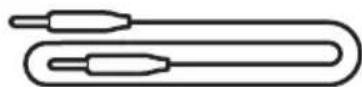
3.5 mm AUX 音频连接线
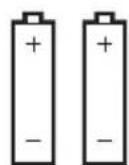
AA 电池(2 节)
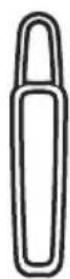
Bose A30 Aviation Headset 控制模块支架
注意:
natural_image
Diagram of a human head with a medical device connected to the ear, showing anatomical positioning (no text or labels)
调整麦克风
natural_image
Diagram of a human head with earphones and a medical device, showing anatomical positioning (no text or labels)
- 确保麦克风离嘴巴 12.7 mm。
注意:麦克风不应触及您的嘴唇。
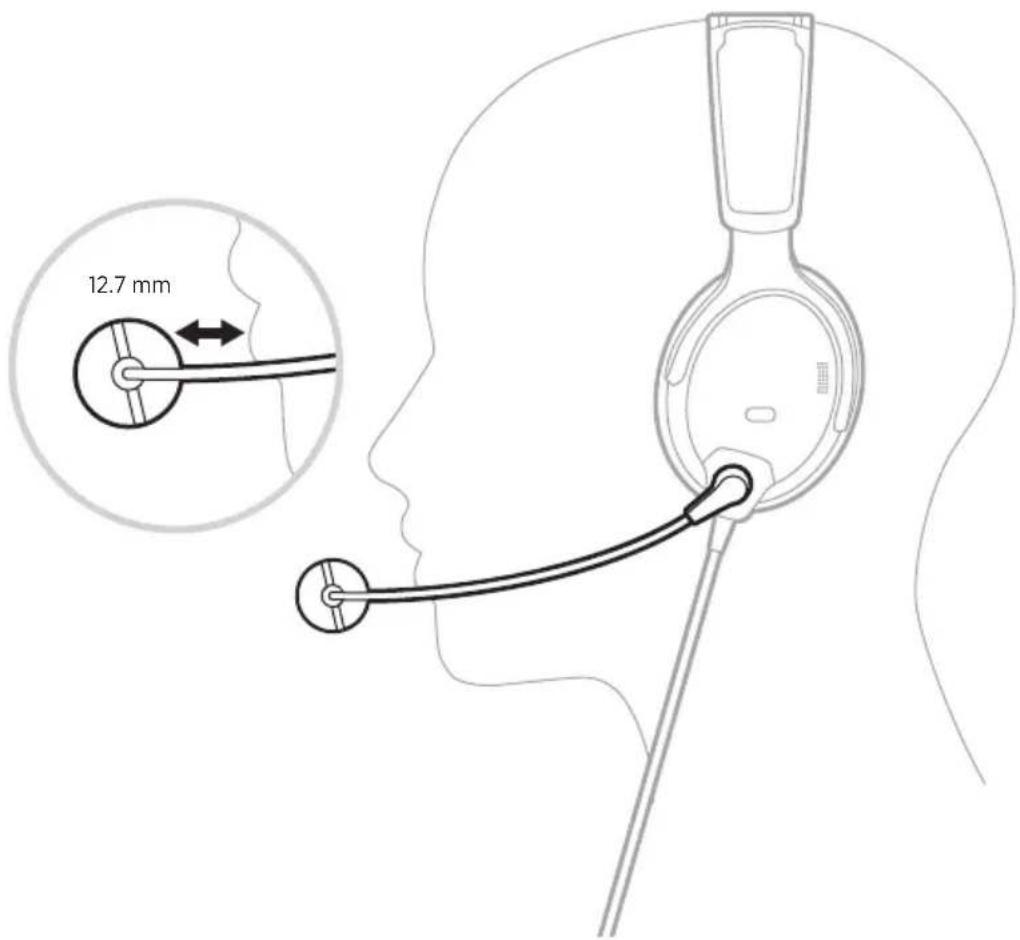
text_image
12.7 mm
- 确保麦克风底座上的白点面向您的嘴。
注意:如果需要,请扭转话筒底座。
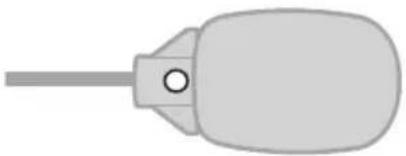
natural_image
Simple illustration of a bulb-shaped object with a central hole and a long shaft (no text or symbols)
- 请在飞行前测试耳机。
适合性的相关条件
natural_image
Diagram showing two mechanical components with arrows indicating assembly or disassembly (no text or symbols present)
打开电源
按下电源按钮 ⏻。
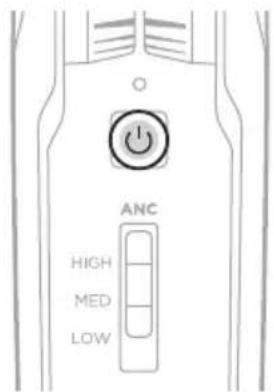
text_image
ANC
HIGH
MED
LOW
text_image
ANC
HIGH
MED
LOW
功能 位置 说明
text_image
ANC
HIGH
MED
LOW
text_image
Diagram showing two types of electronic devices with labeled ports and directional arrows indicating movement or operation.
text_image
Diagram showing battery charging process with two battery cells labeled '1' and '+' above a device casing
text_image
Diagram showing a device being inserted into a plug, with an arrow indicating the insertion direction.
natural_image
Pure mechanical diagram showing a lever mechanism with no text or symbols
natural_image
Pure technical line drawing of a mechanical component with no text or symbols
- 从插座中轻轻拉出端子盖。
更换麦克风组件和端子盖
text_image
Diagram showing two types of electronic devices with labeled ports and directional arrows indicating movement or operation.
text_image
Diagram showing battery charging process with two 1+ batteries and directional arrows indicating charging direction
text_image
Diagram showing a device being inserted into a cylindrical device with an arrow indicating the insertion direction.
注意:
text_image
ANC
HIGH
MED
LOW
电源 指示灯活动 系统状态
natural_image
Line drawing of a mechanical component or connector (no text or symbols)
text_image
BLUETOOTH
Bose A30
natural_image
Technical line drawing of a medical device with internal components and a meshed bottom panel (no text or symbols)
清洁耳机
您的耳机可能需要定期清洁。
组件 清洁过程
natural_image
Diagram of a curved mechanical component with an arrow indicating motion or force direction (no text or symbols present)
natural_image
Line drawing of a car door handle with a curved handle and arrow indicating rotation (no text or symbols)
安装新耳垫
natural_image
Diagram of a curved mechanical component with bidirectional arrow indicating rotation (no text or symbols)
- 从头带上取下旧衬垫。
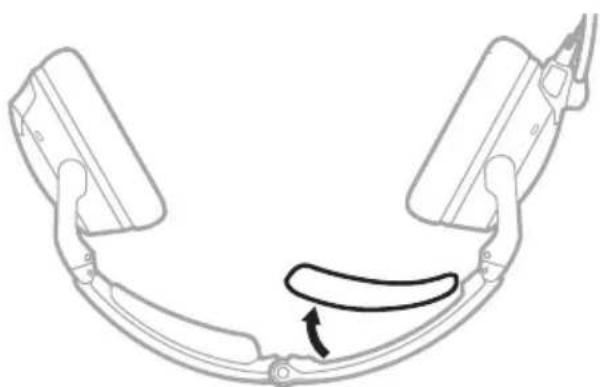
natural_image
Diagram of a curved mechanical component with a curved arrow indicating motion or force (no text or symbols)
natural_image
Simple line drawing of a mechanical device with an arrow indicating rotational motion (no text or symbols)
natural_image
Simple line drawing of a light bulb with two arrows pointing to its top and side (no text or symbols)
电池
请参见第 32 页上的 “电池”。
麦克风或端子盖
请参见第 30 页上的“麦克风放置”。
首先尝试这些解决方案
请访问:____ worldwide.Bose.com/Contact
Acoustic Noise Cancelling(声学消噪)
问题 操作方法
natural_image
Line drawing of a coiled cable with a connector and connector pin (no text or symbols)
text_image
12.5mm
14.0mm
插座 - 插针(正视图)
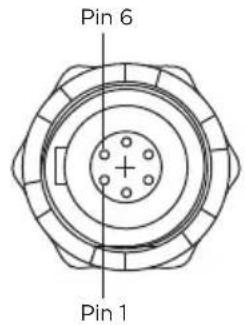
text_image
Pin 6
Pin 1
飞机接口示意图
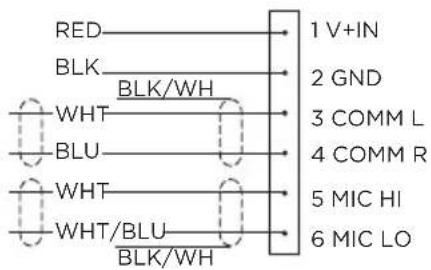
text_image
RED
BLK
WHT
BLU
WHT
WHT/BLU
BLK/WH
1 V+IN
2 GND
3 COMM L
4 COMM R
5 MIC HI
6 MIC LO
按照如下说明连接八条线:
text_image
10-32
V DC - 1/2A RED
BLK BLK/WH
WHT
BLU
WHT
WHT/BLU
BLK/WH
1 V+IN
2 GND
3 COMM L
4 COMM R
5 MIC HI
6 MIC LO
Microphone - Jack Ring
(audio)
Tip (PTT) Barrel (gnd)
Existing PTT switch and wiring
(no connection to Bose headset)
Headphone - Jack
Existing wiring to aircraft intercom/
audio panel
Tip (phone audio) Barrel (audio gnd)
立体声连接示意图
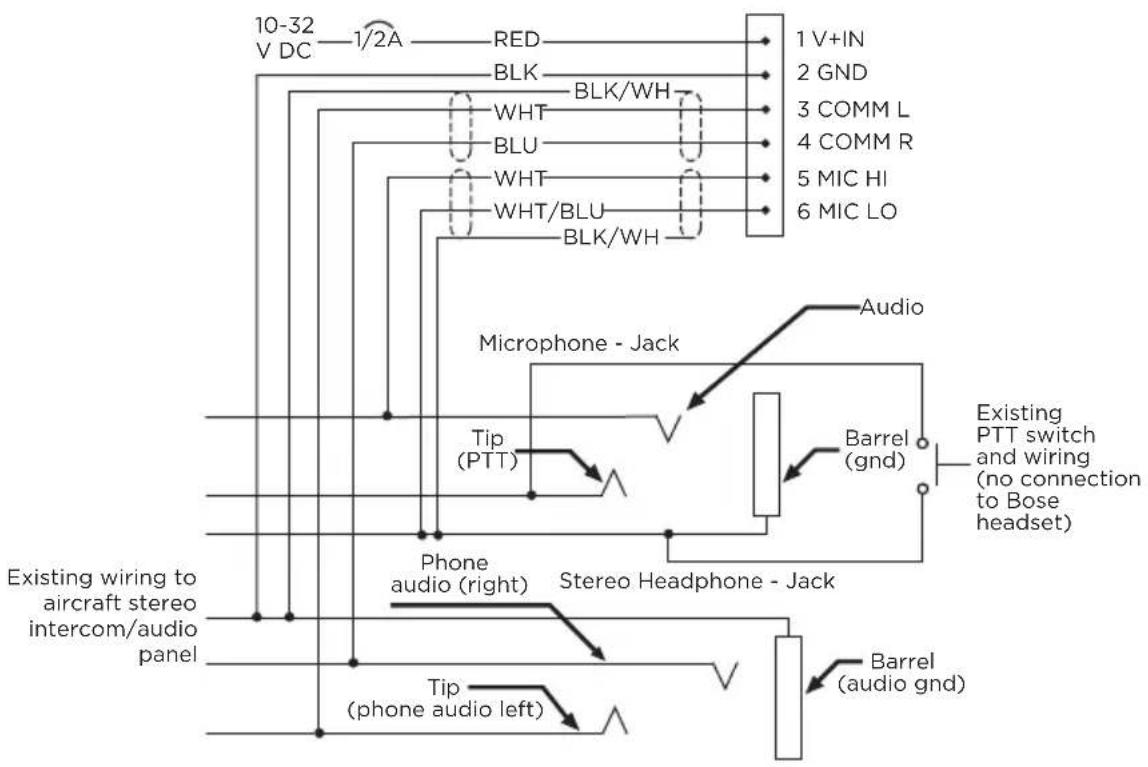
text_image
10-32
V DC — 1/2A — RED — 1 V+IN
BLK — BLK/WH — 2 GND
WHT — 3 COMM L
BLU — 4 COMM R
WHT — 5 MIC HI
WHT/BLU — 6 MIC LO
BLK/WH —
Microphone - Jack
Audio
Tip (PTT) — Barrel (gnd) — Existing PTT switch and wiring (no connection to Bose headset)
Phone audio (right) — Stereo Headphone - Jack
Existing wiring to aircraft stereo intercom/audio panel
Tip (phone audio left) — Barrel (audio gnd)
线路连接详情
可选安装接头的插针在下表中详述。
针号 颜色 用途
中国における輸入元: Bose Electronics (Shanghai) Company Limited, Level 6, Tower D, No. 2337 Gudai Rd.
Minhang District, Shanghai 201100
EUにおける輸入元: Bose Products B.V., Gorslaan 60, 1441 RG Purmerend, The Netherlands
Bose Corporation Headquarters: 1-877-230-5639
The following license disclosures apply to certain third-party software packages used as components in the product.
Package: LittlevGL Version 7.10.1
Copyright © 2020 LVGL LLC
Package: pycrc
Copyright © 2006-2015, Thomas Pircher tehpeh-web@tty1.net
The above is/are subject to the license terms reprinted below:
MIT License
Permission is hereby granted, free of charge, to any person obtaining a copy of this software and associated documentation files (the "Software"), to deal in the Software without restriction, including without limitation the rights to use, copy, modify, merge, publish, distribute, sublicense, and/or sell copies of the Software, and to permit persons to whom the Software is furnished to do so, subject to the following conditions:
The above copyright notice and this permission notice shall be included in all copies or substantial portions of the Software.
THE SOFTWARE IS PROVIDED "AS IS", WITHOUT WARRANTY OF ANY KIND, EXPRESS OR IMPLIED, INCLUDING BUT NOT LIMITED TO THE WARRANTIES OF MERCHANTABILITY, FITNESS FOR A PARTICULAR PURPOSE AND NONINFRINGEMENT. IN NO EVENT SHALL THE AUTHORS OR COPYRIGHT HOLDERS BE LIABLE FOR ANY CLAIM, DAMAGES OR OTHER LIABILITY, WHETHER IN AN ACTION OF CONTRACT, TORT OR OTHERWISE, ARISING FROM, OUT OF OR IN CONNECTION WITH THE SOFTWARE OR THE USE OR OTHER DEALINGS IN THE SOFTWARE.
Package: MCUXpresso Software Development Kit (SDK)
©2006-2021 NXP Semiconductors. All rights reserved.
The above is/are subject to the license terms reprinted below:
3-Clause BSD License
(Also called "BSD License 2.0" or "Modified BSD License")
Redistribution and use in source and binary forms, with or without modification, are permitted provided that the following conditions are met:
- Redistributions of source code must retain the above copyright notice, this list of conditions and the following disclaimer.
- Redistributions in binary form must reproduce the above copyright notice, this list of conditions and the following disclaimer in the documentation and/or other materials provided with the distribution.
- Neither the name of the nor the names of its contributors may be used to endorse or promote products derived from this software without specific prior written permission.
THIS SOFTWARE IS PROVIDED BY THE COPYRIGHT HOLDERS AND CONTRIBUTORS "AS IS" AND ANY EXPRESS OR IMPLIED WARRANTIES, INCLUDING, BUT NOT LIMITED TO, THE IMPLIED WARRANTIES OF MERCHANTABILITY AND FITNESS FOR A PARTICULAR PURPOSE ARE DISCLAIMED. IN NO EVENT SHALL BE LIABLE FOR ANY DIRECT, INDIRECT, INCIDENTAL, SPECIAL, EXEMPLARY, OR CONSEQUENTIAL DAMAGES (INCLUDING, BUT NOT LIMITED TO, PROCUREMENT OF SUBSTITUTE GOODS OR SERVICES; LOSS OF USE, DATA, OR PROFITS; OR BUSINESS INTERRUPTION) HOWEVER CAUSED AND ON ANY THEORY OF LIABILITY, WHETHER IN CONTRACT, STRICT LIABILITY, OR TORT (INCLUDING NEGLIGENCE OR OTHERWISE) ARISING IN ANY WAY OUT OF THE USE OF THIS SOFTWARE, EVEN IF ADVISED OF THE POSSIBILITY OF SUCH DAMAGE.
Packages: CMSIS Version 5.6.0 & SDK CMSIS Peripheral Drivers 2.x.x
Copyright © 2010-2017 ARM Limited or its affiliates. All rights reserved.
Package: Mbed TLS Version 2.26.0
Copyright © 2021 Arm Limited (or its affiliates).
The above is/are subject to the license terms reprinted below:
Apache License
Version 2.0, January 2004
http://www.apache.org/licenses/
TERMS AND CONDITIONS FOR USE, REPRODUCTION, AND DISTRIBUTION
1. Definitions.
“License” shall mean the terms and conditions for use, reproduction, and distribution as defined by Sections 1 through 9 of this document.
“Licensor” shall mean the copyright owner or entity authorized by the copyright owner that is granting the License.
“Legal Entity” shall mean the union of the acting entity and all other entities that control, are controlled by, or are under common control with that entity. For the purposes of this definition, “control” means (i) the power, direct or indirect, to cause the direction or management of such entity, whether by contract or otherwise, or (ii) ownership of fifty percent (50%) or more of the outstanding shares, or (iii) beneficial ownership of such entity.
"You" (or "Your") shall mean an individual or Legal Entity exercising permissions granted by this License.
“Source” form shall mean the preferred form for making modifications, including but not limited to software source code, documentation source, and configuration files.
"Object" form shall mean any form resulting from mechanical transformation or translation of a Source form, including but not limited to compiled object code, generated documentation, and conversions to other media types.
“Work” shall mean the work of authorship, whether in Source or Object form, made available under the License, as indicated by a copyright notice that is included in or attached to the work (an example is provided in the Appendix below).
"Derivative Works" shall mean any work, whether in Source or Object form, that is based on (or derived from) the Work and for which the editorial revisions, annotations, elaborations, or other modifications represent, as a whole, an original work of authorship. For the purposes of this License, Derivative Works shall not include works that remain separable from, or merely link (or bind by name) to the interfaces of, the Work and Derivative Works thereof.
“Contribution” shall mean any work of authorship, including the original version of the Work and any modifications or additions to that Work or Derivative Works thereof, that is intentionally submitted to Licensor for inclusion in the Work by the copyright owner or by an individual or Legal Entity authorized to submit on behalf of the copyright owner. For the purposes of this definition, “submitted” means any form of electronic, verbal, or written communication sent to the Licensor or its representatives, including but not limited to communication on electronic mailing lists, source code control systems, and issue tracking systems that are managed by, or on behalf of, the Licensor for the purpose of discussing and improving the Work, but excluding communication that is conspicuously marked or otherwise designated in writing by the copyright owner as “Not a Contribution.”
“Contributor” shall mean Licensor and any individual or Legal Entity on behalf of whom a Contribution has been received by Licensor and subsequently incorporated within the Work.
- Grant of Copyright License. Subject to the terms and conditions of this License, each Contributor hereby grants to You a perpetual, worldwide, non-exclusive, no-charge, royalty-free, irrevocable copyright license to reproduce, prepare Derivative Works of, publicly display, publicly perform, sublicense, and distribute the Work and such Derivative Works in Source or Object form.
- Grant of Patent License. Subject to the terms and conditions of this License, each Contributor hereby grants to You a perpetual, worldwide, non-exclusive, no-charge, royalty-free, irrevocable (except as stated in this section) patent license to make, have made, use, offer to sell, sell, import, and otherwise transfer the Work, where such license applies only to those patent claims licensable by such Contributor that are necessarily infringed by their Contribution(s) alone or by combination of their Contribution(s) with the Work to which such Contribution(s) was submitted. If You institute patent litigation against any entity (including a cross-claim or counterclaim in a lawsuit) alleging that the Work or a Contribution incorporated within the Work constitutes direct or contributory patent infringement, then any patent licenses granted to You under this License for that Work shall terminate as of the date such litigation is filed.
- Redistribution. You may reproduce and distribute copies of the Work or Derivative Works thereof in any medium, with or without modifications, and in Source or Object form, provided that You meet the following conditions:
a. You must give any other recipients of the Work or Derivative Works a copy of this License; and
b. You must cause any modified files to carry prominent notices stating that You changed the files; and
c. You must retain, in the Source form of any Derivative Works that You distribute, all copyright, patent, trademark, and attribution notices from the Source form of the Work, excluding those notices that do not pertain to any part of the Derivative Works; and
d. If the Work includes a "NOTICE" text file as part of its distribution, then any Derivative Works that You distribute must include a readable copy of the attribution notices contained within such NOTICE file, excluding those notices that do not pertain to any part of the Derivative Works, in at least one of the following places: within a NOTICE text file distributed as part of the Derivative Works; within the Source form or documentation, if provided along with the Derivative Works; or, within a display generated by the Derivative Works, if and wherever such third-party notices normally appear. The contents of the NOTICE file are for informational purposes only and do not modify the License. You may add Your own attribution notices within Derivative Works that You distribute, alongside or as an addendum to the NOTICE text from the Work, provided that such additional attribution notices cannot be construed as modifying the License.
You may add Your own copyright statement to Your modifications and may provide additional or different license terms and conditions for use, reproduction, or distribution of Your modifications, or for any such Derivative Works as a whole, provided Your use, reproduction, and distribution of the Work otherwise complies with the conditions stated in this License.
- Submission of Contributions. Unless You explicitly state otherwise, any Contribution intentionally submitted for inclusion in the Work by You to the Licensor shall be under the terms and conditions of this License, without any additional terms or conditions. Notwithstanding the above, nothing herein shall supersede or modify the terms of any separate license agreement you may have executed with Licensor regarding such Contributions.
- Trademarks. This License does not grant permission to use the trade names, trademarks, service marks, or product names of the Licensor, except as required for reasonable and customary use in describing the origin of the Work and reproducing the content of the NOTICE file.
- Disclaimer of Warranty. Unless required by applicable law or agreed to in writing, Licensor provides the Work (and each Contributor provides its Contributions) on an “AS IS” BASIS, WITHOUT WARRANTIES OR CONDITIONS OF ANY KIND, either express or implied, including, without limitation, any warranties or conditions of TITLE, NON-INFRINGEMENT, MERCHANTABILITY, or FITNESS FOR A PARTICULAR PURPOSE. You are solely responsible for determining the appropriateness of using or redistributing the Work and assume any risks associated with Your exercise of permissions under this License.
-
Limitation of Liability. In no event and under no legal theory, whether in tort (including negligence), contract, or otherwise, unless required by applicable law (such as deliberate and grossly negligent acts) or agreed to in writing, shall any Contributor be liable to You for damages, including any direct, indirect, special, incidental, or consequential damages of any character arising as a result of this License or out of the use or inability to use the Work (including but not limited to damages for loss of goodwill, work stoppage, computer failure or malfunction, or any and all other commercial damages or losses), even if such Contributor has been advised of the possibility of such damages.
-
Accepting Warranty or Additional Liability. While redistributing the Work or Derivative Works thereof, You may choose to offer, and charge a fee for, acceptance of support, warranty, indemnity, or other liability obligations and/or rights consistent with this License. However, in accepting such obligations, You may act only on Your own behalf and on Your sole responsibility, not on behalf of any other Contributor, and only if You agree to indemnify, defend, and hold each Contributor harmless for any liability incurred by, or claims asserted against, such Contributor by reason of your accepting any such warranty or additional liability.
END OF TERMS AND CONDITIONS
©2023 Bose Corporation
Licensed under the Apache License, Version 2.0 (the "License"); you may not use this file except in compliance with the License.
You may obtain a copy of the License at: http://www.apache.org/licenses/LICENSE-2.0
Unless required by applicable law or agreed to in writing, software distributed under the License is distributed on an "AS IS" BASIS, WITHOUT WARRANTIES OR CONDITIONS OF ANY KIND, either express or implied.
See the License for the specific language governing permissions and limitations under the License.
内容物の確認
内容物 15
ヘッドセット各部の名称 16
Acoustic Noise Cancelling.... 54
インターユム通信.... 55
オーディオ 56
マイク 57
natural_image
Diagram of a human head with a medical device connected to the ear area, showing anatomical positioning (no text or labels)
マイクを調整する
natural_image
Diagram of a human head with earphones and a medical device, showing anatomical positioning (no text or labels)
natural_image
Simple illustration of a bulb-shaped object with a central hole and a string (no text or symbols)
natural_image
Diagram showing two mechanical components with arrows indicating assembly or disassembly (no text or symbols present)
電源オン
電源ボタン ⏻を押します。
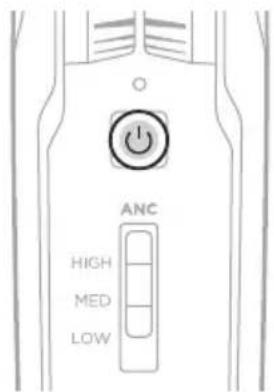
text_image
ANC
HIGH
MED
LOW
text_image
ANC
HIGH
MED
LOW
機能 ポジション 説明
text_image
ANC
HIGH
MED
LOW
text_image
Diagram showing two types of electronic devices with labeled ports and directional arrows indicating movement or operation.
text_image
Diagram showing battery charging process with two batteries and directional arrows indicating charging direction
text_image
Diagram showing a device being inserted into a cylindrical device with a 10000Ω valve, indicating force application or adjustment.
natural_image
Diagram of a mechanical or electrical component with directional arrows indicating motion (no text or symbols)
natural_image
Pure technical line drawing of a mechanical component with no text or symbols
text_image
Technical diagram showing two types of electrical probes with directional arrows indicating movement or change.
text_image
Diagram showing battery charging process with two battery cells labeled '1' and '+' above a device casing
text_image
Diagram showing a device being inserted into a battery, with an arrow indicating the insertion direction.
注記:
text_image
ANC
HIGH
MED
LOW
natural_image
Line drawing of a medical device component (no text or symbols)
text_image
BLUETOOTH
Bose A30
natural_image
Technical line drawing of a medical device with internal components and a meshed bottom panel (no text or symbols)
ヘッドセットのお手入れ
natural_image
Diagram of a curved mechanical component with an arrow indicating motion or force direction (no text or symbols present)
natural_image
Line drawing of a car door handle with a curved seat and arrow indicating rotation (no text or symbols)
新しいイヤークッションを取り付ける
natural_image
Diagram of a mechanical linkage or frame assembly with bidirectional motion arrows (no text or symbols)
natural_image
Diagram of a curved mechanical component with an arrow indicating motion or force direction (no text or symbols present)
natural_image
Simple line drawing of a mechanical device with an arrow indicating rotational motion (no text or symbols)
natural_image
Simple line drawing of a mechanical component with arrows indicating direction (no text or symbols)
natural_image
Simple line drawing of a light bulb with arrows indicating direction (no text or symbols)
電池
「電池」(32ページ)をご覧ください。
マイクまたはターミネーターカバー
Acoustic Noise Cancelling
症状 操作方法
natural_image
Line drawing of a coiled cable with a connector, no text or symbols present
text_image
12.5mm
.49"
14.0mm
.55"
ソケット - ピン出力(正面図)
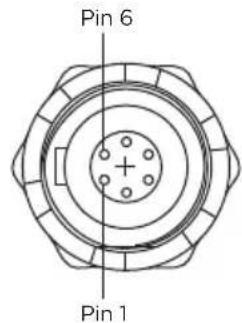
text_image
Pin 6
Pin 1
航空機インターフェイス構成図
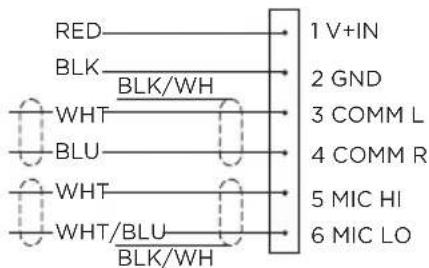
text_image
RED
BLK
WHT
BLU
WHT
WHT/BLU
BLK/WH
1 V+IN
2 GND
3 COMM L
4 COMM R
5 MIC HI
6 MIC LO
text_image
10-32
V DC — 1/2A — RED — 1 V+IN
BLK — BLK/WH — 2 GND
WHT — WHT — 3 COMM L
BLU — BLU — 4 COMM R
WHT — WHT/BLU — 5 MIC HI
BLK/WH — 6 MIC LO
Microphone - Jack — Ring (audio)
Tip (PTT) — Barrel (gnd) — Existing PTT switch and wiring (no connection to Bose headset)
Headphone - Jack — Existing wiring to aircraft intercom/
audio panel
Tip (phone audio) — Barrel (audio gnd)
ステレオ接続の配線図
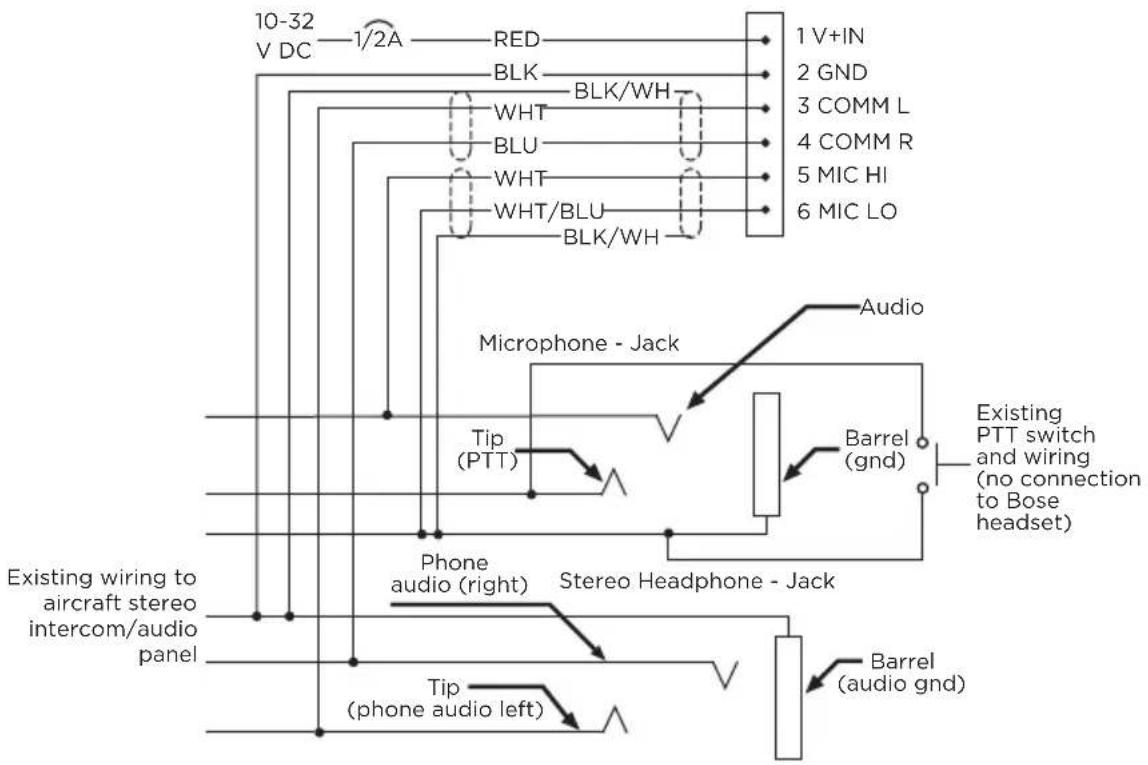
text_image
10-32
V DC — 1/2A — RED — 1 V+IN
BLK — BLK/WH — 2 GND
WHT — WHT — 3 COMM L
BLU — BLU — 4 COMM R
WHT — WHT — 5 MIC HI
WHT/BLU — BLK/WH — 6 MIC LO
Microphone - Jack
Audio
Tip (PTT) —
Existing PTT switch and wiring (no connection to Bose headset)
Phone audio (right) — Stereo Headphone - Jack
Existing wiring to aircraft stereo intercom/audio panel
Tip (phone audio left) — Barrel (audio gnd)
接続方法の詳細