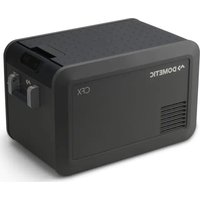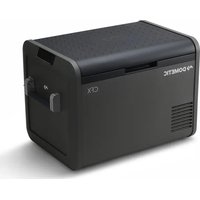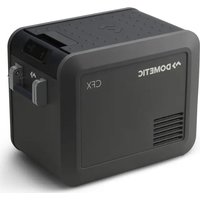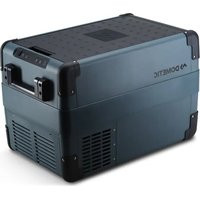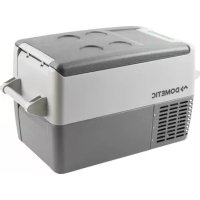
CoolFreeze CF35 - Refrigerator DOMETIC - Free user manual and instructions
Find the device manual for free CoolFreeze CF35 DOMETIC in PDF.



Frequently Asked Questions - CoolFreeze CF35 DOMETIC
User questions about CoolFreeze CF35 DOMETIC
0 question about this device. Answer the ones you know or ask your own.
Ask a new question about this device
Download the instructions for your Refrigerator in PDF format for free! Find your manual CoolFreeze CF35 - DOMETIC and take your electronic device back in hand. On this page are published all the documents necessary for the use of your device. CoolFreeze CF35 by DOMETIC.
USER MANUAL CoolFreeze CF35 DOMETIC
natural_image
Exterior view of two DOMETIC refrigerant units (no visible text or symbols on the devices themselves)CFF35, CFF45
EN Compressor Cooler
Operating manual....8
Kompressor-Kühlbox
© 2020 Dometic Group. The visual appearance of the contents of this manual is protected by copyright and design law. The underlying technical design and the products contained herein may be protected by design, patent or be patent pending. The trademarks mentioned in this manual belong to Dometic Sweden AB. All rights are reserved.
1
2
natural_image
Line drawing of a portable electronic device with scroll arrows indicating rotation or movement (no text or symbols)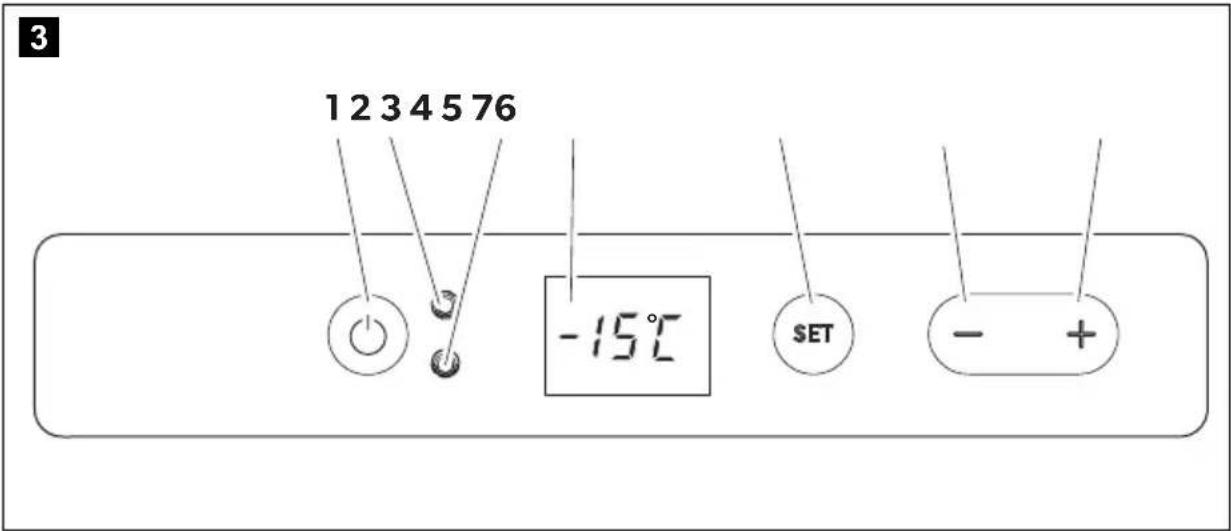
text_image
3 12 3 4 5 76 -15°C SET - +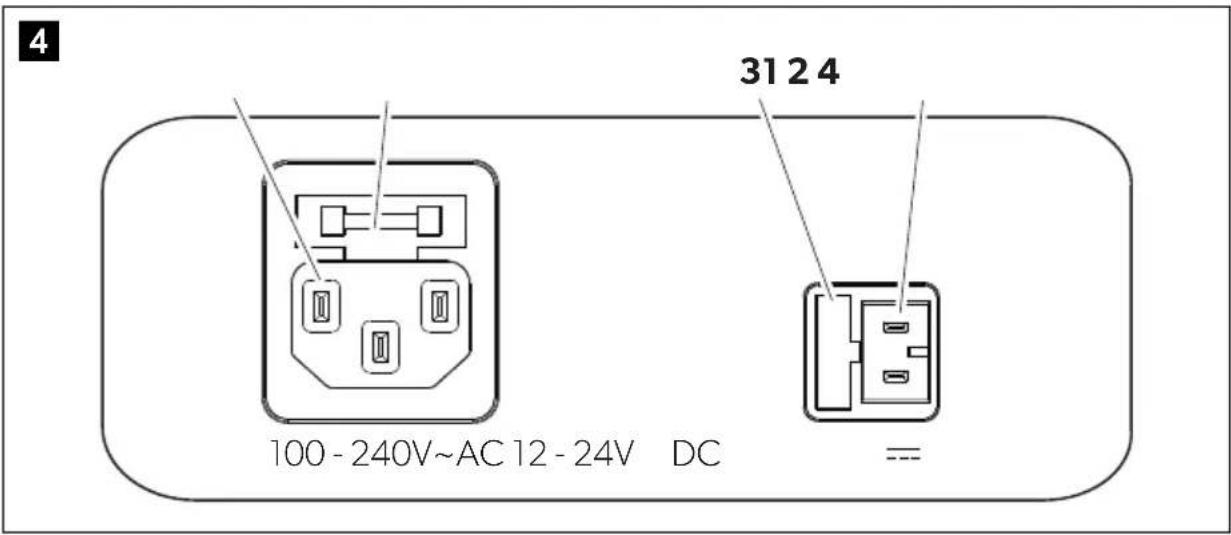
text_image
4 31 2 4 100 - 240V~AC 12 - 24V DC =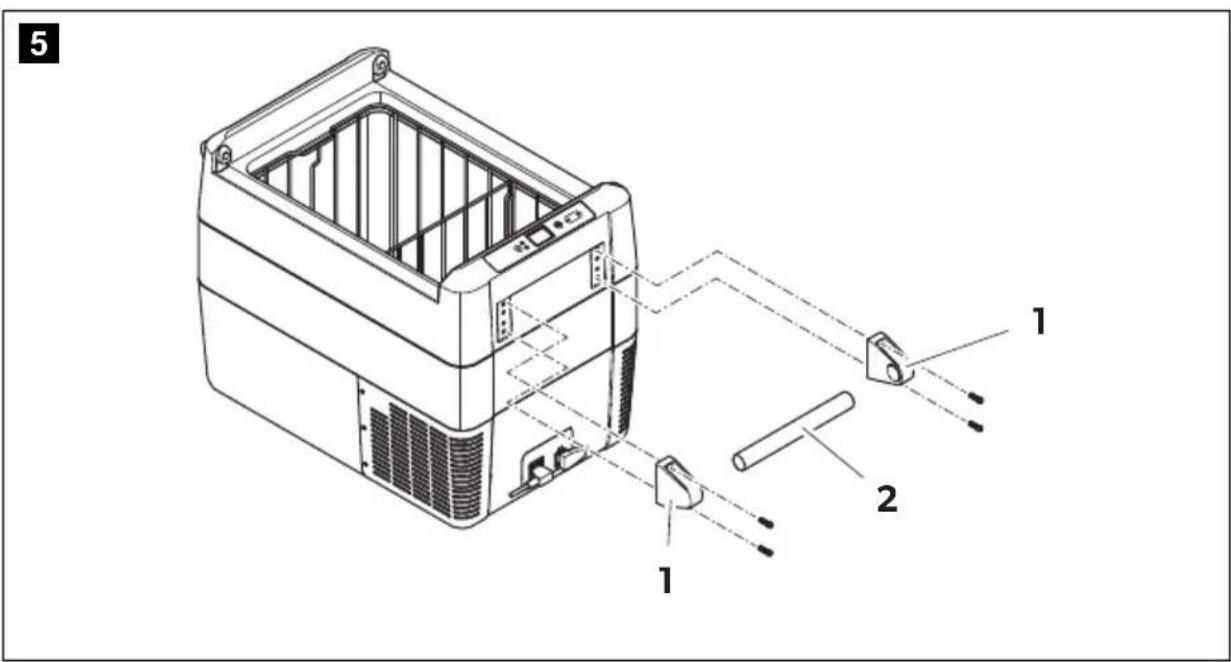
text_image
5 1 2 16
7
A
natural_image
Line drawing of an open industrial container with a checkmark indicating inspection (no text or symbols present)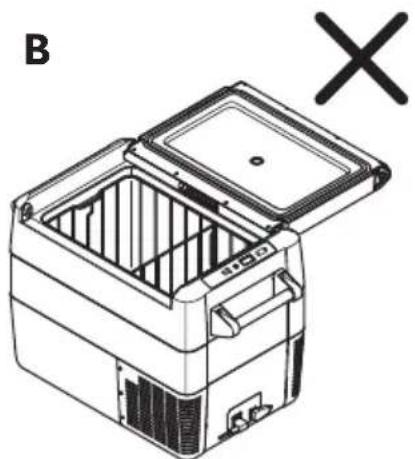
natural_image
Line drawing of a refrigerator with open lid and internal compartments, marked with 'B' and an 'X' symbol (no text or labels on the diagram itself)8
natural_image
Line drawing of a mechanical device with internal cage and mounting bracket (no text or symbols)9
natural_image
Line drawing of a portable electric stove with open lid and internal compartments (no text or symbols)10
text_image
123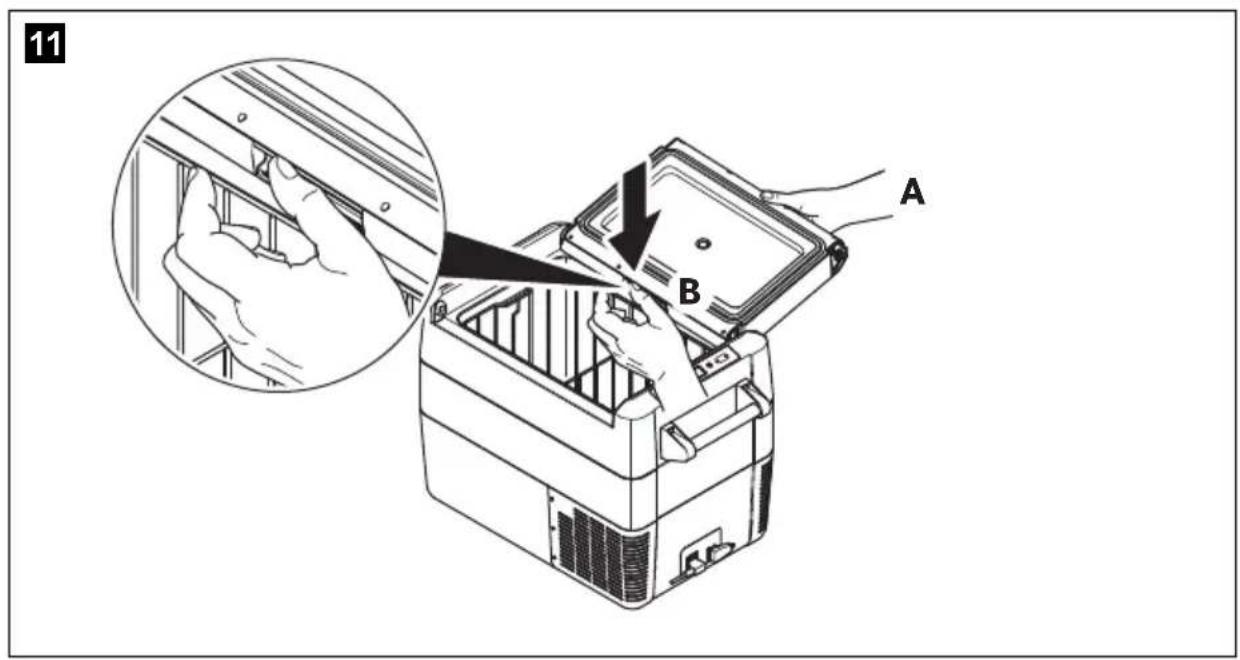
text_image
11 A BPlease read this manual carefully before starting the device. Keep it in a safe place for future reference. If the device is passed on to another person, this manual must be handed over to the user along with it.
The manufacturer cannot be held liable for damage resulting from improper usage or incorrect operation.
Contents
1 Explanation of symbols....8
2 Safety instructions....9
3 Scope of delivery ..... 11
4 Intended use....12
5 Function description.....12
6 Operation....14
7 Cleaning and maintenance.... 22
8 Troubleshooting 23
9 Warranty 24
10 Disposal.... 25
11 Technical data 25
1 Explanation of symbols

DANGER!
Safety instruction: Indicates a hazardous situation that, if not avoided, will result in death or serious injury.

WARNING!
Safety instruction: Indicates a hazardous situation that, if not avoided, could result in death or serious injury.

CAUTION!
Safety instruction: Indicates a hazardous situation that, if not avoided, could result in minor or moderate injury.

NOTICE!
Indicates a situation that, if not avoided, can result in property damage.

NOTE
Supplementary information for operating the product.
2 Safety instructions

WARNING! Failure to obey these warnings could result in death or serious injury.
Electrocution hazard
- Do not operate the cooling device if it is visibly damaged.
- If this cooling device's power cable is damaged, it must be replaced to prevent safety hazards.
- This cooling device may only be repaired by qualified personnel. Improper repairs can lead to considerable hazards.
Fire hazard
- When positioning the device, ensure the supply cord is not trapped or damaged.
- Do not locate multiple portable socket-outlets or portable power supplies at the rear of the device.
Health hazard
- This device can be used by children aged from 8 years and above and persons with reduced physical, sensory or mental capabilities or lack of experience and knowledge if they have been given supervision or instruction concerning use of the device in a safe way and understand the hazards involved.
• Children shall not play with the device. - Cleaning and user maintenance shall not be made by children without supervision.
- Children aged from 3 to 8 years are allowed to load and unload cooling devices.
Explosion hazard
- Do not store any explosive substances such as spray cans with a flammable propellant in the cooling device.

CAUTION! Failure to obey these cautions could result in minor or moderate injury.
Electrocution hazard
- Before starting the cooling device, ensure that the power supply line and the plug are dry.
- Disconnect the cooling device from the power supply
– before each cleaning and maintenance - after every use
Health hazard
- Please check if the cooling capacity of the device is suitable for storing the food or medicine you wish to cool.
- Food may only be stored in its original packaging or in suitable containers.
- Opening the cooling device for long periods can cause significant increase of the temperature in the compartments of the device.
- Clean regularly surfaces that can come in contact with food and accessible drainage systems.
- Store raw meat and fish in suitable containers in the device, so that it is not in contact with or can drip onto other food.
- If the device is left empty for long periods:
- Switch off the device.
- Defrost the device.
- Clean and dry the device.
– Leave the lid open to prevent mould developing within the device.

NOTICE! Damage hazard
- Check that the voltage specification on the type plate corresponds to that of the energy supply.
- Only connect the cooling device as follows:
- With the DC connection cable to a DC power supply in the vehicle
- Or with the AC connection cable to an AC power supply
- Never pull the plug out of the socket by the cable.
- If the cooling device is connected to a DC outlet: Disconnect the cooling device and other power consuming devices from the battery before connecting a quick charging device.
-
If the cooling device is connected to a DC outlet: Disconnect the cooling device or switch it off when you turn off the engine. Otherwise you may discharge the battery.
-
The cooling device is not suitable for transporting caustic materials or materials containing solvents.
- The insulation of the cooling device contains flammable cyclopentane and requires special disposal procedures. Deliver the cooling device at the end of its life-cycle to an appropriate recycling center.
- Do not use electrical devices inside the cooling device unless they are recommended by the manufacturer for the purpose.
- Do not place the cooling device near naked flames or other heat sources (heaters, direct sunlight, gas ovens etc.).
- Risk of overheating!
Ensure at all times that there is a minimum of 50 mm ventilation on all four sides of the cooling device. Keep the ventilation area free of any objects that could restrict the air flow to the cooling components.
Do not place the cooling device in closed compartments or areas with none or minimal air flow.
- Ensure that the ventilation openings are not covered.
- Do not fill the inner container with ice or fluids.
- Never immerse the cooling device in water.
- Protect the cooling device and cables against heat and moisture.
- Protect the cooling device from exposure to rain.
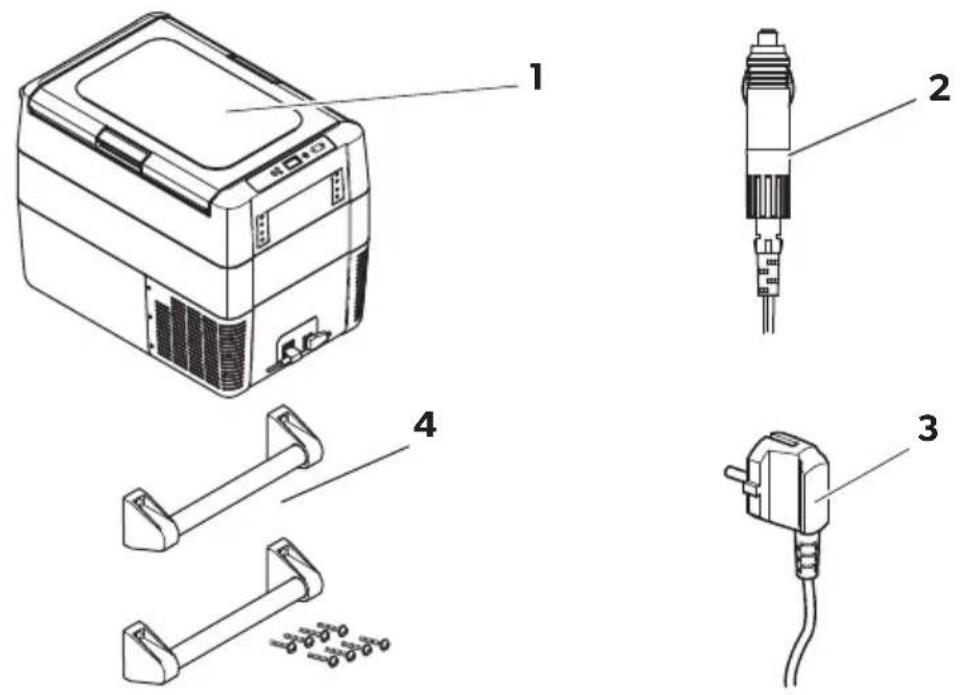
3 S c o p e o f d
Item (fig. 1, page 3)
Quantity Description
11 Cooler
21 Connection cable for DC connection
31 Connection cable for AC connection
4 2 Carry handle, consisting of:
• 2 holders
- 1 handle
- 4 fastening screws
- 1 allen wrench
-1 Operating manual
4 Intended use
The cooling device is suitable for:
• cooling and freezing foods
- camping use and in mobile applications
The cooling device is designed to be operated from:
- a DC on-board power supply of a vehicle, boat or RV
- a DC auxiliary battery
- an AC power supply
The cooling device is intended to be used in household and similar applications such as
- staff kitchen areas in shops, offices and other working environments
- farm houses
- clients in hotels, motels and other residential type environments
• bed and breakfast type environments
• catering and similar non-retail applications
5 Function description
The cooler can chill products, keep them cool as well as freeze them. A low maintenance refrigerant circuit with compressor provides the cooling. The generous insulation and powerful compressor ensure efficient and fast cooling.
The cooler is portable.
The cooler can withstand a short-term inclination of 30^ , for example on boats.
5.1 Scope of functions
- Power supply with priority circuit for connecting to the AC mains
- Three-level battery monitor to protect the vehicle battery
- Display with temperature gauge in ^ and ^ switches off automatically at low battery voltage
- Temperature setting: With two buttons in steps of 1^ (2°F)
- Display dimming function with 3 brightness levels
- Removable wire basket
- Removable carrying handles
5.2 Operating and display elements
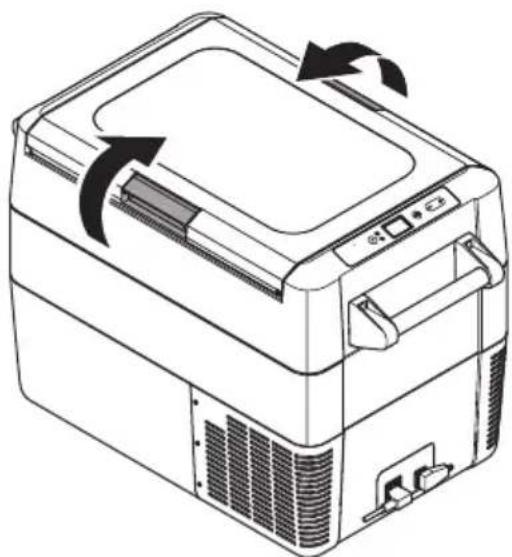
Lid latches (fig. 2, page 3)
Operating panel (fig. 3, page 4)
| Item Description Explanation | ||
| 1 | ON | Switches the cooler on or off when the button is pressed for between one and two seconds |
| OFF | ||
| 2 | POWER “” | Status indication |
| LED lights up green: Compressor is on | ||
| LED lights up orange: Compressor is off | ||
| LED flashes orange: Display switched off automatically due to low battery voltage | ||
| 3 | ERROR | LED flashes red: Device is switched on but not ready for operation |
| 4- | Display, shows the information | |
| 5 | SET | Selects the input mode-Temperature setting-Celsius or Fahrenheit displaySet battery monitorSet brightness of display |
| 6 | DOWN- | Press once to decrease the value |
| 7 | UP+ | Press once to increase the value |
Connection sockets (fig. 4, page 4)
Item Description
1 Connection socket AC voltage supply
2 AC fuse holder
3 DC fuse cover
4 Connection socket DC voltage supply
6 O p e r a t i o n
6.1 Before initial use

NOTE
Before starting your new cooler for the first time, you should clean it inside and outside with a damp cloth for hygienic reasons (please also refer to the chapter “Cleaning and maintenance” on page 22).
Mounting the handles (fig. 5, page 4)
The handles are enclosed unassembled. If you wish to attach the handles, proceed as follows:
▶ Assemble a handle by putting two holders (1) and a handle (2) together.
▶ Fasten the holders with the enclosed screws in the holes provided.
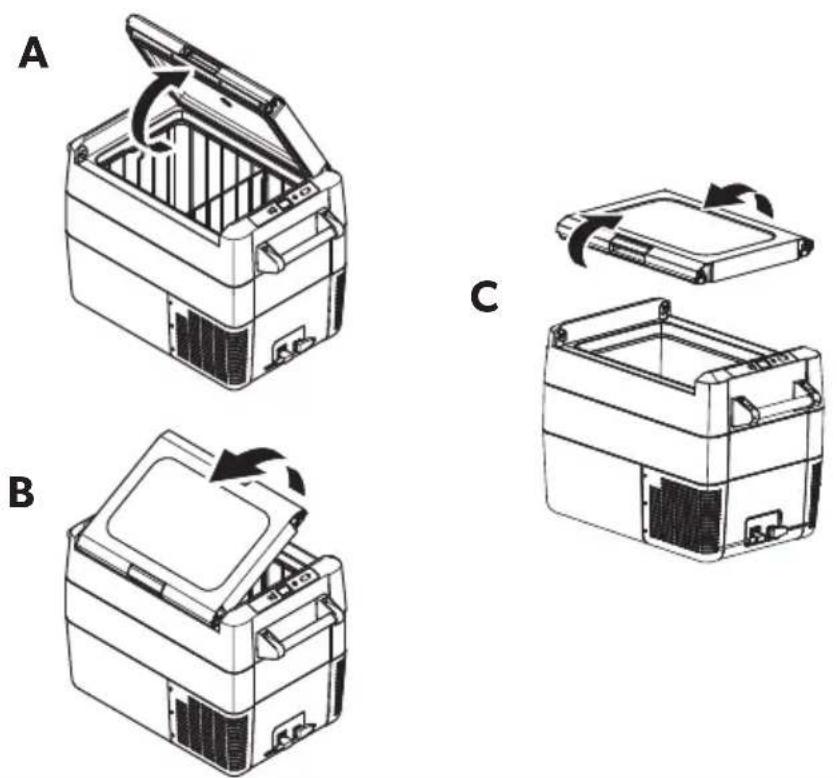
Opening or removing the lid (fig. 6, page 5)
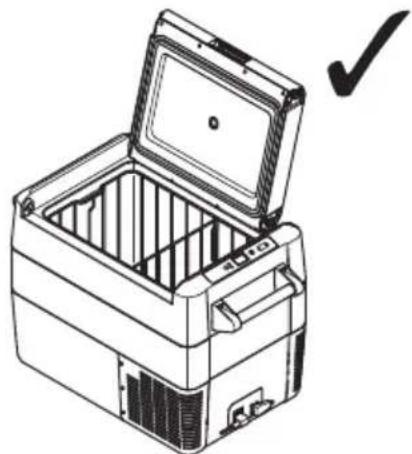
The lid can be opened from either side or removed completely without the need of tools as follows:
▶ To open the lid, unlatch in the preferred opening direction, (A) or (B).
▶ To remove the lid, unlatch both sides at the same time (C).
Lid stop position (fig. 7, page 5)
The lid has a built-in stop position (A). Do not force the lid past the built-in stop (B).

NOTICE!
DAMAGE HAZARD!
Failure to observe this instruction can cause the lid to break off.
If the lid has been forced too far, follow the steps described in the chapter "The lid has been forced past the built-in stop (fig. 11, page 7)" on page 24.
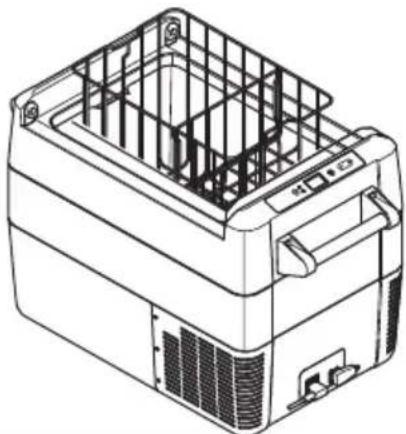
Removing the basket (fig. 8, page 6)

NOTICE!
DAMAGE HAZARD!
Failure to obey this instruction may result in damage to the device. Removing the basket with the lid open may scratch the lid and deform the basket. We recommend to remove the lid before removing the basket.
Selecting the temperature units
Temperature display units can be switched between Celsius and Fahrenheit as follows:
▶Switch on the cooler.
▶ Press the "SET" button (fig. 3 5, page 4) twice.
▶ Use the "UP +" (fig. 3 7, page 4) or "DOWN -" (fig. 3 6, page 4) buttons to select Celsius or Fahrenheit.
√ The selected temperature unit then appears in the display for a few seconds. The display flashes several times before it returns to the current temperature.
6.2 Energy saving tips
- Choose a well ventilated location which is protected from direct sunlight.
- Allow warm food to cool down first before placing it in the cooling device to keep cool.
- Do not open the cooling device more often than necessary.
- Do not leave the cooling device open for longer than necessary.
- Defrost the cooler once a layer of ice forms.
- Avoid unnecessarily low temperatures.
6.3 Connecting the cooler
Connecting to a battery (Vehicle or boat)
The cooler can be operated with 12 V or 24 V---.

NOTICE!
DAMAGE HAZARD!
Failure to obey this instruction may result in damage to the device. Disconnect the cooler and other consumer units from the battery before you connect the battery to a quick charging device. Overvoltage can damage the electronics of the device.
For safety reasons the cooler is equipped with an electronic system to prevent polarity reversal. This protects the cooler against short-circuiting when connecting to a battery.
Using the fused DC plug

NOTICE!
DAMAGE HAZARD!
Failure to obey this instruction may result in damage to the device. For protection of the device the DC cable supplied includes a fuse inside the plug. Do not remove the fused DC plug. Only use the DC cable supplied.
▶ Plug the DC connection cable (fig. 1 2, page 3) into the DC voltage socket of the cooler (fig. 4 3, page 4).
▶Connect the connection cable to a DC power outlet.
Connecting to an AC power supply (e.g. in the home or office)

DANGER!
ELECTROCUTION HAZARD!
Failure to obey these warnings will result in death or serious injury.
- Never handle plugs and switches with wet hands or if you are standing on a wet surface.
- If you are operating your cooler on board a boat from a AC power supply, you must install a residual current circuit breaker between the AC power supply and the cooler.
Seek advice from a trained technician.
The coolers have an integrated multi-voltage power supply with priority circuit for connecting to an AC voltage source. The priority circuit automatically switches the cooler to AC operation if the device is connected to an AC power supply, even if the DC connection cable is still attached.
When switching between the AC power supply and the battery supply, the red LED may light up briefly.
▶ Plug the AC connection cable (fig. 1 3, page 3) into the AC voltage socket of the cooler (fig. 4 1, page 4).
▶Connect the connection cable to an AC power outlet.
6.4 Using the battery monitor
The device is equipped with a multi-level battery monitor that protects your vehicle battery against excessive discharging when the device is connected to the on-board DC supply.
If the cooler is operated when the vehicle ignition is switched off, the cooler switches off automatically as soon as the supply voltage falls below a set level. The cooler will switch back on once the battery has been recharged to the restart voltage level.

NOTICE!
DAMAGE HAZARD!
Failure to obey this instruction may result in damage to the battery. When switched off by the battery monitor, the battery will no longer be fully charged. Avoid starting repeatedly or operating current consumers without longer charging phases. Ensure that the battery is recharged.
In "HIGH" mode, the battery monitor responds faster than at the levels "LOW" and "MED" (see the following table).
| Battery monitor mode LOW MED HIGH | |
| Switch-off voltage at 12 V | 10.1 V 11.4 V 11.8 V |
| Restart-voltage at 12 V | 11.1 V 12.2 V 12.6 V |
| Switch-off voltage at 24 V | 21.5 V 24.1 V 24.6 V |
| Restart voltage at 24 V | 23.0 V 25.3 V 26.2 V |
The battery monitor mode can be selected as follows:
▶Switch on the cooler.
▶ Press the "SET" button (fig. 3 5, page 4) three times.
▶ Use the "UP +" (fig. 3 7, page 4) or "DOWN -" (fig. 3 6, page 4) buttons to select the battery monitor mode.
√Display will be as follows:
Lo (LOW), ΠEd (MED), Hi (HIGH)
√ The selected mode then appears in the display for a few seconds. The display flashes several times before it returns to the current temperature.

NOTE
When the cooler is supplied by the starter battery, select the battery monitor mode "HIGH". If the cooler is connected to a supply battery, the battery monitor mode "LOW" will suffice.
6.5 Using the cooler

NOTICE!
OVERHEATING HAZARD!
Failure to obey this instruction may result in damage to the device. Ensure at all times that there is sufficient ventilation so that the heat that generated during operation can dissipate. Ensure that the ventilation slots are not covered. Make sure that the device is sufficiently far away from walls and other objects so that the air can circulate.
▶Place the cooler on a firm foundation.
Make sure that the ventilation slots are not covered and that the heated air can dissipate. We recommend keeping a gap of at least 2" around ventilation holes.

NOTE
Place the cooler as shown (fig. 1, page 3). If you operate the cooler in a different orientation it can be damaged.
▶ Connect the cooler, see chapter "Connecting the cooler" on page 16.

NOTICE!
EXCESSIVELY LOW TEMPERATURE HAZARD!
Failure to obey this instruction may result in damage to the objects placed in the cooler.
Ensure that the only those objects are placed in the cooler that are intended to be cooled at the selected temperature.
▶ Press the "ON/OFF" button (fig. 3 1, page 4) for between one and two seconds.
√ The LED "⏻" lights up (fig. 3 2, page 4).
√ The display (fig. 3 4, page 4) switches on and shows the current temperature.
√The cooler starts cooling the interior.

NOTE – Displayed temperature
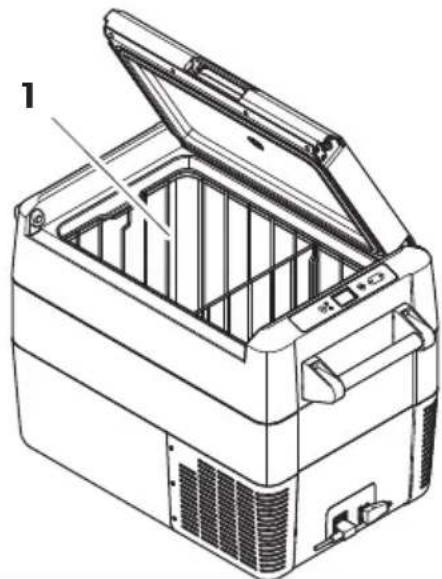
The temperature displayed is that of the large section of the interior compartment (fig. 91).

NOTE
When operating from a battery, the display switches off automatically if the battery voltage is low. The LED "⏻" flashes orange.
Latching the cooler lid
▶Close the lid.
▶ Press the latch (fig. 2, page 3) down, until it latches in place audibly.

NOTE
When latching the lid, ensure that both latch side pins are fully engaged to ensure a good lid seal. One latch may engage slightly before the other.
▶If the lid is not closed equally at both sides, press until a second click is heard.
6.6 Setting the temperature
▶ Press the "SET" button (fig. 3 5, page 4) once.
▶ Use the "UP +" (fig. 3 7, page 4) and "DOWN -" (fig. 3 6, page 4) buttons to select the cooling temperature.
√ The cooling temperature appears in the display for a few seconds. The display flashes several times and then the current temperature is displayed again.
6.7 Setting the display brightness
The display brightness can be dimmed for low ambient light conditions. To set the dimming level of the display proceed as follows:
▶Switch on the cooler.
▶ Press the "SET" button (fig. 3 5, page 4) four times.
▶ Use the "UP +" (fig. 3 7, page 4) or "DOWN -" (fig. 3 6, page 4) buttons to set the brightness of the display.
√ Display will be as follows:
d0 (default), d1 (medium), d2 (dark)
√ The display shows the set mode for several seconds. The display flashes twice before it returns to the current temperature.

NOTE
- The factory setting of brightness of the display is d0 (default).
- If a fault occurs, the brightness automatically reverts to brightness d0 (default). After troubleshooting the set brightness is reactivated.
6.8 Switching off the cooler
▶Empty the cooler.
▶Switch the cooler off.
▶Pull out the connection cable.
If you do not want to use the cooler for a longer period of time:
▶Leave the lid slightly open. This prevents odor build-up.
6.9 Defrosting the cooler
Humidity can form frost in the interior of the cooling device or on the evaporator. This reduces the cooling capacity.

NOTICE!
DAMAGE HAZARD!
Failure to obey this instruction may result in damage to the device. Never use hard or pointed tools to remove ice or to loosen objects which have frozen in place.
To defrost the cooler, proceed as follows:
▶Take out the contents of the cooler.
▶If necessary, place them in another cooling device to keep them cool.
▶Switch off the device.
▶Leave the lid open.
▶Wipe off the defrosted water.
6.10 Replacing the AC fuse

DANGER! ELECTROCUTION HAZARD!
Failure to obey this warning will result in death or serious injury. Disconnect the power supply and the connection cable before you replace the device fuse.
▶Disconnect the power supply to the device.
▶Remove the connection cable.
▶ Pry out the fuse insert (fig. 4 2, page 4) with a screwdriver.
▶ Replace the defective glass fuse with a new one that has the same type and rating (4 A, 250 V).
▶Press the fuse insert back into the housing.
▶Reconnect the power supply to the device.
6.11 Replacing the device DC Fuse
▶Disconnect the power supply to the device.
▶ Pry out the fuse cover (fig. 4 3, page 4) to access the fuse.
▶Reverse the fuse cover and use the hook to remove the fuse.
▶Replace the defective fuse with a new fuse of the same type (Automotive Standard blade fuse, 10 A).
▶Re-fit the fuse cover.
▶Reconnect the power supply to the device.
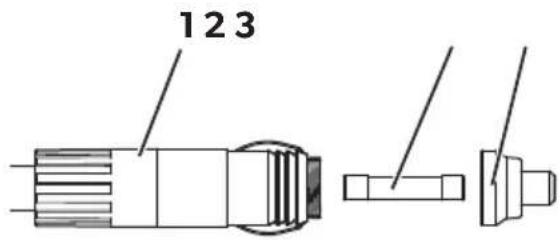
6.12 Replacing the DC plug fuse (fig. 10, page 6)
▶ Unscrew the contact pin housing (3) from the plug (1).
▶ Replace the defective fuse (2) with a new fuse of the same type and rating (3AG, Fast Acting, 10 A).
▶Re-assemble the plug in reverse order.
7 Cleaning and maintenance

WARNING! ELECTROCUTION HAZARD!
Failure to obey this warning could result in death or serious injury. Always disconnect the device from the power supply before you clean and service it.

NOTICE! DAMAGE HAZARD!
Failure to obey these instructions may result in damage to the device.
- Never clean the cooler under running water or in dish water.
- Do not use abrasive cleaning agents or hard objects during cleaning as these can damage the cooler.
▶ Occasionally clean the device interior and exterior with a damp cloth.
▶Make sure that the air inlet and outlet vents on the device are free of any dust and dirt, so that heat can be released and the device is not damaged.
8 Troubleshooting
Fault Possible cause Suggested remedy
| Device does not function, LED does not glow. | No voltage was detected in the DC power outlet. | In most vehicles the ignition must be turned on before power will be supplied to the DC power outlet. |
| No voltage present in the AC power outlet. | Try using another plug outlet. | |
| One of the device fuses is defective. | Replace the defective device fuse, see chapter “Replacing the AC fuse” on page 21 or chapter “Replacing the device DC Fuse” on page 21. | |
| The integrated mains adapter is defective. | This can only be repaired by an authorised repair centre. | |
| The device does not cool (plug is inserted, “POWER” LED is lit). | Defective compressor. | This can only be repaired by an authorised repair centre. |
| The device does not cool (plug is inserted, “POWER” LED flashes orange, display is switched off). | Battery monitor is set too high. | Select a lower battery monitor setting. |
| Battery voltage is too low. | Test the battery and charge it as needed. | |
| When operating from the DC outlet: The ignition is on and the device is not working and the LED is not lit. | The DC outlet is dirty. This results in a poor electrical contact. | If the plug of your cooler becomes very warm in the DC outlet, either the DC outlet must be cleaned or the plug has not been assembled correctly. |
| The fuse of the DC plug has blown. | Replace the fuse in the DC plug, see chapter “Replacing the DC plug fuse (fig. 10, page 6)” on page 22. | |
| The device DC fuse has blown. | Replace the defective fuse, see chapter “Replacing the device DC Fuse” on page 21. | |
| The vehicle fuse has blown. | Replace the vehicle’s DC outlet fuse. Please refer to your vehicle’s operating manual. | |
| The display shows an error message (e.g. “Err1”) and the appliance does not cool. | The appliance has switched off due to an internal fault. | This can only be repaired by an authorised repair centre. |
8.1 The lid has been forced past the built-in stop (fig. 11, page 7)
▶ Support the lid with one hand (A).
▶ Hold the latch down with the other hand (B).

CAUTION!
HEALTH HAZARD!
Failure to obey this caution could result in minor or moderate injury. Beware pinching your thumb while closing the lid.

NOTICE!
DAMAGE HAZARD!
Failure to observe this instruction can cause the lid to break off.
▶Close the lid as far as possible without pinching your thumb, while still holding the latch down, to keep it from breaking.
√ The lid should now be approximately at angle (fig. 11, page 7).
▶ Remove the hand from the latch (B), and continue closing the lid all the way.

NOTE
The hinges may release from the correct position during the final closing action. Reposition the lid as follows:
▶Operate the latches on both sides of the lid simultaneously.
▶Lift and reposition the lid.
9 W a r r a n t y
The statutory warranty period applies. If the product is defective, please contact the manufacturer's branch in your country (see dometic.com/dealer) or your retailer.
For repair and warranty processing, please include the following documents when you send in the device:
• A copy of the receipt with purchasing date
- A reason for the claim or description of the fault
10 Disposal
▶Place the packaging material in the appropriate recycling waste bins wherever possible.
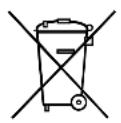
If you wish to finally dispose of the product, ask your local recycling centre or specialist dealer for details about how to do this in accordance with the applicable disposal regulations.
11 Technical data
| CFF35 CFF45 | ||
| Connection voltage: | 12/24 V--- and 100 to 240 V~ | |
| Rated current: | 12 V---: 7.8 A24 V---: 3.5 A240 V~: 0.4 A | 12 V---: 8.6 A24 V---: 3.8 A240 V~: 0.41 A |
| Cooling capacity: | +10 °C to -18 °C (+50 °F to 0 °F) | |
| Category: 1 | ||
| Energy efficiency class: | A+ | |
| Energy consumption: | 85 kWh/annum | 84 kWh/annum |
| Gross volume: | 34 l | 44 l |
| Storage volume: | 30 l | 38 l |
| Climate class: | N, T | |
| Ambient temperature: | +16 °C to +43 °C+60 °F to +110 °F | |
| Refrigerant volume: | 34 g | 43 g |
| CO2 equivalent: | 0.049 t | 0.061 t |
| Global warming potential (GWP): | 1430 | |
| Dimensions(W×H×D) in mm (including handles): | 715 × 407 × 398 | 715 × 475 × 398 |
| (W×H×D) in mm (with handles removed): | 590 × 407 × 398 | 590 × 475 × 398 |
| Weight: 17.2 kg 18.6 kg | ||

NOTE
If the ambient temperature is above +32 °C (+90 °F), the minimum temperature cannot be attained.
Test/certificates:

The coolant circuit contains R134a.
Contains fluorinated greenhouse gases
Hermetically sealed equipment
RISQUE POUR LA SANTÉ !
PASS PÅ! Fare for skade
- Fare for overoppheting!
dometic.com/sales-offices