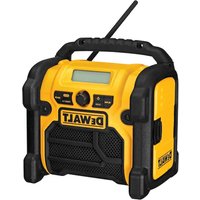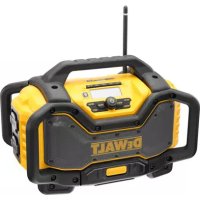
DCR027 - Radio DEWALT - Free user manual and instructions
Find the device manual for free DCR027 DEWALT in PDF.

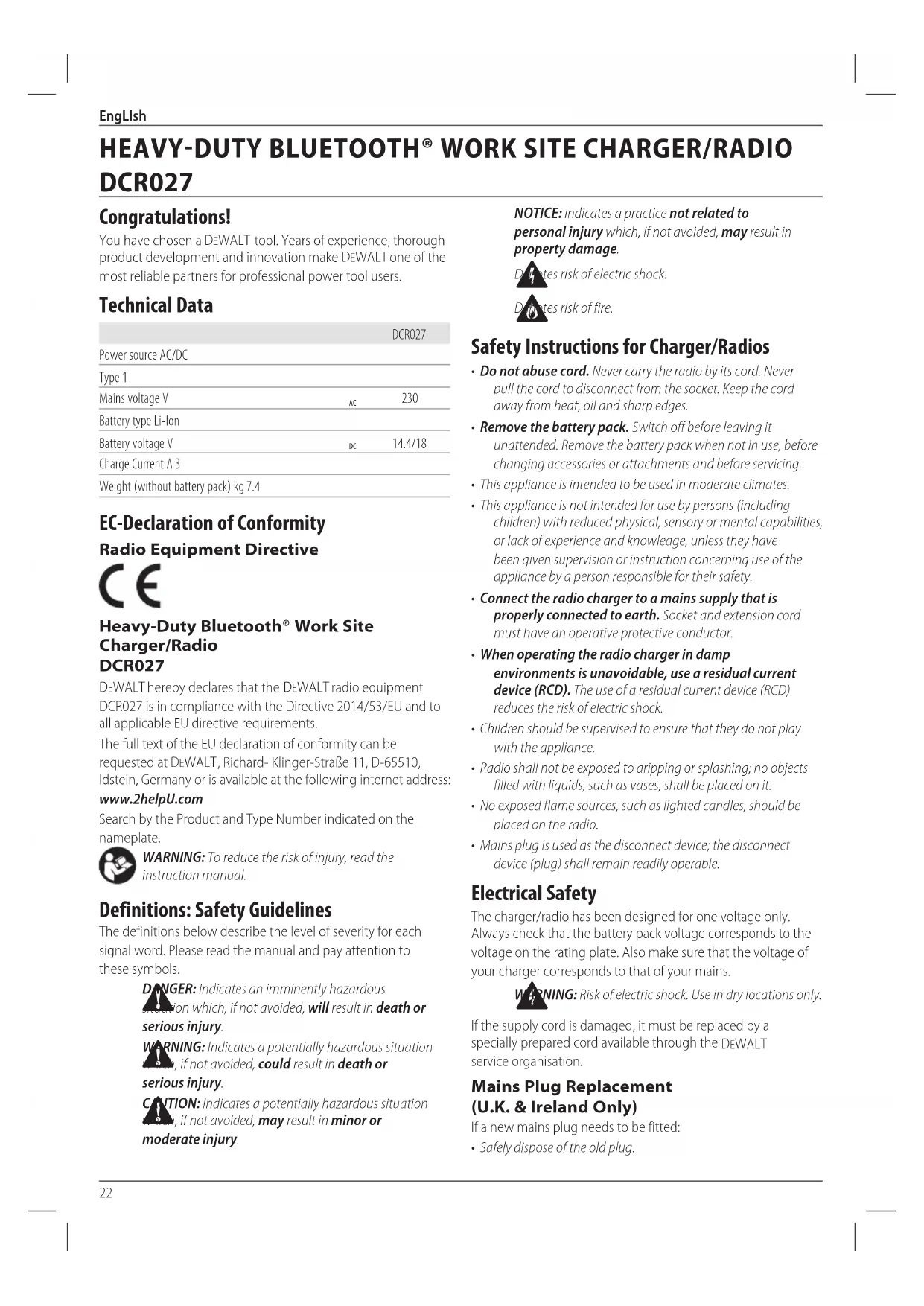


| Brand | DEWALT |
| Model | DCR027 |
| Product type | Bluetooth jobsite charger/radio |
| Power supply | 230 V AC or 14.4/18 V Li-Ion battery |
| Compatible battery type | Li-Ion 18 V (DCB181, DCB182, DCB183, DCB184, DCB185, DCB546, DCB547) |
| Weight (without battery pack) | 7.4 kg |
| Radio functions | DAB/DAB+, FM, Bluetooth, AUX |
| Ports | AUX 3.5 mm, USB 2.1 A, 2 AC outlets 10 A |
| Display | LCD |
| Memory | 10 DAB presets and 10 FM |
| Timer | Auto-off after 1 hour of inactivity |
| Bluetooth range | Up to 30 m (optimal 9 m) |
| Charging time (example) | DCB181: 70 min (charger DCB107), 35 min (DCB113) |
| Electronic protection | Against overloads, overheating, deep discharge |
| Safety | Grounding, RCD recommended, do not expose to water |
| Maintenance | Unplug before cleaning, soft cloth, no solvents |
| Repairability | Charger and battery not repairable, DEWALT accessories recommended |
| Package contents | 1 charger/radio, 1 instruction manual |
| Standards | CE compliant, directive 2014/53/EU |
| Charging temperature | 4 °C to 40 °C |
| Intended use | Jobsite radio, battery charger |
| Warranty | Consult dealer |
Frequently Asked Questions - DCR027 DEWALT
User questions about DCR027 DEWALT
0 question about this device. Answer the ones you know or ask your own.
Ask a new question about this device
Download the instructions for your Radio in PDF format for free! Find your manual DCR027 - DEWALT and take your electronic device back in hand. On this page are published all the documents necessary for the use of your device. DCR027 by DEWALT.
USER MANUAL DCR027 DEWALT
Transport of FLEXVOLT™ batteri
DRC (Dynamic Range Compression)
For at programmere uret
For at justere uret manuelt:
Dynamic Range Compression (DRC)
You have chosen a DEWALT tool. Years of experience, thorough product development and innovation make DEWALT one of the most reliable partners for professional power tool users.
Technical Data
| DCR027 | ||
| Power source AC/DC | ||
| Type 1 | ||
| Mains voltage V | AC | 230 |
| Battery type Li-ion | ||
| Battery voltage V | DC | 14.4/18 |
| Charge Current A 3 | ||
| Weight (without battery pack) kg 7.4 | ||
EC-Declaration of Conformity Radio Equipment Directive

Heavy-Duty Bluetooth® Work Site Charger/Radio DCR027
DEWALT hereby declares that the DEWALT radio equipment DCR027 is in compliance with the Directive 2014/53/EU and to all applicable EU directive requirements.
The full text of the EU declaration of conformity can be requested at DEWALT, Richard-Klinger-Straße 11, D-65510, Idstein, Germany or is available at the following internet address:
www.2helpU.com
Search by the Product and Type Number indicated on the nameplate.

WARNING: To reduce the risk of injury, read the instruction manual.
Definitions: Safety Guidelines
The definitions below describe the level of severity for each signal word. Please read the manual and pay attention to these symbols.
DANGER: Indicates an imminently hazardous condition which, if not avoided, will result in death or serious injury.
WARNING: Indicates a potentially hazardous situation, if not avoided, could result in death or serious injury.
CANTION: Indicates a potentially hazardous situation, if not avoided, may result in minor or moderate injury.
NOTICE: Indicates a practice not related to personal injury which, if not avoided, may result in property damage.

es risk of electric shock.

es risk of fire.
Safety Instructions for Charger/Radios
- Do not abuse cord. Never carry the radio by its cord. Never pull the cord to disconnect from the socket. Keep the cord away from heat, oil and sharp edges.
- Remove the battery pack. Switch off before leaving it unattended. Remove the battery pack when not in use, before changing accessories or attachments and before servicing.
- This appliance is intended to be used in moderate climates.
- This appliance is not intended for use by persons (including children) with reduced physical, sensory or mental capabilities, or lack of experience and knowledge, unless they have been given supervision or instruction concerning use of the appliance by a person responsible for their safety.
- Connect the radio charger to a mains supply that is properly connected to earth. Socket and extension cord must have an operative protective conductor.
- When operating the radio charger in damp environments is unavoidable, use a residual current device (RCD). The use of a residual current device (RCD) reduces the risk of electric shock.
Children should be supervised to ensure that they do not play with the appliance. - Radio shall not be exposed to dripping or splashing; no objects filled with liquids, such as vases, shall be placed on it.
- No exposed flame sources, such as lighted candles, should be placed on the radio.
- Mains plug is used as the disconnect device; the disconnect device (plug) shall remain readily operable.
Electrical Safety
The charger/radio has been designed for one voltage only. Always check that the battery pack voltage corresponds to the voltage on the rating plate. Also make sure that the voltage of your charger corresponds to that of your mains.

JING: Risk of electric shock. Use in dry locations only.
If the supply cord is damaged, it must be replaced by a specially prepared cord available through the DEWALT service organisation.
Mains Plug Replacement (U.K. & Ireland Only)
If a new mains plug needs to be fitted:
- Safely dispose of the old plug.
| Batteries Chargers/Charge Times (Minutes) | ||||||||
| Cat # V DC Weight kg | DCB107 DCB113 DCB115 DCB118 DCB132 DCB119 | |||||||
| DCB546 18/54 6.0/2.0 1.05 270 140 90 60 90 X | ||||||||
| DCB547 18/54 9.0/3.0 1.25 420 220 140 85 140 X | ||||||||
| DCB181 18 1.5 0.35 70 35 22 22 22 45 | 45 | |||||||
| DCB182 18 4.0 0.61 185 100 60 60 60 120 | ||||||||
| DCB183/B 18 2.0 0.40 90 50 30 30 30 60 | ||||||||
| DCB184/B 18 5.0 0.62 240 120 75 75 75 150 | ||||||||
| DCB185 18 1.3 0.35 60 30 22 22 22 X | ||||||||
| DCB187 18 3.0 0.48 140 70 45 45 45 90 | ||||||||
- Connect the brown lead to the live terminal in the plug.
- Connect the blue lead to the neutral terminal.
WARNING: No connection is to be made to the terminal.
Follow the fitting instructions supplied with good quality plugs. Recommended fuse: 13 A.
Using an Extension Cable
An extension cord should not be used unless absolutely necessary. Use an approved extension cable suitable for the power input of your charger (see Technical Data). The minimum conductor size is 1mm^2 ; the maximum length is 30m .
When using a cable reel, always unwind the cable completely.
Grounding Instructions
The charger/radio must be grounded. In the event of malfunction or breakdown, grounding provides a path of least resistance for electric current to reduce the risk of electric shock. The charger/radio is equipped with a cord having an equipment-grounding conductor and a grounding plug. The plug must be plugged into an appropriate outlet that is properly installed and grounded in accordance with all local codes and ordinances.
DANGER: Improper connection of the equipment-grounding conductor can result in a risk of electric shock. The conductor with insulation having an outer surface that is green with yellow stripes is the equipment-grounding conductor. If repair or replacement of the cord or plug is necessary, do not connect the equipment-grounding conductor to a live terminal. Repairs shall only be performed by a DEWALT service agent. Do not modify the plug provided with the charger/radio - if it will not fit the outlet, have a proper outlet installed by a DEWALT repair agent.
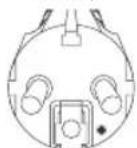
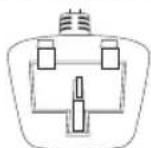
For grounded, cord-connected charger/ radio rated 16A and lower and intended for use on a nominal 230V supply circuit
The charger/radio is for use on a nominal 230V circuit, and has a grounding plug that looks like the plug in the following illustration.
DCR027-BD-QW DCR027-GB DCR027-XE
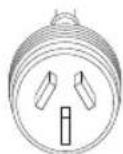
SAVE THESE INSTRUCTIONS
Chargers
DEWALT chargers require no adjustment and are designed to be as easy as possible to operate.
Important Safety Instructions for Charger/Radios
SAVE THESE INSTRUCTIONS: This manual contains important safety and operating instrc tions for the your charger/radio.
- Before using charger/radio, read all instructions and cautionary markings on charger, battery pack, and product using battery pack.
WARNING: Shock hazard. Do not allow any liquid to get into the charger. Electric shock may result.
WARNING: We recommend the use of a residual current with a residual current rating of 30mA or less.
CAUTION: Burn hazard. To reduce the risk of injury, use only DFWALT rechargeable batteries. Other types of batteries may burst causing personal injury and damage.
CAUTION: Children should be supervised to ensure that they do not play with the appliance.
NOTICE: Under certain conditions, with the charger plugged into the power supply, the exposed charging contacts inside the charger can be shorted by foreign
ENGLISH
material. Foreign materials of a conductive nature such as, but not limited to, steel wool, aluminum foil or any buildup of metallic particles should be kept away from charger cavities. Always unplug the charger from the power supply when there is no battery pack in the cavity. Unplug charger before attempting to clean.
DO NOT attempt to charge the battery pack with any charger/radio other than the one in this manual. The charger and battery pack are specifically designed to work together.
- These charger/radios are not intended for any uses other than charging DEWALT rechargeable batteries. Any other uses may result in risk of fire, electric shock or electrocution.
- Do not expose charger/radio to rain or snow.
- Pull by plug rather than cord when disconnecting charger. This will reduce risk of damage to electric plug and cord.
- Make sure that cord is located so that it will not be stepped on, tripped over, or otherwise subjected to damage or stress.
- Do not use an extension cord unless it is absolutely necessary. Use of improper extension cord could result in risk of fire, electric shock, or electrocution.
- Do not place any object on top of charger/radio or place the charger/radio on a soft surface that might block the ventilation slots and result in excessive internal heat. Place the charger/radio in a position away from any heat source.
- Do not operate charger/radio with damaged cord or plug - have them replaced immediately.
- Do not operate charger/radio if it has received a sharp blow, been dropped, or otherwise damaged in any way. Take it to an authorised service centre.
- Do not disassemble charger/radio; take it to an authorised service centre when service or repair is required. Incorrect reassembly may result in a risk of electric shock, electrocution or fire.
- Disconnect the charger from the outlet before attempting any cleaning. This will reduce the risk of electric shock. Removing the battery pack will not reduce this risk.
NEVER attempt to connect 2 chargers together.
- Your charger/radio is designed to operate on standard 230 V household electrical power. Do not attempt to use it on any other voltage. This does not apply to the vehicular charge.
Charging a Battery (Fig. A, B)
When the charger/radio is plugged in it will charge the installed battery. Unplugged, the radio will run up to 8 hours on a fully charged battery using a premium 18V Li-lon battery. Using batteries of lower amp hours will yield less run time.
- Plug the charger into an appropriate outlet before inserting battery pack.
- Insert the battery pack 19 into the charger, making sure the battery pack is fully seated in the charger. The red (charging)
light 12 will blink repeatedly indicating that the charging process has started.
- The completion of charge will be indicated by the red light remaining ON continuously. The battery pack is fully charged and may be used at this time or left in the charger. To remove the battery pack from the charger, push the battery release button 20 on the battery pack.
NOTE: To ensure maximum performance and life of lithium-ion battery packs, charge the battery pack fully before first use.
Charger Operation
Refer to the indicators below for the charge status of the battery pack.
Charge Indicators

Charging


Fully Charged


Hot/Cold Pack Delay

Hot/Cold Pack Delay
When the charger detects a battery pack that is too hot or too cold, it automatically starts a Hot/Cold Pack Delay, suspending charging until the battery pack has reached an appropriate temperature. The charger then automatically switches to the pack charging mode. This feature ensures maximum battery pack life.
A cold battery pack will charge at a slower rate than a warm battery pack. Once the temperature has warmed, it will charge at a higher rate.
Electronic Protection System
XR Li-Ion tools are designed with an Electronic Protection System that will protect the battery pack against overloading, overheating or deep discharge.
The tool will automatically turn off if the Electronic Protection System engages. If this occurs, place the lithium-ion battery pack on the charger until it is fully charged.
Charger/Radio Cleaning Instructions
WARNING: Shock hazard. Disconnect the charger from the AC outlet before cleaning. Dirt and grease may be removed from the exterior of the charger using a cloth or soft non-metallic brush. Do not use water or any cleaning solutions. Never let any liquid get inside the tool; never immerse any part of the tool into a liquid.
Battery Packs
Important Safety Instructions for All Battery Packs
When ordering replacement battery packs, be sure to include catalogue number and voltage.
The battery pack is not fully charged out of the carton. Before using the battery pack and charger, read the safety instructions below. Then follow charging procedures outlined.
READ ALL INSTRUCTIONS
- Do not charge or use battery in explosive atmospheres, such as in the presence of flammable liquids, gases or dust. Inserting or removing the battery from the charger may ignite the dust or fumes.
- Never force battery pack into charger. Do not modify battery pack in any way to fit into a non-compatible charger as battery pack may rupture causing serious personal injury.
- Charge the battery packs only in DFWALT chargers.
DO NOT splash or immerse in water or other liquids. - Do not store or use the tool and battery pack in locations where the temperature may reach or exceed 40^ (104 F) (such as outside sheds or metal buildings in summer).
- Do not incinerate the battery pack even if it is severely damaged or is completely worn out. The battery pack can explode in a fire. Toxic fumes and materials are created when lithium-ion battery packs are burned.
- If battery contents come into contact with the skin, immediately wash area with mild soap and water. If battery liquid gets into the eye, rinse water over the open eye for 15 minutes or until irritation ceases. If medical attention is needed, the battery electrolyte is composed of a mixture of liquid organic carbonates and lithium salts.
- Contents of opened battery cells may cause respiratory irritation. Provide fresh air. If symptoms persist, seek medical attention.
WARNING: Burn hazard. Battery liquid may be flammable used to spark or flame.
WARNING: Never attempt to open the battery pack for any reason. If battery pack case is cracked or damaged, do not insert into charger. Do not crush, drop or damage battery pack. Do not use a battery pack or charger that has received a sharp blow, been dropped, run over or damaged in any way (i.e., pierced with a nail, hit with a hammer, stepped on). Electric shock or electrocution may result. Damaged battery packs should be returned to service centre for recycling.
WARNING: Fire hazard. Do not store or carry the battery pack so that metal objects can contact exposed battery terminals. For example, do not place the battery pack in aprons, pockets, tool boxes, product kit boxes, drawers, etc., with loose nails, screws, keys, etc.
CAUTION: When not in use, place tool on its side on a stable surface where it will not cause a tripping or falling hazard. Some tools with large battery packs will stand upright on the battery pack but may be easily knocked over.
Transportation
WARNING: Fire hazard. Transporting batteries can cause fire if the battery terminals inadvertently come in contact with conductive materials. When transporting batteries, make sure that the battery terminals are protected and well insulated from materials that could contact them and cause a short circuit.
DEWALT batteries comply with all applicable shipping regulations as prescribed by industry and legal standards which include UN Recommendations on the Transport of Dangerous Goods; International Air Transport Association (IATA) Dangerous Goods Regulations, International Maritime Dangerous Goods (IMDG) Regulations, and the European Agreement Concerning The International Carriage of Dangerous Goods by Road (ADR). Lithium-ion cells and batteries have been tested to section 38.3 of the UN Recommendations on the Transport of Dangerous Goods Manual of Tests and Criteria.
In most instances, shipping a DEWALT battery pack will be excepted from being classified as a fully regulated Class 9 Hazardous Material. In general, only shipments containing a lithium-ion battery with an energy rating greater than 100 Watt Hours (Wh) will require being shipped as fully regulated Class 9. All lithium-ion batteries have the Watt Hour rating marked on the pack. Furthermore, due to regulation complexities, DEWALT does not recommend air shipping lithium-ion battery packs alone regardless of Watt Hour rating. Shipments of tools with batteries (combokits) can be air shipped as excepted if the Watt Hour rating of the battery pack is no greater than 100 Whr. Regardless of whether a shipment is considered excepted or fully regulated, it is the shipper's responsibility to consult the latest regulations for packaging, labeling/marking and documentation requirements.
The information provided in this section of the manual is provided in good faith and believed to be accurate at the time the document was created. However, no warranty, expressed or implied, is given. It is the buyer's responsibility to ensure that its activities comply with the applicable regulations.
Transporting the FLEXVOLT™ Battery
The DFWALT FLEXVOLT™ battery has two modes: Use and Transport.
Use Mode: When the FLEXVOLT™ battery stands alone or is in a DEWALT 18V product, it will operate as an 18V battery. When the FLEXVOLT™ battery is in a 54V or a 108V (two 54V batteries) product, it will operate as a 54V battery.
Transport Mode: When the cap is attached to the FLEXVOLT™ battery, the battery is in Transport mode. Keep the cap for shipping.
When in Transport mode, strings of cells are electrically disconnected within the pack resulting in 3 batteries with a
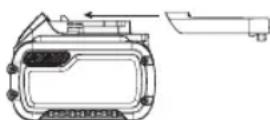
lower Watt hour (Wh) rating as compared to 1 battery with a higher Watt hour rating. This increased quantity of 3 batteries with the lower Watt hour rating can exempt the pack from certain shipping regulations that are imposed upon the higher Watt hour batteries.
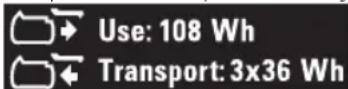
For example, the Transport Wh rating might indicate 3 × 36 Wh, meaning 3 batteries of 36 Wh each. The Use Wh rating might
Example of Use and Transport Label Marking
indicate 108 Wh (1 battery implied).
EngLish
Storage Recommendations
- The best storage place is one that is cool and dry away from direct sunlight and excess heat or cold. For optimum battery performance and life, store battery packs at room temperature when not in use.
- For long storage, it is recommended to store a fully charged battery pack in a cool, dry place out of the charger for optimal results.
NOTE: Battery packs should not be stored completely depleted of charge. The battery pack will need to be recharged before use.
Labels on Charger and Battery Pack
In addition to the pictographs used in this manual, the labels on the charger and the battery pack may show the following pictographs:

Read instruction manual before use.

See Technical Data for charging time.

Do not probe with conductive objects.

Do not charge damaged battery packs.

Do not expose to water.

Have defective cords replaced immediately.

Charge only between 4^ and 40^

Only for indoor use.

Discard the battery pack with due care for the environment.
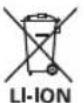
Charge DEWALT battery packs only with designated DEWALT chargers. Charging battery packs other than the designated DEWALT batteries with a DEWALT charger may make them burst or lead to other dangerous situations.

Do not incinerate the battery pack.

USE (without transport cap). Example: Wh rating indicates 108 Wh (1 battery with 108 Wh).

TRANSPORT (with built-in transport cap). Example: Wh rating indicates 3 × 36 Wh (3 batteries of 36 Wh).
Battery Type
The DCR027 operates on a 18 volt battery pack.
These battery packs may be used: DCB181, DCB182, DCB183, DCB183B, DCB184, DCB184B, DCB185, DCB546, DCB547. Refer to
Technical Data for more information.
Package Contents
The package contains:
1 Charger/Radio
1 Instruction manual
- Check for damage to the tool, parts or accessories which may have occurred during transport.
- Take the time to thoroughly read and understand this manual prior to operation.
Markings on Tool
The following pictograms are shown on the tool:

Read instruction manual before use.
Date Code Position (Fig. B)
The date code 24, which also includes the year of manufacture, is printed into the housing.
Example:
2017 XX XX
Year of Manufacture
Description (Fig. A)
WARNING: Never modify the power tool or any part of it.
Usage or personal injury could result.
1 ON/OFF button
2 Volume knob
3 Antenna
4 Device storage compartment
5 Seek/tuner/arrow buttons
6 Mode button
7 Enter/display button
8 Radio preset/memory buttons
9 Mute button
10 Menu button
11 LCD display
12 Charging indicator light
13 Bluetooth® button
14 AC outlet
15 AUX audio port
16 USB charging port
17 Carry handle
18 Roll cage
Intended Use
Your Bluetooth® Work Site Charger/Radio is an FM radio. The DCR027 can be powered by 230V AC power source as well as all DEWALT 14.4V, 18V/54V Li-Ion battery packs. Batteries sold separately.
DO nOT use under wet conditions or in the presence of flammable liquids or gases.
DO nOT let children come into contact with the tool. Supervision is required when inexperienced operators use this tool.
- Young children and the infirm. This appliance is not intended for use by young children or infirm persons without supervision.
- This product is not intended for use by persons (including children) suffering from diminished physical, sensory or mental abilities; lack of experience, knowledge or skills unless they are supervised by a person responsible for their safety. Children should never be left alone with this product.
ASSEMBLY AND ADJUSTMENTS
W I NING: Use only DFWALT battery packs and chargers.
Inserting and Removing the Battery Pack from the Charger/Radio (Fig. B)
NOTE: Make sure your battery pack 19 is fully charged.
To Install the Battery Pack into the Unit
- Align the battery pack 19 with the rails inside the charger/ radio's battery port (Fig.B).
- Slide it in until the battery pack is firmly seated and ensure that you hear the lock snap into place.
To Remove the Battery Pack from the Unit
- Press the release button 20 and firmly pull the battery pack out of the tool handle.
- Insert battery pack into the charger as described in the charger section of this manual.
Fuel Gauge Battery Packs (Fig. B)
Some DEWALT battery packs include a fuel gauge which consists of three green LED lights that indicate the level of charge remaining in the battery pack.
To actuate the fuel gauge, press and hold the fuel gauge button 21. A combination of the three green LED lights will illuminate designating the level of charge left. When the level of charge in the battery is below the usable limit, the fuel gauge will not illuminate and the battery will need to be recharged.
NOTE: The fuel gauge is only an indication of the charge left on the battery pack. It does not indicate tool functionality and is subject to variation based on product components, temperature and end-user application.
To Install Coin Cell Battery (Fig. B)
WARNING: Danger of explosion if battery is incorrectly replaced. When replacing battery, replace it with the same or equivalent type CR2032. Observe correct polarity (+ and -) when replacing batteries. Do not store or carry batteries so that metal objects can contact exposed battery terminals.
- On the battery door on the back of the unit, turn the screw 22 anti-clockwise to remove. Screw will remain captive in the door.
- Press down on the battery door latch and pull to open.
-
Install the coin cell battery 23 according to the diagram inside the coin cell battery area.
-
Replace the battery door, insert the screw and tighten.
NOTE: To reset the LCD display, clock, and pre-sets remove the coin cell battery and re-install. Follow this procedure if the screen seems to lock in place.
DANGER:DO NOT INGEST BATTERY;CHEMICAL HAZARD.This product contains a coin/button cell battery. If the coin/button cell battery is swallowed, it can cause severe internal burns in just 2 hours and can lead to death. Keep new and used batteries away from children. If the battery compartment does not close securely stop using the product and keep it away from children. If you think batteries might have been swallowed or placed inside any part of the body, seek immediate medical attention.
OPERATION
Instructions for Use
WARNING: Always observe the safety instructions and all available regulations.
Your Bluetooth® charger/radio is equipped with memory capacity in order to store the time and your selected memory channels. When the radio is in the OFF position, this memory capacity is powered by one coin cell battery that is included with the charger/radio.
Power/Volume Adjustment
- To turn the radio on, press the power button 1. NOTE: When the radio is first used it will enter 'DAB' mode and automatically scan for stations. It will then set the time and start playing the first station it finds. If there is no time signal available please refer to To Program the Clock to manually set the time.
- Turn the dial 2 clockwise to increase the volume. To decrease the volume, turn anti-clockwise.
Mode Function
To choose one of the mode functions ('DAB', 'FM', or 'AUX' or Bluetooth*) push the mode button 6 until the desired function is found.
NOTE: Pressing the Bluetooth® button 13 also puts the radio into Bluetooth® mode.
DAB Mode
Tuning
When the unit is first switched on the unit will start in 'DAB'/'DAB+ mode and will 'Auto Scan' to find broadcast stations in the local area. Once 'Auto Scan' is complete, use the left or right arrow buttons 5 to scroll through the stations.
NOTE: When moving locations or if reception was poor in the original scan (possible if the antenna was not up), this may result in an empty or incomplete list of available stations. Manually running an 'Auto Scan' will find all available broadcast stations.
To Perform an Auto Scan:
- Press the menu button 10, scroll through the options by pressing the right arrow button 5 until you reach 'Auto
ENGLISH
Scan' and select this option by pressing the Enter/Display button 7.
- Press the right arrow button to select the Yes option.
- Press the Enter/Display button 7 to perform the 'Auto Scan'.
Once 'Auto Scan' is complete the radio will play the first station it finds.
Display
Press the Enter/Display Button 7 to alternate between scrolling text, date and station information.
Station Prune
Some stations once received by your radio which are no longer available may display with a? after the station name.
To remove these stations from the station list, use the 'Prune' function:
Press Menu 10 and scroll right to the 'Prune' option.
- Press Enter/Display 7 to select.
Dynamic Range Compression (DRC)
This function reduces the difference between the loudest and quietest audio being broadcast. Effectively, this makes quiet sounds comparatively louder, and loud sounds comparatively quieter.
The following options are available:
- 0 - broadcast 'DRC' will be ignored
- 1/2 - sets 'DRC' at half the level transmitted
- 1 - uses the 'DRC' level transmitted
- 2 - doubles the 'DRC' level transmitted
NOTE: DRC only works if it is enabled by the broadcaster.
To Adjust:
- Press Menu 10 and scroll right to the 'DRC' option.
- Press Enter/Display 7 to select.
- Select the desired number displayed on the LCD 11 using the arrow buttons 5.
- Press Enter/Display 7 to confirm.
Tune or Seek Function (FM)
There are two tuning methods and one seek method for finding the desired frequency.
To tune:
Press and release the right or left arrow button 5. Repeat until the desired frequency is found.
To seek:
Press and hold the right or left arrow button 5 for 2 seconds. The tuner frequency will change to the first radio station with acceptable clarity and stop at that station.
NOTE: When the charger/radio is paired to a Bluetooth device the right and left arrow buttons 5 can be used to skip or go to previous tracks on the audio device.
To Program the Clock
In 'DAB' mode the time/date automatically synchronises with national time signals. If the time/date does not update automatically it can be updated manually.
To Adjust the Clock Manually:
- Press the Menu button 10.
- Use the arrow buttons 5 to scroll to 'Clock Adjust' on the LCD display and press the Enter/Display button 7.
- Scroll to "Date & Time" and press the Enter/Display button 7.
- Set the date and time using left and right arrow buttons.
- Once the desired time is set press the Enter/Display button to commit.
Other Clock Adjust menu options:
- Time format: Select a 12h or 24h time display format
- Date format: Select the date display format, MM/DD/YYYY, YYYY/MM/DD or DD/MM/YYYY.
To Program the Preset/Memory Buttons
Ten 'DAB' and ten 'FM' radio stations may be independently set. After programming the buttons, pressing 1-2, 3-4, 5-6, 7-8 or 9-10 will instantly change the frequency to the preset station.
- Set the radio to desired station (see Tune or Seek Function).
- Press and hold one of the desired memory buttons 8 until the preset number begins flashing in the LCD display 11. Release the button and wait for the preset display to stop flashing.
Each memory button can store two preset stations.
To Store a Second Preset:
- Manually set the radio to desired station (see Tune or Seek Function).
- Press and hold one of the desired memory buttons until the preset number begins flashing in the LCD display.
- Press the preset button a second time so that the next preset number displays.
- Release the button and wait for the preset display to stop flashing.
To Adjust the EQ
Bass and treble can be adjusted by changing the Equalisation (EQ) settings of the radio.
- Press the Menu button 10 and use the arrow keys to select 'Sound EQ'.
- Press the right arrow button to increase the bass or the left arrow button to decrease it.
- Once desired adjustment is achieved, press the Enter/Display button 7.
- Repeat steps 2 and 3 for treble adjustment.
Playing Audio Through an External Device (Fig. A)
Audio can be played through the charger/radio via a wireless Bluetooth® connection to a compatible Bluetooth® device or by connecting audio device or mobile phone using a 3.5 mm audio cable to the audio port 15 located inside the device storage compartment 4.
Pairing Charger/radio with a Bluetooth® Audio Device
- Place the charger/radio and the Bluetooth® audio source within 1 m of each other.
-
Turn charger/radio on by pressing the power button 1.
-
Press the Bluetooth® button 13 or use the mode button to put the unit into Bluetooth® (BT) mode. This will cause the Bluetooth® button to blink slowly. During this time, the radio is trying to find a previously paired device. If found the Bluetooth® button will stay lit without any blinking.
- If another device is to be paired, press the Bluetooth® button and it should begin a fast blink pattern. While the radio is displaying the fast blink, it is in paring mode.
- Confirm pairing on your device. (Please consult your device's instruction manual for specific pairing instructions.)
NOTE: If pairing is not confirmed within 2 minutes, the LED will stop flashing and the charger/radio will return to half second interval blink pattern.
- Once pairing is successful the Bluetooth® indicator/ button 13 will turn solid. The charger/radio will now play music from your device.
Bluetooth® Status Indicator
| LED indicator Status/Mode | |
| Steady blinking (half second interval) | charger/radio is unpaired or in connecting mode. |
| Rapid Blinking charger/radio is in pairing mode and discoverable by your device. | |
| Solid light charger/radio is connected with a device. | |
| No light charger/radio has timed out and/or is off. | |
Connecting a Previously Paired Bluetooth® Audio Device If a Bluetooth® device has been previously paired to the charger/radio it should automatically reconnect when charger/ radio is powered on. After 4 seconds the charger/radio will go into connecting mode. This is indicated by the Bluetooth® indicator/button 13 blinking steady. Once the previously paired Bluetooth® device is recognized and connected, the LED will go solid. If connection does not occur and you are unable to stream music please follow the instructions for Pairing Charger/radio with a Bluetooth® Audio Device.
Timeout Functionality (Fig. A)
To conserve battery life the charger/radio is designed to power off automatically after an hour of inactivity. This inactivity could be due to the device being unpaired for an hour or in the case of the Bluetooth connection being broken for the same period of time. If the charger/radio powers off due to inactivity of any kind refer to Connecting a Previously Paired Bluetooth Audio Device.
NOTE: Optimum Bluetooth® streaming range is roughly 9 m (line of sight) to the charger/radio but distances up to 30 m are possible. Physical obstacles, other wireless devices or electromagnetic devices may affect the connection quality. If Bluetooth® connection is lost due to exceeding time of separation, exceeding the optimum distance, obstacles or otherwise, reconnecting your device with the charger/radio may be necessary.
Charging a Cell Phone or Audio Device Via USB (Fig. A)
Your audio device or mobile phone can be charged (up to 2.1 AMPS) using the USB power port 16 on the charger/radio. This charging is possible when unit is on, running off of AC plug power or the battery pack.
AC Outlets (Fig. A)
The charger radio is equipped with 2 AC outlets 14 (10 amp maximum) for powering additional tools or appliances.
Factory Reset
A Factory Reset will remove all presets and restore the radio to its default settings.
To perform a factory reset press Menu 10 and use arrow keys 5 to scroll to 'System'. Press Enter Display 7 to select. Use arrow keys 5 to scroll to 'Factory Reset'. Press Enter Display 7 to select.
Important Radio Notes
- Reception will vary depending on location and strength of radio signal.
- Running the radio while connected to certain generators may cause background noise.
MAINTENANCE
Your DEWALT power tool has been designed to operate over a long period of time with a minimum of maintenance. Continuous satisfactory operation depends upon proper tool care and regular cleaning.
The charger and battery pack are not serviceable.

Lubrication
Your power tool requires no additional lubrication.

Cleaning
WARNING: Blow dirt and dust out of the main housing with dry air as often as dirt is seen collecting in and around the air vents. Wear approved eye protection and approved dust mask when performing this procedure.
WARNING: Never use solvents or other harsh chemicals for cleaning the non-metallic parts of the tool. These chemicals may weaken the materials used in these parts. Use a cloth dampened only with water and mild soap. Never let any liquid get inside the tool; never immerse any part of the tool into a liquid.
WARNING: Shock hazard. Disconnect the charger/ from the AC outlet before cleaning. Dirt and grease may be removed from the exterior of the charger using a cloth or soft non-metallic brush. Do not use water or any cleaning solutions. Never let any liquid get inside the unit; never immerse any part of the unit into a liquid.
ENGLISH
Optional Accessories
WARNING: Since accessories, other than those offered
V. WALT, have not been tested with this product, use
of such accessories with this tool could be hazardous.
To reduce the risk of injury, only DEWALT recommended
accessories should be used with this product.
Consult your dealer for further information on the
appropriate accessories.
Protecting the Environment

Separate collection. Products and batteries marked with this symbol must not be disposed of with nor household waste.
Products and batteries contain materials that can
be recovered or recycled reducing the demand for raw
materials. Please recycle electrical products and batteries
according to local provisions. Further information is available at
www.2helpU.com.
Rechargeable Battery Pack
This long life battery pack must be recharged when it fails
to produce sufficient power on jobs which were easily done
before. At the end of its technical life, discard it with due care for
our environment:
- Run the battery pack down completely, then remove it from the tool.
- Li-ion cells are recyclable. Take them to your dealer or a
local recycling station. The collected battery packs will be recycled or disposed of properly.
(Isolation double) - outils
Batterie rechargeable
Dynamic Range Compression (DRC)
Dynamic Range Compression (DRC)
Tekniska Data for mer information.
Evdeicic enavw oTo epyaaleio
Enavw oTo epyaieio emuaviovta ta napakatw Eikovoypaumata:

Aiaβaote to Exyepidio oonyiv npiv ano tn xpon.
Oeesh Kwdiokou Hmuopouniac (Eik. B)
O kwdiok nepounviac 24, o onoioc nepiaaabei enionc to etoc kataokeunc, eivai twnuevoc enavw oTo nepiBna. Napadiyua:
2017 XX XX
'Etoc kataaKeunc
IIepiypaqn (Eik.A)
PNEIADONIOIHsH:Mny Tponoioirnoe note to piko epyaaleio n ooiobnote tmu taou. Mnpoeiva npoknEi BaeBn npoownikoc tpaumiaoic.
1 PAnktpo ON/OFF (Evpyoioiogc/ aeevyoiioiogc)
2 Nepiopopikokouni Evtaonxou
3 Kepaia
4Aiaepiaa anothekeuoc TNC OOKEUNC
5 PAnktpa Avzrtnonc/ auvtoviou/βeouc
6 PAnKtpo TpOIOU AetoupyiaC
7 NAnktpo Eiaaywnc/ epapvionc
8PiikpoPioppuOioeW paiooovou
9 NnKtpo Siyaon nXou
10 PAnKtpo Mevou
11 08ovn LCD
12 Evdekiktnkuiuviopiction
13 PAnKtpo Bluetooth
14PiCa AC
15 Oupa nxou AUX (Bonθ. ειοδoc)
16 Θύρα φόρτιος USB
17AaBnμεTaopopac
18 pOoTaTeUtiKoc Kλωβoc
PpooepoEvn Xpnon
To OopioTc/PaioPwvo Bluetooth yia xwpo epyaiaac evai eva pao FM.To DCR027 mopei va tropodotn eian npyn peuatoC 230 V AC kaowc kai ano ola ta naketa maataiac ovtwv laiov DEWALT 14,4V,18V kai 54 V.Mnatapie c nnovtai exwpiota.
Na MH xnpaiooiaitai ouvnkec uypaoiac n otav unapoxouv eupkta uypa n apia.
MHv apnyete ta naia va eoxovtae enaepn me to epyaieo.
Anateiatae nIbAeyn otav to epyaaleio auto xpoiaoiaei tai ano
m Emuipouc xepiotec.
To npoiov auto dev npoopicietai yia xpno ano atoa (nepiaubavovewnuaiow) nou exouv meiwvec ouaikec, aiothnpiakec n vevuaikec ikavotntec, n eaaipn epiipac kai/n ywockai deiotttwv, ektoc av ta atopa auta eniBennovtai ano atopouneuOuvyia tvv aoxaiaiouc Ta naia dev npenevaevouvnote mova touc ne auto to npoiov.
ΣYNAPMOΛΟΓΗΞH KAI PYOMΙΣΕΙΣ
NEIeIOnoiHsH: Xpnoimuoiite mvo oet mnatapiov
Tonoetnon kai aqaipoeon tou naketou muatapiaac oTo/aNo to paIoqwvo/foptioTn (ek.B)
EHMEIOH: Ia ta kaIutepa anoteleapata, va ebaivoeot to naketo nataipiwv 19 evai nhpwc qopioevo.
Tia va tonoehtnoeTe To naketo matapiaoc tnoovada
PpOaipEtiKa npAeAkoEvA
PNEIADONIOIHsE:EniOJn ME TO npoiov auto dev exouv aoteia napekoueva EKTOC ano auta nov biatfevtai ano tvv DEWALT, n xonon tuxov teotiwnpakouevuv ME to epyaio auto mnoepie va evai enikivuyn. Ia va elattwoete tv kivduvo tpaumatiouo, npenei va xonaionoite MVO npekouva nov ouviotwai ano tvv DEWALT.
Tia nepioootepe, nnpopopiec oxetik a ta kataaana npalekoeva, ououuuleutei teov atinpoo no tov oio ouvepyaceote.
Tia Tny npoostacia tou nepiβaalovtoc
Xwpiotn oulloyn. Ta npoiovta kai oI matapiec nou Eionmaivovtai me auto to ouuBoLo dev npenei va anoppinovtai maiz e ta koiva oikiaka anoppmuata.
Ta npoiovtakai oI npatapiec nepiexouv uikacouu npopoovvaavakntboovnvaavakukwboovwatevaeiwoov 01 avaykec yia npwec uEc Napakaouvevaavakukwve ta nektpika npoiovtakai tic matapec oupwaue touc tonikouc kavovioouc, Pepoootepcnnpopopiec diatiEvta otov iototo www.2helpU.com.