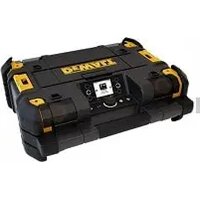
DWST1-81080-XE - Radio DEWALT - Free user manual and instructions
Find the device manual for free DWST1-81080-XE DEWALT in PDF.


| Product type | Connected radio with integrated battery charger |
| Brand | DeWalt |
| Model | DWST1-81080-XE |
| Weight | 5.9 kg (without battery) |
| Power supply | AC/DC adapter 100-240 V, 50-60 Hz, output 24 VDC / 2 A ; or lithium-ion battery 10.8-18 V (sliding) |
| Compatible battery types | DeWalt DCB 10.8 V/18 V (including XR FLEXVOLT up to 9 Ah) |
| Charging time | Approximately 90 to 300 min depending on battery |
| Battery life | Approximately 8 h with a high-end 18 V battery |
| Audio sources | DAB, FM stereo, Bluetooth, 3.5 mm auxiliary input |
| Acoustic power | 45 W (class D) |
| Sound level | 100 dB at 1 m |
| Speakers | 4 mid-range speakers + 2 subwoofers |
| Connectivity | Bluetooth 2402-2480 MHz, USB charging port (5 V/2.1 A), 3.5 mm auxiliary jack |
| Radio presets | 12 DAB stations + 12 FM stations |
| Display | Backlit color LCD |
| Protection rating | IP54 (dust and water splash resistant) |
| TSTAK compatibility | Compatible with all TSTAK modules |
| Mobile app | Remote control via Bluetooth smartphone/tablet app |
| Material | Robust design |
| Cleaning | Soft dry or damp cloth; do not immerse |
| Repairability | Battery non-repairable; other repairs by DeWalt authorized service center |
Frequently Asked Questions - DWST1-81080-XE DEWALT
User questions about DWST1-81080-XE DEWALT
0 question about this device. Answer the ones you know or ask your own.
Ask a new question about this device
Download the instructions for your Radio in PDF format for free! Find your manual DWST1-81080-XE - DEWALT and take your electronic device back in hand. On this page are published all the documents necessary for the use of your device. DWST1-81080-XE by DEWALT.
USER MANUAL DWST1-81080-XE DEWALT
natural_image
Technical line drawing of a mechanical component with labeled parts (1 and 2), no readable text or symbols present.Figur 2. Bagside
Figur 3. Opbevaringsrum
-
USB-strøm/opladningsport
-
Aux-jackstik (3,5 mm)
-
AC/DC strømadapter-rum
-
Rumdæksel
-
Batteripakke-holder
-
Opbevaringskapacitet
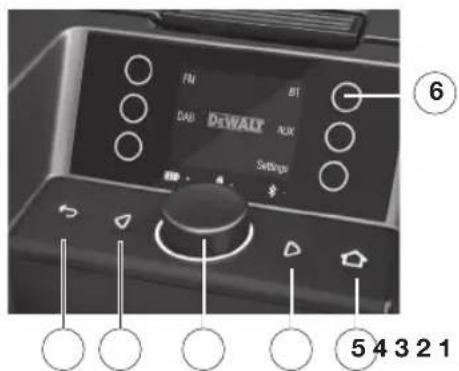
Figur 4. Kontrolpanel
LESEN SIE ALLE ANWEISUN- GEN
natural_image
Technical line drawing of a mechanical component with labeled parts (1 and 2), no readable text or symbols present.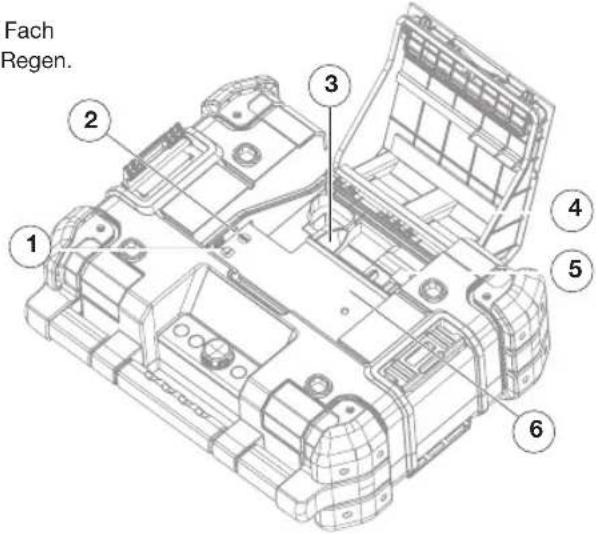
The DEWALT® TSTAK™ CONNECT RADIO includes a built-in FM and DAB radio, Bluetooth support, 3.5mm AUX connector port to play audio/music from an external appliance, and an intuitive application for remote controlling the system via a Bluetooth-enabled smartphone or tablet. The system includes charging capabilities for DEWALT® slide pack batteries. The TSTAK™ CONNECT RADIO will charge most DEWALT® Li-ion batteries. Batteries sold separately.
KEY FEATURES
• FM-stereo with manual/auto scanning and memory preset of stations
• Advanced Digital Audio Broadcasting (DAB) with information broadcast display by station
- Favorites – preset digital stations. 12 DAB stations and 12 FM stations.
- Bluetooth connectivity
• 3.5mm Auxiliary input jack for connecting external audio devices
• USB power/charging port (5V/2.1A)
• Large Colour LCD illuminated display
- Illuminated, soft-touch buttons
- Four mid-range drivers and two subwoofers for rich sound performance
• Volume control and sound tone adjustment
• Heavy-duty design
- Compatible with any TSTAK™ unit
• Water and dust-resistant – IP54 tested
- Smartphone/tablet Application for remote management of the appliance
TECHNICAL DATA
| POWER SUPPLY UNIT (AC/DC POWER ADAPTOR) MODEL: S048HM2400200 | |
| Power input 100-240VAC 50-60 Hz (Class II) | |
| Power output 24 VDC | |
| Current output 2 A | |
| Weight 0.3 kg (0.66 lb.) | |
| APPLIANCE | |
| Power input 24 VDC | |
| Power output USB charge (5V/2.1A) | |
| BLE Standby 7 Days on Battery, Always on when connected to mains | |
| Period of time for switching on the automatic network standby power management function | < 20 mins |
| IP rating IP54* | |
| Weight 5.9 kg (13.2 lb.) not including battery pack | |
| Stacking weight (gross) 60 kg (132 lb.) | |
| BATTERY PACK CHARGER | |
| Battery packs voltage | 10.8 VDC / 18 VDC (including XR FLEXVOLT Battery Packs) 1Ah-9Ah |
| Battery type Li-ion (Slider Pack) | |
| Approx. charging time 90-300 min | |
| Charge current 1.5A | |
| AUDIO CHARACTERISTICS | |
| Audio source | DAB/FM, 3.5mm Auxiliary input jack, Bluetooth |
| Sound SPL 100 dB @ 1 m | |
| Sound power 45 W (class D) | |
| Operation time | 8 hours (approx.) for a fully-charged Premium 18 V Li-ion battery |
| Operating Frequency 2402-2480 MHz | |
| Transmit | 4dBm max |
*Protects from work-site dust, debris and light rain
DEFINITIONS: SAFETY GUIDELINES
The definitions below describe the level of severity for each signal word. Please read the manual and pay attention to these symbols.
⚠️ DANGER: Indicates an imminently hazardous situation which, if not avoided, will result in death or serious injury.
⚠ WARNING: Indicates a potentially hazardous situation which, if not avoided, could result in death or serious injury.
CAUTION: Indicates a potentially hazardous situation which, if not avoided, may result in minor or moderate injury.
→ Notice: Indicates a practice not related to personal injury which, if not avoided, may result in property damage.

WARNING: To reduce the risk of injury, read the instruction manual entirely.
E: Product WARNING labels are located on the bottom of the appliance.
IMPORTANT SAFETY INSTRUCTIONS
- Read these instructions.
- Keep these instructions.
- Pay attention and follow all warnings.
- Follow all instructions.
- DO NOT use this appliance near water.
- Read and understand all safety warnings and instructions. Failure to follow the warnings and instructions may result in electric shock, fire and/or serious injury.
- This appliance shall not be exposed to direct water and no objects filled with liquids, such as bottles, shall be placed on the appliance.
- Clean only with a dry or damp cloth.
- To protect the appliance from water or dust, always close the compartment cover, and the rubber cover of the DC power input port.
- Use in accordance with the manufacturer's instructions.
- DO NOT place near any naked flame sources, such as lighted candles, heat sources such as radiators, heat registers, stoves or other apparatus (including amplifiers) that produce heat.
- Protect the power cord from being walked on or pinched particularly at plug and receptacle.
-
Only use attachments/accessories specified by the manufacturer.
-
When a cart is used, use caution when moving the cart/appliance combination to avoid injury from tip-over. Use only with a cart,
stand, tripod, bracket, or table specified by the manufacturer, or sold with the apparatus.
-
The AC/DC power adaptor should only be used as the power source for the appliance and for battery charging. To disconnect the appliance completely, the AC/DC power adaptor should be disconnected from the outlet.
-
Unplug this appliance during lightning storms or when unused for long periods of time.
-
The AC/DC power adaptor should be easily accessible and not obstructed while in use.
-
Refer all servicing to qualified service personnel. Servicing is required when the appliance has been damaged in any way, such as power-supply cord or plug is damaged, liquid or direct rain has reached the connectors, the appliance has been exposed to extensive moisture, does not operate normally, or has been dropped and does not operate.
-
This appliance is not intended for use by persons (including children) with reduced physical, sensory or mental capabilities, or lack of experience and knowledge, unless they have been given supervision or

EN
instruction concerning use of the appliance by a person responsible for their safety.
- Children should be supervised to ensure that they DO NOT play with the appliance.
- This transformer can be used by children aged from 8 years and above and persons with reduced physical, sensory or mental capabilities or lack of experience and knowledge if they have been given supervision or instruction concerning use of the transformer in a safe way and understand the hazards involved.
- Children shall not play with the appliance
- Cleaning and user maintenance shall not be made by Children without supervision
- Use only with specifically designated DEWALT® battery packs (see Important Safety Instructions for All Battery Packs below for DEWALT®-approved battery packs). Use of any battery packs other than those approved by DEWALT® may create a risk of injury and fire.
The lightning flash with arrow head within a triangle is intended to tell the user that parts inside the product are a risk of electric shock to persons.
The exclamation point within a triangle is intended to tell the user that important operating and servicing instructions are in the user manual supplied with the appliance.
☐ The double insulation symbol (a square within a square) indicates a Class II electrical appliance and is intended to alert qualified service personnel to use only identical replacement parts in this appliance.
⚠ WARNING: To reduce the risk of fire or electric shock, do not expose this appliance to direct rain or moisture. Use only in dry locations.
CAUTION: To prevent electric shock, match the wide blade of the adaptor plug to the wide slot and fully insert.
LIST OF STANDARDS
The DEWALT® TSTAK™ complies with the
following standards:
EN 300328
EN 55024
EN 301489-17
EN 55032
EN 55014-1
EN 60065
EN 55014-2
EN 61000-3-2
EN 55020
EN 61000-3-3
LIST OF SYMBOLS
The labels on this appliance may include the following symbols:
V Volts
A Amperes
W Watts
h hours
--- Direct current
☐ Class II Construction (double insulated)
CE CE Mark
⚠️ Safety alert symbol
IMPORTANT SAFETY INSTRUCTIONS FOR ALL BATTERY PACKS
When ordering replacement battery packs, be sure to include the catalog number and voltage. The TSTAK™ CONNECT RADIO is to be used only with DEWALT® DCB series 10.8V/18V Li-ion rechargeable battery packs, including DEWALT® XR FLEXVOLT battery packs of up to 9Ah. Use of any other battery packs or any non-rechargeable batteries may create a risk of injury or fire.
Recharge only with the TSTAK ^™ CONNECT RADIO integrated charger, or equivalent. A charger that is suitable for one type of battery pack may create a risk of fire when used with another battery pack.
→ Note: The battery pack is not fully charged
out of the carton. Before using the battery pack and charger, read the safety instructions in the following section and then follow the charging procedures.
READ ALL INSTRUCTIONS
- Do not charge or use the battery pack in explosive atmospheres, such as in the presence of flammable liquids, gases or dust. Inserting or removing the battery pack from the charger may ignite the dust or fumes.
- NEVER force the battery pack into the charger. DO NOT modify the battery pack in any way to fit into a non-compatible charger as battery pack may rupture causing serious personal injury.
- Charge the battery packs only in designated DEWALT® chargers.
• DO NOT immerse in water or other liquids. - Do not store or use the appliance and battery pack in locations where the temperature may reach or exceed 105 °F (40 °C) (such as outside sheds or metal buildings in summer). For best life store battery packs in a cool, dry location.
WARNING: Fire hazard. Never attempt to open the battery pack for any reason. If the battery pack case is cracked or damaged, do not insert into the charger. Do not crush, drop or damage the battery pack. Do not use a battery pack or charger that has received a sharp blow, been dropped, run over or damaged in any way (e.g., pierced with a nail, hit with a hammer, stepped on). Damaged battery packs should be returned to the service center for recycling.
WARNING: Fire hazard. Do not store or carry the battery pack so that metal objects can contact exposed battery terminals. For example, do not place the battery pack in aprons, pockets, toolboxes, product kit boxes, drawers, etc., with loose nails, screws, keys, etc. Transporting batteries can possibly
cause fires if the battery terminals inadvertently come in contact with conductive materials such as keys, coins, hand tools and the like. The US Department of Transportation Hazardous Material Regulations (HMR) actually prohibits transporting batteries in commerce or on airplanes (e.g., packed in suitcases and carry-on luggage) UNLESS they are properly protected from short circuits. So when transporting individual battery packs, make sure that the battery terminals are protected and well insulated from materials that could contact them and cause a short circuit.
SPECIFIC SAFETY INSTRUCTIONS
FOR LITHIUM ION (LI-ION)
- Do not incinerate the battery pack even if it is severely damaged or is completely worn out. The battery pack can explode in a fire. Toxic fumes and materials are created when lithium ion battery packs are burned.
- If battery contents come into contact with the skin, immediately wash area with mild soap and water. If battery liquid gets into the eye, rinse water over the open eye for 15 minutes or until irritation ceases. Additionally, seek medical attention. The battery electrolyte is composed of a mixture of liquid organic carbonates and lithium salts.
- Contents of opened battery cells may cause respiratory irritation. Provide fresh air. If symptoms persist, seek medical attention.
- Do not expose a battery pack or appliance to fire or excessive temperature. Exposure to fire or temperature above 265 °F (130 °C) may cause explosion.
WARNING: Burn hazard. Battery liquid may be flammable if exposed to spark or flame.
IMPORTANT SAFETY INSTRUCTIONS FOR ALL BATTERY CHARGERS
Save these instructions: This manual contains important safety and operating instructions for battery chargers.
- Before using the charger, read and understand all instructions and cautionary markings on the charger, battery pack and product using the battery pack.

WARNING: Shock hazard. Do not allow any liquid to get inside the charger. Electric shock may result.

CAUTION: Burn hazard. To reduce the risk of injury, charge only DEWALT® rechargeable battery packs. Other types of batteries may overheat and burst resulting in personal injury and property damage.
→Notice: When battery pack is not in use, keep it away from other metal objects. Alternatively, with the charger plugged into the power supply, the charger can be shorted or ignited by foreign material. Foreign materials or metal objects of a conductive nature, such as, but not limited to, grinding dust, metal chips, steel wool, aluminum foil or any buildup of metallic particles should be kept away from the charger cavities at all times.
Always unplug the AC/DC power adaptor from the outlet and remove the battery pack from the battery pack receptacle before attempting to clean the charger.
- DO NOT attempt to charge the battery pack with any charger other than a compatible DEWALT® charger. The charger and battery pack are specifically designed to work together.
- This charger is not intended for any uses other than charging designated DEWALT® rechargeable batteries. Any other uses may result in risk of fire, electric shock or electrocution.
- Do not expose the charger to direct water source and DO NOT immerse in water.
-
Pull by the plug rather than the cord when disconnecting the charger. This will reduce the risk of damage to the electric plug and cord.
-
Make sure that the cord is located so that it will not be stepped on, tripped over or otherwise subjected to damage or stress.
- Do not use an extension cord unless it is absolutely necessary. Use of improper extension cord could result in risk of fire, electric shock or electrocution.
- When operating a charger outdoors, always provide a dry location and use an extension cord suitable for outdoor use. Use of a cord suitable for outdoor use reduces the risk of electric shock.
- Do not place any object on top of the charger. Place the charger in a position away from any heat source.
- Do not operate the charger with a damaged cord or plug.
- Do not operate the charger if it has received a sharp blow, been dropped or otherwise damaged in any way. Take it to an authorized service center.
- Do not disassemble the charger; take it to an authorized service center when service or repair is required. Incorrect reassembly may result in a risk of electric shock, electrocution or fire.
- Disconnect the charger from the outlet before attempting any cleaning. This will reduce the risk of electric shock. Removing the battery pack will not reduce this risk.
- NEVER attempt to connect 2 chargers together.
- The charger is designed to operate on 24 VDC. Do not attempt to use it with any other power supply AC/DC power adaptor other than that supplied with the appliance.
STORAGE
RECOMMENDATIONS
- When possible store in cool and dry conditions, away from direct sunlight and excess heat or cold.
- For long-term storage, it is recommended storing a fully charged battery pack in a cool dry place, out of the charger, for optimal battery life.
Note: Battery packs should not be stored completely depleted of charge. The battery pack will need to be recharged before use.
CHARGING
The TSTAK™ CONNECT RADIO can charge only DEWALT® DCB series 10.8V/18V Li-ion rechargeable battery packs including DEWALT® XR FLEXVOLT Battery packs up to 9Ah. Use of any other battery pack or any non-rechargeable batteries may create a risk of injury or fire. Be sure to read all safety instructions before using this appliance for charging your battery pack.
IMPORTANT CHARGING NOTES
- Longest life and best performance can be obtained if the battery pack is charged when temperature is between 18^ C and 24^ C. DO NOT charge the battery pack below 4.5^ C, or above 40.5^ C. This is important and will prevent serious damage to the battery pack.
- The charger and battery pack may become warm to the touch while charging. This is a normal condition, and does not indicate a problem. To facilitate the cooling of the battery pack after use, avoid placing the charger or battery pack in a warm environment such as in a metal shed or an uninsulated trailer.
- A cold battery pack will charge at about half the rate of a warm battery pack. The battery pack will charge at that slower rate throughout the entire charging cycle and will not return to maximum charge rate even if the battery pack warms.
- If the battery pack does not charge properly:
a. Make sure power source is working by plugging a different appliance to the same source;
b. Check to see if receptacle is connected to a light switch which turns power off when you turn out the lights;
c. Move the charger and battery pack to a location where the surrounding air temperature is between 18°C and 24 °C;
d. If charging problems persist, take the battery pack and charger to your local service center.
- The battery pack should be recharged when it fails to produce sufficient power
on jobs which were easily done previously. DO NOT CONTINUE to use the pack under these conditions. You may also charge a partially used pack with no adverse effect on the battery pack.
- Foreign materials of a conductive nature such as, but not limited to, grinding dust, metal chips, steel wool, aluminum foil, or any buildup of metallic particles should be kept away from charger cavities. Always unplug the charger from the power supply before attempting to clean.
- Do not freeze or immerse the charger in water or any other liquid.
WARNING: Shock hazard. Don't allow any liquid to get inside the charger. Electric shock may result.
WARNING: Burn hazard. Do not submerge the battery pack in any liquid or allow any liquid to enter the battery pack. Never attempt to open the battery pack for any reason. If the plastic housing of the battery pack breaks or cracks, return to a service center for recycling.
CAUTION: Danger of explosion if battery is incorrectly replaced. Replace only with the same or equivalent type.
CHARGING A BATTERY PACK
The TSTAK ^™ CONNECT RADIO includes a large storage compartment. This compartment also stores and protects the AC/DC power adaptor when not in-use.
- Open the compartment to take out the AC/DC power adaptor (see Figure 1 and Figure 3).
- Plug the charger AC/DC power adaptor into an appropriate outlet and connect it to the TSTAK™ CONNECT RADIO power-in port before inserting the battery pack. The Mains Adapter indicator LED will light in red.
- Open the appliance cover by releasing its locking latch.
- Insert the battery pack (not included) into the radio, making sure the pack is securely held in the receptacle (see Figure 4). The battery indicator LED will
blink continuously, indicating that battery charging is in process.
The AC adapter LED lights in red. The battery LED will light in accordance with battery charging status (Green, Yellow, Red).
→ Note: Close the cover and check it is tightly closed.
- The charging completion will be indicated by a steady battery indicator LED. The pack is fully charged and may be used at this time or left in the charger.
HOT/COLD PACK DELAY
When the charger detects a battery pack that is too hot or too cold, it automatically starts a Hot/Cold Pack Delay, suspending charging until the battery pack has reached an appropriate temperature. The charger then automatically switches to the pack charging mode. This feature ensures maximum battery pack life.
LED INDICATORS
| BATTERY LED | |
| A three-color LED indicates the battery pack status | |
| Green | Battery pack is fully charged |
| Yellow | Battery pack is partially charged |
| Red Battery pack is | empty |
| BATTERY LED | |
| A three-color LED indicates the battery pack status | |
| Slow Blink & Mains Adapter LED is on | Battery is charging |
| Fast Red Blink | Error / Faulty battery pack |
| MAINS ADAPTER LED | |
| A red LED indicates battery Mains Adapter | |
| Red | Mains Adapter Connected |
| BLUETOOTH LED | |
| A blue LED indicates the Bluetooth status | |
| Blue | Bluetooth connected to Mobile App |
| Off | Not connected (light does not need to be on for connecting to the device) |
| ON SCREEN BATTERY STATUS POPUP | |
| When charging a battery pack, a large battery image is displayed in the center of the LCD screen showing the battery pack charging status. | |
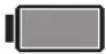 Green Green | Battery pack is fully charged |
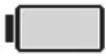 Yellow Yellow | Battery pack is partially charged |
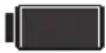 Red Red | Battery pack is empty |
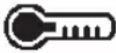 Cyan and Red Cyan and Red | Hot/Cold DelayThis charger has a hot/cold delay feature: when the charger detects a battery that is hot, it automatically starts a delay, suspending charging until the battery has cooled. After the battery has cooled down, the charger automatically switches to the pack charging mode. This feature ensures maximum battery life. |
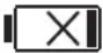 | Faulty Battery PacksThis charger will not charge a faulty battery pack. The charger will indicate faulty battery pack by displaying an X on the LCD battery image. If this occurs, re-insert the battery pack into the charger. If the problem persists, try a different battery pack to determine if the charger is working properly. If the new pack charges correctly, then the original pack is defective and should be returned to a service center or other collection site for recycling. If the new battery pack elicits the same trouble indication as the original, have the charger and the battery pack tested at an authorized service center.NOTE: This could also mean a problem with a charger. |
⚠ WARNING: To reduce the risk of injury, turn the appliance off and disconnect it from the power outlet when not in use and when making repairs. Do not attempt to disassemble the unit; take it to an authorized service center when service or repair is required.
SAVE THESE INSTRUCTIONS FOR FUTURE REFERENCE
The full user manual is available on www.2Helpu.Com/DEWALT
APPLIANCE DESCRIPTION
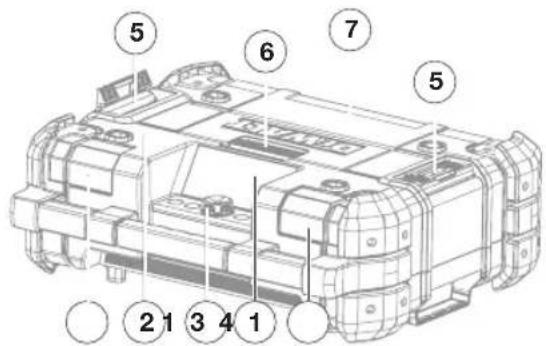
Figure 1. Front View
- Front speakers (2x)
- Carrying handle
- Control panel;
- LCD Display Screen
- Stacking latches (2x);
- Compartment latch
- Compartment cover
• To open the compartment, release the cover locking latch and open it.
• To reach the battery pack receptacle, open the compartment top cover.
• To close the compartment, push the cover down until it is locked in place.
Note: When correctly closed, the compartment protects its contents from dust, debris and light rain.
natural_image
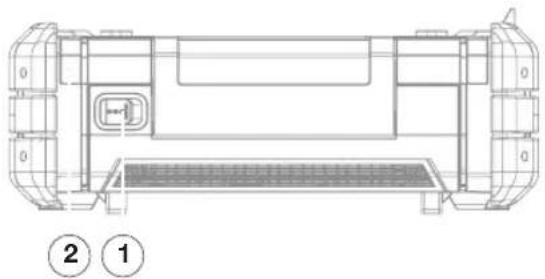
Technical line drawing of a mechanical component with labeled parts (1 and 2), no readable text or symbols present.Figure 2. Rear View
- Power-in port (24 VDC)
- Rear loudspeakers (2x)
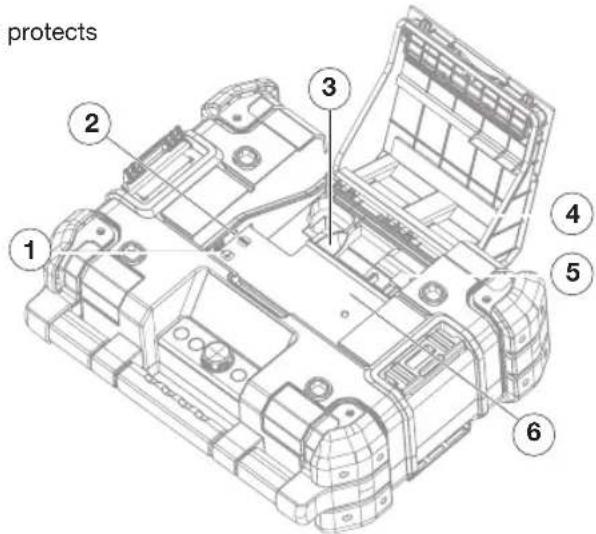
Figure 3. Storage Compartment
- USB power/charging port
- Auxiliary jack (3.5 mm)
- AC/DC power adaptor compartment
- Compartment cover
- Battery Pack Receptacle
6.Storage space
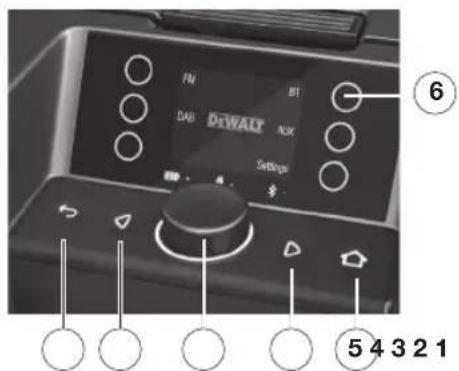
Figure 4. Control Panel
- Back button
- Left button
- Selection knob
- Right button
- Home button
- Touch buttons (×6)
TROUBLESHOOTING
WEAK BATTERY PACKS
Weak batteries will continue to function but should not be expected to perform as well. When the appliance is powered by a battery pack and its charging level falls below 20%, the low battery indicator is displayed.
BATTERY PACK PROTECTION
To protect the life of the battery pack, the appliance will shut off when the battery's charging level becomes too low. If this happens, connect the TSTAK™ CONNECT RADIO to an outlet with the AC/DC power adaptor and charge the battery pack.
MUSIC STOPS
When dropping the appliance in its vertical position the battery pack may disconnect from its receptacle. If the music is operated by the battery pack, the music will stop. To resume, open the cover and reposition the battery pack.
MAINTENANCE
⚠ WARNING: To reduce the risk of injury, turn appliance off and disconnect it from power source before performing any maintenance procedures or when making repairs. Do not attempt to disassemble the unit; take it to an authorized service center when service or repair is required.
CLEANING
WARNING: Disconnect the charger from the AC outlet before cleaning. Dirt and grease may be removed from the exterior of the appliance using a cloth or soft non-metallic brush.
WARNING: Blow out dirt and dust with clean, dry air at least once a week. To minimize the risk of eye injury, always wear ANSI Z87.1 approved eye protection when performing this.
⚠ WARNING: Never use solvents or other
harsh chemicals for cleaning the non-metallic parts of the appliance. These chemicals may weaken the plastic materials used in these parts. Use a cloth dampened only with water and mild soap. Never let any liquid get inside the appliance; never immerse any part of the appliance into a liquid.
ACCESSORIES
WARNING: Since accessories, other than those offered by DEWALT®, have not been tested with this appliance, use of other such accessories could be hazardous. To reduce the risk of injury, only DEWALT® accessories should be used with this appliance.
Accessories for use with the TSTAK™ CONNECT RADIO are available at extra cost from your local dealer or authorized service center.
REPAIRS
The battery packs are not serviceable.
To assure product SAFETY and RELIABILITY, any repairs, maintenance and adjustment should be performed by a DEWALT® factory service center, a DEWALT® authorized service center or other qualified service personnel. Always use identical replacement parts.
REGISTER ONLINE
Thank you for your purchase. Register your product now for:
- Warranty Service: Registering your product will help you obtain more efficient warranty service in case there is a problem with your product.
- Confirmation of Ownership: In case of an insurance loss, such as fire, flood or theft, your registration of ownership will serve as your proof of purchase.
- For Your Safety: Registering your product will allow us to contact you in the unlikely event a safety notification is required under the Federal Consumer Safety Act.
ES
RADIO + CARGADOR DEWALT® TSTAK™ CONNECT
--- Corriente directa
Figura 1. Vista frontal
natural_image
Technical line drawing of a vehicle chassis with labeled components (no text or symbols present)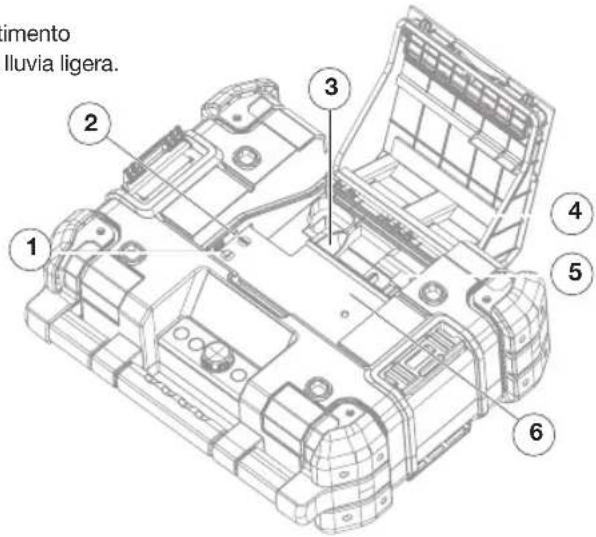
Figura 2. Vista trasera
- Puerto de entrada de corriente (24 VCC)
- Altavoces traseros (x 2)
☐ Construction classe II (double isolation)
CE Certifié CE
natural_image
Technical line drawing of a mechanical component with labeled parts (1 and 2), no readable text or symbols present.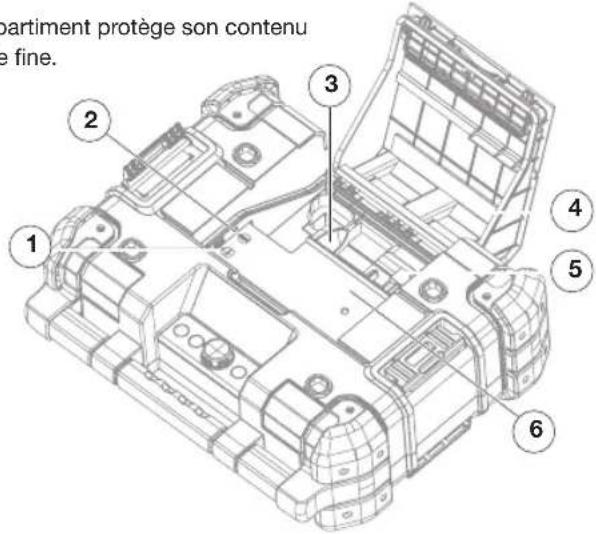
Figura 1. Vista anteriore
natural_image
Technical line drawing of a vehicle chassis with labeled components (no text or symbols present)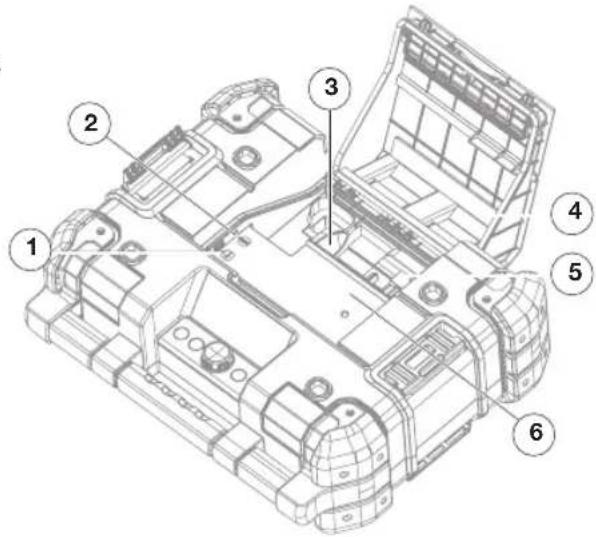
Figura 2. Vista posteriore
APPARAATBESCHRIJVING

natural_image
Technical line drawing of a mechanical component with labeled parts (1 and 2), no readable text or symbols present.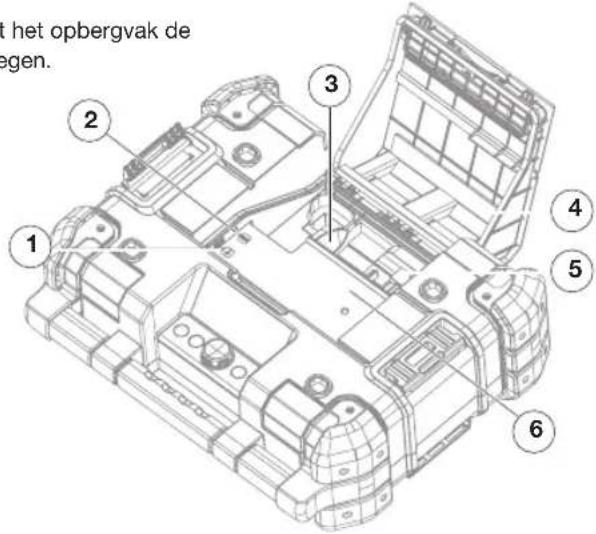
BESCHERMING VAN DE ACCU
natural_image
Technical line drawing of a vehicle chassis with labeled components (no text or symbols present)Figur 3. Oppbevaringsrom
-
USB-strøm/ladeport
-
Aux-plugg (3,5 mm)
-
Strømadapterrom
-
Kammerdeksel
-
Stikkontakt for batteripakke
-
Lagringsplass
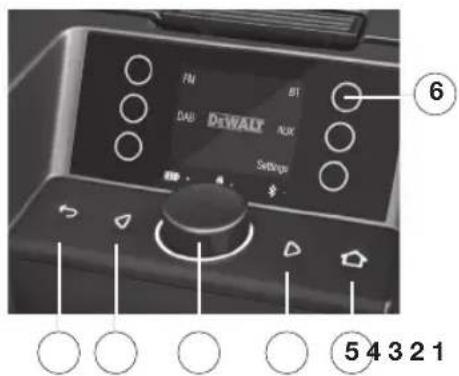
Figur 4. Kontrollpanel
-
Tilbake-knapp
-
Venstre knapp
-
Velgerknott
-
Høyre knapp
-
Hjem-knapp
-
Berøringsknapp (×6)
PROBLEML∅SNING
SVAKE BATTERIPAKKER
Figura 1. Vista frontal
natural_image
Technical line drawing of a mechanical component with labeled parts (1 and 2), no readable text or symbols present.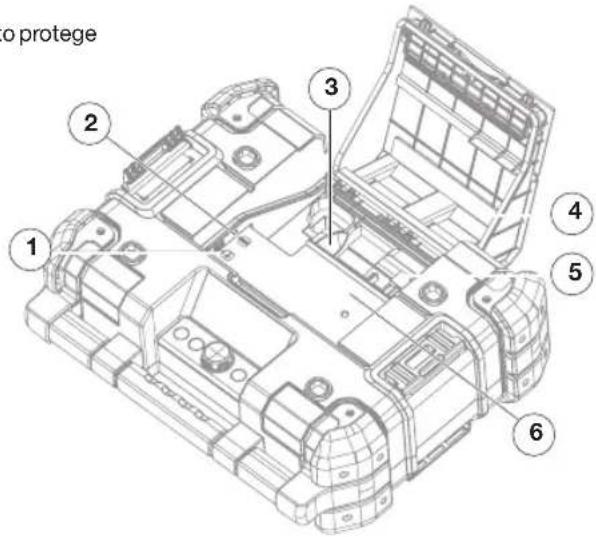
natural_image
Technical line drawing of a vehicle chassis with labeled components (no text or symbols present)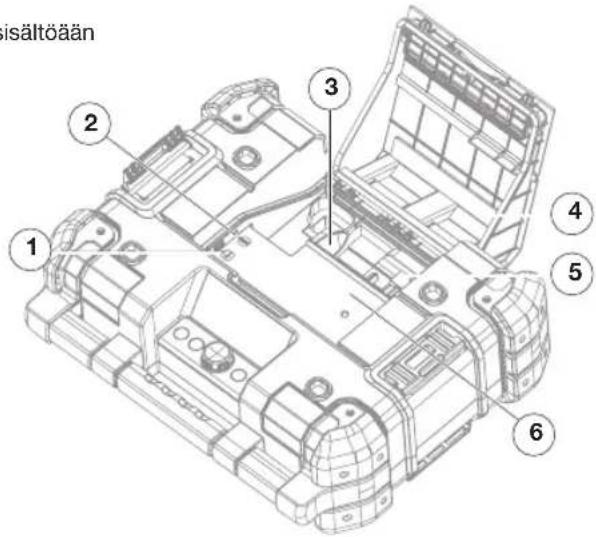
• Stor LCD-upplyst skärm
• Upplysta, mjuka knappar
LED-LAMPA FÖR BLUETOOTH
Figur 1. Frontvy
natural_image
Technical line drawing of a vehicle chassis with labeled components (no text or symbols present)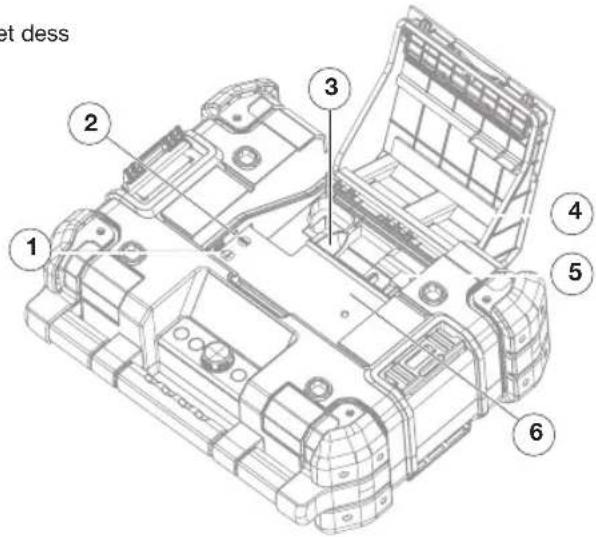
natural_image
Technical line drawing of a vehicle chassis with labeled components (no text or symbols present)AYXNIA LED BLUETOOTH
natural_image
Technical line drawing of a mechanical assembly with labeled components (no text or symbols present)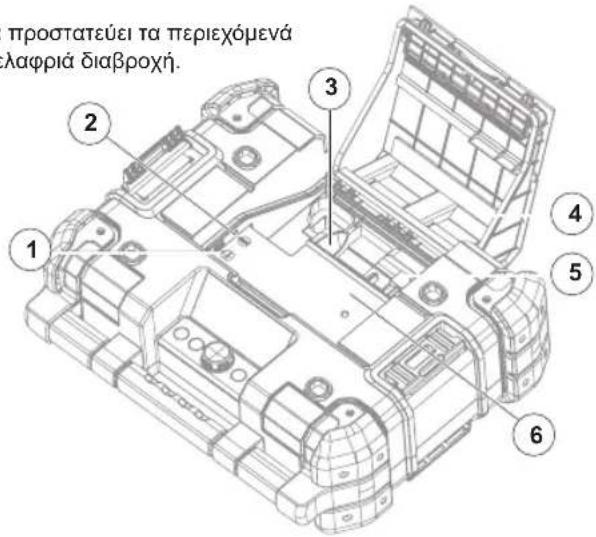
Copyright © 2017 DEWALT
The following are trademarks for one or more DEWALT power tools: the yellow and black color scheme; the kit box configuration.

DEWALT Industrial Tool Co.
D-65509 IDSTEIN,
GERMANY
www.dewalt.com
V1.0
15224 12/2017
- LESEN SIE ALLE ANWEISUN- GEN
- KEY FEATURES
- DEFINITIONS: SAFETY GUIDELINES
- IMPORTANT SAFETY INSTRUCTIONS
- EN
- LIST OF STANDARDS
- LIST OF SYMBOLS
- IMPORTANT SAFETY INSTRUCTIONS FOR ALL BATTERY PACKS
- READ ALL INSTRUCTIONS
- SPECIFIC SAFETY INSTRUCTIONS
- FOR LITHIUM ION (LI-ION)
- IMPORTANT SAFETY INSTRUCTIONS FOR ALL BATTERY CHARGERS
- STORAGE
- RECOMMENDATIONS
- CHARGING
- IMPORTANT CHARGING NOTES
- CHARGING A BATTERY PACK
- HOT/COLD PACK DELAY
- LED INDICATORS
- SAVE THESE INSTRUCTIONS FOR FUTURE REFERENCE
- APPLIANCE DESCRIPTION
- Figure 1. Front View
- TROUBLESHOOTING
- WEAK BATTERY PACKS
- BATTERY PACK PROTECTION
- MUSIC STOPS
- MAINTENANCE
- CLEANING
- ACCESSORIES
- REPAIRS
- REGISTER ONLINE
- RADIO + CARGADOR DEWALT® TSTAK™ CONNECT
- Figura 1. Vista frontal
- Figura 2. Vista trasera
- APPARAATBESCHRIJVING
- BESCHERMING VAN DE ACCU
- PROBLEML∅SNING
- SVAKE BATTERIPAKKER
- LED-LAMPA FÖR BLUETOOTH
Brand : DEWALT
Model : DWST1-81080-XE
Category : Radio