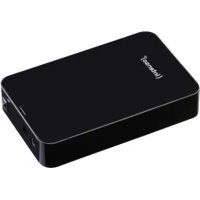
3.5 Memory Center - Hard Drive INTENSO - Free user manual and instructions
Find the device manual for free 3.5 Memory Center INTENSO in PDF.



Frequently Asked Questions - 3.5 Memory Center INTENSO
User questions about 3.5 Memory Center INTENSO
0 question about this device. Answer the ones you know or ask your own.
Ask a new question about this device
Download the instructions for your Hard Drive in PDF format for free! Find your manual 3.5 Memory Center - INTENSO and take your electronic device back in hand. On this page are published all the documents necessary for the use of your device. 3.5 Memory Center by INTENSO.
USER MANUAL 3.5 Memory Center INTENSO
INTENSO INTERNATIONAL GMBH I Service Center (Ihre RMA-Nummer)
Declaration of conformity 2
General 2
Use
System requirements 3
Connecting the hard drive 3
Removing the hard drive 3
Safety instructions 4
Assistance with problems 5
Technical data 5
Disposal
Exclusion of liability 6
7
OVERVIEW
Delivery scope
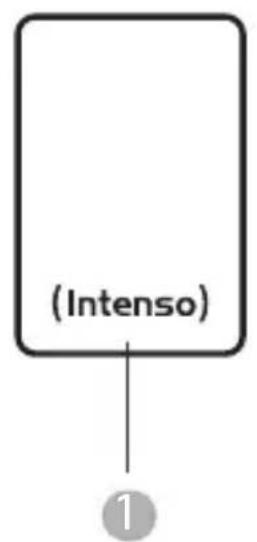


1 Intenso Super Speed USB 3.0 hard drive (downwards compatible)
USB 3.0 cable
Power supply 12V - 2A (GangQi GQ24-120200-AG)
Operating instructions
Declaration of conformity

The CE marking says that this product meets the requirements of all EU Directives applicable for this product.
GENERAL
About these instructions
Read these instructions carefully and please observe and heed all references made in these instructions to guarantee a long life and reliable use of the device. Please keep these instructions ready to hand and pass them on to other users of the device.
Intended use
The primary purpose of this external hard drive is the storage of data from PCs, Notebooks, Ultrabooks or MAC computers. This product is not intended for commercial use or for medical and special applications, where the failure of the product can cause injuries, mortalities or considerable material damages. In the case of use which does not correspond to the intended use, the liability expires. TThe opening, as well as conversion of the device and the use of additional devices and accessories, which are not approved by us, must be refrained from. Do not use the device under extreme ambient conditions and observe the safety instructions. Non-observation of the information and safety instructions in these Instructions is deemed as non-observation of the intended use and leads to expiry of the liability and can lead to personal or material damage.
USE
System requirements
This hard drive is compatible with the operating systems MS Windows 7 / 8 / 8.1 / 10 and Mac OS 10.x*. A free USB interface is required to operate it.
*Trademarks: Windows 7/8/8.1/10 are registered trademarks of the Microsoft Corporation. Macintosh and MAC are registered trademarks of Apple Computer. All brands and third party names are the property of the respective user.
Notes:
A USB 3.0 interface card is necessary for the USB 3.0 operation The hard drive is downward compatible to previous USB standards. The hardware configuration of your PC and the used operating system can influence the compatibility of the hard drive.
Connecting the hard drive
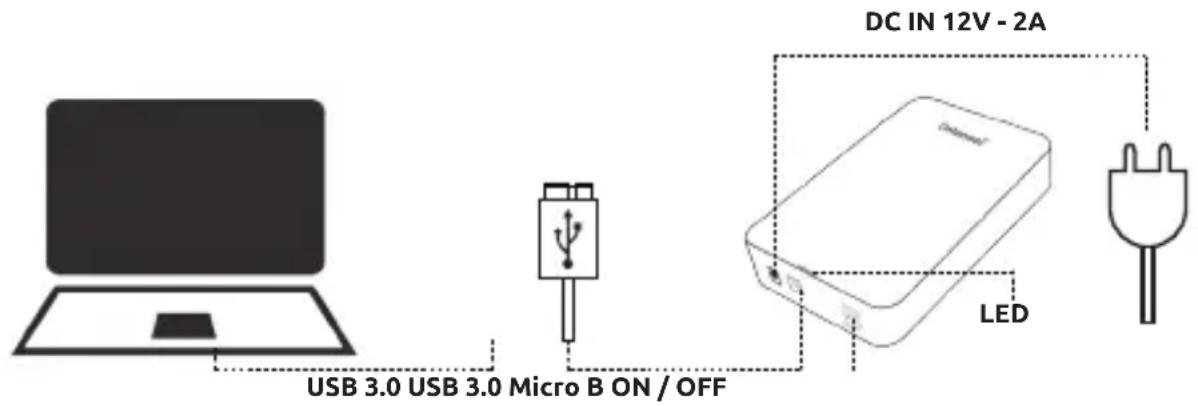
Connect the supplied power supply with the external hard drive. Plug the other end of the power supply into the socket. To switch on, press the On/Off switch on the front side of the housing. To connect the external hard drive to your computer, please use only the supplied USB cable. Connect the USB 3.0 plug with the Intenso hard drive and the plug of the USB cable end with your computer. The computer recognizes the "new hardware" and installs the driver automatically. Wait until the driver installation is completed. In the "workplace" there is now another drive with the designation "Intenso" available. As soon as the external drive is connected with the computer, the LED lights up The LED flashes when a write or read operation is carried out.
Removing the hard drive
Depending on the used operating system, the hard drive must be logged off before the connection to the computer is interrupted. For further details please refer to the Help Section of your operating system provider. The device may not be removed when it is still being accessed (flashing LED). This can lead to damages and/or data loss. Please close all the files located on the hard drive (photos, documents, etc.) before removing the hard drive.
SAFETY INSTRUCTIONS
Dangers for children and persons with restricted physical, sensory or mental abilities:
Children often underestimate dangers or do not recognise them at all. This device is not intended to be used by persons (including children) with restricted sensory, physical or mental abilities or lack of experience and/or knowledge, unless they are supervised by a person responsible for their safety or received instructions from the person on how to use the device and they have understood the resultant dangers. Unsupervised children should not have access to the device. Make sure that children do not play with the device.
General
The device may not be exposed to spray or dripping water.
Vessels filled with liquid (vases, glasses or similar) may not be placed on the device. There is danger that the vessel tips over and the liquid impairs the electrical safety.
Do not operate this device with wet hands.
Do not insert any items, which are not intended for its use, into the openings of the device. This could lead to an electrical short-circuit and a resultant fire.
Do not block or cover the openings of the product.
Under no circumstances use the device in the case of visible damages on it or the USB cable.
When positioning the device, pay attention that no one can tread on the cable or trip over it. Do not place any objects onto the cable.
Do not drop the device or subject it to vibrations or impacts, this applies in particular to the transport. Do not move the device when it is in operation. Hard drives are extremely vulnerable and the data located on them can be destroyed irretrievably through this. Such damages are not contained in the guarantees.
Carry out data backups frequently to avoid a possible data loss.
Data recovery is not part of the guarantees and cannot be conducted by our Service Centre!
Keep the device away from any type of moisture and avoid dust, heat and direct sunlight.
Do not open the housing of the device and do not disassemble it into its component parts. Do not try to repair it yourself. The guarantee expires in this case.
Avoid using the device in strongly magnetized areas such as, for example, in the direct proximity of TV sets, loudspeakers, etc. to avoid data loss or other malfunctions.
During operation pay attention to a vibration-free base to avoid damages.
The socket must be close to the device and easily accessible.
Do not open the housing of the mains adapter. When the housing is open there is mortal danger through electric shock. It does not contain any parts requiring maintenance.
Operate the mains adapter only on sockets with AC 100-240V\~, 50 / 60Hz If you are not sure about the power supply at the installation site, enquire with the energy provider concerned.
Only use the enclosed mains adapter and power supply cable (GangQi GQ24-120200-AG).
To interrupt the power supply to your device, pull the power supply out of the socket. Always hold on to the power pack when removing it. Never pull on the cable.
ASSISTANCE WITH PROBLEMS
Status LED is not illuminated
Check the hard drive, the power supply and the USB cable for visible damages. If there is such a damage, please turn to our Support to exchange it. Under no circumstances should you use the defective device, power supply or cable. Check whether the cable connection is correctly plugged in.
Hard Drive is not recognized
Check the points under "Status LED is not lit" first.
Please check all other existing USB ports of your device. Please use only the supplied cable and in particular no extension.
If the hard drive is not recognized at any USB port of your device, please try whether it works on another device to exclude a possible defect.
Check the Disk Management, it may be possible that only a drive letter has to be assigned (for more details please see the Help file of your Windows version).
If you used the hard drive before, for example, on a TV set, it may be that you need to format the hard drive first to be able to use it on a computer again (for details please see the operating instructions of the previously used device and/or the Help file of your operating system provider).
TECHNICAL DATA
| EXTERNAL USB 3.0 HARD DRIVE 3.5" (8.9CM) | |
| Dimensions (3.5" housing): 118 x 119 | x 34 mm |
| Transfer rate: max. 5 GBit/sec (USB 3.0) | |
| Capacity calculation: 1 MB = 1,000,000 | bytes/ 1 GB = 1,000,000,000 bytes |
DISPOSAL
| Disposal of old electronic equipment: The devices marked with this symbol are subject to the European Directive 2012/19/EC. All electrical appliances and old electrical appliances must be disposed of separate from the municipal waste stream via designated collection facilities appointed by the government or the local authorities. You avoid environmental damage with the proper disposal of old electrical equipment. | |
| Packaging: Packaging is raw material. The packaging material of this product is suitable for recycling and can be re-used. Please pay attention to the local recycling provisions when disposing of any materials. |
EXCLUSION OF LIABILITY
The firmware and/or hardware may be changed at any time without prior notice. For this reason it is possible that parts of these instructions, technical data and images in this documentation differ slightly from the product in your possession. All points described in these instructions only serve the purpose of clarification and must not inevitably correspond to a certain situation. Legal claims cannot be made on the basis of these instructions.
GUARANTEE CONDITIONS AND COMPLAINTS PROCEDURE
Dear Customer,
Our highest priority is customer satisfaction. If, despite our strict IHQ quality guidelines, you discover any deficiencies in your Intenso product, then in addition to your legal guarantee rights, Intenso International GmbH (guarantor) grants you a voluntarily, two-year guarantee for this product in accordance with the following conditions: Intenso International GmbH guarantees that the product is free of material and manufacturing defects if the product is used in accordance with the operating manual.
In a guarantee claim, Intenso International GmbH shall replace the product. Intenso International GmbH does not commit to any services that go above and beyond this, for example compensation for damages or expenses. The guarantee does not constitute liability on the part of Intenso International GmbH for the loss of data. The guarantee applies for two years after purchase by the end consumer and buyer (guarantee period). The sales receipt must be kept and a copy submitted to determine the guarantee period. The guarantee services are available to you in the countries of the European Economic Area (EEA) as well as in Switzerland (territorial scope).
Guarantee claims are excluded in the following cases:
failure to observe the operating manual
- wear of parts that wear out over the course of time, such as batteries for example
misuse or improper handling, installation or use
vibrations or electrostatic discharge of the product, the effects of heat or moisture on the product that are outside the product specifications
damage, scratches or wear
- unauthorised changes, opening the housing, interventions or repairs
damage from other devices, force majeure or transport
For smooth processing in a guarantee claim (complaint), we ask you to observe the following points:
- Request an RMA number for the return shipment (Intenso return document). It can be obtained on the homepage, by e-mail or via the service hotline.
Email (technical support): support@intenso-international.de
Email (RMA number): rma@intenso-international.de
Internet: www.intenso-international.de
Phone (technical support): +49 (0) 4441 - 999 111 (weekdays 9am - 4.30pm) - After a review and release, you will receive the corresponding Intenso return document within three workdays (by e-mail or fax). This document is valid for 14 days and authorises you to send the product back. We do not grant any entitlements by accepting the product. They only come about after completion of a final assessment of the complaint.
- If the product subject to complaint is no longer in our product range, we will offer you a comparable article as a replacement product. If you are not in agreement with the replacement product, then we ask you to process the complaint via the sales outlet from where you originally purchased the product.
- Important: Pack the product including the copy of the sales receipt and all the accessories in a way that is safe to transport. The RMA number must be clearly visible on the package. The package must have sufficient postage. Intenso International GmbH only accepts return shipments that comply with all these conditions.
- A return shipment of foreign articles that were sent in by mistake is not possible.
- The processing time for complaints can be up to four weeks.
- Please send the package to the following address of the guarantor
INTENSO INTERNATIONAL GMBH I Service Center (your RMA number) Kopernikusstraße 12-14 I D-49377 Vechta
MODE D'EMPLOI
Table des matieres
Vue d'ensemble
Matériel fourni
Chere cliente, cher client,
POMOC W PRZYPADKU PROBLEMÓW
Dioda LED stanuNie swieci
INTENSO INTERNATIONAL GMBH I Service Center (Vase c. RMA)
TapaHTHbIe ycIOBnI n IpoIeDypa peKJIaMaIu 7
063OP
O6bem nocTabKn
1
2

3
HeCkN Dnck Intenso c cynepcKOpocTHo nHTeppeucom USB 3.0 (O6paTHo COBMeCTnMbIM)
Kabénb USB 3.0
BLOK cTeBOrO nITaHn 12B-2A (GangQi GQ24-120200-AG)
4 RykoBO,DCTO NO noJIb3OBAHnIO
Дeкларачnia O COOTBeTCTBHH

MapknpoBka 3HaKOM "CE" CBnTeIbCTByeT O TOM, YTO 3TOT npOdyKT OTBeueaT Tpe6oBaHnM Bcex DeIcTByIOxN DxpeKTNB Ebponeckoro CoIO3a, OTHocAunxCn K ATOMy PPOdykTy.
OBsIe CBeDeynA
O6 3TOM pyKOBOdCTBe
BHNMaTeJIbHO IpOHTHe N Co6JIIOJaIte 3To pyKOoCTBO. BbIIOJIHrTe BCE coDEpKaUHecB B ETOM pyKOoCTBe Yka3AHn, YTO6bl OeCneuTb DoJIryu H NaJeKHyO pa6O TY UcTpoiCTBa. XpaHITe 3To pyKOoCTBO B IeRKO DoCTyHOM MeCTe. Ppr NepeJaue yCTpoiCTBa DpyrIM NOnb3OBaTeJAM nepeJaTe BMeCTe C Hm N pyKOoCTBO.
Ha3naueHne
Главнын Ha3haueHem 3TOrO BHeUHero JecTKOrO DnCKa RaBJIeTc CoXpaHEnI DaHHbIX N3 nepcoHaJIbHbIX KOMNbIOTePOB, HOYb6yKOB, YbIbTa6yKOB IINI KOMNbIOTePOB MAC. 3ToT npOdyKT He npEydCMOTpeH dIg KOMMepueckoro HcNoJIb3OBAHn IINI dIg MeDnIuNCHkIX INHbIX CneuaJIbHbIX npImeHEnI, pRi KOTopbIX BbIXoD IpOdyKTA n3 CTPOR MoJKe TnpIBeCTN K TpABMaM, CMEpTeJIbHbIM HechacTHbIM clyuam IINI 3HaunTEJIbHOMy MaTePnaJIbHOMy yIe6py. B clyuae IcNoJIb3OBAHn He NO Ha3HaueHInO OTBeTCTBeHHOCtB n3ROTOBHTeJIyTpaUNBaET cnIy. He BCKpbIbAitke Kopnyca UcTPOIcTB, He BHocITE B yCTPOIcTBa HnKaKne I3MeHEnI N He IcNoJIb3yIte HnKaKne IOnOpHNITeJIbHbIe yCTPOIcTBa I npINAdJIeXHoCTN, KOToPbIE He 6bln HamN yTbeJxDeHbl. He IcNoJIb3yIte yCTPOIcTBO B upe3BbIaHbIX OkpykaIOUx YCNOBnx N CO6JIoJaTe yKa3AHn I O Be3ONaChOCTN.
Heco6IIOHe HnΦOpMauN yKa3aHn No 6e3OnaChocTn, coJepXaUxxCB B 3TOM pyKOBODCTBe, CHTaETc NcNoJIb3OBAHnEM YcTpoiCTBa He nO Ha3NaYeHnIO, CHImaet OTBeTCTBeHHOCt b C I3rTOBNTeJI N MoKeT pInBecTn K TpaBMam IIN MaTePnaIbHOMy yUepe6y.
ПРИМЕHEHNE
Tpe6obHnK cnCTeme
ДэТОТ ДИСК COВМЕСТИС C ONEPAЦИОНБИМСССТЕМАМИ MS Windows 7/8/8.1/10 u Mac OS 10.x*. Ддя erо ИСПОЛБЗОВАнг Heo6xOДM CBO6OДНь INHTePфEиC USB.
- ToBapHbIe 3naku:Windows 7/8/8. 1/10 JaBnIomc3ape2ucmpupoBaHbIMu mobaPbIMu 3nakamu Microsoft Corporation. Macintosh u MAC JaBnIomc3ape2ucmpupoBaHbIMu mobaPbIMu 3nakamu Apple Computer. Bce mop2oBbe Mapku u Ha3eaHua mpebux nuc JaBnIomc co6cbenHocmbio coomeemcmbyoux bnaedbcueb.
yKa3aHnHa:
Дя Исторбовая-coeинец USB 3.0 Heo6xodm INHTepfeic USB 3.0. JecTKI dNcKIMeET o6paTHyIO COBMeCTUMocTb c npedbyuizm n CTAHapTaMn USB. Ha coBMeCTUMocTb JecTKO DnCKa MoKeT BInraTb aPnapaTHa KOnHpyaunBaUeTo KOMNbTepa N IcNoJIb3YeMaJ OepaCNUOHNa CnCTema.
ПоdkлоченkeТКОТДСКА
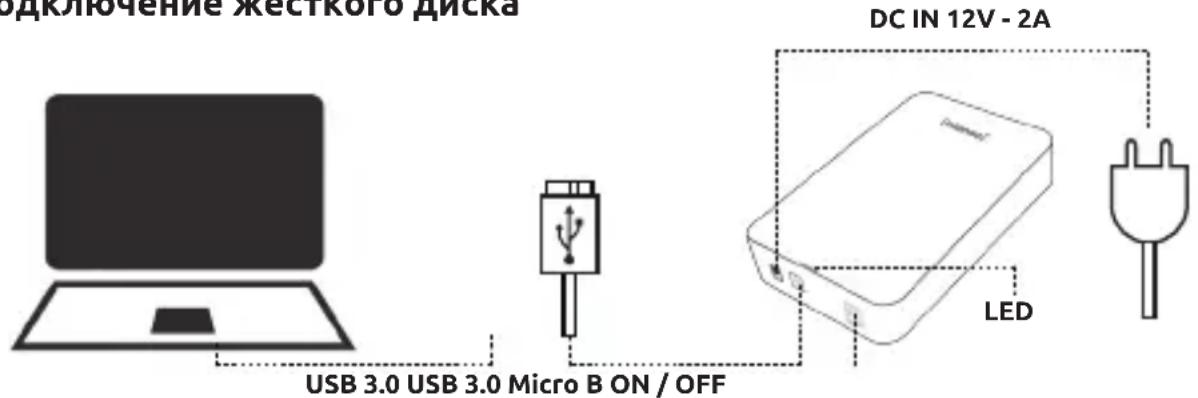
CoeHnHTe npIlaembI 6LOK ceTeBOrO nITaHnC BHeuHm JecTKM DnCKOM. BCTaBbTe BnIKy ceTeBOrO 6LoKa B po3eTky. TeNepb IJIa BkIIOUeHn HaKMnTe BbIKHOaTeJb C nepeDnei CTOpOnbI Kopnyca. IJI na NOkIIOUeHn BHeuHero JecTKoro DnCKa K KomnbIoTepy NcNoB3yIte TOLbKO npIlaAeMbI USB-Ka6eJIb. CoeHNHTe pa3bEm USB 3.0 c JecTKM DnCKOM Intenso. DpyroKoneC USB-Ka6eJIa coeHNHTe C BaWM KomNbIoTePOM. KomNbIoTeP pacno3Haet „HOboe YcTPOINCTBO" n ABtOMaTHueckn UcTaHaBnBaET erO dpaNBep. IOnoJXnTe, noka yctaHOBka dpaINBepa He 6ydt 3aBepSeHa. C 3TOrO MOMeHTa Ha „pa6oYem CToJe" KOMnbIoTepa HMeETCA HObI INCKOBOD C 6o3NaueHnEM „Intenso". Ipn CoeINHeHHn BHeuHero JecTKO R DaCKa C KomNbIoTePOM Ha JecTKOM DnCKe 3aRopaETc CBetoNDoD. Bo BpEma Ipocecca 3aPiNCn Nll CHTbIBAHNc CBtoNDoMDnRAeT.
ydaJIeHHe JKeCTKOrO DnCKa
B 3aBnCmOCTN OT NcNoJIb3yEmoI ONEpaUHOHON CnCTeMbI, NepeJ FIn3NuEckMn OTcoeDINHeHem JeeCTKOrO DNCKA OT KOMNbIOTePa MOKeT NOHaIO6NTbcra YdaJIITb JeeCTKN DnCK B ONEpaUHOHON CnCTeMe. BoJe e NoIpo6Hyu INΦOpMaUNo MOXHO NaHTB CnPaBOUHO NOMOUn ONEpaUHOHON CnCTeMbI. UcToPcIcTB OHeIb3a FIn3NuEckN OTCoeDINHrB TOT MOMeHT, KOJa K Hemy OcyUeCTBJIaERcTc DOCTyn (CBeTOdNOd Mnraet). 3TO MoKeT PnIBecTu K NOBpeJxDeHNIO N/INn yTpate DaHHbIX. NepeJ ydaJIeHem JeeCTKOrO DNCKA ZAKPOITE Bce HaxOJaUneCs Ha HEM φaJIbI (ΦOTorpaΦHn, DOKUMeHTbl N.T.I.).
YKA3AHNЯ NO BE3OПАСHOCTN
Onachoctn dIy deTei n IuC c OrpaHueHHbIMN fN3UeCKMn, ceHCOPHBIMN IIN PCNXUeCKMn BO3MOXHOCTaMn:
IeTn qacto HeedooeHbAOT onaCHcTn IIN daXe BOBce He paCno3HaOT nx. 3To yCTpoiCTBO He paccHTaHO h To, YTObI eTo nCNoJIb3OBaII INuca C OrpaHnueHHbIM CHeHCOPHBIM, Hn3UneCKMn IIN NCNXHueCKIMN BO3MOxHocTAMN (B TOM uNcIe DeTn) IIN IINu, He paCnoJIaIouIne COOTBeTCTBYOUsm ONbITOM N/INn 3HaHnIaMn, 3a NckJIIOueHHeM ClyuaeB, ecIn 3TO npONCxOJNT POn HaI3Opom IINu, OTBeuaOSeTo 3a NX 6e3ONaChOCtB, IIN eCN N OH N OJyHInn OT HeYka3AHn IIOIb3OBaHnIO UcTPOIcTBOM N IOHAn CBy3aHHbIe C 3TIm pNcKn. JETn 6e3 HaI3Opa He DOLKHBI IMeTb DoCTyNA K 3Tomy UcTPOIcTBY. CLeDInTe 3a Tem, YTObI dEtN He IrgpAln C UcTPOIcTBOM.
06uie cBeHn
He onyckaTb nonaHaHna Ha ycTpoiCTBO 6pb3r nn KaaneB BObl.
Ha yctpoiCTBO HeIb3a CTabNTb COcyIb, 3aONHeHHbIe JnIDKOCTbIO (Ba3bl, cTaKaHb IIN T. n.). CyueCTByET ONaCHOCtB OnpOKnDbIBAHNc COcyDa N ONaCHORO Bo3dEJCTBnR JnIDKoCTn Ha 3JIeKTpUueckne ue nn.
He noIb3yIteCb 3TtM yCTpoiCTBOM, ecn y Bac MOKpbIe pyKn.
He BCTaBnTe B OTBePcTna YcTpoHCTBa He NpeDyCMoTpeHHbIe IJIa 3TOrO npeMMeTbI. 3TO MoKeT npNBecTn K KOpOTKOMy 3JIeKtpuYeCKOMy 3aMbIkaHNIO N BbI3BaHHOMy NM BO3RopAHIO.
He 3aIopaxnBaIte n He NaKpbIbAIte OTBepCTn yCTpoicTBA.
Hn B koem cnyae He nCnoJIb3yIte yCTpoiCtBO, eCn Ha hem camom nn Ha USB-ka6e ne mMeIoTcBnDnMbIe NOBpeKdEHHa.
BbIbepnte IyctpoiCTBa TaKoe MeCTo, YTO6bl HNkTO He MoT HaCTyNTb Ha Ka6JIb NIIcNoTKHyTBcO Hero. He cTabTe Ha Ka6JIb KaKHe-Im6o PpeDMeTbI.
He poHnTe yCTpoNCTBO n He noDBeprAte erO cotpcenHm uDapam (B cactnoctn, npn TpaHcnpTnpOBke). He DnraTe yCTpoNCTBO B TOT MOMeHT, KOrDa OHO pa6oTaet. XecTkne dNCKn PpeCDaJIbIOT co6oYpe3BbIyauHNo YyBCTBNTeJIbHbIe yCTpoNCTBa n HEnpaBnJIbHoe o6paueHne MOKeT npVBecTN K 6e3BO3BpAthOMy pa3pyuWeHIO HaxOJaUxxCra Ha Hnx DaHHbIX. Ha TaKne IOBpeJDeHnra rapaHTnHbIe o63aTeJIbCTBa He pacnPoCtpaHraIOTcR.
Bo n36eXaHne Bo3MOxHoi NoTeepn DaHHbIX YaIe co3daBaTte IN Pe3epBHe Ie KOnN.
BocctaHOblne He daHHbIX He BXoNT B obem rapaHTnHbIX o6ra3aTeIbCTB n He BbINOJIHReTcHaHIM cepBnCHbIM ueHTpOM!
3aunuayte yctpoiCTBO OT BlaHn, nbln, BbICOKo TEMpepaTypbI IN pRmBix COJHeuHbIX Lyueh.
He BckpbIbaiTe KOpnyc yctpoiCTBa H He pa3bnpaIte ycTpoiCtBO Ha qactH. He nbTaItec b erocamOCToTeJIbHO pemOHtnipOBaTb. B 3TuX clyuayr rapaHTnY TpaunBaET cnly.
Bo n36eJHHe noTeprn DaHHbIX nIi NHBIX yHKUHOHaJIbHbIX HeNoJaOK n36eAaTe
NcnoJIb3OBaHnY cTpoNCTBa B CInbHbIX MaHHTbIX PONX (HaNPmEp, B HEnocpeIcTBeHHoN
6JIIN3OCTn OT TeJeBn3OpOB, ayDIOKOLOHOK n T. n.).
Bo n36eKanHe nobpeJdeHn yctpoiCTBa He nCnoJIb3yIte erO B MecTax, noDBePxeHHbIX Bn6paunm.
PozetkaДолжна HaxoДиТьсno6n3OCTn 6bItb IeKTo DocTynHoi.
He BckpbIbai Te Kopnyc ceTeBoro aadantepa. Pn OTKpbITOM Kopnyce HMeetc pNCK OnacHOro JJI KIN3HN yDapa ToKOM. B HEM HET DeTaleN, Tpe6yUxNx TexHnueckoO o6ClyJKNBaHnI.
BCTabIyTe CeTeBOAaTep TOnbKO Bpo3eTKN nepemEnHoro ToKa 100...240B\~,50/60Tu. EcIn Bbl He 3HaTe, KaKOBo CeTeBOE HApJxKeHne B MeCte NOpb3ObaHn, BbIaCHnte 3Ty INΦOpMaunIO B COOTBeTCTByUoSeM 3HePrcOHa6kaUoSeM PpeDnpraTm.
IcnoJIb3yIe ToIbKO npnlaeraMbi cTeBOi aanTep n ceTeBOi Ka6elb (GangQi GQ24-120200- AG).
YTo6bI npepBaTb 3JIeKtPOnNTaHHe BaWero yCTpOyCTBa, BbInbTe 6LOK cTeBOr OITaHnI N3 p03ETKn. Pn BbIHmAHnn BCerTa TAHnTe 3a Cam CeTEBoi 6Lok. HIKoRda He TAHnTe 3a npOBoD.
UCTPAHEHNE HENOJAOK
CBeToAnoD coCTOaHHn He rOpHT
IpoBepbTe, HET IIN BUNIMbIX NOBpeXdHn Ha JxecTKOM DuscKe, 6loKe NITaHnra n USB-ka6eJe. Ecn TaKOBbIe IMeIoTcR, O6paTntEcB HnSy cepBnCHyO cnyk6y dIra 3aMeHbI. Hn B Koem clyuae He IcNoJIb3yIte HeNCpRaBHOE UCTPOJcTB0, 6LOK NITaHnra nn Ka6eJIb. IpoBepbTe, npabInbHo IIN POnCoEduHn Ka6eJIb.
KecTKn DnCK He pacno3Haetc
ChauJa npOBepbTe NyKtbi n3 pa3dela „CBeToIIO, COCTOHH He rOpNT".
IpoBepbTe Bce npOue rHe3da USB, mMeoUneCBAaWe yCTpOyCTBe. IcNoB3yIe ToIbKO npIlaRaembl Ka6JIb. B qactHOctn, He nCnoB3yIte HnKaKne yDInHHTeIN.
Ecnn JecTknn Dnck He pacno3Haetc Hn Ha OndHom n3 rHe3d USB Baawero yctpoiCTBa, TnpobepbTe, pa6oTaET nn OH Na dpyrom yctpoiCTBe.
IpoBepbTe ynpaBHeHne DnCKOBoJaMn B OnepaunHOHcNCTeMe. Bo3MOxHo, Tpe6yETcJIuMb
IprncBOHTb DnCKOBOdy 6yKBeHHoe 6o3NaueHne (6oJee nOpDp6HyIO INΦOpMaUIO MoKHO HaTNI
B cnpaBOHOn NOMOUs BaWe BepCnn Windows).
Ecn npepd 3TNM JecTkN DCCK NcNoIb3OBaIcR DnJ dpyrOTo yctpoIcTBA (HaNPmep, DnT TeLeBn3Opa),TO DNJI NCIOb3OBaHnC KOMNbIOTepom MOKeT NOHaIObITbcra 3aHOBO cΦopMaTIPOBaTb DnCK (6oJee NoDpObHyIO INΦOpMaUIO MoKHO NaHTB pyKOBoIDCTBE nO EKnJIyatauIN PpeDbI dyUeRO yCTPOIcTBA I/IIIN B CnpaBOUHO NOMOUI ONepaUOHHO cnCTembl).
TEXHnueCKne DAHHbIE
NCKJIIOUcHHe OTBETCTBEHHOCTn
N3rOToBnteIb Bnpabe B IIO6oMmEHT 6e3 YBeDOMJIHn BHeCTn N3MeHnB aannapatHO nporpaMMHoe oecneueHne n/nn anppaTHyO qactb. Po3tomy HeKOTOpbIe DeTaN 3TOrO pkyOBODCTBa, TexHnueckne daHHbIe n 306paxKeHn B 3TOI DOkUMeHTaCmN MOYr HEMHORO OTNIuATbcr O IMeUceroCBy Bac npOyKTA. Bce nyHKTbI 3TOrO pkyOBODCTBa N3LOXKeHbI TOnbKO C cIeIbIO pa3bAcHEnn I He O6aTeJIbHO dOLJHbI COBnaDaTb C ONpeJeLHeHON CNTyaCne. 3TO pkyOBODCTBO He MoKeT CnyJHtB OCHOBAHEm DJI rnpabOpnPra3aHn.
TAPAHNTHbIE YCJIOBnI INPOUeDyPA PEKJIAMAuN
YBaXaembI KJIneHT,
a6c0IOTHoe yIDOBLeTbOpEHne NOTpe6BocTe KInHeNTOB AIBJeTcHaaHIM rIaBHBIM npnOpHTom. Ecn Bbl obnapyKnte DeΦeKtBt B BaWeM npOdyKTe Intenso, HecMOTpra Ha hauN cTporne dIpeKTHBbI no obecneueHHo kauEcTba IHQ, Intenso International GmbH (rapaHToDAteJIb) npedocTabr Bam, BdoONHeHne K yCTaHOBleHHbIM 3aKOHOM rapaHTnHbIM npabAM, DObpoBOJbHyU dBYXLeTHIO rapaHTnHO Ha 3TOT npOdyKT B COOTBeTCTBnC o CNeDyUOUMu YcNoBMym: Intenso International GmbH rapaHTnpyeT, YTO 3TOT npOdyKT He IMeet MaTePnaJIbHbIX N npOn3BOdCTBeHHbIX DeΦeKTOB, ecn OH nCNOJIb3YeETcB COOTBeTCTBn C INHCTpyKzneN NO eKCNlyatauN. PnHacTynnEHH rapaHTnHoro cLuyAra Intenso International GmbH He oBa3aHO npEOCTABnTB DOONHITeJIbHbIe ycLyI, TAKNE KaK Bo3MeJeHne pacxOob nn Yuep6a. B qactHOCTn, PnHACTyIeHHn rapaHTnHoro cLuyAra Intenso International GmbH He HecET HnKaOK OTBETCTBeHHOCtN 3a Notepu DaHHbIX. rapaHTnDeiCTByET B TeueHne DByX let C DaTb NOKynK KOHeHbIM Notpe6bTeIeM N NOKyNaTeIeM (rapaHTnHbIN nepNoD). Bbl doJHKhbl CoXPaHTb KBNTaHcIOn Dn ONpeDEJIeHHra rapaHTnHoro nepNoDa N npdeOCTABtB Ham ee KOnHI. rapaHTn IOCTUYHa B CTpaHax EBponeckoro ekOHOMueckoro npocTaPAnCTBa (E3P) n B UShBeIcapn (TeppNTopHaJIbHaon OblaCT b DeIcTBn). rapaHTnHbIe npTeH3N INCKLIQUaOTcB CLeDyUOuNX cLuyaX:
Heco6IIOJeHne HNCTpyKuINn O3KcnIyatauIN;
H3HOC JeTaJIeN, KOToPbIe CO BpeMeHem 3HaUNBaIOrTcA, TAKNX KaK BaTapeIKN;
HeHaJIeJaIee HnHepaBnIbHOe npImeHeHne, yCTaHOBa nnncOJIb3OBaHne;
yIapblnNn3JIeKTPoCtATnuecka pa3pRJa npOdykTa, Bo3JeCTBne TeIla nnBnHa n3JenHe, BbIXoJAAee 3a npEeJIb erTo TexHnuecknx XapaKTepNCtIK;
NOBpeKdEHHaapanHbIINnN3HOC;
HecaHKUHOHPOBaHHa MoINΦKauN, BCKpbITne KOpNyCa Hn peMOHT;
yuep6, npuHHeHHbI dpuymU ycTpoiCTBaMn, CTxNHBIM 6eDCTBnA Mn IIN TpaHCnOpTOM.
Дя obecneueHЯ 6ecnepe6oHoi pa6oTbI B clyuae rapaHTn (peKlaMaun) npocm Bac co6liOaTaB cIeDyUOJIne nyHKtbl:
- 3anpocnte Homep RMA nIg Bo3BpaTa (KbntaHnI Intenso o Bo3Bpate npOdykun). 3To MoJHo CdeIaTb chepe3 domaunIO CTpaHnU, no 3JeKtpoHHo NouTe nnu chepe ropayu IHHIO cepBnCHOn cnXk6bl.
Email (texhnueckn nojdepkka): support@intenso-international.de
Email (Homep RMA): rma@intenso-international.de
Internet: www.intenso-international.de
TeneoH (TexHnuecka noepkka): +49 (0) 4441-999 111 (cnoHeJIbHNKa no pHTNUY-c 9:0016:30) - После поверки и постевожденья Bы пolyчite COOTBeTCTByIOUyIO KBNTaHcIIO Intenso o BO3BpaTe npodukци (no злесгюнов почte Илл Фakcy) в Teuehene Tpex pa6ouchДнe. 3ta KBNTaHcIpy DeiCTBnteJIbHaВ TeueHne 14 Днeи I daet BamпраBO Ha BO3BpAT Tobapa. Мы He примmaemпpeTeH3nnpin noLyuHenn TObapa. OHN BO3HnkaIOT ToIbKO nOcIe OkOHaTeJIbHOJ pOBepkn peKlaMaCUn.
- Ecn 3aBHeHOro TObapa 60JIbSe HeT B HaWe accOpTImeHTe, Mbl npEJaRaem Bam conocTaBmbl ToBap B KaueCTBe TObapa Ira OMeHa. Ecn Bbl He corlaacHb C 3aMeHO npOyKta, Mbl npocm Bac o6pa6oTaTb peKlamauio Upe3 TOnkY npOdaJn, B KOToPoBblNaHaJIbHo npNo6peN npOdyKT.
- BaЖно: Наджно упауITE n3dJIne, BкЛIOчЯ KОПИКВИТАЦИ N BCE AkCECCYAPbI,ДЯл TраHCnOptnOBKN. Home RMAdoJKeH 6bITb YeTko BIVdeH NaKOBKe. PaKeTdoJKeH 6bITb МарКИрOBaH doJIXHbIM O6pa3OM. Intenso International GmbH npINHMaet TOLbKO BO3BpaTbI, KOtOpble OTBeUaOT BCEM 3TNM YCLOBnAM.
- Hebo3MOxHObepHyTb ToBap, KOToPbIe 6bl cnUyauHNo OTnpaBHeN C ToBapamn TpeTbx NlU.
- BpempaCCMOptpeHn peKlmaun MOKeT COCTaBnTb Do YeTbipex HeJeIb.
- Пожалуноста, OTпраьтесьдуюшему adpecу rapaHTодаел: INTENSO INTERNATIONAL GMBH I Service Center (Baw Homep RMA) Kopernikusstraße 12-14 I D-49377 Vechta