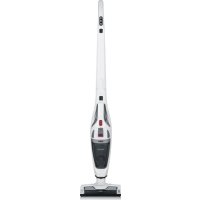
HV 7173 - Vacuum Cleaner SEVERIN - Free user manual and instructions
Find the device manual for free HV 7173 SEVERIN in PDF.



| Brand | Severin |
| Model | HV 7173 |
| Product type | Cordless handstick vacuum cleaner 2 in 1 |
| Power supply | Rechargeable battery, power adapter included |
| Charging time | Approximately 5 hours |
| Power modes | Eco (L) and Power (H) |
| Filter type | Washable filter (soapy solution) |
| Dust container capacity | Not specified |
| Included accessories | Long flat nozzle, short flat nozzle, brush attachment, combination brush with roller brush, power adapter |
| LED lighting | Yes, on the handheld unit and the nozzle |
| Rotating brush | Yes, roller brush integrated into the nozzle |
| Cleaning and maintenance | Empty the container after each use, wash the filter if necessary, clean the brush regularly |
| Safety | Use by children from 8 years old under supervision, do not vacuum liquids or embers, do not immerse |
| Spare parts | Filter set (9814-048), dust container (6982-048), power adapter (2361-048), nozzle (3709-048), roller brush (3627-048), flat nozzles (0024-048, 9812-048), brush attachment (9811-048) |
| Warranty | Manufacturer's warranty, Severin customer service |
Frequently Asked Questions - HV 7173 SEVERIN
User questions about HV 7173 SEVERIN
0 question about this device. Answer the ones you know or ask your own.
Ask a new question about this device
Download the instructions for your Vacuum Cleaner in PDF format for free! Find your manual HV 7173 - SEVERIN and take your electronic device back in hand. On this page are published all the documents necessary for the use of your device. HV 7173 by SEVERIN.
USER MANUAL HV 7173 SEVERIN
Cordless 2-in-1 handheld and stick vacuum cleaner
Dear Customer,
Before using the appliance, read the following instructions carefully and keep this manual for future reference. The appliance must only be used by those familiar with the instructions below.
Safety instructions
Certain groups of persons
- This appliance may only be operated by children over the age of 8 and by persons with reduced physical, sensory or mental capacities or a lack of experience and/or knowledge if they are supervised or have been instructed about the safe use of the appliance and are aware of the dangers associated with its use.
Children are not allowed to play with the appliance or stand or sit on it. - Cleaning and user maintenance may not be performed by children without supervision.
- Children under the age of 8 must be kept away from the appliance and the mains adapter.
- The packaging material must not be used for play purposes. There is a risk of suffocation.
Connecting the appliance safely
The appliance is charged with electrical current. Thus, there is a risk of electric shock.
Therefore:
- Check the appliance and mains adapter for possible damage before use. Never operate a defective appliance or an appliance with a defective mains adapter.
- Only connect the mains adapter to sockets which match the specifications on the mains adapter type plate.
- Never attempt to repair the appliance or its mains adapter yourself. To prevent hazards, repairs to the appliance and the mains adapter may only be made by our customer service. Arrange repair of a defective appliance with a specialist dealer or contact SEVERIN customer service (see our service addresses in the separate warranty booklet or on www.severin.de).
- Do not immerse the appliance or mains adapter in water or other liquids, or treat with liquids. Keep the appliance and the mains adapter away from rain and wet conditions. Do not operate the appliance and mains adapter outdoors or in rooms
with high humidity.
- Do not handle the appliance or mains adapter with wet hands. When unplugging the mains adapter from the socket, always pull directly on the plug.
- Make sure that the cable of the mains adapter is not kinked, pinched or run over and that it does not come in contact with sources of heat, humidity and sharp edges. Make sure that the cable of the mains adapter does not become a trip hazard.
- Before cleaning or servicing the appliance and before changing accessories, switch off the appliance and make sure that the mains adapter is not connected.
Safety when handling rechargeable batteries
- If rechargeable batteries are handled improperly, there is a risk of injury and explosion.
- This appliance has a rechargeable battery that can only be replaced by trained personnel.
- Do not remove the battery from the appliance. Never replace the rechargeable batteries with other rechargeable or non-rechargeable batteries. Never short-circuit rechargeable batteries, i.e. never touch the poles at the same time, especially not with objects that conduct electricity.
- WARNING! Use only the included power supply unit to charge the battery (see Technical Data). Never use another power supply unit to charge the batteries. The power supply unit provided must, in turn, only be used to charge the appliance batteries provided.
- At the end of its useful life, take the appliance with the rechargeable battery to an appropriate collection point nearby without delay, thus ensuring safe and environmentally-appropriate disposal. Never dispose of the appliance with the rechargeable battery in household waste.
- Never take the appliance with the rechargeable battery apart, expose it to high temperatures or throw it into the fire.
-
If the battery is handled incorrectly, liquid may leak from it. Do not use the appliance if it is damaged or leaking liquid.
-
If liquid has escaped, avoid contact with the liquid.
-
In case of contact with the liquid, rinse it off immediately with copious amounts of water. In case of after effects (irrespective of type), consult a doctor.
Rotating brush roller
The appliance's floor nozzle has a powered brush roller. It can cause injuries.
Therefore, please note the following:
-
Before cleaning or maintaining the appliance, make sure that the appliance is switched off and is not on charge.
-
WARNING! Always keep parts of your body clear of the brush roller.
-
Do not vacuum near cables, wires and long fringes. On the one hand, there is a danger that the cable's insulation will be damaged. On the other hand, these objects can get caught in the brush roller and thereby damage the appliance.
LED lighting
-
The handset and the floor nozzle are fitted with LEDs that illuminate the working area in front of the appliance.
-
Do not look into the LEDs during operation.
-
It is not possible to exchange the LEDs.
Intended use
-
The appliance is intended solely for use in the private sphere.
-
The appliance should only be used for cleaning normally soiled flat surfaces, short-pile carpets or upholstery that can withstand exposure to the rotating brush without damage.
-
Any other use is deemed improper and is forbidden.
In order to prevent injuries, fires and damage, the appliance must not be used to vacuum:
- People, animals or plants. Always keep the device well away from all parts of the body, and from hair and clothing (e.g. shoelaces). Do not use near to your head.
- Glowing, burning or smouldering particles (such as ash, coal, charcoal, cigarettes, matches).
- Explosive or highly flammable substances or toners.
- Sharp objects, such as glass splinters, nails or construction waste.
- Fine dust, such as plaster, cement, fine drilling dust or powder.
Water or other liquids.
The following is also forbidden:
- Independent alteration or repair of the appliance or its mains adapter.
- Inserting objects into the appliance's openings. The specially provided accessories are the exception to this rule.
- Use, storage or charging outdoors.
- Use of the appliance without filters in place.
If the appliance is defective
- Have a defective appliance repaired by a specialist dealer or customer service (see contact information in the appendix to this instruction manual or at www.severin.de).
CE Marking
This device is compliant with the mandatory EU directives for CE marking.
Appliance parts and items included
- Handpiece control panel
On/off button

Power mode H
Eco mode L


- Button for bending the handpiece
- Button for detaching the handset from the handpiece
- Charging socket for the mains adapter on the handset
- On/off switch on the handset
- LED indication
- Dust container release button
- LED lights
- Dust container with built-in filter
- Long crevice tool
- Short crevice tool
- Brush attachment
- Floor tool with brush roller
- Charging socket for the mains adapter on the handpiece (back of the handpiece)
- Assembled appliance
Not illustrated:
Mains adapter with mains plug and connection cable
Installing and charging the appliance
Assembling the appliance
- Remove all packaging residues from the appliance.
- Fit the dust container if necessary (see chapter "Cleaning the dust container and filter"), insert the filter and replace the filter cover.
Using as a handheld vacuum cleaner
- Attach the long or short crevice tool to the handset.
You can also fit the brush attachment on the long crevice tool, e.g. to vacuum furniture.
Using as a floor vacuum cleaner
- Fit the handset into the handpiece until it clicks into place with the suction opening facing downwards.
After use, press the button to detach the handset.
Tip: Press the 2 button to bend the handpiece to easily reach recessed areas or fold up the unit for space-saving storage.
Charging the battery
Use the mains adapter to charge the battery before first use. It is recommended to charge the battery before each use, especially if the appliance has not been used for a while. This extends battery life and ensures the longest possible cleaning cycles.
- Make sure that the appliance is switched off.
Charging the handset with the handpiece:
- Check that the handset is securely locked into the handpiece. Plug the mains adapter into the charging socket on the handpiece.
Charging the handset without the handpiece:
- Plug the mains adapter into the charging socket on the appliance.
- Connect the mains adapter to a power socket.
The handset LED flashes red. The charging process starts.
The LEDs light up green continuously if the rechargeable battery is fully charged. The charging process takes around 5 hours when the rechargeable battery is empty.
Vacuum cleaning
TIP: The floor nozzle can also be used without the suction tube in order to vacuum furniture, for instance. When doing so, make sure that the surface can withstand the contact with the brush roller without sustaining damage.
Tip! In Eco mode, the vacuum cleaner operates at reduced power. The appliance draws less energy, and the battery runtime is extended.
Vacuuming with a handset
- Attach a crevice tool or the brush attachment with the long crevice tool to the appliance.
- Push the on/off switch to position I (Eco mode) or II (Power mode) to power on the appliance.
The appliance sucks air.
The handset LED lights up yellow (Eco mode) or green (Power mode). - Vacuum the surface.
- Push the on/off switch to position OFF to power off the appliance.
- Remove the accessories.
- Empty the dust container and clean it (see "Cleaning the dust container and filter").
Vacuuming with a floor vacuum cleaner
- Fit the handset into the handpiece.
- Press the off button on the handpiece to turn on the appliance. The appliance runs in ECO mode.
- Press the L and H buttons to toggle between Eco mode (L) and Power mode (H).
The appliance sucks air.
The handset LED lights up yellow (Eco mode) or green (Power mode). - Vacuum the surface.
- Press the off button on the handpiece to turn off the appliance.
- Press the button to detach the unit from the handpiece.
- Empty the dust container and clean it (see "Cleaning the dust container and filter").
TIP: Use the button to bend the handle forwards for easy cleaning under furniture.
The handset LED flashes when the battery is low and alternates between red and green when the battery is empty.
- When the battery level is too low, the appliance powers off automatically. You should then charge the battery. (See "Installing and charging the appliance").
For a quick guide on cleaning, see Figure II at the beginning of the manual.
Emptying the dust container
The dust container can hold only a limited amount of dirt.
Therefore, it is reasonable to empty the dust container after each use.
- Make sure that the appliance is switched off and is not on charge.
- Remove the handset from the handpiece.
- Hold the appliance with its suction opening facing downwards.
- Press the release button to detach the dust container from the motor unit.
- Remove the dust container.
- Remove the filter and filter holder.
- Empty the dust container into a dustbin.
Cleaning the dust container
We recommend cleaning the filters after each use or when the unit poorly sucks air when the battery is fully charged.
- Make sure that the appliance is switched off and is not on charge.
- Unlatch, remove and empty the dust container (See "Emptying the dust container")
- Remove the filter holder, together with the filter, from the dust container.
- Turn the filter anti-clockwise to release it from the filter holder.
- Knock out the filter and filter holder over a waste bin and remove any dirt with a soft brush as necessary.
- Rinse the dust container with clean water.
- If necessary, wash out the filter in soap solution and then allow it to dry completely.
- When completely dry, insert the filter into the filter holder and lock it in place by turning it clockwise.
- Fit the filter holder into the dust container. Never use the appliance without the filter in place.
- Secure the dust container on the appliance again.
Cleaning the brush roller in the floor tool and the upholstery tool
Soiling may prevent the brush roller from rotating freely. Clean the brush roller regularly.
- Make sure that the appliance is switched off and is not on charge.
- Remove the handset from the handpiece if necessary.
- Release the brush lock on the underside of the floor nozzle and remove the brush.
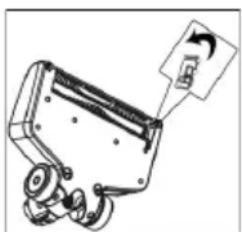
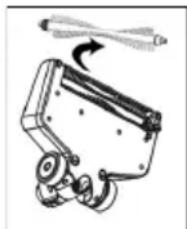
- Remove any hair and dirt from the brush, using a pair of tweezers or scissors carefully, if necessary.
- Fit the brush first with the round side on the gear of the floor nozzle. Then attach the square side of the floor nozzle to the other side.
- Lock the brush back in place and press it down until it clicks into place.
Cleaning the appliance
- Make sure that the appliance is switched off and is not on charge.
- Wipe the housing and handpiece with a slightly damp cloth and then rub them dry.
TIP: Do not use any sharp, abrasive cleaning agents or hard brushes for cleaning.
Storing the appliance
- Store the appliance and accessories in a cool, dry place out of the reach of children.
- Press the button to fold up the handpiece for convenient storage.
| Order number Accessories/spare part | |
| 9814-048 Filter set | |
| 6982-048 Dust container with filter | |
| 2361-048 Mains adapter with con rection cable | |
| 3709-048 Floor nozzle | |
| 3627-048 Brush roller for floor tool | |
| 0024-048 Short crevice tool | |
| 9812-048 Long crevice tool | |
| 9811-048 Brush attachment | |
Troubleshooting
Troubleshooting by yourself
To ensure that you do not encounter any problems, it is important to empty the dust container regularly and take this opportunity to check the filters and clean them if they are dirty. However, if you do encounter any problems with the appliance, use the following table to determine whether you can solve the problem yourself. Before troubleshooting, ensure the unit is switched off and not charging.
| Problem Possible cause / solution | |
| Appliancecannotbeswitched on. | The battery is dead and the LED is off. Switch off the appliance and charge the battery. ▶ Chapter “Charging the battery” |
| The appliance cannot be charged (LEDs do not flash). | The mains adapter or appliance is not correctly inserted. Check that the mains adapter is correctly seated in the charging socket of the handset. Check that the mains adapter is properly connected to the power outlet. |
| When using the charging socket on the back of the handpiece, check that the plug is correctly seated in the charging socket and that the handset is correctly engaged. ▶ Chapter “Charging the battery” | |
| The rechargeable battery is fully charged but the appliance is hardly picking up any dirt. | Empty the dust container or clean the filter.▶ Chapter “Cleaning and servicing the appliance” |
| Operating duration is becoming ever shorter. | The brush roller is soiled and must be cleaned;▶ chapter “Cleaning the brush roller” Clean the filter.▶ Chapter “Cleaning and servicing the appliance” |
| The brush roller rotates slowly or irregularly. | The brush roller is soiled and must be cleaned.▶ Chapter “Cleaning the brush roller” |
If this table does not help, please contact our service hotline (see contact details in the separate warranty booklet).
Disposal
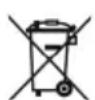
Devices and batteries marked with this symbol must be disposed of separately from household waste. These appliances and rechargeable batteries contain valuable raw materials that can be recycled. Proper disposal of these items protects the environment and public health. Return the appliance and the rechargeable battery
se separately to the appropriate collection points for disposal. Your local authority or dealer can provide information about proper disposal.