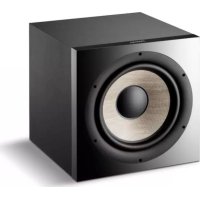
SUB 1000 F - Subwoofer FOCAL - Free user manual and instructions
Find the device manual for free SUB 1000 F FOCAL in PDF.



| Product type | Active sealed subwoofer |
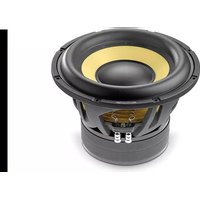
| Speaker | 30 cm (12") Flax cone woofer |
| Frequency response | 24 Hz - 200 Hz (±3 dB) |
| Low cutoff frequency (-6 dB) | 22 Hz |
| Crossover frequency | 40 to 160 Hz (variable) |
| Phase | 0° / 180° (switchable) |
| Inputs | Stereo RCA input (line level) and direct LFE input |
| Power mode | On / Auto (automatic signal detection) |
| Dimensions (H x W x D) | 420 x 400 x 420 mm |
| Net weight | 21.5 kg |
| Power supply | Mains (cable included) |
| Consumption | Automatic standby after 3 minutes of no signal |
| Maintenance and cleaning | Dust with a dry cloth; use a damp cloth for stains. Do not use solvents, detergents, or corrosive products. |
| Safety precautions | Do not open the device (risk of electric shock). Avoid exposure to water, rain, or humidity. Maintain a distance of 5 cm around the device for ventilation. Maximum ambient temperature 35 °C. |
| Spare parts and repairability | No user-replaceable parts. Contact a qualified professional for any repairs. |
| Warranty | 2 years (France) from date of purchase, non-transferable. Outside France, warranty according to local distributor. |
| Box contents | Subwoofer, power cable, user manual |
Frequently Asked Questions - SUB 1000 F FOCAL
User questions about SUB 1000 F FOCAL
0 question about this device. Answer the ones you know or ask your own.
Ask a new question about this device
Download the instructions for your Subwoofer in PDF format for free! Find your manual SUB 1000 F - FOCAL and take your electronic device back in hand. On this page are published all the documents necessary for the use of your device. SUB 1000 F by FOCAL.
USER MANUAL SUB 1000 F FOCAL
natural_image
Line drawing of a rectangular box with a circular recess and small protrusions at the bottom (no text or symbols)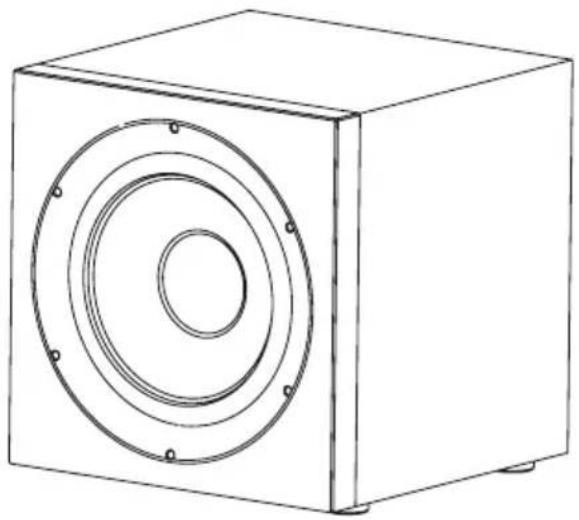
natural_image
Line drawing of a square speaker with concentric circular components (no text or symbols)Français : page 4
Anglais : page 10
Deutsch : seite 16
Italiano : pagina 22
Español : página 28
natural_image
Top-down view of a person sitting in a bed with sound wave indicators and play buttons above (no text or symbols)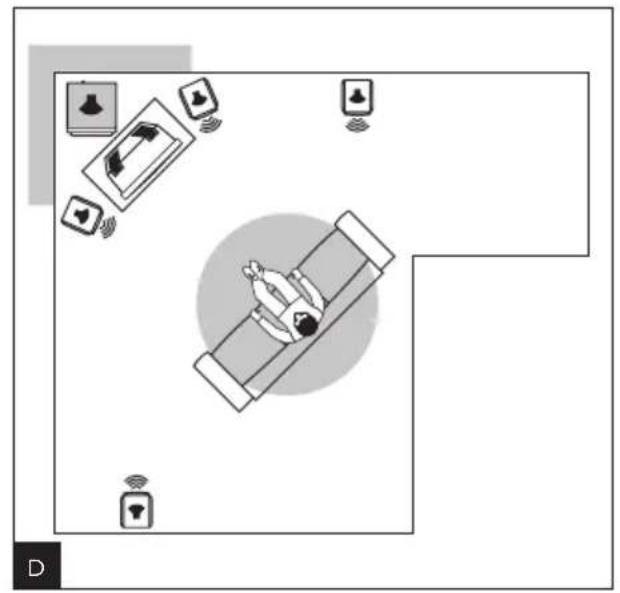
natural_image
Top-down diagram of a person relaxing in bed with floating devices and wireless signals around (no text or symbols)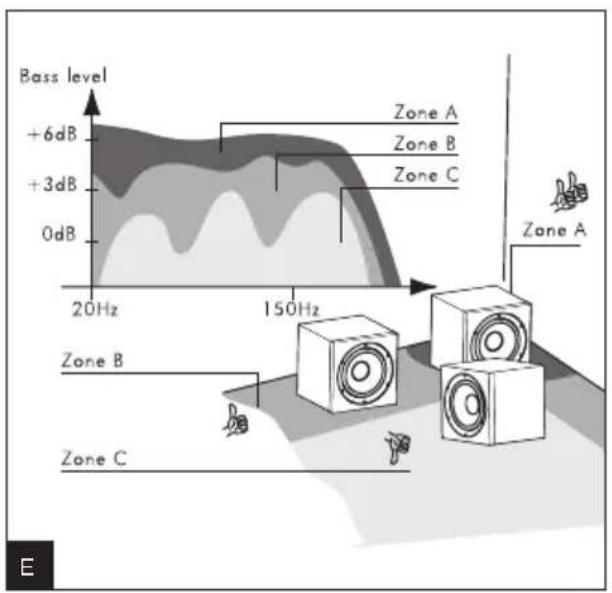
Sub 1000 F
natural_image
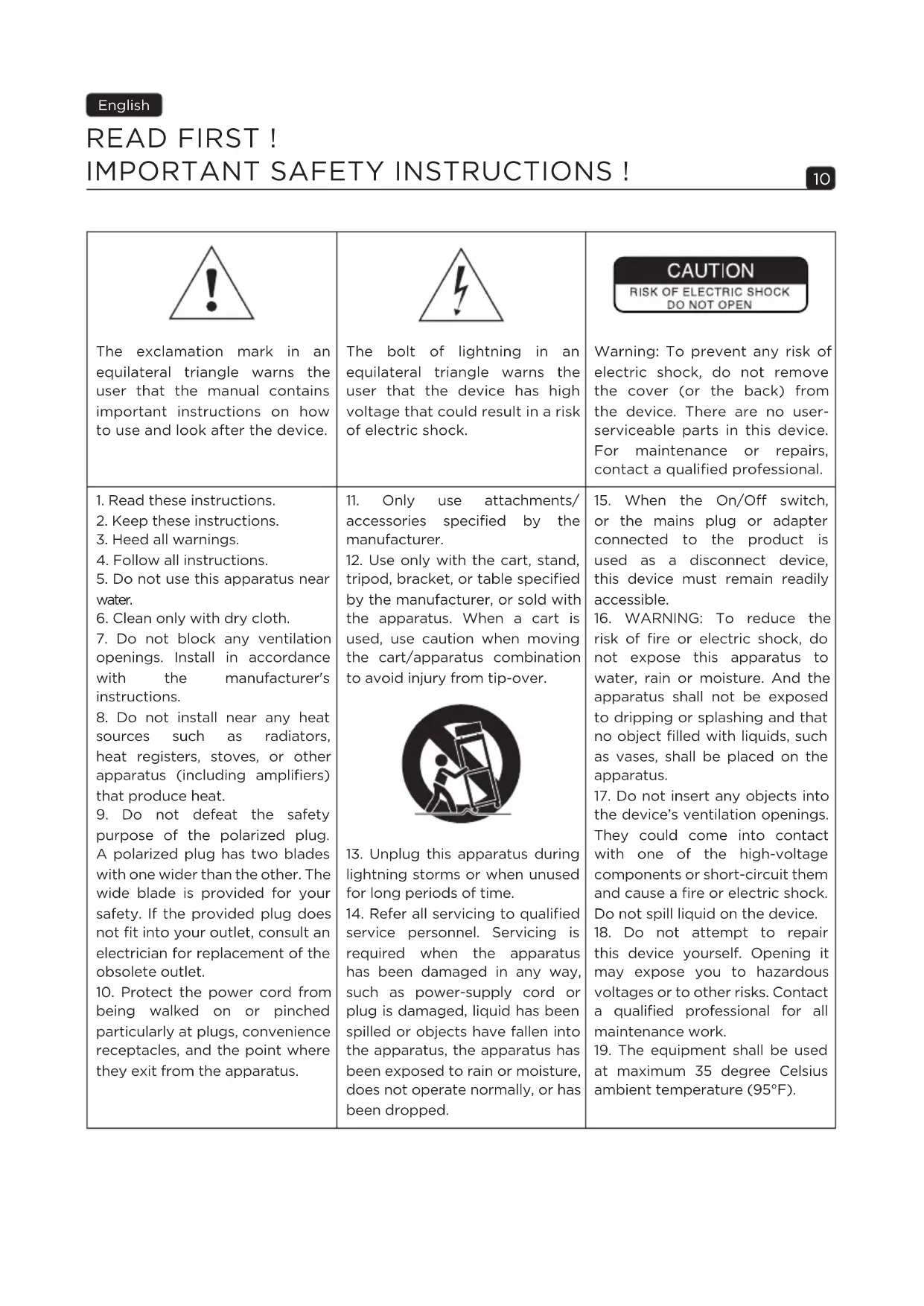
Symbolic icon of a person pushing a cart with a large block, enclosed in a circle (no text or symbols)The exclamation mark in an equilateral triangle warns the user that the manual contains important instructions on how to use and look after the device.
The bolt of lightning in an equilateral triangle warns the user that the device has high voltage that could result in a risk of electric shock.
CAUTION
RISK OF ELECTRIC SHOCK DO NOT OPEN
Warning: To prevent any risk of electric shock, do not remove the cover (or the back) from the device. There are no user-serviceable parts in this device. For maintenance or repairs, contact a qualified professional.
-
Read these instructions.
-
Keep these instructions.
-
Heed all warnings.
-
Follow all instructions.
-
Do not use this apparatus near water.
-
Clean only with dry cloth.
-
Do not block any ventilation openings. Install in accordance with the manufacturer's instructions.
-
Do not install near any heat sources such as radiators, heat registers, stoves, or other apparatus (including amplifiers) that produce heat.
-
Do not defeat the safety purpose of the polarized plug. A polarized plug has two blades with one wider than the other. The wide blade is provided for your safety. If the provided plug does not fit into your outlet, consult an electrician for replacement of the obsolete outlet.
-
Protect the power cord from being walked on or pinched particularly at plugs, convenience receptacles, and the point where they exit from the apparatus.
-
Only use attachments/accessories specified by the manufacturer.
-
Use only with the cart, stand, tripod, bracket, or table specified by the manufacturer, or sold with the apparatus. When a cart is used, use caution when moving the cart/apparatus combination to avoid injury from tip-over.

natural_image
Symbolic icon of a person pushing a large object through a circular frame (no text or symbols)-
Unplug this apparatus during lightning storms or when unused for long periods of time.
-
Refer all servicing to qualified service personnel. Servicing is required when the apparatus has been damaged in any way, such as power-supply cord or plug is damaged, liquid has been spilled or objects have fallen into the apparatus, the apparatus has been exposed to rain or moisture, does not operate normally, or has been dropped.
-
When the On/Off switch, or the mains plug or adapter connected to the product is used as a disconnect device, this device must remain readily accessible.
-
WARNING: To reduce the risk of fire or electric shock, do not expose this apparatus to water, rain or moisture. And the apparatus shall not be exposed to dripping or splashing and that no object filled with liquids, such as vases, shall be placed on the apparatus.
-
Do not insert any objects into the device's ventilation openings. They could come into contact with one of the high-voltage components or short-circuit them and cause a fire or electric shock. Do not spill liquid on the device.
-
Do not attempt to repair this device yourself. Opening it may expose you to hazardous voltages or to other risks. Contact a qualified professional for all maintenance work.
-
The equipment shall be used at maximum 35 degree Celsius ambient temperature (95°F).
-
Do not use this device in tropical climates.
- Do not use this device at altitudes of more than 2,000 m (6,500 ft).
- Do not overload wall sockets, extension leads or multiple socket outlets as this could cause fire or electric shock.
- The device must not be mounted to a wall or ceiling unless intended by the manufacturer.
- If the device has been moved from a cold environment to a hot environment, make sure that no condensation appeared before connecting the power cable.
- No naked flame sources, such as lit candles, should be placed on top of the device.
-
The product should only be connected to the mains power type shown on the label on the device. If you're not sure what type of mains electrical supply you have, ask your retailer or your electricity supplier. For devices intended for use with a battery or another power source, see the user manual.
-
Always leave a distance of at least 5 cm (2") around the product for proper ventilation.
- When replacement components are needed, make sure that the maintenance technician uses the components recommended by the manufacturer or components with the same technical features as the original product. Using non-compliant components could cause fires, electric shocks or other risks.
- After any maintenance or repair work on the device, ask the maintenance technician to test it to check that it works safely.
-
The product should only be connected to the mains power type shown on the label on the device. If you're not sure what type of mains electrical supply you have, ask your retailer or your electricity supplier. For devices intended for use with a battery or another power source, see the user manual.
-
To avoid damaging your hearing, do not listen to loudspeakers at high volumes for long periods of time.
Listening to speakers at high volumes can damage the user's ears and may lead to hearing problems (temporary or permanent deafness, tinnitus, hyperacusis).
Hearing system exposure to excessive sound level (over 85 dB SPL LAeq) for several hours can cause irreparable damage to your hearing.

(CEI 60417-6044)
Please validate your Focal-JMlab warranty, it is now possible to register your product online: www.focal.com/warranty

Package contents:
- Subwoofer
- Power cords
- User manual
Features:
- Active variable low-pass filter
- Phase inverter
- Direct LFE input
- Stereo input
· Autopower
Break-in period
The speaker driver used in Sub 1000 F loudspeakers is a complex mechanical component which requires a certain time to adapt in order to operate at its best and to become acclimatised to the temperature and humidity of the listening environment. This break-in period varies depending on the conditions in question and may take several weeks. To reduce this break-in period, we recommend operating your subwoofer for about 20 consecutive hours. Once the speaker driver's characteristics have totally stabilised, you will be able to enjoy the full capabilities of your subwoofer.
Specifications:
12" (30cm) subwoofer with Flax cone: The speaker driver of this subwoofer is equipped with a sandwich technology Flax cone. Flax is an eco-textile with astounding structural properties: it is light, stiff and has excellent damping. Focal has developed a new 320 g/m2 Flax cone to ensure high rigidity but also high excursion.
Connections
Using the "low-level" RCA inputs
When a 2-channel amplifier with pre-out line outputs are used, the subwoofer should always be connected to the stereo RCA inputs "Left/Right LINE INPUTS" (fig. A).
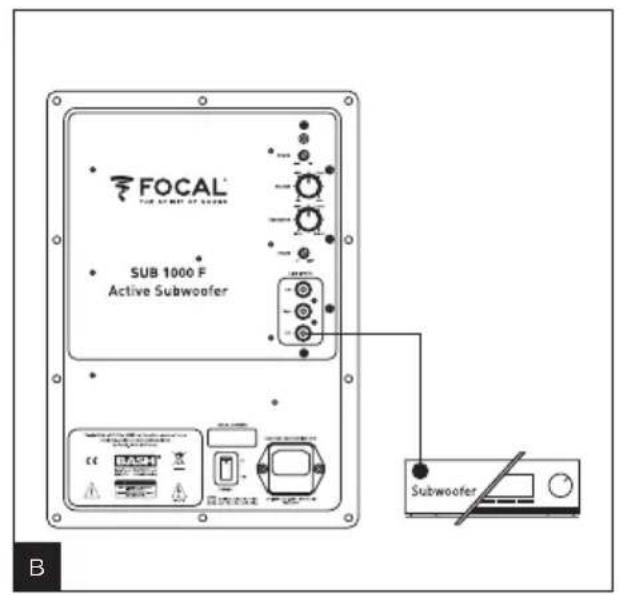
Using the LFE input
When a multi-channel audio/video amplifier is used, the subwoofer's single LFE input should be connected to the audio/video amplifier's "Subwoofer" output if there is one (fig. B).
Positioning the subwoofer in the listening room
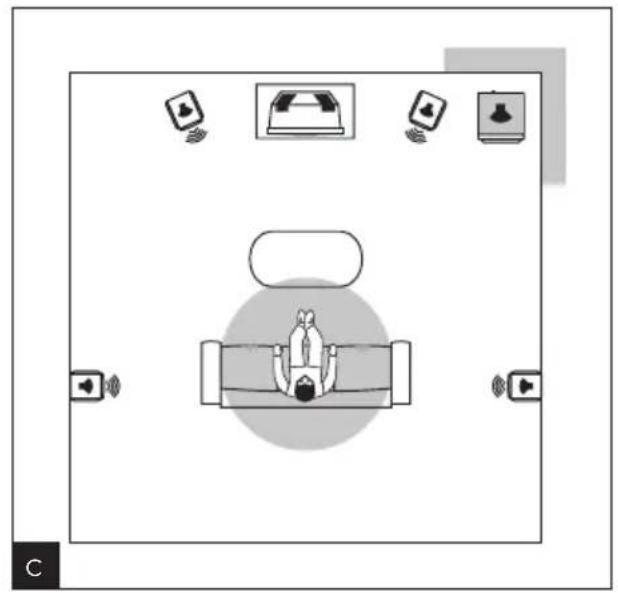
Contrary to loudspeakers, which have to be placed at a sufficient distance from the walls and corners of the listening room, we recommend positioning the subwoofer in a corner (fig. C,D).
If the subwoofer is positioned against only one wall or far away from the walls, the very long wavelengths of the low frequencies will cause the random excitation of room resonances. The frequency response will not be linear and the quality of the bass will be seriously affected (lack of depth, tinny sound, poorly defined and/or poorly held bass, difficult or impossible overlap crossover with other loudspeakers).
By placing the subwoofer in a corner, the room resonances will be excited in a more linear and predictable way. Not only will bass perception be optimal, but this arrangement will also make it possible to boost the bass level by +6 dB (fig. E).
If for practical reasons you aren't able to place the subwoofer in a corner, experiment positioning the subwoofer in different places within the room until you find the best compromise.
Generally speaking, it is better to place the subwoofer towards the front of the room.
As the frequency ranges involved are in principle omnidirectional, the bass is not affected by objects or furniture placed between the subwoofer and the listening point.
Switching the subwoofer on/off
Automatic power-on / standby
This subwoofer is equipped with an automatic audio signal detection system. When switched to "Auto", the subwoofer will turn on as soon as an audio signal input is detected. When switched to "On", the audio signal detection system is disabled and the subwoofer will stay on permanently.
On the other hand, when no audio signal is detected for approximately 3 minutes, the detection system will automatically put the subwoofer into stand-by.
If the subwoofer is going to be unused for several days or more, it is recommended to set the "POWER" switch to "Off". In case of lightning, disconnect the power cable from the mains.
Quick set-up guide
- Plug subwoofer's power cable into the mains.
- Connect the subwoofer to the amplifier according to one of the 3 methods mentioned previously.
- Set the "POWER" switch to "On".
- Turn the "CROSSOVER" knob to half way (to approximately 100 Hz).
- Turn the "VOLUME" knob to half way.
Note: The "CROSSOVER" function will be disabled if the subwoofer is connected to the "LFE" input.
Fine-tuning
- Adjust the bass level according to the other loudspeakers used. This fine-tuning can be carried out by listening to music which varies as much as possible. One should be able to hear the bass without it being too overpowering.
- Select the desired phase inverter ( 0^ or 180^ ). The correct setting is that which you think provides the most bass while being the most well-balanced.
- Fine-tune the cut-off frequency to around 100 Hz. The lower this setting, the more scale and depth the bass will have. The higher this setting, the punchier the sound will be. The correct setting is that which best provides all these characteristics.
- Adjust the volume if necessary.
- Fine-tuning should be carried out each time you change the position of the subwoofer.
Choosing the right cables
When your subwoofer is connected to an amplifier via the stereo line inputs or LFE input, use a shielded RCA/RCA cable of adequate length. In case of doubt, your dealer will be able to advise you on the solution which is best adapted to your needs.
Special precautions
The only maintenance required for the subwoofer is dusting with a dry cloth. If the subwoofer is dirty, we recommend simply cleaning it with a damp cloth.
Never use solvents, detergents, alcohol-based or corrosive products, scrapers or scourers to clean the loudspeaker surface. Keep the loudspeakers away from sources of heat.
Conditions of guarantee
All Focal loudspeakers are covered by guarantee drawn up by the official Focal distributor in your country.
Your distributor can provide all details concerning the conditions of guarantee. Guarantee cover extends at least to that granted by the legal guarantee in force in the country where the original purchase invoice was issued.
BITTE ZUERST LESEN!
natural_image
Symbolic icon of a person pushing a large object, enclosed in a circle (no text or symbols)RCA (Low Level) Anschlüsse
natural_image
Symbolic icon of a person pushing a large cart with a block, enclosed in a circle (no text or symbols)natural_image
Symbolic icon of a person pushing a large object, enclosed in a circle (no text or symbols)natural_image
Symbolic icon of a person pushing a ladder inside a circle (no text or symbols)natural_image
Symbolic icon of a person pushing a large box under a circle (no text or symbols)natural_image
Symbolic icon of a person pushing a large object, enclosed in a circle (no text or symbols)natural_image
Symbolic icon of a person climbing a ladder inside a circle (no text or symbols)natural_image
Symbolic icon of a person climbing a ladder inside a circle (no text or symbols)natural_image
Symbolic icon of a person pushing a large object through a circular frame (no text or symbols)
- CAUTION
- Package contents:
- Features:
- Break-in period
- Specifications:
- Connections
- Using the "low-level" RCA inputs
- Using the LFE input
- Positioning the subwoofer in the listening room
- Switching the subwoofer on/off
- Automatic power-on / standby
- Quick set-up guide
- Fine-tuning
- Choosing the right cables
- Special precautions
- Conditions of guarantee
- BITTE ZUERST LESEN!
- RCA (Low Level) Anschlüsse
Brand : FOCAL
Model : SUB 1000 F
Category : Subwoofer