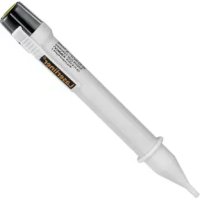
ActivePen - Screwdriver Laserliner - Free user manual and instructions
Find the device manual for free ActivePen Laserliner in PDF.


| Product type | Non-contact voltage tester |
| Brand | Laserliner |
| Model | ActivePen |
| Voltage range | 200 V/AC ... 600 V/AC |
| Frequency | 50 ... 60 Hz |
| Overvoltage category | CAT III - 600V |
| Pollution degree | 2 |
| Power supply | 2 AAA 1.5V batteries (LR03) |
| Dimensions (L x W x H) | 150 x 20 x 17 mm |
| Weight | 37 g (including batteries) |
| Indication | Glowing LED tip |
| Functions | Non-contact electrical voltage detection |
| Working conditions | -10°C to 55°C, max humidity 80% rH, max altitude 2000 m |
| Storage conditions | -10°C to 60°C, max humidity 80% rH |
| Maintenance | Clean with damp cloth, no solvents; remove batteries for prolonged storage; store dry and clean |
| Safety | Use only for intended purpose; do not use if wet; follow instructions; do not exceed 600V; check before use; does not replace verification of absence of voltage using a bipolar tester. |
| Standards | Compliant with directives 2014/35/EU (LVD) and 2014/30/EU (EMC) |
| Disposal | Selective collection according to WEEE |
Frequently Asked Questions - ActivePen Laserliner
User questions about ActivePen Laserliner
0 question about this device. Answer the ones you know or ask your own.
Ask a new question about this device
Download the instructions for your Screwdriver in PDF format for free! Find your manual ActivePen - Laserliner and take your electronic device back in hand. On this page are published all the documents necessary for the use of your device. ActivePen by Laserliner.
USER MANUAL ActivePen Laserliner
natural_image
Illustration of a wall-mounted electrical socket with a tool emitting light, next to a building (no text or symbols visible)natural_image
Electrical outlet with a plug inserted into a socket, showing a warning symbol (no text or labels present)Completely read through the operating instructions, the "Warranty and Additional Information" booklet as well as the latest information under the internet link at the end of these instructions. Follow the instructions they contain. This document must be kept in a safe place and passed on together with the device.
Function / Application
Non-contact voltage tester for locating electrical voltages in cables, sockets, lampholders and fuses. Visual signals indicate the presence of a voltage.
Safety instructions
- The device must only be used in accordance with its intended purpose and within the scope of the specifications.
- The measuring tools and accessories are not toys. Keep out of reach of children.
- Modifications or changes to the device are not permitted, this will otherwise invalidate the approval and safety specifications.
- Do not expose the device to mechanical stress, extreme temperatures or significant vibration.
- Exercise extreme caution when working with voltages higher than 24 V/AC rms or 60 V/DC. Touching the electrical conductors at such voltages poses a risk of life-threatening electric shocks.
- If the device comes into contact with moisture or other conductive-residue, work must not be carried out under voltage. At and above voltages of 24 V/AC rms / 60 V/DC, the presence of moisture creates the risk of life-threatening electric shocks.
- Clean and dry the device before use.
- When using the device outdoors, make sure that the weather conditions are appropriate and/or that suitable protection measures are taken.
- In overvoltage category III (CAT III - 600 V), the voltage between the test device and earth must not exceed 600 V.
- Before taking any measurements, make sure that both the area tobe tested (e.g. a line), the test device and the accessories used (e.g. connection cable) are in proper working order. Test the device by connecting it to known voltage sources (e.g. a 230 V socket in the case of AC testing).
- The device must no longer be used if one or more of its functions fail or the battery charge is weak.
- Observe the safety precautions of local and national authorities relating to the correct use of the device and any prescribed safety equipment (e.g. electrician's safety gloves).
- Do not work alone in the vicinity of hazardous electrical installations and only under the guidance of a qualified electrician.
- The measuring device must not be used as a substitute for a two-pole zero potential test.
- The device measures the presence of electrostatic fields of sufficient strength. If the field strength is too low voltage may still be applied although no warning signal is given. The following list of factors that influence the field strength does not claim to be complete: shielding, cable insulation (type, thickness), measurement distance, insulation between user and earth, special socket designs, condition of tester and of batteries.
Safety instructions
Dealing with electromagnetic radiation and electromagnetic disruptions
- The measuring device complies with electromagnetic compatibility regulations and limit values in accordance with EMC-Directive 2014/30/EU.
- The measuring device complies with safety and electromagnetic compatibility regulations and limit values in accordance with Directive 2014/35/EU (Low Voltage Directive / LVD) and 2014/30/EU (Electromagnetic Compatibility Directive / EMC).
- Umarex GmbH & Co. KG hereby declares that the ActivePen complies with the essential requirements and other provisions of the European Low Voltage Directive 2014/35/EU (LVD) and the Electromagnetic Compatibility Directive 2014/30/EU. The EU Declaration of Conformity can be found in its entirety at the following address: http://laserliner.com/info?an=AAG
- Local operating restrictions – for example, in hospitals, aircraft, petrol stations or in the vicinity of people with pacemakers – may apply. Electronic devices can potentially cause hazards or interference or be subject to hazards or interference.
Symbols
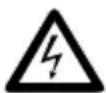
Warning about hazardous electrical voltage: Unprotected live components inside the device housing are capable of posing a risk of electric shock.

Protection class II: The test device has reinforced or double insulation.
CAT III
Overvoltage category III: Equipment in fixed installations and for applications where specific requirements with regard to the reliability and availability of equipment have to be met, e.g. circuit-breakers in fixed installations and devices used in industrial applications which are permanently connected to the fixed installation.
Laserliner

1 Detector tip
2 Pocket clip
3 Battery compartment
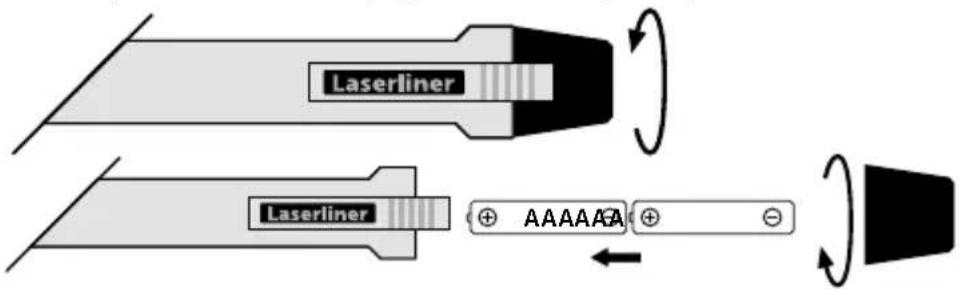
1 Inserting batteries
Open the battery compartment and insert batteries according to the symbols. Be sure to pay attention to polarity
!
Before using the device, you should always test it on a main circuit you know to be operational within the specified voltage range.
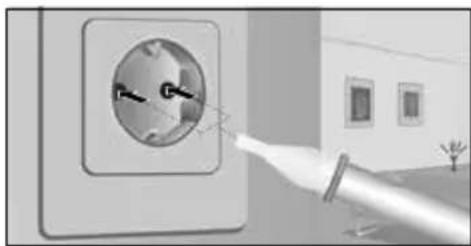
2 Localising electrical voltages
natural_image
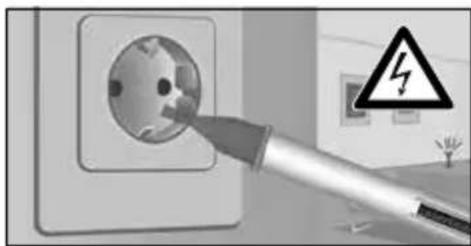
Illustration of a wall-mounted electrical socket with a tool emitting light, next to a building (no text or symbols visible)Position the detector tip in the area to be tested (e.g. cable, socket. etc.).
natural_image
Electrical outlet with a plug inserted, showing a warning symbol (no text or labels present)The detector tip lights up to show a voltage is present.
To determine the L/N conductors, then check the neutral conductor, no signal should appear here.
!
For safety, check all three phase conductors (L1, L2, L3) for the presence of voltage!
!
Replace the batteries if the output is weak or reduced.
To make sure check the PE connection, the installation is not safe if a signal appears here. Observe the technical safety regulations for working on electrical systems, especially:
- Safely isolating from power supply
- Securing to prevent system being switched on again
- Checking zero potential, two-pole
- Earthing and short-circuiting
- Securing and covering adjacent live components
!
Please be aware that even if a visual signal is not displayed, voltage may still be present. Differences in the design of the connection socket or the nature of the insulation (thickness and type) can affect functionality. Voltage cannot be detected behind panels and metal covers.
Information on maintenance and care
Clean all components with a damp cloth and do not use cleaning agents, scouring agents and solvents. Remove the battery(ies) before storing for longer periods. Store the device in a clean and dry place.
Technical data
| Indicator | LED |
| Voltage range 200 V/AC | ... 600 V/AC |
| Frequency 50 ... 60 Hz | |
| Overvoltage category | CAT III - 600V(non-condensing) |
| Pollution degree 2 | |
| Power supply 2 x 1.5V LR | 03 (AAA) |
| Operating conditions | -10°C ... 55°C, max. humidity 80% rH,no condensation, max. working altitude2000 m above sea level |
| Storage conditions -10°C | ... 60°C, max. humidity 80% rH |
| Dimensions (W x H x D) 1 | 50 x 20 x 17 mm |
| Weight (incl. batteries) | 37 g |
Subject to technical alterations. 19W19
EU directives and disposal
This device complies with all necessary standards for the free movement of goods within the EU.
This product is an electric device and must be collected separately for disposal according to the European Directive on waste electrical and electronic equipment.
Further safety and supplementary notices at: http://laserliner.com/info?an=AAG

Laserliner
!
natural_image
Exterior view of a wall-mounted electrical socket with a light bulb emitting a flame (no text or symbols visible)natural_image
Electrical outlet with a plug inserted into a socket, showing a warning symbol (no text or labels present)natural_image
Exterior view of a wall-mounted electrical socket with a light bulb emitting a flame (no text or symbols visible)natural_image
Electrical outlet with a plug inserted, showing a warning symbol (no text or labels present)natural_image
Exterior view of a wall-mounted electrical socket with a tool inserted, showing wiring and components (no text or symbols visible)natural_image
Electrical outlet with a plug inserted, showing a warning symbol (no text or labels present)natural_image
Illustration of a wall-mounted electrical socket with a hand holding a tool, next to a building exterior (no text or symbols visible)natural_image
Electrical outlet with a plug inserted into a socket, showing a warning symbol (no text or labels present)natural_image
Illustration of a wall-mounted electrical outlet with a hand holding a tool near a window (no text or symbols visible)natural_image
Electrical outlet with a plug inserted into a socket, showing a warning symbol (no text or labels present)natural_image
Close-up of a wall-mounted electrical socket with a hand holding a tool, showing wiring details (no text or symbols visible)natural_image
Electrical outlet with a plug inserted, showing a warning symbol (no text or labels present)natural_image
Illustration of a wall-mounted electrical socket with a tool emitting light, next to a room with windows (no text or symbols visible)natural_image
Electrical outlet with a plug inserted into a socket, showing a warning symbol (no text or labels present)natural_image
Exterior view of a wall-mounted electrical socket with a tool emitting light (no text or symbols visible)natural_image
Electrical outlet with a plug inserted into a socket, next to a warning symbol (no text or labels)natural_image
Exterior view of a wall-mounted electrical outlet with a pipe inserted, showing wiring and components (no text or symbols)natural_image
Electrical outlet with a plug inserted, showing a warning symbol (no text or labels present)natural_image
Illustration of a wall-mounted electrical socket with a tool emitting light, next to a building (no text or symbols visible)natural_image
Electrical outlet with a hand inserting a socket, next to a warning symbol (no text or labels)natural_image
Architectural diagram showing a brick wall with embedded pipes and a coiled pipe (no text or symbols)SERVICE

Umarex GmbH & Co. KG
- Laserliner -
Brand : Laserliner
Model : ActivePen
Category : Screwdriver