DigiLevel Pro 40 - Laser level Laserliner - Free user manual and instructions
Find the device manual for free DigiLevel Pro 40 Laserliner in PDF.


Pick your language and provide your email: we'll send you a specifically translated version.
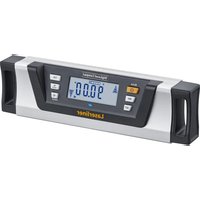
| Product type | Digital laser level |
| Brand | Laserliner |
| Model | DigiLevel Pro 40 |
| Length | 40 cm |
| Accuracy | ±0.5 mm/m |
| Self-leveling | Yes, up to 4° |
| Range with detector | Up to 30 m |
| Laser source | Red laser diode, 650 nm |
| Laser class | 2 (IEC 60825-1) |
| Power supply | 2 AAA batteries 1.5 V |
| Battery life | Approx. 20 hours |
| Weight | 300 g |
| Dimensions | 40 x 2.5 x 5 cm |
| Material | Anodized aluminum |
| Digital display | Backlit LCD screen |
| Inclinometer function | Angle measurement up to 360° (4x90°) |
| Memory | Recording of multiple measurements |
| Protection | IP54 rating (splash and dust resistant) |
| Operating temperature | -10 °C to 50 °C |
| Maintenance | Clean with a soft, dry cloth |
| Laser cleaning | Clean the output window with a cotton swab and isopropyl alcohol |
| Safety | Do not look directly into the laser beam |
| Spare parts and repairability | Batteries available commercially; repair by a Laserliner authorized service center |
| General information | 2-year warranty; supplied with carrying case |
Frequently Asked Questions - DigiLevel Pro 40 Laserliner
How to turn on the DigiLevel Pro 40?
Press the On/Off button on the side of the device. The LCD screen lights up and the laser activates automatically after leveling.
How to use the self-leveling function?
Place the level on a stable surface. Self-leveling activates automatically if the tilt is less than 4°. Once leveled, the laser beam flashes or stays on continuously (depending on the setting).
Can I lock the pendulum for transport?
Yes, the pendulum lock is built-in. Turn the locking knob to the transport position to protect the mechanism during travel.
How to change the batteries?
Open the battery compartment on the back of the device by sliding the cover. Insert two new AAA batteries observing polarity. Close the cover.
What is the accuracy of the level?
The accuracy is ±0.5 mm/m. This means at 1 meter, the maximum deviation is 0.5 mm. For best accuracy, it is recommended to calibrate the device regularly.
How to calibrate the DigiLevel Pro 40?
Place the level on a flat, stable surface. Press the Calibration button (or follow the procedure in the manual). The device performs an auto-calibration. For manual calibration, turn the level 180° and adjust if necessary.
What to do if the laser beam is weak or does not turn on?
First check the batteries: replace them if low. Clean the laser output window with a cotton swab and isopropyl alcohol. If the problem persists, contact customer service.
Can I use the level outdoors?
Yes, thanks to the IP54 rating, it is splash and dust resistant. In bright sunlight, use a laser detector to improve beam visibility.
How to interpret the digital display?
The LCD screen displays the current angle in degrees, slope percentage, and laser status. Icons indicate battery status, pendulum lock, and measurement mode.
Where to find spare parts or repair?
Batteries are available commercially. For any other parts or repair, contact a Laserliner authorized service center. The list of centers is available on the official website.
User questions about DigiLevel Pro 40 Laserliner
0 question about this device. Answer the ones you know or ask your own.
Ask a new question about this device
No questions yet. Be the first to ask one.
Download the instructions for your Laser level in PDF format for free! Find your manual DigiLevel Pro 40 - Laserliner and take your electronic device back in hand. On this page are published all the documents necessary for the use of your device. DigiLevel Pro 40 by Laserliner.
USER MANUAL DigiLevel Pro 40 Laserliner
Manual assistant
Powered by Anthropic
Waiting for your message
Product information
Brand : Laserliner
Model : DigiLevel Pro 40
Category : Laser level