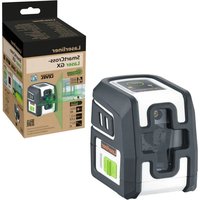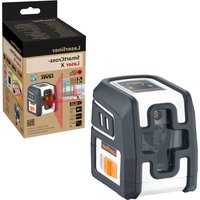
SmartCross-Laser X - Laser level Laserliner - Free user manual and instructions
Find the device manual for free SmartCross-Laser X Laserliner in PDF.


User questions about SmartCross-Laser X Laserliner
0 question about this device. Answer the ones you know or ask your own.
Ask a new question about this device
Download the instructions for your Laser level in PDF format for free! Find your manual SmartCross-Laser X - Laserliner and take your electronic device back in hand. On this page are published all the documents necessary for the use of your device. SmartCross-Laser X by Laserliner.
USER MANUAL SmartCross-Laser X Laserliner
natural_image
Exterior view of a Laserliner device with transparent grip and control panel (no visible text or symbols on body)AUTOMATIC LEVEL


1H 1V
natural_image
Two 3D wireframe diagrams showing a cube with internal lines and a shaded base, no text or symbols present.Laserliner
| DE | 02 |
| EN | 10 |
| NL | 18 |
| DA | 26 |
| FR | 34 |
| ES | 42 |
| IT | 50 |
| PL | 58 |
| FI | 66 |
| PT | 74 |
| SV | 82 |
| NO | 90 |
| TR | 98 |
| RU | 106 |
| UK | 114 |
| CS | 122 |
| ET | 130 |
| RO | 138 |
| BG | 146 |
| EL | 154 |
| SL | 162 |
| HU | 170 |
| SK | 178 |
| HR | 186 |
Laserliner
!
natural_image
Warning symbol with a triangular triangle containing a central starburst pattern (no text or numbers)natural_image
Close-up of a mechanical device with a motor and gear assembly (no visible text or symbols)https://packd.li/ll/ann/in
Laserliner
!
Completely read through the operating instructions, the „Warranty and Additional Information“ booklet as well as the latest information under the internet link at the end of these instructions. Follow the instructions they contain. These documents must be kept in a safe place and passed on together with the product.
Intended use
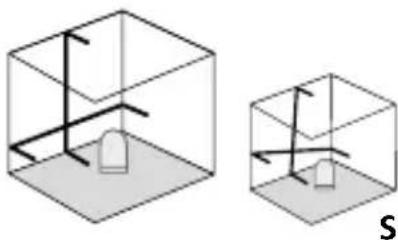
This cross-line laser projects a laser cross and is intended for aligning horizontals, verticals and slopes. Optical signals indicate when the unit is outside its self-levelling range.
The product has an integral hand-held receiver mode and a 1/4" tripod connection.
General safety instructions
- The device must only be used in accordance with its intended purpose and within the scope of the specifications.
- The measuring tools and accessories are not toys. Keep out of reach of children.
- Modifications or changes to the device are not permitted, this will otherwise invalidate the approval and safety specifications.
- Do not expose the device to mechanical stress, extreme temperatures, moisture or significant vibration.
- The device must no longer be used if one or more of its functions fail, the battery charge is weak, or the housing has been damaged.
Safety instructions
Using class 2 lasers

Laser radiation! Do not stare into the beam! Class 2 laser < 1 mW · 635 nm
IEC 60825-1:2014, EN 60825-1:2014/A11:2021 EN 50689:2021
- Attention: Do not look into the direct or reflected beam.
- Do not point the laser beam towards persons.
- If a person's eyes are exposed to class 2 laser radiation, they should shut their eyes and immediately move away from the beam.
- Under no circumstances should optical instruments (magnifying glass, microscope, binoculars) be used to look at the laser beam or reflections.
- Do not use the laser at eye level (1.40 ... 1.90 m)
- Reflective, specular or shiny surfaces must be covered whilst laser devices are in operation.
- In public areas shield off the laser beam with barriers and partitions wherever possible and identify the laser area with warning signs.
Safety instructions
Dealing with electromagnetic radiation
- The measuring device complies with electromagnetic compatibility regulations and limits in accordance with the EMC Directive 2014/30/EU.
- Local operating restrictions – for example, in hospitals, aircraft, petrol stations or in the vicinity of people with pacemakers – may apply. Electronic devices can potentially cause hazards or interference or be subject to hazards or interference.

When transporting always switch off all lasers, secure pendulum and push the slide switch (2) to the left.
Special product features

Automatic alignment of the device with a magnetically dampened pendulum system. The device is brought into initial position and aligns itself autonomously.

Transport LOCK: The device is protected with a pendelum lock during transport.

RX-READY technology enables line lasers to be used even in unfavourable light conditions. The laser lines pulsate at a high frequency and this can be picked up by special laser receivers over long distances.
Laserliner
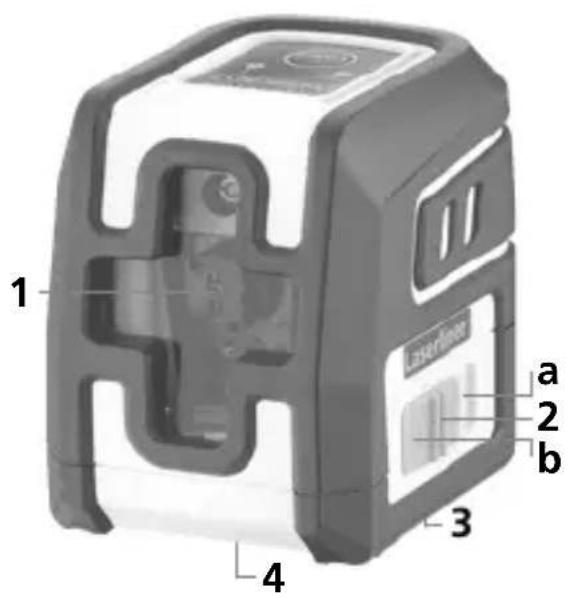
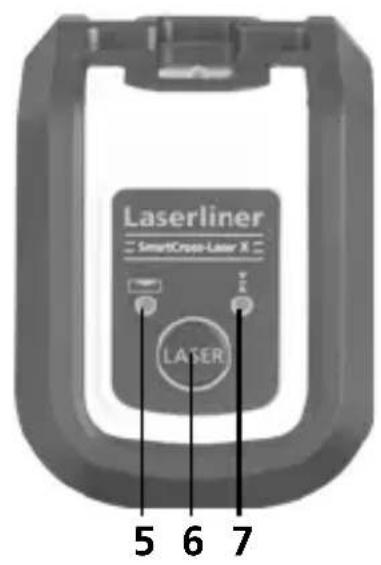
1 Laser output windows
2 Slide switch
a ON
b OFF / transport lock / slope mode
3 Battery compartment (bottom)
4 1/4" tripod threads (bottom)
5 LED levelling
red: levelling off
green: levelling on
6 ON/OFF button;
Hand receiver mode on / off
7 LED hand receiver mode
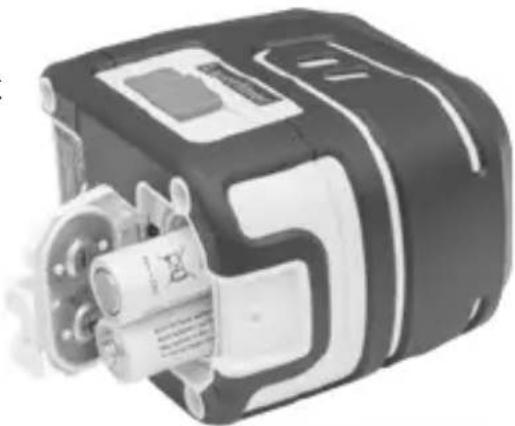
1 Inserting batteries
Open the battery compartment and insert batteries (2 x 1,5V LR06 (AA)) according to the symbols. Be sure to pay attention to polarity.
natural_image
Close-up of a mechanical device with a gear and motor (no visible text or symbols)2Horizontal and vertical levelling
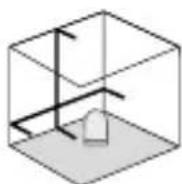
Release the transport restraint, push the slide switch (2) to the right. The laser lines can be switched individually with the selection button.
!
The transport restraint must be released for horizontal and vertical levelling. The LED (5) shows a permanent green light. The laser lines flash as soon as the device is outside the automatic levelling range of 4^ . Position the device such that it is within the levelling range. The light of the laser lines is constant again.
3Slope mode
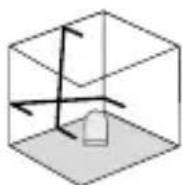
Do not release transport restraint, push slide switch (2) to the left. Sloping planes can now be measured. This mode cannot be used to perform horizontal or vertical levelling as the laser lines are no longer aligned automatically. The laser lines flash red.
Laserliner
4 Hand receiver mode
Optional: Working with the laser receiver RX
Use an RX laser receiver (optional) to carry out levelling at great distances or when the laser lines are no longer visible. To work with a laser receiver, switch the line laser to hand-held receiver mode by keeping button 6 (handheld receiver mode on / off) pressed. The laser lines will now pulsate with high frequency, making the laser lines darker. The laser receiver can detect these pulsating laser lines.
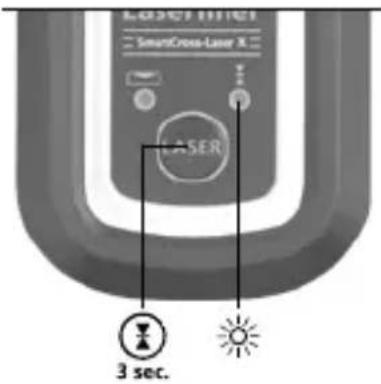

Observe the laser receiver's operating instructions for line lasers.
Preparing the calibration check
It is possible for you to check the calibration of the laser. To do this, position the device midway between 2 walls, which must be at least 5 metres apart. Switch the device on (LASER CROSS ON). The best calibration results are achieved if the device is mounted on a tripod.
- Mark point A1 on the wall.
- Turn the device through 180^ and mark point A2. You now have a horizontal reference between points A1 and A2.
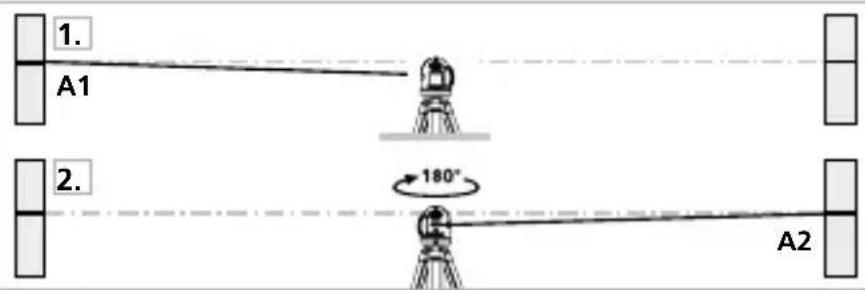
Performing the calibration check
- Position the device as near as possible to the wall at the height of point A1.
- Turn the device through 180^ and mark point A3. The difference between points A2 and A3 is the tolerance.
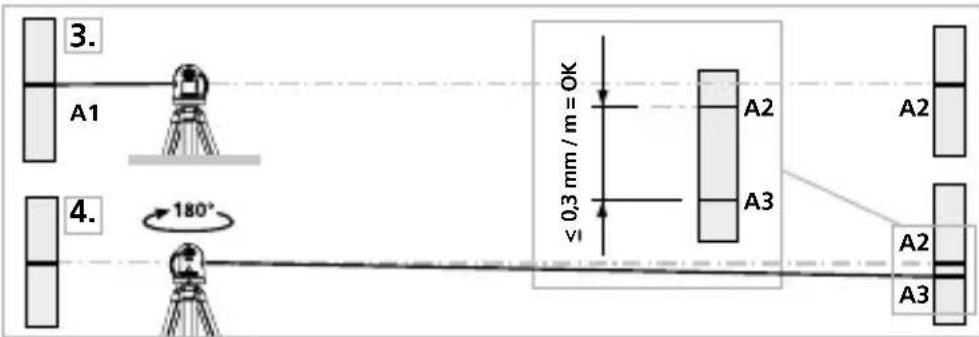

When A2 and A3 are more than 0.3 mm / m apart, an adjustment is necessary. Contact your authorised dealer or else the UMAREX-LASERLINER Service Department.
Checking the vertical line
Position the device about 5 m from a wall. Fix a plumb bob with a line of 2.5 m length on the wall, making sure that the bob can swing freely. Switch on the device and align the vertical laser to the plumb line. The precision is within the specified tolerance if the deviation between the laser line and the plumb line is not greater than ± 1.5 mm.
Checking the horizontal line
Position the device about 5 m from a wall and switch on the cross laser. Mark point B on the wall. Turn the laser cross approx. 2.5 m to the right and mark point C. Check whether the horizontal line from point C is level with point B to within ±1.5 mm. Repeat the process by turning the laser to the left.
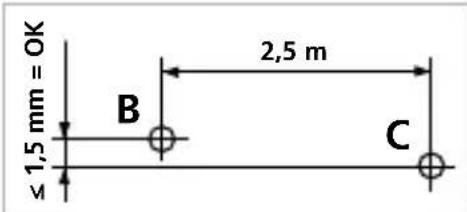

Regularly check the calibration before use, after transport and after extended periods of storage.
Laserliner
Information on maintenance and care
Clean all components with a damp cloth and do not use cleaning agents, scouring agents and solvents. Remove the battery(ies) before storing for longer periods. Store the device in a clean and dry place.
Calibration
The measuring device should be calibrated and tested on a regular basis to ensure it is accurate and working properly. We recommend the measuring device is calibrated every 1 - 2 years. If necessary, contact your distributor or the UMAREX-LASERLINER service department.
Technical data Subject to technical alterations. 24W39
| Self-levelling range ± 4° | |
| Accuracy ± 0.3 mm / m | |
| Levelling automatic | |
| Visibility (typical)* 10 m | |
| Laser wavelength 635 nm | |
| Laser class | 2 / < 1 mW (EN IEC 60825-1:2014/A11:2021, EN 50689:2021) |
| Power supply 2 x 1,5V LR06 (AA) | |
| Operating time approx. 15 hours | |
| Operating conditions | -10°C ... 50°C, max. humidity 80% rH, no condensation, max. working altitude 4000 m above sea level |
| Storage conditions -20°C ... 70°C, max. humidity 85% rH | |
| Dimensions (W x H x D) 84 x 76 x 62 mm | |
| Weight 276 g (incl. batteries) | |
* at max. 300 lux
EU and UK directives and disposal
This device complies with all necessary standards for the free movement of goods within the EU and the UK.
This product, including accessories and packaging, is an electrical appliance that must be recycled in an environmentally appropriate manner in accordance with European and UK directives on waste electrical and electronic equipment, batteries and packaging, in order to recover valuable raw materials.
Electrical devices, batteries and packaging do not belong in household waste. Users are obliged by law to surrender used batteries or battery packs to a public collection point, to sales outlets, or to technical customer services, free of charge.
Remove the battery from the device without damaging it using standard commercial tools: arrange separate collection before returning the device for disposal. Please do not hesitate to contact the UMAREX-LASERLINER service department if you have any queries regarding removing the battery. Look for information on local disposal facilities and note the relevant disposal and safety information at the collection points.
Further safety and supplementary notices at:
https://packd.li/ll/ann/in
Laserliner
!
natural_image
Warning symbol with a triangular triangle and central sunburst pattern (no text)natural_image
Close-up of a mechanical device with visible internal components and mounting brackets (no text or symbols)https://packd.li/ll/ann/in
Laserliner
!
natural_image
Warning symbol with a triangular triangle and central sunburst (no text or numbers)natural_image
Close-up of a mechanical device with internal components and no visible text or symbolsnatural_image
Warning symbol with a triangular frame and central starburst (no text or numbers)natural_image
Close-up of a mechanical device with visible internal components and no readable text or symbolsnatural_image
Close-up of a mechanical device with no visible text or symbols!
https://packd.li/ll/ann/in
Laserliner
!
natural_image
Close-up of a mechanical device with no visible text or symbolshttps://packd.li/ll/ann/in
Laserliner
!
natural_image
Warning symbol with a triangle and central starburst (no text or numbers)natural_image
3D rendering of a mechanical device with internal components and mounting brackets (no visible text or symbols)
https://packd.li/ll/ann/in
Laserliner

natural_image
Warning symbol with a triangular triangle and central starburst pattern (no text)natural_image
Close-up of a mechanical device with visible internal components and no readable text or symbols
https://packd.li/ll/ann/in
Laserliner
!
natural_image
Close-up of a mechanical device with no visible text or symbols
natural_image
Warning symbol with a black triangular triangle containing a central starburst pattern (no text or numbers)Laserstrålning! Titta aldrig direkt in i laserstrålen! Laser klass 2 < 1 mW · 635 nm
IEC 60825-1:2014, EN 60825-1:2014/A11:2021
EN 50689:2021
natural_image
Close-up of a mechanical device with visible internal components and mounting brackets (no text or symbols)https://packd.li/ll/ann/in
Laserliner
!
Laserstråling! Ikke se inn i strålen! Laser klasse 2 < 1 mW · 635 nm
IEC 60825-1:2014, EN 60825-1:2014/A11:2021 EN 50689:2021
natural_image
Close-up of a mechanical device with visible gears and housing (no text or symbols)https://packd.li/ll/ann/in
Laserliner
!
natural_image
Warning symbol with a triangular triangle and central starburst (no text or numbers)natural_image
Close-up of a mechanical device with visible internal components and no readable text or symbolshttps://packd.li/ll/ann/in
Laserliner
!
natural_image
Warning symbol with a triangular triangle containing a central starburst (no text or numbers)natural_image
Close-up of a mechanical device with visible internal components and no readable text or symbolshttps://packd.li/ll/ann/in
Laserliner
!
natural_image
Warning symbol with a triangle and central starburst pattern (no text)natural_image
Close-up of a mechanical device with visible internal components and mounting holes (no text or symbols)natural_image
Warning symbol with a triangular frame and central starburst (no text or numbers)natural_image
Close-up of a mechanical device with a metallic component inserted, showing no visible text or symbols.
https://packd.li/ll/ann/in
Laserliner
!
natural_image
3D rendered mechanical device with internal components and mounting holes (no visible text or symbols)!
https://packd.li/ll/ann/in
Laserliner
!
natural_image
Warning symbol with a triangular triangle and central sunburst pattern (no text)natural_image
Close-up of a mechanical device with internal components and no visible text or symbols
!
https://packd.li/ll/ann/in
Laserliner
!
natural_image
Warning symbol with a triangle and central starburst (no text or numbers)natural_image
Close-up of a mechanical device with visible internal components and mounting brackets (no text or symbols)natural_image
Warning symbol with a triangular triangle and central starburst (no text or numbers)natural_image
3D rendering of a mechanical device with internal components and mounting features (no visible text or symbols)!
natural_image
Warning symbol with a black triangular triangle containing a central starburst pattern (no text or numbers)Lasersko sevanje!
Ne gledati v žarek.
Laser razreda 2
< 1 mW · 635 nm
IEC 60825-1:2014, EN 60825-1:2014/A11:2021
EN 50689:2021
natural_image
Close-up of a mechanical device with visible internal components and mounting holes (no text or symbols)2Vodoravno in navpično niveliranje
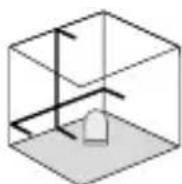
Sprostite transportno varovalo, drsno stikalo (2) potisnite v desno. Prikazal se bo laserski križec.

https://packd.li/ll/ann/in
Laserliner
!
natural_image
Warning symbol with a triangle and central starburst (no text or numbers)natural_image
Close-up of a mechanical device with internal components and no visible text or symbolshttps://packd.li/ll/ann/in
Laserliner
!
natural_image
Warning symbol with a triangular frame and central starburst pattern (no text)natural_image
Close-up of a mechanical device with internal components and mounting holes (no visible text or symbols)!
natural_image
Warning symbol with a triangle and central starburst (no text or numbers)Lasersko zračenje! Ne gledati u lasersku zraku! Laser klase 2 < 1 mW · 635 nm
IEC 60825-1:2014, EN 60825-1:2014/A11:2021
EN 50689:2021
natural_image
Close-up of a mechanical device with no visible text or symbols2Horizontalno i vertikalno niveliranje
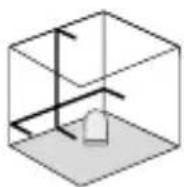
Otpustiti transportni zatvarač, klizni prekidač (2) gurnuti u desno. Pojavit će se laserski križ.
!
Transportni zatvarač se mora otpustiti za horizontalno i vertikalno niveliranje. LED (5) svijetli zeleno. Laserske linije bljeskaju i upali se crveni LED čim je uređaj izvan raspona automatskog niveliranja od 4°. Postaviti uređaj da bude unutar raspona nivelacije. LED se ponovno prebaci na zeleno, a laserske linije prestanu bljeskati (svijetli postojanim svjetlom).

Ako su točke A2 i A3 razdvojene više od 0,3 mm/m, nužno je obaviti podešavanje. Kontaktirati ovlaštenog zastupnika ili servis UMAREX- LASERLINER.
natural_image
Interior view of a room with tiled floor, large windows, and a small robot on the floor (no text or symbols)Manuale
PAP 22
CARTA
RACCOLTA CARTA