ES3124RL - Switch Edimax - Free user manual and instructions
Find the device manual for free ES3124RL Edimax in PDF.



| Product Type | Fast Ethernet Unmanaged Switch |
| Brand | Edimax |
| Model | ES3124RL |
| Number of Ports | 24 RJ-45 10/100 Mbps ports |
| Data Rate | 10/100 Mbps with auto-negotiation |
| Network Standards | IEEE 802.3 10BASE-T, IEEE 802.3u 100BASE-TX, IEEE 802.3x |
| Features | Auto MDI/MDI-X, simultaneous bidirectional flow control, store-and-forward mode |
| MAC Address Table | 8,000 entries |
| Buffer Memory | 160 KB |
| Power Supply | Internal 100-240 VAC, 50/60 Hz, output 3.3 VDC / 4 A |
| Power Consumption | Approximately 13.2 W |
| Dimensions (W × D × H) | 440 × 200 × 44 mm (19-inch rack mountable) |
| Weight | Approximately 2.5 kg |
| Indicators | Power (solid green), Link/Activity (solid green/blinking) |
| Installation | Plug-and-play, no software required |
| Maintenance and Cleaning | Unplug the device before cleaning. Use a soft dry cloth. Do not use liquids or aerosols. |
| Safety | Do not expose to moisture or excessive heat. Unplug during thunderstorms. |
| Spare Parts and Repairability | No user-serviceable parts. For any repair, contact technical support. |
| Compatibility | All standard network protocols |
| Certifications | CE, FCC Class A |
Frequently Asked Questions - ES3124RL Edimax
User questions about ES3124RL Edimax
0 question about this device. Answer the ones you know or ask your own.
Ask a new question about this device
Download the instructions for your Switch in PDF format for free! Find your manual ES3124RL - Edimax and take your electronic device back in hand. On this page are published all the documents necessary for the use of your device. ES3124RL by Edimax.
USER MANUAL ES3124RL Edimax
NETWORKING PEOPLE TOGETHER
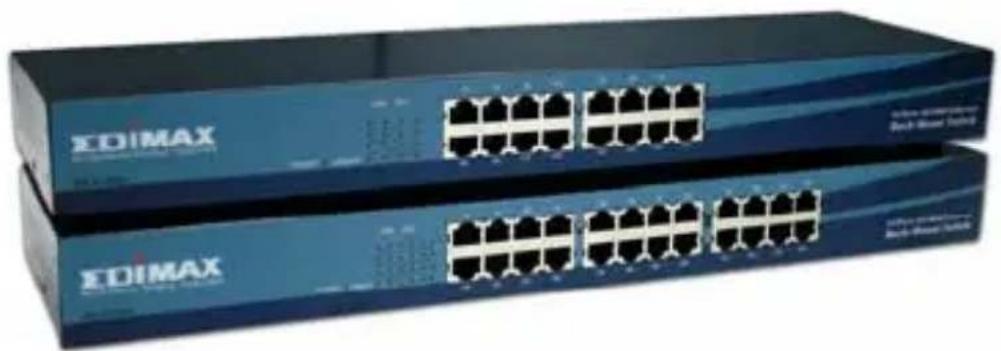
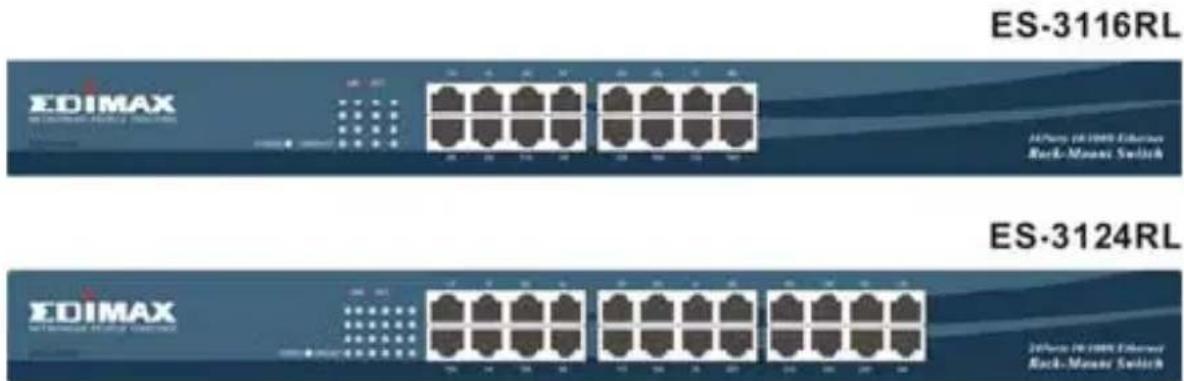
19” Rackmount Fast Ethernet Switches
Quick Installation Guide
Version 2.0 April, 2006
Content Table
English 3
Český 6
Deutsch 9
Espanol 12
Francais 15
Italiano 18
Magyar 21
Nederlands 24
Polski 27
Portugues 30
Pycckn 33
Türkoge 37
FCC Certifications
This Equipment has been tested and found to comply with the limits for a Class A digital device, pursuant to part 15 of the FCC Rules. These limits are designed to provide reasonable protection against harmful interference when the equipment is operated in a commercial environment. This equipment generates, uses, and can radiate radio frequency energy and, if not installed and used in accordance with the instruction manual, may cause harmful interference to radio communications.
Operation of this equipment in a residential area is likely to cause harmful interference in which case the user will be required to correct the interference at his own expense.
This device complies with Part 15 of the FCC Rules. Operation is subject to the following two conditions: (1) this device may not cause harmful interference, and (2) this device must accept any interference received; including interference that may cause undesired operation.
CE
CE Mark Warning
This equipment complies with the requirements relating to electromagnetic compatibility, EN 55022 class A for ITE, the essential protection requirement of Council Directive 89/336/EEC on the approximation of the laws of the Member States relating to electromagnetic compatibility.
Company has an on-going policy of upgrading its products and it may be possible that information in this document is not up-to-date. Please check with your local distributors for the latest information. No part of this document can be copied or reproduced in any form without written consent from the company.
Trademarks: All trade names and trademarks are the properties of their respective companies.
Copyright © 2005, All Rights Reserved.
Introduction
This device is a powerful, high-performance Fast Ethernet switch, with all ports capable of 10 or 100Mbps auto-negotiation operation (NWay), which means this switch could automatically negotiate with the connected partners on the network speed and duplex mode. It is ideal for micro-segmenting large networks into smaller, connected subnets for improved performance, enabling the bandwidth demanding multimedia and imaging applications.
Moreover, the 10/100Mbps auto-sensing ability provides an easy way to migrate 10Mbps to 100Mbps network with no pain. Compared to the shared 10Mbps or 100Mbps networks, the switch delivers a dedicated 10/100Mbps connection to every attached client with no bandwidth congestion issue. This switch also supports auto MDI / MDI-X function; each port could be used to connect to another switch or hub with no crossover RJ-45 cable.
Store-and-forward switching mode promises the low latency plus eliminates all the network errors, including runt and CRC error packets. To work under full-duplex mode, transmission and reception of the frames can occur simultaneously without causing collisions as well as double the network bandwidth.
The switch is plug-n-play without any software to configure and also fully compliant with all kinds of network protocols. Moreover, the rich diagnostic LEDs on the front-panel can provide the operating status of individual port and whole system.
Before you start to install the switch, check the following contents in this package :
One Rackmount Fast Ethernet Switch
- One power cord and one user's manual
- Rack-mount brackets and screws
LED Definition
Please refer to the following table for LED definition
| LED Status Operation | ||
| Power | Steady Green Power is on | |
| Off Power is off | ||
| Link/Act | Steady Green The port is connected | |
| Blinking Green The port is transmitting/receiving data. | ||
| Off | No connection | |
Stations Connection
Connect each station to the switch by twisted-pair cable. Plug one RJ-45 connector into a RJ-45 port of the switch, and plug the other RJ-45 connector into the station's network adapter. Power on the switch and then system is ready. For cable selection, refer to the following table.
Switches Connection
In making a switch interconnection, you could use any port to connect another switch with straight or crossover cable. As all the ports support auto MDI / MDI-X function, using a straight cable to make a switch-to-switch connection is allowed.
For cable selection, refer to the following table :
| Network Speed | Cable Type | Max. Length |
| 10Mbps Cat. | 3, 4, 5 UTP/STP 100 meters | |
| 100Mbps Cat. | 5 UTP/STP 100 meters | |
Rack-Mount
The switch may standalone, or may be mounted in a standard 19-inch equipment rack. Rack mounting produces an orderly installation when you have a number of related network devices. The switch is supplied with two optional rack mounting brackets and screws. These are used for rack mounting the unit.
Specification
| Standard | IEEE 802.3 10BASE-T IEEE 802.3u 100BASE-TX IEEE 802.3x full duplex operation and flow control |
| Interface | 16/24 * 10/100Mbps RJ-45 Fast Ethernet Ports |
| Uplink Auto | MDI/MDI-X(Auto crossover) |
| Network Speed | 10/100Mbps & Full/Half duplex mode auto detection |
| MAC Addr. Table | 8K MAC entries |
| Memory | 160Kbytes |
| Power Supply | Internal Power supply 3.3V 4A (100-240V/ 50-60Hz) |
| EMI CE and FCC class A | |
Uvod
Raccordement des stations
Adres : Merkez Mah. Kemerburgaz Cd. No: 39, Kağithane, 34406, Istanbul
Tel: : 0212 312 50 00 pbx
Faks : 0212 312 50 50
E-posta : teknik@mascom.com.tr
Ankara
Adres : 2. Cadde 85. Sokak No:3/1 Aşaq)iöveçler, 06460, Ankara
Tel: 0312 473 0130 pbx
Faks:03124723998
E-posta : teknika@mascom.com.tr
Izmir
Adres : Hürriyet Bulvarı No:4/1 D:103 Alsancak 35210, İzmir
Tel: 0232 489 6633 pbx
Faks:02324898189
E-posta : tekniki@mascom.com.tr