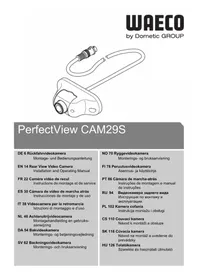
PerfectView CAM29S - Rear Camera WAECO - Free user manual and instructions
Find the device manual for free PerfectView CAM29S WAECO in PDF.


| Product type | Reverse camera |
| Brand | Waeco |
| Model | PerfectView CAM29S |
| Dimensions (L x H x D) | 76 x 29 x 33 mm |
| Weight | 80 g |
| Operating voltage | 12 V == |
| Current consumption | 60 mA |
| Image sensor | 1/4" CMOS |
| Resolution | 640 x 480 pixels (307200 pixels) |
| Lens opening angle | 160° diagonal |
| Horizontal viewing angle | Approx. 130° |
| Vertical viewing angle | Approx. 100° |
| Photosensitivity | 0.5 lux |
| Operating temperature | -20 °C to +70 °C |
| Protection rating | Equivalent P68 |
| Mirror function | Preset |
| Length of supplied connection cable | 20 m |
| Intended use | Reverse video system for vehicles, outdoor mounting |
| Maintenance and cleaning | Clean with a damp cloth; do not use high-pressure cleaners or harsh detergents |
| Safety | Fix securely; follow manufacturer's instructions; do not open the camera |
| Compatible accessories | Cable extension 5 m (ref. 9103555986) or 20 m (ref. 9103555670) |
| Certifications | E13 |
Frequently Asked Questions - PerfectView CAM29S WAECO
User questions about PerfectView CAM29S WAECO
0 question about this device. Answer the ones you know or ask your own.
Ask a new question about this device
Download the instructions for your Rear Camera in PDF format for free! Find your manual PerfectView CAM29S - WAECO and take your electronic device back in hand. On this page are published all the documents necessary for the use of your device. PerfectView CAM29S by WAECO.
USER MANUAL PerfectView CAM29S WAECO
EN 14 Rear View Video Camera
Installation and Operating Manual
Please read this manual carefully before installing and starting up and store it in a safe place. If the device is resold, this manual must be handed over to the purchaser.
Table of contents
1 Explanation of symbols 14
2 Safety and installation instructions. 15
3 Scope of delivery 16
4 Accessories/expansions. 16
5 Intended use 16
6 Technical description 16
7 Installing the reversing video camera. 17
8 Connecting electrical power to the reversing video camera. 19
9 Checking the function and setting the camera. 20
10 Maintaining and cleaning the reversing video camera. 20
11 Troubleshooting 20
12 Warranty. 20
13 Disposal 20
14 Technical data 21
1 Explanation of symbols

CAUTION!
Safety instruction: Failure to observe this instruction can lead to injury.

NOTICE!
Failure to observe this instruction can cause material damage and impair the function of the product.

NOTE
Supplementary information for operating the product.
Action: This symbol indicates that action is required on your part. The required action is described step-by-step.
This symbol describes the result of an action.
Fig. 1 5, page 3: This refers to an element in an illustration. In this case, item 5 in figure 1 on page 3.
2 Safety and installation instructions
The manufacturer accepts no liability for damage in the following cases:
- Faulty assembly or connection
- Damage to the product resulting from mechanical influences and excess voltage
- Alterations to the product without express permission from the manufacturer
- Use for purposes other than those described in the operating manual
Please observe the prescribed safety instructions and stipulations from the vehicle manufacturer and service workshops.
Observe the following installation instructions:

CAUTION!
- Secure the parts installed in the vehicle to ensure they cannot become loose under any circumstances (sudden braking, accidents) and cause injuries to vehicle occupants.
- Always follow the safety instructions of the vehicle manufacturer. Some work (e.g. on retention systems such as the AIRBAG etc.) may only be performed by qualified specialists.

NOTICE!
- To prevent damage when drilling, make sure there is sufficient space on the other side for the drill head to emerge.
- Deburr all drill holes and treat them with a rust-protection agent.
Observe the following instructions when working with electrical parts:

NOTICE!
- When testing the voltage in electrical cables, only use a diode test lamp or a voltmeter.
Test lamps with a bulb consume too much voltage, which can damage the vehicle's electronic system.
-
When making electrical connections, ensure that:
-
they are not kinked or twisted
- they do not rub on edges
- they are not laid in sharp-edged ducts without protection.
Insulate all connections.
- Secure the cables against mechanical wear by using cable binders or insulating tape, for example on existing cables.
The camera is waterproof, however, you should observe the following instructions when handling the camera:

NOTICE!
- Do not spray the camera directly with a high-pressure cleaning device.
- Do not open the camera or pull at the cables, as this impairs the leak-tightness and the function of the camera.
The camera is not suitable for use under water.
3 Scope of delivery
No. in fig. 3, page 4 Quantity Description Item no.
1 1 Camera 9102000095
21 Connection cable 20m long
Fastening material
4 Accessories/expansions
Description Item no.
Extension cable, 5 m 9103555986
Extension cable, 20 m 9103555670
5 Intended use
The CAM29S (item no. 9102000095) is suitable for reversing video systems used in vehicles.
Reversing video systems support the driver when reversing, however this does not relieve you of the obligation to take proper care when reversing.
6 Technical description
The CAM29S camera can be used in various ways, for example, as a reversing video camera for installing on the outside of vehicles.
The electrical connection takes place using a cable ready to plug into the monitor.
7 Installing the reversing video camera

NOTE
If you do not have sufficient technical knowledge to install and connect the components in vehicles, have a specialist install the reversing video camera in your vehicle.
7.1 Fitting the camera
Observe the following information when selecting an installation location for the camera:
Note the length of the camera cable.
- If you wish to use the camera as a reversing video camera, installing the camera on the top middle of the vehicle bumper is recommended (fig. 4, page 4).
The installation location should be sufficiently firm (e.g. to prevent the camera from being knocked down by branches that may brush the roof of the vehicle).
Select a suitable installation location.

NOTICE!
Before drilling any holes, ensure that no electrical cables or other parts of the vehicle can be damaged by drilling, sawing and filing.
Install the camera in accordance with fig. 4, page 4.

NOTE
Make sure it is correctly aligned. If the camera is not correctly aligned, the picture will be askew or upside down on the monitor.
Check that the camera is installed securely.
7.2 Laying cables

NOTICE!
Before drilling any holes, ensure that no electrical cables or other parts of the vehicle can be damaged by drilling, sawing and filing.

NOTE
- As far as possible, use original ducts for laying the cables, or other suitable options such as panelling edges, ventilation grilles or dummy plugs. If there is no rubber plug, produce a suitable hole with a diameter of around 13mm and insert a cable bushing sleeve.
- Cables and connections that are not properly installed will cause malfunctions or damage to components. Correct installation of cables and connections ensures lasting and trouble-free operation of the retrofitted components.
Therefore, please observe the following instructions:
- Wherever possible, lay cables inside the vehicle, as they are better protected there than outside.
If you do need to lay a cable outside the vehicle, ensure that it is well fastened (use additional cable ties, insulating tape etc.). - To prevent damage to the cables when laying them, ensure that they are far enough away from hot or moving vehicle components (exhaust pipes, drive shafts, light systems, fans, heaters, etc.).
- Wrap good-quality insulating tape around the plug connections of the connecting cables and every connection on a cable (including inside the vehicle) to ensure no water can penetrate them (fig. 5 B, page 5). The most suitable tape for this is self-vulcanising tape, e.g. made by 3M.
-
When laying the cables, make sure:
-
they are not kinked or twisted
- they do not rub on edges
-
they are not laid in sharp-edged ducts without protection (fig. 2, page 3).
-
Attach the cables securely in the vehicle with cable binders, insulating tape or by gluing them to prevent them from being tripped over.
- Protect every through-hole made in the outer skin of the bodywork against water penetration, for example by using a cable with a sealant and by spraying the cable and the cable sleeve with sealant.

NOTE
- Only start sealing through-holes when you have completed all installation work on the camera and have laid the required cable lengths.
- Pull the socket connector of the camera cable through the cable bushing sleeve before inserting the sleeve in the bodywork.
Route the camera cable into the interior of the vehicle so that it cannot be damaged under any circumstances (e.g. by gravel impact).
Lay the camera cable so that should you need to remove the camera, you can easily access the plug connection.
8 Connecting electrical power to the reversing video camera
The circuit diagram for the reversing video camera can be found in fig. 6, page 5.
| No. in fig. 6, page 5 | Description | |||||
| 1 | C | a | m | e | r | |
| 2 | 6-pin mini DIN plug | |||||
| 3 | 6-pin mini DIN socket | |||||
| 4 | 6 | - | p | i | n | |
| 5 | Monitor with 6-pin socket | |||||
Connecting the camera

NOTE
Make sure the plug connections are assembled in such a way that the arrows on the plug and the socket are pointing at each other.
Insert the plug of the camera cable (fig. 6 2, page 5) as far as it will go into the 6-pin socket (fig. 6 3, page 5) of the connection cable.
Ensure that the plastic cap of the socket reaches up to the arrow on the plug.
Connect the 6-pin plug (fig. 6 4, page 5) of the connection cable to the monitor.
9 Checking the function and setting the camera
Check the function of the camera after you have connected it to a monitor.
Use the monitor picture to align the camera if necessary so that the picture on the monitor is horizontal.
10 Maintaining and cleaning the reversing video camera

NOTICE!
Do not use sharp or hard objects or cleaning agents for cleaning as these may damage the product.
Occasionally clean the product with a damp cloth.
11 Troubleshooting
The monitor ceases to display camera images.
The camera or the monitor may not be properly connected.
Check all plug connections between the camera and the monitor.
Make sure that the monitor is supplied with power.
12 Warranty
The statutory warranty period applies. If the product is defective, please contact the manufacturer's branch in your country (see the back of the instruction manual for the addresses) or your retailer.
For repair and guarantee processing, please include the following documents when you send in the device:
A copy of the receipt with purchasing date
A reason for the claim or description of the fault
13 Disposal
Place the packaging material in the appropriate recycling waste bins wherever possible.
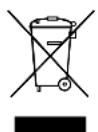
If you wish to finally dispose of the product, ask your local recycling centre or specialist dealer for details about how to do this in accordance with the applicable disposal regulations.
14 Technical data
| PerfectView CAM29S | |
| Item no. 9102000095 | |
| Operating voltage: 12 V== | |
| Current: 60 mA | |
| Image sensor: ¼" CMOS sensor | Preset mirror image function |
| Lens: 160° opening angle, diagonal | |
| Pixels: 640 (H) x 480 (V) (307000 pixels) | |
| Light sensitivity: 0.5 lux | |
| Operating temperature: -20 °C to +70 °C | |
| Horizontal picture angle: approx. 130° | |
| Vertical picture angle: approx. 100° | |
| Protection class: Equivalent to IP68 | |
| Dimensions (W x H x D): 76 x 29 x 33 mm | |
| Weight: 80 g | |
| Certifications: | E13 |
6 Description technique
Domatic Australia Pty. Ltd.
1 John Duncan Court
Varsity Lakes QLD 4227
1800212121
+61755076001
Mail: sales@dometic-waeco.com.au
AUSTRIA
Domatic Austria GmbH
Neudorferstraße 108
A-2353 Guntramsdorf
+432236908070
+43223690807060
Mail: info@dometic.at
BENELUX
Domatic Branch Office Belgium
Zincstraße 3
B-1500 Halle
+3223598040
+32 2 3598050
Mail: info@dometic.be
BRAZIL
Domatic DO Brasil LTDA
Avenida Paulista 1754, conj. 111
SP 01310-920 Sao Paulo
+551132513352
+551132513362
Dometic Group Asia Pacific
Suites 2207-11·22/F·Tower 1
The Gateway · 25 Canton Road,
Tsim Sha Tsui · Kowloon
+852 2 4611386
+852 2 4665553
Mail: info@waeco.com.hk
HUNGARY
Domicic Zrt. Sales Office
Kerékgyártó u. 5.
H-1147 Budapest
+3614684400
+3614684401
Domatic Italy S.r.l.
Via Virgilio, 3
I-47122 Forli (FC)
+390543754901
+390543754983
Mail: vendite@dometic.it
JAPAN
Domatic KK
Maekawa-Shibaura,Bldg.2
2-13-9 Shibaura Minato-ku
Tokyo 108-0023
+81354453333
+81354453339
Mail: info@dometic.jp
MEXICO
Circuito Médicos No. 6 Local 1
Colonia Ciudad Satélite
CP 53100 Naucalpan de Juarez
Estado de Mexico
+525553744108
+52 55 5393 4683
Mail: info@dometic.com.mx
NETHERLANDS
Domatic Benelux B.V.
Ecustraat 3
NL-4879 NP Etten-Leur
+31765029000
+31765029019
Mail: info@dometic.nl
NEW ZEALAND
Dometic New Zealand Ltd.
Unite E, The Gate
373 Neilson Street
Penrose 1, Auckland
+6496221490
+6496221573
Mail: customerservices@dometic.co.nz
NORWAY
Domatic Norway AS
Osteroyveien 46
N-3232 Sandefjord
+4733428450
+4733428459
Mail: firmapost@domatic.no
POLAND
Dometic Poland Sp. z o.o.
Ul. Puławska 435A
PL-02-801 Warszawa
+48224143200
+48224143201
Mail: info@dometic.pl
PORTUGAL
Dometic Spain, S.L.
Komsomolskaya square 6-1
RU-107140 Moscow
+74957807939
+74959165653
Mail: info@dometic.ru
SINGAPORE
Domatic Pte Ltd
18 Boon Lay Way 06-140 Trade Hub 21
Singapore 609966
+6567953177
+6568626620
Mail: dometic@dometic.com.sg
SLOVAKIA
Domatic Slovakia s.r.o. Sales Office Bratislava
Nádražná 34/A
900 28 Ivanka pri Dunaji
/+421245529680
Mail: bratislava@dometic.com
SOUTH AFRICA
Dometic (Pty) Ltd.
Regional Office
South Africa & Sub-Saharan Africa
2 Avalon Road
West Lake View Ext 11
Modderfontein 1645
Johannesburg
+27114504978
+27114504976
Mail: info@dometic.co.za
SPAIN
Dometic Spain S.L.
Avda. Sierra del Guadarrama, 16
E-28691 Villanueva de la Canada
Madrid
+34902111042
+34900100245
Mail: info@dometic.es
SWEDEN
Dometic Scandinavia AB
Gustaf Melins gata 7
Dometic Switzerland AG
Riedackerstrasse 7a
CH-8153 Rümlang
+41448187171
+41448187191
Mail: info@dometic.ch
UNITED ARAB EMIRATES
Dometic Middle East FZCO
P.O.Box 17860
S-D 6, Jebel Ali Freezone
Dubai
+97148833858
+97148833868
Mail: info@dometic.ae
UNITED KINGDOM
Dometic UK Ltd.
Dometic House, The Brewery
Blandford St. Mary
DorsetDT119LS
+443446260133
+443446260143
Mail: customerservices@dometic.co.uk
USA
Dometic RV Division
1120 North Main Street
Elkhart, IN 46515
+1574-264-2131

- Table of contents
- Explanation of symbols
- CAUTION!
- NOTICE!
- NOTE
- Safety and installation instructions
- Scope of delivery
- Accessories/expansions
- Intended use
- Technical description
- Installing the reversing video camera
- Fitting the camera
- Laying cables
- Connecting electrical power to the reversing video camera
- Connecting the camera
- Checking the function and setting the camera
- Maintaining and cleaning the reversing video camera
- Troubleshooting
- Warranty
- Disposal
- Technical data
- Description technique
- AUSTRIA
- BENELUX
- BRAZIL
- HUNGARY
- Domatic Italy S.r.l.
- JAPAN
- Domatic KK
- MEXICO
- NETHERLANDS
- Domatic Benelux B.V.
- NEW ZEALAND
- Dometic New Zealand Ltd.
- NORWAY
- Domatic Norway AS
- POLAND
- Dometic Poland Sp. z o.o.
- PORTUGAL
- Dometic Spain, S.L.
- SINGAPORE
- Domatic Pte Ltd
- SLOVAKIA
- Domatic Slovakia s.r.o. Sales Office Bratislava
- SOUTH AFRICA
- Dometic (Pty) Ltd.
- Regional Office
- South Africa & Sub-Saharan Africa
- SPAIN
- Dometic Spain S.L.
- SWEDEN
- Dometic Scandinavia AB
- Dometic Switzerland AG
- UNITED ARAB EMIRATES
- Dometic Middle East FZCO
- UNITED KINGDOM
- Dometic UK Ltd.
- USA
- Dometic RV Division
Brand : WAECO
Model : PerfectView CAM29S
Category : Rear Camera