BBS300 - Built-in kit BEEWI - Free user manual and instructions
Find the device manual for free BBS300 BEEWI in PDF.



Frequently Asked Questions - BBS300 BEEWI
User questions about BBS300 BEEWI
0 question about this device. Answer the ones you know or ask your own.
Ask a new question about this device
Download the instructions for your Built-in kit in PDF format for free! Find your manual BBS300 - BEEWI and take your electronic device back in hand. On this page are published all the documents necessary for the use of your device. BBS300 by BEEWI.
USER MANUAL BBS300 BEEWI
For additional languages, visit our website
www.bee-wi.com
User's guide
ENGLISH 4
FRANCAIS 12
DEUTSCH 20
ITALIANO 28
ESPAñOL 36
PORTUGUES 44
NEDERLANDS 52
БылгAPСКИ 60
ROmáN 68
Thank you for purchasing the BBS300 Pocket Stereo Speaker from BEEWI. Please read the following instructions to learn how to configure and use more effectively your product.
INTRODUCTION
The Pocket Stereo Speaker is a high performance wireless speaker allowing both music streaming and hands-free communication. It includes advanced built-in microphone and a pair of 1 Watt speakers with Digital Sound Processor (DSP) for echo cancellation and noise reduction that gives a loud and clear full duplex sound quality. The Pocket Stereo Speaker is Bluetooth 2.1+EDR compliant and it is compatible with all Bluetooth compliant devices using HFP and A2DP profiles such as mobile phones and music players. It also supports bi-directional audio streaming using a Dual Air™ enabled Bluetooth transmitter (check www.bee-wi.com for information on Dual Air™ transmitters).
Warning: always obey local legislation regarding the use of mobile phones in the car.
1.PRODUCT DESCRIPTION
1.1. Packaging content
- Bluetooth stereo speaker
- USB charging cable
- Car visor clip & desk stand
- 12V car adapter with USB port
-User Manual CD
1.2. Features
- Wireless music streaming and hands-free communication
- Pocket-size, light weight portable speakers
- Powerful 2 x 1W stereo speakers
- High quality microphone
- Full Duplex, background noise reduction with CVC Digital Signal
Processor (DSP)
- Auto connect to the last connected device
- Auxiliary jack input to be used as a regular speakers
- Up to 120 hours standby time and 8 hours continuous talk or music streaming time
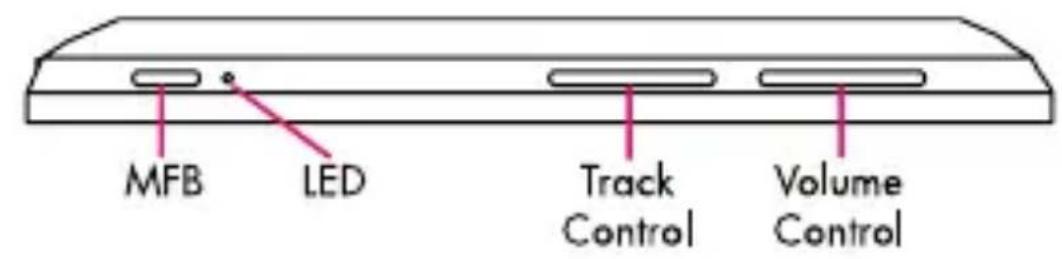
1.4. Product Overview
- On/Off: Power switch
- MFB: Multifunction Button, Play/Pause Music and Call functions
- LED: Light indicator
- Track control: << \& >> keys
- Volume Control: VOL(-) / VOL(+) keys
- Jack Input: auxiliary audio in connector
- Mic: microphone
- Charge: charge connector
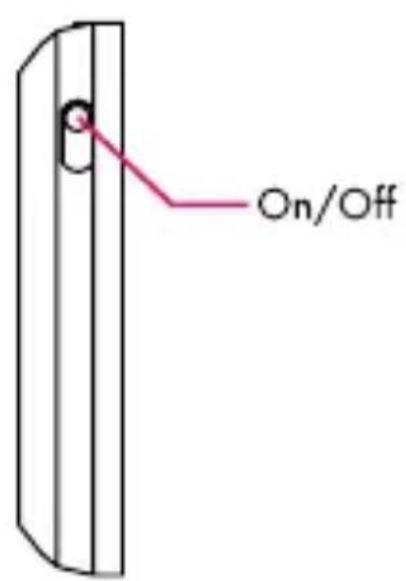
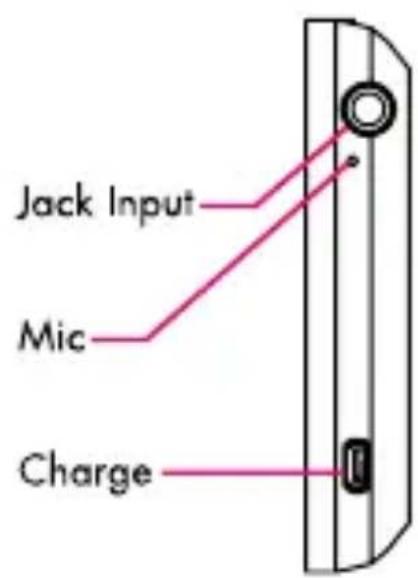
1.3.Product Specification
| Bluetooth Specification Bluetooth V2.1+EDR | |
| Bluetooth Profiles HSP, HFP, A2DP, AVRCP | |
| Frequency Band 2.4GHz~2.4835GHz | ISM Band |
| Working Distance Class 2, Up to 10 meters | |
| Audio Output Power 2 x 1W (4Ω, 1kHz) | |
| Frequency Response 120 Hz to 20 000 Hz | |
| Standby Time Up to 25 hours | |
| Talking Time Up to 8 hours | |
| Playing Time Up to 8 hours | |
| Battery | 800mAh Li-Polymer rechargeable battery |
| Dimensions 115 x 61 x 11,6 mm | |
| Weight 150g | |
2. USING THE PRODUCT
2.1 Power Supply and Charging
Fully charge the device using the included USB cable at least 4 hours before first time use or after a long storage period. The red LED indicator will stay on while charging and will be off as soon as it is completed. It takes approximately 3 hours to re-charge every time.
2.2 Power On / Power Off
Power On: slide the On/Off switch up, the blue LED indicator will blink 3 times.
Power Off: slide the power switch down, the blue LED indicator will turn off.
2.3 Pair and connect
Refer to the Bluetooth pairing procedures in the mobile phone or music player user manual.
When the device is on, long press the MFB button for about 6 seconds until the blue indicator remains steady blue, then release the button. The product is in the pairing mode.
Search for Bluetooth devices in the phone, select the device name "BeeWi BBS300" displayed on the phone and eventually enter the pass key "0000" to add the device to the pair list and establish the connection.
Check the connection by placing a call or playing the music from your phone.
2.4 Connection
The speaker will automatically connect to the last connected device when it will be turned on. If it is not the case, just connect and disconnect the speaker from the mobile phone the first time (refer to the phone user manual). It will then connect automatically the next times.
When using both Hands-Free and Music profiles, hands-free will always have the priority, the music being muted in case of incoming or outgoing calls. As soon as the call has been hung up, the music rebounds afterwards.
Note: If the mobile phone supports only Headset profile, the connection will be established automatically when a call is made (refer to the phone user manual).
2.5 In car use
Slide the speaker in the holder and clip it on the car visor above.
For better voice pick up, direct the microphone towards the user and do not place the speaker on interior dashboard or close to a window, air conditioning vent or car speakers.
2.6 Status indicators
| Status LED Descriptions | ||
| Turn On Blue Blinking 3 times | ||
| Pairing Blue Permanent light | ||
| Standby Mode/ Connected | Blue | Blinking once every 5 seconds |
| Standby Mode/Not connected | Blue | Blinking twice every 3 seconds |
| During Communication Blue | Blinking once every 6 seconds | |
| Playing Music Blue | Blinking 5 times every 9 seconds | |
| Low Battery Red | ||
| Charging Red Light on | ||
| Charging Completed Red | Light off | |
3. FUNCTION MATRIX
| Feature Key Conditions Operation | |||
| Power On On/Off | Power Off | Switch up | |
| Power Off | On/Off | Power on Switch | down |
| Pairing MFB Power on Long press 6 seconds | |||
| Answer a call MFB Incoming Call Short press | |||
| Terminate a call MFB Talking Short press | |||
| Reject incoming call* MFB Incoming Call Long press 2 seconds | |||
| Voice dial* MFB Standby / Music Long press 2 seconds | |||
| Last number redial* | MFB | Standby / Music | 2 short presses |
| Switch call audio to phone | + In call Long press 2 seconds | ||
| Switch call audio to speaker | + In call Long press 2 seconds | ||
| Mute / Un-mute | - In call Long press 2 seconds | ||
| Volume Up | + | Talking / Music Playing | Short press |
| Volume Down | - | Talking / Music Playing | Short press |
| Play/Pause MFB | Music Stopped/ Playing | Short press | |
| Previous Track << | Music | Playing | Short press |
| Next Track >> | Music | Playing | Short press |
| Re-Wind | << | Music Playing | Long press |
| Fast Forward >> | Music | Playing | Long press |
- Mobile phone supporting HFP only
European Union Directives Conformance Statement
Hereby, VOXLAND declares that this product is in compliance with:
- The essential requirements and other relevant provisions of Directive 1999/5/EC
- All other relevant EU Directives
You can view your product's Declaration of Conformity (DoC) to Directive 1999/5/EC (to R&TTE Directive) at www.bee-wi.com.
Caring for the environment by recycling

Do not dispose of electrical devices or accessories with your household waste.
In some countries or regions, collection systems are set up to handle electrical and electronic waste items. Contact your regional authorities for more details.
Copyright and other legal information
BEEWI is a registered trademark. Other trademarks mentioned herewith are owned by their proprietors. All other product or service names are the property of their respective owners.
The use of wireless devices and their accessories may be prohibited or restricted in certain areas. Always obey the laws and regulations on the use of these products.
This product is covered by a 2-year product warranty which is valid from the date of purchase. Users are not permitted to make changes or modify the device in any way. Changes or modifications not expressly approved by the party responsible for compliance will void the user's warranty.
Please visit our website www.bee-wi.com for more information.
Technical support: support@bee-wi.com.
© VOXLAND, 2010.
NOTES:
Support technique: support@bee-wi.com.
© VOXLAND, 2010.