BBS200 - Built-in kit BEEWI - Free user manual and instructions
Find the device manual for free BBS200 BEEWI in PDF.



| Product type | Wireless Bluetooth Speaker |
| Brand | BeeWi |
| Model | BBS200 |
| Bluetooth Technology | Bluetooth V2.1+EDR |
| Bluetooth Profiles | HSP, HFP 1.5, A2DP, AVRCP |
| Range | Up to 10 meters (Class 2) |
| Standby time | Up to 200 hours |
| Talk time | Up to 12 hours |
| Music play time | Up to 10.3 hours |
| Battery | Li-Polymer 600 mAh |
| Charging time | Approximately 2.5 hours |
| Weight | 32 g |
| Thickness | 5.5 mm |
| Power supply | USB (cable included), car adapter 12-24 V included |
| Main functions | Multipoint (3 sources), DSP noise reduction, caller ID, private mode, auto connection, touch controls |
| Care and cleaning | Clean with a soft dry cloth. Do not use abrasive products. |
| Safety | Do not modify the device. Comply with car regulations. Use only the appropriate charger. |
| Spare parts and repairability | No user-serviceable parts. Contact customer service. |
| General information | 2-year warranty. Conforms to EU directives. Registered trademark BeeWi. |
Frequently Asked Questions - BBS200 BEEWI
User questions about BBS200 BEEWI
0 question about this device. Answer the ones you know or ask your own.
Ask a new question about this device
Download the instructions for your Built-in kit in PDF format for free! Find your manual BBS200 - BEEWI and take your electronic device back in hand. On this page are published all the documents necessary for the use of your device. BBS200 by BEEWI.
USER MANUAL BBS200 BEEWI
- Bluetooth Pocket Hands Free Car Kit -
User's guide
Thank you for purchasing the BBS200 Pocket Speaker from BEEWI. Please read the following instructions to learn how to confi gure and use more effectively your product.
Introduction
The Pocket Speaker is a Bluetooth 2.1+EDR wireless speaker using multipoint technology to connect simultaneously up to 3 sources of which 2 mobile phones for hands-free voice communication and one music player for stereo audio. It is compatible with all Bluetooth compliant devices using HFP and A2DP profi les such as mobile phones and music players and also supports Dual Air™ streaming (check www.beewi.com for compatibility statement).
Warning: fully charge the device at least 3 hours before first time use. Afterward it takes approximate 2.5 hours to fully recharge the battery.
1. Product Description
1.1. Packaging content
- Bluetooth Speaker - Car visor clip
- USB cable - User Manual
- 12-24V Car Adapter with USB port
1.2. Features
- Multipoint Technology -2 HSP/HFP profi les and 1 A2DP profi le
- Full Duplex, background noise reduction with CVC Digital Signal Processor (DSP)
- Voice Caller ID for Incoming Callers' number
- "Privacy" talk function button to reduce conversation volume for personal hearing
- Auto connect to the last connected device
- Thinnest and lightest Bluetooth Speaker
- No installation required
- Light force sensitive keys for easy operations
- Up to 200 hours standby time and 12 hours continue talk time under normal usage.
1.3. Product Specification
| Bluetooth Specification | Bluetooth V2.1+EDR |
| Bluetooth Profi les HSP - HFP1.5 - A2DP - AVRCP | |
| Frequency Band 2.4GHz~2.4835GHz ISM Band | |
| Working Distance Class2, Up to 10 meters | |
| Standby Time Up to 200 hours | |
| Talking Time Up to 12 hours | |
| Playing Time Up to 10.3 hours | |
| Battery 600mAh Li-Polymer rechargeable battery | |
| Weight 32g | |
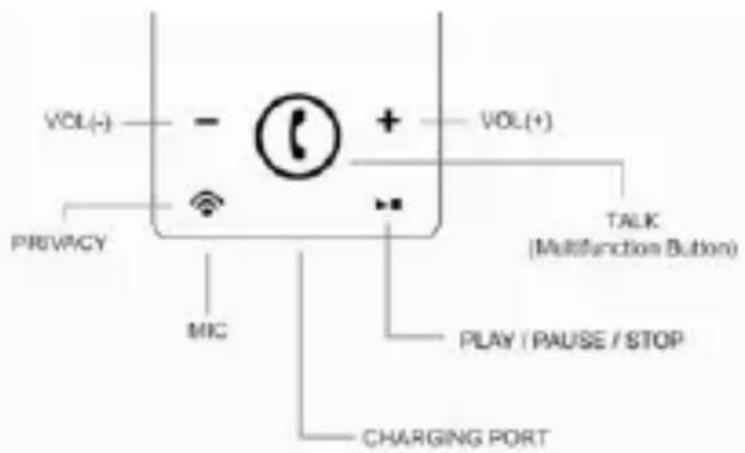
1.4. Product Overview
VOL(-) / VOL(+): volume control
PRIVACY: speaker mute
MIC: microphone
CHARGING PORT: charge connector
PLAY/PAUSE/STOP: music control
TALK: multifunction button
1.5. Status indicator
| Status LED Descriptions | ||
| Turn On | Red & Blue | Blink 3 times simultaneously |
| Turn Off | Red & Blue | Light on and light off simultaneously |
| Pairing | Blue | Blink rapidly |
| Idle or Standby Mode | Blue | Blink once every 5 seconds |
| During Communication | Blue | Blink 3 times every 4 seconds |
| Playing Music Blue | Blink 2 times every 5 seconds | |
| Low Battery | Red | Blink once every 9 seconds |
| Charging Red Light on | |
| Charging Completed Red Light off |
2. Using the product
2.1 Power Supply and Charging
a. The battery must be charged with the enclosed USB cable charger. b. The red LED indicator will stay on while charging and will be off as soon as it is completed. It takes approximately 2.5 hours to re-charge every time.
2.2 Power On / Power Off
a. Power On: long press the Ⓞ button for 2 seconds under power off status until the red and blue LED indicators blink 3 times simultaneously. b. Power Off: long press the Ⓞ button for 2 seconds under standby status until the red and blue LED indicators light on and light off simultaneously.
2.3 Pair and connect
a. Refer to the Bluetooth pairing procedures in the mobile phone or music player user manual.
b. When the device is off, long press the Ⓞ button for about 10 seconds until the blue indicator blinks rapidly, then release the button. At this moment, the product is in the pairing mode.
c. Select the device name "BBS200" displayed on the phone and enter the pass key "0000" to add the device to the pair list and establish the connection.
d. Check the connection by placing a call or playing the music from your phone.
Note: when using both Hands-Free and Music profiles, hands-free will always have the priority, the music being muted in case of incoming or outgoing calls. As soon as the call has been hung up, the music rebound afterwards.
Note: the last connected device will always reconnect automatically. Simply turn it on and the connection will be established automatically.
Note: If the mobile phone supports only Headset profile, Bluetooth reconnection will take place automatically when call is established (refer to the mobile phone user manual).
2.4 In car use
a. Slide the speaker in the holder and clip it on the car visor above. b. For better voice pick up, do not place the speaker on interior dashboard or close to a window, air conditioning vent or car speakers.
2.5 Activate or close the Voice caller ID
Press and hold the Ⓤ button more than 15 seconds during power off status, users can switch among announcement or no announcement features
* only with mobile phone supporting HFP. ** may vary depending on the model of mobile phone. Ex. Some mobile handsets may disconnect after call transfer.
3. Function Matrix
| Feature Key Conditions Operation | |||
| Power On | Power Off | Long Press 2 seconds | |
| Power Off | Idle; Standby Mode | Long Press 2 seconds | |
| Pairing | Power Off | Long Press 10 seconds | |
| Answer a call | Incoming Call | Short Click | |
| Hang up a call | Talking | Short Click | |
| Hang up Line 1 and Answer Line 2 | Line 1 in Use | Double Click | |
| Reject Line 2 call | Line 1 in Use | Long Press 2 seconds | |
| Voice Caller ID Enabled / Disabled | Power Off | Long Press 15 seconds | |
| Reject incoming call* | Incoming Call | Long Press 2 seconds | |
| Voice dial* | Standby Mode | Short Click | |
| Cancel Voice Dial* | Voice Dialing | Short Click | |
| Last Number Redial* | Standby Mode | Long Press 2 seconds | |
| Call Transfer* |  | Talking ** | Long Press 2 seconds |
| Privacy talk |  | Talking | Short Click |
| Cancel privacy (return to speaker) | [0468] | Privacy Mode | Short Click |
| Mute Talking |  | Long Press 2 seconds | |
| Un-Mute Talking | [00K5] | Long Press 2 seconds | |
| Volume Up |  | Talking / Music playing | Short Click |
| Volume Down | Talking / Music playing | Short Click | |
| Play/Pause |  | Music Stopped/Playing | Short Click |
| Music Stop |  | Music Playing | Long Press 2 seconds |
| Backward |  | Music Playing | Long Press 2 seconds |
| Forward | [4w0] | Music Playing | Long Press 2 seconds |
4. Caution
4.1 Always obey local legislation regarding the use of mobile phones in the car.
4.2 Users are not permitted to make changes or modify the device in any way. Changes or modifications not expressly approved by the party responsible for compliance will void the user's warranty.
European Union Directives Conformance Statement

Hereby, VOXLAND declares that this product is in compliance with:
- The essential requirements and other relevant provisions of Directive 1999/5/EC
- All other relevant EU Directives
You can view your product's Declaration of Conformity (DoC) to Directive 1999/5/EC (to R&TTE Directive) at www.bee-wi.com.
Caring for the environment by recycling
When you see this symbol on a product, do not dispose the product with household waste. Do not dispose of electrical devices or accessories with your household waste. In some countries or regions, collection systems are set up to handle electrical and electronic waste items. Contact your
regional authorities for more details.

Copyright and other legal information
BEEWI is a registered trademark. Other trademarks mentioned herewith are owned by their proprietors. All other product or service names are the property of their respective owners. The use of wireless devices and their accessories may be prohibited or restricted in certain areas. Always obey the laws and regulations on the use of these products. This product is covered by a 2-year product warranty which is valid from the date of purchase. Please visit our website www.bee-wi.com for more information.
Technical support: support@bee-wi.com.
© VOXLAND, 2009
- Auto Connect to the last paired device
Support technique: support@bee-wi.com.
© VOXLAND, 2009.

- BLUETOOTH POCKET HANDS FREE CAR KIT
- INTRODUCTION
- PRODUCT DESCRIPTION
- PACKAGING CONTENT
- FEATURES
- PRODUCT SPECIFICATION
- PRODUCT OVERVIEW
- STATUS INDICATOR
- USING THE PRODUCT
- 2.1 POWER SUPPLY AND CHARGING
- 2.2 POWER ON / POWER OFF
- 2.3 PAIR AND CONNECT
- 2.4 IN CAR USE
- 2.5 ACTIVATE OR CLOSE THE VOICE CALLER ID
- CAUTION
- EUROPEAN UNION DIRECTIVES CONFORMANCE STATEMENT
- CARING FOR THE ENVIRONMENT BY RECYCLING
- COPYRIGHT AND OTHER LEGAL INFORMATION
Brand : BEEWI
Model : BBS200
Category : Built-in kit