BBS020 - Built-in kit BEEWI - Free user manual and instructions
Find the device manual for free BBS020 BEEWI in PDF.



| Product Type | Solar Bluetooth Hands-free Kit |
| Brand | BeeWi |
| Model | BBS020 |
| Dimensions | 100 x 48 x 8 mm |
| Weight | 42 g |
| Power supply | 340 mAh Li-Polymer battery, rechargeable via USB or built-in solar panel |
| Talk time | Up to 5 hours (9 hours solar charge for full communication) |
| Standby time | Up to 1000 hours (40 days) |
| Charging time (USB) | Approximately 2 hours |
| Solar charging time | Approximately 9 hours under optimal conditions |
| Bluetooth technology | Bluetooth V2.1+EDR, HSP and HFP 1.5 profiles |
| Range | Up to 10 meters (Class 2) |
| Audio power | 1 W |
| Main features | Full duplex with echo and noise reduction (DSP), Multipoint technology (2 phones), voice command, redial, call rejection, call transfer, mute microphone |
| Maintenance and cleaning | Clean with a soft, dry cloth. Do not use abrasive products. |
| Safety | Do not expose to water or moisture. Comply with current legislation regarding the use of phones in cars. |
| Spare parts and repairability | Contact BeeWi customer service for any spare parts or repairs. |
| General information | 2-year warranty. Recycle in accordance with the WEEE directive. CE certified. |
Frequently Asked Questions - BBS020 BEEWI
User questions about BBS020 BEEWI
0 question about this device. Answer the ones you know or ask your own.
Ask a new question about this device
Download the instructions for your Built-in kit in PDF format for free! Find your manual BBS020 - BEEWI and take your electronic device back in hand. On this page are published all the documents necessary for the use of your device. BBS020 by BEEWI.
USER MANUAL BBS020 BEEWI
For additional languages, visit our website
www.bee-wi.com
User's guide
ENGLISH 4
FRANCAIS 12
DEUTSCH 20
ITALIANO 28
ESPAñOL 36
PORTUGUES 44
NEDERLANDS 52
БBJIAPCKN 60
ROmáN 68
Thank you for purchasing the BBS020 Solar Hands-Free Speaker from BEEWI. Please read the following instructions to learn how to configure and use more effectively your product.
INTRODUCTION
The BBS020 Solar Speaker is a high performance full duplex hands-free solution specially designed for users to enjoy the convenience and freedom of wireless hands-free communication in the car, but also at home or in the office. It includes advanced built-in microphone and 1W speaker with Digital Sound Processor (DSP) for echo cancellation and noise reduction that gives a loud and clear full duplex sound quality.
The BBS020 Solar Speaker is a Bluetooth 2.1+EDR wireless speaker compatible with all Bluetooth compliant devices using HFP profiles such as mobile phones.
Warning: always obey local legislation regarding the use of mobile phones in the car.
1.PRODUCT DESCRIPTION
1.1. Packaging content
-Bluetooth Speaker
- USB cable
- 12-24V Car Adapter with USB port
- Car visor clip
-User Manual CD
1.2. Features
- Full Duplex, background noise reduction with CVC Digital Signal Processor (DSP)
- Multipoint Technology to connect 2 mobile phones simultaneously
- Extra Slim size and light weight
-
No installation required
-
Unlimited standby time, up to 5 hours continuous talk time in worst conditions
- 9 hours full solar recharge time under optimal conditions
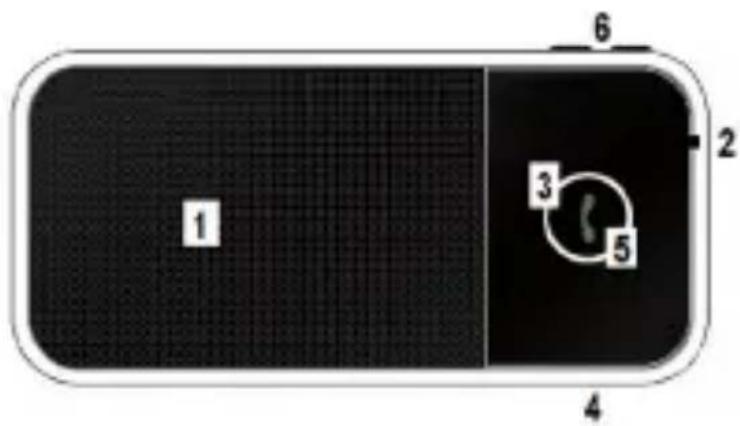
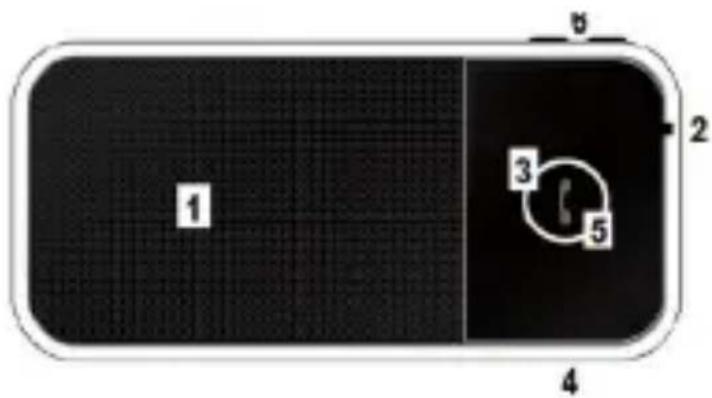
1.3.Product overview
- (1) Speaker
- (2) Microphone
- (3) LED
- (4) Charging Socket (Micro-USB)
- (5) MFB (Multi-Function Button)
- (6) Volume Up (V+) & Down (V-
- (7) Solar Panel (on the back)
1.4. Product Specification
| Bluetooth Specification Bluetooth V2.1+EDR | |
| Bluetooth Profiles HSP - HFP1.5 | |
| Frequency Band 2.4GHz~2.48 GHz ISM Band | |
| Power class & range Class 2, Up to 10 meters | |
| Number of Paired Devices Up to 8 devices | |
| Max Audio Output Power 1W | |
| Standby Time Up to 1000 hours (40 days) | |
| Talking Time Up to 5 hours | |
| Battery | 340mAh Li-Polymer rechargeable battery |
| Battery Charging Time | Up to 2 hours, solar charge 9 hours min. |
| Dimensions 100L x 48W x 8D mm | |
| Weight 42g | |
2. USING THE PRODUCT
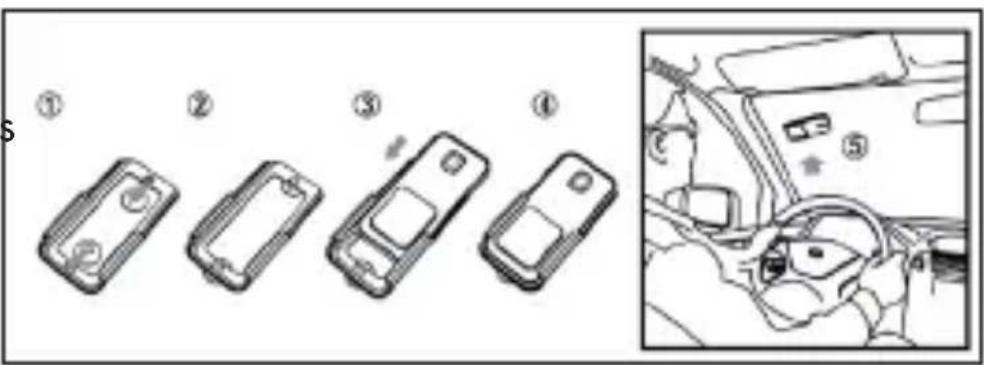
2.1. Car Installation
Slide the speaker into the plastic holder and stick it on the top left of
the windscreen as shown below. Make sure the speaker is firmly attached with the microphone pointing towards the driver.
2.2. Charging
Prior to using the speaker the first time, it is recommended to fully charge the battery. Normal full charge time is approximately 2 hours. The red LED will stay on while charging and will be off as soon as it is completed.
For an efficient solar charge, direct the speaker solar panel on the back towards the sun as recommended above. 2 hours of sun light exposure will give approximately 1 hour of talk time. Using solar power charge, operation time will be extended continuously without any additional charge required by the car charger.
2.3. Power On / Power Off
Power On: press and hold the MFB button for 3 seconds until you hear a short beep. The flashing blue LED light indicator comes on, and the speakerphone automatically connects to the mobile phone it has been paired with already.
Power Off: press and hold the MFB button for 3 seconds until you hear a short beep. The flashing red LED light indication goes off.
2.4. Pair and connect
Refer to the Bluetooth pairing procedures in the mobile phone user manual.
When the speaker is off, long press the MFB button for about 5 seconds until the light indicator flashes red and blue alternatively, then release the button. The alternated flashes indicate that the speaker is in pairing mode.
7
Search for Bluetooth devices in the phone, select "BeeWi BBS020" on display and enter the pass key "0000" to add the speaker to the pair list. When pairing is complete, the blue and red LED light will stop flashing, and the speaker will automatically connect to the phone and go in standby mode with the blue light flashing every 3 seconds. Check the connection by placing a call from your phone.
2.5.Status indicators
| Status LED Descriptions | ||
| Power On Blue 3 seconds flash | ||
| Power Off Red 3 seconds flash, then Off | ||
| Pairing Blue/Red Alternated blinking | ||
| Standby Mode (Connected) | Blue Blinking every 3 seconds | |
| Standby Mode (Disconnected) | Blue | Blinking twice every 3 seconds |
| During Communication Blue Blinking every 6 seconds | ||
| Low Battery Red Blinking every 3 seconds | ||
| Charging | Red | Light on |
| Charging Completed Red | Light off | |
2.6. Connection
The speaker automatically connects to the last connected device when it is turned on. If the device is not found, the speaker will connect to a previous device in the paired list.
In case the connection is not made automatically, it is possible to reconnect manually either from the speaker by pressing the MFB or from the mobile device (refer to the phone user manual). It is also possible to disconnect the speaker either manually or by moving out of range. When losing
the connection/link, the speaker will automatically power off after 15 minutes.
2.7. Multipoint
The Multipoint function allows a simultaneous connection to 2 mobile phones. In default setting of the speaker's Multipoint function is disabled.
-
To enable Multipoint function: in standby mode, press and hold "V+" button for 3 seconds until a beep is heard. If 2 mobile phones are already paired to the speaker, they will connect automatically when powering on the speaker.
-
To disable Multipoint function: in standby mode, press and hold "V-" button for 3 seconds until a beep is heard. The speaker will turn off multipoint function and power off automatically. When powering on again, the speaker will only connect to the last connected Bluetooth device.
2.8. Function Matrix
| Feature Key Conditions Operation | |||
| Power On | R | Powered off | Long press 3 seconds |
| Power Off Powered | on Long press 3 seconds | ||
| Pairing Powered off Long press 6 seconds | |||
| Answer a call | R | Incoming Call | Short press |
| Hang up a call | R | Talking | Short press |
| Reject incoming call | R | Incoming Call | Long press 3 seconds |
| Voice dial / Cancel Voice Dial | R | Standby Mode | Short press |
| Last number redial | R | Standby Mode | Short press twice |
| Switch active calls* | R | 2 Calls in process | Short press twice |
| Hang up call 1 and answer call 2* | R | 2 Calls in process | Short press |
| Feature Key Conditions Operation | |||
| Reject call 2* | R | 2 Calls in process Long press 3 seconds | |
| Switch audio to/from phone | + & - In | call Simultaneous press | |
| Mute microphone - In call Long press 3 seconds | |||
| Un-mute microphone + Long press 3 seconds | |||
| Volume up + In call Short press | |||
| Volume down - In call Short press | |||
- 3-way calling not supported if Multipoint function enabled
2.9. Restore to Default Setting
To reset the speaker to the original settings and remove all the previous pairing and connections, just press and hold both "V+ and "V-" buttons simultaneously for 10 seconds until the blue and red LED lights flash 5 times.
European Union Directives Conformance Statement
Hereby, VOXLAND declares that this product is in compliance with:
- The essential requirements and other relevant provisions of Directive 1999/5/EC
- All other relevant EU Directives
You can view your product's Declaration of Conformity (DoC) to Directive 1999/5/EC (to R&TTE Directive) at www.bee-wi.com.
Caring for the environment by recycling

Do not dispose of electrical devices or accessories with your household waste.
In some countries or regions, collection systems are set up to handle electrical and electronic waste items. Contact your regional authorities for more details.
Copyright and other legal information
BEEWI is a registered trademark. Other trademarks mentioned herewith are owned by their proprietors. All other product or service names are the property of their respective owners.
The use of wireless devices and their accessories may be prohibited or restricted in certain areas. Always obey the laws and regulations on the use of these products.
This product is covered by a 2-year product warranty which is valid from the date of purchase. Users are not permitted to make changes or modify the device in any way. Changes or modifications not expressly approved by the party responsible for compliance will void the user's warranty.
Please visit our website www.bee-wi.com for more information.
Technical support: support@bee-wi.com.
© VOXLAND, 2010.
NOTES:
Support technique: support@bee-wi.com.
© VOXLAND, 2010.
NOTES:
1.PRODUCTOMSCHRIJVING
UcTpoIcTBOTO mMa MmKPOoH n 1W BnCOKOrOBOpHTeI, INTeRpHaN C npOecop Ha zHΦpOBnA cnHaN (DSP), no3BoJBaaI npemaxBaHeTo Ha exOTO n HamaJIbBaHe Ha yMObTe 3a NOCTnRaHe Ha JcEHN cINJeH 3ByK B INHTerpaIIHHyDyJIkeKc.
CoIapHnT BnCOKOrOBOpnteIaT XeHdCΦpN BBS020 n3noJ3Ba cTaHApTa Bluetooth 2.1+EDR, CbBmecTnM c Ha6opa ot ycTroPocTBA Bluetooth, noDlbpKaun HFP npoΦnI, KaTO Mo6uInHe TeleΦOHi.
Вниманце: спаЗвайтЕ виharи MeCTHOTO 3aKOHODaTeJICTBO NO OTHOWeHne Ha ПОЛЗванeto Ha MOБиJeH TeleФOH B aBTOMo6nI.
1.ОПИСАНЕHAПОДУКТА
1.1.CbIbpxaHneHaKOMnIeKTa
- Bucokorobopitel Bluetooth
-USB ka6eJ - 3apяно устpoистvo 3a kola 12-24V c USB n3xoД
-山nka3aceHHNK - Pьководъво 3a уnotpe6a Вьрху CD
1.2.OchOBHn xapaKTepeNtIKN
- INTerpaJIeH dUpIeKc, HamaJIeHne Ha UyMa n exOTO C uNΦpoBnЯ npOuCeOp (DSP) CVC
-TexHOrnMultipoint3a eHOBpeMeHHo CBbp3BaHe Ha2MO6uHnTelefoHa - KomnaKTn pa3Mepu, MHORO TbHbK u MHORO Jek
-He e Heo6xOДmO nHCTaIInpaHe
- HeorpaHnueHo BpeMe Ha pa6Ota B peKIM "ToTOBHOCT", Had 5 yaca B peKIM Ha pa3roBOp
- Bpeme 3a coIapHo 3apeXdaHe - 9 yaca B ONTImaJIHn ycIOBna
1.3.Опсане
- (1) BucokorobopnteI
- (2) Minkpofoh
- (3) LED uHdnikatop
- (4) Bxod 3a 3apraHNO yctpoiCTBO (MnKpo USB)
- (5) MHoroΦyHKuOHaJIeH 6yToH (MFB)
- (6) 3Byk yBelenueHne (V + ) & HamaJIeHne (V - )
- (7) Colapen napei (ot3aI)
1.4.CpeunphiKaun
| Спесиophilia наBluetooth Bluetooth V2.1+EDR | |
| Проблема наBluetooth HSP - HFP1.5 | |
| Чебта лentesа 2.4GHz~2.48 GHz ISM Band | |
| Мошист и посрпные Клас 2, до 10metра | |
| Броча свьрзанITE anapatrп Do 8 anapatrа | |
| Мakсимална мошист на Звука 1W | |
| В р散热 "Тотовост" Do 1000 ча (40 ди) | |
| В р散热 на пазковор Do 5 ча | |
| Батерия | Проблема 340mAh Li- полимерна |
| Вреема заразждане на сBatерияа Do 2 ча, соларно заразждане 9 ча | |
| Размeper 100(d) x 48(ш) x 8(d) мм | |
| Тergл 42 r | |

- USER'S GUIDE
- INTRODUCTION
- 1.PRODUCT DESCRIPTION
- PACKAGING CONTENT
- FEATURES
- 1.3.PRODUCT OVERVIEW
- PRODUCT SPECIFICATION
- USING THE PRODUCT
- CAR INSTALLATION
- CHARGING
- POWER ON / POWER OFF
- PAIR AND CONNECT
- CONNECTION
- MULTIPOINT
- FUNCTION MATRIX
- RESTORE TO DEFAULT SETTING
- EUROPEAN UNION DIRECTIVES CONFORMANCE STATEMENT
- CARING FOR THE ENVIRONMENT BY RECYCLING
- COPYRIGHT AND OTHER LEGAL INFORMATION
- NOTES
- 1.PRODUCTOMSCHRIJVING
- 1.ОПИСАНЕHAПОДУКТА
- 1.3.ОПСАНЕ
- 1.4.CPEUNPHIKAUN
Brand : BEEWI
Model : BBS020
Category : Built-in kit