
PW 4916 FA - Scale AEG - Free user manual and instructions
Find the device manual for free PW 4916 FA AEG in PDF.
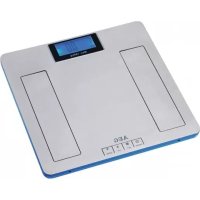



| Product Type | Body fat analyzer scale |
| Brand | AEG |
| Model | PW 4916 FA |
| Weighing capacity | 0.5 kg to 180 kg (1.1 lb to 396.8 lb) |
| Accuracy | 100 g (0.1 kg) |
| Measurement units | kg, lb, st:lb |
| Power supply | 3 AAA batteries (1.5 V) |
| Display | LCD |
| Personal memory | 10 slots (gender, height, age) |
| Measurement functions | Weight, body fat, body water, muscle mass, bone mass, weight status |
| Height range | 100 cm to 220 cm |
| Age range | 10 to 80 years |
| Net weight | 1.85 kg |
| Operating temperature | 0 °C to +40 °C |
| Warranty | 24 months |
| Maintenance | Clean with a damp cloth, do not immerse in water |
| Safety | Not suitable for children <10 years, >80 years, pregnant women, pacemaker wearers |
Frequently Asked Questions - PW 4916 FA AEG
User questions about PW 4916 FA AEG
0 question about this device. Answer the ones you know or ask your own.
Ask a new question about this device
Download the instructions for your Scale in PDF format for free! Find your manual PW 4916 FA - AEG and take your electronic device back in hand. On this page are published all the documents necessary for the use of your device. PW 4916 FA by AEG.
USER MANUAL PW 4916 FA AEG
Technical characteristics
Warranty
Control element overview Instruction Manual
Technical data
P
Guarantee
D-47906 Kempen/Germany
| Età(anni) | Donne | Uomini | ||||||
| Acqua corporea | Massamuscolare | Acqua corporea | Massamuscolare | |||||
| Bassa | Normale | Alta | Normale | Bassa | Normale | Alta | Normale | |
| 10-15 | 57% | 57-67% | >67% | 8-38% | 58-72% | >72% | 32-44% | |
| 16-30 | 47% | 47-57% | >57% | 2-38% | 53-67% | >67% | 38-44% | |
| 31-60 | 42% | 42-52% | >52% | 0-36% | 47-61% | >61% | 36-42% | |
| 61-80 | 37% | 37-47% | >42% | 9-35% | 42-56% | >56% | 34-40% | |
General Safety Instructions
- Read the operating instructions carefully before putting the appliance into operation and keep the instructions including the warranty, the receipt and, if possible, the box with the internal packing.
- The appliance is designed exclusively for private use and for the envisaged purpose. This appliance is not fit for commercial use. Do not use it outdoors (except if it is designed to be used outdoors). Keep it away from sources of heat, direct sunlight, humidity (never dip it into any liquid) and sharp edges. Do not use the appliance with wet hands.
- Check the appliance and the cable for damage on a regular basis. Do not use the appliance if it is damaged.
- Do not try to repair the appliance on your own. Always contact an authorized technician.
- Pay careful attention to the following "Special Safety Instructions".
Special safety instructions for this device
- The body fat scales are not suitable for the following people:
Children under 10 and adults over 80 - Individuals with symptoms of fever, oedemas or osteoporosis People undergoing dialysis treatment - Those taking cardiovascular medication Pregnant women People with a pulse of less than 60 beats a minute
The device can bear a maximum body weight of 180 kg (396.8 lb / 28 st 4 lb). A larger weight can damage the device!
Overview of the Components
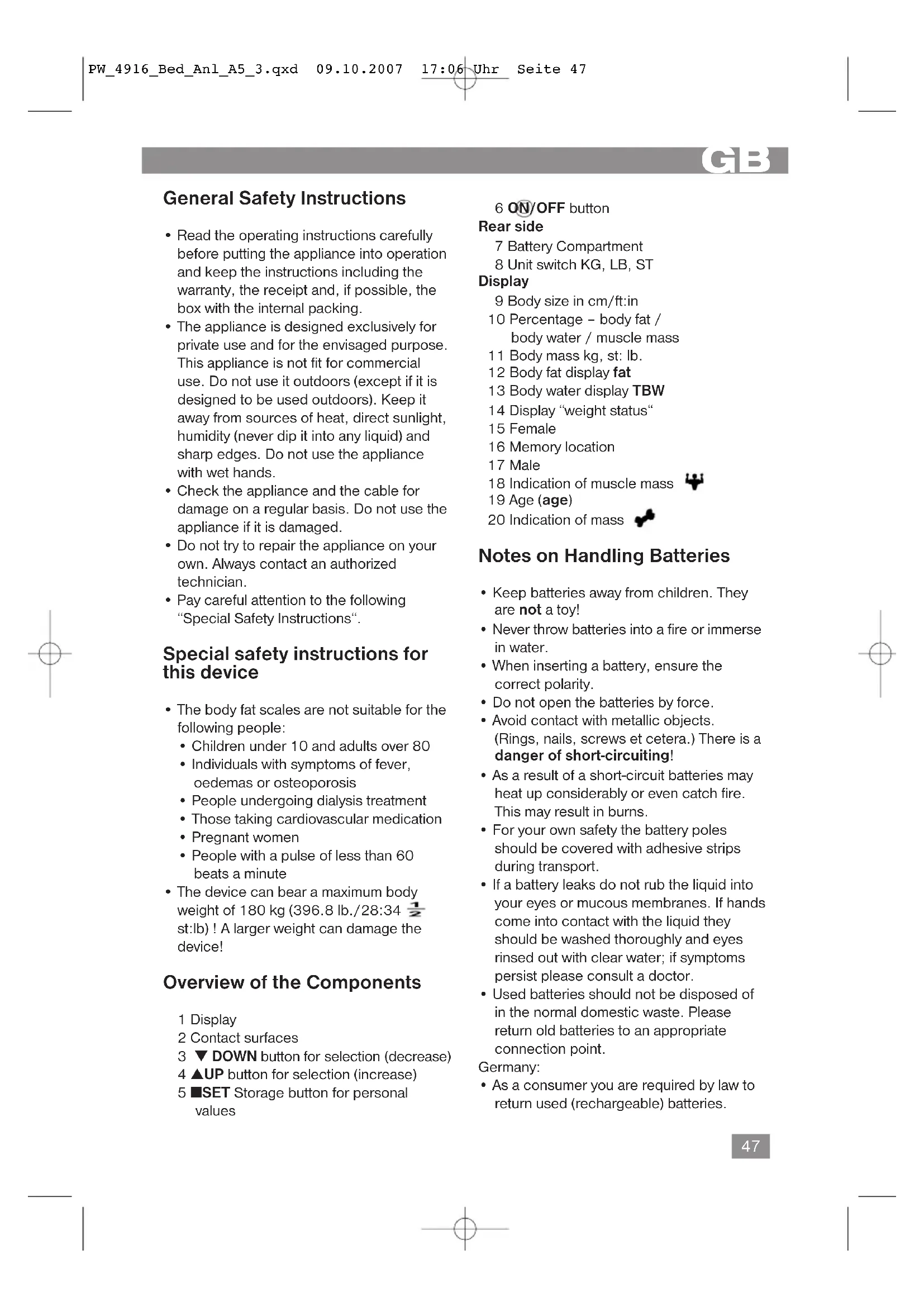
1 Display 2 Contact surfaces 3 DOWN button for selection (decrease) 4 ▲UP button for selection (increase) 5 SET Storage button for personal values
6 ON/OFF button
Rear side
7 Battery Compartment 8 Unit switch KG, LB, ST
Display
9 Body size in cm/ft:in 10 Percentage - body fat / body water / muscle mass 11 Body mass kg, st: lb. 12 Body fat display fat 13 Body water display TBW 14 Display "weight status" 15 Female 16 Memory location 17 Male 18 Indication of muscle mass 19 Age (age) 20 Indication of mass

Notes on Handling Batteries
- Keep batteries away from children. They are not a toy!
- Never throw batteries into a fire or immerse in water.
- When inserting a battery, ensure the correct polarity.
- Do not open the batteries by force.
- Avoid contact with metallic objects. (Rings, nails, screws et cetera.) There is a danger of short-circuiting!
- As a result of a short-circuit, batteries may heat up considerably or even catch fire. This may result in burns.
- For your own safety, the battery poles should be covered with adhesive strips during transport.
- If a battery leaks, do not rub the liquid into your eyes or mucous membranes. If hands come into contact with the liquid, they should be washed thoroughly and eyes rinsed out with clear water; if symptoms persist, please consult a doctor.
- Used batteries should not be disposed of in the normal domestic waste. Please return old batteries to an appropriate collection point.
Germany:
- As a consumer, you are required by law to return used (rechargeable) batteries.
GB
- You can return your old (rechargeable) batteries free of charge where they were bought, as well as at the local public collection points in your town.
The following symbols are to be found on (rechargeable) batteries containing harmful substances:
Pb = contains lead
Cd = contains cadmium
Hg = contains mercury
Li = contains lithium
Inserting the batteries
- Open the battery compartment (7) on the back. 2. Insert 3 batteries of type AM4, AAA, 1.5V. Please ensure that the polarity is correct (see the floor of the battery compartment)! 3. Close the battery compartment again. 4. If the device is not used for a prolonged period of time, please take the batteries out in order to prevent leakage of battery acid. 5. Different battery types or new and used batteries must not be used together. 6. If the display (1) shows "LO" for low battery during the use of the device, replace the batteries.

Attention!
Batteries do not belong in your usual household rubbish. Please dispose of old batteries at proper collecting points or at your dealer.

Warning!
Do not expose batteries to high temperatures or direct sunlight. Never throw batteries into a fire.
Danger of explosion!
Information for body fat measurement
People who use a heart pacemaker or another type of medical implant with electronic components are advised not to use these scales, as otherwise the performance of the implant may be impaired or endangered.
The device functions correctly if your feet are bare and dry and if you are in standing position. The basic principle of these scales is measurement of the electrical impedance of the body. The scales send a weak, imperceptible electrical signal through your body in order to determine the current values. Under normal circumstances the signal is completely harmless! Nevertheless you should read our special safety instructions! The measurement is known as "biometric impedance analysis" (BIA), a factor which is associated with the body fat and body water ratio and which is subject to other biological aspects (age, sex, height).
There are heavy people with a well-balanced relation between fat and muscular mass and there are apparently slender people with substantially higher body fat values. Fat is a factor that contributes to burdening the body and, in particular, the circulatory system. The checks of both values (fat and weight) are hence a basic prerequisite for health and fitness.
Body Fat
Body fat is an important part of the body. Fat plays an important role in your body ranging from the protection of joints with its reserve of vitamins to the regulation of the body temperature. The goal is not to reduce drastically the quantity of fat in your body, but to reach and maintain a balanced relation between the muscular mass and the fat mass.
GB
The significance of water for our health
The human organism consists of approximately 55 - 60% water, with this quantity varying according to age and sex. Water has a number of tasks to fulfil in the body: It is a building block of our cells. This means that all cells in the body, whether these are skin, gland, muscle, brain or other cells, can only function if they receive enough water. It is a solvent for important substances in our organism.
It is a means of transport for nutrients, the body's own substances and metabolic products. Please see the table of guideline
values for the reference value for your fitness profile. It shows that there is a relation between the body fat values and your age and sex. Always bear in mind that, as in the case of the water balance in your body, also the share of fat is subject to great variations. Therefore, weigh yourself always at the same hour of the day to obtain a comparable value. The results of the analysis of the body fat and body water ratio are only reference values. They are not recommended for use for medical purposes. You should always consult your doctor if you have any questions about medical treatment or a diet to achieve your normal weight.
Technical Features
Memory presets:
| Memory Sex Height Age(age) |
| 01 Male 170 cm (5`6` ft:in (feet)) 25 3/4 |
Memory locations: 10
Height setting: from 100 to 220 cm (3' 3'' - 7' 2'' ft:in)
Age: from 10 to 80 years
Minimum weight: 0.5 kg (1.1 lb. / 0, 1 st:lb)
Maximum weight: 180 kg (396.8 lb. / 28:34½ st:lb)
Weight measurement acc.: 100 g steps
Body fat gradation: 0.1%
Body water ratio: 0.1%
Permissible operating temperature: 0°C to +40°C (32°F ~ 104°F) < 85%
relative humidity
Guidelines - body fat percentage
| Age (years) | Women | Men | ||||||
| Under- weight (Underfat) | Normal (Healthy) | Slightly over- weight (High) | Over- weight (Obese) | Under- weight (Underfat) | Normal (Healthy) | Slightly over- weight (High) | Over- weight (Obese) | |
| 10-39 | <21% | 21-33% | 33-39% | >39% | <8% | 8-19% | 19-25% | >25% |
| 40-59 | <23% | 23-35% | 35-40% | >40% | <11% | 11-22% | 22-28% | >28% |
| 60-79 | <24% | 24-36% | 36-42% | >42% | <13% | 13-25% | 25-30% | >30% |
GB
Guide values for the body water and muscle mass ratio in percent
| Age (years) | Women | Men | ||||||
| Body water | Muscle | Body water | Muscle | |||||
| Low | Normal | High | Normal | Low | Normal | High | Normal | |
| 10-15 <57% 57-67% >67% 28-38% <58% 58-72% >72% 32-44% | ||||||||
| 16-30 <47% 47-57% >57% 32-38% <53% 53-67% >67% 38-44% | ||||||||
| 31-60 <2% 42-52% >52% 30-36% <47% 47-61% >61% 36-42% | ||||||||
| 61-80 <37% 37-47% >42% 29-35% <42% 42-56% >56% 34-40% | ||||||||
Guideline for the bone weight in kg.
| Women | Men | |||||
| Body mass | <45 kg | 45-60 kg | >45 kg | <60 kg | 60-75 kg | >75 kg |
| Bone weight | ~ 5,8 kg | ~ 6,2 kg | ~ 6,5 kg | ~ 6,5 kg | ~ 6,9 kg | ~ 7,2 kg |
Attention: Owing to great variations in the level of body fat it is difficult to obtain a reference value. On average for adult men the best time for the measurement is between 6 and 8 o'clock p.m. because the level of body fat is very constant during this period!
Putting into service
Simple Weighing Function
Position the balance on a hard, flat surface (avoid carpets). Uneven floors lead to imprecise readings.
- With the switch next to the battery compartment you may choose between the settings 'kg', 'lb.' (pound) and 'st:'(lb. (Stone)).
- Switch on the scales by applying pressure to one of the contact surfaces (2) with your foot and/or toe. The display will show: PO (flashing), "male", age 25, then the display will change to the preset height. Then it shows "0.0"kg (0.0 lb., 0: 0 st:lb).
- Now stand with both feet on the contact surfaces of the scales. Spread your weight out evenly and wait while the scales calculate your weight.
4.The indication on the display initially flashes 3x then your exact weight will be shown. When you step off the scales, they will turn off automatically after approx. 8 seconds.
Programming your personal data
Attention: Carry out the following operations one after the other and within a few seconds or the device will automatically interrupt the programming mode!
- To turn the weighing scales on, press down the ON/OFF switch (6). The display will show: PO (flashing), "male", age 25, then the display will change to the preset height. Then it shows "0.0"kg (0.0 lb., 0: 0 st:lb).
- Wait until 0.0kg (0.0 lb./ 0: 0 st:(lb.)) appears in the display.
Attention:
- If the display shows "OL" (overload), the weight exceeds 180 kg.
- If the display shows 0.0 kg (0.0 lb., 0:0 st:lb) or - - - during weighing, you stepped on the scales too early. The self-testing of the scales had not been
completed. The display will turn off.
- Then, push the SET button (5) to change to the programming mode. The PO signal (memory location) then flashes on the display and the pre-set symbol for 'male' and the pre-set height in cm (ft:in) is displayed.
- Select a storage location using the UP/DOWN buttons (3/4).
- Then push the SET button and the display changes to the next setting. 6. The symbol for 'male' flashes on the display. Use the UP/DOWN buttons to select a setting (male or female).
- Push the UP/DOWN button again to change to the HEIGHT setting. The indication '170' (5'6" in) flashes. Use the UP/DOWN buttons to select a value between 100 (3'3" ft:in) and 220 cm (7'2" ft:in).
- Push the SET button again to change to the age setting. The indication '25' flashes. Push one of the buttons DOWN or UP and hold it down to run up or down through the values in fast mode. Use the UP/DOWN buttons to select a value between 10 and 80 years.
- If you press the SET button again, the "personal" memory space, the gender, the age and the preset height will flash for a few seconds on the display. Then the display shows 0.0 kg (0.0 lb., 0:0 st:lb). You can now weigh yourself or you have the following other possibilities:
a. Push the SET button again to view all settings. b. If you like to make some changes, press the SET button and proceed as described in the points 4-6. c. If you wait for more than 6 seconds without any action, the scales will switch themselves off.
Your personal data is now stored in the selected storage location.
There is an overall number of 10 storage locations. The remaining 9 storage locations can be used to store also the personal data of other members of your family or other users of these scales.
Determination of the body and bone mass, and the body fat, muscle and body water percentages
First, enter your personal data in one of the storage locations available.
To switch on the scales, press the ON/OFF button and wait until 0.0kg (0.0 lb., 0:0 st:lb) is shown in the display. After this, the display will show the settings last adjusted (e.g. memory location 03). Press the SET button (memory location number is flashing) and select your memory location on which your data is stored with the UP/DOWN buttons.
- The display will first show the stored data, such as memory location number (flashing), your gender and your age (age); then, after a few seconds, the display will skip to your height. Then the display shows 0.0kg (0.0 lb., 0:0 st:lb).
Note: Measuring is only possible with bare feet. If required, wipe the contact surfaces clean to enhance conductivity. Put each of your bare feet on 1 of the 2 contact surfaces.
- Now, step on the scales.
- Please wait until the measuring process has been completed. This is indicated by a treadmill with o o o o. After a few seconds, the display will show your determined weight (Fig. 3), your body fat percentage (symbol: fat % ) (Fig. 4) followed by your body water percentage (symbol: TBW % ) (Fig. 5). In addition, the scales will determine the muscle mass ratio (" % ) (Fig. 6) and the bone weight in kg ( / kg ) (Fig. 7).
- While the display shows body fat (fat %) and body water percentage ratio (TBW %), the following is slotted in: It shows the range you are in (Underfat - underweight, Healthy - normal, Overfat - slight overweight, Obese - corpulent).
- The determined values will be shown in the LCD display 3x in the mentioned order, then the scales switch off automatically.
Display and Error Messages
General
If an error message (Err) appears in the display please wait until the scales switch off. Then switch them on again to continue using them. For a complete reset remove the battery for a moment and then reconnect it.
Messages
- 0.0 kg, 0.0 lb., The weight to be 0: 0 st:lb: measured is too low. Correct operation is not possible.
- „Err2“: The calculated body fat/ water percentage ranges beyond the upper or lower measuring limit. Err2: The measurement was aborted before the measuring process was completed or it was not possible to perform measuring. Err: The indication Err (Error) means that the weight exceeds 180kg . Do not exceed the device's maximum load to prevent damages to the device and the sensors. -Place the scales on a flat and solid surface.
- „LO": The battery charge is too low.
Usage and care tips
- Weigh yourself without any clothes or shoes on before meals and always at the same hour of the day. The balance rounds off weight to the closest 100 g. If you weigh yourself twice and two different values are given, it means that your weight is comprised between both values.
- Do not immerse the balance in water: the electronic components can be damaged.
- Remove the batteries if the scales will not be used for a longer period of time.
- Handle the balance with care, as it is a precise measuring instrument. Do not drop it or jump on it.
- Do not load the appliance with more than 180 kg (396.8 lb / 28.34 st) to avoid damaging the device.
Cleaning
- Clean the device with a slightly moist cloth. Make sure that no humidity or water seeps into the device!
- Do not use abrasive detergents! These can damage the casing of the device!
- Use a commercially sold detergent or soap for cleaning.
- Dry the device well after cleaning with a dry and soft cloth.
This device has been tested according to all relevant current CE guidelines, such as electromagnetic compatibility and low voltage directives, and has been constructed in accordance with the latest safety regulations. Subject to technical changes without prior notice!
Technical data
Model: PW 4916 FA
Power supply: 3 × 1.5 V, type AAA,
LR03, AM4
Min. / max.
weight load: 0.5 kg
(1.1 lb / 0.1 slb)
- 180 kg (396.8 lb /
28:34 sb)
Net weight of the
scales: 1.85 kg
G3
Guarantee
The device supplied by our Company is covered by a 24-month guarantee starting on the date of purchase (receipt).
During the life of the guarantee, any fault of the device or its accessories ascribable to material or manufacturing defects will be eliminated free of charge by repairing or, at our discretion, by replacing it. The guarantee services do not entail an extension of the life of the guarantee nor do they give rise to any right to a new guarantee.
Proof of the guarantee is provided by the proof of purchase. Without proof of purchase, no free replacement or repair will be carried out.
If you wish to make a claim under the guarantee, please return the entire machine in the original packaging to your dealer together with the receipt.
Defects to consumables or parts subject to wear, as well as cleaning, maintenance, or the replacement of said parts, are not covered by the guarantee and hence are to be paid for!
The guarantee lapses in case of unauthorized tampering.
After the expiry of the guarantee
After the expiry of the guarantee, repairs can be carried out by the competent dealer or repair service against payment of the ensuing costs.
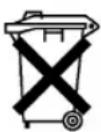
Meaning of the "Dustbin" Symbol
Protect our environment: do not dispose of electrical equipment in the domestic waste.
Use the collection points provided for the disposal of electric appliances to dispose of electric appliances that you no longer use.
This helps avoid the potential effects of incorrect disposal on the environment and human health.
This will contribute to the recycling and other forms of reutilisation of electrical and electronic equipment. Information concerning where the equipment can be disposed of can be obtained from your local authority.
General safety instructions
| Alder (är) | Kvinner | Menn | ||||||
| Kroppsvann | Muskler | Kroppsvann | Muskler | |||||
| Lav | Normal | Høy | Normal | Lav | Normal | Høy | Normal | |
| 10-15 | 57% | 57-67% | >67% | 8-38% | 58-72% | >72% | 32-44% | |
| 16-30 | 47% | 47-57% | >57% | 2-38% | 53-67% | >67% | 38-44% | |
| 31-60 | <42% | 42-52% | >52% | 30-36% | <47% | 47-61% | >61% | 36-42% |
| 61-80 | 37% | 37-47% | >42% | 9-35% | 42-56% | >56% | 34-40% | |
- After a few seconds, "0.0" kg (0.0 lb. / 0:0 st:lb.) is displayed.
Tips:
- If the display shows "OL" (overload), the weight is under 180 kg. - If 0.0 kg (0.0 lb., 0:0 st:lb) is displayed, you have stepped onto the weighing surface too early. The self-test was not yet finished, and the reading disappears. 3. Then press the SET button (5) to enter programming mode. The display shows "P0" (storage space) blinking, the preset symbol for male, and the preset height in cm (ft:in).
4. Select a storage space using the UP/DOWN buttons (3/4). 5. Press the SET button again; the display switches to the next setting. 6. The symbol for "male" blinks in the display. Select a setting using the UP/DOWN buttons (male or female). 7. Press the UP/DOWN button again to go to the "height" setting. The reading "170" (5'6" in) blinks. Select a value between 100 (3'3" ft:in) and 220 cm (7'2" ft:in) using the UP/DOWN buttons. 8. Press the SET button again to go to the age setting. The reading "25" blinks. Pressing the DOWN or UP button starts a fast run. Select a value between 10 and 80 years using the UP/DOWN buttons. 9. If you press the SET button again, the "personal" storage space, gender, age, and set height blink for a few seconds in the display. Finally, 0.0 kg (0.0 lb., 0:0 st:lb) is displayed. Now you can weigh yourself or you have the following options:
(1, 1 lb. / 0, 1 = 1 lb)
- 180 kg (396.8 lb. /
28:34 sb)
Weight
7 Date 8 Time
Display
9 Height cm (cm)/Ft:in 10 Body fat percentage 11 Body weight in kg, st: lb (kg, st: lb). 12 Body fat mass indicator 13 Step indicator for body fat
14 Indicator, Weight status
15 Female 16 Memory key 17 Male 18 Body mass index 19 Age 20 Bone weight indicator

Battery safety instructions
- Keep batteries away from children. They are not toys! - Never throw batteries into fire or water. When inserting batteries, ensure correct polarity. - Do not open batteries. Do not allow batteries to come into contact with metal objects. (Rings, nails, wires, etc.) Danger of short circuit! A short circuit can cause strong heating of batteries and even
cause burns. As a result, you can get burns.
For safety, it is recommended to tape the battery contacts with adhesive tape during storage or transport. - If a battery leaks, do not allow the liquid to come into contact with eyes or other mucous membranes. In case of contact, wash hands, rinse eyes with clean water, if symptoms persist - consult a doctor. Do not throw used batteries into household waste. Dispose of them at designated collection points.
German:
According to the law, used batteries/accumulators must be returned. Old batteries/accumulators can be returned free of charge where they were purchased, as well as at public collection points in your area.
These symbols are marked on batteries/accumulators containing hazardous substances:
Pb = contains lead
Cd = contains cadmium
Hg = contains mercury
Li = contains lithium
Inserting batteries
- 1. Open the battery compartment on the back of the device (7). 2. Insert 3 batteries of type AM4 "AAA" 1.5V. Pay attention to the correct polarity (see the diagram in the compartment)! 3. Close the battery compartment. 4. If the device is not used for a long time, remove the batteries to prevent "leaking" of the cells. 5. Never mix new batteries with old ones, or with batteries of other types. 6. If during the use of the scale
the display shows the symbol (1) indicating low batteries, the batteries must be replaced.
Attention!
Do not throw batteries into household waste. Used batteries should be taken to one of the collection points for recyclables or to a specialized store.
Warning!
Do not expose batteries to heat or direct sunlight. Never throw batteries into fire. There is a risk of explosion!
Information on the topic of measuring body fat mass
People with pacemakers or other implanted electronic medical devices are not recommended to use these scales. They may negatively affect the proper functioning of implants. The device functions correctly only if you stand correctly on the contact surface barefoot and with dry feet! The principle of operation of the scales is based on the measurement of the electrical resistance of the body. For this purpose, the scales send a weak, imperceptible electrical signal through the body to collect data about its current state. The signal is generally absolutely safe! Despite this, please follow the special safety instructions! This procedure is known as "Bioelectrical Impedance Analysis" (BIA), a factor that depends on the fat content of body tissues/water in the body, as well as being related in a certain proportion to other physiological parameters (age, gender, height). It is known that there are thick people with a balanced proportion between
Muscle mass index is a parameter that is strongly correlated with the value of fat mass. Fat mass is a factor that significantly burdens the human body, especially the cardiovascular system. Therefore, controlling your parameters (muscle and fat mass) is the main prerequisite for healthy achievements and good well-being.
Fat tissue
Fat deposits are an important part of the body. They perform various very important functions in the body, from protecting joints and storing vitamins to regulating temperature. Therefore, the goal is not a radical reduction in fat mass, but achieving and maintaining a balanced proportion between muscle and fat mass.
The role of water in our health
The human body consists of approximately 55-60% water, more or less depending on age and gender. Water
performs several functions in the body:
It is the basis of every cell. This means that every cell of the body: whether it is a skin cell, liver, muscle, brain or any other, is only viable if it contains a sufficient amount of water.
It serves as a solvent for important substances in our body.
It transports nutrients, substances produced by the body itself, and metabolic products. Comparative data for determining your profile are given in the table of recommended values. It shows the dependence of the proportion of fat mass in the body on age and gender. Do not forget that the proportion of fat mass in the body changes during the day, as does the proportion of water in it. Therefore, to achieve comparable values, take measurements at the same time of day. The results of measurements of fat tissue/water in the body are indicative only. It is not recommended to use them for medical purposes. Consult your doctor if you have any questions about treatment or diet to achieve a normal weight.
Technical specifications
Output data:
Age: from 10 to 80 years
Minimum weight: from 0.5 kg (1.1 lb. / 0.1 st:lb)
Maximum weight: 180 kg (396.8 lb. / 28:34 1/2 st:lb)
Maximum weight: 180 kg (396.8 lb / 28 st 6 lb)
Weight capacity: 100
The value when the oil level is 0.1%
Distribution of non-volatile matter: 0.1%
Operating temperature range: from 0°C to +40°C (32°F to 104°F) at
relative humidity <85%.
Indicative values of oil levels in the body in simple terms
| Возpac (В гобах) | Женшины | Мужшины | ||||||
| Вес поочи (Underfat) | Hормаль (Healthy) | Вес сlerпka (Bышев (High) | Избыточн (Obese) | Вес поочи (Underfat) | Hормаль (Healthy) | Вес сlerпka (Bышев (High) | Избыточн (Obese) | |
| 10-39 | <21% 21-33% 33-39% | >39% | <8% | 8-19% 19 | >25% | >25% | ||
| 40-59 | <23% 23-35% 35-40% | >40% | <11% | 11-22% | 22-28% | >28% | ||
| 60-79 | <24% 24-36% 36-42% | >42% | <13% | 13-25% | 25-30% | >30% | ||
Calculated values for tissue fluid and muscle mass, in percent


- P
- GENERAL SAFETY INSTRUCTIONS
- SPECIAL SAFETY INSTRUCTIONS FOR THIS DEVICE
- OVERVIEW OF THE COMPONENTS
- REAR SIDE
- DISPLAY
- NOTES ON HANDLING BATTERIES
- GERMANY
- GB
- INSERTING THE BATTERIES
- ATTENTION
- WARNING
- INFORMATION FOR BODY FAT MEASUREMENT
- BODY FAT
- THE SIGNIFICANCE OF WATER FOR OUR HEALTH
- TECHNICAL FEATURES
- PUTTING INTO SERVICE
- SIMPLE WEIGHING FUNCTION
- PROGRAMMING YOUR PERSONAL DATA
- DETERMINATION OF THE BODY AND BONE MASS, AND THE BODY FAT, MUSCLE AND BODY WATER PERCENTAGES
- DISPLAY AND ERROR MESSAGES
- GENERAL
- MESSAGES
- USAGE AND CARE TIPS
- CLEANING
- TECHNICAL DATA
- G
- GUARANTEE
- AFTER THE EXPIRY OF THE GUARANTEE
- MEANING OF THE "DUSTBIN" SYMBOL
- TIPS
- BATTERY SAFETY INSTRUCTIONS
- INSERTING BATTERIES
- INFORMATION ON THE TOPIC OF MEASURING BODY FAT MASS
- MUSCLE MASS INDEX IS A PARAMETER THAT IS STRONGLY CORRELATED WITH THE VALUE OF FAT MASS. FAT MASS IS A FACTOR THAT SIGNIFICANTLY BURDENS THE HUMAN BODY, ESPECIALLY THE CARDIOVASCULAR SYSTEM. THEREFORE, CONTROLLING YOUR PARAMETERS (MUSCLE AND FAT MASS) IS THE MAIN PREREQUISITE FOR HEALTHY ACHIEVEMENTS AND GOOD WELL-BEING
- FAT DEPOSITS ARE AN IMPORTANT PART OF THE BODY. THEY PERFORM VARIOUS VERY IMPORTANT FUNCTIONS IN THE BODY, FROM PROTECTING JOINTS AND STORING VITAMINS TO REGULATING TEMPERATURE. THEREFORE, THE GOAL IS NOT A RADICAL REDUCTION IN FAT MASS, BUT ACHIEVING AND MAINTAINING A BALANCED PROPORTION BETWEEN MUSCLE AND FAT MASS
- THE HUMAN BODY CONSISTS OF APPROXIMATELY 55-60% WATER, MORE OR LESS DEPENDING ON AGE AND GENDER. WATER
- OUTPUT DATA
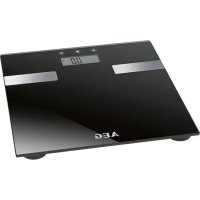
Brand : AEG
Model : PW 4916 FA
Category : Scale