
PW 5644 FA - Scale AEG - Free user manual and instructions
Find the device manual for free PW 5644 FA AEG in PDF.
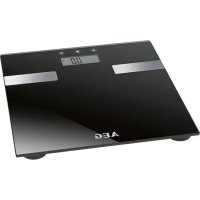



| Product type | Glass impedance meter scale |
| Brand | AEG |
| Model | PW 5644 FA |
| Net weight of the device | Approximately 1.57 kg |
| Power supply | 2 x 1.5V AAA/R03 batteries |
| Memory capacity | 10 users (P0 to P9) |
| Maximum weight | 180 kg (396.8 lb / 28:3½ st:lb) |
| Minimum weight | 5.0 kg (11.0 lb / 0:11 st:lb) |
| Weight graduation | 100 g (0.2 lb / ¼ st:lb) |
| User height range | 80 to 220 cm (2'7½" to 7'2½" ft:in) |
| User age | 6 to 100 years |
| Main functions | Weighing, body fat analysis, body water (TBW), muscle mass, bone mass, BMR (energy expenditure), BMI |
| Fat measurement accuracy | 0.1% |
| Water measurement accuracy | 0.1% |
| Display | Digital screen with mode indicators, sex symbol, units, etc. |
| Measurement units | kg / lb / st:lb (weight); cm / ft:in (height) |
| Safety | Not suitable for people with a pacemaker, pregnant women, children under 6 years, etc. Anti-slip protection (wet glass surface) |
| Care and cleaning | Clean with a slightly damp cloth; do not immerse in water |
| Spare parts and repairability | Do not repair yourself; contact a qualified technician |
| Operating temperature | 0°C to 40°C |
| Relative humidity | < 85% |
| Automatic shut-off | 15 seconds after use |
| Package contents | Scale, batteries, instruction manual |
Frequently Asked Questions - PW 5644 FA AEG
User questions about PW 5644 FA AEG
0 question about this device. Answer the ones you know or ask your own.
Ask a new question about this device
Download the instructions for your Scale in PDF format for free! Find your manual PW 5644 FA - AEG and take your electronic device back in hand. On this page are published all the documents necessary for the use of your device. PW 5644 FA by AEG.
USER MANUAL PW 5644 FA AEG
CE
AEG
Location of Controls....Page 3 Instruction Manual......Page 35 Technical Specifications Page 36 Disposal Page 39
Nederlands
Thank you for choosing our product. We hope you enjoy using the appliance.
Contents
General Notes......35
Symbols in these Instructions for Use ....35
Children....35
Special Safety Instructions For This Machine ....35
Handling Batteries 36
Inserting the Batteries 36
Location of Controls....36
Technical Specifications....36
Information about the Analysis Scale ....37
Use 37
Weighing Function 37
Saving Personal Data 37
Measurement and Analysis....37
Assessment of the Results 38
Body Fat....38
The Importance of Water for our Health....38
Guideline values for body fat and body water content ..38
BMR (Basal Metabolic Rate / Energy expenditure)......39
Reference values of the daily intake of
kilocalories without physical activities....39
BMI (Body Mass Index) 39
Reference values for the BMI....39
Display Error Messages 39
Cleaning....39
Disposal 39
Disposal of Batteries....39
Meaning of the "Dustbin" Symbol 40
General Notes
Read the operating instructions carefully before putting the appliance into operation and keep the instructions including the warranty, the receipt and, if possible, the box with the internal packing. If you give this device to other people, please also pass on the operating instructions.
- The device is designed exclusively for private and not for commercial use.
- Only use the device for the intended purpose.
- Do not use a damaged device.
- Keep away from heat, direct sunlight, damp (never immerse in liquids) and sharp edges.
- Do not try to repair the appliance on your own. Always contact an authorized technician.
- Pay careful attention to the following "Special Safety Instructions".
English
Symbols in these Instructions for Use
Important information for your safety is specially marked. It is essential to comply with these instructions in order to avoid accidents and prevent damage to the machine:

WARNING:
This warns you of dangers to your health and indicates possible injury risks.

CAUTION:
This refers to possible hazards to the machine or other objects.

NOTE:
This highlights tips and information.
Children
- In order to ensure your children's safety, please keep all packaging (plastic bags, boxes, polystyrene etc.) out of their reach.

WARNING!
Do not allow small children to play with the foil. There is a danger of suffocation!
- Children should be supervised at all times in order to ensure that they do not play with the device.
Special Safety Instructions For This Machine

WARNING:
If the glass surface is moist or covered with water droplets, please wipe the surface dry as there is a danger of slipping.

CAUTION:
- Handle the balance with care, as it is a precise measuring instrument. Do not drop it or jump on it.
- Do not load the appliance with more than 180 kg (396.8 lb, 28: 3½ st:lb) to avoid damaging the device.
- If the scales are carried or not going to be used, please store them only in a horizontal position.
- The body fat analysis scale is not suitable for the following persons:
- Children under 6 years and adults over 100 years
- Persons with symptoms of fever, oedema, or osteoporosis
- Persons undergoing treatment for dialysis
- Persons who use a pacemaker
- Persons who take cardiovascular medication
- Pregnant women
- Sportspersons who perform over 5 hours of intensive sporting activities each day
- Persons with a heartbeat lower than 60 beats/minute
- Persons who are taking vaso-dilating or vaso-constrictive medications
- Persons with considerable anatomic deviations of the legs in relation to total body size (length of the legs considerably shortened or lengthened).
Handling batteries
WARNING:
- Do not expose the batteries to high temperatures or direct sunlight.
- Never throw batteries into the fire. There is a danger of explosion!
- Keep batteries away from children. They are not a toy.
- Batteries may be swallowed, which can be life-threatening. If a battery has been swallowed, seek medical help immediately.
- Do not open the batteries by force.
- Avoid contact with metallic objects. (Rings, nails, screws, etc.) There is a danger of short-circuiting!
- As a result of a short-circuit, batteries may heat up considerably or even catch fire. This may result in burns.
- For your own safety, the battery poles should be covered with adhesive strips during transport.
- If a battery leaks, do not rub the liquid into your eyes or mucous membranes. If hands come into contact with the liquid, they should be washed thoroughly and eyes rinsed out with clear water; if symptoms persist, please consult a doctor.
Inserting the Batteries
i NOTE:
Where required, the supplied batteries have been protected for transport with plastic foil.
- Remove this foil before inserting the batteries into the appliance.
- Open the battery compartment on the back.
- Insert 2 batteries of type AAA/R03. Please ensure that the polarity is correct (see the floor of the battery compartment)!
- Close the battery compartment again.
- If the device is not used for a prolonged period of time, please take the batteries out in order to prevent leakage of battery acid.
- If the message "Lo" appears on the display, replace the batteries.
△ CAUTION:
- Different battery types or new and used batteries must not be used together.
- Batteries are not to be disposed of together with domestic wastes. Dispose of the used batteries at the relevant collection bin or at your dealer's.
Location of Controls
1 UP-button ▲ 2 SET-button ■ 3 DOWN-button ▼ 4 Display 5 Contact Surfaces
| Display Indications | Meaning |
| kg (lb / st:lb) Body weight | |
| P0 - P9 User memory space | |
| [27TX] | Male |
| [RWDY] | Female |
| cm (ft:in) Body height | |
| age Age | |
| fat Body fat display | |
| TBW Body water display | |
 | Muscle mass display |
 | Bone weight display |
 | Percentage – body fat / body water / muscle mass |
| Underfat Healthy Overfat Obese | Rating: underweight – normal weight – overweight - obese |
| KCAL | Basal metabolic rate of the daily energy requirement in kilocalories (BMR) |
| BMI Body Mass Index | |
Technical Specifications
Model: PW 5644 FA
Power supply: 2 Batteries 1.5 V Type "AAA" / "R03"
Net weight of device: ....approx. 1.57 kg
Memory capacity:....10
Mass alignment: .... from 80 to 220 cm (2'7½" - 7'2½" ft:in)
Age: from 6 to 100 years
Minimum weight: from 5.0 kg (11.0 lb / 0 st 11 lb)
Maximum weight: 180 kg (396.8 lb / 28 st 3.5 lb)
Weight measurement unit: 100 g (0.2 lb / 0.25 st) increments
Body fat measurement unit: 0.1%
Body fluid graduation: 0.1%
Recommended operating environment:
Temperature: 0°C - 40°C / 32°F - 104°F
Relative air humidity: < 85%
The right to make technical and design modifications in the course of continuous product development remains reserved.
This device has been tested according to all relevant current CE guidelines, such as electromagnetic compatibility and low voltage directives, and has been constructed in accordance with the latest safety regulations.
Information about the Analysis Scale

WARNING:
Do not use the scales if you use a pacemaker or another medical implant with electronic components. The function of the implant may be impaired by the measurement.
The main principle of this device is based on the measurement of the electric impedance within the human body. In order to determine the actual body data, the device leads a weak, unnoticeable electric signal through your body.
The signal is generally safe! However, please read our special safety instructions!
The method of measurement is referred to as “bioelectric impedance analysis” (BIA), a factor which is based on the relationship between body weight and associated body water percentages as well as on other biological data (age, gender, body weight).
Use

NOTE:
- You will find the buttons for the operation on the top edge of the scale.
- The scales are factory set with the units "kg" and "cm".
To change the settings to "lb" or "st:lb" as well as "ft:in", proceed as follows:
- Switch the scales on by applying gentle pressure on the glass surface with your foot or toe.
- Press the UP button ▲, until the required unit of weight is displayed. The unit for the height also automatically changes.
Weighing Function
- Place the scale on a hard, flat surface (avoid carpets). An uneven floor contributes to inaccurate measurements.
- Stand on the scales with both feet. The device switches on automatically.
- Distribute your weight equally and wait for the scale to determine your weight.
- The digits on the display will flash before your exact weight will be shown.
- In order to extend the battery life, the device will automatically turn off 15 seconds after you have stepped off the scale.
- If there is no weight determination while "0.0" is shown, the scale will shut off automatically after 15 seconds.
Saving Personal Data

NOTE:
- The scale has default values that you can change, as described below.
- Carry out the following steps in sequence and within a few seconds. Otherwise, the device will automatically cancel input mode.
- Press the button SET. The memory space (P0) will flash on the display. Confirm the setting by pressing SET or select another memory space by pressing the UP / DOWN button. Then press SET to go to the next setting.
- The symbol for "male" or "female" will flash. Confirm the setting by pressing SET or use the UP / DOWN button to choose the symbol for your gender. Then press SET to go to the next setting.
- The height setting will flash. Select your height by pressing UP or DOWN button. Holding down one of the buttons will accelerate the process. Confirm your entry by pressing SET.
- The setting AGE will flash. Select your age by pressing UP or DOWN button. Holding down one of the buttons will accelerate the process. Confirm your entry by pressing SET.
- The short display “----” will terminate the entry mode for this memory location. Then you will see the memory location, the symbol of the gender and the weight “0.0 kg” (0.0 lb / 0: 0 st:lb) in the display.
You now have the following options:
- You can change the units for weight and type. Press the UP button ▲, until the desired unit of weight is displayed. The unit for the height automatically changes.
- Press the SET button to see the selected settings again.
- Allocate further memory spaces. There are 10 spaces available in total. Press SET and change the space by pressing the UP or DOWN button. Proceed further as described above.
- If you want to make changes, press SET (the memory location will blink). Select the stored position using the UP or DOWN button. Proceed further as described above.
- You can immediately start measuring.
Measurement and Analysis
Record your personal data in the memory.

NOTE:
- The analysis scale will only work correctly when you are standing on the contact surfaces barefoot and with slightly moistened foot soles, if possible. Completely dry foot soles can lead to unsatisfactory results as they have a conductivity that is too low.
- If necessary wipe the contact surfaces to improve results.
38 English
i NOTE:
- Due to the significant fluctuation of body fat, it is difficult to attain a standard value. On average the optimal testing time is between 6 p.m. and 8 p.m., since the body fat remains very consistent during this period of time.
- Press the SET button. Use the UP / DOWN button to select the stored position at which your data is saved.
- Your preset data briefly appears in the display. Wait until the display comes to a standstill: memory location, the symbol of the gender and the weight "0.0 kg" (0.0 lb / 0: 0 st:lb).
- Stand on the contact surfaces (5) of the scales with both feet.
- Firstly your weight will flash on the display.
- You'll see a treadmill "○○○○" in the display during the analysis. After a few seconds, the following results will be shown:
- The body fat proportion in % (fat) and the rating
- The proportion of body fluid % (TBW)
- The proportion of muscle mass in % (symbol)
- The bone weight in kg (lb / st:lb) (symbol )
- The basal metabolic rate of the daily energy requirement in KCAL
- The Body Mass Index (BMI)
• Afterwards the determined data will be shown repeatedly. Then the scale will automatically turn off.
Assessment of the Results
There are heavy persons with a well-balanced percentage between fat and muscle mass, and there are seemingly slim persons with significantly high body fat values. Fat is a factor that puts serious strain on the body, in particular the cardiovascular system. Therefore, controlling both values (fat and weight) is a prerequisite for health and fitness.
Body Fat
Body fat is an important component of the body. From protecting the joints as a vitamin repository to regulating the body temperature, fat plays a vital role in the body. Thus the goal is not to radically reduce the proportion of body fat, but rather to achieve and maintain a healthy balance between muscle and fat.
The Importance of Water for our Health
Approximately fifty-five to sixty percent of the human body consists of water, depending on age and gender in varying amounts.
Water has to fulfill several tasks within the body:
- It is the building block of our cells. That means that all the cells in our body, whether skin cells, gland cells, muscle cells, brain cells or others, are functional only if they contain enough water.
- It is a solvent for important substances in our body.
- It is a means of conveyance for nutrients, the body's own substances and metabolic products.
Reference values for your fitness profile can be seen in the benchmark table. It shows the dependency of body fat data on age and gender. Always pay attention to your body's water balance, which, as well as the fat level, undergoes strong fluctuations throughout the day. Therefore, to obtain consistent data, always measure at the same time of day.
The calculated results of the body fat and water level should only be considered as reference values. They are not recommended to be used for medical purposes. Please always consult a doctor if you have questions about a medical treatment or a diet in order to achieve a normal body weight.
Guideline values for body fat and body water content as a percentage (approximate figures)
| Age(Years) | Women Men | ||||
| Body fat Body | water Body fat Body water | ||||
| <=30 | 4.0 – 20.5 66.0 | 54.7 4.0 – 15.5 66.0 | 58.1 Underweight | ||
| 20.6 – 25.0 54.6 | 51.6 15.6 – 20.0 58.0 | -55.0 Normal | |||
| 25.1 – 30.5 51.5 | 47.8 20.1 – 24.5 54.9 | -51.9 Overweight | |||
| 30.6 – 50.0 47.7 | 34.4 24.6 – 50.0 51.8 | -34.4 Obese | |||
| >30 | 4.0 – 25.0 66.0 | 51.6 4.0 – 19.5 66.0 | 55.4 Underweight | ||
| 25.1 – 30.0 51.5 | 48.1 19.6 – 24.0 55.3 | -52.3 Normal | |||
| 30.1 – 35.0 48.0 | 44.7 24.1 – 28.5 52.2 | -49.2 Overweight | |||
| 35.1 – 50.0 44.6 | 34.4 28.6 – 50.0 49.1 | -34.4 Obese | |||
BMR (Basal Metabolic Rate / Energy expenditure)
The Basal Metabolic Rate (BMR) characterizes the energy expenditure. The energy expenditure is used to describe the amount of energy in KCAL that the body requires per day during complete rest, at an indifference temperature (28-30 °C) and on an empty stomach for the maintenance of its function (e.g. while sleeping).
Reference values of the daily intake of kilocalories without physical activities
| Age (Years) | Women Men | |||
| Weight (kg) | KCAL | Weight (kg) | KCAL | |
| 6-17 50 | 1265 60 1620 | |||
| 18-29 55 | 1298 65 1560 | |||
| 30-49 60 | 1302 70 1561 | |||
| 50-69 60 | 1242 70 1505 | |||
BMI (Body Mass Index)
The Body Mass Index (BMI) refers the body weight to the square of the body height.
BMI = Weight in kg: (body height in m x body height in m)
Example:
A woman weighs 55 kg and is 1.68 m tall. Her BMI is calculated as follows:
55 kg: (1.68 m x 1.68 m) ≈ 19.5 kg/m² ⇔ Normal weight
The value "square of the body height" is in no relation to the body surface. The BMI is merely a rough reference value, as it neither considers the build and gender, nor the individual composition of the body mass from the fat and muscle tissue of a human.
Reference values for the BMI
| BMI | Under-weight | Normal | Over-weight | Obese |
| < 18.5 18 | 5 - 25 25 - 30 | >30 |
Please note that the interpretation of the BMI indicates excess weight with very muscular bodies (bodybuilder). The reason for this is that the far above-average muscle mass is not considered in the BMI formula.
Display Error Messages
i NOTE:
If an error message appears on the display, wait until the device is turned off. Turn it on again to restart the operation. If the error display has not disappeared, take the batteries out of the battery compartment for 10 seconds.
| Display Indications | Meaning |
| Self test (after inserting the batteries) for perfect functioning of the display | |
| Lo Battery is | low |
| Err | The weight lies above the allowed maximum weight. |
| Err2 | The percentage of body fat content lies above or below the limits of the measuring scale. |
Cleaning

CAUTION:
- Do not immerse the balance in water: the electronic components can be damaged.
- Do not use a wire brush or any abrasive items.
- Do not use any acidic or abrasive detergents.
- Clean the device with a slightly moist cloth. Make sure that no humidity or waters seeps into the device!
- Use a commercially sold detergent or soap for cleaning.
- Dry the device well after cleaning with a dry and soft cloth.
Disposal
Disposal of Batteries
Your appliance contains batteries. If these batteries are spent, follow the instructions below:

CAUTION:
Batteries/rechargeable batteries must not be disposed of with household waste!
- The batteries must be removed from the appliance.
- Take spent batteries to the appropriate collection point or to a dealer.
- Your town or local authority can provide information about public collection points.
This symbol can be found on batteries/rechargeable batteries which contain hazardous substances:
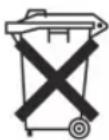
- Pb = contains lead
- Cd = contains cadmium
- Hg = contains mercury
- Li = contains lithium
40 English
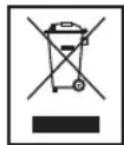
Meaning of the "Dustbin" Symbol
Protect our environment: do not dispose of electrical equipment in the domestic waste.
Please return any electrical equipment that you will no longer use to the collection points provided for their disposal.
This helps avoid the potential effects of incorrect disposal on the environment and human health.
This will contribute to the recycling and other forms of reutilisation of electrical and electronic equipment.
Information concerning where the equipment can be disposed of can be obtained from your local authority.
Instruction manual
(BMI) Body Mass Index


- NEDERLANDS
- CONTENTS
- GENERAL NOTES
- ENGLISH
- SYMBOLS IN THESE INSTRUCTIONS FOR USE
- WARNING
- CAUTION
- NOTE
- CHILDREN
- SPECIAL SAFETY INSTRUCTIONS FOR THIS MACHINE
- HANDLING BATTERIES
- INSERTING THE BATTERIES
- I NOTE
- △ CAUTION
- LOCATION OF CONTROLS
- TECHNICAL SPECIFICATIONS
- INFORMATION ABOUT THE ANALYSIS SCALE
- USE
- WEIGHING FUNCTION
- SAVING PERSONAL DATA
- MEASUREMENT AND ANALYSIS
- ASSESSMENT OF THE RESULTS
- BODY FAT
- THE IMPORTANCE OF WATER FOR OUR HEALTH
- BMR (BASAL METABOLIC RATE / ENERGY EXPENDITURE)
- REFERENCE VALUES OF THE DAILY INTAKE OF KILOCALORIES WITHOUT PHYSICAL ACTIVITIES
- BMI (BODY MASS INDEX)
- EXAMPLE
- REFERENCE VALUES FOR THE BMI
- DISPLAY ERROR MESSAGES
- CLEANING
- DISPOSAL
- DISPOSAL OF BATTERIES
- MEANING OF THE "DUSTBIN" SYMBOL
- INSTRUCTION MANUAL
- (BMI) BODY MASS INDEX
Brand : AEG
Model : PW 5644 FA
Category : Scale