
PW 5570 FA - Scale AEG - Free user manual and instructions
Find the device manual for free PW 5570 FA AEG in PDF.


| Product type | Digital bathroom scale |
| Brand | AEG |
| Model | PW 5570 FA |
| Dimensions (approx.) | 30 x 30 x 2 cm |
| Device weight | 1.5 kg |
| Power supply | 2 AAA batteries (not included) |
| Maximum capacity | 180 kg |
| Accuracy | 100 g |
| Measurement units | kg, lb, st |
| Display | Backlit LCD screen |
| Material | Tempered glass |
| Color | White |
| Main functions | Automatic on, automatic off, overload indicator |
| Care and cleaning | Clean with a soft damp cloth; do not immerse |
| Safety | Non-slip surface, overload protection |
| Batteries | 2 x AAA (1.5 V) |
| Warranty | 2 years |
| Repairability | Not user-repairable; spare parts not available |
Frequently Asked Questions - PW 5570 FA AEG
User questions about PW 5570 FA AEG
0 question about this device. Answer the ones you know or ask your own.
Ask a new question about this device
Download the instructions for your Scale in PDF format for free! Find your manual PW 5570 FA - AEG and take your electronic device back in hand. On this page are published all the documents necessary for the use of your device. PW 5570 FA by AEG.
USER MANUAL PW 5570 FA AEG
GB Stainless steel analysis scale
Location of Controls ......Page 3 Instruction Manual......Page 35 Technical Specifications Page 36 Disposal Page 39
Français
4 Deutsch
Bedienungsanleitung
Manusear as pilhas 26
Figure lineaguida 32
Uso 33
Thank you for choosing our product. We hope you enjoy using the appliance.
Contents
General safety Instructions ....35
Symbols in these Instructions for Use ....35
Children 35
Special Safety Instructions For This Machine ....35
Handling Batteries 35
Inserting the Batteries 36
Location of Controls 36
Technical Specifications....36
Information on Measuring Body Fat 37
Body Fat 37
The Importance of Water for our Health ....37
Guideline Figures 37
Use 38
Weighing Function 38
Saving Personal Data 38
Measurement and Analysis 38
Display Error Messages ....39
Cleaning 39
Disposal 39
Meaning of the "Dustbin" Symbol 39
Disposal of batteries 39
General safety instructions
Read the operating instructions carefully before putting the appliance into operation and keep the instructions including the warranty, the receipt and, if possible, the box with the internal packing. If you give this device to other people, please also pass on the operating instructions.
- The device is designed exclusively for private and not for commercial use.
- Only use the device for the intended purpose.
- Do not use a damaged device.
- Keep away from heat, direct sunlight, damp (never immerse in liquids) and sharp edges.
- Do not try to repair the appliance on your own. Always contact an authorized technician.
- Pay careful attention to the following "Special Safety Instructions".
Symbols in these Instructions for Use
Important information for your safety is specially marked. It is essential to comply with these instructions in order to avoid accidents and prevent damage to the machine:
WARNING:
This warns you of dangers to your health and indicates possible injury risks.
CAUTION:
This refers to possible hazards to the machine or other objects.
NOTE:
This highlights tips and information.
Children
- In order to ensure your children's safety, please keep all packaging (plastic bags, boxes, polystyrene etc.) out of their reach. Caution! Do not allow small children to play with the foil as there is a danger of suffocation! • Children should be supervised at all times in order to ensure that they do not play with the device.
WARNING!
Special Safety Instructions For This Machine
WARNING:
If the surface is damp or there are drops of water on it, first wipe these dry or wipe them off. There is a risk of slipping.
CAUTION:
- Handle the balance with care, as it is a precise measuring instrument. Do not drop it or jump on it.
- Do not load the appliance with more than 150 kg (330.7 lb, 23.62 st) to avoid damaging the device.
- If the scales are not in use, always store them on a horizontal position.
- The body fat analysis scale is not suitable for the following persons:
- Children under 10 years and adults over 85 years
- Persons with symptoms of fever, oedema, or osteoporosis
- Persons undergoing treatment for dialysis
- Persons who use a pacemaker
- Persons who take cardiovascular medication
- Pregnant women
- Sportspersons who perform over 5 hours of intensive sporting activities each day
- Persons with a heartbeat lower than 60 beats/minute
Handling batteries
WARNING:
- Do not expose the batteries to high temperatures or direct sunlight. Never throw batteries into the fire. There is a danger of explosion!
- Keep batteries away from children. They are not a toy!
- Do not open the batteries by force.
WARNING:
- Avoid contact with metallic objects. (Rings, nails, screws et cetera.) There is a danger of short-circuiting!
- As a result of a short-circuit batteries may heat up considerably or even catch fire. This may result in burns.
- For your own safety the battery poles should be covered with adhesive strips during transport.
- If a battery leaks do not rub the liquid into your eyes or mucous membranes. If hands come into contact with the liquid they should be washed thoroughly and eyes rinsed out with clear water; if symptoms persist please consult a doctor.
Inserting the batteries
i NOTE:
Where required, the supplied batteries have been protected for transport with plastic foil.
- Remove this foil before inserting the batteries into the appliance.
- Open the two battery compartments on the back.
- Insert 2 batteries of type AAA/R03. Please ensure that the polarity is correct (see the floor of the battery compartment)!
- Close the battery compartments again.
- If the device is not used for a prolonged period of time, please take the batteries out in order to prevent leakage of battery acid.
- If the message "Lo" appears on the display, replace the batteries.
CAUTION:
- Different battery types or new and used batteries must not be used together.
- Batteries are not to be disposed of together with domestic wastes. Dispose of the used batteries at the relevant collection bin or at your dealer's.
Location of controls
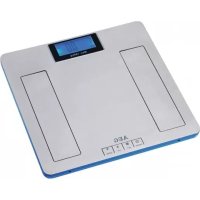
1 Display 2 UP-button 3 DOWN-button 4 Contact Surfaces 5 Handle 6 UNIT button 7 SET-button
| Display symbol Meaning | |
| kg (lb/st) Body weight | |
| USER User memory space | |
| Male | |
| Female | |
| cm (Ft:in) Body height | |
| Age Age | |
| Unathletic type | |
| Average type | |
| Athletic Type | |
| Body fat display | |
| Body water display | |
| Muscle mass display | |
| Bone weight display | |
| % | Percentage – body fat / body water / muscle mass / bone weight |
| Analysis bar:Extremely underweight – under-weight – normal weight – over-weight – obese | |
| KCAL Daily kilocalorie requirement | |
| Increase | Weight gain in kg (lb/st) compared with previous measurement |
| Dncrease | Weight loss in kg (lb/st) compared with previous measurement |
Technical Specifications
Model: PW 5570 FA Power supply: 2 Batteries 1.5 V Type "AAA" / "R03" Net weight of device: 1.5 kg Memory capacity: 10 Mass alignment: ......from 75 to 225 cm (2'5" – 7'4½" Ft:in) Age: from 10 to 85 years Minimum weight: ....from 2.5 kg (5.5 lb/0: 4 st) Maximum weight: 150 kg (330.7 lb/23: 6 st) Weight measurement unit: 100 g increments Body fat measurement unit: 0.1% Body fat measuring range: 4.0% - 50.0% Body water measuring range: 35.0% - 85.0% Muscle mass measuring range: 10.0% - 50.0%
Subject to technical changes without prior notice!
This device has been tested according to all relevant current CE guidelines, such as electromagnetic compatibility and low voltage directives, and has been constructed in accordance with the latest safety regulations.
Information on Measuring Body Fat

WARNING:
Do not use the scales if you use a pacemaker or another medical implant with electronic components. The function of the implant may be impaired by the measurement.

NOTE:
The device can only function correctly if you stand on the contact surfaces with bare, dry feet!
The main principle of this device is based on the measurement of the electric impedance within the human body. In order to determine the actual body data, the device leads a weak, unnoticeable electric signal through your body.
The signal is generally safe! However, please read our special safety instructions!
The method of measurement is referred to as "bioelectric impedance analysis" (BIA), a factor which is based on the relationship between body weight and associated body water percentages as well as on other biological data (age, gender, body weight).
There are heavy persons with a well-balanced percentage between fat and muscle mass, and there are seemingly slim persons with significantly high body fat values. Fat is a factor that puts serious strain on the body, in particular the cardiovascular system. Therefore, controlling both values (fat and weight) is a prerequisite for health and fitness.
Body Fat
Body fat is an important component of the body. From protecting the joints as a vitamin repository to regulating the body temperature, fat plays a vital role in the body. Thus the goal is not to radically reduce the proportion of body fat, but rather to achieve and maintain a healthy balance between muscle and fat.
The Importance of Water for our Health
Approximately fifty-five to sixty percent of the human body consists of water, depending on age and gender in varying amounts.
Water has to fulfill several tasks within the body:
- It is the building block of our cells. That means that all the cells in our body, whether skin cells, gland cells, muscle cells, brain cells or others, are functional only if they contain enough water.
- It is a solvent for important substances in our body.
- It is a means of conveyance for nutrients, the body's own substances and metabolic products.
Reference values for your fitness profile can be seen in the benchmark table. It shows the dependency of body fat data on age and gender. Always pay attention to your body's water balance, which, as well as the fat level, undergoes strong fluctuations throughout the day. Therefore, to obtain consistent data, always measure at the same time of day.
The calculated results of the body fat and water level should only be considered as reference values. They are not recommended to be used for medical purposes. Please always consult a doctor if you have questions about a medical treatment or a diet in order to achieve a normal body weight.
Guideline values for body fat and body water content as a percentage (approximate figures)
| Age(Years) | Women Men | ||||
| Body fat Body | water Body fat Body | water | |||
| <=30 | 4.0 – 20.5 66.0 | 54.7 4.0 – 15.5 66.0 | 58.1 Underweight | ||
| 20.6 – 25.0 54.6 | 51.6 15.6 – 20.0 58.0 | -55.0 Normal | |||
| 25.1 – 30.5 51.5 | 47.8 20.1 – 24.5 54.9 | -51.9 Overweight | |||
| 30.6 – 50.0 47.7 | 34.4 24.6 – 50.0 51.8 | -34.4 Obese | |||
| >30 | 4.0 – 25.0 66.0 | 51.6 4.0 – 19.5 66.0 | 55.4 Underweight | ||
| 25.1 – 30.0 51.5 | 48.1 19.6 – 24.0 55.3 | -52.3 Normal | |||
| 30.1 – 35.0 48.0 | 44.7 24.1 – 28.5 52.2 | -49.2 Overweight | |||
| 35.1 – 50.0 44.6 | 34.4 28.6 – 50.0 49.1 | -34.4 Obese | |||
38
English
Use
Use the SET, UNIT, UP) and DOWN) buttons to change the stored settings.
i NOTE:
The scales are factory set with the units "kg" and "cm".
To change the settings to "lb" or "st" as well as "Ft:in", proceed as follows:
- Switch the scales on by applying gentle pressure to the surface with your foot or toe.
- Press the UNIT button until the desired unit of weight is displayed. The unit for the height also automatically changes.
Weighing Function
- Place the scale on a hard, flat surface (avoid carpets). An uneven floor contributes to inaccurate measurements.
- Stand on the scales with both feet. The device switches on automatically.
- Distribute your weight equally and wait for the scale to determine your weight.
- The digits on the display will flash before your exact weight will be shown.
- In order to extend the battery life, the device will automatically turn off 10 seconds after you have stepped off the scale.
Saving Personal Data
i NOTE:
- The scale has default values that you can change, as described below.
- Carry out the following steps in sequence and within a few seconds. Otherwise, the device will automatically cancel input mode.
- Press the button SET. The memory space will flash on the display (USER). Confirm the setting by pressing SET or select another memory space by pressing the UP / DOWN button. Then press SET to go to the next setting.
- The symbol for "male" or "female" will flash. Confirm the setting by pressing SET or use the UP / DOWN button to choose the symbol for your gender. Then press SET to go to the next setting.
- The height setting will flash. Select your height by pressing UP or DOWN button. Holding down one of the buttons will accelerate the process. Confirm your entry by pressing SET.
- The setting AGE will flash. Select your age by pressing UP or DOWN button. Holding down one of the buttons will accelerate the process. Confirm your entry by pressing SET.
- The default symbol for the "unathletic" type flashes. Which type do you consider yourself to be? Select your
type using the UP or DOWN button: "unathletic", "average" or "athletic". Confirm your selection with SET.
- If only the stored position and the display 0.0 kg (0.0 lb/0:0 st) is still shown, input mode for this stored position is completed.
You now have the following options:
- You can change the units for weight and type. Press the UNIT button until the desired unit of weight is displayed. The unit for the height automatically changes.
- Press the SET button to see the selected settings again.
- Allocate further memory spaces. There are 10 spaces available in total. Press SET and change the space by pressing the UP or DOWN button. Proceed further as described above.
- If you want to make changes, press SET (USER flashes). Select the stored position using the UP or DOWN button. Proceed further as described above.
- You can immediately start measuring.
Measurement and Analysis
Record your personal data in the memory.
NOTE:
- The device can only function correctly if you stand on the device with bare, dry feet!
- If necessary, wipe the contact surfaces to improve results.
- Due to the significant fluctuation of body fat, it is difficult to attain a standard value. On average, the optimal testing time is between 6 p.m. and 8 p.m., since the body fat remains very consistent during this period of time.
- Press the SET button. The preset stored position data appears on the display (USER flashes). Use the UP / DOWN button to select the stored position at which your data is saved.
- Wait for the USER display and 0.0 kg (0.0 lb/st) to stop flashing.
- Stand on the contact surfaces (4) of the scales with both feet.
- Firstly, your weight will flash on the display.
- After a few seconds, the following results will be shown:
- the body fat content in % (symbol)
- the body water content in % (symbol)
- the results analysis in the form of a bar
- the muscle mass content in % (symbol)
- the bone mass content in % (× symbol)
- the calorie requirement per day
- The preset gender
- The preset type
- The preset height
- The preset age (AGE)
- The weight gain (INCREASE) / the weight loss (DECREASE) in kg (lb/st) in comparison to the previous measurement
- Afterwards the determined data will be shown repeatedly. Then the scale will automatically turn off.
Display error Messages
i NOTE:
If an error message appears on the display, wait until the device is turned off. Turn it on again to restart the operation. If the error display has not disappeared, take the batteries out of the battery compartment for 10 seconds.
| Display symbol Meaning | |
| 8888 | Self test (when switching on) to check that the numeric display functions properly |
| ---- The scales stand faultily. | |
| Lo Battery is low | |
| Err | The percentage of body fat content lies above or below the limits of the measuring scale |
| EEEE | The weight lies above the allowed maximum weight. |
Cleaning
△ CAUTION:
- Do not immerse the balance in water: the electronic components can be damaged.
- Do not use a wire brush or any abrasive items.
- Do not use any acidic or abrasive detergents.
- Clean the device with a slightly moist cloth. Make sure that no humidity or water seeps into the device!
- Use a commercially sold detergent or soap for cleaning.
- Dry the device well after cleaning with a dry and soft cloth.

Disposal
Meaning of the "Dustbin" Symbol
Protect our environment: do not dispose of electrical equipment in the domestic waste.
Please return any electrical equipment that you will no longer use to the collection points provided for their disposal.
This helps avoid the potential effects of incorrect disposal on the environment and human health.
This will contribute to the recycling and other forms of reutilisation of electrical and electronic equipment.
Information concerning where the equipment can be disposed of can be obtained from your local authority.
Disposal of batteries
Your appliance contains batteries. If these batteries are spent, follow the instructions below:
CAUTION:
Batteries/rechargeable batteries must not be disposed of with household waste!
• The batteries must be removed from the appliance. • Take spent batteries to the appropriate collection point or to a dealer. - Your town or local authority can provide information about public collection points.
This symbol can be found on batteries/rechargeable batteries which contain hazardous substances:

- Pb = contains lead • Cd = contains cadmium • Hg = contains mercury • Li = contains lithium

- FRANÇAIS
- DEUTSCH
- BEDIENUNGSANLEITUNG
- CONTENTS
- GENERAL SAFETY INSTRUCTIONS
- SYMBOLS IN THESE INSTRUCTIONS FOR USE
- WARNING
- CAUTION
- NOTE
- CHILDREN
- SPECIAL SAFETY INSTRUCTIONS FOR THIS MACHINE
- HANDLING BATTERIES
- INSERTING THE BATTERIES
- I NOTE
- LOCATION OF CONTROLS
- TECHNICAL SPECIFICATIONS
- INFORMATION ON MEASURING BODY FAT
- BODY FAT
- THE IMPORTANCE OF WATER FOR OUR HEALTH
- ENGLISH
- USE
- WEIGHING FUNCTION
- SAVING PERSONAL DATA
- MEASUREMENT AND ANALYSIS
- DISPLAY ERROR MESSAGES
- CLEANING
- △ CAUTION
- DISPOSAL
- MEANING OF THE "DUSTBIN" SYMBOL
- DISPOSAL OF BATTERIES
Brand : AEG
Model : PW 5570 FA
Category : Scale