
WG711E - Lawn mower WORX - Free user manual and instructions
Find the device manual for free WG711E WORX in PDF.



| Product Type | Corded Electric Lawn Mower |
| Brand | Worx |
| Model | WG711E |
| Rated Voltage | 220-240 V ~ 50/60 Hz |
| Idle Speed | 3500 min⁻¹ |
| Cutting Width | 40 cm |
| Cutting Height | 20-70 mm |
| Number of Cutting Positions | 6 |
| Grass Catcher Capacity | 50 L |
| Machine Weight | 18.3 kg |
| Sound Pressure Level | 83 dB(A) |
| Sound Power Level | 96 dB(A) |
| Measured Vibration Value | 5.0 m/s² |
| Blade Type | Rotary Metal Blade |
| Mulching Function | Yes (without bag, flap closed) |
| Foldable Handle | Yes, for storage |
| Bag Fill Indicator | Viewing window |
| Included Accessories | Bag, wrench, cable hook, cable clips, handle button |
| Protection Class | II (double insulation) |
| Recommended Extension Cord Length | ≤ 10 m, cross-section ≥ 1.0 mm² |
Frequently Asked Questions - WG711E WORX
User questions about WG711E WORX
0 question about this device. Answer the ones you know or ask your own.
Ask a new question about this device
Download the instructions for your Lawn mower in PDF format for free! Find your manual WG711E - WORX and take your electronic device back in hand. On this page are published all the documents necessary for the use of your device. WG711E by WORX.
USER MANUAL WG711E WORX
natural_image
Exterior view of a VlORX lawn mower (no signage or text visible on the device body)| Lawn mower | EN | P06 |
| Rasenmäher | D | P14 |
| Tondeuse à gazon | F | P22 |
| Tosatrice per giardini | I | P29 |
| Cortadora de césped | ES | P37 |
| Cortador de relva | PT | P45 |
| Grasmaaier | NL | P53 |
| Gressklipper | DK | P61 |
| Ruohonleikkuri | FIN | P68 |
| Plæneklipper | NOR | P75 |
| Gräsklippare | SV | P82 |
| Çim biçme makinesi | TR | P89 |
| Mnχανή κουρέματος γκαζόν | GR | P96 |

natural_image
Completely black image with no visible content, text, or symbols.
natural_image
Completely black image with no visible content, text, or symbols.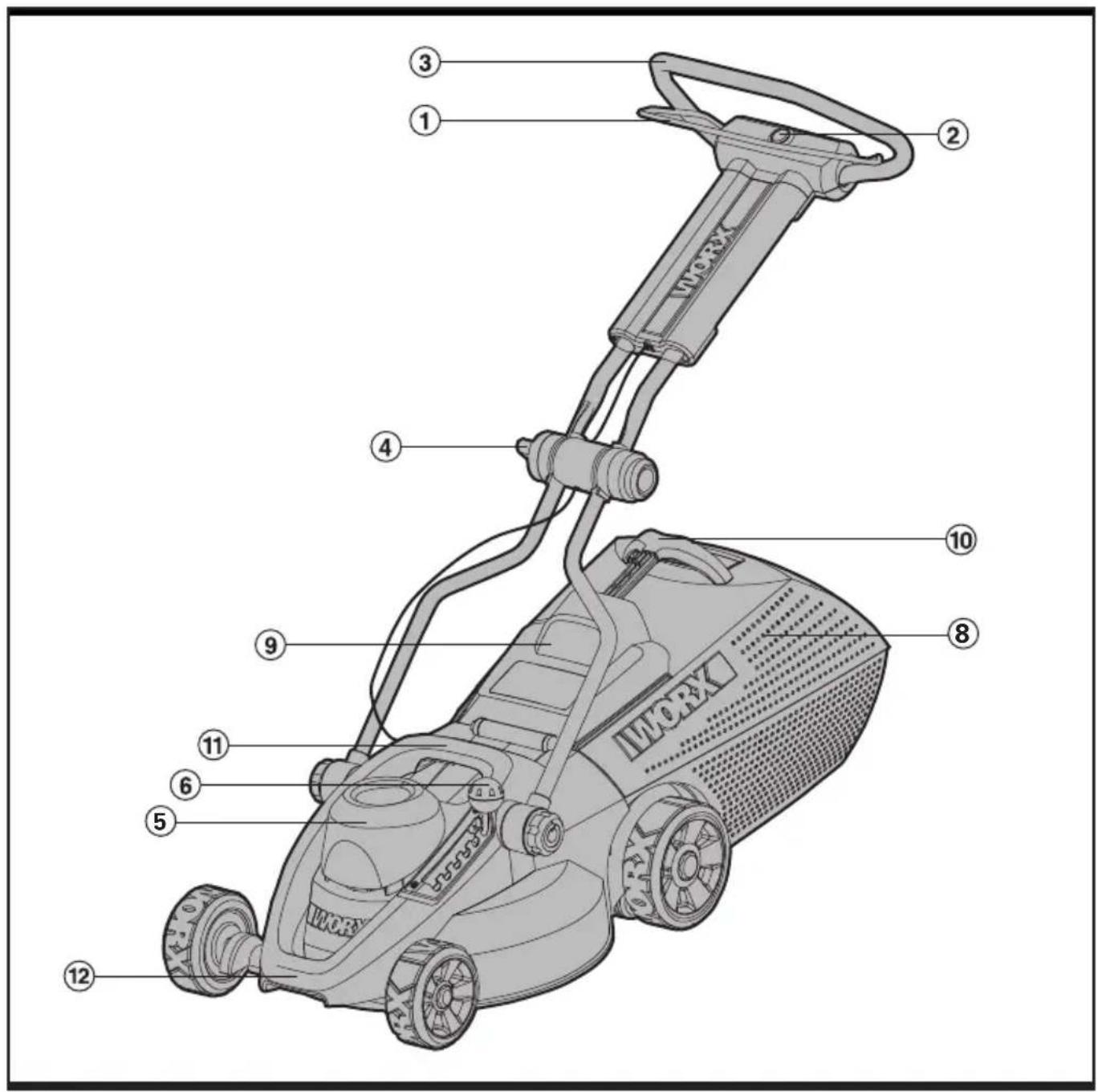
text_image
Labeled diagram of a workstation lawn mower with numbered parts for identification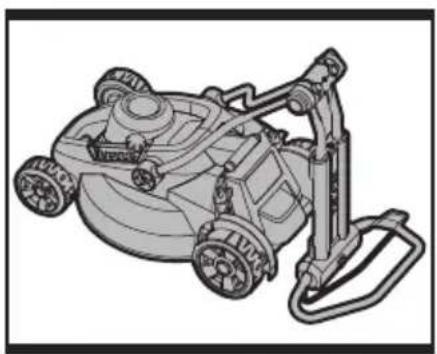
natural_image
Line drawing of a lawn mower with attached ladder (no text or symbols)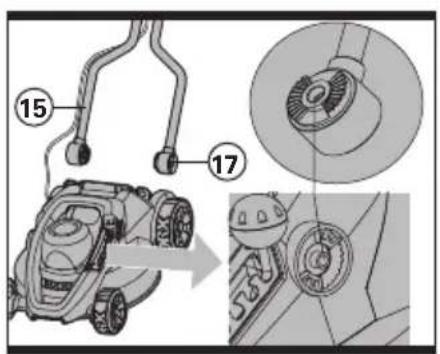
text_image
Technical diagram showing mechanical components with numbered parts and a magnified view of a circular component detail.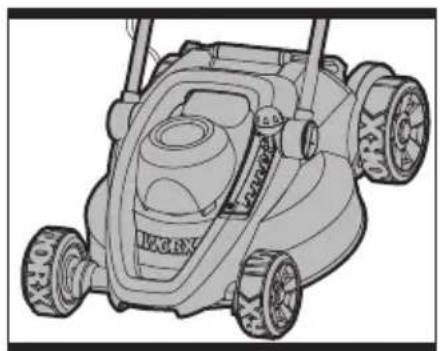
natural_image
Line drawing of a lawn mower with three wheels and a central vent (no text or symbols)a b c
natural_image
Technical line drawing of a lawn mower with labeled parts (no text or symbols beyond basic labels)DEF.1
text_image
14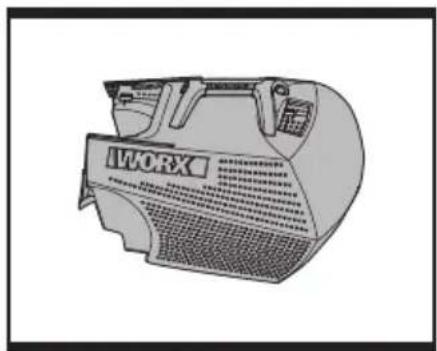
natural_image
Line drawing of a workbench with no visible text or symbols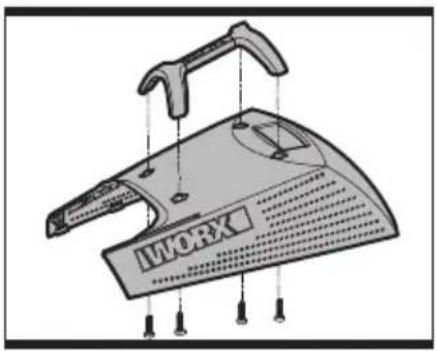
natural_image
Illustration of a workbench with a hammer handle and labeled 'WORK' on the cover (no other text or symbols)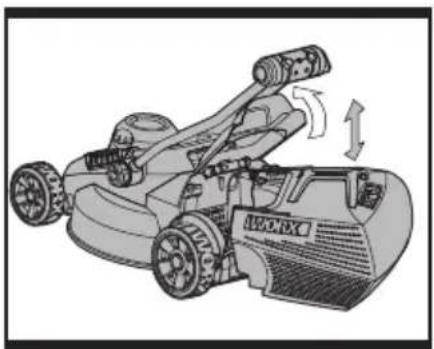
natural_image
Illustration of a lawn mower with motion arrows indicating rotational motion (no text or symbols)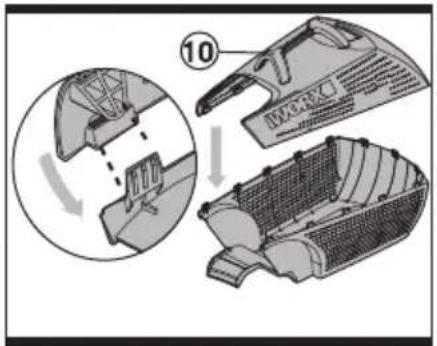
text_image
10 WORKF.2 G
text_image
Technical diagram of a mechanical device with labeled parts 1 and 2, showing assembly or assembly steps.J
text_image
6 1K
natural_image
Diagram of a car interior showing a window with a numbered label (18) and a handle, no readable text or symbols present.1
natural_image
Illustration of two human figures with robotic equipment, one carrying a motor and the other holding a cart (no text or symbols)J
natural_image
Two technical illustrations of a robotic car with labeled parts, shown from top and side views (no text or symbols present)K
text_image
Technical diagram showing mechanical assembly with numbered components and a magnified detail viewLM.1 M.2
natural_image
Illustration of two human figures with robotic equipment, one carrying a motor and the other holding a cart (no text or symbols)
natural_image
Two technical illustrations of a robotic car with labeled parts, shown from top and side views (no text or symbols present)- Switch lever
- SaFETy button
- uPPER HANDLE
- uPPER HANDLE KNOb
- MOTOR COVER
- HEIGHT OF CuT LEVER
- bLaDE bOLT (SEE L)
- GRaSS bOx
- SaFETy FLaP
- GRaSS bOx HaNDLE
- MIDDLE CaRRy HANDLE
- FRONT CaRRy HaNDLE
- bLaDE (SEE L)
- CabLE CLIPS (SEE E)
- LOwER HANDLE (SEE b)
- LOw HANDLE KNObS (SEE D)
- LOwER HANDLE bRaCKET (SEE b)
- INSPECT wINDOw (SEE I)
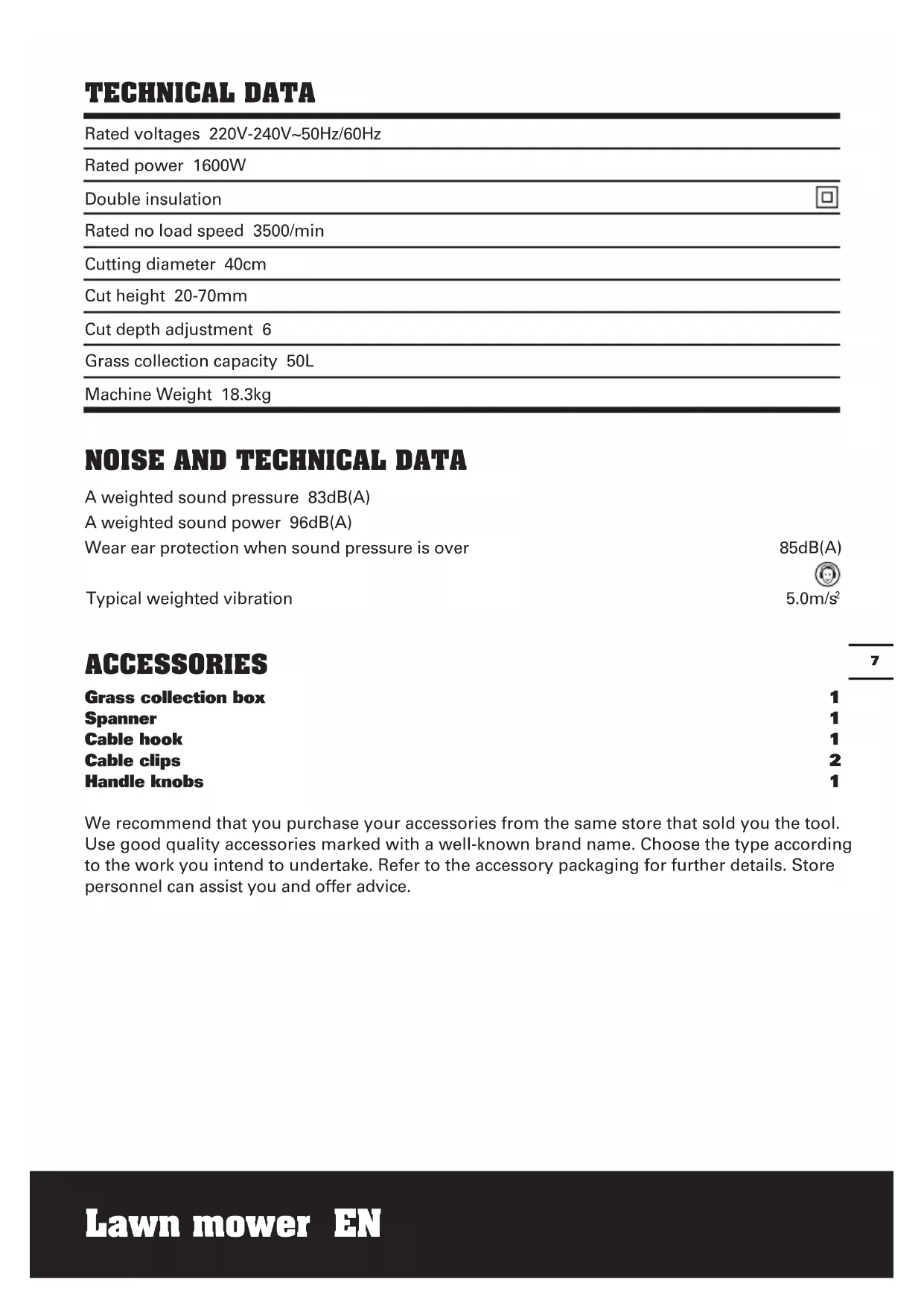
TECHNICAL DATA
| Rated voltages 220V-240V~50Hz/60Hz | |
| Rated power 1600W | |
| Double insulation | ☐ |
| Rated no load speed 3500/min | |
| Cutting diameter 40cm | |
| Cut height 20-70mm | |
| Cut depth adjustment 6 | |
| Grass collection capacity 50L | |
| Machine Weight 18.3kg | |
NOISE AND TECHNICAL DATA
A weighted sound pressure 83dB(A)
A weighted sound power 96dB(A)
Wear ear protection when sound pressure is over
85dB(A)
Typical weighted vibration

5.0m/s²
ACCESSORIES
| Grass collection box | 1 |
| Spanner | 1 |
| Cable hook | 1 |
| Cable clips | 2 |
| Handle knobs | 1 |
We recommend that you purchase your accessories from the same store that sold you the tool. Use good quality accessories marked with a well-known brand name. Choose the type according to the work you intend to undertake. Refer to the accessory packaging for further details. Store personnel can assist you and offer advice.
SAFETY INSTRUCTIONS

WARNING! Read all instructions
Failure to follow all instructions
listed below may result in electric shock, fire and/or serious injury.
SAVE THE INSTRUCTION FOR FUTURE USE
If not used properly this lawnmower can be dangerous! This lawnmower can cause serious injury to the operator and others, the warning and safety instruction must be followed to ensure reasonable safety and efficiency in using this lawnmower.
The operator is responsible for following the warning and safety instruction in this manual and on the lawnmower. Never use the mower unless the grassbox or guards are correctly positioned.
TRAINING
- Read the instructions carefully. Be familiar with the controls and the proper use of the appliance.
- Never allow children or people unfamiliar with these instructions to use the appliance. Local regulations may restrict the age of the operator.
- Never mow while people, especially children, or pets are nearby.
- The operator or user is responsible for accidents or hazards occurring to other people or their property.
PREPARATION
- Only use this Lawn Mower when a Residual Current Device (RCD) with a tripping current of not more than 30mA is in the circuit.
- While mowing, always wear substantial footwear and long trousers.
- Do not operate the appliance when barefoot or wearing open sandals.
- Thoroughly inspect the area where the appliance is to be used and remove all stones, sticks, wires, bones, and other foreign objects.
- Before using, always visually inspect to see that the blades, blade bolts and cutter
assembly are not worn or damaged.
Replace worn or damaged blades and bolts in sets to preserve balance.
OPERATION
- Mow only in daylight or in good artificial light.
- Avoid operating the appliance in wet grass, where feasible.
- Always be sure of your footing on slopes.
- Do not walk backwards whilst operating your product, you could trip - Walk, never, run.
- Mow across the face of slopes, never up and down.
- Exercise extreme caution when changing direction on slopes.
- Do not mow excessively steep slopes.
- Use extreme caution when reversing or pulling the appliance towards you.
- Stop the blade(s) if the appliance has to be tilted for transportation when crossing surfaces other than grass, and when transporting the appliance to and from the area to be mowed.
- Never operate the appliance with defective guards or shields, or without safety devices, for example deflectors and/or grass catchers, in place.
- Switch on the motor according to instructions and with feet well away from the blade(s).
- Do not tilt appliance when switching on the motor, except if the appliance has to be tilted for starting. In this case, do not tilt it more than absolutely necessary and lift only the part which is away from the operator. Always ensure that both hands are in the operating position before returning the appliance to the ground.
- Do not put hands or feet near or under rotating parts. For rotary mowers, keep clear of the discharge opening at all times.
- Never pick up or carry an appliance while the motor is running.
- Remove the plug from the mains:
-- Whenever you leave the machine;
-- Before clearing a blockage;
-- Before checking, cleaning or working on the appliance;
-- After striking a foreign object. Inspect the appliance for damage and make repairs as necessary;
-- If the appliance starts to vibrate abnormally (check immediately).
MAINTENANCE AND STORAGE
- Keep all nuts, bolts, and screws tight to be sure the appliance is in safe working condition.
- Check the grass catcher frequently for wear or deterioration.
- Replace worn or damaged parts for safety.
- Do not try to repair the machine or access internal parts. Use authorised service centres only.
- Only use the replacement blade, blade bolt, spacer and impeller specified for this product.
- Be careful during adjustment of the lawnmower to prevent entrapment of the fingers between moving blades and fixed parts of the machine.
- If an extension cord is used make sure it is for outdoor use and marked as such. The recommended size of extension cord is not lighter than 1.0mm2 and a maximum of 10 meters in length.
- All electric power tools should be properly insulated and any extension cable should be orange so it will stand out when laid around the garden
- When using a hand controlled electric tool, feed the cable over your shoulder, this should prevent you cutting through it.
ATTENTION: Through poor conditions of the electrical MAINS, shortly voltage drops can appear when starting the EQUIPMENT. This can influence other equipment (Eg. Blinking of a lamp). If the MAINS-IMPEDANCE Zmax=0.38+0.24JOHM, such disturbances are not expected. (In case of need, you may contact your local supply authority for further information).
SYMBOL DESCRIPTION

Warning

Read the user instruction carefully and make sure you understand all the controls and what they do.

Always keep the lawnmower on the ground when mowing. Tilting or lifting the lawnmower may cause stones to be thrown out.
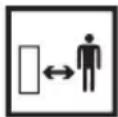
Keep bystanders away. Do not mow whilst people especially children or pets are in the mowing area.

Beware of severing toes or hands. Do not put hands or feet near a rotating blade.
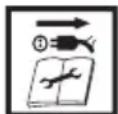
Switch off! Remove plug from mains before adjusting, cleaning or if cable is entangled or damaged. Keep the cable away for the blade.
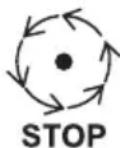
Blade continues to rotate after the machine is switched off. Wait until all machines components have completely stopped before touching them.

Do not mow in the rain or leave the lawnmower outdoors while raining.
ASSEMBLY

IMPORTANT! Before you assemble the lawn mower, check the accessories ding above information, make sure the sories are completed.
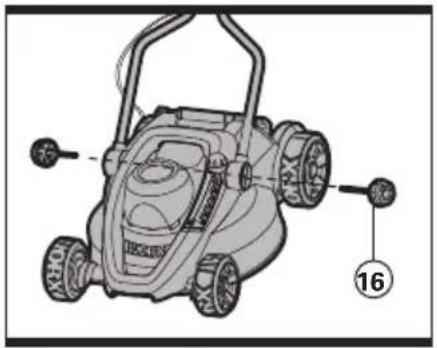
FITTING THE LOWER HANDLE.(See A, B, C, D)
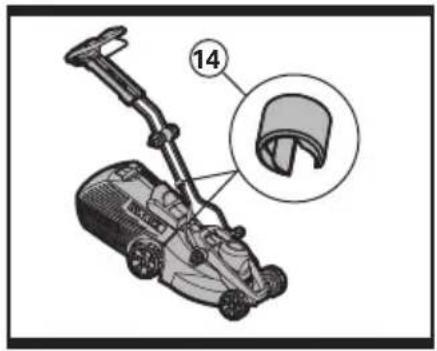
The mower should now look like fig A. Fix the lower handle brackets (17) to the deck as fig B and align the handle as fig C. Make sure that they are located properly before inserting the lower handle knobs and tighten clockwise.(See D) Lift the Upper handle into position as shown E. align handle and tighten handle knob clockwise. Check that the upper and lower handles are firmly secure. Ensure the cables do not become stuck when folding/ unfolding Lower Handle.
NOTE: Ensure that the cable clips (14)(See E) supplied are used to fix the cable to the Lower Handle (15).(See B) Attach the cable clips and make sure there is enough cable slack.
GRASSBOX HANDLE ASSEMBLY (See F.1)
First connect the grass box handle (10) to the box top using the four provided screws. DO NOT OVER TIGHTEN THE SCREWS.
GRASSBOX ASSEMBLY (See F.2 and G)
Next, snap together the top and bottom grass box halves by pushing all the "snap fits" together around the edges; start from the rear and work towards the front.
GRASS BOX FITTING
Lift the safety flap (9) and insert grass box (8).(See H)
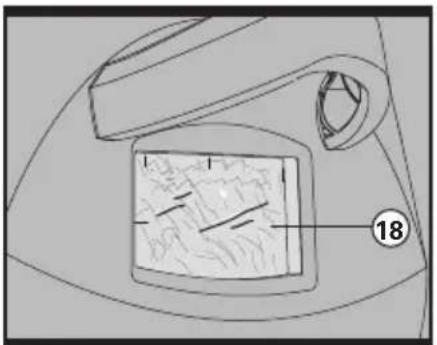
As the grassbox fills up, grass will be clearly visible through the inspect window(18)(See I) When the window is full it its time to empty the grassbox.
REMOVING/EMPTYING
Lift the safety flap (9) and hold up. Remove grass box (8)
MULCHING FEATURE
For non-grass collection, the mower can be used without the grass box (8) in position, with the safety flap (9) in the down position.

WARNING! Always check the safety flap can close the discharge outlet tightly before using. Never lift the safety flap (9) when the lawn mower is being used without fitted grass box.
OPERATION
STARTING AND STOPPING (See J) STARTING
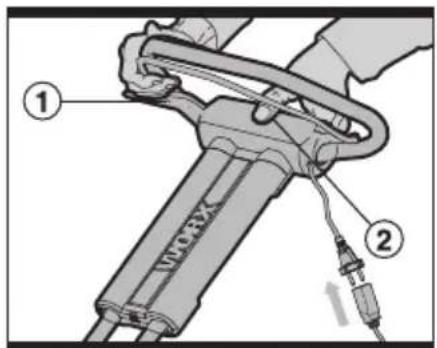
Connect the female extension cable connector to the pigtail (See J). Connect the plug to the mains an switch ON.
The switchbox is provided with a lock-off button to prevent accidental starting.
With one hand press and hold the safety button (2), with the other hand squeeze the switch lever (1) towards the handle, and release the safety lock off button. The machine is now started, wait until the product is at full speed before cutting the grass.
Then Use both your hands to hold the switch lever to keep it running.
STOPPING
Release the switch lever (1).
ADJUSTING THE CUTTING HEIGHT (See K)

WARNING! Before adjusting the mower height, wait for the mower to completely stop. Mower blades continue to rotate after the machine is switched off and a rotating blade can cause injury. Wait until all machine components have completely stopped before touching them.
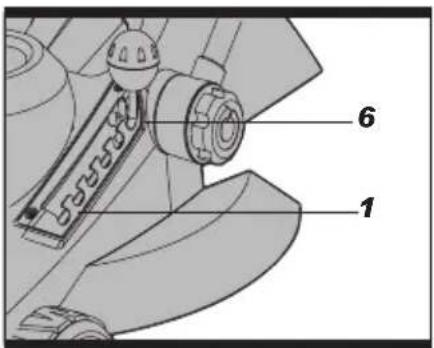
Before your first cut, adjust the mower cutting depth to the desired position The mower can be set to one of six cutting heights, with cutting heights between 20 mm and 70 mm. To adjust the cutting height press the height of cut lever (6) outwards, at the same time lifting or pushing down the mower until required height is selected.
| Position Height of cutting | |
| 6 20mm | |
| 5 28.7mm | |
| 4 39.3mm | |
| 3 50mm | |
| 2 60.4mm | |
| 1 70mm | |
MOWING
For cutting convenience, it may be best to start mowing at a point close to the power supply and to work your way away from the supply. Mow the lawn at a right angle from the power supply and place the power cable to side which has already been cut.

WARNING! When mowing do
not allow the motor to labour
particularly in heavy conditions. When the motor labours the speed of the motor drops and you will hear a change in the motor sound, when this occurs stop mowing, release the switch lever and raise the height of cut. Failure to do so could damage the machine.
MAINTENANCE
Remove the plug from the socket before carrying out any adjustment, servicing or maintenance.
Your power tool requires no additional lubrication or maintenance.
There are no user serviceable parts in your power tool. Never use water or chemical cleaners to clean your power tool. Wipe clean with a dry cloth. Always store your power tool in a dry place. Keep the motor ventilation slots clean. Keep all working controls free of dust. Occasionally you may see sparks through the ventilation slots. This is normal and will not damage your power tool.
If the supply cord is damaged, it must be replaced by the manufacturer, its service agent or similarly qualified persons in order to avoid a hazard.
Never carry out any assembly operations or adjustments with the power connected to the mower. Always ensure that the power button is in the off position and that the power plug is disconnected from the supply. Always handle the blade with care-sharp edges could cause injury use gloves.
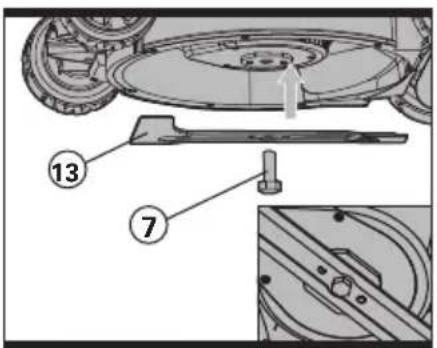
Follow these procedures to remove and replace the blade. You will need garden gloves (not provided) and a spanner wrench (not provided) to remove the blade. Hold the blade (13) and unscrew the blade bolt (7) anti clockwise using a spanner wrench. Remove blade and attach a new one to the blade bolt. Ensure that the blade is properly positioned as seen in Fig. L, and then firmly tighten the bolt. DO NOT OVER TIGHTEN.
Renew your metal blade after 50hrs mowing or 2 years, which ever is the sooner-regardless of condition.
If the blade is cracked or damaged replace it with a new one.
STORAGE
Rotate the Upper Handle knob to release the lower pushing nod.
Clean the exterior of the machine thoroughly using a soft brush and cloth. Do not use water, solvents or polishes. Remove all grass and debris, especially from the ventilation slots. Turn the machine on its side and clean the blade area. If grass cuttings are compacted in the blade area, remove with a wooden or plastic implement.
Store the machine in a dry place. Do not place other objects on top of the machine.
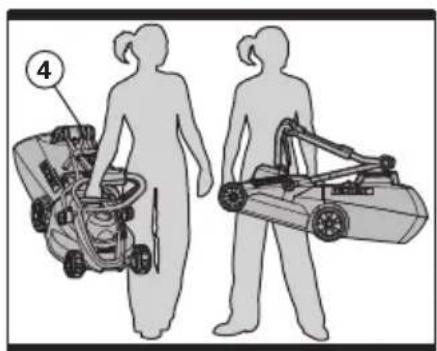
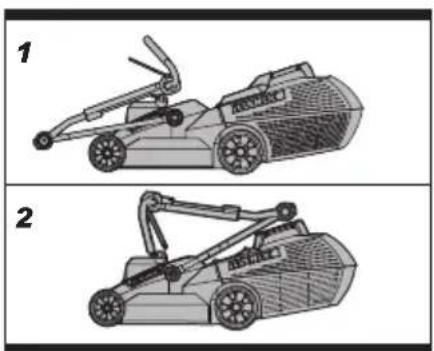
Rotate the Upper Handle knob (4) to release the handle joint, it could be folded. You could carry the mover by middle carry handle (11) and front carry handle(12).(See M.1, M.2)
To aid storage loosen the wing nuts and fold the handles.
Ensure cables are not stuck or entangled when folding or unfolding top handles. Do not drop the handles.
ENVIRONMENT PROTECTION
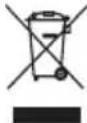
Waste electrical products must not be disposed of with household waste. Please recycle where facilities exist.
Check with your local authorities or retailer for recycling advice.
PLUG REPLACEMENT (UK & IRELAND ONLY)
If you need to replace the fitted plug then follow the instructions below.
IMPORTANT
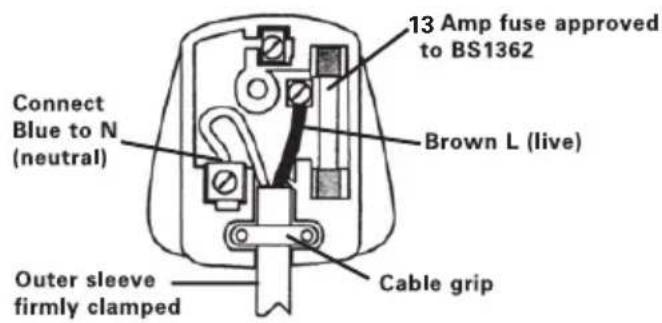
The wires in the mains lead are colored in accordance with the following code:
Blue = Neutral
Brown = Live
As the colors of the wires in the electrical cord of this appliance may not correspond with the colored markings identifying the terminals in your plug, proceed as follows. The wire which is colored blue must be connected to the terminal which is marked with N. The wire which is colored brown must be connected to the terminal which is marked with L.

WARNING! Never connect live or neutral wires to the earth terminal of the Only fit an approved 13Amp BS1363/A and the correct rated fuse.
NOTE: If a moulded plug is fitted and has to be removed take great care in disposing of the plug and severed cable, it must be destroyed to prevent engaging into a socket.
text_image
13 Amp fuse approved to BS1362 Brown L (live) Connect Blue to N (neutral) Cable grip Outer sleeve firmly clampedDECLARATION OF CONFORMITY
We,
POSITEC Germany GmbH
Neuer Höltigbaum 6
22143 Hamburg
Declare that the product
Description WORX Lawn mover
Type WG711E
Complies with the following Directives,
EC Machinery Directive 98/37/EC
EC Low Voltage Directive 2006/95/EC
EC Electromagnetic Compatibility Directive
2004/108/EC
Noise Emission in the Environment by
Equipment for Use Outdoors Directive
2000/14/EC amended by 2005/88/EC
- Conformity Assessment Procedure as per
Annex VI
- Measured Sound Power Level 93 dB
- Declared Guaranteed Sound Power Level
96 dB
- The notified body involved
Name: ITS Testing & Certification
Address: ITS Testing & Certification,
Cleeve Road, Leatherhead, KT22 7SB
Standards conform to,
EN 60335-1
EN 60335-2-77
EN 55014-1
EN 55014-2
EN 61000-3-3
EN 61000-3-2
ISO 11094
EN ISO 3744
EN 836
EN 50366
Jaiky Zhou
2008/01/09
Jacky Zhou
POSITEC Quality Manager

natural_image
Abstract gray geometric shapes on white background (no text or symbols)Lawn mower EN
Schraubenschlüssel 1
Kabelhaken 1
Kabelklemmen 2
Handgriff Knopf 1
Name: ITS Testing & Certification
Anschrift: ITS Testing & Certification,
Cleeve Road, Leatherhead, KT22 7SB
Werte nach
EN 60335-1
EN 60335-2-77
EN 55014-1
EN 55014-2
EN 61000-3-3
EN 61000-3-2
ISO 11094
EN ISO 3744
EN 836
EN 50366
Jaiky Zhou
2008/01/09
Jacky Zhou
ATTENTION: Through poor conditions of the electrical MAINS, shortly voltage drops can appear when starting the EQUIPMENT. This can influence other equipment (Eg. Blinking of a lamp). If the MAINS-IMPEDANCE Zmax=0.38+0.24JOHM, such disturbances are not expected. (In case of need, you may contact your local supply authority for further information).
DESCRIPTION DES SYMBOLES

Avertissement.

Nom: ITS Testing & Certification
Adresse: ITS Testing & Certification,
Cleeve Road, Leatherhead, KT22 7SB
Et conforme aux normes:
EN 60335-1
EN 60335-2-77
EN 55014-1
EN 55014-2
EN 61000-3-3
EN 61000-3-2
ISO 11094
EN ISO 3744
EN 836
EN 50366
Jaiky Zhou
2008/01/09
Jacky Zhou
Cleeve Road, Leatherhead, KT22 7SB
Conforme a,
EN 60335-1
EN 60335-2-77
EN 55014-1
EN 55014-2
EN 61000-3-3
EN 61000-3-2
ISO 11094
EN ISO 3744
EN 836
EN 50366
Jaiky Zhou

natural_image
Two gray crescent shapes on white background, no text or symbols present2008/01/09
Jacky Zhou
Cleeve Road, Leatherhead, KT22 7SB
Normativas conformes a,
EN 60335-1
EN 60335-2-77
EN 55014-1
EN 55014-2
EN 61000-3-3
EN 61000-3-2
ISO 11094
EN ISO 3744
EN 836
EN 50366
Jaiky Zhou

natural_image
Two gray crescent shapes on white background, no text or symbols present2008/01/09
Jacky Zhou
Cleeve Road, Leatherhead, KT22 7SB
WAARSCHUWING! Lees alle
BEMESTEN MET VERGAAN MATERIAAL
Naam: ITS Testing & Certification
Adres: ITS Testing & Certification, Cleeve
Road, Leatherhead, KT22 7SB
Standaards in overeenstemming met,
EN 60335-1
EN 60335-2-77
EN 55014-1
EN 55014-2
EN 61000-3-3
EN 61000-3-2
ISO 11094
EN ISO 3744
EN 836
EN 50366
Jaiky Zhou

text_image
CE2008/01/09
Jacky Zhou
Navn: ITS Testing & Certification
Adresse: ITS Testing & Certification,
Cleeve Road, Leatherhead, KT22 7SB
Standarder i overensstemmelse med:
EN 60335-1
EN 60335-2-77
EN 55014-1
EN 55014-2
EN 61000-3-3
EN 61000-3-2
ISO 11094
EN ISO 3744
EN 836
EN 50366
Jaiky Zhou
2008/01/09
Jacky Zhou
Nimi: ITS Testing & Certification
Osoite: ITS Testing & Certification, Cleeve Road, Leatherhead, KT22 7SB
VEDLIKEHOLD OG LAGRING
KNIV-VEDLIKEHOLD (Se L)
Navn: ITS Testing & Certification
Adresse: ITS Testing & Certification,
Cleeve Road, Leatherhead, KT22 7SB
Standardene samsvarer med:
EN 60335-1
EN 60335-2-77
EN 55014-1
EN 55014-2
EN 61000-3-3
EN 61000-3-2
ISO 11094
EN ISO 3744
EN 836
EN 50366
Jaiky Zhou
2008/01/09
Jacky Zhou
DRA INTE ÅT SKRUVARNA FÖR MYCKET.
Adress: ITS Testing & Certification,
Cleeve Road, Leatherhead, KT22 7Sb
Adi: ITS Testing & Certification
Adres: ITS Testing & Certification,
Cleeve Road, Leatherhead, KT22 7SB
'Ovoμα: ITS Testing & Certification
Cleeve Road, Leatherhead, KT22 7SB