4x10DCF - Binoculars NIKON - Free user manual and instructions
Find the device manual for free 4x10DCF NIKON in PDF.



| Product Type | Binoculars |
| Brand | Nikon |
| Model | 4x10DCF |
| Magnification | 4× |
| Effective Objective Diameter | 10 mm |
| Real Angular Field of View | 10° |
| Apparent Angular Field of View | 38.6° (ISO14132-1:2015 standard) |
| Field of View at 1000 m | 175 m |
| Exit Pupil | 2.5 mm |
| Brightness | 6.3 |
| Eye Relief | 13.7 mm |
| Close Focusing Distance | 1.2 m |
| Length | 52 mm |
| Width | 93 mm |
| Depth | 19 mm |
| Weight | 65 g |
| Interpupillary Distance Adjustment | 57 - 72 mm |
| Prism Type | Roof |
| Waterproofness | Not waterproof, handle with care |
| Power source | None (passive optical instrument) |
| Focusing | Central focusing ring |
| Lens maintenance | Use a blower then a soft cloth with lens cleaner |
| Body maintenance | Wipe with a soft, dry cloth |
| Safety | Do not observe the sun, do not disassemble, keep out of reach of children |
| Included accessories | Binoculars ×1, strap ×1, case ×1 |
| Repairability | Contact local retailer or Nikon after-sales service |
Frequently Asked Questions - 4x10DCF NIKON
User questions about 4x10DCF NIKON
0 question about this device. Answer the ones you know or ask your own.
Ask a new question about this device
Download the instructions for your Binoculars in PDF format for free! Find your manual 4x10DCF - NIKON and take your electronic device back in hand. On this page are published all the documents necessary for the use of your device. 4x10DCF by NIKON.
USER MANUAL 4x10DCF NIKON
Thank you for purchasing these Nikon binoculars.
Before using the product, read this document thoroughly to ensure proper use.
After reading this document, keep it readily accessible for future reference.
- About the documentation
- No part of this document may be reproduced, transmitted, transcribed, stored in a retrieval system, or translated into any language in any form, by any means, without Nikon's prior written permission.
- Illustrations shown in this document may differ from the actual product.
- Nikon will not be held liable for any errors this document may contain.
- The appearance, specifications, and capabilities of this product are subject to change without notice.
■ For your safety and caring for the product
To prevent damage to property or injury to yourself or to others, read "For your safety and caring for the product" in its entirety before using this product.
WARNING
Failure to observe the precautions marked with this icon could result in death or severe injury.
CAUTION
Failure to observe the precautions marked with this icon could result in injury or property damage.
Caring for the product: Cautions
The items contained in this section alert you to the fact that any improper use ignoring the contents described herein may negatively affect product performance and functionality.
SAFETY PRECAUTIONS
WARNING
- Do not use while walking or operating a vehicle.
Failure to observe this precaution could result in accidents or other injury.
- Do not disassemble or modify this product.
Do not touch internal parts that become exposed as the result of a fall or other accident.
Failure to observe these precautions could result in injury.
- Do not directly view the sun or other bright light source through the product.
Failure to observe this precaution could result in visual impairment.
- Keep this product out of reach of children.
Failure to observe this precaution could result in accidents, other injury, or product malfunction.
The plastic bag used to wrap this product may block their mouths and noses and cause them to suffocate.
In addition, note that small parts constitute a choking hazard.
Should a child swallow any part of this product, seek immediate medical attention.
- Do not entangle, wrap or twist the straps around your neck. Failure to observe this precaution could result in accidents.
CAUTION
- Do not leave the lenses pointed at the sun or other strong light sources.
Light focused by the lens could cause a fire.
- Do not leave the product where it will be exposed to extremely high temperatures for an extended period, such as in an enclosed automobile or in direct sunlight.
Failure to observe this precaution could result in fire or product malfunction.
- Take care that your fingers, hands, and skin do not get caught in the product.
Failure to observe this precaution could result in accidents or other injury.
- Cease use immediately should you notice any changes in your skin.
Failure to observe this precaution could result in skin irritation or inflammation.
- Check the condition of the product's rubber parts, eyecups, and accessories before use.
They may deteriorate if used or stored for a long period of time, and may attach on clothes and cause stains.
Caring for the binoculars: Cautions
- Do not drop
Do not drop the product or subject it to blows. The product may malfunction if subjected to strong shocks or vibration.
- Keep dry
Protect the product from rain, water splashes, sand, and mud. Water inside the product can damage the functionality.
- Avoid sudden changes in temperature
If you bring the product from a cold place to a warm place, or from a warm place to a cold place, water droplets may form inside and outside the product and cause damage. When you bring the product to a place with a temperature difference, place the product in a carrying case or plastic bag and seal it beforehand. When the product has adapted to the ambient temperature, take it out from the bag and use it.
- Cleaning the body
When cleaning the body, use a blower to gently remove dust and lint, then wipe gently with a soft, dry cloth. After using the product at the beach or seaside, wipe off any sand or salt using a cloth lightly dampened in fresh water and then dry the product thoroughly.
- Cleaning the lenses
These glass elements are easily damaged: remove dust and lint with a blower. If using an aerosol blower, keep the can vertical to prevent the discharge of liquid that could damage glass elements. To remove fingerprints and other stains from the lenses, apply a small amount of lens cleaner to a soft cloth and wipe the lenses carefully.
- Store in a well-ventilated area
To prevent mold or mildew, store the product in a dry, well-ventilated area. Do not store the product with naphtha or camphor moth balls, or where it will be exposed to extremely high temperatures, for example near a heater or in an enclosed vehicle on a hot day. Failure to observe these precautions could result in product malfunction.
- When the product will not be used for an extended period, store the product with a desiccant
For long term storage, keep the binoculars in a plastic bag or an airtight container with a desiccant. If this is not possible, remove the binoculars from the case, which is vulnerable to humidity, and store them separately in a clean, well-ventilated location.
- Do not use excessive force when handling the product
When opening and closing the product, such as when adjusting the interpupillary distance, move it slowly within the movable range. Also, when rotating the "focusing ring", move it within the movable range. Applying excessive force will result in damage to the product.
- Take care not to let sand or dust get into the rotating parts. Letting sand or dust get into the rotating parts such as the "focusing ring" could result in product malfunction.
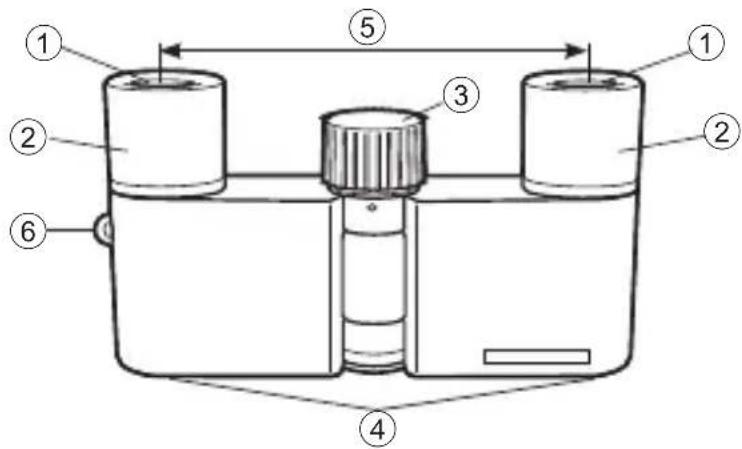
Nomenclature
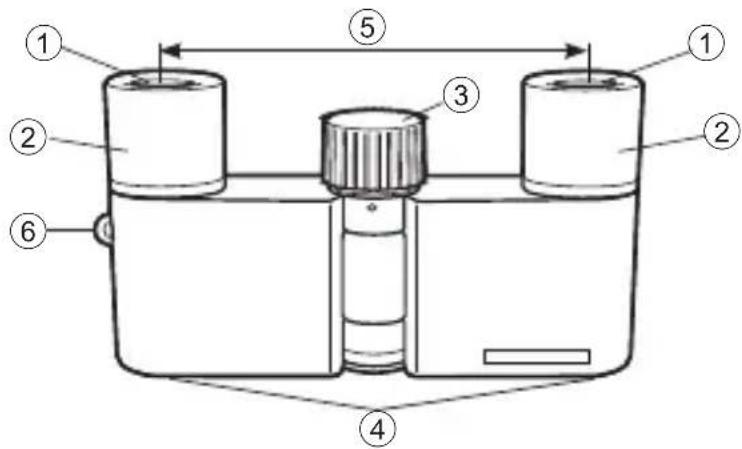
① Eyepiece lens
② Eyecups
(3) Focusing ring
④ Objective lens
(5) Interpupillary distance
⑥ Strap eyelet
| Items supplied | |
| Binoculars | ×1 |
| Strap | ×1 |
| Case | ×1 |
Adjusting the interpupillary distance
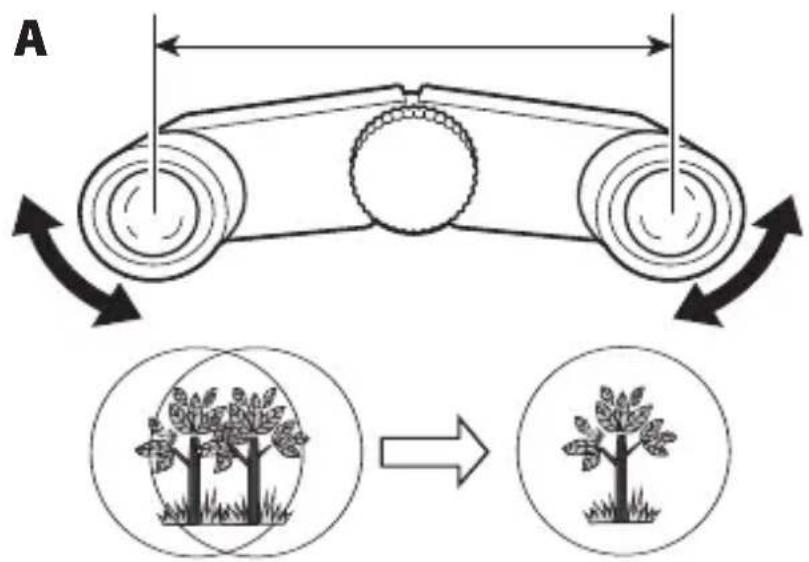
1) Look into the eyepieces, and open and close the body as shown by the arrows to adjust the field of view into a single circle (A).
2) Move your eyes closer to, or away from, the binoculars so that there are no shadows in the field of view.
- When wearing glasses, make sure the lenses of the glasses touch the eyepieces.
Focusing
- This product does not have a function for correcting differences in visual acuity. If there is a large difference in visual acuity between your right and left eyes, adjust the focus to suit your dominant eye.
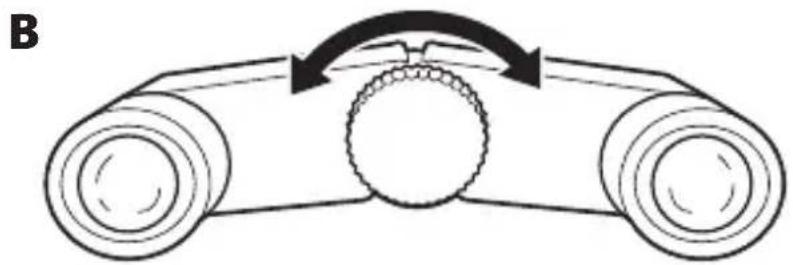
1) Turn the focusing ring in the center of the body ( B), and adjust the focus.
To view close objects, turn the focusing ring counterclockwise. To view distant objects, turn the focusing ring clockwise.
Specifications
| Product name 4 | ×10D CF |
| Magnification (×) | 4 |
| Effective diameter of objective lens (mm) | 10 |
| Angular field of view (real) (°) | 10 |
| Angular field of view (apparent) (°)*1 | 38.6 |
| Field of view at 1,000 m/yd. (m/ft) | 175/525 |
| Exit pupil (mm) 2.5 |
| Brightness 6.3 | |
| Eye relief (mm) 13.7 | |
| Close focusing distance (m/ft) | 1.2/3.9 |
| Length (mm/in.) 52/2.0 | |
| Width (mm/in.)*2 | 93/3.7 |
| Depth (mm/in.) 19/0.7 | |
| Weight (g/oz.) 65/2.3 | |
| Interpupillary distance adjustment (mm/in.) | 57 - 72/2.2 - 2.8 |
| Prism type Roof |
1 Apparent field of view: Apparent field of view is calculated based on the ISO14132-1:2015 standard.
2 Not including the strap eyelet.
- This product is not waterproof. Handle with care.
Cleaning lens
- When cleaning the binoculars' objective lenses and eyepiece lenses with an aerosol-type dust cleaner, make sure to hold the can upright at least 30~cm (11.8 in.) from the lens surface while moving the can to avoid focusing the vaporized liquid gas on one point.
When requesting for repair
Please contact your local dealer or the store where you purchased the product. Do not disassemble. It may result in a serious incident. Please note that Nikon is not responsible for any direct or indirect damage if the user attempts to disassemble the product.
Introduccion
Leaestoprimero
He poHayTe n3dene n He noDBepraTe erO yDapam. CnIbHbIe yDapbl nn Bn6paZna MOryT npNBecTu K HeNCpPaBHOCTu n3dEJIa.
He noDbepraTe BO3deiCTBnIO BlaRn
3aunuaine n3dene oTdoxj,6pbI3r BObl,necka n rpa3n.
IopanaHne BObblBHytpb n3delenmoKet npnbecTn K hapyuHIO erO yHKcnoHaJIbHOCTn.
He npimehaTe ype3mepHbIe ycIIy, nCnoIb3yI n3dJIne
EcnBbI OTKpbIBaete N 3aKpbIBaete n3delen, HapnMpE BO BpeMpeylnpOBKN MeK3paQKOBOrO pacCToHnA, MeJenHNo nepeDbraTe erO B npedeJax dnaana30Ha NOBxNHO. Kpome TOrO, BpaJaa OKycnpOBoUHoe KOJIbCuO, nepeDbraTe erO B npedeJax dnaana30Ha NOBxNHOCTn. PpImeHHe upe3MePbIX ycJIn npNBedet K NOBpeJdeHIO n3delen.
He donyckaTe nonadaHn necka n nbInn BHyTpboNDBnKhbIX deTalei
IonoandaHne necka nnn nbInn BHyTpB NOdBnXhBIX DeTaJe, TaKnx KaK OKucnpoBOuHoe KOJIbUO, MOKeT npNBecTn K HeNCppaBHOCTN N3dEJIa.
Homeklataype
① 千H3aOkyIpa
② Harla3HnKu
③ ΦOKycnpoBOuHoe KoJIbUO
④ЛинзblO6beKТиВа
⑤ Mex3paqkoBoepacctOarHne
⑥ yuko dny kpepeHnpeMn