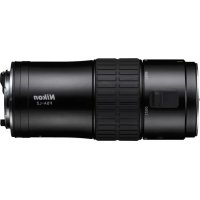
FSAL2 - Binoculars NIKON - Free user manual and instructions
Find the device manual for free FSAL2 NIKON in PDF.

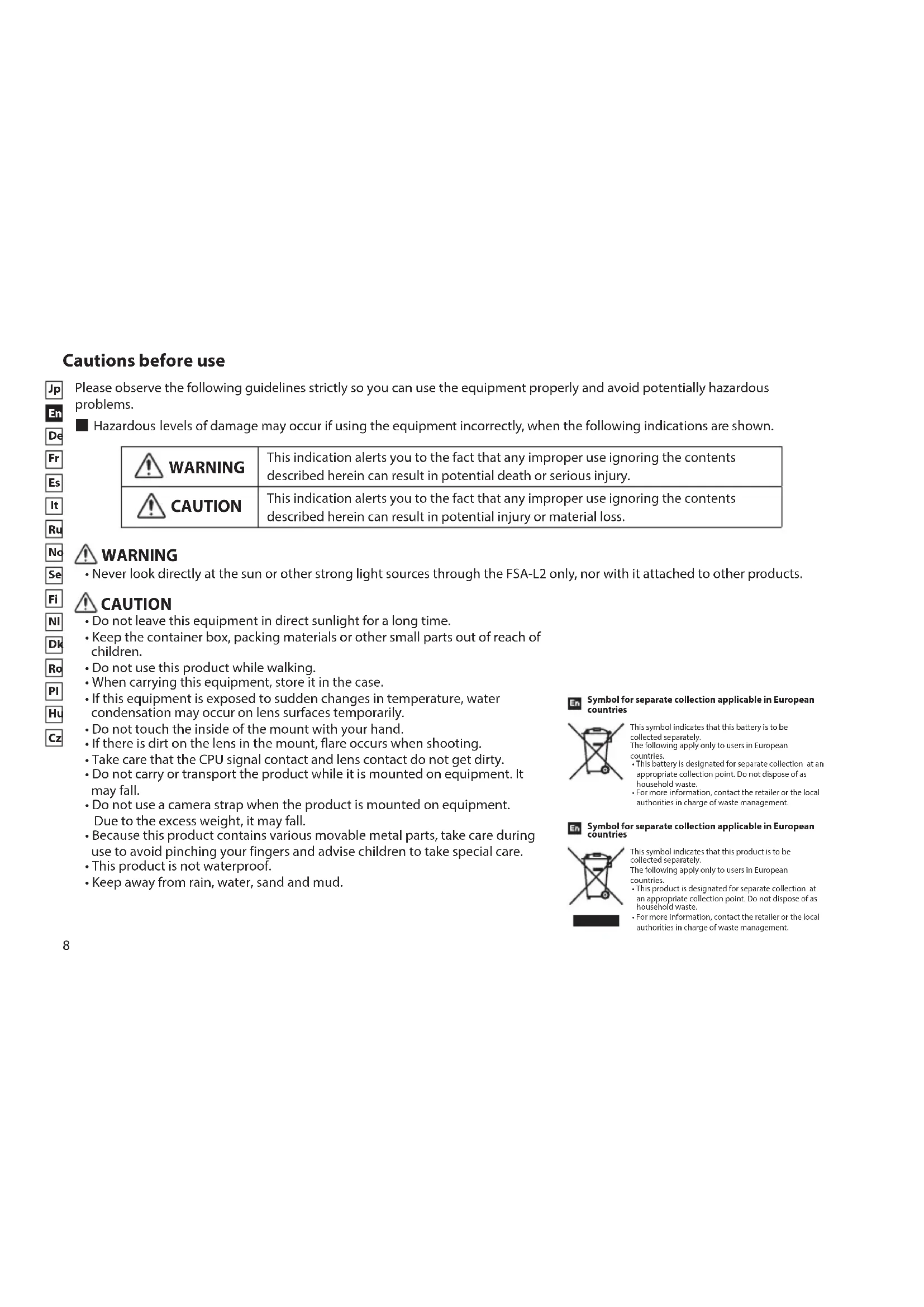


| Product type | DSLR adapter (Nikon F mount) for spotting scope |
| Brand | Nikon |
| Model | FSA-L2 (FSAL2) |
| Magnification (zoom) | 3.5x |
| Length × diameter (mm) | 150 × 62 |
| Weight (g) | 435 |
| Camera side mount | Nikon F mount (bayonet) |
| Scope side mount | Specific bayonet for EDG spotting scopes |
| Compatible scopes | EDG 85 VR/85-A VR, EDG 85/85-A, EDG 65/65-A |
| Compatible cameras | Nikon DSLR (D4, D3, D2, Df, D810, D800, D750 series, etc., up to D40) |
| Recommended shooting modes | Mode A (aperture priority) or Mode M (manual) |
| Exposure metering | Center-weighted metering only |
| Focus | Manual via scope's focus ring (AF not available) |
| Included accessories | Scope-side cap, camera-side cap, case |
| Housing material | Metal alloy and plastic (probable) |
| Weather sealing | Not water-resistant – avoid rain, water, sand |
| Cleaning and maintenance | Use a soft, dry cloth; avoid solvents; store in case |
| Safety | Do not look at the sun; do not use while walking; keep out of reach of children |
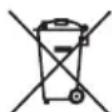
| Recycling and disposal | Compliant with WEEE – do not dispose of with household waste |
| Certifications | FCC Class B, EU EMC directive, AS/NZS, VCCI Class B, CU TR 020, RoHS, WEEE |
| Equivalent focal length (with EDG 85) | 500-1750 mm (DX format: 750-2625 mm) |
| Aperture (with EDG 85) | f/5.9-21 |
| Aperture (with EDG 65) | f/6.2-22 |
Frequently Asked Questions - FSAL2 NIKON
User questions about FSAL2 NIKON
0 question about this device. Answer the ones you know or ask your own.
Ask a new question about this device
Download the instructions for your Binoculars in PDF format for free! Find your manual FSAL2 - NIKON and take your electronic device back in hand. On this page are published all the documents necessary for the use of your device. FSAL2 by NIKON.
USER MANUAL FSAL2 NIKON
Please observe the following guidelines strictly so you can use the equipment properly and avoid potentially hazardous problems.
Hazardous levels of damage may occur if using the equipment incorrectly, when the following indications are shown.
| WARNING | This indication alerts you to the fact that any improper use ignoring the contents described herein can result in potential death or serious injury. |
| CAUTION | This indication alerts you to the fact that any improper use ignoring the contents described herein can result in potential injury or material loss. |
WARNING
- Never look directly at the sun or other strong light sources through the FSA-L2 only, nor with it attached to other products.
CAUTION
- Do not leave this equipment in direct sunlight for a long time.
- Keep the container box, packing materials or other small parts out of reach of children.
- Do not use this product while walking.
- When carrying this equipment, store it in the case.
- If this equipment is exposed to sudden changes in temperature, water condensation may occur on lens surfaces temporarily.
- Do not touch the inside of the mount with your hand.
- If there is dirt on the lens in the mount, flare occurs when shooting.
- Take care that the CPU signal contact and lens contact do not get dirty.
- Do not carry or transport the product while it is mounted on equipment. It may fall.
- Do not use a camera strap when the product is mounted on equipment. Due to the excess weight, it may fall.
- Because this product contains various movable metal parts, take care during use to avoid pinching your fingers and advise children to take special care.
- This product is not waterproof.
- Keep away from rain, water, sand and mud.
Symbol for separate collection applicable in European countries
This symbol indicates that this battery is to be
collected separately.
The following apply only to users in European Union.
This battery is designated for separate collection at an
appropriate collection point. Do not dispose of as
household waste
For more information, contact the retailer or the local
authorities in charge of waste management.
En Symbol for separate collection applicable in European countries
This symbol indicates that this product is to be
The following apply only to users in European
Counities
This product is designated for separate collection at
an appropriate collection point. Do not dispose of as
household waste
For more information, contact the retailer or the local
authorities in charge of waste management.
About controls for radio interference
- This device complies with Part 15 of the FCC Rules. Operation is subject to the following two conditions:
(1) This device may not cause harmful interference, and
(2) This device must accept any interference received, including interference that may cause undesired operation.
-
This equipment has been tested and found to comply with the limits for a Class B digital device, pursuant to Part 15 of the FCC Rules and to EU EMC directive. These limits are designed to provide reasonable protection against harmful interference in a residential installation. This equipment generates, uses and can radiate radio frequency energy and, if not installed and used in accordance with the instructions, may cause harmful interference to radio communications. However, there is no guarantee that interference will not occur in a particular installation. If this equipment does cause harmful interference to radio or television reception, which can be determined by turning the equipment off and on, the user is encouraged to try to correct the interference by one or more of the following measures:
-
Reorient or relocate the receiving antenna.
- Increase the separation between the equipment and receiver.
- Consult the dealer or an experienced radio/TV technician for help.
This Class B digital apparatus meets all requirements of the Canadian Interference-Caising Equipment Regulations.
Nomenclature
Please refer to numbered images on page 2.
- Mounting/dismounting index
- Camera mounting/dismounting index
-
Camera position index (standard)
-
Focal length display (for 85mm objective models, 35mm-format equivalent)
-
Focal length index
-
Camera position index (horizontal)
-
Camera side mount
- Signal contact pins
9.Clamp screw - Scope side mount
- Zoom ring
- Mounting/dismounting lock-pin
- Mounting/dismounting sliding lever
Accessories
Mount cap for scope side × 1
Mount cap for camera side × 1
Case x1
Fieldscope Digital SLR Camera Attachment FSA-L2
This product is a zoom-type Digital SLR camera attachment, exclusively for use with EDG Fieldscopes.
Specifications
| Zoom (x) 3.5 | ||
| Length × diameter (mm)1 | 150 × 62 | |
| Weight (g)2 | 435 | |
| Electromagnetic compatibility | FCC Part15 SubPartB class B, EU:EMC directive, AS/NZS, VCCI classB, CU TR 020 | |
| Environment RoHS, WEEE | ||
| Mount of FSA-L2 body Bayonet mount | ||
| Mount D-SLR camera side Nikon F mount | ||
| With EDG Fieldscope 85 series With EDG Fieldscope 65 series | ||
| Focal length (mm) | 500-1,750(DX format: 750-2,625mm)*3 | 400-1,400(DX format: 600-2,100mm)*3 |
| f-number 5.9-21 6.2-22 | ||
1: Excludes cap and projections.
2: Excludes cap.
*3: When used with a Nikon DX-format digital SLR camera, the picture angle is equivalent to approx. 1.5x focal length of 35mm format.
Mounting and dismounting
Mounting
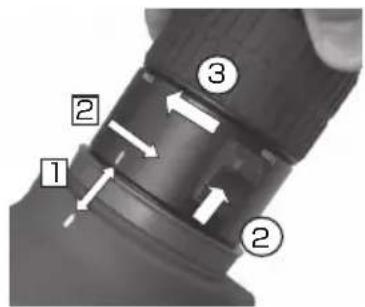
Insert the FSA-L2 into the EDG Fieldscope aligning the mounting/dismounting indexes of both sides.
Screw in the FSA-L2 in the direction of the arrow until you hear a click.
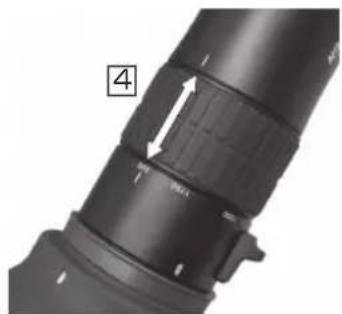
3 Attach the camera to the FSA-L2, aligning the camera mounting/dismounting indexes.
4 First loosen the clamp screw. Then align the two camera position indexes, and tighten up the clamp screw to make the camera position horizontal.
Dismounting
① Remove the camera by pressing the lens mounting/dismounting button.
② Slide the mounting/dismounting lever in the direction of the arrow, and keep it in position.
③ Rotate the body in the direction of the arrow, and remove the FSA-L2.
*Please refer to the complete image showing correct mounting on page 2.

Shooting precautions
- Depending on the shooting conditions, vignetting may occur. Vignetting may not completely disappear.
Focus using the focusing ring on the Fieldscope while viewing the camera's finder. - With high-magnification shooting, the focal depth is low. Be sure to focus carefully.
- With high-magnification shooting, you can prevent vibrations by using a self-timer or a remote controller.
- Camera position may become misaligned during camera operation. Before releasing the shutter, adjust the camera if necessary.
- Do not use flash when shooting.
Camera settings
Compatible cameras: D4 series, D3 series, D2 series, Df, D810 series, D800 series, D750, D700, D610, D600, D300 series, D200, D100, D7200, D7100, D7000, D90, D80, D70 series, D5500, D5300, D5200, D5100, D5000, D3300, D3200, D3100, D3000, D60, D50, D40 series (As of May, 2015)
- When used with a Nikon FX-format digital SLR camera, vignetting occurs at focal lengths between 500mm and 750mm with EDG Fieldscope 85 series and between 400mm and 600mm with EDG Fieldscope 65 series.
Compatible Fieldscopes: EDG Fieldscope 85 VR/85-A VR
EDG Fieldscope 85/85-A
EDG Fieldscope 65/65-A
Shooting modes: A (Aperture-Priority Auto) mode or M (Manual) mode
- Appropriate aperture using aperture-priority auto mode with a film camera has not been verified.
Exposure metering: Center-weighted metering
- Matrix metering and spot metering cannot be used.
- When you move away from the finder during shooting, prevent light entering with a shield such as an eyepiece cap.
- Because the optical system has different characteristics from interchangeable camera lenses, when the FSA-L2 and a Fieldscope are used for shooting with a digital SLR camera, exposure may vary with the camera model. Use exposure compensation if necessary.
Exposure compensation may be necessary when used at wide-angle zoom setting. - The actual f-number and the focal length vary depending on the actual zoom setting, while the camera display and image data show the constant f-number (13) and focal length (800mm).
Focus: Manual focus using the focusing ring on the Fieldscope body.
- "Autofocus" and "Manual focus with electronic rangefinder" function cannot be used.
- When a lens is used at a telephoto setting, the viewfinder image becomes darker because of the changes in F-number. Please take into consideration that in this situation it may be difficult to focus.
Shutter release: To reduce vibration caused by shutter release, please use the following mode/items:
Exposure delay mode, remote cord, self-timer, remote control, Modulite Remote Control Set ML-3, etc.
- When using a tripod, please use a sturdy and stable model.
- Please refer to the Nikon website for the latest information of compatible cameras and Fieldscopes
To reduce vibration caused by shutter release, please use the following mode/items:
Exposure delay mode, remote cord, self-timer, remote control, Modulite Remote Control Set ML-3, etc.
- When using a tripod, please use a sturdy and stable model.
I P E D U N P E X K D E H N E
Kateropnueckn 3aepaaetc rcmptb npmo HA cOnHcne HIN Hhie CInhBhe NCTouHKn CBeta KaH HenocpeDCTBeHHO uepe3 SA-L2, TaK u chee3 coeHNHeHbE C Hm dpyrne yctpOCTBa.
OCTOPOXHO
- He donyckaite dInntelbHoro BO3deiCTBna Ha daHHoe yctpoiCTBO npMoro CONHeuHoro CBeta.
- He donyckaIte, yTo6bI detn imEni DoCTyn K Kopo6Ke, ynaKOBOuHbIM MaTePuaIam nn Hhblm He6OJIbUIM Detalam N y3Jam.
He ncpnoj3yute daHHoe u3dne ne npx oxb6e.
-ДлгпернокиэтOTOучрочьИспльзуITEKopo6ky. - EcnHa daHnHOe yCTpoiCTBO DeiCTByET pe3Kni nepenad TemnepaTpybl, To Ha NOBepxHOCTNo6BeKTNbMoKeT Ha HEKOTOpoe Bpemr NORBtCk KOHDeHCAT.
- He npikacaiTecb pykamK BHyTpEHNM qactm yctpoiCTba.
- ECnn Ha liHH3e yCTpoiCTBa IMMeTcRpa3b, TO 3TO npoBnTc KaK 3acBETKa npi CbEMKe.
- PpIMTe MepbI, YTo6bl Ha CnHahBbHbI KOHTaKT CPU HHa KOHTaKT OBeKtNbA He InonaIa Tpr3b.
3aPpeaaetc npehocntb nIITpAHCnOpTnpoBaT daHoe n3dene, KOrda OHO yctaHOBNEHO ha o6OpydoBaHH. OHO moKet ynaCTb.
He nCnoB3yIte pemeH kamepb,ecn yCTpOINCTBO yCTaHOBJeHO Ha 06OpyIOBaHN. 13-3a NOBbIeHHOro Beca OHO MOKeT yNaCTb. - Pockolky daHoe n3dene coepknt pa3nunhble noBnxhblte MeTaNueckne deTann, B npoucece ero nCnoIb3OBAHnna Heo6xOJnmo CO6IaTb Mepbl npedoctoPOXHOCTN, 1TO NO3BOJNT u36eKaTb 3aueMleHnna TaIbceB. Oco6bE Mepbl npedoctoPOXHOCTN DOJXHb C6JIIOaTbCB BAOTHOweHN NcNoIb3OBAHnua n3dennr DeTBMN.
JaHHe N3DeJIe He JABJIeTcB BOHOENpOnHuaembIM.
He onnyckaTe nonaHaHnaDaHHoro yCTpoiCTBa NOd DOxkb, B BOy, Bo3deIcTBnHa Hero necka n rpa3n.

CMMBOI copTIOBKN MYCOPA, MCNOnb3yOuONiCA B eponeONKsCTPAOK
Даннш CMNBOH 3HbAeT, YTO STa bTaBApOJONKHaJTHYINMHNBATBcOTdEBnHOOTDPyRTO MyCPOJ.
PBNENHEHNA HINKe INHOpFMJIa KACaETCB TOnIbHOIOIbTOBATEIe N3CTpAnEFoBI.
DAHNAI BATAPEN DOJIHXA yTNHIAIHOBAPOTCH
OTDINbHO I OTDPYIO MYCOPA COBTCTBYIOU
PnHMHbIXyHTKtAX.He BbIPACBaJIte DAHNHY
BATAPeO BMEcTc6CBTOBIMMYCOPM.
DOnOMIHNTbHyN IOHOPMAuBIo Bb MOKTe
NOyHcyT y pNDaJIbIy Nm y MCTNHxBIACTe,
OTBeVauHbX3 y TNI1A3zIO MYCOPA.

CMMON coprupOBK Mycopa, Mcnonb3youuicBaB epononeKcKts Prachay
DAHNNCHBNOO3HAQHTOTOTNPDKTJONKHEYIYNNHNPOBATCIOIOTDQNHOOTDPXN.
IINBIEHJNHN HANKE IONOPMADN KACAE TCH NIKBOKIOIHOBJATOEIC 3T CPTAP EBPOBN.
DAnHHA pNOyDK ToNDXeYTHNIKIOBAPo7
OTENBHO TO DYPNYC B COBTETCTOYNUO XPHEMN yNHXTK. He BnOPcBAJBte DAHNyOg BAHTapeO BMECTe CbTOBtBM MYCOPM.
DONJIHITINIbHyIO MHOPMAIO BbMOKTeN OJNYWHTy NPOBIAJIaM NMy JMeCHTHX BnCTeR, OBTECAIOAIX3ZAYTNIHALIOY MOCDA.
O padonomexax, co3daBaembIX opraHamu ynpaBneHna
-Даньпрбор coOTbETCTByeТ Tpe6OBaHЯm YacTи 15 ПаВи FCC. Pa6Ota прбopa coOTbETCTByeT TAKIM DByM yCIOBnAМ:
(1) daHHbI npnbop He MoKet 6bItb nCTouHnKOM HeDOnyCTnMbIX NOMex;
(2) daHHbI np6op DoJxKeH npHmAtb IIO6bIe BxoJaune nomexn, BKnIOyAa nomexn, KOtOpBle MOryt HApUHTb HopMaJIbHyIO pa6Ory np6Opa.
JaHHOe O6OpOBOAHHe npOBepHo Ha COOTBeTCTBne OrpaHueHnM IJRA UoPobbIX yctpoiCTB KnaCca B corNaCHOaTIN 15 PpaBn FCC n dpeKtNBbl EC o6 3MC. TaNKe orpaHueHn pa3pa60TaHbI dR naHApEkaUe 3aunTbI OT HeOnyCTMbIX NOMex B ctaioHOAPbIX yCTaHOBkAX. JaHoe O6OpOBOAHHe rHeeppyET, INoJIb3yeT MOnKet n3NyuaTb paDIOuCACTOTHYO 3HEprIO npri HecO6JIIODeHn pyKoBOdCTBa NO kCNIIyatauH, a TAKKe MoKet Bbl3BaTb HeONyCTMbIE NOMEx B pa6ote CpeDcTB paNIOCBsRn. Ondako rapaHTnpoBAbT OTCYCTBne NOMex B ONpeJeHHbIX yCTaHOBkX HeBO3MOxHO. Ecn daHHOe O6OpOBOAHn CTae TpNInHOH NoDOnyCTMbIX NOMex npNEMa paINO INI TeNeBn3NOHORo CNrHa, KOtOpBle MOxHO OnpeEnITb, BKIOUay n BkIKNoay np6Op, NpIb3OBAteLam peKomeHdyTeC IOnbITaTbCyr YCTpaHNTb NOMEX C NOMOuBo ODHoro n3 HIXKEONICAHbIX cnOC6OB:
- CMEHNTe NIOLOXKeHHe IprnEMHOaHTeHHbI INI INepeMeCTuTe ee B DpyrOe MeCTo.
yBEnuTe paCCToHnE MeKdy np6Opom n pniemHKOM. - npokohcybtpytec b ofoaunbHbIM dIePOM uN ObTHbIM cneuaHnCTOM no paIIO- n Teaneannapatype. DAnHHuOpOB np6Op Knacca B COOTBeTCTByET BCEM Tpe6oBaHnM PonoXeHn KaHaDbI 06 yctpoiCTBax, npOn3BOaHux nomexn (Canadian Interference-Caising Equipment Regulations).
HomeKlataTypa Cm. npohymepoBaHHbe pucyHKn Ha ctp.2.
1.Metka nya yctaHOBN/CHTNA
2. Metka dans yctahOBkn/CHTnKaMepbl
3.Metka noIoxKeHHa fOToKaMepebI (6a3OBa)
4.ИндикагияfillspacctorHn(ДЯМоденсocbeKTHBaMn85MM,3KBuBaeHTfOpMaTa35MM)
5.Metka okycbixpacctoHH
6. Metka noJoxeHn foToKamepbI (ropu3OHTaBHa)
7.Kpennnene co cToPOhfoTOkAmepb
8. KoHTaKTbI nepeDaun CnHaNoB
9.3axmHOBnHT
10. KpeIeHne co cToPOhbl 3pntelbHOJ Tpy6bl
11. Konbuto 3ymmnpoBaHn
12. CTonOpHbI WTHnOFT IJRA YCTaHOBKn/CHTIN
13.Повьнкий рычakokдя устану.
PnHaJleXHoCTn
3aunTHa KpbIka co CTOpOHb Tpy6bX1
3aunTHa KpbiKa co cToPOhbl KaMepbX1
Yexonx1
IepexoHnK dIy 3pnteBbIX Tpy6 Fieldscope n uΦpoBbIX SLR-ΦotoKaMep FSA-L2
JaHHoe n3dennne npedctabnreT co6oN OCHaueHHy TpaHcfoKaTOpom aadanTp-Hascky dny uHpObix SLR-phiokamep, npednaeHHyo NCKIOUHTeBHO IINCNOB3OBAHNA co 3PntEhbIMn Tpy6am EDG Fieldscope.
TexHnueckneXapaKTepeNCTnKn
Symbol for kallsorting i europeska lander
Compatible camera's: D4 series, D3 series, D2 series, Df, D810 series, D800 series, D750, D700, D610, D600, D300 series, D200, D100, D7200, D7100, D7000, D90, D80, D70 series, D5500, D5300, D5200, D5100, D5000, D3300, D3200, D3100, D3000, D60, D50, D40 series (met ingang van mei 2015)
Ko compatible kamerer: D4 series, D3 series, D2 series, Df, D810 series, D800 series, D750, D700, D610, D600, D300 series, D200, D100, D7200, D7100, D7000, D90, D80, D70 series, D5500, D5300, D5200, D5100, D5000, D3300, D3200, D3100, D3000, D60, D50, D40 series (gaeldende i maj 2015)