CP040 - Talkie Walkie MOTOROLA - Free user manual and instructions
Find the device manual for free CP040 MOTOROLA in PDF.



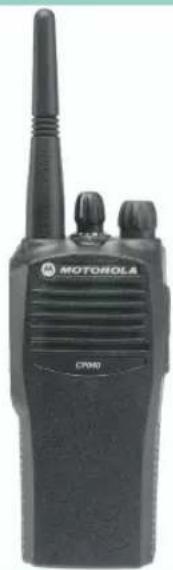
| Brand | Motorola |
| Model | CP040 |
| Product Type | Portable Two-Way Radio |
| Use | Professional |
| Number of Channels | 4 or 16 (depending on programming) |
| Power Supply | Rechargeable battery (desk charger included) |
| Battery Life | Up to 8 hours in typical use |
| Charging Time | 14 to 16 hours for initial charge; 90 minutes for 90% charge |
| Transmit Power | High or low (selectable) |
| Main Features | VOX, channel scanning, normal/tight squelch, selective call, call alert, monitor, audio compression |
| Programmable Buttons | 2 buttons for quick access to functions |
| Accessory Connector | For headset, earpiece, and other accessories |
| Indicator Light | Multicolor indicator (red, green, amber) for operating status and battery |
| Safety | Compliant with ICNIRP regulations; safety manual provided |
| Maintenance and Cleaning | Clean with a soft, dry cloth; avoid solvents |
| Spare Parts and Repairability | Battery, antenna, belt clip available; consult your distributor |
| Dimensions (approximate) | Approximately 120 x 55 x 35 mm |
| Weight (with battery) | Approximately 300 g |
Frequently Asked Questions - CP040 MOTOROLA
User questions about CP040 MOTOROLA
0 question about this device. Answer the ones you know or ask your own.
Ask a new question about this device
Download the instructions for your Talkie Walkie in PDF format for free! Find your manual CP040 - MOTOROLA and take your electronic device back in hand. On this page are published all the documents necessary for the use of your device. CP040 by MOTOROLA.
USER MANUAL CP040 MOTOROLA
intelligence everywhere
BASIC USER GUIDE
CP040
CONTENTS
Computer Software Copyrights 2
Radio Overview
Operation and Control Functions 3
Radio Controls 3
LED Indicator 4
Programmable Buttons 4
Improved Audio Feature 6
Companding 6
Battery Charge Status. 6
Audio Indicators for Programmable
Buttons 6
Getting Started
Battery Information. 7
Charging Your Battery. 7
Desktop Charger 7
Accessory Information 8
Attaching the Battery. 8
Removing The Battery 8
Attaching The Antenna 9
Removing The Antenna 9
Attaching The Belt Clip 10
Removing The Belt Clip 10
Turning the Radio On or Off 11
Adjusting the Volume. 11
Selecting a Radio Channel 11
Sending a Call 12
Receiving a Call. 12
Monitoring 12
VOX Operation 13
Connecting a VOX Headset 13
Enable/Disable Headset Sidetone. 13
VOX Headset 13
Non-VOX Headset With In-Line PTT .13
Radio Calls. 14
Repeater Or Talkaround Mode 14
Setting Tight or Normal Squelch 14
Setting the Power Level. 14
Receiving a Selective Call 14
Receiving a Call Alert Page. 14
Scan 15
Starting or Stopping Scan 15
Talkback 15
Deleting a Nuisance Channel 15
Restoring a Channel to the Scan List .16
Prioritizing a Scan List Member. 16
Computer Software Copyright
The products described in this manual may include copyrighted computer programmes stored in semiconductor memories or other media. Laws in the United States of America and other countries preserve for Motorola Europe and Motorola Inc. certain exclusive rights for copyrighted computer programmes, including the right to copy or reproduce in any form the copyrighted computer programme. Accordingly, any copyrighted computer programmes contained in the products described in this manual may not be copied or reproduced in any manner without the express written permission of the holders of the rights. Furthermore, the purchase of these products shall not be deemed to grant either directly or by implication, estoppel, or otherwise, any licence under the copyrights, patents, or patent applications of the holders of the rights, except for the normal non-exclusive royalty free licence to use that arises by operation of the law in the sale of the product.
RADIO OVERVIEW
This user guide covers the operation of the CP040 Portable Radios.

Caution
Before using this product, read the operating instructions for safe usage contained in the Product Safety and RF Exposure booklet 6864117B25_ enclosed with your radio.
ATTENTION!
This radio is restricted to occupational use only to satisfy ICNIRP RF energy exposure requirements. Before using this product, read the RF energy awareness information and operating instructions in the Product Safety and RF Exposure booklet (Motorola Publication part number 6864117B25) to ensure compliance with RF energy exposure limits.
OPERATION AND CONTROL FUNCTIONS
Radio Controls
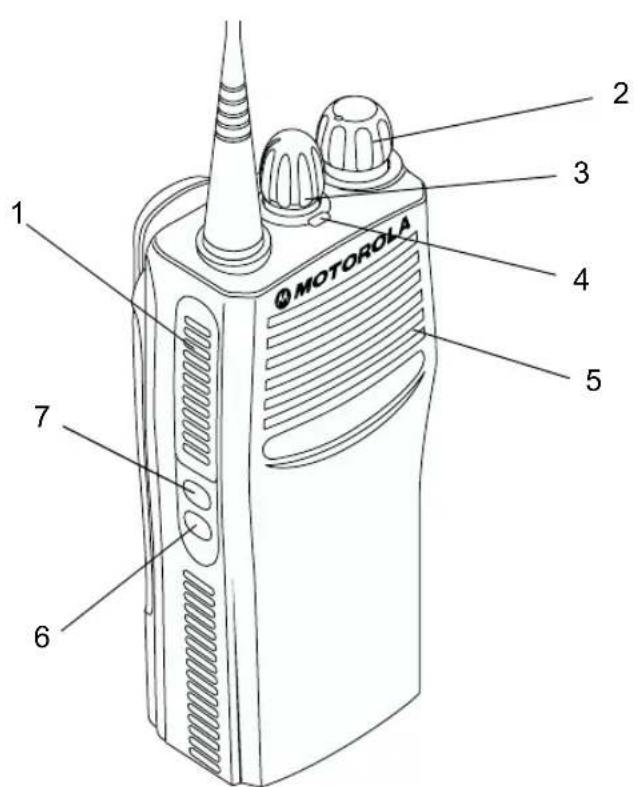
The numbers below refer to the illustrations on the inside front cover.
1. Push-to-talk (PTT)
Press and hold down this button to talk; release it to listen.
2. On-Off / Volume Knob
Used to turn the radio on or off, and to adjust the radio's volume.
3. Channel Selector Knob
Switches the radio to different channels.
4. LED Indicator
Indicates power up, transmit, receive, scan status, Call Alert, Selective Call and battery status.
5. Microphone
Hold the microphone 2.5 to 5cm from your mouth, and speak clearly into it.
6. Side Button 2 (Programmable)
7. Side Button 1 (Programmable)
Recommended for Monitor/Cancel button.
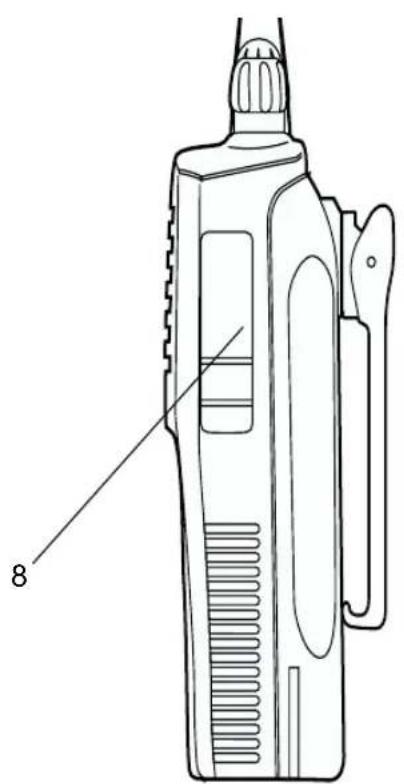
8. Accessory Connector
Connects remote microphones, remote earphones and other accessories. Replace dust cap when not in use.
LED Indicator
The LED shows radio status as follows:
| LED State Indication | ||
| Radio Call | ||
| Red Solid | Radio transmitting. | |
| Red Flashing Channel | busy - when receiving. | |
| Scan | ||
| Green Flashing Radio | is scanning. | |
| Call Alert | ||
| Yellow Flashing Receiving a Call Alert | ||
| Selective Call | ||
| Yellow Flashing Receiving a Selective Call | ||
| Sticky Monitor/Open Squelch | ||
| Yellow Solid Radio in monitor mode. | ||
| Low Battery Level | ||
| Red Flashing Flashing | when transmitting. | |
Programmable Buttons
Your radio has two programmable buttons. Your dealer can program these buttons as shortcuts to various radio features.
Check with your dealer for a complete list of functions your radio supports.
The buttons can access up to two features, depending on the type of button press:
- short press—quickly pressing and releasing the programmable buttons
- long press—pressing and holding the programmable buttons for a period of time (at least 1 1/2 seconds)
- hold down—pressing and holding down the programmable buttons while checking status or making adjustments
The following table is a summary of programmable radio features and corresponding page references. In the "Button" column, have your dealer record the name of the programmable button next to the feature that has been programmed to it.
Also, where appropriate, have your dealer indicate whether the button press requires a short press, a long press, or needs to be held down.
| Function | Short Press | Long Press | Hold Down | Page | Button |
| Battery Indicator Checks battery | charge status. | 6 | |||
| Volume Set — — Sound a tone | for adjusting your radio's volume level. | 11 | |||
| Sticky Permanent Monitor | A long press of the Monitor button initiates. A short press of the Monitor button cancels. | Monitors activity on a selected channel. | — | 12 | |
| Voice Operated Transmission (VOX) | Toggle VOX On and Off. 13 | ||||
| Repeater/Talkaround | Toggle between using a repeater or transmitting directly to another radio. | — | 14 | ||
| Power Level Toggle transmit power level between High and Low. | — | 14 | |||
| Squelch | Toggles your radio's squelch level between tight and normal squelch. | 14 | |||
| Scan/Nuisance Channel Delete | Toggle scan on and off . Delete a nuisance channel while scanning. | — | 15 | ||
Improved Audio Feature
Companding
Companding is a feature that allows further improvement of voice quality. It compresses your voice at transmission and expands it when receiving while simultaneously reducing extraneous noise. However, to enjoy this benefit, all transmitting and receiving radios must have this feature activated.
Battery Charge Status
You can check battery charge status if your dealer has preprogrammed one of the programmable buttons. Hold down the preprogrammed Battery Indicator button. The charge status is shown by the color of the radio's LED indicator.
| Battery Level | LED Indicator |
| Good Green | |
| Sufficient Yellow | |
| Low Flashing | Red |
| Very Low None |
Audio Indicators for Programmable Buttons
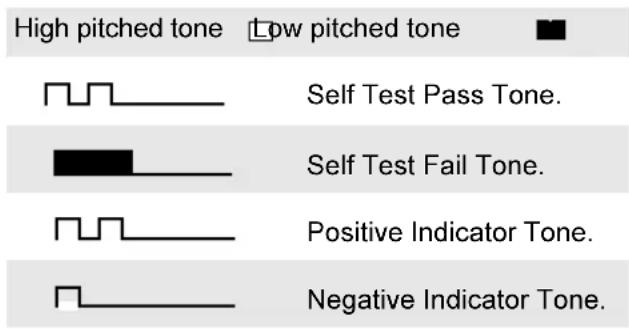
Some programmable buttons use tones to indicate one of two modes:
| Button Posi tive Tone Negat i ve Tone | ||
| Scan | Start scan | Stop scan |
| Power Level High power selected | Low power selected | |
| Squelch | Tight Squelch | Normal Squelch |
| Repeater/ Talkaround | Does not use repeater | Uses repeater |
| VOX VOX Enabled VOX Disabled | ||
GETTING STARTED
BATTERY INFORMATION
Charging Your Battery
If a battery is new, or its charge level is very low, you will need to charge it before you can use it. When the battery level is low and the radio is in transmit mode you will see the LED indicator flash red. Upon release of the PTT button, you will hear an alert tone.
Note: Batteries are shipped uncharged from the factory. Always charge a new battery 14 to 16 hours before initial use, regardless of the status indicated by the charger.
Desktop Charger
To Charge the Battery
1 Turn the radio off.
2 Place the battery, with or without the radio, in the charger pocket.
- The charger LED indicates the charging progress.
| LED color Status | |
| No LED Indication Battery inserted incorrectly or battery not detected. | |
| Single Green Flash $successful charger power-up. | |
| Flashing Red a | Battery unchargeable or not making proper contact. |
| Red Battery is charging. | |
| Flashing Yellow Battery in charger but waiting to be charged. The battery temperature may be too hot or too cold. The voltage may be lower than the predetermined threshold level for charging. | |
| Flashing Green b | Battery 90% (or more) charged. |
| Green Battery fully charged. | |
a Remove and replace the battery in the charger. If the LED indicator continues to flash red, consult your dealer.
b A standard battery may require 90 minutes to charge to 90% capacity.
ACCESSION INFORMATION
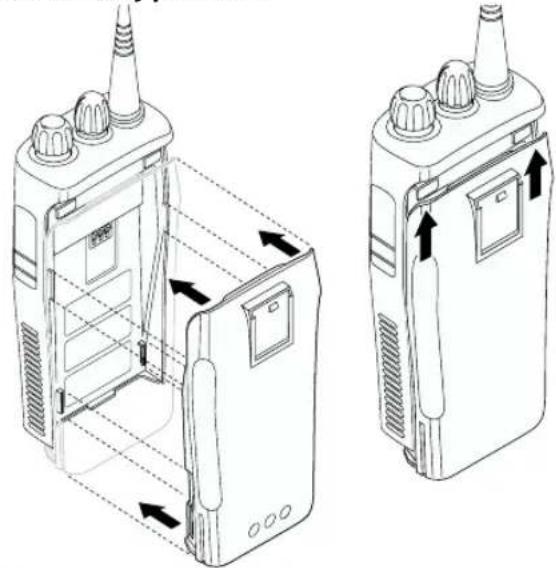
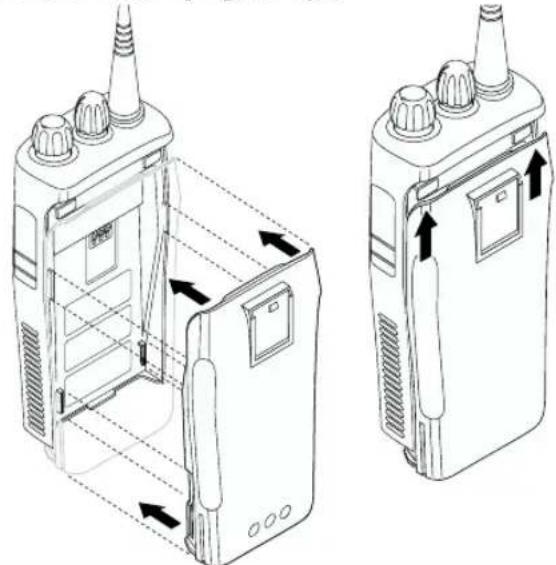
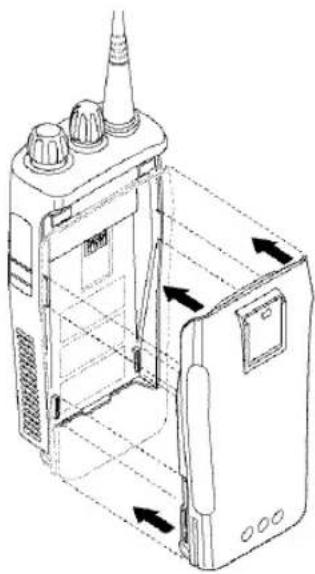
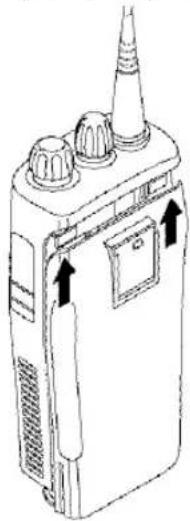
Attaching the Battery
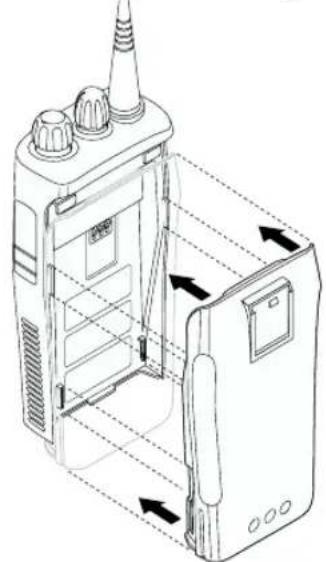
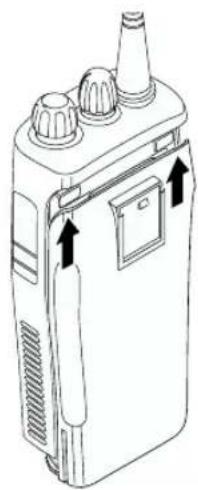
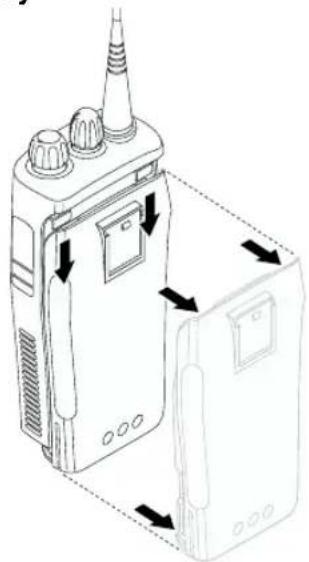
1 Align the battery to the battery rails on the back of the radio (approximately 1 cm from the top of the radio.)
2 Press the battery firmly to the radio and slide the battery upward until the latch snaps into place.
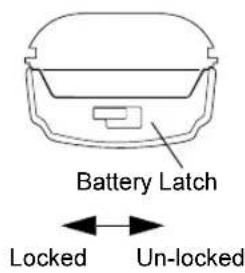
3 Slide the battery latch, located on radio bottom, into the lock position.
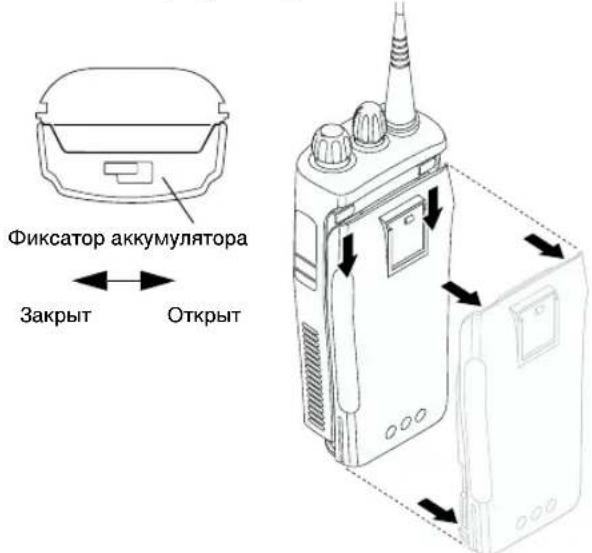
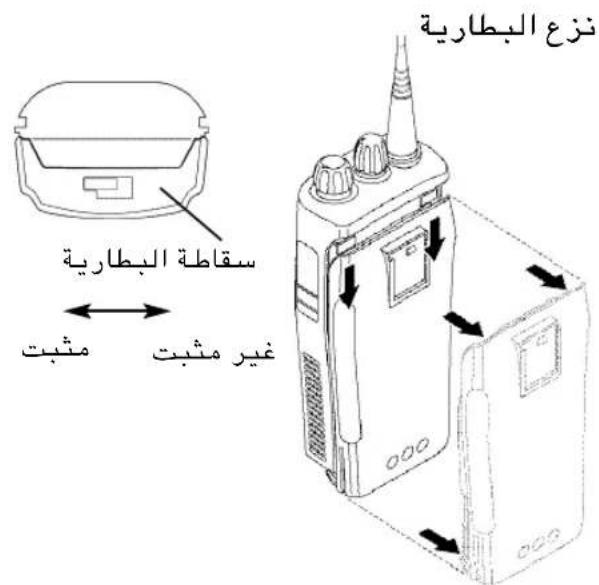
Removing the Battery
1 Turn off the radio if it is turned on.
2 Slide the battery latch into the unlock position. Disengage by pushing downward and holding the latch towards the front of the radio.
3 With the battery latch disengaged, slide the battery down from the top of the radio approximately 1cm . Once the battery is free from the battery rails, lift it directly away from the radio.
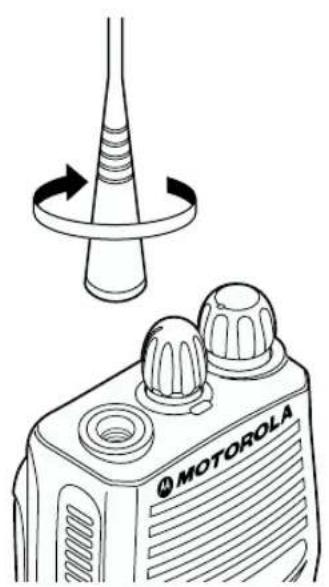
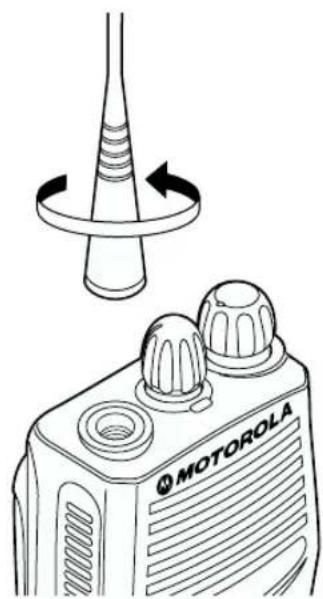
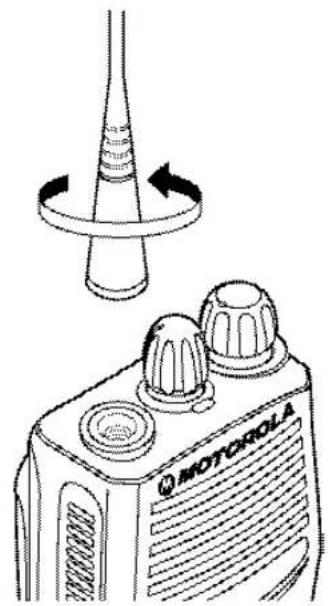
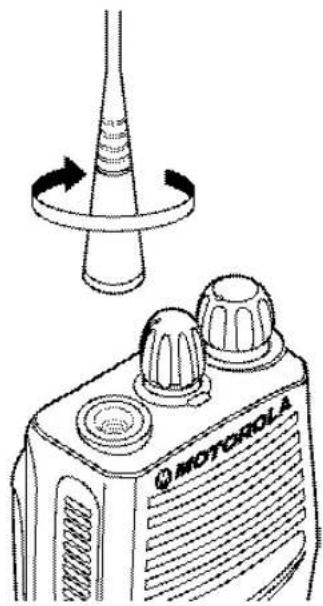
Attaching the Antenna Removing the Antenna
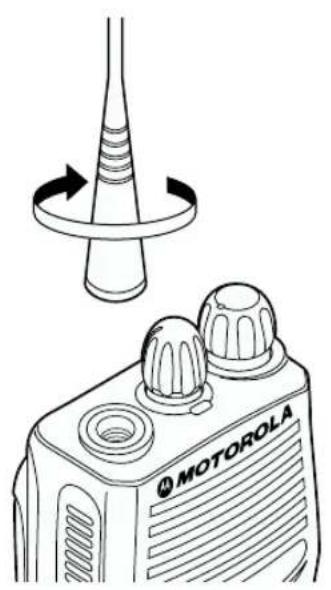
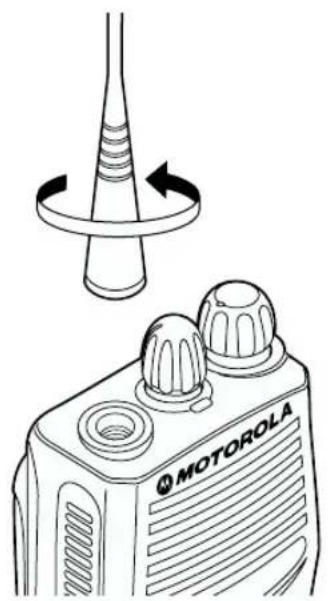
Turn the antenna clockwise to attach it. Turn the antenna counter-clockwise to remove it.
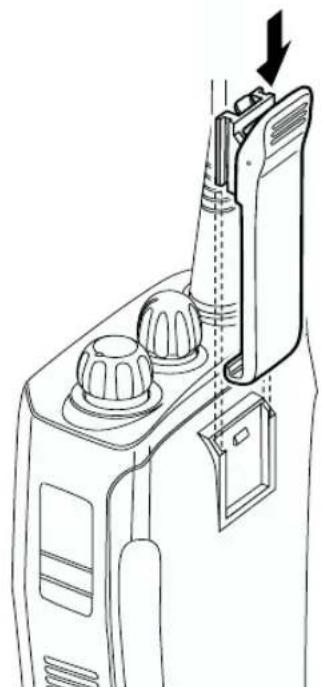
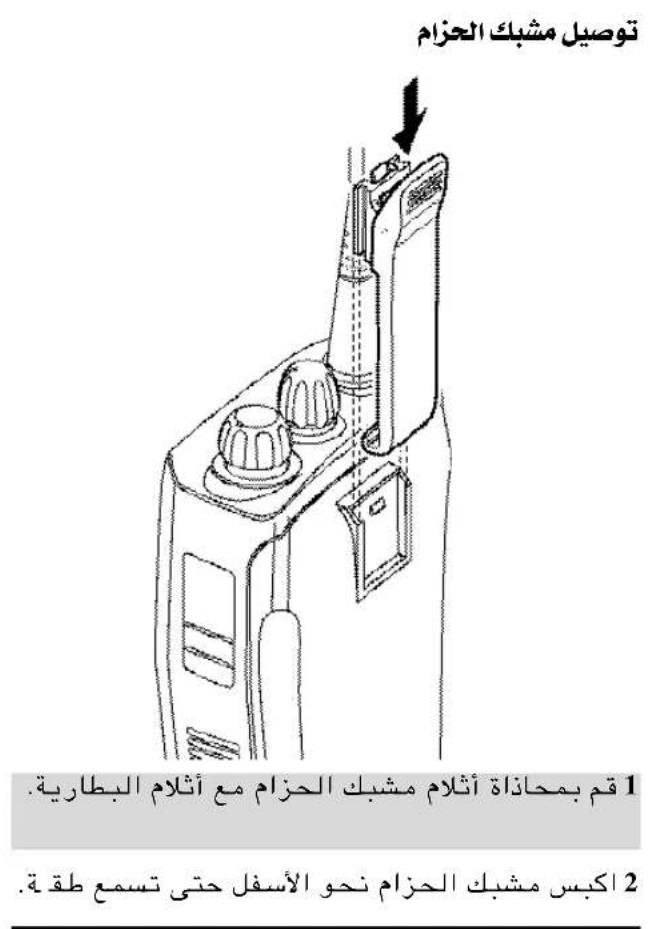
Attaching the Belt Clip
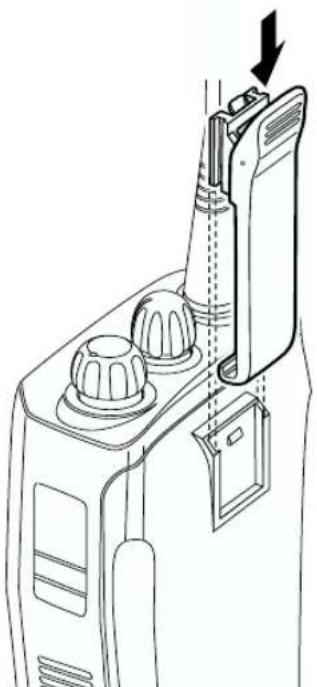
1 Align the grooves of the belt clip with those of the battery.
2 Press the belt clip downward until you hear a click.
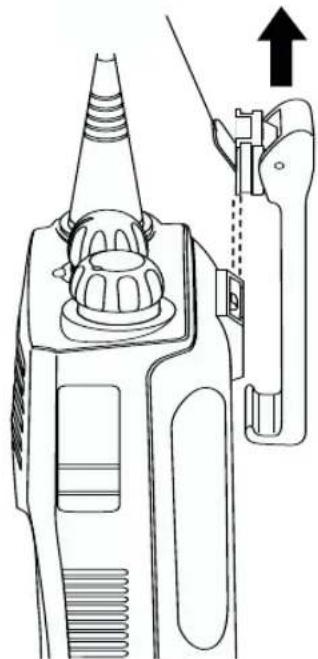
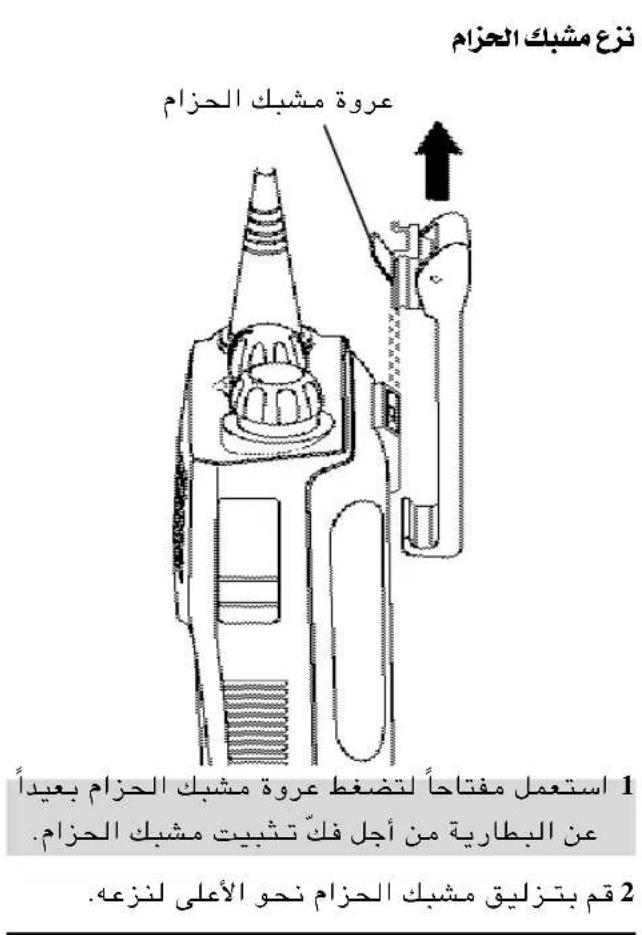
Removing the Belt Clip
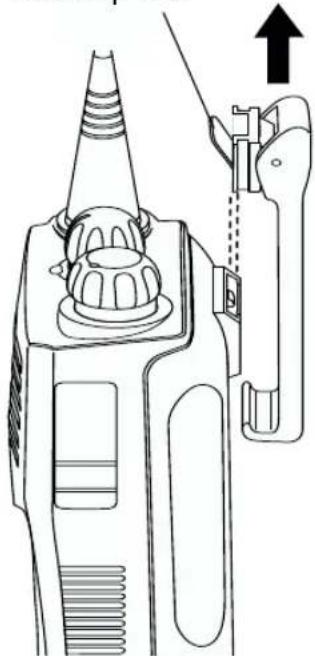
Belt Clip Tab
1 Use a key to press the belt clip tab away from the battery to unlock the belt clip.
2 Slide the belt clip upward to remove it.
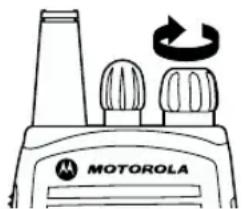
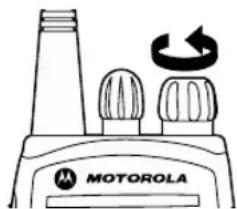
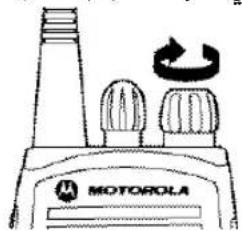
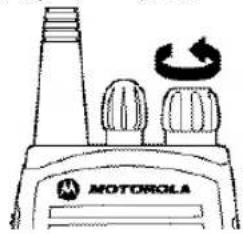
TURNING THE RADIO ON OR OFF
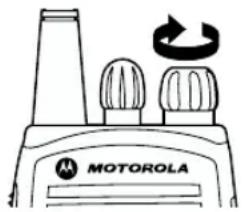
ON OFF
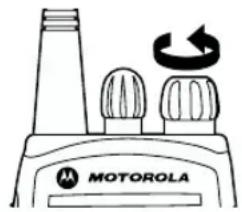
Turn the On/Off/ Volume Control
knob clockwise. If power-up is successful, you will hear the Self-Test Pass Tone
(3)see the LED flash green.
If the radio fails to power up, you will hear the Self Test Fail Tone

Turn the On/Off/ Volume Control knob counter-clockwise until you hear a click.
ADJUSTING THE VOLUME
1 Hold down the Volume Set button; you will hear a continuous tone.
2 Turn the On/Off/Volume Control knob to the desired volume level.
3 Release the Volume Set button.
SELECTING A RADIO CHANNEL
Your radio offers 4 or 16 channels.
Note: Due to government regulations, some channels may not be programmed. Ask your dealer for more information.
To select a channel, turn the Channel Selector knob clockwise or counterclockwise until you reach the desired channel.
SENDING A CALL
1 Turn your radio on.
2 Use the Channel Selector knob to select the desired channel.
3 Hold the radio in a vertical position, press the PTT, and talk at a distance of about 2.5 to 5cm from the microphone.
4 Release the PTT to listen.
RECEIVING A CALL
1 Turn your radio on.
2 Adjust the radio's volume.
3 Switch to the desired channel. To respond, hold the radio in a vertical position, press the PTT, and talk at a distance of about 2.5 to 5cm from the microphone.
MONITORING
It is important to monitor traffic before transmitting to ensure that you do not "talk over" someone who is already transmitting.
1 Press and hold the preprogrammed Monitor button to access channel traffic.
2 Once channel traffic has cleared, proceed with your call by pressing the PTT button.
3 A long press of the preprogrammed Monitor button places the radio in Sticky Permanent Monitor mode.
- You hear a high-pitched tone.
A short press of the Monitor button cancels Sticky Permanent Monitor mode and returns the radio to normal operation.
VOX OPERATION
When hands-free operation is desired, your radio can be activated by voice alone using the VOX feature when you speak through an accessory that is connected to your radio.
Connecting a VOX Headset
1 Turn off your radio.
2 Connect the VOX accessory to your radio and turn the radio on.
3 To enable or disable VOX operation, press the preprogrammed VOX button.
Note: Pressing PTT disables VOX.
-or-
Select a channel that has been programmed for VOX by your dealer to enable VOX.
Note: You do not need to press a preprogrammed VOX button.
Note: Pressing the PTT button disables VOX.
4 Select a channel that has not been preprogrammed for VOX by your dealer to disable VOX.
ENABLE/DISABLE HEADSET SIDETONE
Your dealer can program your radio to hear your voice through the headset during transmit.
VOX Headset
1 Turn off your radio.
2 Connect the VOX accessory to your radio.
3 Turn the radio on. During transmit, the sidetone will be enabled, if programmed in the radio.
Non-VOX Headset with In-Line PTT
1 Turn off your radio.
2 Connect the non-VOX accessory to your radio.
3 Press and hold the In-line PTT on your headset.
4 Turn the radio on and release the PTT once the radio has completed start-up.
5 To disable the headset sidetone, turn off your radio and turn the radio on again.
RADIO CALLS
REPEATER OR TALKAROUND MODE
Talkaround Mode enables you to communicate with another radio when either:
- the repeater is not operating
-or-
- your radio is out of the repeater's range but within communicating distance of another radio.
Press the preprogrammed Repeater/Talkaround button to toggle between Repeater mode and Talkaround Mode.
SETTING TIGHT OR NORMAL SQUEELCH
Use this feature to filter out nuisance (unwanted) calls and/or background noise. However, tightening squelch could cause calls from remote locations to be filtered out as well. In this case, normal squelch may be more desirable.
Press the preprogrammed Squelch button to toggle between tight and normal squelch.
Each channel in your radio has a predefined transmit power level that can be changed.
High power allows you to reach a radio that is farther away.
Low power conserves the battery's charge.
Press the preprogrammed Power Level button to toggle between low and high power.
RECEIVING A SELECTIVE CALL
When you receive a selective call:
- The LED indicator flashes yellow, if programmed by your dealer.
- You hear two high pitched tones.
To answer the call, press the PTT button.
RECEIVING A CALL ALERT PAGE
When you receive a Call Alert Page:
- The LED indicator flashes yellow, if programmed by your dealer.
- You hear four high pitched tones.
To answer the Page, press the PTT button; to cancel the Page, press any other key.
SCAN
You can monitor multiple channels and receive any calls that are transmitted on them. Channels can be programmed into a scan list by your dealer. Your radio automatically switches to a scan list channel when it detects activity on it.
STARTING OR STOPPING SCAN
The LED indicator blinks green during a scan operation and stops blinking when the radio switches to a channel.
You can start or stop a scan operation by:
1 To start or stop a scan operation, press the preprogrammed Scan button.
-or-
2 Select a channel that has been preprogrammed by your dealer to start Auto Scan.
Note: You do not need to press a preprogrammed Scan button.
3 Select a channel that has not been preprogrammed by your dealer to stop Auto Scan.
TALKBACK
If the Talkback option is preprogrammed, you can respond to any calls received during the scan operation. To respond, press the PTT button before the programmed hangtime elapses. Otherwise, the radio will continue scanning. Check with your dealer for details.
DELETEING A NUISANCE CHANNEL
Note: Your dealer must have preprogrammed a button to Nuisance Delete to access this feature.
If a channel continually generates unwanted calls or noise (a "nuisance" channel), you can temporarily remove it from the scan list:
1 While the radio is on the Nuisance Channel, press the preprogrammed Nuisance Channel Delete button until you hear a tone.
2 Release the Nuisance Channel Delete button. The nuisance channel is deleted.
Note: You cannot delete a priority channel or the last remaining channel in the scan list.
Restoring a Channel to the Scan List
1 Press the Scan button to stop the scan.
2 Press the Scan button again to start scanning again. The Deleted Nuisance Channel is restored to the scan list.
PRIORITIZING A SCAN LIST MEMBER
You may want your radio to scan a specific channel more frequently for calls. Your dealer can prioritize scan list members for you. Check with your dealer for details.
| Priority Channel Scanning Sequence | |
| None specified | Ch1→Ch2→Ch3→Ch4→...Ch1 |
| Channel 2 | Ch2→Ch1→Ch2→Ch3→Ch2→Ch4→Ch2→...Ch1 |
Even though your radio has switched to a non-priority channel, it will still check for activity on the priority channel. If activity is detected, the radio will switch to the priority channel.
INHALT
Copyright fur Computer-Software 2
AllgemeineInformationen ....
- Pulsar para haber (PTT, del ingles Push-To-Talk)
diretta (Talkaround) 14
"Repeater" eller "Talkaround" Iage 14
1. Sändningsknapp (PTT- Push To Talk)
INFORMATIE OVER ACCESSORIES
De batterijplaatsen
1. Puhepainike (PTT)
SELAUKSEN ALOITTAMINEN JA LOPETTAMINEN
Avamua-2nmao Paolotnaeovou (On-Off).11
Puroe Evtaos. 11
Enioyn PaootnAeewvikou Kavaiaou .11
AnoToaN KAnoN 12
Anyn Knaonc 12
Papakoouθηση 12
Aetoupyia VOX. 13
3ByKOBaHINdNkauHnDJIa
nporpaMMpyembIX KHOOK 6
Iodrotobka paanocthaun K pa6ote 7
HOpMaun 6 aKkymyTopax. 7
3apn aKymyHTopa. 7
HactoJIbHOe 3apJdHOe ycTpoIcTBO .7
Hnfoopmaun 6 akceccyapax .8
YcTaHObKa aKKMyIHTopa 8
CHRTHe aKKyMyJIrTopa. 8
YCTaHOBka aHTeHHbl. 9
CHATNE aHTeHHbI 9
KpenneHne nonchoro 3axima. 10
CHATNE norCHoro 3axkma. 10
BkIIOueHne I BbIKIOueHne paIOocTaHcnn. 11
PerynnpOBKa rpoMkoCTn. 11
Bb6op paiokaHana 11
IocbIIka Bbl3Oba 12
PpneM Bb30Ba. 12
MoHITOpINr 12
PexkIM roIocoboro ynpabneHn nepeauei (VOX). 13
IopcoeHHeHne rapHtpybI c roIOcOBbIM ynpabLeHnem nepedauee 13
BkIIOueHne/ByIKIIOueHne 3oΦΦeKta npocJyUWBaHnco6CTBeHHOro roJocA B
raphHnType. 13
IapHHTypa c roLOOCbIM ynpabJIeHNHeM nepeauei 13
TapHnIpya c TaHreHToi PTT 6e3 roIocoboro ynpabNeHnnepeDauey .13
PaIOOBbI3OBbl 14
Pexim petpaHcIaun nn npraMoCBA3n 14
UcTaHOBka "y3KOrO" HnH HopMaIbHOro yPoBHa 7yMOnOHxKeHn (Squelch) .14
YcTaHOBka yPoBHa MOUHOCn 14
PnEM CeJIeKTHBHO Bbl3OBA.14
PpneM neJdxKnHROBO ONoBeueHne ObI3Obe.14
CkaHnpoBaHne. 15
BkIIOueHne N BbIKIOueHne cKaHnpOBaHn 15
Функцу "ToK6aK" 15
YdaenHe Mewaioe Ro KaHana. 16
Bo3BpaKaHaNa B CnICOK cKaHIpOBaHn..16
Ha3NaueHne npOpnteTa dIyHKTa B cNcKe cKaHnpoBaHH 16
AaHHbIe paAnocTaHcNm CdeHaBb I B EC
PpeCTabnteIbctBO KomnHn «Motopona FM6X» B Pocnn
CekTop CucTemhbx INTherpupobahhbx PeueHn Pocna 123056 MockBa, yn. faeKa - 7 / 1
Ten.7 (095) 785-01-50 paKc. 7 (095) 785-01-60
Hhopmaun 06 abTOpckom npaBe Ha
KOMNbTePHeO nporpaMMHoe oecneueHne
OnucaHbIe B daHHOM pykoBOcTBe 3dennr Moryr coepKaTb 3aunuehHbIe ABTOPCKMM npabAMN KOMNBoTePbHe nporpAmMb, XpaHauueCn Ha onynpOboHKnOBbX 3Y uIN dpyrHx HocHTenX.3akOHb CoeHNHEHbL IITATOB AmePKN IN HEKOTOPBX dpyRIN cTpan H obceNeuMaBt HkETOpBte 3ckKnIO3NBbIe npaba KomnAHM Motorola Europe n Motorola Inc. B OTHouEHN 3aunuEHbX ABTOPCKM npabOM KOMNBoTePbX nporpAMM, BKNHOa npabo HA KOPIPOBAHne IN BOCpON3BedeHBe B NOBOF pOPMe 3aunuEHbX ABTOPCKM npabOM KOMNBoTePbX nporpAMM. CBsR C 3TNM HNKAKKe 3aunuEHbIe ABTOPCKMM npabAMN KOMNBoTePbHe nporpAMMb, COepPKaUeNEcB IN3dennx, ONUCAHbX B HACTORUeM PYKOBOCTBE, He paspuaetc KOnipOBat INI BOCpON3BDMTb KAKM 6b To H N6blno hIMB CNOCoB6 63 BNHO rncbMeHOrO papeuHn BnaDaepeBee 3TxN ABTOPCKNXP npab. Kpome TORO, NOKNYA 3TxN 3dennr He daET HNKAKNX RbX bIN NpOpaZymBaembX npab INnpab HA NcUeHN, HapmpeH ne NpOpaZymBaeAET OK3A BnApEnBueE OT CBOX npab IN T.N., B OTHouEHN ABTOPCTBA, NaTEHOB INI 3aBOK HA nateBb IBaNepBee ABTOPCKX npab, 3a NKNUOeyHem EobHyhN E 3KcKIOHNBbX npab H a63B03m3HyIO NcUeHNHO HA NCNOB3OBAHne 3TxN 3dennr CornacHO 3aOKHAM c npodaKe 3denni
OBUEE ONINCAHNE PAADNOCTAHUN
B daHOM pyKOBOIDCTBE ONncaHa 3KcNpyataunnoptatNBHO paNoctaun CP040.

BHHMaHHe!
Ipepe TEm KaK PnHCTyNtB K NcNoJIb3OBAHnIO DaHHORo H3dEINr NPOTHTe NHTCPYKUIM NO 6e3onacCHOCTn, CoepKaUneC8 B bkyKeTe 6864117B25_ "VHΦopMaunr No texHnke 6e3onacHOCTn I BO3dEJCTBnIO
paiaocactoTHOHN3Heprn"KOTOpbIN npIIOKeH K paiaocTaHcIM.
BHIMAHNE!
B cenx yobntbopene Tpe6oBAHn no Bo3deICTBHO
paioactoTHO 3heprn ICNIRP nconb3OBAHne daHHo
paIOCTaHn paoeaaTcra Tohko dna pa60t/bnpoccecoHaNBHO
dAeTbHOCHT. Ipeep nCNOJb3OBAHm EAnHORo n3DENn npOTnTe
IHOpmaIO NO BO3deIcTBNO paIOCACToTHOr N3nyEHN
INCTpyKUN IO kCNpNyatau, coepjkaunec B 6yKnTe
"INOpmaUgno TeXnke 63onacHO tN BO3deCTBIO
paIOACToTHO 3heprn (ny6nkaunr Motorola, kataloXhbl No
6864117B25_, YTO6bl He DOnyCTMb BbIXo3 a DOnyctMble npedeBb
BO3deIcTBn PAIOCACToTHO 3heprn.
ФУнкци N OPGAHbl UYPABJIeHnI ΦYHKZnN
OprahbI ynpaBHeHra paNocTaHcHn
PnBBeHbIe HNKe UcΦpbl AByJIOTcH OMepaMn IO3uNHa HIIIOCTpaunx, NOMEueHHbIX Ha BHyTpEnHe CTOpOHe 06JokKn.
- TaHreHTa PTT
Длп поедачи НжмITE и удржИBaIte
Нжато, Длп послушИВаИЗ - OTNYCTNTE.
2.Pyka Bk./Bbikl./PomKoctb IcnoIb3yeTcI INB KIOUeHIN-BbIKIOUeHIN paIIOCTaHcNn N peryIINPOBKn POMKOCTN. - Puyka BbI6opa KaHaoB PepeKluOaet paNIOCTaHcUHO Ha pa3JIuHbIE KaHaJIbI
4.CBToDIOHbI HnDKaTOp OTo6paKaET BKJIIOUeHHe NITaHnI,pepeaHy, npneM,CTaTyc CKAHINPOBaHN,ONOBueHHe O Bbl3OBe,CEJIeKTUBHbIBBb3OBuCOCToHHe aKKyMyJrTopa. - MmKpoΦoH YeTKO roBOpHTe B MmKpOΦoH, dePka ero Ha pacCToHHn 2,5-5 cm OTO pTa.
6.Бokobar KhoNka 2 (nporpaMmpyema) - Bokobar KhoNka 1 (nporpaMmpyema) PeKOMeHnyETcIJI NcNoJIb3OBAHnB KaueCTBe KhoNk MoHITOp/OTMeHa.
8.Γe3doIINoDCOeHNHeHnAKeCCyapOB NcNoIb3yeTcI INr NOCoEHNHeHn BblHOChbIX MkPocOHOB,BblHOCHbIX HayuHKOB INpyrNX akceccyapOB.Korda pa3bEm He nCNOb3yeTc, OHdoJKeH6bIT3aKpbIT3aRnykoN.
CBeToaHbI HdkKaTOp
CBeToIIOI OTO6paKaAe COCTOHHne paIIOCTaHcII NcIeNyUoIIM O6pa3OM:
1 BbIKHouHTe paHIOCTaHcHIO.
2 IomeCTHe aKKMyIaTOp (BmecTe c paAnocTaHcne HnO TdEhHO OT Hee) BOTceK 3apHOrO yCTpoiCTBa.
CBeToIOHbI INHnKaTOp 3apHnHO yCTpOuCTBa 6yTeT OTo6paKaTb CtaDNn npouecca 3apAKn.
| Цвет СВЕТОДNOДНО Индikatopa | Соctониhe | |
| Индikaця OTCYTCTBYET | АккумларTop Bставли Нерравильно яни He об hapтуг. Одна BCпьшka Зеленblim | Ус��шие ВКлоченип пitaши Зapадно устpoиства. |
| Магаюши Красны a | Зарда AkкумларTop Невоземожни яни OTCYтCTыe Контак мени AkкумларTopOM Зарданblim устpoист Bom. | |
| Красны AkкумларTop 3аржаetс. | ||
| Магаюши Желтын | АккумларTopnomeши Зарадноу устpoистBO, Н ог Зарда К не началась. Вазможни Прочи: Слишkom Високая яни Слишkom Из第三代 TempepaTypea AkкумларTop. Вазможно, Велични наразожени иж; пороговоу 3начени, установлениногу дlya зарда. | |
| Магаюши Зеленblim b | Уровень Зарда AkкумларTopa Составлaret 90 (пли бльш) прочны. | |
| Зелены AkкумларTop по постсы зар? Зелены AkкуmларTop по посту Зелены AkкуmларTop по посту Зелены AkкуmларTop по посту Зелены AkкуmларTop по посту Зелены AkкуmларTop по посту Зелены AkкуmларTop по посту Зелены AkкуmларTop по посту Зелены Akкуmлар Top по посту Зелены AkкуmларTop по посту Зелены AkкуmларTop по посту Зелены AkкуmларTop по посту Зелены AkкуmларTop по посту Зелены AkкуmларTop по посту Зелены AkкуmларTop по посту Зелены AKKуmlarTop по посту Зелены AKKуmlarTop по посту Зелены AKKуmlarTop по посту Зелены AKKуmlarTop по посту Зелены AKKуmlarTop по посту Зелены AKKуmlarTop по посту Зелены AKKуmlarTop по посту Зеленibles AkкумларTop по посту Зеленibles AkкуmларTop по посту Зеленibles AkкуmларTop по посту Зеленibles AkкуmларTop по посту Зеленibles AkкуmларTop по посту Зеленibles AkкуmларTop по посту Зеленibles AkкуmларTop по посту Зеленibles AkкуmларTop по посту Зeltenibles AkкуmларTop по посту Зеленibles AkкуmларTop по посту Зеленibles AkкуmларTop по посту Зеленibles AkкуmларTop по посту Зеленibles AkкуmларTop по посту Зеленibles AkкуmларTop по посту Зеленibles AkкуmларTop по поustу Зеленibles AkкуmларTop по посту Зеленibles AkкуmларTop по посту Зеленibles AkкуmларTop по посту Зеленibles AkкуmларTop по посту Зеленibles AkкуmларTop по посту Зеленibles AkкуmларTop по посту Зеленibles AkкуmlalTop noПнocьг Зеленibles AkкуmлalTop noПнocьг Зеленibles AkкуmлalTop noПнocьг Зеленibles AkкуmлalTop noПнocьг Зеленibles AkкуmлalTop noПнocьг Зеленibles AkucemлalTop noПнocьг Зеленibles AkucemлalTop noПнocьг Зеленibles AkucemлalTop noПнocьг Зеленibles AkucemлalTop noПнocьг Зеленibles AkucemлalTop noПнocьг Зеленibles AkucemлalTop noПнocьг Зелен讳 AkucemлalTop noПнocьг Зелен讳 AkucemлalTop noПнocьг Зелен讳 AkucemлalTop noПнocьг Зелен讳 AkucemлalTop noПнocьг Зелен讳 AkucemлalTop noПнocьг Зелен讳 AkucemлalTop noПнocьг Зelten讳 AkucemлalTop noПнocьг Зелен讳 AkucemлalTop noПнocьг Зелен讳 AkucemлalTop noПнocьг Зелен讳 AkucemлalTop noПнocьг Зелен讳 AkucemлalTop noПнocьг Зелен讳 AkucemлalTop noПнocьг Zelten讳 AkucemлalTop noПнocьг Зелен讳 AkucemлalTop noПнocьg | ||
a BbHbTe aKKMyJHTOp u3 3apHnHO yCTpoiCTBa n BmecTo Hero yCTaHOBnTe dpyroE cnn KpaChh b CBeTOIOHbI INHIMKaTOp npOioJXaeMnRaTb, o6patntecb K BaUeMy Dnepy.
bДЯЗAPDACTAHdAPTHORAOKKMynrTopaNo90%ero EMKOCTNMOKETNOTpe6oBaTc90MNHyT.
INHOPMALIJAOBAKCECCYAPAX
YcTaHOBKa aKKyMylrTopa
1 CoBMeCTIte aKKMyJrTOp c HAnpaBIAHUMMn IJIa Hero Ha 3aDHei CTeHKe KOpNyCa paNIOCTAHm (Ha pacCToRHH npIMepHO 1 CM OT BepXHei KpbIuKn paNIOCTAHm.)
2ПLOTHO npKMMTE aKKMyJITOp K KOPnycy paIIOCTaHcIMN I CdBINbTe aKKMyJITOp BBepx, YTo6bI erO cHKCaTOp C 3aUeJIKNBaHHeM BOWeJ B CBOE rHe3do.
3 CdBnHbTe cKcTOp aKkMyIHTopa, paONIOXeHHb B HxKHeY qACTn paNIOCTaHcUN, B NOIOXeHne "3akpbIT".
CHATNE aKKyMylrTopa
1 Ecnn paanoctaHnBknoyeHa, Bbkioute ee.
2 CdbnHbTe pKcTop aKKymIaTopa B noJoxHe H "OTkpBt". BbBeNITe pKcTop n3 3aueJIeHN HaDaBnB eO N B 3TOM IIOXKeHN HaPaBnB CTOPOHy nepeDHei CTeHN KOpnyca paNoctaHn.
3 IocJe TOrO, KaK cHkCaTOp aKKMyJrTopa BbIeTe N3 3aueJIeHn, CdBHbTe aKKMyJrTOp BHN3 npIMepHo Ha 1 cm. Korda aKKMyJrTOp COIeTe CO CBOx HApBaJIHOuX, npINoHIMtTe erO nOTcoEduHInTe OT paNIOCTaHcUN.
YctaHObKa aHTeHHbl
CHATNE aHTehhbl
IpyncoeHHeHH aHTeHHbIOBepHnTe ee no YacBOO CTpeKKe Do fHKcaun.
IJIaOTCOeINHeHnAHTeHHbI NOBepHInTe ee npOTNB YacOBOcCTpeKN.
Kpenenne nOraCHO 3axma
1 CoBmecTHe HApBaBnIouHne Ha NoAChOM 3aXkMec HApBaBnIouuMn aKkyMylrTopa.
2 HaxMMTe Ha noaCHOI 3aXIM CBepxy Bn3 nO uJyka.
CHATNE NORCHO 3axnma
Jaanka norchoro 3axima
1 C nOmoIbIO KInOua OToXMMte NaNky NoHCHO 3aKIMa OT aKKyMylrTopa.
2 CdbnHbTe noaCHO 3axm BBepx nla OTCoeDnHeHn.
BKNIOUOHEH N BbIKJIIOUeHNE PAADNOCTAHUN
BKl. BblKl.
| ПовернITE ручу Вк./ Вык. /Perулровka |
| rpondКоCTи NO уасовои стpeлke. B счуаe |
| HOPMaJIbHOrO BKNIOUчEHи пNTaHи ПОЗБУЧИТ |
| TOHaJIbHь сИганЛ |
| "camOTecTIpOBaHne |
| пpoшлу усpeшо" |
| ( ) |
| CBETODIod 6удET MИraТь |
| 3eJIeHbIM. |
| B счуаe сбог пriи |
| ВКЛIOUчEHи ПИТаHиЯ |
| пpo3Byt NT ToHaJIbHьи |
| СИГHAЛ |
| "camOTecTIpOBaHne He |
| пpoшло" ( ) |
IobepHnte pyky Bkn./ BbIKl./PerynnpoBka rpoMkOCTn npOTNB yacBOi CTpeKN Do 1eK.
M
PEIYINPOBKA IROMKOCTN
1 HaxMMTe n ydepxnBaIte KhoNky YcTaHOBKa rPOMKoCTn; npO3ByuNT HeNPpepbIBHbI TOHaJIbHbI CNrHaJ.
2ДЯ BbIcTaBHeHn HUxHO rpoBn rpoMkoCTn NOBopauBaTe pyky Bk./BbIKn./ PerynipOBKa rpoMkoCTn.
3 OTnyCTnTe KHOIky YcTaHOBka rPOMKOCTn
BbIBOP PAДNOKAHАla
Ba7a paAnocTaHcHnI NO3BOJnE T nCNoJIb3OBA Tb OT 4do16 kaHaNoB.
Примechанe:ВсвзисpacnopжehнмпраNTeJIbCTBa HeKOTOpble KaHaJIbI MOryT Oka3aTbCHeNoCTUHbIMnДЯ nporpaMMIpOBaHn.ДЯ NOlyueHn 6Oone noJpObHo nHΦopMaunu 6oPaTInTeCb K O6cIyXnBaIOSeMy Bac dInIepy.
Длг Вьбopa KaHana NOBOPaUNBaIte pyKу Bьбop KaHana IO YacOBО CTpeJIke IIN IpoTnB YacOBO CTpeJIKN, NOKA He NOBITcH HxKnbl KaHaI.
ПОсьИКА Вbl3OBA
1 BkIIOUHTe paAnIOCTaHcNIO.
2 ⅡЯ BbIbopa HxKHOro KaHaJa NcNoJIb3yIte pyuKy BbIbOp KaHana.
3 Depxnte paHocTaHnIO BepTKKaJbHo, HaxMNTe TaHReHTy PTT uROBOpTe B MmKpoΦoH, depxa erHa pacCTOarHnn npImepHO 2,5-5 cm oTo pTa.
4Дл npocnyuBaHnOtnyctnte TaHReHTy PTT.
ПРЕМ ВьИЗОВА
1 BkIIOUHTe paAnIOCTaHcNIO.
2 OtperynpyTe rpoMkoctb paNocTaHcnn.
3 IpeeknouhTecb Ha HyxHbI paNOKaHaJI.ДЯ OTBeta DePKeHTe paNIOCTAHUO BepTKaJIbHO, HaxMNTe TaHReHTy PTT nROBOpTE B MInKpOFOH,dePka erHa paCCToHmN npIMepHo 2,5-5 cm OTO pTa.
MOHHTOPNH
Baxho npoBeCTM MOHTOpHr paNoooMeHa nepei Hauanom nepeauy, YTObI Baun peerOBopbl He Hanoxnilncb Ha nepedauy dpyroJ paNocTaHcnn.
1ДлгпроверкнHaJIИчЯ paIIOO6MeHa no KaHAny HaxMNTe N ydePxNBAaTe HaxaToJ 3anporpaMMIpOBaHHyKHOKNy MoHtOp.
2Пи OTCyTCTBn paINOO6MeHa NO daHHOMy KaHany npoJONKHe BbIOnHHe Nc Bbl3OBA, HaxKaB TaHReHTy PTT.
3ДЛNTeHbHbHaXnM 3aIporpaMMNpOBaHHoKHOKN MoHTOp BBOIT paIOCTaHcUO BpeXm HEnpepbHBbMoHTOpnHr.
- Ipo3ByuHT ToHaJIbHbI CNrHaI BbICOKOToHa.
KpaTkoBpeMeHHbHaXkM KHOKn MoHtOp npBOoNT K OTMeHe peXkMa HenpepbIBhB MOHTOpnH N BO3BpaTy paIIOCTaHcN B HOpMaJIbHbI peXm pa6Obl.
PEKIM TOLOCOBOTO YNPABJIENI PEPAUEN (VOX)
EcnBbXOTHe, YTO6bI npaPabOte y Bac 6bln CBO6oHbI pyKN, TO c NOMOuBIO cyHKcNIM (VOX) Bbl MOKeTe aKTINBnPOBaTb paNIOCTaHcNIO rIoOCOM, ROBOPaYepe3 POKJIHOeHHbIK paNIOCTaHcNIAkceccyap.
IopcoeHHeHne raphHtypb c (vox)
1 BbIKNIOHTpe paIIOCTaHcHIO.
2 PoiocoeHnHTe K paHIOCTaHcIMn akCEccyap c cyHKmEe VOX IN BKJIIOHNTe paHIOCTaHcIMIO.
3ДЯ BKJIOUeHINI NIN OTKJIOUeHINI peKIMa VOHXAKMITE 3anporpamMnpoBaHHyO KHONky VOX.PnmeAHne: Haxatne TaHReHTbI PTT npBODNT KOTKJIOUeHNOpeKIMa TOnocoboe ynpabJeHne nepedaue.
-NNN
IpeeknouTecb Ha KaHaJI, KOtOpb Bau dInep 3aInporpaMMPOBaJI TaKIM o6pa3OM, yTo6bl npn nepexOe Ha Hero BKIoUoAancapeKIM VOX.
Прмочи:В StOM Cnyuae HaKMaTb 3anporpaMMnpoBaHHyIO KHONKy VOX He HxKHO.
IpmeaHHe:HaKaTne TaHReHTbI PTT npuBODNT K OTKJIIOUeHnO peXIMa FOnOCOBoe ynpabNeHne nepedaue.
4ДлгOTKIOUeHnpeXIMa VOX npeKIOUHTecb Ha KaHaJI, KOtOpBn BaW dInep He 3anporpamMnpoBaJI TAKm O6pa3OM, YTO6bl npn nepexOHe Ha Hero BKIOUcAChpeXIM VOX.
BKJIIOUeyHNE/BbIKJIOyEHNE ΘΦΦEKTA IPOCSnyUINBAHn COBCTBEHHOTo TOLOCA B ΓAPHNtYPE
BaW dIJIeP MoKET 3aInporpaMMnpoBaTb paNIOCTAHUIO TaKIM O6pa3OM, YTO6bl BO BpeM nepeDaun BB cIbIaJIN B raphHtpe co6ctBeHHbI roJoc.
FapHntypac VOX
1 BbiknIOuHTe paAnocTaHcIIO.
2 PoiKJIIOUHTe K paIIOCTaHcIIaKCECCyap c cyHKcEe roLOCOBOrO ynpaBHeHnpepeae.
3 BkHouHTe paAnocTaHcHIO. Bo BpeM nepedaunBbl 6yTeTe CbIaTb Co6CTBeHHbI rOLOc,ecnBau DNJIeP 3aIporpaMMIpOBaI 3OT 3cΦeKT BpaAnocTaHcHIN.
TapHnTypa c TaHreHToI PTT 6e3 VOX
1 BbiknIOuHTe paAnocTaHcNIO.
2 PoiKJIIOUHTe K paIIOCTaHcIN aKceccyap 6e3 cyHKcIN VOX.
3 HaKMMTe uYepKbainTe pacnoIooKeHHyHOHa rapHnType TaHreHTy PTT.
4 BkHouHTe paAnocTaHcIIO nNoCle ee BkHouEHHBpa6Oty Otnyctnte TaHreHTy PTT.
5ДлгOTKIOUeHnIgOcpeKtA npocJyINBaHnIco6CTBeHHOro rIoocaB rapHnType BbIKIOuHTepaIOCTaHnIO n 3aTeM CHOBA BKIOHHTe ee.
PAДNOBbl3OBbl
PEKIM PETPAHCJIaUNIINIINIIPROMCB3N
PexnmpoBcB3n daet BO3MOXHOCTb C8R3N C dpyro paIOCTaHcne,ero MOxHO NcPOJb3OBaT B cJeDyUOxN CnyaHx:
- PetpahcIaTOp He pa6oTaE
一NNN
Ba7a paNocTaHnHaxoNTc3a npedeJaMa paNyca DeiCTBnH petpHaCJHTopa, HO B npedeJax 30HbICBnC DpyrO paNocTaHnneI.
HaKImaTe 3anporpaMMnpoBAHHyO KHOJky PetpacnTop/IpMaar CB8b DnI nepeKIOueHm Mekdy peKImamn PeTpaHCnAurn Ipmaar CBA3b.
YCTAHOBKA "y3K0rO" HIN HOPMAJIbHOrO YPOBHA SHYMONOHJXEHNA (SQUELCH)
IcnoJb3yUtepeXMMpa60TbHa"y3KoNnonoe dIa IOTcHbTpBOBbBAHNMeuOuHX(HexKeIateJIbHbIX) Bbl3OBBoW/INnFOHOBOrO uMa.ODhako,ycTaHOBka peXIMamaPbToHa"y3KoNnonOE MoKET npNBecTHK OTcHbTpBOBaHNTOkKe INBb3OBOTyJaJIeHHbIX paHIOCTaHcN.B 3tOM Cnyae CEJIeCOo6p3Ho IcNoJb3OBaTbpeXMMpa60TbHaHopMaJIbHOI NOOce.
HaKmMaTe 3anporpaMMnpoBaHHyU KHOkY
WymonohxKeHne IJIpeKJIIOueHnM MeXyD
peKmAmPa60TbI Ha "y3KoN INI HOpMaJbHOI NOIOce.
YCTAHOBKA YPOBHA MOUHOCTHI
JaKaJDoRaKaHana paNocTaHcHn 3aHaONpeJeHHb yPOBeHb MOUHOCTn nepeaH, KOTOpBm MoKHO N3MeHrTb.
BpeKIMe BbICOKOYO yPOBH MOLUHOCTM MOXHO BECTN CB3b C ydaJIeHHbIMn paIIOCTaHcIaRMN.
BpeXnme Hn3KOry yPOBHa MOLUHOCTu 3KOHOMUTc3apnakkymyIaTOPa.
HaximaiTe 3anporpaMMnPOBaHHyO KHONky yPoBeHb MOUHOCTN IJII NEPEKJIIOUeHIN MEEKdy pEKIMAMN BBICOKO r Hn3KO r yOBHA MOUHOCTN.
ПРЕМ СЕLEKTИВΗΟ БызОВА
Pn npneMe cJIeKTHBHO BbI3OBA:
- CBeToDnOHDhI INHdNkATOp Mmraet JKeJTBIM,ecn3TO 3aInporpaMMIpObaHO BaumM dInepom.
-Двжды npo3ByuT ToHaJIbHbI CnHaN BbICOKOToHa.
ДЯ OTBetaHa BbI3OB HaxMITE TaHReHTy PTT.
PnEM PEnJxKInHROBOO ONOBELEHN O BbI3OBE
PnpneMe neJxHROBO OOnBeueHnO Bb3OBe:
- CBeToDIOHbI INHnKaTOp MNaeT KeJtBIM,ecN3TO 3aIporpaMMuPoBaHO BaUIM dUnepom.
- Ipo3ByaT YeTbIpe TOHaJIbHbIX CnRHaJa BbICOKOToHa.
Длг OTBetaHa NeiDxHROBoe COO6ueHne HaxMnte TaHTReHTy PTT;Длг OTMeHbI NeiDxHROBOTo COo6ueHnH HaxMnte NIObOу DpyryO KnabuWy.
CKAHNPOBAHNE
CkaHIpOBaHHe N03BONJIeT BECTN MOHITOpHHr HECKoJIbKIX KaHaIIOB IN pPnHIMaTb nepeDaBaEMbIe NO Hm BbI3Obbl. BaU dUnep MoKET 3anporpaMMIpOBaTb KaHaJIbI B CnUCOK CkaHIpOBaHry. O6hApyKINB paNoOO6MeH Ha KaKOM-JIbO IN3 KaHaIIOB, BHeCEHHbIX B CnUCOK CkaHIpOBaHry, paNoCTaHcNIA ABTomAtuYeCKIn NepeKJIIOHTcR Ha 3OT KaHaJl.
BKVJIIOUeyHNEI BbIKJIIOUeyHNECKAHINPOBAHNA
Bo BpemcKaHnpOBaHHcBToDIOoMnraET 3eJIeHbIM INpepcTaet MraTb npi nepeKJIOueHnn paAnocTaHcN Ha KaHaI.
BkIIOUeHne IIN BbIKIOUeHne cKaHnpoBaHnA:
1Дя3ayncka nnn npekpaueHnraKaHnpoBaHnHaXMMTe 3anporpammmnpoBaHHyIO KHOINKy CkaHnpoBaHne.
-NNN
2 IpeeknIOHTecb Ha KaHaJI, KOToPbI BaW dInep 3anporpaMMIpOBaJI TaKIM o6pa3OM, YTO6bl npn IepexOe Ha Hero BKIOUaJcR peKIM ABTOCKAHIpOBaHHe.
Прмочанe:ВЗTomСлуанHaЖиMaTb 3anporpaMMnpoBaHHyIO KHONKy CkaHnpOBaHne He HxKHO.
3ДлпркрашениАВTOCKHINPOBAниpepeKIOHITecbHaKaHaI,KOTOpBiBaWДИпeR He 3aIpoIgPAMMInPOBaJI TAKIM O6pa3OM,YTO6bl npn IepexOJe Ha Hero BKNIOUcAICIpeKIM ABTOCKAHINPOBAHne.
ФУнКЦЯ "ТOKБэК"
EcnBau Dnep 3anporpaMMPOBaJ
DOnONHtEnbHyO cyHKuIO "ToK63K"TO Bbl CMOXeTe
OTBeaTb Ha Bbl30BbI BO BpeM BAIOJIHeHNe ONEpaun
CKaHnpoBAHn. JIy OTBeTa HA Bbl3OB HAXMITE
TaHTReTy PTT Do nCTeueHn 3anporpaMMPOBaHHOrO
NepnoDa cKcauHa KaHaJe. Ecn Bbl 3TOrO He
CdeJaTe, To paNDocTaHcN IpoDoJNKIT
CKaHnpoBAHne. JIy NOLyehn 6Olee NoPpObHoi
INHcOpMaun o6paTInTeCb K ObcnykBaIOUeMy Bac
dInepy.
YDAJIEHNE MELSAIOUZERO KAHANA
IpnmeaHne: IJIIOCTyNA K 3TOI cyHKcHn Heo6xOIMO, YTObBaW dINep 3anporpamMnpOBaI KNONKy ydaJeHne MewaHOeRO KaHana.
Ecnn no KaKOMy-Jn6o KaHaJy ("MeuAoUeMy" KaHaJy) NOCTOHHNOCTynaHOT HeKeNaTeHbHbe Bbl3OBbl/WMbl, TO MOxHO BpeMeHHO ydaJIITb 3T0 KAHaN I3 CNnCKaCKaHnpOBaHn.
1 KOrda paAnocTaHcHn HaCtpoHa Ha MeHaOu KaHaJI, HaxMITE 3aIporpaMMIpOBaHHyIO KHOJky YdaJeHne MeHaOoTe RaHaJaN ydepxNBaIte ee HaKaToJ Do Tex nop, Noka He ycblWiTE ToHaJIbHbI CNrHaJI.
2 OTnycTe KhoNky YdaJeHne MeHaOoero KaHaja. B pe3yIbTaTe MeHaOuSi n KaHaI 6ydet ydaJIeH.
PpimcHHe: PnOpTeHbKaHaJI NIN NOcneHIn KaHaJI, OCTaBUnsCBA CnNcKe cKaHIpOBaHnIy, ydaJIuTb HeJIb3J.
Bo3bpat KaHaJa B cnucok cKaHnpoBaHnA
1 HaKMTe KHOKNy CkaHnpOBaHne IJI npEkpaueHHN cKaHnpOBaHH.
2ДЯ BO3O6HOBJIeHnRA CKaHnPOBaHnRA CHOBA HAnKMITE KHOJNky CKaHnPOBaHnE. YdaJIeHHbIM MeMaHOUsn KaHaJI 6yJeT Bo3BpaUeH B CnICOK CKaHnPOBaHnI.
HA3HauEHNIE PPNOPUTETAДЛЯ ПУHKTAВСПСКЕСКAHNPOBAHNY
Moxho 3aiporpaAMnPOBaT paNOCtAHUToKIM
O6pa3OM, YTObI BO BPEMc KaHnPOBAHH
OnpedeeneHHbKaHaJ npOBepraCHa Ha HauyHe
Bbl3OBoB Yaue Dpynx KaHaIOB B CnNCke
CKaHnPOBAHH. BaA dInep MoKet Ha3HaunTB
PnpOpHTb dnnnyHKTOB B CnNCKe cKaHnPOBAHH.Дla
NoJyehn6 bonee noDpObHO nHOpMaun
O6paNTecb K o6cnykBaIoUeMy Bac dInepy.
RECEPTIONAREA UNUI APEL
J 1 J 1 J 1 J 1 J 1 J 1 J 1 J 1 J 1 J 1 J 1 J 1 J 1 J 1 J 1 J 1 J 1 J 1 J 1 J 1 J 1 J 1 J 1 J 1 J 1 J 1 J 1 J 1 J 1 J 1 J 1 J 1 J 1 J 1 J
21_2^2
111 111 111 111 111 111
1 1
8
aJc jll lalkll aJauu Joo 1 1 1 1 1 1 1 1 1 g /g (aBgejll
LALLI 1
1 1 1 1 1 1 1 1 1 1 1 1 1 1 1 1 1 1 1
11jg,laLwJy
1
J 1
JL 11/21 11
VOX 1
LwUj1 1
VOX 2 2 2
i 3
gog
SLWUJLgALIaBbIpa1
GALLIyHuaHpaIpcAebuJUwOg2
SLWUJIJLgnon-VOX
b11 1e JUwJg yjy j 3 10 g20 11 10 g, aLau In-line PTT
j 4 j 4 j 4 j 4 j 4 j 4 j 4 j 4 j 4 j 4 j 4 j 4 j 4 j 4 j 4 j 4 j 4 j 4 j 4 j 4 j 4 j 4 j 4 j 4 j 4 j 4 j 4 j 4 j 4
5
VOX
L aal jn no jglll Jia 13
Jg, b a gally jglll b u i ic y
Loce VOx igally b u i i I aol p
jlg jLwgi Paa L a h S
1
VOX 2
Vox 3
g jy/1j 1111111111111111111111111111111111111111111111
14 1
1/2
aJso Jw!
11 11 11 11 11 11 11 11 11 11 11 11 11 11 11 11 11 11 11 11 11 11 11 11 11 11 11 11 11 1
1 1
1
1
Jll 1Lkll 2
a j 1111 Jw. PTT JwJy
/laal jLg sb yal bai 3
Jy Jy Lg eo aay Ls<swy
aal aas y Lwyyj
111111111111111 1
1
1
2
3
4
5
6
7
8
a#
1 2
J 3
g g 1
j 1
k .PTT J5 5 2.5
a
1
b/1ably/JiJ 2
jL
16 4 LwU
gai jll aia bia i1 1glal yloc :la2ylo
gaii jia bi jn jn gao 1
jno Logaall jno jol all .gao
1201 /
111 111 111 111 111 111
1
| x^ | = 1| x| · | r1^2 + r2^2 + r_3^2| ≤ 34| x| ^2
/1 10000000000000000000000000000000000000000000000000000000000000000
/1111111111111111111111111111111
sLwJ1j11 13
a aagaae Jgtaa


g
a ccll l aol
a
4.4.1.2.1.3.
2
Jolalilie ablall jaij jai Jai
SLWU13411
J 3
aag yjraa jiai 1 aalay aaiy
Jkiy j,1j 1k
jgljj jie jie jie jie
Autoliz X1 Closelst Cloglso
y
1
()
12
IgILs aablaal abn gnn
jll jie sccgssg 1, jbbabb jz3
1
J 1 J 1 J 1 J 1 J 1 J 1 J 1 J 1 J 1 J 1 J 1 J 1 J 1 J 1 J 1 J 1 J 1 J 1 J 1 J 1 J 1 J 1 J 1 J 1 J 1 J 1 J 1 J 1 J 1 J 1 J 1 J 1 J 1 J 1 J
y 111 11 11 11 11 11 11 11 11 11 11 11 11 11 11 11 11 11 11 11 11 11 11 11 11 11 11 11 11 11 11 11 11 1
J 1 J 1 J 1 J 1 J 1 J 1 J 1 J 1 J 1 J 1 J 1 J 1 J 1 J 1 J 1 J 1 J 1 J 1 J 1 J 1 J 1 J 1 J 1 J 1 J 1 J 1 J 1 J 1 J 1 J 1 J 1 J 1 J 1 J 1 J
a y1y1g b1-8aa a j 1
1.5) 1.5
1 1 1 1 1 1 1 1 1 1 1 1 1 1 1 1 1
111 111 111 111 111 111 111 111 1
1111/111111111 111111111 11111111
11 11 11 11 11 11 11 11 11 11 11 11 11 11 11 11 11 11 11 11 11 11 11 11 11 11 11 11 11 1
LED
Ls LwH
MOTORIA and the Stylish M Logo are registered in the U.S. Patent & Trademark Office. All other product or service names are the property of their respective owners. © Motorola, Inc. 2003.