
BAR628HGU - Weather Station OREGON SCIENTIFIC - Free user manual and instructions
Find the device manual for free BAR628HGU OREGON SCIENTIFIC in PDF.



| Product Type | Wireless Weather Station |
| Brand | Oregon Scientific |
| Model | BAR628HGU |
| Main unit dimensions (L x W x H) | 116 x 55 x 127 mm |
| Main unit weight (without batteries) | 186 g |
| Probe dimensions (L x W x H) | 92 x 60 x 20 mm |
| Probe weight (without batteries) | 63 g |
| Main unit power supply | 3 UM-3 (AA) 1.5 V batteries |
| Probe power supply | 2 UM-4 (AAA) 1.5 V batteries |
| Indoor temperature range | -5°C to 50°C |
| Outdoor temperature range | -20°C to 60°C |
| Temperature accuracy | 0.1 °C |
| Relative humidity range | 25% to 95% |
| Humidity accuracy | 1% |
| Probe radio frequency | 433 MHz |
| Maximum transmission distance | 30 meters (without obstacles) |
| Probe transmission interval | Every 40 seconds |
| Main features | Indoor/outdoor temperature and humidity, weather forecast, lunar cycle, radio-controlled clock, alarm |
| Care and cleaning | Slightly damp cloth and mild alcohol-free cleaner |
| Safety | Do not immerse in water, do not use rechargeable batteries, remove batteries if storing for a long time |
Frequently Asked Questions - BAR628HGU OREGON SCIENTIFIC
User questions about BAR628HGU OREGON SCIENTIFIC
0 question about this device. Answer the ones you know or ask your own.
Ask a new question about this device
Download the instructions for your Weather Station in PDF format for free! Find your manual BAR628HGU - OREGON SCIENTIFIC and take your electronic device back in hand. On this page are published all the documents necessary for the use of your device. BAR628HGU by OREGON SCIENTIFIC.
USER MANUAL BAR628HGU OREGON SCIENTIFIC
Weather Station Advanced Model: BAR628HG / BAR628HGU User Manual
CONTENTS
Contents 1
Introduction 1
Product Overview 2
Front View 2
Back View 2
LCD Display 3
Remote Sensor (THGR122NX) 3
Getting Started 4
Batteries 4
Change Settings 4
Table Stand or Wall Mount 4
Remote Sensor (THGR122NX) 4
Setup Sensor 4
Data Transmission 5
Search for Sensor 5
Clock 5
Turn Clock ON / OFF 5
Set Clock / Calendar 5
Switch Clock Display 6
Alarm 6
View Alarm Settings 6
Set Alarm 6
Activate Alarm 6
Silence Alarm 6
Weather Forecast 6
Temperature and Humidity 6
Select Temperature Unit 6
Select Channel Number 6
Minimum / Maximum Records 6
Moon Phase 6
Reset System 7
Safety and Care 7
Warnings 7
Troubleshooting 7
Specifications 7
Main Unit Dimensions 7
Remote Sensor Dimensions 7
Temperature 7
Relative Humidity 7
Weather Forecast 7
Remote Sensor (THGR122NX) 7
Clock 7
Power 8
About Oregon Scientific 8
Declaration of Conformity 8
INTRODUCTION
Thank you for selecting the Oregon Scientific™ Weather Station Advanced (BAR628HG / BAR628HGU). This device bundles precise time keeping, weather forecast, and indoor and outdoor temperature and humidity monitoring features into a single tool you can use from the convenience of your home.
In this box, you will find:
- Main unit
- Remote sensor (THGR122NX)
- Main unit batteries, 3 x UM-3 (AA) 1.5V
- Remote sensor batteries, 2 x UM-4 (AAA) 1.5V
Keep this manual handy as you use your new product. It contains practical step-by-step instructions, as well as technical specifications and warnings you should know.
FRONT VIEW

text_image
RADIO SWITCHING 1 69:28 72:23 10:38 26/3 Breson A 2 3 4 5 6- LCD display
- ▲ and ▼ Increase or decrease setting / activate or deactivate RF Clock
- MODE: Change display / settings
- (1·)View alarm status; set alarm
- CHANNEL: Switch remote sensor
- : Press to activate or deactivate alarm
BACK VIEW

text_image
Diagram of a device rear panel with numbered components and an inset view showing internal components.- SNOOZE button
- Wall mount hole
- Battery compartment (cover on)
- Table stand
- Battery compartment (cover off)
- °C / °F switch
- MEM: View current, maximum, and minimum temperature / humidity readings
- RESET hole

text_image
1 2 3 4 MAX MIN 88% -100.8° 5 6 7 8 MAX MIN 88% -100.8° 9 10 11 12 (+) (+) AM PM 38:00:00 38/38 0 0 0 0 13 14 15 A B C DA. Weather Forecast Area
B. Outdoor Temperature & Humidity Area
C. Indoor Temperature & Humidity Area
D. Clock / Alarm / Calendar Area
- Weather display
- Outdoor humidity
- Sensor signal
- Low battery icon for sensor
- Outdoor temperature
- Indoor humidity
- Indoor icon
- Low battery icon for main unit
- Indoor temperature
- Time
- Radio Frequency (RF) reception icon
- Alarm activated
- Alarm setting
- Calendar
- Moon phase

text_image
Thermo . Hygro Sensor 1 2 Oregon SCIENTIFIC- LCD display
- LED status indicator

text_image
1 2 3 4 1 2 3 CHANNEL NEXT- Wall mount hole
- RESET hole
- CHANNEL number (1-3)
- Battery compartment (Battery compartment cover not shown)
GETTING STARTED
BATTERIES
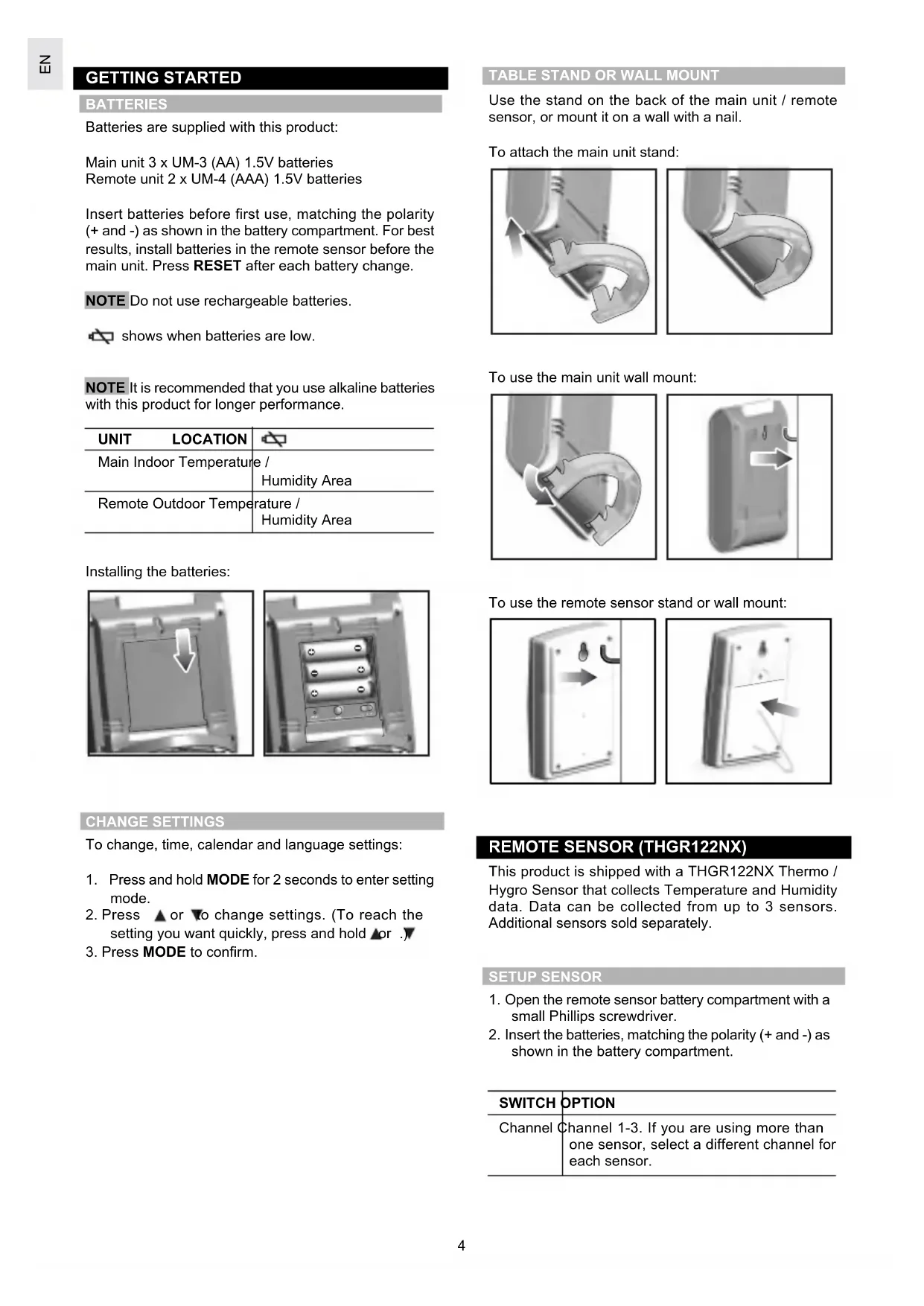
Batteries are supplied with this product:
Main unit 3 x UM-3 (AA) 1.5V batteries Remote unit 2 x UM-4 (AAA) 1.5V batteries
Insert batteries before first use, matching the polarity (+ and -) as shown in the battery compartment. For best results, install batteries in the remote sensor before the main unit. Press RESET after each battery change.
NOTE Do not use rechargeable batteries.

shows when batteries are low.
NOTE It is recommended that you use alkaline batteries with this product for longer performance.
| UNIT LOCATION | |
| Main Indoor Temperature / Humidity Area | |
| Remote Outdoor Temperature / Humidity Area | |
Installing the batteries:

natural_image
Close-up of a mechanical component with a white arrow pointing downward on a square surface (no text or symbols visible)
natural_image
Close-up of a mechanical component with three cylindrical pins and mounting holes (no visible text or symbols)CHANGE SETTINGS
To change, time, calendar and language settings:
- Press and hold MODE for 2 seconds to enter setting mode.
- Press ▲ or ▼ to change settings. (To reach the setting you want quickly, press and hold ▲ or ▼)
- Press MODE to confirm.
TABLE STAND OR WALL MOUNT
Use the stand on the back of the main unit / remote sensor, or mount it on a wall with a nail.
To attach the main unit stand:

natural_image
Close-up of a mechanical component with curved arrows indicating motion or force (no text or symbols)
natural_image
Close-up of a metallic mechanical component with curved and straight surfaces (no visible text or symbols)To use the main unit wall mount:

natural_image
Close-up of a mechanical component with a curved arrow-like feature (no visible text or symbols)
natural_image
Close-up of a gray electronic device casing with a white top and arrow indicating direction (no text or symbols)To use the remote sensor stand or wall mount:

natural_image
Diagram of a device with a curved handle and arrow indicating direction (no text or symbols)
natural_image
Close-up of a mechanical component with a curved arrow indicating a force or movement (no text or symbols visible)REMOTE SENSOR (THGR122NX)
This product is shipped with a THGR122NX Thermo / Hygro Sensor that collects Temperature and Humidity data. Data can be collected from up to 3 sensors. Additional sensors sold separately.
SETUP SENSOR
- Open the remote sensor battery compartment with a small Phillips screwdriver.
- Insert the batteries, matching the polarity (+ and -) as shown in the battery compartment.
| SWITCH | OPTION |
| Channel | Channel 1-3. If you are using more than one sensor, select a different channel for each sensor. |
- Set the channel. The switch is located in the battery compartment.
- Place the sensor near the main unit. Press RESET on the sensor. Then, press and hold MEM and CHANNEL on the main unit to initiate signal sending between the sensor and the main unit. The reception icon on the main unit will blink for approximately 3 minutes while it is searching for the sensor. (Refer to the "Data Transmission" section for more information.)
- Close the remote sensor battery compartment.
- Secure the sensor in the desired location using the wall mount or table stand.

natural_image
Close-up of a hand using a tool to apply material to a component with mounting holes (no visible text or symbols)
natural_image
Close-up of a handheld electronic device with buttons and a display (no visible text or symbols)For best results:
- I insert the batteries and select the channel before you mount the sensor.
• P lace the sensor out of direct sunlight and moisture.
• D o not place the sensor more than 30 metres (98 feet) from the main (indoor) unit. - Position the sensor so that it faces the main (indoor) unit, minimizing obstructions such as doors, walls, and furniture.
- P lace the sensor in a location with a clear view to the sky, away from metallic or electronic objects.
- Position the sensor close to the main unit during cold winter months as below-freezing temperatures may affect battery performance and signal transmission.
You may need to experiment with various locations to get the best results.
DATA TRANSMISSION
Data is sent from the sensor(s) every 40 seconds. The reception icon shown in the Temperature and Humidity Areas show the status.
| ICON DESCRIPTION | |
 | Main unit is searching for sensors. |
 | At least 1 channel has been found. |
 | Channel 1 is selected (number will change depending on the sensor you select). |
| --- shows in Outdoor Temp / Humidity Area | The selected sensor cannot be found. Search for the sensor or check batteries. |
SEARCH FOR SENSOR
To search for a sensor, press and hold MEM and CHANNEL (on the main unit) for 2 seconds.
NOTE If the sensor is still not found, check the batteries, obstructions, and remote unit location.
NOTE Signals from household devices such as doorbells, electronic garage doors, and home security systems may cause temporary reception failure. This is normal and does not affect general product performance. The reception will resume once the interference ends.
CLOCK
The clock automatically synchronizes the current time and date when it is brought within range of the radio signal DCF77 generated from Frankfurt, Germany for Central Europe (model BAR628HG) or MSF60 generated from Rugby, England (model BAR628HGU).
NOTE The signals are collected by the main unit when it is within 1500 km (932 miles) of a signal.
Initial reception takes 2-10 minutes, and is initiated when you first setup the unit, and whenever you press RESET. Once complete, the reception icon will stop blinking. The icon is shown in the Clock Area.
| STRONG SIGNAL | WEAK SIGNAL NO | SIGNAL |
To force a manual search for clock signals, press and hold ▲ for 2 seconds. If no signal is found, check the batteries.
TURN CLOCK ON / OFF
Perform this step if you cannot receive clock signals. Press and hold ▼ for 2 seconds. Then, manually set the clock following the "Set Clock" instructions (below).

The signal icon indicates that the clock feature is ON. No icon means that it is OFF.
SET CLOCK / CALENDAR
You only need to do this if you have disabled the clock feature (for example, if you are too far from or cannot receive a signal).
- Press and hold MODE for 2 seconds. The Clock Area will blink.
- Select the hour, minute, year, month, day, and day of the week language. Press ▲ or ▼ to change the setting.
- Press MODE to confirm.
The language options are (E) English, (F) French, (D) German, (I) Italian, and (S) Spanish.
SWITCH CLOCK DISPLAY
Press MODE to toggle between Clock with Seconds and Clock with Weekday display.
ALARM
This product is equipped with a 2-minute crescendo alarm.
VIEW ALARM SETTINGS
Press ( (·) ). The alarm time and alarm status will show in the Clock Area.
SET ALARM
- Press ((·)) to switch to alarm display.
- Press and hold ((·)) again for 2 seconds. The alarm settings will blink.
- Select the hour and minute. Press ▲ or ▼ to change settings. Press ( · ) to confirm.
ACTIVATE ALARM
Press 🔔 to activate or deactivate the alarm. 🔔 shows in the Clock / Alarm Area when the alarm is activated.
SILENCE ALARM
When the alarm time is reached, the crescendo alarm will sound for 2 minutes. To silence the alarm:
- Press SNOOZE to silence it for 8 minutes.
OR
- Press any key except SNOOZE to mute the alarm and activate it again after 24 hours.
If no button is pressed, the alarm will automatically silence after 2 minutes. It will then sound again after 8 minutes.
WEATHER FORECAST
This product forecasts the next 12 to 24 hours of weather within a 30-50 km (19-31 mile) radius with 70 to 75 percent accuracy. The weather forecast is always displayed.
| SUNNY | PARTLY CLOUDY CLOUDY | LOUDY | RAINY |
 |  |  |  |
TEMPERATURE AND HUMIDITY
This product can display current, minimum, and maximum temperatures and humidity percentage information collected by the remote sensors and main (indoor) unit.
Outdoor data is collected and displayed every 40 seconds. Indoor data is collected and displayed every 10 seconds.
SELECT TEMPERATURE UNIT
Slide the °C / °F switch into the desired location. The switch is located in the main unit battery compartment. The setting for the main unit overrides the remote sensor setting.
SELECT CHANNEL NUMBER
Press CHANNEL to switch between sensors 1-3.
The icon shows the selected sensor.
| KINETIC-WAVE ICON |  | [S7XX] |  |  |
| DESIG-Indoor Remote Remote Remote NATED Display Display Display Display DISPLAY Channel 1 Channel 2 Channel 3 | ||||
To auto-scan between sensors, press and hold CHANNEL for 2 seconds. Each sensor's data will be displayed for 3 seconds. To end auto-scan, press CHANNEL or MEM.
NOTE If you use a sensor that collects only temperature data, humidity will not be shown.
NOTE For more information on the sensor see "Remote Sensor THGR122NX" Section.
The MEM button is located in the main unit battery compartment. Press MEM to toggle between current, maximum (MAX) and minimum (MIN) records. To clear the records, press and hold MEM for 2 seconds. A beep will sound to confirm that the memory has been cleared.
MOON PHASE
The Calendar must be set for this feature to work, see "Set Clock" section.
- Press ▲ or ▼ to view the moon phase for the next or previous day.
- Press and hold ▲ or ▼ to scan quickly through the years (2001 to 2099).
| ● | New Moon |
| ○ | Waxing Crescent |
| ○ | First Quarter |
| ○ | Waxing Gibbous |
| ○ | Full Moon |
| ○ | Waning Gibbous |
| ○ | Last Quarter |
| ○ | Waning Crescent |
RESET SYSTEM
The RESET button is located in the main unit battery compartment. Press RESET when you change the batteries and whenever performance is not behaving as expected (for example, unable to establish radio frequency link with remote sensor or clock).
SAFETY AND CARE
Clean the product with a slightly damp cloth and alcohol-free, mild detergent. Avoid dropping the product or placing it in a high-traffic location.
WARNINGS
This product is designed to give you years of service if handled properly. Oregon Scientific will not be responsible for any deviations in the usage of the device from those specified in the user instructions or any unapproved alterations or repairs of the product. Observe the following guidelines:
- Never immerse the product in water. This can cause electrical shock and damage the product.
- Do not subject the main unit to extreme force, shock, or fluctuations in temperature or humidity.
- Do not tamper with the internal components.
- Do not mix new and old batteries or batteries of different types.
- Do not use rechargeable batteries with this product.
- Remove the batteries if storing this product for a long period of time.
- Do not scratch the LCD display.
NOTE The technical specification of this product and contents of this user guide are subject to change without notice. Images not drawn to scale.
TROUBLESHOOTING
| PROBLEM SYMPTOM REMEDY | ||
| Calendar Strange date / Changemonth (→5) | language | |
| Clock Cannot adjust clock Disable clock (→5) | ||
| Temp Shows “LLL” or Temperature is“HHH” out-of-range | ||
| Remote sensor | Cannot locate remote sensor | Check batteries(→5) |
| Check location (→5) | ||
| Cannot change Check channels | Check sensors. Only one sensor is working (→5) | |
| Data does not match main unit | Initiate a manual sensor search (→5) | |
SPECIFICATIONS
MAIN UNIT DIMENSIONS
| L x W x H | 116 x 55 x 127 mm(4.6 x 2.2 x 5 inches) |
| Weight | 186 g (6.6 ounces) without battery |
REMOTE SENSOR DIMENSIONS
| L x W x H | 92 x 60 x 20 mm(3.6 x 2.4 x 0.79 inches) |
| Weight | 63 grams (2.22 ounces)without battery |
TEMPERATURE
| Unit | °C / °F |
| Indoor range | -5°C to 50°C(23°F to 122°F) |
| Outdoor range | -20°C to 60°C(-4°F to 140°F) |
| Resolution | 0.1°C (0.2°F) |
RELATIVE HUMIDITY
| Range | 25% to 95% |
| Resolution | 1% |
| Memory | Minimum / maximum |
WEATHER FORECAST
| Display | Rainy, cloudy, partly cloudy, sunny |
REMOTE SENSOR (THGR122NX)
| RF frequency | 433 MHz |
| Range | 30 metres (98 feet) with no obstructions |
| Transmission | every 40 seconds |
| Channel No. | 1-3 |
CLOCK
| RF Clock | Auto or manual (disabled) |
| Clock display | HH:MM:SS |
| Hour format | 12hr AM / PM(Model BAR628HGU)24hr (Model BAR628HG) |
| Calendar | DD / MM; weekday in5 languages (E, D, F, I, S) |
POWER
Main unit batteries 3 x UM-3 (AA) 1.5V
Sensor batteries 2 x UM-4 (AAA) 1.5V
NOTE It is recommended that you use alkaline batteries with this product for longer performance.
ABOUT OREGON SCIENTIFIC
Visit our website (www.oregonscientific.com) to learn more about Oregon Scientific products such as digital cameras; MP3 players; children's electronic learning products and games; projection clocks; health and fitness gear; weather stations; and digital and conference phones. The website also includes contact information for our customer care department in case you need to reach us, as well as frequently asked questions and customer downloads.
We hope you will find all the information you need on our website, however if you'd like to contact the Oregon Scientific Customer Care department directly, please visit: www2.oregonscientific.com/service/support
OR
Call 949-608-2848 in the US.
For international enquiries, please visit: www2.oregonscientific.com/about/international/default.asp
EC-DECLARATION OF CONFORMITY
This product contains the approved transmitter module that complies with the essential requirements of Article 3 of the R&TTE 1999 / 5 / EC Directive, if used as intended and the following standards have been applied:
Safety of information technology equipment
(Article 3.1.a of the R&TTE Directive)
Applied Standard EN 60950: 2000
Electromagnetic compatibility
(Article 3.1.b of the R&TTE Directive)
Applied Standards
ETSI EN 301 489-1-3 (Ver.1.4.1): 2002-08
Efficient use of radio frequency spectrum
(Article 3.2 of the R&TTE Directive)
Applied Standards
ETSI EN 300 220-3 (Ver1.1.1): 2000-09
Additional information:
The product herewith complies with the requirements of the Low Voltage Directive 73 / 23 / EC, the EMC Directive 89 / 336 / EC and carries the CE marking accordingly.

text_image
mack whiteCarmelo Cubito
Agrate Brianza (MI) / Italy January 2004
Manufacturer's EU R&TTE Representative
CE
COUNTRIES RTTE APPROVAL COMPLIED
All EC countries, Switzerland CH
and Norway N
text_image
RADIO CONTROLS 1 69% 28% 72% 23% 10:38 26/3 breson 2 3 4 5 6text_image
Diagram of a device rear panel with numbered components and an inset view showing internal components.natural_image
Close-up of a mechanical component with a white arrow pointing downward on a square surface (no text or symbols visible)
natural_image
Close-up of a mechanical component with three cylindrical pins and mounting holes (no visible text or symbols)natural_image
Close-up of a mechanical component with curved arrows indicating motion or direction (no text or symbols)
natural_image
Close-up of a metallic curved component with a pointed tip, possibly part of a tool or bracket (no text or symbols visible)Fissaggio a muro:

natural_image
Close-up of a mechanical component with curved and angular features (no visible text or symbols)
natural_image
Exterior view of a rectangular electronic device with a curved arrow pointing to its side (no text or symbols visible)natural_image
Diagram of a door handle with an arrow indicating left motion (no text or symbols)
natural_image
Close-up of a mechanical component with a curved arrow indicating direction (no text or symbols visible)SENSORE REMOTO (THGR122NX)
natural_image
Close-up of a hand using a pipette to apply liquid into a plastic component (no text or symbols visible)
natural_image
Close-up of a handheld electronic device with two internal components (no visible text or symbols)text_image
Handwritten signature or name in cursive scriptCarmelo Cubito
Agrate Brianza (MI) / Italia January 2004
- Appareil principal
- Sonde sans fil (THGR122NX)
text_image
Diagram of a device rear panel with numbered components and an inset view showing internal wiring connections.text_image
1 2 3 4 MAX MIN 88% -100.8 5 6 7 8 MAX MIN 88% -100.8 9 10 11 12 (=) AM PM 38:00:00 38/38 A B C D 13 14 15natural_image
Close-up of a mechanical component with a white arrow pointing downward (no text or symbols visible)
natural_image
Close-up of a metallic electrical connector with three batteries and mounting holes (no visible text or symbols)natural_image
Close-up of a mechanical component with curved arrows indicating motion or force (no text or symbols)
natural_image
Close-up of a metallic curved component or tool tip (no visible text or symbols)natural_image
Close-up of a mechanical component with a curved, metallic edge and a small protrusion (no visible text or symbols)
natural_image
3D rendering of a rectangular electronic device with a curved arrow pointing to its side (no text or symbols visible)natural_image
Diagram of a door with a curved handle and arrow indicating left motion (no text or symbols)
natural_image
Close-up of a mechanical component with a curved arrow indicating a force or movement (no text or symbols visible)SONDE (THGR122NX)
natural_image
Close-up of a hand using a tool to apply a component to a metallic bracket (no visible text or symbols)
natural_image
Close-up of a handheld electronic device with buttons and display (no visible text or symbols)Mémoire Minimum / maximum
PREVISIONS METEO
text_image
Handwritten signature or name in a cursive scriptCarmelo Cubito
Agrate Brianza (MI) / Italie January 2004
text_image
Diagram of a device rear panel with numbered components and an inset view showing internal components.text_image
1 2 3 4 MAX MIN 88% -100.8 5 6 7 8 MAX MIN 88% -100.8 9 10 11 12 (=) AM PM 38:00:00 38/38 A B C D 13 14 15natural_image
Close-up of a mechanical component with a white arrow pointing downward on a square surface (no text or symbols visible)
natural_image
Close-up of a battery pack with three cylindrical cells and four terminal blocks (no visible text or symbols)natural_image
Close-up of a metallic mechanical component with curved arrows indicating motion or force (no text or symbols)
natural_image
Close-up of a metallic mechanical component with a curved, angular feature (no visible text or symbols)natural_image
Close-up of a mechanical component with a curved metallic edge and a flat blade (no visible text or symbols)
natural_image
3D rendering of a rectangular device with a curved arrow pointing to its side (no text or symbols visible)natural_image
Diagram of a door with an arrow indicating direction, no text or symbols present
natural_image
Close-up of a mechanical component with a paperclip and arrow indicating direction (no text or symbols)natural_image
Close-up of a hand using a tool to apply material to a component with mounting holes (no visible text or symbols)
natural_image
Close-up of a handheld electronic device with battery and indicator lights (no visible text or symbols)text_image
Diagram of a device rear panel with numbered components and an inset view showing internal components.text_image
1 2 3 4 MAX MIN 88% -100.8 5 6 7 8 MAX MIN 88% -100.8 9 10 11 12 (=) AM PM 38:00:00 38/38 A B C D 13 14 15natural_image
Close-up of a mechanical component with a white arrow pointing to a square feature (no text or symbols visible)
natural_image
Close-up of a mechanical component with three cylindrical pins and mounting holes (no visible text or symbols)natural_image
Close-up of a metallic pipe fitting with directional arrows indicating flow or movement (no text or symbols)
natural_image
Close-up of a metallic tool or bracket with a curved handle (no visible text or symbols)natural_image
Close-up of a mechanical component with curved and straight lines, no visible text or symbols
natural_image
3D rendering of a rectangular electronic device with a curved arrow pointing to its side (no text or symbols visible)natural_image
Diagram of a door handle with a curved handle and arrow indicating direction (no text or symbols)
natural_image
Close-up of a flat electronic device with a metallic handle and a paperclip, showing no text or symbols.SENSOR REMOTO (THGR122NX)
natural_image
Close-up of a hand holding a small electronic component with a screwdriver inserted (no visible text or symbols)
natural_image
Close-up of a handheld electronic device with buttons and display screen (no visible text or symbols)SENSOR REMOTO (THGR122NX)
text_image
march whiteCarmelo Cubito Agrate Brianza (MI) / Italia January 2004 Representante de R&TTE de fabricante
CE
text_image
RADIO SWITCHING 1 69:28 72:23 10:38 26/3 Dreson A B C D E F G H I J K L M N O P Q R S T U V W X Y Ztext_image
Diagram of a device rear panel with numbered components and an inset view showing internal components.text_image
1 2 3 4 MAX MIN 88% -100.8° 5 6 7 8 MAX MIN 88% -100.8° 9 10 11 12 (+) (+) AM PM 38:00:00 38/38 0 0 0 0 13 14 D A B C 15natural_image
Close-up of a mechanical component with a white arrow pointing downward (no text or symbols visible)
natural_image
Close-up of a metallic electronic component with three cylindrical pins and mounting holes (no visible text or symbols)ACESSO AO PAINEL DE BOTÕES FRONTAL
natural_image
Close-up of a mechanical component with directional arrows indicating movement (no text or symbols)
natural_image
Close-up of a metallic mechanical component with a curved, angular feature (no visible text or symbols)natural_image
Close-up of a metallic mechanical component with a curved, glossy surface (no visible text or symbols)
natural_image
3D rendering of a rectangular electronic device with a curved arrow pointing to its side (no text or symbols visible)natural_image
Diagram of a door with a handle and arrow indicating left side (no text or symbols)
natural_image
Close-up of a mechanical component with a metallic base and a curved arrow indicating direction (no text or symbols)SENSOR REMOTO (THGR122NX)
natural_image
Close-up of a hand holding a small object with a pointed tip, next to a metallic component (no visible text or symbols)
natural_image
Close-up of a battery pack with two batteries and three leads (no visible text or symbols)SENSOR REMOTO (THGR122NX)
text_image
Handwritten signature or scribble on white background, likely a signature or autographCarmelo Cubito
Agrate Brianza (MI) / Itália January 2004
text_image
Diagram of a device rear panel with numbered components and an inset view showing internal components.text_image
1 2 3 4 MAX MIN 88% -100.8 5 6 7 8 MAX MIN 88% -100.8 9 10 11 12 (=) AM PM 38:00:00 38/38 A B C D 13 14 15natural_image
Close-up of a mechanical component with a white arrow pointing downward (no text or symbols visible)
natural_image
Close-up of a battery pack with three cylindrical cells and four terminals (no visible text or symbols)To change, time, calendar and language settings:
natural_image
Close-up of a metallic pipe fitting with a curved arrow indicating flow direction (no text or symbols)
natural_image
Close-up of a metallic mechanical component with a curved handle and flange (no visible text or symbols)natural_image
Close-up of a metallic mechanical component with a curved handle and internal grooves (no text or symbols visible)
natural_image
3D rendering of a rectangular electronic device with a curved arrow pointing to its side (no text or symbols visible)natural_image
Diagram of a door switch with an arrow indicating left motion (no text or symbols)
natural_image
Close-up of a mechanical component with a paperclip and arrow indicating direction (no text or symbols)DE AFSTANDSSENSOR (THGR122NX)
natural_image
Close-up of a hand using a tool to apply a component to a small electronic device (no visible text or symbols)
natural_image
Close-up of a handheld electronic device with buttons and a display (no visible text or symbols)Transmissie Every 40 seconds
Kanaal nr. 1 - 3
KLOK
text_image
Handwritten signature or name in a cursive scriptCarmelo Cubito
text_image
RADIO SWITCHER 1 69% 28% 72% 23% 10:38 26/3 Dreson 2 3 4 5 6text_image
Diagram of a device rear panel with numbered components and an inset view showing internal components.natural_image
Close-up of a mechanical component with a white arrow pointing downward (no text or symbols visible)
natural_image
Close-up of a battery pack with three cylindrical cells and four terminals (no visible text or symbols)ÄNDRA INSTÄLLNINGAR
FÖR VÄGG OCH BORDSPLACERING
natural_image
Close-up of a metallic tool tip with curved arrows indicating flow or movement (no text or symbols)
natural_image
Close-up of a metallic tool or bracket with a curved handle, no visible text or symbolsnatural_image
Close-up of a mechanical component with a curved, glossy surface (no visible text or symbols)
natural_image
3D rendering of a rectangular electronic device with a curved arrow pointing to its side (no text or symbols visible)natural_image
Diagram of a door handle with an arrow indicating left motion (no text or symbols)
natural_image
Close-up of a metallic electronic device with a black arrow pointing to its side panel (no text or symbols visible)TRÅDLÖS FJÄRRENHET (THN122NX)
natural_image
Close-up of a hand holding a small electronic device with a screwdriver inserted (no visible text or symbols)
natural_image
Close-up of a handheld electronic device with two buttons and a display (no visible text or symbols)För bästa resultat:
text_image
1 69% 28°C 72% 23°C 10:38mo 26/3 bresen 2 3 4 5 6text_image
Technical diagram of a computer monitor with numbered parts and an inset view showing internal componentsnatural_image
Close-up of a metallic mechanical component with a white arrow pointing to a rectangular cutout (no text or symbols visible)
natural_image
Close-up of a battery pack with three batteries and cooling fins (no text or symbols visible)改變設定
如要改變時間、日歷和語言設定:
natural_image
Close-up of a mechanical component with curved and straight lines, no visible text or symbols
natural_image
Close-up of a mechanical component with curved and flat surfaces (no visible text or symbols)使用主機的挂墻設備:

natural_image
Close-up of a mechanical component with no visible text or symbols
natural_image
3D rendering of a gray plastic enclosure or housing component with internal cutouts and mounting holes (no text or symbols visible)使用遥控感應器支架或挂墻設備:

natural_image
Close-up of a mechanical component with no visible text or symbols
natural_image
Exterior view of a gray rectangular electronic device with ventilation slots and a cable (no text or symbols visible)遥控感應器(THGR122NX)
natural_image
Close-up of a hand using a tool to apply plastic components on a metal base (no visible text or symbols)
natural_image
Close-up of a mechanical device with battery housing and mounting holes (no visible text or symbols)如要獲得最佳的接收效果:
text_image
Technical diagram of a remote control panel with numbered components and an inset view showing internal components.natural_image
Close-up of a mechanical component with a white arrow indicating downward motion (no text or symbols visible)
natural_image
Close-up of a mechanical component with three cylindrical batteries and mounting holes (no visible text or symbols)改变设置
如要改变时间、日历、语言设置:
natural_image
Close-up of a mechanical clamp or bracket component (no visible text or symbols)
natural_image
Close-up of a mechanical component with curved and flat surfaces (no visible text or symbols)使用主装置壁挂孔:

natural_image
Close-up of a mechanical component with no visible text or symbols
natural_image
3D rendering of a rectangular electronic device with internal components and a cable, no visible text or symbols使用遥控传感器支架或壁挂孔:

natural_image
Close-up of a mechanical component with curved and straight surfaces (no visible text or symbols)
natural_image
3D rendering of a gray rectangular device with ventilation slots and a curved handle, shown from an angle (no text or symbols visible)遥控传感器(THGR122NX)
natural_image
Close-up of a hand using a tool to adjust or install a component, no visible text or symbols
natural_image
Close-up of a mechanical device with multiple ports and mounting holes (no visible text or symbols)如要获得最佳效果: