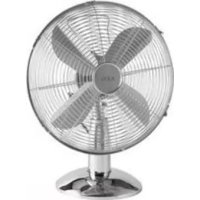
VL 5526 M - Fan AEG - Free user manual and instructions
Find the device manual for free VL 5526 M AEG in PDF.



| Product type | Table fan |
| Brand | AEG |
| Model | VL 5526 M |
| Color | Not specified |
| Power supply | 220-240 V, 50 Hz |
| Power consumption | 35 W |
| Net weight | 3.0 kg |
| Protection class | Class II |
| Number of speeds | 3 (low, medium, high) |
| Oscillation function | Yes, 70° angle |
| Adjustable tilt | Yes, via wing screw |
| Blade material | Plastic |
| Protective grille | Front and rear, removable |
| Control type | Rotary switch (speed) and push button (oscillation) |
| Cable length | Approximately 1.5 m (estimate) |
| Usage | Indoor only |
| Maintenance | Clean with a dry or slightly damp cloth |
| Safety precautions | Do not insert objects into the grille, unplug before cleaning |
| Repairability | Do not repair yourself, contact authorized service center |
| Included accessories | Protective grilles, blade, base, screws |
Frequently Asked Questions - VL 5526 M AEG
User questions about VL 5526 M AEG
0 question about this device. Answer the ones you know or ask your own.
Ask a new question about this device
Download the instructions for your Fan in PDF format for free! Find your manual VL 5526 M - AEG and take your electronic device back in hand. On this page are published all the documents necessary for the use of your device. VL 5526 M by AEG.
USER MANUAL VL 5526 M AEG
Élimination. Page 16
Espanol
Indice
Overview of the Components.. Page 3
Instruction Manual.. Page 25
Technical Data.. Page 27
Disposal. Page 28
Język polski
Spistresci
Overview of the Components
Thank you for choosing our product. We hope you enjoy using the appliance.
Symbols in these Instructions for Use
Important information for your safety is specially marked. It is essential to comply with these instructions in order to avoid accidents and prevent damage to the machine:
WARNING:
This warns you of dangers to your health and indicates possible injury risks.
CAUTION:
This refers to possible hazards to the machine or other objects.
NOTE:
This highlights tips and information.
General Safety Instructions
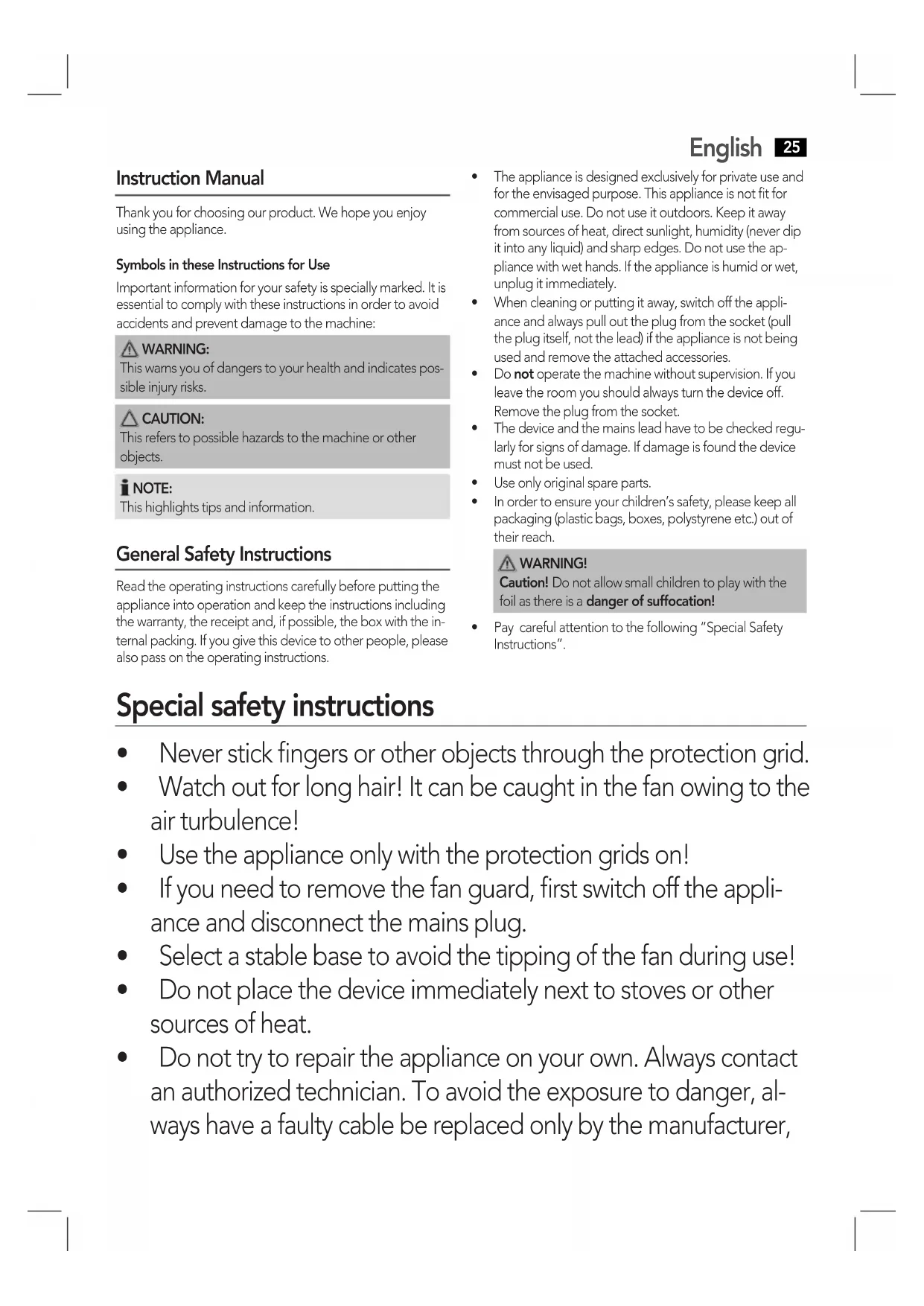
Read the operating instructions carefully before putting the appliance into operation and keep the instructions including the warranty, the receipt and, if possible, the box with the internal packing. If you give this device to other people, please also pass on the operating instructions.
English
- The appliance is designed exclusively for private use and for the envisaged purpose. This appliance is not fit for commercial use. Do not use it outdoors. Keep it away from sources of heat, direct sunlight, humidity (never dip it into any liquid) and sharp edges. Do not use the appliance with wet hands. If the appliance is humid or wet, unplug it immediately.
- When cleaning or putting it away, switch off the appliance and always pull out the plug from the socket (pull the plug itself, not the lead) if the appliance is not being used and remove the attached accessories.
- Do not operate the machine without supervision. If you leave the room you should always turn the device off. Remove the plug from the socket.
- The device and the mains lead have to be checked regularly for signs of damage. If damage is found the device must not be used.
Use only original spare parts. - In order to ensure your children's safety, please keep all packaging (plastic bags, boxes, polystyrene etc.) out of their reach.
WARNING!
Caution! Do not allow small children to play with the foil as there is a danger of suffocation!
- Pay careful attention to the following "Special Safety Instructions".
Special safety instructions
- Never stick fingers or other objects through the protection grid.
- Watch out for long hair! It can be caught in the fan owing to the air turbulence!
- Use the appliance only with the protection grids on!
- If you need to remove the fan guard, first switch off the appliance and disconnect the mains plug.
- Select a stable base to avoid the tipping of the fan during use!
- Do not place the device immediately next to stoves or other sources of heat.
- Do not try to repair the appliance on your own. Always contact an authorized technician. To avoid the exposure to danger, always have a faulty cable be replaced only by the manufacturer,
26 English
by our customer service or by a qualified person and with a cable of the same type.
- This appliance can be used by children aged from 8 years and above and persons with reduced physical, sensory or mental capabilities or lack of experience and knowledge if they have been given supervision or instruction concerning use of the appliance in a safe way and understand the hazards involved.
Children shall not play with the appliance. - Cleaning and user maintenance shall not be made by children without supervision.
Scope of delivery and parts description
1 Rotary switch for speed
2 Control knob for oscillation
3 Motor
4 Flattened area on the motor shaft
5 Rear protective grid
6 Locking screw for propeller
7 Hook
8 Fastening screw for protective grid
9 Front protective grid
10 Propeller
11 Fastening nut
12 Stand
13 Small knurled screw
14 Power cord
Without illustration:
4 screws for rear protective grid
Unpacking the Device
- Remove the device from its packaging.
- Remove all of the packaging material such as foils, filling material, cable holders and cardboard packaging.
- Check the scope of delivery.
- Check the appliance for any transport damage to prevent a hazard.
NOTE:
There may still be dust or production residues on the surface of the device. We recommend that you quickly wipe off the housing with a damp cloth.
Assembly instructions
The device must be completely assembled before initial operation!
Warning: Risk of injury!
The edges of the propeller are sharp. Use caution during assembly.
NOTE:
- You will need a Phillips screwdriver of medium size for the assembly.
- All screws are preassembled on the individual parts.
-
Also observe the "Overview of the Components" on page 3.
-
Unscrew the 4 preassembled outer screws from the front of the motor.
- Hold the rear protective grid so that the 4 boreholes on the protective grid are exactly above the 4 boreholes on the motor.
NOTE:
Ensure that the carrying handle on the protective grid is pointing upwards.
- Mount the rear protective grid with the 4 screws.
- Attach the propeller and fasten it with the locking screw.
CAUTION:
The screw must sit on the flattened side of the motor shaft!
- Attach the front protective grid by hanging the hook with the nut into the rear protective grid.
i NOTE:
Ensure that the holes on the grid edge for the fastening screw in the front and rear protective grid are positioned above each other.
- Close the fasteners on the circumference of the protective grid.
- Secure the protective grid with the fastening screw and the nut.
Position
The ideal position is a non-slip, flat surface.
Putting into Service
Electrical Connection
- Before inserting the plug into the socket. Make sure that the mains voltage to be used matches that of the device. You can find this information on the nameplate.
- Connect the device to a duly installed protective contact socket.
Use
Basic Settings
Set the blower inclination angle before starting the device.
- Unscrew the small knurled screw.
- Tilt the protective grid into the desired position.
- Re-tighten the knurled screw.
Operation
To select the speed, use the rotary switch on the rear:
0 off
slow
medium
- III fast
To shut off the device, select the position 0.
Fan setting
You have two options:
Stationary
- Shut off the device.
- Pull the control knob upwards.
- Use the carrying handle to place the device into the desired position.
Oscillating
- Shut off the device.
- Press the control knob.
iNOTE:
The device rotates automatically in the range of about 70 degrees.
- To turn off the function, shut off the device and pull the control knob upwards.
Cleaning
WARNING:
Always remove the mains plug before cleaning the device.
If you need to remove the safety guard: Always switch the device off and remove the mains plug.
- Under no circumstances should you immerse the device in water for cleaning purposes. Otherwise this might result in an electric shock or fire.
CAUTION
- Do not use a wire brush or any abrasive items.
-
Do not use any acidic or abrasive detergents.
-
Clean the outside of the device with a dry cloth without any additives.
If the device is very dirty wet a cloth with water and then wipe the device dry once you have finished.
Maintenance and storage
Clean the appliance as described.
We recommend that the appliance is kept in its original packaging if you do not intend to use it for long periods.
Always store the appliance out of the reach of children, in a well-ventilated and dry place.
Noise development
The workplace-related emission value is less than 70 dB(A).
Technical Data
Model: VL 5526 M N
Power supply: 220-240 V, 50 Hz
Power consumption: 35 W
Protection class:
Net weight: 3.0 kg
The right to make technical and design modifications in the course of continuous product development remains reserved.
This device has been tested according to all relevant current CE guidelines, such as electromagnetic compatibility and low voltage directives, and has been constructed in accordance with the latest safety regulations.

Disposal
Meaning of the "Dustbin" Symbol
Protect our environment: do not dispose of electrical equipment in the domestic waste.
Please return any electrical equipment that you will no longer use to the collection points provided for their disposal.
This helps avoid the potential effects of incorrect disposal on the environment and human health.
This will contribute to the recycling and other forms of reutilisation of electrical and electronic equipment.
Information concerning where the equipment can be disposed of can be obtained from your local authority.
Instrukcja obslugi
CTC Clatronic Sp. z o.o
He Do3B0JMaTe MaJIIM DiTAM rpaTncb i3 PnIBKOIO. IcHye 3arpo3a3adyxN!
3BepHtB yBary Ha HacTynHi "CneuaJIbHi Bka3iBKn IooD 6e3NeKn".
CneuaJIbHi Bka3iBKn 7oDo 6e3peKn IJra 2bOro npIJaDy
He ycoByte naIbci a6o kicb npedMeTu chepe3 3anobixHy pe- tky.
-Обекхио 3doBIMBOLOccM:ПobITprHnnotik moKeix BCMOKTyBaTu!
EkcpnyaTyte npnaTtBkn 33akpntOo 3anobxHOIO pewiKoIO!
- YKsqo notpiio 3nTn 3axncny pewiTy 3 BeHTnIaTopa, cnepy BmKHiTb npnilad i BiD'ednaIte noToB iD MepeXi.
Bn6epitb nixo7y nictaBky TaK, 06 npnaad nid yac ekc- nlyaatai He mir nepeknndaTncb!
He cTaBTe npilad 6n3bko do neeai abo iHux dxkepei TeIla.
38 YkpaIHcbka
He pemontyte npnilad cami, aie 3BepHITbCra do aBTOPn3ObaHoro faxibra. Ia 3anobirahnra 3arpo3i noxkoJKeHn Ka6eIb XNBLeHHra cIid 3amInTu Ha eKBiBaJIeHTn BnKJIIOuHO BnPO6Hnikom, abo hauoIO cepBicHOIO clyxboIO a6o iHsoIO KBaJIiΦikoBaHOIO OcO6OIO.
- Léen npinctpii mokytb BnKOpNCTOByBaTn diTn, cTapSi 8 pokIB, i ocobn 3 obmexeHIMn φi3nHIMn, ceHCOPHIMn a6o po3ymoBIMn 3di6HOCTaMn nn OCobn 6e3 DoCTaTHbOro DoCBiDy i 3HaHb, RkIIO BOHN BnKOpNCTOBYOTb npinctpii niD HargJdOM a6o 6yInPiPOIHCTpyKTOBaHi IooIO BnKOpNCTaHHa npinctpoU B 6e3peHnCnoci6 i yCbIDomJIIOITb, kY He6e3neKy BIn MOKe CTAHOBTN.
- ДiTи He NOBUNHi ГаTNcA 3 npNCtPoEМ.
- Yuichi Henry i OBCnyroByBaHHaPnCTpoH He NOBHHi BIKOHyBaTncb DITbMn 6e3 HaIyDopocnX.
KomnJIeKTHicTb Ta onnc deTaJeN
1Поворотнй поемпakч Swdkocti
2Pyuka KepyBaHHa 3BOPoTHo-NOBOPOTHM pyxOM
3 DnBnYH
4 JIscKa Bajy DnBuYHa
5 3aHn3axncha citka
6 BnHT KpInneHn nponeepa
7 RaOK
8ΓBnHT KpɪŋJIeHЯ 3axIcHoi citKN
9Ipeedna3axncha citka
10 Pponep
11 KpinnilbHa raiKa
12 Ctiinka
13 Mani rBnHT i3 pndneHO roIbKOHO
14 LHyp xuBleHHn
He noka3aHO Ha iInocptpaui:
4 rBnHTa KpInnHeHHa3aHbOa3axnCHOcITKN
Po3naKyBaHnI npnilady
1.ДoctaHbTe npinla3 ynaKOBKn.
2.YcHbTe BcI NaKyBaIbHi MaTeiAin JK IIIBK, MaTeiAIN3aONBIOBaHi, Ka6eBHi CkO6n Ta KapTOHHY yNAKOBY.
3. NepeBipTe KOMJIeKTHICTb.
4.OrIaHbTe npnlaHa npedMeT noiKoJKeHb,IO MoIIN 3'ABNTcra Niac TpaHCnOpTyBaHHa,IO6 BnKJIouHTn He6e3neKy.
I PIMITKA.
Ha npnnaMy moKyb 6ytn nnn a6o Bnpo6HnHi 3aunuKn. PekomeHdaJiaBnTnpaTN Kopnyc 3BOJNOXeHOIO raHjipKOIO.
Bka3iBkn 3i cKlaandaHna
Ipeed noaTkom ekcnnyataui npnaad cniD nobHicTIO CKnactn!
I NONEPEDKEHHHe6e3neKa TpaBMyBaHHa
PponeIep Mae roctpi KpomKn. BynbTe obepekhi n.i.d. cac cknadaHn.
I NPMIMITKA.
Длгсknаданн Heo6xHa BnKpyTk a Tny Phillips cepeDhboro po3mipy.
Yci rBnHTn nnonepaHbO 3akpyHe B BiNIOBiiH DeTJI.
IuB. TaKoX "OrJn enemHrib ynpabniHHa CTopiH uJ 3.
- BnKpyTtB 4 3akpyHeHX 3OBHIuHIX rBnHTa Ha nepeHi nOBepxHi DnRgamma.
- TpimmaTe 3aHIO 3axnCHy ciTKy Ta, IO6 ii 4 OTbOpn po3-TaUyBaIncr TOUHO HaI OTBopAMN B Kopnyc iDbvryHa.
IIPMIMTKA.
IpekeonaiTecra, 10 pyka 3axnchoi ciTk npo3TaioBaHa Bropi.
- 3aKpinitb 3aHIO 3axNCHy ciTky 4 TBnHTamM.
- HadihTe nponeep Ta 3akpiitb Ioro KpinnbHm rBnH TOM.
YBAGA.
TbHtMa3aKpyTITnca Do Jnckn Bany DnBnyHa!
- 3akpiinb nepeHIO 3axnCHy ciTKy, 3aehnBn raoK i3 raKOIO 3aAIO 3axnCHy ciTKy.
ITPIMITKA.
IpekehnaTecn,IO O TBOPn Ha KpaX cITKn IaN KpiNlBnHex rBnHTb Y nepeDnHi Ta 3aDHi 3axnCHnx cITkax po3TaUOBAHoi N HABnPoTN OOnHO.
- 3akpiTe fikcatopn no kparx 3axnchoi citkn.
- 3aKpiniTb 3axnChy ciTKy 3a dONOMOIO KpiINHOro rBNHTa 3raIKOIO.
Micu dIra po3TaUyBaHHa
PnuaTHMMICUeM DnPa PO3TaUyBaHH e NIOrA HeKOB3Ka NOBepxH.
BVeHnB EKcIpyataio
Enektpnue niiKIOUeHHA
- Ipeen TmM, UO NOCTaBnTn BnIKy Do po3eTKN, nepeBi-paIte BiINOBiDnHcTB Hanpyr Nmepexi Hanpyr npuJaY. DaHI Bu 3HaJeTe Ha 3aBOcBki Ta6nui.
PiKJIIOUITb npuIaI Do PO3ETKn 3 3axnCHIM KOHTaKTOM, UO HALEXHO BCTaHOBNeHa.
BnKopncTaHH
Ba3oBi HAcTpoIOBAAH
Ipeed nyckom B eKcnnyatauio BCTaHOBiT kyT haxnny BeHTnIATopy.
- Nocla6Te MaIII rBnHT 3 pNΦJIeHOIO rOJIbKOIO.
- Haxnjitb 3axnchCy citky B 6axkahe noIoxeHHA.
- 3aTARHITbTBnHT 3pNΦneHOIO rOJIiBKOIO.
Ekcnnyataua
Iy B60puy WbNkOCTIOBepHITb NOBOPOTNIpeMnKaU no3aNy y BiNOBiHE NONOKeHHA:
D
BUMKHYTO
•
NOBINbHO
cepeHbO
1IIBWIDKO
U06BIMKHyTn npnna, noBepHiTb nepemkay y noIoxeHHA 0.
HanaatyBaHHaBHTnIaTopa
IChye DbIMoKJINBOCTI:
HepyXOMN BENTMHTOP
- BumkhHtB npnla.
- BntarHITb pyuKy kepyBaHHaDorOpn.
- 3a donomoroIpyKINJIpepehecenHnpeceTabTe npnilad y noTpi6He noIOxKeHH.
3BOPOTHO-NOBOPOTHm pyx
3JIeKToPiTuHHe: 220-240B,50T
IopTe6nemar MoUHocTb: 35 BaTT
Klacc 3aunrbl:
Bec HeTTo: 3,0 K
CoxpaHEno npaBO Ha TexHHueckne N KOHCTpyKIOHOHbIe N3MeHENB paMKax pOdoJkaHOUeICn pa3pa60TKn pOdyKa-Ta.
3To n3deneHne npoNo BCE Heo6xOIMbIe N akTyalb HbIe npOBepKn, npEanncAHNble dInpeKTmbO CE, K npM.
Ha 3JEKTPOMaHHTHyIO COBMeCTUMOCTb I COOTBETCTBVE
Tpe6oBaHnM K Hn3KOBbTHOHTexHKe, OHO 6blTOKaKe
CKOHCTpyuipoBaHO INoCTpoEHO C yueTOM nocJeHNX Tpe6oBAHNI NO Texnke 6e3onacHOCTn.
#
. jSio sa lo5 jiell
aalaae aee
J 1
4.2.9.11
Aii
VL 5526 MN
50~240-220
1,35
1
3.0
yglalil yg aayaa, yia 1r j! gda bina
Lulal
Jia aaii CE jie jie jie jie jie
aaiai i aaiiaai aiai g g g g g g g g g g g
aDall 1
1
aalol alol 21 g aalol alalol aalol .2
.3
J
: 15
Jusit 0
aiaia 1
abuaiee 110
iueiee ju 111
0g j
agall 150
Laa
中
1
.2
gall gll jll lall jia 3
jzjzj
j1 1
.2
:
70 1
jao jao jao jao jao jao jao jao jao jao jao jao jao jao jao jao jao jao jao jao jao jao jao jao jao jao jao jao jao jao jao jao jao jao jao jao jao jao jao jao jao jao jao jao jao
a
y = - ( x - 2) ^2 + 9 = - x^2 + 4x + 5
jell jil
jil jll jil jil jil jil jil
.
y
#
a 100
aB
jlll 1
C
Jg, gaii jiajia jia jia jia jia jia jia jia jia jia jia jia jia jia jia jia jia
aai jg sll 8 gall , dlaal .
i 4
:
C 111111111111111111111111
gaii


- Espanol
- Indice
- Język polski
- Spistresci
- Symbols in these Instructions for Use
- WARNING:
- CAUTION:
- NOTE:
- General Safety Instructions
- English
- WARNING!
- Special safety instructions
- English
- Scope of delivery and parts description
- Without illustration:
- Unpacking the Device
- Assembly instructions
- Warning: Risk of injury!
- i NOTE:
- Position
- Putting into Service
- Electrical Connection
- Use
- Basic Settings
- Operation
- Fan setting
- Stationary
- Oscillating
- iNOTE:
- Cleaning
- CAUTION
- Maintenance and storage
- Noise development
- Technical Data
- Disposal
- Meaning of the "Dustbin" Symbol
- Instrukcja obslugi
- CneuaJIbHi Bka3iBKn 7oDo 6e3peKn IJra 2bOro npIJaDy
- YkpaIHcbka
- KomnJIeKTHicTb Ta onnc deTaJeN
- He noka3aHO Ha iInocptpaui:
- Po3naKyBaHnI npnilady
- I PIMITKA.
- Bka3iBkn 3i cKlaandaHna
- I NONEPEDKEHHHe6e3neKa TpaBMyBaHHa
- I NPMIMITKA.
- IIPMIMTKA.
- YBAGA.
- ITPIMITKA.
- Micu dIra po3TaUyBaHHa
- BVeHnB EKcIpyataio
- Enektpnue niiKIOUeHHA
- BnKopncTaHH
- Ba3oBi HAcTpoIOBAAH
- Ekcnnyataua
- HanaatyBaHHaBHTnIaTopa
- HepyXOMN BENTMHTOP
- 3BOPOTHO-NOBOPOTHm pyx
- #
- Aii
- 1
- J
- 中
- jzjzj
- :
- a
- y = - ( x - 2) 2 + 9 = - x2 + 4x + 5
- gaii
Brand : AEG
Model : VL 5526 M
Category : Fan