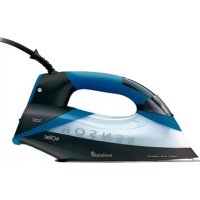
CVG9901 - Iron SOLAC - Free user manual and instructions
Find the device manual for free CVG9901 SOLAC in PDF.



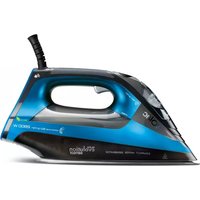
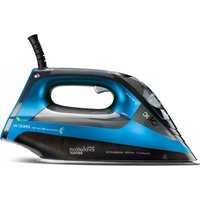
| Product Type | Compact ironing station |
| Brand | Solac |
| Model | CVG9901 |
| Category | Iron |
| Touch screen | Yes, with illuminated icons |
| Temperature selection | 4 positions: ECO, low (.), medium (..), high (MAX) |
| Continuous steam output | Up to 60 g/min |
| Steam functions | Medium (35 g/min) and Maximum (60 g/min) |
| Presence sensor | Yes, interrupts steam when handle is not held |
| Auto-off (Auto-Pause) | Yes, after 3 minutes of inactivity |
| Vertical steaming | Yes, to remove creases on hanging garments |
| Anti-scale system | Yes, resin filter that retains limescale |
| Soleplate type | Metal soleplate |
| Water recommendation | Use distilled or demineralized water preferably |
| Soleplate maintenance | Ecological clay-based products |
| Exterior maintenance | Damp soapy cloth, avoid abrasive products |
| Tank emptying | Empty after each use, unplug first |
| Power supply | Check that voltage matches home voltage (not specified) |
| Safety instructions | Supervise children, unplug before filling, do not touch hot soleplate |
| Warranty | See World-Wide Guarantee leaflet; damages due to limescale excluded |
| Approval | Woolmark Apparel Care for wool |
Frequently Asked Questions - CVG9901 SOLAC
User questions about CVG9901 SOLAC
0 question about this device. Answer the ones you know or ask your own.
Ask a new question about this device
Download the instructions for your Iron in PDF format for free! Find your manual CVG9901 - SOLAC and take your electronic device back in hand. On this page are published all the documents necessary for the use of your device. CVG9901 by SOLAC.
USER MANUAL CVG9901 SOLAC
ZEHLICI CENTRUM COMPACT
ZELAZKO KOMPAKTOWE
KOMPAKTNY ZEHLIACISTROJ
HASZNALATI UTMUTATIO
KOMNAKTEH TIADEU CEHTbP
aal 1
EVOLUTION COMPACT IRONING CENTRE
INSTRUCCIONES DE USO
INSTRUCTIONS FOR USE
MODE D'EMPLOI
GEBRAUCHSANLEITUNG
INSTRUÇOÉS DE USO
ISTRUZIONI PER L'USO
GEBRUKSAANWJZING
NAVOD KPOUZITI
INSTRUKCJA OBS LUGI
NAVOD NAPOUZITIE
HASNALATI UTASITÁS
Hnctpykun3a ynoTpe6a
p
INSTRUCTIONS DE UTILIZARE






5-11· ESPÁÑOL
12-18· ENGLISH
19-25· FRANÇAIS
26-32 DEUTSCH
33-39· PORTUGUES
40-46·ITALIANO
47-53· NEDERLANDS
54-60· CESKY
61-67· POLSKI
68-74·SLOVENCINA
75-81 MAGYAR
82-88· 6bIrpck
89-93· ARABIC
94-100· ROMÁNA
en
fr
de
pt
it
nl
CS
pl
sk
hu
bg
ar
ro








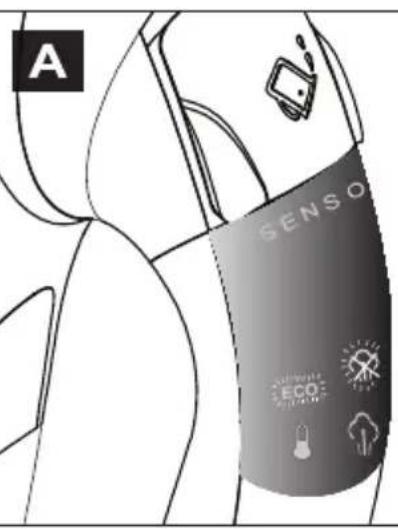
Fig.1 A

B
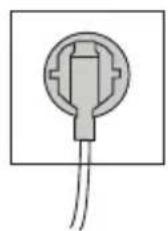

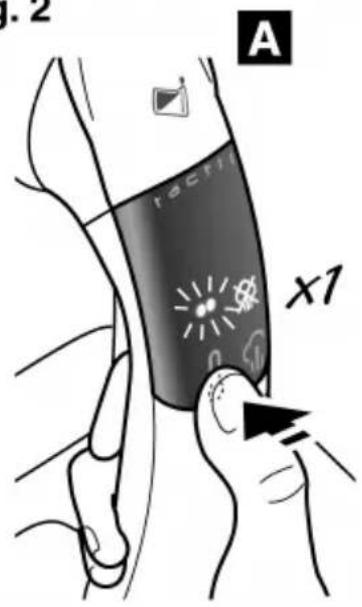
Fig. 2
A
B
C
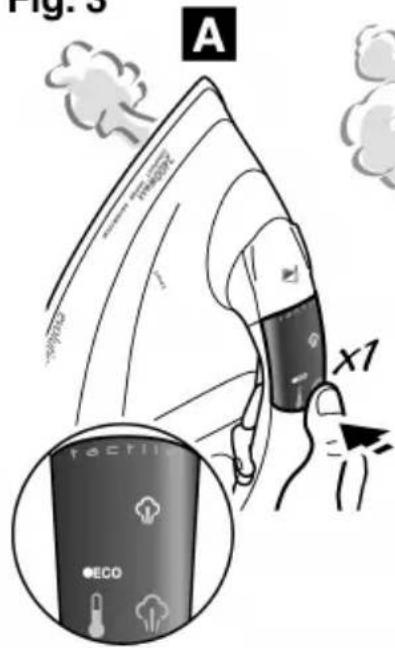
Fig. 3
B
C
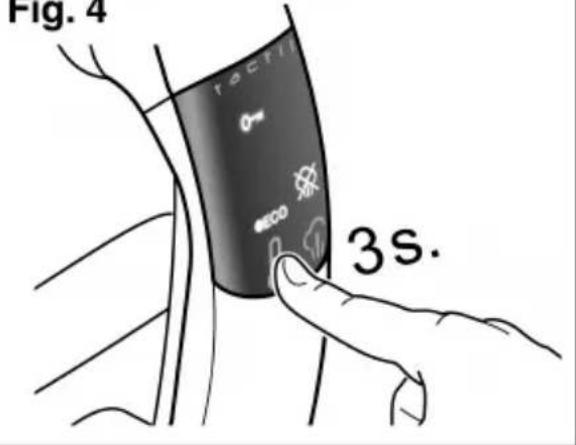
Fig. 4
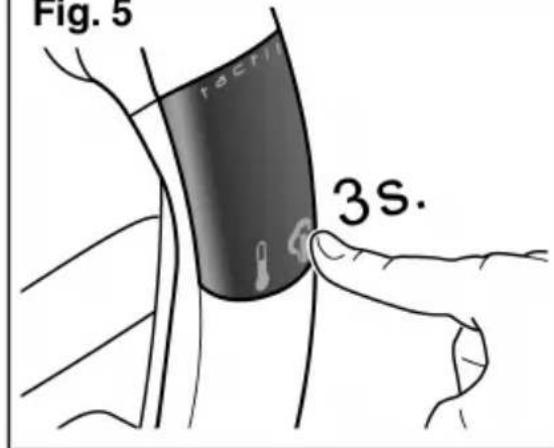
Fig. 5


. ESPANOL
DESCONEXION TEMPORAL
Thank you for choosing the Compact Ironing Centre, hereinafter referred to as CVG, by Solac.

Read these instructions before first using your appliance. This manual is an integral part of the product. Please safeguard it for future reference.
ATTENTION
-
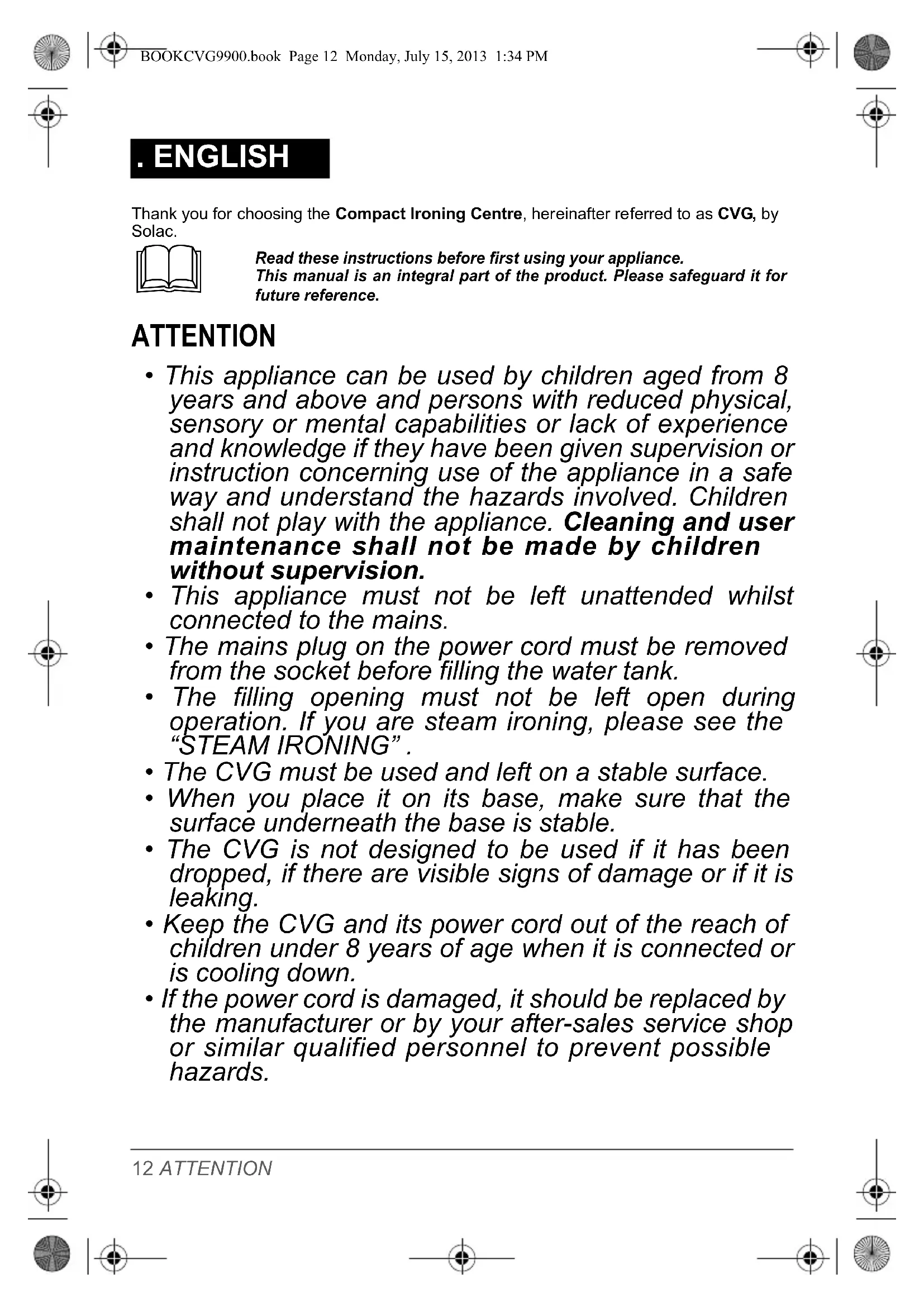
This appliance can be used by children aged from 8 years and above and persons with reduced physical, sensory or mental capabilities or lack of experience and knowledge if they have been given supervision or instruction concerning use of the appliance in a safe way and understand the hazards involved. Children shall not play with the appliance. Cleaning and user maintenance shall not be made by children without supervision.
-
This appliance must not be left unattended whilst connected to the mains.
-
The mains plug on the power cord must be removed from the socket before filling the water tank.
-
The filling opening must not be left open during operation. If you are steam ironing, please see the "STEAM IRONING".
-
The CVG must be used and left on a stable surface.
-
When you place it on its base, make sure that the surface underneath the base is stable.
-
The CVG is not designed to be used if it has been dropped, if there are visible signs of damage or if it is leaking.
-
Keep the CVG and its power cord out of the reach of children under 8 years of age when it is connected or is cooling down.
-
If the power cord is damaged, it should be replaced by the manufacturer or by your after-sales service shop or similar qualified personnel to prevent possible hazards.
12 ATTENTION


ATTENTION: Hot surfac
If the appliance is hot, handle it carefully and do not touch the hotplate.
-
Do not modify or repair the appliance. In the event of any anomaly in the appliance, do not use it and take it to an authorised assistance service.
-
Always unplug the appliance after use and before assembling or removing parts, and performing any maintenance or cleaning operations. Also unplug it in the case of a power cut. The appliance must be switched off before plugging or unplugging it into the mains
-
Before using your CVG (Compact Vapor Generator), remove all the paper or plastic bags, plastic sheets, cards and possible stickers that may be on the outside or inside of the appliance that acted as handling protection or sales promotion material. Remove the soleplate protector before using your CVG.
-
Do not plug it in without checking that the voltage of the appliance is the same as your home mains voltage.
-
Take care that the cord does not touch the hot parts of the appliance.
-
Check that the socket outlet has a suitable ground connection.
-
To fill your CVG or fill it while ironing, follow the instructions in the "FILLING WITH WATER" (fig. 2), unplugging it and using the beaker provided.
-
Do not plug your CVG in without water in the tank as this may cause irreparable damage to the system.
-
The appliance may emit a little smoke and a plastic smell during the first few minutes of use. This is normal and will disappear quickly.
-
The first few times you use it, some small white particles may be released; these are totally harmless and do not stain. This is a relatively normal result of the manufacturing processes.
-
Do not spray "vertical" steam on a garment hanging in the wardrobe or on a person. Vertical ironing must be done with the garment on a hanger and away from other garments, elements or persons.
-
When you finish ironing, always empty the water from the tank. If you want to drain it while ironing, always unplug the appliance from the mains first.
-
To disconnect the CVG, never pull on the power cord, take out the plug.
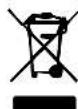
IMPORTANT: When you want to dispose of the appliance, NEVER throw it in the rubbish. Instead, go to your closest CLEAN POINT or waste collection centre for subsequent treatment. In this way, you will be contributing to looking after the environment. Before disposing of your used appliance, you should make it visibly unserviceable and have it disposed of according to current national legislation. Ask your Distributor, Town Council or Local Authority for detailed information.
en
ATTENTION 13

MAIN COMPONENTS AND ACCESSORIES
1 Water filler hole cap
2 Water tank
3 Tou ch s c r e e n
4 Handle
5 Temperature selector
6 Steam selector
7 Non-slip legs
8 B e a k e r
a Luminous icons
MAX Position (MAX)
Position (…)
Position (..)
-ECO Position (ECO)
Ironing without steam
Medium steam 35 g/min
Maximum steam 60g / min
Lock screen
BEFORE STARTING TO IRON
Make sure you have removed the soleplate protector before starting to iron.
1 With your CVG unplugged, open the filler cap turning it upwards (fig 1).
Due to the high level of water hardness in most areas, Solac recommends that you always use distilled or demineralised water for ironing. You will thus guarantee that your CVG stays in perfect condition for as long as possible. If you cannot find distilled water for any reason, be sure to use water that is low in minerals (soft).
1 Do not put any type of scale remover solvents or products in the water tank. Do not use perfumed or ironing water either. These products can damage the interior of the steam generation system.
2 Fill the tank without exceeding the maximum level using the beaker provided (8) and keeping the CVG upright. After the tank is full, close the cap (1).
Keep the water-filling hole lid (1) closed during operation.
3 Check the garment to be ironed to see if it has a label that indicates the ironing temperature.
We recommend that you classify garments by their required ironing temperature and that you begin ironing with the garments that require the lowest temperature () .
SILK, WOOL, SYNTHETIC FIBRES, minimum temperature ()
POLYESTER, medium temperature ()
COTTON, max. temperature (***)
LINEN, maximum temperature (MAX)
NB: Ironing delicate garments with a temperature higher than necessary is harmful for the fabric and causes burnt residue to get stuck to the soleplate.
If you have any doubts about the temperature to use for a given garment, perform a test on a part which won't be seen, beginning with the lowest temperature settings.
OPERATION
This appliance has been designed exclusively for ironing clothes. Do not use it for other purposes.
If the appliance is hot, handle it carefully and do not touch the hotplate.
! Never leave the CVG with the hotplate in a horizontal position. Stand it upright when you are not ironing.
1 Extend the cable fully and plug in the appliance.
Stand the CVG upright.
14 MAIN COMPONENTS AND ACCES



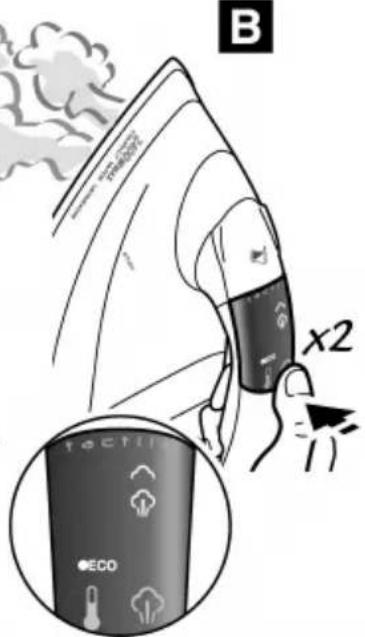
A buzzer will sound and all the icons on the screen will be displayed, indicating that the appliance is working correctly. The icons 500 (fig. A) will then start to flicker. When the CVG reaches the selected temperature, the icons will light up continuously. (fig. 1B).
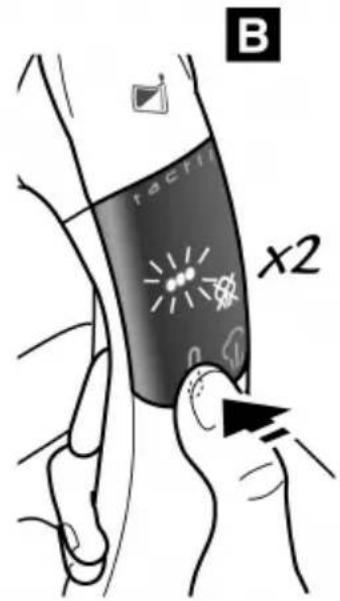
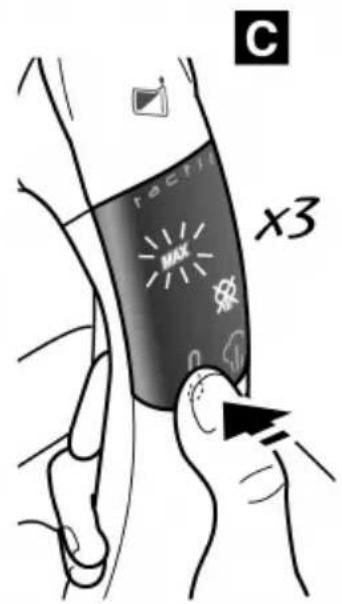
2 Select the desired working temperature according to the garment to be ironed (see "TEMPERATURE SELECTION (fig. 2)".
3 Select ironing with steam function (medium or maximum) or ironing without steam function, as required (see STEAM SELECTION (fig. 3)).
4 If you wish, you can lock the touchscreen to prevent the accidental activation or deactivation of any function. To do so: Without touching the handle, press the temperature selector for more than 3 seconds (5). (fig. 4).
Theicon will light up.
5 To unlock the touchscreen, press the temperature selector (5) once again, without touching the CVG's handle. The icon will disappear.
6 Take the CVG by the handle and move the hotplate over the garment to be ironed.
TEMPERATURE SELECTION (fig. 2)
The CVG has 4 temperature positions for you to choose between, by pressing the temperature selector (5).
1 Press the temperature selector (5) as many times as necessary until the desired temperature level is displayed.
Position (default position)
Position () (fig. 2A)
Position (…)(fig. 2B)
Position (MAX) (fig. 2C)
The corresponding icon will flicker until the temperature selected has been reached. Once this temperature has been reached, the icon will light up continuously.
STEAM SELECTION (fig. 3)
The CVG has two steam positions; medium steam (35 gr/min) and maximum steam (60 gr/min). To select the desired steam level:
1 Press the steam selector (6) as many times as necessary until the desired steam flow icon is displayed (medium fig. 3A) or maximum (fig. 3B). Steam will start to be emitted.
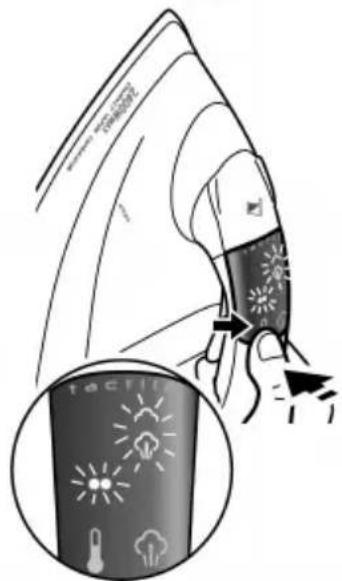
If the steam selector is selected without having reached the desired temperature, the steam selector icon and temperature icon selected will flicker until the working temperature is reached (fig. 3C). Once this temperature has been reached, they will no longer flicker simultaneously and steam will start to be emitted.
2 To stop the emission of steam, press the steam selector again (6) until the icon is displayed, and steam will stop being emitted automatically.
PRESENCE SENSOR
The CVG has a presence sensor which stops the emission of steam immediately after detecting lack of contact on the handle. This ensures lower power consumption as well as greater autonomy of the tank (lower water consumption).
The steam function switches back on automatically when taking hold of the CVG handle.
When taking your hand off the handle, the steam selector is not deactivated. Steam emission is only temporarily cut off until contact is detected once again on the handle. The screen continues to display the steam selector icon selected.

TEMPORARY SWITCH OFF
For temporary switch off during ironing.
1 Without touching the handle, press the steam selector for 3 seconds (6) (fig. 5).
All the icons will light up momentarily and a buzzer sound. All the icons on the display will then disappear.
2 Press the steam selector (5) for 3 seconds to switch on the CVG again.
All the icons will light up momentarily and a buzzer sound. The CVG will be situated at Position with the steam selector deactivated
AUTOMATIC SWITCH OFF: AUTO - PAUSE
The CVG has an automatic switch off system.
It is switched off automatically 3 minutes after the last time it was used. This means that once the device is activated, the CVG no longer heats up and begins to cool down.
All the icons will light up momentarily and a buzzer sound. All the icons on the screen will then disappear except the icon, which flickers indicating that the appliance has been switched off.
To activate it again, simply take hold of the handle or touch the temperature selectors (5) or steam selector (6). A buzzer will sound and the CVG will return to the temperature and steam position selected before it was switched off.
Remember that the period between being switched off and switched back on again will affect the time that the CVG may need to regain the temperature selected previously.
IRONING RECOMMENDATIONS
STEAM IRONING
The operation of this model is similar to a professional iron so you can iron with a continuous flow of steam from Position ECO without any water dripping.
We recommend you iron first with steam and then go over the clothes dry to remove moisture and obtain results that are comparable to professional ironing.
ECONOMIC IRONING
For more efficient use and lower power consumption, SOLAC recommends the ECO ironing position.
1 Press the temperature selector (5) as many times as necessary until the icon is ECO displayed.
When the CVG is switched on, it starts by default at Position ECO
2 If you wish, press the steam selector (6) as many times as necessary until the desired steam selector icon is displayed (no steam medium steam or maximum steam).
The possibility of ironing with steam at a low temperature allows you to iron a large number of garments without having to increase the working temperature, with the resulting energy saving.
16 IRONING RECOMMENDATIONS

VERTICAL IRONING
It enables you to remove creases from delicate garments without having to lay them on the ironing board: jackets, coats, curtains, suede garments, etc.
1 Place the garment on a hanger, away from other garments, persons...
2 Select the desired ironing temperature, pressing the temperature selector (5) as many times as necessary. Stand the CVG upright.
3 Press the steam selector (6) once or twice, defending on the flow of steam desired (medium or maximum).
At Position (●) you will obtain a more humid visible steam which will be easier to see, whereas at Position (●●) and (MAX) the steam is drier and, although the same flow is maintained, will be less visible.
FILLING WITH WATER
If while ironing the tank runs out of water, the CVG will emit different light signals depending on the steam selector activated at the time:
- Steam selector deactivated. flicker
- Medium steam selector activated: lit up continuously and , flicker
Maximum steam selector activated: lit-up continuously and , flicker
1 Switch off the CVG, keep it upright and fill the tank using the beaker (8) provided.
Dry the CVG with a dry cloth if any of the water spills out of the tank.
If the appliance were to run out of water completely with the steam selector activated, you would hear a strange noise from the micro-pump. Switch off the steam selector to prevent any damage to the system.
Switch off the appliance and fill the water tank. When switching it on again, this noise will disappear.

OTHER FUNCTIONS
ANTICALC SYSTEM
The CVG is fitted with an innovative anticalc system consisting of a resin filter, which retains the limy substances in the water, preventing these from reaching the steam chamber in the soleplate and thereby extending the life of your CVG. The existence of this anticalc system does not mean you can ignore the advice on water hardness mentioned in the "BEFORE STARTING TO IRON" section.
CLEANING AND CONSERVATION
SOLE-PLATE
1 Unplug the iron and let it cool down.
Use environment-friendlyly clay-based products to clean the sole-plate.
OUTSIDE
1 To clean the outside of your CVG, use a cloth moistened in soapy water.
1 Do not clean with abrasive chemical products or solvents as it may attack certain plastic parts and / or remove some of the marks and / or indications.
2 Store your CVG in the vertical position, wind the cord round the heel and secure it with the clip.
Although the power cord is fitted with a 360^ rotational elbow, NEVER FORCE this cord when winding it around the appliance on the first turn.
en

WARRANTY CONDITIONS
- Solac accepts no liability for faults in your appliance in the event of noncompliance with the specifications of the warranty conditions or failure to follow the operating or maintenance directions included in the instruction brochure for every appliance.
The warranty conditions may be found in the accompanying "World-Wide Guarantee" booklet.
We remind you that the damage caused by the effects of scale is not covered by the guarantee..
. FRANÇAIS
RECOMMANDATIONS DE REPASSAGE
REPASSAGE AVEC VAPEUR
CONDITIONS DE GARANTIE
fr
STOOMSELECTIE (afb. 3)
VOLBA TEPLOTY (obr. 2)
SKÖR, AKO ZACNETE ŽEHLIT
VOL'BA TEPLOTY (obr. 2)
VOL'BA PARY (obr. 3)
Zehlicka CVG má dve polohy pary; para strednej intensity (35 g/min) a para maximalnej intensity (60 g/min). Požadovanú intenzitu pary zvolite nasledovne:
CbCTABHn YACTN N AKCECOAPN
| 1 Πokpumue Ha om8opa 3a HaIuBaHe Ha eOda | a CBetTlnHHn INHdkaTOPn | |
| MAX | Hueo (MAKCMMAJIHO) | |
| 2 Pe3ep8oap 3a eOda | ●●● | Hueo (●●) |
| 3 Pezynupaù, ekpañ | ●● | Hueo (●●) |
| 4Дрьжka | ●ECO | Hueo (● ECO) |
| 5 Pezynamop Ha mempepamypama | ○ | Гладене 6e3napa |
| 6 Pezynamop 3a u3nyckaHe Ha npa | ○ | Спаба пао 35 a/Mun |
| 7 Пом ueBONlb3aaua smouka | ○ | Пара по bucoko haIyzaHe 60 a/Mun |
| 8Чаа | ○ | БлOKupaHe Ha ekpañ |
Hnbo (Eco) (HaCTpoeHO aBTOMaTHUHO)
HnBO () (ΦnR.2A)
HnBO(…)(ΦnR.2B)
HnBo (MAKcIMMAJIHO) (ФИ.2C)
[1] Cbomeemhama uKoHa ue Muza do nocmuzahe Ha u36paHama memnepamypa. Cned nocmuzahe Ha keNaHama memnepamypa, uKoHama ue ceemu 6e3 da Muza.
PEYJINPAHE HA IAPATA (ФИ.3)
IOTnra IMa DBe No3uIm 3a npap; cna6a npap (35 rp/MnH) n npap NOB BnCOKo HaJraHe (60 rp/MnH). 3a da n36peTe JekaHTo paBnue Ha npaTa:
1 HaTnCHete Bbpxy ekpaHa 3a perylnpae He npapa (6) DOkato NoCTnHrTe XeJaHOTo HnBO (cna6a npap (ΦnR. 3A) nnp npod Bucoko Hnrahe (ΦnR. 3B)).Ue 3anoHne da n3nn3a npap.
Ako u36epeme yHKcuaMa 3a npa 6e da e nocmuHa nOcbxodumama memnepamypa, uKoHume 3a pezynupaHe Ha npama u Ha memnepamypama ue Muzam do nocmuane Ha paBomHama memnepamypa (pu. 3C). CneD nocmuane

Ha Heo6xodumama memnepamypa, ukoHume eDHOpeMeHHO ue cnpam da Muam u ue u3ne3e napa.
2 3a da npekbcheTe n3n3aHeTo Ha npa, HATNCHeTe OTHOBeKpaHa 3a peYnnpaHe Ha napata (6) dOKaTO CBETHe NkOHata U npapTa ige cnpe Da n3n3a.
CEH3OP 3A INPNCbCTBVE
IOTnra e OcnrypeHa cbc ceH3Op 3a npncbCTBne, KOITo BpeMeHHO npeKbcBa H3JIIN3aHeTo Ha npa aKO He DOKOCBaTe dpBXkata. C TOBa ce noCTnRa NO-cna6a KOHCyMaunr Ha eHepn r I No-MaNKo NpTpe6JeHne Ha BOda.
IOnaBaHeTo Ha napa ce Bb3CTaHOBra aBTOMaTnUHO, KOraTO XBaHeTe npBXKaTa Ha IOTnRA.
I Ipu omcmpaHBeHa pbkama om dpbXkama He ce de3akmueupa cyHKuura 3a u3bpaHomo paHuue Ha napama. BpemEnHO ce npekbcsa u3nuaHemo Ha npa doKamo xbaHeme omHOo dpbXkama. Ha ekpaHa npodbJxaba da cemu ukoHama c u3bpaHomo paHuue Ha napama.
BPEMEHHO N3KJIIOYBAHE
3a BpeMeHHo npeKbcBaHe Ha rnaDeHeTo.
1 Be3 da IOKOCBaTe dpbXkata, HATNCHeTe 3a 3 cekyHn ekpaHa 3a peryInpaHe Ha napata (6) (fnr.5).
3a MomeHm ue cemHam bcuKu ukoHu u ue ce ye u3cUpaeHe. Cned moea ue yacHam bcuKu ukoHu om ekpaHa.
2 HaTnCHHe 3a 3 cekyHn eKpaHa 3a perynipaHe Ha npaTa (5), 3a da aKTbnpaTe OTHOBO IOTnraTa.
3a MOMem uie cemham ecuku ukoHu u ue ce yye u3cupbahe. Ue ce nocmu2He HNBO ECO nФункиятza 3a npa ue 6bde de3akTbnpaHa
ABTOMATNUHO N3KJIIOUOBAHE: ABTOMATNUHO IPEKbcBAHE
IOTnra npTeXkaba CnCTema 3a ABTomaTHNO N3KIOUyBaHe.
IOTnraCe N3KJIIOUBA aBtOMaTNUHO TPN MInHyTN CNeI HEnHOTO IocNepDHO N3PON3BaHe.
ToBa 03HaayBa, Ye npn 3aJeCTBaHe Ha CnCTeMaTa 3a N3KJIIOUBAHe, IOTyTA CNIPA Da Ce HarpraBa N 3aNouBa Da N3CTNuBa.
3a MOMem uie cemHam bcuku ukoHu u ue ce ue u3cuphe. Cneo ma ue yacham bcuku ukoHu c u3KnoueHue Ha ukoHama 0, KOmo ue MU2a, noka3auku, ye anapambme e u3knou.
3a da eklnoume omho oumma, docmambyHO e da xeaHeme dpkka m unu da dokocheme ekpana 3a pezynupahe Ha memnepamypama (5) unu napama (6). Ue ce ue u3c6upeane u ue ce 6b3cmohoe m Hube 3a npama u memnpamypama Ha umura npedu u3knuehaemo.
I Imaume npedbud, ye nepuodbm om 6peme om u3knnoyehaemo do noemophomo Eknoubahe uma 3naueHue 3a 8b3cmaHOeBaHe Ha u3paHomo npedu moa paBhuue Ha memnepamypama.
ПЕПОРъКИ 3А ГЛадеНЕ
TJADHEC NAPA
Функциониранeto Ha TOn Mодел HanoДбяВа ФункципTe Ha npoфсиОнlaHa IOTЯ ИпЗВOLЯВa ГадеНe C HeNpeKbСHаТа napa Ha HnBO ECO 6e3 N3nyckaHe Ha BOda.
I Ipnopbyeame omHauano da 2nadume c npa u Hakpa a 3a8bpuume 2nadeHemo 6e3 npa 3a omcmpanhahe Ha enazama om Mamepuma u 3a nocmuane Ha npopecuohannho 2nadeHe.
IKOHOMNUHO TIADEHE
3a no-efektnbHaTa ynoTpe6a n no-cna6oTo noTpe6JeHne Ha eheprn, SOLAC npenopbUba no3ueta Ha rJaede He ECO.
1 HaTnCHHe Bbpxy ekpaHa 3a peryIuPaHe Ha TempepaTypaTa (5) DOkato CBeTHe IKOHaTa ECO.
1 Ppu EknioueBaHe Ha Iomura, abmomamuHc Ce HacmpouBa no3nna
2 HaTnCHHe Bbpye ekpaHa 3a peryInpaHe Ha napata (6) DOKaTO CBETHe IKOHATA C KeJahOTo paBnUe Ha napata (6e3 npa , cnaBa npa INn npa nO BnCOKO Hnrahe).
Bb3moxhocmma 3a 2anahe c Hucka memnepamypa no3oJrae aanaedeHemo Ha 2oJrMo KOnuuecm8 dpexu 6e3 Heo6xodumocm om noeuwaabeHa pa6omhama memnpamypa u uKOHOMUHO nompe6neHue Ha eHepzua.
BEPTUKAJHO TIADEHE
I03BOLJyBa n3rnaKdHaTe Ho dEniKaTHMaTePN 6e3 da e Heo6XoDmO da ce nocTabr Bbpxy Dbckata 3a rnaDeHe. Jketa, naTt, 3abecn, koxa n dp.
1 Okayete dpexata Ha 3akaayanka,Ha pa3ctoHne OT pyn dpexn n Iua...
2 N36epete Jekanata TemnepaTypa 3a rnahe He KaTo HaTnchTe ekpaHa 3a perynipane Ha TemnepaTypa (5) n dpbXte IOTnra BBB BepTKaHNO NOIOxHe.
3 HaTnCHHe Te BbpyekpaHa 3a peryInpaHe Ha npaTa (6) eINH nIN DBA nBn B 3aBnCIMOCOT JeNaHTo HnBO Ha npa (cnaBa nn npa NoB BnCOKo HaJraHe
[1] Ha no3nua () napama e no-Hacumeha u no-euduma, Ha no3nua () u (MAKCMAJHA) napama e no-he3a6enexuma.
ДОЛИBAHE HA BODA
Ako no BpeMe Ha rnahepe3epBoapbT octaHe 6e3 B0da, HOTnra Tse n3dae pa3nHn CBETnnHHN CnHaJI N 3aBnCIMoCT OT AKTNBnPaHaTa B TO3N MOMENT yHKnra Ha npaTa:
- De3aKTHBnpuHa fYHKUHa Ha napata:
- AKTNBnpaHa cyHKnna 3a cna6a npapa: CBeTn nocToHNO MmraT
- AkTnBvpaHaФyHKcIg 3a npa nO BucOko HajraHe: CBeTnIOCToHHO MIRaT
1 N3KIOHcTe IOTnTa, DpbXTe Ra BbB BepTNKaJIHO NOJIOKeHne HAnbJNHeTe BOHNpe3ePBOaP cOcnrypeHaT aUa (8).
Iodcyweme kumma cbc cyxa kbpna ako bodaama npenee om pe3epoapa.
Ako kumma ocmane 63 boda 6 pekum Ha anadehe c npapa, ue ce yye cmpaeh 38yk, npou3nua, om Mukpo-nomnama. H3knyoume cyHKuyma 3a anadehe c npapa, 6 npomueh cnyaam ome da ce ypedu cuemema.
I3KIOUcHeme Iomura om 3axpaHeaHemo u HnblHeme pe3epeoapa c boda. Cned 3apekdahe Ha pe3epeoapa, uyMb m ue u3ye3He.
ДРУГИ ΦУнКЦИN
AHTUBAPOBNIKOBA CNTEMA
IOTnra TcBbpxa HOBAtopcKa aHTnbapOBNKoBa cnCTema, n3rpaedeHa ot fHNTbp cbc CMona, KOITO 3aDbpxa BapOBKOBITE OTnaraHna OT BODaTaNpeDoTbPaTBA npOHKBaHeTo mB NapHata KaMepa. ToBa yDbJxaba XNBota Ha anapata. HanuNeTo Ha aHTNbapOBNKoBaTa CNCTema He O3NaUba, Ye He Tp6Ba Da ce Cna3BaT ppeDncaHnraTa 3a TBbpDOCTTa Ha BODaTa, nocoueHb pa3deNa „PENE DA 3AIOCHETE DA IADNTE".
СъхраHEнЕ И NOЧNTBAHE
OCHOBA
1 N3KIOHOTNtA nOCTaBte Da n3CTnHe.
3a noucmeaeHa nnoyama u3non3eaume ekono2uHu noucmeau npenapamu Ha 6a3ama Ha 2nuHama.
BbHUAYACT
1 3a nouchBaHe Ha BbHnHaTa Yact Ha KTL, n3noJ3BaIe HABNaXHeHa C BOa N canyH Kbpna. Hnkora He n3noJ3BaIe abpa3NBn npenapatn, HTO pa3TBOpNTEn, TbN KaTOMorat Da nobpejT HAKON
1 nacmacoeu yacmu u / unu da u3mpaum Hrkou om o60hauehura m u / unu yka3aHura.
2 CbxpahraBte KLC BBB BepTKKaHNO noJoxeHne. HABnTe Ka6eJa OKoJo 3aHaTa My hact n ro 3actonopete cbc ckobata.
He3aeucumo om mo8a, ye 3axpaHbauqum Ka6e e c dee nocoku Ha u3BueaHe Ha 360^ HNKORA HE u3non3eaume cuna npu nbpeomo My Habuahe okono mno ha KfU.
TAPAHUNHHN YCIOBNA
Solac He Hocu om2oBopHocm 3a nobpeDu BBe Bauu en. ypeD, nopodeHu om Hecnla3BaHe Ha zapAHUOn Hume ycnoBu unu Ha uHcmpykuUme 3a paBoma u npobkka, Koumo ce npunazam KbM UhcmpykuaMa 3a ekCnNoamaua Ha BCEku en. ypeD.
-「TapaHcnoHHnTe n3nCKBaHnRA MoKe Da HamePte B npJIOXeHaTa 6poUpya "WorldWide Guarantee".
HanomHme Bn, Ye nobpeDnte, npuHHHeH OT KOTneH KAMbK, He ce NOKpNBAT Ora rapaHcunra.
A
Solac CVCG CompaIg
1 1

A
J 8 J 8 8 8 8 8 8 8 8 8 8 8 8 8 8 8 8 8 8 8 8 8 8 8 8 8 8 8 8 8 8 8 8 8 8 8 8 8 8 8 8 8 8 8 8 8 8 8 8 8
1
J 1 J
(Compact Vapor Generator) CVG
CVG 1sA piai jai 1j j
a 1
aill jieolj jill aiae pa 25
jglal (1 p) (olalyl alall e) a jg s2jll cclc v g si lga CVG il Sa Jel
jiall 1
y
y 1
iie 1
yj 1
jaiiill jiae jie juiy jiu yu 1
a a a a a a a a a a a a a a a a a a a a a a a a a a
al 1
jglall lal gll alall ayai i j glal lal aal al jg f j gll ae
aalal alalal gaiall gai alalgai jgai aaiaii ciagai gai iial

Cllalg auiyjll Cligsall
a 1
MAX MAX 2
() 3
() 4
(ECO·) 5
6
35 7
8
四四四 44
Sg
y 1
(1 p) 1
jllg jil jbiell all plalu y Solac aygi jbiall pae gaiy jaiy jbi
y jaii clal yjai 1. jao ci jbi jiln all CVG il sa iin an
aal alal alal
J 1
jaiy jaiy pabi
CVG 8) jzj y jy j 2
.(1) 2a
aalll 1 (1) aaii
3
a 1
.(ECO·)




(ECO·)
()a#
(···)
(MAX)
1
sall sals
j 1
3.1.2.2.2.2.2.2.2.2.2.2.2.2.2.2.2.2.2.2.2.2.2.2.2.2.2.2.2.2.2.2.2.2.2.2.2.2.2.2.2.2.2.2.2.2.2.2.2.2.2.2.
1
jai jai jai kssu 1
A
CVG 1
jgljglgJl, JIs JSdi 1
CVG
y
j(1-)E
(-1-)y jki jjll elai i jilal CVG jg llaie
((20 1
jss 3
(3)
Lgge gaii gaiy, gaiiaai aai ai 4
:
.(4)(5)
0 1
5
。
6
(2)
(5)jai jia jia baiy dgyi jia CVG sall
1
()(ECO)
(12-)()
(-2-)(…)
(2-)(MAX)
juiu jkiy jil yclaiu jilal jall g yie jilial all jall g yia kailg all jayi j
(3)
jssu 60) jssu (35) uusu CVG
:
(1) (6)
(-)(3-)
j 1
i 3-
j111 1
j 2
1
91




jiaai jia
15x
(olll 1) jll lal ydlaed
CVG 5a jaiy aay yie jilal Jall g
a 1
jaiy jiy jiy jiy jiy jiy jiy jiy jiy jiy jiy jiy jiy jiy jiy jiy jiy jiy jiy jiy jiy jiy jiy jiy jiy jiy jiy jiy jiy jiy jiy jiy jiy jiy jiy jiy jiy jiy jiy jiy jiy jiy jiy jiy jiy jiy jiy jiy jiy jiy jiy j iy
a
sllcuiuui
.(5)(6)3j
J 1
CVG 3 2
Eco CVG 1sui
jaiiie:jiaiii
yliyliyliyCVG 1
CVG 3 2
y
01 1111111111111111111111111111111
jll jaiy i aai y jn
(6)j(5)jla jla jla jla jla jla jla jla jla
y
ll CVG 1
jai jia jia jia jia jia jia jia jia jia jia jia jia jia jia jia jia jia jia jia jia jia jia jia jia jia jia jia jia jia jia jia jia jia jia jia jia jia jia jia jia jia jia jia jia jia jia jia jia jia jia
s
1
eEOO 1
i 1
y1y1y
Sulaiy 551
ECO ySOLAC
AECO 5)
ECO 1
2
()
1
a
S2gss
i 1
1
1
CVG 5 2
S = 5ac



()(6)()() 3
sallolgall
y
yj
J 1
1J 1
(8) 1
jgl jg jolal yuul la laiy uabcy CVG 1s
aaiiie i jy ie i y gaaia aaii i jy jiaai jaiy ai y ai y ai y ai y ai y ai
i 1
Caaai
s
wssuiaaai paaill
In conformity with the European directives
sOlaC
www.solac.com

- ESPANOL
- DESCONEXION TEMPORAL
- ATTENTION
- ATTENTION
- ATTENTION: Hot surfac
- MAIN COMPONENTS AND ACCESSORIES
- BEFORE STARTING TO IRON
- OPERATION
- TEMPERATURE SELECTION (fig. 2)
- STEAM SELECTION (fig. 3)
- PRESENCE SENSOR
- TEMPORARY SWITCH OFF
- AUTOMATIC SWITCH OFF: AUTO - PAUSE
- IRONING RECOMMENDATIONS
- STEAM IRONING
- ECONOMIC IRONING
- IRONING RECOMMENDATIONS
- VERTICAL IRONING
- FILLING WITH WATER
- OTHER FUNCTIONS
- ANTICALC SYSTEM
- CLEANING AND CONSERVATION
- SOLE-PLATE
- OUTSIDE
- WARRANTY CONDITIONS
- FRANÇAIS
- RECOMMANDATIONS DE REPASSAGE
- REPASSAGE AVEC VAPEUR
- CONDITIONS DE GARANTIE
- STOOMSELECTIE (afb. 3)
- VOLBA TEPLOTY (obr. 2)
- SKÖR, AKO ZACNETE ŽEHLIT
- VOL'BA TEPLOTY (obr. 2)
- VOL'BA PARY (obr. 3)
- CbCTABHn YACTN N AKCECOAPN
- PEYJINPAHE HA IAPATA (ФИ.3)
- CEH3OP 3A INPNCbCTBVE
- BPEMEHHO N3KJIIOYBAHE
- ABTOMATNUHO N3KJIIOUOBAHE: ABTOMATNUHO IPEKbcBAHE
- ПЕПОРъКИ 3А ГЛадеНЕ
- TJADHEC NAPA
- IKOHOMNUHO TIADEHE
- BEPTUKAJHO TIADEHE
- ДОЛИBAHE HA BODA
- ДРУГИ ΦУнКЦИN
- AHTUBAPOBNIKOBA CNTEMA
- СъхраHEнЕ И NOЧNTBAHE
- OCHOBA
- BbHUAYACT
- TAPAHUNHHN YCIOBNA
- A
- Cllalg auiyjll Cligsall
- Sg
- 1
- (2)
- (3)
Brand : SOLAC
Model : CVG9901
Category : Iron