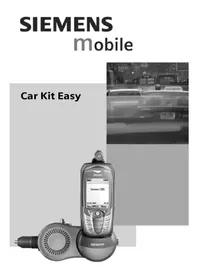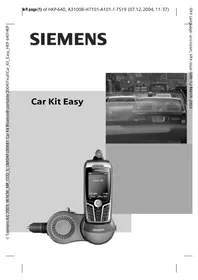
Car Kit Easy HKP640 - Built-in kit SIEMENS - Free user manual and instructions
Find the device manual for free Car Kit Easy HKP640 SIEMENS in PDF.



| Product Type | Hands-free car kit for vehicle |
| Brand | Siemens |
| Model | Car Kit Easy HKP640 |
| Power Supply | 12 V via cigarette lighter |
| Operating Voltage | 10.8 V to 16 V |
| Power Consumption | Max. 1 A, standby current max. 1 mA |
| Ambient Temperature | -20 °C to +55 °C |
| Speaker Output Power | Max. 1.3 W |
| Phone Compatibility | Siemens phones according to compatibility table on packaging |
| Main Functions | Hands-free, phone charging, automatic answer, volume adjustment, call transfer, conference |
| Mounting | On 12 V socket, adjustable orientation (350°) with locking |
| Microphone | Built-in with mounting clip and adhesive base, retractable cable |
| Safety | Follow safety instructions, do not use without support cradle, avoid obstacles |
| Care and Cleaning | Clean with a soft slightly damp cloth, no detergents |
| Accessories | Replacement support cradles available at specialized stores |
Frequently Asked Questions - Car Kit Easy HKP640 SIEMENS
User questions about Car Kit Easy HKP640 SIEMENS
0 question about this device. Answer the ones you know or ask your own.
Ask a new question about this device
Download the instructions for your Built-in kit in PDF format for free! Find your manual Car Kit Easy HKP640 - SIEMENS and take your electronic device back in hand. On this page are published all the documents necessary for the use of your device. Car Kit Easy HKP640 by SIEMENS.
USER MANUAL Car Kit Easy HKP640 SIEMENS
natural_image
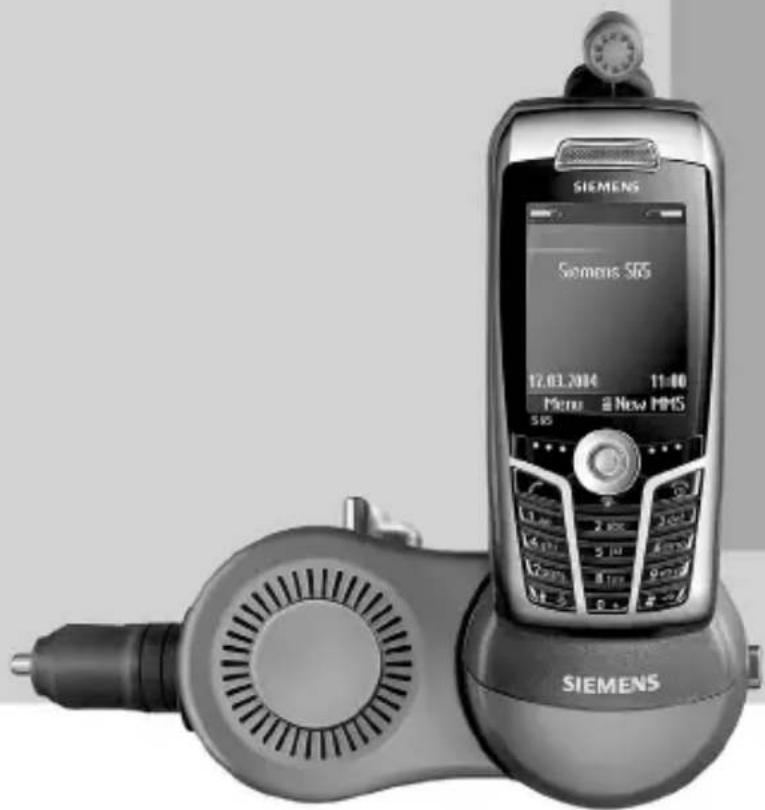
Black-and-white photo of a Siemens 565 mobile phone with a dial and external earpiece (no visible text or symbols on device body)Car Kit Easy (en) ...... 2
Car Kit Easy (de) ...... 10
Car Kit Easy (it) 18
Car Kit Easy (fr) 26
Car Kit Easy (nl) 34
Car Kit Easy (sv) 42
Car Kit Easy (es) 50
Car Kit Easy (pt) 58
Car Kit Easy (pl) 66
Car Kit Easy (ru) 74
Car Kit Easy (el) 82
Car Kit Easy (tr) 90
Customer Care 98
Car Kit Easy (en)2
Car Kit Easy (en)
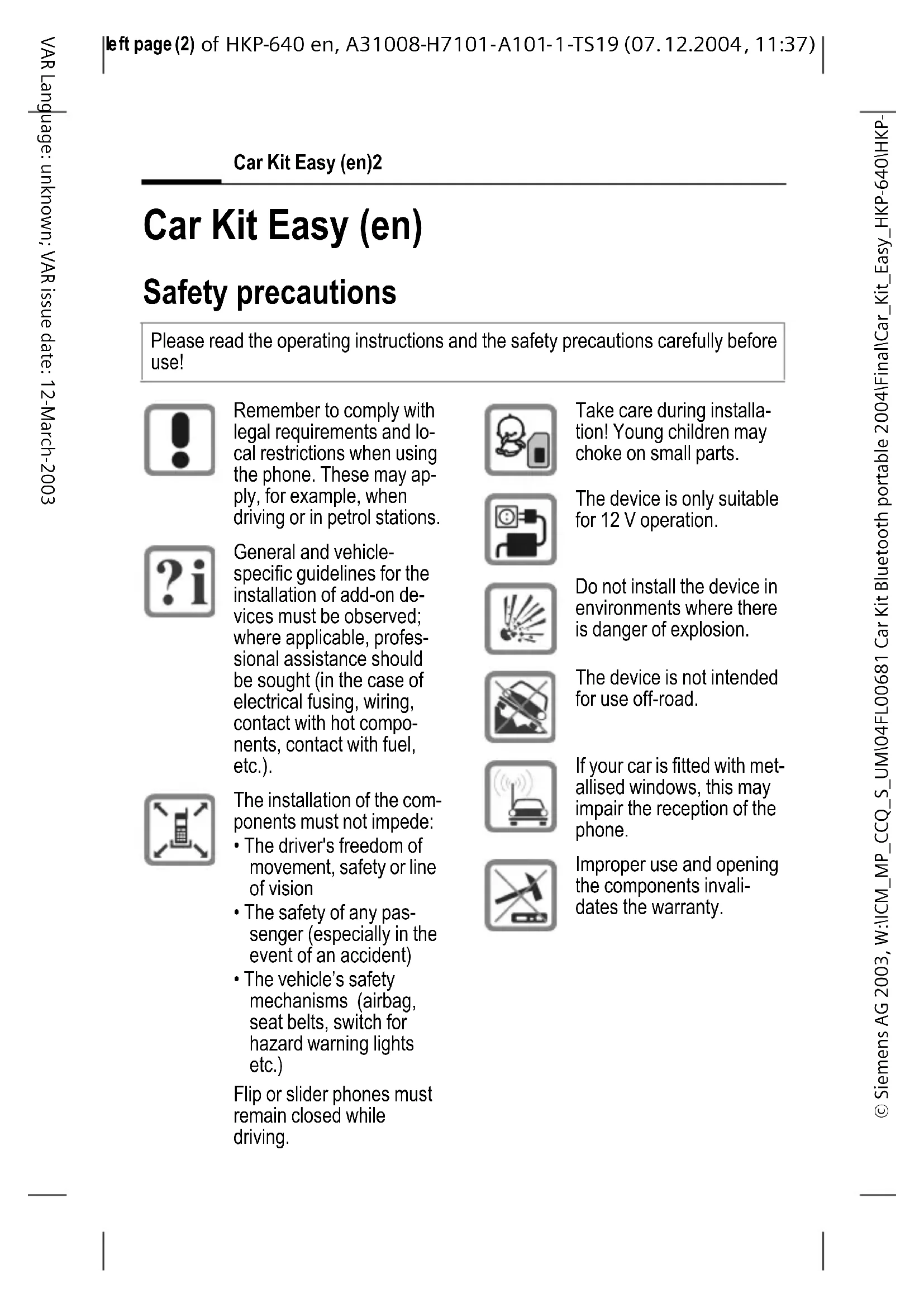
Safety precautions
Please read the operating instructions and the safety precautions carefully before use!

Remember to comply with legal requirements and local restrictions when using the phone. These may apply, for example, when driving or in petrol stations.

General and vehicle-specific guidelines for the installation of add-on devices must be observed; where applicable, professional assistance should be sought (in the case of electrical fusing, wiring, contact with hot components, contact with fuel, etc.).
The installation of the com- ponents must not impede:
• The driver's freedom of movement, safety or line of vision
• The safety of any passenger (especially in the event of an accident)
- The vehicle's safety mechanisms (airbag, seat belts, switch for hazard warning lights etc.)
Flip or slider phones must remain closed while driving.
Take care during installation! Young children may choke on small parts.
The device is only suitable for 12 V operation.

Do not install the device in environments where there is danger of explosion.

The device is not intended for use off-road.
If your car is fitted with met-allised windows, this may impair the reception of the phone.

Improper use and opening the components invalidates the warranty.
Please note:

Please dispose of unwanted telephones and accessories in accordance with the relevant legislation.
Please remove all covers from the camera and from the pin and socket contacts before placing the phone in the holder. Otherwise the leads may be damaged (e.g. connector for mobile phone holder).

Only use Siemens original accessories. In this way you will avoid possible health risks and damage to the product and ensure compliance with the relevant provisions.
For further operating instructions, please refer to the operating instructions for your mobile phone.
Please observe the compatibility table on the packaging. Only the phones listed there fit optimally in the holders. If you put other phones in the holder, the phone may not click firmly into place or you may damage the phone or the holder.
Car Kit Easy (en)4
The Car Kit Easy is referred to be-low as Car Kit.
It is suitable for use in 12 V power sockets (cigarette lighter).
The scope of supply includes the Car Kit main module with cradle as well as a microphone with adjusting clips and adhesive pad (use is optional).
The Car Kit is suitable for use with Siemens mobile phones in accordance with the compatibility table on the packaging.
It may be necessary to replace the cradle in order to use your phone with the Car Kit. To do this, check the compatibility information on the rear of the holder.
Replacing the cradle
The Car Kit can be converted for using a different Siemens phone type by replacing the cradle.
First release the microphone with the adjusting clips, if necessary, from the holder.
There is a clip on the rear of the cradle. Pull this gently (A) and then pull the cradle upwards (B).
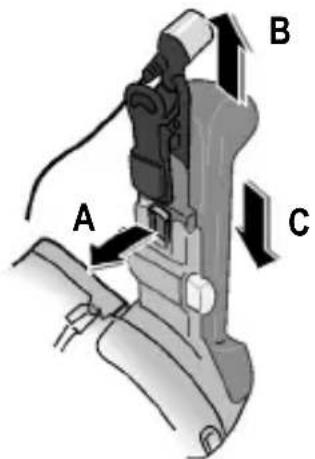
Place the new cradle on the guide mechanism and push it down until it clicks into place (C).
Place the microphone with the adjusting clips on the holder, if appropriate.
Note
Do not mount or operate the Car Kit without the cradle. This would endanger functionality and safety.
Assembly
Main module
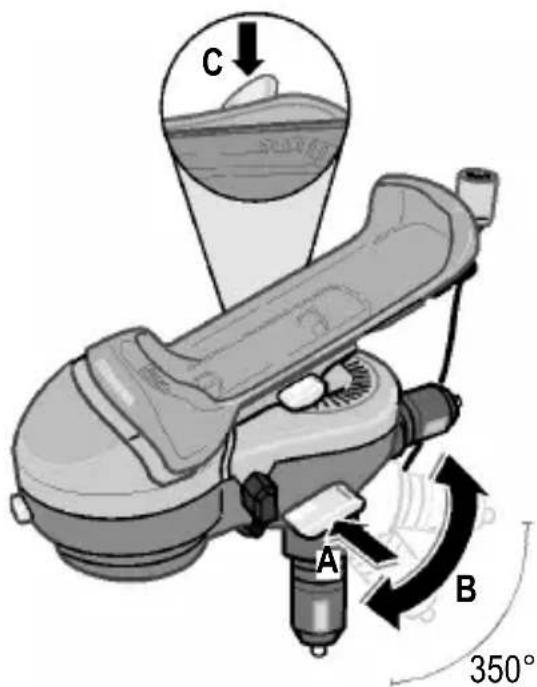
Release the locks on the main module. Press the release button () as shown in the picture, see (A).
Remove the cigarette lighter, if appropriate, and insert the connector for the Car Kit in the 12 V power socket.
Do not use any plug extensions or a plug adapter for assembly, as otherwise it cannot be guaranteed that the Car Kit will be held securely.
Twist or tilt the Car Kit into the desired position (B) (note the point of contact).
Now press the locking key in the direction indicated by the symbol ( ) (C). The main module is now secured in place.
Car Kit Easy (en)6
Cradle
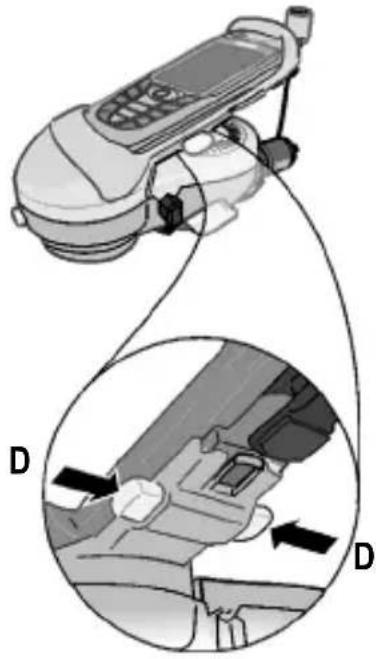
Now align the cradle. To do this, hold down the locking key (D).
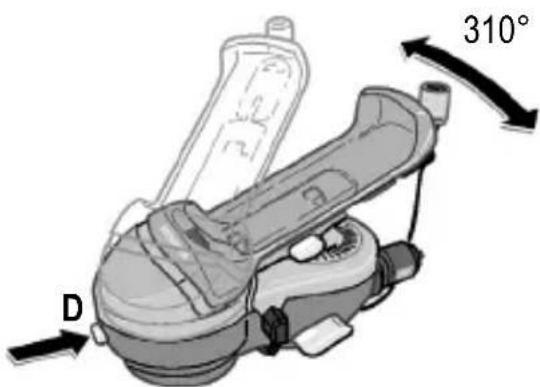
Twist the cradle into the desired position (note the point of contact). Release the locking key.
Microphone
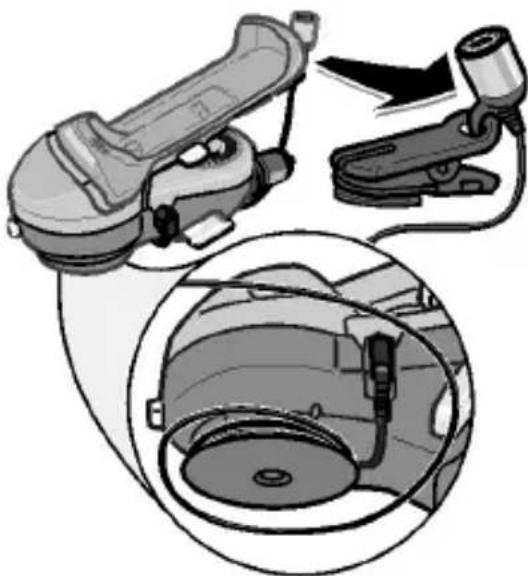
You can leave the microphone plugged into the main module.
In order to ensure optimum voice quality, you can also clip the microphone onto your lapel, for example, using the adjusting clips or attach it to the dashboard with the adhesive pad.
To do this, unroll the micro-phone cable from the integrated cable holder.
natural_image
Diagram showing a car interior with a mechanical device and a close-up of its internal components (no text or symbols present)A minimum distance of 60 cm is recommended between the microphone and loudspeaker.
Dismantling
You can dismantle the Car Kit at any time in order to use it, for example, in another vehicle.
Remove the phone (see p. 7). Release the lock on the main module. Press the release key (). Now remove the Car Kit from the12 V power socket.
Wind up the microphone cable into the cable holder if necessary.
Operating instructions
Inserting the mobile phone
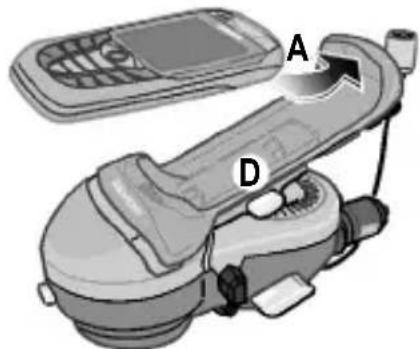
In order to ensure that the cradle is free, press the release keys (D) at the same time. Insert the phone into the upper end of the cradle (A).
natural_image
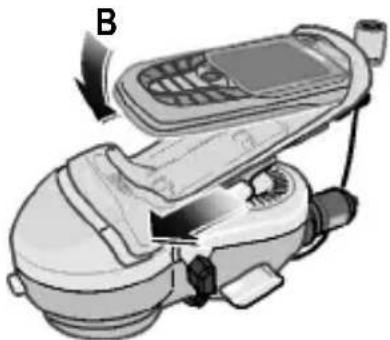
Illustration of a handheld device with labeled parts A and D, showing no text or symbols beyond labelsThen press the lower end of the phone into the cradle (B).
natural_image
Illustration of a mobile phone with a device labeled B, showing no text or symbols on the device itself.Push the cradle gently down- ward until it locks into place.
Flip or slider phones must remain closed while driving.
Removing the mobile phone
To remove the phone, press the release keys (D) on the cradle. The cradle extends upwards and releases the phone.
natural_image
Diagram of a mobile phone with attached cable and car seatbelt, showing internal components (no text or symbols)Car Kit Easy (en)8
Activating the Car Kit
When the phone is switched off: Place the phone in the holder. The phone is activated automatically when the ignition is switched on and the PIN can be entered. The phone can also be switched on manually. The Car Kit is ready for use immediately.
When the phone is switched on: Place the phone in the holder. The Car Kit is ready for use immediately and the phone is charged.
You can now make and take calls in handsfree mode.
After a call has been established in handsfree mode, a short beep is generated via the Car Kit loudspeaker.
For information on other functions such as volume control, automatic call acceptance, call rejection, connection setup, end call, toggle, conference etc. please refer to the relevant sections of the operating instructions for your phone.
Flip or slider phones in a Car Kit Easy are only intended for operation in a closed state with automatic call acceptance. Numbers must not be dialled while driving when the flip or slider phone is open ((see p. 2)). If you are using a flip phone: After you have dialled a number, you can close the phone again without the call being ended as a result.
Important settings on the phone
Your Siemens phone has several profiles. The profile Car Kit is automatically activated when the phone is placed in the Car Kit. You can adjust the profile of your phone. Please read the relevant sections of the operating instructions for your phone.
Troubleshooting
Your partner on the phone cannot hear you
- Microphone must be mounted laterally in the socket for the main module.
Automatic call acceptance does not work
- The function is not activated on the phone.
Loud background noise on called partner's terminal
- Do not install the microphone in the air flow of the sunroof, window or ventilation.
Poor voice and audio quality
- Increase the distance between the microphone and loudspeaker.
- Increase the volume of the phone.
- The distance from the microphone to the user's mouth should not exceed 80 cm.
Poor reception quality
- If your car is fitted with metallised windows, this may impair the reception of the phone.
Key lock does not work
- The key lock is automatically disabled when the phone is placed in the Car Kit.
Phone switches itself off
• See operating instructions for the phone.
Service phone numbers
• See Customer Care, p. 98.
Technical data
Power supply 10.8 V to 16 V
Current input max. 1 A / max. 1 mA (idle current)
Ambient temperature -20 °C to +55 °C
Loudspeaker max. 1.3 W output power
Maintenance
The product should be cleaned with a soft, slightly damp (not wet) cloth.
Do not use cleaning agents, colourants or other chemical substances.
Accessories
- Replacement cradles
Products are available from specialist dealers or visitour online shop at:

Siemens Original Accessories www.siemens.com/shop
In some countries repair and replace services are impossible where the products are not sold through our authorised dealers.
Car Kit Easy (de)10
Car Kit Easy (de)
Sicherheitshinweise
natural_image
Diagram showing a car interior with a handheld device and a close-up of its internal components (no text or symbols)natural_image
Diagram of a mobile phone car with labeled parts A and D, showing no text or symbols beyond labelsnatural_image
Illustration of a mobile phone with a labeled component (B), showing no text or symbols on the device itself.natural_image
Diagram of a mobile phone with attached cable and car seatbelt, showing mechanical components and directional arrows (no text or symbols)Siemens Original Accessories www.siemens.com/shop
natural_image
Mechanical assembly diagram showing a motor and cable assembly with a close-up of the internal components (no text or symbols)natural_image
Illustration of a mobile phone with labeled parts A and D, showing no text or symbols beyond labelsnatural_image
Illustration of a mobile phone with a labeled component (B), showing no text or symbols on the device itself.natural_image
Diagram of a mobile phone car interior showing seatbelt and cable connections (no text or symbols)Car Kit Easy (it)24
natural_image
Diagram showing a car engine component being connected to a hose, with an inset close-up of the engine assembly (no text or labels)natural_image
Diagram of a mobile phone car with labeled parts A and D (no text or symbols beyond labels)natural_image
Illustration of a mobile phone with a hand inserting a cable (no text or symbols visible)natural_image
Diagram of a mobile phone with attached cable, showing internal components and directional arrows (no text or symbols)Car Kit Easy (fr)32
natural_image
Technical illustration of a car engine component with exploded view and close-up detail (no text or symbols)natural_image
Diagram of a mobile phone car with labeled parts A and D, showing no text or symbols beyond labelsnatural_image
Illustration of a mobile phone with a labeled component (B), showing internal components and wiring (no text or symbols present)natural_image
Diagram of a mobile phone with attached cable and two circular insets showing internal components (no text or symbols)Car Kit Easy (nl)40
natural_image
Diagram showing a car engine component being connected to a hose, with an inset close-up of the engine interior (no text or symbols)natural_image
Illustration of a mobile phone car with labeled parts A and D (no text or symbols beyond labels)natural_image
Illustration of a mobile phone with a labeled component (B), showing no text or symbols on the device itself.natural_image
Diagram of a mobile phone with attached cable and car seatbelt, showing internal components (no text or symbols)Car Kit Easy (sv)48
Använda Car Kit
Siemens Original Accessories www.siemens.com/shop
natural_image
Diagram showing a car brake system with a valve and attached sensor, plus an inset close-up of the component (no text or labels)natural_image
Diagram of a mobile phone car with labeled parts A and D (no text or symbols beyond labels)natural_image
Illustration of a mobile phone with a labeled component (B), showing no text or symbols on the device itself.natural_image
Diagram of a mobile phone car interior showing the cable and seatbelt mechanism (no text or symbols)Car Kit Easy (es)56
natural_image
Diagram showing a car interior with a mechanical device and a close-up of its internal components (no text or symbols present)natural_image
Diagram of a mobile phone car with labeled parts A and D (no text or symbols beyond labels)natural_image
Illustration of a mobile phone with a hand operating the screen (no text or symbols visible)natural_image
Diagram of a car interior showing a handheld device connected to a seatbelt, with two circular insets highlighting the seatbelt mechanism (no text or symbols present)Car Kit Easy (pt)64
Utilizar o Car Kit
natural_image
Diagram showing a car engine component being connected to a hose, with an inset close-up of the engine assembly (no text or labels)natural_image
Illustration of a mobile phone car with labeled parts A and D (no text or symbols beyond labels)natural_image
Illustration of a mobile phone with a labeled component (B), showing no text or symbols on the device itself.natural_image
Diagram of a mobile phone with attached cable and seatbelt, showing internal components and directional arrows (no text or symbols)Car Kit Easy (pl)72
natural_image
Technical illustration of a car electrical switch and motor assembly (no text or symbols)natural_image
Diagram of a mobile phone car with labeled parts A and D (no text or symbols beyond labels)natural_image
Illustration of a mobile phone with a device labeled B, showing no text or symbols on the device itself.natural_image
Diagram of a mobile phone with attached cables and a close-up inset showing the interior seat (no text or symbols)Siemens Original Accessories
www.siemens.ru
Car Kit Easy (el)82
Car Kit Easy (el)
natural_image
Diagram showing a car electrical switch and its internal components, with no visible text or symbols.natural_image
Illustration of a mobile phone with a device labeled B, showing no text or symbols on the device itself.natural_image
Diagram of a mobile phone with attached cable and seatbelt, showing internal components and directional arrows (no text or symbols)Car Kit Easy (el)88
Χρήση του Car Kit
natural_image
Technical illustration of a car engine component with a close-up view showing internal components (no text or symbols)natural_image
Illustration of a mobile phone with labeled parts A and D (no text or symbols beyond labels)natural_image
Illustration of a mobile phone with a labeled component (B), showing no text or symbols on the device itself.natural_image
Diagram of a car interior showing a device connected to a seatbelt, with two circular insets highlighting the seatbelt mechanism (no text or symbols present)Car Kit Easy (tr)96
We offer fast, individual advice! You have several options:
Our online support on the Internet:
www.siemens.com/ mobilephonescustomercare
We can be reached any time, any place. You are given 24 hour support on all aspects of our products. Here you will find an interactive fault-finding system, a compilation of the most frequently asked questions and answers, plus user guides and current software updates to download.
You will also find the most frequently asked questions and answers in this user guide.
You can also get personal advice about our range of products on our Premium Hotline:
Austria 0900 - 30 08 08
(1,35 Euro/Minute)
Germany 0190 - 74 58 26
(1,24 Euro/Minute)
France....08 99 70 01 85
(1,35 EuroTTC/
Italy....899 842 423
Spain....807 517 203
(0,91 euro/minuto)
Sweden 0900 204 18 00
Qualified Siemens employees are waiting to offer you expert information about our products and installation.
In some countries repair and replace services are impossible where the products are not sold through our authorised dealers.
When calling customer service, please have ready your receipt and your car kit, and if available, your Siemens Service customer number.
If repair work is necessary, please contact one of our service centres:
Abu Dhabi....0 26 42 38 00
Argentina 0 80 08 88 98 78
Australia....13 00 66 53 66
Austria....05 17 07 50 04
Bahrain 40 42 34
Bangladesh....0 17 52 74 47
Belgium....0 78 15 22 21
Bolivia....0 21 21 41 14
Bosnia Herzegovina...... 0 33 27 66 49
Brazil....0 80 07 07 12 48
Brunei 02 43 08 01
Bulgaria....02 73 94 88
Cambodia 12 80 05 00
Canada 1888770211
China 0 21 38 98 47 77
Croatia....0 16 10 53 81
Czech Republic....2 33 03 27 27
Denmark 35 25 86 00
Dubai 0 43 96 64 33
Egypt....0 23 33 41 11
Estonia....6 30 47 97
Finland....09 22 94 37 00
France....01 56 38 42 00
Germany * 0 18 05 33 32 26
Greece....80 11 11 11 16
Hong Kong....28 61 11 18
99Customer Cai
| Hungary | 06 14 71 24 44 |
| Iceland | 5 11 30 00 |
| India | 22 24 98 70 00 Extn: 70 40 |
| Indonesia | 0 21 46 82 60 81 |
| Ireland | 18 50 77 72 77 |
| Italy | 02 24 36 44 00 |
| Ivory Coast | 05 02 02 59 |
| Jordan | 0 64 39 86 42 |
| Kenya | 2 72 37 17 |
| Kuwait | 2 45 41 78 |
| Latvia | 7 50 11 18 |
| Lebanon | 01 44 30 43 |
| Libya | 02 13 50 28 82 |
| Lithuania | 8 52 74 20 10 |
| Luxembourg | 43 84 33 99 |
| Macedonia | 02 13 14 84 |
| Malaysia | + 6 03 77 12 43 04 |
| Malta | + 35 32 14 94 06 32 |
| Mauritius | 2 11 62 13 |
| Mexico | 01 80 07 11 00 03 |
| Morocco | 22 66 92 09 |
| Netherlands | 0 90 03 33 31 00 |
| New Zealand | 08 00 57 43 63 |
| Nigeria | 0 14 50 05 00 |
| Norway | 22 70 84 00 |
| Oman | 79 10 12 |
| Pakistan | 02 15 66 22 00 |
| Paraguay | 8 00 10 20 04 |
| Philippines | 0 27 57 11 18 |
| Poland | 08 01 30 00 30 |
| Portugal | 8 08 20 15 21 |
| Qatar | 04 32 20 10 |
| Romania | 02 12 04 60 00 |
| Russia | 8 80 02 00 10 10 |
| Saudi Arabia | 0 22 26 00 43 |
| Serbia | 01 13 07 00 80 |
| Singapore | 62 27 11 18 |
| Slovak Republic | 02 59 68 22 66 |
| Slovenia | 0 14 74 63 36 |
| South Africa | 08 60 10 11 57 |
| Spain | 9 02 11 50 61 |
| Sweden | 0 87 50 99 11 |
| Switzerland | 08 48 21 20 00 |
| Taiwan | 02 23 96 10 06 |
| Thailand | 0 27 22 11 18 |
| Tunisia | 71 86 19 02 |
| Turkey | 0 21 65 79 71 00 |
| Ukraine | 8 80 05 01 00 00 |
| United Arab Emirates | 0 43 66 03 86 |
| United Kingdom | 0 87 05 33 44 11 |
| USA | 1 88 87 77 02 11 |
| Vietnam | 84 89 20 24 64 |
| Zimbabwe | 04 36 94 24 |
Siemens Aktiengesellschaft
All rights reserved. Subject to availability.
Right of modification reserved.