Car Kit Bluetooth Portable HKW700 - Built-in kit SIEMENS - Free user manual and instructions
Find the device manual for free Car Kit Bluetooth Portable HKW700 SIEMENS in PDF.



| Product type | Bluetooth hands-free car kit |
| Weight | Approx. 175 g |
| Power supply | 12 V DC (range 10.8 - 16 V) |
| Power consumption | Max. 1 A in operation, max. 1 mA in standby |
| Ambient temperature | -25 °C to +70 °C |
| Speaker output power | Max. 1.5 W |
| Technology | Bluetooth® with hands-free profile |
| Number of connectable phones | Up to 4 registered, simultaneous connection to 1 |
| Main functions | Hands-free calls, phonebook, voice recognition, push-to-talk, call lists, call transfer, microphone mute |
| Maintenance | Clean with a soft, slightly damp cloth |
| Safety | Safety instructions included; prohibited use in explosive areas; comply with local laws |
| Included accessories | Detachable external microphone, adhesive mount, power cable |
| Certification | CE, FCC, compliance with European directives |
Frequently Asked Questions - Car Kit Bluetooth Portable HKW700 SIEMENS
User questions about Car Kit Bluetooth Portable HKW700 SIEMENS
0 question about this device. Answer the ones you know or ask your own.
Ask a new question about this device
Download the instructions for your Built-in kit in PDF format for free! Find your manual Car Kit Bluetooth Portable HKW700 - SIEMENS and take your electronic device back in hand. On this page are published all the documents necessary for the use of your device. Car Kit Bluetooth Portable HKW700 by SIEMENS.
USER MANUAL Car Kit Bluetooth Portable HKW700 SIEMENS
RenQ Mable GnH & Co. OHG
Flaxleraputz
8167M
Germany
IOH
TaeKcMefxgX&
Xenaynau
Xinxi Moore
Republton
2008年1月16日
All rights reserved. Subject to availability.
Right of multifiscation reserved.
European Directive 2002/96/EC 91
Fadered Commuunation Commutine (m) 06
Ferderal Comwnicnian Commission (cn) 98
FCC (Federal Communication Commission) (fr)
68 Fold out to see exploded diagram
Pn
SACCAOKEPPER
Apre pervedere Tespolo
Ouyirnouraftierlaus
G00100010001000
Abn nane vnr o gralica desarrolado
Favocdesdooraqaraerayesadaetalbada
图2
Rus PaesepHMeTepnOcMOTpeNarPamMI
Bogszabz
Openkappen an de geodetal teernde tekening te beiksen
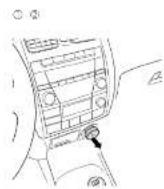
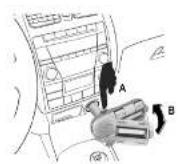
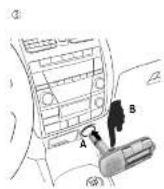
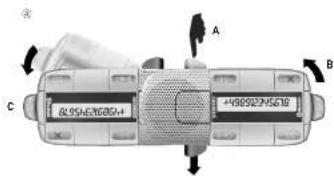
Before using Bluetooth® accessories or mobile phones inside a vehicle, check the vehicle user guide for any limitations on the use of these products.
For additional information please consult your mobile phone's user guide.
Compatibility
The following mobile phones can be used with the handsfree Car Kit Bluetooth® Portable:
- BenQ/Siemens mobile phones with Bluetooth interface. Certain devices may have limited functions.
- Mobile phones by other manufacturers that are also equipped with a handsfree profile Bluetooth interface. Certain devices may have limited functions.
Performance
The handsfree Car Kit Bluetooth® Portable will from hereon be referred to as "Car Kit". It is intended for use with a 12 V socket (cigarette lighter).
Bluetooth® technology
The Bluetooth® word mark and logos are owned by the Bluetooth® SIG, Inc. and any use of such marks by BenQ Corp. is under license.
Other trademarks and trade names are those of their respective owners.
The Car Kit and phone communicate using Bluetooth, a short-range radio connection.
To enable this communication, the Car Kit must be connected to the phone. For more information please read "Connecting to the phone for the first time (Pairing)", p. 2.
Fitting/Dismantling
Do not use plug extension cables or plug adaptors when assembling the device as these prevent the Car Kit from being installed securely.
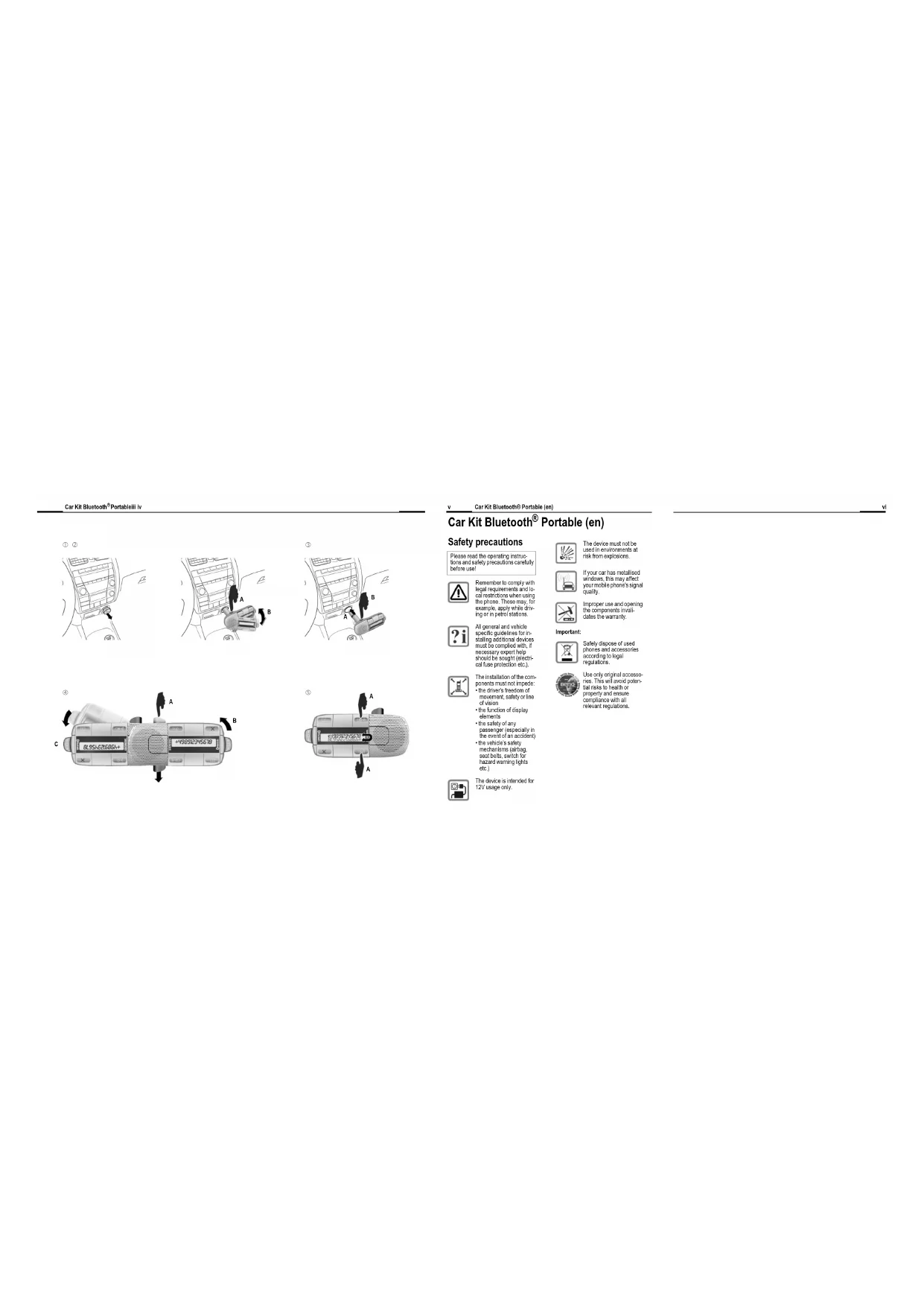
To install the device follow steps ① to ③ from the diagrams on the cover pages. Dismantle the device using the same steps in reverse.
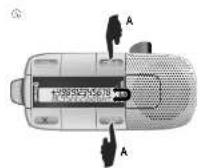
The Car Kit can be adjusted so that it can be operated by the driver or the front-seat passenger.
To do this, twist the Car Kit (see step 4 on the cover pages). Then twist the display, whilst simultaneously pressing buttons and (see step 5 on the cover pages).
Fitting the microphone
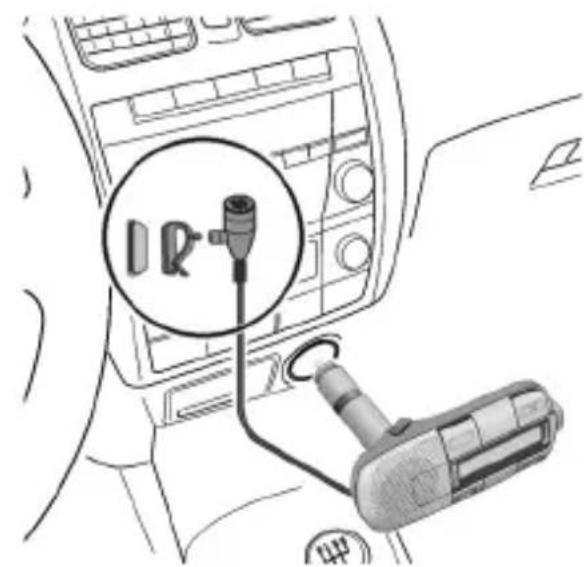
In order to ensure optimum voice quality, you can also clip the microphone onto your lapel, for example, using the adjusting clips or attach it to the dashboard with the adhesive pad. Clean the area first where you want to attach the external microphone using a suitable fat dissolving cleaning agent. The adhesive pad will only adhere permanently to a grease-free surface.
Secure the external microphone in the direction of the speaker at the required location using the adhesive velcro pads.
Keys and symbols
You can access your Car Kit's user interface using the navigation button and the four function keys.
Navigation (p. 2)
On/Off/End

Phonebook (p. 4)
(if supported by the phone)
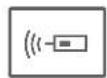
Push to talk Key (p. 6)
(ptt key, activation key)
(if supported by the phone)
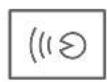
Voice recognition (p. 6) (if supported by the phone)
See below for the symbols used to illustrate the navigation button's actions:

louder/up

quieter/down

Pressing the navigation button confirms the selection.
When a button requires a long press, the user interface will display "press and hold".
In all other cases a short press of the button will suffice.
Getting started
Connecting to the phone for the first time (Pairing)
For details on how to set up a Bluetooth connection, please consult your phone's user guide.
To switch off the Car Kit, press and hold ×
- Activate the Car Kit's registration mode by pressing and holding.
- Activate your phone's Bluetooth interface and start searching for Bluetooth activated devices within the range of your phone.
- When the Car Kit is located, the phone will request you to confirm the connection by entering a PIN. The PIN is shown on the Car Kit display.
- After the PIN has been entered, the telephone ID is shown on the Car Kit display which subsequently switches to standby mode. With phones from other manufacturers it may be necessary to make a confirmation on the phone for the Car Kit to be able to switch to standby mode.
The Car Kit is now ready for use. The Car Kit and the phone can communicate with one another and recognise each other in future.
Using several phones
The Car Kit can save the connection details of up to 4 phones, each of which can be selected for use.
When a fifth phone is connected, the entry details of the phone that has not been connected for the longest period of time are automatically deleted.
Switching on the Car Kit
- Switch on the Car Kit by starting your car and/or by pressing and holding × .
- The Car Kit displays all known phones in a list. You have around 5 seconds to select your phone. After this time has elapsed, the phone that appears first in the list is automatically selected and connected.
Should the selected phone not be available the Car Kit will discontinue the search after around 3 minutes.
Using the Car Kit with a different phone
To switch off the Car Kit press and hold ×
- To switch on the Car Kit press and hold × . The Car Kit displays all known phones in a list for around 5 seconds.
- Select the desired phone:
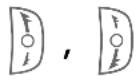
Select an entry.
The displayed phone is connected.
Switching off the Car Kit
If no phone is connected for an hour, the Car Kit then automatically switches off.
Factory setting

Press and hold in pairing mode (see p. 2): deletes all Car Kit entries.
Functions
Standby mode
In standby mode the Car Kit has the following functions:

Press and hold: the Car Kit is switched off.

Opens the call lists.


Displays the software version.

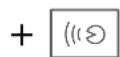
Turns the display text 180^
You may also use the function keys (p. 2).
Accepting/rejecting a call, ending a call

Accept a call.

Reject a call.

End a call.
Making calls to phonebook entries
(if supported by the phone)
When the Car Kit is switched on, addressbook entries are uploaded to the Car Kit. This procedure may take several minutes.

Call up phonebook (in standby mode).
Select letters.

Confirm letters.

Select entry.

Confirm entry.
Several numbers can be saved in one phonebook entry.
Select a number.

Start the call.
Additional phonebook functions

Moves up one entry.

Press and hold: moves up 10 entries.

Moves down one entry.

Press and hold: moves down 10 entries.

Press and hold: standby mode.
Press briefly: back.
Making a call to a call list entry
(if supported by the phone)

There are 3 call lists to choose from:
Dialled numbers
Missed calls
Accepted calls
A call list is only shown when it has at least 1 entry.
Select a call list.

Activate call list.

Select entry.

Start the call.
During calls

Louder.

Quieter.

Hold call.

End call.
Second call

End current call.

Hold current call and accept call waiting or swap between 2 calls.

Press and hold: end all calls.
Transferring a call
You can transfer a call between a phone and the Car Kit.
Press: transfer active call from the Car Kit to the phone.
For additional information please consult your mobile phone's user guide.
Microphone muting setting

Press and hold: switches the microphone to inactive/active.
Push to talk Key (ptt key, activation key)
(if supported by the phone)
Press the push to talk session on the phone.

Press: to request/reject speaking rights.

Confirm incoming ptt session.
For additional information please consult your mobile phone's user guide.
Voice recognition
(if supported by the phone)

Call up voice recognition (in standby mode).
Adjust volume.
For additional information please consult your mobile phone's user guide.
Display symbols
| Signal strength of the phone (is shown in standby mode) | |
| Charge level of the phone (is shown in standby mode) | |
| Login mode (Pairing) | |
| Phone is being connected | |
| Phone is connect | |
| No phone connection | |
| GSM service is available | |
| GSM service is not available | |
| Dialled numbers/ Outgoing call | |
| Missed calls/Engaged | |
| Accepted calls/ Incoming call | |
| Current call | |
| Current call/call waiting | |
| Held call | |
| Swapping between two calls | |
| Interface error | |
| Selection from a list | |
| Private number | |
| Office number | |
| Mobile number, private |
| d | Mobile number, office |
| d+Y | ptt incoming |
| Y···d | ptt outgoing |
| d···d | ptt standby mode |
| Volume | |
| ×D/√D | Microphone muting active/inactive |
| *< < d Transfer call to Car Kit | |
| *< < d Transfer call to phone | |
| × | Action not possible |
| !+! | Reset to factory settings |
| E3 | Loading the phonebook active |
| Voice control active | |
Troubleshooting
Loud background noise on called partner's terminal
- Do not install the microphone in the air flow of the sunroof, window or ventilation.
Poor talk and audio quality
- Increase Car Kit volume.
- A minimum distance of 60~cm is recommended between the microphone and the loudspeaker.
- The distance between the microphone and the user's mouth should not exceed 80~cm .
Phone cannot be located/Bluetooth connection problems
- Connecting to the phone for the first time, see p. 2.
- Since the last time the phone was used with the Car Kit, at least 4 more phones have been registered. Re-register the phone.
Addressbook is not being updated
- Make sure the phone is in standby mode and the key lock is not activated. Reconnect the phone to the Car Kit, see p. 3.
Service contact numbers
See Customer Care, p. 89.
Technical data and approval
| Power supply 10.8 V to 16 V | |
| Current input max. 1 A / max. 1 mA (quiescent current) | |
| Ambient temperature | -25 °C to +70 °C |
| Loudspeaker output power | max. 1.5 W |
| Weight approx. 175 g | |
The Car Kit complies with the following EU directives:
89/336/EEC "Electromagnetic Compatibility"
92/59/EEC "General Product Safety Directive"

10R-020230E
Model approved in accordance with directive
72/245/EEC, last altered by directive 95/54/EU "Electromagnetic Compatibility in Automobiles".
Declaration of conformity
CE
BenQ Mobile hereby confirms that the mobile phone described in this user guide is in compliance with all essential requirements and other relevant provisions of Directive 1999/5/EC (R&TTE). The declaration of conformity (DoC) concerned has been signed. Please call the company hotline if you require a copy of the original or visit: www.BenQMobile.com/conformity
FCC
see p. 96
Care
The product should be cleaned with a soft cloth that is damp but not wet. An adhevise residue may remain after removing the adhesive pads. Only use cleaning agents which are recommended by the car manufacturer. Do not use colorants or other chemical substances.
Accessories
Products may be obtained in specialist shops or visit our online shop at:

Original Accessories www.BenQMobile.com/ shop
Customer Care
see p. 89
Car Kit Bluetooth® Portable (de)
Sicherheitshinweise
www.BenQMobile.com/conformity
FCC
Original Accessories www.BenQMobile.com/ shop
Kundenservice (Customer Care)
siehe S. 89
Car Kit Bluetooth® Portable (it)
www.BenQMobile.com/conformity
FCC
Original Accessories
www.BenQMobile.com/ shop
Touche push to talk HKO-520
Commande vocale active
Service clients (Customer Care)
voir p. 89
France. 0899700185 (1,35 EuroTTC/ Appeluis 0,34EuroTTC/Minute)
Tecla push to talk (p. 46)
Finalizar lacomings.
Original Accessories www.BenQMobile.com/ shop
Apart from the above, there are several other ways to remove the impurities. For example, using a vacuum oven can remove the impurities in a small amount of time. It is also possible to use a vacuum oven to remove the impurities by using a vacuum oven with a vacuum oven that has been calibrated for the removal of impurities.
YCTPOIcTBO He DoJIxHO
NCIOJIb3OBAtbcRA B MecTaX C
IOBbIWeHHo B3PbIBOONaCHOCTbIO.
Ecni nABTOMO6nIb OCHaueH MetaJIIN3NPOBaHHbIMN CTeKNaMn, BO3MOxHO yXuDHeHne pInema CnHaJa TeNefoHOM.
B cnyuae Heonyctmoro nCnoJb3ObaHn nn pa36Opkn aHHynpyetc rapaHTn.
06paTnte BnImaHne:
YTNIN3aunr TeNefoHOB n akceccyapOB DoJXHa BbIIOJIHrTbcB COOTBETCTBnC DeIcTBUOM 3aKoHOdaTeNbCTBOM.

IcnoJb3yIte TOnbKO opnHaJIbHbIe akceccyapbl. PpN CO6JIIOJeHN 3TOrO Tpe6OBaHN Bbl CMOKeTe N36EkaTb BO3MOxHOr OpiuHHeHry uIep6a 3DOpOBbIO mATEpnaJIbHOrO yIep6a, a TaKke oBeCneuHTb BblONHeHne DeIcTByUoXn PpeDnscAHNI.
Пронзve endo BenQ Mobile GmbH & Co. OHG.
Юд ТоварнбIM 3нakOM Siemens AG,
пердаHHbIM NO ЛицензИ.
Ipeed nCnoJb3OBAHnem akceccyapa Bluetooth® nIN Mo6nJIbHbIX TeJefoHOB B aBTOMo6nIe npOBepbTe,OnyUCKaETcR nIN BpyKOBOdCTBe NO 3KcNlYaTaunn BaUeO aBTOMo6nIg NcNoJIb3OBAHne TaKInx yCTPOiCTB.
OTKpbITHe cNnCKa Bbl3OBB.
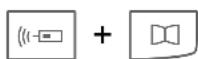
OTo6paXeHne BercnnpoRpaMMHoro oBeCneHn.
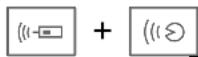
- Na6paHHbIe HOMepa;
- npOnyUeHHbIe Bbl3OBbl;
- PpHRAe Bbl3OBbl.
CnNCKn BbIBOJrTcra TOnbKO B TOM Cnyuae, ECNI B HnxEcTb, NO KpaHHe Mpe, OHa 3aPiNCb.
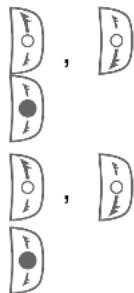
Bb6op cncka.
AKTINBaCnCnCKa.
Bb6op 3aIncn.
Ha6op Homepa.
Bo Bpempa3roBopa

Громчe.
Tnwe.

YdepjkaHne Bbl3Oba.

3aBepseHne coeHHHeHna.
BtopoB Bbl0B

3aBepseHne TekyuIero COeINHeHn.

IpebeoTekyuero CoeHHeHna ydepkaHne npnem BTOPOrO BbI3OBA nI INepeKJIouyeHne MeJdY DByMa COeHHeHnA M.

YdepxBaIte HaxaToi: 3aBepWeHne Bcex COeHNHeHn.
IpeeknueHne coeHHHeHna
BbIMoJKeTe nepeKJIouHTb TeKyUeecOeDInHeHne Ha pa3roBOp uepe3aBTOKOMnJIeKT.
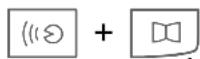
Haxmnte: nepeKJIoueHne Tekyuero CoeINHeHnHa aBTOKOMJIeKT/Ha TeJeFOH.
IOnoHnTeJbHyIO HOpMauHO BbI HaJeTe B INcTpyKuIN NO 3KcNpyaTuIN BaWeRo MoBnBHorO TeJefoHa.
OTKJIIOUeHne MmKpOΦoHa

YdepxBaTe HaxaToH BbIKIOUeHHe/BKIOUeHHe MKNPOOHa.
KnaBnsa push to talk (KnaBnsa ptt, KnaBnsa aKTNbauu)
(ecnnnoepxNbaetcTeJefoHOM)
Hauchnite ceaHc push to talk ("Haxmni roBOpu") Ha TeJefoHe.

HaKaTb:
noTpe6oBaTb/NoDTBepdntb pa3roBopa.

POnBepnTb BXOJaun ceaHc ptt.
Дальneviche yka3aHnЯ npeДCTaBHeHbIB INHCTpyKcUN NO 3KcNPyataCn BaUeRo MO6nIbHOrO TeleΦoHa.
Tolocobie KomaHdbI
(ecnnyHKnna POndepKnBaetc TenefoHOM)

BbI3OB rOJOCOBbIX KOMaHd (BpeXIMe rOTOBHOCTN).
PeynpobKa rpoMkoCTn.
Tepeonha Knra He 6HOBJeTc
CootBcTbne cTaHdapTaM
CE (CoOTBeTCTBnE cTaHdApTaM)
Hactoamm qnpma BenQ Mobile 3aBnE, yTO OINcaHHbI B 3TOI INCTpyKuIM NO 3KcNpyatauIM MOhNbHbI TeJeFOH COOTBeTCTByeT BCEM OCHOBOJOnaHaOUsM Tpe6OBaHnA M INoJoxHeNMa DInpeKTnBbl 1999/5/EC (R&TTE). POnPiSCaH COOTBeTCTByUoN CeptnqkAT COOTBeTCTBna (DoC).
FCC
Даанhoe yctpoiCTBO COOTBeTCTByeT чacter 15 HopMaTIN BO FCC. YcNoBnЯ Дя ЗКСПЛУАТAUИ NДaHHOу yctpoiCTBa: (1) yctpoiCTBO He co3ДаeT OnaCHbIX NOMex и (2) He NOdВeprAeTcR Bo3ДeJCTBnIO nomex, Дже ecпи 3TN NOMEXN MOryt нMeТь НжелаTeJIbHbIe əффeKТbl.
PnOcUeCTBHeHn N3MeHeHn B yCTPOICTBe, KOTOpbIe He 6bln ODo6peHbI CTOpHOH, OTBeuaHOSei 3a TexHnueCKOE COCTOARHe, POJIb3OBaTeJIb MOKeT JINuHTbcr IpaB Ha 3KcNpyaTuIO yCTPOICTBOM.
yxo
ABTOKOMnIeK T CJeIyEt npOTnpaTb BJaXHOH (HO He MOKPO)TKaHbIO.
Iocne ydaJIeHnIINyUKN MoKeT OCTaTbCk KNeJUeBWeUeCTBO. IcNoJIb3yIte TOnbKO UInCTaUne CpeIcTBA, peKOMeHDoBaHHbIe N3rOToBnTeJIem aBTOMo6nJIa.
He nCnoIb3yIe KpaIteIu IIN dpyrne XIMnueckne BeIecTba.
Akeccyapbl
BbIMoKeTe npNo6peCTn akceccyapbl B CneuAn3NpOBaHHbIX MaRa3HnX NJI 3aKa3aTb INxYepe3 INHTepHeT.

OpiuHaJIbHbIe akceccyapbl www.siemens.ru

ME69
CepBnchaj cIy6a
CM. ctp. 89
www.BenQMobile.com/conformity
FCC
Om deze communicates maybe the next step in establishing a relationship between parents and children. The first step is to establish a relationship between parents and children, which is a crucial step in establishing a relationship between parents and children.
Montage/demontage
www.BenQMobile.com/conformity
FCC
Klantenservice (Customer Care)
zie pag. 89
Customer Care
We offer fast, individual advice! You have several options:
Our online support on the Internet:
www.BenQMobile.com/ customercare
We can be reached any time, any place. You are given 24 hour support on all aspects of our products. Here you will find an interactive fault-finding system, a compilation of the most frequently asked questions and answers, plus user guides and current software updates to download.
You will also find the most frequently asked questions and answers in this user guide.
You can also get personal advice about our range of products on our Premium Hotline:
Austria .09 00 30 08 08
(1,35 Euro/Minute)
Germany 09001745826
(1,24 Euro/Minute)
France. 08 99 70 01 85
(1,35 EuroTTC/
Appeluis 0,34 EuroTTC/Minute)
Italy. 899 842 423
Qualified employees are waiting to offer you expert information about our products and installation.
In some countries repair and replace services are impossible where the products are not sold through our authorised dealers.
When calling customer service, please have ready your receipt and your car kit, and if available, your Service customer number.
If repair work is necessary, please contact one of our service centres:
Abu Dhabi 026423800
Argentina 08102226624
Australia. 1300665366
Austria. 05 17 07 50 04
Bahrain 40 42 34
Bangladesh. 017527447
Belgium. 078152221
Bolivia .021214114
Bosnia Herzegovina. 033276649
Brazil. 08007071248
Brunei 02430801
Bulgaria. 02739488
Cambodia 12800500
Canada 18887770211
Chile. 800530662
China 40 08 88 56 56
Colombia. 01 80 07 00 66 24
Croatia 016 105381
Czech Republic. 233032727
Denmark 35 25 65 29
Dubai 043966433
Ecuador 1800101000
Egypt. 02334111
Estonia. 6304797
Finland. 0922943700
France. 0156384200
Germany. 01805333226
Greece. 80 11 11 11 16
Hong Kong. 28 61 11 18
Hungary 06 14 71 24 44
Iceland 520300
India. 22 24 98 70 00 Extn: 70 40
Indonesia 02146826081
Ireland. 1850777277
Italy 02 24 36 44 00
Ivory Coast. 05 02 02 59
Jordan. 064398642
Kenya. 2723717
Kuwait. 2454178
Latvia 7501118
Lebanon. 01 44 30 43
Libya 02 13 50 28 82
Lithuania 870070700
Luxembourg. 43 84 33 99
Macedonia 023131848
Malaysia. +60377124304
Malta. +35 32 14 94 06 32
Mauritius 2116213
Mexico 018007110003
Morocco. 22669209
Netherlands 0 90 03 33 31 00
New Zealand. 08 00 27 43 63
Nigeria 014500500
Norway. 22708400
Oman. 79 10 12
Pakistan. 02 15 66 22 00
Paraguay 800102004
Peru 080052400
Philippines 027571118
Poland. 08 01 30 00 30
Portugal 808201521
Qatar. 04322010
Romania 02 12 09 99 66
Russia. 88002001010
Saudi Arabia 022260043
Serbia .01 13 07 00 80
Singapore 62 27 11 18
Slovak Republic .02 59 68 22 66
Slovenia. 0 14 74 63 36
South Africa .0860101157
Spain. 902115061
Sweden. 087509911
Switzerland .0848212000
Taiwan .02 23 96 10 06
Thailand. 027221118
Tunisia 71861902
Turkey. 02164599898
Ukraine 88005010000
United Arab Emirates. 043660386
United Kingdom 08705334411
USA 18887770211
Venezuela. 08001005666
Vietnam. 84 89 20 24 64
Zimbabwe. 04369424
European Directive 2002/96/EC
All electrical and electronic products should be disposed of separately from the municipal waste stream via designated collection facilities appointed by the government or the local authorities.
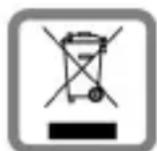
This crossed-out wheeled bin symbol on the product means the product is covered by the European Directive 2002/96/EC.
The correct disposal and separate collection of your old appliance will help prevent potential negative consequences for the environment and human health. It is a precondition for reuse and recycling of used electrical and electronic equipment.
For more detailed information about disposal of your old appliance, please contact your city office, waste disposal service or the shop where you purchased the product.
Italiana
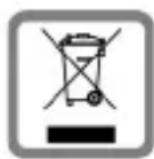
All electrical and electronic products should be disposed of separately from the municipal waste stream via designated collection facilities appointed by the government or the local authorities.
This crossed-out wheeled bin symbol on the product means the product is covered by the European Directive 2002/96/EC.
The correct disposal and separate collection of your old appliance will help prevent potential negative consequences for the environment and human health. It is a precondition for reuse and recycling of used electrical and electronic equipment.
For more detailed information about disposal of your old appliance, please contact your city office, waste disposal service or the shop where you purchased the product.
Federal Communication Commission
This device complies with Part 15 of the FCC Rules. Operation is subject to the following two conditions: (1) This device may not cause harmful interference, and (2) this device must accept any interference received, including interference that may cause undesired operation.
This equipment has been tested and found to comply with the limits for a Class B digital device, pursuant to Part 15 of the FCC Rules. These limits are designed to provide reasonable protection against harmful interference in a residential installation. This equipment generates, uses and can radiate radio frequency energy and, if not installed and used in accordance with the instructions, may cause harmful interference to radio communications. However, there is no guarantee that interference will not occur in a particular installation. If this equipment does cause harmful interference to radio or television reception, which can be determined by turning the equipment off and on, the user is encouraged to try to correct the interference by one of the following measures:
- Reorient or relocate the receiving antenna.
- Increase the separation between the equipment and receiver.
- Connect the equipment into an outlet on a circuit different from that to which the receiver is connected.
- Consult the dealer or an experienced radio/TV technician for help.
Any changes or modifications not expressly approved by the party responsible for compliance could void the user's authority to operate this equipment.
FCC Radiation Exposure Statement:
This equipment complies with FCC radiation exposure limits set forth for an uncontrolled environment. This equipment should be installed and operated with minimum distance 20cm between the radiator & your body.
This transmitter must not be co-located or operating in conjunction with any other antenna or transmitter.
IC Statement:
"The installer of this radio equipment must ensure that the antenna is located or pointed such that it does not emit RF field in excess of Health Canada limits for the general population; consult Safety Code 6, obtainable from Health Canada's website www.hc-sc.gc.ca/rpb"
CE Statement:
Hereby, the manufacture declares that this device is in compliance with the essential requirements and other relevant provisions of the R&TTE Directive 1999/5/EC.
This device will be sold in the following EEA countries: Austria, Italy, Belgium, Liechtenstein, Denmark, Luxembourg, Finland, Netherlands, France, Norway, Germany, Portugal, Greece, Spain, Iceland, Sweden, Ireland, United Kingdom, Cyprus, Czech Republic, Estonia, Hungary, Latvia, Lithuania, Malta, Slovakia, Poland, Slovenia.